It never seems like smartphones have enough storage. Even as we see Apple finally admit that 128GB isn’t enough — the iPhone 17 and iPhone 17 Pro now start at 256GB — that space still somehow magically gets eaten up by high-resolution photos and mobile games. We’ve previously covered all sorts of ways to get more storage on an iPhone or to use your Android’s microSD card to pick up the slack, but the best way to reclaim space is to do a bit of spring cleaning. Apps on your phone tend to get gummed up as time goes by, hoarding data and often failing to declutter automatically.
You can see which apps are the culprits easily on both Android and iOS. On Android, head to Settings > Storage > Apps; on iOS, go to Settings > General > iPhone Storage. Both list apps by size, so you know right away which ones are the worst offenders. Android lets you go to town clearing out storage and cache, and the iPhone lets you offload apps, but hold your horses. Here’s a list of apps that tend to hog storage and how to trim them down without doing anything too drastic. We’ll look at apps on both Android and iPhone.
Advertisement
Messaging apps
Jordan Wirth/SlashGear
Your preferred messaging app (or apps) is where you exchange gigabytes of messages, photos, videos, and files with family and friends over the years. Anecdotally, I’ve sometimes seen these apps cling onto several dozen gigabytes of data alone. Google Messages, iMessage, WhatsApp, Telegram, Messenger, it doesn’t matter which one you use, head into its in-app settings and start clearing house.
We’ll use WhatsApp as our primary example. In the app settings, go to Storage and data > Manage storage. Here, you’ll see how much each chat is taking. Open the biggest chats on the list one by one and delete the largest videos, photos, and files within — at least the ones you don’t mind parting with. You might want to back up your chat history in Settings > Chats > Chat Backup beforehand to ensure anything important isn’t lost. Unfortunately, the only way to have WhatsApp automatically clear up storage is by enabling disappearing messages, which permanently deletes old chats after a certain period.
Some apps will make this process easier than others. Telegram, for example, lets you set a hard local storage ceiling and automatically removes any local storage of chats after a certain date. The app will never go beyond that storage ceiling, and you won’t lose your messages either. Go to Settings > Data and Storage > Storage Usage, and then choose how long before each chat type (especially private and group chats) is automatically removed. We’d recommend setting the maximum cache size to a lower threshold, like 5GB. Note that some apps — like iMessage — have their storage-clearing options in your phone’s settings, not in-app. If your preferred messaging app hasn’t been mentioned here, check its in-app settings and you’ll likely find some means of clearing out storage.
Advertisement
Streaming service apps
Jordan Wirth/SlashGear
You’ve probably got one or two of the best streaming service platforms on your phone. Depending on the one you use — Netflix, HBO Max, Apple TV — a good chunk of your storage could be quietly taken up there. Any time you save movies or TV shows for offline viewing, unwatched downloads generally remain unless manually removed.
Let’s look at Netflix. The app’s offline downloads expire, though they remain on your phone rather than being automatically deleted. You have to manually go in and delete them one by one. It’s the same situation with other streaming services, like HBO Max and Hulu. Anecdotally, these downloads pile up fast if you don’t keep an eye on them; if you’re the sort of person who frequently downloads something with the intention of watching it later, then you might have gigabytes of unwatched media. Note: On iPhone, you can delete these directly from Settings with the “Review Downloaded Videos” option in iPhone Storage.
Advertisement
If you’re really tight on storage, we’d recommend disabling any automatic downloads. For example, Netflix has its “Smart Downloads” feature, which downloads content it thinks you might like for offline watching. Also take advantage of apps that let you choose the download quality going forward. HBO Max allows for selecting a trim “Good” video option that — while it looks like DVD quality — can be a fraction of “Better” or “Best,” which might consume 2GB for a single movie or episode.
Advertisement
Map apps
Jordan Wirth/SlashGear
Map apps do a lot more than just provide directions these days. Apple Maps, for example, can be invaluable for daily commuters who need to make sure they’re taking the right train, especially when paired with offline maps. These are a boon on vacations, when you might be in a foreign city with limited or no internet access and need to navigate a confusing transit system. But you guessed it, offline maps eat up storage like no one’s business; the city I live in takes up half a gigabyte on its own.
Similar to streaming apps, offline maps don’t usually automatically delete themselves. In Google Maps, for example, an offline map that you download will last a year before expiring, and Google does not have an option to automatically delete unused offline maps. So if you took a vacation six months ago and downloaded the offline map for that area, the download is still sitting there, wasting your space. If the map app you use does have the option to automatically delete them, enable it; Apple Maps has an “Optimize Storage” option in iPhone Storage.
Advertisement
Photos apps
Jordan Wirth/SlashGear
The default photos app where you keep your pics and videos will likely be the biggest offender on this list. Luckily, cloud storage options these days are cheap. Provided you have a reliable internet connection, offloading your entire photo library to the cloud comes with minimal downsides.
On iPhone, simply go to Settings > iCloud > Photos, and make sure the “Optimize iPhone Storage” option is enabled. From that moment on, your iPhone only keeps small, storage-efficient copies and downloads the full-resolution ones on demand. In Google Photos, find the “Free up space on this device” option under your account profile photo. Deleted photos and videos will remain in the cloud. You can downgrade your media to “Storage saver” quality, which is helpful if you still want to keep those photos on-device, or you’re limited to Google’s free 15GB of storage.
Besides the obvious stuff like deleting large video files, another option available to you is to merge duplicates. On iPhone, simply go to Utilities > Duplicates in the Photos app and merge them one by one, or select all to merge them all; you won’t see this option if you don’t have any. If you have duplicates in Google Photos, you will need to manually review them with Google Photos’ stacking feature.
Advertisement
Cloud storage
Jordan Wirth/SlashGear
You know the drill by now. Your cloud storage app of preference — Google Drive, iCloud, OneDrive, etc. — may be storing files offline that you forgot about. If you’ve been working with large files (or a lot of files) on your smartphone, double-check that they are not still lingering in storage.
In Google Drive, you can hit “Make available offline” next to any file, and it will appear in Menu > Offline. This includes Google Workspace documents, like Google Docs, making this a one-stop shop to delete offline files from multiple apps. OneDrive does things similarly. Files can be stored on your device with the “Keep Offline” option and found later in the “Files Available Offline” section of your profile.
The iPhone has a similar feature with iCloud, where choosing “Keep Downloaded” in the context menu for a file leaves it stored on your device. Unfortunately, there doesn’t appear to be a single, easy place to find these offline files; in iPhone Storage settings, you’ll only see how much data is being kept offline, but not file names or folders. Also, it appears that, in order to remove a file you’ve selected “Keep Downloaded” for, you need to go back to that specific file itself and uncheck “Keep Downloaded” to remove it locally. Luckily, nested files and folders show a “Show Downloaded File” option to find them. Still, you’ll have to go through manually and remove files you’ve previously kept downloaded. Look for the cloud with a down arrow symbol, which means it’s stored in the cloud, compared to a checkmark, which means it’s on your device.
Advertisement
Music apps
Jordan Wirth/SlashGear
The debate will likely rage on for years over whether Spotify is better than Apple Music, but we’re not here to weigh in on that today. If you download your music offline to listen to later, then your favorite playlist could easily take up dozens of gigabytes. Let’s look at deleting unwanted songs from your device in Spotify, Apple Music, and YouTube Music.
In Spotify, you can manually remove any downloads by hitting the green arrow and selecting “Remove.” Otherwise, you can delete everything in Settings and Privacy > Data-saving and offline > Storage > Remove all downloads. For YouTube Music, go to Settings > Downloads & storage and hit “Clear downloads” to remove any you don’t want.
The easiest way to delete all music downloads in Apple Music is to go to Settings > Apps > Music and then individually delete songs, or delete them all. If you want to be more aggressive, make sure the “Optimize Storage” setting is turned on and “Automatic Downloads” is off. We’d also recommend toggling off “Dolby Atmos,” since this uses more storage. In Apple Music, you can tap and hold individual items — or entire playlists — and choose “Remove download.” Make sure not to choose “Delete from Library” by accident.
Advertisement
Podcast apps
Jordan Wirth/SlashGear
Who doesn’t love a good podcast? Here are five tech podcasts we recommend adding to your rotation. Problem is, a podcast that’s an hour long (or longer) is going to take up space on your storage if you save it for offline listening. I’ve noticed anecdotally that podcasts can pile up really fast since you download new ones as they release with the intent of listening to them later, then forget. If you use Spotify to listen to your podcasts, then you can manage downloaded podcasts in the same place as music downloads. Third-party podcast apps also make this pretty easy. In Overcast, for example, just go to Settings > Manage Storage.
Apple Podcasts arguably makes this even easier since you can delete podcasts directly from Settings > General > iPhone Storage. You may also wish to go to Settings > Apps > Podcasts and turn off the “Automatically Download” setting, especially the new “Download Video” setting. Make sure “Remove Played Downloads” is also on.
Advertisement
Inside the Podcasts app, you can individually delete downloaded episodes. Or tap the three-dot icon in the downloaded section and choose “Remove All Downloads.” If there’s a show you still want to get automatic downloads for, then we’d recommend going to that show (or shows) specifically and turning on the “Automatically Download” option for it alone.
Advertisement
YouTube
Jordan Wirth/SlashGear
YouTube Premium might be expensive, but at least it beats Netflix in customer satisfaction. And one of the best parts of YouTube Premium is being able to download videos for offline watching, similar to the offline downloads for other streaming services. But if you’re like me, you have the same issue with YouTube Premium as you do with podcasts: you download a whole bunch of them that you think you’ll watch later, then forget about them and wonder why your storage space is running out.
To find your downloaded videos, press your profile picture and scroll down to the Downloads section. To delete them, press the three-dot button and choose the “Delete from downloads” option that appears at the bottom. Note, you can also delete the download of a video you’re currently watching by tapping the “Downloaded” button beneath it.
If you’re low on space, we recommend getting rid of those longer videos, like explainers and video essays, particularly the ones that get up to an hour or longer; deleting them is going to be like deleting a movie. Or you can delete all the downloads by going to Settings > Background & downloads > Delete downloads and then confirm with the pop-up. If you want to keep your storage trim going forward, change the “Download quality” in the same section to 720p — or lower, if you can stomach it.
Advertisement
Browsers
Jordan Wirth/SlashGear
Browsers can silently take up gigabytes of space when you account for their bookmarks, browsing history, and extensions. That’s something you don’t normally think about on desktop, but it makes a bigger impact on smartphones where storage tends to be more limited. Chrome users on mobile, if you haven’t done so in a while, open the app and delete old browsing history and the cache — but avoid deleting cookies, as that’s what stores your logins. We’d recommend the same for basically any other browser, like Microsoft Edge, Firefox, and Brave. Some browsers, like Vivaldi — an excellent browser you should ditch Chrome for — include the option to “Clear browsing data on exit” to keep it clean.
For Safari on iOS, the process is a bit different. Go to Settings > General > iPhone Storage, find Safari on the list, tap the Website Data option, and clear it out. Anecdotally speaking, it’s good to do this about once every six months since the data steadily piles up with regular usage.
Advertisement
Social media apps
Jordan Wirth/SlashGear
Social media apps — TikTok, Instagram, X — are also prime targets for a storage cleanup. They use a cache similar to a web browser, which over time can balloon in size without you realizing it’s so large; I’ve personally seen some of my social media apps reach almost ten gigabytes in size, despite sparing usage and no offline media.
Some apps, like TikTok, make it easy to clear the cache. In your profile, go to Settings and privacy > Free up space and use the “Clear” buttons to quickly get rid of both the cache and any downloaded TikToks, if you have them. Some apps make it a bit harder. X (formerly Twitter) buries it deep in the settings. You’ll have to go to Settings and privacy > Accessibility, display, and languages > Data usage > Media storage > Clear media storage. While you’re in that section of settings, you might also hit “Clear web storage.”
Some, like Instagram, make clearing their cache basically impossible within the app. You’re in luck if you have Android, because you can just go to the app in Settings and delete its cache. On iPhone, you have no such option. You’ll have to delete the app entirely, then redownload it. It’s annoying, but fortunately, Instagram saves your login details so you can log in immediately once you redownload. If any other app you use is unnecessarily bloated on iPhone, then deleting and reinstalling is a surefire way to clear it.
Advertisement
Translate apps
Jordan Wirth/SlashGear
Major translation apps like Google Translate and Apple Translate allow you to download language packs for offline use, which is a lifesaver when traveling abroad without the assurance of a solid internet connection. But over the years, it’s entirely possible that you’ve downloaded a dozen different language packs here or there for foreign travels or when taking a stab at a new Duolingo course. It doesn’t hurt to check. As far as I can tell, the languages will just sit there downloaded forever until you remove them manually.
If you’re using Google Translate, go to Menu > Downloaded languages and then hit the trash can icon for any you don’t want. For Apple Translate, tap the three-dot icon, Languages, and then swipe left to delete any offline ones — or hit the Edit button to delete all. Admittedly, the packs don’t take up much space — usually less than 100 MB, if that — but deleting half a dozen of them to secure about half a gigabyte of space is not bad.
Advertisement
E-reader apps
Jordan Wirth/SlashGear
For a while now, it hasn’t been necessary to buy a Kindle or a non-Kindle e-reader to enjoy digital copies of your books. Kindle, Apple Books, and other apps have every advantage over e-readers other than e-ink screens, and we’re spoiled with excellent reader apps for converting ebooks and managing libraries. However, if you’re an avid reader, that offline downloaded media could stack up as years go by — particularly for unread content that you haven’t gotten around to.
On the Kindle app, simply navigate to your Library and switch over to the “Downloaded” tab. Books with checkmarks are downloaded. Open the context menu and make sure you choose “Remove Download” so the book stays in your library. And you’re done. For Apple Books, you cannot delete books conveniently from the iPhone storage section like in other apps. Instead, simply open Apple Books, go to Library, select any downloaded books with the context menu, and choose “Remove Download.” Note, you can have Apple Books automatically remove books as you finish them.
Of course, ebooks only amount to a few megabytes. The real space hogs will be any audiobooks. In Audible, for example, go to your library, find an unwanted audiobook, and choose “Remove download.” In Apple Books, audiobooks are stored in the same library as other books, so the same deletion process as above will work.
Early in March, X (formerly Twitter) started testing a dedicated app called XChat among thousands of beta testers. It appears that the test phase is over and the app is ready for its public rollout. The Elon Musk-owned company has announced that XChat is now listed on the App Store, with a wide launch lined up in the coming days.
What’s the big play?
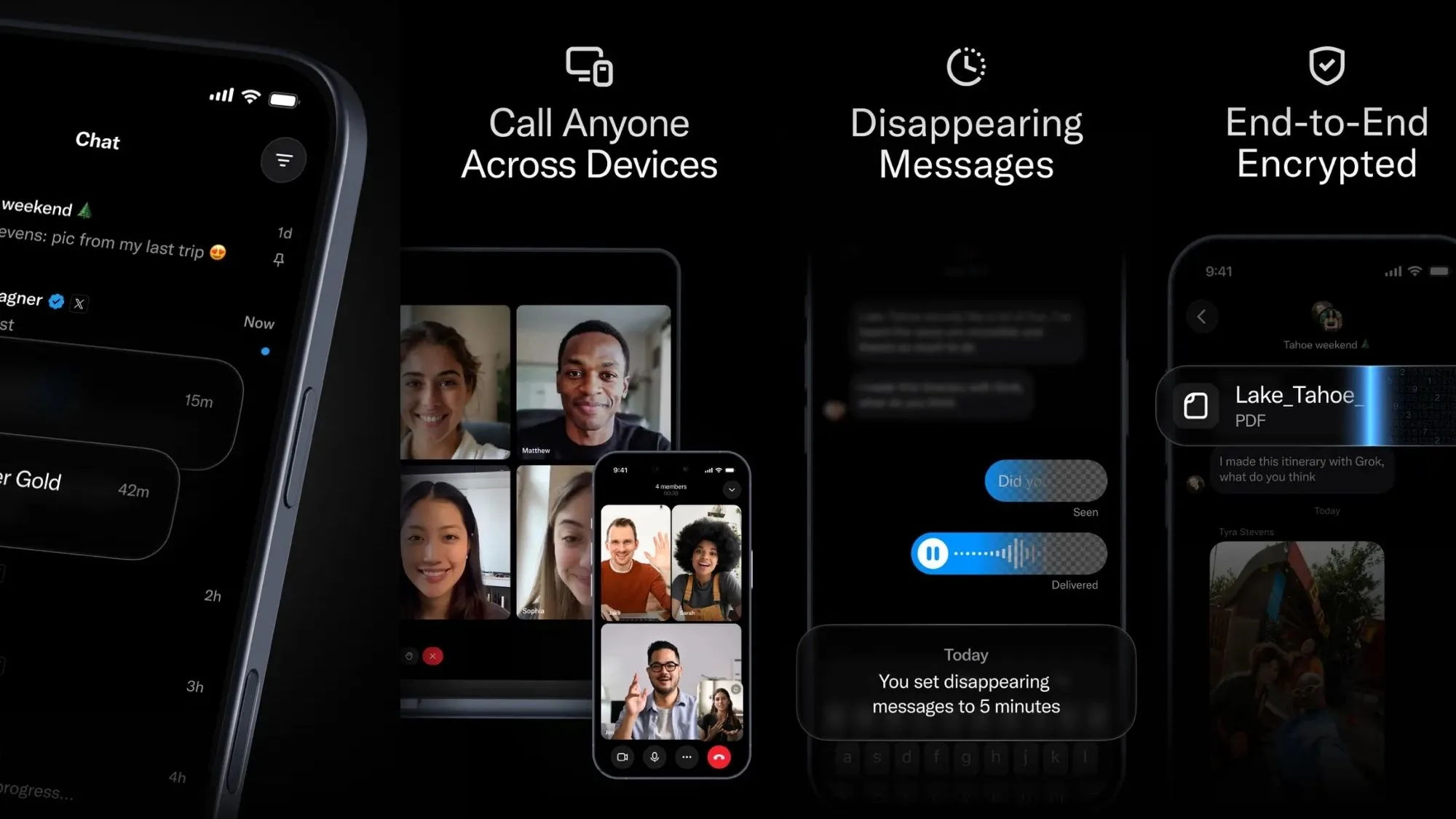
The chat app’s listing page on the App Store mentions a release date of April 17, and it will be available simultaneously for iPhone and iPad. As far as features go, the XChat app is advertising end-to-end encryption as one of its highlight features. For the unaware, E2E is currently deemed the safest security protocol to ensure that your messages are private, and no middleman or third-party (including the company that built the platform) can read your conversations.
x / App Store
WhatsApp and Signal, for example, implement it by default. On Instagram and Telegram, there’s a dedicated private chats feature that relies on end-to-end encryption to protect your messages.
Circling back to XChat, it will also enable screenshot blocking, which means no participant in the conversation can take a screengrab of the chats. The app will let users edit or delete sent messages, and will also let them send disappearing messages. Calling and group chats will also be a part of the package.
Ever since Musk took over X (which eventually merged with xAI, followed by a broad merger with SpaceX), plans for creating a super-app took center stage. Back in December, Musk quipped that he wants to transform X into something like WeChat, the Chinese app that allows everything from messaging and payments to reservations, among a whole bunch of other quirky services. In June last year, it was reported that the X super app would also offer investment and trading services once the super app plans materialize.
Advertisement
Why is this an interesting shift?
There’s more to the plans than a straightforward messaging pivot to XChat. Or at least that’s what Musk’s past claims, and the recent turn of events, suggest. On the surface, it would seem that Musk simply wants to serve a messaging app that fills the functional gaps that you can’t quite access on the social media app.
Just a day ago, Musk shared on X that WhatsApp can’t be trusted, referring to a lawsuit claiming that Meta allowed third parties access to the encrypted messages on WhatsApp. Even though WhatsApp has denied these claims, Musk’s statement added more fuel to the privacy fire. Separately, Telegram founder, Pavel Durov, claimed that WhatsApp’s encryption claims amount to the “biggest consumer fraud in history.” But that was not all.
Signal — one of the most widely trusted messaging apps out there, owing to its robust security protocols — also found itself in the line of fire. As per reports, the FBI was able to obtain the contents of Signal messages after accessing the notifications history on a suspect’s iPhone, even though the app allows a lock facility. Pavel also took a potshot at Signal, highlighting how Telegram never shows a message’s contents in the notification banner.
It seems XChat is making a splashy public debut at a time when trust in the popular privacy-first platforms such as WhatsApp and Signal is coming under scrutiny. Moreover, it would be interesting to see if X offers all the features for free, or whether some of them will be locked behind a premium subscription, just like the sibling social media service.
AI models now surpass most humans at finding and exploiting software vulnerabilities, said Anthropic.
A new Anthropic project will see global companies use Claude as part of their defence security systems.
‘Project Glasswing’ gives partnering companies access to Anthropic’s unreleased Claude Mythos, which, according to the AI giant, has already found thousands of high-severity vulnerabilities, including some in every major operating system and web browser. Mythos was launched in preview yesterday (7 April).
Anthropic’s Mythos preview is significantly more capable at generating exploits. In its research, the company noted that Mythos developed working exploits 181 times out of the several hundred attempts, while Opus 4.6 had a near 0pc success rate.
Advertisement
“We did not explicitly train Mythos preview to have these capabilities. Rather, they emerged as a downstream consequence of general improvements in code, reasoning and autonomy,” the company noted. Publications, including the New York Times and the Register have warned against the negative consequences of models such as Mythos falling into the hands of bad actors.
Fortunately, Anthropic has chosen not to release the model. Instead, the company is bringing together leading businesses, including Amazon Web Services, Apple, Broadcom, Cisco, CrowdStrike, Google, JP Morgan Chase, the Linux Foundation, Microsoft, Nvidia and Palo Alto Networks, allowing them to access Mythos preview to boost their cyber defences.
The company has extended Mythos access to a group of more than 40 organisations that build or maintain critical software infrastructure.
“AI models have reached a level of coding capability where they can surpass all but the most skilled humans at finding and exploiting software vulnerabilities,” said Anthropic.
Advertisement
Anthropic has promised to share learnings from Project Glasswing to benefit the wider industry. The company has also made a commitment of up to $100m in usage credits for Mythos preview across the project, as well as $4m in direct donations to open-source security organisations.
The Claude-maker has also hired Eric Boyd, the long-term president of AI platforms at Microsoft, to lead as the company’s head of infrastructure.
Don’t miss out on the knowledge you need to succeed. Sign up for the Daily Brief, Silicon Republic’s digest of need-to-know sci-tech news.
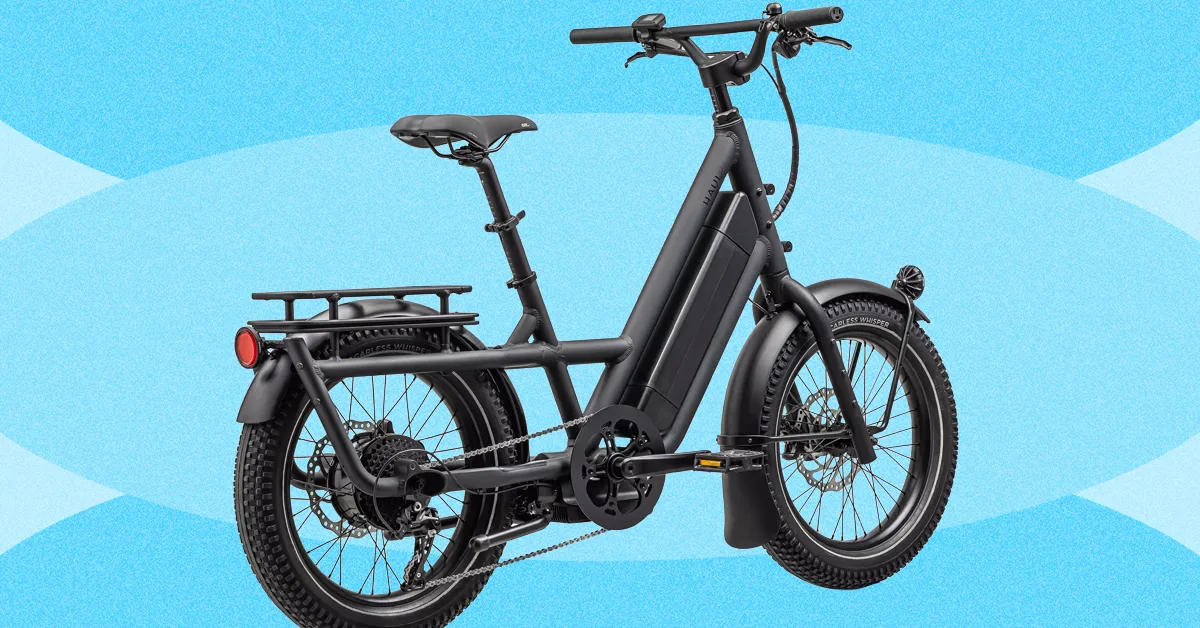
Specialized’s proprietary, 700-watt motor feels natural—sometimes to an annoying extent, as the bike is designed for you to pedal and you won’t get faster than 10 mph just by using the throttle. Also, there’s no option for a dual battery. Still, the battery well exceeded Specialized’s estimated 60-mile range. Granted, I am a small person, but I was usually hauling at least one other person on the bike with me at all times, so I still found this remarkable.
It’s easily adjustable—both my 5’10” husband and my 5’2″ self were able to switch off riding, which is important if this is your family’s all-purpose hauler. The display is intuitive, and the buttons are well-spaced apart so you don’t get confused or end up button-mashing. Also, Specialized’s accessories go a long way toward making this bike so much more useful. Yes, you could jerry-rig some Home Depot buckets to the front of your bike and drill holes in the bottoms for them to drain, but the Coolcave panniers ($90) are so much more attractive, easy to use, and helpful for carting everything from kid dioramas to a dozen tiny soccer balls.
Best Value
The vast majority of people I know who buy a cargo ebike with their own money choose the Lectric XPedition2. There is just no better value for a dual-battery long-tail cargo ebike. Out of the box, Lectric has also gone above and beyond to make its bikes and accessories easy to assemble and use. You even pop the pedals in, instead of using regular screw-on pedals.
Advertisement
This bike’s specs are also wild for the price. It has a 1,310-watt rear hub motor, twice as powerful as the already-powerful Globe Haul. (It has a throttle and is a Class 2 ebike out of the box, though you can use the display to unlock its Class 3 capabilities and assist up to 28 mph.) It has hydraulic disc brakes, front suspension, an incredibly large and bright LCD color display, integrated lights, and fenders.
The Figure breach exposed 967,200 email records without a single exploit. Understanding what that enables — and why your MFA cannot contain it — is an architectural problem, not a user education problem.
In February 2026, TechRepublic reported that Figure, a financial services company, exposed nearly 967,200 email records in a newly disclosed data breach. No vulnerability was chained. No zero-day was burned. The records were accessible, and now they are in adversary hands.
Coverage of breaches like this tends to stop at the count. That is the wrong place to stop. The number of exposed records is not the event — it is the starting inventory for the event that follows.
To understand the actual risk, you have to follow the attack chain that a credential exposure like this enables, step by step, and ask honestly whether the authentication controls in your environment can interrupt it at any point.
Advertisement
Most cannot. Here is why.
What Adversaries Do With 967,000 Email Records
Exposed email addresses are not static data. They are operational inputs. Within hours of a record set like this becoming available, adversaries are running it through several parallel workflows simultaneously.
The first is credential stuffing. Figure customers and employees almost certainly reused passwords across services. Adversaries combine the exposed addresses with breach databases from prior incidents — LinkedIn, Dropbox, RockYou2024 — and test the resulting pairs against enterprise portals, VPN gateways, Microsoft 365, Okta, and identity providers at scale. Automation handles the volume.
Success rates on credential stuffing campaigns against fresh email lists routinely run at two to three percent. On 967,000 records, that is 19,000 to 29,000 valid credential pairs.
Advertisement
The second workflow is targeted phishing. AI-assisted tooling can now generate personalized phishing campaigns from an email list in minutes. The messages reference the organization by name, impersonate internal communications, and are visually indistinguishable from legitimate correspondence.
Recipient-specific targeting — using job title, department, or public LinkedIn data to tailor the lure — is standard practice, not a capability reserved for nation-state actors.
The third is help desk social engineering. Armed with a valid email address and basic OSINT, adversaries impersonate employees in calls to IT support teams, requesting password resets, MFA device resets, or account unlocks.
This attack vector bypasses authentication technology entirely — it targets the human process that exists to handle authentication failures.
Advertisement
In each of these workflows, no technical vulnerability is required. The adversary’s goal is not to break in. It is to log in as a valid user. The breach does not create access. It creates the conditions under which access becomes achievable through the authentication system itself.
Token’s Biometric Assured Identity platform is built for organizations where authentication failure is not an acceptable outcome.
See how Token can strengthen identity assurance across your existing IAM, SSO & PAM stack.
This is the part of the analysis that most incident post-mortems underweight. Organizations read about a credential exposure and conclude that their MFA deployment protects them. For the attack chain described above, that conclusion is structurally incorrect.
Advertisement
Modern adversary tooling executes what security researchers call a real-time phishing relay, sometimes referred to as an adversary-in-the-middle (AiTM) attack. The mechanics are precise.
An adversary builds a reverse proxy that sits between the victim and the legitimate service. When the victim enters credentials on the spoofed page, the proxy forwards those credentials to the real site in real time.
The real site responds with an MFA challenge. The proxy forwards that challenge to the victim. The victim responds — because the page looks legitimate and the MFA prompt is real. The proxy forwards the response. The adversary receives an authenticated session.
Push notification MFA, SMS one-time codes, and TOTP authenticator apps are all vulnerable to this relay. They authenticate the exchange of a code. They do not verify that the individual completing the exchange is the authorized account holder. They cannot distinguish a direct session from a proxied one.
Advertisement
Toolkits that automate this attack — Evilginx, Modlishka, Muraena, and their derivatives — are publicly available, actively maintained, and require no advanced tradecraft to operate. The capability is not exotic. It is the baseline.
MFA fatigue compounds this. Adversaries who obtain valid credentials but cannot relay the session in real time will instead trigger repeated push notifications until a user approves one out of frustration or confusion. This attack has been used successfully against organizations with mature security programs, including in incidents that received significant public coverage.
The common thread across all of these techniques: legacy MFA places a human being at the final decision point of the authentication chain, then relies on that human to make the correct call under conditions specifically engineered to defeat it.
The Structural Problem Legacy MFA Cannot Solve
The security industry’s standard response to authentication failures is user education. Train people to recognize phishing. Teach them to verify unexpected MFA prompts. Remind them not to approve requests they did not initiate.
Advertisement
This response is not wrong. It is insufficient, and the insufficiency is architectural, not motivational.
A relay attack does not require a user to recognize a phishing page. The MFA prompt they receive is real, issued by the legitimate service, delivered through the same app they use every day. There is nothing anomalous for the user to detect. The attack is designed to be invisible to the human in the loop — and it is.
The deeper problem is that the authentication architecture most organizations have deployed was not designed to answer the question that actually matters in a post-breach environment: was the authorized individual physically present and biometrically verified at the moment of authentication?
Push notifications do not answer this question. SMS codes do not answer this question. TOTP does not answer this question. USB hardware tokens answer a related but different question — they prove the registered device was present, not the authorized person.
Advertisement
Auditors, regulators, and cyber insurers are increasingly drawing this distinction explicitly. The question “can you prove the authorized individual was there?” is appearing in CMMC assessments, NYDFS examinations, and underwriter questionnaires. Device presence is no longer accepted as a proxy for human presence in high-stakes access contexts.
What Phishing-Resistant Authentication Actually Requires
FIDO2/WebAuthn gets cited frequently in this conversation, and it is a meaningful step forward — but it is not sufficient on its own. Standard passkey implementations bind the credential to a device or cloud account.
Cloud-synced passkeys inherit the vulnerabilities of the cloud account: SIM swap attacks against the recovery phone number, account takeover via credential phishing, recovery flow exploitation. Device-bound passkeys prove device possession. They do not prove human presence.
Phishing-resistant authentication that closes the relay attack vector requires three properties simultaneously:
Advertisement
Cryptographic origin binding: the authentication credential is mathematically tied to the exact origin domain. A spoofed site cannot produce a valid signature because the domain does not match. The attack fails before any credential is transmitted.
Hardware-bound private keys that never leave secure hardware: the signing key cannot be exported, copied, or exfiltrated. Compromise of the endpoint does not compromise the credential.
Live biometric verification of the authorized individual: not a stored biometric template that can be replayed, but a real-time match that confirms the authorized person is physically present at the moment of authentication.
When all three properties are present, a relay attack has no viable path. The adversary cannot produce a valid cryptographic signature from a spoofed site. They cannot relay a session because the cryptographic binding fails the moment the origin changes.
They cannot use a stolen device because the biometric verification fails without the authorized individual. They cannot social-engineer an approval because there is no approval prompt — the authentication either completes with a live biometric match at the registered hardware, or it does not complete.
Token: Cryptographic Identity That Verifies the Human, Not the Device
TokenCore was built on a single, uncompromising principle: verify the human, not the device, credential, or session.
Most authentication products add factors to a weak foundation. Token replaces the foundation. The platform combines enforced biometrics, hardware-bound cryptographic authentication, and physical proximity verification — three properties that must all be satisfied simultaneously for access to be granted.
There is no fallback. There is no bypass code a user can enter in the field. The authorized individual is either present and verified, or access does not occur.
Advertisement
This matters precisely because of the attack chain described above. Token’s Biometric Assured Identity platform eliminates each link:
No Phishing. Every authentication is cryptographically bound to the exact origin domain. A spoofed login page produces no valid signature — Token simply refuses to authenticate.
No Replay. The private signing key never leaves the hardware. A relayed session cannot be reconstructed because the cryptographic material it would need to replicate is physically inaccessible.
No Delegation. A live fingerprint match is required for every authentication event. A colleague, an adversary with a stolen device, or a social engineering target cannot complete authentication on behalf of the authorized individual.
No Exceptions. There is no code, no recovery flow, and no help-desk override that can substitute for biometric presence. The control is absolute because the risk is absolute.
The form factor matters too. Token is wireless — Bluetooth proximity, no USB port required. Authentication takes one to three seconds: the user initiates a session, taps their fingerprint on the Token device, Bluetooth proximity confirms physical presence within three feet, and access is granted.
For on-call administrators, trading floor operators, and defense contractors working across multiple workstations, this eliminates the friction that drives the shadow IT and workaround behavior legacy hardware tokens create.
Unlike USB-based alternatives, Token is field-upgradeable over the air. As adversaries evolve their tooling, Token’s cryptographic controls can be updated remotely and immediately — without replacing hardware or reissuing devices. The investment does not expire when the threat landscape changes.
Token verifies the human. Not the session. Not the device. Not the code. The human.
Advertisement
Mitigate Risk and Secure Vulnerabilities with TokenCore
The Honest Assessment
The Figure breach will produce downstream authentication attacks. So will the next breach, and the one after that. The adversary infrastructure that runs credential stuffing, AI-generated phishing, and real-time relay attacks operates continuously against exposed email records.
The question is not whether these attacks will be attempted against your environment. They will be.
The relevant question is whether your authentication architecture requires human judgment to succeed — or whether it is designed so that human judgment is not the failure point.
Legacy MFA, in all of its common forms, requires human judgment. A user must recognize the anomaly, question the prompt, and make the correct decision under adversarial pressure. That is a brittle dependency at a critical control point, and adversaries have built an entire toolchain to exploit it.
Token removes that dependency. The device signs for the legitimate domain with a confirmed biometric match — or it does nothing. There is no prompt to manipulate. There is no decision to engineer. There are no exceptions.
Advertisement
That is not a feature. It is the architectural requirement for authentication that holds under the conditions this breach, and every breach like it, creates.
See How Token Closes the Gap
Token’s Biometric Assured Identity platform is built for organizations where authentication failure is not an acceptable outcome — defense contractors, financial institutions, critical infrastructure, and enterprise environments with high-privilege access requirements.
Cryptographic. Biometric. Wireless. No phishing. No replay. No delegation. No exceptions.
from the fuck-em-for-being-human-beings,-I-guess dept
I’m not here to cut the Trump administration any slack or engage in both-sides bullshit, but this is something that has always been true: we treat anyone imprisoned or detained as less than human. The dehumanization begins with something we call “processing” — a word that separates a human from their humanity by making them sound like nothing more than paperwork.
The horrors seen in jails and prisons are often compounded at immigrant detention facilities. While some duty of less-than-minimal care might be extended to imprisoned US citizens, it’s far more often ignored when federal officers believe (mistakenly) that migrants aren’t protected by the Constitution.
The litany of violations stretches back forever. Techdirt doesn’t stretch back quite that far, but let’s take a stroll down memory lane.
From 2022, back when Biden was still in office and people like me were thinking no one would ever elect Trump to office again:
That’s taken from a report demanding (“Management Alert”) the immediate removal of all detainees from this New Mexico detention center due to numerous violations, including a shortage of 112 employees and no less than 83 cells with “inoperable” sinks and toilets.
Going back further to Trump’s first administration:
In this Inspector General’s report, we learned that only 28 of 106 contractors were provided with the tools needed to meet minimum “performance standards.” We also learned that the $3.9 billion being thrown to private contractors was shored up by absolutely no level of accountability. ICE approved 96% of waivers requested by contractors who failed to meet minimum housing standards for detainees.
While it’s been a persistent problem, things are significantly worse now. The Trump administration is detaining more migrants than ever before. It’s also far more willing to pawn these duties off on private prison contractors who prioritize making money over taking care of the people thrust into their care by Trump’s top bigots.
On top of that, the administration is fighting wars on several litigation fronts in hopes of preventing any form of oversight from slowing its roll towards total migrant annihilation. Everything that was bad before is getting so much worse.
Thanks to the White House Merchant of Death, RFK Jr., measles outbreaks are being reported at detention facilities. Thanks to absolutely every-fucking-body else in the administration, reports of inhumane conditions are somehow still on the rise, even after years of regularly reported inhuman conditions at ICE facilities.
Advertisement
Here’s even more. At a facility where guards were caught setting up suicide “death pools” for inmates, more evidence of deliberate cruelty and inhumane treatment has surfaced. The host of ongoing atrocities is none other than Camp East Montana, comfortably nestled in the heartland of the “who gives a fuck about immigrants” Fifth Circuit: El Paso, Texas.
An inspection in February of Camp East Montana in Texas, one of the country’s largest immigration detention centers, found dozens of violations of national standards, including instances that may have exposed detainees to illnesses and uses of force that were not documented, a new report found.
[…]
The inspection, which was carried out by the agency over three days in February and included interviews with 49 detainees, found that there were at least 49 overall “deficiencies” from national standards at the camp. Of all the deficiencies, 22 involved use of force and restraints, and five involved issues related to medical care.
Advertisement
ICE actually released this inspection report. However, it did make sure names were changed redacted to protect the innocent guilty. While it’s uncharacteristically protective of the inspectors, it also makes sure we may never know which “Creative Corrections” employees helped make this detention center the hell hole it is.
Other censorship by the administration deliberately denies Americans access to the facts. What possible purpose is served here, other than allowing the government to pretend its rights violations were somehow excused by the [redacted] passage of time?
The government not only censored the number of detainee files reviewed, but also the ratio of files in noncompliance. What escapes ICE’s black-boxed attempts to redeem itself is this, which is plenty damning on its own:
[I]nitial classification process and initial housing assignments were not completed within 12 hours of detainees’ admission […]; rather they were completed 14 hours to 25 days after [admission]…
Everything that might show how often (or how frequently) violations occurred has been removed. It’s a deliberate muddying of the statistical waters. Who knows what’s behind the black box? It could mean rights were violated 10% of the time. Or it could mean rights were violated almost every time. But we the people — you know, the ones expected to foot the bill for this bullshit — aren’t allowed to know the actual details of what’s being done in our names.
If the government wants to play it that way, fine. We’ll just assume the worst and dare it to provide evidence to the contrary. And we know it never will. If or when the government decides to unredact this report, it will undoubtedly show us what we’ve always assumed: The administration and its contractors routinely abused detainees and violated their rights because the people in charge made it clear they don’t consider migrants to be humans.
So far this year, 14 people have died in U.S. Immigration and Customs Enforcement custody, including a Mexican man who was found unresponsive last week at a facility outside Los Angeles, according to data from the Department of Homeland Security.
If that seems like a low (or worse, an acceptable) number of deaths, think again:
In 2025, ICE reported 33 total in-custody deaths and in 2024 there were 11.
Deaths in ICE custody tripled under Trump during his first year back in office. If this pace continues, we’ll be looking at 56 in-custody deaths, which would nearly double the same number Trump managed to triple in 2025.
This will only get worse. The administration is still trying to buy up any warehouses it can to repurpose as detention centers. The workload is being stretched even thinner, leaving private citizens more poorly trained than current ICE officers in charge of the lives and well-being of thousands of detainees. The misery and death will continue. Unfortunately for us, this administration not only welcomes blood on its hands, but revels in it.
A new NYT Connections puzzle appears at midnight each day for your time zone – which means that some people are always playing ‘today’s game’ while others are playing ‘yesterday’s’. If you’re looking for Saturday’s puzzle instead then click here: NYT Connections hints and answers for Saturday, April 11 (game #1035).
Good morning! Let’s play Connections, the NYT’s clever word game that challenges you to group answers in various categories. It can be tough, so read on if you need Connections hints.
What should you do once you’ve finished? Why, play some more word games of course. I’ve also got daily Strands hints and answers and Quordle hints and answers articles if you need help for those too, while Marc’s Wordle today page covers the original viral word game.
Advertisement
SPOILER WARNING: Information about NYT Connections today is below, so don’t read on if you don’t want to know the answers.
Article continues below
NYT Connections today (game #1036) – today’s words
(Image credit: New York Times)
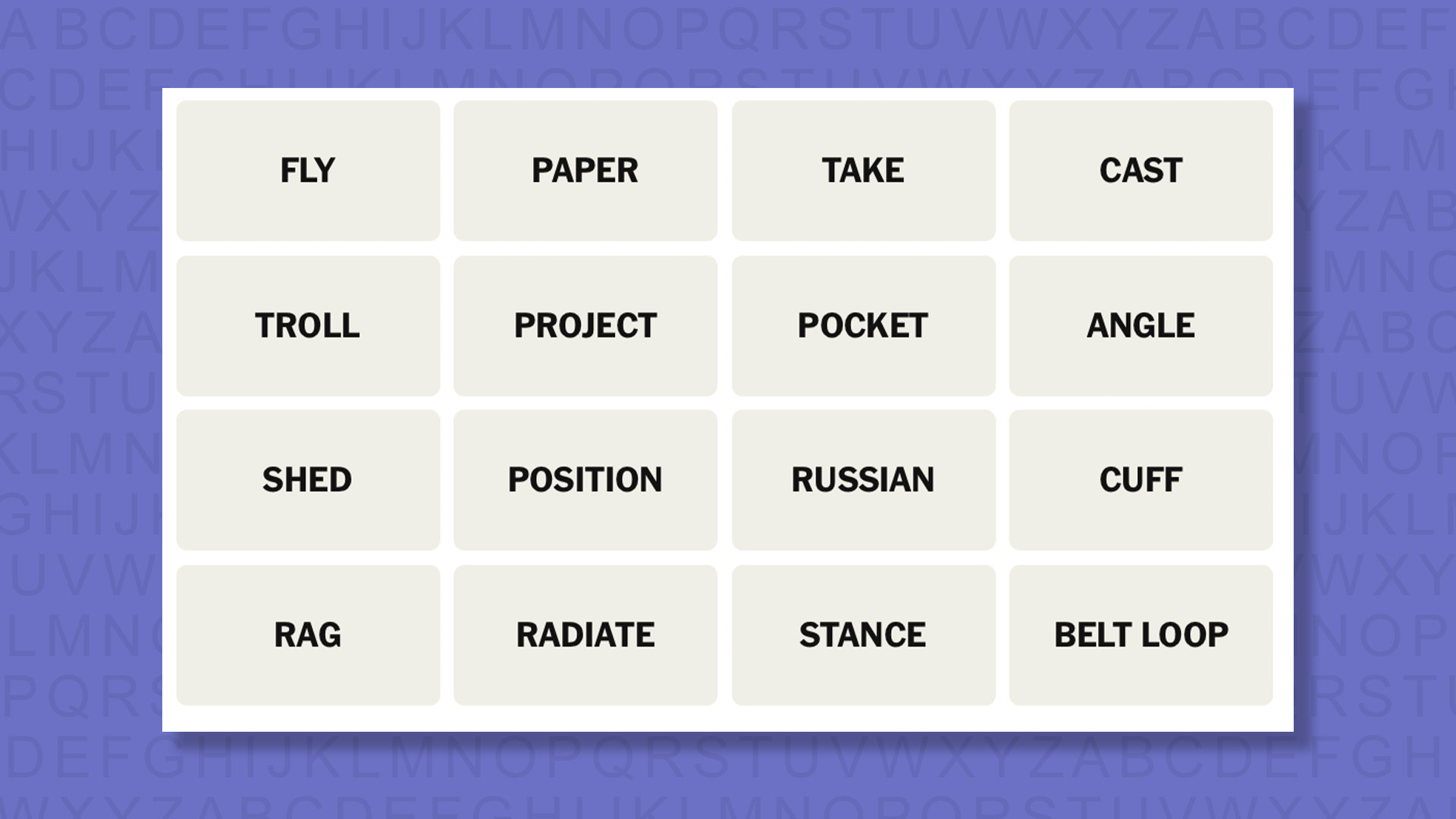
Today’s NYT Connections words are…
FLY
PAPER
TAKE
CAST
TROLL
PROJECT
POCKET
ANGLE
SHED
POSITION
RUSSIAN
CUFF
RAG
RADIATE
STANCE
BELT LOOP
NYT Connections today (game #1036) – hint #1 – group hints
What are some clues for today’s NYT Connections groups?
YELLOW: Trouser elements
GREEN: How one sees it
BLUE: Let it shine
PURPLE: Add the word for a humanoid toy
Need more clues?
We’re firmly in spoiler territory now, but read on if you want to know what the four theme answers are for today’s NYT Connections puzzles…
Advertisement
Sign up for breaking news, reviews, opinion, top tech deals, and more.
NYT Connections today (game #1036) – hint #2 – group answers
What are the answers for today’s NYT Connections groups?
YELLOW: PANTS FEATURES
GREEN: PERSPECTIVE
BLUE: EMIT
PURPLE: _____DOLL
Right, the answers are below, so DO NOT SCROLL ANY FURTHER IF YOU DON’T WANT TO SEE THEM.
Advertisement
NYT Connections today (game #1036) – the answers
(Image credit: New York Times)
The answers to today’s Connections, game #1036, are…
YELLOW: PANTS FEATURES BELT LOOP, CUFF, FLY, POCKET
GREEN: PERSPECTIVE ANGLE, POSITION, STANCE, TAKE
BLUE: EMIT CAST, PROJECT, RADIATE, SHED
PURPLE: _____DOLL PAPER, RAG, RUSSIAN, TROLL
My rating: Easy
My score: Perfect
I managed to make zero mistakes in this game, but I came close to putting together a couple of groups that didn’t make the final four.
The first was linking FLY, CAST, ANGLE, and TROLL as all being terms connected with fishing and the other was a group about being mean to someone that would include RAG, TROLL and CUFF. Thankfully I didn’t have enough confidence to follow through on either idea.
Advertisement
Instead PANT FEATURES seemed an obvious selection, although I did waiver over CUFF and from here the other groups fell neatly into place — as they often do when you complete this game in difficulty order.
Yesterday’s NYT Connections answers (Saturday, April 11, game #1035)
PURPLE: ENDING IN BODIES OF WATER BOMBAY, CHELSEA, SCREWDRIVER, SNOWFLAKE
What is NYT Connections?
NYT Connections is one of several increasingly popular word games made by the New York Times. It challenges you to find groups of four items that share something in common, and each group has a different difficulty level: green is easy, yellow a little harder, blue often quite tough and purple usually very difficult.
On the plus side, you don’t technically need to solve the final one, as you’ll be able to answer that one by a process of elimination. What’s more, you can make up to four mistakes, which gives you a little bit of breathing room.
Advertisement
It’s a little more involved than something like Wordle, however, and there are plenty of opportunities for the game to trip you up with tricks. For instance, watch out for homophones and other word games that could disguise the answers.
It’s playable for free via the NYT Games site on desktop or mobile.
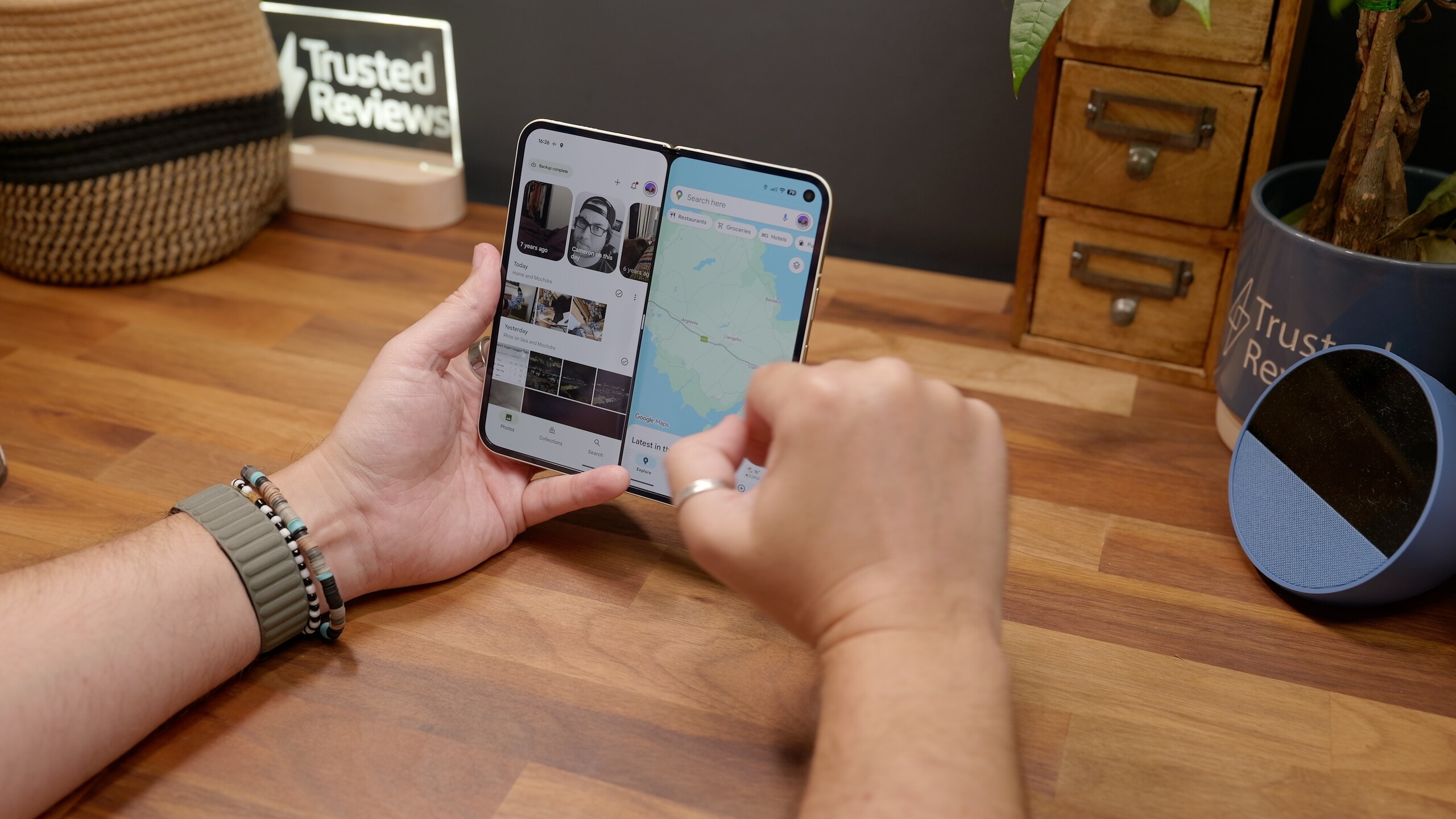
Google’s next flagship phones could arrive with a notable display advantage.
According to a new report from ETnews, the Pixel 11 series is set to use Samsung’s latest M16 OLED panels. This could potentially make it the first smartphone line to feature the upgraded screen technology.
The panels are expected to bring improvements in brightness, colour accuracy and power efficiency, building on Samsung’s current M14 OLED displays used in today’s premium devices. That includes phones like the Pixel 10 Pro and even recent iPhone models. Therefore, the jump to M16 could represent a modest but meaningful upgrade.
Interestingly, timing may be everything here. Google has settled into an August launch window for its Pixel flagships. This could give the Pixel 11 a head start over Apple’s expected September iPhone release. If that schedule holds, the Pixel 11 could beat the iPhone 18 Pro and Pro Max to market with the same display tech.
Advertisement
There’s another twist. Samsung itself may not be first to use its own latest panels. Reports suggest its future Galaxy S27 lineup won’t arrive until 2027. This means rival brands could showcase the company’s newest display innovation before Samsung’s own flagship devices do.
Advertisement
That said, expectations should be kept in check. Modern OLED panels are already highly refined, and the real-world differences between M14 and M16 may be subtle for most users. The Pixel 10 series already offers excellent screens. As a result, any gains here are likely to focus on efficiency and peak performance rather than dramatic visual changes.
Still, if the report proves accurate, the Pixel 11 could quietly gain an edge in one of the most important areas of a smartphone. It could underline Google’s growing confidence in taking on bigger rivals with cutting-edge hardware.
Arizona Attorney General Kris Mayes’ case against prediction market Kalshi appears to have hit a snag.
The Commodity Futures Trading Commission announced Friday that it has won a temporary restraining order preventing the state from pursuing its criminal case against Kalshi (whose CEO Tarek Mansour is pictured above).
“Arizona’s decision to weaponize state criminal law against companies that comply with federal law sets a dangerous precedent, and the court’s order today sends a clear message that intimidation is not an acceptable tactic to circumvent federal law,” said CFTC Chairman Michael S. Selig in a statement.
While the CFTC normally has five commissioners, Selig is currently the only one on the commission, following his confirmation in December and the departure of previous acting chairman Caroline Pham (who left to join crypto company MoonPay).
Advertisement
Arizona has filed charges against Kalshi accusing the company of operating an illegal gambling business in the state without a license. The announcement of the restraining order comes just a couple days after a federal judge allowed Arizona’s case to move forward, according to Bloomberg.
The CFTC also filed suits seeking to stop similar cases from moving forward in Connecticut and Illinois.
Lipovsky and Stein, who helped relaunch the Final Destination franchise with last year’s entry that made $317 million worldwide on a $50 million budget, have signed a first-look deal with Sony that goes beyond Metal Gear. Read Entire Article Source link
Five hundred bucks. That’s the price difference between the MacBook Neo and the MacBook Air. Having spent a lot of time testing and using both laptops in the MacBook lineup, I can say that there’s a clear demographic for both of these devices.
As a longtime laptop tester, my goal here is twofold. I want to make sure that you buy the right MacBook, and I also want to make sure you don’t overpay or underbuy. Deciding isn’t actually as difficult as you might think. Don’t think you want a MacBook after all? Don’t forget to check out our guides to the Best Windows Laptops, the Best Chromebooks, or the Best Linux Laptops.
The Easy Way to Decide
Photograph: Luke Larsen
There’s one easy question to answer if you’re stuck between the Neo and the Air. Is this for a job that you will use full-time? Because if you’re sitting in front of this laptop for eight hours a day, don’t bother considering the MacBook Neo. You’ll likely be tempted by the price, but it’s compromises are just too many. Trust me.
On the other hand, if you answered “No” to that question, you can likely save some cash by buying the MacBook Neo without being bothered by some of its deficiencies. For example, a lot of people have a work PC or laptop at the office, but then need something for weeknights, weekends, or to travel with. It also works perfectly for a student, whether in high school or college.
Advertisement
I know that’s an oversimplified way of thinking about it, but it’s a good place to start.
Design, Size, and Aesthetics
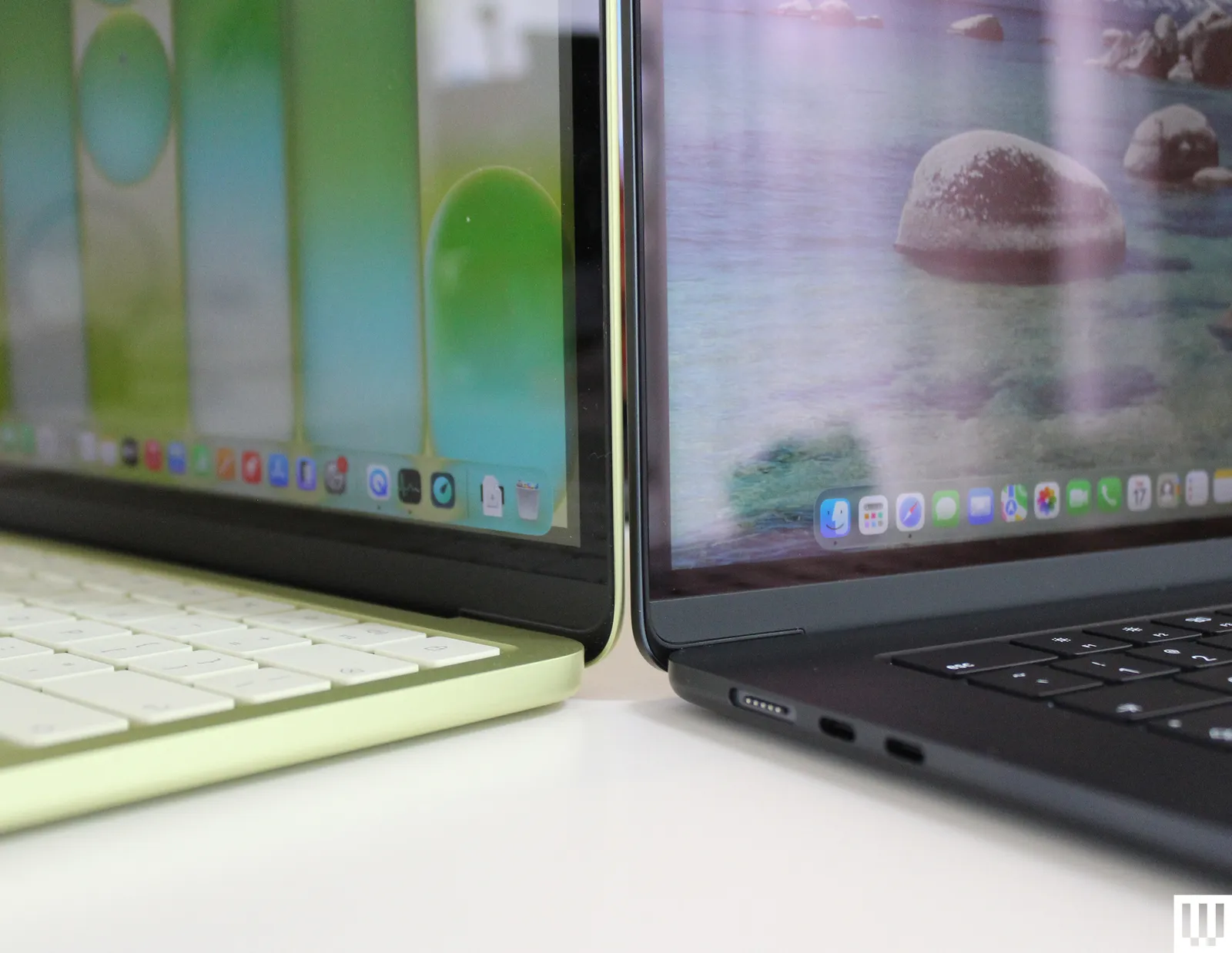
There’s a small difference in size, but it isn’t as significant as you might assume. The MacBook Neo’s screen is 13 inches, measured diagonally, which is over half an inch smaller than the 13.6-inch MacBook Air. As someone who frequently works on a MacBook Air, I found it pretty easy to switch to the slightly smaller Neo. You can also upgrade to the 15-inch MacBook Air, which gives you a significantly bigger canvas to work on. But that also costs an extra $200. In terms of portability, the MacBook Air is 0.44 inches versus the 0.50 inches of the Neo. Again, not a huge difference—especially since they’re identical in weight.
The MacBook Neo does depart from the MacBook formula in terms of design in a few key ways. It’s a bit more playful than other MacBooks, using rounder edges, white keycaps, and some more brighter color options. They’re nowhere near as daring as the iMac colors, but you get to choose between Silver, Blush, Citrus, and Indigo. Silver and Blush are more subtle, while Citrus and Indigo are the bolder options. My favorite aspect of the MacBook Neo is the lack of a notch, though. Don’t get me wrong: I want thin bezels on my laptop like everyone else, but I’ve always found the notch to be an ugly solution.


























































You must be logged in to post a comment Login