Connect with us

Tech

How To Record Phone Calls on a Samsung Galaxy Phone?

Published

on

Call recording can be very helpful if you have to recall important information, such as instructions, addresses, or office conversations. Samsung Galaxy smartphones have a built-in call recording feature that lets you record phone calls without downloading any additional apps. Before you begin recording calls, be aware that this feature is only available in countries where call recording is permitted, so it may not be available on all phones. For instance, call recording is permitted without consent in India, but in most of Europe and the US, consent is required from all parties involved in the call. Moreover, it also doesn’t work for Wi-Fi calls.

1. Record a Call on a Samsung Galaxy Phone

You can record a call on your Samsung Galaxy phone only after the call has been initiated. Follow these simple steps to record a call on your Samsung Galaxy phone:

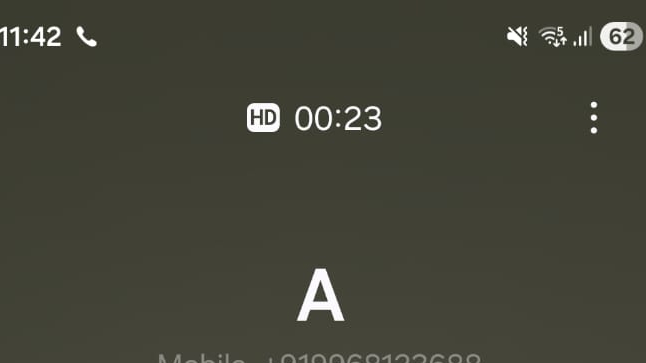
  1. Make a phone call using the Phone app on your Samsung Galaxy phone.
  2. During the active call, check the call screen for the Record call button.
  3. If you don’t see it, tap the three-dot menu to find the recording option.
    image to tap the three-dot
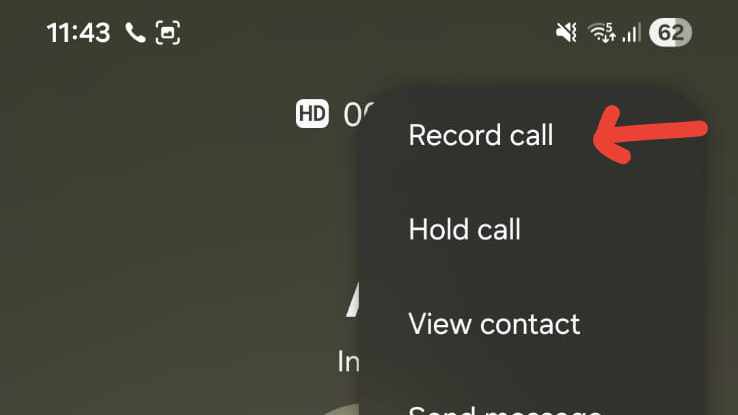
  4. Tap Record call to start recording the conversation.
    image to Tap Record call to start recording phone call on samsung
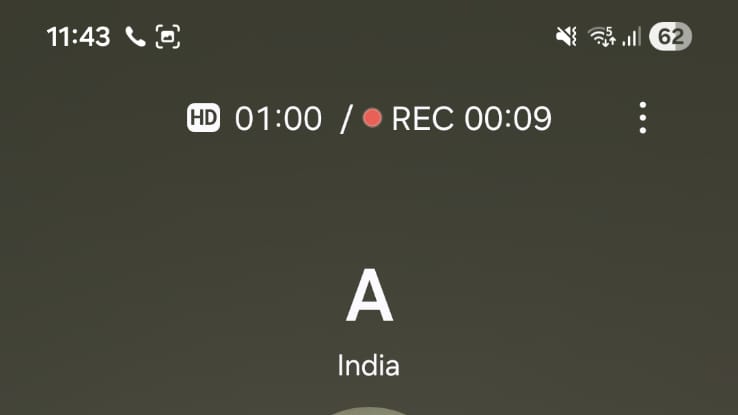
  5. The phone displays a red dot and a timer to show that it is recording the call.
    image to The phone displays a red dot and a timer
  6. To end the recording, tap Record call again or end the call.

2. Automatically Record Calls on a Galaxy Phone

This function records calls without having to press the record button each time. Follow these easy steps:

  1. Open the Phone app on your Samsung Galaxy phone.
  2. Go to the Keypad section.
    image to Tap the three-dot menu to Record Phone Calls Samsung
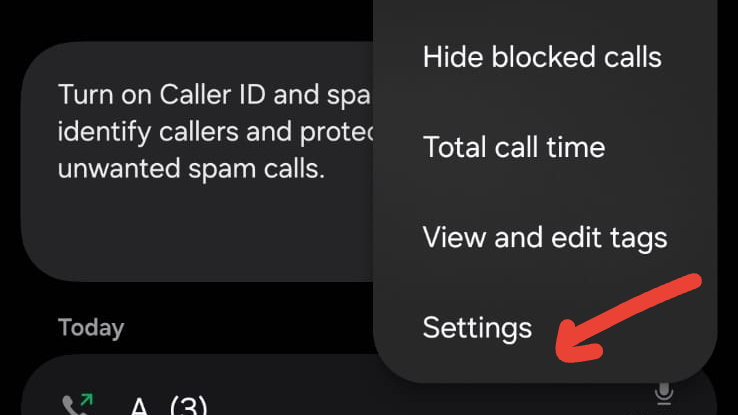
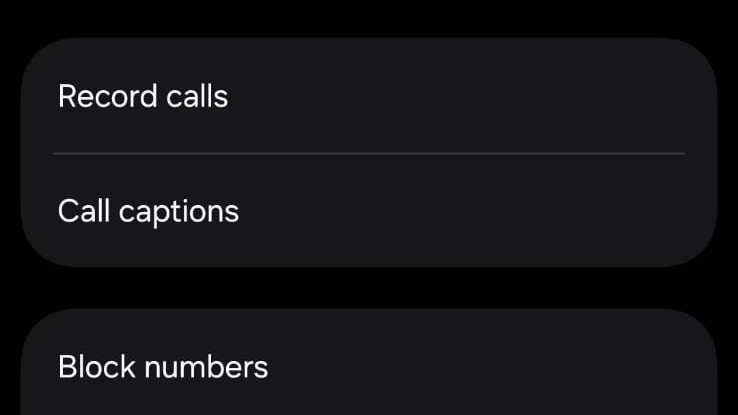
  3. Tap the three-dot menu at the top and select Settings.
    image for settings
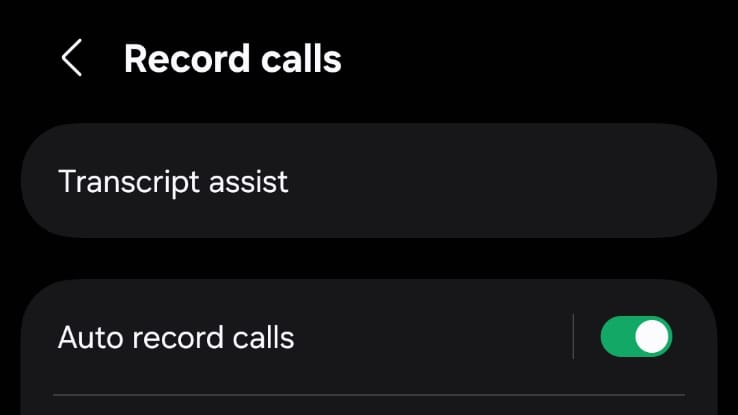
  4. Tap Record calls.
    image to Tap Record calls.
  5. Turn on the Auto record calls option.
    image to Turn on the Auto record calls option.

When auto call recording is enabled, Samsung automatically records all calls, including calls from unknown numbers. But you can adjust this preference if you do not want all calls to be recorded automatically. Samsung gives you the flexibility to choose whether to record all calls, unsaved numbers only, or calls from selected contacts. To record calls from selected contacts, you only need to include their numbers in your contact list under the auto-record options.

3. Record Calls Using Google Voice on Samsung

If call recording isn’t available on your Samsung device, you can use Google Voice to record calls made from your Google Voice number. Google Voice announces to all parties that the call is being recorded. The Google Voice app saves the recorded call in the Voicemail tab.

  1. Open the Google Voice app on your Samsung phone.
  2. Open the menu and go to Settings.
  3. Turn on Incoming call options.
  4. When you receive a call on your Google Voice number, answer the call and open the keypad.
  5. Tap 4 to start recording the call.
  6. Tap 4 again to stop recording.

How to Find, Listen to, and Share Recorded Calls?

Samsung saves all call recordings in one place, so you can easily find and manage them later. Here’s how to access recorded calls:

  1. Open Phone settings.
  2. Tap Record calls.
    image to Tap Record calls
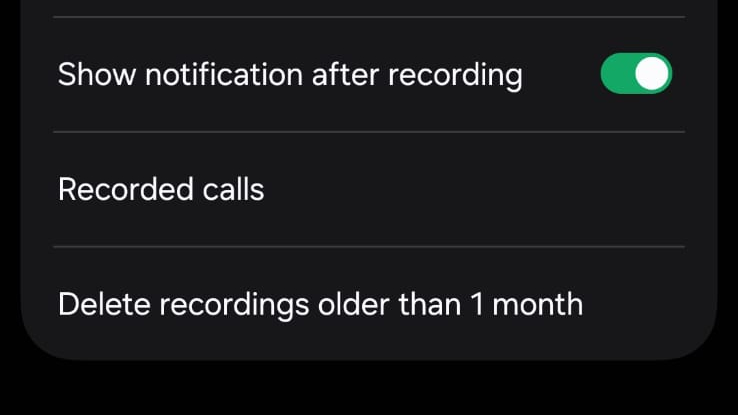
  3. Select Recorded calls.

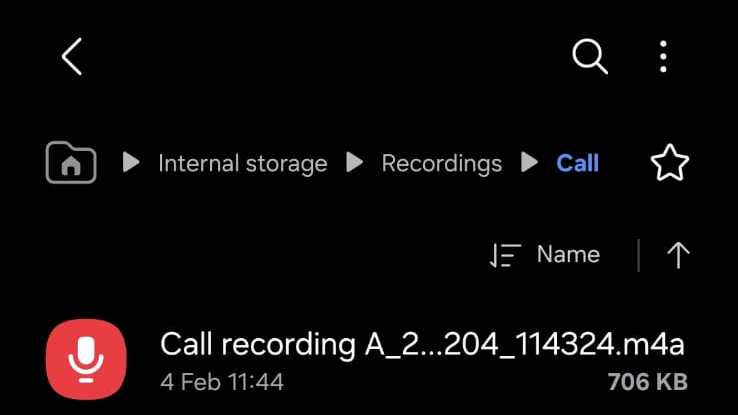
In the call recordings section, you will see all the recordings you have saved, typically in alphabetical order. You can change the list view to date, file size, or call recording. When you long-press a recording, you can rename it, move or copy it to another folder, delete it, or share it via messaging or email clients.

Is It Safe to Use Third-Party Call Recording Apps?

Most third-party call recording apps use accessibility services to record calls, and sometimes do so without informing the other party. Many regions prohibit this practice or consider it illegal, and it can violate local privacy policies. Due to these concerns, Samsung advises against using third-party call recording apps and instead recommends using the call recording feature if available.

Advertisement

Source link

Continue Reading
Click to comment

Leave a Reply

Your email address will not be published. Required fields are marked *

Tech

10 Best 4K UHD Blu-ray Discs of 2025

Published

on

The 10 Best 4K UHD Blu-ray Discs of 2025 arrive at a moment when I keep hearing the same weary refrain: physical media is dead. And yet, it refuses to lie down. 2025 was a genuinely stellar year for 4K discs, one that challenged me and plenty of other disc mavens just to keep up, let alone narrow things down to a definitive decade. As always, the criteria are unapologetically strict: highly watchable and rewatchable films with reference-level picture and sound, extras that add real value instead of padding a press release, and, when studios bothered to try, packaging with some genuine shelf appeal. To keep the playing field level, only 4K discs I personally reviewed made the cut, and multi-movie boxed sets were left out entirely.

Agree? Disagree? Any must-owns that I somehow missed? Drop me a comment down below. 

Outland Limited Edition (Arrow)

image

Peter Hyams’ Outland was, for me, the top of the crop in a year filled with truly outstanding releases. Props to Arrow for rescuing this largely forgotten sci-fi classic, a thrilling High Noon in space that helped Sean Connery turn the corner on his Bondian past. Though the image is intentionally dim and gritty; full of claustrophobic interiors and airless exteriors on the third moon of Jupiter, realized with the help of then-cutting-edge analog visual effects; the disc surrenders sublime shadow detail and punchy colors from beginning to end. I opted for the DTS-HD Master Audio 5.1 soundtrack–the disc defaults to the original Oscar-nominated LPCM stereo mix that reintroduces us to yet another propulsive Jerry Goldsmith score. New interviews, new featurettes and a new commentary join the 2012 archival Hyams track for a near-perfect evening in the home theater.

Where to buy: $29.99 at Amazon

Kingdom of Heaven (Fox/Disney/Sony)

image

While 2025 brought us three of cinephiles’ most-requested 4K upgrades; Tombstone, Kingdom of Heaven and Master and Commander: The Far Side of the World; all in SteelBook-exclusive drops from Disney/Sony, Kingdom rose above. The new Dolby Atmos audio dutifully provides exactly what the epic adventure demands from scene to scene, from subtle atmospheric cues to a mighty, sprawling mix for the grand battle scenes. Video quality is more natural and more detailed than even the excellent HD Blu-ray, here with the restored director’s cut and roadshow versions on both 4K and 1080p discs (Scott was closely involved in this release and the theatrical cut is nowhere to be found, so what does that tell us?). This set does an admirable job porting most if not all of the unholy amount of bonus content that has supplemented this title since its earliest editions, with an introduction, three commentaries and an augmented viewing mode, plus a third platter loaded with days’ worth of bonus content—yes, mostly SD, but you’re still watching it anyway.

Where to buy: $59.99 at Amazon

Advertisement

Dark City Limited Edition (Arrow)

image

A fast sellout, Arrow’s slipcased hardbox of Alex Proyas’ trippy Dark City was the only way to get the theatrical and director’s cuts (quantifiably different and both excellent) together in DP-approved 4K restorations in Dolby Vision, just the thing for all those shadows–each with new Dolby Atmos remixes. The two-disc set is loaded with new and old bonuses, now including five (!) audio commentaries on Proyas’ preferred, longer cut, as well as some of the wonderful physical goodies for which Arrow’s limited editions are so well-known: reversible cover art, a two-sided poster, artcards and more.

(The well-adorned 4K director’s cut is currently available in a single-disc edition.)

Where to buy: Check Amazon

This Is Spinal Tap (Criterion)

image

This is Rob Reiner’s first theatrical feature, the beloved “mockumentary” that set the standard for decades of comedies since. Criterion’s 4K preserves its deliciously grainy 16mm origins, although you might want to click over from the subdued vintage LPCM stereo to the 5.1 for a more dramatic jump from the low-key interviews to the heavy-duty rock-and-roll. The three-disc set is packed with goodies, notably all three legacy audio commentaries together for the first time, in addition to over an hour-and-a-half of outtakes, a new featurette and a cleverly designed companion booklet.

Where to buy: $49.99 at Amazon

Advertisement. Scroll to continue reading.
Advertisement

Wicked (Universal)

image

Everything we could have hoped for from a recent, big-budget movie, Wicked boasts a spectacularly colorful Dolby Vision image and thrilling Dolby Atmos audio, the flying characters conspicuously present in the overhead channels. It’s the extras here that really pushed it over the top, though: In an age where new filmmaker commentaries are becoming all too rare, Universal gives us two separate tracks, the first with director Jon M. Chu and the other with stars Cynthia Erivo and Ariana Grande. These are in addition to deleted scenes, featurettes, a 45-minute “making of” plus a surprisingly well-produced Sing-Along mode.

Where to buy: $21.99 at Amazon

Hard Boiled (Radial/Shout! Factory)

image

Regarded by many as the pinnacle of Hong Kong action, this final pairing of director John Woo and star Chow Yun-fat made a huge international splash, with Hollywood seeking to emulate its uniquely over-the-top violence and balletic “gun-fu” choreography. Shout! has long brought us special editions that are a cut above, but their Hong Kong Cinema Classics label has set a new standard, here with a 4K scan of the camera negative, presented in Dolby Vision with 1992-authentic Cantonese and English mono. A lavish three-disc set in a rigid library box with a fantastic companion book, Hard Boiled carries a brand-new Woo commentary, another from historian Frank Djeng, as well as a third track ported from the Criterion Collection laserdisc, further enhanced by a gallery of new talent and expert interviews.

Where to buy: $85.99 at Amazon

The Sound of Music (Fox/Disney/Sony)

image

Before you judge, remember that this was once the highest-grossing movie of all time and the winner of Best Picture and four more Academy Awards. A true story and a stage adaptation done right, Music was shot on location and de-cornified to give audiences the best-ever telling of a singing, dancing family’s defiance of the Nazis. For the 60th anniversary, Fox scanned the original 65mm film negative at 8K and performed extensive restoration with jaw-dropping results, especially impressive on larger screens. The purpose-built new Atmos track, sourced from the 70mm 6-track magnetic stereo master, is pure joy, for the enduring Rodgers & Hammerstein songs and so much more. All this, and some picture postcards, too!

Where to buy: $29.99 at Amazon

Monty Python and the Holy Grail (Sony)

image

Right from the SteelBook cover; with its vintage, oh-so-Python poster art; we know we’re in for a treat, as we journey back some 50 years to experience the lads’ timeless, side-splitting spin on King Arthur’s noble quest. This was a low-budget indie, so the quality of the Dolby Vision image here is a genuine revelation, and the accompanying Dolby Atmos sounds better than any comedy has a right to. The extras are an intriguing and quite generous mix of old and new, from the expected to the obscure.

Where to buy: Check Amazon

Advertisement

Sinners (Warner)

image

Go in spoiler-free and you might not even realize what you’re in for with Ryan Coogler’s utterly original and flawlessly executed genre-bending period piece. The entire movie was shot in large-format, a combination of IMAX and the recently resurrected Ultra Panavision 70, so the image shifts between 16:9 and 2.76:1 aspect ratios, each with remarkable depth, high contrast, and tight, organic grain. The events cross over into the supernatural, and the Atmos audio powerfully conveys the dark forces all around. The music is intrinsic to both the story and our greater cinematic odyssey, and by the time you read this, composer Ludwig Göransson might well have added another Oscar to his collection. Extras are solid, but might an awards sweep lead to a more substantive double-dip by Warner?

Where to buy: $34.98 at Amazon

Lilo & Stitch (2002 & 2025; Disney/Sony)

image
image

An unavoidable tie as both the original animated classic and its modern live-action remake shone as brightly as the Hawaiian sun. The 2002 starter flaunts its watercolor aesthetic in lush 4K, paired with a five-star Atmos remix brimming with mighty bass and inspired new surround moments. The 2025 redux succeeded in the unenviable task of recreating the sweet, charming story of a precocious youngster and her GMO “pet” in flesh and blood and CGI (with a few plot changes along the way), ultimately delivering a billion-dollar global hit. The gorgeous island scenery in this one could make it a 108-minute ad for tourism to our 50th state, and but for some stingy LFE, it too is reference-quality. Stay tuned after the ‘ohana-friendly frolics for a respectable assortment of extras in each set.

Where to buy: $40.99 at Amazon

Advertisement. Scroll to continue reading.
Advertisement

Source link

Continue Reading

Tech

Top picks for college and university

Published

on

Regardless of your course type, having a decent laptop while you’re studying should be one of your top priorities. After all, you’ll be using it for everything from taking notes and revising, to streaming and maybe even the odd spot of gaming too. 

But with so many laptops on the market, all at varying prices, it can be difficult to work out which one to choose. That’s where we come in. 

Our team of experts have put countless laptops through a series of rigorous tests to determine just how well each one performs. We assess everything from power and battery life to the screen quality and how portable each laptop is for carrying across campus. From here, only the laptops that we deem are best for students have made it onto this list.

We understand that not every course is identical, so we’ve made sure to include a range of laptops to suit your needs. So whether you just need a simple laptop for typing up essays and coursework or you need a bit more oomph to support creative courses, there’s bound to be an option here for you.

Advertisement

In addition, we’ve also tried our best to keep budgets sensible as we know the last thing a student needs is to fork out on an overpriced device.

Keep reading to see our list of the best laptops for uni students. If, however, you can’t find a laptop that’s quite suitable for your needs then fear not, as our computing experts have put together a multitude of lists to help guide you in the right direction. Check out our lists of the best budget laptops and the best laptops overall, if you’re open to spending a bit more.

Advertisement

SQUIRREL_ANCHOR_LIST

Advertisement

Learn more about how we test laptops

Every laptop we review goes through a series of uniform checks designed to gauge key things including build quality, performance, screen quality and battery life.

These include formal synthetic benchmarks and scripted tests, plus a series of real world checks, such as how well it runs the most frequently used apps.

We also make sure to use every laptop we review as our primary device for at least a week to ensure our review is as accurate as possible.

Advertisement

  • Solid performance

  • Brilliant endurance

  • Good port selection

The Acer Aspire 14 AI might come across as a bit of an odd choice, owing to the fact it doesn’t necessarily take pride of place at the top of our other ‘best laptop’ list – that honour goes to a laptop further down this list.

Instead, we’ve picked this Acer option as the best Windows laptop for students owing to it simply being a great all-rounder, prioritising function over form.

Advertisement

For instance, the Intel Core Ultra 7 256V processor inside provides solid performance for basic productivity tasks such as web browsing and typing up notes and has the potential to push on to more intensive tasks. It also comes with some beefier integrated graphics that mean you could dabble in creative tasks such as photo or video editing if you need to for your course.

Its 1920×1200 OLED screen offers good colours and decent detail for those tasks, along with exemplary black levels and contrast to add a little more pizzazz to displayed images. The Aspire 14 AI’s chassis is also light and portable, while coming with an exceptionally functional port selection at its modest price point.

What’s more, its 18 and a half hours of runtime in our testing makes it a seriously strong choice for when you’re out all day and you don’t want to have to carry a charger around. The keyboard and trackpad are also a bit of a mixed bag, although for the price, it’s only a minor complaint.

For the sub price tag, this Acer Aspire 14 AI is a fantastic Windows laptop that certainly takes it to much more premium rivals.

Advertisement

  • Snapdragon X Plus offers beefy performance

  • Solid display

  • Excellent battery life

The Dell Inspiron 14 Plus 7441 (2024) is our next top recommendation for a student laptop thanks to its fantastic performance, solid display and excellent battery life.

The Dell Inspiron 14 Plus 7441 (2024) has a well-made brushed aluminium design and is reasonably slender at 14.69mm. It’s on the heavier side for an ultrabook, but still more than portable enough to slot into a bag without much thought.

Advertisement

One benefit to its slightly larger size is the well-rounded selection of ports. This includes two USB 4 Type-C ports, one USB 3.2 Gen 1 Type-A port, a 3.5mm jack and a MicroSD reader.

We found the keyboard to be solid, offering snappy travel and a fingerprint reader for Windows Hello integration.

The 14-inch IPS touchscreen display has a QHD+ resolution and offers solid contrast, deep blacks and perfect temperature. The screen is vibrant and colour accuracy is decent, though below the level required for some creative workloads.

Performance from the 10-core Snapdragon X Plus chip is surprisingly brisk, and the 1TB SSD is great too, offering some of the best and fastest speeds of any laptop we’ve tested. Windows 11 comes with minimal bloatware, and there are some nifty AI features baked into some apps courtesy of that Snapdragon X Plus SoC. There’s also quick access to Microsoft’s AI assistant via the Copilot key.

Advertisement

The battery life here is excellent. We were able to get nearly two full working days out of the Dell Inspiron 14 Plus 7441 (2024) before reaching for the charger. Charging is decently fast too, with a full charge possible in about 75 minutes.


  • Lower starting price makes it surprisingly excellent value

  • All models have at least 16GB RAM

  • Excellent performance

  • Fantastic battery life

  • The screen is starting to show its age

  • Small port selection

  • More fun colours would be nice

The Apple MacBook Air M4 is the brand’s latest and greatest offering yet, sustaining Apple’s immense reputation for offering sublime lightweight laptops that don’t half pack a punch.

Advertisement

The M4 chip inside offers some potent performance in our testing that makes it suitable for everything from web browsing and multi-tasking without even breaking a sweat to editing 4K video without much trouble. With this and the sustained optimisation of games for macOS, it’s even possible to use this latest-gen MacBook Air for a spot of gaming.

The base model has jumped up to 16GB of unified memory from the 8GB of older models to give more headroom for multitasking and intensive workloads, although if you’ve got more cash, you can always add more. The same goes for storage beyond the 256GB SSD fitted to the base model.

The move to the M4 chip also helps this MacBook Air yield even stronger battery life, which in our experience translated to getting through an intensive work day with around a third charge left in the device.

One area where things haven’t improved is that it retains the same 60Hz LCD screen, which, while decent, feels a tad long in the tooth against the other options here with high-res OLEDs. In addition, the port selection isn’t too great, so you’ll be carrying around a dongle with you for most of the day.

Advertisement

If you can get past these issues, though, the MacBook Air M4 is easily the most complete model in the Air lineup to date, and that’s why it earns a rightful spot here.


  • Good price for OLED

  • Strong battery life

  • Respectable entry-level performance

  • Basic typing experience with no backlight

  • Memory and storage can’t be upgraded

This laptop has a well-built plastic design that’s light enough to carry around on the regular, and to our great surprise, a lovely OLED screen that makes movie marathons an absolute delight. The large 15-inch should also make it easier to fit more text on your screen, which should be helpful for both essay typing and scanning documents.

Advertisement

The biggest issue with this laptop is that it’s not very powerful, falling behind the likes of the Surface Laptop Go 3 in our tests. But during our time with the laptop, we found it perfectly adequate for browsing the web, writing up essays and watching videos. As long as you’re not going to push it too hard – such as photo/video editing – the performance should be fine.

So if you’re looking for a supremely cheap Windows laptop with a top-notch screen, you’ll struggle to do better than the Asus Vivobook Go 15 OLED. The Surface Laptop Go 2 is another great cheap Windows laptop worth considering, but Microsoft is sadly phasing it out of stores, so you may only be able to pick it up second-hand in the coming months.

Advertisement

  • Lightweight, sleek chassis

  • Decent power for a Chromebook

  • Excellent endurance

  • Screen lacks some detail

  • Speakers are a little thin

If it’s a lightweight device you want in both chassis and operating system, the Samsung Galaxy Chromebook Plus is one of the absolute best we’ve tested.

ChromeOS has come on leaps and bounds since a few years ago, and remains an ideal operating system for a lightweight and productivity-focused use case, such as typing up notes, watching YouTube videos or even more so. This particular option is also a Chromebook Plus, which means you get some handy A features, such as the clever Magic Eraser tech from Google’s Pixel phones, as well as live translated captions and auto-framing and background blur tech for the webcam when in Google Meet scenarios.

The real benefit of this Samsung option is that it weighs just 1.17kg, making it one of the most portable laptops we’ve tested full stop – ideal for when you need to carry it from one side of campus to the other in a dash. The fact that Samsung has crammed a 15.6-inch OLED screen for more real estate and sublime definition is fantastic, too.

For good measure, you’ll also find a competent port selection, a snappy and tactile keyboard, and a smooth trackpad to make navigation a breeze. Its 10-core Intel Core 5 120U processor is also zippy for productivity tasks, and it posted some great scores in our Geekbench 6 test that push more expensive Windows devices such as the Asus Zenbook A14. There is also a decent set of 256GB storage, and while the 8GB of RAM might seem stingy in 2025, it’s fine for the workloads you’re likely to undertake.

Advertisement

In a video loop test, it was also able to last for 15 and a half hours or so before conking out, giving you all-day battery life for when you’re away from the mains a lot. Against other premium student laptops that are a lot more expensive than this one, it’s brilliant.

The only caveat to this Chromebook is its higher price, and if that’s too prohibitive, then options such as the Asus Chromebook Plus CX34 can provide the fundamentals of a good experience for a bit less.

Advertisement

  • Fantastic battery life in most situations

  • Quiet fans

  • Solid gaming performance on battery power

  • Quality build

  • CPU performance doesn’t match some rivals

  • Shallow keyboard

  • Uninspiring webcam

The Asus Zenbook S14 OLED takes the crown in our list of the best ultrabooks, so it makes sense that it wins out here, too.

The reason for this is that it features a smart and elegant design, complete with Asus’ innovative Ceraluminum” surface that has been fitted to the most recent Zenbook S laptops, combining ceramic and aluminium for an immensely lightweight and durable finish to make for a wonderfully portable and svelte laptop for when you want to win style points with your friends. Ports are good too, with HDMI, USB-A and a headphone jack alongside two Thunderbolt 4 USB-C ports.

It comes with a 3K resolution OLED screen that wowed us with its pixel-perfect colour accuracy for both generalist and creative tasks, plus punchy peak brightness, inky blacks and excellent contrast and dynamic range. It also has a 16:10 aspect ratio to play nicely with modern workloads, and a 120Hz refresh rate for improving general responsiveness.

This Zenbook S14 OLED has an Intel Core Ultra 7 258V that we found to provide good performance, with especially strong single-core performance. Intel’s decision to remove hyperthreading from this generation of chips means that multi-core performance isn’t as strong as some AMD and Snapdragon-powered rivals. The ballpark performance here is between the M2 and M3 chips in recent MacBooks

Advertisement

This Asus laptop also has a capacious 72Whr battery, which in a laptop of this size is excellent. Combined with the efficiency of the Core Ultra 2 chip inside, it’s able to help this Asus laptop last for nearly 20 hours while video streaming, which is fantastic.

It’s only little things to watch out for with this one, such as a shallow keyboard that may not suit some, as well as an uninspiring 1080p webcam. With this in mind, the Asus Zenbook S14 OLED is the real cream of the crop for an ultrabook for students, although it comes at a bit of a price.

Advertisement

  • Brilliant port selection

  • Potent performance

  • Gorgeous OLED screen

  • Horrendously expensive

  • Rivals can go for longer

Suppose you’re likely to be working on creative projects, such as if you’re on a photography or media-type course that involves technical editing work. In that case, you’ll want a laptop with a dazzling screen and heaps of power – enter the Asus ProArt P16 (2025).

For the first part of that, we’ve got a large 16-inch 3K resolution OLED screen with some fantastic detail, plus deep blacks and vibrant dynamic range. Its colour accuracy is also virtually perfect, so it’s ideal for undertaking creative tasks that utilise those specialist gamuts. Being a 120Hz screen helps its general responsiveness, too.

As for its power, this laptop packs in an AMD Ryzen AI 9 HX 370 processor with its 12 cores and 24 threads that make it a serious powerhouse, while the addition of an RTX 5070 GPU gives you enough oomph for those intensive loads and some gaming tasks, too. It essentially trades blows with Apple’s powerful MacBook Pro M4.

The ProArt P16 (2025) isn’t lacking elsewhere either, with a tactile keyboard and huge trackpad to make navigation a breeze, plus one of the best port selections you’ll find with a a range of USB-C, HDMI and USB-A ports The 10 and a half hours of battery life is fine for a laptop with this spec, although you will get better longevity further down the list with other options.

Advertisement

If it’s a proper laptop for content creation tasks you want, and you don’t mind the premium attached to it, this ProArt option is truly sublime.


  • Immensely lightweight and portable

  • Sublime battery life

  • Solid port selection

  • Key rivals can offer more power

  • Rather expensive

Laptops with larger screens can be quite cumbersome to carry around, but if you’re on the go a lot and don’t want to sacrifice portability and more screen real estate, then the LG Gram Pro 16 seems like an ideal solution.

Advertisement

This laptop, being part of LG’s Gram line, has a penchant for being lightweight and portable; indeed, its magnesium frame contributes to both a durable and super light finish at just 1.2kg. There is some flexing under pressure, although not too much. At just 12.8m thick, it’s also slender, but still packs in a good port selection with a pair of USB4 Type-C ports, a full–size HDMI, two USB-As and a headphone jack.

The slightly larger chassis also lends itself to a proper full-size keyboard, complete with a snappy and short travel, plus a capacious trackpad for navigating and such.

You can spec this laptop with an OLED panel if you wish, although ours came with a high resolution IPS screen. It’s a 2560×1600 resolution 144Hz screen with variable refresh rate tech that delivers on a bright and punchy experience with decent depth and contrast alongside fantastic colour accuracy for an IPS panel to make it handy for both productivity and more creative workloads.

The Intel Core Ultra 7 258V chip inside provides decent performance with strong single-core performance in the Geekbench 6 and Cinebench R23 tests, although again, the lack of any hyperthreading befalls Intel with multi-threaded performance against AMD and Apple’s chips. There is also a fast 1TB SSD and plenty of fast DDR5 RAM headroom on hand with 32GB.

Advertisement

The Gram Pro 16 also wins out in this list for battery life, lasting for 21 hours and 10 minutes in the PCMark 10 battery test. This means it’ll easily last for two to nearly three days on a charge before needing to be plugged back in, and you can take it away with you and put endurance concerns to the back of your mind.

If it’s a portable big-screen laptop you want for lectures, classwork or otherwise, this LG Gram Pro 16 is a brilliant option.

Advertisement

  • Luxury portable redesign

  • Excellent keyboard

  • Luscious OLED display

  • Impressive graphical performance

Being both a gamer and a student can be a pricey affair, as you’ll likely need a console, laptop and TV to survive the semester. So how about combining all of those devices together to save on money? The Asus ROG Zephyrus G14 (2023) is the perfect remedy, capable of doubling up as both your gaming rig and workstation with very few compromises.

Firstly, the G14 is shockingly lightweight for a gaming laptop, hitting the scales at just 1.7kg. Most gaming laptops are significantly heavier, making them unsuitable for porting around university. The optional Mini LED screen ensures fantastic picture quality too, which is important for watching movies and playing games.

Performance is plenty powerful enough to play all of the latest games. The intense graphics power here also opens up the opportunity for more creative pursuits such as editing video/photos and graphics design. The biggest issue here is battery life, with our tests seeing a result of just 3 hours and 20 minutes for productivity work. That could be a big issue if you’re working on the go away from a power mains.

Nevertheless, if you fancy the idea of owning a laptop that can fulfil the duties of both gaming and student work, then we strongly recommend the Asus ROG Zephyrus G14 (2023). Or if you want something cheaper, make sure to check out our Asus TUF Gaming A15 (2023) review as an alternative option.

Advertisement

  • It’s so fast thanks to M1

  • Exceptional battery life

  • Strong app support

  • Great keyboard

  • Poor webcam

  • Same design as before

  • Poorly positioned (and only two) USB ports

If you want a MacBook on a budget, the MacBook Air M1 is a fantastic option. Though no longer available through Apple, the laptop can be found as a refurbished model for under £400, making it the perfect MacBook for any student.

The standout feature of the MacBook Air M1 is its Apple M1 chipset. The M1 took over the Intel Core i3/i5 in this laptop, enabling faster performance beyond what you might expect from Apple’s cheapest laptop. 

Advertisement

The six-year-old laptop has since been outpaced by the MacBook Air M2 and Air M3 models, plus the M4 mentioned above,  but you won’t find either at quite as low a price as the 2020 M1 model.

The design also feels a little outdated compared to the Air M2, though the display is sharp and bright enough for most use cases and the Magic Keyboard feels fantastic to type on.

App support is strong, with a growing number of native M1 apps available and Rosetta 2 ready to translate any stragglers from the x86 platform. We found that mainstream apps ran with no issue and you can even install apps from the iOS App Store.

Finally, the MacBook Air M1 has an impressive nine to 11-hour battery life with looped 1080p video lasting up to 12 hours on a single charge. This is another major upgrade granted by the custom M1 chipset and the laptop’s standby time is excellent, too.

Advertisement

The MacBook Air M1 delivers fantastic performance, battery life and app support without breaking the bank.


  • Innovative, funky design

  • Solid port selection

  • Brilliant endurance

  • Underpowered in intensive tasks against the competition

  • Higher refresh rate display would have been pleasant

As far as we’re concerned, on top of the performance that you need to get you through your classes, the most important aspect of a student laptop is whether or not it’s portable enough to be easily carried from one end of the campus to the other. After all, with the amount of textbooks and snacks required to make it through the day, the last thing you want is to be bogged down by a heavy laptop. To that end, the Asus Zenbook A14 is the perfect option.

Advertisement

By using Asus’ ceraluminium material which is both lightweight and durable, the Zenbook A14 totals in at less than a kilogram on the scales so you’ll barely notice its presence if it’s chucked into a backpack or tote bag. It’s also just 13.3mm thick which is barely that much more than some of the USB-C ports on the side of the device.

Of course, the worry with any laptop that’s as slim and portable as this one, is that the battery life suffers as a result, but we’re glad to report that the Zenbook A14 has no such issue. In our battery test we were able to get the laptop to run for a whopping 20 hours and 47 minutes before it needed to be topped up, which is astonishing and more than enough to get you through two-days of use between charges.

Part of what allows for such strong battery life is the efficiency of the Snapdragon X chipset inside. This Arm-based processor is one of the fastest around which is why the laptop also benefits from top-level performance that can handle almost any task you throw at it. When jumping from one task to the next, the A14 moved at great speed without any signs of slowing down, and files from the 1TB SSD would load in next to no time.

Asus has also made sure to use the available space efficiently by creating a keyboard with tons of travel, and a large trackpad that goes almost all the way from the opening of the lid, to the bottom of the space bar. You won’t be caught short on ports either with two USB-C slots, one USB-A port, and a place to connect an HDMI cable and wired headphones.

Advertisement

  • Fantastic OLED screen

  • Solid battery life

  • Excellent port selection

  • Modest performance for the price

  • Thinner speakers

As much as we love the Asus Zenbook A14 for its portability, there are some students out there who would no doubt be happy to trade some of that portability for a bit more power, especially where the display is concerned, and it’s here that the Acer Swift 16 AI comes into view. This is a powerful yet still portable laptop with a gorgeous display.

The moment you open up this laptop, it’s hard not to be mesmerised by the 16-inch 2.8K OLED panel. Not only does its larger amount of space make the process of side-by-side multitasking a great deal easier, but the clarity of its resolution ensures that everything you look at is crisp.

Advertisement

When you decide that it’s time to call it a day, the OLED technology makes the latest films and TV shows look even better with a level of contrast that really draws you into darker sections of a scene whilst giving vibrant colours the space they need to really pop. It’s perfect for anyone who wants to use their university laptop as their main device for both work and entertainment.

Powering the show is the super powerful Intel Core Ultra 5 chipset which made short work of our benchmarking tests. In fact, its high performance in PCMark 10 is a solid indicator of just how well this laptop facilitates everyday web browsing and working between multiple apps. The speedy 512GB SSD also means that you’ll have plenty of room to store those all-important course files locally so you can rely on them at a moment’s notice.

Because of the power that Intel’s chipset brings to the table, the Swift 16 AI (as its name implies) provides quick access to Microsoft Copilot Plus. Having a fully featured AI assistant that’s always ready at the press of a button is a huge help for bouncing ideas around when you’re stuck on a project.

Advertisement

FAQs

What should a student look for in a laptop?

A good keyboard, long battery life and snappy performance are all key things to consider when purchasing a student laptop. You’ll also want to make sure it isn’t too heavy, with 1.3kg and under being an ideal heft. Screen quality is worth thinking about if you plan on using the laptop for Netflix and YouTube.

Advertisement
Do students need a laptop with a GPU?

A dedicated GPU is only worth considering if you’re a creative/design student who will be doing lots of video editing, 3D modelling or animation. Gamers will also benefit from a powerful GPU. But be warned, a GPU will crank up the price, make the laptop heavier and shorten the battery life, so only get a laptop with one if it’s essential.

How much RAM does a student laptop need?
Advertisement

Honestly, most people will be fine with 8GB RAM, but it may be worth investing in 16GB of RAM or beyond for heavier workloads such as content creation and gaming.

What is the best laptop for a student?

We’ve crowned the Acer Aspire 14 AI as the best overall laptop for students, thanks to its Intel Core Ultra 7 processor that provides solid performance for productivity tasks, all for a decent price.

Advertisement

However, if your budget is tight then we’d recommend the Asus Vivobook Go 15 OLED instead – especially if your course doesn’t require too many intensive tasks like photo or video editing.

Advertisement

Advertisement

Test Data

  Acer Aspire 14 AI Dell Inspiron 14 Plus 7441 (2024) Apple MacBook Air M4 Asus Vivobook Go 15 OLED Samsung Galaxy Chromebook Plus Asus Zenbook S14 OLED Asus ProArt P16 (2025) LG Gram Pro 16 Asus ROG Zephyrus G14 (2024) MacBook Air M1 Asus Zenbook A14 Acer Swift 16 AI
PCMark 10 7623 3414 6604 8292 7243 3691 7662
UL Procyon photo editing -4
Cinebench R23 multi core 9618 8152 11863 22629 9583 15946 7963
Cinebench R23 single core 1911 1115 2159 2943 1927 1696 1777
Geekbench 5 single core 1731
Geekbench 5 multi core 7308
Geekbench 6 single core 2658 2456 3748 1187 1947 2516 2058 2756 2333 2522
Geekbench 6 multi core 10638 13265 14664 2878 7080 10132 22606 10939 13213 10069
3DMark Time Spy 4340 1871 590 4122 11630 4262 11494 3507
CrystalDiskMark Read speed 6386.86 MB/s 6185.31 MB/s 2833.5 MB/s 1090.18 MB/s 5007 MB/s 5280.88 MB/s 7133.66 MB/s 5010.11 MB/s 4796.17 MB/s
CrystalDiskMark Write Speed 5581.54 MB/s 4793.16 MB/s 2728.6 MB/s 1009 MB/s 2804 MB/s 4896.13 MB/s 6487.43 MB/s 3440.1 MB/s 3504.39 MB/s
Brightness (SDR) 383.5 nits 457.7 nits 392.43 nits 372 nits 359.1 nits 419.5 nits 440.1 nits 394.6 nits
Brightness (HDR) 616 nits 500 nits
Black level 0.01 nits 0.09 nits 0 nits 0 nits 0.01 nits 0.21 nits 0 nits 0.01 nits
Contrast ratio 28000:1 1930:1 1:1 26360:1 1380:1 0:1 28810:1
White Visual Colour Temperature 6600 K 6300 K 6243 K 6600 K 7300 K 6800 K 6800 K
sRGB 100 % 97 % 99.7 % 100 % 100 % 100 % 100 % 100 %
Adobe RGB 95 % 75 % 95.5 % 95.8 % 94 % 87 % 96 % 94 %
DCI-P3 99 % 74 % 98 % 99.9 % 100 % 98 % 100 % 100 %
PCMark Battery (office) 18.5 hrs 16.5 hrs 7.52 hrs 18.5 hrs 10.5 hrs 21.2 hrs 6 hrs 14.75 hrs
Battery Life 8 hrs 12 hrs
Battery discharge after 60 minutes of online Netflix playback 6 % 7 % 7 % 6 % 5 % 7 %
Battery recharge time 94 mins 75 mins 112 mins 75 mins 108 mins 95 mins
Cyberpunk 2077 (Quad HD) 48.92 fps 30.23 fps
Cyberpunk 2077 (Full HD) 82.19 fps 67.15 fps
Cyberpunk 2077 (Full HD + RT) 34.88 fps 31.96 fps
Cyberpunk 2077 (Full HD + Supersampling) 55 fps 53.64 fps
Returnal (Quad HD) 58 fps
Returnal (Full HD) 90 fps 77 fps
Rainbow Six Extraction (Quad HD) 96 fps 81 fps
Rainbow Six Extraction (Full HD) 154 fps 136 fps
F1 22 (4K) -3 fps

Full Specs

  Acer Aspire 14 AI Dell Inspiron 14 Plus 7441 (2024) Review Apple MacBook Air M4 Review Asus Vivobook Go 15 OLED Review Samsung Galaxy Chromebook Plus Review Asus Zenbook S14 OLED Review Asus ProArt P16 (2025) Review LG Gram Pro 16 Review Asus ROG Zephyrus G14 (2024) Review MacBook Air M1 Review Asus Zenbook A14 Review Acer Swift 16 AI Review
UK RRP £899.99 £1049.99 £999 £500 £749 £2798.99 £1799.98 £2399 £999 £1199.99
USA RRP $898.99 $999 $700 $2299.99 $2199 $999 $1194.99
EU RRP €1129
CA RRP CA$1299
AUD RRP AU$1499
CPU Intel Core Ultra 7 256V Qualcomm Snapdragon X Plus Apple M4 Intel Core i3-N305 Intel Core 5 120U AMD Ryzen AI HX 370 Intel Core Ultra 7 258V AMD Ryzen 9 8945HS M1 8-core Intel Core Ultra 5 226V
Manufacturer Acer Dell Apple Asus Samsung Asus Asus LG Asus Apple Acer
Screen Size 14 inches 14 inches 13.6 inches 15.6 inches 15.6 inches 16 inches 16 inches 14 inches 13.3 inches 16 inches
Storage Capacity 1TB 1TB 256GB, 512GB, 1TB, 2TB 256GB 256GB 2TB 1TB 1TB 2TB 512GB
Front Camera 1080p webcam 1080p 30fps webcam 12MP 720p 1080p webcam 1080p webcam FHD IR 720p
Battery 65 Whr 54 Whr 53.8 mAh 42 Whr 68 Whr 90 Whr 77 Whr 73 Whr 49.9 Whr 70 Whr
Battery Hours 18 35 16 33 15 25 10 23 21 10 18 14 45
Size (Dimensions) 318.9 x 225.1 x 16.9 MM 314 x 223.75 x 14.69 MM 30.41 x 21.5 x 1.13 CM 36.03 x 23.25 x 1.79 CM 225.8 x 355.8 x 9.8 MM 310 x 214 x 12.9 MM 354.9 x 246.9 x 14.9 INCHES 357.7 x 251.6 x 12.9 MM 312 x 220 x 15.9 MM 304 x 212 x 161 MM 356 x 249.4 x 9.92 MM
Weight 1.4 G 1.4 KG 1.24 KG 1.63 KG 1.17 KG 1.2 KG 1.85 KG 1.2 KG 1.50 KG 1.29 G 1.53 KG
ASIN B0DZD958Z8 B08N5NMHM3
Operating System Windows 11 Windows 11 macOS ChromeOS Windows 11 Windows 11 Windows 11 macOS Windows 11
Release Date 2025 2024 2025 2023 2024 2024 2025 2025 2024 17 November 2020 2025
First Reviewed Date 26/08/2024 16/04/2025 09/01/2024 15/03/2025 09/10/2024 13/05/2025 02/12/2020 17/04/2025
Model Number E1504G
Resolution 1920 x 1200 2560 x 1600 2560 x 1664 1920 x 1080 1920 x 1080 x 2880 x 1800 2560 x 1600 2880 x 1800 2560 x 1600 2880 x 1800
HDR Yes Yes Yes Yes
Refresh Rate 60 Hz 59 Hz 60 Hz 60 Hz 60 Hz 120 Hz 144 Hz 120 Hz 60 Hz 120 Hz
Ports 2x USB4 Type C, 2x USB-A, 1x HDMI, 1x 3.5mm jack 1 USB 3.2 Gen 1 Type-A port 1 Audio Jack (headphone and microphone combo) port 2 USB4 40Gbps (USB Type-C®/DisplayPort™/Power Delivery) MagSafe 3 charging port, 3.5mm headphone jack, 2x Thunderbolt 4 (USB-C) ports with support for: Charging DisplayPort Thunderbolt 4 (up to 40Gb/s) USB 4 (up to 40Gb/s) 6 1 HDMI 2 USB Type-C 1 USB3.2 MicroSD Multi-media Card Reader 1 Headphone out/Mic-in Combo 2x USB-C, 2x USB-A, 1x HDMI, 1x SD card reader, 1x headphone jack 2x USB4 Type-C, 1x HDMI, 2x USB-A, 1x 3.5mm combo jack 2x USB-C, 2x USB-A, HDMI 2.1, Micro SD, Audio Jack 2x Thunderbolt 4 and headphone jack 1x HDMI, 2x USB-C, 2x USB-A, headphone jack
Audio (Power output) 8 W 6 W
GPU Intel Arc 140V Qualcomm Adreno Apple M4 Intel UHD graphics Nvidia RTX 5070 Intel Arc 140V iGPU Nvidia GeForce RTX 4070 Apple M1 7-core Intel Arc 130V
RAM 16GB 16GB 16GB, 32GB 8GB 8GB 64GB 32GB 32GB 16GB 16GB
Connectivity Wifi 6 Wifi 7, Bluetooth 5.4 Wi‑Fi 6E (802.11ax), Bluetooth 5.3 WiFi 6E Wifi 6E, Bluetooth 5.3 Wifi 7, Bluetooth 5.4 Wi-Fi 6E, Bluetooth 5.3 Wi-Fi 6 and Bluetooth 5.0 Wifi 7, Bluetooth 5.4
Colours Ice Blue Sky Blue, Silver, Starlight, Midnight Silver Blue Eclipse Grey and Platinum White Gold, Silver and Space Grey
Display Technology OLED LCD LED OLED OLED OLED IPS OLED LED OLED
Screen Technology IPS IPS IPS IPS
Touch Screen No Yes No No No Yes Yes No No No No
Convertible? No No No No No Yes No No No No No

Source link

Continue Reading

Tech

New AAP ‘Screen Time’ Recommendations Focus Less on Screens, More on Family Time

Published

on

When the American Academy of Pediatrics first set limits for children’s screen time in 2016, the phrase had an entirely different meaning — and connotation — than it does a decade later.

“It was created around research on TV viewing — and taking that literature and translating it into today’s world is so much more complex,” says Libby Milkovich, a developmental and behavioral pediatrician at Children’s Mercy hospital in Kansas City.

For the first time in 10 years, the AAP has released updated guidance on children’s and teen’s “screen time” — though what exactly that consists of is up to interpretation.

The new technical report and policy statement aim to offer families, health care professionals, educators, policymakers and industry leaders a research-backed perspective on “digital ecosystems, children, and adolescents.”

Advertisement

“People really want the concrete, easy advice, and trying to communicate the nuance is really difficult; how do you communicate ‘what is digital media?’” Milkovich, a co-author of the AAP report and policy statement, says.

The guilt around screen time snowballed in the last few years, with many parents fretting over what exactly constitutes screen time — like if podcasts count, for example — with other researchers lumping interactive assistants, like Amazon’s Alexa, into the screen time category.

One of the biggest shifts from 2016 to 2026: no set screen time limit. In contrast, 10 years ago, the AAP suggested limiting children to two hours of screen time a day.

“The recommendations historically made to parents have become almost impossible,” Milkovich says.

Advertisement

In an age when screens are ubiquitous, from classrooms to restaurants to airplanes, it seems unreasonable for families to bear all responsibility, Milkovich says, adding that the purpose of the new policy is in part to “take away some pressure of putting it on parents and taking away the shame, when it’s really all these systems and digital media devices themselves.”

Instead, Milkovich and the AAP recommend multiple avenues of attack for right-sizing the amount of exposure kids have to digital media:

  • Reviewing programming to see if it’s high-quality through Common Sense Media. The AAP recommends PBS Kids and Sesame Workshop as high-quality programming — although those programs are also at risk of getting cut.
  • Offering kids activities to replace screen time, like after-school sports, rather than simply cutting out screen time with no replacement.
  • Sharing a family tablet, versus giving a child their own.
  • Finding alternatives outside media consumption to help with emotional regulation.
  • Looking into underlying causes of media usage (like boredom or social disconnection) and brainstorming alternative pathways.
  • Screening for medical conditions like ADHD and depression if a child’s usage is problematic, including affecting sleep, academic performance and relationships.

The important strategy, Milkovich says, is to try and meet families where they are at. Cutting out screen time could be easier for some families than others: for example, if a child lives in an unsafe neighborhood, they cannot simply go to the park to play outside instead of watching TV.

“Some families are very passionate about, and value having, healthy digital media habits, but others have different resources and digital media balance may not be at the top of their priorities,” Milkovich says. “We can look into these really straightforward guidelines versus these big, broad conversations on the content and purpose [of media] if the families are not there.”

The AAP also recommends a “family media plan” in which family members, as a whole, tackle boundaries for media consumption. One small step that Milkovich recommends families start with is to have a device-free meal time. Sharing meals is predictive of healthy children, she says, adding that going device-free could help with social interactions and connection.

Advertisement

“I think my big takeaway when I talk about it with families is, it’s not ‘how to regulate screen time,’ but it’s how to use them as a family,” Milkovich says. “Parents: Make sure you’re modeling good behaviors, because that’s how kids are learning.”

The report also points toward the “5 C’s,” which was initially recommended by the AAP’s Center of Excellence on Social Media and Youth Mental Health a few years prior.

The “5 C’s” can help parents monitor and limit their children’s screen time and media usage.

Source: Southern Med Pediatrics and healthychildren.org

The AAP plans to release its next report on screen time quicker than another decade from now, though the research has to go through years of vetting. In its next iteration, Milkovich hopes to further explore the relationship between schools and screen time, as most now implement a 1:1 device program and rely more on digital textbooks than physical.

Advertisement

“I think we have to navigate our role a bit as pediatricians in supporting families in school and having healthy kids have healthy digital habits,” Milkovich says. “And it’s recognizing in our role we can’t be prescriptive in telling families what to do, because we don’t know their culture, community or needs.”

The association is also working on multiple reports tackling artificial intelligence: one about AI use in pediatric medicine and the other with a broader focus, similar to the screen time report.

Source link

Advertisement
Continue Reading

Tech

BMW admits heated seat subscriptions were a mistake, but the paywalls aren't going away

Published

on


BMW faced a wave of criticism in 2022 when heated seats were offered as part of its ConnectedDrive functions-on-demand program in markets like the United Kingdom, Germany, and South Korea. Owners could pay the equivalent of around $18 per month to access the feature – more than the $12 per…
Read Entire Article
Source link

Continue Reading

Tech

Tesla’s New Model Y Is More Affordable, But It’s Still Far From Cheap

Published

on


Unlike traditional automakers, who are much more deliberate and forthcoming about making changes to their product lineups, Tesla is well known for making quick adjustments and additions to its vehicles. It could involve adding a new version of an existing model, discontinuing trim levels, or adjusting prices — including sometimes slashing prices to quickly move inventory. Its latest move is the addition of a new, more affordable trim level of its best-selling Model Y electric crossover. 

This latest Model Y variant is positioned at the more affordable end of the price range, slotting in above the Model Y RWD Standard. The main difference is the addition of a second motor, giving it AWD capability and a major jump in performance over the RWD model.

Advertisement

Tesla’s new Standard AWD model becomes the fifth member of the current Model Y lineup and could be an enticing option for those who want the power and traction of a dual-motor Y without the expense of the crossover’s Premium versions. It will be up to buyers to decide on the value proposition of the new $41,990 (plus $1,390 destination fee) Model Y Standard AWD when compared to the rest of the Model Y lineup and EV competitors from other brands.

Advertisement

More power, but less range

Given how much the Tesla Model Y dominates the sales charts, it’s a fairly big deal whenever a new version of it becomes available. Tesla launched the heavily refreshed “Juniper” Model Y in early 2025 and has been expanding the lineup in the months since. Prices now range from just under $40,000 to the high $50,000s, depending on range, features, and performance. 

Right now, the cheapest 2026 Tesla Model Y one can buy is the $39,990 (plus $1,390 destination) Model Y Standard RWD, which has a single electric motor driving the rear wheels. This has an EPA-estimated range of 321 miles. For a $2,000 premium, the Standard AWD adds a second, front-mounted electric motor. This gives it AWD traction and significantly better performance.

According to Tesla, the Model Y Standard AWD will hit 60 mph in 4.6 seconds, more than two seconds quicker than the 6.8-second time the company claims for the RWD version. The improved performance comes at the cost of range, though: The new AWD model uses the same battery as the base Model Y, giving it an EPA-estimated range of 294 miles — the lowest of all current Model Ys.

Advertisement

The sweet spot of the Model Y lineup?

Previously, buyers who wanted a dual-motor Model Y had to step all the way up to the $48,990 (plus $1,390 destination) Premium AWD version, so the new trim represents a significant cost savings in that light. The Premium model does have features the Standard AWD doesn’t, though. These include a larger battery with more range and additional amenities like a rear passenger display and ventilated front seats. Performance is identical, though, with no difference in 0-60 times between the two according to Tesla’s estimates. 

Whether one considers this new $42,000 Model Y “cheap” is subjective, but at the very least, the $2,000 upcharge feels like a reasonable price to pay for the added benefit of AWD and a 0-60 time that’s over two seconds quicker than the base model. And the range penalty is relatively minor, all things considered. Of course, if you want maximum acceleration from a new Model Y, you’ll likely want to step up to the $57,490 Model Y Performance, which has a blistering 0-60 time of 3.3 seconds.

Advertisement

The Tesla Model Y faces more competition than ever, with many rivals gunning for its throne. However, the addition of this new version may entice EV buyers who want dual-motor traction and performance without breaking the bank.


Advertisement

Source link

Continue Reading

Tech

Workers are enduring more tech upheaval than ever – but it seems to be paying off

Published

on


  • Workers feel energized, not exhausted, by new tech and AI tools
  • Companies need to respond even quicker to prevent shadow AI use
  • Employees also want to feel heard at work

Three in four (72%) UK workers say they’ve experienced organizational change over the past year, with the most common change being new technology (42%), outpacing restructuring (35%) and leadership changes (33%), but a new study from Qualtrics says this might be a good thing.

The report notes technology change might actually be energizing employees, not exhausting them, with tech change broadly resulting in higher engagement rather than burnout.

Source link

Advertisement
Continue Reading

Tech

Kilo CLI 1.0 brings open source vibe coding to your terminal with support for 500+ models

Published

on

Remote-first AI coding startup Kilo doesn’t think software developers should have to pledge their undying allegiance to any one development environment — and certainly not any one model or harness.

This week, the startup — backed by GitLab co-founder Sid Sijbrandijunveiled Kilo CLI 1.0, a complete rebuild of its command-line tool that offers support for more than 500 different underlying AI models from proprietary leaders and open source rivals like Alibaba’s Qwen.

It comes just weeks after Kilo launched a Slackbot allowing developers to ship code directly from Salesforce’s popular messaging service (Slack, which VentureBeat also uses) powered by the Chinese AI startup MiniMax.

The release marks a strategic pivot away from the IDE-centric “sidebar” model popularized by industry giants like Cursor and GitHub Copilot, or dedicated apps like the new OpenAI Codex, and even terminal-based rivals like Codex CLI and Claude Code, aiming instead to embed AI capabilities into every fragment of the professional software workflow.

Advertisement

By launching a model-agnostic CLI on the heels of its Slack bot, Kilo is making a calculated bet: the future of AI development isn’t about a single interface, but about tools that travel with the engineer between IDEs, terminals, remote servers, and team chat threads.

In a recent interview with VentureBeat, Kilo CEO and co-founder Scott Breitenother explained the necessity of this fluidity: “This experience just feels a little bit too fragmented right now… as an engineer, sometimes I’m going to use the CLI, sometimes I’m going to be in VS Code, and sometimes I’m going to be kicking off an agent from Slack, and folks shouldn’t have to be jumping around.”

He noted that Kilo CLI 1.0 is specifically “built for this world… for the developer who moves between their local IDE, a remote server via SSH, and a terminal session at 2 a.m. to fix a production bug.”

Technology: Rebuilding for ‘Kilo Speed’

Kilo CLI 1.0 is a fundamental architectural shift. While 2025 was the year senior engineers began to take AI vibe coding seriously, Kilo believes 2026 will be defined by the adoption of agents that can manage end-to-end tasks independently.

Advertisement

The new CLI is built on an MIT-licensed, open-source foundation, specifically designed to function in terminal sessions where developers often find themselves during critical production incidents or deep infrastructure work.

For Breitenother, building in the open is non-negotiable: “When you build in the open, you build better products. You get this great flywheel of contributors… your community is not just passive users. They’re actually part of your team that’s helping you develop your product… Honestly, some people might say open source is a weakness, but I think it’s our superpower.”

The core of this “agentic” experience is Kilo’s ability to move beyond simple autocompletion. The CLI supports multiple operational modes:

  • Code Mode: For high-speed generation and multi-file refactors.

  • Architect Mode: For high-level planning and technical strategy.

  • Debug Mode: For systematic problem diagnosis and resolution.

Solving multi-session memory

To solve the persistent issue of “AI amnesia”—where an agent loses context between sessions—Kilo utilizes a “Memory Bank” feature.

Advertisement

This system maintains state by storing context in structured Markdown files within the repository, ensuring that an agent operating in the CLI has the same understanding of the codebase as the one working in a VS Code sidebar or a Slack thread.

The synergy between the new CLI and “Kilo for Slack” is central to the company’s “Agentic Anywhere” strategy. Launched in January, the Slack integration allows teams to fix bugs and push pull requests directly from a conversation.

Unlike competing integrations from Cursor or Claude Code —which Kilo claims are limited by single-repo configurations or a lack of persistent thread state — Kilo’s bot can ingest context from across multiple repositories simultaneously.

“Engineering teams don’t make decisions in IDE sidebars. They make them in Slack,” Breitenother emphasized.

Advertisement

Extensibility and the ‘superpower’ of open source

A critical component of Kilo’s technical depth is its support for the Model Context Protocol (MCP). This open standard allows Kilo to communicate with external servers, extending its capabilities beyond local file manipulation.

Through MCP, Kilo agents can integrate with custom tools and resources, such as internal documentation servers or third-party monitoring tools, effectively turning the agent into a specialized member of the engineering team.

This extensibility is part of Kilo’s broader commitment to model agnosticism. While MiniMax is the default for Slack, the CLI and extension support a massive array of over 500 models, including Anthropic, OpenAI, and Google Gemini.

Pricing: The economy of ‘AI output per dollar’

Kilo is also attempting to disrupt the economics of AI development with “Kilo Pass,” a subscription service designed for transparency.

Advertisement

The company charges exact provider API rates with zero commission—$1 of Kilo credits is equivalent to $1 of provider costs.

Breitenother is critical of the “black box” subscription models used by others in the space: “We’re selling infrastructure here… you hit some sort of arbitrary, unclear line, and then you start to get throttled. That’s not how the world’s going to work.”

The Kilo Pass tiers offer “momentum rewards,” providing bonus credits for active subscribers:

  • Starter ($19/mo): Up to $26.60 in credits.

  • Pro ($49/mo): Up to $68.60 in credits.

  • Expert ($199/mo): Up to $278.60 in credits.

To incentivize early adoption, Kilo is currently offering a “Double Welcome Bonus” until February 6th, giving users 50% free credits for their first two months.

Advertisement

For power users like Sylvain, this flexibility is a major draw: “Kilo Pass is exactly what I’ve been waiting for. I can use my credits when I need them and save them when I don’t—it finally fits how I actually use AI.”

Community, security, and competition

The arrival of Kilo CLI 1.0 places it in direct conversation with terminal-native heavyweights: Anthropic’s Claude Code and Block’s Goose.

Outside of the terminal, in the more full featured IDE space, OpenAI recently launched a new Codex desktop app for macOS.

Claude Code offers a highly polished experience, but it comes with vendor lock-in and high costs—up to $200 per month for tiers that still include token-based usage caps and rate limits. Independent analysis suggests these limits are often exhausted within minutes of intensive work on large codebases.

Advertisement

OpenAI’s new Codex app similarly favors a platform-locked approach, functioning as a “command center for agents” that allows developers to supervise AI systems running independently for up to 30 minutes.

While Codex introduces powerful features like “Skills” to connect to tools like Figma and Linear, it is fundamentally designed to defend OpenAI’s ecosystem in a highly contested market.

Conversely, Kilo CLI 1.0 utilizes the MIT-licensed OpenCode foundation to deliver a production-ready Terminal User Interface (TUI) that allows engineers to swap between 500+ models.

This portability allows teams to select the best cost-to-performance ratio—perhaps using a lightweight model for documentation but swapping to a frontier model for complex debugging.

Advertisement

Regarding security, Kilo ensures that models are hosted on U.S.-compliant infrastructure like AWS Bedrock, allowing proprietary code to remain within trusted perimeters while leveraging the most efficient intelligence available.

Goose provides an open-source alternative that runs entirely on a user’s local machine for free, but seems more localized and experimental.

Kilo positions itself as the middle path: a production-hardened tool that maintains open-source transparency while providing the infrastructure to scale across an enterprise.

This contrasts with the broader market’s dual-use concerns; while OpenAI builds sandboxes to secure autonomous agents, Kilo’s open-core nature allows for a “superpower” level of community auditing and contribution.

Advertisement

The future: A ‘mech suit’ for the mind

With $8 million in seed funding and a “Right of First Refusal” agreement with GitLab lasting until August 2026, Kilo is positioning itself as the backbone of the next-generation developer stack.

Breitenother views these tools as “exoskeletons” or “mech suits” for the mind, rather than replacements for human engineers.

“We’ve actually moved our engineers to be product owners,” Breitenother reveals. “The time they freed up from writing code, they’re actually doing much more thinking. They’re setting the strategy for the product.”

By unbundling the engineering stack—separating the agentic interface from the model and the model from the IDE—Kilo provides a roadmap for a future where developers think architecturally while machines build the structure.

Advertisement

“It’s the closest thing to magic that I think we can encounter in our life,” Breitenother concludes. For those seeking “Kilo Speed,” the IDE sidebar is just the beginning.

Source link

Continue Reading

Tech

Microsoft Cordless Phone System from 1998 was Designed to Blend Everyday Calls With The Growing Capabilities Of Home Computers

Published

on

Microsoft Cordless Phone System 1998
The Microsoft Cordless Phone System debuted quietly in late 1998, marking the company’s first move into hardware. It plugged directly into a Windows PC, aiming to combine ordinary calls with the power of home computers. This product was launched on October 6th, and by November, it was available in stores for an anticipated price of $199.95 ($395 today).


The system consisted of three major components: a 900MHz cordless handset, a base unit, and a separate charging dock. People would simply plop the dock down wherever they thought it most convenient. The base unit would simply plug into a conventional landline and communicate with the computer via a serial port. Without the computer, you’d just receive a standard cordless phone, good for basic calls, with respectable range, clear sound, and 40 interference-free channels. It included all of the normal functions you’d expect, such as a hold button, redial, volume control, out-of-range alerts, and low power notifications.


ASUS ROG Xbox Ally – 7” 1080p 120Hz Touchscreen Gaming Handheld, 3-month Xbox Game Pass Premium…
  • XBOX EXPERIENCE BROUGHT TO LIFE BY ROG The Xbox gaming legacy meets ROG’s decades of premium hardware design in the ROG Xbox Ally. Boot straight into…
  • XBOX GAME BAR INTEGRATION Launch Game Bar with a tap of the Xbox button or play your favorite titles natively from platforms like Xbox Game Pass,…
  • ALL YOUR GAMES, ALL YOUR PROGRESS Powered by Windows 11, the ROG Xbox Ally gives you access to your full library of PC games from Xbox and other game…


When it was connected to the PC, things became much more fascinating. Microsoft included Call Manager software that worked with Windows 95 and 98. The application requires a Pentium 90 or higher processor, at least 16MB of RAM (32MB was suggested), a sound card with a microphone and speakers, and an open serial connection. It wasn’t like you could just turn off the computer and let it do its thing; for complete functionality, the machine needed to be powered on with the program operating quietly in the background.

Microsoft Cordless Phone System 1998
Call Manager was able to import contacts from the Windows address book, allowing you to manage phone numbers, set priorities, and even give personalized messages to certain callers. When you received an incoming call, the phone would read the caller’s name from the address book aloud if the Caller ID matched a contact, which could be useful for deciding whether to answer the phone right away.

Microsoft Cordless Phone System 1998
Voice commands stood, as you would click a button on the phone, wait for the tone, and then simply say, “Call Dad,” and it would dial the appropriate number. Similar actions, such as “call back” and “delete message,” allow you to manage communications. On the PC side, Microsoft had included Voice integration, which allowed you to select a number off the screen and dial it up with a single voice command.

Microsoft Cordless Phone System 1998
Voicemail has all the bells and whistles, with messages kept on the computer’s hard drive rather than a separate unit, and it could hold thousands of messages depending on how much space was available. You might create individual voicemail boxes for different members of your family or workplace, with bespoke greetings for each caller. Your top priority contacts would ring through, while others would be routed to voicemail or banned. Anyone could even access the messages remotely, which was quite handy. There’s your call log, which automatically records every incoming and outgoing call so you can readily review recent calls.

Microsoft Cordless Phone System 1998
The package also included features like speed dial, do not disturb options, and voice notes. The phone was also capable of taking up calls on the handset and then routing them to the PC speakers. Sales, however, were more or less flat, since one of the most significant constraints was that in order to use it at all, you had to leave your Windows 9x system on all the time, which most people were not doing back in ’98, especially when they went to bed in the dark of night. Furthermore, it was more expensive than your average cordless phone, thus it only lasted a year or so on the market. After that, Microsoft largely abandoned the cordless phone concept and went on to other projects.

Advertisement

Source link

Continue Reading

Tech

Measles Has Now Begun To Infect Immigrant Detention Camps

Published

on

from the cascading-failure dept

It’s darkly funny, in a way, to recall a racist trope that gets trotted out about immigration all the time: immigrants bring disease into the country. That in itself isn’t funny, obviously. The funny part is that it seems like we’re proving the opposite to be true under the Trump administration. As the measles outbreak in America continues to rage, immigration detention camps are starting to feel the effects.

Earlier this week reports indicated the Dilley detention center in Texas was going on a sort of soft lockdown due to confirmed cases of measles among those detained.

“ICE Health Services Corps immediately took steps to quarantine and control further spread and infection, ceasing all movement within the facility and quarantining all individuals suspected of making contact with the infected,” McLaughlin said.

McLaughlin said medical officials were monitoring detainees and taking “appropriate and active steps to prevent further infection.”

“All detainees are being provided with proper medical care,” she added.

Advertisement

We are definitely in “prove it” territory when it comes to this administration and immigration questions. That’s all the more so if the government, as they’ve done via other excuses in the past, limits or restrains entry to these facilities from other lawmakers who want to check DHS’ homework and uses the measles outbreak as the reason for it.

Neha Desai, a lawyer for the California-based National Center of Youth Law, which represents children in U.S. immigration custody, said she hopes the measles infections at Dilley are not used to “unnecessarily” prevent lawmakers and attorneys from inspecting the detention center in the near future, citing broader concerns about the facility.

“In the meantime, we are deeply concerned for the physical and the mental health of every family detained at Dilley,” Desai said. “It is important to remember that no family needs to be detained — this is a choice that the administration is making.”

It’s also worth remembering that the spread of disease is a recurring feature in the concentration camp industry. Deaths from disease as well. And, unlike the trope mentioned above, these are infections immigrants are getting from America, not bringing to her soil.

And it’s not just one detention camp, either. The Florence Detention Center in Arizona is also dealing with measles infections.

Advertisement

The U.S. Department of Homeland Security reports one ICE detainee in the Florence Detention Center in Pinal County tested positive for measles on Jan. 21.

Two more measles cases have recently been confirmed among people who are also in federal custody in the county, according to a spokesperson for the Pinal County Public Health Services District. But the spokesperson did not provide details about which facility the other two infected individuals are in, or whether any of the three cases in the county are linked.

As Desai said in the quote above, this is a choice. Or, rather, a series of choices. It’s a choice made by Trump and his minions to carry out this inhumane, disorganized, haphazard campaign of brutality on illegal immigrants. This could have gone many ways, but Trump chose cruelty on purpose. It’s a choice to put RFK Jr. in charge of America’s health and then watch idly, leaning back with folded arms, as the country experiences the worst measles outbreak in decades over the past 13 months. It’s a choice to not pivot on any of the above.

And it’s a choice to leave South Carolina swinging in the wind as the measles outbreak there will no doubt continue to spread to the rest of the country.

State health officials are reporting 29 new cases of measles in the state since Friday, bringing the total number of cases in South Carolina related to the Upstate outbreak to 876. The South Carolina Department of Public Health (DPH) said there are currently 354 people in quarantine and 22 in isolation. The latest end of quarantine for these cases is Feb. 24.

Those numbers will continue to rise, but they are already breathtaking. 2025 saw a measles infection count nationwide of 2,267. South Carolina has generated nearly 40% of that total in one month in one state. 18 states have already had measles infections within their borders this year. The 2026 totals are going to make 2025 look like peanuts.

Advertisement

And it could potentially be hardest on the human beings who are shoved like sardines into these immigrant detention camps. Diseases like the measles will spread incredibly fast there. And, despite DHS’ claims to the contrary, I just can’t find it in me to believe that this administration is going to put a priority on detainee’s health.

Filed Under: arizona, concentration camp, dilley detention center, donald trump, florence detention center, ice, immigration, kristi noem, measles, rfk jr., south carolina

Source link

Advertisement
Continue Reading

Tech

What to do when you regret a social media post, explained

Published

on

The internet is an archive of so many different versions of ourselves. If you’re Gen Z or a millennial, there’s a good chance you preserved almost every stage of your life online: old fandoms, old friends, old opinions. And with that comes an inevitable cringe.

So what do you do when you see something embarrassing you posted years ago? You may be tempted to go scorched earth, but journalist and Wall Street Journal contributor Alexandra Samuel says that’s not necessarily the best course of action. “I think that you need to think about deleting things you’ve posted as curation,” she told Vox.

“The Internet Archive keeps snapshots of all kinds of things on the internet, so you need to be aware that when you delete something, it might be deleted for you,” Samuel said. “That doesn’t mean it’s deleted from the internet. I think when you delete things, it’s always a good idea to back them up before you delete them.”

What other options do you have when you look back on an old post and cringe? And how should we be thinking about our life’s digital archive? We answer these questions on Explain It to Me, Vox’s weekly call-in podcast.

Advertisement

Below is an excerpt of my conversation with Samuel, edited for length and clarity. You can listen to the full episode on Apple Podcasts, Spotify, or wherever you get podcasts. If you’d like to submit a question, send an email to askvox@vox.com or call 1-800-618-8545.

Was there a moment when online regret and shame first grabbed your attention?

Absolutely. In June 2011, Vancouver lost the Stanley Cup to Boston, and people went nuts. There was this riot in the streets, and what made that riot notable is that for the first time, it was captured in real time on social media. It was the heyday of Twitter. People were tweeting photos. People were making videos and posting them on YouTube. There was initially a lot of excitement about the idea that like, “We’re going to be able to catch the people who are flipping cars and breaking into store windows.”

I saw this unfolding literally that evening, online. And I thought, “This is not a good plan.” History teaches us that when we start narcing on our fellow citizens and stepping into that quasi-surveillance role, it tends to go very, very badly. I wrote a piece that evening for the Harvard Business Review about why this phenomenon of citizen surveillance through social media was so problematic. And I got a lot of pushback.

Advertisement

It’s interesting that so many people’s gut reactions were like, “Okay, but what if I snitched?”

I think there’s something really delightful about outrage as a subjective experience. We live in a really complicated world. There’s a lot of gray. There’s a lot of nuance. It’s really hard to feel like a morally upright person if you shop on Amazon and put gas in your car. And these moments where we’re shaming people online give us a little moment of moral superiority.

What’s the argument for not deleting old posts?

Imagine a scenario where you’ve posted something on Instagram or TikTok. You realize afterwards that you were kind of an idiot, and you wish you hadn’t said what you said. Maybe you even had a back-and-forth in the comment thread where someone pointed out why what you said was insensitive and you showed some capacity for learning. If you delete it without archiving it [and] it comes back to haunt you, you don’t have that evidence of you learning. It’s much better to take the screenshots, archive the thread, and back up all that context so that if it does still come back to haunt you or even if you just want to reflect on it, [you can].

Advertisement

I don’t know if you’ve ever gone back and read old journals, but I have. And every time I think, “What old me thought is none of my business.”

It’s funny you said that. I’ve literally had that exact experience of rereading old journals. We just all need to realize that by definition, anything that is a snapshot is a two-dimensional image of something that we experienced. Whether you’re looking at your own history of something that you did, or if you’re looking at something someone else said, I just wish we could have a little more tenderness and empathy and focus on what people learn and how we grow rather than judging everyone by their most awful moment.

Do you have any advice for best practices when it comes to having a social media presence you won’t be ashamed of in 10 or 20 years?

Trying to have a social media presence where you never regret anything is a recipe for having a completely meaningless and stupid social media presence. Conversely, I think it’s important to resist the lure of the hot take. What you need to do is try and chart that middle ground where you don’t court controversy for its own sake. When you’re deliberately pushing people’s buttons, that’s when you end up saying things that don’t reflect what you truly believe. But if your goal is to have a social media presence where you never regret anything, then truly don’t be online. I actually think it’s a really, really good option now. If I were not a journalist for whom part of the job is showing up online, I do not know if I would use social media anymore.

Advertisement

It sounds like if you’re going to share anything online, that feeling of regret may be inevitable. How do you survive it?

The first thing to do is take yourself out of it, depersonalize it, and think, “If this were happening to a friend, what would I think here?” Don’t hesitate to admit if you think you were wrong, but don’t rush to respond either. You need to close the computer, put the phone down, walk away. Talk to somebody with good judgment and ask what they think. The internet moves quickly, but unless you are a celebrity and you’re getting a hundred thousand responses an hour, there’s actually no reason that three crappy comments can’t wait to be addressed the next day.

And then you absolutely can say you’re wrong. I actually think one of the most powerful things that we can do as humans, as professionals, and as internet users: Show that you can be wrong and you can even be wrong on the internet, and it doesn’t kill you. It doesn’t destroy your value as a human.

Source link

Advertisement
Continue Reading

Trending

Copyright © 2025