Half of American workers now say they use some form of AI technology in their role, pushing the number over the critical point for the first time.
New Gallup research found 50% of employees now reported using AI tools at work in some capacity, a rise of 4% from the previous quarter, and up 21% from the same period just three years ago.
The study also found the mood around using AI at work appears to be changing, with many workers softening their stance on the technology despite the risk it poses to their jobs.
Advertisement
Article continues below
AI acceptance
Taking place over February 4 to February 19, 2026, Gallup’s survey specifically asked 23,717 US employees how often they used AI as part of their role, and what effect it was having on their work.
Advertisement
It found the usage of AI at work is also increasing, with 13% of employees now saying they use AI on a daily basis, with 28% reporting they use it a few times a week or more.
Overall, businesses appear to be getting to grips with the changes, with 41% of employees reporting their organization has integrated AI in a bid to improve organizational practices, up three points from the previous quarter.
Workers in AI-friendly businesses were more likely to report “disruption” and both positive and negative changes in staffing levels, along with a boost in productivity.
Sign up to the TechRadar Pro newsletter to get all the top news, opinion, features and guidance your business needs to succeed!
Advertisement
However only about one in 10 employees in organizations adopting AI said they strongly agree the technology has transformed how work gets done in their organization.
The survey found 27% of employees in those firms embracing AI stating their workplace has changed in disruptive ways to a large or very large extent in the past year – as opposed to just 17% in non-AI firms.
More and more workers are voicing concern about the effect AI will have on their jobs, with a shocking 18% of all employees surveyed saying it would be very or somewhat likely their job will be eliminated within the next five years due to AI or automation.
“Most employees who use AI report improvements in their productivity and efficiency, particularly in leadership and knowledge-based roles where they can readily apply AI to daily tasks,” Gallup noted in its report.
“For many workers, however, these benefits appear at the level of individual tasks rather than broader workplace systems. While some employees report transformational effects, relatively few say AI has fundamentally changed how work gets done across their organization.”
With this smart refresh, SteelSeries has produced a good mid-range ultralight mouse that can deliver excellent gaming performance thanks to its new sensor, 4k wireless polling, and improved battery life.
Key Features
Review Price:
£99.99
Advertisement
Super lightweight
The Aerox 3 Gen 2 weights just 68 grams, making it perfect if you play first-person shooters.
Advertisement
Moving in 4K
Powered by Quantum 4K wireless, the 4000Hz polling rate improves responsiveness, trumping standard 1000Hz mice.
Advertisement
Improved battery life
The ~200 hours on Bluetooth or ~120 hours on 2.4Ghz keeps you gaming for longer.
Advertisement
Introduction
SteelSeries has been quietly working to improve its lineup of gaming peripherals for some time now and the Aerox 3 Gen 2 is the latest product to be sent back to the drawing board. And it’s clear that with a new sensor, improved battery life, a higher polling rate, and a refined design, Steelseries isn’t playing around.
But is it enough to earn a place on our best gaming mouse list? We put the ultralight mouse to the test over the course of two weeks – and I’ve been left pretty impressed.
Design and Performance
Similar design to the Aerox 3 Wireless
Flatter design makes it perfect for small hands
A new gap between the side buttons improves control
SteelSeries hasn’t reinvented the wheel with Gen 2. The mouse still looks and feels similar to the original 2022 version – with a few small differences to address those concerns of creaking and mushy buttons, of course.
The body is still lightweight with a flatter palm rest, which is perfect for smaller hands and different grip styles. I’ve been rocking my trusty Logitech G Pro Wireless mouse for a while and I was surprised by how quickly I took to the Aerox – its shape fitting effortlessly in my hand.
Advertisement
Advertisement
The flatter design means my smaller hands were able to reach the side buttons with relative ease during gaming. These sit proud from the main body and have a smoother texture, allowing you to pick them out during intense gaming sessions. They also have a more noticeable gap from its predecessor, which made it easier to identify what button I was pressing in the heat of battle.
Image Credit (Trusted Reviews)
The mouse itself has more of a coarse texture – similar to that of the original version – making it feel grippy despite your grip style. SteelSeries says it comes with an IP54 rating, which protects it against dirt, dust, and water and while it’s certainly better than my Logitech mouse, I have noticed some lingering fingerprints on the mouse buttons after long sessions and small dust particles sitting on the internal parts. It’s nothing a bit of compressed air can’t fix, but if you like things to look clean and pristine, you’re going to need to bear that in mind.
The skates, which are once again made out of 100% virgin-grade PTFE, work well across several surfaces and can be replaced. On the SteelSeries GcK Heavy XL mousemat, I found the mouse was able to glide smoothly and without issues – arguably better than the Logitech. It also worked well on my desk, except the movement did not feel as smooth. Like the chassis, the gaps around the skates also attracted dirt.
Where the mouse design has changed considerably is with the scroll wheel. The patterned design has now been replaced by a striped design, which feels grippier. It’s easy to find, despite being sunk into the chassis compared to some of the other best gaming mice, and the scrolls feel responsive.
The mouse also comes in three new colourways: Shadow (black), Ghost (white), and Magenta Haze. These are all personal preference, but the RGB lighting will interact differently with the chassis depending on the colourway you choose.
Advertisement
Advertisement
Under the hood is where the majority of the changes have been made with a TrueMove 26,000 DPI sensor replacing the 18,000 one found in the original model. SteelSeries has also boosted the wireless polling rate from 1000Hz to 4000Hz, improving response rates across the board. For context, polling rate refers to how frequently the mouse reports its position to your PC – at 4000Hz it’s doing that four times more often than a standard 1000Hz mouse, which translates to smoother, more responsive cursor movement, which is particularly noticeable in fast-paced competitive games. This isn’t enabled by default, though, and has a considerable knock-on effect on battery life – something I’ll talk about later.
The Aerox 3 Gen 2 is a smooth operator. The mouse feels incredibly fast, especially when increasing the DPI settings for games such as Counter-Strike 2, Battlefield 6, and Escape From Tarkov. Tracking accuracy was consistent throughout testing and the sensor held up well during faster flicks without losing tracking. The default DPI is 2400, which I’d recommend for day-to-day tasks, but this can be increased steadily using the on-board DPI button or via SteelSeries software.
Combine this with the increased polling rate, and the Aerox 3 Gen 2’s performance in competitive shooters is genuinely impressive. The mouse felt quick and responsive, and the buttons have both low pre and post travel, resulting in a satisfying click response – although, the switches are louder and took some time to get used to. Over two weeks of heavy use, those clicks remained consistent – I didn’t feel like there was any mushiness, which is reassuring given creaking and button quality were issues on the original.
Advertisement
The same could be said for the side buttons, although my small hands struggled to reach the top one unless I shifted to a more claw-like grip. That being said, I prefer them over the Logitech, simply because the shape is smaller and it fits my hand better.
Image Credit (Trusted Reviews)
Battery Life
Major improvements over the original Aerox 3
Offers 120 hours or 200 hours via Bluetooth (with RGB off and default settings)
Charges fully in just over an hour
Advertisement
The new version of the Aerox has made considerable improvements to the battery life of the mouse with SteelSeries promising 120 hours or 200 hours via Bluetooth. This is with the mouse kept at default settings and RGB turned off, though.
In reality, though, those numbers drop pretty quickly when you start tinkering with the settings. If you switch to 4000 Hz polling rate, for example, the battery life drops to approximately 35 hours.
Obviously this is enough to see you through a couple of gaming sessions, but if you want to get the most amount of juice out of your mouse and prevent charging during use, you’re going to want to switch off the RGB lighting and stick to default settings.
Advertisement
I didn’t feel too limited by the battery life – it lasted me most of the week while working and gaming, but I do feel let down by the box fresh numbers considering how feature-rich the mouse is. That being said, charging is easy to do with the long cable provided and the mouse charges fully in just over an hour.
Image Credit (Trusted Reviews)
Software and Lighting
SteelSeries Engine is easy to use and offers lots of customisation
RGB can be distracting
Sensitivity Converter could be improved
Advertisement
As with all SteelSeries peripherals these days, you can customise the Aerox 3 Gen 2 using the SteelSeries GG app. This allows you to control the mouse’s RGB lighting and change settings – from polling rate, DPI, smoothing, acceleration, and more. The live preview mode also allows you to understand the changes you’re making as you go – removing the guesswork and making it easier for newcomers to understand.
It’s the same with the RGB settings available in the Prism menu. Here you can choose from five different effects for the lighting and 26 different presets. You also have the option to set lighting effects for when the mouse is idle and active, as well as reactive. These lights fill up the chassis from the bottom and can be seen towards the bottom of the mouse and the sides.
The default setting is to have RGB lighting when the mouse is active, however, when it’s actively being used, the lights turn off. It’s a great way of saving battery power, but to be honest, I found it to be quite distracting and I ended up turning the lights off altogether.
Advertisement
That being said, I like that the RGB lighting briefly keeps you in the loop with your battery status. It flashes green briefly when it’s charged, yellow when the mouse has only 5-10% battery life left, and red every two minutes when it’s on its last legs. I found the latter quite useful while playing games, as it meant I could plug it in to charge during a quieter moment.
The software also comes with the 3D Aim Trainer and Sensitivity Converter, both of which are helpful if you’re big on shooters. While I’m a big fan of the 3D Aim Trainer, I’m less convinced by the effectiveness of the Sensitivity Converter, simply because it doesn’t really take into account some of the fast twitch movement you need for certain games.
This is disappointing given SteelSeries’ efforts to package this up in the mouse’s software. Nevertheless, the 3D Aim Trainer is a great way to test the mouse and its settings, as well as warm up before moving onto ranked competitive matches.
Advertisement
Advertisement
Should you buy it?
If you’re serious about competitive FPS games
The Aerox 3 Gen 2 is a superb lightweight mouse with a feature set that is geared towards competitive shooters. While it sits in a competitive mid-range category, it’s feature rich and offers a high polling rate.
Advertisement
If you’re not a fan of the design
While the honeycomb design helps dissipate heat fast, it’s not for everyone – and there are plenty of ultralight mice out there with different designs at a similar price range.
Advertisement
Final Thoughts
The Aerox 3 Wireless Gen 2 is a confident refresh from SteelSeries that addresses most of the issues people had with the original. The new TrueMove sensor is a fantastic upgrade, the 4K wireless polling gives it an edge in competitive shooters, and the improved battery life held up for the most part in my testing. The honeycomb design will probably continue to divide opinion and the switches are on the louder side.
But for competitive FPS players – particularly those with smaller hands – this is a seriously capable mid-range gaming mouse. It’s fast, well built, and surprisingly comfortable. If you’re looking to upgrade your aging mouse or you simply want to make the jump to a high-rate wireless polling mouse without breaking the bank, this deserves a serious look.
Advertisement
How We Test
We use every mouse we test for at least a week. During that time, we’ll check it for ease of use and put it through its paces by playing a variety of different genres, including FPS, strategy and MOBAs.
We also check each mouse’s software to see how easy it is to customise and set up.
Used as main mouse for over two weeks
Tested performance on a variety of games
Tested battery life across all modes
FAQs
How much does the SteelSeries Aerox 3 Wireless Gen 2 mouse weigh?
The gaming mouse weighs 68g, which isn’t the lightest mouse we’ve tested but certainly placing it within the ultralight category.
Advertisement
Does the Aerox 3 Wireless Gen 2 mouse have onboard memory?
Yes, the mouse does have onboard memory and you can save five sensitivity levels, which can be created inside the SteelSeries GG software.
Can you play games while charging the Aerox 3 Wireless Gen 2 mouse?
Advertisement
Yes, you can continue to use the mouse while charging it via the provided USB-C cable.
A critical vulnerability in Nginx UI with Model Context Protocol (MCP) support is now being exploited in the wild for full server takeover without authentication.
The flaw, tracked as CVE-2026-33032, is caused by nginx-ui leaving the ‘/mcp_message’ endpoint unprotected, allowing remote attackers to invoke privileged MCP actions without credentials.
Because those actions involve writing and reloading nginx configuration files, a single unauthenticated request can modify server behavior and effectively take over the web server.
“[…] any network attacker can invoke all MCP tools without authentication, including restarting nginx, creating/modifying/deleting nginx configuration files, and triggering automatic config reloads – achieving complete nginx service takeover,” reads NIST’s descripion of the flaw in the National Vulnerability Database (NVD).
NGNIX released a fix for the flaw in version 2.3.4 on March 15, a day after researchers at the AI workflow security company Pluto Security AI reported it. However, the vulnerability identifier, along with technical details and a proof-of-concept (PoC) exploit, emerged at the end of the month.
Advertisement
In the CVE Landscape report earlier this week, threat intelligence company Recorded Future notes that CVE-2026-33032 is under active exploitation.
Nginx UI is a web-based management interface for the Nginx web server. The library is very popular, with more than 11,000 stars on GitHub and 430,000 Docker pulls.
Based on Pluto Security’s internet scans using the Shodan engine, there are currently 2,600 publicly exposed instances potentially vulnerable to attacks. Most are in China, the United States, Indonesia, Germany, and Hong Kong.
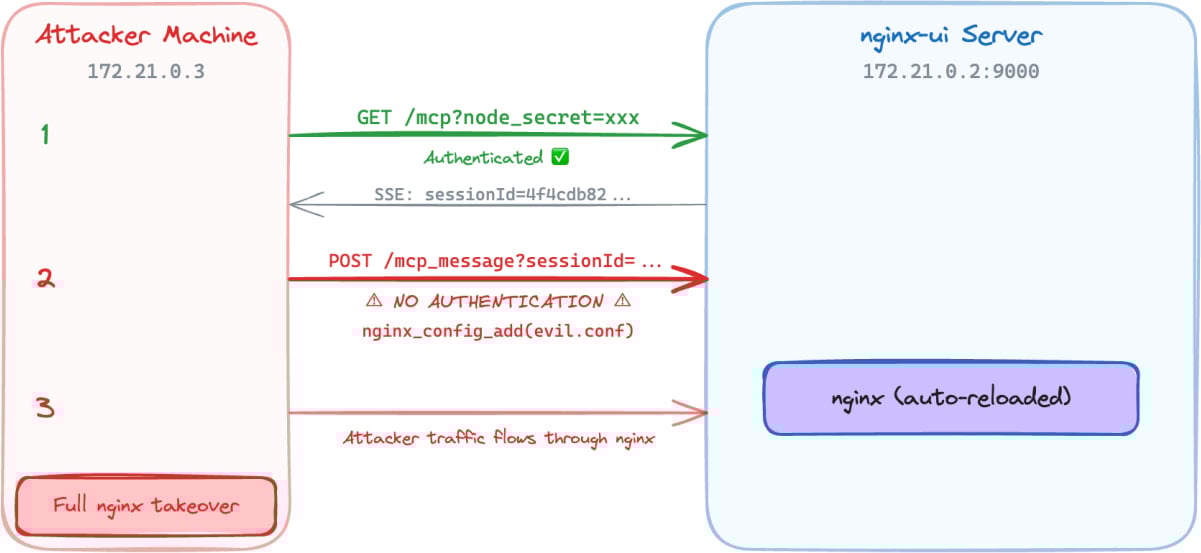
In a report today, Pluto Security’s Yotam Perkal says that exploitation only requires network access and is achieved by establishing an SSE connection, opening an MCP session, and then using the returned ‘sessionID’ to send requests to the ‘/mcp_message’ endpoint.
Advertisement
Overvie of the attack flow Source: Pluto Security
From there, attackers can invoke MCP tools without authentication and take the following actions:
Connect to the target nginx-ui instance
Send requests without any authentication headers
Gain access to all 12 MCP tools (7 destructive)
Read nginx configuration files and exfiltrate them
Inject a new nginx server block with malicious configuration
Trigger automatic nginx reload
Pluto Security’s demo shows that an attacker can use the unauthenticated MCP message endpoint to execute privileged nginx management actions, perform config injection, and ultimately take control of the nginx server, all without authentication.
Given the active exploitation status and the availability of public PoCs, system administrators are recommended to apply the available security updates as soon as possible. The latest secure version of nginx-ui is 2.3.6, released last week.
Automated pentesting proves the path exists. BAS proves whether your controls stop it. Most teams run one without the other.
This whitepaper maps six validation surfaces, shows where coverage ends, and provides practitioners with three diagnostic questions for any tool evaluation.
The LCD era on Apple’s iPad Air may finally be over next year. According to a new report by the South Korean outlet ET News, Apple is gearing up to give the iPad Air the most-awaited upgrade: an OLED display.
Per the publication, Samsung Display is preparing to manufacture OLED panels for the next-generation iPad Air. Mass production is expected to begin around the end of this year or the beginning of next year (in January 2027).
Apple
Why is this a big deal?
If everything goes well, Apple may release the updated iPad Air in the first half of 2027, likely between March and May. This is a bigger deal than it sounds. The iPad Air is a mid-range tablet that features one of the most capable chipsets in the segment, along with a clean iOS experience.
However, it’s held back by the LCD display, which is limited to 60Hz, while tablets in the market (around the same price) offer OLED displays that support higher refresh rates. The top-tier iPad Pro has also enjoyed an OLED panel for two years.
Bringing OLED to the Air will deliver richer contrast, deeper blacks, and more accurate colors, effectively closing a significant visual gap between Apple’s mid-range and premium tablet tiers. Once the update lands, Apple’s entire iPad lineup will feature OLED panels, except the baseline iPad.
Advertisement
Apple
What’s the catch, though?
The OLED panel that’s headed to the 2027 iPad Air could use a single-stack LTPS structure, which is cheaper than the pricier tandem OLED panel found on the iPad Pro. If true, this could result in noticeable compromises.
For instance, the OLED iPad Air might miss out on ProMotion 120Hz support; the display will most certainly be locked at 60Hz (maintaining the company’s upsell hierarchy). While this won’t be an issue for everyday users, who use the iPad for streaming, browsing, or taking notes, gamers might want to stick with the iPad Pro.
Anyways, iPad’s OLED jump will still feel transformative, especially for buyers who’ve used the entry-level or the mid-range iPads for years.
It seems like a daunting task to buy a new car right now, with the average price higher than ever before. Tariffs, wars, and rising gas prices are constant talking points. While it’s true that you may pay more for a new car in 2026, the experts at Kelley Blue Book think it’s still a pretty good time to buy — you just need to shop smarter.
The average price of a new car was over $49,000 in February 2026, a 3.4% increase from prices a year ago. Kelley Blue Book added that this is actually pretty shocking inflation. However, this is due to consumers going for more expensive vehicles — namely full-size trucks. These buyers paid an average over $66,000 in February 2026 but removing them from the equation brought the average new car purchase down to $39,000. “This tells a very different affordability story,” said Executive Analyst Erin Keating.
Basically, you can still find pretty affordable options if you want them. Compact SUV buyers paid $36,807 on average in February 2026 for vehicles like the 2026 Honda CR-V at $32,370, the 2026 Mazda CX-50 at $31,395, and the 2026 Toyota RAV4 at $33,350. These are reliable, efficient options with plenty of modern tech without all the added costs of luxury SUVs.
Advertisement
Have tariffs made new cars more expensive in 2026?
fotokaleinar/Shutterstock
While you can find affordable options in 2026, there is still some uncertainty in the air. The Trump Administration’s tariffs cost automakers nearly $35 billion — with carmakers paying between 15% and 25% on imported vehicles depending on the country they are coming from. While the tariffs were ruled to be illegal by the Supreme Court in February 2026, they continue to exist.
With the tariffs creating a sense of confusion and continuing to cost automakers money, it’s no surprise to see prices shifting. Some vehicles held off on raising prices when they believed the tariffs would end, but now, with the uncertain future ahead of them, BMW, Ferrari, Genesis, Hyundai, Mazda, Porsche, Volkswagen, and others have increased vehicle prices. Destination fees also reached an all-time high in February 2026, allowing some automakers to seemingly not raise the MSRP of its vehicles — but destination fees cannot be negotiated.
Advertisement
What about used vehicles?
Scharfsinn86/Getty Images
While new vehicle prices have gone up in February 2026, used car prices actually went down. According to Kelley Blue Book, the average used car listing in February was $25,287, down 1.1% from January. This is due to supply and demand — fewer people are buying used cars. However, tax refund season (April) could see an increase in potential buyers.
You can expect more used EVs in the marketplace than ever before. However, don’t expect to find super cheap used cars like you could in the past. Older vehicles under $15,000 are in short supply, warned Kelley Blue Book. Only 31 days’ worth of used cars under $15,000 were left by the end of January 2026. Used car prices may even go up due to tariffs, since more drivers will be turning to the used car market as new car prices continue to increase and become impossible to afford. At least this means you can expect more when you sell your own used car privately or trade it in.
Having demonstrated that it has the operational capability to transport humans safely to the moon and back, the United States is moving on to its next major aim: It wants nuclear reactors in orbit and on the lunar surface by 2030. For such a feat, the National Aeronautics and Space Administration will have to work in conjunction with the Department of Defense and the Department of Energy.
In a post on X, the White House Office of Science and Technology Policy (OSTP) unveiled a document with new guidelines for federal agencies to establish the space nuclear technology road map for the coming years. This, they say, will ensure “US space superiority.”
At present, space instruments use solar power to operate. However, this is considered impractical for more complex purposes. Although technically there is always sunlight, the power is intermittent and almost always requires bulky batteries to store it.
Reactors produce fairly continuous energy for years through nuclear fission. They can also be used for so-called nuclear electric propulsion. Continuous output makes them the most viable option for lunar base subsistence, but they can also allow spacecraft to undertake long or complex missions without worrying about depleting a limited supply of chemical fuel.
Advertisement
Nuclear technology, in short, makes it possible to go farther, with more payload, for longer, and with fewer constraints.
According to the memorandum, the US goal is to put a medium-power reactor in orbit by 2028, with a variant designed for nuclear electric propulsion, and a first functional large reactor on the surface of the moon by 2030. To achieve this, both NASA and the Pentagon will develop energy technologies in parallel, using the current strategy of competition among contractors.
The reactors will have to be modular and scalable, and will have to include applications for both future life on the moon and space propulsion. For its part, the DOE will have to ensure that these projects have the fuel, infrastructure, and safety features necessary to achieve their objectives. In addition, the agency will evaluate whether the industry has the capacity to produce up to four reactors in five years.
The plan contemplates technologies that produce at least 20 kilowatts of electricity (kWe) for three years in orbit and at least five years on the lunar surface. In the meantime, they should have a design capable of raising power to 100 kWe. The first designs should arrive within a year.
Advertisement
Finally, the order tasks the OSTP with creating a road map for the initiative, noting obstacles and recommendations for addressing them.
“Nuclear power in space will give us the sustained electricity, heating, and propulsion essential to a permanent presence on the moon, Mars, and beyond,” OSTP posted. For his part, NASA administrator Jared Isaacman posted, “The time has come for America to get underway on nuclear power in space.” The message was followed by an emoji of a US flag.
The plan provides a common framework for each agency to work within. In the background, the race for space infrastructure is evidence of technological competition with China, which is also seeking advanced energy capabilities for the moon.
This story originally appeared inWIRED en Españoland has been translated from Spanish.
Apple’s MacBook Neo is a $600 (or $500 for students) shot across the bow at affordable Windows laptops, and it seems like Microsoft has ready its first response. The newly announced “Microsoft College Offer” is a bundle of Microsoft 365 Premium, Xbox Game Pass Ultimate, custom Xbox controller and discounted laptop that the company thinks could woo students away from Apple’s new deal.
With the purchase of a discounted machine directly from Microsoft, retailers like Amazon and Best Buy or PC makers like HP, ASUS and Acer, you can get what the company says is an extra $500 of value from its bundle. The laptop deals include a Lenovo IdeaPad Slim 3x with a Snapdragon X chip, 16GB of RAM and 256GB of storage for $500 from Best Buy, around $250 off the laptop’s usual $750 price. Or if you wanted something even cheaper, Walmart is selling an HP Omnibook 3 for $429, a discount of $270 off its usual $699 price. Microsoft is less generous with the deals on its own laptops and tablets, but you can even get a discount on a Surface Laptop as part of the offer.
A discounted laptop is great, but where the value of the Microsoft College Offer gets harder to define is with the services the company is packing in. Getting what would normally be a $200 year-long subscription to Microsoft 365 Premium for free is a meaningful deal, but many colleges give their students access to Microsoft’s apps (and other software) with the cost of their tuition. A year of Xbox Game Pass Ultimate, which costs $30 per month as of October 2025, sounds like significant savings, but the offer is only valid for new subscribers. That leaves the free custom Xbox controller as the simplest bonus of the bunch, a value of around $76.
Windows PC makers are expected to make more serious attempts to compete with the Neo over the next year. For now, though, the Microsoft College Offer isn’t exactly a bad deal, but it’s certainly not as straightforwardly appealing as an Apple-quality laptop for $500 with a college discount.
Advertisement
The Microsoft College Offer is available to students starting April 15 and runs through June 30, 2026. Microsoft says redemption of the full bundle of services and accessories it’s offering needs to happen by July 31, 2026.
A new NYT Strands puzzle appears at midnight each day for your time zone – which means that some people are always playing ‘today’s game’ while others are playing ‘yesterday’s’. If you’re looking for Wednesday’s puzzle instead then click here: NYT Strands hints and answers for Wednesday, April 15 (game #773).
Strands is the NYT’s latest word game after the likes of Wordle, Spelling Bee and Connections – and it’s great fun. It can be difficult, though, so read on for my Strands hints.
Want more word-based fun? Then check out my NYT Connections today and Quordle today pages for hints and answers for those games, and Marc’s Wordle today page for the original viral word game.
Advertisement
SPOILER WARNING: Information about NYT Strands today is below, so don’t read on if you don’t want to know the answers.
Article continues below
NYT Strands today (game #774) – hint #1 – today’s theme
What is the theme of today’s NYT Strands?
• Today’s NYT Strands theme is… This is not working
NYT Strands today (game #774) – hint #2 – clue words
Play any of these words to unlock the in-game hints system.
Advertisement
NEST
BRUT
PURE
SLEPT
MATE
FIRED
NYT Strands today (game #774) – hint #3 – spangram letters
How many letters are in today’s spangram?
• Spangram has 10 letters
NYT Strands today (game #774) – hint #4 – spangram position
What are two sides of the board that today’s spangram touches?
First side: left, 1st row
Last side: right, 7th row
Advertisement
Right, the answers are below, so DO NOT SCROLL ANY FURTHER IF YOU DON’T WANT TO SEE THEM.
Advertisement
NYT Strands today (game #774) – the answers
(Image credit: New York Times)
The answers to today’s Strands, game #774, are…
HOBBY
RECREATION
SIDELINE
INTEREST
PASTIME
SPANGRAM: JUSTFORFUN
My rating: Hard
My score: 1 hint
I completely got the wrong end of the stick with today’s theme and took “this is not working” literally as I searched for words connected to things being broken.
Sign up for breaking news, reviews, opinion, top tech deals, and more.
Fortunately, my fruitless search also included plenty of non-game words and a hint of HOBBY set me on the path of discovering more words associated with free time pursuits, including RECREATION — which was so long I was convinced it would turn yellow and become the spangram.
Instead, today’s yellow snake was JUSTFORFUN, which is possibly where I am going wrong with my hobbies as all of them — cycling, puzzles and watching football/soccer — involve more pain than fun.
Advertisement
Yesterday’s NYT Strands answers (Wednesday, April 15, game #773)
TOPAZ
TURQUOISE
OPAL
GARNET
DIAMOND
PERIDOT
SPANGRAM: BIRTHSTONE
What is NYT Strands?
Strands is the NYT’s not-so-new-any-more word game, following Wordle and Connections. It’s now a fully fledged member of the NYT’s games stable that has been running for a year and which can be played on the NYT Games site on desktop or mobile.
I’ve got a full guide to how to play NYT Strands, complete with tips for solving it, so check that out if you’re struggling to beat it each day.
Nothing launched a genuinely useful app called Warp earlier today, with a simple idea: allowing Android users to share files, links, and copied texts directly to their Mac, Windows, or Linux machines without including any cables or convoluted workarounds.
Nothing announced the app for Chrome and Edge (Chromium-based web browsers) and Android smartphones, floating it on both the Chrome Web Store and the Google Play Store (via 9To5Google). However, a few hours later, the app is nowhere to be found, with the official listings returning errors.
Nothing
So, how did Warp actually work?
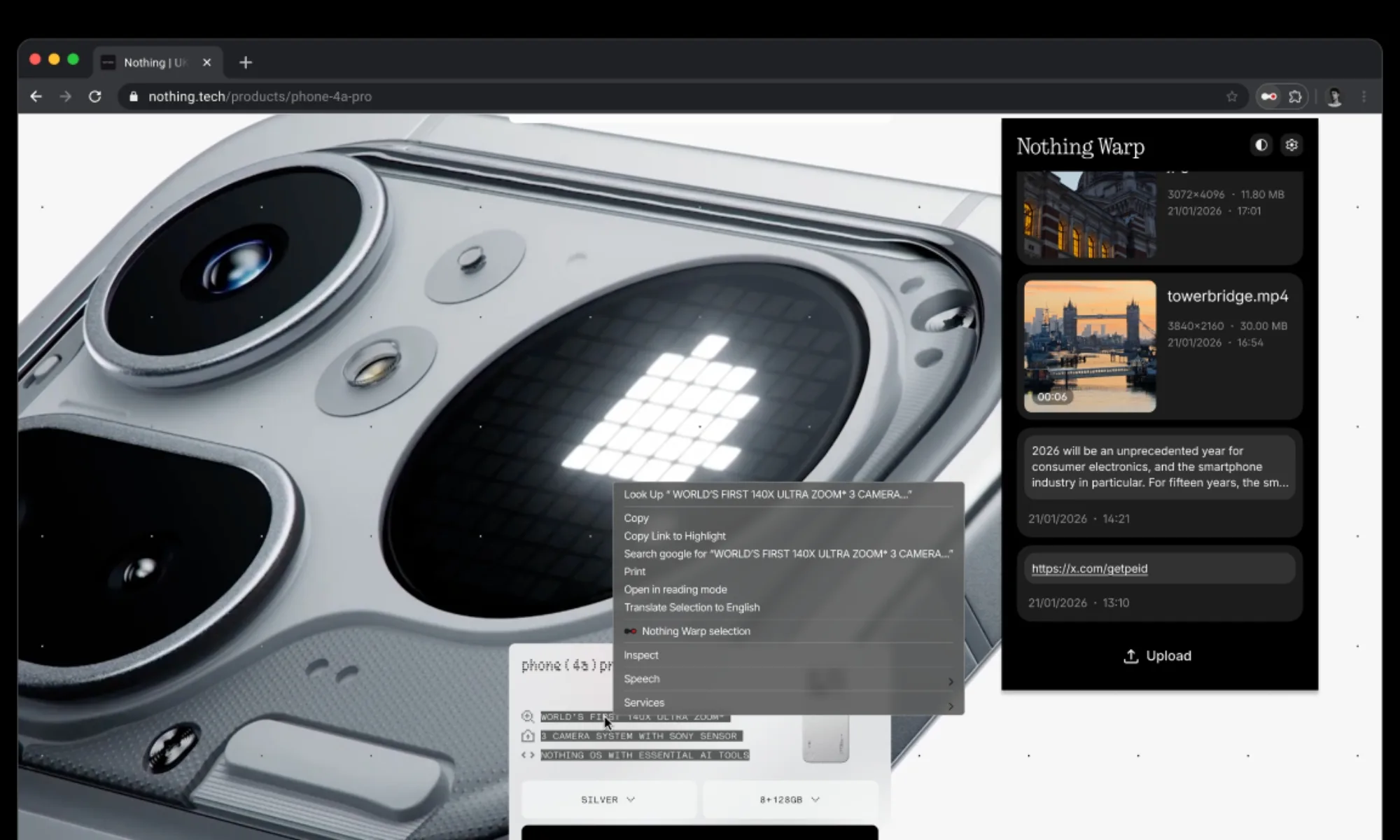
Nothing’s Warp app used Google Drive as a data transfer bridge, keeping files within users’ accounts rather than routing them via Nothing’s servers. From their phones, users picked any file or link (via the Android share sheet) and sent it through Warp.
On the receiving end, a desktop, the browser extension added a right-click “Send with Nothing Warp” option, along with an upload button. Once a file was received, users still had to manually download it.
In other words, Nothing’s Warp wasn’t using peer-to-peer transfer (like Quick Share or AirDrop), but a cloud relay with some branding on top.
Advertisement
Digital Trends
Did the Nothing Warp app disappear already?
That’s the part nobody has explained (yet). Within hours of launch, the official community post announcing the app returned a “This page doesn’t exist” error. The app isn’t listed on the Play Store or the Chrome Web Store anymore.
One Reddit user claims that the app bears a striking resemblance to an open-source tool, which could be one of the reasons for the potential takedown. However, this remains unconfirmed speculation at the moment, as the company hasn’t issued an official statement about the removal.
Another user downloaded the app’s setup, but couldn’t run it due to a Play Store warning, which is usually issued for safety purposes. Even so, the app is reportedly working fine for users who installed it earlier today on their smartphones and laptops.
Warp’s rapid rise and fall remind me of how the Nothing Chat app, an iMessage-bridging solution, was pulled days after launch due to security concerns. If the removal was precautionary, Nothing might go ahead with a refined version of the app.
The online leak of a full version of Avatar: Aang, The Last Airbender—a highly anticipated animated film in a multimedia fantasy franchise—has divided passionate fans while upsetting those who spent years working on the film.
The leaks began on X late on Saturday night, about six months before Aang was scheduled to premiere on Paramount+. User @ImStillDissin posted two short clips from the film. “Nickelodeon accidentally emailed me the entire Avatar aang movie,” he claimed. He also threatened to stream the entire movie if Paramount didn’t release an official trailer, and he posted a still from the movie’s end credits, revealing previously undisclosed voice-over cast and roles. The media from @ImStillDissin’s posts were later hit with copyright strikes and removed.
But within 48 hours, links to download the full movie appeared on 4chan and X, where some users also directly streamed the film. Across the web, fans said they had successfully pirated and watched what appeared to be a nearly finished and “beautiful” animated film.
While some argued that Paramount deserved to be punished because of certain creative and marketing decisions around the movie, others noted what a blow the leak was to the animators and production crew. A number of those team members took to social media to convey their sadness and frustration.
Advertisement
“We worked on the aang movie for years with the expectation that’d [sic] we’d get to celebrate all of our hard work in theaters. Just to see people unceremoniously leak the film and pass our shots around on twitter like candy,” animator Julia Schoel wrote Tuesday on X.
The user behind @ImStillDissin, who would not reveal his real name due to fear of legal repercussions, tells WIRED that he obtained the movie almost by chance and did not expect his posts to set off such a crisis in the entertainment world. “When I posted those clips I was purely trolling,” he says. “I was expecting a day of clout farming at best, not for the whole thing to blow up like this.”
(While WIRED has done its due diligence in verifying that the person speaking to us was behind the @ImStillDissin X account, we acknowledge that the hacking community is known to troll.)
According to @ImStillDissin, a screen-grabbed version of Avatar: Aang, The Last Airbender was circulating among people he knew from his days in the hacking community, one of whom shared it with him. “Broadly speaking, the supply chain for movies and TV is rife with insecure companies and vendors and lax checks,” he claims. He notes that two different SpongeBob SquarePants movies leaked months before their release dates in 2024. “Someone on 4chan who wasn’t happy at me drip-feeding stuff posted a copy of a draft script [of the new Avatar film] from like two years back,” says @ImStillDissin.
Advertisement
Neither Nickelodeon nor its parent company Paramount have confirmed a hack had taken place, nor have they issued a statement on the matter. They also did not respond to requests for comment.
Originally announced in 2021, Avatar: Aang, The Last Airbender marked the first production for Avatar Studios, a division of Nickelodeon’s animation department.
Some people felt justified in pirating and sharing the movie due to the recasting of voice actors. Last year, during a Reddit AMA, casting director Jenny Jue wrote that the voice cast from the Avatar TV show that aired on Nickelodeon in the 2000s was not returning due to efforts to “match actors’ ethnic/racial background to the characters they’re portraying.”
Boston Dynamics has integrated Google DeepMind into its robotic dog Spot, giving it more autonomous reasoning for industrial inspections like spotting spills and reading gauges. Spot can also now recognize when to call on other AI tools. IEEE Spectrum reports: Boston Dynamics is one of the few companies to commercially deploy legged robots at any appreciable scale; there are now several thousand hard at work. Today the company is announcing that its quadruped robot Spot is now equipped with Google DeepMind’s Gemini Robotics-ER 1.6, a high-level embodied reasoning model that brings usability and intelligence to complex tasks.
[T]he focus of this partnership is on one of the very few applications where legged robots have proven themselves to be commercially viable: inspection. That is, wandering around industrial facilities, checking to make sure that nothing is imminently exploding. With the new AI onboard, Spot is now able to autonomously look for dangerous debris or spills, read complex gauges and sight glasses, and call on tools like vision-language-action models when it needs help understanding what’s going on in the environment around it. “Advances like Gemini Robotics-ER 1.6 mark an important step toward robots that can better understand and operate in the physical world,” Marco da Silva, vice president and general manager of Spot at Boston Dynamics, says in a press release. “Capabilities like instrument reading and more reliable task reasoning will enable Spot to see, understand, and react to real-world challenges completely autonomously.”
You can watch a demo of Spot’s new capabilities on YouTube.

































































You must be logged in to post a comment Login