This latest investment is in addition to the $8bn Amazon has already invested in the AI company.
In line with a strategy to expand AI infrastructure, Amazon has announced plans to invest up to $25bn into Anthropic – $5bn now and as much as $20bn in the future. To date, Amazon has invested $8bn in Anthropic and the AI start-up has also committed to spending more than $100bn over the next 10 years on Amazon’s cloud technologies.
This will include current and future generations of Trainium, which is Amazon’s custom AI chips, and tens of millions of Graviton cores, Amazon’s CPU chip. Additionally, Anthropic will secure up to 5GW of capacity to train and power their AI models, including significant Trainium3 capacity which is expected to come online this year.
Commenting on the announcement, Andy Jassy, the CEO of Amazon, said: “Anthropic’s commitment to run its large language models on AWS Trainium for the next decade reflects the progress we’ve made together on custom silicon, as we continue delivering the technology and infrastructure our customers need to build with generative AI.”
Advertisement
The news is hot on the heels of Anthropic’s plans to release Mythos, the platform’s latest model, to UK financial institutions. The model was launched as part of a limited release earlier this month, with access granted to big businesses and financial organisations to bolster their security. Reportedly, Mythos vastly outperforms other AI models in vulnerability detection and exploitation.
Amazon has been investing heavily in AI infrastructure as of late, with a $50bn contribution to a recent OpenAI funding round that closed at $110bn. As part of the round, Nvidia invested $30bn and SoftBank invested $30bn. The investment brought OpenAI from a $500bn valuation to a $730bn pre-money valuation.
OpenAI also has an additional deal with Amazon in which the organisation will utilise 2GW of computing capacity powered by Amazon’s in-house Trainium chips.
Don’t miss out on the knowledge you need to succeed. Sign up for the Daily Brief, Silicon Republic’s digest of need-to-know sci-tech news.
A previously undocumented data-wiping malware dubbed Lotus was used last year in targeted attacks against energy and utilities organizations in Venezuela.
The malware was uploaded to a publicly available platform in mid-December from a machine in Venezuela and has been analyzed by researchers at Kaspersky.
Before the cripling stage, the attacker relies on two batch scripts that prepare the system for the final payload by weakening defenses and obstructing normal operations.
According to the researchers, the Lotus data-wiping malware is designed to completely destroy compromised systems by overwriting physical drives and eliminating recovery options.
“The wiper removes recovery mechanisms, overwrites the content of physical drives, and systematically deletes files across affected volumes, ultimately leaving the system in an unrecoverable state,” Kaspersky says in a report today.
Advertisement
Given the timing, the observed activity aligns with geopolitical tensions in the region, which culminated this year on January 3 with the capture of Venezuela’s then-president, Nicolás Maduro.
Around mid-December 2025, the state-owned oil company Petróleos de Venezuela (PDVSA) suffered a cyberattack that disabled its delivery systems. The organization blamed the United States for the incident.
It should be noted that there is no public evidence indicating that PDVSA’s systems were wiped in the attack or details about the nature of the attack.
Preliminary activity
Kaspersky’s report notes that the attacks begin with the execution of a batch script (OhSyncNow.bat) that disables the Windows ‘UI0Detect’ service, and performs an XML file check to coordinate execution across domain-joined systems.
Advertisement
A second-stage script (notesreg.bat) is executed when certain conditions are met. It enumerates users, disables accounts via password changes, logs off active sessions, disables all network interfaces, and deactivates cached logins.
The malicious code then enumerates drives and runs ‘diskpart clean all’ to overwrite them with zeros. It also uses ‘robocopy’ to overwrite directory contents, Kaspersky found.
In the next phase, it calculates the free space and uses ‘fsutil’ to create a file that fills the disk, making it harder to restore the wiped data.
After preparing the environment for data destruction and performing some wiping actions itself, the batch script decrypts and executes the Lotus wiper as the final payload.
Advertisement
Lotus wiper deployment
The Lotus wiper operates at a lower level, interacting with disks via IOCTL calls, retrieving the disk geometry, clearing USN journal entries, wiping restore points, and overwriting physical sectors, not just logical volumes.
The malware performs multiple actions, summarized as follows:
Enables all privileges in its token to gain administrative-level access.
Deletes all Windows restore points using the Windows System Restore API.
Wipes physical drives by retrieving disk geometry and overwriting all sectors with zeroes.
Clears the USN journal to remove traces of file system activity.
Deletes files by zeroing their contents, renaming them randomly, and removing them (or scheduling deletion on reboot if locked).
Repeats cycles of drive wiping and restore point deletion multiple times.
Updates disk properties using IOCTL_DISK_UPDATE_PROPERTIES after the final wipe.
Kaspersky suggests that system administrators should monitor for NETLOGON share changes, UI0Detect manipulation, mass account changes, and disabling of network interfaces, which are all precursor activities.
They say that unexpected usage of ‘diskpart,’‘robocopy,’ and ‘fsutil’ is also a red flag.
A general recommendation against wipers and ransomware is to maintain regular offline backups whose restorability is frequently validated.
Advertisement
AI chained four zero-days into one exploit that bypassed both renderer and OS sandboxes. A wave of new exploits is coming.
At the Autonomous Validation Summit (May 12 & 14), see how autonomous, context-rich validation finds what’s exploitable, proves controls hold, and closes the remediation loop.
The Apple Watch‘s blood oxygen sensor has been at the center of what feels like a never-ending tennis match of legal back-and-forth.
In 2020, the Apple Watch Series 6 launched with the sensor that measures your blood’s oxygen saturation (SpO2), which is how much oxygen red blood cells pick up from your lungs and transport to the rest of your body. That same year, global medical technology company Masimo filed a lawsuit claiming that Apple’s sensor infringed its patents. In 2023, the US International Trade Commission sided with Masimo and imposed an import ban on Apple Watch Series 9 and Ultra 2 models.
However, on Friday, the ITC declined Masimo’s request for another import ban on the Apple Watch and said it wouldn’t review a preliminary ruling finding that the redesigned Apple Watch doesn’t infringe Masimo’s patents. This is a major win for Apple.
Advertisement
Unless Masimo decides to appeal the decision, Apple can bring blood oxygen monitoring back to its devices.
But based on the history of this case, it may not be the end of this match.
The history of Apple’s blood oxygen ban
The ITC became involved in the Masimo and Apple legal battle in 2021, and in January 2023, it upheld that Apple violated Masimo’s patents. Then, in December 2023, the ITC banned Apple from importing its watches, including the Series 9 and Ultra 2, into the US.
Ahead of the Apple Watch Series 11 launch, Apple reintroduced blood oxygen sensing in August 2025, which was approved by the US Customs and Border Protection. It got around the ban by using a paired iPhone to display blood oxygen levels instead of the Apple Watch. Masimo sued US Customs over this decision.
If relaunched, you’d be able to view your blood oxygen levels in the iPhone’s Health app.
Apple
In November 2025, a jury for the US District Court for the Central District of California found that Apple infringed one of Masimo’s patents and awarded the company $634 million in damages. Apple told AppleInsider that it plans to appeal, claiming that the patent expired in 2022.
Advertisement
Though the ITC has rejected another ban on Apple’s blood oxygen feature and declined Masimo’s request to review the ruling in Apple’s favor, Masimo may continue the battle, especially given its November win, after which the company released a statement saying, “We remain committed to defending our IP [intellectual property] rights moving forward.”
An Apple representative didn’t immediately respond to a request for comment. Masimo declined to comment.
In the meantime, if your curiosity gets the best of you, you could always purchase a pulse oximeter. It’s a device that estimates your blood oxygen level by measuring the light that passes through your finger. No messy legal battles involved.
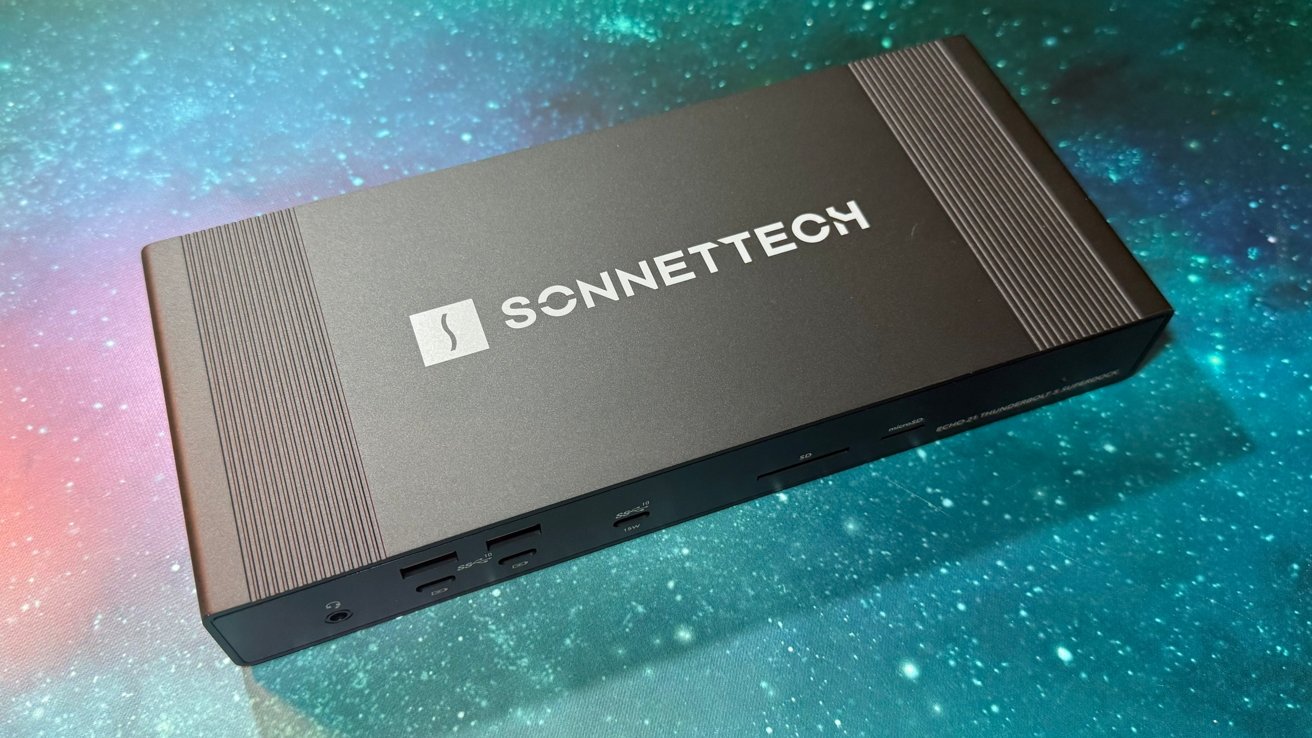
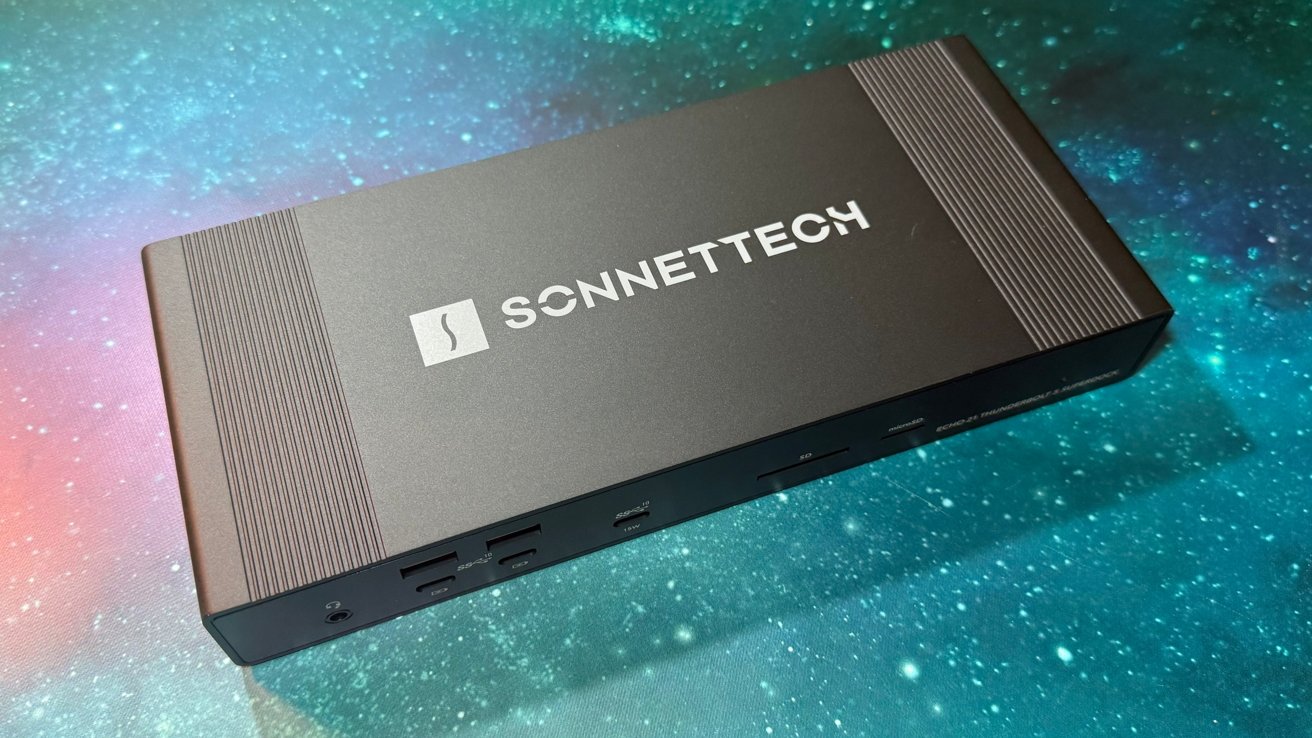
The Sonnet Echo 21 Thunderbolt 5 SuperDock is a fantastic port and storage expansion for new Mac users, and isn’t pinched for bandwidth.
Sonnet Echo 21 Thunderbolt 5 SuperDock
We get a lot of docks in for review. A lot. In many cases, we see docks with a lot of ports, but they connect over 10 gigabit per second USB-C. Worse, downstream ports are listed as providing that same 10 Gbit/sec. Continue Reading on AppleInsider | Discuss on our Forums
Redwood Materials has laid off around 135 employees, or roughly 10% of its workforce, as it restructures to better accommodate its growing energy storage business, TechCrunch has learned.
The cuts come just five months after Redwood cut 5% of its workforce, and three months after it closed a $425 million funding round that boosted the battery recycling company’s valuation to north of $6 billion, as TechCrunch previously reported.
It’s been a difficult time in the battery industry lately. Earlier this month, battery recycler Ascend Elements filed for Chapter 11 bankruptcy protection, citing “insurmountable” financial challenges. Some battery-makers have also restructured or gone out of business as the automotive industry in the U.S. has backed away from its most optimistic and ambitious plans to transition to electric vehicles.
But Redwood Materials founder and CEO JB Straubel told employees that this new round of cuts is not a sign that the company is heading down the same path.
Advertisement
“Redwood today is the strongest it’s ever been,” Straubel wrote in an email to the workers who weren’t laid off, according to a copy viewed by TechCrunch. “The materials business is well on its way to profitability and has an exciting roadmap ahead.”
Straubel noted that Redwood “continue[s] to dominate the US battery recycling market” but also touted the company’s “great momentum” in its new energy storage business. Redwood has recently announced deals with Crusoe AI and, most recently, electric automaker Rivian to provide recycled batteries that can be used to power those companies’ facilities. The company declined to comment beyond the contents of Straubel’s email.
In his message, Straubel wrote that “parts of the company have expanded faster than needed to support the direction” of Redwood. As a result, he said Redwood is making cuts across multiple divisions, including the engineering and operations organizations, according to an employee who was granted anonymity to discuss the layoffs.
Techcrunch event
Advertisement
San Francisco, CA | October 13-15, 2026
“We are confident that we can deliver on our critical projects with a smaller team that is more focused,” he wrote. “We have successfully adapted to changes in the market that have bankrupted many of our competitors.”
Advertisement
Straubel went on to write that he is “more excited than ever with our path ahead as we build the most integrated and cost-effective critical materials and energy storage business in the world.”
“This is a self-sustaining business and will continue to make this company more valuable over time. We have the team and the technology to do what no other company can,” he wrote.
Workers who were laid off were told by Redwood’s chief HR officer that the layoffs were made “to sharpen our focus, our work and the size of our teams to support the direction Redwood is going in the future,” according to a copy of her email, which was viewed by TechCrunch.
Employees who were laid off are receiving severance and paid health benefits, according to Straubel’s email, as well as “career transition assistance.”
Advertisement
“I am grateful to the approximately 135 employees who we say goodbye to today — they’ve all contributed to building Redwood,” he wrote.
When you purchase through links in our articles, we may earn a small commission. This doesn’t affect our editorial independence.
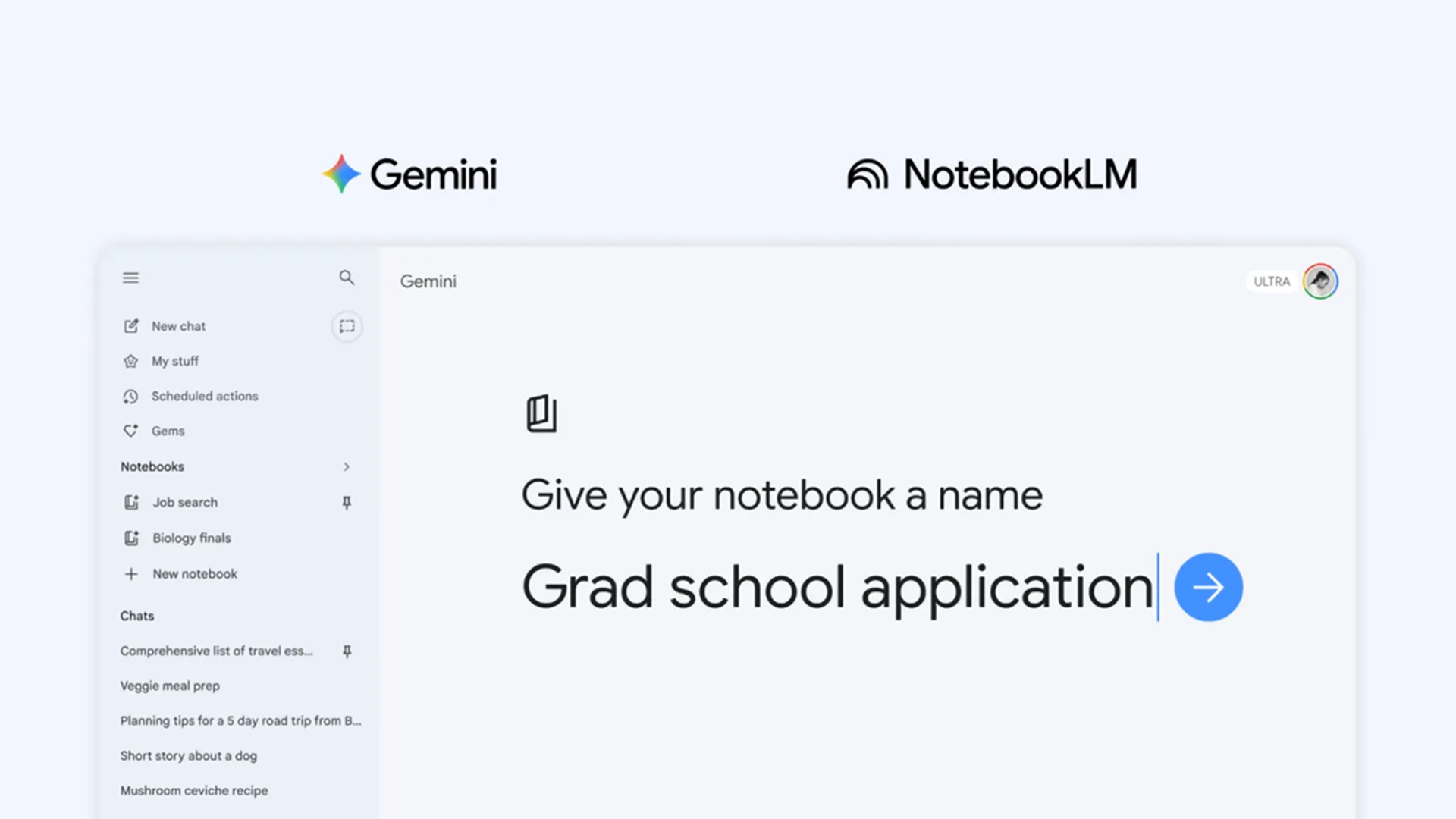
Google has made its Gemini Notebooks feature free for all users. Now, instead of starting over every time, you get a space where chats, files, and instructions live together and build on each other. Google describes these notebooks as personal knowledge bases, which is another way of saying Gemini can finally remember what you were doing and keep going.
Notebooks are great for the small, repeated things that usually fall apart because you have to keep re-explaining them. You don’t need them for big, complex projects, but once you start using them, you might just default to them when engaging with Gemini. To get the most out of Notebooks takes a few attempts, but here are some useful tips to make them the perfect way to have Gemini remember you and how you work.
1. Treat a notebook like your “ongoing life admin” space
(Image credit: Google)
This is a good tip for when you’ve used Gemini a lot already, but not Notebooks. Start by creating one notebook for the kind of tasks that never quite stay organized. Things like errands, reminders, subscriptions, and random to-dos. Drop in notes, paste in old chats, and add anything you would normally scatter across apps.
Advertisement
Article continues below
Then try a prompt like: “Based on everything in this notebook, organize my tasks for this week into a simple plan.” Remember that Gemini already has your messy, real-world context from previous interactions. The key is that you are not starting from zero.
Advertisement
The result feels practical in a way that normal AI responses do not. It reflects what you actually have to do and becomes a running record that gets easier to use over time.
2. Use it as a shared memory
Every day decisions tend to repeat themselves. What to order, what you liked last time, what you said you would try again. The Notebooks you make can keep track of all of that without any extra effort.
Add things like past orders, quick notes about meals, or even copied text messages. Then use a prompt such as: “Suggest dinner tonight based on what is already in this notebook.”
Advertisement
Sign up for breaking news, reviews, opinion, top tech deals, and more.
Because Gemini pulls from your actual history, the suggestions feel less random. The AI can spot patterns, avoid repeats, and put weight on things you already like. It might even remind you of something you like.
3. Clean up messy notes
Most people have a pile of notes that never quite turn into anything. A notebook is a good place to collect them without worrying about structure. Drop in everything as it comes to you.
Advertisement
Once there is enough material, try asking it to: “Turn everything in this notebook into a clear plan I can follow.” This could be anything from organizing a weekend to figuring out a new workout routine.
Gemini won’t just come up with something independently. It will reshape what is already there so that what you get is close to something you would have made yourself, just more organized.
Advertisement
4. Set the tone
(Image credit: RØDE)
One of the simplest but most effective uses of a notebook is setting instructions at the top. You can tell Gemini how you want responses to sound or be structured, and it will carry that forward.
You might write: “Keep responses concise, practical, and lightly conversational.” After that, you can just ask questions without restating them every time.
This works because notebooks store custom instructions alongside everything else. The effect is subtle, but the AI will feel more consistent, and you spend less time tweaking prompts just to get the right tone.
Advertisement
5. Make a lot of notebooks
(Image credit: Tosnail)
Gemini Notebooks really click when you stop trying to put everything in one place. Instead, create separate notebooks for different areas. One for daily tasks, one for planning, one for hobbies, and so on.
Then use prompts that assume that context. I don’t need any other details for a particular project in a notebook. I can just write: “Using this notebook, suggest what I should focus on next.” Because each notebook has a clear purpose, Gemini’s responses become more targeted.
Over time, each one becomes its own little world of tasks. You create spaces where projects can grow, rather than just organizing existing data. It’s still Gemini underneath, but now the AI can be much better at tracking what you are doing. It can pull from past chats, files, and instructions all at once, instead of treating each interaction as new.
That continuity is what changes the experience. The more you use a notebook, the more it starts to feel like it is working with you rather than responding to you.
Advertisement
The most useful AI upgrade may simply be better recall, rather than just bringing more power to bear on each answer.
Modders Delca and Trxye have spent years pouring their hearts into a fan project that reimagines legendary Tomb Raider adventures in side scroller fashion, which is a tall job for anyone, but they’ve pulled it off with flying colors. They’ve created 11 levels inspired by the series’ first three games, and you’ll be guiding Lara Croft through reinvented places such as Peru, Greece, Venice, and the sunken ship the Maria Doria, all of which have been updated with a 2D twist.
Delca had already dabbled in an official Tomb Raider Remastered collection, but when Trxye joined the team about a year ago, the two of them went back to the drawing board and started from scratch. That kind of attention has paid off handsomely, as new game feels like a love tribute to the originals, but with a unique twist all its own.
XBOX EXPERIENCE BROUGHT TO LIFE BY ROG The Xbox gaming legacy meets ROG’s decades of premium hardware design in the ROG Xbox Ally. Boot straight into…
XBOX GAME BAR INTEGRATION Launch Game Bar with a tap of the Xbox button or play your favorite titles natively from platforms like Xbox Game Pass…
ALL YOUR GAMES, ALL YOUR PROGRESS Powered by Windows 11, the ROG Xbox Ally gives you access to your full library of PC games from Xbox and other game…
The gameplay is just as you remember it, with Lara still able to run over platforms, dive into water, climb walls, and fight monsters with the same timing and weight as before. According to classical physics, she can still perform a swan dive that ends horribly if there is concrete waiting for her, and those traps will spring shut just as quickly as before. Secrets are still hidden in places that fans used to memorize (and then carefully avoid) back in the day.
Advertisement
The audio and visuals are all from the PlayStation era, so the soundtrack and Lara model are exactly what fans of the franchise would expect. In terms of gameplay, Delca and Trxye painstakingly selected 11 levels that take in a variety of environments, including rainforests, ancient ruins, freezing Antarctic bases, and the opulent halls of Atlantis. Each one has been painstakingly rebuilt level by level to operate precisely in the side scroller style, resulting in platforming sequences that demand precise leaps, fighting, and puzzles that take just as much careful thought as before.
The release date is slated for May 2026, and all you have to do is go to TRCustoms.org, the main site for Tomb Raider fan creations, and download the game with no account or purchase required. [Source]
OpenClaw exposures reveal thousands of internet accessible high risk systems
AI agents are being deployed with excessive permissions across critical environments
Remote code execution vulnerabilities expose most observed OpenClaw deployments
Agentic systems are moving quickly from experimentation into everyday workflows, yet recent findings suggest security practices are not keeping pace.
According to SecurityScorecard, thousands of OpenClaw deployments are exposed directly to the internet with minimal safeguards.
The team identified 40,214 internet-exposed OpenClaw instances in total, with 28,663 unique IP addresses hosting control panels accessible from anywhere on the internet.
Article continues below
Advertisement
Exposed AI agents become a hacker’s dream target
“The math is simple: when you give an AI agent full access to your computer, you give that same access to anyone who can compromise it,” the researchers stated.
Approximately 63% of observed deployments appear vulnerable to remote code execution, allowing attackers to take over the host machine without user interaction.
Advertisement
Of the exposures, there were three high-severity Common Vulnerabilities and Exposures affecting OpenClaw, with CVSS scores ranging from 7.8 to 8.8.
Public exploit code is already available for all three vulnerabilities, meaning attackers do not need advanced skills to compromise exposed systems.
Sign up to the TechRadar Pro newsletter to get all the top news, opinion, features and guidance your business needs to succeed!
The research also found that 549 exposed instances correlate with prior breach activity, and 1,493 are associated with known vulnerabilities that compound the risk for users.
Advertisement
The exposed deployments are heavily concentrated in major cloud and hosting providers, indicating repeatable and easily replicated insecure deployment patterns.
The problem is not the AI’s capabilities but the access and permissions granted to these systems without proper security controls.
Advertisement
“In practice, because it was written by AI, security wasn’t a dominating feature in the development process,” said Jeremy Turner, VP of Threat Intelligence at SecurityScorecard.
“For the folks that want to use the more agentic AI systems, you really need to take careful consideration in what integrations you support and what permissions you actually give.”
Many users are configuring these bots with personal names and company names, revealing exactly who is using these AI tools and making them attractive targets for attackers.
Any time a user connects an AI agent to a platform, they are giving it an identity with specific permissions.
Advertisement
That identity may be able to post content, access email, read files, or interact with other systems on the user’s behalf.
“The risk isn’t that these systems are thinking for themselves,” Turner said. “It’s that we’re giving them access to everything.”
“It’s like handing your laptop to a stranger on the street and hoping nothing bad happens… Any of the communications… on that device… are going to be interfaces from untrusted third parties that can… take certain actions.”
A compromised agent could be instructed to transfer funds, delete files, or send malicious messages without raising immediate alarms because the behavior appears legitimate.
Advertisement
Unfortunately, the report reveals a fundamental disconnect between AI adoption and security practices.
Users are being asked to give these agents broad system access, and in many cases, that has already led to data exposure, unintended actions, and loss of control.
“Don’t just blindly download one of these things and start using it on a system that has access to your whole personal life. Build in some separation and run some experiments of your own before you really trust the new technology to do what you want it to do,” Turner said.
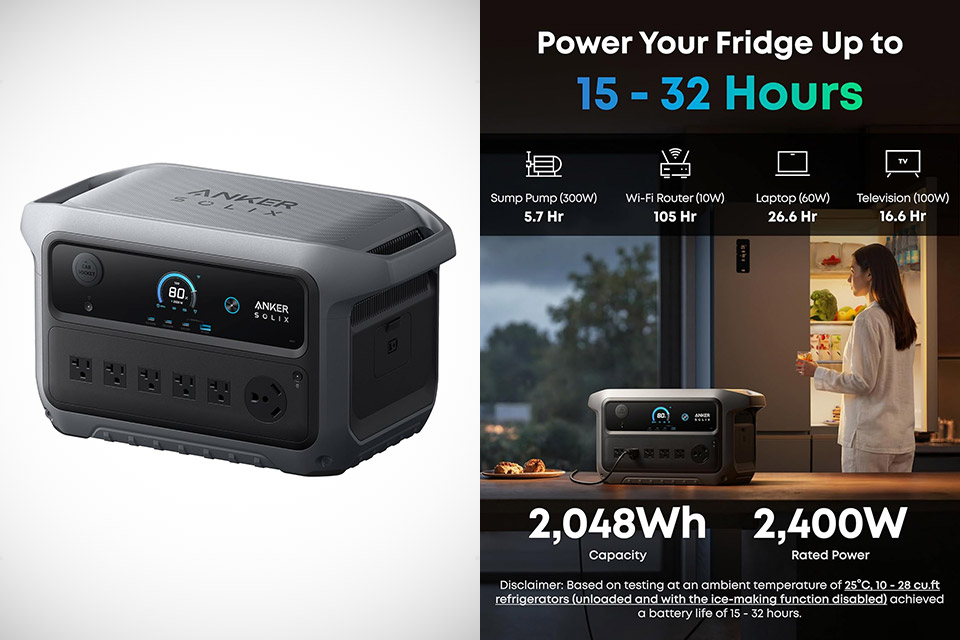
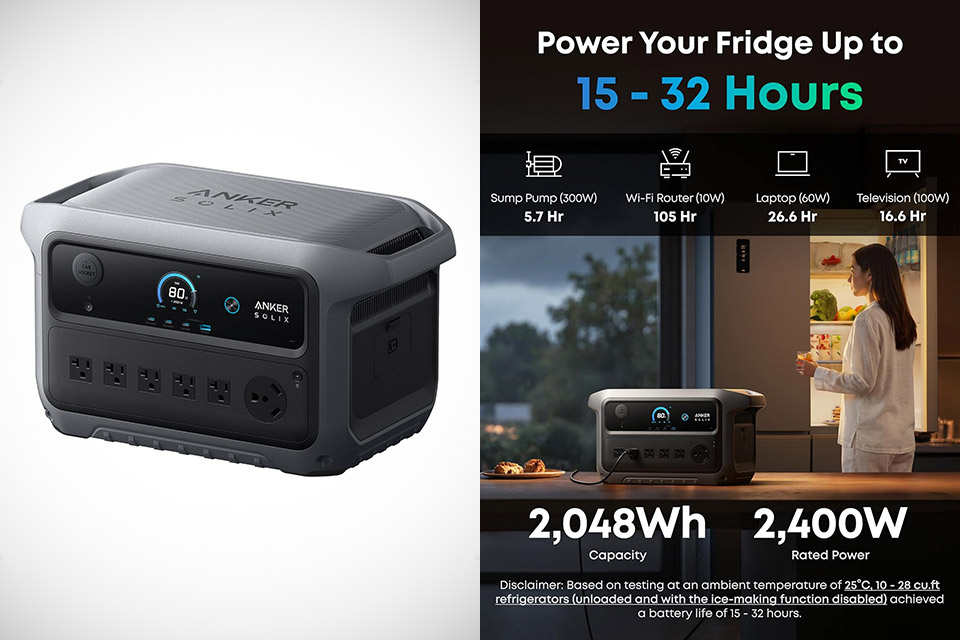
People often talk about finding value when a product simply works for you and does not involve a significant trade-off in performance or cost. The Anker Solix C2000 Gen 2 portable power station, priced at $799.99 (was $1,499), has a capacity of 2,048 watt-hours and is powered by lithium iron phosphate cells that can withstand thousands of charge cycles without trouble. With so much energy saved, you can power a conventional dual-door fridge for up to 32 hours on a full charge.
The output is consistent at 2,400 watts and can reach 4,000 watts, so using a window air conditioner, power tools, or small appliances will not disrupt your power supply. Five regular AC outlets will handle most household plugs, plus there’s an extra RV-style connector and a slew of USB connections to keep your phone, laptop, and lights all charged at the same time.
Charging is also quite flexible, as a typical wall socket will charge the unit from empty to full in just 58 minutes. Solar charging accepts up to 800 watts, and adding a wall power supply accelerates the process even further. If you’re on the road, the auto alternator charging works exactly as you’d think, and there are five different ways to top it off, ensuring that downtime is minimal. What really stands out in real-world applications is efficiency, and this isn’t just about raw statistics. The standby drain is minimal, around 9 watts, allowing the station to be ready for weeks without depleting its own battery.
It’s also pretty nice to know that the unit is small and light enough to toss in the car trunk or carry across a campsite without breaking your back, weighing in at 41.7 pounds and measuring roughly 18 by 10 by 10 inches, making it much smaller and lighter than some of the other units with the same capacity. If you need additional power in the future, simply add another battery, doubling the total capacity to 4,096 watt-hours, eliminating the need to purchase a new system. During a power outage, the operation can be operated quietly in your bedroom or living area. The app allows you to check the battery level, predict the runtime, and turn on or off the ports remotely, allowing you to keep an eye on things even when you are not present.
France Titres, the government agency in France for issuing and managince administrative documents has disclosed a data breach after a threat actor claimed the attack and stealing citizen data.
Also known as Agence nationale des titres sécurisés (ANTS), the administrative body operates under the French Ministry of the Interior, serving as the managing authority for official identity and registration documents in France. This includes driver’s licenses, national ID cards, passports, and immigration documents.
According to an announcement the agency published yesterday, the attack occurred last week, and while the investigation is still ongoing, several data types for an undisclosed number of individuals may have been exposed.
“On Wednesday, April 15, 2026, the National Agency for Secure Documents (ANTS) detected a security incident that may involve the disclosure of data from individual and professional accounts on the ants.gouv.fr portal,” reads ANTS’s announcement.
The types of data that may have been exposed are:
Advertisement
Login ID
Full name
Email address
Date of birth
Unique account identifier
Postal address (for some)
Place of birth (for some)
Phone number (for some)
ANTS stated that it is currently in the process of notifying those identified as impacted.
The agency noted that the exposed information does not allow unauthorized access to its electronic portals. However, the same data can be used in phishing and social engineering attacks.
“No action is required from users. However, they are advised to remain highly vigilant regarding any suspicious or unusual messages they may receive (SMS, phone calls, emails, etc.) that appear to come from ANTS,” the agency warned.
ANTS has notified the data protection authority (CNIL), the Paris Public Prosecutor, and has also involved the national cybersecurity agency (ANSSI) in the response effort. The agency warned that the sale or dissemination of the data is illegal.
19 million records claimed stolen
On April 16, a threat actor using the moniker ‘breach3d’ claimed the attack on hacker forums claimed the attack on ANTS, alleging to be holding up to 19 million records.
Advertisement
The threat actor claims that the stolen data contains full names, contact details, birth data, home addresses, account metadata, and gender and civil status.
The data has been offered for sale for an undisclosed amount, so it has not been broadly leaked yet.
ANTS saus that user do not need to take any action but recommends exercising “extreme caution” about suspicious or unusual communication over SMS, voice, and emails appearing to come from the agency.
BleepingComputer has contacted ANTS to ask about the threat actor’s allegations, but we have not received a response as of publishing.
Advertisement
AI chained four zero-days into one exploit that bypassed both renderer and OS sandboxes. A wave of new exploits is coming.
At the Autonomous Validation Summit (May 12 & 14), see how autonomous, context-rich validation finds what’s exploitable, proves controls hold, and closes the remediation loop.
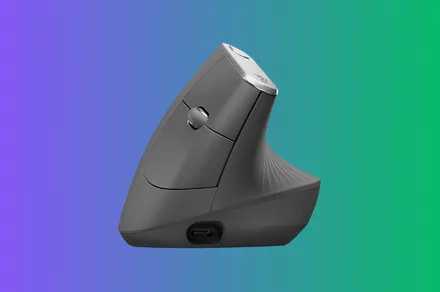
If you spend most of your working day at a mouse, the Logitech MX Vertical is one of the more practical desk upgrades you can make, and at $74.99 it’s down $45 off its $119.99 list price in a limited-time deal. The vertical design isn’t a gimmick: Logitech’s own testing shows a 10% reduction in muscular activity compared to a standard mouse, and the 57° wrist angle addresses the pressure points that build up over a long day in a way that a standard horizontal mouse simply doesn’t.
What you’re getting
The MX Vertical’s 57° angle puts your hand in a natural handshake position rather than the pronated grip that standard mice require. That rotation takes the pressure off the forearm and wrist, and the dedicated thumb rest positions your thumb comfortably without any adjustment period. Logitech worked with leading ergonomists on the design criteria, which is reflected in the result: this is a mouse that was built around how the human hand actually sits rather than retrofitted with a vertical angle as an afterthought.
The 4000 DPI high-precision sensor means less physical hand movement to cover the same cursor distance, which compounds the fatigue reduction across a full working day. A cursor speed switch on the top of the MX Vertical lets you adjust DPI on the fly without diving into software settings, which is a practical detail for anyone switching between tasks that need precision and those that don’t.
Multi-device support covers up to three Windows and Apple computers simultaneously, with Easy-Switch toggling between them. The rechargeable battery removes the ongoing cost of disposables, and the textured rubber surface keeps the grip secure without feeling clinical. Wireless connectivity keeps the desk clean.
Advertisement
Why it’s worth it
Ergonomic mice with serious sensor specs and multi-device support typically hold their price well. The MX Vertical at $74.99 brings all of that to a price that makes the upgrade decision straightforward for anyone already experiencing wrist discomfort or looking to get ahead of it, and the limited-time pricing makes this worth acting on before it moves back up.
The bottom line
The Logitech MX Vertical at $74.99 is one of the more genuinely useful desk upgrades available at this price. The vertical design, 4000 DPI sensor, and multi-device support add up to a mouse that improves how your wrist feels at the end of the day and performs well enough to make no compromises doing it, and the $45 saving makes the timing right.


































































You must be logged in to post a comment Login