
TL;DR
SpaceX’s IPO is expected to create over 4,000 new millionaires, from engineers to cafeteria workers. Pricing is set for Wednesday at $135/share, with a $1.8 trillion Nasdaq listing on Thursday.



Racing fanatics who own Apple Vision Pro headsets can now enjoy a high-quality, mixed reality racing simulation experience, thanks to iRacing Connect, available starting Tuesday, provided that they own all other required hardware.
Of course, we already iRacing was coming to Apple Vision Pro, as Eddy Cue, Apple’s Services chief, already said as much in April. However, starting Tuesday, May 12, iRacing Connect is available for free in the App Store.
The experience blends a user’s racing rig with a virtual cockpit and aligns the physical steering wheel with the in-game one. It does this via technical integration of CloudXR.
According to an iRacing press release, physics calculations and high-fidelity graphic rendering are performed on PCs equipped with NVIDIA’s RTX GPU. Frames are encoded and shared wirelessly over Wi-Fi to iRacing Connect on visionOS.
“We’re thrilled to have worked with Apple and NVIDIA to bring iRacing to Apple Vision Pro,” said iRacing president Tony Gardner.
“With the ultra-high-resolution capabilities of Apple Vision Pro and the power of NVIDIA’s RTX GPU, this new spatial experience puts our users in the driver’s seat with a level of immersion and fidelity never before seen in sim racing.”
Those who wish to try out iRacing will need an Apple Vision Pro running visionOS 26.4, a PC with an Nvidia graphics card model 4070Ti+ or 5070Ti+ running driver version 580+, and a Wi-Fi 6+ enabled router capable of over 1000Mbps on the 5Ghz band.

SpaceX’s IPO is expected to create over 4,000 new millionaires, from engineers to cafeteria workers. Pricing is set for Wednesday at $135/share, with a $1.8 trillion Nasdaq listing on Thursday.
TL;DR
More than 4,000 current and former SpaceX employees are expected to become millionaires when the company begins trading on Nasdaq this week, according to an analysis by Hill.com. Of those, approximately 400 are projected to hold stakes worth $100 million or more.
The wealth creation will not be limited to engineers and executives. SpaceX has historically compensated workers at every level, including cooks, welders, and cafeteria staff, with stock options rather than higher cash salaries, a bet on the company’s long-term value that is now about to pay out at a $1.8 trillion valuation.
SpaceX is offering 555.6 million shares at a fixed price of $135 each, raising approximately $75 billion in the largest IPO in history. Goldman Sachs is the lead underwriter, followed by Morgan Stanley, Bank of America, Citigroup, and JPMorgan Chase.

The 💜 of EU tech
The latest rumblings from the EU tech scene, a story from our wise ol’ founder Boris, and some questionable AI art. It’s free, every week, in your inbox. Sign up now!
Pricing is expected after market close on Wednesday, with shares set to begin trading on Nasdaq under the ticker SPCX on Thursday. The offering is massively oversubscribed, with investors bidding for multiples of the available shares.
SpaceX’s compensation philosophy has long favoured ownership over cash. Options granted in 2025 carried exercise prices of $37 and $42.40 per share, meaning employees who hold those grants will see their paper gains multiply several times at the $135 listing price.
The approach extended across the organisation. Non-technical staff received equity packages alongside engineers and mission-critical personnel, a practice unusual for a company of SpaceX’s scale and one that explains the breadth of the projected wealth creation.
For some employees, the windfall comes with a problem. One former employee holds a $21.4 million stake that represents 93% of his household’s investable net worth, highlighting the concentration risk that comes from years of equity-heavy compensation.
A group of more than 100 current and former employees created a low-fee wealth management arrangement with advisory firm Choreo, representing combined potential wealth of between $1 billion and $5 billion. The group was formed specifically to prepare for the post-IPO liquidity event.
The IPO is also expected to accelerate a housing boom in South Texas, where SpaceX’s Starbase launch facility is located near Brownsville. The average home price in Cameron County has more than doubled since SpaceX arrived, rising from approximately $131,000 in 2014 to over $281,000 in April 2026.
Longtime residents are already facing affordability pressure as incoming SpaceX professionals bid up prices. If thousands of newly liquid millionaires reinvest in local real estate, the displacement risk will grow further.
The 4,000 millionaire figure is an estimate by Hill.com, not a confirmed SpaceX disclosure. Actual outcomes depend on the final listing price, employee vesting schedules, lockup periods, and individual tax situations.
Lockup restrictions typically prevent employees from selling shares for 90 to 180 days after listing. The wealth is real on paper but will remain illiquid for months, and a post-IPO share price decline during the lockup period would reduce the actual value employees can realise.
Musk will retain over 82% voting control after the offering through super-voting shares, meaning the 4,000 new millionaires will have negligible influence over corporate decisions. The governance structure concentrates economic upside broadly but decision-making power narrowly.
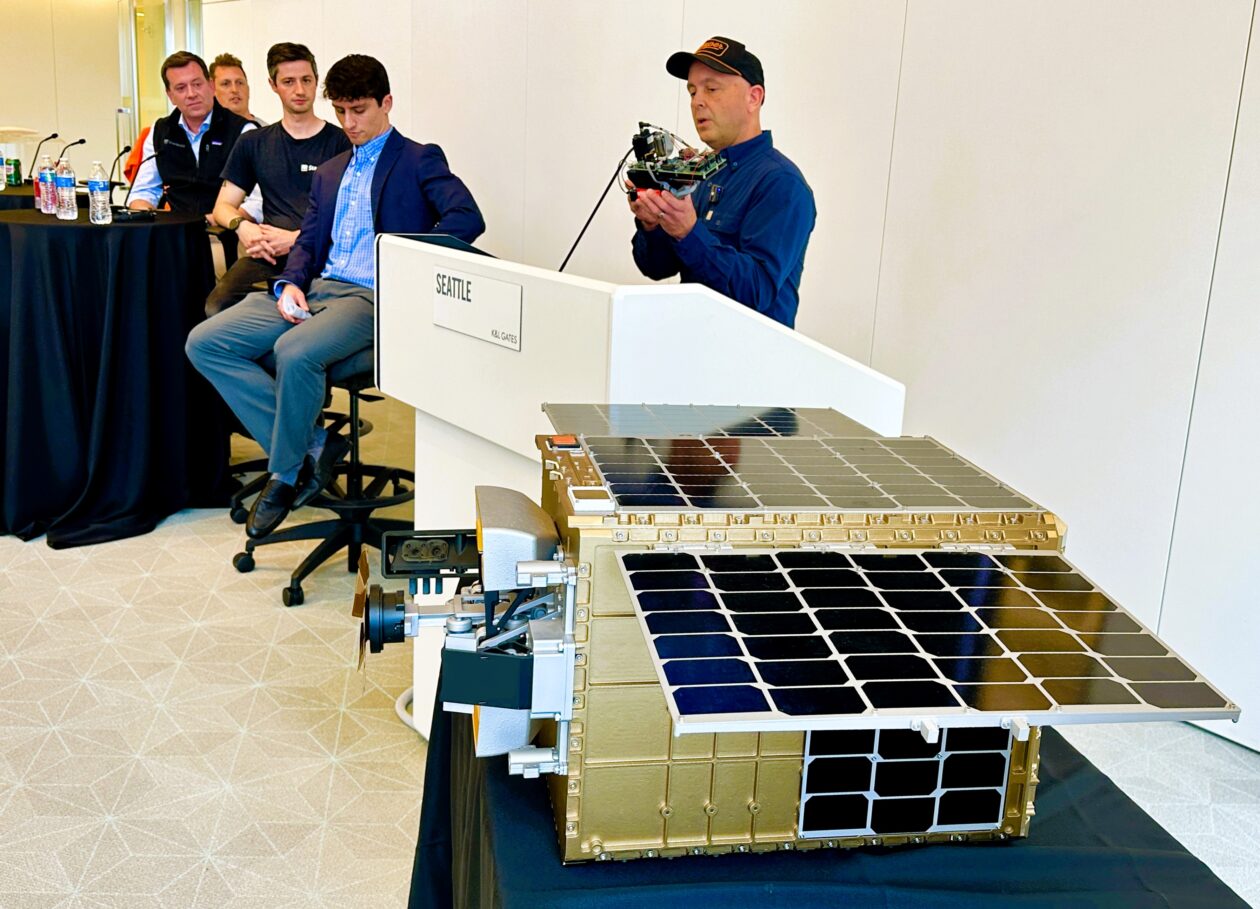

Four founders of companies on the tech frontier got together this week at a Seattle conference for a show-and-tell about the hardware at the heart of their businesses. And like any good show-and-tell, their talks touched on strategy as well as gadgetry.
For example, consider the laser-powered weed zapper pioneered by Seattle-based Carbon Robotics. The LaserWeeder system takes advantage of optical sensors and artificial intelligence to identify and target the weeds among the crops as the robotic rig is pulled through a field.
Carbon Robotics’ founder and CEO, Paul Mikesell, held up one of the LaserWeeder’s scanners during Monday’s DeepTech session at the downtown office of K&L Gates.
“We have it set up so this camera can see exactly what the laser shooting this way is going to hit, and every time we turn on that laser, the same pixel area in the camera is going to explode and blow up,” he said. “This device reminds me of a lot of science and technology that we had to tackle, but also, there’s a lot of pain that went into this thing.”

@media (max-width: 600px) {
aside.callout { float:none !important; max-width:100% !important; margin-left:0 !important; margin-right:0 !important; }
aside.callout .callout-img { display:none !important; }
}
The company’s engineers had to figure out how to target weeds precisely based on imagery that was distorted by the camera’s viewing angle. “It’s a pretty incredible feat to get that right, and once we got it right, we’re just banging off them all the time,” Mikesell said.
Mikesell said he’s often asked about his strategy for selling LaserWeeders through farm-implement dealerships. “We decided to go direct every time, all the time,” he said. “And so we have a global team of sales reps and service support people. What that means is, we maintain the customer relationship. We know what things are being used for, how well it’s working, what are their challenges. And the customers know how to get a hold of us directly instead of going through a dealership.”
He’s looking forward to the day when artificial intelligence can speed up the process of hardware design. “I’m surprised by the lack of an AI tool in there, but I think it’s also because, you know, software engineers wrote the software that made the AI, so they’re much more comfortable with it,” Mikesell said.
“We actually did hook Claude up to an oscilloscope and got it to produce firmware that was proving out what we needed,” he said. “So I think that’s just going to continue to come.”

@media (max-width: 600px) {
aside.callout { float:none !important; max-width:100% !important; margin-left:0 !important; margin-right:0 !important; }
aside.callout .callout-img { display:none !important; }
}
Starfish Space co-founder Austin Link’s gadget for the show-and-tell was too big to lift off the display table. It was an engineering model of Starfish’s Otter Pup spacecraft, one of which is currently in the midst of an orbital satellite docking test.
“We actually ran a pretty exciting test over the weekend, which I can’t tell you about yet,” Link said.
Otter Pup is designed to prove out technologies that will be used on Starfish’s full-scale Otter spacecraft for inspecting or maneuvering other satellites in orbit. “Humans have done this before, but every time we’ve done it before, it’s really expensive,” Link said. “You look at a Northrop Grumman satellite that did a similar mission. They made $65 million by extending the life of a satellite. It cost $400 million to do it.”
Starfish aims to use innovations in computer vision and robotics to make satellite docking more affordable. That means the Tukwila, Wash.-based startup has to do more with less.
“This satellite has just a single thruster on board, and the force that that thruster creates is the equivalent of a house fly sitting on your hand,” Link said. “It’s a tiny amount of force, so you have to apply it very thoughtfully over time. You have to predict what’s going to unfold with the physics and ultimately come together and dock. And that’s our big challenge as a company, not just with a demonstration satellite, but eventually with our full-size Otter.”

@media (max-width: 600px) {
aside.callout { float:none !important; max-width:100% !important; margin-left:0 !important; margin-right:0 !important; }
aside.callout .callout-img { display:none !important; }
}
Overland AI builds autonomous off-road vehicles, including a 3,000-pound tactical vehicle that can transport supplies, drones or even anti-drone weapon systems for warfighting units.
“It’s not super-easy to get one in this room, but I wish I could have brought it,” said Byron Boots, co-founder and CEO of the Seattle-based startup. “Instead, what I did was rip the sensor pod off one of these vehicles.”
The sensor pod is equipped with stereo cameras and a lidar ranging system, all of which are hooked into an onboard computer. “This is from something called our SPARK Kit, which allows you to take any vehicle and make it autonomous,” Boots said. “It actually hangs up over the head of where someone would sit on a vehicle like this.”
Even though “AI” is part of the company’s name, Overland AI’s focus has widened from just writing the software to building the hardware as well.
“In order to move fast, we decided we just needed to do that ourselves and own that full vertically integrated stack,” said Boots, who is a professor of machine learning and robotics at the University of Washington as well as a startup CEO. “If you do that, you can then literally hand this robotic system with an autonomous stack on it to a user, and they can just start using it. You don’t have to wait for someone else to integrate with you.”

@media (max-width: 600px) {
aside.callout { float:none !important; max-width:100% !important; margin-left:0 !important; margin-right:0 !important; }
aside.callout .callout-img { display:none !important; }
}
Redmond, Wash.-based Starcloud made its mark at the intersection of AI and space operations last year when it became the first company to train a large language model in Earth orbit. For this week’s show-and-tell, the company’s co-founder and chief technology officer, Ezra Feilden, brought an Nvidia H100 GPU — the same type of AI chip that was used for last year’s in-space demonstration.
“It’s very high power density. These GPUs were designed to sit and have a nice easy life inside a data center. They were not designed to be strapped to a rocket and launched into the vacuum of space, and then be run for five years without any maintenance or any TLC,” Feilden said. “So, that’s part of what we do at Starcloud. We ruggedize GPUs and other IT hardware such that they survive the launch, and then they can operate continuously in space without any mechanical intervention.”
Orbital data centers are attracting a rising tide of buzz because they could get around some of the big problems created by the rapidly growing hunger for AI data processing capacity: for example, limits on available electrical power, and concerns about land and water use.
Data processing in space brings its own challenges, however. How many solar-powered satellites will be required to handle the load? How will they be connected? And how will they be able to get rid of the waste heat produced by all those high-powered AI chips? Feilden and his colleagues at Starcloud are working to address those challenges.
Feilden said his company is scaling up operations at a new facility in Woodinville. “We’ll be deploying dozens of satellites that we build from that facility in the next couple of years, scaling up to thousands of satellites per year, which is the number that we need to hit to have a meaningful impact on the terrestrial data center industry with what we’re doing,” he said.
Starcloud isn’t the only company with big ambitions for orbital data centers. SpaceX, which is just days away from the world’s biggest initial public offering, envisions putting a million data center satellites in orbit. But SpaceX could be as much of a partner as a competitor. Last month, Starcloud struck a deal to use SpaceX’s Starlink mini laser terminals on its own satellites. And Starcloud is counting on new launch vehicles, including SpaceX’s Starship mega-rocket, to drive down the cost of putting satellites in orbit.
“We strongly believe that’s happening very soon,” Feilden said. “This decade, certainly.”
Starfish Space’s Austin Link was intrigued by that perspective. He noted that Feilden and his colleagues are working with a business model that assumes launch costs will decline significantly. “We assume that launch cost is what it is today, and we don’t make any changes in our models when we’re designing products,” Link said. “It’s a really interesting contrast.”
The schedule of events for Deep Tech Week Seattle continues through Friday.
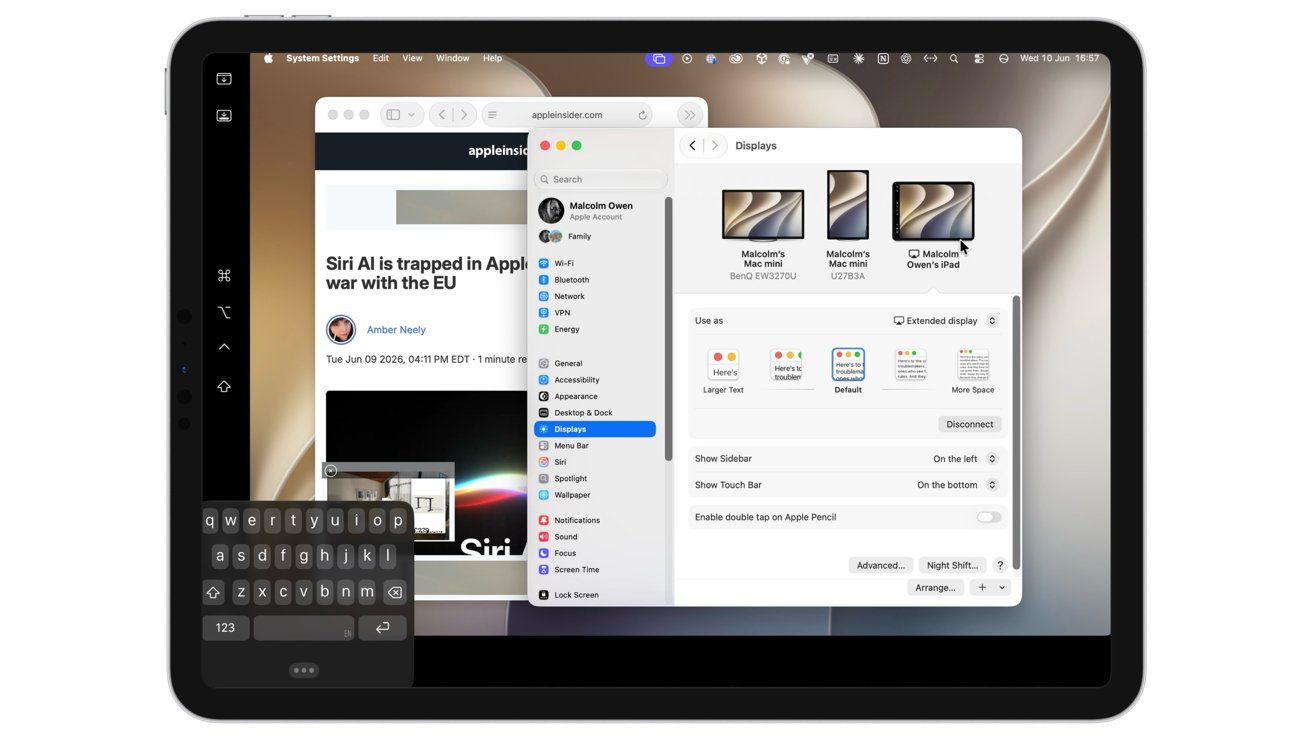
Sidecar in macOS 27 finally allows you to use your finger to navigate macOS apps from your iPad’s screen, without needing an Apple Pencil. Here’s how it works, with one key limitation.
Sidecar is a feature of macOS that lets you extend your Mac’s display onto an iPad’s screen. For road warriors with a MacBook Pro, it was an invaluable way to get a multi-screen desktop while on the go.
While Sidecar has been around for quite a while, it hasn’t really undergone that much of a change. For macOS 27 and iPadOS 27, that seemed to be the case at first glance.
However, Apple has implemented a function that it surprisingly hasn’t included before. You can now directly interact with apps on your Mac desktop.
In earlier versions of Sidecar, you could use your finger with your iPad-extended Mac desktop. This sounds obvious, but the implementation wasn’t as intuitive as you’d think.
Sure, you could use multi-touch gestures for various functions, treating the iPad display like a Magic Trackpad. You could do things like copying and pasting by using three-finger gestures, and you could also pinch to zoom if you wanted.
However, you couldn’t really interact with apps directly. You could not tap a button on your Mac desktop, go through menus, or do anything with an app interface at all using your fingers.

All of the UI elements of macOS apps can now be interacted with using your finger on an iPad screen with Sidecar.
You could interact with the apps, but only if you used a trackpad on a connected Magic Keyboard, a mouse, or an Apple Pencil. While the Apple Pencil would be a natural choice for imaging apps, users would be more inclined to use their Mac’s peripherals instead.
With macOS 27 and iPadOS 27, that has changed. Surprisingly with no fanfare from Apple.
If you have Sidecar running, you can now tap bits of the interface, and it will work as if you have clicked a mouse. You can now select items in the macOS interface and in apps without resorting to some form of peripheral.

Yes, you can finger-paint in Mac’s Pixelmator Pro using Sidecar. And you can change the tools too, without reaching for the Apple Pencil.
This makes things more intuitive from a productivity standpoint, since precious seconds aren’t spent reaching for an implement.
It’s not just mouse clicks, as dragging works too. You can now drag a selection box with a finger, much like clicking and dragging with a mouse.
This also extends to resizing windows with a drag of the finger, and even scrolling through lengthy sidebar items.
While this is a major change to the way Sidecar works, it is pretty much the only one this time around.
Enabling Sidecar in the Display section of Settings works just like it did before. You tap the plus, select the iPad from the list, and it appears to the side of any existing monitors.

Setting up Sidecar hasn’t changed in macOS 27.
Then, you select the iPad and under Use as, select either Extend display or Mirror, and you’re off to the races.
Also unchanged is the ability to do so via the Screen Mirroring functions, though you will want to use the Settings method to enable the sidebar and Touch Bar functionality.
On the iPad itself, the Sidecar interface hasn’t changed. There’s still the sidebar handling essential functions like mimicking the function, Command, and Control keys, the on-screen keyboard, and other elements.
At the bottom, the virtual Touch Bar is available as usual.
What is a little frustrating is that, under testing, it can’t be put into portrait mode, only landscape.
You can still see the rotating iPad representation in the Arrange Displays part of Display settings, but only when you’re just sharing the keyboard and mouse. It does not rotate to portrait from landscape as an extended display.
This is a little annoyance, but like many other first-beta issues, it’s something to be adjusted in future updates.
As a productivity aid, Sidecar has always been useful. But, it always had the issue of neutering touch inputs with your fingers.
It always seemed odd that, for a company that prided itself on perfecting touch interfaces, it minimized their usage in Sidecar.
Of course, most people will use the keyboard and mouse or trackpad on their Mac or MacBook, with the Apple Pencil being a secondary interaction tool in this case. Yet finger-to-screen interactions were severely limited, aside from gestures.
With the change made to Sidecar, it’s an update that rights a major wrong about the feature that should’ve been rectified much, much sooner.


I cannot in all honesty advise anyone to buy an 8GB RAM laptop in 2026. Between resource-heavy browser tabs, background updates, and new AI features, 8GB is a recipe for constant freezing and elevated blood pressure.
Fortunately, you don’t need a massive budget to save your sanity. After scouring Amazon, Dell, Lenovo, and Newegg, I found that new, name-brand 16GB Windows laptops with actual decent processors under $500 are nearly extinct.
However, these three incredible exceptions are live right now — but you’ll have to act fast, as one is a major clearance deal.
Why buy it: This machine sports the fastest CPU of the three. Because of its smartphone-style architecture roots, it can easily squeeze out 20 hours of battery life — enough to let you leave the charger at home. It features a spacious screen and a dedicated numeric keypad, making it perfect for students, freelancers, and spreadsheet warriors. At just over $500, it’s a total steal when you consider HP sells the lesser 256GB version for $750.
Why buy it: This is a remarkably capable workstation masquerading as a budget notebook. Originally priced at $750, Best Buy is actively clearing these out for just $501 (compared to $659 at Newegg). The Ryzen AI processor is an absolute beast for multi-tasking and light content creation, though it won’t quite match HP’s legendary all-day battery life. Snag this one quickly before clearance stock dries up.
Why buy it: If you want the absolute lowest price tag, this is it. While it has a smaller 256GB SSD and shorter battery life than its rivals, it still holds its own in raw performance thanks to fast DDR5 RAM and a reliable Intel i5 chip. Even better? Unlike most modern budget laptops, you can upgrade its internal components down the road. Walmart has this marked down to $480, easily beating Amazon’s $540 price tag.
Please don’t buy a cheap 8GB machine just to regret it the moment you power it on. Whether you choose the ultra-efficient HP Snapdragon, the powerhouse Asus on clearance, or the wallet-friendly Acer, upgrading to 16GB of RAM is the single smartest tech move you can make today.
I couldn’t find any new, branded Windows laptop with 16GB RAM and a decent CPU (no N-series, no Core i3, no older tech) from Amazon, Dell, HP, Lenovo or Newegg. I have focused only on Windows 11 laptops rather than Chromebook ones.

I’m not the first to say this, but it’s a strange and heartbreaking time to be a teacher and parent of young children.
As a recent transplant to New Mexico, I admire the ways the state invests in children, regardless of their identities. Seeing these state policies in action has changed my perspective and made me think differently about what students deserve and how much better things would be if we chose to care for students and families more consistently.
There are days when my own children are crawling into my lap with a book while I continue to process footage of children suffering in conflicts on the other side of the world. My high school students are writing the kind of poetry that leaves me speechless, even as I privately wonder about their career options as artificial intelligence receives more investment than the arts. Yet, my experience in New Mexico has shown me that another approach is possible.
I have a unique vantage point, both as a parent and an educator who sees these challenges reflected in the lives of my students and their families. My local school district in New Mexico has yet to pivot to hybrid learning in response to the palpable fear parents felt, while the actions of federal agents created widespread fear in their community. My state is not banning books and restricting curricula. Instead, as a recent transplant to the state, I’m in awe of the ways New Mexico invests in children and our more vulnerable residents.
After the 2024 election, a shockwave swept through my school as students grappled with what another Trump presidency would mean for their futures. At the performing arts school where I teach, we have a high percentage of queer and trans students, a stark contrast to my previous school in California, where most LGBTQ+ students often chose to remain closeted until well after graduation. I grieve for what my previous students lost when they did not acknowledge or affirm their queer and trans classmates. In English class, they missed robust discussions; the depth their queer and trans peers bring to literary discussions, while leveraging queer theory, translates into highly analytical and more engaging coursework. In the scope of a school day, there were countless other ways all students missed a more complete experience, while their queer and trans peers chose safety in an environment hostile to their identities.
And while New Mexico is much less hostile to trans residents, I still can’t imagine what it would be like to be growing up in a world that constantly demands you to defend and fight for your humanity. Guaranteed care by the state means nothing if authority figures are consistently exposed to negative messaging about transgender people or if your lack of insurance prevents you from getting the life-saving care you need.
And yet, trans students in New Mexico are able to attend school in an environment with teachers who are largely committed to affirming a variety of gender identities, select curriculum that allows LGBTQ students to see themselves, bond with accepting and encouraging peers from across the gender spectrum, and learn from LGBTQ teachers who embody a hopeful future of what it means to be your full self in your career. This is all possible when a school doesn’t just accommodate gender and sexual diversity, but embraces it. Extensive research confirms the ways in which affirming environments like ours can be life-saving for LGBTQ teens, especially trans students.
Earlier in my career, I felt optimistic about my queer and trans students’ futures. Today, seeing my trans students grapple with the new political realities has renewed my commitment to making an optimistic future visible for them. In a past article, I reflected on my role as a teacher in presenting a hopeful future for my students during unhopeful times. There is no one for whom this is more crucial than our queer and trans students.
Ultimately, I wonder what it would look like for our world to care about children as much as the state of New Mexico does. What will happen when all children can attend high-quality early childhood education without adding to the financial burden of a growing family? What does it look like when gender affirming care is protected by law? Or when our lawmakers prohibit book and curriculum censorship? Or when we finally decide that school shootings do not have to be a certainty of American life?
I know these questions will remain abstract while we watch students as young as Liam Ramos fear for their lives. But we cannot have a different future if we are not imagining a better one in the present. I’m thankful for my students, past and present, who encourage my imagination.
This story is part of an EdSurge series chronicling diverse educator experiences. These stories are made publicly available with support from the Learning Commons. EdSurge maintains editorial control over all content. (Read our ethics statement here.) This work is licensed under a CC BY-NC-ND 4.0.

President Donald Trump is enthralled with the Ultimate Fighting Championship staging an event at the White House on his birthday this weekend—in effect his present to himself, since he came up with the idea. We have the details on both the fighting and the anticipated lobbying.
While the White House does not yet know exactly which celebrities might show up for the UFC on Sunday because they have not accepted their Ticketmaster email invitations, Trump’s aides tell Inner Loop they are expecting a parade of donors to attend.
The tickets have been free—and there is no resale—because the UFC is footing the approximately $60 million cost to stage the event, but the UFC has also offered sponsor packages for upwards of $1 million that come with ringside seats.
With limited avenues for executives and companies to get close to Trump these days, political consulting firms in Washington have been advising clients to buy the packages, and Trump’s aides say they have been inundated with requests.
The sponsorship requests have come on top of a stream of queries by administration officials and members of Congress trying to get into the UFC White House event, which is oversubscribed because Trump has personal control over the majority of seats and is deciding who he wants and he doesn’t, the aides say.
The most sought-after seats are under the Claw, a giant 92-foot-tall arch structure that holds lights and sound equipment above the Octagon. The structure is actually called a “beta tent” by its supplier Stageco, but it was renamed by the White House, ESPN reported.
UFC president Dana White has said that he and Ari Emanuel, the chair of the UFC’s parent company, will control 700 seats between them, while Trump will control about 1,200.
The most well known method to get direct face time with Trump during his second term in office has been to buy a $1 million seat at the so-called candlelight dinners hosted by Trump super PAC MAGA Inc. Trump would go from person to person and talk with them directly, according to one political consultant with close ties to Trump’s fundraising operation.
But the candlelight dinners don’t happen with regular frequency—sometimes months go by without a dinner, the consultant said—and so, companies that missed out on donating to fund Trump’s ballroom have been advised to consider sponsoring.
A White House official tells Inner Loop that they have not been involved in any sponsorship discussions and any cost information could be found with UFC. At least some of the UFC’s regular Octagon sponsors, including Meta, have ongoing business interests before the federal government.
In a statement, White House spokesperson David Ingle disputed the notion of lobbying at the event. “The Fake News’ continued attempts to fabricate conflicts of interest are irresponsible and reinforce the public’s distrust in what they read,” he said. “There are no conflicts of interest.”
Meanwhile, Trump’s team acknowledges that the UFC White House event won’t be featuring the biggest names; they were unable to get the likes of former UFC heavyweight champion Jon Jones and former UFC lightweight champion Conor McGregor.
There were conversations behind the scenes by White and his contract negotiator Hunter Campbell to book them both, but those talks fell through, people familiar with the matter tell Inner Loop.
It would have been a big deal for the White House to have landed McGregor, the biggest box office attraction in the sport’s history, for his comeback fight, after his last appearance in the Octagon in 2021 against Dustin Poirier ended with a broken leg.

Schools have been quietly chipping away at recess for nearly a decade, and a sweeping new update from the American Academy of Pediatrics says the consequences are real, measurable, and showing up well beyond elementary school. At the same time, the federal government has issued a formal advisory on children and screen time, calling on schools, parents, and tech companies to act. Both stories point in the same direction, but the path forward is far less obvious than the headlines suggest.
For the first time since 2013, the American Academy of Pediatrics has updated its recess guidelines, and the expansion is significant: the new recommendations extend to middle and high school students, not just younger children. EdSurge reporter Lauren Coffey has been reporting on what that guidance actually means for administrators under pressure to protect instructional time, whether the evidence on attendance and attention is strong enough to move policy, and why advocates say the answer may be simpler than schools are willing to admit.
A formal screen time advisory from HHS Secretary Robert F. Kennedy calls for bell-to-bell phone bans, warning labels on apps, and the elimination of recommendation algorithms for children. But researchers are being careful: the evidence linking screen time to negative outcomes is correlation, not proven cause and effect, and the line between harmful social media and beneficial education technology is one that schools and families are still figuring out how to draw. EdSurge reporter Nadia Tamez-Robledo breaks down what the advisory actually asks of schools, why the tech industry response will be the real test, and what the carve-outs for students with IEPs reveal about the limits of a one-size-fits-all approach.
Recess Took a Break in Some Schools. A Push Is On to Bring It Back by Lauren Coffey
Surgeon General Advisory Wants Kids to Live Beyond the Confines of Screens by Nadia Tamez-Robledo
Join us on This Week with EdSurge where we ask whether the research is pointing toward a simpler solution than most schools are willing to try. Listen to the episode.
This Week with EdSurge is produced by the EdSurge newsroom. Subscribe to the EdSurge newsletter for the latest in education news delivered straight to your inbox.


Smartphones deliver more power and polish than ever, yet most follow the same safe template. AYANEO decided to break the mold with its first smartphone. The Pocket Play takes the sliding concept from Sony’s long-gone Xperia Play and updates it for today’s games and apps. Slide the 6.8-inch display upward in landscape mode and the magic happens. A full set of physical controls appears underneath. You get a proper D-pad on the left, ABXY face buttons on the right, two round capacitive touchpads that stand in for analog sticks, plus shoulder bumpers and triggers, while dedicated shortcut buttons sit within easy reach.
The layout is similar to the 2011 Xperia Play, but with a more modern flair. Those spherical touchpads replace traditional analog sticks, yet they still provide a remarkably natural input experience, especially with the limited time you have to check them out. Keeping your thumbs off the screen allows you to have a continuous view even during the most intense gaming sessions. The entire control deck is pushed to the bottom, leaving the huge display completely unobstructed for whatever you’re doing, whether gaming or watching media.
Sale

The 6.8-inch display boasts a 2400 by 1080 resolution and a refresh rate of 165Hz. An OLED panel delivers stunning colors and silky smooth action, whether you’re playing high-frame-rate Android games or streaming from the cloud. When the device is closed, it acts like a phone for calls, messages, and app use; however, when you open it, it morphs into a dedicated gaming setup.
The MediaTek Dimensity 9300, along with its Immortalis-G720 graphics engine, provides excellent performance. AYANEO backs it up with lots of high-speed LPDDR5 RAM and UFS 4.0 storage. You also get a microSD card slot, which is a nice touch given how useful they are for adding new games or emulator roms to your library. The active cooling mechanism keeps everything operating smoothly, even during extended gaming sessions, which is unfortunately uncommon on most smartphones.
A 5,000 mAh battery keeps the lights on, and a quick recharge means you won’t have to wait long before your next gaming session. You also get stereo speakers and a strong vibration motor, which work together to create a really immersive gaming experience with excellent audio and haptic feedback. A USB-C port with speeds of up to 3.1 Gen 2 and a DisplayPort 1.4 output enable you to connect the device to a TV or monitor and enjoy games on the big screen. You also have Wi-Fi and Bluetooth to suit your wireless requirements.
The device’s cameras are mounted on the back and include a 50-megapixel primary sensor and a 16-megapixel ultrawide lens. There is a 5-megapixel selfie camera on the front. To be fair, these cameras exist merely to handle the basics and are unlikely to impress anyone; early reports show they do the job, but don’t expect high-end photography from them. It’s clear that AYANEO emphasized gaming gear over taking beautiful photos.
You get Android 15 out of the box, and a fingerprint scanner is buried inside the power button for quick unlock. The software offers a full smartphone experience in addition to the typical gaming capabilities. There are also some useful shortcut buttons and a slide mechanism that allow you to quickly access game controls without having to deal with on-screen overlays.Pricing is unknown until the Kickstarter campaign opens. Rumors suggest that early backers will pay around $500, with future tiers perhaps providing extra RAM, storage, or higher-end finishes. AYANEO also intends to offer additional grips and cases to improve comfort for both gaming and non-gaming applications.
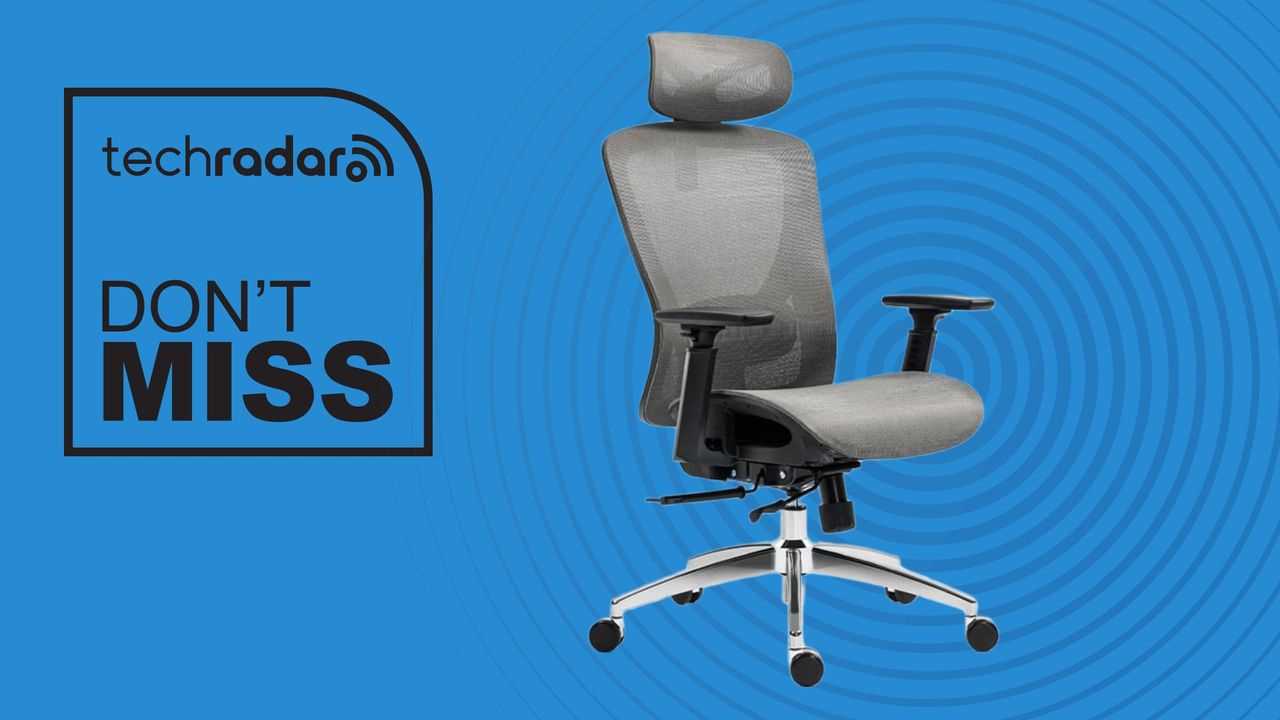
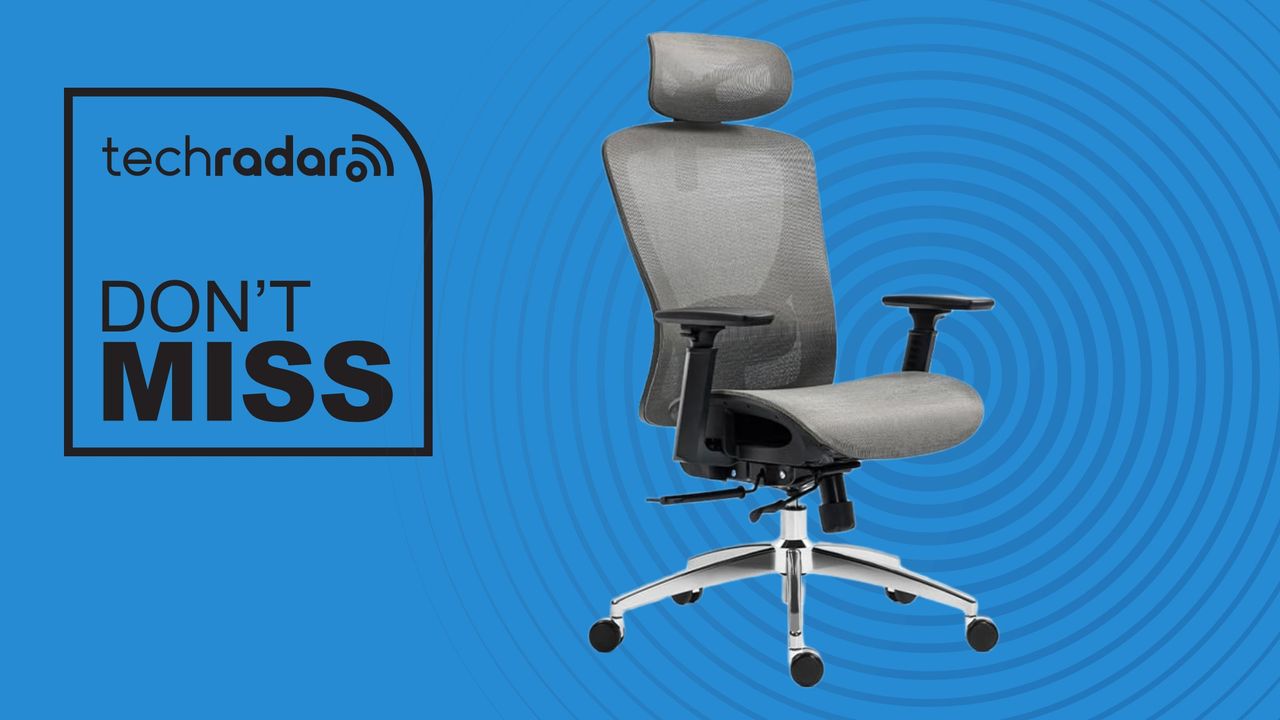
You can spend a whole lotta money on a good office chair these days – but however feature-rich and overly engineered they are, in my experience, you can’t beat a comfortable, solid office chair that won’t break the bank.
Of all the office chairs I’ve tested and reviewed, I still think the $210 Boulies EP200 on Amazon is the best value chair you can get right now. For me, the EP200, which is also on sale in the UK for £190 at Amazon delivers all the core features I expect, and more. Amazon has matched the sale price of this chair, which is discounted at both Boulies.com and Boulies.co.uk. It amounts to around a 30% discount, whichever site you choose.
I’ve been sitting on this chair day in, day out for 18 months straight now and it’s as good today as it was when I first assembled it. The mesh is still firm, supportive, and comfortable. There’s no creaks, no squeaks. If I were buying a new office chair today, I’d just get another EP200. It’s worth every penny. It scored 4.5 stars in my review, with a Highly Recommended award.
I absolutely love the EP200. I love the breathable mesh design, the lockable recline, the adjustable seat depth, even the 3D armrests with their satisfying click on every twist. I use this at work every day, but also after-hours when I’m gaming. I never feel discomfort or fatigue that some cheap chairs induce (and some expensive ones, for that matter).
Now, Boulies’ value-driven chair isn’t as rich with features as the Herman Miller and Steelcase office chairs my team and I have tested. But it’s well-built for the money, highly adjustable, and doesn’t require taking out a bank loan to afford it.
Having spent many hours in an office sitting on the iconic Herman Miller Aeron, I can tell you that while that pricey mesh chair was very comfortable, for most people working in an office or home office, the EP200 delivers everything you’d want from a seat at a fraction of the price.
In summarizing my time with the EP200 in my review update, I said “Overall, a year on, I still find the Boulies EP200 to be the archetypal office chair for most people. It’s relatively cheap, not overly engineered or designed (in a good way), and suitable for long hours in the office and home office.”
For more top-performing options, check out my in-depth guide to the best office chairs we’ve tested (and yep, the EP200 is on that list).

Industry 4.0 represents an opportunity for innovative, ambitious and future-focused professionals to transform the world as we know it.

The fourth industrial revolution, or Industry 4.0 as it is often better known, is the integration of smart, digital technologies into larger industrial and manufacturing processes, with the aim of creating intelligent, improved systems.
Skills in this area are absolutely vital for any professionals looking to work in a future-focused role or high-tech capacity.
SiliconRepublic.com, as part of its month-long Industry 4.0 coverage, has compiled a list of some of the most important skills to have as you face a changing world.
It is not at all uncommon to assume that the most critical qualities to possess in technical and complex industries are all hard skills. It is, however, a commonly held myth, as soft skills are critical to long-term success in any professional space, including for careers under the Industry 4.0 umbrella. These are the abilities that enable you to communicate effectively with co-workers, negotiate positive change and create a better workplace environment.
Skills to prioritise are adaptability and problem-solving, as Industry 4.0 roles are often complex and ever-evolving; collaboration, as your job may demand a degree of crossover with other teams, departments or companies; critical thinking, as Industry 4.0 careers are often rooted in a need to address modern-day problems with unique solutions; and leadership, as everyone should know how to command a room and lead others when necessary.
Soft skills bring a crucial human element to careers that are often considered complex and clinical.
3D printing – or as it is often known, additive manufacturing – has enabled experts in Industry 4.0 careers to move beyond traditional methods as they create models and prototypes with the power to improve quality of life, reduce costs and maximise resources.
Clinicians may use 3D printing to develop prosthetics and implants to match a patient’s specific anatomy. Manufacturers can use the technology to create specific, necessary medical equipment and aerospace engineers often use additive manufacturing to develop small, complex parts that demand high accuracy and specific criteria.
There are a range of organisations and sectors in STEM and outside of it that are now using 3D advancements and it is undoubtedly a skill that will be carried into the next industrial wave.
Digital twin technology is described as the virtual representation of a physical system or process that receives data from the real world, in real-time. Its purpose is to mirror the behaviour, performance and state of the primary, physical model, so experts can explore, experiment and analyse without impacting the real counterpart.
Digital twin tech allows organisations to simulate real-world scenarios, fortify security and improve operations, while also minimising risk or accidental harm.
Among the skills that are useful to those who want to know more about wielding digital twin technologies are abilities in IoT, AI, data analytics, simulation software and cloud computing – and it is of particular importance to those hoping to work in manufacturing, aerospace, automotive, energy and utilities, healthcare, smart cities, and infrastructure.
Research suggests that IoT, as a critical element of Industry 4.0, is a skill that is under near constant demand by organisations and employers.
Anyone hoping to be an IoT expert should ensure that they have a robust education in software such as AutoCad, which allows engineers to design machines; cybersecurity for managing complex and high-risk projects; data and analytics skills that ensure clean, concise and insightful work; and AI and ML, among others.
Careers in Industry 4.0 are moving so rapidly it can be hard to keep up with the changes, but what is important to remember is that the skills of today create the future. All you have to do to keep pace is to commit to upskilling and tackle each challenge as it comes.
Don’t miss out on the knowledge you need to succeed. Sign up for the Daily Brief, Silicon Republic’s digest of need-to-know sci-tech news.




Weekend Open Thread: Evereve – Corporette.com

Jensen Huang Approves Samsung, SK Hynix, and Micron for NVIDIA (NVDA) HBM4 Memory Supply


Anatomy of the June crypto crash: Fed, Iran, Saylor

The Best Mystery Series of All Time Is Surging on Streaming 30 Years After It Ended


Alexander Zverev wins the French Open to finally earn a 1st Grand Slam title


Suspicious Polyfill login prompts pop up on Toshiba, Muji websites

Senator Cynthia Lummis Calls CLARITY Act the Most Consequential Financial Legislation of This Generation
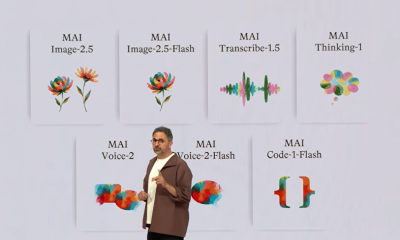

Microsoft unveils seven homegrown AI models in new bid for ‘long term self-sufficiency’


Microsoft launches MXC, an OS-level sandbox for AI agents, with OpenAI and Nvidia already on board


(VIDEO) Justin Bieber Delivers Surprise Happy Birthday Serenade to Diners at Los Angeles Mexican Restaurant

The Pain Points Taking a Fragile Tech Rally Down a Notch

Eli Lilly (LLY) Stock Surges 4% Following Breakthrough Sleep Apnea Trial Results
LBank Surpasses 25 Million Users Worldwide as AFA Partnership Continues to Drive Global Growth

Von der Leyen’s AI envoy pick draws conflict-of-interest fire


Trump’s AI Ownership Plan Could Benefit Anthropic at OpenAI’s Expense


Meta steals a tactic from Tesla and builds data centers in tents

Bangladesh beat Australia after 20 years in ODIs, register only their second win over six-time world champions | Cricket News


High Stakes for Wembanyama as New York Pushes for 3-0 Lead


Hackers now exploit SolarWinds Serv-U flaw to crash servers


Notion restores access to Anthropic after service disruption



You must be logged in to post a comment Login