Shopping for contact lenses online can be convenient and cost-effective, but it’s important to do some research before you order contacts online. Unlike buying in a store, you won’t have immediate access to an optometrist for guidance, so taking a few key factors into account can help ensure you get the right lenses for your needs.
Prescription and brand compatibility: Before you purchase your contacts online, be sure to have a valid contact lens prescription from your eye doctor. Additionally, it’s best to stick to the brand and specification suggested by your doctor, as different materials, water content and oxygen permeability levels can affect comfort and eye health.
Pricing and discounts: While online retailers often lower prices than brick-and-mortar stores, it’s worth comparing costs across multiple sites. Look for discounts on bulk orders, subscription savings or rebates from manufacturers. However, be cautious of deals that seem too good to be true, as some unauthorized sellers may offer counterfeit or expired lenses.
Shipping and return policies: If you wear contacts daily, factor in shipping times to avoid running out unexpectedly. Some retailers offer expedited shipping or auto-replenishment services for added convenience. Also, be sure to check the return policy in case you receive the wrong prescription, a damaged box or uncomfortable contacts. You’ll want a hassle-free way to change or return your order.
Advertisement
Customer reviews: Not all contact lens retailers are reputable. Choose sites that require a prescription verification process, have clear customer service policies and are approved by regulatory agencies like the FDA. Reading customer reviews can also give insight into the retailer’s reliability, shipping times and overall service quality.
Insurance and HSA/FSA eligibility: If you have vision insurance or a health savings account or flexible spending account, check whether the retailer you choose accepts them. Some sites allow you to apply your benefits directly at checkout, while others may require reimbursement. Taking advantage of these options can help you save on out-of-pockets costs.
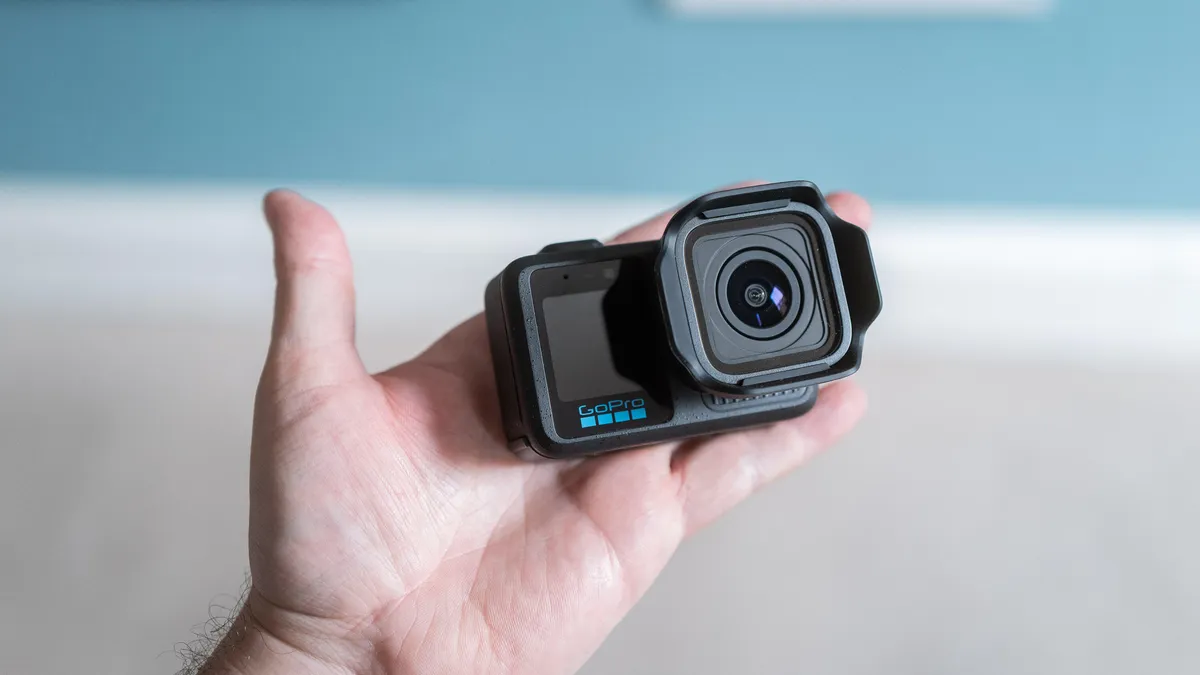
I’ve been using GoPro’s Mission 1 Pro action camera for a few weeks now. I’m not quite ready to slap a final verdict on it, but I’ve definitely learned a few things that are worth knowing if you’re considering buying one. I’ve tested a range of features, from the new slow-motion mode to shooting 50 megapixel stills, and it’s impressed in some ways — and left me wanting more in others.
But I’m not yet ready to give it a review score. The reason being that I’ve had a very early sample with unfinished software that isn’t representative of how it might work if you went and bought one. My first model even had a pre-production lens, which was changed on the second unit I received. So while there are some things I’ve been able to test, it’s not fair to the camera to base my review off what I’ve seen so far.
But here’s what I can tell you.
Advertisement
How much is the Mission 1 Pro?
The Mission 1 Pro is on sale now for $700. Then there’s the base Mission 1, which has the same large sensor and new processor of the Pro model but lacks the slow-motion skills. It costs $500. At the top of the range is the Mission 1 Pro ILS, which has the same specs as the model I’ve been testing but uses an interchangeable micro four thirds lens mount — a first for any GoPro.
The ILS model — due out later in the year — will also cost you $700. It’s the model I’m most excited about, but I’ll get into that later.
Taken in DNG raw and adjusted in Lightroom, the wide-angle lens of the camera allowed me to capture a lot in one shot.
Advertisement
Andrew Lanxon/CNET
Why is the Mission 1 Pro exciting?
The Mission 1 Pro’s got a new GP3 image processor and a larger 1-inch sensor. GoPro says it offers better dynamic range and low-light performance. More importantly, it offers an astonishing 960fps frame rate for slow-motion video and 8K open-gate recording, meaning it captures footage using the entire sensor.
Those are potent specs from a device that still fits in the palm of your hand and is fully waterproof, even without a dive case.
Is the Mission 1 Pro slow motion good?
On paper, very. It can shoot at an astonishing 960 frames per second, which is the sort of speed you’d normally only get from dedicated slow-motion cameras. But there are caveats. First, it’ll only capture this footage at full HD, so if you’re working on a 4K or 8K project, you’ll need to upscale that footage and you could potentially lose quality as a result.
Advertisement
The camera cage, grip and shutter button add a lot of bulk to the camera, but they do make it much more ergonomic when you’re out and about shooting away.
Andrew Lanxon/CNET
It also only shoots in short bursts of 10 seconds at a time, so you’ll need to get your timing right if you want an epic shot; you can’t simply leave it running for minutes and hope you get the shot. But I don’t think that’s a problem. It’s important to keep in mind that slowing 10 seconds of 960fps footage to a 30fps timeline results in roughly five minutes of slow-motion video.
My preferred slow motion is shooting at 240fps, which the camera can achieve at 4K resolution and in its Log color profile for better color grading in post production. That 240fps frame rate still offers an impressive 8x slow-motion effect when played back at 30fps and goes well beyond what even my professional Canon R5 or Blackmagic Cinema Camera 6K Pro can achieve.
What is the general Mission 1 Pro video quality like?
Here’s where I can’t really answer with any certainty. The footage I’ve shot so far has been hit and miss. I’ve found the auto white balance to be a bit unreliable, often producing slightly unnatural colors and forcing me instead to shoot using manual white balance — which, to be honest, I would probably want to do anyway to ensure consistent colors in a shot.
Advertisement
I also sometimes found the image processing went a bit too far in brightening shadows and saturating the color, resulting in more of an HDR look than I would have wanted. It’s why I’d rather shoot my footage mostly using in the 10-bit Log profile, which gives me more flexibility for adjusting my footage in post production.
I heavily edited this still image, taken in DNG raw. Apart from adjusting the white balance, as the auto settings looked very cool and magenta, I also brought the highlights down a touch. The footage looks good, although the wide lens’s fixed focus means I’m not quite sharp, as the focal plane is optimized more toward infinity.
Andrew Lanxon/CNET
Overall, image quality seems solid, though not noticeably better than the already excellent Hero 13 Pro it replaces. The biggest upgrades in this model appear to be aimed at those who want more advanced slow-mo capabilities.
Advertisement
That said, it’s important to remember that I’ve installed at least four firmware updates during my testing and only received the final production hardware a few days ago. I haven’t yet had the chance to re-test it in a wide range of scenarios. It’s certainly off to a good start, but whether it does enough to justify an upgrade from the previous model remains to be seen once I’ve spent more time shooting in both daylight and low-light conditions.
How about still images?
They’re fine, at least based on my tests so far. The super-wide angle lens means that fine details aren’t great, but if you’re into capturing those huge, sweeping vistas on your travels, then it’ll be fantastic. It shoots in DNG raw and my advice is to use it: Having manual control over the colors has been critical for me, as has the ability to pull back shadow and highlight detail in Adobe Lightroom.
This straight-out-camera photo, taken in JPEG with manual white balance, isn’t bad but I think it looked too over-processed, with shadows that have been artificially brightened too much, resulting in an HDR-style image.
Advertisement
Andrew Lanxon/CNET
By editing my DNG raw file, I was able to keep the shadows at a more realistic level, thereby maintaining the darker vibe I was going for. I love how the wide-angle lens allowed me to use these leaves as a natural frame for the waterfall.
Andrew Lanxon/CNET
What about battery life?
Again, it’s impossible to say with certainty at this point as the software updates will certainly play a big part in how energy efficient the camera is. However, the battery life from the new Enduro 2 battery already seems solid. Even after a long day out shooting footage on the levada walks on the stunning island of Madeira, I still got back to my lodgings with plenty of battery to spare.
What new accessories are there for the Mission 1 Pro?
There’s a new camera cage that comes with a detachable grip and a sort of shutter button that fits into the cold shoe slot. While it makes the usually very small camera a lot bigger, it also makes it easier to hold and operate more like a regular compact digital camera.
Advertisement
The new Enduro 2 battery should offer enough juice for a day of mixed shooting.
Andrew Lanxon/CNET
GoPro has also announced a set of wireless microphones which will natively work with the cameras without the need for external receivers — much like DJI does with its mics and Osmo cameras. I haven’t tried these yet, but for content creators and vloggers these will likely be a must buy.
What about the interchangeable lens Mission 1 Pro ILS?
This is the model I’m most excited about. While the specs on paper for the Mission 1 Pro are awesome — especially when it comes to slow motion — I’m generally not a fan of the super-wide angle, fixed-focus look achieved by “traditional” action cameras like this. Sure, they’re great if you want a big field of view when strapping one to your head and hurling yourself down a mountain on a bike, but GoPro cameras have never challenged traditional filmmaking.
Advertisement
But strap on a high quality micro four thirds lens from the likes of Panasonic, Olympus or Voigtlander and now you’ve got a proper setup capable of high-speed shooting at a range of focal lengths, adjustable focus and shallow depth of fields for cinematic bokeh –all from a camera body small enough to slip into your jacket pocket.
I’m genuinely excited about spending some real time with the Mission 1 Pro ILS and seeing whether GoPro can truly play in a more professional cinematography arena.
There’s still a screen on the front to help you frame up those selfies.
Advertisement
Andrew Lanxon/CNET
Should you buy the GoPro Mission 1 Pro?
I’m still in the early days of testing but I can say a few things with certainty. The 960fps slow-motion mode is an amazing headline, but its application is arguably quite niche. I struggled to even find things to shoot and was only really happy with a brief clip of a pigeon flapping its wings. Think hard about whether that sort of slow motion is really important to you, especially considering its limitations.
Beyond the slow-mo skills, the overall quality that I’ve seen so far isn’t leaps and bounds beyond what the company offers from its Hero 13 camera. So if you already have a recent GoPro and mostly use it to shoot at 4K at a standard 24, 30 or 60fps, then I don’t think you’ll see much benefit. But for those of you upgrading from a much older model — such as the Hero 7 — you’ll certainly see the boost in quality.
The real excitement will come when the ILS model arrives and we’re able to pair that larger image sensor and slow-motion skills with a professional-standard lens. Stay tuned for that.
After the James Webb Space Telescope (JWST) began operations in 2022, it soon made a tantalizing discovery in the form of mysterious red dots: small, red-tinted astronomical objects of unknown origin and composition. So far well over 300 of such little red dots (LRDs) have been identified, with many theories on what they are. Fortunately the Chandra X-ray Observatory recently added some more clues as detailed in an accompanying paper.
Current theories include them being a form of primordial galaxy, or a supermassive black holes embedded in a dense gas cloud. The LRD discussed in the paper with the designation 3DHST-AEGIS-12014 was found to emit X-rays unlike other LRDs. By comparing the data between JWST and Chandra for this LRD it lends credence to the theory that these LRDs are a transitional phase as a supermassive black hole ingests the material of said gas cloud.
X-rays produced during this can sometimes make it out of the gas cloud, after which we can observe it. If that’s the case, these LRDs should cease to exist the moment the black hole has consumed enough of the cloud, which is something that we may be able to find evidence for if we’re lucky.
Microsoft is testing a new Defender for Endpoint capability that will automatically isolate compromised endpoints to thwart attackers’ attempts to move laterally across the network.
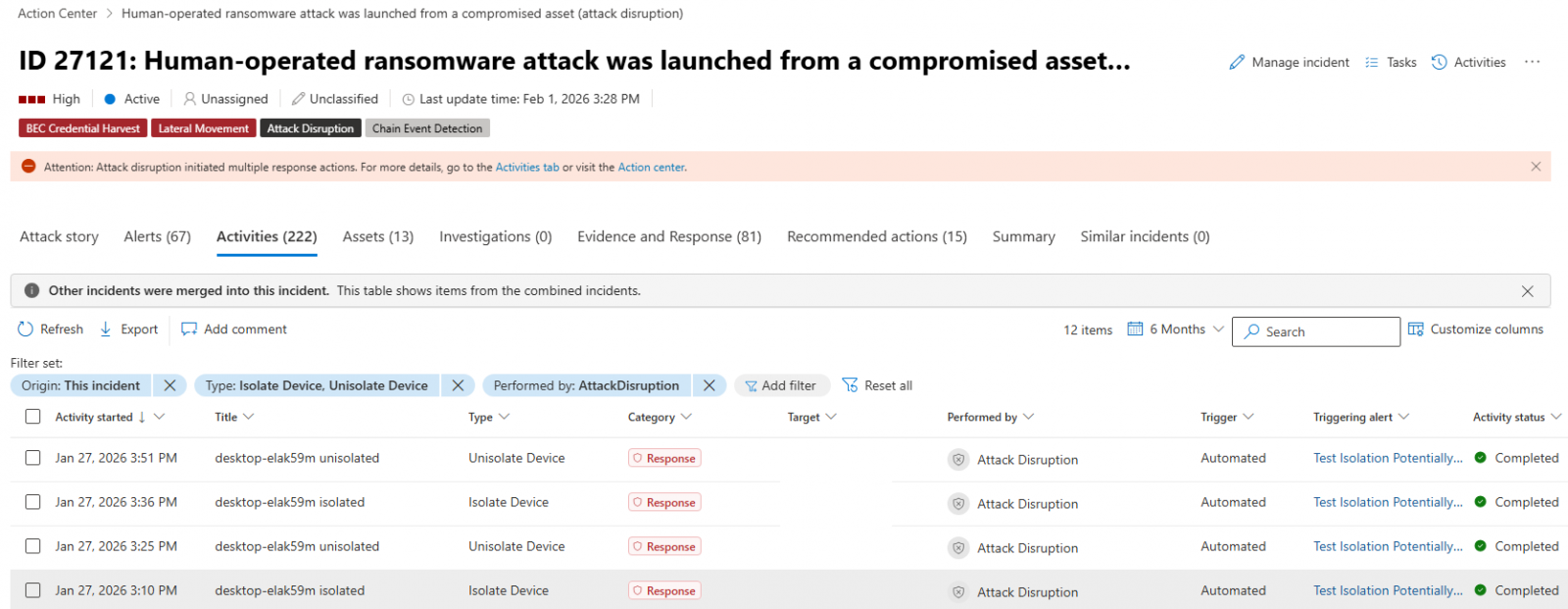
This is now available in preview mode and works as part of automatic attack disruption, a feature designed to contain attacks, limit their impact, and provide security teams with more remediation time.
Compromised endpoints that are automatically isolated are disconnected from the network to reduce the risk of further impact, but they retain connectivity to the Microsoft Defender for Endpoint service, which will continue to monitor the device.
“When a device in your organization is suspected to be compromised, Microsoft Defender for Endpoint can automatically isolate the device as part of automatic attack disruption,” Microsoft said.
Advertisement
“Automatic isolation helps reduce the risk of further impact on the organization, limit attacker lateral movement, and prevent impacts such as data exfiltration and ransomware propagation.”
Automatic device isolation works only on onboarded end-user workstations managed by Microsoft Defender for Endpoint.
As Microsoft explained, they can also be released from containment at any time by security operators after completing the incident investigation and mitigating the risks.
To release a device from automatic isolation, select the device from the “Device inventory” or open the device page and select “Release from isolation” from the action menu.
Advertisement
Defender for Endpoint automatic device isolation (Microsoft)
Nearly four years ago, in June 2022, Microsoft also announced that admins could manually contain compromised, unmanaged Windows devices by cutting off incoming and outgoing communication with onboarded Defender for Endpoint endpoints.
Microsoft also began testing device isolation support for Defender for Endpoint on onboarded Linux devices in January 2023, with the capability reaching general availability in October 2023.
The same month, it revealed that Defender for Endpoint could also isolate compromised user accounts as part of automatic attack disruption to block lateral movement in hands-on-keyboard ransomware attacks.
More recently, Microsoft began testing another new feature for the Defender for Endpoint enterprise endpoint security platform that automatically blocks traffic to and from undiscovered Windows endpoints, preventing attackers from breaching other non-compromised devices on the network.
Earlier this month, it revealed another Defender for Endpoint preview feature that will allow admins to schedule antivirus scans on onboarded Linux systems using the Microsoft Defender portal, mdatp managed JSON configuration, or the mdatp command-line tool.
Advertisement
“Scheduled scans support daily quick scans, interval-based quick scans, and weekly full scans, with options for low-priority execution, idle-time scheduling, and randomized start times,” it said.
Automated pentesting tools deliver real value, but they were built to answer one question: can an attacker move through the network? They were not built to test whether your controls block threats, your detection rules fire, or your cloud configs hold.
This guide covers the 6 surfaces you actually need to validate.
Data breach notification service Have I Been Pwned says a data breach at convenience store chain 7-Eleven affects over 185,000 people, including their names, dates of birth, and physical addresses.
The data breach, reported in April, also included phone numbers and email addresses.
Have I Been Pwned, which collects caches of data breaches and alerts affected individuals that their data was compromised, said in a new listing that 7-Eleven was the victim of a hack-and-extortion attack. The ShinyHunters group took credit for the breach, saying they would publish the data if they weren’t paid.
Per a listing with Maine’s attorney general’s office, 7-Eleven chief information security officer Jim Kastle said the hackers gained access to an internal server containing franchisee documents. A separate listing with Massachusetts’ attorney general said the breach also included Social Security numbers and driver’s licenses.
The average person works 80,000 hours over the course of their career. Ideally, that time should be fulfilling, well-paid, and spent doing things that make the world a better place.
Of course that’s much, much easier said than done. In an increasingly fragile job market made still more fraught by AI, there’s no longer such a thing as a safe bet.
According to Benjamin Todd, most people lack a systematic approach to thinking about their career choice. Todd is the co-founder and president of 80,000 Hours, a nonprofit dedicated to helping people move into careers focused on tackling the “world’s most pressing problems” — issues that include AI safety, biosecurity, global health, and animal welfare. 80,000 Hours uses the effective altruismframework of importance, neglectedness (how many resources are devoted to the problem), and tractability (or solvability) to decide which causes to prioritize.
In his new book 80,000 Hours: How to Have a Fulfilling Career That Does Good, which was released this week, Todd pulls together more than a decade of research and advising into a guide for making career decisions. It’s aimed at people just starting out as well as more experienced workers looking to make a switch, providing a framework to make career choices.
Advertisement
I spoke with Todd about careers and skill sets that are more resistant or adaptable to AI job disruptions, why “going with your gut” (usually) isn’t good advice, tips for landing a high-impact job offer, and other topics.
Our conversation below has been lightly edited for length and clarity.
There’s a lot of anxiety around advances in AI and job displacement, how that affects people’s job prospects and how they should think about career choices.
Yeah, I feel like when I talk to people about their careers these days, that’s the main thing that’s on their mind. … I think a lot of the simple answers about which jobs will be best [in the age of AI] are too simple.
Advertisement
How have the last few years — thinking about AI but also other disruptions and changes to the job market — changed your core assumptions about how people should choose their careers?
The main thing that comes to mind is we seem to be getting more and more evidence that far more capable AI will be here soon.
Then I think that just has a lot of implications for which problems are most pressing, and then potentially also which skills are most valuable. If there’s going to be a lot of change and things will be more unpredictable 10 years from now, then it makes sense to focus on shorter-term plans than to spend 10 years training to do something. Starting medical school now seems a lot more risky than it would have been 10 or 20 years ago.
When you say AI is coming and going to change things, are you talking about artificial general intelligence (AGI) specifically?
Advertisement
I mean there’s multiple levels. I think [where the technology is now], if it just froze here, would be kind of similar to the internet and how important it was. But the big-picture thing that seems most important is the idea that you could get to some kind of AI that can do a lot of remote work jobs at roughly a human level. That seems like it could bring the economy and science into a significantly different regime.
I’m probably a bit more skeptical than most technologists of mass near-term unemployment from AI, though I also think that most economists are still underrating how big a deal it could eventually be.
You mention in the book that managing AI agents is a skill less likely to be replaced by AI. Why is that?
I talk about four things that could make skills become more valuable in the future given technology and automation. And the second one is complementarity to AI. So it’s not that AI won’t be able to do that, it’s that it’s a skill where as AI gets better, that skill becomes more valuable. Because if AI is more useful and being used to do more things, and you can make it like 1 percent or 10 percent more efficient, then the value of that additional efficiency increases as AI becomes more useful.
Advertisement
Right now, AI is pretty bad at these messy, nebulous, long-horizon things where you need to coordinate between lots of people and decision-makers. I think in an intermediate future there will be a lot of the more routine work tasks that are being done by AI agents, but then there’s human managers who are needed to stitch them together.
That seems to me like that might be a very lucrative job, but that might not add up to a lot of jobs.
That comes down to how much more stuff can get done in total. And those people would be way more productive than people have been in the past, because everyone is running a team of 10 AIs. So we would want many more people doing that type of thing.
One way to think about it is that a lot of things that in the past would have been too expensive to do would become economically feasible because now you don’t need a team of 30 people to start this new nonprofit. You can do it with a team of three people and a bunch of AI. So then a lot of people could start new projects and you just get a lot more total things being done with [the aid of] AI rather than, “Oh, we have to do the same stuff as before, but with only 10 percent as many people employed.”
Advertisement
I think that’s maybe good for people at a mid- or senior level in their career, but it could make things harder for more entry-level people.
I think that’s a little bit too early to say. So there is some research that finds that skilled human managers are also better at managing AI agents, and there’s a kind of correlation in that skill set. There is research about the most junior software engineers, [that finds] their jobs are down 20 percent. But in some ways young people are just much more adaptable to new technology, and I find a lot of college students seem to be significantly more sophisticated at using AI.
So in some ways, and because it’s changing so fast as well, young people might be better placed to learn how to use these tools faster and adapt as they keep changing. I’m a bit less confident it’s going to be bad for the younger workers.
That’s interesting because I’ve seen quite a lot of headlines and quite a lot of anxiety from younger people around their job prospects.
Advertisement
I think it’s very understandable to be anxious because they’re facing far more change to the job market than any recent generation has had to face. No one really knows exactly how it’s going to shake out. I would say one point for optimism is in theory it will mean that many projects are possible that weren’t possible before. That does also open up a lot of extra opportunities for young people who I think in some ways are better placed to take on these more risky and novel things because they’re less set in their ways.
“I would say one point for optimism is in theory it will mean that many projects are possible that weren’t possible before.”
Because better or worse, AI is a force multiplier.
Totally. We were talking about this skill [at managing AI agents] being lucrative. It would also be applicable to a lot of social problems as well.
Advertisement
What does effective altruism get right about career choice — and wrong?
I think most people just aren’t thinking enough about the impact of their career at all, and they actually have this amazing opportunity to at a minimum save people’s lives and maybe do a lot more by helping prevent the next pandemic or being one of the only people working on AI risks.
When people are thinking about choosing a career, that should really be one of the first things they say: “The world’s facing massive problems. You could do something about them. Wouldn’t that be fulfilling and interesting? Why not do it?”
But people within effective altruism can think too much about their impact. I think people naturally compare themselves to others, but then people who get into effective altruism will tend to compare themselves based on impact. That’s better than comparing it based on how many yachts you have, but there’s still always someone who has more impact than you, and it’s easy for people to have this sense they’re not doing enough. They can potentially go into careers where they think there’s an intellectual case for being really impactful, but it’s not actually a good day-to-day lifestyle for them and they can end up getting pretty demoralized several years down the line. Those are some of the more common pitfalls.
Advertisement
I think you make a very compelling case that when people go with their gut, when they try to make career choices based on intuition, they aren’t always very good at that. You recommend a more systematic approach to thinking this through. Do you think people usually benefit from an outside observer acting as a sounding board?
I do encourage people to work through a systematic approach, especially when it comes to assessing personal fit. A lot of the advice is really about getting out of your head. I think oftentimes the most useful thing people can do is just apply to lots of positions and see what they get.
Often the best way to assess your fit is to speak to someone who has experience hiring in [that] area, they’re the people who’ve done the most assessing of who is going to succeed in a path.
In general, getting an outside perspective is super useful. That’s part of one of the big benefits of the one-on-one advice we offer on the 80,000 Hours website. … You can not consider enough options or factors, so getting an outside perspective is one of the best ways to help broaden your frame and make sure you haven’t missed something.
Advertisement
The key is to have a mixture of a more systematic approach and not do something your gut is actively worried about without understanding the reasons. There’s lots of research that shows that guts are bad at stock picking or predicting which person is going to succeed in some 10-year career path. But your gut is really good at things like, “Do I trust this person?” because that’s what we’ve evolved to be really good at guessing, and it’s something you have had a decent amount of practice about over your life. So if your gut is worried about a path, that might be picking up on something that actually you’re not excited about. The advice I give is don’t go with your gut, but do check with it. So I also wouldn’t say to totally ignore your gut either.
I think some people will chafe at the idea that some career paths are far more impactful than others. What would you say to more skeptical readers? People who would be reluctant or unable to retrain?
In the introduction, I mention this study where people were surveyed on how much they thought different charities more effectively save lives than others. They thought the best charity would be about 50 percent more effective than an average one at saving lives. Our intuitions are very bad at grasping big differences in scale. … When you ask experts in global health, they say there’s a hundred times difference between the most effective charity and the average for saving lives. It seems like no one knows about these differences even though it’s a huge deal. It means you could work for 10 years on a path and then retire and do whatever you most enjoy for the remaining 30 years and still achieve what would have taken hundreds of years working in one of the less effective charities.
I would actually advocate that people keep working rather than retire, but because there’s these huge differences in impact, it actually means it should be possible to find something that is both better for you personally and more impactful for the world.
Advertisement
There is a chapter in the book about what you can do that’s the most impactful thing without changing jobs if you’re already in a career. I talk about donating 10 percent of your income [to effective charities], political advocacy, and even just “slacktivism.” When most people do that they just tweet into their echo chamber … but if you’re talking about something that actually is a huge deal that no one knows about, [it can be effective.]
Another example I use is if you can help someone else find a really impactful job, then that has just as much impact as doing the job yourself. … I talk about being a multiplier.
How can people realistically transition into higher-impact careers, especially if those paths come with greater uncertainty in the age of AI?
It depends a lot where someone is starting from. … There’s more and more fellowships that are designed to help people transition [into higher-impact careers] quickly. You did the Horizon Institute for Public Service fellowship, which I would say is in this genre.
Advertisement
For more experienced people, if you’re an accountant or something like that, lots of organizations need people doing operations and accounting so they might sometimes hire people from outside the field pretty quickly. If that doesn’t work, it’s more of a case of thinking over one or two years, asking, “How can I best position myself to get one of these jobs?”
For that, you could look at the list of skill sets in the guide and think about whether you could learn any of these skills. There’s also a chapter on types of jobs that are really good for gaining skills quickly. One example is working at smaller, rapidly growing organizations, because you can advance faster and those roles tend to be more generalist. That type of generalist skill set is really useful in a lot of social impact organizations, and it means you can do things with AI earlier and get stuff done using those tools. Whereas if you go to a larger organization instead where the work tends to be more routine, that’s closer to something that AI is going to be able to do sooner.
What advice do you have for people with financial constraints that require them to secure a role right away, even if it may not be the highest impact or greatest fit?
I see impact as one important factor, but your own well-being matters too. You might also have dependents as well. Ultimately, you have to make your list of options and then choose the one that’s best given your goals. If money is a priority for you right now, then I think you should focus on that. There’s no shame in it.
Advertisement
I also talk about the idea of having a plan Z, [if your plan A and B don’t work out] that on some level you’re okay with. If you can’t do that, then you should focus on getting yourself into a stronger position first. Maybe you need to focus more on things like building skills or saving money which will mean you can take bigger risks later.
There’s this axiom that the best time to get a job is when you have a job, so you have more leverage or experience. How true do you think that is?
What most helps in getting a job is doing something as close as possible to the actual work. Obviously being in a job already is a very good way to demonstrate that you can do the work. But people who don’t have jobs already can often find ways to do that, like a portfolio project.
I talk about the “pre-interview” project, where you come to the interview with a specific proposal [to the company you’re applying] for how you would help them with some challenge the organization is facing … most jobseekers don’t have that level of understanding of a position. So you’re already standing out just by having thought about it.
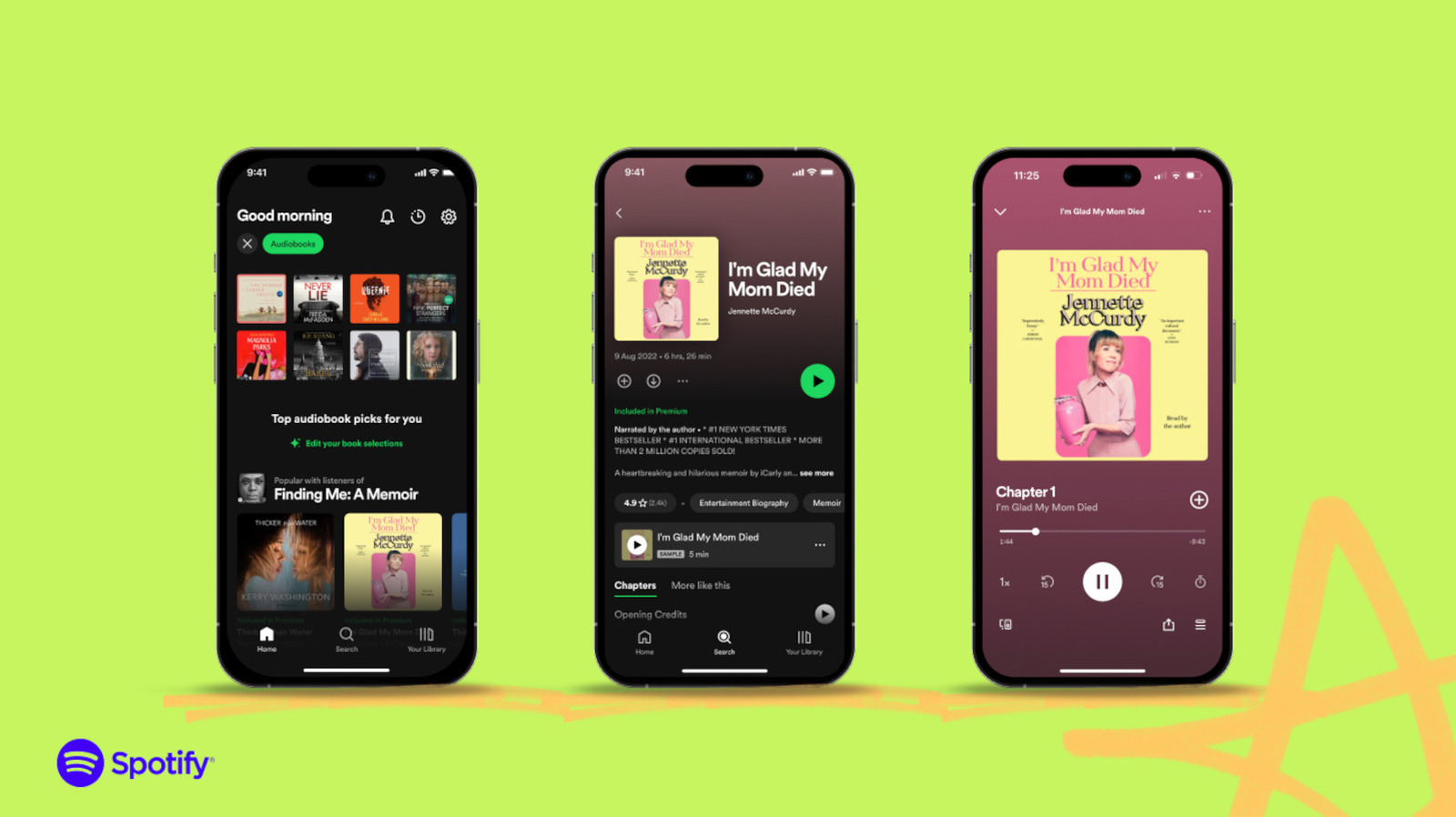
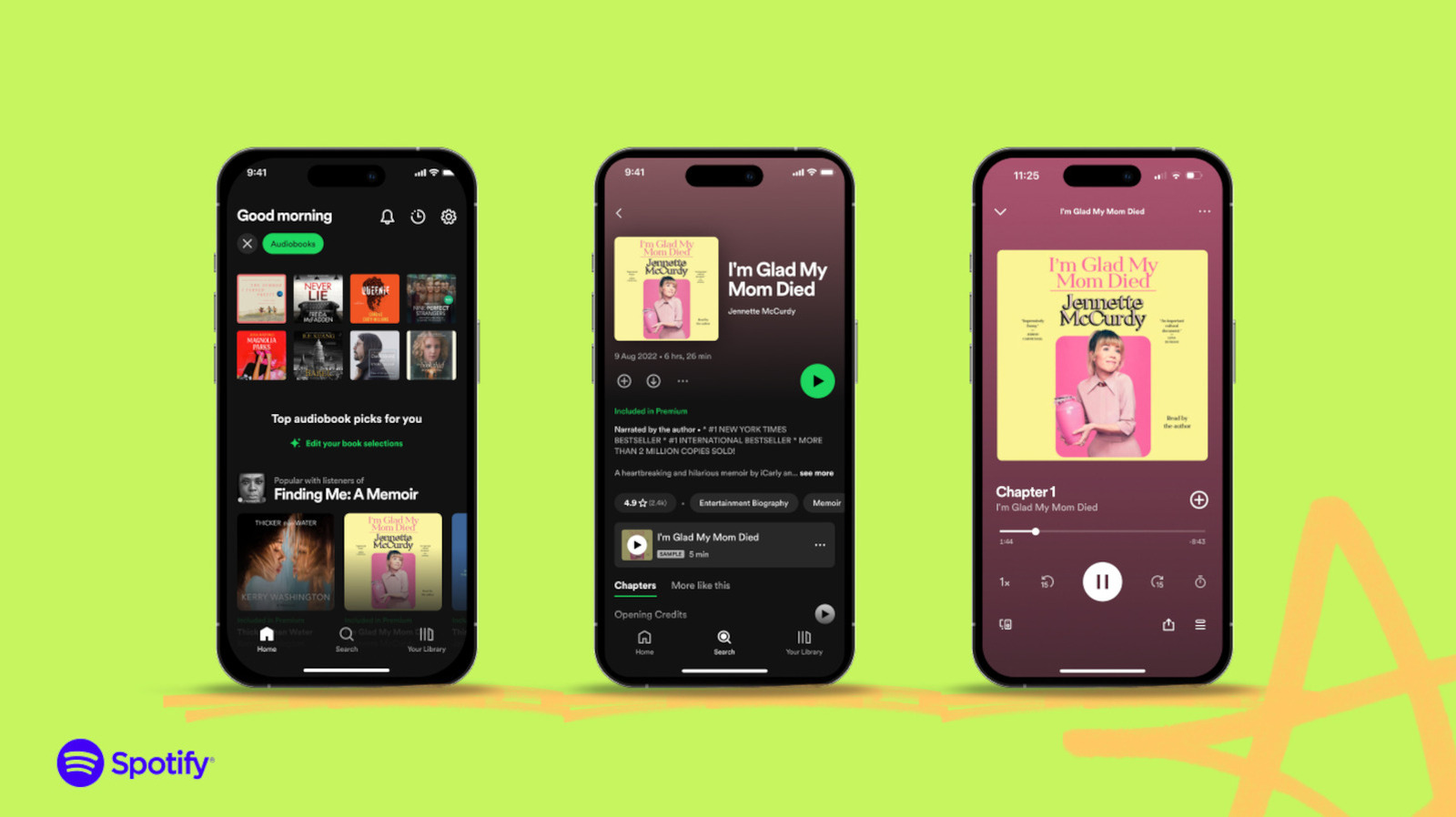
Spotify is expanding its offerings with a pretty wide selection of narrated long-form magazine articles from several publications that are most likely already familiar to you. The audio streaming service has announced that it’s adding over 650 long-form articles to its audiobook library. While all the pieces it added are in the English language only, they will be available in all of Spotify’s regions where audiobooks are available.
The articles included in this rollout include pieces from Rolling Stone, The Atlantic, Vogue, Variety, Billboard, Vibe, GQ, WIRED, Vanity Fair and Pitchfork. Spotify has teamed up with more publications, but as you can see, the curated collection offers articles on topics subscribers are most likely interested in, namely music and technology. “With Articles, we’re introducing long-form journalism in audio as a natural extension of the music, podcasts, and audiobooks people already come to Spotify for, focused on topics we know they love,” said Colleen Prendergast, Licensing Lead at Spotify Audiobooks. Prendergast also said that by offering subscribers shorter formats to listen to, the hope is for them to interact more with books, particularly the audiobooks in Spotify’s library, over time.
Each narrated article Spotify has released is under two hours long, and subscribers can listen to them against their audiobooks listening time. A Spotify Premium subscription includes 15 hours of audiobook listening time a month. Voracious readers can purchase top-ups, however, such as the Audiobooks+ monthly add-on with higher listening time limits. They can also just purchase individual articles to listen to for $2 each.
The company said in its announcement that the narrated articles it released were produced in-house by the Spotify Audiobooks team. We’ve asked Spotify for clarification whether that means the narrations were done by human talents or generated using AI, and we’ll update this post when we hear back.
Advertisement
Spotify announced several generative AI-focused updates during the company’s investor day last week. One of the features it’s launching next month in the US will allow users to generate personal podcasts directly within Spotify by drawing from the user’s profile and any file they upload, including PDFs and URLs. It’s also launching “Prompted Playlists” for audiobooks, which can create playlists based on user’s prompts describing what they want to hear more of and their listening history.
The war over forever chemicals in cookware has seen celebrity chefs, major cookware makers, and state legislatures enter into battle. Now, a new front has opened over advertising claims.
Cookware company Caraway is alleging that “Big Cookware” is using a lawsuit to try to “silence” the company, which rose to prominence making forever-chemical-free pans. Caraway recently launched a marketing campaign in response to a lawsuit filed in February by two large pan makers, which claims that Caraway is harming their reputation by marketing its products as free of “toxic” chemicals—despite never mentioning either company by name.
The lawsuit, filed by Groupe SEB USA and Meyer in the Southern District of New York, claims that Caraway’s marketing around forever chemicals, a colloquial term for per- and polyfluorinated alkyl substances (PFAS), is harmful to the industry as a whole. Caraway’s marketing materials, the two companies say in the suit, is not grounded in scientific fact and “has caused immense and continuing harm to consumers, to Plaintiffs, and to other cookware and bakeware companies in the marketplace.”
In response to questions from WIRED, Carmine Zarlenga, a lawyer at Mayer Brown representing Groupe SEB USA and Meyer in the case, sent over a press release. “Claiming to be a smaller company is no defense to false advertising—all companies large and small have the same rights and obligations under federal and state false advertising laws,” Zarlenga said in the release.
Advertisement
The lawsuit is the latest attack on anti-PFAS advocacy by two of the largest companies in the global cookware industry. In 2024, as more than two dozen state legislatures weighed bans on consumer products with PFAS in them, Groupe SEB, the parent company of Groupe SEB USA, and Meyer formed the Cookware Sustainability Alliance, an advocacy group for the industry. That group has actively opposed bans, including signing letters and testifying in statehouses.
Last fall, facing a bill in the California legislature to ban consumer products containing PFAS, celebrity chefs, including Rachael Ray, Marcus Samuelsson, and David Chang sent letters to the legislature opposing the bill. (Ray and Chang have cookware lines affiliated with Meyer, while Samuelsson serves as a “chef partner” for All-Clad, which is owned by Groupe SEB. WIRED sought comment from All Clad, Ray, Samuelsson, and Chang. All four did not respond.) The bill ultimately passed the legislature but was vetoed by Governor Gavin Newsom.
“The Cookware Sustainability Alliance focuses on state-level advocacy to protect perfectly safe cookware from being swept into overly broad PFAS product bans,” the group’s president, Steve Burns, told WIRED in an email. “We are not a party to any lawsuit at this point.”
Last year, the Cookware Sustainability Alliance challenged claims made by Caraway through the National Advertising Division (NAD), an independent nonprofit that is often linked with the Better Business Bureau National Programs that self-polices the ad industry. The alliance challenged some of the claims in Caraway’s advertising around PFAS.
Advertisement
The NAD ruled that Caraway could continue to advertise its products as “nontoxic” and “PFAS-free,” but it should avoid specific claims in its advertising, including that other nonstick cookware “can release toxins into your food and home during ordinary, manufacturer-recommended use.”
Caraway, the February lawsuit alleges, continued to use that messaging despite the NAD decision. The company says that most examples of advertising highlighted in the lawsuit simply state that its products are nontoxic and that it fully complied with the NAD’s recommendations. But the suit also claims that Caraway “has not taken down many of the relevant advertisements.” In a memo to support a dismissal motion, Caraway alleged the NAD did not provide “any factual support whatsoever to the element of consumer deception.”
If you’ve ever used an online patient portal to message your doctor in the middle of the night, you won’t be surprised to learn that responding to those messages takes an increasingly big bite out of clinicians’ workdays.
So in recent years, hospitals have begun adopting an AI tool that can draft responses for them. The tool was supposed to make a time-consuming task go more quickly and smoothly, said Philip Barrison, an MD-PhD student at the University of Michigan Medical School who studies AI in healthcare.
Instead, the tool has given doctors and nurses a new to-do list. First they have to read the AI-generated response and decide if it “is actually something that they think they would say,” Barrison said. Humans are suggestible, and looking at something and deciding whether you would have thought of it on your own is a cognitively complex task.
Even if the message looks correct, the clinician still needs to “edit it to the point where they think it’s acceptable” to send to a patient, Barrison said. The AI tool introduces a totally new set of complicated judgment calls into what used to be a relatively straightforward process. As a result, many clinicians have chosen not to use it at all.
Advertisement
They’re fortunate to have the choice. Buoyed by expectations of cost savings and skyrocketing productivity, companies are increasingly asking (and sometimes requiring) employees to use AI to make their work more efficient. Meta, for example, last year instructed some workers to use AI to “go 5X faster by eliminating the frictions that slow us down.” The CEO of Shopify told employees they’d need to prove they “cannot get what they want done using AI” before the company would approve new hires. Some companies are even evaluating or ranking employees based on how much they use AI tools.
Workers in some sectors have found major time savings from AI. But for others, the tools just change the work rather than making it faster. Workers might be spending less time writing patient portal messages, for example, but more time editing the releases the AI tool writes.
At best, this mismatch between employer expectations and employee reality can be an annoyance. In other cases, however, it can result in workers being laid off for failing to meet unrealistic efficiency demands. Some critics say the overzealous adoption of AI in high-stakes settings like healthcare even puts people’s lives at risk. Now workers, unions, and experts are increasingly calling for guardrails to protect employees from inflated expectations around AI — and customers, students, patients, and the general public from mistakes that can happen when managers put AI adoption above all else.
The hidden costs of AI use
Advertisement
Corporations are increasingly presenting employees with a choice: Use AI to be more productive or “you’re going to be automated out of a job,” said Aiha Nguyen, director of the labor futures program at the research organization Data & Society.
But the effects of AI on productivity aren’t as straightforward as some CEOs have claimed. In one 2025 study, software developers believed AI made them faster, but in fact they took 19 percent longer to complete tasks. (The researchers tried to repeat the experiment this year but had trouble recruiting developers who would agree to work without AI.) And in a recent survey of 5,000 white-collar workers, 40 percent of rank-and-file employees said AI saved them no time at all.
Workers across heavily AI-exposed fields point to hidden timesucks that come with using the technology. Julie, an art teacher, wrote in a response to a Vox reader survey that her school’s administrators routinely suggest using AI for lesson-planning, emails, and progress report comments. She’s tried AI-generated lesson plans, but they don’t account for the fact that kids may work through an activity at different speeds.
“First, I am checking what AI suggests, then I am editing them. Why add a step I can accomplish on my own?”
Advertisement
— Julie, an art teacher who wrote in response to a Vox reader survey
“First, I am checking what AI suggests, then I am editing them,” she said. “Why add a step I can accomplish on my own?”
For an employee at an East Coast communications agency, an internal AI tool was supposed to speed up the process of drafting press releases and other documents about the pharmaceutical industry.
“The goal is, I think, to be able to plug and chug into this machine and be able to turn a lot of materials around a lot quicker than we already do,” said the employee, who asked to remain anonymous for fear of career repercussions.
But when the employee tried to use it for basic research, it made too many mistakes. Double-checking its work erased any time savings. When the employee tried using it for communications with clients, its people-pleasing tendencies became a problem, as the tool put a “weird happy spin” even on messages warning of bad news.
Advertisement
“Part of the reason we take a human speed to turn things around is because there is so much nuance behind everything that we do,” the employee told me. “AI is just not going to be able to catch it.”
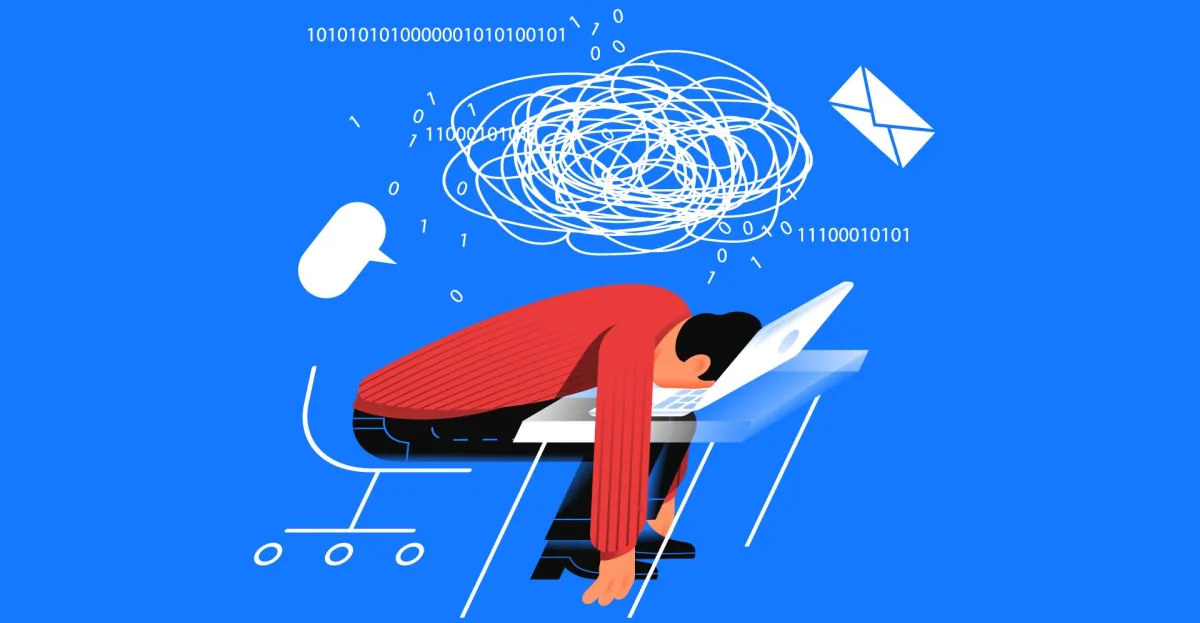
It’s not just that AI makes errors. With the advent of agentic AI, workers are increasingly being asked to edit and oversee the output of multiple AI tools, a new kind of work that can have unexpected costs.
One recent study of 1,488 workers across industries, for example, found that excessive oversight of AI agents could lead to what the researchers called “AI brain fry,” a kind of cognitive fatigue. “Participants described a ‘buzzing’ feeling or a mental fog with difficulty focusing, slower decision-making, and headaches,” the researchers wrote in Harvard Business Review. Brain fry was also associated with an increased number of errors and an increased desire to quit one’s job.
The researchers also found that while using one or two AI tools increased productivity, adding additional tools produced diminishing returns, and after four tools, productivity actually declined.
Advertisement
What workers really want from AI
Despite such findings, companies continue to pressure employees to use AI, and to cite AI investment as a rationale for layoffs, even as companies that try to link staff reductions to AI adoption tend to struggle on the stock market.
Some workers and organizations, however, are beginning to push back. National Nurses United, the country’s largest nurses’ union, has criticized the use of AI tools in hospitals to estimate staffing needs or to recommend treatment protocols for patients.
There’s no guarantee that these tools will take into account a patient’s individual profile, including underlying medical conditions, the way human clinicians can, Cathy Kennedy, the union’s president, told me. AI is supposed to “help us do our work more efficiently, but at the end of the day, it makes it even more burdensome,” she said.
Advertisement
Hospitals need to evaluate, with nurses at the table, whether AI tools really work as advertised, Kennedy said. “We have to stop — we have to go back and really see if this is truly doing what it needs to do,” she said.
The same is true across industries, Barrison, the healthcare researcher, told me. “Organizations need to be prepared to say when, if they were seeking a return on investment, if they were seeking value in a technology — how do you define what that value is? And if there’s not value there anymore, how do you turn it off?”
Some workers have found ways that AI actually helps them do their work — just not the ones management expected. Julie, the art teacher, likes to use Claude to learn more about topics she’s less familiar with, like kiln-firing ceramics.
Meanwhile, researchers have found that AI can actually reduce employee burnout, if it’s used to complete tasks employees find burdensome. “Everybody in every job has a list of things that they procrastinate on,” said Julie Bedard, a managing director and partner at Boston Consulting Group who led the AI brain fry study. “Those are the places I get, unsurprisingly, a lot of enthusiasm to try AI with.”
Advertisement
But employers won’t find out what those burdensome tasks are unless they listen to rank-and-file employees. “Worker standards and worker rights should continue to be at the heart of all of this,” Nguyen said, “rather than just focusing too much on the AI.”
Not so long ago, business laptops were painfully boring. Thankfully, things have changed a lot. In 2026, the best business laptops aren’t just built for Excel sheets and Zoom calls anymore. They now pack desktop-level performance, OLED displays that rival those on premium TVs, AI-powered productivity tools, and battery life that can actually last a long flight without making you fight for the airport charging socket.
This shift has also made choosing the right laptop way more confusing. Some machines focus entirely on portability for people constantly traveling between meetings, while others pack dedicated GPUs and AI chips for creators, developers, and multitaskers. To help narrow things down, we’ve rounded up some of the best business laptops you can buy right now.
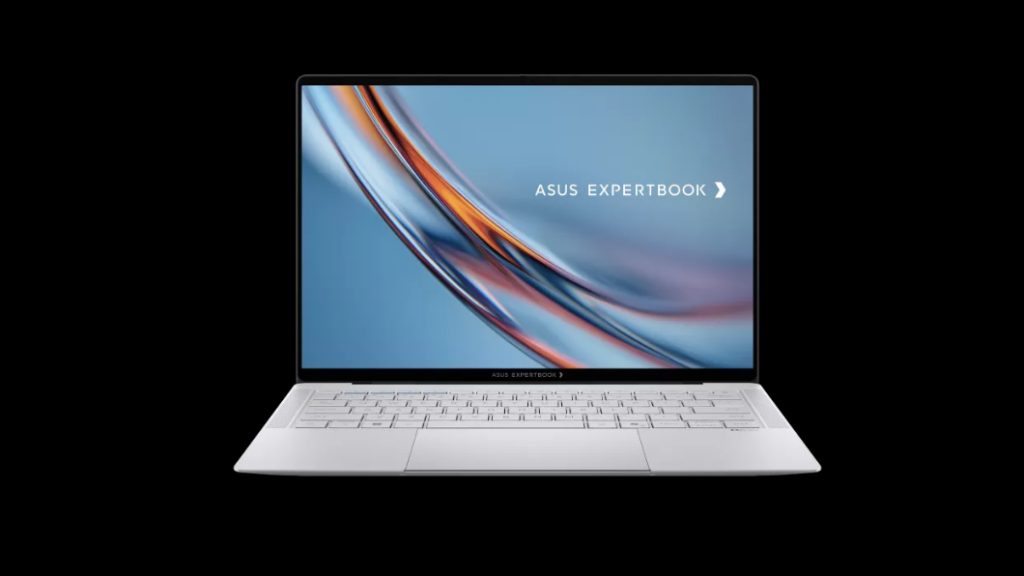
1. ASUS ExpertBook Ultra 2026
The ASUS ExpertBook Ultra 2026 is a business notebook built on premium design and high-end AI performance for professionals and executives. With an Intel Core Ultra 7 processor and an Intel Arc B390M graphics card, the device delivers top-notch AI-assisted performance across a range of applications. It features a 32GB LPDDR5X RAM and a 2TB PCIe Gen 4 SSD for superior multitasking and performance. Meanwhile, its 14-inch 3K OLED touchscreen display supports a 120Hz refresh rate and delivers accurate Pantone colors with HDR support.
Regarding connectivity, ASUS comes equipped with two Thunderbolt 4 ports, two USB Type-A ports, HDMI 2.1, Wi-Fi 7, and Bluetooth 5.4. For AI integration, ASUS has included the Intel NPU, Copilot+, and MyExpert AI. In addition, the use of a magnesium chassis ensures the computer is slim, durable, and lightweight, with a weight under 1 kilogram. The device comes with a 70 Wh battery and very fast charging, with the laptop reaching up to 50% in 30 minutes.
Best Features of ASUS ExpertBook Ultra 2026
Performance-oriented with powerful AI
Super fast solid-state drive (SSD)
Slim, lightweight, and strong body construction
Pantone-certified OLED display screen
Multitasking and creative-friendly
2. Dell 14 Premium
Dell 14 Premium focuses on the needs of professionals seeking a portable yet powerful, premium-design laptop. In terms of performance, Dell 14 Premium is one of the closest equivalents to MacBook Pro among professional-oriented Windows laptops. The inclusion of Intel Core Ultra processors and Nvidia RTX GPUs ensures that productivity and creative applications can be used comfortably while multitasking and performing AI-assisted operations.
Using Intel Core Ultra 7 processors along with an Nvidia RTX 4050 graphics processing unit (GPU) offers reliable computing capabilities in business and creativity-related purposes. It has a maximum memory size of 32 GB with a total storage volume of 2 TB. This laptop also features a 14.5-inch OLED touchscreen display, a slim metallic build, and wireless connectivity.
Advertisement
With its light metal frame, it is perfect for traveling professionals, while its OLED screen enhances viewing quality for any kind of presentations or editing.
Best Features of Dell 14 Premium
Optionally comes equipped with RTX 4050 for creative work
Lightweight premium design
Intel Core Ultra processor
OLED display
Excellent performance for business and productivity
3. Lenovo ThinkPad X1 Carbon Gen 13The
The Lenovo ThinkPad X1 Carbon Gen 13 laptop is designed specifically for business professionals who require dependable performance every day. This laptop has a robust carbon fiber design, along with AI features that help ensure privacy.
The laptop can incorporate the most advanced technologies thanks to Intel Core Ultra 7 and Intel Arc processors, enabling seamless multitasking. RAM capacity on the laptop is up to 64 GB, and memory space can go up to 2 TB. Moreover, this laptop incorporates a 14-inch 2.8K OLED display, providing excellent picture quality.
Lenovo has included various AI-based security tools to help business clients use the laptop more easily. Such tools include privacy alerts and tips about using a VPN. Connectivity via Thunderbolt 4, WiFi, and ports makes the laptop easy to use for business. In addition, carbon fiber and magnesium materials increase laptop durability and reduce weight.
Best Features of Lenovo ThinkPad X1
Premium lightweight business design
Excellent keyboard experience
AI-enhanced privacy and security tools
Powerful multitasking performance
High-quality OLED display
4. HP EliteBook Ultra G1i
The EliteBook Ultra G1i by HP is an ultralight laptop designed for business professionals who need improved performance and enhanced security. This device comes equipped with Intel Lunar Lake processors, intelligent AI technology, top-notch security, and an elegant OLED screen, enabling improved efficiency and productivity at work. It serves as a perfect companion for traveling businessmen and executives.
For connectivity, the laptop includes Thunderbolt 4 ports, USB 3.2 support, Wi-Fi 7, and Bluetooth 5.4. The HP also integrates enterprise-grade security features like BIOS protection, malware isolation, and remote lock/wipe capabilities. As for the laptop’s design, it is made of sturdy metal with an impressive matte finish and is quite light, at an estimated 1.18 kg. Furthermore, its battery will ensure that you can use it continuously for 13 hours.
Photo credit: Pipfix Protective cases for the upcoming iPhone 18 Pro models have now appeared in clear detail through recent leaks. These accessories give an early sense of the colors and subtle shifts Apple has prepared for its 2026 flagships. Dark Cherry stands out among the options on display. This shade brings a rich, wine-like red that feels warm and substantial rather than bright.
Cases in the leaks also show a Light Blue and Dark Gray option, as well as Silver to round out the expected lineup (albeit it is not in every sample we’ve seen). This quartet of options shows that Apple intends to cater to everyone while also maintaining a coherent appearance. The phone bodies under these cases keep the same overall design as current Pro models, with smooth aluminium on the sides and a large camera bar on the back.
The iPhone 18 Pro and Pro Max have a slightly larger design, which gives it a thicker profile and hints there’s extra capacity inside for some new toys. That extra depth is most likely home to a 48-megapixel main camera with a variable aperture, which allows the camera to change how much light enters based on the conditions rather than the user having to manually switch modes.
Of course, MagSafe rings fit nicely in every case, though some of the clear versions appear to be a little smaller than last year, with a cleaner magnetic region that doesn’t cover nearly as much of the phone back, which should make the end product feel a little more open and true to the underlying color. One thing to keep in mind is the size change, so if you’re one of the lucky ones upgrading to the new model, you’ll most likely need fresh protection once they arrive, and the cases from last year won’t fit quite as neatly anymore. [Source]





















![TL | Thief Gives Money To Homeless[TRACYLEAD] #tracylead #kindperson #respect #help](https://wordupnews.com/wp-content/uploads/2026/05/1779804688_maxresdefault-80x80.jpg)



























You must be logged in to post a comment Login