Palo Alto Networks is warning that hackers are now exploiting a PAN-OS GlobalProtect authentication bypass flaw, tracked as CVE-2026-0257, in attacks attempting to breach corporate networks.
The company fixed the CVE-2026-0257 flaw earlier this month, warning that it could be used to establish unauthorized VPN connections on the device.
“GlobalProtect portal and gateway of Palo Alto Networks PAN-OS® software allows the attacker to bypass security restrictions and establish an unauthorized VPN connection,” reads Palo Alto’s advisory.
The flaw received a Medium severity rating because it requires devices to be configured with authentication override cookies enabled and a specific certificate configuration.
Advertisement
However, on Friday, Palo Alto Networks updated the advisory to warn that the flaw was now being actively exploited in attacks against unpatched devices, raising the severity rating to High.
“Palo Alto Networks has become aware of limited exploit attempts on unpatched PAN-OS devices without mitigations applied,” reads the update.
This update comes after Rapid7 warned that it had observed the flaw being exploited against numerous customers starting on May 17.
“Rapid7 MDR identified successful exploitation across numerous customers, however we did not observe any indication of successful lateral movement from the devices. The earliest date for observed exploitation was May 17, 2026,” explains Rapid7.
Advertisement
“As of May 29, 2026, this vulnerability has been added to the CISA KEV.”
According to Rapid7, the attacks began with hackers authenticating to GlobalProtect gateways using forged authentication override cookies that targeted the local administrator account.
The company first observed exploitation on May 18 from infrastructure hosted by Vultr, with a second wave of attacks detected on May 21 originating from Dromatics Systems.
In some cases, attackers were able to connect to the device via VPN using forged cookies, granting them access to internal networks. However, Rapid7 says that in many incidents, even though the appliance accepted the forged cookie, they were unable to establish a full VPN session.
Advertisement
Rapid7’s investigation into affected customers found that the impacted devices had GlobalProtect authentication override cookies enabled and were configured in a way that allowed attackers to forge valid authentication cookies.
The researchers say the flaw stems from PAN-OS’s validation of authentication override cookies.
A GlobalProtect VPN device decrypts these types of cookies using a configured private key and then trusts the decrypted contents without performing any signature verification.
If the same certificate is reused for both HTTPS services and authentication override cookies, attackers can obtain the corresponding public key via the HTTPS session and then use it to create forged cookies that the device will accept as legitimate.
Advertisement
Rapid7 developed a proof-of-concept exploit that demonstrates how an attacker can retrieve the public certificates exposed by a GlobalProtect portal or gateway, generate a forged authentication override cookie for an arbitrary user, and authenticate without knowing valid credentials. Using this PoC, the researchers successfully authenticated to an unpatched GlobalProtect gateway.
Organizations using GlobalProtect VPN devices should immediately install the latest security updates to patch the flaws.
Admins can also mitigate the flaw by turning off the authentication override feature or utilizing a different certificate for this feature and not sharing it with other services on the device.
CISA has now added the flaw to its Known Exploited Vulnerability catalog, ordering federal agencies to mitigate the flaw by June 1, 2026.
Advertisement
Automated pentesting tools deliver real value, but they were built to answer one question: can an attacker move through the network? They were not built to test whether your controls block threats, your detection rules fire, or your cloud configs hold.
This guide covers the 6 surfaces you actually need to validate.
Data suggests firms are turning away from CEST as critics say it fails to reflect recent court rulings
Use of HMRC’s own tool for checking compliance with the UK’s controversial IR35 freelancer tax rules has fallen sharply, according to Freedom of Information data obtained by tax adviser IR35 Shield.
The Check Employment Status for Tax tool, better known as CEST, was created to help firms decide whether contractors should be taxed like employees. But usage fell 43 percent during the 2025-26 tax year, and dropped 71 percent between 2023-24 and 2024-25, from 458,894 determinations to 135,178.
Advertisement
What is IR35?
IR35 is a reform unveiled in 1999 by the UK tax authorities. The latest regulation change – which came into force in April 2021 – forces medium and large businesses in the UK to set the tax status of their contractors and freelancers. Previously this was set by the contractors themselves.
Contractors found to be within the scope of the legislation – i.e. inside IR35 – will have to pay more tax than they might expect.
The reforms are part of the government’s crackdown on so-called disguised employment, where workers behave as employees but avoid paying regular income tax and national income contributions by billing for their services through PSCs, which are taxed at lower corporate rates.
The measures first came into effect in the UK public sector in 2017. The British government hoped the reforms would recoup £440m by bringing 20,000 contractors in line.
Advertisement
HMRC reckons that only one in 10 contractors in the private sector who should be paying tax under the current rules are doing so correctly. It estimates the reforms will recoup £1.2bn a year by 2023.
The findings suggest that firms continue to abandon CEST in favor of alternative status assessment solutions and more comprehensive compliance processes, IR35 Shield said.
CEO Dave Chaplin said: “The majority of firms we speak to for the first time are either lifting blanket bans or seeking to move away from using CEST, having realized it is not compulsory to use, nor does it give them the level of certainty they need.”
The decline is not the result of changes to the tool or legislation, according to IR35 Shield.
Advertisement
“The underlying CEST logic has not been updated since November 2019 and was based on HMRC’s view of the law at that time. Despite the courts dismissing HMRC’s position in key areas, upon which the tool was based, the tool has not been updated,” Chaplin said.
IR35 Shield pointed out that HMRC lost a recent employment status case with Professional Game Match Officials Limited (PGMOL). Entering the facts of the case into CEST would have produced an indeterminate result, it said.
In 2022, the Public Accounts Committee Committee (PAC) found that central government was spending hundreds of millions of pounds to cover tax owed for individuals wrongly assessed as self-employed. “Government departments and agencies owed, or expected to owe, HMRC £263 million in 2020-21 due to incorrect administration of the rules,” the House of Commons spending watchdog said.
Part of the compliance problem was down to HMRC’s guidance and the CEST tool. “Some questions within CEST were difficult to interpret correctly, and the guidance was long, too general in scope and not integrated into CEST itself,” the PAC said.
Advertisement
In a statement sent to The Register, a spokesperson at HMRC, said:
“We always expected use of the tool to reduce as employers familiarised themselves with the 2021 off-payroll working reforms, and the majority of those who use the tool are satisfied with the service they receive.
“The tool is rigorously tested against case law and we’ll stand by the tool’s results, so long as the information provided is correct in accordance with our guidance.” ®
Electrek reports:
Tesla wants to sell modular AI data center hardware, according to a new trademark application for a product called “Megapod.” The filing describes a complete, self-contained computing system for AI workloads…
Tesla filed the “Megapod” trademark (serial number 99893717) with the U.S. Patent and Trademark Office this month, through its longtime IP counsel. It’s an intent-to-use application, meaning Tesla is claiming the name for a product it hasn’t launched yet. The goods-and-services description is unusually specific for a trademark. Megapod covers “modular data center hardware systems for artificial intelligence computing, comprised of computer servers, computer hardware for artificial intelligence data processing, networking equipment, power distribution units, and cooling systems.” It also covers “self-contained modular computing hardware systems for artificial intelligence workloads,” integrated platforms sold as a single unit — an enclosure bundling compute, power distribution, and cooling — and downloadable software to monitor, manage, and optimize those systems.
In plain terms: Tesla wants to sell a turnkey AI data center building block. Not a battery, not a chip on its own, but the full rack-and-room of servers, networking, power, and cooling that AI training and inference run on.
Tesla’s offering would have to compete with Nvidia’s liquid-cooled, rack-scale systems that simulates a giant GPU, the article points out. But “The bigger issue is that Tesla has no merchant compute-hardware business to build on.”
Advertisement
Tesla’s own AI training cluster, Cortex at Gigafactory Texas, runs on roughly 67,000 Nvidia H100-equivalent GPUs. In other words, Tesla is one of Nvidia’s customers, not a competitor selling alternative hardware… Where Tesla does have a real AI-data-center business is power, not compute. Its Megapack and new Megablock energy storage products are selling into AI data centers as grid buffers — Musk’s own xAI has bought roughly $1 billion of Megapacks to keep its training runs powered. That energy-storage strength is the one credible thread here. A Megapod that bundles Tesla’s power electronics, thermal management, and the enclosure — the “shell” around the chips rather than the chips themselves — would at least sit adjacent to a business Tesla actually runs.
Polymarket has been paying online creators to post deceptive videos that show them making lucrative bets on the prediction market, according to a new investigation in the Wall Street Journal.
The WSJ said that it analyzed 1,100 videos about Polymarket and also viewed instructional materials that the company provided to creators. Many of those videos were reportedly filmed on “near-perfect copies” of the Polymarket website, while featuring trades and winnings that were not real. The creator videos were then amplified by a “social-media army” deployed by a marketing contractor.
The WSJ said the company also told those creators not to specify that they’d been paid by Polymarket, although the creators started adding “@polymarket partner” to their bios after journalists began asking questions.
Razeen Khan, a college student and creator who worked with Polymarket until March, compared the practice to commercials that make fast food look more appealing than it is in real life: “We’re depicting what actually happens.”
Advertisement
Polymarket said it is “committed to maintaining accurate, fair, and transparent markets” and plans to conduct an audit of its promotional content.
Looking for the most recent Strands answer? Click here for our daily Strands hints, as well as our daily answers and hints for The New York Times Mini Crossword, Wordle, Connections and Connections: Sports Edition puzzles.
Today’s NYT Strands puzzle has a fun topic, though it might be better suited for October. Some of the answers are difficult to unscramble, so if you need hints and answers, read on.
Your goal is to find hidden words that fit the puzzle’s theme. If you’re stuck, find any words you can. Every time you find three words of four letters or more, Strands will reveal one of the theme words. These are the words I used to get those hints but any words of four or more letters that you find will work:
These are the answers that tie into the theme. The goal of the puzzle is to find them all, including the spangram, a theme word that reaches from one side of the puzzle to the other. When you have all of them (I originally thought there were always eight but learned that the number can vary), every letter on the board will be used. Here are the nonspangram answers:
CREEPS, SHIVERS, JITTERS, WILLIES, BUTTERFLIES
Today’s Strands spangram
The completed NYT Strands puzzle for June 22, 2026.
NYT/Screenshot by CNET
Today’s Strands spangram is GOOSEBUMPS. To find it, start with the G that’s five letters down on the far-left row, and wind up and around.
Access to safe drinking water remains a challenge for billions of people worldwide, but a new invention from researchers in South Korea could make the process much simpler. A self-powered floating capsule that fits in the palm of a hand can reportedly test water quality and disinfect unsafe water without relying on batteries, external power, or chemical treatments.
A simple shake is all this water purification capsule needs
According to a recent paper published in Nature Water, the device, called the Floating-induced Detection-Guided Disinfection (FDGD) capsule, generates electricity when shaken. An internal magnet moves through a coil to produce enough power to activate a built-in sensor that measures the water’s electrical conductivity, giving users an indication of its quality through a connected smartphone or smartwatch.
Construction of an FDGD capsuleNature Water
If the water passes the initial safety check, the capsule can simply be left floating inside it. Gentle movement from waves or even walking while carrying the container generates static electricity, powering microscopic nanorods on the capsule’s surface. These create strong electrostatic forces that damage the membranes of nearby bacteria and viruses through a process known as electroporation, effectively neutralizing them without adding chemicals.
Nature Water
In laboratory testing involving containers holding up to four liters of water, researchers reported that the device successfully inactivated 99.9999% of bacteria and viruses, including E. coli, across multiple water samples. The technology was detailed in the journal Nature Water, with researchers describing it as an affordable, decentralized solution for regions where conventional water treatment infrastructure is unavailable.
The clever part isn’t the disinfection, it’s the lack of dependencies
Interestingly, plenty of portable water purifiers already exist, but most depend on disposable filters, chemicals, UV lamps, or rechargeable batteries. This capsule sidesteps all of those requirements by harvesting energy from simple physical movement, making it particularly attractive for disaster relief, camping, remote communities, or humanitarian deployments where electricity isn’t guaranteed.
Of course, the FDGD capsule is still a research prototype and has yet to prove itself outside controlled testing. But if it can be commercialized at the low cost envisioned by its creators, it could put a reliable water testing and purification tool into millions of hands. Sometimes, the biggest breakthroughs aren’t massive treatment plants or billion-dollar infrastructure projects. Sometimes, they’re small enough to fit in your pocket.
Fraunhofer introduces quantum random generator targeting future cryptographic security challenges
Q-Dice uses vacuum fluctuations instead of software algorithms for randomness
New system delivers over 4 Gbit/s quantum-generated random number output
As concerns grow about the security implications of future quantum computers, researchers continue searching for stronger sources of cryptographic protection.
One critical requirement involves generating truly unpredictable random numbers that can withstand increasingly sophisticated attacks against modern digital systems.
Fraunhofer IPMS has now introduced a new quantum random number generator designed specifically for security-sensitive environments and high-throughput infrastructure deployments.
Latest Videos From
Quantum randomness replaces reliance on conventional algorithms
The system, known as Q-Dice, generates random numbers using quantum vacuum fluctuations rather than conventional software algorithms that may contain weaknesses.
Advertisement
According to Fraunhofer IPMS, the technology delivers randomness at speeds exceeding 4 Gbit/s, with the hardware appliance rated at 4.1 Gbit/s.
Random number generation forms a fundamental component of encryption, authentication, secure communications, and access control systems throughout modern digital infrastructure.
Weak or predictable randomness can undermine otherwise robust security mechanisms, creating opportunities for attackers to exploit cryptographic vulnerabilities.
Advertisement
Sign up to the TechRadar Pro newsletter to get all the top news, opinion, features and guidance your business needs to succeed!
Because Q-Dice randomness originates from quantum vacuum fluctuations rather than a mathematical formula, there is no underlying pattern for hackers to study.
This means no seed value exists for attackers to calculate, predict, or reverse engineer, regardless of available computing power.
Fraunhofer IPMS says Q-Dice derives entropy from inherently unpredictable quantum effects, producing outputs suitable for applications including data encryption, authentication systems, secure communications, quantum key distribution, and post-quantum cryptography.
Advertisement
The organization claims that generated randomness was evaluated using recognized frameworks, including BSI AIS 20/31 and the NIST SP 800-22 test suite.
The system also carries EAL 3 and PTG 3 classifications, reflecting compliance with security requirements established by Germany’s Federal Office for Information Security.
Unlike many software-based approaches, the platform relies on physical quantum phenomena rather than mathematical procedures intended to simulate randomness.
Advertisement
Rack-mounted hardware and cloud access offer deployment flexibility
Fraunhofer IPMS is offering the technology through both dedicated hardware and cloud-based delivery models to accommodate different operational requirements.
The primary hardware version arrives as a 19-inch rack-mounted appliance intended for deployment inside data centers and other controlled computing environments.
The appliance combines quantum entropy generation, signal acquisition, randomness extraction, and system integration within a single platform featuring 10 Gbit/s Ethernet connectivity.
Advertisement
Fraunhofer IPMS said the development process remained entirely in-house, covering optical subsystem design, low-noise analog electronics, high-speed data acquisition, and FPGA-based post-processing.
For organizations unwilling to install dedicated equipment, the institute also provides an online Entropy-as-a-Service offering delivering quantum-generated randomness through a secure interface.
“With Q-Dice, we make high-quality quantum randomness practically usable and accessible,” said Alexander Noack, Division Director Data Communication and Computing at Fraunhofer IPMS.
“Whether as a robust 19-inch rack system integrated into your own infrastructure or via our online Entropy-as-a-Service platform, we are removing the barriers to adopting quantum-level security.”
Advertisement
Fraunhofer IPMS is now actively seeking partners to pilot the technology and help build practical, real-world applications around it.
Noack added that the goal involves working collaboratively to raise the overall bar for security and trust as quantum computing capabilities continue advancing.
Whether Q-Dice becomes a standard component in next-gen security infrastructure, or remains a niche tool, depends on how quickly organizations recognize the urgency of post-quantum preparation.
It’s no secret that Snap has been working on a pair of AR-powered smart glasses for quite some time now – the dev kits for the hardware have been available for the past few years, and CEO Evan Spiegel always claimed that they’d be available by the end of 2026.
Well, we’ve just had our first official look at the super high-tech Specs – specs that Snap spent literally billions of dollars on over years of R&D – ahead of release later this year and, let’s just say, reactions are… mixed.
There’s no getting around it; the glasses don’t look as sleek or as stylish as many were expecting, especially with companies like Meta and Ray-Ban coming out with some pretty slick-looking (albeit comparatively basic) smart specs. It’s actually the opposite; the glasses are massive, chunky and look overly large on the head – even when modelled by Spiegel on stage at the announcement.
As you’d expect, the reaction memes are strong, and opinions are divided online. Even Snap’s stock dropped by 5% after the announcement, suggesting that Snap might’ve been drinking its own kool-aid for a little too long, focusing too much on the smarts and not the fact that, y’know, these actually need to be worn, in public, where people can actually see them on your face.
Advertisement
The problem is that I know the software experience on the Specs is fantastic, unlike anything else I’ve ever seen or used – but will people actually give it a go when they look like that? I think we all know the answer to that question.
Advertisement
Snap’s software is leagues ahead of the competition
Back in September 2025, I got to try the Spects dev kit at Snap’s London HQ, and Snap OS 2.0 feels closer to the sci-fi AR we were promised a decade ago than anything I’ve used since. While most rivals are serving up green, single‑colour overlays and static notification panels, Snap is running a full operating system that understands the world around you.
Image Credit (Trusted Reviews)
Full‑colour graphics aren’t just floating in your periphery; they’re anchored to real objects and surfaces. Pin a window next to your desk or drop a widget onto a coffee table and it stays there, even as you look or walk away. It sounds like a small thing, but that persistence makes the specs feel like genuine mixed‑reality interfaces rather than glorified heads‑up displays.
Image Credit (Snap)
Then there’s the built-in AI, which, believe it or not, is actually quite good. Much like Google Gemini’s Live Mode on mobile, Snap’s Spatial Tips feature doesn’t just answer questions in a floating chat box; it understands what you’re looking at and overlays help directly onto it.
Image Credit (Trusted Reviews)
Advertisement
When I asked how to do an ollie on a skateboard, it didn’t spit out a wall of text – it drew the steps onto the board itself, showing where my feet should go at each stage. The same approach applies to things like flat‑pack furniture, car engines or household repairs: you look at the thing you’re stuck on, and the instructions appear right where you need them.
Advertisement
Image Credit (Snap)
On top of that, real‑time translation features can caption conversations and translate signs or menus with real-world overlays, with text that sticks to people and objects as they move. Compared to the mostly static, widget‑driven software on Even Realities’ G2 or Rokid’s AR specs, Snap OS 2.0 feels way more polished, mature and genuinely useful.
So when I say Snap’s software is leagues ahead of the competition, I really do mean it.
Comparing the Snap Specs to existing smart glasses like the Meta Display specs and Even Realities G2 is like comparing an iPhone 17 Pro to a Nokia 3410; they’re in totally different leagues.
Samsung Galaxy XR. Image Credit (Trusted Reviews)
Advertisement
In fact, in terms of the tech and mixed-reality experience on offer, they’re closer to the likes of the Apple Vision Pro and Samsung Galaxy XR – relatively large VR-style headsets that you certainly couldn’t wear on a night out or a trip – than existing smart glasses.
Like the proper headsets, Snap’s specs have high-end full-colour screens rather than the single-colour panels used by most existing manufacturers, and like those headsets, it can run a plethora of first- and third-party apps – there’s a reason why Snap got those dev kits out so early, after all.
Advertisement
Image Credit (Snap)
It actually goes a step further with its semi-transparent lenses, rather than using passthrough camera feeds and regular screens like the existing ultra-premium headsets. With electrochromic dimming on the lenses, it’s not hard to imagine they could offer a more immersive mode for watching movies and the like.
Image Credit (Snap)
When you look at the Specs through that lens (pun intended), they look more like a phenomenal feat of engineering than a bulky pair of smart glasses.
Advertisement
… but there’s no argument, they’re ugly and expensive
Snap has tried its best to frame these as fashionable, collaborating with the likes of Kaia Gerber, Jimmy Butler, Imogen Heap, Jack Harlow, and Hoyeon to model the Specs in marketing images – but, let’s be honest, they’re still some pretty ugly.
Image Credit (CNBC)
Compared to regular glasses that most people currently wear, these are much thicker – not just in the frame housing the screens but also in the arms of the glasses. The arms also look way longer than they should – on Spiegel’s head at the reveal, anyway – with very little in terms of a hook at the end to wrap around your ear for extra stability.
The slightly rounded, curved shape of the specs is quite nice in my eyes, but they’re just too big, chunky and obviously-smart to be worn by the average Joe. And with an eye-watering price tag of £1,995/$2,195, they’re not attainable for the average consumer either.
Image Credit (Snap)
Advertisement
Of course, these are first-gen specs, and if Snap does power through and keep iterating on the design and hardware, this is the worst the Specs will ever be.
Advertisement
Just think about how much better the Apple Watch Series 11 is compared to the Apple Watch – it’s the same here. The core concept is there, and Snap’s software is a shining beacon in a sea of lazy AR concepts; it just needs the time to properly cook.
Image Credit (Snap)
That said, I reckon the Snap Specs will be a big hit with die-hard techies with money to burn, and I imagine I’ll be seeing execs from companies sporting the Specs at events like MWC in 2027 – but will I see anyone actually wearing them in day-to-day life? I doubt it, and that’s a shame.
I’ve spent years messing with in-game brightness sliders, GPU filters, HDR modes, and monitor presets to tinker with my experience on my favorite games. Of course, I’d always go with the original artists’ intent first, but replaying these titles with new filters does freshen up the atmosphere.
This is why I was particularly impressed by BenQ’s new MOBIUZ gaming monitors. During a recent visit to BenQ’s Taiwan HQ, I got a hands-on look at the company’s latest AI-powered game filter tech, and it immediately made more sense than I expected. The company isn’t just slapping on the “AI” sticker onto a gaming display. What you are getting here is custom touches to change up your experience by pulling from BenQ’s game art database that automatically tunes brightness, contrast, and color balance to match the game’s visual style. The fun part is that your performance doesn’t take a hit.
The filter lives in the monitor
Vikhyaat Vivek / Digital Trends
When you use GPU-side filters, such as Nvidia’s Game Filters, your graphics card is still involved in the post-processing pipeline. Those tools can make a game look sharper, moodier, or more vivid, but they can also come with a performance cost depending on the setup. BenQ takes a different route by moving this job to the display itself. Its Smart Color system works through the Color Shuttle software and uses an AI chipset with BenQ’s MOBIUZ Game Color Database.
So rather than applying a GPU-level filter to the rendered frame, it adjusts the monitor’s own output using game-specific visual profiles. In practice, you can make a game look richer or more balanced without worrying that the filter itself is quietly eating into your frame rate. Considering how precious those extra fps can be for a lot of PC gamers, the visual filter makes sure you don’t lose any of it.
More than just a bunch of presets
Vikhyaat Vivek / Digital Trends
The part I liked during the demo was that BenQ is not treating this like an old-school FPS/RPG/Racing preset menu. Those have existed forever, and most of them are either too aggressive or too generic. Color Shuttle is built around a game art database with more than 120 profiles. BenQ says it uses deep learning to understand color grading, lighting, and artistic direction across different game styles. Once Smart Color is enabled, it can detect what you are playing and switch to a suitable profile automatically.
You can also tweak those settings yourself, including familiar BenQ tools like Color Vibrance and Light Tuner that let you shift the image toward your preference. Again, “better colors” has always been a subjective thing. One player may want a horror game to look darker and moodier, while another may prefer better shadow visibility. Someone else may want open-world games to look more cinematic. BenQ’s system gives you a starting point, then lets you tune from there.
Advertisement
Backed by a community
Vikhyaat Vivek / Digital Trends
One of the best parts of Color Shuttle is cloud sharing. You can save custom presets, upload them, and share them with other players. Other users can then download those setups for their own compatible monitors. This gives the feature a social side. Imagine downloading a profile for a specific game because another player has already found a better balance for night scenes or other scenes.
But that also explains why the internet connection is part of the story. Color Shuttle connects to BenQ’s Game Color Database, and the cloud side is used for saving and sharing profiles. The AI tuning is not the same thing as cloud gaming or streaming, but the ecosystem still depends on BenQ’s online database and community layer.
Still, there are some limitations. Color Shuttle is currently a Windows 10/11 app, and console users need to save presets to the monitor’s Gamer modes through a PC before using them elsewhere. Regardless, I like where BenQ is going here. A lot of AI gaming features feel too heavy or too tied to expensive GPU upgrades. Smart Color is smaller, but also more practical.
404 Media remembers how a Florida police office looked up his ex-girlfriend’s license plate in the Flock automated license plate reader system at least 69 times in 2024 — even searching for her mom’s license plate at least 24 times. The police office was charged with stalking and hacking-related offenses, serving one day in prison with five years of probation — but his case “was not a one-off.” [Alternate link via Bruce Schneier]
Local news reports from around the country repeatedly detail police abusing the Flock surveillance system in order to stalk their partners or ex-partners. The contours of each story are much the same, with the police officer in question using their access to the system to repeatedly track a specific person over the course of weeks or months. The cases highlight the fact that Flock can be used to track the whereabouts of individual people, that police do not get a warrant in order to use the system, and that, if they have access to the system, they have the technical ability to look up any license plate they want for any reason they want. An April study by the civil rights group Institute for Justice found that at least 18 police officers have been caught around the country using Flock to stalk a romantic interest in the last few years; another database, called the ALPR Abuse Library, has documented 20 specific cases of “stalking/targeting” around the country.
The known cases of police stalking are almost certainly a vast underreporting of the overall abuse, because they largely include only cases in which the behavior was so egregious that it led to police officers being fired, arrested, or both. Flock told 404 Media that it is “aware of 15 incidents of abuse, each surfaced because of the transparency and accountability features deliberately built into our platform…. There are also 140,000 monthly active users of Flock, so the relatively rare instances of abuse, while obviously wrong and awful, are exactly that — rare,” a Flock spokesperson told 404 Media. [One in 10,000.] “Humans are fallible; unlike most tools society provide law enforcement, Flock ensures that in the instances when our technology is misused, the evidence used to hold responsible parties accountable, is right there in our system. We also encourage all our customers to have a usage policy, regular training, and to implement our Audit Assistance tool, which proactively flags unintended use….”
But it is also the case that Flock has strenuously fought against lawsuits and potential regulations that are seeking to require police to get a warrant to use the system. And many cases of abuse have not been detected by police departments themselves but by those private citizens, journalists, and stalking victims who have found patterns of abuse in public records files they have obtained from their local police departments. In most cases of Flock-related stalking reviewed by 404 Media, the abuse occurred over the course of months or years, and the victims were subjected to dozens or hundreds of lookups. Other abuse cases have been discovered using the website HaveIBeenFlocked.com, a website that compiles Flock searches released via public records requests and turns them into a searchable database. Flock has repeatedly tried to get that website taken down, as we have previously reported.
Regardless of how that might work, the ban is not a substitute for parental controls on devices and your home network. With two kids of my own, here’s what I’ve learned.
Talk to your kids
Parental controls are there as a safeguard to protect kids from the harms that the internet has to offer. As kids get older, the number of restrictions you have will reduce, but you’ll still most likely want something in place.
All restrictions should be clearly stated and you should talk to your kids about why restrictions are in place and what you expect from them when they’re using devices. Then, you can put restrictions in place.
Advertisement
Use the provided parental controls
Whether or not your kids have Apple or Android phones, there are free parental controls available for both platforms: Screen Time for iOS and Family Link for Android.
Advertisement
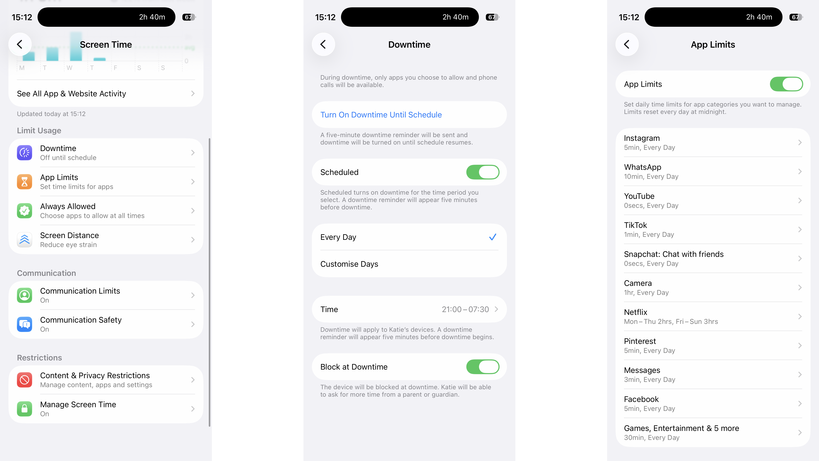
These both need to be tied to a child’s account, but once installed, they both give a similar set of controls: you can make kids request apps before installing them, you can set app time limits, control the contacts they can add, and you can put phones into downtime to prevent use (either manually or scheduled).
Image Credit (Trusted Reviews)
Family Link for Android phones is available on iOS and Android, but for Screen Time you need another Apple device.
If your kids have Amazon tablets or Kindles, then parental controls are available there, too, controllable through the parents’ dashboard online. Again, you get a similar level of control, including time limits.
Advertisement
The one thing that’s annoying about Amazon’s parental controls are that they stop a child joining a different Wi-Fi network, and you have to do this with a parent’s profile on the device itself. On the one hand, this is a safety feature, but if a child goes off to stay with grandparents, for example, they can’t connect to Wi-Fi without you being present.
Windows has its own controls, with Microsoft Family Safety. MacOS devices can use Screen Time, just like the phones.
Advertisement
Game consoles have their own set of controls that you need to set up individually.
Advertisement
Most social networks have parental controls of varying quality, but require that any account your child sets up be monitored by you as a parent using the provided controls.
My advice is to always set every device up with the controls available, but to try and restrict the number of manufacturers you have.
For example, if your child has an iPhone and an iPad, the same settings and time limits apply to both; if they have an Android tablet, a Windows PC, and an iPhone, you have to set limits and controls on each.
Invest in a router with proper parental controls
It’s essential, in my view, to have parental controls running on your home network. I use Eero at home and have Eero Plus. With this, I can create profiles for each child and associate their devices.
Advertisement
Each profile can have its own scheduled downtime, turning off at bedtime, for example, and you can filter the internet in an appropriate way for different-aged children. Eero also allows me to block specific services across all devices, say turning off Discord, YouTube or Snapchat.
Advertisement
But be careful. To identify a device, Eero (and other routers) use a device’s MAC address. Phones and tablets can create a private MAC address, which can change frequently. It’s for privacy to stop public hotspots spying, but when a MAC address changes, your router thinks it’s a new device.
Disable this setting on your child’s devices (turning it off or setting it to Fixed, rather than Rotating) and, if your router supports it, turn on notifications for new devices. That way, you’ll get a pop-up on your phone if the router spots a new device, which covers MAC address changes and any children bringing other unlocked devices home.
Also be aware of devices with more than one network connection. A PC with Wi-Fi and Ethernet will appear as two different devices, and you need to add both to a profile for full protection.
Home network controls should not be used in place of on-device controls, but alongside them. When your child leaves home with a device, such as an iPhone, they’re no longer protected or restricted by the home network. Make sure mobile devices are set up with restrictions similar to those on your home network, so your kids remain protected when they’re using a mobile connection or on another network.
Advertisement
Advertisement
Protect your passwords and PINs
Most parental controls will require a PIN or password when you want to make changes, so don’t use the same ones that you’d use on your own phone, as your kids probably know what this is. I use random PINs and passwords, and save them in a secure note on my phone.
Be aware of different access routes
Just because a phone’s locked down or restricted in a certain way, it doesn’t mean that your kids can’t get around the controls you have. Take Snapchat, for example: kids can simply log in on someone else’s phone or via a web browser, bypassing time limits that you might have set.
If a service that your child has access to has the option of two-factor authentication (where you need a code to login), set this up, but add the code to your phone, such as through the Google Authenticator app. Sign out of all sessions on the service on your child’s phone, and then sign them back in. They’ll need the authentication code to do so, so it’s fine to give out that one-time code.
Advertisement
However, now if they try and log in via another phone or the web, they’ll need a code that they can’t get, so you can ensure that they’re safe. This doesn’t stop them from creating new accounts on many services.
Advertisement
It’s also worth blocking web access to services on their phone and your home network, just for safety. For example, if you have time limits on WhatsApp, you’ll want to block WhatsApp.com, as the web version allows a child to pair their account and switch to a web browser when they run out of time.
Image Credit (Trusted Reviews)
Blocking social media sites’ web addresses prevents kids from bypassing time controls in apps or creating new accounts to circumvent restrictions.






























































You must be logged in to post a comment Login