LG’s best OLED yet? The OLED65G6 delivers an excellent picture performance across a range of sources. There are a few flaws and aspects I’m not fond of, but this is a strong start to LG’s 2026 TV line-up
Bright, colourful, accurate-looking HDR picture
Impressive upscaling
Anti-reflection panel
Robust gaming performance
Wealth of entertainment options
Sound system is just ‘fine’
Apps ringfenced webOS sign-up
Dolby Vision x Filmmaker mode doesn’t seem to ‘adapt’
Anti-glare panel produces purple colour
Game mode is a little too bright and sounds a too sharp
SQUIRREL_PLAYLIST_10208579
Advertisement
Key Features
Hyper Radiant Colour Tech
2nd Gen panel of the Primary RGB OLED panel
Advertisement
LG Shield Security
Secures data, offers multi-year updates
Advertisement
Dolby Atmos FlexConnect
Supports wireless immersive sound
Advertisement
Introduction
Another year, another G-series OLED from LG. But don’t assume that this is another rehash because there have been changes under the hood.
LG has bet big on OLED with only Samsung as its main challenger, while others have placed their chips on alternatives such as Mini LED and RGB TVs.
The reasoning behind Mini LED/RGB is that they offer higher brightness, wider colour range and better performance in bright rooms. LG disagrees.
Advertisement
Advertisement
And with the OLED G6, it’s taking on the naysayers to disprove the notion that OLED may be inferior.
This is LG’s brightest OLED yet, and more than a decade after it launched its first OLED, it wants customers to know that OLED is still the best in the business.
So the gloves are off (again). Can LG’s G6 OLED knock its RGB rivals out, or is this going to go the distance?
Design
Stand or wall-mount version
Vanta Black Anti-Reflective panel
Strong viewing angles
There haven’t really been any significant changes to LG’s design of the G6-series in years – ‘if it ain’t broke, don’t fix it’.
Advertisement
Advertisement
The stand takes about four minutes to assemble, but it seems to be the same as the G5 and G4 stands. Of course, if you buy the wall-mounted version, you just deal with hanging it up on your preferred surface. Connections are side- and downward-facing for feeding sources to the TV.
Image Credit (Trusted Reviews)
The stand is adjustable. You can hang it in its low orientation, or if you want to put a soundbar below, put the stand into its high position.
The OLED65G6 features LG’s Vanta Black Anti-Reflective coating to reduce reflections and maintain black levels in a bright room. Black levels remain strong, but I don’t find the G6 necessarily as good as Samsung’s glare-free OLEDs at mitigating glare and reflections. That said, the S95H does raise blacks slightly in a dark room but the OLED G6’s panel does create a purple tinge to reflections.
Wide angles are very strong, and while brightness and colour saturation do tail off, you’d have to be very wide and far to notice this.
Image Credit (Trusted Reviews)
Advertisement
User Experience
Five-year software updates
LG webOS platform
LG’s webOS interface still fundamentally looks like the webOS it’s been for the last few years. There’s no room for Freely but all the UK catch-up and on-demand apps are provided, side-by-side with the big global apps such as Disney+, Netflix and Apple TV.
Accessing these apps requires an LG account. In previous years, this was ring-fenced to some but not all apps; now it’s required for all apps. It’s not a change most will like unless they already have an LG account.
Advertisement
Image Credit (Trusted Reviews)
You get five years of updates with LG’s Re:New program that guarantees four major software updates.
The interface itself is swift and responsive. Scrolling down to the bottom doesn’t take long, the interface free from clutter or meaningless diversions. There are ads, of course, but I don’t find them intrusive. Flick to the left and you’ll be received by LG’s Information Board, which offers weather updates, Google Calendar and any smart tech in your Home Hub.
Advertisement
Image Credit (Trusted Reviews)
Given this is the G-Series TV (which once upon a time stood for Gallery), there is LG’s Gallery+ app, where you turn the G6 into a picture painting (not to be confused with LG’s Gallery TV, which can also do the same thing). A subscription is required, but there’s free content alongside AI-generated… things.
With the LG Sports app, you can keep track of your favourite teams across a range of sports, as well as access content via Prime Video, YouTube, Apple TV, and DAZN. Currently, there’s a spotlight on the World Soccer Festival (you can guess what that is).
Image Credit (Trusted Reviews)
Gaming
Cloud gaming
4K/165Hz for PC gaming
AMD and Nvidia VRR
LG still pushes the G-Series as a gaming TV despite its more lifestyle focus, and I measured input lag remains quick at 12.9ms. All four HDMI 2.1 inputs support ALLM, VRR and 4K/120Hz.
Advertisement
Advertisement
PC gamers get a boosted 165Hz refresh rate with both AMD FreeSync Premium and Nvidia G-Sync included. There’s also Dolby Vision Gaming (4K/120Hz) and the HGIG standard, which covers off most of the gaming HDR formats aside from HDR10+ Gaming.
Image Credit (Trusted Reviews)
For further tweaking, press the Settings button when the TV is in its game mode, and the Game Optimiser pop-up allows for deeper customisation, including adjusting black levels or switching the Game Genre setting to optimise for specific game types.
Head to LG’s gaming portal and that has cloud gaming options in GeForce NOW (which supports 4K/120Hz in the cloud), Amazon Luna, Xbox app, Utomik, and Blacknut, while Twitch broadcasting is built in too.
Connectivity
Four HDMI 2.1 inputs
Bluetooth
If this feels like Déjà vu, then that’s because nothing much has changed on the connectivity front. There are four HDMI 2.1 inputs, one of which supports eARC for a sound system. Other HDMI 2.1 features include QFT to reduce latency during gaming and QMS, which eliminates black screens when switching to other HDMI sources.
Advertisement
The rest covers a headphone output, digital optical output, two RF aerials for broadcasts, Ethernet, three USB 2.0 inputs, and a CI+ 1.4 common interface slot.
Advertisement
Image Credit (Trusted Reviews)
That’s virtually the same as it’s been for the last few years, which is fine, though the Hisense UR9 drops a HDMI input for a DisplayPort, which is different from the accepted norm.
This is the second year of LG Display’s Primary RGB Tandem panels, and the G6 is upping brightness further.
Advertisement
This year, it boasts what LG calls its Hyper Radiant Colour Tech, and along with the Alpha 11 AI Processor Gen3, it says it can boost peak brightness by 3.9 times.
That sounds like the usual marketing mumbo jumbo that doesn’t mean much to most people. I wasn’t able to record the figures of the OLED65G5 as I didn’t have the necessary equipment, but now I do and the OLED65G6 is one of the brightest OLEDs I’ve tested. In its Standard mode it registers the following:
Advertisement
HDR Window (%)
Nits
2
2668
5
2499
10
2458
100
400
The OLED65G6 can go even brighter, registering above 3000 nits in Filmmaker and Vivid modes, while very briefly reaching 4000 nits in the latter. If you’re of the opinion that OLEDs aren’t bright enough to watch during the day, the OLED G6 rebuffs that. And I suspect that when the G7 turns up, it’ll be even brighter.
HDR support covers HDR10, HLG, and Dolby Vision, and LG says there’s Dolby Vision x ambient Filmmaker mode, though as I’ll get to later, I’m not entirely convinced this is the case.
The 4.2-channel system has 60W of power at its disposal. On paper, it’s the same as the OLED65G5 model, but LG has re-tuned it to sound warmer and offer more bass. As always, we’ll hear whether that’s the case.
Advertisement
Advertisement
Image Credit (Trusted Reviews)
LG’s α11 AI Sound Pro feature claims to up-mix Dolby Atmos sound to 11.1.2 virtual channels, and I’d recommend using it – it’s a much more expansive sound when enabled.
WOW Orchestra combines the TV’s speakers with an LG soundbar to create a bigger sound, but the OLED65G6 also supports Dolby Atmos FlexConnect and will work with the Sound Suite speaker system LG launched in 2026.
The G6 features AI experiences powered by Google Gemini and Microsoft Copilot, which you can mostly (if not completely) avoid. LG’s Shield security system protects your data through the cloud and in real-time.
Picture Quality
Crisp, clear, detailed 4K images
Not the brightest Dolby Vision performance
Slick motion processing
There’s been a lot of kerfuffle surrounding the launch of LG’s new 2026 TVs. Reviewers have mentioned different issues, different firmware updates – it’s all been a slightly messy rollout.
Advertisement
On my part, the G6 OLED I received seemed to have firmware dating back to 2024, which I couldn’t believe and thought I’d misread, but I updated the TV anyway. I’ve not experienced the issues some have, but there is one issue I’d like to point out.
Advertisement
I don’t think the Dolby Vision x Filmmaker mode is working properly.
On its website, LG notes it is the ‘ambient’ version of Filmmaker mode, but this is either not true, or it’s not working. Dolby Vision x Filmmaker mode is dark – and it’s meant to be like that as it’s tuned for watching with the lights off. The problem is that when the TV asks you to watch in this mode, it doesn’t compensate for ambient light. In a bright room, it’s so dark that detail is missing. I’ve turned on the AI Brightness mode in the settings, and that’s had zero effect.
Dolby x Filmmaker
Dolby Vision Home Cinema
Advertisement
Whether it was night-time scenes in Civil War, Dune or Sinners; detail is lost to the darkness in a bright room. Switching to Dolby Vision Home Cinema fixed this, but every time the LG G6 OLED receives a Dolby Vision signal, it’ll ask to watch in Filmmaker mode. My advice is to decline unless you’re watching in a dark room.
Aside from that, the LG OLED65G6 looks terrific in virtually all its picture modes. It’s not a massive increase in a real-world sense from the G5, but it is better.
Advertisement
Advertisement
Colours are rich, punchy, varied, but also seem accurate out of the box. Compared to a Hisense UR9 sat alongside it for the majority of testing, colours, shades and tones always seem to strike a better expression on the LG, with a more convincing performance.
Sharpness and detail are excellent; the OLED65G6 wrings every last bit of detail from the dank corridors and rusty surfaces of the Romulus station in Alien: Romulus; better than the Hisense UR9, which is softer, not as sharp and not as defined.
Image Credit (Trusted Reviews)
Where the LG loses points is with dark detail, which, while good across the films I demo on the OLED65G6, there are instances where black levels are a little impenetrable. But overall, black levels are rich and rock solid. There’s not a raised black in sight, even in a brightly lit test room. The pixel-perfect control of black levels means OLED TVs still reign over backlit LCD TVs.
In Disney’s Soul when Joe falls into The Great Beyond, highlights are rendered brightly, the sense of contrast from the TV is greater than the Hisense UR9, the pixel-perfect dimming also means it’s more precise with the starfield, picking out the varying brightness of the stars clearly and sharply.
Image Credit (Trusted Reviews)
Advertisement
It’s even more notable with Interstellar as they travel through the wormhole into another galaxy. As the camera pans past stars, the LG picks up more stars – and therefore more detail – than is visible on the Hisense.
Advertisement
With HDR10 content, the LG can feature white tones that are a little less bright – especially the ‘Construct’ scene in The Matrix Resurrections where Neo wakes up in a white room. Full-screen brightness is an area where Mini LEDs still have the advantage.
The Vivid mode features colours that are punchy, pure and rich – a boost in colour volume over the Home Cinema mode with a wider range of colours, and a performance that’s more balanced than it has been in recent years.
Image Credit (Trusted Reviews)
Brightness is excellent, contrast is terrific, detail levels are excellent and motion is handled with few issues. The Vivid mode boosts brightness and colours in all the right places, and it does so without adding distracting noise or garish colours. There are moments where it is oversaturated, but this the best Vivid mode I’ve seen on an LG TV.
A brief note on the Game Optimiser mode. It’s a little too bright to my eyes, and seems to introduce some clipping (loss of detail) with bright sources.
Advertisement
Advertisement
Upscaling
Impressive levels of detail
While the LG G6 OLED handles HDR content impressively well, most tend to watch in HD rather than 4K. It’s a good thing the OLED65G6 continues its excellent performance in this area.
With a Blu-ray of Mad Max: Fury Road, colours strike the right look (the red-orange of the ‘wasteland’, the blue skies, the white tones of the clouds). The LG uncovers more detail than the Hisense UR9 with a clearer sense of sharpness and finer detail visible. The LG retrieves more detail in the characters’ clothing, revealing more of the wear and tear they’ve been through.
Image Credit (Trusted Reviews)
The same is true with a Blu-ray of Pacific Rim – colours are consistently better on the LG than on the Hisense, complexions feature more colour and life, and the dark detail performance is the opposite of its HDR picture, offering more insight into dark scenes than the Hisense.
Colours have more punch, solidity and range. It’s a very pleasing HD image.
Advertisement
With a DVD of There Will Be Blood, the LG handles noise well, although it doesn’t eliminate all of it; it balances noise reduction without affecting film grain better than the Hisense.
Advertisement
Image Credit (Trusted Reviews)
Sharpness and detail are good enough for a DVD source, and I noticed the LG picked out more detail with Plainview’s beard than the Hisense UR9 did. There’s a touch more definition on the LG, colours – again – seem more accurate, with a richer and punchier feel for colours.
Sound Quality
Warm delivery
Clear dialogue
AI Sound Pro with Atmos
LG’s taken the G6 OLED in a different direction with its sound, responding to customer feedback.
The issues ‘fixed’ with the G6 aren’t the ones I’d have gone for. While the G5 sported a thinner sound, it was clear and sharp, especially with the highs. The G6 carries more bass and a warmer tone, but the highs have dulled and it’s not as detailed.
Advertisement
The built-in system isn’t very loud at my usual listening levels, and has to be pushed to close to 80 to have an impact. You won’t want to listen to stereo programming with AI Sound Pro as the processing can make it sound harsh. If it’s a Dolby Atmos soundtrack, enable AI Sound Pro; otherwise, use Standard mode for everything else.
Image Credit (Trusted Reviews)
For stereo content, the Standard mode is a good choice. Watching The Capture on iPlayer, and it’s clear, with a big, broad soundstage, good bass, and decent dynamism.
Switch to Atmos in AI Sound Pro, and there’s a warmer tone with richer bass and a smoother performance. Despite the emphasis on more bass, the LG can sound a bit tubby at times –in Blade Runner 2049, the lows can sound muddled and soft, and the highs aren’t the sharpest.
Advertisement
Image Credit (Trusted Reviews)
With Civil War, the LG isn’t the most energetic, coming across as tepid and quiet at half volume. Pump the volume up and there’s slight distortion but regardless the action scenes sound sluggish. It’s fine but not exciting.
Advertisement
Dialogue is clear and, for the most part, natural, though there have been times when the warmth of the sound renders male voices a little bassy. Watching series two of Daredevil: Born Again, and there are moments where the tone of voices isn’t quite right.
Nevertheless, sound is spread across the screen, and at times you can hear effects pushed out from the frame, widening the soundstage even further.
When playing games on the PS5, the sound system goes for a sharper response, and I find it too crisp and sharp in Game Optimiser mode.
Advertisement
SQUIRREL_PLAYLIST_10208579
Should you buy it?
It’s too soon to say whether this is the best OLED of 2026, but the LG G6 OLED delivers impressive picture across a range of sources
Advertisement
The Dolby Vision x Filmmaker mode isn’t quite working
If the Filmmaker mode is meant to be adaptive, changing its performance with regards to the amount of light in a room, then it’s not working properly.
Advertisement
Final Thoughts
The G6 OLED is another excellent effort from LG. The picture quality is brighter, slightly more colourful, punchier, and feels like it’s more accurate.
The Dolby Vision x Filmmaker mode isn’t working as advertised in terms of its ambient function. It’s preferable to play in Dolby Vision Home Cinema in a room with lots of ambient light (if you’re in a dark room, Filmmaker mode is preferred).
Even though LG has given the sound system a retune, it still struggles with volume and is not the most exciting delivery. I also wish LG hadn’t locked all apps behind an account sign-up, either.
But the LG remains great for gaming, and there’s a wealth of entertainment options (if you get past the sign-up). RGB Mini LEDs are brighter, but they don’t offer the same level of contrast and control as far as black levels go. At least not yet.
Is it the best OLED? It depends on what you want. In terms of respecting the source, I’d say it’s the Sony Bravia 8 II. For sheer spectacle and mitigating reflections, it’s the Samsung S95H.
The LG G6 OLED finds itself in between those two, delivering accurate but great-looking HDR images without the slightly raised blacks of Samsung’s S95H.
LG’s best OLED yet? Absolutely, and a contender for one of 2026’s best TVs.
Advertisement
How We Test
The 65-inch LG G6 OLED TV was tested over a month with real-world use and benchmark tests that included measuring brightness, input lag and using the Spears and Munsil Benchmark UHD disc to test viewing angles and colour accuracy.
Advertisement
Tested with real world use
Tested for a month
Benchmarked with Spears and Munsil disc
FAQs
Does the LG G6 OLED come in sizes bigger than 77-inches?
At the time of review, the LG G6 OLED is only available in 48, 55, 65, and 77-inch models.
Test Data
LG OLED65G6
Contrast ratio
Infnity
Input lag (ms)
12.9 ms
Peak brightness (nits) 5%
2499 nits
Peak brightness (nits) 2%
2668 nits
Peak brightness (nits) 10%
2458 nits
Peak brightness (nits) 100%
400 nits
Set up TV (timed)
240 Seconds
Full Specs
LG OLED65G6 Review
UK RRP
£3099
Manufacturer
LG
Screen Size
65.4 inches
Size (Dimensions)
1441 x 263 x 910 MM
Size (Dimensions without stand)
826 x 1441 x 24.3 MM
Weight
27.3 KG
Operating System
webOS
Release Date
2026
Model Number
OLED65G62LW
Model Variants
OLED65G66LS
Resolution
3840 x 2160
HDR
Yes
Types of HDR
HDR10, HLG, Dolby Vision, Dolby Vision x Filmmaker
Refresh Rate TVs
48 – 165 Hz
Ports
Four HDMI 2.1, three USB, ethernet, optical digital out, CI+, two RF tuners
HDMI (2.1)
eARC, ALLM, VRR, 4K/165Hz, QFT, QMF
Audio (Power output)
60 W
Connectivity
Wi-Fi, Google Cast, AirPlay 2, WiSA, Bluetooth 5.3
If you’ve been planning to buy a new budget or mid-range smartphone without giving in to the AI price increases, realme has announced a limited-time sale that could help you save some money. The company’s Narzo Days Sale is now live on Amazon, offering discounts and EMI offers across several smartphones in the Narzo lineup. The sale runs from July 28 to July 31 and includes devices such as the Narzo 100X, Narzo 90X, Narzo 80 Lite 4G, Narzo 100 Lite, and Narzo Power. Here’s what you should know.
realme Narzo Days Sale Offers
The biggest discount during the sale is available on the realme Narzo 100X, which receives a ₹1,000 instant discount across all storage variants, along with up to 6 months of No Cost EMI. The Narzo 80 Lite 4G also gets a ₹1,000 discount, bringing its effective price below ₹12,000. Meanwhile, buyers interested in the Narzo 90X can avail a ₹500 discount and six months of No Cost EMI. The Narzo 100 Lite and Narzo Power don’t receive any direct price cuts but are available with No Cost EMI options for up to nine months, depending on the model.
The realme Narzo Days Sale is available exclusively on Amazon until July 31. If you’re considering a new Narzo smartphone, this is a good opportunity to grab one at a lower price or take advantage of No Cost EMI offers, especially on the Narzo 100X, Narzo 90X, and Narzo 80 Lite 4G.
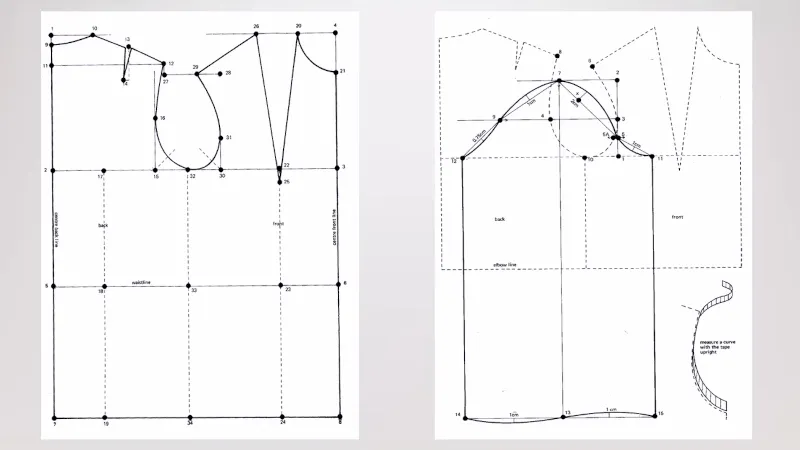
A talk from the recent Electromagnetic Field event in the UK caught our eye, in which [Amy Jeskins] looked at the overlooked engineering skill of pattern cutting. She takes us through the mechanics of creating a pattern for a piece of clothing, and asks why it is not a skill taught to engineers.
She’s a specialist in theatrical costume, and the talk takes us through some examples of her work before looking at the history of tailoring and pattern making. She explores flat cutting and draping a pattern on a form before coming into the present day with CAD packages designed for clothing work. It’s the social aspect of the talk that’s perhaps the most interesting, looking at how it has become a gendered skill and thus not something considered where it should belong, as engineering. We’re reminded of one of the most important additions for a healthy hackerspace, a textile room, as we’ve seen people there bridge this divide from both directions.
A silver-suited hero once limited to Japanese PlayStation discs now races across any modern screen you point him at. Pepsiman Recompiled takes the 1999 cult classic, turns its original code into something a browser can run directly, and lets anyone with a legal disc image jump back into the chase at a smooth 60 frames per second.
In March 1999, developer KID released Pepsiman exclusively in Japan. You play as the Pepsi mascot, physically running, sliding, and hopping your way through city streets and obstacle courses, grabbing cans and dodging trucks, roadwork, and public humiliation, all in order to reach the next vending machine. There are also live-action videos of Mike Butters drinking Pepsi to break up the action. Pepsiman never officially left Japan, but it amassed a sizable fan base thanks to imports, emulator enthusiasts, and speedrun crowds.
PlayStation 5 Console – 1TB, includes wireless controller, 1TBSSD, Disc Drive, 2 Horizontal Stand Feet, HDMI cable, AC power cord, USB cable, printed…
1TB of Storage, keep your favorite games ready and waiting for you to jump in and play
Ultra-High Speed SSD, maximize you play sessions with near instant load times for installed PS5 games
Kem0x (aka Kareem Olim) revived the old game with the PSXRecomp framework. Unlike straight-up emulators, his version recompiles the original PlayStation code into WebAssembly, allowing it to run directly in a compatible browser, eliminating the need to draw around an outdated platform. Users must bring their own CUE and BIN files, which are simply image files from a physical disc, but that’s it. It’s entirely done on your machine, with no server issues.
— 吉野@連邦(renpou.com) (@yoshinokentarou) July 24, 2026
Click on the page, then select your disk images to reveal the silver runner. The default presentation is widescreen, but if you prefer a more traditional format, there is also a 4:3 alternative. Another good detail is that the browser-based version plays at 60fps, smoothing out the animation while maintaining the original timing, physics, and music. It all only works with regular gamepads. You can also remap the keyboard controls. Another cool feature is that memory card saves occur in real time, and you can even import or export them in raw format. Just for fun, they included a pause menu with level selectors, restart, and return to title choices, which the original did not have. As you continue through the stages, you will gain access to practice sessions distinct from the saves. All of this is wrapped up as a progressive web app, so once the files are cached, you may play them offline.
Chromium desktop browsers for macOS are now the most dependable alternative, although other browsers and mobile devices still have certain flaws. They still need to test several later-stage visual options and full campaign audio looping, but despite these constraints, the game is totally playable from beginning to end. To view the source code and release notes, visit the RepsiMan GitHub website. To play, simply go to pepsiman.ol.mr, provide your own disc image, respect the rights holders, and you’ll be set. [Source]
Just as Larry Ellison and Paramount executives had worried, the state antitrust challenge to their $111 billion merger with Warner Brothers has resulted in significant delays that could prove terminal.
Two weeks ago California and eleven other states filed an antitrust lawsuit to block the merger, pointing out that the consolidation would undermine market competition, resulting in mass layoffs, higher consumer prices, and product quality hits as the merged company attempts to pay down a massive debt load. This isn’t hard to predict or prove given that every single merger that Warner Brothers has been involved with in the last quarter century has been a disastrous dud.
The judge overseeing the case granted a 14-day restraining order pausing the deal. But Paramount has now agreed to suspend the merger for far longer in the apparent belief that this could speed up the looming trial:
Paramount framed the agreement as a “significant win” that would help it close the deal. The company said the move would speed up the legal process by pushing the case to a trial sooner. It will also help avoid prolonged back-and-forth over some legal issues, like the merits of a court-ordered delay.
So as it stands, the Paramount merger will simply expire if they can’t win or dismantle the antitrust trial by June 4, 2027. That’s a problem for all sorts of reasons, the biggest being that the terms of the agreement involve Paramount being forced to pay a ticking fee of about $7 million per day (or $650 million per quarter) to investors starting in October until the deal closes (or doesn’t).
Advertisement
As mentioned previously, Larry Ellison and Oracle are also hugely over-leveraged on the AI bubble and data center investment; if that bubble pops during this window (which is broadly expected since nobody but Nvidia is making any money), that could heavily complicate his financial backing for the already very debt-heavy deal. At the same time, broadcast television isn’t magically getting more popular anytime soon.
And even if this deal does ultimately succeed, there’s been very little evidence that Paramount, much like the Trump administration that rubber-stamped the superunion, has any idea what they’re doing.
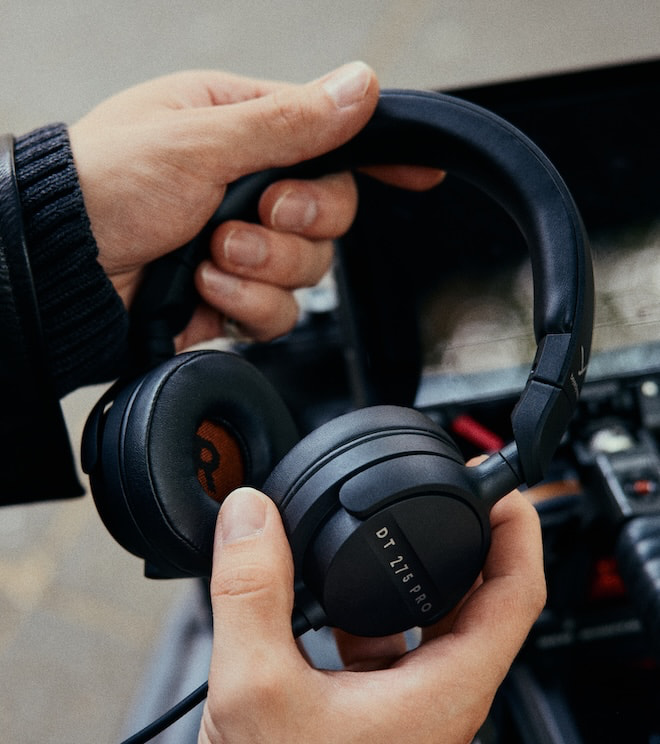
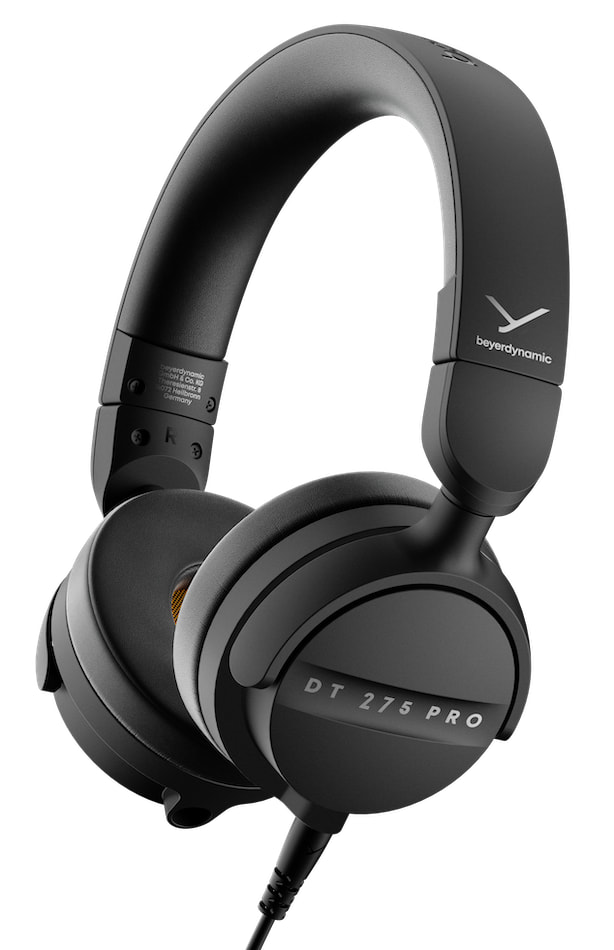
Trying to monitor a camera feed, cue the next track in a crowded booth or hear what is actually coming through the console is not the moment to discover that the ANC battery is dead or Bluetooth has decided to take the afternoon off. The Beyerdynamic DT 275 PRO is built around that problem, using a compact closed back on-ear design, 22dBA of passive isolation, a 195 gram chassis and a locking cable that can connect to either earcup. It sells for $149 and should be just as useful on location as it is later that night when I want to hear the horns, strings and vocals on Dusty in Memphis without the room joining the performance.
The DT 275 PRO is available now through Beyerdynamic’s U.S. website and authorized retailers. It joins the DT 270 PRO but serves a different purpose: the DT 270 PRO is an over-ear model for recording, podcasting and indoor studio work, while the DT 275 PRO trades some long-session comfort for greater isolation, faster handling and a smaller footprint.
Built for Rooms That Have Abandoned Indoor Voices
Active noise cancellation works well on airplanes and commuter trains, but it can introduce processing, latency and another battery that inevitably dies during the part of the production nobody can repeat.
Beyerdynamic DT 275 PRO
The DT 275 PRO takes the less fashionable approach of using closed earcups, leatherette pads and clamping pressure to reduce outside noise mechanically. Beyerdynamic specifies 22dBA of ambient-noise attenuation, which is the feature separating it from most compact studio headphones at this price.
The sound is tuned for clear speech, controlled bass and reliable signal assessment rather than a dramatic consumer presentation. Beyerdynamic specifies a frequency response of 5Hz to 24kHz, 45-ohm impedance, 105dB SPL at 1mW and total harmonic distortion below 0.04 percent.
Advertisement
The 45-ohm load should make the headphones practical with field recorders, cameras, audio interfaces, laptops and mobile devices without requiring a dedicated headphone amplifier. They can also produce substantial output, so protecting one’s hearing remains preferable to discovering the maximum level personally.
The Cable Goes Where You Need It
The detachable 1.5-meter cable can connect to either the left or right earcup and uses a locking bayonet mechanism to prevent an accidental disconnection. Beyerdynamic says the decoupled design also reduces cable and handling noise when the headphones are used with cameras, recorders and portable audio bags.
That sounds like a minor detail until a cable runs across the wrong side of a camera rig or escapes during a live take.
The earcups swivel for storage and single-ear monitoring, while the ear pads, headband pad and cable are replaceable. The connection cable is also compatible with Beyerdynamic’s DJ 300 PRO X and CLUB models.
Replaceable wear components should be mandatory on professional headphones. Throwing away an otherwise functional pair because the ear pads have absorbed five years of sweat is not innovation.
Advertisement
Beyerdynamic DT 275 PRO Specifications
Design: Closed back, wired, on-ear
Driver type: Dynamic
Frequency response: 5Hz to 24kHz
Impedance: 45 ohms
Sensitivity: 105dB SPL at 1mW and 500Hz
Passive noise attenuation: 22dBA
Total harmonic distortion: Below 0.04 percent
Maximum short term power handling: 100mW
Cable: 1.5 meters, detachable and lockable
Cable connection: Left or right earcup
Connector: 3.5mm with 6.35mm adapter
Weight: 195 grams without cable
Replaceable parts: Ear pads, headband pad and cable
What Is Missing?
The DT 275 PRO does not include Bluetooth, ANC, a microphone or an inline remote. None belongs on a professional monitoring headphone built to avoid latency and electronic processing, but buyers looking for one pair to handle production work, commuting and phone calls should understand what is not included.
Advertisement. Scroll to continue reading.
Unlike the DT 270 PRO, the product page does not list a USB-C audio adapter. The DT 275 PRO terminates in a conventional 3.5mm plug and includes a 6.35mm adapter, so owners of port-free smartphones and laptops will need a separate dongle.
The larger concern is comfort. The DT 275 PRO is light at 195 grams, but its on-ear design uses a fairly firm clamp to achieve that 22dBA of passive isolation. That should help keep outside noise where it belongs, although the pressure may become noticeable during a long production session. Isolation and all-day comfort rarely arrive holding hands.
The Competition
The Sennheiser HD 25 is the most direct rival. It also costs approximately $150, uses a closed on-ear design and has remained a fixture in DJ booths and broadcast bags for decades. It is lighter and already has an enormous replacement-parts ecosystem, while the DT 275 PRO counters with its dual-side locking cable, newer design and published 22dBA attenuation rating.
Advertisement
Sony MDR-7506
The Sony MDR-7506 currently sells for $113 and remains one of the most widely used production headphones ever made. Its over-ear design may prove more comfortable, but the fixed coiled cable is considerably less convenient for mobile work and Sony does not position it around the same level of passive isolation.
Audio-Technica’s ATH-M40x costs $109 and offers an over-ear fit, detachable cables and swiveling earcups. The ATH-M50x moves closer to the Beyerdynamic’s price at $159 and adds larger 45mm drivers and three supplied cables, but both occupy more room in a production bag.
Beyerdynamic’s own DT 270 PRO remains the obvious alternative for podcasting, music production and longer indoor sessions. It uses velour over-ear pads and weighs almost exactly the same, but offers lower passive isolation and a less compact wearing style.
Who Is It For?
The DT 275 PRO is intended for production crews, field recordists, broadcast engineers, livestream operators, front of house staff and DJs who need compact wired headphones with strong isolation and no wireless delay.
It should also appeal to commuters who value durability and passive isolation more than apps, firmware updates and hearing a synthetic voice announce that the battery is low.
Advertisement
Who Should Avoid It?
Home-studio users working in a quiet room will probably find the DT 270 PRO or DT 770 PRO X more comfortable over longer sessions.
Anyone who needs wireless connectivity, calls or active noise cancellation should also look elsewhere. The DT 275 PRO is a tool, not a lifestyle platform with a login screen.
Beyerdynamic DT 275 PRO
The Bottom Line
The Beyerdynamic DT 275 PRO fills a specific gap between traditional studio headphones and DJ models. Its combination of 22dBA passive isolation, low weight, swiveling earcups, replaceable parts and a cable that locks into either side makes sense for people who monitor audio in environments where the environment refuses to cooperate.
Beyerdynamic’s advantage is that it has designed the DT 275 PRO around modern mobile-production workflows rather than asking another 35-year-old headphone to keep learning new tricks.
The CIA has never confirmed or denied the following story.
The only evidence we have that it happened at all is a 1997 article in Popular Science Vol. 250, Issue 1, where journalist Dawn Stover spoke to the mastermind behind one of the best-kept secrets of the Cold War.
We think of digital surveillance as a relatively modern fear. We worry that our phones are spying on us. That CCTV watches our every move. Even laptops have physical privacy covers to mitigate security risks. But it turns out, this goes back at least 60 years – right to the heart of the Soviet embassy in Washington DC.
Advertisement
Latest Videos FromTechRadar
The year is 1963. Kennedy still sits in the White House. Khrushchev holds the Kremlin. The Cuban Missile Crisis is still fresh in everyone’s mind. Paranoia runs high on both sides of the Iron Curtain.
And a repairman strolls unnoticed through the halls of a mansion in the capital. He steps into a busy administrative office used by Russian diplomats and the KGB. His bag of tools clunks with every swing. The man pauses at a large, boxy machine in the corner of the room. It hums and whirs.
The Mrs George Pullman House where the Soviet Union Embassy was located in 1963, pictured in 2010 (Image credit: Getty Images // Coast-to-Coast)
Launched just three years prior, the Xerox 914 was the company’s first successful photocopier – with a troubling tendency to catch on fire. But that’s not why the repairman is here today.
He drops his bag to the floor. The diplomats and KGB agents ignore him, the clerical staff barely see him, the hawkish security guards notice nothing out of the ordinary. The repairman diligently begins, as he always did, his routine maintenance work.
Sign up to the TechRadar Pro newsletter to get all the top news, opinion, features and guidance your business needs to succeed!
When he’s finished the job, he slips away as quietly as he came. He leaves behind a single trace of his presence.
Advertisement
The repairman has just become one of the CIA’s best assets.
But the real story begins the year before in New York, at a disused bowling alley so anonymous you wouldn’t give it a single glance, let alone two. It’s far away from prying eyes.
Inside, Xerox’s head of government programs Donald Cary meets with four engineers. They’re not there to bowl. The Xerox men selected for the mission are Douglas Webb, Kent Hemphill, James Young, and thirty-six-year-old Ray Zoppoth, who knows the Xerox 914 inside out. He should do. He helped create the photocopier in the first place.
Advertisement
It’s exactly the expertise the CIA needs if the agency’s plan is to work.
Because the plan is to heist as many files as they can from the Soviet Union embassy, located within the Mrs. George Pullman House in downtown DC. With security so tight, not even a repairman, however inconspicuous, could hope to walk out unfrisked with stolen files stuffed down his pants.
So, the secret service has to get creative.
For days, the engineers discuss potential ways to capture images of the files being photocopied on the Xerox 914. Finally, Zoppoth hits upon an answer. Like all great ideas, it’s as maddeningly simple as it is cunning.
Advertisement
Mount a battery-powered home-movie camera with a zoom lens inside the copier. Aim the lens at the mirror used to reflect images onto the drum. And start taking pictures.
According to Stover’s piece, Zoppoth suggests the team “Mount a battery-powered home-movie camera with a zoom lens inside the copier. Aim the lens at the mirror used to reflect images onto the drum. Add a photocell that would prompt the camera to snap still frames whenever the photocopier lit up. And start taking pictures.”
Every time someone lays a document on the bed and presses ‘Copy’, the photocopier lights up, triggering the camera.
Easier said than done, but the Xerox engineers are excited by the breakthrough. They set to work installing a Bell & Howell 8mm movie camera inside a copier located in Xerox’s New York campus.
A vintage 8mm likely similar to one allegedly fitted inside the Xerox 914 (Image credit: Getty Images // Celine Lyneborg)
The noisy, bulky 914 is, it turns out, perfectly tailored to the role of spying device. It’s so impossibly large, it conceals the camera even when the maintenance panels are removed, and the operational sound as staff make copies masks the whir of the camera. No-one has any idea they’re being covertly watched.
Advertisement
The test run proves a success. Ray Zoppoth and the rest of the research team can see everything passing through the photocopier. “When we developed the pictures, we found recipes and copies of music and cartoons and jokes and all kinds of things,” he later tells Popular Science.
Weeks later, Ray Zoppoth finds himself deep inside a building used by the CIA. He’s led into a basement room allegedly code-named ‘Disneyland East’. Zoppoth shows the spooks the Xerox invention. He teaches them how to fit the camera inside the 914. They, in turn, train the embassy’s regular repairman to install the camera and extract the film each time he returns.
Then, one day, in 1963, a familiar face arrives at the Soviet Embassy to carry out routine maintenance work. He holds a bag containing tools and, in its depths, an innocent 8mm home-movie camera. He’s waved through the gates without a thought.
The rest is history.
Advertisement
With lips tightly sealed and files classified, we’ll never know what was learned. The Cold War dragged on for another 27 long years.
But shortly after the project ended, Zoppoth confessed that the secret service again tapped up Xerox. This time, they want cameras hidden inside the more streamlined Xerox 813 desktop photocopier, used by ministries, agencies, and diplomatic offices around the world.
If the story is true – and only Zoppoth admitted it, with his colleague confirming but refusing to go on record – it suggests the joint operation was a success.
It remains a reminder that even the unsexiest machine in the office can be a security risk.
You’d think getting wrong advice would make you more cautious. New research says the opposite happens when that advice comes from AI. A study led by Valerio Capraro, a psychology professor at the University of Milan-Bicocca, found that incorrect AI advice made people less accurate, yet noticeably more confident in their answers (via IBM Think).
The study also found that people who received incorrect AI advice became far less willing to admit they didn’t know an answer, even when staying silent was an option, and they were rewarded for accuracy.
Why does wrong AI advice make people so sure of themselves?
Representative Image (AI-generated)
Researchers asked participants six questions about obscure movie details, deliberately picking ones the AI model consistently answered incorrectly. This let them isolate what happens when people consult AI, regardless of whether its advice is actually good.
The results were striking. Without AI, participants declined to answer roughly 36 to 44% of the time across two experiments. With AI available, that dropped to just 3 to 6%. Accuracy fell too, from 27.5 percent correct when working alone to just 9.2 percent with AI involved.
Capraro suspects AI may lower the amount of confidence people need before committing to an answer, essentially shifting how they judge their own certainty. Oddly, this held true even when AI advice appeared automatically without being requested, suggesting the effect isn’t just about actively seeking help.
Advertisement
Sensor Tower
Does raising the stakes change anything?
Adding financial rewards and penalties made people somewhat more cautious and accurate, though the underlying pattern never fully disappeared. Capraro draws a clear distinction here. AI should augment human judgment, not replace it entirely.
If you are working or aim to work in the research and development field, then consider undertaking an online course to boost your skills.
Whether you are an industry veteran, a newbie, or somewhere in the middle, the industry you are in is likely changing as fast as you can keep up with. That is certainly true of the research and development sector, where innovation and transformation are par for the course.
As a result, it is an absolute necessity that professionals, regardless of which stage of their career they are in, stay aware of the skills, techniques and processes making waves in the sector. If you want your career to evolve in step with the space itself, then make use of every educational opportunity that comes your way – starting with some free and inexpensive online courses.
Coursera
For students or professionals looking to better develop an understanding of research methodologies, Coursera, via the Queen Mary University of London, is running the Research Methodologies programme.
Advertisement
This flexible 20-hour course consists of four modules in which participants will study different research methodologies, different sampling approaches, and primary and secondary data collection approaches. Students will also look at the role of the internet in market research as well as non-comparative scaling techniques and the course will end with a discussion on different data collection approaches, observation, content analysis, narrative research, phenomenology and the collection of data using ethnography.
A similar course suited to those looking to develop foundational skills is the Coursera/University of London programme titled Understanding Research Methods. This flexible, six-hour course has four core modules and is particularly suited to those conducting research as part of their postgraduate studies or who are looking to build their knowledge base. No prior knowledge or experience in research is required.
Alison
Alison and NPTEL are running the Understanding Research Methods and Approaches programme which involves exploring qualitative research methods, fieldwork and literature reviews among other topics. The free online course offers a general introduction to understanding different research methodologies and various approaches. Students will learn the significance of linking the gap between theory and practice. The advanced level course takes around five to six hours, includes three modules and is CPD accredited.
If you want a more specific education, Alison and NPTEL have additional courses such as a beginner level Introduction to Biomedical Research programme, an Academic and Research Skills for Business Success course and a Research Skills for Healthcare programme.
Advertisement
Oxford Home Study Centre
The Oxford Home Study Centre is running a free Research Skills training course designed to teach students how to conduct effective research and make efficient use of their time.
The course is flexible, takes around 20 hours to complete and comes with a certificate upon completion. This course delves into the fundamental elements and benefits of research capabilities and will focus on why research skills are important, tips and tricks for reading and note-taking techniques, and how to utilise Miller’s Law, which is a proposed memory retention rule that the average person can only keep seven (plus or minus two) items in their working memory at any given time.
It is ideal for an individual looking to boost the skills that empower research in the long-term, at a core level.
Class Central
Class Central, via Yale University, is running a Fundamentals of Qualitative Research Methods programme.
Advertisement
The course, which is a Yale University programme accessed for free through YouTube, is a self-paced video course that takes under an hour and a half to finish. Students will learn the fundamentals of qualitative research methods, develop a qualitative research question and gather data using interviews and focus groups.
Class Central, via various other edtech platforms, also offers research programmes such as the Understanding Clinical Research: Behind the Statistics module, Research Ethics and Plagiarism course, and Research Skills, Communication and Dissemination.
Don’t miss out on the knowledge you need to succeed. Sign up for the Daily Brief, Silicon Republic’s digest of need-to-know sci-tech news.
Ukraine approves indigenous turbojet-powered guided bombs for frontline combat operations
Domestic guided bombs now strike military objectives up to 200 kilometers away
Seven Ukrainian manufacturers now build guided bomb conversion systems domestically
Ukraine has officially approved several domestically built guided aerial bombs for combat use, including turbojet-powered versions capable of striking objectives up to 200 kilometers (125 miles) away.
Brig. Gen. Andrii Lebedenko, deputy commander-in-chief of the Armed Forces of Ukraine, said several of these designs have already seen use on the battlefield, while others remain in testing.
“We already have systems that use more than just gliding. They now carry turbojet engines to increase their employment range to between 100 and 200 kilometers,” said Lebedenko.
Latest Videos FromTechRadar
Advertisement
Ukraine expands the reach of indigenous guided bombs
The program began in 2024 as an effort to convert older unguided aerial bombs into precision-guided weapons after Ukraine lacked domestic manufacturers capable of producing such systems.
Ukrainian officials now say the country has seven manufacturers producing guided bomb systems, compared with none when the initiative was first introduced.
“This task was set in 2024. We did not have any such manufacturers in the country. Now there are already seven. They already know how to do it,” said Lebedenko.
He also confirmed that Ukraine already operates aircraft capable of launching domestically produced weapons, while expanding manufacturing capacity has become the next priority for the defense industry.
Sign up to the TechRadar Pro newsletter to get all the top news, opinion, features and guidance your business needs to succeed!
According to Ukrainian officials, the program has also created a growing community of engineers capable of designing glide kits and propulsion systems for increasingly sophisticated aerial munitions.
Advertisement
“Moreover, a school of specialists and engineers has emerged who know how to create gliding systems. They know how to make them with engines,” said Lebedenko.
Some of the latest variants are no longer limited to gliding after release because turbojet engines continue powering the bombs toward military objectives at greater stand-off distances.
Alongside upgrading older munitions, Ukraine has also developed entirely indigenous guided aerial bombs, expanding its domestic precision strike capability.
Ukraine’s Brave1 defense innovation platform announced the country’s first indigenous guided aerial bomb after approximately 17 months of development.
The weapon carries a 250-kilogram warhead designed to strike fortified positions, command centers, and other military objectives located dozens of kilometers away.
Developers have described the weapon as a completely original Ukrainian design rather than an adaptation of an existing foreign guided bomb.
Advertisement
Ukrainian military officials have also indicated that improving strike accuracy remains more important than producing larger numbers of guided bombs for operational use.
“We are looking toward precision so that we can effectively destroy enemy command posts, drone control centers, infrastructure, and other targets,” said Lebedenko.
Ukraine has also disclosed expanding manufacturing capacity, growing engineering expertise, and longer operational reach for its guided bomb program.
However, independent verification of battlefield performance remains limited because operational details surrounding combat employment have not been publicly released.
The Amazfit T-Rex 2 Ultra is a well-stocked smartwatch for adventurers – you just need to be willing to handle its hulking watch frame.
Plenty of battery life
High-end watch features at a more affordable price
A useful LED flashlight
It’s a big watch to wear
Smartwatch ecosystem lags behind competition
GPS and heart rate tracking not best in class
Key Features
Advertisement
Review Price:
£549
Built-in LED flashlight
Advertisement
Integrated white and green LED modes offer high visibility for nighttime outdoor activities.
Dual-band GPS tracking
Advertisement
Dual-band GPS technology delivers strong distance and pace tracking accuracy during outdoor workouts.
Long-lasting battery life
Advertisement
An 870mAh battery provides up to 30 days of typical use and up to 10 days with always-on display.
Introduction
The Amazfit T-Rex Ultra 2 is a smartwatch built for outdoor lovers who don’t want to spend the big bucks on a new Garmin Fenix 8, Garmin Instinct 3 or Apple Watch Ultra 3.
The Android and iOS-friendly outdoor smartwatch offers many of the same features you’ll find on those more premium options. That includes offline colour maps, turn-by-turn navigation, and sports modes aplenty, all packaged up in a watch design that’s built to operate in extreme environments.
Advertisement
When you’re not heading off for a multi-day hike, the Ultra 2 will let you pay your way, make calls over Bluetooth and let you load up music to keep you company on your off-road outings.
With the arrival of the Ultra, Zepp Health has now grown its T-Rex series to three watches. This sits at the top of that pile, but is it the one you should go for and is this one of the best outdoor smartwatches? I’ve been wearing it for a few weeks to find that out.
Advertisement
Design and screen
Now larger case size
Larger AMOLED display
Comes in one colour
If we’re comparing the Ultra 2 to the last Ultra and the T-Rex 3 Pro, this is a considerably larger watch to live with. You now have a 51mm case that measures in at 14.3mm thick.
Image Credit (Trusted Reviews)
It’s inevitably going to get compared to Garmin’s 51mm Fenix 8 model, which is thinner, though opting for a titanium bezel and buttons helps to ensure it’s not super heavy to wear. At just shy of 90g, it actually sits at around the same weight as Garmin’s 51mm Fenix. You can find lighter, smaller and still rugged watches, including in Zepp Health’s own Amazfit line.
It’s a watch dominated by its titanium bezel that surrounds a now larger 1.5-inch, 480 x 480 resolution AMOLED touchscreen. That’s a screen that can achieve a maximum brightness of 3,000 nits. I did find that in some brighter outdoor light, it can still be challenging to view the screen at some angles. The screen visibility and overall quality are good, but I think you’ll find better screens on rival watches.
Advertisement
Advertisement
Image Credit (Trusted Reviews)
The strap attached to that big polymer case is unsurprisingly a pretty robust silicone one. At 26mm, it’s a sizable strap to whip on. The traditional watch clasp ensures it stays securely in place at all times, with a clippable design that makes it very easy to swap the strap out for a new one.
The visible screws are your indicator that Zepp Health has designed this watch to operate in extreme environments. Whether it’s the ability to handle recreational dives up to 45 metres or offer military-grade resistance to extreme heat and cold temperatures, this is a watch truly built for some serious rough and tumble.
Image Credit (Trusted Reviews)
There is room on that case exterior for an LED flashlight, which has become an on-trend feature for outdoor watches. This one shines nice and bright, making it a worthy addition. There are both white and green LED light modes along with a boost mode, when you need a bump in visibility.
Performance and software
ZeppOS supports Android and iOS
Zepp Pay, App Store and free offline maps
Bluetooth calls supported
Advertisement
Zepp Health keeps the software all in-house. So the Ultra 2, like other Amazfit smartwatches, runs on ZeppOS, which is available for both Android and iOS users. The experience of using it across the two platforms is largely the same, bar a few missing features on either side. iPhone users can control their phone camera remotely, while Android users have the added ability to send quick replies to messages.
Image Credit (Trusted Reviews)
The big addition from the first Ultra is the built-in microphone and speaker. This allows you to handle calls, hear turn-by-turn directions during navigation mode, and it also brings the voice memo feature into play. The speaker goes pretty loud, if not the clearest when using it for calls.
It can also be used with Zepp Flow, which means you can speak to the watch to ask about your fitness stats, switch on the do not disturb mode or just set a timer. While it is not as sophisticated a voice assistant as Google’s Gemini or Apple’s Siri, it works well enough to give you an alternative way to interact with the watch.
Advertisement
Image Credit (Trusted Reviews)
In terms of core features like viewing notifications, using music controls and loading audio, making contactless payments, and generally getting around on the watch, everything works well enough. If you’re looking for a watch you can download apps and watch faces, you can do that here – just don’t expect a storefront that matches the likes of Google Play in Wear OS in terms of variety and the number of available apps and watch faces.
Advertisement
Image Credit (Trusted Reviews)
ZeppOS still lags a little behind the likes of Garmin, Apple, and Wear OS watches when it comes to offering a polished smartwatch ecosystem. It doesn’t necessarily shortchange you in features; it just doesn’t quite match up to the competition.
Tracking and features
Over 180 sports modes
Works with Strava, Komoot and TrainingPeaks
Promises pre-loaded maps and automatic re-routing
Whether you run, swim, bike, stay indoors or love Hyrox-style workouts, the Ultra 2 pretty much has you covered. This is a watch that can also track your daily step counts, monitor sleep time or continuously track heart rate. Those are likely not the main reasons you’re going to be looking at it, though.
Image Credit (Trusted Reviews)
You’re probably going to be sizing it up because of its abilities to accurately track your movements outside, offer maps you can view and follow on the watch and be able to quickly know when you’re about to hit higher-altitude terrain.
Advertisement
I’ll start with tracking accuracy: you get dual-band GPS, giving you the latest GPS technology available in smartwatches. Though as I’ve found, not all dual-band GPS watches deliver the same results.
I’d say the T-Rex Ultra 2 delivers very strong GPS accuracy. The likes of Garmin, Apple and Suunto just shade it overall for the best showcase of dual-band, but for distance tracking and metrics like average pace, I was happy with what the Ultra 2 served up.
Advertisement
Image Credit (Trusted Reviews)
For mapping and navigation support, there is the promise of preloaded maps, but I ended up having to sync them over from the Zepp phone app as I’ve done with other map-supporting Amazfit smartwatches.
Depending on how big the location or region you want to sync is, it can take anywhere from 20-30 minutes to transfer maps to the watch. Even with the option of doing that over Wi-Fi, I found things a bit slow going.
Image Credit (Trusted Reviews)
Advertisement
When the maps are loaded, you can use a mixture of the touchscreen and physical buttons to zoom and move around maps, pick from two different map viewing styles and make use of the onboard navigation features.
You can upload a route to follow, explore nearby spots like coffee shops and create routes directly on the watch. Maps are nicely detailed and easy to view, and the navigation features work well to steer you in the right direction if you veer off course.
If you’re looking for a more traditional sports watch experience, the Ultra 2 can give you that as well. I’ve used it for a range of indoor workouts including pool swims and the tracking in general has been very good.
Advertisement
Image Credit (Trusted Reviews)
Heart rate tracking accuracy is a mixed bag – though I do typically find this is the case with bigger watches. Given the size of the Ultra 2, I do think that contributes to some of the inaccurate readings I’ve seen during more high-intensity workouts. You can pair external heart rate monitors over Bluetooth, as well as various cycling sensors, if you want a more accurate read on your data.
The training features and training insights available are a work in progress for Zepp Health. You can better understand your training volume, see recommended recovery times, and set up interval training sessions, with the watch capable of automatically recognising a range of strength training movements. While these features are well-built and the insights do feel mostly reliable, the presentation needs a bit of work.
Advertisement
Image Credit (Trusted Reviews)
It’s good to see that you can link it to the likes of Strava, Runkeeper, Apple Health and Google Fit, which means you can pull in workout and training data from other sources if you’re not just a one-device person.
Up to 30 days battery life
Up to 10 days with always-on display mode
50-177 hours GPS battery life
The T-Rex Ultra 2 is built to be on your wrist for big adventures, which means it needs to deliver big battery life.
There’s an 870mAh capacity battery inside of its hulking 51mm frame that can max out to a month with what Zepp Health deems typical use. That’s basically when you’re not regularly using GPS, the flashlight or using the most accurate continuous health monitoring support.
Image Credit (Trusted Reviews)
Advertisement
When you start to add some of those features into the mix, those numbers drop. That said, it’s still designed to be a watch that can last over a week – even with the screen on at all times.
Advertisement
I found the battery life in general to be very good. On some heavier usage days, the battery drop was around 10%. Overnight, the drop can be as little as 2%. I never felt there was a noticeable battery drain. When you keep the screen on at all times, you can get up to 10 days of battery, depending on whether you’re using those more power-hungry features.
Image Credit (Trusted Reviews)
When you’re using the GPS, battery numbers range from 50 hours with its most accurate GPS mode to up to 177 hours with the GPS max battery life mode. In most cases, you’ll have to sacrifice the most accurate GPS tracking; I found that an hour of tracking in the most accurate GPS mode dropped the battery by around 5%. That doesn’t equate to the 50 hours promised.
If you compare those GPS battery numbers to the pricier 51mm Fenix 8 Pro, Garmin’s watch can go anywhere from 21 hours to 24 days. So it’s not quite the mammoth numbers promised by the watch it’s clearly trying to emulate.
Advertisement
Should you buy it?
Advertisement
You want an outdoor-friendly smartwatch that’s cheaper than the competition
While an expensive smartwatch, the T-Rex 2 Ultra does undercut the competition while offering a solid all-round performance.
Advertisement
You want the best-value Amazfit outdoor smartwatch
The Amazfit T-Rex 3 Pro is smaller and offers a lot of the same features as the T-Rex 2 Ultra for considerably less money.
Advertisement
Final Thoughts
If the plan for the Amazfit was to offer a good, cut-price alternative to Garmin’s largest Fenix 8 model and similarly priced Garmin Instinct 3, then I think the T-Rex Ultra 2 mostly achieves that.
It’s got a rugged design, a bucketload of outdoor features and can deliver the kind of battery life that means it can last for weeks. The problem is that the T-Rex 3 Pro exists and that’s not far off offering the same qualities for less money.
Really, the Pro model feels like the smarter buy unless you really value a bigger display, a bit more battery and that pretty handy flashlight.
Advertisement
How We Test
We thoroughly test every smartwatch we review. We use industry-standard testing to compare features properly, and we use the watch as our main device over the review period. We’ll always tell you what we find and we never, ever, accept money to review a product.
Worn as our main smartwatch during the testing period
Health data compared against other wearables
FAQs
What are the main differences between the T-Rex Ultra 2 and the T-Rex Pro 3?
The T-Rex Ultra 2 includes a larger 51mm case, more battery life, a built-in flashlight, and more onboard storage than the T-Rex Pro 3.

































































You must be logged in to post a comment Login