

Connect with us
DAPA Banner
DAPA Coin
DAPA
COIN PAYMENT ASSET
PRIVACY · BLOCKDAG · HOMOMORPHIC ENCRYPTION · RUST
ElGamal Encrypted MINE DAPA
🚫 GENESIS SOLD OUT
DAPAPAY COMING

Tech

5 Everyday Tech That Can Track Your Activity

Published

on


It’s virtually impossible to live in modern society and not be tracked in some way. Websites track you, the apps you need and use every day could be the worst offenders in privacy invasion, and the devices you use it is tracking you, too. And even if you turn off the phone and go outside, you could being watched by the widespread Flock cameras that might be in your neighborhood. We know that tracking devices are all around every single one of us, all the time, every day. But sometimes you don’t even realize a device can track you in the first place.

Now, to walk things back a bit. We’re not out to terrify you into thinking your smart toaster is equivalent to the “1984” telescreen. Oftentimes, tracking is inevitable and even benign. Most electronic devices connected to the internet and receiving updates need basic usage telemetry to help the manufacturer fix bugs and optimize performance. With that in mind, these are five everyday tech devices that might be tracking your activity — for better or for worse.

Advertisement

Wi-Fi routers

In recent years, we’ve seen a scary news headline that says that Wi-Fi routers can be used like sonars to “see” inside buildings. Sadly, it’s no exaggeration. A Wi-Fi router can be utilized to map its surroundings. The technology is so sensitive it could theoretically track someone’s gait when walking, and possibly their breathing, even in another room.

What’s worse, a bad actor wouldn’t even have to compromise the network or buy a $10,000 frequency analyzer tool to do it; They’d only need a cheap smartphone kept in the network’s vicinity. Victims wouldn’t know when they were being tracked, either, and the more devices victims have, the more accurate the tracking gets. We already have concerns about mass surveillance with cameras, but now imagine the thousands upon thousands of Wi-Fi networks in every city and state retrofitted into a tracking apparatus that has x-ray vision — and imagine what dark forces out there would love to get their hands on said apparatus.

Now for a dose of reality. We’ve seen that this works, in theory, but so far we haven’t found documented cases where this has been abused. There are certainly concerning trends in that direction, like court cases arguing that that authorities should be able to track you with WiFi-based location, and consumer devices made by shady companies that boast Wi-Fi motion detection. On the flip side, a lot of the research around Wi-Fi sensing has been focused on potentially good use cases. We’d probably all be okay if grandma’s Wi-Fi network was leveraged to alert us in the event she takes a fall. For the possible unsavory uses of the tech, it may be possible to mitigate them by polluting the real data with false data.

Advertisement

Smart TVs

Let’s not beat around the bush: your smart TV could be spying on you. It’s something most people never think of, and yet at the same time, it’s completely unsurprising. Tech companies are some of the biggest privacy abusers. Why wouldn’t they take the big screen situated in your living room, the locus of your home’s activity, and track its behavior? Consumer Reports explains how smart TVs use ACR (automatic content recognition) to track you. Basically, ACR is “watching” what you watch, compiling and analyzing that info, and then using it to recommend further content. That Consumer Reports article also has a guide on how to disable ACR in most major TV brands.

In the past, we’ve seen companies do all sorts of spooky things with smart TVs. Samsung was once caught saying that it would collect personal data unrelated to a voice command query over your microphone (the clause has since been removed from Samsung’s privacy policy). There was also that thoroughly dystopian UAB (unique audio beacon) tech that allowed advertisers to figure out who exactly was watching their ads by pinging nearby smartphones with inaudible, ultrasonic noise. Case in point, tech companies have stooped to some disturbing stuff before, and they might try again.

Advertisement

However, we’re not saying you should throw away your fancy OLED panel in favor of an old CRT. Just do some digital hygiene. Go into your smart TV’s settings and disable analytics and ACR; disable features you never use, like the microphone for voice commands; learn how to disable ads on your TV, if possible. If you do all your watching through a streaming box, then you might even disconnect the smart TV from Wi-Fi entirely, since the streaming box is the only thing that needs to be connected.

Advertisement

Smart glasses

Smart glasses with cameras seem like a cool way to film things hands-free… except when they enable loathsome individuals to secretly film others in public. We’ve already discussed at length where Meta Ray-Bans and their ilk should and shouldn’t be used, and laws are already in the pipeline to curb their misuse, but it’s not just unsavory people using the glasses for unsavory purposes — It’s the companies, like Meta. They’re not as concerned with filming other people as much as filming you, the user.

The Electronic Frontier Foundation reports how Meta’s smart glasses in particular don’t have any strictly-offline functionality. AI voice chats and media recordings get pumped into the cloud and may in some cases see employees annotating them for AI training. It would appear, according to a Svenska Dagbladet investigation, that users may not always control what’s recorded and uploaded. Imagine going to the bathroom with the glasses on — but not recording — and someone on the other side of the world seeing the whole thing. One of the workers quoted in the aforementioned report said that the stuff they see on a daily basis would unleash “enormous scandals.”

While you might think that the same privacy risk applies to a smartphone, it’s important to remember that a smartphone isn’t sitting on your face, pointed at your surroundings whether or not you’re using the camera. Smart glasses inherently introduce a new class of privacy risk. Considering Meta is up to its neck in a huge class action lawsuit as a result of everything we’ve mentioned, we’d say this is the one device on this list most should avoid entirely.

Advertisement

Doorbell cameras

It’s impossible to deny the benefits of a doorbell camera. You can see who’s at your door — even when not at home — as a security measure, a means to avoid unwanted visitors, and a way to keep tabs on anyone who’s entered your property line. As you can probably guess, however, having a camera in your home that’s owned by a tech company requires trusting that only you will be able to see the footage. We’re not just fearmongering baselessly. Ring — one of the most popular doorbell camera makers in the U.S. — was accused by the FTC of spying on users without their consent.

There’s also been growing concern in recent years that the Ring cameras belonging to your neighbors are surveilling and tracking you. We all know that one curmudgeon who makes everyone’s life miserable at the HOA meeting, who spends half their day with a drawn curtain in one hand and a phone dialed to 911 in the other. Now that curmudgeon has a camera that’s on even when they sleep, a camera which footage they can pass along to the police and get them involved even when you’re innocent. And there are probably a lot of these cameras in your neighborhood.

Again, we wouldn’t necessarily advocate for getting rid of your Ring camera. Instead, go into the settings and change a few. Some of the things we’ve mentioned — like Ring Neighbors — can be disabled entirely. Of course, Ring is just one company on the market making these doorbell cameras. It doesn’t matter which brand you’re using. Limit what privacy settings you can, and be wary of any camera-enabled device that’s filming continuously in the background, 24/7.

Advertisement

Smart home devices

Once you get used to controlling your lights verbally with your smartphone’s AI assistant, it’s painful to go back to the olden days of getting up off the couch and switching lights on manually. Now, you can fill your home with an army of smart devices that make things more secure and convenient — and affordably so. Once again, we extend a gentle reminder that these tech devices are made by companies that may not respect your privacy, or even adhere to their own privacy policy. There’s ample evidence to suggest they’re listening in constantly, gathering information, and potentially sharing it. And if they’re not listening, the devices themselves may be vulnerable to hackers.

First we’d say, use common sense. Don’t put an indoor camera in your bedroom, for example, and be careful what brands you buy from. You only have to Google a device’s manufacturer name paired with keywords like “security vulnerabilities” to quickly find the ones to avoid. Don’t make common Wi-Fi mistakes like using weak, outdated encryption for your home network, since it’s the bedrock of your smart home. Consider keeping some “dumb” devices, like a non-smart front door lock, to limit the attack surface.

In truth, most of this stuff is basic security practice that you should already be doing on your PC and smartphone anyway. Things like setting strong passwords for smart home platforms, like Google Home, and keeping all devices updated to the latest software. Hackers love an easy, low-hanging fruit, so even doing the bare minimum makes you a much less desirable target.

Advertisement


Source link

Advertisement
Continue Reading
Click to comment

You must be logged in to post a comment Login

Leave a Reply

Tech

Cops Keep Getting Arrested for Using Flock’s Cameras to Stalk People

Published

on

404 Media remembers how a Florida police office looked up his ex-girlfriend’s license plate in the Flock automated license plate reader system at least 69 times in 2024 — even searching for her mom’s license plate at least 24 times. The police office was charged with stalking and hacking-related offenses, serving one day in prison with five years of probation — but his case “was not a one-off.” [Alternate link via Bruce Schneier]

Local news reports from around the country repeatedly detail police abusing the Flock surveillance system in order to stalk their partners or ex-partners. The contours of each story are much the same, with the police officer in question using their access to the system to repeatedly track a specific person over the course of weeks or months. The cases highlight the fact that Flock can be used to track the whereabouts of individual people, that police do not get a warrant in order to use the system, and that, if they have access to the system, they have the technical ability to look up any license plate they want for any reason they want. An April study by the civil rights group Institute for Justice found that at least 18 police officers have been caught around the country using Flock to stalk a romantic interest in the last few years; another database, called the ALPR Abuse Library, has documented 20 specific cases of “stalking/targeting” around the country.

The known cases of police stalking are almost certainly a vast underreporting of the overall abuse, because they largely include only cases in which the behavior was so egregious that it led to police officers being fired, arrested, or both. Flock told 404 Media that it is “aware of 15 incidents of abuse, each surfaced because of the transparency and accountability features deliberately built into our platform…. There are also 140,000 monthly active users of Flock, so the relatively rare instances of abuse, while obviously wrong and awful, are exactly that — rare,” a Flock spokesperson told 404 Media. [One in 10,000.] “Humans are fallible; unlike most tools society provide law enforcement, Flock ensures that in the instances when our technology is misused, the evidence used to hold responsible parties accountable, is right there in our system. We also encourage all our customers to have a usage policy, regular training, and to implement our Audit Assistance tool, which proactively flags unintended use….”

But it is also the case that Flock has strenuously fought against lawsuits and potential regulations that are seeking to require police to get a warrant to use the system. And many cases of abuse have not been detected by police departments themselves but by those private citizens, journalists, and stalking victims who have found patterns of abuse in public records files they have obtained from their local police departments. In most cases of Flock-related stalking reviewed by 404 Media, the abuse occurred over the course of months or years, and the victims were subjected to dozens or hundreds of lookups. Other abuse cases have been discovered using the website HaveIBeenFlocked.com, a website that compiles Flock searches released via public records requests and turns them into a searchable database. Flock has repeatedly tried to get that website taken down, as we have previously reported.

Advertisement

Source link

Continue Reading

Tech

The social media ban might be coming, but you still need parental controls, here are my top tips

Published

on

Whether you’re for it, against it or indifferent to it, the social media ban for under-16-year-olds is due to come into force next year.

Regardless of how that might work, the ban is not a substitute for parental controls on devices and your home network. With two kids of my own, here’s what I’ve learned.

Talk to your kids

Parental controls are there as a safeguard to protect kids from the harms that the internet has to offer. As kids get older, the number of restrictions you have will reduce, but you’ll still most likely want something in place.

All restrictions should be clearly stated and you should talk to your kids about why restrictions are in place and what you expect from them when they’re using devices. Then, you can put restrictions in place.

Advertisement

Use the provided parental controls

Whether or not your kids have Apple or Android phones, there are free parental controls available for both platforms: Screen Time for iOS and Family Link for Android.

Advertisement

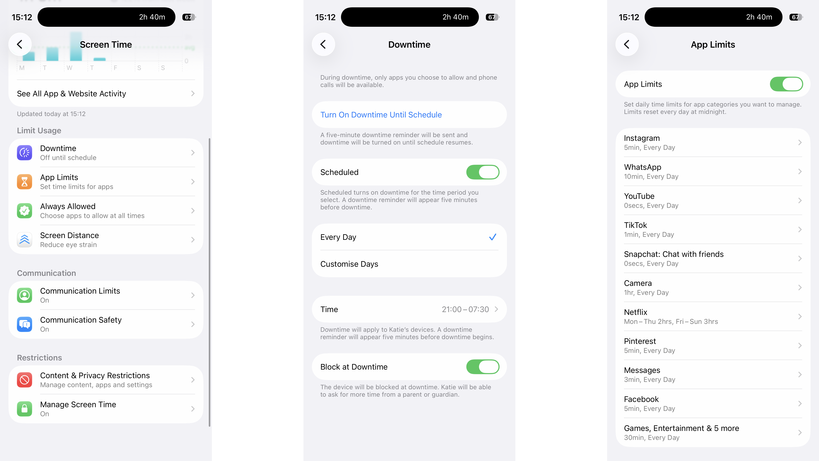
These both need to be tied to a child’s account, but once installed, they both give a similar set of controls: you can make kids request apps before installing them, you can set app time limits, control the contacts they can add, and you can put phones into downtime to prevent use (either manually or scheduled).

Screen Time in iOSScreen Time in iOS
Image Credit (Trusted Reviews)

Family Link for Android phones is available on iOS and Android, but for Screen Time you need another Apple device.

If your kids have Amazon tablets or Kindles, then parental controls are available there, too, controllable through the parents’ dashboard online. Again, you get a similar level of control, including time limits.

Advertisement

The one thing that’s annoying about Amazon’s parental controls are that they stop a child joining a different Wi-Fi network, and you have to do this with a parent’s profile on the device itself. On the one hand, this is a safety feature, but if a child goes off to stay with grandparents, for example, they can’t connect to Wi-Fi without you being present.

Windows has its own controls, with Microsoft Family Safety. MacOS devices can use Screen Time, just like the phones.

Advertisement

Game consoles have their own set of controls that you need to set up individually.

Advertisement

Most social networks have parental controls of varying quality, but require that any account your child sets up be monitored by you as a parent using the provided controls.

My advice is to always set every device up with the controls available, but to try and restrict the number of manufacturers you have.

For example, if your child has an iPhone and an iPad, the same settings and time limits apply to both; if they have an Android tablet, a Windows PC, and an iPhone, you have to set limits and controls on each.

Invest in a router with proper parental controls

It’s essential, in my view, to have parental controls running on your home network. I use Eero at home and have Eero Plus. With this, I can create profiles for each child and associate their devices.

Advertisement

Each profile can have its own scheduled downtime, turning off at bedtime, for example, and you can filter the internet in an appropriate way for different-aged children. Eero also allows me to block specific services across all devices, say turning off Discord, YouTube or Snapchat.

Advertisement

Eero Parental controlsEero Parental controls

But be careful. To identify a device, Eero (and other routers) use a device’s MAC address. Phones and tablets can create a private MAC address, which can change frequently. It’s for privacy to stop public hotspots spying, but when a MAC address changes, your router thinks it’s a new device.

Disable this setting on your child’s devices (turning it off or setting it to Fixed, rather than Rotating) and, if your router supports it, turn on notifications for new devices. That way, you’ll get a pop-up on your phone if the router spots a new device, which covers MAC address changes and any children bringing other unlocked devices home.

Mac address controls in iOSMac address controls in iOS

Also be aware of devices with more than one network connection. A PC with Wi-Fi and Ethernet will appear as two different devices, and you need to add both to a profile for full protection.

Home network controls should not be used in place of on-device controls, but alongside them. When your child leaves home with a device, such as an iPhone, they’re no longer protected or restricted by the home network. Make sure mobile devices are set up with restrictions similar to those on your home network, so your kids remain protected when they’re using a mobile connection or on another network.

Advertisement

Advertisement

Protect your passwords and PINs

Most parental controls will require a PIN or password when you want to make changes, so don’t use the same ones that you’d use on your own phone, as your kids probably know what this is. I use random PINs and passwords, and save them in a secure note on my phone.

Be aware of different access routes

Just because a phone’s locked down or restricted in a certain way, it doesn’t mean that your kids can’t get around the controls you have. Take Snapchat, for example: kids can simply log in on someone else’s phone or via a web browser, bypassing time limits that you might have set.

If a service that your child has access to has the option of two-factor authentication (where you need a code to login), set this up, but add the code to your phone, such as through the Google Authenticator app. Sign out of all sessions on the service on your child’s phone, and then sign them back in. They’ll need the authentication code to do so, so it’s fine to give out that one-time code.

Advertisement

However, now if they try and log in via another phone or the web, they’ll need a code that they can’t get, so you can ensure that they’re safe. This doesn’t stop them from creating new accounts on many services.

Advertisement

It’s also worth blocking web access to services on their phone and your home network, just for safety. For example, if you have time limits on WhatsApp, you’ll want to block WhatsApp.com, as the web version allows a child to pair their account and switch to a web browser when they run out of time.

WhatsApp web imageWhatsApp web image
Image Credit (Trusted Reviews)

Blocking social media sites’ web addresses prevents kids from bypassing time controls in apps or creating new accounts to circumvent restrictions.

Advertisement

Source link

Continue Reading

Tech

Sunday Reboot: The right marketing, the wrong changes

Published

on

In this week’s “Sunday Reboot,” Beats subverts the World Cup, and GymKit and Malcolm’s gym are updated in opposite ways.

Young man wearing large black headphones with a small white strip on the side, looking over his shoulder toward the camera, dressed in a dark hoodie against a plain background
Jamal Musiala with some taped Beats – Image Credit: Instagram/Beats/Jamal Musiala

Sunday Reboot is a weekly column covering some of the lighter stories within the Apple reality distortion field from the past seven days. All to get the next week underway with a good first step.
This week, current Apple CEO Tim Cook warned of price increases, Brazil adopted EU-style App Store rules, and supply chain assembler Tata is accused of contaminating the water supply in India. Also, leakers are worried we could have another colorgate issue this fall.
Continue Reading on AppleInsider | Discuss on our Forums

Source link

Continue Reading

Tech

Plastic waste could soon fuel aircraft as researchers develop cheaper jet fuel from discarded materials using a new reactor system

Published

on


  • Plastic waste can now be converted directly into usable jet fuel
  • A tandem reactor system breaks plastic down at 460 degrees Celsius
  • Ruthenium catalyst sites delivered far better selectivity than commercial alternatives

Researchers at Nanjing Forestry University and Tsinghua University have demonstrated a new method for converting plastic waste directly into usable jet fuel, with estimated production costs ranging from $1.0 to $1.8 per kilogram.

The work comes as airlines, governments, and fuel producers continue searching for alternatives that could reduce dependence on conventional fossil-derived jet fuel.

Source link

Continue Reading

Tech

Ubisoft co-founder Claude Guillemot dies in plane crash

Published

on

Claude Guillemot, co-founder of French video game company Ubisoft, died Friday at the age of 69.

According to French media (via Bloomberg), Guillemot died in a plane crash in the French resort town of La Baule. He was one of two people aboard the plane, both of whom died.

Guillemot founded Ubisoft with his four brothers in 1986. Since then, the company has published the Assassin’s Creed, Far Cry, Prince of Persia, and Tom Clancy video game franchises, as well as many other titles. The family retains control of Ubisoft, and Guillemot’s brother Yves is still CEO.

Guillemot was also chairman of Guillemot Corp., which makes gaming and audio accessories.

Advertisement

“Ubisoft was deeply saddened to learn of the death of Claude Guillemot, co-founder of the group and chairman of Guillemot Corp., in an accident,” Ubisoft said in a statement. “Our thoughts are with his family and loved ones during this difficult time. No further statements will be made at this time.””

Source link

Continue Reading

Tech

Doom Composer Bobby Prince Has Died

Published

on

Prince also worked on Wolfenstein and Duke Nukem games.

Video game composer and sound designer Bobby Prince has died. An obituary states that Prince died on June 16 at the age of 81 following an illness. Developer id software shared the news of Prince’s passing.

Prince was perhaps best known for his pioneering work on the Doom series. The Library of Congress inducted his soundtrack for the original game into the National Recording Registry just last month.

Advertisement

“Despite the limitations of the 1993-era sound card drivers, Prince composed the perfect riff-shredding accompaniment for the game’s demon-slaying journey to hell and back,” the Library of Congress stated. “Taking advantage of his knowledge of MIDI, Prince even worked to ensure that the sound effects he created could cut through the music by assigning them to different MIDI frequencies.”

Prince also worked on games such as Wolfenstein 3D, Rise of the Triad and Duke Nukem 3D. In 2006, the Game Audio Network Guild honored Prince with a lifetime achievement award.

“Everyone at Romero Games is deeply saddened to learn of the passing of Bobby Prince,” Doom co-designer and id Software co-founder John Romero wrote on X. “He left an incredible mark on games and on my life.”

Advertisement

Source link

Advertisement
Continue Reading

Tech

If You’re Searching for a New Skillet, Consider Stainless Steel

Published

on

If you’ll excuse the pun, skillets seem to always be a hot topic.

More than in other sections of cookery, there is a continual quest to find the best one, or at least the best one you can afford. I’ve seen cycles of fetishization come and go for copper, cast-iron, and carbon steel.

At the Mall of New Hampshire in the 1980s, I remember watching a miraculous cooking-store demonstration of omelettes effortlessly sliding out of a Teflon pan. Then, only a few years ago, the industry pretty much dropped the whole Teflon category like a hot potato due to the pans’ propensity to give off harmful fumes if they get too hot. Less durable ceramic immediately filled the void, and we’re already realizing how quickly it can lose its nonstick magic.

All this time, stainless-steel pans have been waiting in the wings. They are durable, and lighter and less fussy than cast iron and carbon steel. They’re not nonstick, but that’s often fixed with a pat of butter. They sear well, and with a bit of TLC, they’re built for a lifetime of hard work.

Advertisement

All-Clad has been one of the great brands in stainless for years, but I wondered if other slightly more expensive skillets were worth a look, particularly as some are new to the market and others have been flying under the radar. Along with a 10-inch All-Clad, I called in similar-sized pans from Hestan, Viking, and Heritage Steel. Testing all these sounded like fun at first, but things got weird and stayed weird for a while, and only with a bunch of hands-on data gathering and time at the stove did I understand which pans I could recommend.

Pans Labyrinth

A smart and easy cheat for someone like me is to use All-Clad’s 10-inch D3 Fry Pan as a baseline. (“Fry pan” and “skillet” are used interchangeably in this category.) The D3 has been an America’s Test Kitchen and Wirecutter darling for years, with advocates seeking out traits like uniform heating across its surface, a comfortable handle, and cladding (layers of different metals). It’s $170 with a lid and $150 without, which is a good chunk of change, but it feels like a fair price for buy-it-for-life durability.

I own and love one of All-Clad’s 4-quart D5 Essential Pans, which is like a high-sided skillet, and it has a perfectly flat cooking surface. But the cooking surface on the D3 skillet All-Clad sent to me for this story was a bit domed–high in the center and low around the outside—not horribly so, but surprising to me, and among the dozen or so pans I called in, it was among the furthest out of whack. I also noticed that the rivets that hold the handle to the pan weren’t fully squished on there. It felt fine and didn’t wobble, but an All-Clad representative confirmed this wasn’t right. They sent another pan, and the rivets were as they should be on that one, but the bottom was pretty much the same. I learned that this amount of doming is within All-Clad’s tolerance range, but not within mine. What can I say? I like flat pans, I thought, looking wistfully at my perfect D5.

I had a similar level of trouble with another pan I had high hopes for. The new 10-inch Viking Pure Glide Pro, which I had seen at my favorite trade show, has a textured titanium layer for the cooking surface above an aluminum core and stainless-steel bottom layer. Impressively, this combination of materials created a capable nonstick competitor that I’d be a lot more excited about if it was part of a better, sturdier pan. The Viking had some temperature management issues that I’ll get to in a moment, and it either warped or arrived warped to the point that heating oil would form a moat around the center of the pan. If Viking fixes this, the Pure Glide Pro has the potential to be a hell of a pan, but it’s not there yet.

Advertisement

Source link

Continue Reading

Tech

Podcast: LOEWE TVs & Headphones at AXPONA 2026

Published

on

Recorded from the show floor at AXPONA 2026, this episode features Kendall Costello, Sales Operation Analyst at Loewe, and Amir Hejazi, Senior Engineer at Loewe. Topics covered include details about Loewe’s latest Stellar TVs and Leo headphone lineup, along with their return to the U.S. market. The conversation focuses on design priorities, key features, and how Loewe is positioning its products in a competitive premium market, with insight into how engineering and product strategy come together across both categories.

Sponsors: Thank you SVS for sponsoring this episode, along with Audeze for supplying all guests LCD-S20 Headphones, and Loewe and T10 Bespoke for sharing lounge space at AXPONA 2026.

This episode was recorded on April 12, 2026 (the third day of AXPONA 2026).

Where to listen:

On the Panel:

  • Kendall Costello, LOEWE Sales Support Manager
  • Amir Hejazi, LOEWE Sr. Engineer
  • Chris Boylan, eCoustics Editor-at-Large
  • Brian Mitchell, eCoustics Founder & CEO (Host)

AXPONA 2026 Podcasts:

Credits:

Advertisement. Scroll to continue reading.
Advertisement

Source link

Continue Reading

Tech

BMPS 2026 Grand Finals Rankings After Day 3: GodLike Qualify For EWC in Paris

Published

on

The BMPS Grand Finals have just concluded, and what an action-packed three days they were. We saw the rise of new titans like Divine Gaming, who, up until today, were the favorites to win the title. Sadly, veteran GodLike had other plans, who just had a stellar day in every single match. Another big surprise was the return of OG, who also qualified for the EWC in Paris by defeating SouL in the overall team standings. Here’s what the final BMPS rankings look like.

BMPS Grand Finals Rankings After Day 3

Rank Team WWCD Finish Points Position Points Total Points
1 GODL 2 104 58 162
2 DIVINE 2 96 56 152
3 VS 2 79 54 133
4 GDR 1 93 35 128
5 TAG 2 95 28 123
6 iQOOxOG 1 78 41 119
7 iQOOxTT 1 78 38 116
8 VASISTA 2 76 37 113
9 iQOOORGE 2 68 43 111
10 NBE 1 73 34 107
11 iQOO8BIT 0 73 30 103
12 GENS 0 70 29 99
13 iQOOSOUL 1 66 30 96
14 7GODS 1 64 31 95
15 iQOORNTX 0 67 19 86
16 MYTH 0 50 13 63

Source link

Continue Reading

Tech

Apple’s era of wearable intelligence begins in 2027 and cameras will be a big part of it

Published

on

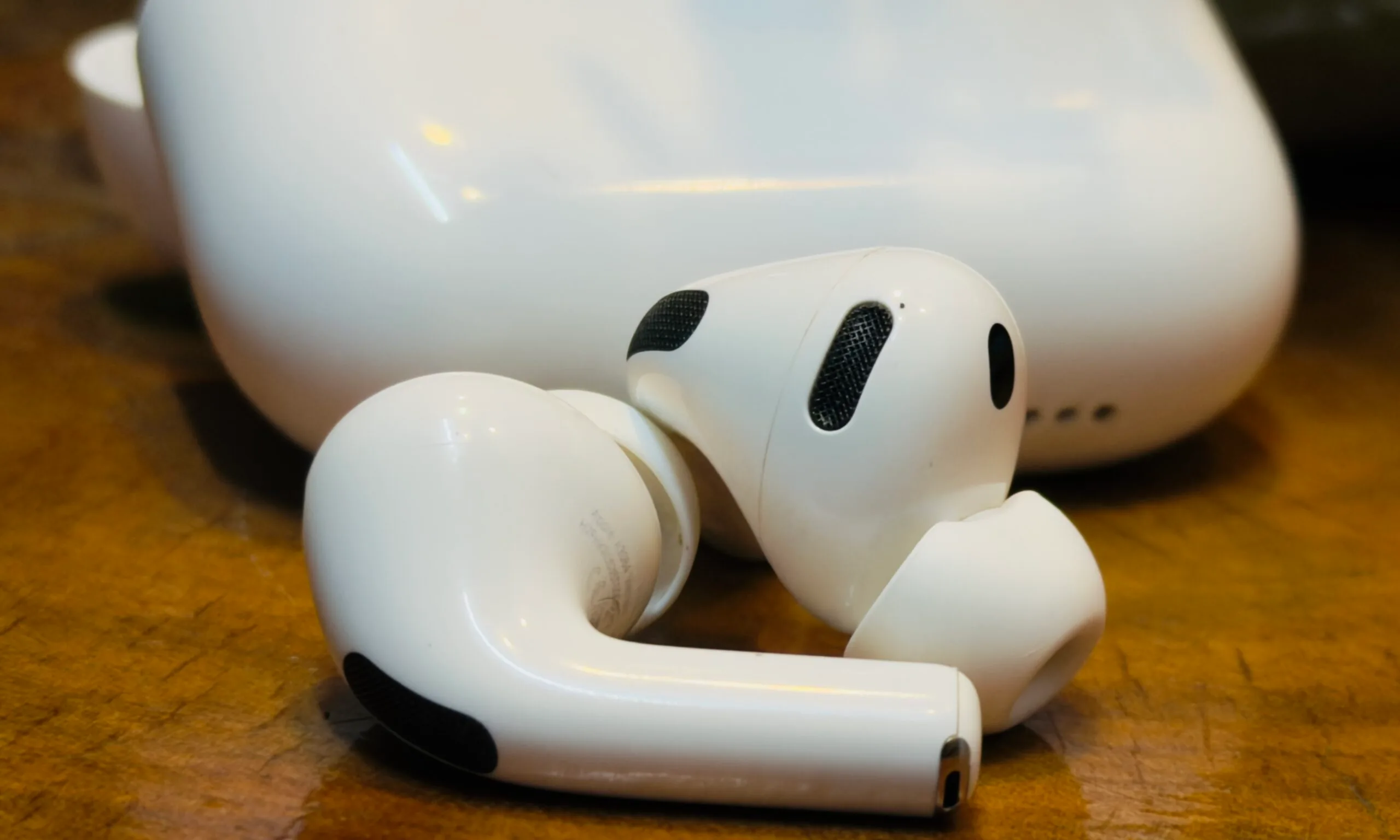
Apple’s wearable future is starting to come into focus, and cameras appear to be at its center. Bloomberg’s Mark Gurman reports that camera-equipped AirPods and Apple’s first smart glasses are currently on the roadmap for 2027. While they may look like ordinary accessories on the surface, both products could play a crucial role in helping Apple Intelligence understand the world around its users in real time.

Your AirPods might start paying attention

When most people think of AirPods, they think of music, podcasts, and phone calls. Cameras aren’t exactly high on the wishlist. But Apple has a different vision. The cameras wouldn’t be there for recording videos. Instead, they’d help gather information about the world around you and feed that data into Siri and Apple’s AI systems.

Imagine asking Siri about a building you’re looking at, identifying an object in front of you, or getting contextual information without ever pulling out your phone. So, your AirPods could become another set of eyes for Apple’s AI; that’s a dramatically different role from what earbuds do today.

Glasses to see, not just display

Then there’s Apple’s smart glasses, arguably one of the company’s most anticipated future products. Unlike the bulky Vision Pro headset, smart glasses could bring AI into a form factor people might actually wear all day. While details remain scarce, cameras are expected to play a crucial role, helping the device understand its surroundings and deliver real-time, useful information.

What’s particularly interesting is how these products fit into Apple’s broader AI strategy. Most companies are trying to make AI more useful through apps and chatbots. Apple appears to be exploring something more ambient — AI that observes the world around you and responds when needed. Whether consumers are ready for camera-equipped wearables is another question entirely. But if Gurman’s report is accurate, 2027 could be remembered as the year Apple stopped thinking about AI as software and started turning it into something you wear.

Advertisement

Source link

Continue Reading

Trending

Copyright © 2025