

Tech
Best Portable Fan 2026: Handheld and battery models tested

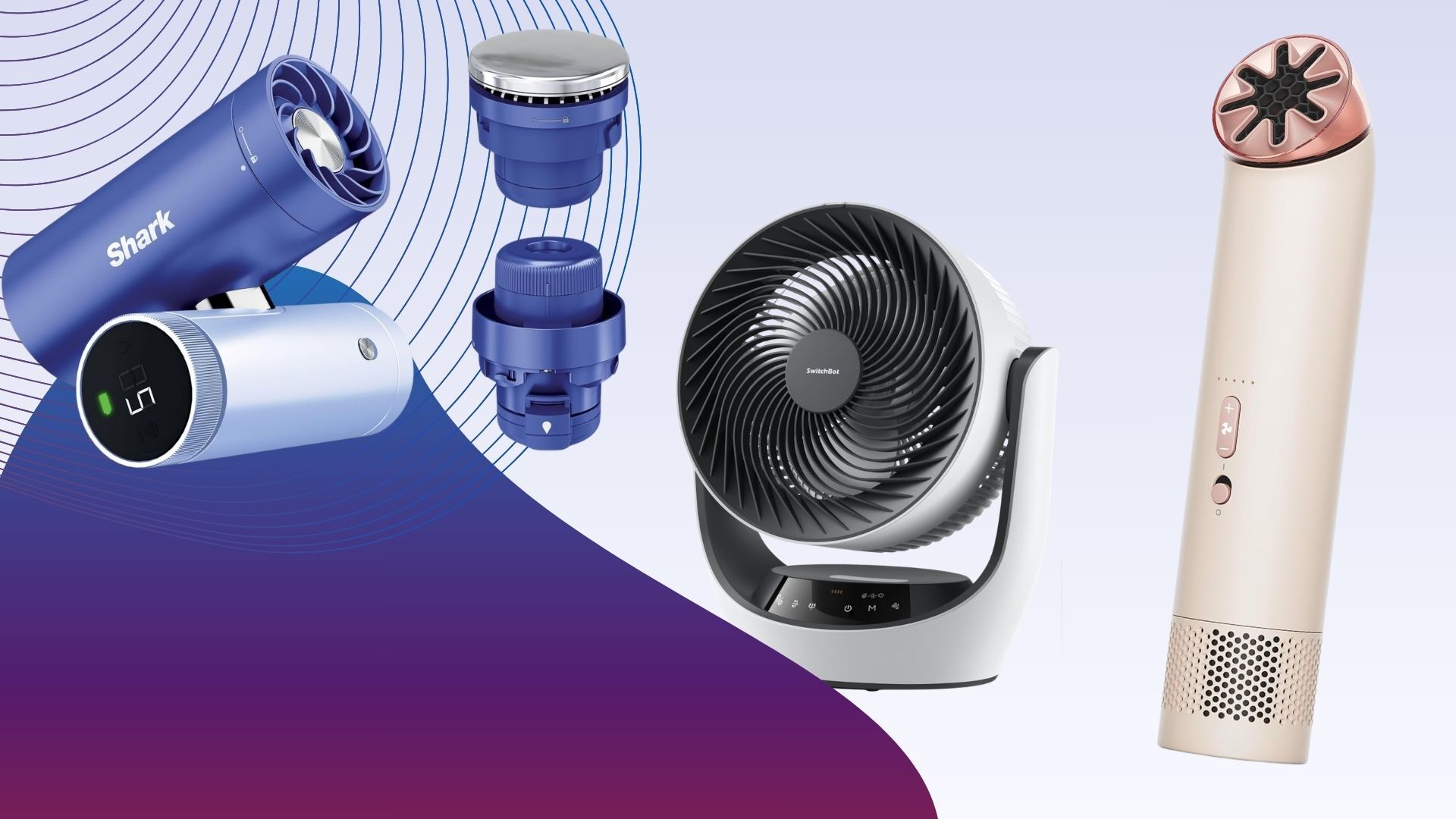
Fans might be good for keeping you cool at home, but all those bulky plug-in models are no good the second you step outside the door. Thanks to improvements in battery power and motors, portable fans, handheld, wearable or simply wire-free, are as good as their fixed counterparts.
The good news is that there are a lot more products to choose from. The bad news is that many, handheld models particularly, are cheap no-brand models that are basic at best.
If you want a bit more from a portable fan, then you’re in the right place. Here, we’ve rounded up a variety of products, including handheld fans that you can take on the move, and battery-powered ones that are ideal for quickly moving around the house or taking into the garden.
It’s important to work out what you want from a portable fan before you buy. If travel is your primary objective, whether that’s sitting on the beach or stuffed into a hot train, then a handheld model is ideal.
Make sure you buy one with enough battery life, enough power to cool you and quiet enough operating levels.
For wider cooling of multiple people and at a greater range, a battery-powered fan is ideal as you can carry it where you need without needing a power socket. Standing fans are good where you don’t have surfaces; desktop versions are useful in bedrooms or for when you want to put a fan on a table.
There’s a lot to consider but our in-depth testing means that you can rely on our product choices. If you want a plug-in model, then check out our guide to the best fans.
Best Portable Fan at a glance
SQUIRREL_ANCHOR_LIST
We test every fan using the same process so that their performance is easy to compare.
First, we measure air flow in metres per second (m/s). We take readings at two distances (15cm and 1m) to see how much the air flow drops off. We do this at both the minimum and maximum fan speeds to understand the full performance range. A good fan should offer a wide range of speeds, from a gentle breeze to a powerful blast of air.
We also measure noise levels at the lowest and highest speeds to see how loud each fan is. You can read more in our detailed guide, how we test fans. A far more flexible handheld fan than many others, the Shark ChillPill is a brilliant tool that offers three ways of cooling.
It’s smartly designed, too, and available in multiple colours. It has a body comprised of two barrels (one for the controls and battery, one for the main fan) that are hinged in the middle. This lets you twist the fan to point it where you want, or you can place it on a desk and have it point at you.
There are also optional clips and straps available if you want to wear the fan, or even have it clipped to your bike’s handlebars.
In fan mode, you can use the ChillPill while it’s charging via USB-C, or take it handheld with battery life running between 1.5 hours and 11 hours, depending on which of the ten fan speeds you use.
Controls are really smart: the LCD shows the selected speed and battery life, and a twist of the outer dial adjusts the speed. When measured at 15cm, this fan ranges from 1m/s to 4.6m/s and is extremely powerful, ideal for cooling down a single person.
More than just a fan, the ChillPill also has two additional attachments. The Misting Pod takes water and blows a stream of water droplets at you for up to 10 minutes (you then need to refill the reservoir). It works brilliantly and makes a difference in places where a fan alone isn’t enough, such as on a hot train. Then, there’s the InstaChill Plate, which is a metal attachment that cools down that you can place on key parts of your body, such as your temples, wrists or neck.
It’s this overall flexibility that makes the Shark ChillPill one of the best handheld fans.
By taking everything the company knows about motors and fans and distilling it into a compact form, the Dyson HushJet Mini Cool is the most powerful handheld fan available.
Available in a wide range of colours, it’s also one of the smallest, with the fan measuring just 38mm in diameter, making it easy to store in a bag, slip into a pocket or even wear with the provided neck strap. At the top is the air outlet, which rotates so that you can direct air where you want it. There’s then a power switch to turn the fan on, and up/down buttons to cycle through the five fan speeds. And, hold the plus button down to turn on the Boost mode.
Air speeds are incredible, running between 2.6m/s and 8.1m/s on standard power modes, and an incredible 11.3m/s on Turbo. At high speeds, the fan gets loud, but it can blast so much air that on a hot day, you won’t care.
Battery life runs between one hour and six hours, so there’s enough juice to last for a long commute. When charging via USB-C, the fan can be used on fan speed one; with the provided desk mount, it’s a handy workstation cooling solution, too.
Circulator fans, which have vertical and horizontal oscillation, are great in hot weather, as they can push stuffy air around and improve airflow through your home. With the SwitchBot Standing Circulator Fan, you get all of these benefits, plus the built-in battery means you can put the fan where you want it, whether that’s a different room or out in the garden.
There’s a choice of assembly, and the fan can be put together with no stand parts to make a desktop version, one segment for a mid-sized version, and two for the full standing effect. That’s neat, but it does mean that conversion from one mode to another is quite slow. Controls are via the buttons on the base or the slightly cheap-feeling remote that clips into the back of the fan’s head. As the IR sensor is on the fan’s base, it can be tricky to get the line of sight you need.
Fortunately, the SwitchBot Standing Circulator Fan is also a smart product and you can control it via Bluetooth or, if you have a SwitchBot hub, Wi-Fi.
This fan is powerful. Measuring from 1m away, the fan outputs a gentle breeze at fan speed one, up to 3.8m/s at fan speed nine. It’s also relatively quiet, running at between 35.9dB and 57.2dB.
Battery life is impressive, and the fan can last between two and 12 hours, depending on settings. Opt for a mid-level fan speed and you’ve got enough juice to last for a night’s sleep. To top it all off, this fan even has a nightlight, which makes it ideal for use in a kid’s bedroom. Well priced and flexible, this is a very good multi-purpose fan.
A brilliant and flexible fan, the Shark FlexBreeze Portable Fan FA220UK is designed with indoor and outdoor use in mind.
This fan looks like a regular standing fan, but it also has a clever trick. Press the button on the stand, and you can slip out the top section, fold out the feet and you’ve got a desktop model.
Controls are on the top and via the remote, which attaches magnetically to the back. This fan has five fan speeds to choose from, and 180° horizontal oscillation. The fan head can be tilted vertically manually.
It’s a little hard to see which fan speed you’re on, as one LED lights up per speed and they’re hard to see in sunlight. For outdoor use, this fan has a clip-on mister, which attaches to a hose. This blasts a shower of cooling water at you, but it’s for outdoor use only: there’s too much water for inside and you will get a bit damp if you sit too close. However, for those very hot days, this fan provides a nice way to cool down.
The Shark FlexBreeze Portable Fan FA220UK is powerful, running at between 0.8m/s and 3.6m/s, when measured from 1m away. With sound peaking at 50dB, this fan is also quite quiet.
Fully charged, the internal battery will last between two and 24 hours, depending on the fan speed. For cooling during a BBQ or coming inside for the night, there’s enough battery power to get through the hottest periods.
Rather than a fan, the Sony Reon Pocket Pro Plus is a personal cooling device that you wear. This updated version has a redesigned neck band that makes it more comfortable to wear, and a new algorithm to adjust its cooling.
With the cooling pad on your back, the Sony Reon Pocket Pro Plus can cool down to 20°, which is 2° cooler than with the previous model. That’s a bigger difference than it seems, and this device certainly improves comfort levels in hot environments. App control makes it easy to use this device on the move. This device also ships with the Pocket Tag 2, which takes in external environmental information, including temperature and humidity, allowing the device to adjust its cooling (or heating) to suit.
It works brilliantly, helping your body maintain a more comfortable temperature. It is expensive, but if you want something smarter to keep you cool, the Sony Reon Pocket Pro Plus is a great product.
A more standard handheld fan, the VersionTECH Hand Held Fan is much cheaper than everything else on this list, but it also has some clever features.
The best thing about this fan is that its handle can fold back 180°, making the fan easier to transport. But, place it on a desk, and the hinge turns this into a desktop fan. Fold the handle out, and you’ve got a standard handheld model.
With a built-in clip, so you can attach the fan to the underside of an umbrella, or similar, the VersionTECH Hand Held Fan is very flexible. It charges via microUSB and will last between two and six hours, depending on which fan speed you use. There’s a choice of three fan speeds, which is a little limiting, but they cover enough range to suit most uses.
Fan speeds range between 2.3m/s and 3.9m/s, which good but you do have to hold the fan close to you to really feel its effect; the other handheld models here are much more powerful but also more expensive.
If you want something simple and cheap to travel with, the VersionTECH Hand Held Fan is a good option.
The MeacoFan Sefte 8″ Portable Battery Air Circulator combines all of the features that we’ve come to love from the company and adds a battery for additional portability.
Extremely well-made, this fan is a desktop model designed to sit next to you while you work, on a table or a bedside table for sleep. Although an air circulator, it has motorised horizontal oscillation only, although you can manually tilt the fan head up to get air where you want it.
For ease, a remote control attaches to the front of the fan, giving you quick access to all of the fan’s functions.
On its lowest fan speed, the MeacoFan Sefte 8″ Portable Battery Air Circulator pushes out a gentle breeze, but at full power (setting 12), air speed increases to 3.1m/s at 15cm. Even at 1m the air speed is 2.6m/s, so you can cool multiple people in a room when you need to. It’s also very quiet, never going above 54dB, so this fan fades into the background.
Battery life is rated at up to 17 hours, so even on moderate fan speeds, you can get this to last through the night. The SwitchBot Battery Circulator Fan is similar to the company’s standing fan, but the desktop body is better built and this fan feels quite a bit more premium, even if it is quite chunky.
As an air circulator, this fan has both horizontal and vertical oscillation, so can really push air around a room.
Controls are on the front, but there’s also a handy remote control that gives you access to all of the fan’s features. It’s a shame that the remote can’t stick magnetically to the fan’s body, though.
Alternatively, as this is a SwitchBot product, you can remote control the fan using the app via Bluetooth. Add a SwitchBot Hub in and you can remote control of the fan, too.
And, like its Standing version, the SwitchBot Battery Circulator Fan also has a nightlight built in, making it a good choice for a child’s bedroom. This is a powerful fan, running at between 0.9m/s on the lowest fan speed up to 3.8m/s on the highest setting of nine, measured from 15cm away. From 1m away, on maximum, the fan managed a powerful 2.5m/s. That’s a bit less than the standing version, but enough power to cover a few people in a room.
Slightly lower fan speeds are good for battery life, and the SwitchBot Battery Circulator Fan can last between six hours on maximum up to 12 hours on minimum speed.
If you want the benefits of an air circulator mixed with a desktop fan that you can take anywhere, this is a good choice.
Learn more about how we test fans
Test Data
Shark ChillPill
Dyson HushJet Mini Cool
SwitchBot Standing Circulator Fan
Shark FlexBreeze Portable Fan FA220UK
Sony Reon Pocket Pro Plus
VersionTECH Hand Held Fan
MeacoFan Sefte 8″ Portable Battery Air Circulator
SwitchBot Battery Circulator Fan
Sound (low)
42.1 dB
60.6 dB
35.9 dB
32.1 dB
–
38.7 dB
34.8 dB
33.9 dB
Sound (medium)
–
72.7 dB
44.8 dB
38.1 dB
–
45.8 dB
43.5 dB
42.1 dB
Sound (high)
67.9 dB
78 dB
57.2 dB
50 dB
–
50.9 dB
54.0 dB
54 dB
Air speed 15cm (low)
–
2.6 m/s
0.9 m/s
1.1 m/s
–
2.3 m/s
0.0 m/s
0.9 m/s
Air speed 15cm (medium)
–
5.5 m/s
3 m/s
3.2 m/s
–
3.2 m/s
2.0 m/s
2.5 m/s
Air speed 15cm (high)
4 m/s
8.1 m/s
5.1 m/s
4.6 m/s
–
3.9 m/s
3.1 m/s
3.8 m/s
Air speed 1m (low)
–
–
–
0.8 m/s
–
0 m/s
0.0 m/s
–
Air speed 1m (medium)
–
–
2.1
2.4
–
1
1.8
2
Air speed 1m (high)
–
–
3.8 m/s
3.6 m/s
–
1.2 m/s
2.6 m/s
2.5 m/s
Full Specs
Shark ChillPill Review
Dyson HushJet Mini Cool Review
SwitchBot Standing Circulator Fan Review
Shark FlexBreeze Portable Fan FA220UK Review
Sony Reon Pocket Pro Plus Review
VersionTECH Hand Held Fan Review
MeacoFan Sefte 8″ Portable Battery Air Circulator Review
SwitchBot Battery Circulator Fan Review
UK RRP
–
–
£99.99
£199.99
£199
£25.99
£79.99
–
USA RRP
–
–
$99.99
$199.99
–
–
–
–
EU RRP
–
–
–
–
€229
–
–
–
Manufacturer
Shark
Dyson
SwitchBot
Shark
Sony
–
Meaco
SwitchBot
Quiet Mark Accredited
–
–
–
–
–
–
No
–
Size (Dimensions)
84 x 45 x 112 MM
38 x 38 x 180 MM
335 x 290 x 1000 MM
35 x 35 x 94 CM
125 x 175 x 60 MM
11 x 14 x 10 CM
261 x 211 x 384 MM
173 x 384 x 334 MM
Weight
350 G
210 G
3.45 KG
5.67 KG
259 G
150 G
2.3 KG
2.4 G
ASIN
–
–
–
–
–
B07BT18FFP
–
–
Release Date
2026
2026
2026
2024
2026
2021
2025
2025
First Reviewed Date
10/03/2026
22/05/2026
11/06/2026
25/06/2024
24/06/2026
21/08/2023
23/06/2025
16/06/2026
Model Number
Shark ChillPill
Dyson HushJet Mini Cool
SwitchBot Standing Circulator Fan
Shark FlexBreeze Portable Fan FA220UK
–
VersionTECH Small Portable Personal Mini Desk Table Folding Fan with USB
–
SwitchBot Battery Circulator Fan
Remote Control
–
–
Yes
Yes
Yes
–
Yes
Yes
App Control
–
–
Yes
–
Yes
–
–
Yes
Number of speeds
10
5
9
5
5
3
12
9
Fan Type
Portable fan, mister and cooling pad
Handheld
Battery/mains air circulator
Battery or mains powered, desktop or pedestal fan
Wearable air conditioner
Portable
Desk fan
Portable air circulator
Oscillation
No
–
Yes (Vertical -10° to 90°, Horizontal -45° to 45°)
Yes (up to 180°)
–
No
70 degrees
Yex (90° horizontal, 90° vertical)
Timer
No
–
Yes
Yes (one-hour intervals up to five hours)
–
No
No
Yes (hourly up to nine hours)
Night Mode
–
–
Yes
–
–
–
Yes
Yes
Heat mode
No
–
–
No
Yes
No
No
–
Source link

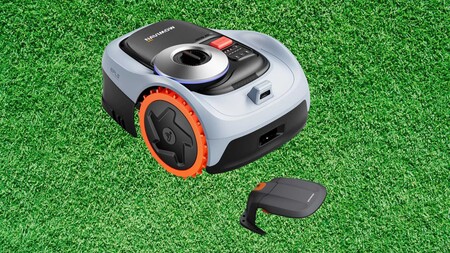
Robot mowers have come a long way from the boundary-wire era, and Segway’s Navimow range sits at the sharper end of where that technology has landed.
The Segway Navimow i205 AWD is down from £899 to £699 in this Prime Day deal, saving you £200 on a wire-free robot mower that maps your entire lawn from a single tap in the app, with the Garage S charging station included at no extra cost.

A sizeable discount lands on the Segway Navimow robot lawnmower, turning lawn care into a hands‑free upgrade that gives you your time back
A strong saving lands on the Segway Navimow robot lawnmower, transforming lawn care into a seamless, time‑returning upgrade.
That hands-free setup runs on EFLS Network RTK combined with Vision positioning, giving the mower centimetre-level accuracy across the whole garden, and the network data access is currently provided at no additional charge.
Where the i205 AWD justifies its name is on the kind of terrain that exposes the limits of a standard two-wheel mower, because the three-motor all-wheel-drive system engages that third motor only when the gradient actually needs it, keeping energy consumption down on flatter sections.

An automotive-grade Electronic Stability Control system keeps movement straight and controlled on slopes up to 45 degrees, while a patented Traction Control System adjusts grip automatically on wet or uneven ground so the wheels never spin out or leave marks.
The 2.5Ah battery covers up to 125 square metres on a single charge, and at 59 dB(A) the Navimow i205 AWD is quiet enough to run without clearing the garden of people first.
VisionFence obstacle detection recognises more than 150 object types and reroutes in under 0.1 seconds, while the smart security system fires an alert the moment the mower is lifted or moves outside its designated zones.
Gardens with a genuine mix of slope, tight corners, and awkward pathways are where the Navimow i205 AWD is designed to work without complaint, and at £699 with the Garage S thrown in, this deal takes a meaningful amount of friction out of that first step towards wire-free lawn care.
If you’ve got a small-to-mid-sized lawn that’s not particularly even, then the Segway Navimow i205 AWD could be for you. With its three-wheel AWD system, this robot drives over rough ground and copes with bumps without getting stuck. Add in its excellent object detection and avoidance, the integrated 4G and Wi-Fi (no need for a reference station for most people), the brilliant app and low price, and this is a great choice for most people.
-
Great value
-
Easy to set up
-
Brilliant navigation and obstacle avoidance
-
Integrated 4G
SQUIRREL_PLAYLIST_10148964

Refurbished Sony hardware has a reputation for punching well above its price, and right now, there are two PS5 deals worth going for.
The standard PlayStation 5 has dropped to £392 from its £479.99 RRP, saving you £109.99 on a console that still represents Sony’s full vision for next-generation gaming performance at its most complete.

If Prime Day didn’t have the right deal for you, refurbished PlayStation consoles are still a great way to save
If Prime Day didn’t have the PlayStation deal you were hoping for, refurbished consoles are still a smart, money‑saving alternative.
That disc drive matters more than it might seem, because it opens up the secondhand game market alongside digital purchases, and over a console generation, that difference in buying flexibility tends to add up to real money saved.
Under the hood, the PlayStation 5 runs a custom AMD RDNA 2 GPU capable of 10.28 teraflops, paired with a 1TB NVMe SSD that effectively eliminates loading screens and lets open-world games stream assets in ways last-gen hardware simply couldn’t manage.
Hardware-accelerated ray tracing brings realistic light behaviour to supported titles, and the DualSense controller’s adaptive triggers and haptic feedback make the physical sensation of playing something you notice almost immediately and then can’t stop noticing.
If the disc drive isn’t something you need, the PlayStation 5 Slim Digital Edition brings the same processing architecture in a lighter, more compact chassis, currently reduced to £405 from £438.02, a saving of £33.02.
The Slim Digital weighs just 2.6kg against the original digital model’s 3.9kg, and the redesigned chassis uses a removable side panel that supports Sony’s add-on Ultra HD Blu-ray drive if you change your mind about going disc-free further down the line.
Both consoles share the same 16GB GDDR6 memory, identical CPU architecture, and the same Tempest 3D Audio engine, so whichever you go for, the generational leap in performance is identical.
The decision now really comes down to how you buy games and how much the physical footprint matters to you, and at these prices, either way you’re getting Sony’s current-generation hardware at a meaningfully lower entry point than new.
A new slimmer PS5 lessens the physical footprint, adds more storage, includes smarter port options and offers a removable disc drive. The internals retain the same immense power, nuanced SSD technology and 4K-capable graphics. A brilliant DualSense controller, a compelling UI, the best library of exclusive games around, and proper reverence for PlayStation’s past ensures the PS5 remains this generation’s console king.
-
Refined slimmer and lighter design
-
Absurd power meets brilliant user interface
-
DualSense controller is a step forward
-
Removable disc drive adds flexibility
-
Better library of first-party exclusives
-
Mid-cycle refresh doesn’t improve internals
-
Lags behind Series X and S when it comes to loading times
-
Still expensive
SQUIRREL_PLAYLIST_10148964


An endpoint agent cannot report its own absence. The 2026 Axonius Actionability Report, conducted with the Ponemon Institute and surveying 662 IT and security professionals, put a number on a gap SOC teams have worked around for years. Across the Axonius customer base, 12.7% of devices in a 298,000-device median inventory are missing their expected security agent.
If a device has no agent, no management console shows it. If a CMDB record is stale, no reconciliation flags it. An employee who installed Claude Enterprise outside procurement created a SaaS workspace, identity surface, and API-token footprint that endpoint telemetry alone will not reliably inventory. The coverage percentage on the EDR dashboard is structurally incomplete because the reporting mechanism cannot see what it does not cover.
That gap matters more now than it did six months ago. SOC and XDR vendors are pushing more autonomous investigation and remediation into production. Those agents will query the same dashboards, trust the same coverage percentages, and act on the same blind spots human analysts learned to work around. A human analyst second-guesses a 98% coverage number. An autonomous agent treats it as ground truth and moves at machine speed.
Three independent signals converged on the same gap
Gravitee’s 2026 survey of 900-plus executives found 88% reported confirmed or suspected AI-related incidents, and only 14.4% sent agents live with full security approval. The Axonius/Ponemon report found 52% of respondents would let autonomous agents act on recommendations — while 63% said the underlying data lacks important information. The CSA’s Agentic Trust Framework requires verified data governance before agents act on any finding.
Mike Riemer, Field CISO at Ivanti, said that known vulnerabilities on Azure’s honeypot networks are now attacked in under 90 seconds. “Traditional security measures continue to work,” Riemer told VentureBeat.
The caveat is that those measures only protect what they can see. An EDR agent deployed across 87.3% of the device inventory leaves the remaining 12.7% outside that agent’s telemetry, policy enforcement, and detection logic.
Exclusive deployment data quantifies the scale
Joe Diamond, CEO of Axonius, told VentureBeat that the average CISO sees roughly 50% of what is actually on the network. “Say 50% of their environment is sitting in dark matter,” Diamond said. “They don’t know what it is, or where it is, or who has access to it, if it’s secure, if it’s not secure.”
Deployment data from more than 900 Axonius customers confirms those numbers. TransUnion went from 70% to 99% endpoint coverage after out-of-band verification. Western Union went from 85% to 99% by consolidating data from 38 tools and cutting manual workload by half. Lumen discovered 1.1 million assets, where the CMDB showed 17,000. That translates to roughly 37,000 unmanaged endpoints per organization sitting outside every policy, every patch cycle, and every detection rule.
Diamond pointed to Mythos, Anthropic’s frontier reasoning model, as a sign that machine-speed offensive capability will make any unknown asset far riskier than it is today. “People tend to have shiny object syndrome,” he said. “If you didn’t understand what 50% of your environment looked like from a traditional endpoint perspective, and you think you’re going to wind sprint to granular control and governance of AI, your program will fail.” Diamond called the broader AI shift “as big, if not bigger than the internet.”
Three approaches compete to close the gap
No single architecture solves the visibility problem today. Three approaches compete, each with named tradeoffs security teams should evaluate before procurement.
A dedicated integration layer uses bidirectional API adapters to build an always-current inventory. Axonius runs 1,400-plus adapters and now discovers shadow Claude Enterprise installations via its Anthropic adapter (GA June 15). “We created a bidirectional API integration with all the IT systems and all the security controls to build an always up-to-date inventory of what the environment looks like,” Diamond told VentureBeat.
Platform-native EDR and XDR intelligence builds richer asset context inside the agent footprint. Depth within the agent footprint is the advantage. The limitation is structural. Platform-native intelligence is bounded by what the agent can see, and the gap the Ponemon report identified lives precisely where that visibility ends.
CMDB modernization requires continuous reconciliation against three or more independent telemetry sources. Only 13% of organizations reconcile daily, according to Axonius/Ponemon data. The remaining 87% operate on stale records that feed incorrect prioritization into any automated remediation pipeline.
EDR data readiness: Five gates before autonomous remediation
Before you let autonomous SOC agents close tickets or quarantine assets, this checklist tells you whether your EDR and asset data is solid enough to trust. It is vendor-agnostic, works with any EDR and CMDB, and gives you five pass/fail gates you can run in a single working session.
|
Risk Area |
What the data shows |
Readiness threshold |
Action to take now |
|
Asset inventory delta |
Ponemon: only 45% consolidate into a single view. Forrester TEI: 150% more assets than previously identified. Lumen: 17K in CMDB vs. 1.1M discovered. |
Delta ≤10% between discovery, CMDB, and EDR agent count. Delta above 10% blocks automated remediation until reconciled. |
Run API-based discovery against all segments. Diff against CMDB and EDR console count. Reconcile quarterly minimum. |
|
Unmanaged AI services |
Gravitee: 88% confirmed or suspected AI incidents. Only 14.4% with full security approval. Anthropic adapter (GA June 15) discovers unmanaged Claude Enterprise installations. |
No high-risk AI services outside approved procurement. Weekly SaaS discovery scans. Unmanaged high-risk instances trigger IR triage before exception review. |
Deploy SaaS discovery or protocol-level adapters for AI service detection. Automate weekly scans. Route unmanaged instances to IR queue. |
|
CMDB record accuracy |
Ponemon: only 13% reconcile daily (RSAC 2026). Brooks Running: 20% server discrepancy between console and independent discovery. Top remediation barriers: unclear prioritization, unclear ownership, inconsistent data. |
≥85% of records validated against 3+ independent telemetry sources. No stale or orphaned records in active remediation queue. |
Cross-reference CMDB against cloud inventory, EDR telemetry, and IdP directory. Continuous reconciliation replaces annual audit cycles. |
|
Endpoint agent coverage gap |
Ponemon: an agent cannot report its own absence (p. 8). TransUnion: 70% to 99% after out-of-band verification. RSAC 2026: 12.7% of 298K median devices missing expected agent. |
≥95% agent coverage verified via out-of-band discovery. Many CISOs set this as the minimum before allowing autonomous remediation. No self-reported-only metrics in board reports. |
Run network-based or API-driven discovery against managed device list. Coverage below 95% blocks automated remediation scoping. |
|
Asset ownership mapping |
Ponemon: 32% apply tags consistently. Only 51% assign ownership on new exposures (pp. 9, 16). TransUnion: 12K to 190K assets with ownership mapped. |
Owner assigned within 24 hours. Tags consistent across cloud, EDR, CMDB. Three systems showing three owners = failure. |
Automate ownership via cloud tags, IdP group membership, or CMDB metadata. Map asset, remediation, and business owner as separate fields. |
Five questions to ask before allowing autonomous SOC action
-
What independently verifies endpoint-agent coverage outside the EDR console?
-
How does the SOC reconcile conflicts between EDR, CMDB, cloud inventory, IdP, and discovery tools?
-
Can AI agents act on assets with unknown or disputed ownership?
-
Can the system distinguish “not vulnerable” from “not visible”?
-
What data-quality gate blocks autonomous remediation when coverage or ownership falls below threshold?
Board-ready risk framing
Kayne McGladrey, IEEE Senior Member, has confirmed the pattern across multiple published VentureBeat interviews. The structural gap in self-reported coverage is not new. What is new is that autonomous agents will act on it at machine speed without the institutional workarounds human analysts developed over years of experience. Diamond put the board-level stakes plainly in an April 2026 press statement: “Findings pile up because the data isn’t trusted, ownership isn’t clear, and entire asset classes aren’t even in the picture.”
The CSA’s Agentic Trust Framework requires that any agent promoted to a higher autonomy level must pass five gates, including demonstrated accuracy and a security audit. The EU AI Act’s Article 50 transparency obligations take effect August 2, 2026. The May 2026 Digital Omnibus pushed high-risk system obligations to December 2027, but organizations deploying agentic SOC agents on incomplete asset data face immediate operational risk that outpaces any regulatory timeline.
The board-ready sentence: Our EDR coverage reports are structurally incomplete because an endpoint agent cannot report its own absence, and we are verifying coverage through out-of-band discovery before deploying autonomous agents that would act on those reports at machine speed.
Security director playbook
-
Run out-of-band asset discovery this week. Compare results against your CMDB export and EDR console count. If the delta exceeds 10%, halt automated remediation scoping until the gap is reconciled.
-
Deploy SaaS discovery for AI services. Employees install AI ahead of procurement, ahead of security. Weekly scans are the minimum. Route any unmanaged high-risk instance to your incident response queue for triage before exception review.
-
Map asset ownership to remediation responsibility. Ponemon found only 32% of organizations apply tags consistently. If three systems show three different owners for the same asset, automated remediation has no routing target. Fix the ownership layer before deploying agents that depend on it.
-
Kill self-reported-only coverage metrics. Any risk calculation or board report that relies on EDR console-reported coverage alone is built on data the reporting system cannot verify. Require out-of-band verification for every coverage number that informs a risk decision.
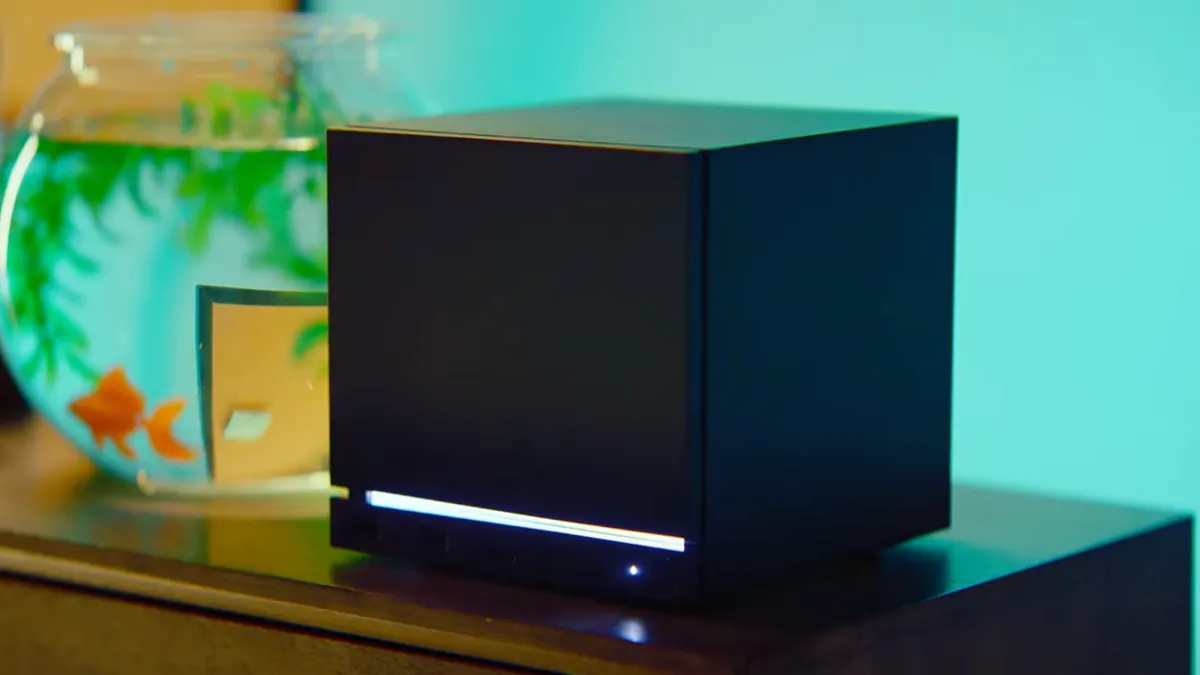
Valve will release its living room PC game console, called the Steam Machine, but it won’t be cheap, thanks to the ongoing memory shortage referred to as RAMageddon, which already shot up the price of the Steam Deck. The company finally unveiled the pricing for the Steam Machine, and it’s not for the faint of heart.
The Steam Machine will start at $1,049 for the 512GB version that doesn’t come with a Steam Controller, according to the listing page Valve posted on Monday. Adding a controller to the package will bring the price up to $1,128. Willing to spend even more? With 2TB of storage, the cost jumps up to $1,349 without a controller. The 2TB model with a Steam Controller will set you back $1,428.
On Friday, Valve sent the first wave of reservation emails to those interested in buying a Steam Machine. The window to buy the console will start on June 29 and will be open for three days. Those who do not complete their purchase will lose their reservation, and it will go to someone else. Everyone else who did not get a reservation email will be put on a waitlist and will have to wait for when Valve restocks inventory to get an invite to purchase a Steam Machine.
The Steam Machine is Valve’s gaming PC, built into a roughly 6-inch cube that’s designed to connect to a living room TV. The aim is to deliver a simplified PC gaming experience for a broad audience and for game developers to optimize for a single spec as they’ve done with the Steam Deck.
Here’s everything we know about the Steam Machine.
When does the Steam Machine come out?
The Steam Machine will be available for purchase starting June 29, but only for those who are picked to purchase it on the launch date.
Make some space in your living room for the Steam Machine.
Can I preorder the Steam Machine?
Preorders for the Steam Machine are closed. They opened on Monday and closed on Thursday. The first batch of reservation emails for those who will be able to order the week of June 29 has already gone out. They will get another email from Valve letting them know they can order their Steam Machine, and they will have 72 hours to complete their order.
Anyone who was not selected to buy the Steam Machine on June 29 will be put on a wait list. When Valve restocks more units, another group from the wait list will be invited to purchase their Steam Machine. Valve didn’t provide a window of how long for people on the wait list will have to wait to buy a Steam Machine. Those who waited until after the June 25 deadline to sign up for a Steam Machine will be put at the end of the wait list.
Watch this: Valve’s Steam Controller Gets Some Major Design Changes
How much will the Steam Machine cost?
The Steam Machine will start at $1,049 for the 512GB version without a Steam Controller. The other options include controllers or more storage:
- 512GB with Steam Controller: $1,128
- 2TB without Steam Controller: $1,349
- 2TB with Steam Controller: $1,428
What are the Steam Machine specs?
Valve released the final specs of the Steam Machine last week with the news of the official launch of the console.
Steam Machine Specs
| CPU | AMD Zen 4 6C / 12T, up to 4.8 GHz, 30W TDP |
|---|---|
| Memory | 16GB DDR5 plus 8GB GDDR6 VRAM |
| Graphics | Semi-custom AMD RDNA3 28CUs, 2.45GHz max sustained clock, 110-watt TDP |
| Storage | 512GB NVMe SSD or 1TB NVMe SSD, high-speed microSD slot |
| Ports | USB-A 3.2 Gen 1 (x2), USB-A 2.0 (x2), USB-C 3.2 Gen 2, DisplayPort 1.4 (up to 4K @ 240Hz or 8K@60Hz, supports HDR, FreeSync and daisy-chaining), HDMI 2.0 (up to 4K @ 120Hz, supports HDR, FreeSync and CEC), Gigabit Ethernet |
| Wireless Networking | 2×2 Wi-Fi 6E, Bluetooth 5.3 |
| Operating system | SteamOS 3 |
| Weight | 5.7 pounds (2.6 kilograms) |
| Size | 6 inches tall (5.8 inches without feet), 6.4 inches deep, 6.1 inches wide |
What else is unique to the Steam Machine?
Valve is doing a bit more than just making a tiny gaming PC. The company is offering some features that aren’t found on the PS5, Switch 2 or Xbox Series consoles.
To start, there are removable face plates for the Steam Machine. This is similar to the faceplates for the Xbox 360, which offer a bit of customization for the console.
An e-ink display can be used as the front panel on a Steam Machine (used for testing by Valve, will not be for sale) https://t.co/NIO6m4qm5o pic.twitter.com/Gd30STsifs— Wario64 (@Wario64) November 12, 2025
Steam Machines are upgradable. You can increase storage by adding a microSD card to the console’s microSD card slot or by replacing the solid-state drive. There is also the possibility to upgrade the RAM, but that will take a few more steps versus the storage swapping.
The Steam Machine will also be just a computer when needed. Connect it to a monitor with a mouse and keyboard, and the console will act just like a Linux desktop. There’s also the option to install Windows in lieu of SteamOS, which would make it still play PC games, although the experience won’t be as smooth as SteamOS.
The Steam Machine is a PC, too.
The Steam Controller for the Steam Machine will connect seamlessly to the console. And, for multiplayer games, four controllers can connect with a console very easily.
Wait, didn’t Valve already have Steam Machines?
Kind of. Back in 2013, Valve revealed a new operating system called SteamOS. It’s what powers the Steam Deck and creates the Big Picture Mode, which allows gamers to play their PC games in a mostly console-like experience instead of the typical desktop experience of using a mouse to double-click a game to start.
Along with the operating system, Valve also released its Steam Machine platform. This allowed computer hardware makers to develop computers shaped more like a home console instead of a desktop. Alienware and Dell were some of the notable companies that developed their own Steam Machines, but none of them really caught on, partly due to many games not being compatible with the Linux-based SteamOS.
The Steam Machines fizzled out in the mid-2010s as making games compatible with SteamOS was not a priority for game developers at the time. It wasn’t until 2018 that Valve developed Proton, a compatibility layer for SteamOS to make it easier to run most Windows games. Proton currently supports more than 20,000 Windows games.
Valve also ended up offering an alternative to getting a whole new piece of hardware. In 2015, the company released Steam Link, a device that allowed PC games to be streamed directly to a TV.

The Art TV category has become one of the television industry’s most competitive design battlegrounds, and Amazon is the latest major brand hoping to make a large black rectangle look less like it belongs in an airport lounge. Its new Ember Artline is Amazon’s first lifestyle TV, pairing a matte 4K QLED display, customizable frame colors, Fire TV, and access to more than 2,000 free works of art.
Samsung has largely defined this category since introducing The Frame in 2017, but the concept is no longer its private gallery. Hisense, TCL, and Skyworth have all introduced their own art focused TVs, while LG is preparing its Gallery TV line. Most follow the same broad formula: a matte screen, slim wall mounting, decorative bezels, and an art mode designed to make the television disappear when nobody is watching it.
Amazon is not reinventing the Art TV. It is, however, bringing the weight of the Fire TV platform and a substantial free art library to a category where Samsung has long held the advantage. That makes Ember Artline more than another lifestyle set with a tasteful frame; it is Amazon’s first serious attempt to hang a place in the premium living room on the wall.

Free Art, Fire TV, and a Matte QLED Display
Amazon’s Ember Artline TVs are designed to combine art display, personalization, and 4K streaming in a more accessible lifestyle TV package. The line is currently available in 55- and 65-inch screen sizes.
Picture Quality: Ember Artline models use 4K UHD QLED panels with matte, anti-glare screens designed to reduce reflections when displaying art or watching television. Supported HDR formats include HDR10, HDR10+, HLG, and Dolby Vision.
Sound: A built-in two-channel speaker system provides 20 watts of output on the 55-inch model and 24 watts on the 65-inch version, with Dolby Audio support. That should be adequate for casual viewing, but a soundbar or separate audio system remains the better choice for movies, sports, and music.
Art and Photos: Art Display is the centerpiece. Amazon includes access to more than 2,000 works of art at no additional subscription cost, and users can also display personal images through Amazon Photos.
Match the Room: This AI-powered feature lets users upload photos of their space and receive art recommendations based on the room’s colors, style, and existing décor. It is accessed through the Art & Photos hub in the Fire TV sidebar.
Frame Options: Each Ember Artline includes one magnetic, interchangeable frame. Buyers can choose from ten options, making it easy to alter the TV’s appearance without taking it off the wall.
Wood-Look Finishes: Ash, Teak, Walnut, and Black Oak.
Contemporary Colors: Midnight Blue, Fig, Matte White, Pale Gold, Silver, and Graphite.
Fire TV OS (2026): Ember Artline TVs ship with Amazon’s redesigned Fire TV experience, which features a cleaner interface, dedicated content categories, expanded app pinning, and personalized recommendations through Alexa+. The goal, naturally, is less time wandering through menus and more time actually watching something.
Gaming Support: Although art display is the focus, Ember Artline supports cloud gaming through Amazon Luna and Xbox Game Pass, so a separate console is not required. A compatible game controller is recommended, while some party games can use a smartphone as a controller. Keep expectations in check, however: the Artline uses a 60Hz panel and is not positioned as a high-performance gaming display with advanced features such as 120Hz playback or variable refresh rate support. Subscriptions and a capable internet connection may be required.
Instant On: Amazon’s OmniSense technology uses built-in sensors to wake the display when someone enters the room, either showing selected artwork or making the TV ready to use. When the room is empty, the display turns off to conserve energy.
Alexa+: Alexa+ adds hands-free control, personalized content recommendations, photo browsing, smart-home management, and faster search. It is included with a Prime membership on compatible devices and is also available to non-Prime customers through the Alexa+ Standard plan for $19.99 per month. Alexa+ can also be accessed through compatible Alexa devices, Alexa.com, and the Alexa app.

Amazon Ember Artline TVs
| Amazon TV Model Number | Ember Artline |
| Product Type | 4K UHD QLED Smart TV |
| Price (List Price) | 55-inch: $899 65-inch: $1,099 |
| OS version | Fire OS 8 |
| Processor (SoC) | AML T963D4Z |
| CPU | 4x CA55 @ 1.9 GHz |
| Application BinaryInterface (ABI) | 32-bit |
| GPU | Mali-G57 MC1 |
| Memory (RAM) | 2.5 GB |
| Mic | Bottom 2×2 Mic Array |
| Connectors / Ports | 4 x HDMI (1 HDMI 2.1 with eARC, 3 HDMI 2.0 1 x USB 3.0 1 x RF Input 1 x SPDIF Digital Audio Output Optical 1 x Audio Output Headphone 1 x 3.5mm mini jack IR blaster output |
| Onboard Controls | One button for Channel Up/Down, Volume Up/Down, and Power |
| Audio System | 55″ – 10W+10W 65″ – 12W+12W |
| HDR Support | HDR10, HDR10+, HLG, dolby Vision |
| Resolution and Refresh Rate | 4k UHD (3840 x 2160) @ 60 Hz |
| Audio codecs (input formats) | AAC Up to 48kHz 2 channels
MP3. Up to 48kHz, 2 channels in DSP (16-bit and 24-bit) and software (16-bit) PCM/Wave. Up to 96kHz, 6 channels, 16-bit and 24-bit Opus. Up to 8 channels, 48 kHz |
| Dolby Audio. | – Support for AC3 (Dolby Digital) and EAC3 (Dolby Digital Plus) pass through (omx.google.raw.dec) decoder
– Dolby passthrough support from Audio Track – AV Sync handling for Dolby passthrough – Mixing system sound with Dolby Stream in pass-through mode – Support device switching from Dolby passthrough to non-passthrough playback |
| Video Codecs | HEVC VP9 AV`1 |
| DRM (Digital Rights Management) | Yes |
| Bluetooth | Ver 5.4 |
| Wifi | 802.11ax 1T1R; WiFi 6, support 2.4GHz&5GHz; Chip MT7902B |
| Ethernet | 10/100 Mbps |
| Storage | 16 GB |
| Miracast(display mirroring with Fire tablet) | Yes |
| Far-field Alexa control | Hands-free voice control is supported only through a linked Echo device Near-field Alexa control |
| Mic button on Remote | Supported |
| Dimensions (WHD – with frame) | 55-inch model: 49.1” x 28.7” x 1.8” 65-inch model: 57.0” x 33.2” x 1.55” |
| Weight (with frame) | 55-inch model: 42.5 lbs 65-inch model: 57.1 lbs |
The Bottom Line
Amazon’s Ember Artline is not likely to topple Samsung’s The Frame or LG’s Gallery TV on picture performance alone. With only two screen sizes, a 60Hz QLED panel, and no premium gaming features, Amazon is taking a measured first swing at the Art TV category rather than arriving with a wrecking ball.
What makes Ember Artline different is the value proposition. Buyers get more than 2,000 artworks at no added subscription cost, a magnetic frame in the box, ten frame-style options, and Match the Room, which uses AI to suggest artwork that suits the colors and décor of a specific space. That is a smarter approach than simply hanging a matte TV on the wall and calling it culture.
The Ember Artline makes the most sense for Prime members and existing Fire TV or Alexa households who want an attractive, easy-to-use TV that does not demand another monthly fee just to look presentable between episodes. It is also a credible option for shoppers who prioritize décor, personalization, and Amazon’s ecosystem over reference-level black levels, serious gaming performance, or a wider selection of screen sizes.
Samsung still has the deeper Art TV pedigree, while LG and other rivals offer more premium alternatives. But Amazon’s retail reach, included art catalog, and ecosystem integration give Ember Artline a clearer purpose than another me-too lifestyle set. If the line expands beyond 55 and 65 inches, it could become a much more serious threat.
Price & Availability
Related Reading:

I have lost count of how many times I have copied something important, copied another thing before pasting it, and then realized the first item was gone. It is a small frustration, but it happens often enough to become annoying. I recently came across ClipboardAI, which caught my attention because it goes beyond Apple’s built-in clipboard by saving copied items into a searchable history.
Instead of replacing the last thing you copied every time, ClipboardAI keeps a searchable record of copied text, links, codes, email addresses, phone numbers, addresses, and images across iPhone, iPad, and Mac. That means an older clip does not disappear just because you copied something new.
It saves, sorts, and brings clips back quickly
ClipboardAI uses on-device AI to sort copied items into links, codes, emails, addresses, phone numbers, text, and images. Users can also create collections for material they reuse often, including research links, templates, travel details, or saved snippets.

The keyboard extension is the feature that makes the app feel most useful. It can show up to 20 recent clips inside any iOS text field, so you do not have to leave Messages, Mail, Slack, Safari, or another app to paste something copied earlier.
The app can summarize copied text, generate link previews, detect languages, offer translations, turn lists into checklists, and solve math expressions or unit conversions. Some tools will be useful often, while others are more situational.
The privacy approach is important
Since clipboards often contain private information like passwords, codes, addresses, emails, phone numbers, and copied messages, privacy is a make-or-break factor for apps like this. ClipboardAI keeps AI features on-device, stores clips locally using SwiftData, and avoids analytics, ads, third-party SDKs, and developer-run servers.
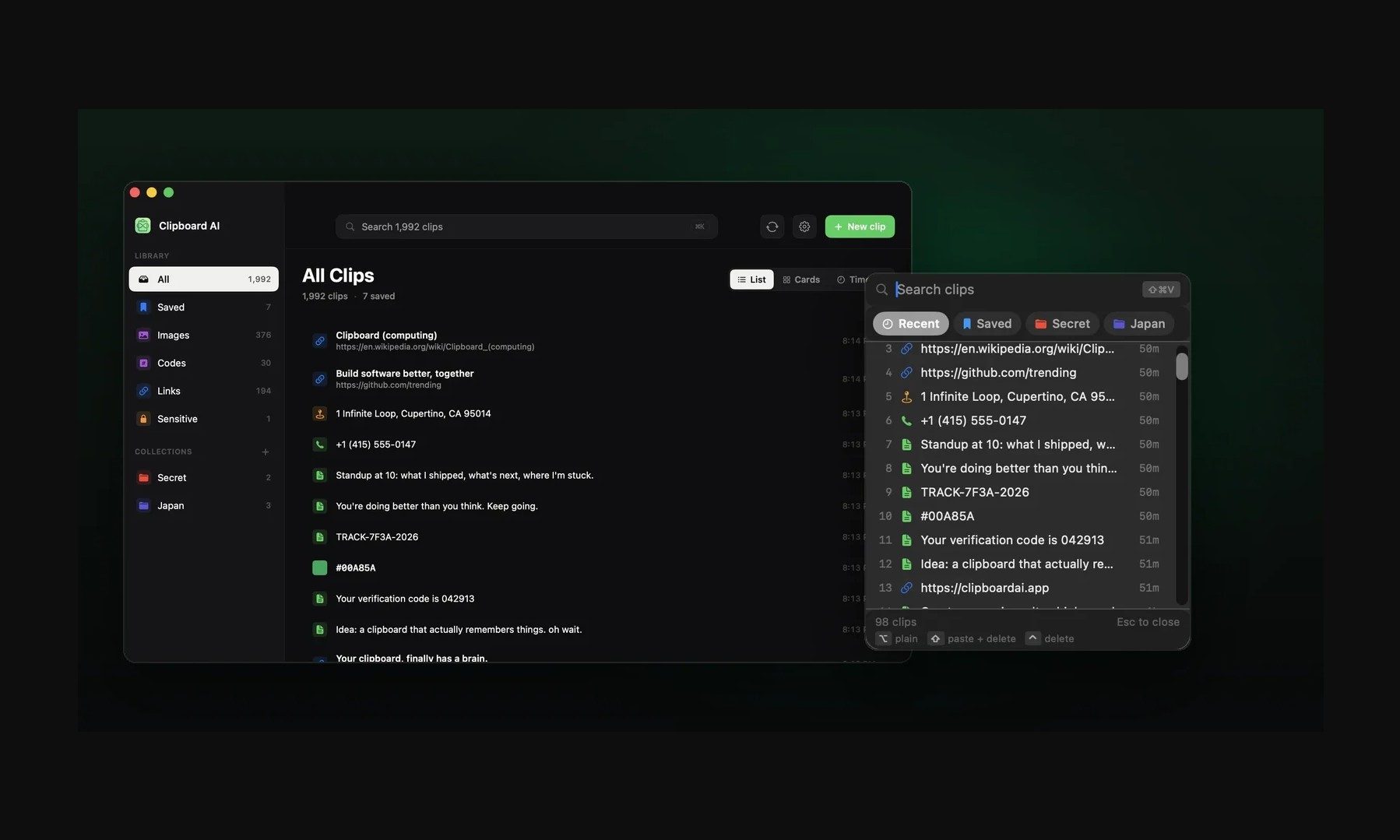
The app also treats sensitive clips differently from regular copied items. It can detect passwords, API tokens, credit card numbers, and SSNs, and then blur them by default. Passwords can disappear after 60 seconds, and sensitive clips stay out of the keyboard extension unless the user changes that setting.
Sync runs through the user’s own iCloud account and is optional. The free version includes automatic capture, categories, search, and up to 10 saved clips. Pro adds unlimited clips, iCloud sync, the keyboard extension, AI features, and collections, with a 7-day yearly trial and a $24.99 lifetime option.
Not everyone needs a clipboard manager. But if you lose copied links, codes, notes, or addresses several times a week, ClipboardAI could be a useful replacement for Apple’s built-in clipboard.

The US government has eased the restrictions it imposed on Anthropic’s most advanced AI model, Claude Mythos 5, allowing the company to grant access to more than 100 US organizations, including large corporations and government agencies.
In a letter sent to Anthropic’s cofounder and chief compute officer Tom Brown obtained by WIRED, US Commerce Secretary Howard Lutnick told the AI lab it would permit certain trusted partners to access Mythos because he had “determined that appropriate safeguards are in place.” Semafor first reported the existence of the letter.
“Anthropic has worked with the U.S. government to address risks associated with the Covered Models. These efforts have yielded significant progress,” Lutnick wrote.
However, the government stopped short of permitting a broader rollout of the model, and said nothing about the fate of Claude Fable 5, the consumer-facing version of Mythos that Anthropic released with significant additional safeguards. Lutnick noted in his letter that the other requirements outlined in the initial directive he sent on June 12 remain in effect.
“We received notice from the US government that Mythos 5, our strongest cybersecurity model, can be redeployed to a small group of cyber defenders and infrastructure providers,” Anthropic spokesperson Eduardo Maia Silva said in a statement to WIRED. “We are working to provision the approved set of providers and restore their access to Mythos 5 as quickly as possible. We are pleased to see this progress and continue to work with the government to expand access to Mythos 5 and make Fable 5 available for general use again.”
Anthropic is still in discussions with the White House about restoring access to Fable 5, and they are expected to continue over the weekend, according to a person familiar with the matter. Both parties are hopeful the resolution of this incident will help inform a lasting policy framework for future model releases, the person said.
The partial reinstatement comes roughly two weeks after the White House sent an export control directive to Anthropic that required the company to limit foreign nationals from accessing Mythos and Fable 5, including people working and living in the United States. In response, Anthropic disabled access to the models entirely. In his latest letter, Lutnick wrote that organizations approved to use Mythos may now allow their foreign national employees to access the model, and Anthropic may do the same for its own foreign national employees.
The Trump administration grew concerned about Anthropic’s rollout of Mythos after it learned the company granted access to a South Korean telecommunications firm it believed had ties to China, WIRED previously reported. Amazon and the National Security Agency also separately raised concerns to the White House that Fable 5 could be jailbroken, and the confluence of events convinced officials they needed to take action.
In recent weeks, Anthropic sent senior members from its cybersecurity and AI safety teams to Washington, DC to meet with Trump administration officials. Along with Brown, Anthropic’s public policy chief Sarah Heck have been leading the company’s discussions with the US Department of Commerce.
Getting Mythos 5 back online marks a promising step forward for Anthropic and the White House, but the saga has raised broader questions about the overall direction of US AI policy, particularly the extent to which the Trump administration will seek to control future model releases. On Friday, OpenAI announced it was delaying the release of its upcoming GPT 5.6 models in response to a request from the Trump administration.
Tech
After hiring AWS exec and raising $107M seed round, Virginia startup plants flag in Seattle area


Virginia-based AI startup Trase is expanding its presence in the Seattle region, with plans to grow from about 20 employees in the area today to as many as 100 in the coming months.
The 56-person company this week publicly launched and raised a $107 million seed round to focus on highly regulated industries like healthcare. Arch Venture Partners led the seed round.
GeekWire previously reported on the company’s hiring of Baskar Sridharan — a longtime Microsoft, Google Cloud and Amazon Web Services engineering leader — as president. It is now using the Seattle area as a key engineering hub, with plans to expand in the region with new offices to accommodate growth plans.
Sridharan, who is growing the Seattle-area team, said AI adoption is stalling where it’s needed most.
“AI adoption is faltering within sectors that need it most: complex, highly regulated enterprises overburdened with administrative tasks that are ripe for automation,” Sridharan wrote in a previous LinkedIn post. “The issue isn’t innovation, it’s implementation.”
He added: “The next era of technology will be increasingly defined by those willing to solve the messy, complex problems of real-world AI deployment at scale.”
Before joining Trase, Sridharan spent nearly 16 years at Microsoft, where he helped build Azure storage technologies. He later became vice president of engineering for Google Cloud before joining Amazon Web Services as vice president of AI, machine learning services, and infrastructure.
The company also recently hired Srirama Koneru, the former general manager of Bedrock Agentic AI Infrastructure and GenAI Services at Amazon Web Services and former senior director of engineering at Google and at Salesforce. The company’s CEO is Grant Verstandig, the founder and CEO of Red Cell.
Trase, incubated by the venture studio Red Cell Partners, is building an agentic platform that enables enterprises in healthcare, national security and energy to deploy autonomous AI agents within existing infrastructure while meeting security and compliance requirements.
Customers include Duke University Health System, which is using the specialized agents in its Division of Cardiology to automate the more than 5,000 faxes the clinic receives each month.
The expansion adds to Seattle’s growing reputation as a hub for enterprise AI talent, particularly among startups recruiting experienced cloud infrastructure leaders from Microsoft, Google and Amazon. GeekWire tracks a list of more than 100 engineering centers in the Seattle area.
We’ve reached out to the company and we’ll update this post as we learn more. The expansion in Seattle was first reported by The Puget Sound Business Journal.
Update: The company confirmed its expansion plans in the region and provided this statement: “Seattle is one of the nation’s leading technology hubs, making it a natural market for Trase as it continues to scale its operations.”


Porsche lifted the curtain this week, with a clear message for its customer racing community. The new 911 GT4 R replaces the long-running Cayman-based GT4 models and becomes the first car in this category to wear the iconic 911 shape. Built on the same foundation as the current 911 Cup, the car arrives in time for the 2027 season and carries a starting price of $375,500 in the United States, including delivery.
The shift away from the mid-engine Cayman chassis makes a lot of sense, considering that Porsche has discontinued producing gas-powered 718s and has already invested heavily in the 992.2-generation 911 Cup vehicle. Now, teams and drivers are looking at a single platform to climb the ranks, with the potential to move from the Porsche one-make series to the GT4 R and then to the GT3 R without having to relearn an entirely new car layout or support network, and let’s be honest, the rear-engine balance and wider track give the new car a much more stable feel on track than the old Cayman version.
Sale

LEGO Speed Champions Porsche 911 GT3 RS Super Car Toy – Model Kit & Pretend Play Toy for Boys & Girls…
- BUILD A RACING LEGEND – Boys and girls ages 9 years old and up can construct the LEGO Speed Champions Porsche 911 GT3 RS Super Car (77239) building…
- AUTHENTIC PORSCHE DETAILS – Young builders can recreate the real-life vehicle’s signature elements including the famous rear wing, air intake…
- 1 PORSCHE DRIVER MINIFIGURE – Kids can place the driver minifigure with helmet and red Porsche Track Day Experience outfit behind the wheel to stage…

The new car is powered by a 4.0-liter flat-six boxer engine, which is identical to the one used in the 911 GT3, but has been tuned during Cup development. In its unrestricted form, it produces a strong 520 PS (513 horsepower) at 8,400 rpm and 470 Nm of torque at 6,150 rpm, with a redline of 8,750 rpm. Of course, most race series now limit power to 430 PS thanks to factory-installed 53.7-millimeter air restrictors. The power is transmitted to the rear wheels via a six-speed sequential dog-ring gearbox with paddle shifters and a four-disc racing clutch, which is all linked together by a limited slip differential.

The chassis retains the 911 Cup’s steel structure and integrated roll cage while being modified to comply with GT4 regulations. They’ve also begun to use natural fiber-reinforced plastic on the doors, engine cover, aerodynamic components, and even some interior trim to decrease weight without losing strength. With an overall weight of roughly 1,515 kg (3,340 pounds), ballast plates can be used to achieve specified series minimums if necessary. The front and rear track widths are slightly larger than the original Cayman GT4, and the car comes with 18-inch forged wheels with a five-bolt layout, rather than center-lock hubs.

The suspension setup remains highly flexible, with dual-adjustable dampers paired with three different spring rates, allowing you to tune the car to the circuit and the driver’s preferences. The brakes have huge two-piece steel rotors (380mm in diameter), six-piston front calipers, and four-piston rear units. What about aerodynamics? They’ve simply built straight on the Cup package, with a manually adjustable rear wing with eleven settings on swan-neck mounts, additional cooling apertures on the nose, functional vents on the fenders, and side skirts with splitters to help manage airflow underneath the car. Finally, a small ducktail feature provides some rear treatment.
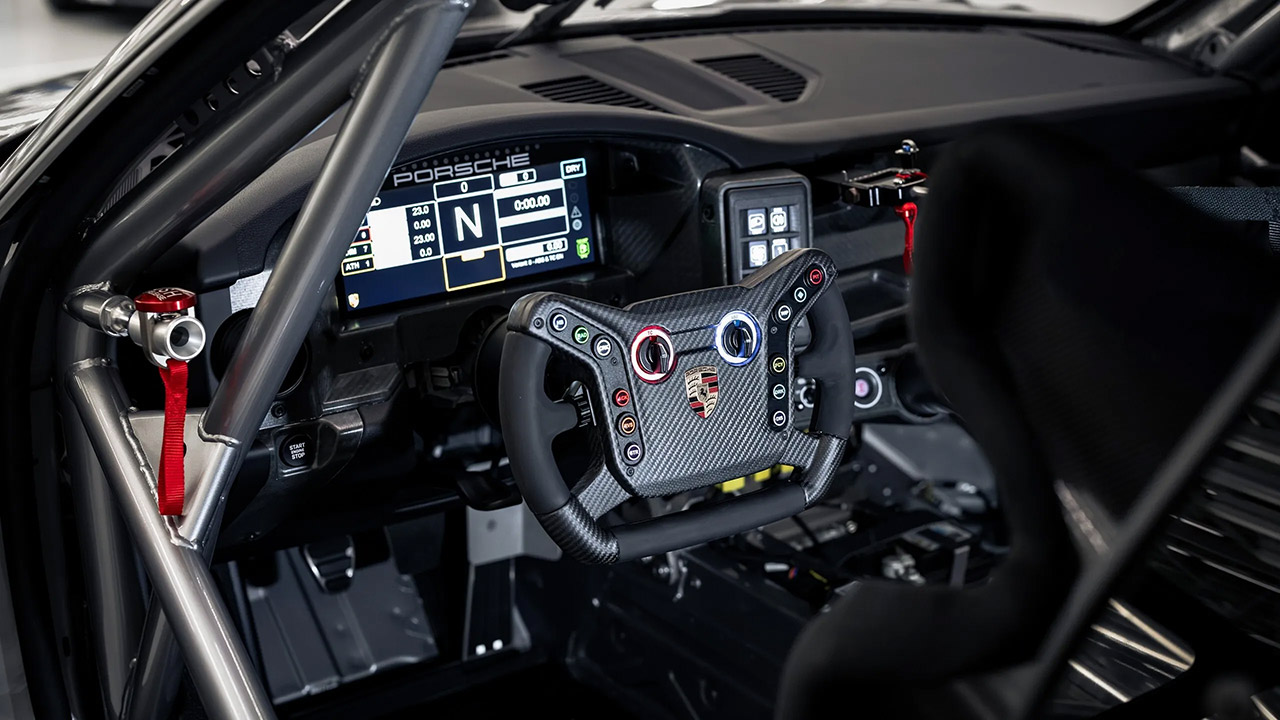
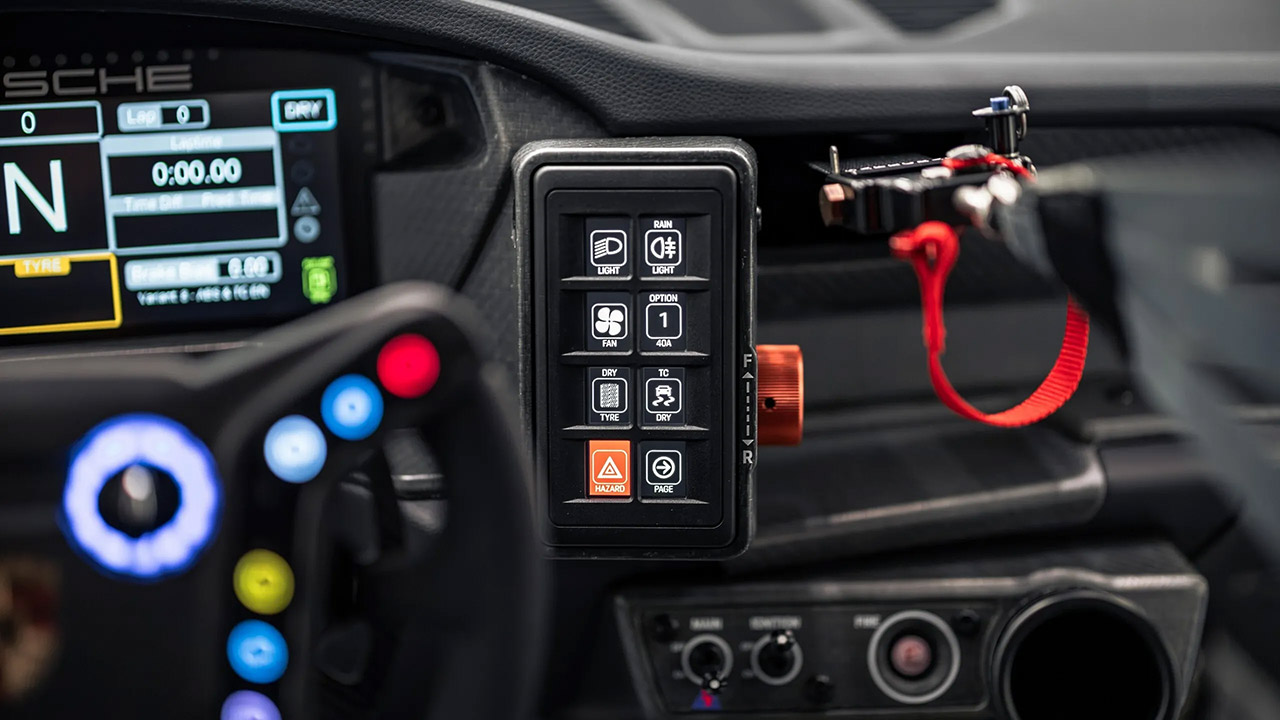
Inside the cockpit, you are kept focused on the road because the entire setup is designed to put you in the zone. A big 10.3-inch color display in front of you, accompanied by a built-in data logger and a very precise GPS system, allows you to examine your performance after each session. Everything is wrapped in natural fiber inside panels, which adds a nice touch. You also have air jacks and ventilation ready in case you need to shift your vehicle into the fast lane.
Porsche intended the 911 to compete in GT4 America, the IMSA Michelin Pilot Challenge Grand Sport class, and their own one-make series, such as the Porsche Carrera Cup North America and the Sprint Challenge. Since 2016, more than 1,500 Cayman-based GT4s have raced, earning Porsche numerous factory titles and driver victories. The new 911 aims to build on that success while also giving drivers a clearer path up Porsche’s customer motorsport ladder. Deliveries are slated to begin in late 2026, as teams currently running 911 Cup cars will notice a plethora of shared parts and setup expertise that has already been dialed in from their current cars, resulting in lower running costs and a speedier development period upfront.
[Source]

Apple has sharply raised prices across its Mac, iPad, HomePod, and Apple TV lineups as surging AI-driven demand creates a global memory and storage shortage. Increases range from $30 for the HomePod mini to $1,300 for the M3 Ultra Mac Studio, with Apple CEO Tim Cook saying efforts to shield customers from higher costs had become “unsustainable.” The Verge reports: On Thursday, the company adjusted the price of its new MacBook Neo, which will now start at $699 instead of $599, while the base MacBook Air will jump to $1,299 from $1,099, as reported earlier by Bloomberg. The 14-inch MacBook Pro is getting an increase as well, going from $1,699 to $1,999. Meanwhile, the iPad Air will now start at $749 instead of $599, while the iPad Pro is increasing to $1,199 from $999.
As spotted by MacRumors, the M4 Max Mac Studio will now cost $2,499, a big jump from $1,999. The M3 Ultra Mac Studio is now priced at $5,299, up from $3,999. Apple is even raising the prices of its HomePod, which now costs $349 instead of $299, as well as bumping the price of the HomePod mini to $129 instead of $99. The Apple TV also now costs $199 instead of $129.

SELLAS Life Sciences: The AML Platform Is More Interesting Than Binary Event (NASDAQ:SLS)

EU Lawmakers Call for Clear DeFi, Staking, NFT Rules Under MiCA

Home Winning % in Last 5 Years for CFB Programs in West


-

 Entertainment6 days ago
Renter of Home in Anne Heche Crash Denies Settlement With Son
-
 Sports4 days ago
Two goals and an assist by sheer aura: Cristiano Ronaldo just entered the World Cup chat
-

 Tech5 days ago
Microsoft accidentally kills epic Outlook email threads
-

 Fashion16 hours ago
Weekend Open Thread: Staud – Corporette.com
-

 Business6 days ago
Soccer-U.S. defends Iran World Cup travel restrictions, says discussions ongoing
-

 Politics1 day ago
The House | Manchesterism won’t survive the painful trade-offs unless it gets citizens on board
-

 Politics1 day ago
Potential 2028er World Cup attendee leaderboard
-

 Business1 day ago
Asia stock markets slide as tech shares slump
-
 Tech2 days ago
A Look At A Gaggle Of Transputer Boards
-
Crypto World3 days ago
Bitcoin (BTC) Dips Below $62K, Ethereum (ETH) Plunges 6% Daily: Market Watch
-

 Crypto World3 days ago
Securitize Wraps Roubini's SEC-Registered ETF as Dubai VARA Digital Security
-
 Crypto World2 days ago
Dell (DELL) Shares Tumble Over 5% Following Analyst Downgrade to Hold
-
Business3 days ago
Entergy settles forward sale agreements, raises $672 million in cash proceeds
-
 Crypto World7 days ago
Can Charles Hoskinson Really Rescue Cardano?
-

 Sports13 hours ago
FIH Pro League: India defeat Pakistan 7-1, register biggest win of campaign | Other Sports News
-

 Crypto World4 hours ago
Kraken's xStocks Opens Bending Spoons IPO Registration to EEA Retail
-

 Crypto World16 hours ago
RTX holders must register wallets before token distribution begins
-
 Crypto World19 hours ago
Hyperliquid Named on Singapore MAS Investor Alert Register
-

 Crypto World7 days ago
Jake Chervinsky accuses CME of protecting derivatives monopoly
-

 Sports2 days ago
India vs Bangladesh LIVE Score, Women’s T20 World Cup: Bangladesh Opt To Bat; India Enter ‘Do-Or-Die’ Stage As Semi-Final Race Heats Up
You must be logged in to post a comment Login