
Security teams log 54% of successful attacks and alert on just 14%. The rest move through your environment unseen.
The Picus whitepaper shows how breach and attack simulation tests your SIEM and EDR rules so threats stop slipping by detection.



Ford on Thursday unveiled both the name and starting price of its upcoming electric truck. The Ford Fathom will start at just under $30,000, making it one of the most affordable electric pickup trucks coming to the US market.
While the automaker didn’t show off what it will look like, the Fathom will have a standard-range battery, five seats and Ford’s BlueCruise driver assistance, as well as Apple Maps integration. BlueCruise is Ford’s version of AutoPilot, providing a hands-free driving experience in designated areas called “Blue Zones” on certain highways.
The Fathom’s announcement follows Ford’s $5 billion investment last summer in EV production and the development of Ford’s Universal Electric Vehicle platform. The Ford Fathom is the first electric vehicle built on UEV.
According to Ford, the name Fathom and the truck’s design come from “a deep understanding of the person who would drive it. Their day. Their challenges. Their goals. Even their wallet.”
Although EV sales have continued to increase worldwide, that growth has begun to slow in recent years, especially in the US. According to the International Energy Agency, electric car sales in the US increased by 40% in 2023, but slowed to 10% growth in 2024. Worldwide, EV sales increased by 35% in 2023 before slowing to 24% in 2024, followed by 20% growth in 2025.
As electric vehicle growth slows, affordability may be the strongest component for attracting new buyers. When announcing Ford’s 2025 investment in EV production, Ford CEO Jim Farley acknowledged there’s risk, but said the company planned to create a “vehicle that can sustain itself” and still make strong profits, CNET previously reported.
“The team were just ultra focused on providing customers value in terms of what they are looking for and content that they want rather than stripping out stuff that they don’t,” Ford Model e General Manager Kay Hart told CNET. “Blue Cruise-capable vehicles with hands-free driving, digital car key, large touchscreen … the versatility of an open bed, the true adaptability, the value of this vehicle is what I think is the core message.”
The Ford Fathom will be available for preorder in early 2027 with a starting MSRP of $28,350. That price is just above the upcoming Slate pickup truck, which starts at $24,950 and is currently the most affordable electric pickup available for preorder.


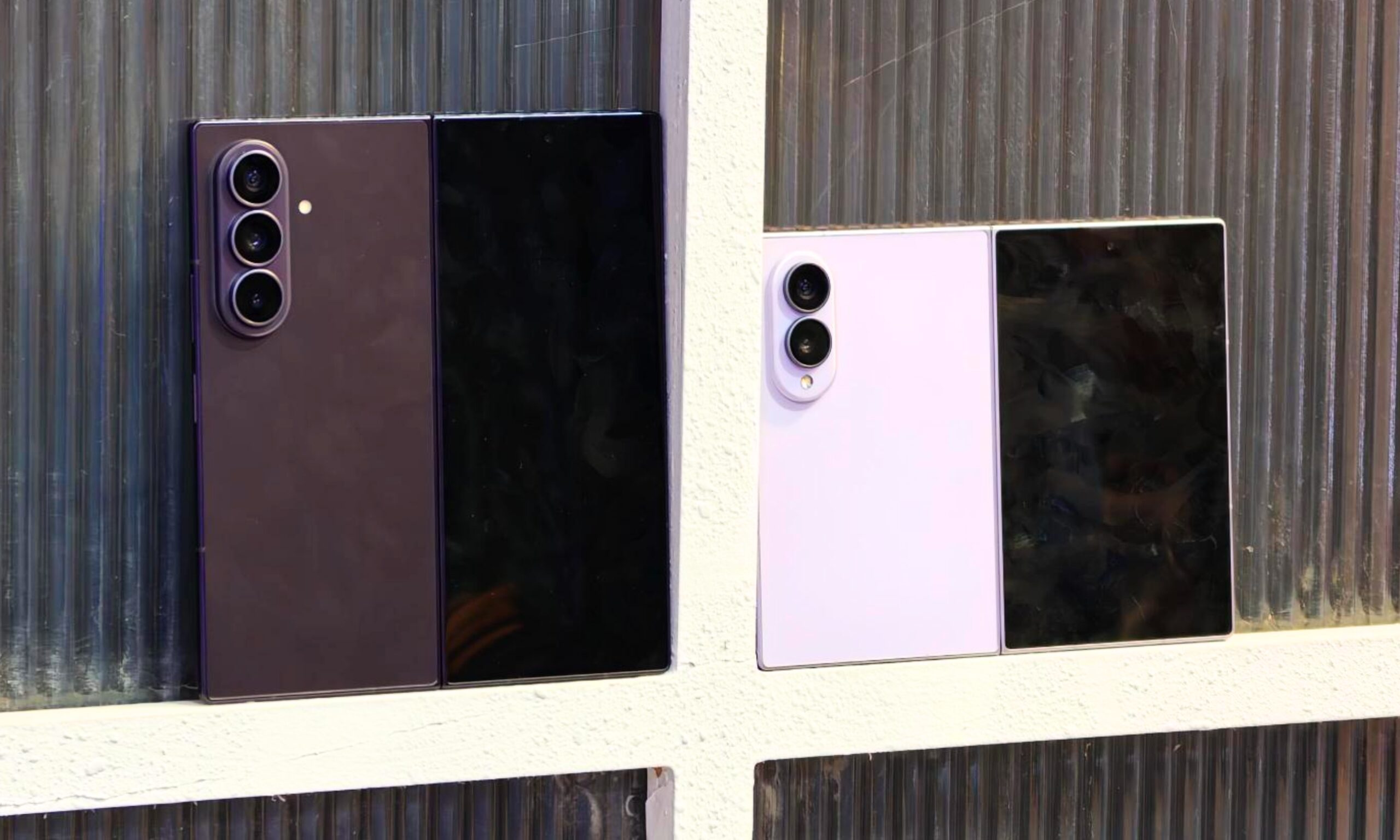
Samsung did something genuinely interesting at Galaxy Unpacked 2026. For the first time in the history of its Galaxy Z foldable lineup, it split the book-style foldable line into two entirely different devices. Whether it had something to do with Apple’s purported iPhone Ultra is a conversation for another time, but for now, anyone visiting a Samsung experience center has two Fold phones to choose from: the new Galaxy Z Fold 8 and the Galaxy Z Fold 8 Ultra.
The Fold 8 is wider, lighter in hand, and built specifically for one-hand use on the cover screen and content consumption on the inner screen. The Fold 8 Ultra, on the other hand, carries forward the tall and thin design. After spending some hands-on time with both devices, I’ve come to a conclusion.

While I genuinely appreciate what the Fold 8 is trying to do, I won’t buy it with my own money. I’ll spend the extra $200 on the Ultra, and I wouldn’t think twice about it. Here’s why.
As I was reading the embargoed spec sheets of both phones, one thing caught me off guard. Even though the Fold 8 weighs 201 grams, which basically makes it the lightest Samsung Fold ever, it’s not the thinnest foldable. That honor belongs to the Ultra.
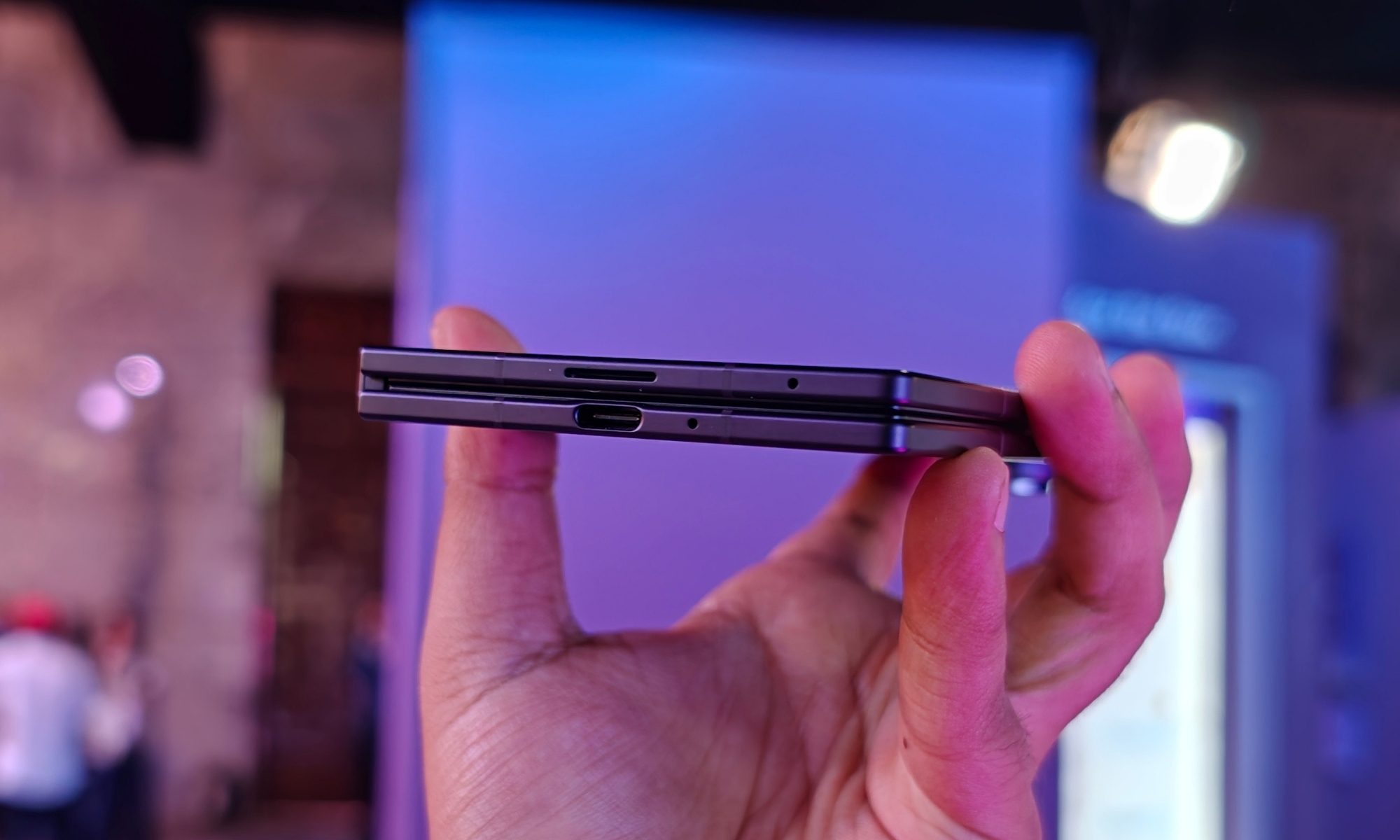
The Fold 8 sits at 4.5mm when unfolded, while the Fold 8 Ultra measures 4.1mm. Folded, the Ultra is 8.9mm against the Fold 8’s 9.7mm. You might think that I’m making a fuss over a laughably small difference, but the moment you hold both devices in hand, you’ll understand what I’m saying.
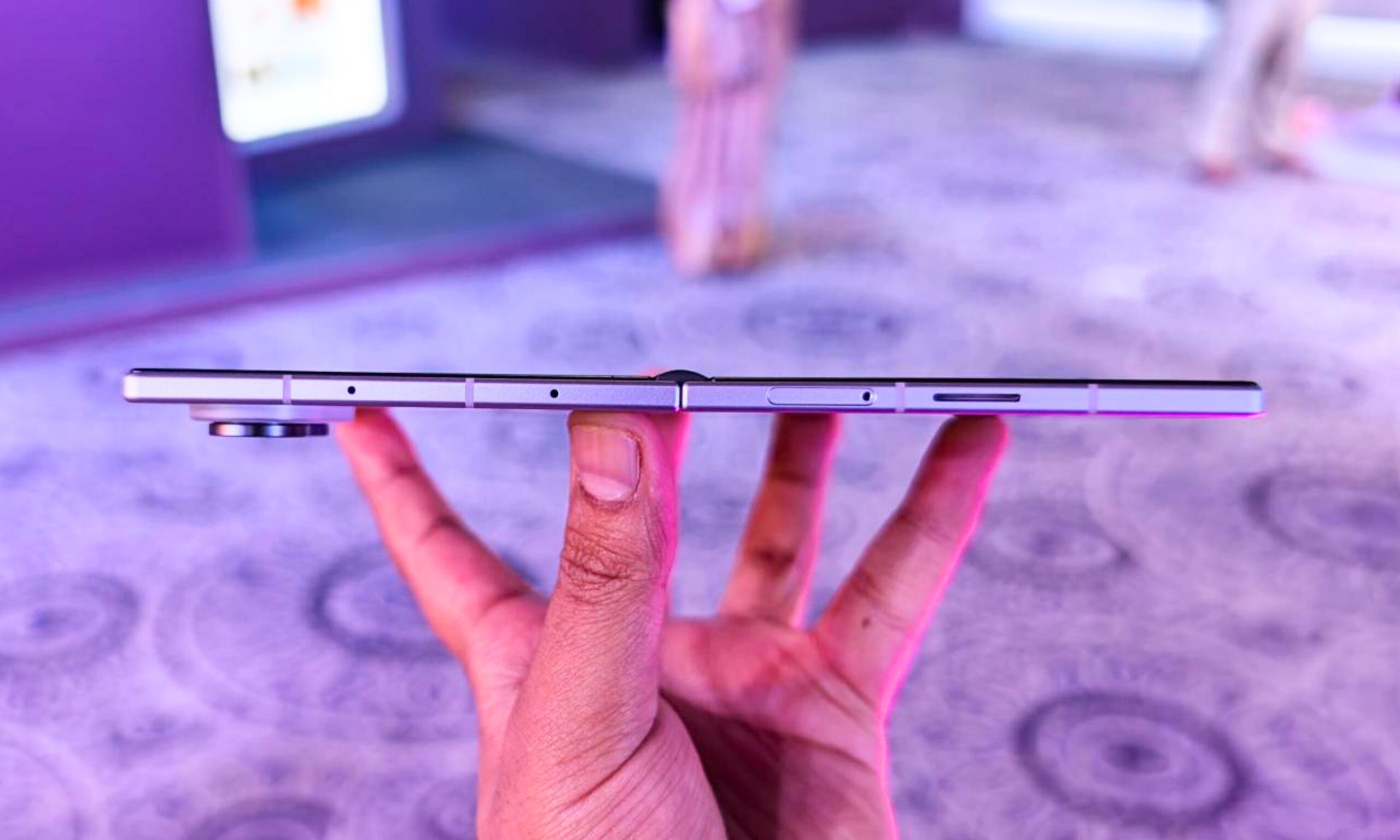
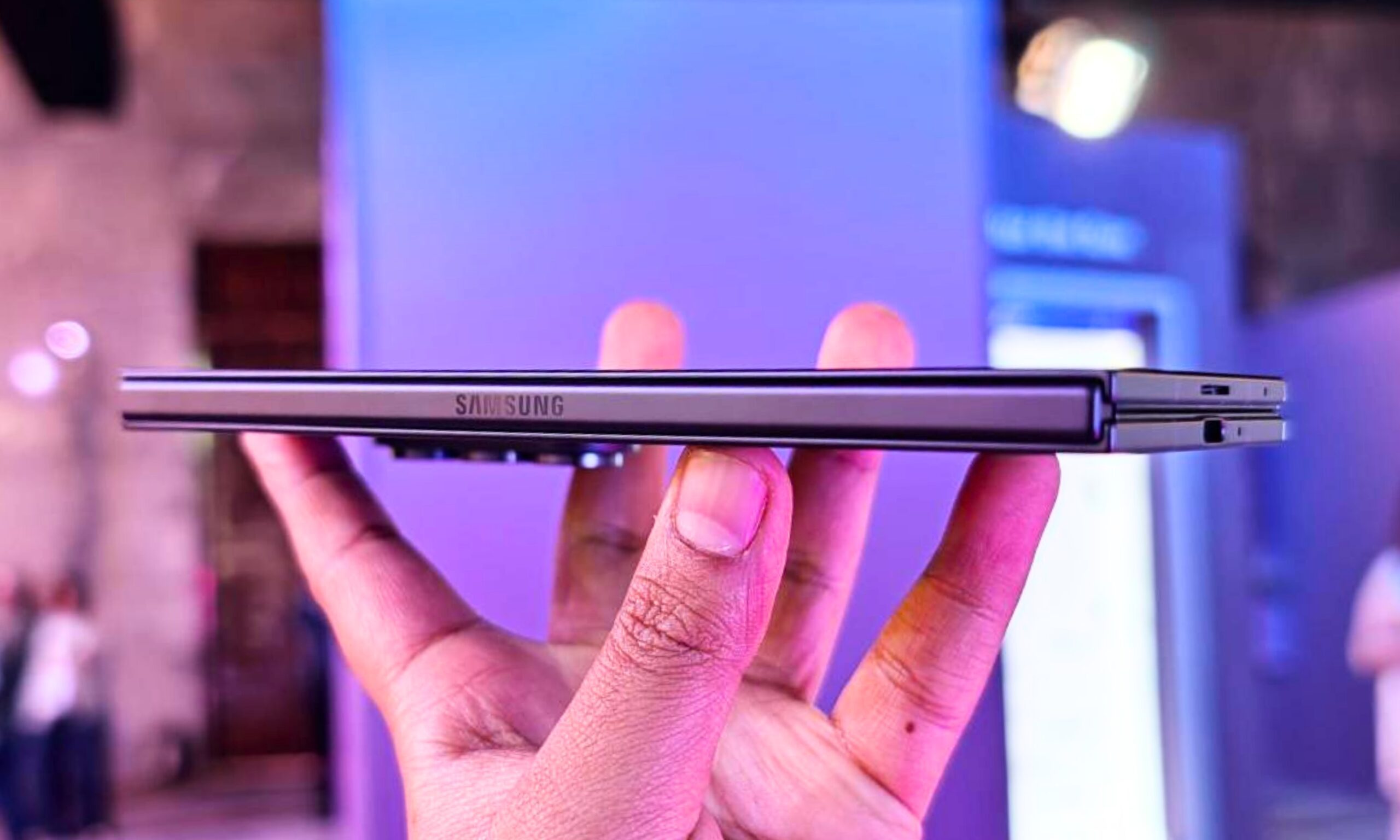
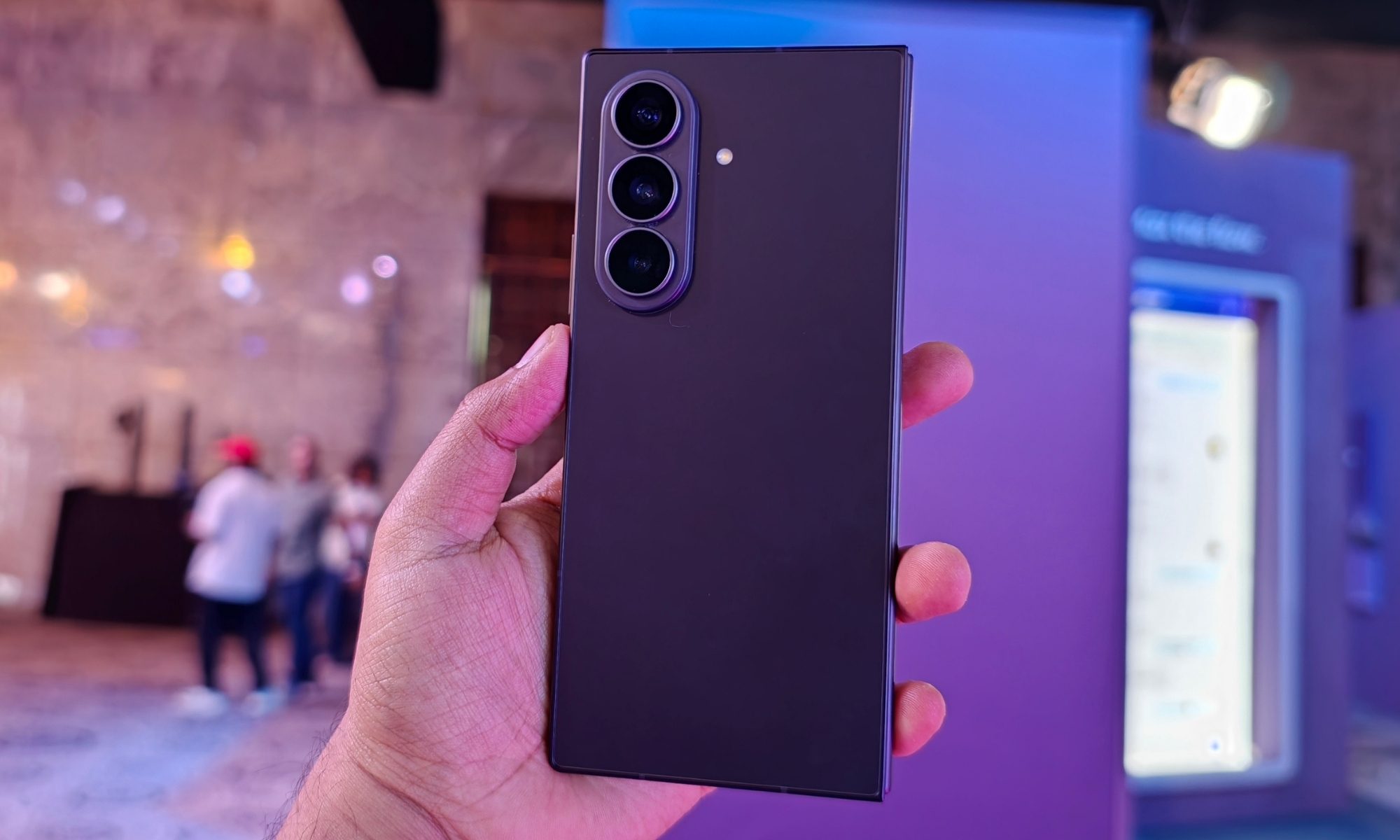
To me, the Ultra feels flatter, sleeker, and more refined. I strongly believe that Samsung has managed to shave off the bulk that usually comes with a book-style foldable. At 8.9mm, the phone sits more naturally in the palm, feels less chunky, and far less brick-like.
I know we already have conventional flagships breaching the 8mm mark. The S26 Ultra is only 7.9mm thick, which already gives it a remarkably slim yet balanced in-hand feel, but the fact that the Fold 8 Ultra is almost as thick as the iPhone 17 Pro or a mere 0.4mm thicker than the Pixel 10 Pro XL says that it’s already operating in the same physical territory as regular flagship phones.
I’m perfectly aware that some Chinese foldables are thinner, but you can’t buy them in the US, at least not through official channels. They simply aren’t an option for the average American consumer, so I’m putting them out of the question.
I’ve run One UI 9’s split-screen setup on both phones, and I have some very strong thoughts about it. Yes, the Fold 8’s 4:3 inner display is a great screen for watching content. But as a tool for getting some serious work done, it comes up short.
To me, the landscape split-screen option on the 7.6-inch Fold 8 feels slightly cramped vertically. It looks like two browser windows fighting for elbow room on a small desk. The Ultra’s 8-inch display, with its near-1:1 aspect ratio, provides a meaningfully larger vertical canvas to work with.
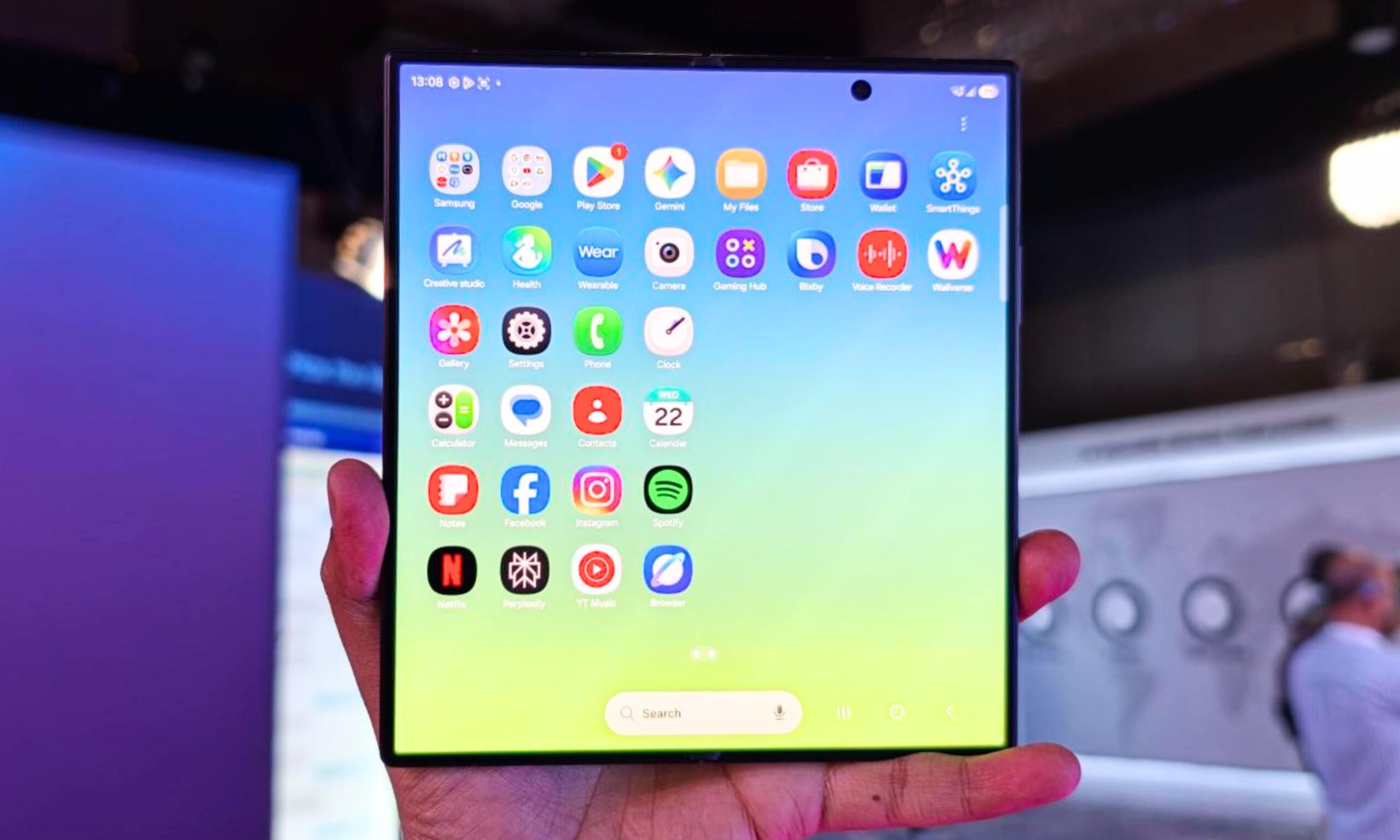
As someone who has to go through a couple dozen emails every single day, read as many words as fast as possible in news articles on Chrome, and generally squeeze as much information onto the screen as possible, that’s the difference between an annoyingly short and a genuinely usable split-screen setup.
Every additional line of text directly means less scrolling, fewer page turns, and less time spent moving things around.
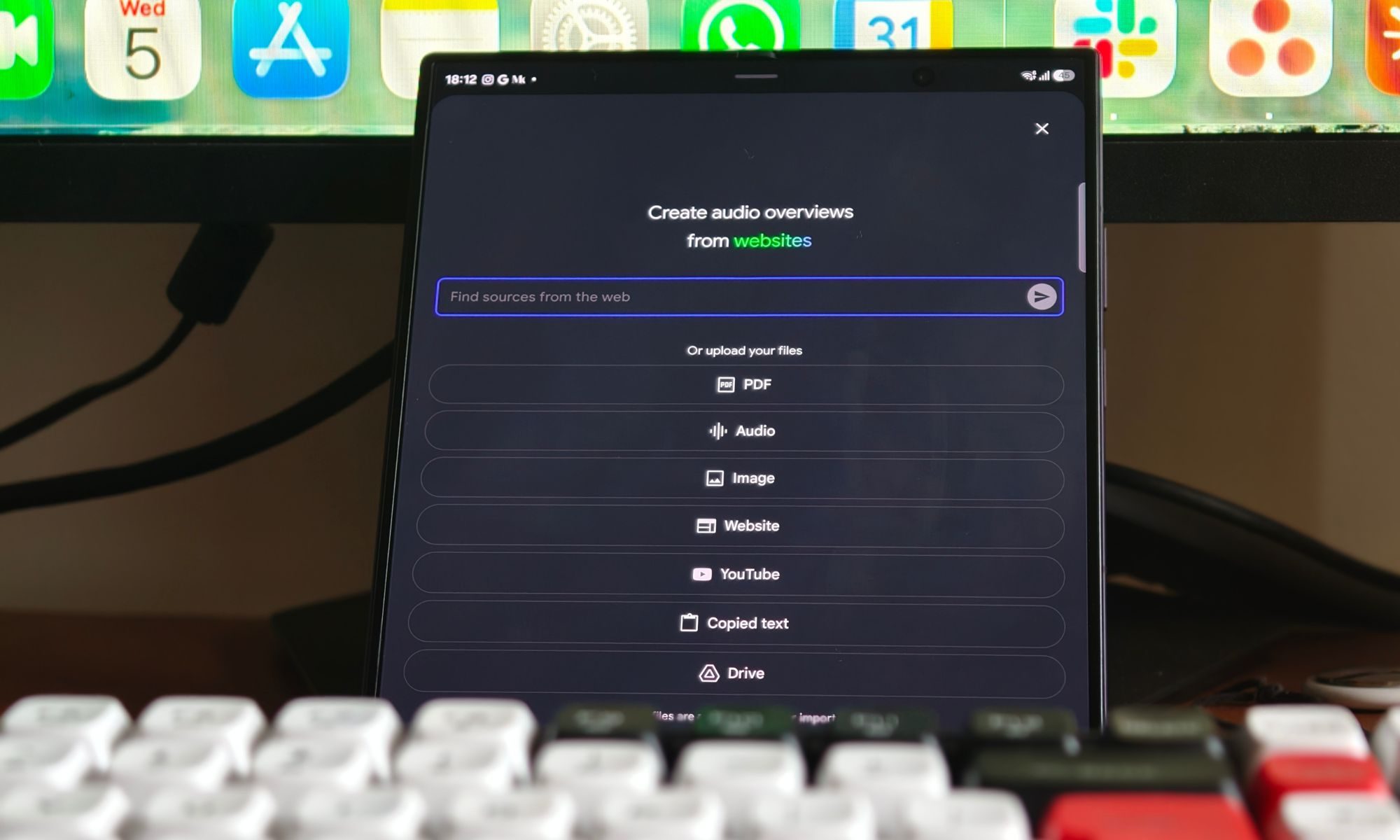
Fun fact: the regular Fold 8 lets you use three apps in a vertical split-screen setup side by side, but the individual app windows get way too tight in my opinion. The standard one-plus-two layout works the best for me, and the Fold 8 Ultra’s display plays perfectly into that setup.
If I’m buying a foldable, I’m going to use the additional screen estate to its best, and for that, the Ultra remains the better one. What’s the point of carrying around a tablet-sized inner display if I’m constantly fighting for space on it anyway?
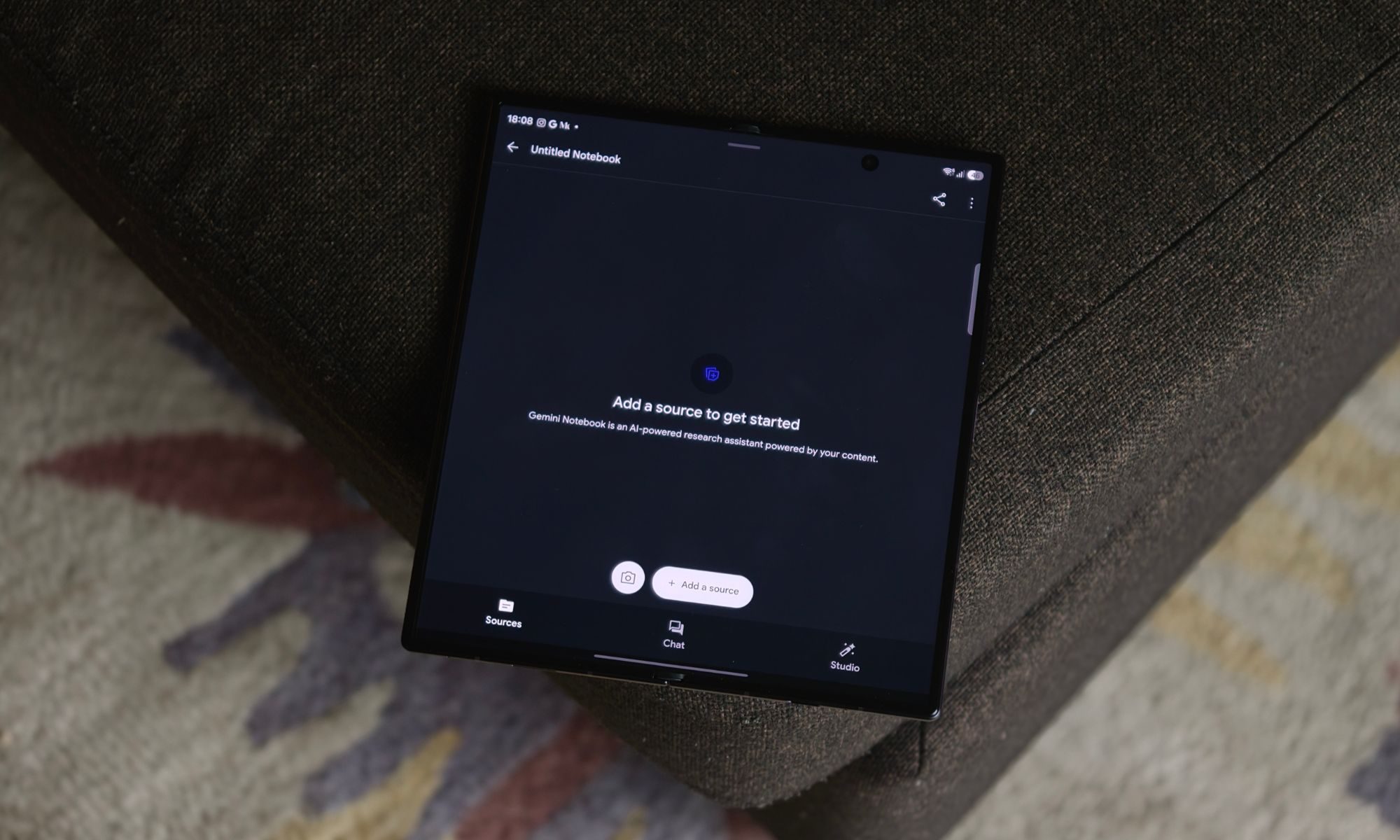
I’m not sure about everyone, but I love to capture portraits on a smartphone. And I can’t stress this enough, but the kind of subject magnification a dedicated telephoto camera adds is simply unmatched. No in-sensor 2x crop can match that, not the one on my iPhone 17, and neither the one on the Fold 8.
To be completely honest with you, I’m not as drawn to the 200MP (f/1.7) camera on the Fold 8 Ultra as I am to the presence of a 10MP (f/2.4) 3x telephoto lens. It’s not the best one out there: the 1/3.94-inch sensor doesn’t do well in poorly lit scenarios, and the night mode just makes handheld photography more tedious.
However, in broad daylight, or even with some artificial light, the results are much better than anything you can achieve with a digital crop on a 50MP or 200MP primary camera. Concerts and sports events aside, the 3x telephoto, combined with the portrait mode, gives genuinely great results.
Eventually, I’d want Samsung to improve the 10MP sensor camera with a slightly larger sensor. But for now, spending $1,899 on a 2026 flagship foldable with no zoom camera is a compromise I’m not willing to make.
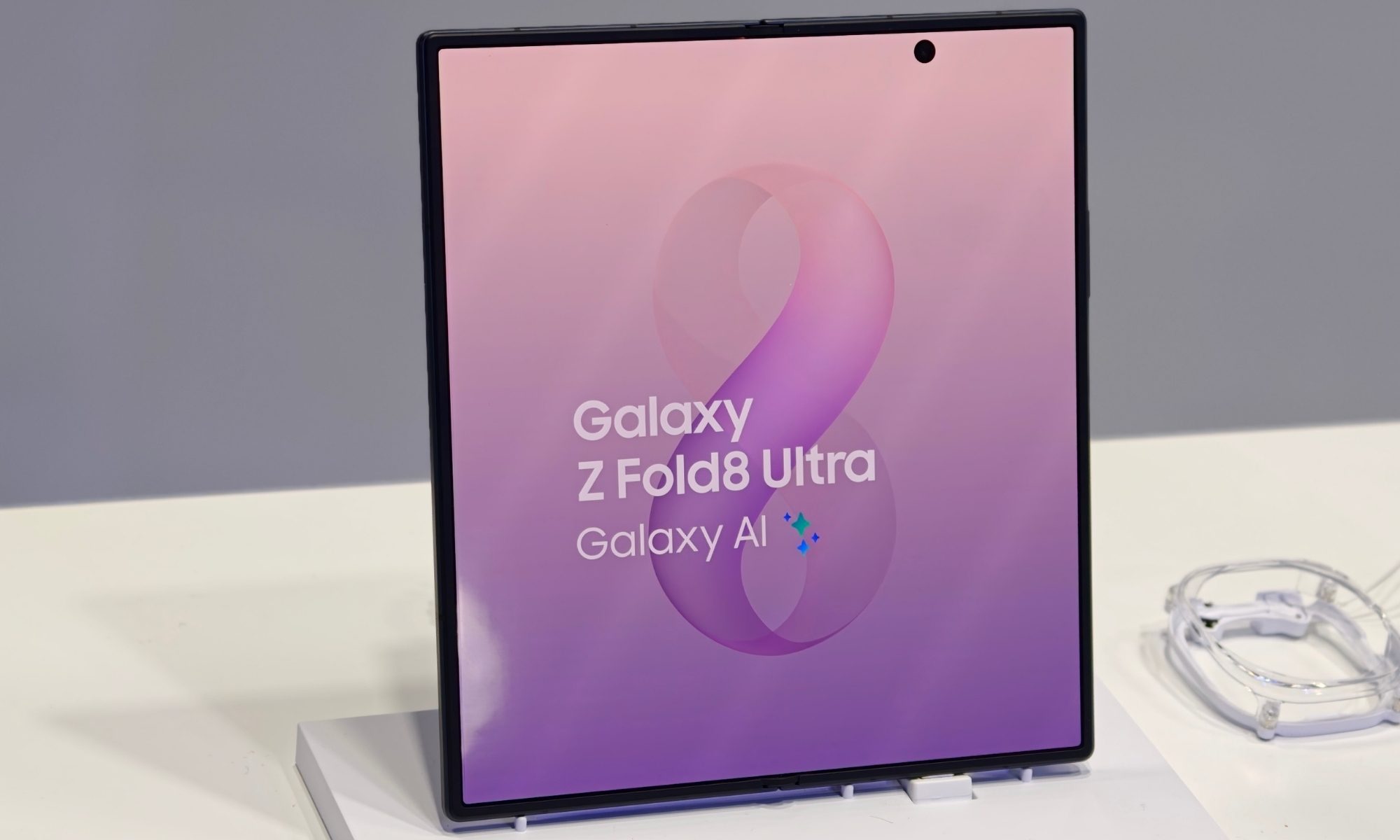
Ultimately, that’s what it comes down to for me. The Fold 8 isn’t a bad phone by any measure. Samsung has made the right changes for the right audience: the ones who value content consumption and one-handed usage over everything else. However, if I’m spending nearly $2,000 on a foldable, I want the one that makes the fewest compromises.
I want the thinner, more premium design, the larger inner screen for productivity-based workflows, and a dedicated telephoto camera. At $200 cheaper, the Fold 8 might be the smarter and more accessible one for some people, but I’d rather spend the difference and get the Ultra for me.
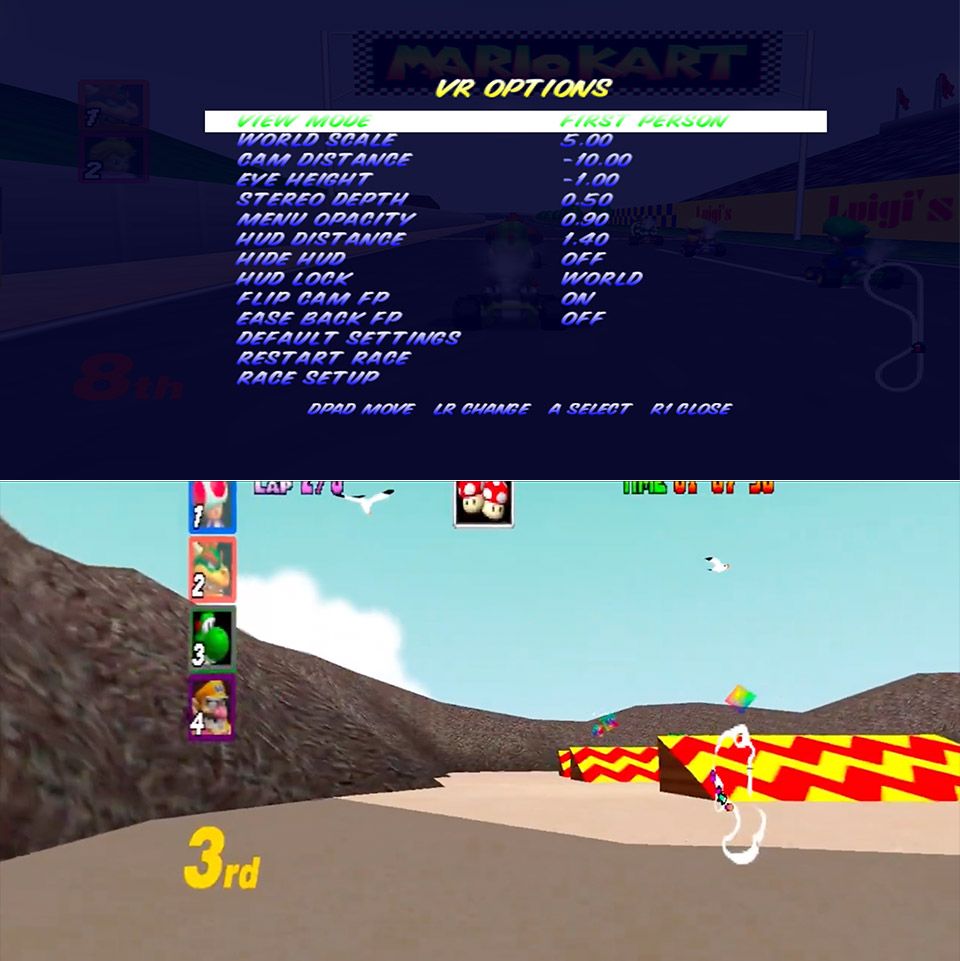
RayRod TV has released a free VR mod that drops Mario Kart 64 into modern headsets with full head tracking and stereo 3-D. Built on HarbourMasters’ SpaghettiKart PC port, the project runs the original 1997 racing game natively on Windows while adding an OpenXR layer so any compatible headset can take over the view. You supply your own US .z64 ROM, point the executable at it once, and the rest is ready to go.
I can now hit my favourite shortcut in Mario Kart 64 in glorious first person VR 😂
What the hell is happening with VR modding this year 🔥 pic.twitter.com/onx6DzJlg6
— Beardo Benjo (@BeardoBenjoYT) August 5, 2026
Head tracking is at the center of this experience. In first-person mode, you’re essentially right in the driver’s seat, with the camera focusing on every movement of your head. Lean in on a curve on Rainbow Road, give the left side a quick glimpse for an upcoming item box, or look up and forward to see the track fly into the distance, since it’s all in your head. The developer took pity on us and provided some ease-back and flip options to prevent the camera from going too far in on drifts. Otherwise, you’d be feeling quite green around the gills after only one lap. Even with those softening settings in place, the impression of speed remains extremely acute. Take a traditional shortcut, such as the tunnel on Koopa Troopa Beach, where the rock ceiling is right on top of your helmet, making it feel like a real life close call.
No products found.
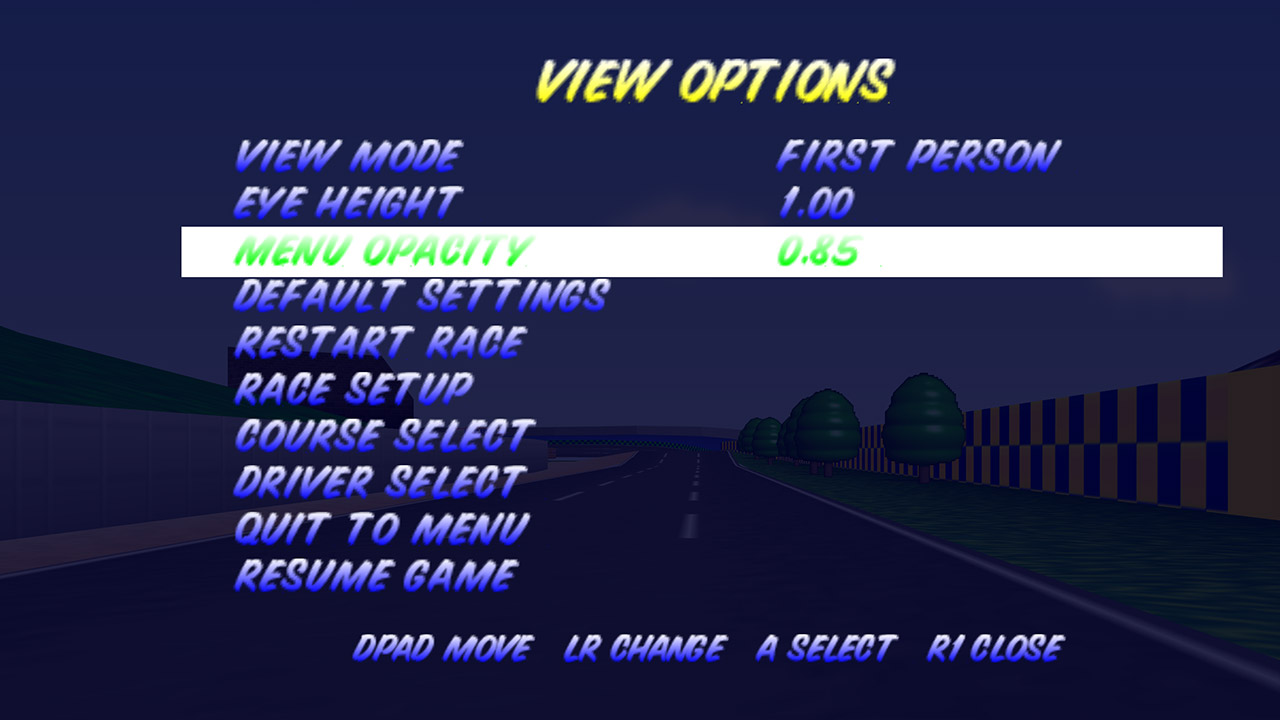
If you need some extra options to get settled in, there are four camera modes to pick from. You’re literally in the kart, so first-person is straight in your face. Third-person mode returns to the usual chase camera, although you can still lean about to see your surroundings. Then there’s Theater mode, which just displays the original flat game on a large virtual screen floating in the empty area. If you want to go all out, Diorama mode reduces the entire course to a little tabletop model, so Rainbow Road simply hangs in the air like a kid’s toy set that you can walk around. Each mode is readily switchable; simply pull out the floating menu when paused and push the appropriate trigger.
That same option allows you a lot of fine control over how the entire experience feels to you. There are separate sliders for world scale and stereo depth, allowing you to adjust the track size and 3-D effect separately if desired. You may change the eye height, camera distance, HUD opacity, and whether the HUD is locked to the world or fixed to your head. If you want to go fully minimalist, you can disable the interface and only see the road before of you. Motion controllers receive all of the rumbling feel on hits, but regular gamepads are also supported, so if you’re a purist, stick with what you know.
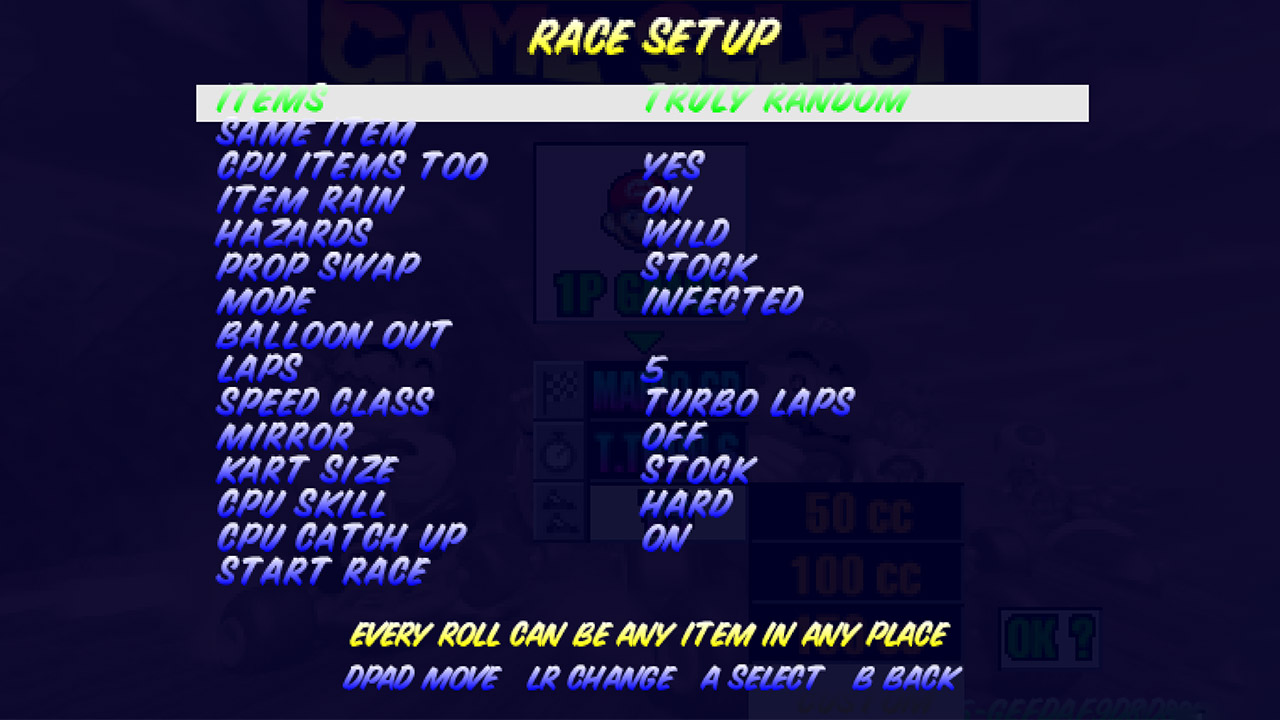
Aside from the VR excitement, the update also allows you to customize the racing choices. You have a custom menu where you can stack new rules on top of existing classes. Item behavior can be completely random, or frantic and inverted if you wish. There are also optional high-resolution texture packs that can be dropped in, such as the MK64 Reloaded pack, which sharpens up existing objects without affecting the overall appearance and feel. Everything runs on Windows, but internet multiplayer has yet to be resolved, thus local multiplayer is still the only option for the time being.
Researchers found a way to bypass recent mitigations for Spectre v2 speculative execution side-channel attacks and developed an exploit to leak secrets from Linux machines.
The method works against Spectre v2 defenses on AMD and Intel processors that rely on sanitizing or isolating branch predictors, which researchers generically refer to as neutralization-based mitigations.
Spectre v2 is also known as Branch Target Injection (BTI) and is a variant of the Spectre class of vulnerabilities.

It exploits a processor’s indirect branch predictor and causes it to mispredict the target of an indirect branch, leading to speculative execution along an attacker-influenced code path.
Modern processors use branch prediction to guess the most likely execution path and speculative execution to run instructions along that predicted path before the branch outcome is known.
Spectre v2 allows an attacker to manipulate the CPU’s indirect branch predictor so that the processor speculatively executes instructions at an attacker-chosen location, which could expose sensitive data.
With neutralization-based mitigations (eIBRS on Intel and Safe RET on AMD), there is a gap between the time the branch predictor is isolated and when it is used by the victim branch.
Active Spectre v2 mitigations assume that an attacker cannot use to their advantage the time between cleaning the branch predictor state and using it.
However, the researchers introduced a primitive that enables re-poisoning the CPU’s state after the cleaning but before it is used.
Daniël Trujillo, a PhD student, and associate professor Mengjia Yan of the MIT Computer Science and Artificial Intelligence Laboratory (CSAIL) discovered a technique for exploiting this Time-of-Neutralization to Time-of-Use (TONTOU) window to extract sensitive data.
“An attacker without any special access to read arbitrary memory from the system, including sensitive data such as hashed passwords,” Trujillo told BleepingComputer.
The researchers developed an Interrupt Injection attack, where “unprivileged user programs can schedule timer interrupts to occur during kernel execution.”
“Therefore, we can force the kernel to be redirected to the interrupt handler and use this handler to poison microarchitectural states within the post-neutralization window,” the researchers explain.
The researchers found that interrupts occurring during the post-neutralization window can be used to poison the processor’s indirect branch predictor, enabling attacks against all types of indirect branches.
Mengjia and Trujillo tested the attack starting from the assumption that an attacker can run arbitrary, unprivileged code on a Linux target machine to leak data from the kernel.
On an AMD Zen 2 host with the latest Spectre v2 mitigations, the two researchers successfully ran through all the stages of a TONTOU attack: neutralization, redirection, poisoning, and the use of the poisoned branch predictors.
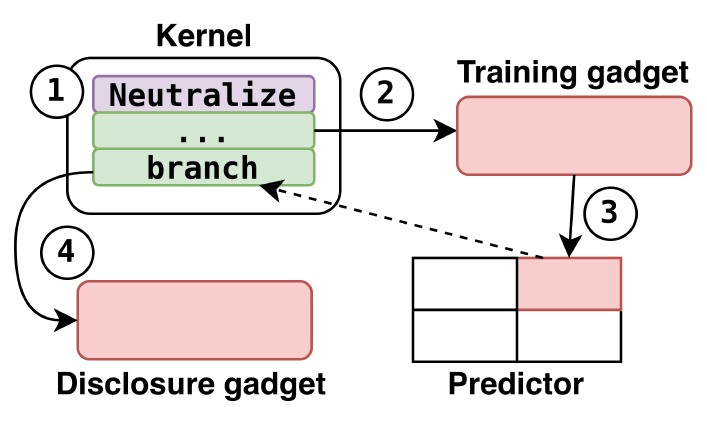
Successfully exploiting the issue requires overcoming several obstacles, including redirecting kernel control flow, precisely aligning interrupts with the post-neutralization window, and using the interrupt handler to poison the branch predictor entry associated with the target indirect branch.
The researchers address these challenges through installing ‘timers’ to trigger hardware interrupts, frequent injection of interrupts, and via active and passive poisoning methods.
The attack was tested on both Intel and AMD processors. On an AMD Zen 2 system running Linux version 6.14.0-37-generic with 16GB of RAM, the researchers showed it could leak arbitrary kernel memory at a rate of 5.47 bytes/s and 91.97% accuracy, including the contents of /etc/shadow, which stores password hashes.
Across 10 test runs, the attack successfully located and extracted the file in five cases, with each attempt taking an average of 18 minutes.
While the attack is also possible on Intel machines, they noted that additional software requirements make the task more complex.
The researchers note that interrupt injection enables attacker-controlled poisoning of the Return Stack Buffer (RSB), causing speculative mispredictions of return targets.
Because passive RSB pollution is less reliable, they combined interrupt injection with Inception, a previously disclosed attack that Daniël Trujillo helped develop.
AMD has published an advisory today noting that the interrupt inject issue “appears to be associated” with how implementation on Linux of the Safe RET mitigation against potential information disclosure attacks.
Daniël Trujillo and Mengjia Yan presented their findings today at the Black Hat USA security conference. They will also share the details at the USENIX Security 2026 between October 27 and 29.

Security teams log 54% of successful attacks and alert on just 14%. The rest move through your environment unseen.
The Picus whitepaper shows how breach and attack simulation tests your SIEM and EDR rules so threats stop slipping by detection.

Your ChatGPT usage limits are about to get loosened if you’re a free user. OpenAI said on Thursday that it is giving free users unlimited text chats, and the default model for paying users is getting upgraded.
Usage limits are one of the biggest annoyances of using AI chatbots and other products. If you don’t pony up for the $20 paid subscription — or if your workplace doesn’t pay for an enterprise plan — you probably run into messages on ChatGPT telling you that you’ve reached your limit for the day. Now, these limits for text-only chats will be removed for free users. Limits on image generation, file uploads and voice tools will still apply.
Free and paying users will have a new default model, GPT-5.6 Luna, the lightweight version in the company’s newest model family. Luna has performed better than the current default, GPT-5.5 Instant, with OpenAI reporting that factual errors were 62% less common with Luna. There’s also going to be a new “Think” button available for free users and subscribers on the $8 per month Go plan. This is supposed to help the AI answer harder questions by taking more time to process an answer.
Plus and Pro users ($20 and $200 per month subscribers, respectively) should also see some improvements when they use GPT-5.6 Sol, the heavyweight new model. OpenAI said it tweaked Sol to be better at everyday tasks, like web research, writing, planning and making decisions. It should give honed or focused answers — less unnecessary info and formatting. There will also be a slider tool where you can increase the amount of technical firepower you want in your prompt, like upgrading from GPT-5.6 high to extra high to pro.
Luna will be the new default model starting this week, while the unlimited chats, new Think button and slider should be released next week. Don’t panic if you don’t see them right away; rollouts can sometimes take a few days.
While unlimited chats might be nice if you use AI for school or work, it could be an issue for some vulnerable groups. We’ve seen more than a few cases (and subsequent lawsuits against AI companies) where people who use AI chatbots excessively develop and exacerbate some mental health issues. In one lawsuit, a mother alleges that OpenAI failed to enact necessary safeguards in order to keep her daughter engaged with ChatGPT. It’s a similar concern that is underpinning several lawsuits against social media companies, saying they had deliberately addictive designs that resulted in harm for young and vulnerable users.
OpenAI says it has added guardrails to the models so they “avoid romantic roleplay, age-restricted challenges and presenting itself as a substitute for real-world relationships” for users under 18.
(Disclosure: Ziff Davis, CNET’s parent company, in 2025 filed a lawsuit against OpenAI, alleging it infringed Ziff Davis copyrights in training and operating its AI systems.)



AI and ML
Agent Plugins 1.0 defines a write-once-run-anywhere container for passing tools and skills across different agent platforms
The AI giants have joined forces to ask the world’s developers to all please write their agentic skills and tools into the same format. In return, coders will be able to move these superpowers easily from one platform to another (such as when they get laid off). It’s designed to be write once, run everywhere.
Vercel posted the initial draft of the Agent Plugins spec on Thursday, with input from Amazon, Cursor, Microsoft, and OpenAI, which all pledged fidelity (and engineers) to the project. It was quickly embraced by the Linux Foundation’s Agentic AI Foundation (AAIF), though it will operate as an independent entity.
Agent Plugins 1.0 packages an AI agent’s skills and tools in a single directory structure. It builds on the AAIF-stewarded MCP protocol and the open Agent Skills standard originally created by Anthropic in 2025.
Agent Skills holds the instructions for how the agent should perform a specific task. MCP provides the connectivity to outside databases, APIs, shell scripts, and other external resources. Together, the trio makes AI capabilities modular so that they are, in theory, write-once-run-anywhere.
It is still up to the agent clients, or platforms, to provide a user interface, establish security boundaries and create marketplaces where the plugins can be shared. Thus far, VS Code, Cursor, GitHub Copilot, ChatGPT, Codex, and Kiro all support the standard.
Agent Plugins follows the Next.js practice of using the host computer’s directory format as the structure for defining components.
The spec prescribes creating a top-level directory for each plug-in, with a small manifest and schema. The manifest provides the name, version and schema of the plugin in JSON format. Skills are filed in the skills sub-directory, and the MCP server configuration is stored as an mcp.json file.
Those are the essential elements, though the plugin authors can also use the namespace directory to store additional extensions. This format “keeps the shared format predictable without requiring it to absorb every client-specific experiment happening across agent products,” noted the AAIF in a blog post.
Bundling the skills with the MCP configuration makes the package portable, allowing it to be copied and used across any supporting agent client.
Agent developers around the globe are adding all manner of experimental hooks, rules and extensions into their skills. Nonetheless, the keepers of the spec deliberately kept the scope “narrow” for this 1.0 release, in AAIF’s words. The best ones may be considered for future versions of the spec, though the team is not making any promises. Until then, developers can add all these extensions to the namespace and hope for the best, portability-wise.
Going forward, Agent Plugins will be managed under an open governance model, with an independent technical oversight committee calling the shots, considering input from the public. Currently, engineers from Amazon, Cursor, Microsoft, OpenAI, and Vercel are on the core development team. The spec is licensed under the Creative Commons Attribution 4.0 International License (CC-BY-4.0).
There are other efforts underway to tame the wild frontier of agent development. Google folded its own Agent2Agent (A2A) agentic communications protocol effort into AAIF. Google is also building out a specification for finding tools on the web, called Agentic Resource Discovery.
AAIF has a similar “complementary” project to Agent Plugins, Skills Over MCP, which shares skills by bundling them into the MCP server itself. Essentially, this approach is akin to shipping “the manual with the product,” wrote AAIF Vice President Angie Jones.
Should MCPs be festooned with skills? Or should each set of skills come with an attached MCP? Let the best approach win! ®
A single adapter could be all you need.
With the 25th anniversary of the GameCube rapidly approaching, it’s never been a better time to revisit Nintendo’s sixth generation console. Sure, it might have been less popular than the PlayStation 2, but the GameCube had some incredible games that still hold up today, including The Legend of Zelda: The Wind Waker and Metroid Prime. Some releases, like Resident Evil 4, were even better on the GameCube than on PS2.
The one issue with revisiting the GameCube is that it was designed to work with analog CRT TVs, not modern LCD and OLED TVs. In 2026, most TVs don’t have analog inputs anymore. Thankfully, the console is still modern enough that you can connect it to a newer television without too much work. In this guide, I’ll explain how you do exactly that.
First, some bad news. Not all GameCubes were created equally. Between the time Nintendo first released the console in Japan on September 14, 2001 and eventually discontinued it in early 2007, the company made one major revision to the hardware to cut costs. Unfortunately, if you own that later model, it’s harder to connect your GameCube to a modern TV.
Ideally, what you want is a DOL-001 model GameCube. If you own a DOL-101 variant, things are more complicated. This is because the latter is missing a Digital AV Out connection. In the US and other NTSC regions, this port was originally designed to allow the GameCube to output a 480p signal over a set of component video cables Nintendo sold separately. In 2026, a handful of companies make adapters that use that same port to allow the GameCube to output video over HDMI to a modern TV.
Finding out whether you own a DOL-001 GameCube is easy. If the back of the console has two audio-video ports, with one labeled Digital AV Out, you’re in luck. Another way to check is to flip the console over and read the label on the bottom. If it says DOL-001 toward the top, you have the correct model.
With the right variant, playing GameCube games on an LCD or OLED TV is as simple as buying an adapter and connecting the two devices over HDMI. While you can find plenty of cheap HDMI adapters online, I recommend spending a bit more to buy the Retro-Bit Prism HD Adapter. Retro-Bit makes great stuff, and its GameCube adapter is no exception. Most GameCube HDMI adapters rely on open-source software called GC Video. The Retro-Bit comes with a USB-C port to make updating that software easy; no need to take apart the device.
Another option is the Carby from Insurrection Industries or, for a more affordable alternative, consider Bitfunx’s offering. Just note, depending on the dongle you buy, you may also need to get a separate HDMI cable if don’t have a spare.
Once you have an adapter, all you need to do is plug it into your GameCube’s Digital AV Out port, and then connect an HDMI cable from the adapter to you TV. All three of the models recommended above come with a remote that allows you to bring up GC Video’s on-screen menu to adjust settings like output resolution.
Now this is where things get a bit more complicated. To get the best image quality from your GameCube, you’ll want to consult this webpage to find out if you own any games that support 480p output. If you find one that does, pop it your console first and hold down the B button on your controller as the game boots up. You will see a dialogue that asks “Enable progressive scan display?” Select Yes. Provided the game supports this feature, progressive scan will give you the best possible image quality from the old console. Some games also support native widescreen output. Typically, you can enable this from the settings menu of a compatible game.
If your GameCube doesn’t have a Digital AV Out, your best bet is a device like RetroTINK-2X Mini that can convert the analog signal from your console to a digital one. You can take the composite cables that came with your GameCube and connect them to RetroTINK-2X Mini, and then connect an HDMI cable from that device to your TV. RetroTINK also sells devices that can upscale the signal from GameCube, but those are quite expensive and only worth it if you have a collection of retro consoles.
If all of the above sounds like a hassle, emulation can provide another path to play your favorite GameCube games on a modern TV. If you own a Switch 2, Nintendo offers a selection of emulated GameCube games through its Nintendo Switch Online service. You’ll need to pay for the $50 per year Expansion Pack tier to access the Switch 2’s GameCube library.
Despite its limited selection of games, the Switch 2 is a great way to experience some of the GameCube’s best games. The console outputs the games at 900p, meaning they’ll look sharper on modern TV. What’s more, games that include multiplayer, such as F-Zero GX, offer online play, with support for up to four players, and there’s even support for controller remapping.
As of August 2026, there are nine GameCube games available through Nintendo Switch Online, with two more on the way. See the full list below:
If you already own a collection of old GameCube games, another option is to emulate your library by connecting a PC or laptop to a TV. The Dolphin emulator has been around for more than two decades. It’s free, extremely stable and has additional features that can improve the experience of playing older games like resolution scaling and custom save states. You don’t need a powerful machine to run Dolphin: Virtually every Windows or Mac machine made in the past decade can run any game, but advanced graphical options can require a little more horsepower.


The company has secured a deal to provide Anthropic with computing capacity for six years, according to a Bloomberg report.
Volta Infra, a new AI infrastructure start-up, has emerged from stealth with a valuation of $2.4bn after completing a seed funding round and Series A round led by Azora, Andreessen Horowitz, Altimeter and Nvidia.
The rounds also saw participation from strategic investors including the family office of Michael Dell and Matter Venture Partners.
Volta, founded earlier this year by Ricard Boada and Sofia Gumuzio, aims to help top AI labs and start-ups access key infrastructure. The company develops, finances, builds and operates AI factories by integrating “institutional capital, powered land, data centres, compute, software and operations under a single platform”.
The months-old start-up raised $300m in venture funding, according to Bloomberg, and also announced a deal with asset company Azora to provide $5bn of financing for the “next generation of AI factories” developed by Volta.
“Compute has become a new infrastructure asset class, with AI models and applications as the verticals built on top,” said Boada. “Every technology revolution has run on a physical layer beneath it.
“We founded Volta because compute should be financed, developed, and commercialised with the principles and scale of infrastructure.”
The start-up also announced that it has secured a $10bn strategic partnership with an unnamed AI lab to develop an AI factory in Norway alongside Bitdeer, a Bitcoin miner that operates data centres.
The project – the first within Volta’s broader development pipeline – will comprise a 133MW deployment powered by Nvidia Vera Rubin systems.
As well as the site in Norway, Volta plans to build US sites in Texas and Wyoming, Boada told Bloomberg. The start-up aims to deploy multiple gigawatts of capacity by 2030.
Bloomberg reported that the unnamed AI lab involved in the $10bn Norway site deal is actually AI giant Anthropic, with the publication citing anonymous sources familiar with the matter. As part of the deal, Anthropic will reportedly have access to Volta’s computing capacity at the site for six years.
Anthropic has recently been making a series of deals to boost its access to vital AI infrastructure and compute.
Just a couple of weeks ago, the company announced a partnership with AMD for 2GW of its latest-generation chips in a bid to boost AI capacity and meet growing demands. The Wall Street Journal reported that the deal between the companies is worth “tens of billions of dollars”.
Anthropic has also made similar deals with Broadcom and Amazon.
Don’t miss out on the knowledge you need to succeed. Sign up for the Daily Brief, Silicon Republic’s digest of need-to-know sci-tech news.

In brief: Flock’s AI-powered license plate readers, which have drawn public scrutiny over surveillance and privacy concerns, are traditionally stationary. However, public records indicate that the company is exploring ways to make its cameras more mobile, including through partnerships with delivery and rideshare companies.
A presentation from Flock, obtained by 404 Media, describes abandoned plans to install the company’s automatic license plate readers on 350,000 vehicles operated by Uber, Lyft, and other delivery companies in Georgia. The plan could have significantly expanded the surveillance capabilities of the already controversial AI-powered cameras.
ALPRs from companies such as Flock and Axon are ostensibly designed to record the license plates of passing vehicles and store the data in a searchable cloud database. Authorities have used the cameras, which currently operate in about 6,000 communities across the US, to track the movements of vehicles suspected of being involved in serious crimes.
However, incidents involving misread plates and police officers using ALPRs to stalk people have contributed to a nationwide backlash. Many communities, including Los Angeles, have since deactivated the cameras. ALPRs are usually installed on traffic lights or roadside poles, but a recently uncovered document outlines a proposed partnership between Flock and dashcam provider Nexar.

The presentation highlights the hundreds of thousands of dashcams in Uber and Lyft rideshare vehicles in Georgia, as well as cameras operated by local businesses and homeowners associations, as potential ALPR platforms. While Flock and Nexar ultimately did not ink the deal, it would have allowed Flock to catalog every vehicle that passed those equipped with cameras. Whether the drivers would have been aware of the surveillance remains unclear.
Authorities have utilized mobile camera networks before. Last year, robotaxi company Waymo admitted that it complies with police warrants for footage from its 360-degree cameras, but only after carefully reviewing the requests. Axon and Motorola also provide ALPRs designed for installation on moving vehicles.
The Flock-Nexar presentation was originally obtained through a public records request by Jason Hunyar, a Georgia-based blogger who reports on Flock’s activities in the state. Previous requests have uncovered records indicating that the company erased its supposedly immutable usage records after an officer observed a girl’s gymnastics room and sold data collected by its cameras.
In one post, Hunyar outlines Flock’s plans to install its cameras on robot dogs that could send data back to their Hangzhou-based manufacturer through pre-installed backdoors. Previous reports also revealed that a major Flock investor supports a company capable of intercepting and altering surveillance footage.


The Head Mare hacktivist group has been exploiting vulnerabilities in unpatched TrueConf video conferencing servers to replace client installers with malicious versions that deliver backdoors.
The exploited vulnerabilities allowed the attacker to execute arbitrary code with the highest level of privileges and deploy the PhantomCore and PhantomGraph backdoors.
TrueConf is a video conferencing tool widely used in Russia, especially in the enterprise and government sectors, as a secure, on-premise alternative to Western tools such as Zoom and Microsoft Teams.
Researchers at cybersecurity company Kaspersky discovered the attack in July. They found that Head Mare hackers used TCP port 4307, which is open by default, to connect to the target TrueConf server without authentication.
They leveraged a vulnerability internally tracked by Kaspersky as KLCERT-26-057 to execute a malicious script within TrueConf’s isolated environment, and KLCERT-26-058 to escape the sandbox and run commands on the underlying operating system.
The attacker then increased their privileges to NT AUTHORITY\SYSTEM, and replaced the ‘\public\js\locale.php’ file with a web shell that gave them persistent remote access to the compromised server.
Kaspersky reports that Head Mare uses a web shell to collect sensitive information from the victim’s environment, access the TrueConf database, and replace the legitimate TrueConf Client installer hosted on the server with a malicious version that contains the PhantomCore backdoor.
When members of the organization connect to the local TrueConf server, they receive a trojanized, non-digitally signed client installer as an update.
“Even if your organization does not use the TrueConf server, employees of the organization can connect to compromised counterparty TrueConf servers to participate in online meetings and download infected installation packages,” Kaspersky warns.
Additionally, Head Mare deploys PhantomGraph, a separate backdoor consisting of two DLL files (SysExcSvc.dll and SysReadSvc.dll) that accept commands via a Microsoft OneDrive account, execute them, and return the results.
Observed attacker activity through PhantomGraph included dumping the memory of the Local Security Authority Subsystem Service (LSASS) process to exfiltrate credentials.
The malware also runs commands for reconnaissance activity, such as hostname and whoami, and starts a reverse SSH tunnel.
Kaspersky says it is currently observing multiple active Head Mare campaigns targeting Russian organizations in various sectors: instrumentation, electronics, transportation, energy, IT, and software development.
According to the researchers, the threat actor is using several initial access methods that include phishing, exploiting public-facing web servers, and access via contractors.
The two flaws Kaspersky saw leveraged in attacks affect TrueConf Server 5.3.x before 5.3.9, 5.4.x before 5.4.9, 5.5.x before 5.5.5, and older versions.
The vendor fixed them in versions 5.3.9, 5.4.9, and 5.5.5, released on June 18.
In April 2026, CheckPoint Research reported that hackers were targeting a zero-day arbitrary file execution flaw in TrueConf, tracked as CVE-2026-3502, compromising users via trojanized client updates.
CheckPoint named the campaign ‘Operation True Chaos,’ and tentatively attributed it to Chinese threat actors behind the Havoc implant, which was used in these attacks.
Security teams log 54% of successful attacks and alert on just 14%. The rest move through your environment unseen.
The Picus whitepaper shows how breach and attack simulation tests your SIEM and EDR rules so threats stop slipping by detection.

It can be hard to find TVs this big for less than $600, something that makes this deal even better.
The Hisense 65-inch U6 Pro Mini-LED 4K TV has crashed to just $598.99 from a $1,099.99 list price, slicing more than $500 off and handing you a barely believable 45% saving on a set this good.
Save 45% on the Hisense 65-inch Mini-LED 4K TV, now at a low price
A 65-inch Mini-LED TV for under $600 is rare, but the Hisense U6 Pro has just crashed to $598.99 at Amazon, over $500 off its list price.

Half a grand is real money, and here it’s the gap between a decent mid-range set and a genuine home-cinema centrepiece, which is precisely what makes this one worth clearing the wall for.
The picture is where it earns every glance. Hi-QLED Mini-LED backlighting drives hundreds of precise dimming zones for inky blacks and highlights that genuinely leap off the screen, while Quantum Dot colour, Pantone-validated and up to 30% richer than an ordinary LED, makes every scene look lit from within.
Feed it a blockbuster or a games console and the native 144Hz panel keeps the fastest motion razor-sharp, with AMD FreeSync Premium Pro locking out the tearing and stutter that pull you out of a firefight. Where cheaper sets smear, this one stays crisp.
Every HDR format that matters is on board, from Dolby Vision IQ to HDR10+ Adaptive, so films land exactly as their makers graded them, and IMAX Enhanced certification pipes that big-screen scale and DTS-powered audio straight into your living room.

Sound punches well above a chassis this slim thanks to a built-in subwoofer and Dolby Atmos that let explosions rumble and dialogue stay clear without a soundbar in sight, while the Hi-View AI Engine quietly tunes picture and audio to whatever’s on and Fire TV with Alexa means less scrolling and more watching.
If you’ve been holding out for the right moment to turn any room into the one everyone wants to watch in, the Hisense U6 Pro at $598.99 with more than $500 off is about as clear a green light as a deal ever gives you.
SQUIRREL_PLAYLIST_10148964





Zack Polanski: an incitement to murder Nigel Farage?


Frugal Friday’s Workwear Report: Cap-Sleeve Pointelle Crewneck Sweater


Crypto PAC spending tops $2M in Michigan House race


DTCR: Deleveraging And A Hedge Fund Collapse Point To A Possible AI Bottom


ESET tracks rise in malicious AI skills and adaptable malware


Weekend Open Thread: Mattifying Sunscreen


XRP Ledger urges node upgrade after manifest flood


Jordan Coyle & Cordiamo take Laya Arena Stakes at RDS


Financial Crash Expert: The 90-Day Collapse Timeline They Are Desperately Hiding.


Can Astrology Help Find Gold and Silver Trends? A Financial Astrology Guide
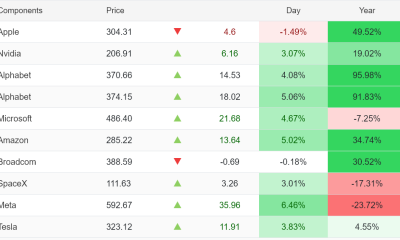

US Tech Stocks See Largest 5-Week Inflow in History: Can Nasdaq Break Its Downtrend?

US stocks: Dow closes at record on Mideast optimism; SpaceX, AMD drag Nasdaq

Tourist plane on sightseeing flight in Peru crashes into a field, killing all 13 people on board


Page Not Found | WIRED


Reform UK And Greens Sink To Lowest Favourability Ratings To Date

Bikini-clad Jennifer Aniston, 57, kisses hypnotist boyfriend Jim Curtis as they enjoy a romantic getaway aboard a luxury yacht in Spain


Nvidia Stock Climbs 2.5% as Chip Sector Rally Builds Ahead of AMD Earnings, Nvidia’s Own Report Looms


Trump says he is cancelling strikes on Iran subject to ‘rapidly’ making deal


Polymarket targets $20 billion valuation as competition heats up in prediction market sector


OpenAI, Anthropic AI agents targeted real people and systems in cyber tests


You must be logged in to post a comment Login