You can use Venmo to pay for Android app purchases and subscriptions.
FellowNeko/Shutterstock
You can now pay for your Google Play purchases with Venmo. Google has added the service as a payment option in the Play store, letting you purchase apps, subscriptions or in-app content with either your Venmo balance or your linked cards and bank accounts.
Similar to other payment options available in the US, such as your cards, PayPal and Cash App, you will have to set it up and link Venmo to your Play account before you can use it. Just go to payment methods in the Google Play app to add it. Once you’re done, you’ll be able to use Venmo across Google’s services, including YouTube.
Google recently opened the Play store to outside billing in the US, the UK and Europe as part of its settlement with Epic Games. That means developers can now offer you an alternative payment system or link you to their own websites for purchase when you want to buy an app or to pay for a subscription, and it’s worth noting that some of those alternative options might not take Venmo.
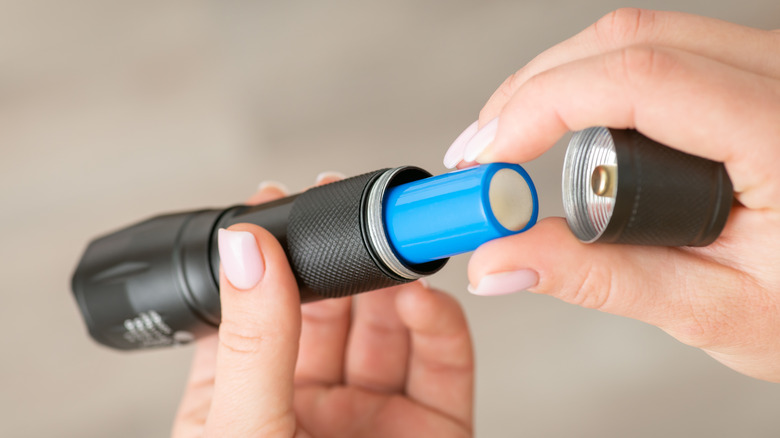
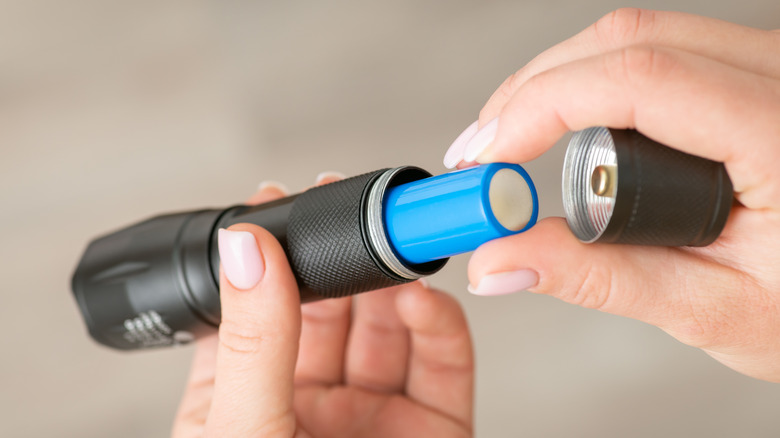
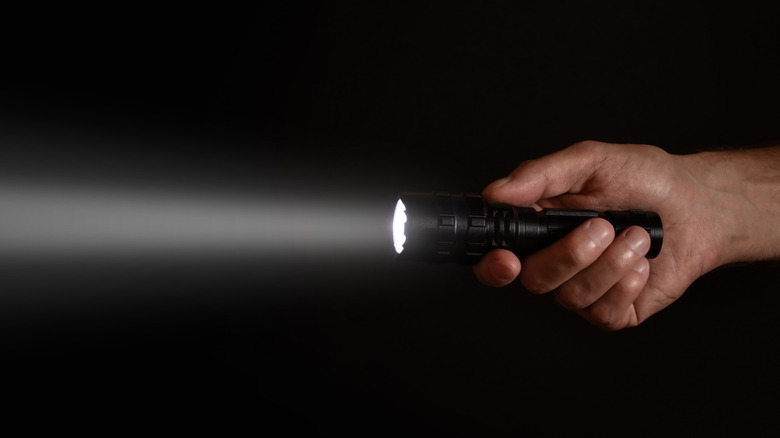
Ordering things from Amazon is extremely convenient, especially with all the perks you get with Amazon Prime. The trouble is, you don’t always get what you pay for. Sometimes, this is because of an error during the shipping process or a defective product. But in many cases, it’s simply because sellers can hugely exaggerate the capabilities of their products and Amazon does very little to stop it. Some of the most shocking examples of this can be found if you’re trying to shop for ultra-bright flashlights. There are scores of cheap flashlights on Amazon from brands you’ve never heard of, with many of them promising outputs of 1 million lumens or more for a price of less than $50. The best-selling examples among them have racked up hundreds or even thousands of reviews, many of which are positive. Some have even been given the “Amazon’s Choice” label by the retailer.
Put simply, these output claims are completely false. Testing by 1Lumen shows that even the brightest flashlights in the world peak at around 200,000 to 230,000 lumens, and only a handful are capable of reaching the 100,000-lumen mark. These class-leading flashlights are bulky and very expensive, requiring their own built-in fans to stay cool enough to operate. To illustrate just how outlandish the claims of these budget Amazon flashlights are, Torque Test Channel measured the lumen output of various flashlights that had been purchased from the retailer. The very best of these budget flashlights achieved only 0.24% of its advertised lumen output, while the worst achieved just 0.05%.
Advertisement
Claimed lumen outputs keep climbing
Skrypnykov Dmytro/Shutterstock
The Torque Test Channel comparison took place in 2024, and at the time, the highest claimed output for one of these budget flashlights was 1 million lumens. Notably, at the end of the analysis, the YouTuber noted that the advertised output of some of the flashlights had changed even in the short time between ordering them and testing them. The outputs that sellers advertised kept going up even though the product being sold hadn’t changed, leading to the YouTuber joking that “2 million lumen flashlights will be right around the corner.”
Two years later, that prediction proved to be correct. Multiple sellers on Amazon now advertise flashlights with 2-million-lumen outputs, and some claim even higher numbers. One flashlight that we found on Amazon is sold by a brand called Gekiro and claims to produce 2.5 million lumens despite costing just $29.99. The flashlight’s description claims that 2.5 million lumens is “as bright as […] car headlights.” In reality, older halogen vehicle headlights average around 3,000 lumens, while modern LED headlights are often around 6,000 lumens. If the flashlight seller’s claims were true, that would actually make the Gekiro flashlight around 417 times brighter than modern car headlights.
It isn’t just Amazon that has a problem with sellers posting unrealistic outputs either. A quick search through eBay listings brings up a string of flashlights with claimed 1-million-lumen outputs, while some AliExpress flashlight sellers have taken things a step further and now claim outputs of 10 million lumens.
Advertisement
How to avoid falling for sellers’ lies
Liudmila Chernetska/Getty Images
Until these retailers implement policies to properly regulate sellers’ advertising, these massively inflated claims won’t go away. That leaves buyers with the task of figuring out which flashlights actually live up to their maker’s claims and which are falsely advertised. A flashlight advertising a 1-million-lumen output is easy to spot as a lie, but a flashlight that claims to produce 5,000 or 10,000 lumens doesn’t immediately stick out in the same way.
The key to making sure you’re getting what you’re paying for is to ensure that any ultra-bright flashlight you buy has been independently tested by a professional reviewer who can validate its maker’s claims. The most powerful flashlights on the market have all been tested in this way, so if you can’t find any reputable reviews outside of Amazon for a product, that’s usually a red flag. It’s also well worth considering how much output you realistically need from your flashlight. We’ve previously argued that 1,000 lumens is more than enough for most camping flashlights, and 300 lumens might be fine in some cases. Too many lumens — or in other words, too much light being emitted — from a flashlight can actually be a hindrance rather than a help.
Advertisement
If you buy from a trusted manufacturer, check that independent reviews (not Amazon’s on-site reviews) back up the seller’s claims, and don’t overestimate the output you need, there are plenty of affordable, powerful flashlights to pick from. Ironically, most of those quality, affordable flashlights will be more powerful in the real world than a supposedly 1-million-lumen flashlight from a no-name brand on Amazon.
Sunglasses were a simple product for most of their existence. Two lenses, a frame, UV protection. Then Meta put cameras in them, the smart glasses category took off, and a pair of shades became something a stranger could use to record you without your knowledge. DuckDuckGo, which has built its entire identity around the idea that your data shouldn’t be collected without consent, looked at that trend and responded with a product that refuses to participate in it: sunglasses with no camera, no microphone, no Bluetooth and no AI. They block sunlight. That’s the complete list of things they do.
Enter DuckDuckGo, the privacy-focused internet search engine and web browser company. The company has partnered with eyewear company Knockaround and is now selling what it calls “anti-surveillance” sunglasses, a simple yet chic style that’s just like the sunglasses we all knew before the AI surge. They protect your eyes and don’t spy on anyone.
Yes, you can buy analog sunglasses in a million other places, including your local drugstore. But DuckDuckGo is out to make a point: AI glasses don’t respect your privacy, and the best way to protest them is not to buy them. The DuckDuckGo sunglasses even have a sassy name: Normal F* ****** Sunglasses.
“We see the new wave of AI glasses as yet another privacy-invasive technology from Big Tech, so we created a satirical campaign around them and released Normal F****** Sunglasses,” a DuckDuckGo representative said. “Why? Because ultimately, the only truly privacy-respecting glasses are ones without cameras, mics, or AI listening in on you and others you come into contact with.”
Advertisement
The representative noted that DuckDuckGo CEO Gabriel Weinberg has publicly said that “AI surveillance should be banned while there is still time.”
The matte black sunglasses come in Knockaround’s Paso Robles frame design, look a lot like classic Ray-Ban Wayfarers with a small DuckDuckGo logo, and offer polarized lenses and UV400 protection. The playful website copy declares that they include zero cameras, guarantee zero notifications, offer a seamless offline mode and infinite charge life. They sell for $35 a pair.
Humor publication The Onion published a sly post about the DuckDuckGo sunglasses, sharing comical quotes from made-up consumers. “0/10, useless for perverts,” says one fictional person. Says another, “Guess I’ll have to violate people’s privacy the old-fashioned way: From the bushes.”
The representative told us that “a significant percentage of the inventory has sold, though it’s still too early to release sales data.”
Advertisement
CNET editor Gael Fashingbauer Cooper, a journalist and pop-culture junkie, is co-author of “Whatever Happened to Pudding Pops? The Lost Toys, Tastes and Trends of the ’70s and ’80s,” as well as “The Totally Sweet ’90s.” She’s been a journalist since 1989, working at Mpls.St.Paul Magazine, Twin Cities Sidewalk, the Minneapolis Star Tribune, and NBC News Digital. She’s Gen X in birthdate, word and deed. If Marathon candy bars ever come back, she’ll be first in line.
See full bio
The capital holds two-thirds of capacity, while multimegawatt projects gather beyond the M25
A snapshot of Britain’s datacenter estate puts nearly 40 percent of its facilities in London, along with about two-thirds of its estimated colocation capacity, although development is spreading beyond the capital.
The analysis counts 555 UK server farms, matching Statista’s latest figure. It puts their combined IT capacity at about 1.6 GW.
Advertisement
By facility count, that would put Blighty second only to the US, although there is a considerable gap between the two.
The study data was compiled by Karas Plating, a UK-based specialist in electroplating and surface coatings for critical electrical components and power distribution systems.
The firm presumably has an eye on where new business might emerge as new datacenters are planned as part of the government’s AI Opportunities Action Plan.
It will surprise nobody that London is the nexus of the UK’s data infrastructure, with clusters of bit barns to serve the financial markets in the City, and along the M4 motorway corridor close to the fiber-optic cable routes that stretch west from the capital to join the undersea cables linking with North America.
Advertisement
London has 219 active facilities, according to the analysis, or about 40 percent of the total. This adds up to 1,048 MW, or two-thirds of the country’s entire datacenter compute capacity. It also leads the way in future growth with 15 planned expansion projects.
But the report also indicates there is a significant shift taking place toward high-capacity regional infrastructure to support growing demand. This is something The Register has previously reported on, as developers look away from London due to issues like power shortages and planning constraints.
Outside the Big Smoke, South East England claims 62 current facilities, adding up to 128 MW capacity, with ten planned developments, the second-biggest expansion queue nationwide. We assume that these include bit barns close to London’s M25 orbital motorway, such as the massive campus planned by colocation firm Equinix at South Mimms.
Further afield, North West England has 39 active facilities with 52 MW capacity, and five upcoming builds. This makes it the region with the largest number of planned projects outside of the traditional hot spot of London and the South East.
Advertisement
The East of England and Scotland both have more operational datacenters, the first with 45 and a total of 44 MW capacity, while north of the border there are no fewer than 49 with a total of 30 MW.
Wales currently boasts 32 active sites, but these make for a total of 154 MW of IT capacity, coming in second only to London.
The region with the fewest current operational server farms is the South West, which has 20 sites adding up to 54 MW, and two new facilities planned. One of these is presumably the controversial Devon data campus near Great Torrington, which is claimed will house 1.5 GW of AI-optimized compute capacity.
Just ahead is North East England, where there are 21 sites with a total of 17 MW capacity. This will change in the near future, however, as US investment giant Blackstone has plans for a huge facility near Blyth, Northumberland, said to be large enough for 720 MW of IT.
Advertisement
OpenAI also aims to build a Stargate datacenter project at Cobalt Park, North Tyneside, although it has put these plans on hold for now, citing reasons such as the cost of energy in the UK. ®
Goldmund has introduced the Telos 9800, a new flagship mono power amplifier that delivers more than 1,500 watts and represents the most advanced amplifier the Swiss company has developed to date. With a $500,000 asking price, one might reasonably wonder whether it also includes a chalet in Gstaad, a numbered bank account, and someone to explain the purchase to your mistress in Geneva.
The Telos 9800 builds on the foundation of the Telos 8800, introduced in 2023, while incorporating new design and engineering developments that move it above both that model and the recently launched “midrange” Telos 4800. Goldmund does not replace its flagship amplifiers very often, so the Telos 9800 will likely remain at the top of the company’s lineup for several years.
Related Reading:
The Swiss Touch
Engineered and assembled in Switzerland, the Telos 9800 is built around an entirely new amplification platform. Its power supply and amplification stages are housed in separate but interconnected units, allowing each section to operate under optimal conditions while reinforcing the system’s overall mechanical and electrical integrity.
Designed with a symmetrical signal path from input to output, the Telos 9800 is intended to preserve signal integrity while minimizing electromagnetic interference and unwanted noise. It remains stable into loads as low as 1 ohm and incorporates comprehensive protection systems designed to maintain reliability under demanding operating conditions.
Advertisement
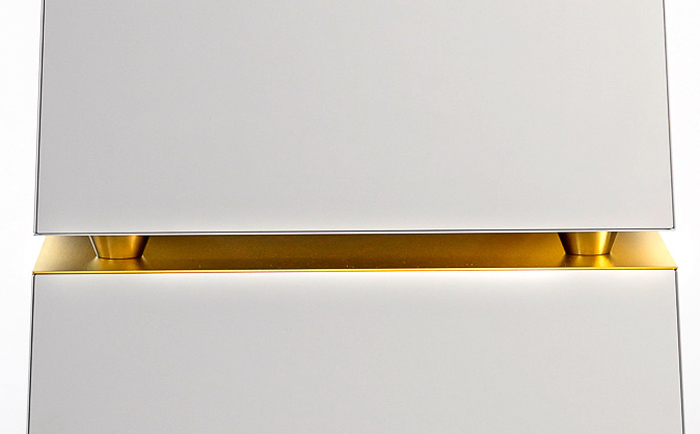
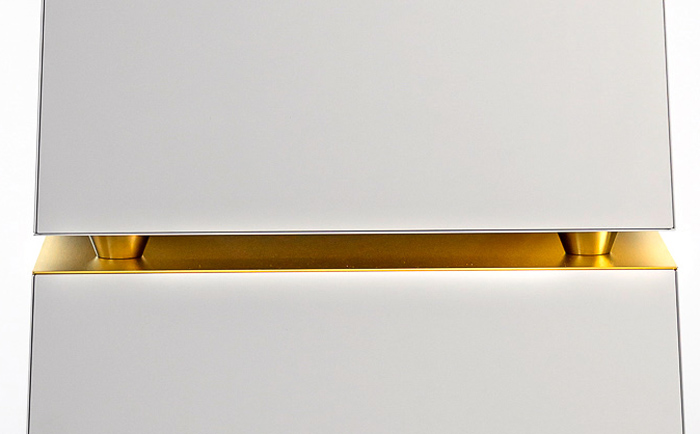
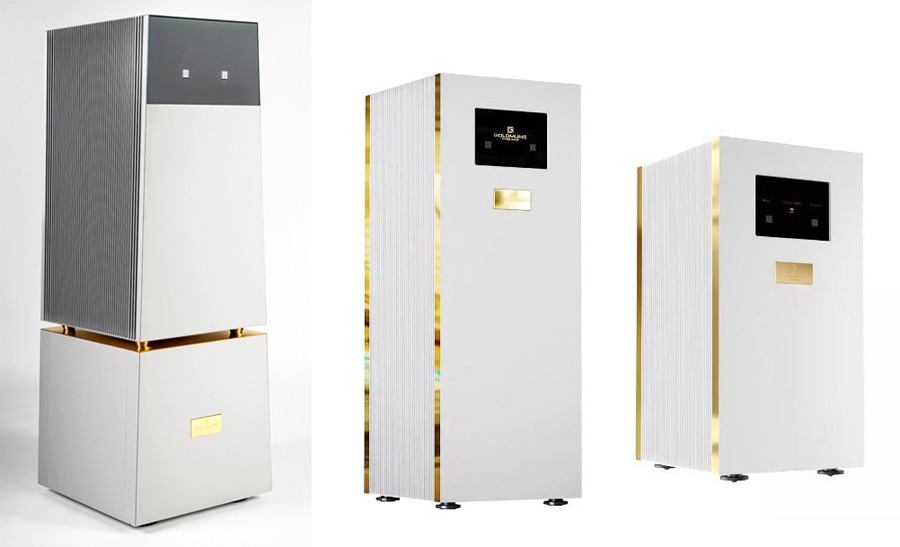
Developed in collaboration with designer Cécile Barani, the Telos 9800 introduces a new visual direction for Goldmund. Its two-part form mirrors the physical separation of the power supply and amplification stages, giving the amplifier a functional relationship between its internal architecture and exterior design. Precision-machined aluminum surfaces, a new digital interface, and a restrained gold accent complete a look that is notably more architectural than Goldmund’s previous flagship amplifiers.
Taken together, Goldmund says these design and engineering changes allow the Telos 9800 to deliver high output with greater control, particularly during demanding musical passages and large dynamic swings. The company also claims improvements in low-level detail, clarity, and overall precision, although those performance claims will ultimately depend on the associated system, loudspeakers, and listening environment.
What Makes the Goldmund Telos 9800 Different
Power Output: The Telos 9800 delivers 1,560 watts RMS into 8 ohms, with a specified total harmonic distortion (THD) of 0.005% from 20 Hz to 20 kHz.
Dynamic Range: Goldmund specifies a dynamic range of 117 dB, measured with a 22 kHz bandwidth, which is intended to preserve low-level detail across a wide range of listening levels.
Advertisement
Damping Factor: The Telos 9800 has a specified damping factor of 900 at 1 kHz and an output noise floor of less than 3 μV, both of which are intended to support low noise and strong loudspeaker control.
Gain: Amplifier gain is adjustable in 3 dB increments, allowing users to better match the Telos 9800 with different source components and system configurations.
Analog Signal Path: The Telos 9800 uses a fully analog signal path from input to output and incorporates thermal and short-circuit protection. An automatic shutdown system is designed to protect both the amplifier and connected loudspeakers in the event of an operating fault.
Advertisement. Scroll to continue reading.
Advertisement
Connections: The Telos 9800 includes analog and digital inputs, including RCA and XLR connections. The rear panel also features multiple loudspeaker binding posts, a ground-lift switch, a universal power connection, and a 12-volt trigger input for external control.
Power Management System: Goldmund’s proprietary power-management system combines 10 kVA of transformer capacity with the largest capacitor bank the company has developed to date, providing 648 mF of stored energy. Custom capacitors, in-house-designed transformers, and a redesigned amplification stage using next-generation power boards are intended to improve stability, instantaneous current delivery, and loudspeaker control under demanding loads.
Goldmund Telos Mono Power Amps Comparison
Telos 9800 (2026)
Telos 8800 (2023)
Telos 4800 (2024)
Price
US – $500,000 CHF – 400,000 GB – £370,000 AUS – $800,000
US – $366,000 CHF – 320,000 GB – £350,000 AUS – $650,000
US – $260,000 CHF – 220,000 GB – £235,000 AUS – $445,000
22 kHz measurement bandwidth (flat), true RMS unloaded: 117 dB
22 kHz measurement bandwidth (flat), true RMS unloaded: 117 dB
Damping Factor
900 at 1 kHz / 8 Ω
600 at 1 kHz / 8 Ω
600 at 1 kHz / 8 Ω
Distortion
IMD (SMPTE), unloaded: < 0.01 %
THD+N unloaded: < 0.005 % from 20 Hz to 20 kHz at 30 Vrms output
IMD (SMPTE), unloaded: < 0.01 %
Advertisement
THD+N unloaded: < 0.005 % from 20 Hz to 20 kHz at 30 Vrms output
IMD (SMPTE), unloaded: < 0.01 %
THD+N unloaded: < 0.005 % from 20 Hz to 20 kHz at 30 Vrms output
Output Noise Floor
Analog input terminated with RCA Shorting Caps, unloaded: < 3 V from 20 Hz to 20 kHz
Analog input terminated with RCA Shorting Caps, unloaded: < 3 μV from20 Hz to 20 kHz
Analog input terminated with RCA Shorting Caps, unloaded: < 3 μV from 20Hz to 20 kHz
Gain
35 dB, +/- 9 dB (adjustable in steps of 3 dB for each input)
35 dB, +/- 9 dB (adjustable in steps of 3 dB for each input)
35 dB, +/- 9 dB (adjustable in steps of 3 dB for each input)
Input Levels
Max level before clipping
Advertisement
Analog input: 2 Vrms
Digital input: 0 dBFS
Max level before clipping
Analog input: 2 Vrms
Advertisement
Digital input: 0 dBFS
Max level before clipping
Analog input: 2 Vrms
Digital input: 0 dBFS
Advertisement
Output Levels
Max level before clipping: 1% THD, unloaded: 375 Vpp
Max level before clipping: 1% THD, unloaded: 300 Vpp
Max level before clipping: 1% THD, unloaded: 300 Vpp
Audio Inputs
Analog input RCA unbalanced connector
Analog input XLR balanced connector
Digital input (RCA connector)
Analog input RCA unbalanced connector
Advertisement
Analog input XLR balanced connector
Digital input (RCA connector)
Analog input RCA unbalanced connector
Analog input XLR balanced connector
Advertisement
Digital input (RCA connector)
Audio Outputs
2 x speaker output binding posts (red & black)
1 x output Goldmund speaker 4B type connector
Digital Output (RCA Connector)
Advertisement
2 x speaker output binding posts (red & black)
1 x output Goldmund speaker 4B type connector
Digital Output (RCA Connector)
2 x speaker output binding posts (red & black)
Advertisement
1 x output Goldmund speaker 4B type connector
Digital Output (RCA Connector)
Additional Rear Panel Connections
Power cord: universal socket 3 lugs, 16 A
Main fuses
Advertisement
AC black GND Binding post (with bridge connection)
Green-yellow AC earth binding post (with bridge connection)
RS232 command connector
Power cord: universal socket 3 lugs, 16 A
Advertisement
Main fuses
AC black GND binding post (with bridge connection)
Green-yellow AC earth binding post (with bridge connection)
RS232 command connector
Advertisement
Power cord: universal socket 3 lugs, 16 A
Main fuses (F1: 2.5A ; F2: 1A F3: 8A)
AC black GND binding post
Green-yellow AC earth binding post
Advertisement
Ground lift switch.
RS232 command connector
Jack connector for 12 Volt Trigger
Power Supply
Nominal line voltage: 115 V or 230 V
Advertisement
Input voltage range: +/- 5 %
Nominal line voltage: 115 V or 230 V
Input voltage range: +/- 5 %
Nominal line voltage: 115 V or 230 V
Advertisement
Input voltage range: +/- 10 %
Power Consumption
Not Provided
IEC 60065, 1/8 Output Power at 8 Ω: 750 W
IEC 60065, 1/8 Output Power at 8 Ω: 680 W
Finish Options
Not Provided
Black, Silver Grey
Standard – Grey On Request – Black
Dimensions (WxHxD)
50 x 136.7 x 50 cm
20 x 63.18 x 20 inches
42 x 113 x 47 cm
Advertisement
16.6 x 44.5 x 18.5 inches
42 x 82.6 x 50 cm
16.6 x 32.6 x 20 inches
Weight
360 kg
Advertisement
794 lbs
265 kg
584 lbs
195 kg
Advertisement
430 lbs
The Bottom Line
The Goldmund Telos 9800 occupies a rather lonely corner of the high-end audio market where 1,560 watts into 8 ohms, stability down to 1 ohm, a 10 kVA power supply and 648 mF of energy storage are considered reasonable engineering targets. Its new two-unit architecture, which physically separates the power supply from the amplification stage, is arguably more interesting than the headline power figure because it shows how far Goldmund was willing to go to improve isolation, current delivery and thermal management.
There are alternatives at this level, most notably the Dan D’Agostino Relentless Epic 1600, Boulder 3050 and CH Precision M10, although each approaches the problem somewhat differently. Anyone spending $500,000 on amplification is well beyond conventional notions of value, and system matching becomes far more important than shopping from a specification sheet.
For that reason, Goldmund’s own passive loudspeakers are probably the safest and most logical place to start. Models such as the Tethys Passive keep the amplifier and loudspeaker within the same engineering ecosystem, whereas Goldmund’s flagship Gaia and Apologue speakers already incorporate their own Telos amplification and therefore do not require the 9800.
Advertisement
Is the Telos 9800 necessary? Of course not. Neither is a penthouse overlooking Lake Geneva. At this altitude, that stopped being the point several hundred thousand dollars ago.
Price & Availability
The Goldmund Telos 9800 is priced at CHF 400,000 per unit, approximately £370,000, €430,000, or $500,000 USD.
If your internet feels unstable or slow at times, it’s natural to blame the ISP or the router. A router essentially handles everything and your ISP is responsible for providing fast, seamless internet. In such cases, upgrading to a high-speed internet plan or buying a new router may seem like the perfect solution. But as surprising as it may sound, these might not be the real problems. The router could just be overloaded, and as a result, struggling to deliver optimal performance. And there are typically two router settings that can help solve the problem, QoS (Quality of Service) and SQM (Smart Queue Management). If configured correctly, this will significantly reduce slowdowns, allowing you to delay the router upgrade.
Before we delve into configuring the settings, it’s vital to understand why your router could be the bottleneck due to bufferbloat. Data transmitted over the internet is broken into small packets which your router handles, and it can only transmit a given number of packets at once. When traffic exceeds the available bandwidth, extra packets are stored in a memory buffer and wait for their turn. As the buffer grows, so does the time it takes for recent packets to be transmitted. This directly translates into increased latency. Regular internet speed tests don’t help pinpoint the problem, because they generally check for the download and upload speeds. That’s why you need to configure features like QoS and SQM.
Advertisement
Understanding QoS and SQM
Kazim Alvi/SlashGear
QoS or Quality of Service is a feature available on most routers that allows you to prioritize specific devices or data types on the network. For instance, you could prioritize your PC over your smartphone, or gaming over downloads and backups, and vice versa. Different router manufacturers offer different controls over QoS, but the feature is generally available on most modern routers. SQM or Smart Queue Management, on the other hand, is an advanced QoS feature designed to handle bufferbloat, which is basically the overloaded memory queue we discussed earlier. With SQM, your router prioritizes traffic from tasks that are latency-sensitive, say gaming and video calls.
If you are aiming for lower latency, SQM will help. But if download speeds are slow because multiple devices are competing for the available bandwidth, you are better off with QoS. That’s because Quality of Service lets you prioritize important devices and traffic types, which in this case is downloads. Also, on older routers, SQM may not be natively available, and you may need to install an open-source router firmware like OpenWRT to set up the feature, which is a hassle for the average user.
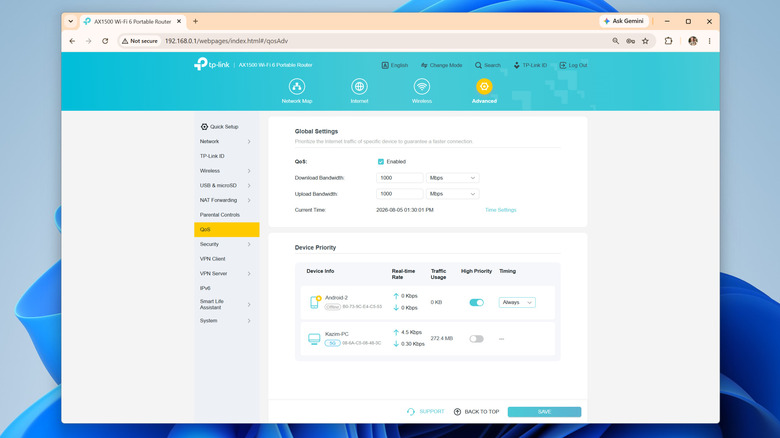
Turning on and setting up QoS and SQM will vary based on your hardware, so check your instruction manual to know for sure (most routers have a PDF version on the manufacturer’s website), but it generally goes like this: open your router’s admin panel, go into the QoS section (it may be under something like Advanced Settings), turn the feature on, and configure device or traffic priority. For instance, if you actively download files on your computer, prioritize it over other resource-intensive devices on the network. On routers that grant granular controls, you can specifically prioritize downloads or file transfers over other types of traffic.
Advertisement
Easy tricks to speed up downloads
New Africa/Shutterstock
Beyond QoS and SQM, there are a couple of other tips and tricks that will help improve connectivity and speed up downloads. The most important of all, and perhaps the simplest, is effective router placement. If your router is far away from the connected device, the signal strength will be low, and you will subsequently notice lower download speeds. Simply bringing the router closer to the device or using a Wi-Fi range extender or a mesh network will do the trick for most.
If physically moving the router is not an option, you can consider connecting the more important devices using an Ethernet cable. When it comes to stability and consistent speeds, Ethernet is undoubtedly a better choice over Wi-Fi, although the difference is usually less noticeable on modern routers with better coverage. In case your laptop doesn’t feature a LAN port, get a USB-to-Ethernet adapter to add the functionality.
Advertisement
Similarly, optimal band selection and minimizing interference is just as important. You should ideally have the non-critical devices, like smart plugs and security cameras, on the 2.4 GHz band, while reserving the 5 GHz band for computers, smartphones, gaming consoles, and smart TVs. As for wireless interference, move common interference-causing household appliances like microwaves and baby monitors away from both the router and the device in question.
Industrial and commercial applications accounted for more than 70pc of humanoid robot shipments.
Humanoid robot sales have skyrocketed 272pc in a year as the maturing technology proves its use in industrial settings, a new report finds.
China remains the centre of this booming industry, holding more than 97pc of the market, while representing more than 85pc of the global demand.
Sales are further expected to triple year-over-year by 2026 to around 60,000 units, reported Smart Analytics Global (SAG), with industry-wide revenue expected to hit more than $1.6bn. The sector is expected to grow from nearly $5.5bn in 2026 to more than $50bn by 2035.
Advertisement
Shipments grew from just more than 5,000 units to more than 19,000 in the first half of this year, bolstered by government led support from China – including helping developers test and deploy robots – abundant funding and emerging businesses that are expanding through public listings in the country.
Hangzhou-based Unitree’s Shangai listing received nearly 10m retail orders, marking an oversubscription of more than 5,500 times, as the company readies to become mainland China’s first publicly traded humanoid robot maker.
Advancements in physical AI are also attracting innovative robotics start-ups, major tech companies and automakers.
Domestically, Shanghai-based Agibot overtook Unitree to become the world’s largest humanoid robot vendor capturing 44pc of the global market. Together, the two vendors account for 75pc of robot sales across the world. Behind the two leaders are Beijing-based Galbot, Shenzen’s Ubtech and Guangdong-based Leju.
Advertisement
Major sellers include half-size bipedal robots, which dominated Agibot’s its humanoid portfolio and wheeled robots designed for more efficient mobility, stability and cost, over fully human-like locomotion.
Home robots still far off
Industrial and commercial applications accounted for more than 70pc of humanoid robot shipments in the first half of this year – up from 50pc in the same time last year, SAG said.
The growth comes as vendors narrow in on manufacturing, logistics, warehousing and other structured commercial environments, where robots can perform defined tasks and demonstrate measurable productivity.
Advanced use cases such as bionic humanoid robots targeting human interaction, for example, are much slower to grow on account of technology and regulatory limitations around AI, and customer acceptance.
Advertisement
The analytics firm said general-purpose home-service humanoid robots, something Meta is working towards with its recent acquisition of Assured Robot Intelligence, is unlikely to reach mass market scale in the next five years.
Reports suggest that Meta has made “significant” investments in this category with goals to create humanoid robotic hardware to help with household chores.
Recent US restrictions on foreign-made robots could create additional issues for Chinese sellers looking to expand into mature markets, the report found.
Similarly, the EU’s scrutiny over AI applications across autonomous robots in manufacturing and personal assistance also places hurdles for growth.
LG Display is reportedly developing 5-stack OLED panels rumored to be headed to the 24-inch iMac, which give ever better brightness and image quality.
Apple is clearly planning to bring OLED displays to all of its devices, potentially with the iPhone 20 Pro getting 2-stack or what the company calls Tandem OLED panels. Back in 2022, Apple was so keen on 2-stack for the iPad that it insisted an initially reluctant Samsung develop the design.
Samsung’s reluctance was because at the time, only Apple wanted the costly technology. Apple’s insistence was because 2-stack OLED has a longer life and produces a better image quality than single OLED panels.
But since January 2025, LG Display has been making 4-stack OLED television screens, and according to The Elec, it is now working on 5-stack versions. These may be used in TV sets, too, but Apple is said to have asked about a 24-inch display, clearly for a future iMac.
Advertisement
This isn’t the first time that LG has been reported to be working on 5-stack OLED. But a previous report concluded that such an iMac might not be produced until 2030.
The new report is fractionally more optimistic, predicting that a 24-inch 5-stack OLED iMac may launch in 2029.
Why Apple wants 5-stack OLED
While 2-stack OLED improves the life cycle of a display, compared to the previous single-stack version, it can still have burn-in. Familiar to Mac users from the CRT days of the 1980s and 1990s, it’s possible for a ghostly image of the menubar to appear permanently on screen.
An iMac will be at risk of this far more than an iPad or an iPhone, because it is more likely to be continually on for longer.
Advertisement
Then mounting multiple layers of OLED over one another ultimately affects brightness. To combat this, a 5-stack OLED panel will have three layers of blue LEDs instead of two.
Apple is claimed to have made requests to both LG Display and Samsung Display regarding OLED panels. Based on reports of those, the aim appears to be to get 24-inch displays with a resolution of 218 pixels per inch to 220 pixels per inch.
The technology to do this exists, but it currently comes at a cost. The panels themselves are more expensive, but they are also more complex to produce in volumes.
Or rather, they are for a large display like that of a 24-inch iMac. Or perhaps especially for TV sets where LG Display currently sells 4-stack models of up to 83 inches.
Advertisement
There is an issue of the quality of the display, which is an issue for a monitor where a user will be sitting immediately in front of it. It’s less of an issue for a TV set across the room.
Consequently, it’s possible that LG Display’s screens do not yet meet Apple’s standards for an iMac-sized screen. Yet given how Apple was pressing for 2-stack OLED back in 2022, it’s curious how it is still reported to be years away from using it in the iPhone.
Hoy wants sending something from your Mac to feel as casual as dropping a file onto someone’s desk. Instead of opening another app, you drag it onto that person’s face sitting in the menu bar.
The pre-release Mac app folds file sharing, voice notes, and screen recording into one lightweight interface. The person you’re sending something to effectively becomes the shortcut, which makes Hoy feel less like another messenger and more like a communication layer built into macOS.
How does Hoy actually work
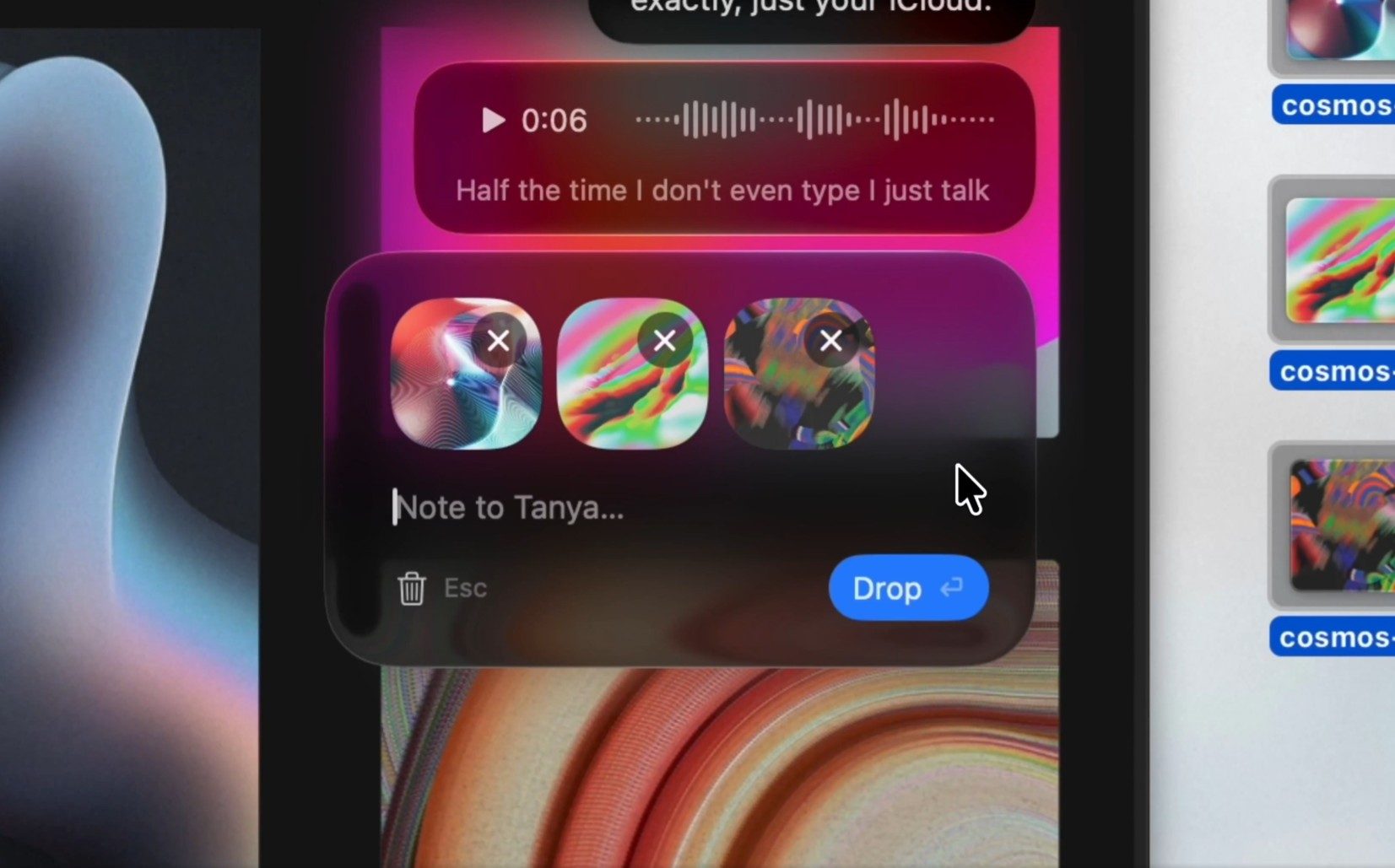
Once someone joins a channel, Hoy puts their avatar in your Mac’s menu bar. You can drag a file onto their face, click to type, or record a voice note without first opening a full conversation window.
Hoy
Screen recording follows the same logic. Hoy can capture your display with an optional camera bubble, then send the recording directly to the recipient.
That gives it a useful spot between quick sharing and asynchronous feedback. AirDrop is still the obvious choice when someone is nearby. Hoy is built for the moments when they’re across town, working remotely, or simply checking in later.
Advertisement
Why iCloud does the heavy lifting
Hoy doesn’t run its own content server for messages or recordings. Everything moves through Apple’s CloudKit, with each channel stored against the host’s iCloud account.
That setup comes with a practical catch. Larger files and recordings count against the host’s available iCloud storage. Hoy says it can’t access the content inside those channels, while voice transcription happens locally on the Mac.
Hoy
Calling Hoy serverless would still oversell the idea. The app may avoid operating its own messaging backend, but Apple’s infrastructure is doing plenty of work behind the scenes.
Who is Hoy really for
The bigger challenge is convincing people to install it. Messages already covers many of the same basics on every Mac, so Hoy has to earn its place by making common exchanges noticeably faster.
Its strongest case right now is probably small remote teams that send quick feedback and screen recordings throughout the day. The free tier includes three hosted channels, which makes it easy enough to test without committing.
Advertisement
An iPhone companion is planned for later this year. Until then, Hoy’s appeal comes down to whether putting people directly in the menu bar saves enough friction to become a habit.
The 350-W panels are fairly easy to set up; though the metal fasteners on the kickstands take a bit of fiddling. Unfortunately, the 500-W panels are downright finicky. To fold down compactly, it is broken into twelve separate sections and folds out in a double row, so I found I had to wrestle with it to get the feet set up and ensure it was stable. You’ll also need to watch out at the higher angle if there’s any wind, or a gust might just catch them and flip them over. The flip side is that they fold down impressively small with a nice rubbery handle that makes them easy to carry. Setup aside, I don’t think you’ll find anything more compact for the wattage.
BougeRV
Arch Flexible Solar Panel
Lightweight and flexible, this panel is ideal for mounting on top of your RV, van, or other vehicle. You could attach it to a cabin roof or a hardtop tent too, and it can bend up to 270 degrees. Though no fixings are included, it’s possible using adhesive or strong double-sided tape and it also has holes for bolting. It’s thin, weighs just shy of 9 pounds, and boasts an IP68 rating. Conversion efficiency is 25 percent, and I was able to get 165 watts out of it when the sun was at its highest. Now, it’s not really all that portable, in that it doesn’t fold up or have a handle for easy carrying. But it’s a great option for mounting and has standard MC4 connectors. BougeRV also offers a smaller 100-W model.
Advertisement
Other Good Solar Panels I’ve Tried
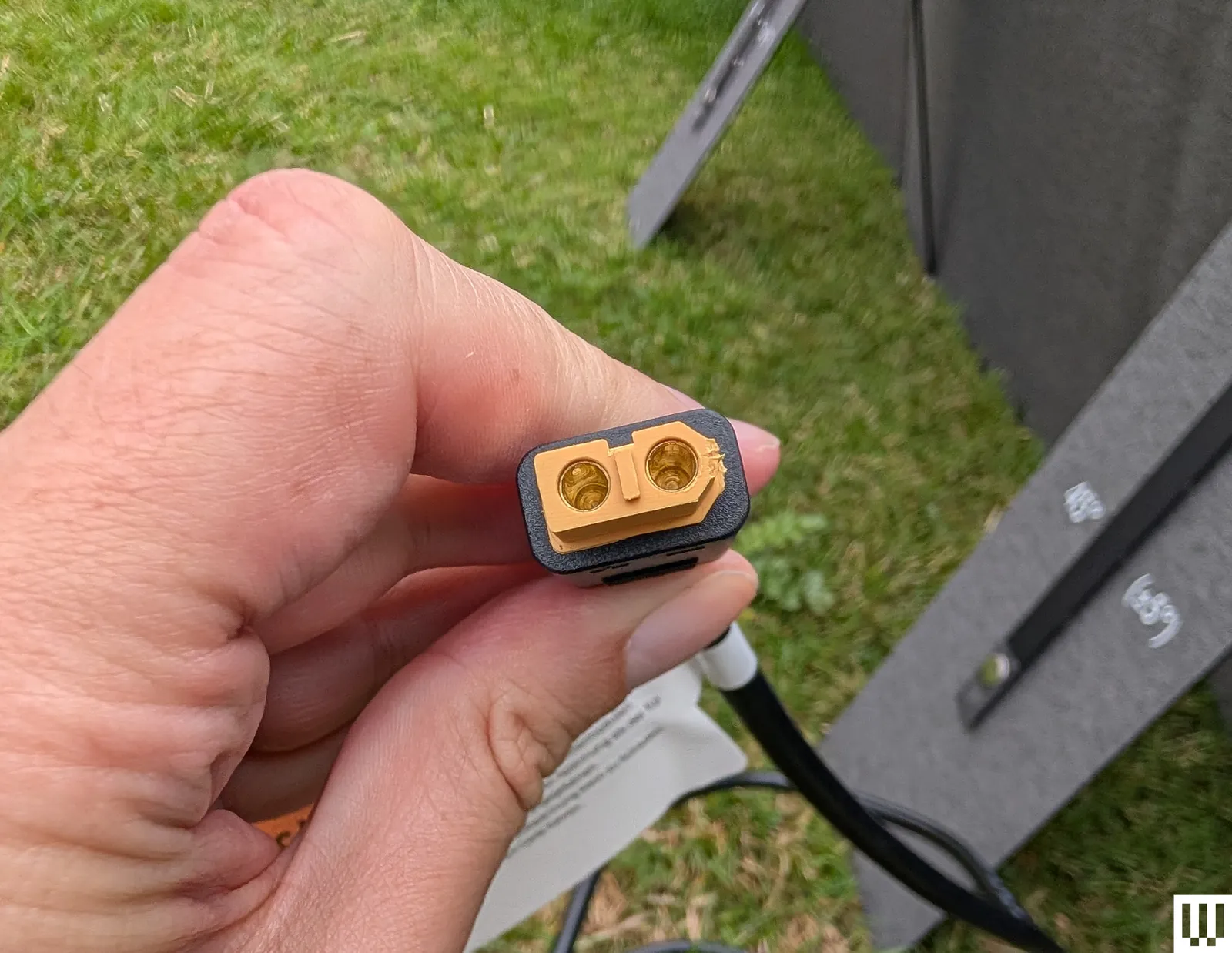
Anker Solix PS200 for $450: I have tested several of Anker’s older solar panels, including the Solix PS200. These folding 200-watt panels are IP67-rated with a familiar design of molded plastic handles, folding feet, and metal fasteners. They offer 23 percent conversion efficiency and couldn’t quite hit the same highs as the Solar Saga 200 despite a higher price and weight. The reason you might pick Anker instead is the inclusion of MC4 connectors and an XT60 connector cable. Anker has just released some superior-looking bifacial panels, both PS100 ($220) and PS200 ($500), but I haven’t tested them yet. They appear more compact and efficient.
DJI IBC Power 200W for $419: DJI sent me these panels, and they have the same slide out folding feet with a strap and metal fasteners, though the molded handle is only at one end. They are IP67, came with an MC4 to XT60 cable, and produced up to 160 watts when the sun was out. Sadly, you need the DJI Power Solar Panel Adapter Module (MPPT) to use them with some DJI power stations, though they worked fine charging the Anker Solix C1000.
What I Plan to Test Next
Advertisement
The last EcoFlow panel I tested seems to be discontinued, but the latest 220W panel ($299) looks good and is reasonably priced. I haven’t been able to test any Renogy panels, but they seem to be highly rated in online reviews. Two other brands on my radar are Goal Zero and Biolite.
Portable Solar Panels: Frequently Asked Questions
What to Look For in Solar Panels
Portable solar panels come in all sorts of shapes and sizes, but they always have a stated maximum wattage they can produce. While a panel might be rated at 200 watts, it’s important to note that it will likely produce less in real-world conditions. Changing weather, the angle of the sun, the impact of temperature, and other factors can reduce the wattage your panels produce. Even in good conditions, you may only get 70 to 80 percent of the stated wattage, and it will be a lot less in challenging conditions. Solar generators will also have a stated maximum wattage that they can absorb through the solar charging port.
Advertisement
For portability, most panels fold up into a kind of briefcase design for easy carrying. They are generally rigid with fold out feet to prop them at different angles. You can also get flexible panels, like the BougeRV panel I recommend above that’s designed to be attached to an RV roof. There are also roll-up panels, though these don’t tend to be as durable or long-lasting. Make sure you check the dimensions and weight of your chosen panels before buying.
Photograph: Simon Hill
Lastly, always check the compatibility of your panels and your solar generator. It’s simplest to match panels and generators from the same manufacturer, but it’s easy to mix and match panels with generic MC4 connectors and solar generators with XT60 ports. It’s important to be careful about the voltage of your panels relative to your solar generator to avoid dangerous mishaps. Look for the open circuit voltage (OCV) for both and make sure your panels never exceed your solar generator’s range. People will sometimes overpanel, adding a higher wattage than the generator can accept to account for the fact that the panels will likely never produce their full capability. This is usually safe to do, provided you don’t exceed the OCV.
Photograph: Simon Hill
You should also favor solar generators with Maximum Power Point Tracking (MPPT), a technology designed to monitor the fluctuating input from solar panels (impacted by shade and changing weather) and maximize how much of it is converted for use.
What About Weather Do You Need for Solar Panels?
Advertisement
Most portable solar panels are designed to be left outdoors and survive a light rain shower. Look for an ingress protection (IP) rating. An IP65 rating is fine for light rain and dust, but if you want your panels to survive more serious weather, look for an IP67 or IP68 rating. While the panels and cables are generally weather-proof, be careful with your solar generator and make sure it has an IP rating if you intend to leave it outside.
I try to test portable solar panels in similar conditions using the same solar generator where possible (usually the Anker Solix C1000). I test in direct sunlight and also in partial shade. I record the highest wattage and check how much power each solar panel can produce over four and eight hour periods. I try to test every day for a week or so, weather permitting, and then compare results.
The United States military is filled with all kinds of standards that recruits must meet upon joining and starting training. These include several areas of physical fitness, and unlike most jobs in the U.S., there are height and weight requirements. Believe it or not, you can be either too tall or too short to enlist, with a range of 4 feet, 10 inches to 6 feet, 8 inches for both genders’ minimum and maximum height. These restrictions are meant to ensure that all personnel can safely operate military equipment, though it is possible to get a waiver in some situations.
In addition to the height limits for the general military, certain jobs have more stringent requirements across all of the services. These standards apply to personnel operating on different types of ships, airplanes, and tanks. This makes sense, as submarines, fighter jets, and armored vehicles have limited crew compartments, making it uncomfortable if not impossible for people of a certain height to take those jobs.
Advertisement
To become a tanker, which in the Army is Military Occupational Specialty (MOS) 19K, Armor Crewmember, a person cannot exceed 6 feet, 1 inch in height. Fortunately, that doesn’t limit too many applicants, as the average height of an American woman is 5 feet, 3.5 inches, while men average around 5 feet, 9 inches tall. Because the U.S. military operates the M1 Abrams Main Battle Tank, the height requirements are universal across its variants. Unlike tankers, the height requirement for MOS 19C, Bradley Crewmember, isn’t restrictive for those operating the M2 Bradley Infantry Fighting Vehicle.
Advertisement
The inside of an M1 Abrams MBT is cramped
Tanks have always been cramped, as their design requires a great deal of armor to protect the personnel inside. The vehicle also needs to be able to navigate roads, bridges, and various terrain, so making them wider isn’t typically an option, while making them higher only makes them easier to see and strike. If you look back through the history and evolution of tank design, this remains a constant, as tight quarters are the name of the game.
When looking specifically at the driver’s compartment, it sits center and to the front of the tank with a hatch that allows the driver to peer out (pictured). Just above the hatch is the forward edge of the turret ring. Inside, the driver sits on a seat and has little room for their legs. The steering-throttle control sticks up between the legs with handlebars for operating the tank, while the driver looks at a screen for information about the vehicle. The steering-throttle control is a yoke that controls acceleration and steering.
The compartment is cramped, to say the least, so there’s not a huge margin for anyone exceeding 6 feet, 1 inch in height. Even at that height, it’s not the most comfortable place in the world to work, but many tank drivers do so every day they put on their uniform and step inside their vehicle. The other positions inside the tank don’t offer much more in terms of space, though there’s a bit of room for the tank commander, gunner, and loader, as the driver is isolated from the rest in the forward hull.




























































You must be logged in to post a comment Login