



Connect with us

Tech

Instant Prints Ready for the Road with the Fujifilm Instax Mini 41 Bundle

Published

on

Fujifilm Instax Mini 41 Bundle
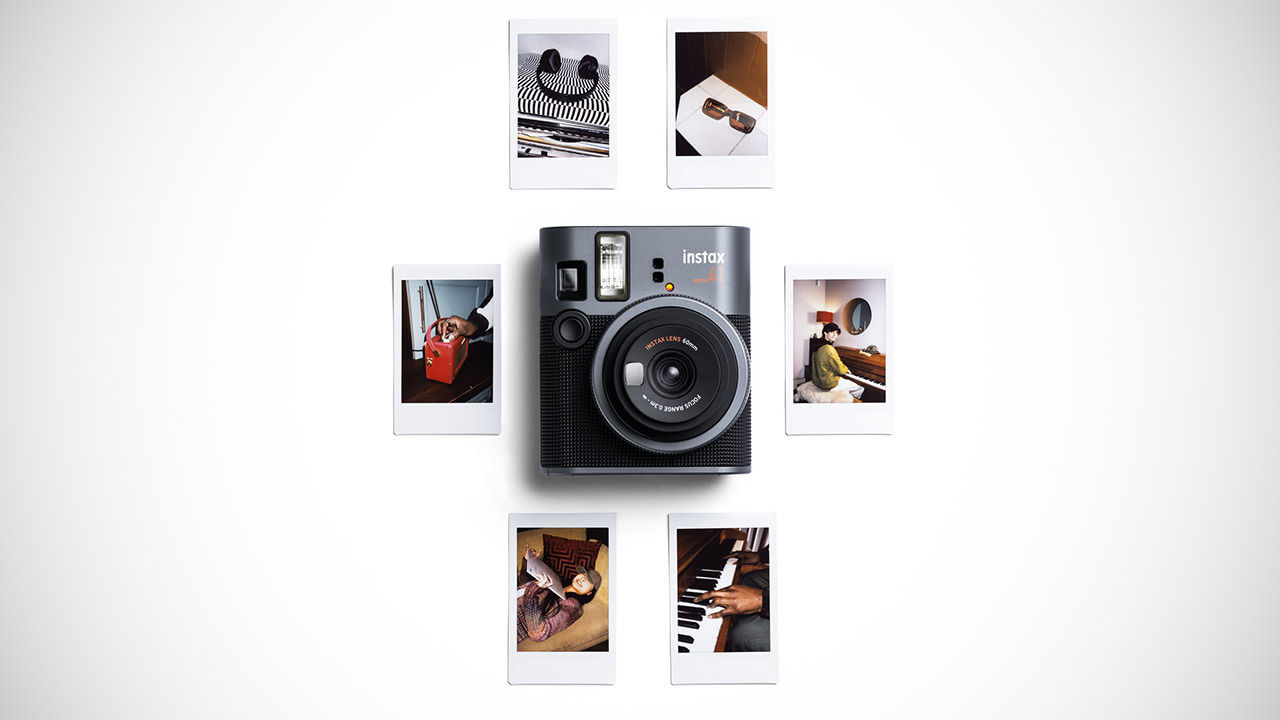
Fujifilm put together a simple bundle around its Instax Mini 41 camera, priced at $99.95 (was $117), that lets anyone grab quick shots and walk away with physical prints in about 90 seconds. The bundle includes the camera itself, one 10-pack of Instax Mini film, a hand strap, two AA batteries, a quick start guide, and a one-year limited warranty. Credit-card-sized prints measure roughly 2 by 3 inches overall, with the image area at 62 by 46 millimeters, and they develop on their own once ejected.


Classic lines define the camera’s body, which is made up of black and dark silver surfaces with a splash of brilliant orange. It provides the camera a sleek retro appearance and can be effortlessly slipped into a bag or hung from the wrist strap. At 104.5 by 122.5 by 67.5 millimeters, with a weight of 345 grams when devoid of batteries or film, it is truly something you can throw in your luggage and forget about for all-day carry-on travels or weekend trips.


Operating the camera isn’t difficult either, as you simply twist the lens to turn it on, then twist again to switch to close-up mode, where you can photograph subjects between 0.3 and 0.5 meters away, as the built-in parallax correction ensures they look right in the finished print. If you want to take a self-portrait, there is a small mirror next to the lens: simply line yourself up, click the shutter button, and let the camera handle the rest, with flashes and exposure automatically sorted.

Fujifilm Instax Mini 41 Bundle
Most common day-to-day circumstances, whether daylight or indoors, have exposure totally set to auto. The shutter speeds range from 1/2 to 1/250th of a second, and slow synchro can be used if the light becomes too dim. The built-in flash starts up with automated brightness adjustment and can handle subjects ranging from 0.3 to 2.2 meters; it recycles in around seven seconds on a new set of batteries. Power comes from two AA alkaline cells, which provide enough juice for around ten full film packs under regular use. They also have an auto power-off mode that activates after 5 minutes of inactivity to save the batteries.

Fujifilm Instax Mini 41 Bundle
You feed the film into the back, there’s a little counter to keep track of how many exposures you have left, and the camera will print the image for you after the shutter is fired. The photographs hold up well, with the same old Instax appearance and feel, and they can even withstand a little water if you get caught in a downpour or put them in your wallet.

Source link

Advertisement
Continue Reading
Click to comment

You must be logged in to post a comment Login

Leave a Reply

Tech

You’ll have to wait until 2027 for those leaked AirPods with built-in cameras

Published

on

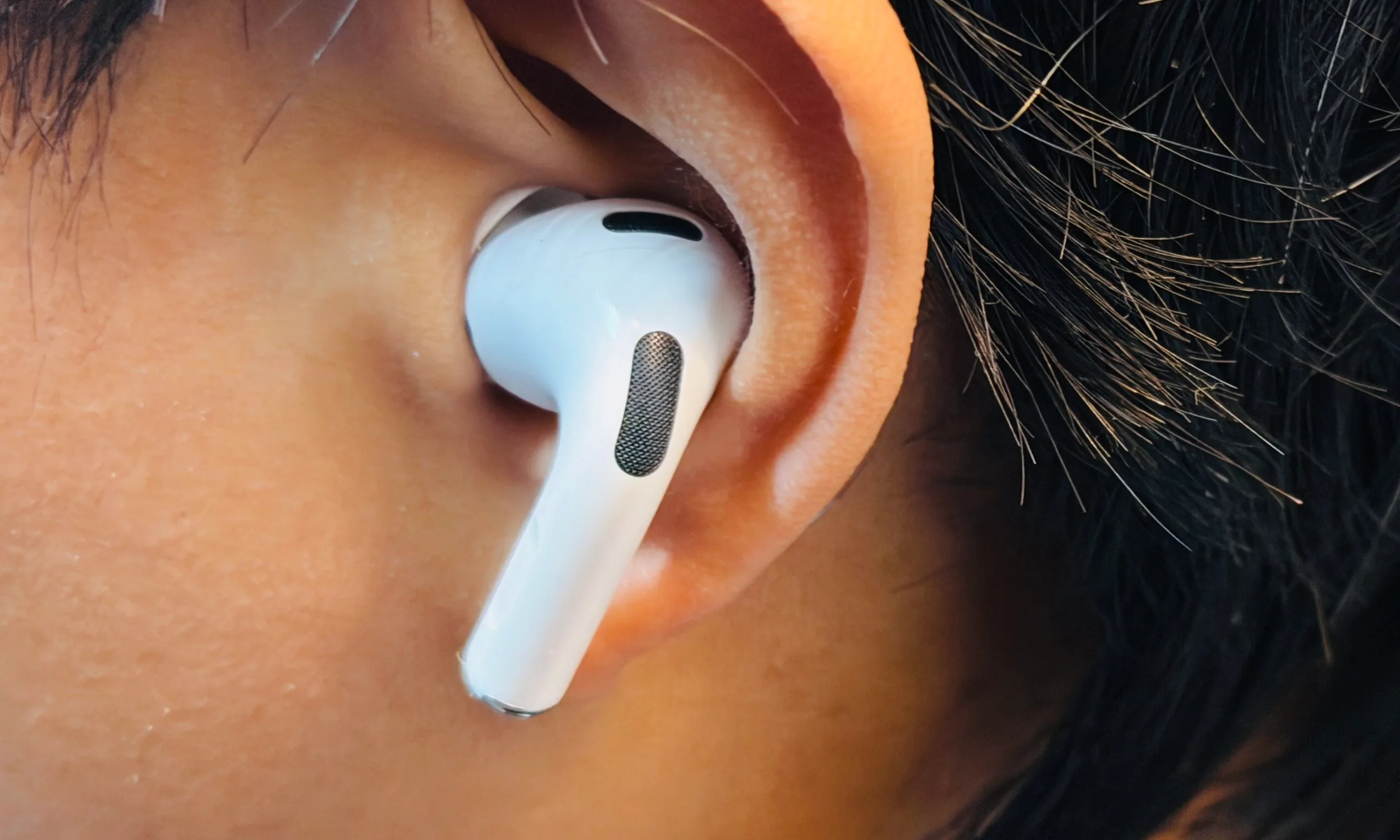
Apple may have accidentally given everyone an early look at its strangest AirPods yet, but the actual wait hasn’t changed. Bloomberg’s Mark Gurman reports that Apple’s camera-equipped AI AirPods remain on track for 2027, despite a leaked video from a developer version of macOS showing the earbuds in action

The leak made them look closer than they are

The leaked video appeared earlier this week inside a macOS update and showed the upcoming AirPods working with Apple’s Visual Intelligence feature. The technology uses the earbuds’ cameras to understand what’s happening around the wearer and provide that visual context to Siri and other AI features. The leak understandably sparked speculation that Apple might be preparing to unveil the earbuds at its upcoming September event.

Apparently, not so fast. Gurman says the product is still off Apple’s 2026 release schedule, with supply-chain and software problems having already pushed it from its original 2026 plan into 2027. Apple employees had reportedly begun advanced testing earlier this year before those problems emerged.

They’re cameras, yes, but not really “camera” cameras

One of the more interesting details is that the tiny cameras aren’t expected to function like conventional cameras. According to Gurman’s sources, they will use low-resolution sensors designed to scan the surrounding environment, rather than capture traditional photos or videos. The idea is to give Siri and Apple’s AI features another way to understand what the user is seeing.

Advertisement

That could make the AirPods considerably more useful as an AI wearable, but it also introduces an obvious privacy headache. The idea of earbuds quietly looking at the world around their wearer has already raised concerns online, particularly over whether other people could be captured without knowing it. Apple is reportedly conscious of the issue, especially after the privacy controversy surrounding Meta’s camera-equipped smart glasses.

It’s also worth noting that Apple has reportedly developed two versions of its camera-equipped AirPods, with the leaked video showing the B790 model based on the AirPods Pro 3, while another version, B798, is a newer AirPods Pro generation with cameras and AI. If Apple sticks to its current plans, the earbuds will arrive in 2027 alongside a packed lineup that could include its first smart glasses, a camera-equipped wearable pendant, a foldable iPhone, and an AI-focused smart home display.

So while the leaked video confirms the camera AirPods are real, don’t expect them to show up anytime soon: 2027 is still the year Apple’s earbuds apparently get eyes.

Source link

Advertisement
Continue Reading

Tech

HYDR8 Will Lead You To Water, But Will You Drink?

Published

on

[Ayushmaan] states up front that most of his free time is spent “building things that probably didn’t need to exist”. Well, this one might be an anomaly, because it seems pretty useful to us.

HYDR8, as it says on the tin, is a wearable that knows when it’s time to hydrate. The impetus for this one was something we all chase: the flow state. [Ayushmaan] would sit down, get deep into work, and look up hours later to to find that he had a headache and a full water bottle. Phone reminders were soon swiped away in annoyance.
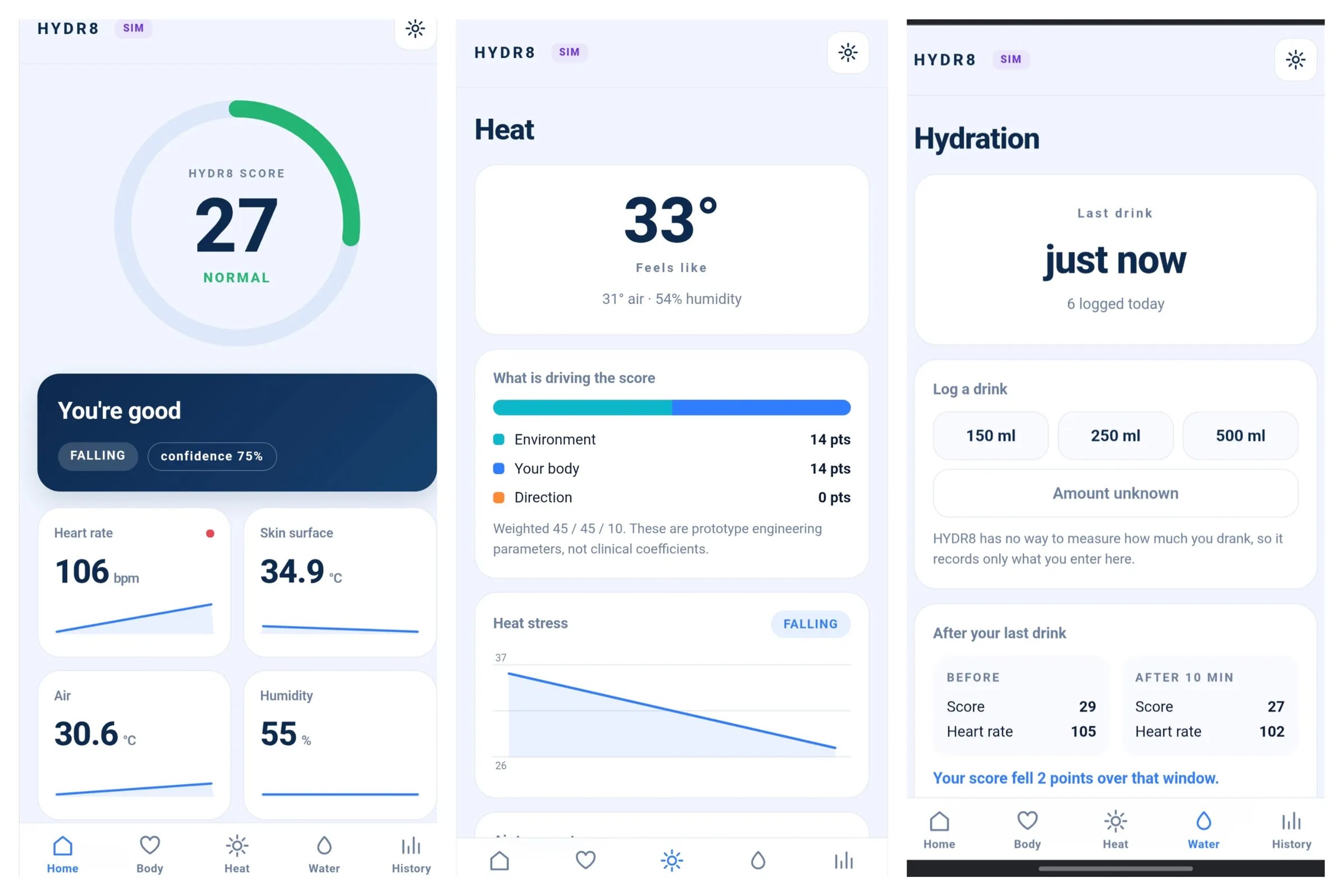
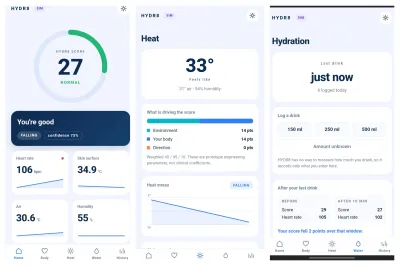
A triptych of screenshots showing the HYDR8 dashboard.This wearable is based on a XIAO ESP32-C3. It reads heart rate, oxygenation, skin temperature, and both the ambient temperature and humidity. It also learns your personal resting numbers range.

Taking all of this into consideration, it generates a heat/hydration stress score between 0-100. The thing is, HYDR8 tells you specifically what to do; sometimes it’s ‘drink water’ and other times, it’s ‘find shade’.

The wearable itself, while somewhat chunky, is pretty simple: it only shows the time and a message when it matters. The ESP32 hosts a full dashboard on your phone.

Advertisement

Keep in mind that this is not a medical device, it’s an experiment, a prototype. It can’t measure how hydrated you are. Instead, it measure hydration stress.

If you don’t want to wear anything, here’s a smart straw that uses a tiny turbine flowmeter and a Hall effect sensor to record the volume sipped, and detect whether the sipper is low on fluids. And if you find yourself under the hot lights of a wet bulb event, here’s how to survive it.


Source link

Advertisement
Continue Reading

Tech

Josh Traded Hundreds of Broken Consoles for $10,690 in GameStop Credit

Published

on

Josh Trade-In Broken Console $10,000 GameStop Credit
Josh arrived at the GameStop in Clackamas, Oregon, with plastic crates stacked high. Inside sat hundreds of consoles that no longer worked. Staff sorted through PlayStations, Xboxes, Nintendo Switches, Game Boys spanning several generations, a Sega Game Gear, a pair of Sony PSPs, and more. Some units were modern enough to still hold residual value even in poor shape. Others dated back years.


Josh Trade-In Broken Console $10,000 GameStop Credit
Josh’s whole collection was traded in at GameStop. The crew ran each console through their system, churning out a bunch of lengthy receipts that accumulated into a sizable pile. Most of the receipts showed the Xbox Ones at $7.92 apiece, the Xbox Series Xs at between $10 and $11, the PS4s at $16, and a few Xbox Ones in good condition fetching approximately $40 each. There were also a lot of older handhelds and Xbox 360s that didn’t bring much, but when you multiply all the consoles by the volume, it adds up quickly.

Josh Trade-In Broken Console $10,000 GameStop Credit
When the last receipt was issued, the total had reached $10,690.06. Everything arrived as shop credit, which is the more valuable option they provide instead of cash. Josh walked away with a large stack of credit cards and a big smile on his face, which GameStop later published on social media. GameStop’s article put it succinctly: there was a guy in Clackamas who traded hundreds of broken systems for that exact amount and thanked him for the junk.

Josh Trade-In Broken Console $10,000 GameStop Credit
The photographs show a mix of Nintendo Switch Lites, old Game Boys, Game Gears, and PSPs. There was also a black and white Xbox 360 toward the bottom of a carton, which was only the tip of the iceberg. The total number of crates required far exceeded the one clear bin shown in the image. The team was able to handle everything on-site, testing what they could and provide trade values based on the console and current demand for components or repair.


GameStop is pretty keen on accepting non-working hardware, which is a way of saying they’ll take your broken systems off your hands. They are always looking for working units to clean and test for resale, as these are sold as refurbished stock. The broken ones are useful for collecting donor boards, housings, and other components to keep other systems running. They end up picking up some merchandise at a nice low price, and the customer simply walks away with some store credit to spend on whatever they want.
[Source]

Source link

Advertisement
Continue Reading

Tech

Five days after buying Cursor for $60bn, SpaceX tried to buy Cognition

Published

on

SpaceX approached AI coding startup Cognition about an acquisition, Bloomberg reports, and Cognition did not engage. Chief executive Scott Wu replied publicly that his company is “not for sale and we haven’t been talking.

SpaceX approached the AI coding company Cognition about buying it, according to Bloomberg, and Cognition did not engage. It would have been the company’s second large AI takeover in a matter of months.

The denial arrived the same day and went further than the report. Chief executive Scott Wu wrote publicly that Cognition is “not for sale and we haven’t been talking.

Those two accounts are close but not identical. Bloomberg describes an approach that was not taken up, alongside continuing discussions about working together, including a possible arrangement for Cognition to use SpaceX’s computing capacity.

Advertisement

Cognition is not cheap either way. It raised $1bn at a $26bn valuation in May and has been in early talks with investors this month at a valuation of at least $40bn.

The context is what SpaceX bought last week. It completed a $60bn purchase of Cursor on 14 August, the largest name in the vibe coding market.

Buying a second one so quickly says something about the first. SpaceX’s AI arm has trailed rivals in selling to businesses and has been through job cuts and restructuring.

Cognition would have arrived with customers attached. Its Devin agent is used by Mercedes-Benz and GE Aerospace, and Bloomberg reports that its commercial progress interested SpaceX as much as its technology.

Advertisement

Elon Musk has set the pace himself. He told staff that AI revenue would out-earn rockets by September, a target that requires enterprise customers rather than research prestige.

The compute talks are the part worth watching. If Cognition ends up renting SpaceX’s GPUs, a company that refused to be bought becomes dependent on the infrastructure of the company that tried.

Wu has said this before, which matters when reading the denial. He told Bloomberg in May that the round he had just closed was what allowed Cognition to “stay independent and continue as an independent business.

For European developers the direction is the story rather than the deal. The tools their engineering teams now depend on are being gathered into an American conglomerate that also launches rockets and runs a satellite network.

Advertisement

Source link

Continue Reading

Tech

AirPods with cameras not coming till 2027, won’t take photos

Published

on

In spite of a recent demo video leaking, the AirPods with cameras are rumored to not be ready for release until 2027. Also, concerns over them becoming “pervertpods” can be set aside.

After Apple accidentally leaked its own video of AirPods with cameras, speculation has been running wild. A new rumor suggests that the timeline for release hasn’t shifted.

According to a report from Bloomberg, Apple is expected to debut a set of AirPods Pro 4 with cameras. These earbuds won’t be able to take photos and won’t be announced until sometime in 2027 when product issues are resolved.

Various leakers have shared their opinions on the matter, with some like Kosutami suggesting the product was cancelled. It seems that may be half true, with the AirPods Pro 3 variety of the product being shelved entirely, while an AirPods Pro 4 version is still in development.

Advertisement

Those speaking anonymously in the report say that the leaked video is for the AirPods Pro 3 variety. This aligns with Kosutami’s assertion that the video was old and accidentally left behind.

The danger of wearable cameras

Since the product won’t be able to capture photos or videos, people shouldn’t worry about them becoming “pervertpods.” The societal rejection and nickname stem from abuses committed by people wearing Meta’s smart glasses with built-in cameras.

Black eyeglasses in sharp focus against a colorful, blurred background of app icons and digital screens, suggesting technology, notifications, and visual clarity through the lenses

Apple’s move towards smart glasses needs to be carefully considered

AppleInsider already speculated about the challenges Apple would face when it announces smart glasses with cameras in the future. It seems the AirPods with cameras may have to battle that issue first.

Advertisement

It seems like a potential solution to the privacy problem of wearable cameras is the one being rumored for these AirPods. Include sensors for AI and accessibility use, but don’t give users the ability to capture photos or video.

Since AirPods are such small and underpowered products, it seems incredibly likely that they won’t be able to capture photos due to physical limitations like battery life and sensor size. The included sensors will be able to get enough data to perceive the world for AI analysis, like scanning the book in that demo, but won’t have enough to produce a pixel-perfect image of the environment.

It remains to be seen if this distinction will be enough for privacy advocates. The problem with Meta glasses is their ability to capture photos and record videos without users’ consent.

Those videos become fodder for social media, whether it’s men abusing women in massage parlors or teen boys bullying teen girls in middle school — there is a reason they’ve become known as “pervert glasses.”

Advertisement

The accessibility aspects of wearable cameras and sensors could be life-changing for many. I doubt Apple will ignore that utility, but I also believe the company won’t release them into the world without real safeguards in place.

Personally, I think the images and video captured from glasses like Meta’s are awful, so I’m okay with Apple shipping glasses without that capability. Preventing the cameras on AirPods or smart glasses from capturing anything at all may be the best way to ensure users gain the utility of things like Visual Intelligence without the damage caused otherwise.

Source link

Advertisement
Continue Reading

Tech

Peacock Is Testing Out a Rewards Program for Subscribers

Published

on

There aren’t too many streaming services that lean into membership perks for their subscribers, but Peacock is testing the waters with a rewards program. On Tuesday, the company announced the launch of a beta test for a select group of Peacock Premium and Premium Plus subscribers, aimed at providing “meaningful recognition, exclusive access, flexibility, and experiences that extend beyond traditional discounts.”

The news arrives the same week the streamer announced a round of price hikes across its plans.

The rewards membership is included with the streaming subscription at no extra cost, and is offered in three tiers based on how long you’ve subscribed to the service. Customers who’ve had an account for three months to one year are in the Gold tier; Platinum members are those with one to three years under their belts; any subscriber who’s had one of the eligible Peacock plans for more than three years is in the Diamond tier.

For now, the beta version has rewards that fall under four categories. NBCUniversal rewards are tailored for Peacock and NBCU programming brands, and currently, subscribers can get discounts on items in the NBCU Shop or Bravo Shop. Partner rewards are tied to perks from the brand’s partners, and at rollout, that includes a free Instacart Plus membership. Subscribers can also tap into Engagement rewards (based on app activity) or Experiential rewards, which are designed to give fans real experiences within the NBCUniversal world.

Advertisement

As the testing phase continues, Peacock plans to expand the program and offer more rewards and benefits connected to Universal Parks, early entry to live events from NBCUniversal and previews of TV shows and films.

Loyalty programs from platforms such as Disney Plus and Crunchyroll give members the opportunity to buy products at a discount, receive exclusive or early access to events or take advantage of savings at partner companies. While Peacock’s rewards program doesn’t cost extra for subscribers, some offers may have small fees attached.

Source link

Continue Reading

Tech

Google gives Gemini Live its own Deep Research upgrade

Published

on

Google is giving Gemini Live a pretty meaningful upgrade with the addition of Deep Research. The feature is rolling out today to all Gemini app users, letting you start a full research task through a voice conversation and come back to the finished report later.

Deep Research has already been available inside Gemini for some time. Instead of giving you a quick chatbot answer, Gemini can dig through multiple sources, follow useful leads, and put together a much more detailed report with citations. The process can take several minutes, but you don’t have to keep Gemini open while it works. Once the research is finished, you’ll receive a notification.

Deep Research already does a lot more than a normal Gemini query

Everyone seems to have a Deep Research tool these days. ChatGPT has one, Claude has one, and Gemini has had its own version for a while. Instead of returning a quick answer, Gemini can search across multiple sources, follow relevant leads, and build a longer report complete with citations. It can also work with uploaded files and information from connected Google services such as Gmail and Drive.

The process can take several minutes, so it makes more sense for questions that need proper digging than something you need answered immediately. You also don’t have to sit around waiting. Gemini can continue working in the background and notify you once the report is ready.

You can move between talking and typing without starting over

The Gemini Live integration also keeps the Deep Research report in context as users switch between voice and text. For example, you could start a research request through Live, lock your phone while Gemini works, and return later to discuss the findings by voice. You can then switch to typing for a follow-up question or refine part of the report without beginning a separate conversation.

Advertisement

Google announced the feature as part of a wider back-to-school update that also includes a student hub, study notebooks, and interactive visualizations. Deep Research in Gemini Live, however, is not limited to students and is rolling out to all Gemini app users.

Source link

Advertisement
Continue Reading

Tech

Valve Steam Frame Videos Show How To Wear The Headset, Perfect The Fit And Sign In

Published

on

Eight leaked Steam Frame videos are informative and kinda silly.

Usually we hate it when a Valve starts leaking, but right now, we’re pretty OK with it. Valve accidentally published eight videos about the Steam Frame VR headset in an ARM Steam Client update today, and before the how-tos could be removed, they were spotted, saved and shared by users. So, Valve published some and is letting the rest run wild online.
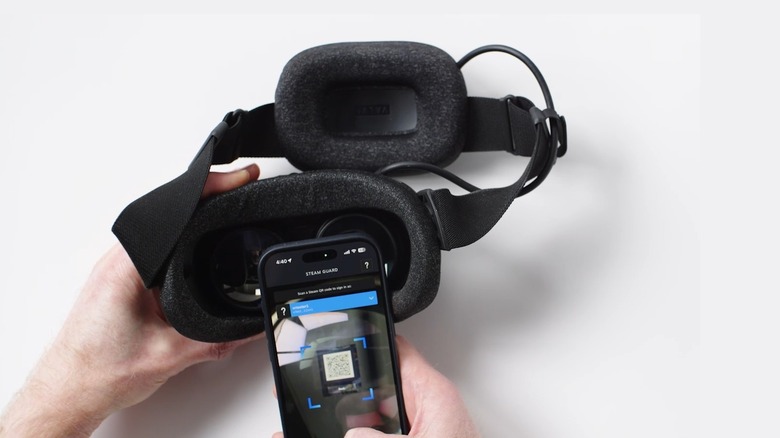
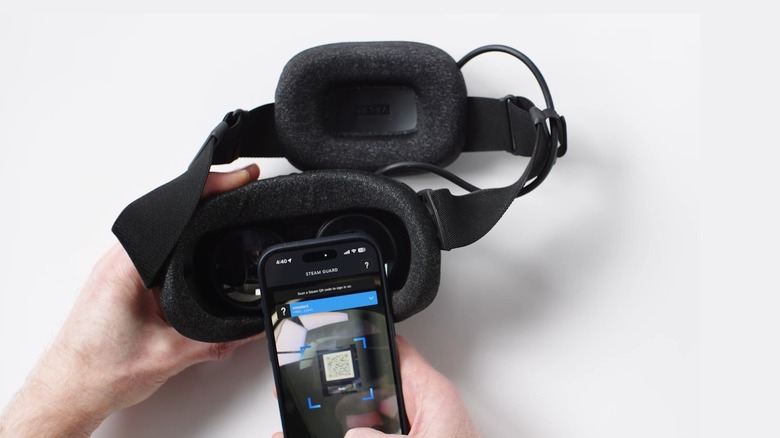
There’s no shocking new information in the videos, but they do offer an in-depth look at the Steam Frame sign-in process, how to wear the headset and what accessories come with it. The videos are all clean, friendly and slightly silly, as if directed by a pre-homicidal GLaDOS. The sign-in video is particularly tongue-in-cheek, showing an optional, lowkey ridiculous process that allows you to scan a QR login code by focusing your phone camera on one lens of the headset. The basic fit video also shows people wearing the Steam Frame over their mouths or as a purse. It’s so crazzzzzzzy.


The most interesting videos show the interpupillary distance wheel, which features a sliding lock, and the ergonomic accessories. These include hand straps for the controllers, an additional support strap that runs across the crown of the head, and an extended light blocker for players with small noses. The Steam Frame’s squishy face gasket and optional eye spacer attach to the headset with magnets for easy modularity, and the charging port lives in a battery pack on the backside of the main head strap.

Advertisement

Here are all eight videos that Valve leaked all over itself today, as gathered by @Neupro5 on X:

The Steam Frame is due to land this summer, according to Valve. One thing that wasn’t included in today’s video dump was the headset’s price, which is poised to be quite high, considering the ongoing RAM shortage that’s driving up costs across the computer hardware space. (The Steam Frame includes 16GB of RAM.) Valve recently put the Steam Machine and Steam Controller on the market, with the Steam Machine priced at $1,049 for the base 512GB model.

Advertisement

Source link

Continue Reading

Tech

Meta’s AI assistant finally lands on Mac, but it has some catching up to do

Published

on

Meta has finally brought its Meta AI assistant to the Mac with a dedicated desktop app, giving users another AI chatbot to keep open alongside all those other tabs. The app can analyze a shared window, answer questions about what’s on screen, generate content, and accept voice dictation across macOS.

Meta AI can actually see what’s on screen

The most interesting part of the Mac app is its ability to look at a shared window and use what it sees as context. Users can ask Meta AI about something on screen, get suggestions, or have it help create content based on what’s visible. It also supports dictation across applications, making it a little more useful as a desktop assistant than simply opening Meta AI in a browser tab.

Meta is also pitching the app at creators and small businesses. Its AI can connect with Instagram and Facebook accounts, Meta advertising campaigns, and Google Workspace, allowing it to analyze things such as post reach, likes, shares and saves, suggest content ideas, and create presentations, documents and spreadsheets. It can also handle recurring tasks such as weekly performance summaries.

But Meta has some catching up to do

Mac users already have plenty of AI assistants to choose from, and Meta’s first desktop effort feels more like catching up than getting ahead. Gemini can already work with shared screen content, while ChatGPT and Claude offer deeper computer-control features that can actually interact with the Mac. Meta could still carve out a useful niche by tying its assistant directly into Instagram, Facebook, and its advertising tools, particularly for creators and businesses.

For now, though, Meta AI’s Mac app feels more like a promising first step than a must-have assistant. Meta says more capabilities are on the way, which could make it considerably more useful over time. The real challenge is convincing Mac users that they need yet another AI assistant sitting on their desktop.

Advertisement

Source link

Continue Reading

Tech

Android Can Now Share Space With the Original Software on the reMarkable Paper Pro

Published

on

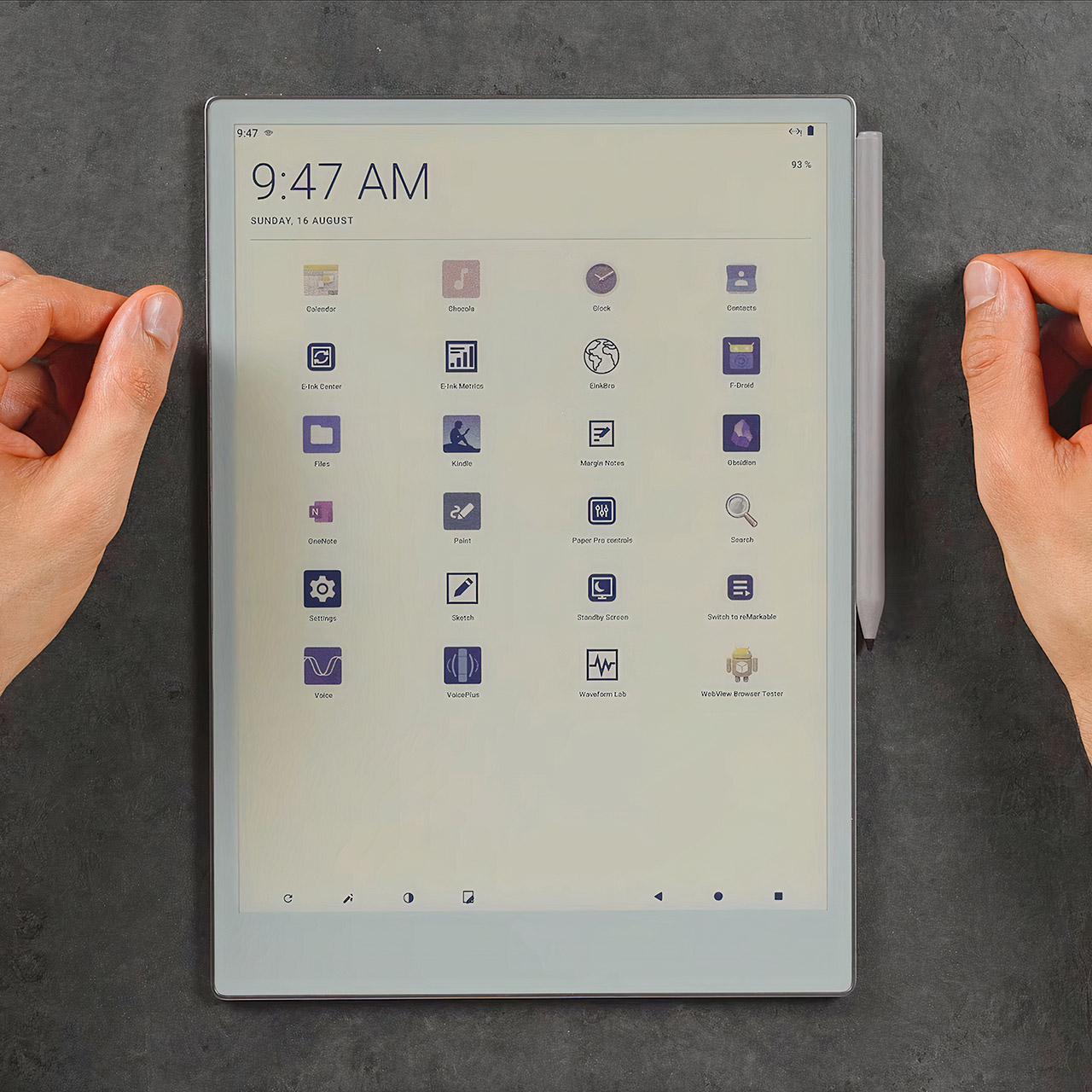
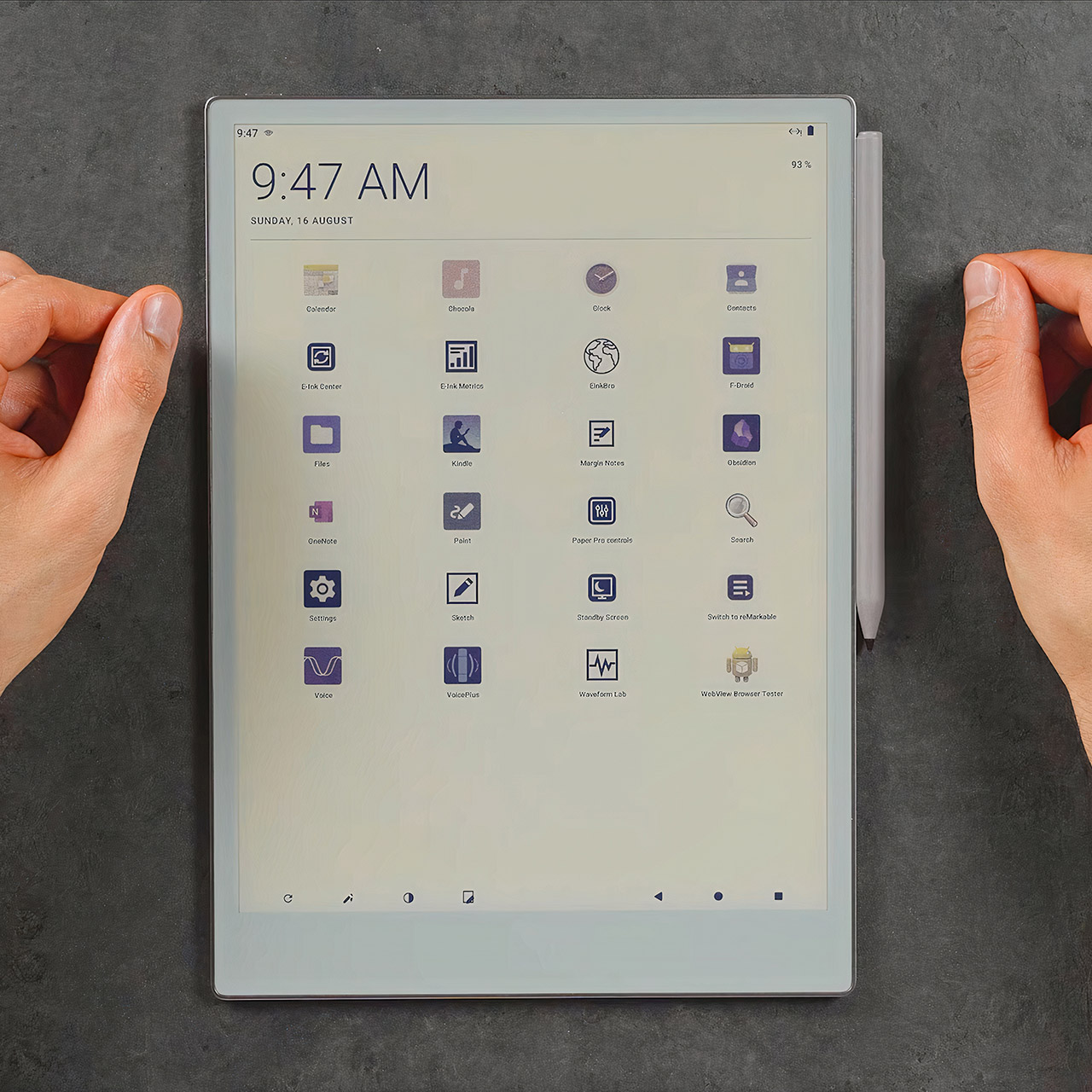
Android Port reMarkable Paper Pro Tablet
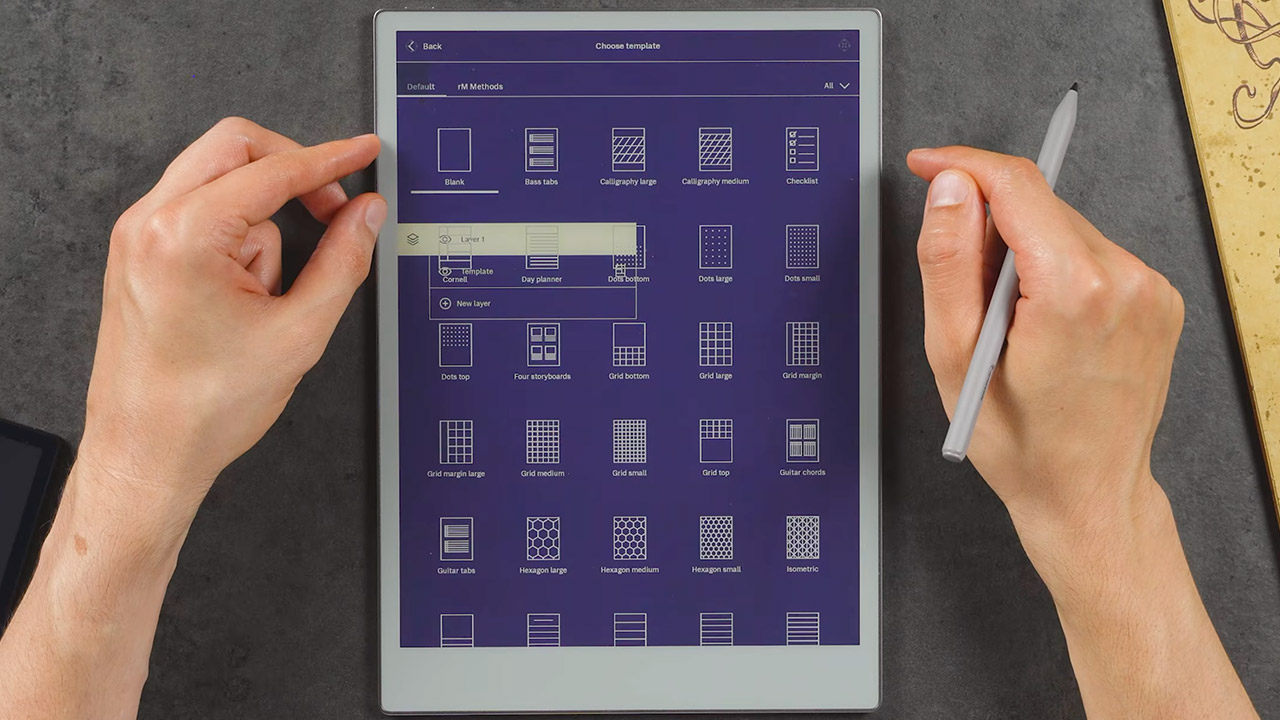
Chalid Raqami has gotten Android 13 running on the reMarkable Paper Pro. The YouTuber known for detailed E Ink device work installed a full Android system that sits alongside the tablet’s factory Linux-based software instead of replacing it.


On the 11.8-inch color E Ink notebook, you can transition between the original focused note-taking interface and Android in roughly 20 seconds, with a simple double tap on the power button. Raqami began the project on Android 12 because the Paper Pro only had 2GB of RAM and a 1.8ghz cortex-a53 quad core processor, but once that version was stable, he changed to Android 13 as it proved out to be a better fit for modern app compatibility without using too much of the hardware.

Android Port reMarkable Paper Pro Tablet
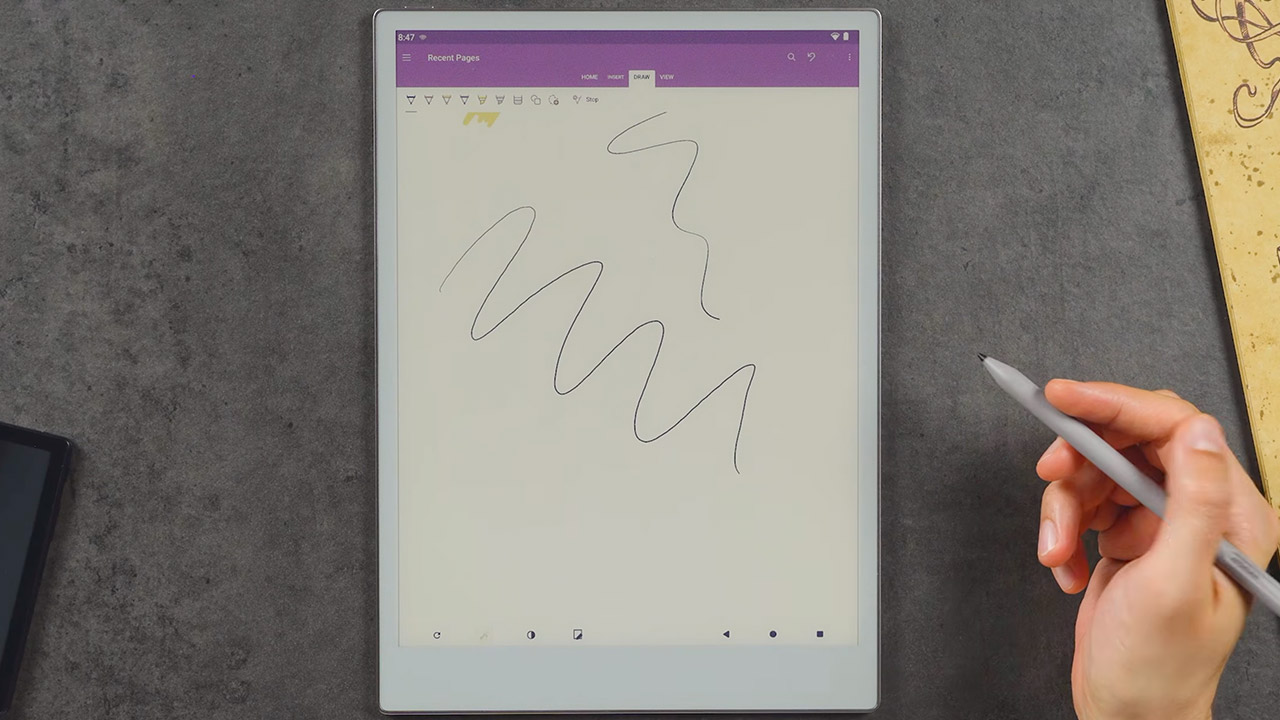
You can now access all of the usual features that standard software does not include. For example, you can use Kindle to read books or comics, internet browsers for quick searches, Microsoft OneNote and other productivity tools that accept pen input, or audiobooks. Bluetooth keyboards can even connect to the tablet without the need for ReMarkable’s expensive keyboard folio. The Wi-Fi, USB, front light controls, audio, and sleep cover all function normally.

Android Port reMarkable Paper Pro Tablet
What about the stylus response? Raqami paid special attention to this, since he created a low latency pen mode that activates from the nav bar, and writing in supported Android apps feels almost as seamless as using the original program. Battery life has also improved, as deep sleep has decreased standby drain to roughly 0.3 percent per hour, allowing for many hundred hours of standby time on a single charge. He also made some modifications to the gpu acceleration, E Ink refresh rates, and memory management to keep the interface useable on the color gallery 3 display, even though the panel is fantastic image quality but not so great at speed.

Android Port reMarkable Paper Pro Tablet
Heavy apps continue to struggle, as obsidian and other memory-intensive tools do not function efficiently, and video playback and rapid scrolling remain clumsy on the E Ink panel. The main goal of the Android version is to plug the gaps in the original software and provide you practical tools, rather than trying to transform it into some kind of traditional tablet.

Android Port reMarkable Paper Pro Tablet
Unfortunately, the port is still a ways away from being ready for public release. For the time being, it only requires dev mode, and any updates to the reMarkable software will erase the Android installation, forcing you to start over from scratch. Raqami is still working on improving the installation and recovery process so that it can be shared more widely; once that is done, he intends to conduct some limited testing with a small group; for the time being, it is more of a personal project to demonstrate how the Paper Pro can maintain its clean writing focus even with some additional tools to make it more practical.
[Source]

Source link

Advertisement
Continue Reading

Trending

Copyright © 2025