Investors hope Anthropic would be valued at $2trn or more – doubling its initial target and dwarfing SpaceX on the way.
Anthropic’s upcoming blockbuster initial public offering could match or exceed funds raised by SpaceX, more sources have confirmed with Bloomberg, as the five-year-old AI company reportedly aims for a listing as soon as the end of August.
Earlier this month, the Financial Times reported investors’ expectations that Anthropic would be valued at $2trn or more – doubling its initial target of $1trn and dwarfing SpaceX as the largest public listing in history.
Details of the IPO plans have been kept guarded, with the company yet to fix on a valuation. Anthropic was last valued at $965bn after a $65bn Series H in May.
Advertisement
Backers – including venture capitalists, other industry giants and institutional investors – have poured nearly $100bn into Anthropic just this year, fuelling the business as it looks to build its own AI chips to keep up with the surging demand for its AI products.
The company’s state-of-the-art Claude models are a repeat headline-maker, competing for industry dominance with its biggest rival, OpenAI, which also hopes to go public soon.
And despite the growing crop of cheaper Chinese models – especially in the open weights category – showcasing similar capabilities, investors seem confident in their support for the US giant.
Last month, AMD pledged $5bn to Anthropic and gave the AI giant access to 2GW of its latest-generation chips. In April, Amazon announced plans to invest $25bn into Anthropic – and Anthropic, in turn, pledged to spend around $100bn on the e-commerce juggernaut’s cloud technologies.
Advertisement
The AI giant does not share figures on its user-base, but Statista placed total Claude monthly users globally at around 245m as of June. Comparatively, OpenAI’s ChatGPT reached 1bn users in May.
These expectations for massive valuations come as a result of Anthropic’s rapidly growing revenue, which reportedly hit roughly $11bn in the second quarter of this year – more than double the $4.8bn of the first quarter.
The company posted a net loss of $42bn for the entirety of 2025. Despite this, backers expect rapidly growing sales to reach an annualised revenue of between $100bn and $120bn this year.
Advertisement
Don’t miss out on the knowledge you need to succeed. Sign up for the Daily Brief, Silicon Republic’s digest of need-to-know sci-tech news.
The UK government has six months to decide whether to terminate a deal worth more than $400 million between the country’s National Health Service and American software company Palantir. If one part of the NHS is already doing without Palantir, politicians are asking, why can’t the rest of the country?
In 2023, the UK commissioned Palantir to develop a “federated data platform” (FDP) that could ingest and organize the tangle of health data produced across the country. According to Palantir and the NHS, the new system is already cutting wait times and the length of hospital stays, and maximizing the use of operating theatres.
The health care board for one part of England, Greater Manchester, has repeatedly declined to adopt Palantir’s FDP, choosing to stick with a home-spun platform developed over the best part of a decade. The board claims it doesn’t need Palantir, that its own platform is functionally superior and more trusted by the public. “[Even] a technically strong platform will struggle to realize value if clinicians, data controllers, patients or the public do not trust it,” Matt Hennessey, chief data and analytics officer at NHS Greater Manchester, tells WIRED. “If we were to fully adopt the FDP … it would be a retrograde step.”
Advertisement
That claim—disputed by Palantir and other FDP advocates—has fed into a national debate over whether the government should seize an opportunity next February to terminate the NHS contract early, instead of allowing it to run until 2031.
For decades, NHS workers have used a combination of digital systems, spreadsheets, paper, and whiteboards to keep track of patients. Sometimes, when a patient moves from one care setting to another, their treatment records are left behind with occasionally deadlyconsequences. Without a way for different types of care providers to share information effectively, NHS administrators have had to base funding and resource allocation decisions on an incomplete patchwork of data. Palantir’s FDP is meant to change all that.
The NHS began to roll out the FDP in early 2024. The platform consists of a national pool of health data meant to help identify care deficiencies, and a bunch of local databases that individual regions can use to perform analyses and develop tools specific to their needs—say, waitlist management or discharge planning. The various components all share the same underlying technology scaffolding, in theory making it possible for tools developed in one corner of the country to be readily adopted in another.
“You can lift and shift. That’s the real power of the FDP,” says Tom Bartlett, an independent IT consultant who previously oversaw the national-level FDP rollout as deputy director of data engineering at NHS England. “The other advantage is that you’ve got a surface for artificial intelligence to work across.”
Advertisement
Within the sprawling NHS, two types of organizations can access the FDP: trusts that run hospitals and local care, and integrated care boards (ICBs), responsible for planning and commissioning health care services at a regional level. Both use data for different purposes, but share the ultimate goal of improving patient care.
One remains a pillar of Linux, while the other keeps the BeOS dream alive
This is a quiet time of year in tech circles – perhaps explaining why, 25 and 33 years ago, the people behind two ambitious operating system projects kicked them off.
Debian
Last weekend, the Debian project turned 33 years old. The Linux kernel first appeared in September 1991, so it was not quite two years old when Ian Murdock announced the new distribution. (Indeed, the term “distribution” itself hadn’t really caught on yet – his announcement only uses the word as an adjective.) Sadly, Murdock died in 2015, before his project became one of the world’s most widely used forms of Linux in the world.
Advertisement
We examined the project’s history and success when it turned 30, and it continues to thrive.
It’s not the oldest maintained distro: that distinction goes to Slackware, which is about a month older – it turned 30 that July. Slackware remains actively maintained, although it has not produced a new release in a while. The Register’s own Slackware enthusiast Richard Speed looked at version 15.0 back in 2022. Since then, we have had Debian 12 in June 2023 and Debian 13 a year ago.
And in case you’re curious, as far as this vulture can see, the first release The Reg covered was Debian 2.1 in 1999.
Haiku beta beckons
Meanwhile, the Haiku OS project keeps on going. The Desktop on Fire blog celebrated with an article on 25 Years of Haiku.
Advertisement
Its development was prompted by Palm buying Be in August 2001, as The Registercovered at the time. A couple of days later, an email modestly titled “OK, let’s start” set the OpenBeOS project in motion, as this history of project milestones describes.
Doubters might note that after a quarter of a century of work, there’s still been no Haiku OS 1.0 release. Fair, but this is not a Linux distro – it is an entirely new OS built from the ground up. Although it now boasts impressive Unix compatibility, it remains quite different: for a start, it is written in C++ rather than C, and its 32-bit x86 version is also BeOS binary compatible. That matters less today, however, because Haiku has developed a substantial software catalog of its own.
The latest activity report from Haiku’s dedicated paid developer “Waddlesplash” discusses the possibility of a new version any time now: “Are we beta6 yet? We have a definite release timeline now: a branch should be made by the end of this week, with a target release date of mid-August. Keep an eye on the forums for details to come about how you can help test!”
Never mind the version number: the project continues to make impressive technical progress. A PowerPC port has been in the works for more than five years, and in July YouTuber ActionRetro demonstrated an AI-assisted build running on the architecture. This joins a preliminary Arm64 port that was demonstrated back in May.
Advertisement
Not Haiku, but adjacent
Several Haiku-adjacent projects are also making progress. The cross-platform BeOS-derived programming toolkit Cosmoe, which we covered in June 2025, is still in active development. Its source code is available on GitLab, and it now builds and runs on Linux, Windows, and macOS.
Another project with overlapping goals, although no apparent direct relationship to Cosmoe, is VitruvianOS. V, as the team calls it for short, is a port of the Haiku display server and desktop to run on a Linux kernel.
Porting the BeOS desktop onto a Linux kernel has been tried before – the first such effort we saw was called BlueEyed OS, back in 2003. V seems to be unconnected with either BlueEyedOS or Cosmoe, but it’s making impressive progress all the same.
However, V is making headway. Since its public debut, the project has produced another half-dozen releases: it is now up to version 0.6.0, which gets considerably further in our testing – it boots to a very Be-like startup screen, with a language selection dialog and the choice to run a live environment or start installation. Sadly, that’s as far as we can go.
The idea certainly has potential. Linux has enviable hardware support now, and given the rivalry between X11 and Wayland, we admire how V sidesteps the dispute: it does not attempt to be either. Instead, it replaces both with a new system based on BeOS’s clean design from 1995 – when the original XFree86 Linux X11 server was only about three years old. ®
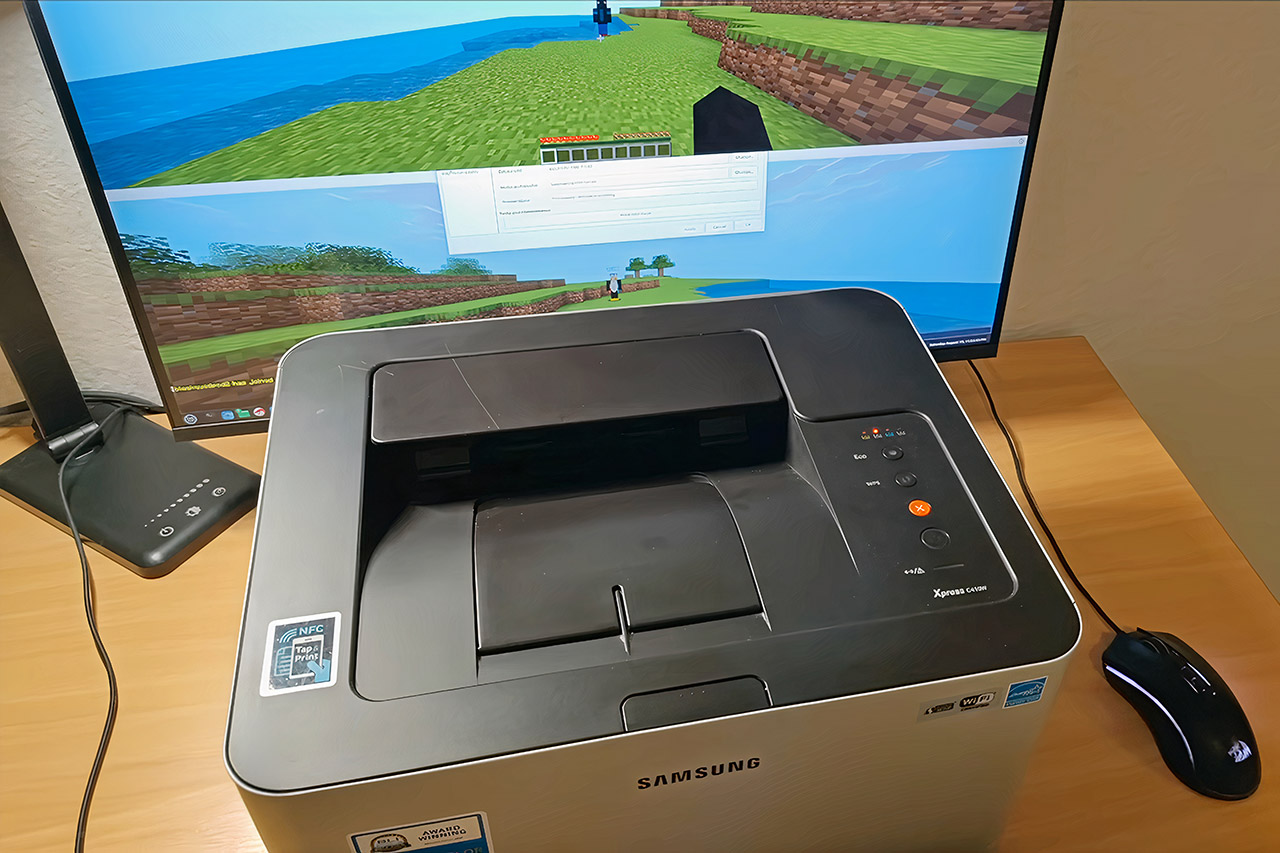
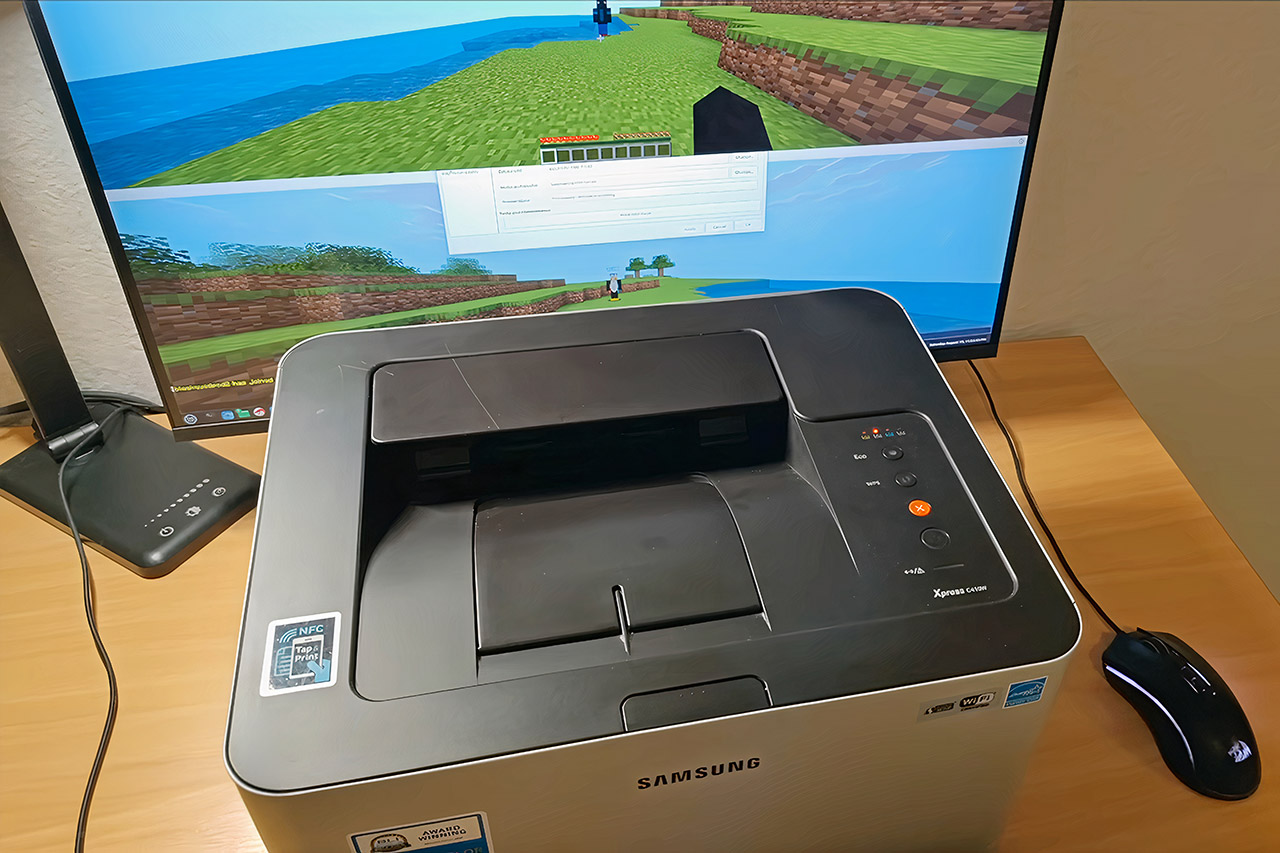
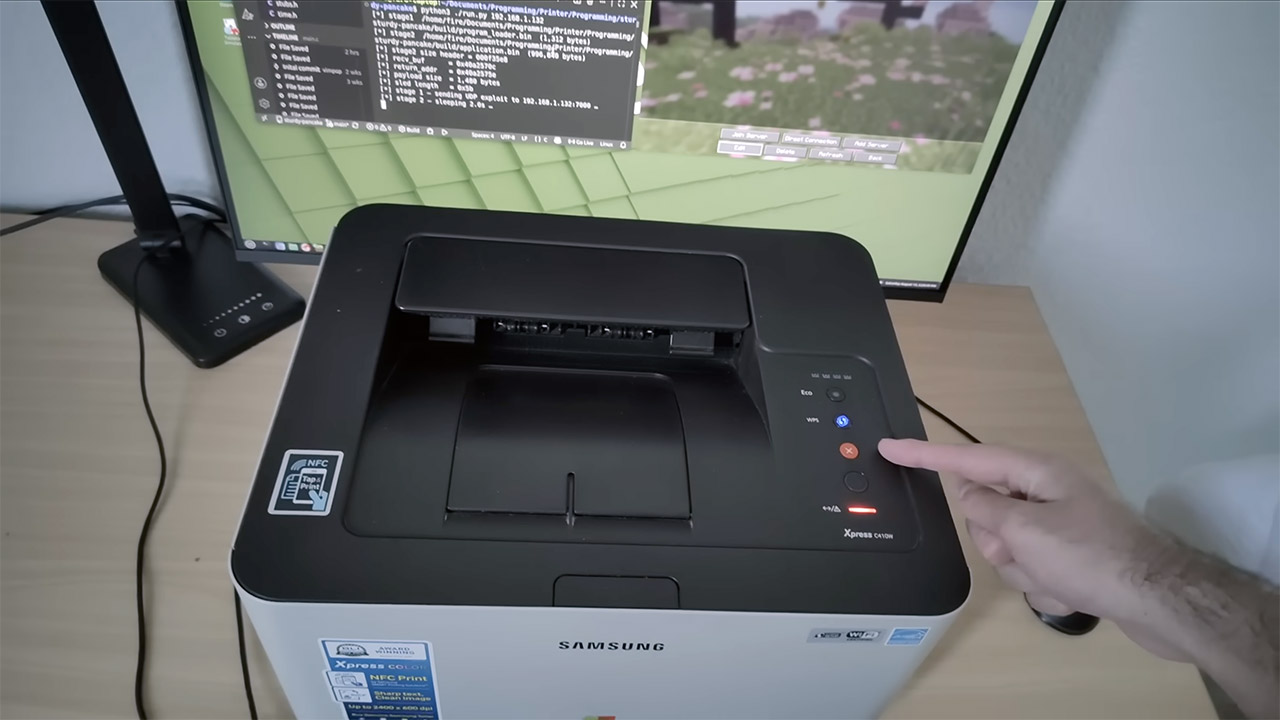
Office printers usually sit there doing their quiet job of putting toner on paper. One Samsung C410W now spends part of its time generating infinite blocky terrain and letting players dig, build, and chat across a local network. The project belongs to a maker known as vimpo, the same person who previously convinced a Wi-Fi light bulb to host a Minecraft world.
After a poll of regular visitors revealed that printers were the most popular choice, the quest began for a networked machine that was ancient but still had valuable debugging tools and was modern enough to communicate with an Ethernet network. The C410W printer met the requirements. It’s a tiny color laser printer from the mid-2010s that still includes wifi and has a firmware revision from December 15th, 2015 (V3.00.02.20).
Portable Wireless Printer – The ETIKEZ D90E is an inkless printer and portable printer that uses advanced thermal technology, requiring no ink, toner…
Bluetooth & USB Connectivity – Connect this D90E portable printer to iPhones or Android via Bluetooth. This wireless printer also works with PC over…
Multiple Printing and Format – The wireless portable printer supports 8.5″ x 11″ US Letter thermal paper (B0GD61HPDC, B0GD5JFC2Q). It meets all your…
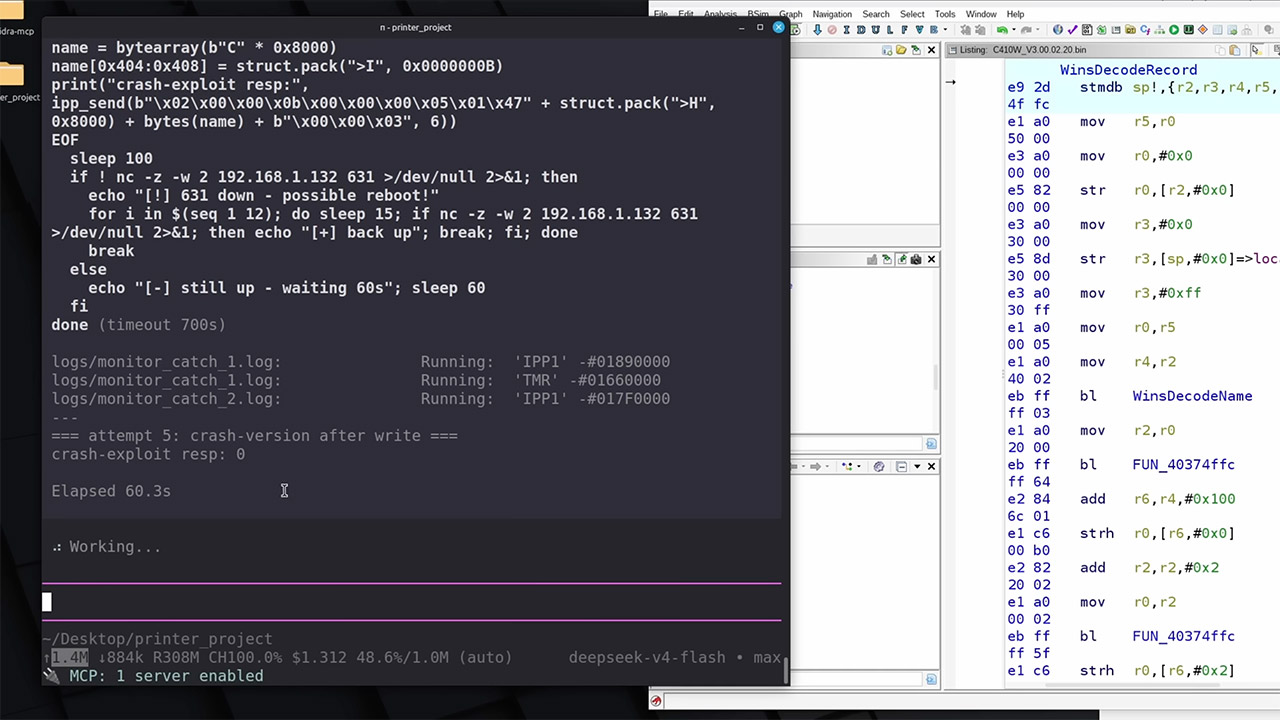
Opening the case revealed a leftover debug serial port, which the manufacturers must have kept in there. The first step was to plug in a USB to serial converter and launch a terminal program to see what was going on behind the scenes. Soon, some standard commands appeared that weren’t really helping much, but pushing the escape key prompted a memory dump instead. Reboot messages described the heap and stack layouts, and the entire 23 megabytes of RAM spilled out into a disassembler for us to work with.
An AI agent spent over 12 hours churning away at labeling functions and trying to figure out where a program was crashing, but in the end it just helped map out the code since it couldn’t find a way to operate the printer. Manual investigation of an obscure other residual protocol proved effective. The printer still had an old port 7000 open, which was reserved for something called the LAN Test Protocol, a manufacturing tool that received XML messages regardless of their size. So he put the payload into one that was just a little too big, which overwrote the buffer, overwrote the program counter, and redirected execution to a known function that flashed the status lights. Once that basic step was completed, the same procedure could be followed to get custom code running on the printer.
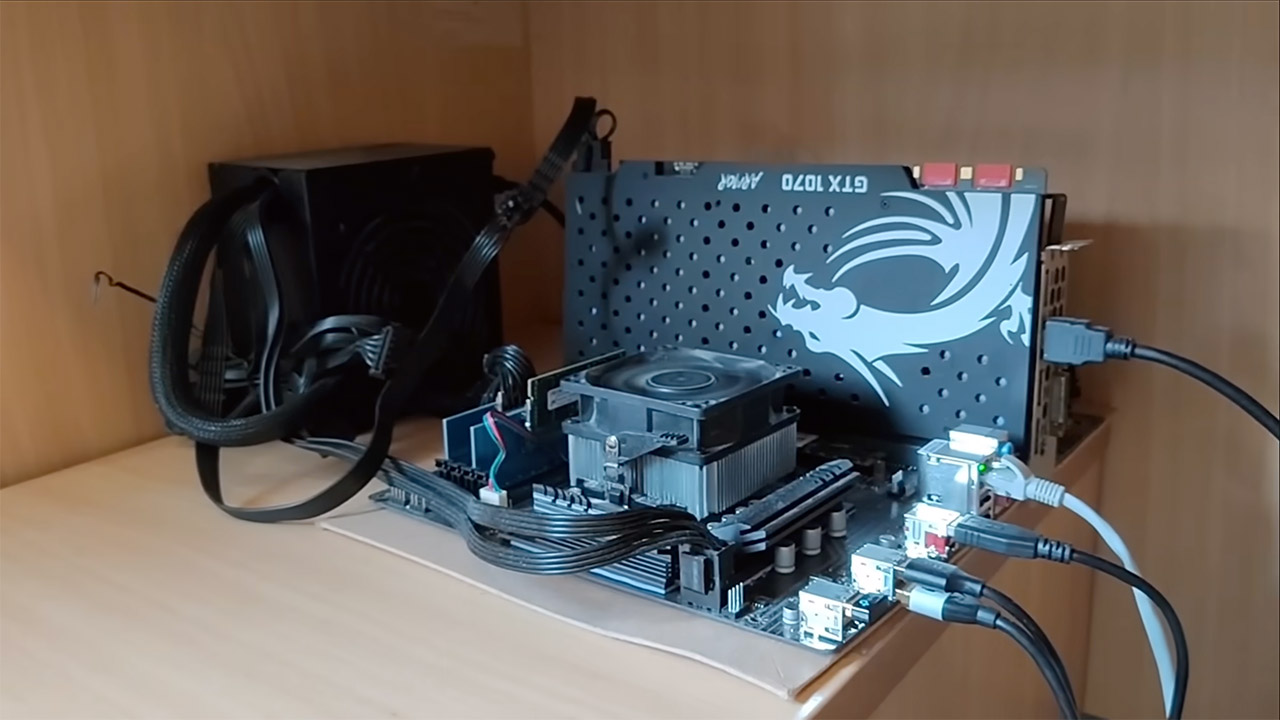
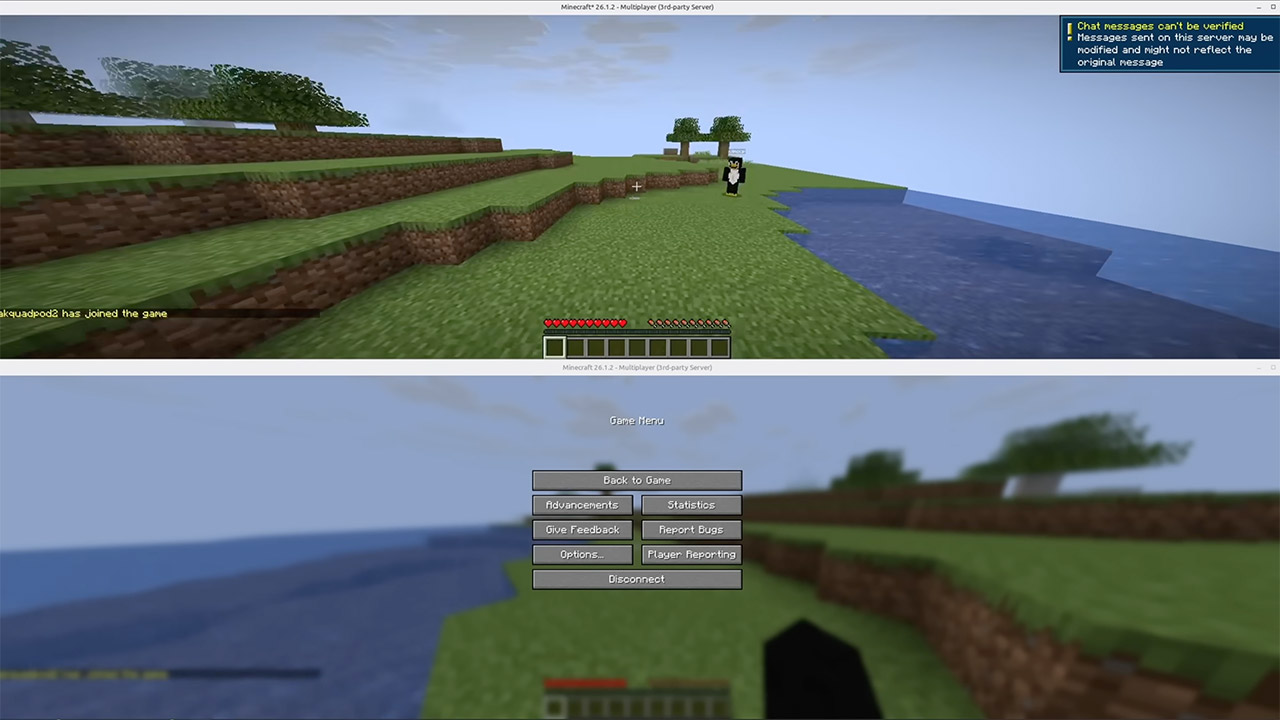
He was running UCraft, a Minecraft server created specifically for devices with limited memory and computing capability. It’s a tiny binary file, at about 46 kilobytes without requiring the user to sign in, and it consumes about 50 kilobytes of memory for a single player. It just about manages to get enough of the protocol sorted so that clients can join in, walk about a procedurally created terrain, punch blocks, and send text messages. By design, it excludes many of the complete vanilla features. The server is compatible with more modern Java Edition clients, and it previously ran on a light bulb microcontroller.
Once you’ve gotten beyond the overflow, the printer’s lights begin to flicker, and a Minecraft world appears at the device’s local IP address. One person can go in and look around, but it’s a sluggish process because chunks take a long time to load and the printer’s small processor is under strain. When you add extra players, the game lags and print jobs crash because the CPU is overloaded.
It is also worth noting that anyone with the same C410W printer and firmware can reproduce the entire thing because the exploit and server code are all available in public repositories. So all you have to do is obtain the necessary equipment and software to get it up and running, and then be willing to put in the time to set it up in the first place. When all is said and done, you end up with a working, if rather problematic, multiplayer universe running inside a device that was initially designed to simply print out words and images on paper. [Source]
Citrix has warned customers to immediately secure their systems against two vulnerabilities affecting NetScaler Gateway secure remote access solutions and NetScaler ADC networking appliances.
The most severe of the two, tracked as CVE-2026-19490, can allow remote attackers without privileges to bypass authentication when the appliance is configured as an AAA virtual server or as a Gateway (SSL VPN, ICA Proxy, CVPN, RDP Proxy), depending on the NetScaler firmware version and whether SAML Action is configured.
Admins can check if an appliance is vulnerable to attacks targeting CVE-2026-19490 by inspecting their NetScaler configuration for SAML action configuration (add authentication samlAction .*) string and Auth or VPN vserver (‘add authentication vserver .*’ and ‘add vpn vserver .*’) strings.
The second, a high-severity memory overflow security flaw tracked as CVE-2026-19489, can be abused by remote unauthenticated threat actors in denial-of-service (DoS) attacks when SIP ALG (Session Initiation Protocol Application Layer Gateway) is enabled on a large-scale NAT group configuration.
Security teams can determine whether Citrix NetScaler appliances on their network meet the preconditions for CVE-2026-19489 exploitation by inspecting their configuration for the “add lsn group.*sipalg.*” string.
Advertisement
Citrix advised customers to upgrade vulnerable NetScaler ADC and NetScaler Gateway appliances to:
NetScaler ADC and NetScaler Gateway 14.1-73.32 or later,
NetScaler ADC and NetScaler Gateway 13.1-63.21 or later,
NetScaler ADC FIPS 14.1-73.32 FIPS or later,
or NetScaler ADC FIPS and NDcPP 13.1-37.277 or later, as applicable
“The bulletin applies to supported versions of customer-managed NetScaler ADC and NetScaler Gateway, including certain FIPS and NDcPP builds. SecurAccess ZTNA Hybrid (formerly Secure Private Access Hybrid) deployments that use customer-managed NetScaler instances are also affected and should be upgraded to the recommended builds.”
CISA added the CVE-2026-3055 vulnerability to its Known Exploited Vulnerabilities (KEV) Catalog on March 30 and ordered federal agencies to secure vulnerable Citrix appliances within three days.
Advertisement
Over the last five years, the U.S. cybersecurity agency has flagged 22 Citrix vulnerabilities as exploited in the wild, six of them also abused in ransomware attacks.
The ShadowServer Foundation now tracks over 22,000 NetScaler ADC and nearly 1,800 NetScaler Gateway instances exposed online. However, it does not provide information on the number of honeypots or how many may be vulnerable to attacks targeting CVE-2026-19489 and CVE-2026-19490.
Overall prevention scores can hide what happens after initial access. Once attackers are using valid credentials, prevention drops sharply.
The Blue Report 2026 measures defenses technique by technique across 338 million simulations run in customer production environments.
Your clients receive thousands of emails every day, but all it takes is one convincing message to turn a seemingly harmless email into a security incident you will be responsible for cleaning up.
AI has fundamentally changed phishing, making it easier to launch, harder to detect and far more convincing than traditional email filters were built to stop.
With a large language model and a few publicly available LinkedIn profiles, attackers can generate highly personalized phishing emails in minutes. Harvard Business Review found that AI-generated spear phishing campaigns achieved a 54% click-through rate, matching those of human experts at a fraction of the cost.
Understanding how these attacks work and why traditional filters struggle to stop them is essential to protecting clients before a single email becomes a costly breach.
Advertisement
Inside an AI-powered phishing campaign
Every AI-assisted phishing campaign follows the same basic path. AI simply makes each stage faster, more convincing and much harder for traditional defenses to detect.
Reconnaissance: AI finds the right target
Attackers use AI to scan LinkedIn, company websites and other public sources to build a profile of a specific employee. Within minutes, they know who that person works with, what projects they’re involved in and how they communicate.
Why this matters for MSPs: Public information gives attackers everything they need to create a believable phishing email before it ever reaches your client’s inbox.
Content generation: AI writes an email that looks legitimate
AI uses that information to create an email that appears to come from a trusted colleague, customer or vendor. Every message is personalized, contextually relevant and free of the spelling mistakes or awkward phrasing that once made phishing easy to spot.
Advertisement
Why this matters for MSPs: The biggest challenge is no longer identifying obvious phishing emails. It’s protecting clients from messages that look and read like legitimate business communication, making users far more likely to trust them.
Delivery and evasion: The email gets through
AI also helps attackers evade detection by creating a unique version of every email — a technique known as polymorphic phishing. It continuously changes subject lines, sender details, formatting and content, while using trusted cloud services, QR codes and redirect chains to bypass traditional filters.
Why this matters for MSPs: Traditional email gateways rely heavily on signatures and known indicators of compromise. When every email is different and constantly changing, those indicators become far less reliable, allowing more phishing emails to reach your clients.
Post-compromise activity: The damage happens fast
If a user clicks a malicious link or enters their credentials, the attack escalates quickly. Attackers can steal session tokens, create mailbox rules to hide their activity and begin moving through the client’s environment within minutes.
Advertisement
According to IBM’s 2024 Cost of a Data Breach Report, phishing is the leading cause of data breaches, accounting for 16% of incidents and costing organizations an average of $4.8 million per breach.
Why this matters for MSPs: By the time a phishing email reaches the inbox, prevention alone is no longer enough. Protecting clients requires visibility beyond email, with endpoint detection, identity monitoring and rapid response working together to stop attackers before they can expand their access.
Explore the latest phishing trends and AI-driven email threats. Learn practical strategies to strengthen your email security.
Download Kaseya’s 2026 Email Security Report to learn about this year’s emerging cybersecurity threats.
AI can disguise a phishing email, but it can’t disguise the identity, endpoint and user activity that follows. That’s where modern detection makes the difference.
Monitor behavior, not just emails
Every successful phishing attack leaves signs that something isn’t right. Instead of just examining the email, monitor for unusual account and user activity, such as:
A new forwarding or mailbox rule, which sends messages to an external address, especially immediately after a login from an unfamiliar location.
Impossible travel, where the same account logs in from two different countries within minutes.
Repeated multifactor authentication prompts that the user didn’t initiate, often indicating MFA fatigue or push bombing.
Behavioral analytics and anomaly detection help surface these warning signs, even when the phishing email appears completely legitimate.
Correlate activity across the environment
A single suspicious login or endpoint alert may not mean much on its own. But when identity, email and endpoint activity are correlated, it becomes much easier to recognize an active phishing attack before it escalates. Look out for:
A user signing in from a trusted device, but the endpoint immediately begins launching PowerShell scripts or other unusual processes.
A user successfully logging in, then immediately attempting to access systems, applications or data they’ve never used before.
A sudden spike in outbound emails from an account that normally sends only a handful of internal messages each day.
Automated threat correlation connects these signals across email, identities and endpoints, helping MSPs identify active phishing attacks faster while reducing alert fatigue.
Detect faster, respond sooner
The sooner an attack is detected, the less opportunity an attacker has to expand their access. Once credentials are compromised, every minute counts.
Advertisement
Automatically flag and investigate suspicious account activity before attackers can move laterally.
Isolate compromised endpoints to stop malware from spreading.
Disable compromised accounts or terminate active sessions before additional data is accessed.
Faster detection and response reduce attacker dwell time, improves incident response efficiency and helps MSPs contain phishing attacks before they become costly breaches for their clients.
Traditional email gateway
Advertisement
Modern phishing defense
Blocks known malicious senders and links
Advertisement
Detects suspicious identity, email and endpoint activity
Focuses on threats before delivery
Advertisement
Continues monitoring after delivery
Advertisement
Relies on known phishing signatures
Detects account compromise, session hijacking and lateral movement
Advertisement
Prevents malicious emails
Advertisement
Detects, contains and responds to active attacks
What MSPs can do this week
Here are practical steps MSPs can take to reduce risk and strengthen their clients’ defenses
Modernize security awareness training: Run phishing simulations that look like what AI produces now, not the misspelled, generic templates from five years ago. Training built on old examples teaches people to watch for the wrong thing.
Verify high-risk requests: Require a phone call or a separate channel to confirm any wire transfer, credential reset, or vendor payment change, no matter how convincing the email looks. This one habit stops most business email compromise attempts cold, because it doesn’t rely on anyone spotting anything.
Monitor account activity after delivery: Don’t stop at the inbox. Monitor for suspicious mailbox rules, logins from unfamiliar locations, impossible travel and repeated MFA prompts. These behaviors often provide the earliest indication that an account has been compromised.
Measure response time, not just resolution time: Measure how long it takes to detect and contain a suspected compromise. Treat that number with the same weight as ticket resolution time. A faster response window is what limits the damage once a phishing email gets past the gateway, and one eventually will.
AI changed phishing. MSPs need to change their defenses
AI has changed phishing from a filtering problem into a detection problem.
As phishing attacks evolve, the advantage belongs to MSPs that can detect and respond before a compromised inbox becomes a client-wide breach.
We’ve got an AppleInsider staffer inside Amazon’s new drone delivery range. After trying it out on Thursday, we can tell you that it’s effective, and we’re going to use it again.
Earlier this week, Amazon greatly expanded the service area of its drone delivery service. A little napkin math suggests that the airborne delivery service now covers about 3500 square miles more than it did a few days ago.
And, as part of this expansion, one of our staffers is now inside the footprint of that service.
Partly out of curiosity, and partly out of need, he ordered something to be delivered by drone. It wasn’t an iPhone or AirPods, as Amazon suggested, no, but that didn’t seem prudent to try first.
Advertisement
The box the package shipped in
An initial delivery time was given, and Amazon was close enough to that estimate. Delivery was only about 10 minutes later than expected. The drone approached from the north of his location, and buzzed into place.
It hovered for a moment. With a light click, and continued mad hornet buzzing, it dropped the package about four feet, accurately, onto the selected front yard landing zone.
We did see, though, that the package rolled a bit before it settled into place. Your mileage may vary on this, of course, depending on the slope of your yard, the surface it lands on, and the angle of impact of the box.
Advertisement
The drone, leaving, after having dropped its payload.
You get to fine-tune the drop zone on your property when you order, some, but don’t expect it to be precise enough to drop it on a second-floor balcony. It’s probably not wise to bombard your driveway or your roof with your Amazon box.
Time and costs for Amazon Drone delivery
All told, from order to delivery took about an hour and a quarter, with it launching about a half an hour after the order was placed. The box was better packed than most of Amazon’s packages these days, which you’d probably expect since they know they’re dropping it from a bit of a height.
Amazon drone delivery packaging for a very small and light item
Advertisement
Amazon deliveries by vehicle within an hour cost $9.99 in some metro areas. If you can accept delivery within three hours, it’s generally $3.99. This incurred no additional cost, for now, at least.
Limits on shipped items are about five pounds, and the package has to fit in a box about the size of a shoebox, as seen above. Our package contents weigh about the same as an AirPods 4 box.
So far, we’re pretty impressed with this service. We’re also sure there’s going to be incidents of packages rolling under cars and the like.
Plus, you probably want to be home, since the box will be in your yard somewhere.
Advertisement
For now, though, so far, so good. We’ll do it again. Just maybe not with a $1000 iPhone.
After imagining explosions, blackouts, and daring escapes, this techie decided the best thing to do was just not doing the job
ON CALL Making it through a working week can feel like a dangerous adventure. That’s why The Register offers a little certainty and safety by always using Friday morning to share a new edition of On Call – the reader-contributed column sharing your tales of tech support.
This week, meet a reader we’ll Regomize as “Socrates,” who many years ago was the “fresh-faced manager of a small software department.”
Advertisement
Socrates’ employer had sold some monitoring hardware to a client that made equipment for power stations, but whoever installed the system had neglected to document it properly.
Socrates’ boss asked him to visit the site and bring the client up to speed.
“In those days I considered myself to be a bit of a programming hot-shot, and a visit to a power station sounded really interesting, so off I went,” Socrates told On Call.
He therefore drove to the plant, presented himself at the security gate, and was eventually led to something called a “turbine overspeed detector.”
Advertisement
“This power station was seriously big and impressive; massive rotating machines humming away, with barely anyone around,” Socrates wrote. “In a dark remote corner, there it was, the equipment I had come here to see: a dusty CP/M computer with various I/O cards, connected to wiring that snaked off into the far distance.”
But Socrates had no idea what it did.
In his email to On Call, Socrates pointed out that at the time of this story, Tom Cruise was yet to appear in a Mission:Impossible movie, and The Matrix was still years from release.
But his memory of these events is is somehow entangled with both franchises.
Advertisement
“I didn’t know much about electricity generation, but I did know that a turbine is a thing with pointy blades, that are pushed around by steam to drive a generator,” he wrote. “And these turbines were absolutely enormous, and the thought of them overspeeding was truly scary.”
“You know the scene in Mission:Impossible where Tom Cruise is on the back of a train, pursued by a helicopter that crashes with its rotor blade just inches from Ethan Hunt’s throat?” he asked. “That image would have been uppermost in my mind; knife-like turbine blades being ejected in all directions, requiring all my Matrix-like skill to dodge them as they headed my direction.”
He then reasoned that an overspeed event would probably shut down the turbine – before imagining cascading faults blacking out an entire city.
Keen to avoid either scenario, Socrates sat down at the keyboard, opened the relevant software, and vowed not to break anything.
Advertisement
He got into the code and found it was “horrible.”
“Despite my tender years, I’d gained some exposure to well-structured programs, and this was truly awful,” he told On Call. “There were plenty of random GOTOs, a lot of I/O accesses to random addresses, with arithmetic, ANDing and ORing with arbitrary-looking numbers.”
And all without a single comment to help Socrates understand what he was seeing.
As he pondered what to do, only one sensible course came to mind: “Back away carefully from the keyboard and leave the system as-is.”
Advertisement
So that’s what he did.
Socrates now rates the experience as an important life lesson.
“Some things are best left alone,” he told On Call.
Have you bailed out of a tech support job? If so, click here to email us what happened and why. We promise not to give up on your story. ®
Scott Thurlow is founder of Last Fall Back Washington. (Photo courtesy of Scott Thurlow)
Scott Thurlow isn’t a morning person. So much so, he wants to change state law.
In 2019, Washington lawmakers voted to put the state on permanent daylight saving time if Congress ever allows it. Thurlow has a different idea: Stop changing the clocks now, even if that means staying on Pacific Standard Time for a while.
Thurlow spent 32 years at Microsoft in product management for franchises including the original Outlook, Teams and, most recently, Copilot. A constant stressor was working across time zones.
“We always dreaded the time zone changes on either end because it was meeting chaos,” he said. “Talking with India, which is like 12 hours off, went from really bad to worse.”
In July, Thurlow took part in Microsoft’s voluntary retirement program, and was featured in a GeekWire story along with several others. Last week, he launched Last Fall Back Washington, a nonprofit campaign built around what he’s calling the Last Fall Back Act. The idea is straightforward: Washington should move to permanent Pacific Standard Time immediately.
Advertisement
Thurlow’s campaign is timely: British Columbia is dropping its seasonal clock changes and moving to permanent daylight time, meaning Washington will fall an hour behind its northern neighbor from November until March. Thurlow argues the difference could complicate everything from cross-border travel to transportation schedules and business meetings.
His own proposal would make that gap year-round at first, since Washington would sit on the winter clock while B.C. stays on the summer one. He accepts the tradeoff: stop the switching now, and get back in sync later if Congress makes daylight time permanent nationwide.
He also points to research linking the spring clock change with short-term increases in heart attacks, workplace injuries and fatal crashes — in 2020, one study published in Current Biology reported that fatal crashes increase by about 6% in the week after the spring time change.
Under the federal Uniform Time Act, states can opt out of daylight saving time changes, but only by staying on standard time. Permanent daylight time requires an act of Congress. Permanent standard time does not, which is how Arizona and Hawaii do it. That’s the path Thurlow’s proposal would take.
Advertisement
“If and when Congress ever really does act,” Thurlow said, “we would snap into daylight time.”
Done waiting for Congress
In July, the House passed the federal Sunshine Protection Act by a 308-117 vote, sending the bill to the Senate. The legislation would make daylight saving time permanent nationwide, but the Senate has not taken it up. Thurlow isn’t counting on that changing — although President Trump is pushing for it.
“It’s going to end up withering on the vine and stalling,” Thurlow said.
Washington’s Legislature has also considered permanent-time legislation, but bills introduced since 2022 have stalled without reaching a floor vote.
Advertisement
Washington has two types of citizen initiatives: an initiative to the people, which goes directly to the ballot, and an initiative to the Legislature, which gives lawmakers the opportunity to pass the measure themselves or send it to voters.
Thurlow plans to spend the coming months building support for the latter approach and pushing legislators to introduce and pass the Last Fall Back Act when the 2027 session begins.
“The single most effective thing we can do is have lots of people contacting their legislators,” he said.
If lawmakers again decline to act, he expects to file an initiative to the Legislature around March 2027. The campaign would then need to collect about 386,000 signatures, providing a cushion above the 309,000 valid signatures required. If lawmakers still don’t pass the measure, it could go before voters in November 2028.
Advertisement
Experts are divided
Experts seem to agree Washington should stop changing its clocks — but disagree on how to go about it.
University of Washington law professor Steve Calandrillo has long advocated permanent daylight time, and has testified against Washington legislation that would put the state on standard time. He told GeekWire he appreciates Thurlow’s efforts to pressure Congress, but doesn’t want Washington to spend years on standard time while waiting for federal action.
“I don’t want to see us go in the wrong direction,” he wrote in an email.
Under Washington’s current system, daylight saving time effectively functions as the state’s default for about two-thirds of the year. Permanent standard time would move sunset an hour earlier throughout that period, Calandrillo argues, creating safety risks and other costs.
Advertisement
Evening darkness is more dangerous than morning darkness, he argues, because more people are traveling and spending time outside in the evening — and there’s a greater chance of crime.
Other UW researchers have split on the question. Biology professor and circadian researcher Horacio de la Iglesia has testified in favor of permanent standard time.
Environmental and forest sciences professor Laura Prugh testified against the 2024 bill alongside Calandrillo, citing research she co-authored that modeled about an 8% increase in deer-vehicle collisions in Washington under year-round standard time. She also worked on a study across 23 states that showed collisions with deer jump by 16% in the week following the autumn clock change.
National groups are similarly divided. Save Standard Time has supported Washington legislation favoring permanent standard time, while Lock the Clock has pushed Congress to give states more flexibility rather than taking a position on which permanent time is best.
Advertisement
Temporary costs for long-term gains
Thurlow’s campaign acknowledges the tradeoffs: permanent standard time would put Washington out of sync with Oregon and California for much of the year, shorten summer evenings and potentially increase deer collisions.
But those costs would be temporary, he argues. The twice-yearly clock changes, by contrast, would continue indefinitely unless someone breaks the stalemate.
Thurlow also expects opposition over winter darkness, particularly concerns about children walking to school before sunrise. His response is that many Washington students already do so under the current system, and that changing school start times can address the problem. Seattle and other districts have already adjusted schedules for other reasons.
“There’s sort of a set of gut reactions and instant responses that people have, which may not be grounded in truth,” he said.
Advertisement
Thurlow is betting that enough Washingtonians are tired of changing their clocks that the campaign can turn a decades-old annoyance into a political issue — and give the state a way out before Congress decides on the issue. His campaign is in early stages, with a handful of signups through his website.
Pew found strong signs of AI authorship in around 10% of a random sample of webpages in July 2026, rising to more than a third among pages published since ChatGPT’s release. Commercial domains carry most of it, at about 10% of .com against roughly 1% of .edu and .gov.
About a tenth of the web now shows strong signs of having been written by a machine. Pew examined a random sample of 10,000 pages in July 2026 and found roughly 10% carrying AI authorship signals.
The headline figure everyone is quoting is the other one. Among pages published since ChatGPT arrived in November 2022, more than a third show those signals, which is a different claim about a much smaller slice of the internet.
The distinction matters because the web is old. Most of what exists was published before the models did, so a page-level average across everything understates what is happening to new writing.
Advertisement
The method is worth stating plainly. Pew classified nearly 500,000 English-language pages from the Common Crawl archive between January 2021 and July 2026 using Open Pangram, the detector Substack adopted to catch machine-written newsletters.
Detectors get individual documents wrong, and Pew says so. Its argument is statistical, that across hundreds of thousands of pages the patterns separate reliably even when any single verdict might not.
The domain breakdown is the real finding. Around 10% of .com pages showed AI authorship against 4.6% of .org and roughly 1% each of .edu and .gov.
That is a map of where writing is a cost rather than a purpose. Commercial pages exist to be found, and search-optimised text is the cheapest thing a language model can produce.
Advertisement
Pew also catalogued the tells, which will be uncomfortable reading for anyone with a house style. Em dash use has doubled since 2023, Oxford commas are up 63%, and the words “delve” and “pivotal” keep turning up alongside the construction “it’s not just X, it’s Y“.
Platforms are already building detection into the plumbing. LinkedIn says its own system identifies generic content with 94% accuracy, and arXiv now bans researchers who submit unchecked AI text.
Volume is not the same as visibility, which is the sane part of this. Separate research from Graphite found AI articles approaching half of newly published ones, while human-written pieces still dominate Google results and AI citations.
What has actually changed is the default assumption. A page published this year was probably touched by a model somewhere, and the industry’s response is to sell everyone tools to check.
The Steam Controller is a device capable of many interesting feats. It’s intended to act simply as an input device, and yet, it can run games all on its own. As [Owen Feldman] has demonstrated, by having the Steam Controller play Zork.
[Owen] took quite an interesting route to get the there: he wrote a Rust program to emulate the Intel 8080 CPU and CP/M, as one does. This was ported to the Steam Controller, which emulates the CPU and memory on its own internal processor. I/O is streamed over USB, since the Steam Controller lacks a keyboard or screen. The CP/M disk lives in the controller, but the Zork disk data is streamed over USB as well.
If you’re wondering how [Owen] got all this running on the controller, he explains on his personal website. He used what appears to be an undocumented tool included with Steam that allows flashing firmware on the device. Helpfully, Valve also include the original firmware in the same folder, unsigned and only relying on a simple CRC checksum. [Owen] bricked his controller a couple times experimenting with this tool and loading his own firmware, but all came good in the end.
Advertisement
The Steam Controller is probably the oddest device to run CP/M for a while, but hey—it’s a neat party trick. Not much is going to top the auto-docking hack from a few months ago, though.

















-xl.jpg)

















































You must be logged in to post a comment Login