Connect with us

Tech

Trump Admin Moves to Impose More Than $100K Fee For H-1B Worker Visas

Published

on

The Trump administration is proposing to make permanent a $103,265 fee on certain new H-1B visas, dramatically increasing costs for employers that rely on highly skilled foreign workers in tech, education, and research. “A federal judge in June ruled that the fee was illegal and blocked the Trump administration from collecting it,” reports Reuters. “A Boston-based appeals court is reviewing that decision while a different court considers whether a judge properly rejected a challenge to the fee by a major business group.” From the report: Trump’s temporary fee increase expires in September, one year after it was issued. The proposed rule by the U.S. Department of Homeland Security, posted in the Federal Register on Monday, would make a fee of $103,265 permanent. It could be finalized by the end of the year. The H-1B program allows U.S. employers to hire foreign workers with training in specialty fields and offers 65,000 visas annually, with another 20,000 for workers with advanced degrees, approved for three to six years. Those visas typically came with fees between $2,000 and $5,000 before Trump’s order. The fee would not apply to visas granted to foreign citizens already in the United States on student visas, who make up a large share of new H-1B recipients, or to renewals of current visas.

Read more of this story at Slashdot.

Source link

Advertisement
Continue Reading
Click to comment

You must be logged in to post a comment Login

Leave a Reply

Tech

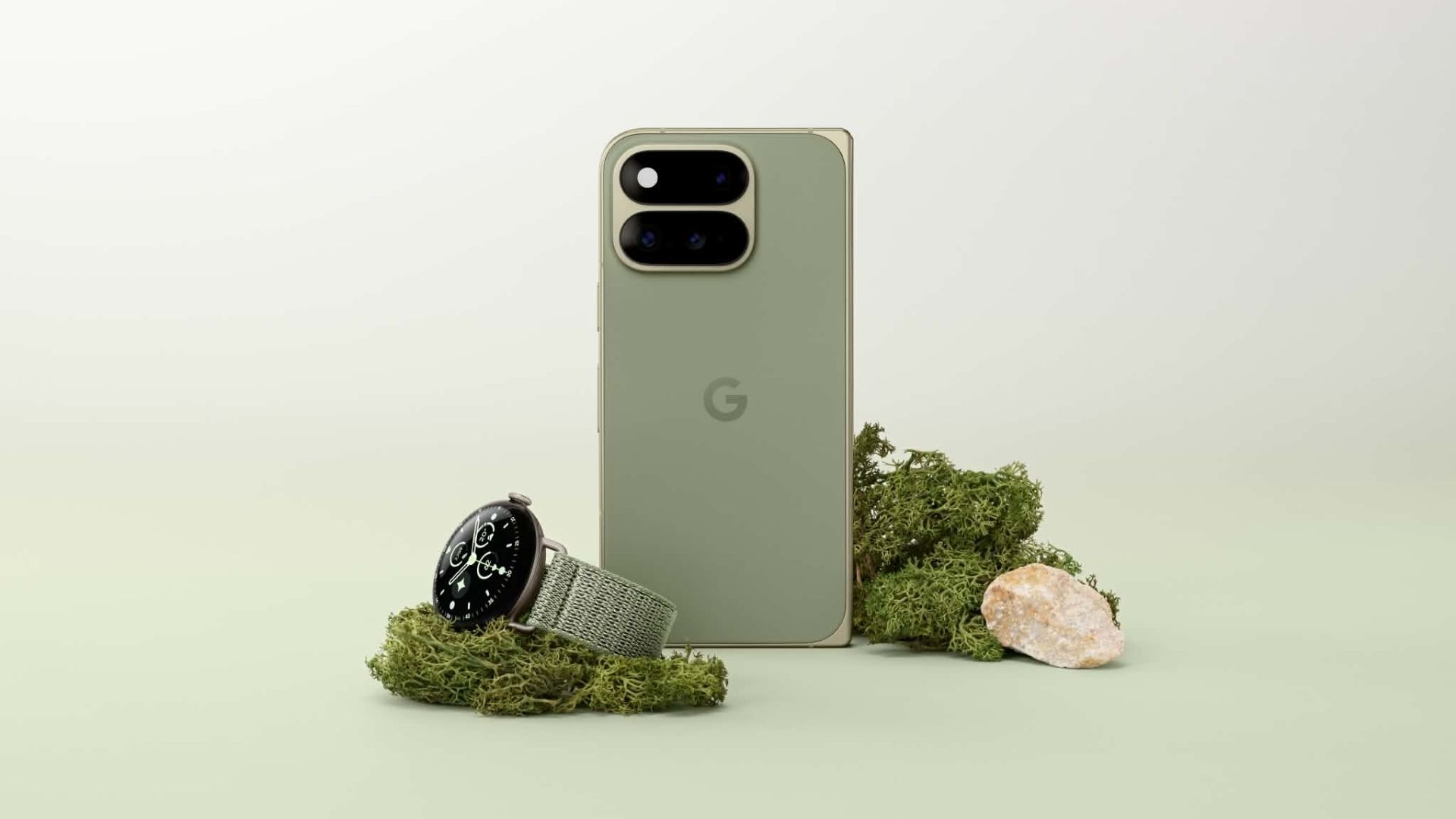
Your Pixel 11 Pro just got its own AI tech support agent

Published

on

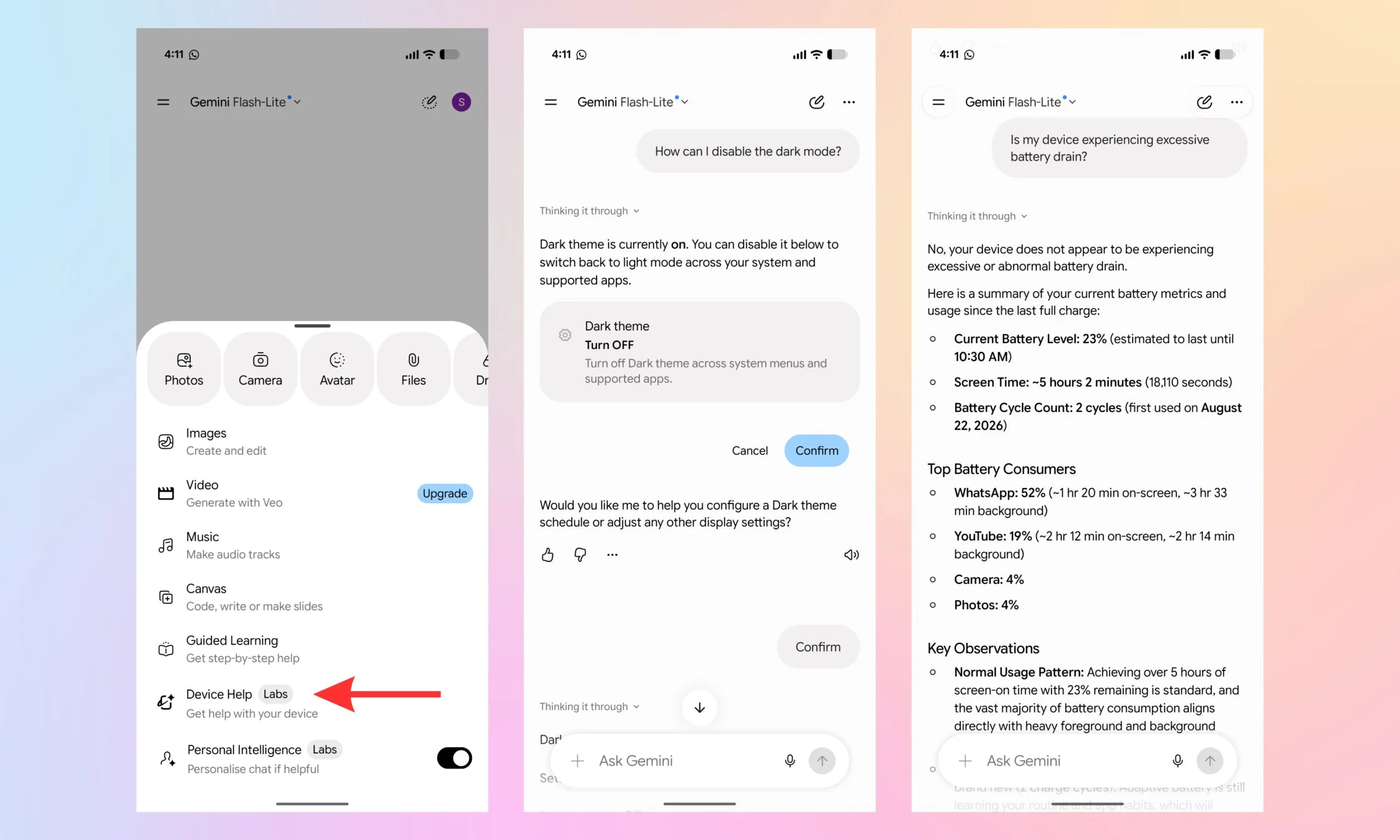
Pixel 11 Pro owners running the latest Gemini beta might notice a new option in the app’s plus menu. 

The new tool reportedly lets Gemini troubleshoot your smartphone rather than just point you to the right settings menu and list a dozen options.

So what exactly does this new device help tool do?

Tucked into the Gemini app’s plus menu or accessible through the overlay, the new option is called “Device help.” On the Pixel 11 Pro XL I’m currently using, it sits between Guided Learning and Personal Intelligence. It also carries a “Labs” label (similar to Personal Intelligence), indicating that Google is still testing the feature. 

The description below the name reads “Get help with your device,” and that’s exactly what the tool does. With a Device Help Agent, the tool can perform tasks like adjusting system settings for dark theme, brightness, and Do Not Disturb. It can also troubleshoot Wi-Fi, Bluetooth, or battery drain, and break down your storage and battery usage.

In addition, the tool can also audit app permissions and walk you through Pixel-specific features and gestures in a step-by-step, easy-to-follow manner. In my opinion, that is a genuinely broad toolkit for something that lives and breathes inside a chat interface. 

Advertisement

Is this actually new tech?

Under the hood, though, the Device help tool doesn’t appear to be entirely new. The functionality reportedly leans on Google’s existing Device Assistance connected app. It’s the same one previously known simply as Utilities, now repackaged behind a conversational Gemini front end rather than a standalone utility.

Regarding who can try the new tool, it is strictly a Pixel 11 Pro thing right now. It is available in the Google app beta version 17.52, and neither the baseline Pixel 11 nor older Pixel phones get it, at least not yet. 

Given the Labs badge, I’d treat this as an early trial rather than a wider rollout. Google has a habit of testing features on one device before releasing it to others, and that’s if the feature works as intended. 

Source link

Advertisement
Continue Reading

Tech

Nuki Smart Lock & Keypad 2 NFC review: Features, specs, price

Published

on

If you’re looking for a simple way to access your home, the Nuki Smart Lock and Keypad 2 NFC combo is perfect for renters while supporting in-demand features like Apple Home Key.

I never want to own another smart lock without Apple Home Key support. Retrofit smart door locks have a problem though, as they don’t have an external-facing component for NFC usage.

That’s where the Nuki Smart Lock and Keypad 2 NFC comes in. The lock attaches to the indoor-side of your deadbolt while the Keypad 2 NFC attaches to the wall outside.

I’ve reviewed a lot of smart home gear and have started a semi-regular column called “Owning an Apple Home.” It isn’t always easy talking at length about something like a smart shade, door lock, or smart light, but I’ve found that focusing on how they’re actually used versus specs helps.

Advertisement

Here’s what you need to know about the Nuki Smart Lock and Keypad 2 NFC. It’s a good system, so let’s get into it.

Nuki Smart Lock & Keypad 2 NFC review: Design and features

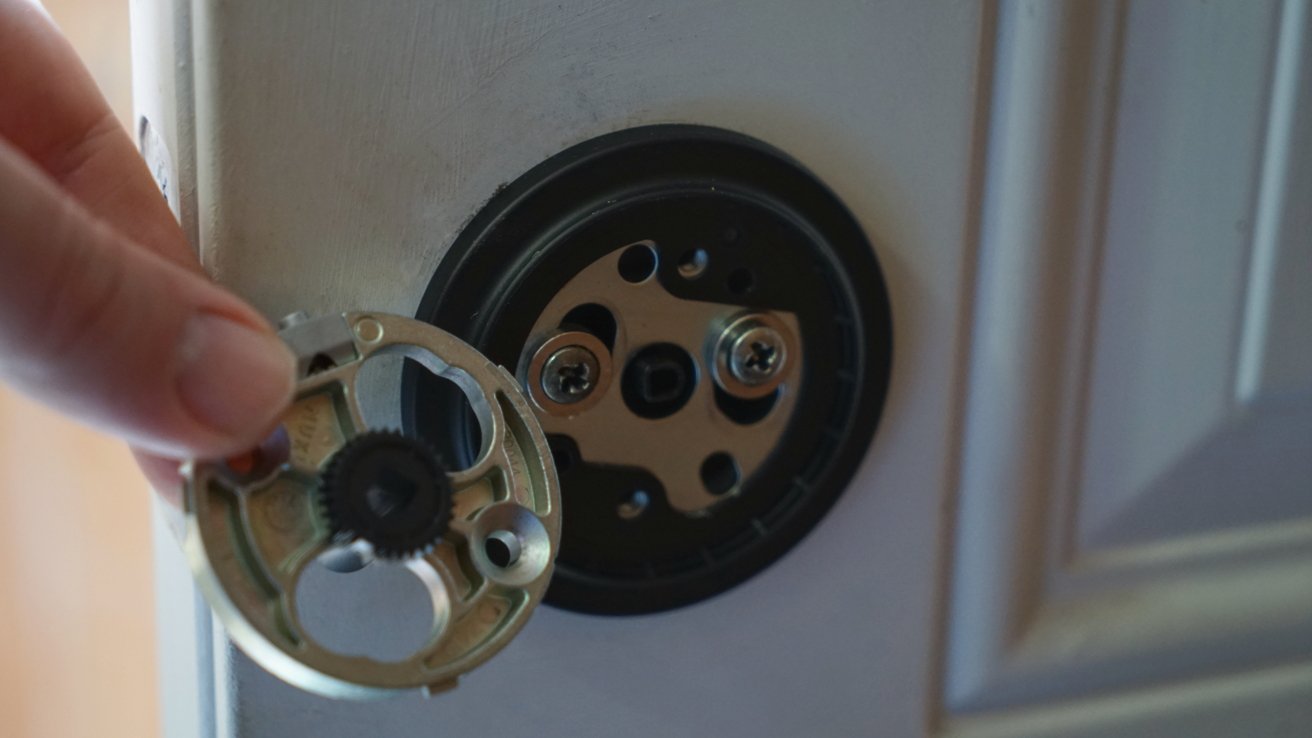
There are a couple of ways to introduce a smart lock to your home. You can completely replace the deadbolt with a new lock that changes the internal mechanism and outward-facing keyhole, or you can retrofit a system on the indoor side of the door.

Hand holding a circular metal lock component next to a partially disassembled deadbolt mechanism mounted on a door panel

Nuki Smart Lock & Keypad 2 NFC review: retrofit your door lock

Since the Nuki Smart Lock is a retrofit that exists only within the closed door, it can’t benefit from features like Home Key. Apple’s Home Key feature uses NFC to unlock a door with the tap of your iPhone or Apple Watch, which can’t happen if the lock is on the other side of the door.

Advertisement

That’s where the Keypad 2 NFC comes in. You mount it outside of the door and it acts as an NFC surface for Apple Home Key.

It also accepts passcodes and fingerprints as access methods, so use whatever is most convenient in the moment. Sometimes, like if I’m carrying groceries, it’s easier to use my fingerprint than Home Key.

Hand holding a colorful yellow phone case near a wall-mounted electronic keypad lock on a white textured wall, suggesting contactless access or interaction with the security device

Nuki Smart Lock & Keypad 2 NFC review: Home Key support is a must

I’ve decided that having Home Key is a must for any smart lock. You get one Home Key card for your household and it unlocks all of your compatible locks seamlessly.

Advertisement

My Level Lock resembles a standard deadbolt from the inside and out, but that comes at a premium. The Nuki Smart Lock & Keypad 2 NFC combo isn’t that much less expensive, but sales cut the cost to be almost half of Level lock.

Using the system has been mostly flawless. I had some setup difficulties getting the features live and the lock paired to Matter, but that’s more of a Matter issue than a Nuki one.

Unlike the Level Lock, Nuki’s battery is internal and rechargeable. The Keypad 2 NFC takes two AAA batteries, but they last about a year.

Hand holding a small digital power bank connected by cable to a modern cylindrical door lock, whose circular light glows red, suggesting the lock is charging or being powered temporarily

Nuki Smart Lock & Keypad 2 NFC review: recharging is simple

Advertisement

Charging the Nuki Smart Lock is simple. It comes with a USB-C cable that has a proprietary magnetic connector on one end, so you can use a wall charger or portable battery to recharge.

I keep the Nuki app installed for access to low-battery notifications, but otherwise I ignore the app. Nuki’s Matter and Home Key integration are good enough that I can interface fully from Apple’s app or via NFC and fingerprints.

It feels unnecessary to state these days because it’s basically standard, but the Nuki lock utilizes end-to-end encryption with bank-level security.

Using the Nuki Smart Lock & Keypad 2 NFC

The Nuki Smart Lock is a retrofit solution that attaches to the existing deadbolt mechanism with very little installation overhead. The result is a door lock that sticks out further than your standard locking mechanism, which is a unit that houses a motor that turns the lock.

Advertisement
Hand holding a smartphone with a smart lock app open in front of a closed white door and round metal doorknob, suggesting remote control of the door lock

Nuki Smart Lock & Keypad 2 NFC review: unlock via app, NFC, passcode, fingerprint, or Apple Home

August was one of the pioneers of this type of smart lock, and while the company shrunk the design over time, it always took on a rather industrialized style. The Nuki lock blends in well with modern doorknobs, but perhaps a little too well.

Now, you’d expect any human that has spent most of their life turning doorknobs to not get confused by this definitely-not-a-doorknob, but you’d be surprised. Whether faced with the more industrially-designed August lock or the Nuki Smart Lock, people freeze as if encountering a new unknown predator.

“So what do I do here?” You open the door. It isn’t even locked. Grab the doorknob and turn it like normal.

Advertisement

This interaction happened with most people that saw these retrofitted smart door locks for the first time. Of course, it’s a one-time failure, but one that shouldn’t have to happen.

Close-up of a slightly open door showing a modern cylindrical metal doorknob and latch plate, with soft light entering from the left side

Nuki Smart Lock & Keypad 2 NFC review: a door lock that looks closer to a door knob

Nuki’s design is sleek, silver, and has a light on the end. It looks nothing like a doorknob, especially when placed directly next to the actual doorknob, but people struggle with this.

It’s not a Nuki problem, but one I wanted to point out.

Advertisement

Overall, I’ve enjoyed the Nuki Smart Lock. It is low-to-no maintenance as a smart home device, integrates with my Apple Home, and is unobtrusive as a device with its design and execution.

Finger pressing a button on a black numeric keypad mounted on a white wall, suggesting access control or security entry system near a doorway

Nuki Smart Lock & Keypad 2 NFC review: a fingerprint works too

When I need to unlock the door, I use my fingerprint or Apple Watch — I’ve never used the code. If anything, I wish I could have a system that offered only an NFC touch point and no other mechanism at all.

Having the backup of your home’s physical key is nice, but I’ve never been in danger of losing access to my home because of a dead battery. I do have a smart lock on my front and back door, so the likelihood of a dead battery preventing entry into my home is basically zero.

Advertisement

Home Key is, well, key

I’m an Apple Home user and want to minimized the amount of technology I own that isn’t accessible within the Home app. Matter has been an excellent boon to Apple Home users, and Nuki is Matter compatible.

Hand holding a small cylindrical metallic smart lock or knob with a circular button on the end, shown close up against a softly blurred, bright background

Nuki Smart Lock & Keypad 2 NFC review: a smart lock that looks good

However, in the case of smart locks, simple Matter or Apple Home integration isn’t enough. I’m demanding Home Key support going forward.

The ability to have a single digital key for my smart home in Apple Wallet that can unlock all of my doors is amazingly convenient. Sure, alternative unlocking options are available, even from the Home app itself, but you can’t beat the convenience of simply tapping your iPhone or Apple Watch to unlock.

Advertisement

The only thing that might prove more accessible and simple is UWB smart locks. That’s an emerging technology that isn’t widespread just yet, but I’d argue that plus Home Key would still be preferable.

For those looking for a retrofit solution that’s not too expensive, the Nuki Smart Lock & Keypad 2 NFC combo is a good option. It’s especially a great buy for those renting or living in an apartment.

Nuki Smart Lock & Keypad 2 NFC – Pros

  • Home Key and Matter support
  • Easy installation
  • Keypad with fingerprint & NFC

Nuki Smart Lock & Keypad 2 NFC – Cons

  • Might confuse some with doorknob-like design
  • A bit pricey, but competitive

Rating: 4.5 out of 5

The Nuki Smart Lock and Keypad 2 NFC combo is a great setup for your Apple Home, if a tad expensive. The design is necessary given the nature of a retrofit lock, but it’ll be confusing for some.

Where to buy the Nuki Smart Lock & Keypad 2 NFC

The Nuki Smart Lock bundled with the Keypad 2 NFC can be ordered at Amazon, with the price discounted to $289 (down from $378) at press time. Alternatively, you can order the set from Nuki directly.

Advertisement

Source link

Continue Reading

Tech

ReliaQuest confirms failed data-theft attack after ShinyHunters breach

Published

on

ReliaQuest confirms failed data-theft attack after ShinyHunters breach

Cybersecurity company ReliaQuest has confirmed that one of its employees was targeted in a social engineering attack after hackers impersonated a member of the security team.

In a statement over the weekend, ReliaQuest said that an attacker called multiple employees and tried to trick them into accessing “a fake ReliaQuest single sign-on (SSO) page behind a content delivery network.”

Last week, ReliaQuest’s Threat Research team shared in a now-deleted post, that the ShinyHunters extortion gang was registering .claims domains to impersonate company’s help desks and IT teams.

image

“ReliaQuest is tracking a widespread ShinyHunters campaign using domains that follow the company[.]claims pattern. These domains incorporate the targeted organization’s name or abbreviation under the .claims TLD,” read the company’s post on X.

Yesterday, a newly-created X account believed to be linked to the threat actors replied to the post, stating “Who’s hunting who ?,” sharing screenshots of what appeared to be a compromised Okta SSO account for a ReliaQuest employee.

Advertisement

Soon after, ShinyHunters published the same screenshots in a new entry on their data data leak site.

Both ReliaQuest’s and the alleged threat actor’s posts were later taken down from X. 

According to the company, the threat actor hosted the phishing page on a “lookalike domain,” which BleepingComputer learned from sources was reliaquest.claims, and used the name of a real security employee during the vishing attempts.

One of the targeted employees fell for the attacker’s ruse, entered their credentials on the fake SSO page, and approved an MFA push notification, giving the attacker temporary, view-only access to ReliaQuest’s identity dashboard.

Advertisement

However, device-trust controls successfully blocked subsequent attempts to access applications through the dashboard, according to the company.

“The extent of the access was view-only. No ReliaQuest applications or systems were accessed, and no customer data was ever touched,” ReliaQuest says.

“The threat actor continued with attempts to access these applications from the dashboard but was consistently denied due to the security controls in place.”

The cybersecurity firm says it terminated the attacker’s sessions, revoked the exposed password, and reset all authentication tokens.

Advertisement

The ensuing investigation found no evidence of access to other accounts, apps, or data, and no signs that the actor established persistence on ReliaQuest’s systems.

The firm audited its control fidelity, device trust, and on-network access since August 21 and identified no suspicious activity.

ShinyHunters claims the attack

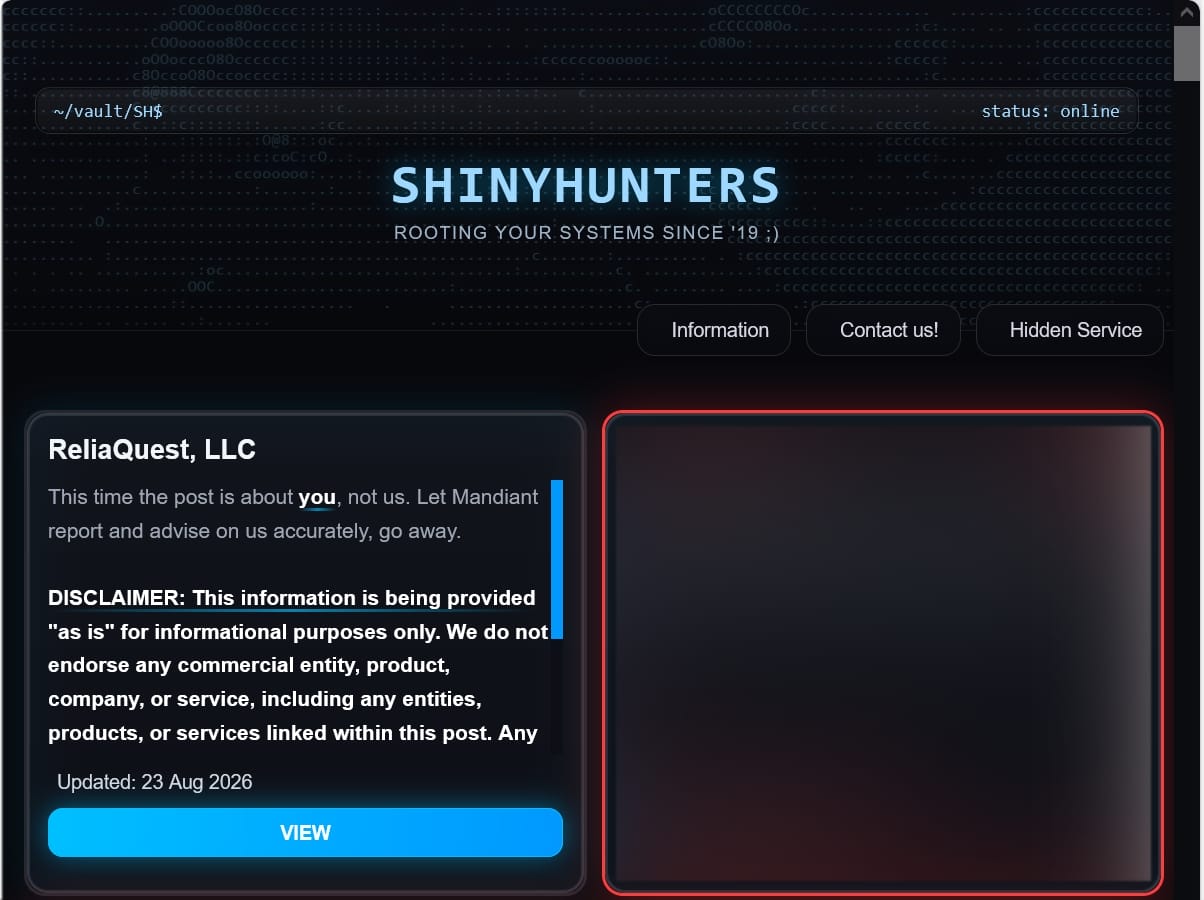
ReliaQuest’s statement comes shortly after the infamous data extortion group ‘ShinyHunters’ claimed an attack on the company.

In a new post on its extortion portal, ShinyHunters references ReliaQuest’s previous reporting on the threat group, saying “this time the post is about you, not us.”

Advertisement
Post on the ShinyHunters extortion page
ReliaQuest listed on the ShinyHunters extortion page
Source: BleepingComputer

The threat actors published evidence of access, showing that they had successfully breached ReliaQuest’s Okta SSO account.

We asked ReliaQuest if the disclosed incident is linked to ShinyHunters, but we have not received any additional information yet.

However, ShinyHunters told BleepingComputer that their access was view only and did not reach any applications, systems, or customer data.

“No additional identities were accessed, no business applications were reached, no customer or ReliaQuest data was accessed beyond the user’s login credentials, and no persistence was established,” the threat actor told us.


article image

Overall prevention scores can hide what happens after initial access. Once attackers are using valid credentials, prevention drops sharply.

The Blue Report 2026 measures defenses technique by technique across 338 million simulations run in customer production environments.

Advertisement

Get the report

Source link

Continue Reading

Tech

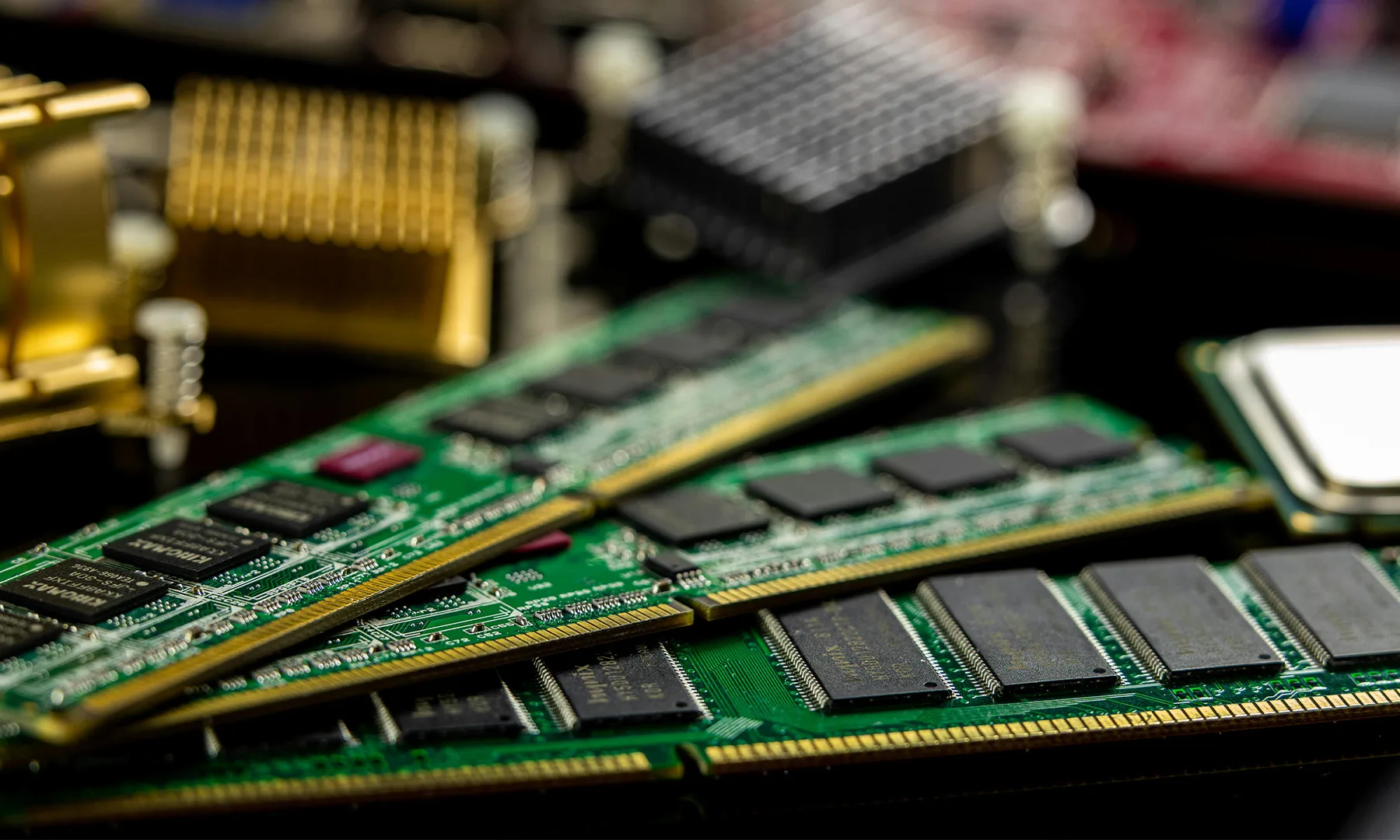
Amazon Hikes Hardware Prices By 60%, Blaming Memory Shortage

Published

on

Amazon has raised the prices of its hardware devices by as much as 60%, blaming “significant increases in memory and storage component costs.” TechCrunch reports: The price explosion impacted Fire TVs, Echos, Kindles, and Eeros. One egregious example that’s been cited is that of the Echo Dot, one of Amazon’s cheapest smart speakers, the price of which jumped 60% overnight, from $49.99 to $79.99. Price-tracking sites like CamelCamelCamel show the stark uptick, which has previously hovered much lower. […] The company also said that it would continue to offer occasional promotions to customers over the course of the next year. Amazon said in a statement: “The consumer electronics industry is facing significant increases in memory and storage component costs. After absorbing these increases for as long as we could, we recently adjusted pricing across our product lines.”

Read more of this story at Slashdot.

Source link

Advertisement
Continue Reading

Tech

Solid-state cooling could be the secret to faster AI laptops

Published

on

Your next laptop’s biggest bottleneck might not be its chip; it could be how well it stays cool. A new white paper from Ventiva, developed alongside analyst firm Moor Insights and Strategy, argues that thermal design is quickly becoming the deciding factor for how fast AI laptops can actually run.

Why memory bandwidth is the real bottleneck

The paper explains that local AI performance is measured in tokens per second, and that number mostly comes down to memory bandwidth. Most laptops today still rely on 128-bit memory buses paired with LPDDR5 memory, which caps bandwidth around 150 GB per second. That is simply not fast enough to run today’s more demanding AI models at usable speeds, and chipmakers are already racing to fix this.

Qualcomm has pushed its Snapdragon X2 Elite chips to 192-bit buses, while AMD and NVIDIA now offer 256-bit options in their client silicon. Apple has gone furthest with its M5 Max, which uses a massive 512 bit bus capable of running large open source models like GPT-OSS 120 B entirely on device. The report expects this shift toward wider buses to accelerate further with the arrival of LPDDR6 memory, which promises faster data rates and better efficiency, with mainstream adoption expected by 2027 and 2028.

Here is the tricky part, though. Wider memory buses require memory chips to sit extremely close to the processor, inside traces shorter than 25 millimeters, exactly where fans and heat pipes have traditionally lived inside a thin and light laptop. Apple sidesteps this by placing memory directly on its chip package, but every other laptop maker has to solve the same spatial puzzle inside a traditional chassis.

Why fans may not be the answer anymore

Traditional fan based cooling cannot keep scaling alongside these denser memory layouts, especially as chipmakers push toward 256-bit and wider buses. That is pushing solid-state cooling into the spotlight as a serious contender. The report highlights Ventiva’s ionic cooling platform, which uses charged particles to move air silently without any moving parts.

It also points to Frore’s AirJet technology, which recently proved itself by cooling an Intel reference laptop measuring just 11.3mm thin, sustaining 15 watts of fanless cooling while staying noiseless. Meanwhile, YPlasma showcased a plasma-powered laptop cooler at CES, using ionized gas instead of a spinning fan to move air, claiming operation at just 17 decibels.

Advertisement

The paper frames 2027 and 2028 as a real turning point, when wider memory buses and LPDDR6 would become the standard. If that timeline holds, laptop makers will need to rethink cooling instead of treating it as an afterthought.

Source link

Advertisement
Continue Reading

Tech

Pixel 11 Pro Fold’s durability test highlights issues that should have been fixed

Published

on

Google’s Pixel 11 Pro Fold has once again struggled in a durability test, with the foldable cracking along both antenna lines during a bend test. It’s the fourth consecutive generation of Google’s foldable phone to break at the same vulnerable area.

The latest test comes from Zack Nelson of the YouTube channel JerryRigEverything, who put the Pixel 11 Pro Fold through his usual series of scratch, flame, dust and bend tests. The biggest concern came at the end, when the phone cracked along the antenna lines positioned next to the hinge.

That is the same area where the original Pixel Fold, Pixel 9 Pro Fold and Pixel 10 Pro Fold failed during similar testing. Google has previously claimed that it re-engineered the Pixel 11 Pro Fold to be three times stronger, with its hinge tested to withstand 83 million opening and closing cycles in a laboratory environment. The durability test suggests there may still be a weak point outside those controlled conditions.

Advertisement

The exterior 6.6-inch display also showed scratches at level six on the Mohs hardness scale, with deeper grooves at level seven, despite Google claiming it is twice as scratch-resistant as last year’s model. The larger 8-inch Super Actua Flex Display, meanwhile, scratched at level two, with deeper marks at around the level of a fingernail, which is expected for a flexible display.

Advertisement

The flame test caused permanent damage to both screens. The exterior display lasted around 20 seconds under the flame before suffering permanent damage, while the inner display lasted about 13 seconds.

Zack also found that fine particles could make their way into the hinge despite the phone’s IP68 rating. Water resistance and dust resistance aren’t necessarily the same thing when a device has moving parts, and the test showed dust collecting around the hinge and internal components.

Advertisement

The most dramatic moment came during the bend test. The phone cracked along both antenna lines, but the front glass also popped completely away from the frame. Zack noted that the glass came off without wires or other components remaining attached to it.

The test also offered a look inside the phone, including its flexible display construction and hinge. Under the inner screen is an ultra-thin glass layer and reinforcement structure, while the hinge uses a different design from Samsung’s Galaxy Z Fold 8. The Pixel 11 Pro Fold also has an internal cooling system with a copper vapor chamber for its Tensor G6 chipset.

As with any durability test, this doesn’t mean the Pixel 11 Pro Fold will fail during normal use. However, seeing the same antenna-line failure for a fourth consecutive generation raises questions about Google’s decision to retain the placement of a known structural weak point.

Advertisement

Advertisement

Source link

Continue Reading

Tech

TikTok reaches $400M settlement with US over COPPA violations

Published

on

TikTok

TikTok reaches $400M settlement with US over COPPA violations

The U.S. Department of Justice announced a $400 million settlement with TikTok, ByteDance, and affiliated companies over allegations that they violated the Children’s Online Privacy Protection Act (COPPA).

The TikTok social media platform, owned by the Chinese technology company ByteDance, allows users to create, watch, and share short-form videos.

In 2024, the U.S. Department of Justice filed a lawsuit against TikTok and its parent company, alleging violations of COPPA dating back to 2019.

image

In 2019, Musical.ly, TikTok’s predecessor, agreed to a $5.7 million settlement with the Federal Trade Commission (FTC) over allegations of illegally collecting personal data from users under 13 without parental consent.

Last year, the FTC referred a new investigation to the DoJ, claiming that TikTok continued to breach COPPA rules despite its 2019 commitment to comply with the rules.

Advertisement

As a result of the investigation, the DoJ alleged that TikTok knowingly allowed children under 13 to create regular accounts outside its restricted “Kids Mode,” collected and retained their personal information without parental consent, failed to delete accounts and data when parents requested it, and maintained inadequate procedures for finding and removing underage accounts.

The newly announced agreement resolves the litigation, with the DoJ now recognizing that TikTok has made significant changes to its ownership, data management, and legal compliance operations since 2024.

The U.S. state also recognized that TikTok implemented important changes to its privacy retention practices, improved age-related controls, and strengthened parental oversight.

As part of the settlement agreement, one of the largest ever for COPPA cases, TikTok will now pay $300 million immediately, and another $100 million if a court vacates an earlier consent decree involving its predecessor, Musical.ly.

Advertisement

“Companies that collect children’s personal information must comply with the law,” stated Assistant Attorney General Brett A. Shumate.

“This resolution secures a significant monetary recovery and reflects the Department’s commitment to ensuring children receive the full protections that Congress mandated.”

The announcement notes that the settlement resolves only allegations, and there has been no judicial determination that TikTok or ByteDance is liable.


article image

Overall prevention scores can hide what happens after initial access. Once attackers are using valid credentials, prevention drops sharply.

The Blue Report 2026 measures defenses technique by technique across 338 million simulations run in customer production environments.

Advertisement

Get the report

Source link

Continue Reading

Tech

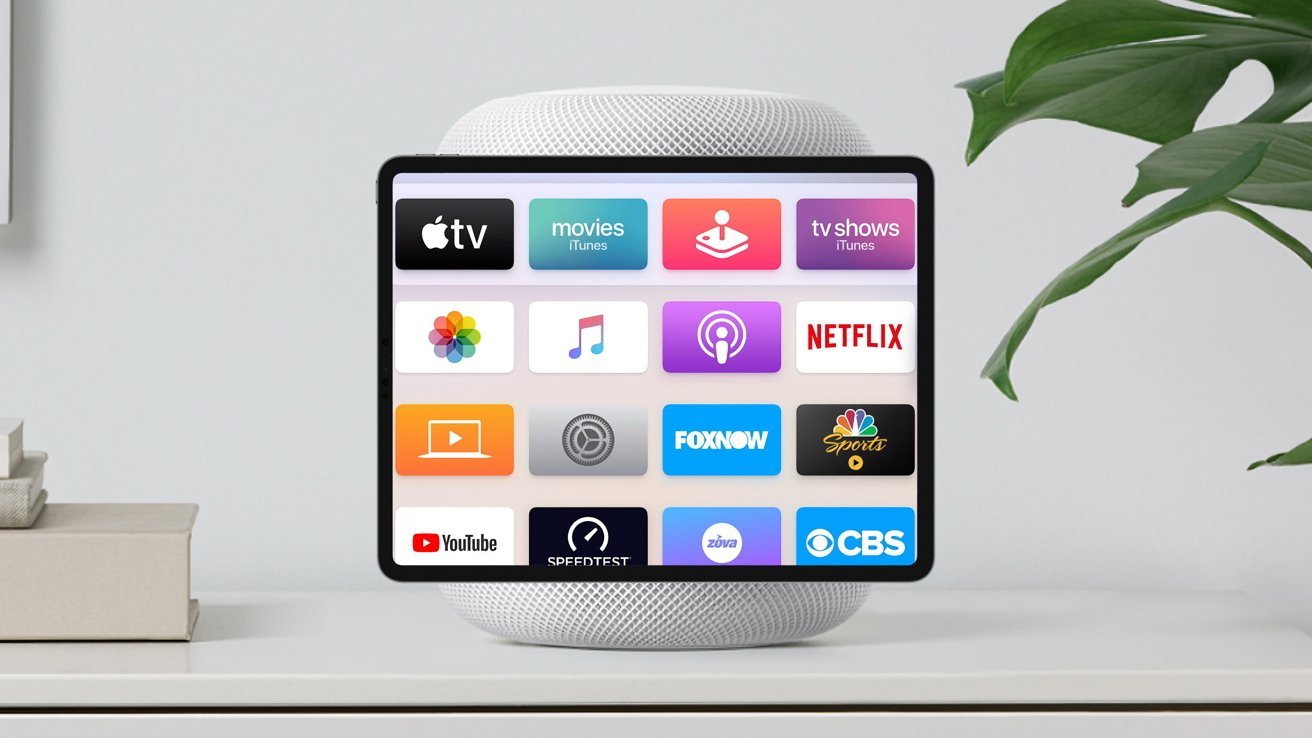
Ambient sensing, cameras to power Home Hub personalization

Published

on

According to strings accidentally left in a macOS Tahoe update, Apple’s Home Hub will offer user profiles, with identity verification provided by ambient sensing and built-in cameras.

With the macOS 26.7 release candidate build, Apple inadvertently revealed details about several of its upcoming products, including a camera-equipped model of AirPods. Also present was code related to the company’s upcoming Home Hub, an AI-focused device with an operating system that’s said to resemble tvOS.

Rumors have suggested the product will ship in two variants, one with a speaker-type base, and another wall-mounted version. This two-model approach was corroborated by macOS Tahoe code, and now even more details about the Home Hub have surfaced.

As noted by MacRumors, the macOS 26.7 RC build indicates Apple’s Home Hub will offer a Personal Content feature, meaning the device will display different content depending on who’s using it. This will seemingly be facilitated through user accounts or profiles.

Advertisement

Home Hub users will see the option to enable Personal Content after opening the Settings app and tapping their name. Once the feature is active, users will be able to access Personal Content by selecting their profile or account from the Home Hub’s Control Center.

Strings found in macOS Tahoe code reveal Apple’s Home Hub will feature cameras and “ambient sensing” for user recognition. “Sorry, since this device hasn’t seen you in a while, you’ll need to ask again in front of the camera,” reads one string. Another one asks the user to “come in front of this device and ask again.”

Aside from the new Personal Context feature, the macOS 26.7 RC also contains references to “Pebble,” which is believed to be the codename for Apple’s upcoming homeOS. The Home Hub operating system will seemingly feature “Faces” and a “Face Gallery,” which could be similar to what’s already avaialble on watchOS.

Also present are identifiers for both Home Hub variants, with J490 being the one with a speaker base, and J491 being the wall-mounted model. The descriptors “HomeAccessory” and “HomeAccessory_wall” appear to refer to these Home Hub variants as well.

Advertisement

Overall, while it looks as though the Home Hub will offer personalization options, the product’s software seemingly won’t be much of a departure from tvOS or watchOS.

Source link

Advertisement
Continue Reading

Tech

Trump bought SpaceX shares two weeks after blockbuster IPO

Published

on

President Donald Trump bought as much as $50,000 worth of SpaceX shares on June 23, according to a financial disclosure first reported by Reuters, two weeks after the record-setting IPO of Elon Musk’s company.

It’s not clear what price Trump paid for the shares, but by that point they had fallen from their highs of over $200. SpaceX shares were trading in the mid-$150 range on June 23. At the end of trading on Monday, shares closed at the IPO price of $135, possibly putting the president’s stake underwater.

Trump and Musk are close, despite a brief falling out last summer that involved the businessman accusing the president of withholding the Department of Justice’s files on Jeffrey Epstein because of how often Trump’s name appears in them. SpaceX has been hoovering up an increasing amount of government contracts and benefiting from the Trump administration’s deregulatory stance, according to a recent Wall Street Journal analysis.

White House spokesman Davis Ingle told Reuters that the president’s stock portfolio is managed by third-party financial institutions and replicate “recognized indexes, such as the Schwab ​1000.” SpaceX lobbied popular indexes to change their rules to allow for faster inclusion ahead of its IPO, which means many people likely own some of the company’s stock even if they don’t know it.

Advertisement

Source link

Continue Reading

Tech

Hackers target WordPress sites in miniOrange auth bypass attacks

Published

on

Hackers target WordPress sites in miniOrange auth bypass attacks

Hackers are attempting to exploit two critical authentication bypass vulnerabilities in the miniOrange SAML 2.0 Single Sign On plugin for WordPress that can be used to forge SAML responses and log in as administrators.

The miniOrange SAML SSO plugin turns a WordPress site into a SAML service provider, letting users log in through corporate identity platforms such as Microsoft Entra ID, Okta, Google Workspace, or OneLogin instead of separate WordPress credentials.

Created by Xecurify, miniOrange is a family of seven plugins, with a free version that has 10,000 downloads and 30,000 customers for the other six.

image

The two vulnerabilities observed in exploitation attempts are tracked as CVE-2026-61979 and CVE-2026-15981 and can be chained together to bypass authentication.

Because the miniOrange SAML SSO plugin accepts the signature algorithm from incoming SAML responses instead of enforcing the configured one, an attacker can leverage CVE-2026-61979 to select HMAC-SHA1. This causes the plugin to treat the RSA public key from the identity provider (IdP) as the shared secret.

Advertisement

Since the public key is known, the attacker can forge a signature that the plugin accepts as authentic.

The second security issue, CVE-2026-15981, causes the plugin to treat an OpenSSL verification error (-1) as a successful result, allowing malformed signatures to pass validation.

According to security firm Patchstack, the two vulnerabilities were publicly disclosed and fixed in July. However, the vendor’s advisory covered only the free edition, leaving the six paid editions without an alert, even though fixes were provided for those too.

The following versions addressed the two flaws:

Advertisement
  1. Free, single site – 5.4.5
  2. Premium, single site – 13.0.4
  3. Standard, single site – 17.06
  4. Premium/Enterprise/All-Inclusive, multisite – 20.2.8
  5. Enterprise/All-Inclusive, single site – 26.0.3
  6. VIP, single site – 32.0.8
  7. VIP, multisite – 35.0.7

Failing to disclose the risk across all versions of the plugin reportedly led many sites running the paid editions to take no action, creating an opportunity for threat actors to exploit the two vulnerabilities.

Patchstack reports that, on August 16, DigitalOcean blocked an anomalous WordPress administrator session originating outside its trusted network.

The investigation showed that attackers have chained the two flaws to obtain an admin session cookie through the Standard edition plugin in version 16.1.9.

Patchstack’s data shows that exploitation attempts and opportunistic scanning are underway, launched from six IP addresses across Europe, Africa, and the United States.

A proof-of-concept (PoC) exploit targeting the free edition is also publicly available, so the pace of attacks could increase at any time.

Advertisement

Patchstack warns that the WordPress administrator dashboard will not show update warnings for the paid versions of the plugin, so website owners must manually upgrade to a patched release.


article image

Overall prevention scores can hide what happens after initial access. Once attackers are using valid credentials, prevention drops sharply.

The Blue Report 2026 measures defenses technique by technique across 338 million simulations run in customer production environments.

Get the report

Source link

Advertisement
Continue Reading

Trending

Copyright © 2025