




Connect with us

Tech

FTC Sues Amazon, Accusing the E-Commerce Giant of Misleading Advertisers

Published

on

The FTC and 22 state attorneys general are suing Amazon, accusing the company of secretly inflating advertising prices through undisclosed changes to its auction system that may have extracted more than $20 billion from advertisers since 2019. “Amazon has millions of advertising customers who were misled into paying significantly higher prices,” FTC Chairman Andrew Ferguson said in a statement. “These higher costs were largely passed on to American consumers.” CNBC reports: The complaint, which was filed in U.S. District Court for the Western District of Washington, centers on Amazon’s sponsored products ads, brands ads and display ads that run alongside search results on its sprawling webstore. Amazon has amassed the third-largest digital advertising business globally, trailing only Google and Meta. The company hauled in more than $68 billion in ads revenue last year, with the lion’s share coming from sales of sponsored products ads. Third-party sellers who hawk their wares on Amazon’s marketplace have recently criticized surging advertising costs on the site, including a string of recent policy changes, which led to some top merchants withholding their ad spend in a boycott. The company has traditionally used a “second-price” auction system, wherein it told advertisers they “only pay the least bid amount needed in order to win,” the complaint states, citing Amazon’s own marketing materials.

The FTC alleges in its complaint that Amazon in 2019 changed its auction rules without notice by adding an undisclosed surcharge it referred to as a “soft reserve price,” which led to higher ad prices. “Amazon made this surreptitious change to its auction because it was unhappy about how much revenue its advertising auctions were generating,” the agency said in its complaint, which cites internal communications between Amazon ad executives. In one exchange, a company executive allegedly acknowledged it uses an “invented auction participant” to increase prices, the FTC said. The FTC and the states alleged Amazon’s practices violate federal and state consumer protection laws, and they’re seeking civil penalties, restitution and other unspecified damages. In a blog post, Amazon called the FTC’s lawsuit “misguided” and said the complaint “fundamentally misunderstands how advertisers operate.” The company added that the agency’s lawsuit doesn’t include evidence of consumer price increases.

“We’ve provided advertisers with guidance about our auctions and pricing in the main tools they use to manage their campaigns, and we continue to update that guidance,” the company said. “We look forward to making our case in court.”

Read more of this story at Slashdot.

Advertisement

Source link

Continue Reading
Click to comment

You must be logged in to post a comment Login

Leave a Reply

Tech

Nvidia is building an IP licensing empire on the back of NVLink

Published

on

The proliferation of custom AI ASICs, or XPUs, from OpenAI, Meta, Microsoft, and others has led many to question Nvidia’s grip on the market. After all, if everybody’s building their own, who needs the GPUs the AI arms dealer has made its fortune on?

But Nvidia isn’t concerned in the least and has instead invited its competition to raid – or, rather, license – the GPU giant’s IP holdings, particularly those related to networking.

On Monday, MediaTek became the latest to embrace Nvidia’s NVLink Fusion high-speed interconnect technology for its fledgling datacenter XPU offering. In exchange, Nvidia has invested $3.5 billion in convertible bonds issued by MediaTek. The GPU giant will also continue to license the Taiwanese SoC provider’s own designs for use in future DGX and RTX Spark systems.

Advertisement

If you’re curious, we explored MediaTek’s datacenter ambitions last month. But the designer, best known for its Arm-based smartphone and tablet processors, is only one of several high-profile chip designers that plan to integrate the tech. Amazon, Fujitsu, Qualcomm, Arm, and Marvell are all on the same list.

NVLink Fusion started as a commercialized version of Nvidia’s high-speed inter-GPU interconnect, introduced early last year. Initially, it was offered in two varieties: a chip-to-chip (C2C) variant for connecting CPUs to GPUs (or XPUs) in a memory coherent fabric, and a switched fabric used to stitch together multiple accelerators into one big logical rack-scale chip. It’s since expanded to become the blanket offering by which Nvidia licenses its semiconductor IP.

Given how long it’s taken Broadcom and others to develop competitive alternatives to NVLink, it’s not surprising companies like MediaTek would license the tech, rather than reinventing the wheel, or piping alternative interconnects, like UALink, over regular old Ethernet.

By licensing Nvidia’s NVLink Fusion tech, companies can focus on building competitive accelerators without worrying about how they’re going to scale in production.

Advertisement

And because Nvidia’s MGX rack designs are part of the Open Compute Project, MediaTek and its partners not only benefit from Nvidia’s scale-up networking tech, but also can essentially take existing NVL72 racks and slot in their compute blades. This should dramatically reduce the system design and mechanical engineering experience required to go from silicon to AI racks.

And this isn’t theoretical. Amazon is doing just that with its Trainium series of AI accelerators. As we wrote at the time, Amazon used Nvidia’s MGX NVL72 reference design for its Trainium3-based rack systems launched last year. Meanwhile Trainium4, expected late this year, will ditch Amazon’s in-house NeuronLink interconnect tech for NVLink Fusion.

Nvidia’s cut

So, what does Nvidia get from letting rival chip designers piggyback off its hard-won networking tech?

A lot more than licensing fees: It’s also a way to keep companies hooked on its other products.

Advertisement

When NVLink Fusion was first announced, customers had two options. They could pair their XPUs with Nvidia’s CPUs or their CPUs with Nvidia’s GPUs. Customers also were on the hook for NVSwitches if they wanted to take advantage of the tech’s scale up networking capabilities.

So, on top of licensing the tech, Nvidia had the potential to sell roughly two GPUs per partner CPU, a Grace or Vera CPU for every two partner XPUs, and up to nine NVSwitches for every 72 or so accelerators, and that’s just the rack.

If you’re already buying NVLink, why not use InfiniBand or Nvidia’s Spectrum-X Ethernet kit to switch those racks together to train and serve even larger models at scale?

Nvidia has since softened its stance and now seems content with the combination of NVSwitch sales and NVLink Fusion licensing. If it hadn’t, Amazon couldn’t have paired Graviton with Trainium.

Advertisement

“The beauty about this platform is it provides the flexibility and the fungibility in order to meet the customers where they are. And so, leveraging the NVLink Fusion platform, they can adopt anywhere from the CPU to the GPU to the scale-up fabric to the scale-out networking across our Spectrum-X and InfiniBand, as well as our DPU within the scale-in fabric to do the north-south storage management as well as security isolation,” Dion Harris, Nvidia’s senior director of HPC and AI Hyperscale Infrastructure, told press on Monday. “So, the five different networking technologies and topologies that we offer in our technology stack are all available to customers via NVLink Fusion.”

Nvidia isn’t quite ready to talk about the licensing structure just yet, but Harris says they won’t be giving it away.

“…It is safe to assume that there will be some licensing elements in place in that Nvidia NVLink Fusion is an Nvidia technology,” Harris said.

It’s not just about networking

Nvidia is already the largest datacenter Ethernet networking provider in the world, thanks in no small part to the AI boom. Its quarterly networking revenue now exceeds $15 billion, and NVLink Fusion licenses and associated NVSwitch sales will only bolster that. However, Nvidia’s licensing ambitions don’t stop there.

Advertisement

Last week, Nvidia detailed its latest IP offering in the form of NVHBM, essentially a custom base with an integrated memory controller.

According to Nvidia, the approach frees up 25 percent of the die for compute while cutting HBM power draw by 15 percent and boosting effective bandwidth by 30 percent.

Amazon’s Annapurna Labs will be among the first to field the tech with its Trainium family of AI ASICs.

But while Amazon’s adoption of NVHBM is a clear win for Nvidia, it should be noted that the idea isn’t unique to Nvidia. As we understand it, both Broadcom and Marvell are developing similar base-die tech as well. But the tech is another example of how Nvidia is leveraging its engineering might to extract revenues from everything associated with AI, including custom ASICs from others.

Advertisement

A deal with the devil or mutually beneficial coexistence

While Nvidia’s fledgling IP offerings are rather narrow for the moment, it’s not hard to imagine Nvidia competing with rivals like Broadcom or partners like Marvell and MediaTek on XPU design before long.

Depending on how things play out, Nvidia, Broadcom, Marvell, and MediaTek could end up looking more like frenemies.

XPUs are quickly becoming big business for both Broadcom and Marvell, but the networking required to scale that compute and system design required to bring it to market remains a competitive advantage for Nvidia.

Sure, both have competent Ethernet switching appliances capable of going toe-to-toe with NVSwitch, but even then you still have to integrate that into a rack. The advantage of being able to slot a custom compute blade into a generic NVL72 system and for it to work out of the box is hard to ignore.

Advertisement

If NVLink Fusion helps the XPU designers sell more chips, it could end up being a net benefit even if it means losing out on switch sales. Nvidia is clearly aware that while the barrier to entry for custom silicon has fallen through the floor, scaling that compute remains the hard part. ®

Source link

Continue Reading

Tech

AI adoption at work is broad but shallow

Published

on

ai and ml

GenAI now reaches 80% of occupations, but in most of those fewer than half of workers use it

Economists have taken another stab at assessing the impact of generative AI adoption on different occupations and have found that adoption is broad but not very deep.

Advertisement

While generative AI reaches 80 percent of occupations and more than 40 percent of tasks, in most of these occupations fewer than half of workers adopt it.

Occupational use is high in professions where you’d expect – in management and professional occupations, particularly those that are related to finance, business, and computers. It’s lowest in personal service occupations and jobs requiring manual activity or interpersonal interaction.

That in and of itself isn’t surprising – other studies have suggested as much. But AI companies that have looked at occupational exposure to generative AI (Anthropic, Microsoft, OpenAI) based on chat logs come up with results that differ from those described in “What Work Does Generative AI Do?”

The paper [PDF], by authors Alexander Bick (Federal Reserve Bank of St. Louis), Adam Blandin (Vanderbilt), David J. Deming (Harvard), and Tyler R. Schumacher (Vanderbilt), measures how workers actually use generative AI for their jobs by analyzing Real-Time Population Survey (RPS) data.

Advertisement

The measurement discrepancy is the result, the authors say, of chat log classifiers that associate chats with a few tasks that have generic, activity-based descriptions like “Edit written material or documents.” 

The problem with this approach is that when OpenAI data concludes 15 percent of chats involve that sort of editing, those figures don’t match up with the US Department of Labor’s O*NET database, where only 2.4 percent of workers are in jobs that include that task.

The result, the researchers say, is that the exposure figures from vendors likely overstate how much generative AI is actually relevant to people’s jobs.

“GenAI is used in many occupations and tasks, but few of these exhibit very high adoption rates,” the authors state. “For example, four out of five detailed occupations have adoption rates above 20 percent, but only one out of six occupations exceed 70 percent adoption.”

Advertisement

Most occupations exhibit relatively low adoption rates, but for a few, the figure is substantial. About 15 percent of occupations had adoption rates above 70 percent (largely computer-oriented). And in terms of tasks, only 2.8 percent of tasks had adoption rates above 50 percent and none surpassed 70 percent.

Overall, as of May 2026, 55 percent of US adults between the ages of 18 and 64 used generative AI for non-work reasons and 45 percent of US adults used GenAI for work, according to the paper. The overall adoption rate (work or otherwise) is 62 percent.

One thing that drives AI adoption, they say, is experience. Those who start using it in one domain tend to adopt it in other domains.

Thus the researchers argue it’s at least as important to understand why some workers adopt AI and some don’t as it is to understand which tasks it can handle. ®

Advertisement

Source link

Continue Reading

Tech

Broadcom Pledges to Lock Down Open Source Python, Java Libraries

Published

on

Broadcom is launching “TrueSource,” an effort to curate and secure open-source components used with its Tanzu platform, including Spring, RabbitMQ, and libraries across Java, Python, and Node.js. “The idea is to provide a set of solutions focused on providing clean and secure artefacts,” Purnima Padmanabhan, vice president of Broadcom’s Tanzu Division, told The Register. “We choose and build every Spring library, databases, other Java components,” she said. The Register reports: Padmanabhan said that promise means VMware will also provide “TrueSource trusted artifacts” for code that is not part of Spring, including the wider Java ecosystem, Python, and Node.js. “Broadcom’s curation process ensures that the libraries conform to a reference architecture and are supportable by the maintainers of record,” according to a company statement. “Thousands of engineers across Broadcom’s software divisions scan, fix, contribute to, and consume them every day.”

A VMware spokesperson told The Register the Broadcom business unit “will work with and support maintainers on open source software and we will provide fixes to open source upstream for any active projects.” “With Spring and RabbitMQ, we are the maintainers. For other open source software, we will work with the maintainers. We believe that the community maintainers must remain the source of truth,” the spokesperson said.

This is just the sort of contribution that the open-source community wants vendors to do to reflect the value they extract from software they did not create alone. It’s also the sort of thing vendors sometimes conclude they need to do to keep products based on FOSS viable.

Read more of this story at Slashdot.

Advertisement

Source link

Continue Reading

Tech

Apple Caught Off Guard by AI Demand for Mac Mini and Mac Studio

Published

on

According to The Information (paywalled), Apple reportedly moved up the release of new Mac mini and Mac Studio models after unexpectedly strong enterprise demand for Macs capable of running AI workloads. MacRumors reports: Apple normally releases new Mac models in the autumn, closer to October or November, making this week’s announcement unusually early, falling just before the anticipated arrival of new iPhone models. The Information says that the AI-driven boom in Mac Studio and Mac mini sales is behind the early launch. Apple noticeably promoted the ability to link multiple Mac Studios together into a single, more capable system for running large frontier AI models, a feature aimed at business and developer customers rather than everyday consumers.

Apple highlighted the Mac mini and Mac Studio’s shift toward business buyers in June, with a “Business at the Park” event involving executives from major companies Ford, Disney, and Anthropic. The Mac mini was said to be the “darling” of the event. Even so, enterprise’s rush toward powerful desktop Macs more broadly took Apple by surprise.

The company reportedly did not possess an engineering team dedicated to business customers or staff focused on developer relations, and lacked an enterprise AI strategy. Businesses that approached Apple asking to buy access to the company’s Private Cloud Compute infrastructure were reportedly turned down. Apple is instead leaning on partners such as WebAI and Mount Thor, which provide AI tools and execution environments built on Apple hardware.

Read more of this story at Slashdot.

Advertisement

Source link

Continue Reading

Tech

The hardest problem in physical AI may be the magnet, not the model

Published

on

Actuators account for 40% to 60% of a humanoid robot’s bill of materials and China refines roughly 90% of the rare earth magnets inside them, which makes the components rather than the models the limit on scale. Europe has a 2030 cap on single country supply under the Critical Raw Materials Act, and one company, Schaeffler, building the actuators at volume.

The hardest problem in physical AI is not the AI. Actuators are in short supply from a small pool of qualified manufacturers, and new capacity takes years, not quarters, Nate Evans wrote in Unite.ai.

The argument arrives with an interest attached. Evans cofounded Fictiv, a manufacturing sourcing platform the Japanese components supplier MISUMI bought for $350M, and now heads MISUMI AI.

The column drops the point just as it gets useful. Actuators are 40% to 60% of a humanoid robot’s bill of materials, McKinsey found, and the gearbox is 30% to 50% of the actuator.

Advertisement

That gearbox is where the queue forms. Harmonic and strain wave drives come from a short list including Harmonic Drive and Nabtesco, and qualification cycles are long.

Inside the motor sits the harder dependency. Every high torque joint needs a neodymium magnet, and China holds about 90% of the processing capacity for rare earth magnets.

The mining figure is lower and less alarming. China accounts for roughly 69% of extraction, so refining rather than ore is what binds.

Europe has written a law about exactly this. Light and heavy rare earths sit on the strategic raw materials list, with a 2030 target that no single third country supplies more than 65% of consumption.

Advertisement

The Critical Raw Materials Act also reaches the robot itself. Articles 28 and 29 name industrial robots directly, and from 2028 magnets above 0.2kg need a label, a digital record and a recycled content figure.

Europe’s industrial answer is currently one company. Schaeffler invested in Humanoid, the London startup that raised $152M in July, and Bosch builds the robots.

Schaeffler also sells the joints. It is preferred supplier for more than half of Humanoid’s joint actuators under an agreement running to 2031, covering a seven-digit number of units.

It is buying as well as supplying. Schaeffler will put a four-digit number of the robots into its own plants by 2032, starting at Herzogenaurach in December. TNW has argued Europe could win on deployment despite China holding 63% of the hardware chain.

Advertisement

Which is where the column’s remedy runs out. An actuator assembled in Herzogenaurach still contains a magnet refined in China, and no amount of supplier qualification changes that.

The gap is a policy one rather than a purchasing one. Europe has a 65% cap dated 2030, a labelling regime dated 2028, and almost no refining capacity to meet either.

Source link

Advertisement
Continue Reading

Tech

Defeating Bacteria In Hot Water Systems With A Heat Exchanger

Published

on

The average hot water is a relatively simple appliance to understand. It uses gas or electricity to dump energy into water in the form of heat, keeping it at a pleasant temperature for uses like bathing and cleaning. Basic mechanisms are in place to ensure the water stays at a relatively constant temperature, neither too hot where it could cause burns, nor too cold such that it wouldn’t be fit for purpose.

One of the problems, though, is that sometimes storing water at the desired temperature can create the perfect breeding ground for bacteria. However, a neat little trick developed by NIST could solve that problem rather elegantly.

You’re Hot And You’re Cold

Legionella pneumophila is a bacteria that loves to grow in warm water. It can enter the body via aerosol and cause of Legionella’s disease. Credit: CDC, public domain

One of the interesting problems of our modern era is that changing our water usage has changed the risk profile for pathogens growing in hot water. NIST has noted for some time that while the pipes in our walls haven’t changed size, things like our shower heads have changed their flow rate to save water. Less flow rate in the same sized pipes means that water stays in the pipes for longer, increasing the time in which harmful pathogens have to grow in that environment.

Chief amongst these pathogens? The one most commonly feared is legionella pneumophila, the bacterium responsible for causing Legionnaires’ disease. The severe form of pneumonia comes with a fatality rate of 10%, and infection typically comes from inhaling aerosolized droplets containing the bacteria.

Of course, a great way to create aerosolized droplets filled with bacteria is to spray not-quite-hot water through a shower head. This is why hot water systems, particularly in large multi-occupancy buildings, are a risk for such infections. Legionnaires’ disease is rare, but it’s always out there, with 6000 confirmed cases showing up in the US each year. It’s possible that the true number is up to 10 times higher because the disease isn’t routinely tested for. The disease’s rarity is in part because engineers and tradespeople put in plenty of work to minimize the ability for the bacterium to breed in hot water systems. As NIST’s work demonstrates, though, there is possibly even more that could be done to tackle this problem.

Advertisement

Ideally, your hot water pipes in your house would not host any nasty bacteria. But often, hot water systems sit around 49 °C (120 °F), a temperature that’s hot enough to be useful and pleasant without a major scalding risk. Legionella pneumophila won’t easily grow at that temperature; the bacteria thrives between 20 °C to 45 °C (68 °F – 113 °F). Unfortunately, though, it’s not hot enough to kill the bacteria completely. Furthermore, water cools as it travels through pipes to an outlet, and thus pipes can be a perfect environment to spur further growth.

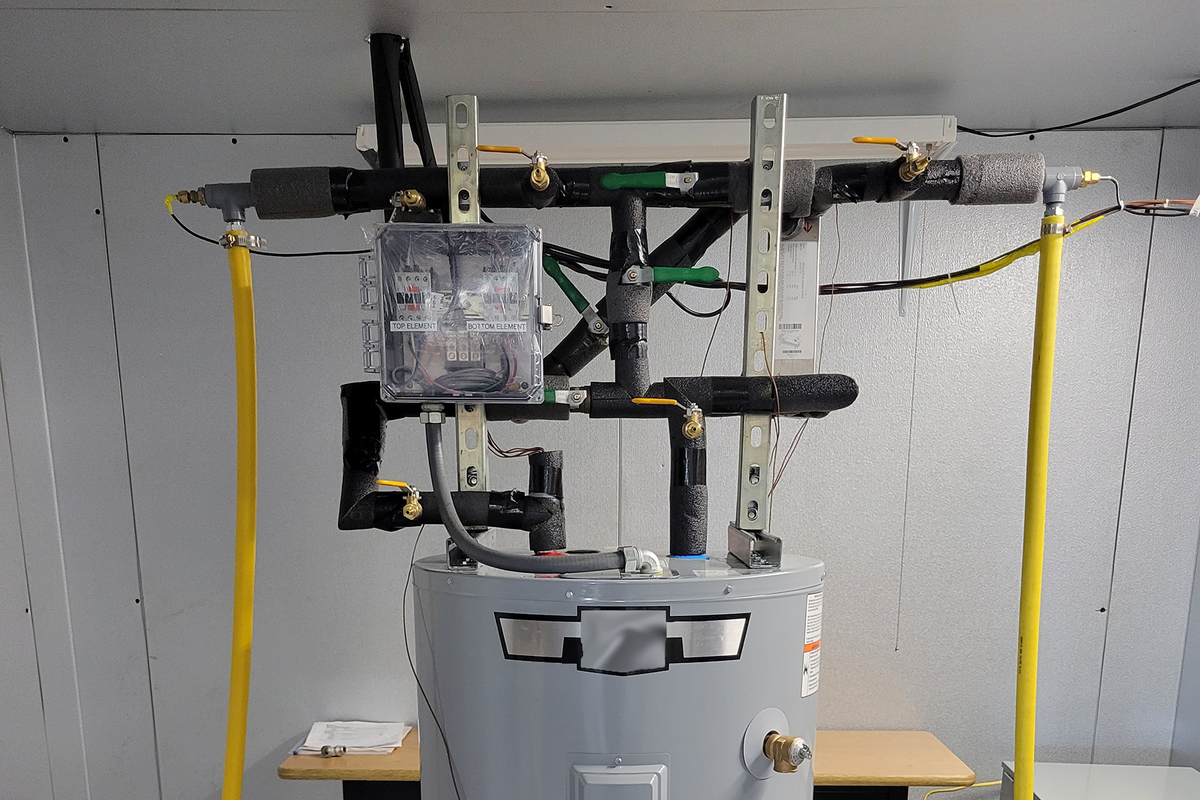
The solution developed by NIST is simple—jack up the set point of the hot water heater, then fit a heat exchanger on top to cool outgoing hot water with the incoming cold supply. Credit: Brandon Hayes/NIST 

The simple solution would be to simply jack up the hot water system to store water at a much higher temperature, say around 70 °C (160 °F).  This could be undesirable in many contexts, though, as water that hot can more easily cause burns. It would be ideal to store the water at a higher temperature, while making sure it was delivered at a slightly lower temperature so it didn’t hurt anybody when it left the tap or shower head.
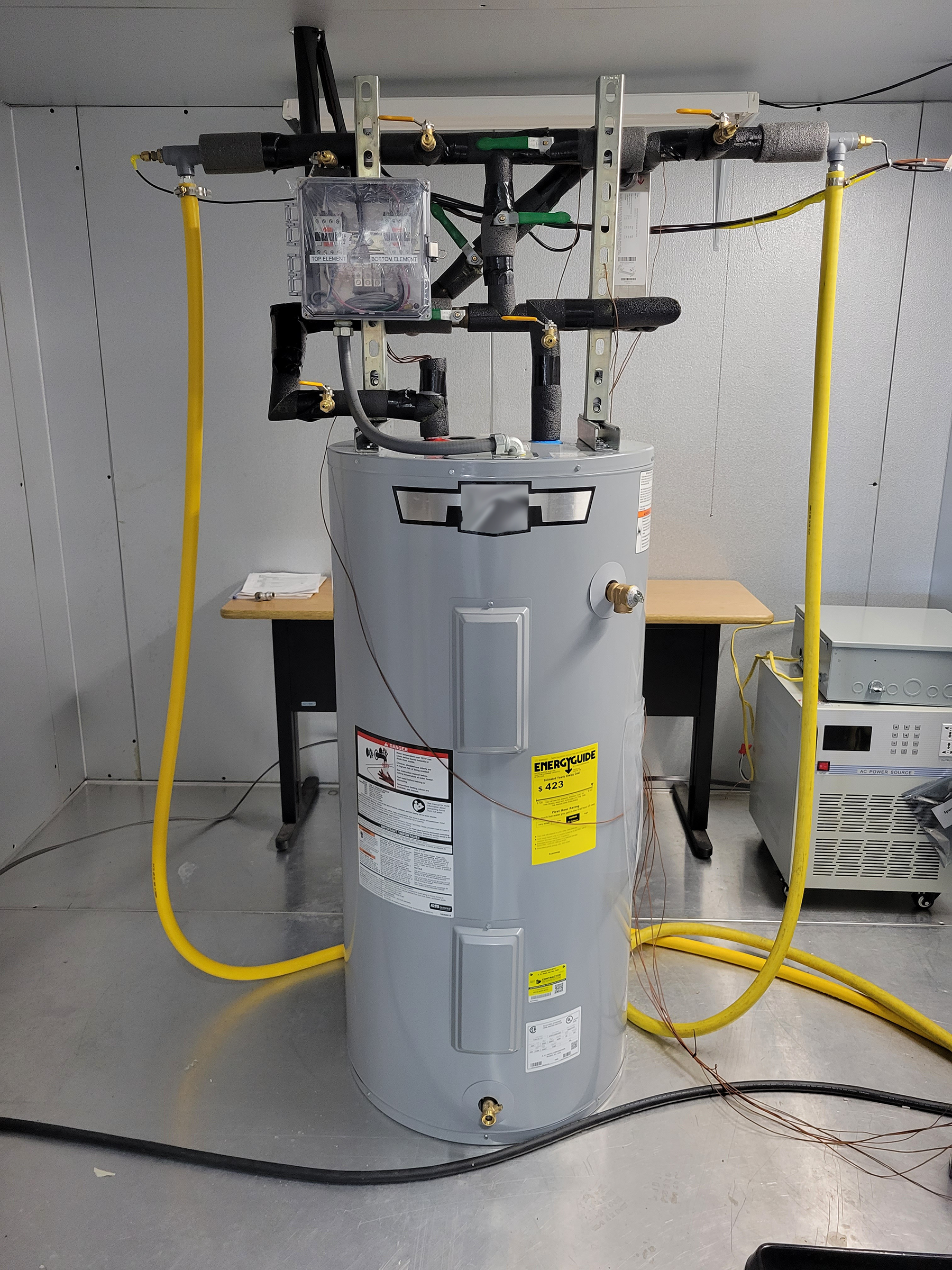
A prototype unit whipped up by NIST cost only about $100. Credit: NIST

It turns out that there is a remarkably simple way to achieve this. NIST developed a simple heat exchanger which can be mounted atop any old hot water system. It’s designed such that the hot water leaving the tank passes through a heat exchanger where it’s surrounded by cold water which is running to the water heater’s intake pipe. This has dual benefits. The hot water inside the tank can be stored in the tank at 70 °C, which kills almost all legionella peumophila almost instantly. That water, though, is then cooled to a slightly safer temperature as it passes through the heat exchanger and out to the tap or shower. The hot water remains at a safe temperature for the user, and contains far less harmful bacteria, and cooling it doesn’t introduce any pathogens from another source. In turn, the cold water coming into the tank is pre-warmed slightly by the hot water, so the energy isn’t simply wasted.

This trick isn’t just simple, it’s also cheap. NIST engineers were able to fabricate a prototype unit to fit to a residential water heater using just $100 of components. It could be a useful addition for homeowners looking to make their hot water service a little cleaner. However, the real benefits are likely to be for larger operators of multiple-occupancy facilities, like nursing homes and hotels. These facilities often have to take great care to avoid the build up of harmful bacteria in building-wide hot water systems. Having the ability to increase the tank temperature to the point that legionella pneumophila bacteria simply die off would be a huge boon to this effort.

Sometimes, it’s possible to make great gains with a simple hack. Using the cold water service to cool hotter outgoing water is a smart trick that uses only minimal additional equipment to offer a safer hot water supply. It could yet become a common install for hot water systems in order to fight the good fight against a harmful disease that likes to lurk in our pipes. If you happen to see a heat exchanger atop a hot water heater in future, you can smile that someone has done the work to try and make that hot water supply just a little safer going forward.
Advertisement

Source link

Continue Reading

Tech

How To Make Sure Your Android Phone Is Secure

Published

on

Android offers tons of options to keep your device secure and private; it’s well worth exploring them all.

According to a 2025 study by the Pew Research Center, nearly 75% of Americans have experienced some form of online scam. These are becoming increasingly complex, as the spread of sophisticated AI tools have made online attacks more diverse, effective and harder to detect. 

Vishing, for instance, has seen crooks using AI-powered deepfakes to mimic the voices of a victim’s loved ones to scam them over the phone. Meanwhile, malware attacks are more dangerous and adaptive than ever. And that’s not to mention the often-overlooked privacy risks that many popular apps pose.

Advertisement

Luckily, on Android, you can address many of these security and privacy risks directly. From AI-powered scam detection tools to advanced theft protection measures, Android offers many features to keep you safe.

Update your software

One of the easiest ways to protect yourself is to update your Android phone, ensuring you receive the latest bug fixes and security features. To check what version you’re using, open your phone’s Settings app and tap About Phone, where you’ll find a section titled Android Version. This shows the status of your operating system, security settings, Google Play system status and build number. 

Advertisement

Android sends a notification when an OS update is available; tap it and follow the prompts to update right away. If you accidentally clear the notification or want to update later, go to Settings > System > Software Updates. Fully updated phones will display a checkmark, while a yellow arrow indicates an update is available. Install any available ones by tapping System Update.

To update apps, open Google Play and tap your profile picture at the top-right. Then, go to Settings > Network preferences > Auto-update apps. Here, select from several options depending on whether you want to update apps over Wi-Fi or mobile data; the best option depends on your phone’s data plan.

To check for app updates on-demand, tap your profile picture in Google Play and choose Manage apps and device. Under Updates available, hit Update all to run all pending updates or See details to review each app individually and install updates as desired. Some app may require new privacy permissions for updates, prompting you to confirm these new settings.

Advertisement

Enable Android’s basic protections

Enabling two-factor authentication secures your Google account, which is the key to so much on your phone. To add this, visit your Google Account management page, select Security & sign-in, and then under How you sign in to Google, hit 2-Step Verification. Walk through the steps to add a secondary step.

Another simple protection is to enable your phone’s automatic backup feature: go to Settings, tap Google and select Backup. If it is your first time doing so, follow the prompts to back up your phone. If not, navigate to Manage backup, where you can adjust your data settings and enable automatic backups. With a backup, you won’t lose crucial data if your device is stolen or lost.

One of Android’s most important security features is the Find Hub app, which allows you to see your device’s last known location, ring it, erase your personal information, track lost luggage, and share your location with friends and family. Although Find Hub is automatically enabled, taking some steps ensures your device can be found using it. 

Advertisement

Make sure you’ve turned on location permissions by visiting Settings > Location > Use location. Next, go to Settings > Security > Find Hub and confirm Allow device to be located is enabled. You can find your Android device by visiting Google’s Find Hub website in any browser. Google’s Find Hub support page has great advice on preparing your phone for recovery before it’s lost.

Turn on anti-scam features

Android features multiple scam detection tools to alert you about potentially malicious phone calls or texts. One, called Scam Detection, uses Gemini’s AI models to detect the “subtle conversational patterns used in job offer scams or sophisticated romance baiting scams.” If enabled, you’ll hear a series of beeps and receive a notification alerting you to a potential scam. 

Advertisement

Due to the sensitive nature of many calls, this feature is disabled by default. To turn it on, open the Phone app, tap the Menu icon at the top-left, and choose Settings. Then, find Scam Detection and toggle it to active. While this is currently only available for Google Pixel phones, Google has announced that it will bring the tool to other phones, starting with the Samsung Galaxy S26. 

Android offers a similar tool targeting texting schemes; you’ll get a warning about potential scams when on-device AI detects a suspicious message. The alerts provide the option to dismiss them, report the scammer or block the number. Google assures that the AI’s algorithm occurs entirely within your device, meaning none of the contents are uploaded to an outside database or cloud server. 

This feature is on by default and only applies to conversations with people not in your contact list. If you don’t want your phone scanning conversations, disable it by going to Messages, tapping your profile icon, then choosing Protection & Safety. From there, you can enable or disable Spam protection.

Advertisement

Manage your privacy settings

Part of securing Android is defining how applications can interact with your personal data. To adjust these options, open the Settings app, tap Apps, find your desired application and select Permissions, where you can customize privacy settings. For some (including camera, location and microphone), Android may offer more precise customization options.

Android’s permission manager also presents these based on permission type instead of a per-app basis. To use this view, open the Security & Privacy section of the Settings app, navigate to Privacy, and choose Permission manager. Here, you’ll see a breakdown of permission types; choose one to review and adjust which apps have that permission. 

Permissions include your calendar, call logs, photo library, physical activity metrics, body sensors, text messages and other critical data. Which ones are appropriate depend on the app. For example, location access is essential for a navigation app to work correctly, while being completely unnecessary for a card game. Ultimately, permissions are a cocktail of your tolerance for data sharing and desired app functionalities. 

Another helpful setting is having Android pause access for unused apps, preventing apps you haven’t touched in months from sucking up your data. To enable this, tap Settings > Apps > See all apps. Next, choose the one you want to pause, navigate to Unused app settings, and enable Pause app activity if unused.

Advertisement

Customize your advertisement settings

You may be surprised to learn that your phone usage is shared with advertising partners. Android allows you to opt out of this form of data sharing by visiting Settings > Google > All services> Privacy & security > Ads > Ads privacy. There, you’ll find several ad-related settings.

The first is called Ad topics, where Android shares topics (up to three at a time) you may be interested in with advertisers. Turn off the feature by navigating to Ad topics in the above menu. If you choose to leave this enabled, you can remove specific topics. 

Advertisement

Android also allows you to block apps from suggesting ads to other apps. On the same menu, select App suggested ads. You can also block specific apps from suggesting ads in this section. 

Finally, you can prevent Android from using your personal data to measure the effectiveness of these advertisements. Visit the Ad measurement section of Ads privacy to enable or disable the feature. For a more drastic step, consider removing yourself from targeted advertising entirely using Opt out of Ads Personalization.

Advertisement

Protect against harmful apps

Most of what’s on the Play Store is safe, but it’s still important to be aware of what you’re downloading. Criminals can hide malware within seemingly innocuous apps, sometimes circumventing Google’s security protections. This is why the Google Play Protect feature protects you from harmful apps. 

Enabled by default, Play Protect scans apps for malware or harmful data sharing as you download them. The system also periodically scans your device for harmful activity, as malicious apps can lay dormant for months or years before executing malware. If Android finds a problematic app, it will remove it, disable it or send you a notification. 

To verify your phone is protected, open the Google Play Store, tap your profile icon at the top-right and go to Play Protect > Settings > About. You’re able to disable this functionality by tapping the Play Protect entry in the Play Store’s profile menu, then choosing Settings. Here, you’ll find the Scan apps with Play Protect slider. Google strongly suggests you “always keep Google Play Protect on,” as disabling it can expose you to dangerous apps.

App security concerns are much more acute if you sideload apps from outside Play Store, as they haven’t undergone the same security checks. Those who sideload can do so more safely by enabling Improve harmful app detection, which automatically sends non-Play Store applications to Google for review. You might also consider an Android antivirus app if you regularly sideload.

Advertisement

Turn on theft protection

Having your phone stolen is awful, but it can be less panic-inducing than you’d expect with Android’s suite of threat protection features. To turn on theft protection, go to Settings > Google > All services. From there, navigate to the Personal & device safety section and tap Theft protection, which holds several advanced security features.

The first is called Theft Detection Lock, which uses your phone’s Wi-Fi, Bluetooth and motion sensors to detect if someone forcefully takes your phone. To enable this, enable Theft Detection Lock in the above settings page. A similar security measure, dubbed Offline Device Lock, automatically locks your screen if someone takes your device offline to prevent you from tracking their movements in Find Hub. 

Advertisement

The Failed Authentication Lock feature in the same menu protects from someone guessing your PIN. Identity Check adds an additional layer of security, as it requires your biometric data to change critical security features like passwords or two-factor recovery.

Another useful theft protection tool is Android’s Remote Lock feature, which has you lock your device from a verified phone number. To enable this, your phone must have an active SIM card, a verified phone number, and Find Hub activated. Once it’s on, you can remotely set your stolen phone’s screen to lock when it comes back online. To do so, visit android.com/lock, enter your phone number, and follow the prompts. You also can add a security question to restrict the feature in the Remote Lock menu.

Advertisement

Source link

Continue Reading

Tech

Fixing An Expensive Amprobe Cable Tracer With Mystery Fault

Published

on

Perhaps the most annoying kinds of faults are those that involve expensive equipment that just sit around in a cupboard, only for them to just stop working at all. Such was the case with the £2,000 Amprobe cable trace kit that [Tom] bought for work-related purposes. After sitting around unused for a few years, the signal generating part of the kit refused to power up at all, with Fluke’s service department wanting at least £600 to even attempt a repair after already having had [Tom] cough up £70 to even get this quote.
Subsequently he instead sent it to [Buy it Fix it] on YouTube for an attempted repair, which at the very least would be a less costly option. These systems use a signal generator connected to the cable, with a separate detector wirelessly tracking this signal. By itself that doesn’t sound too complex, but as it turns out it wasn’t quite so straightforward to diagnose.

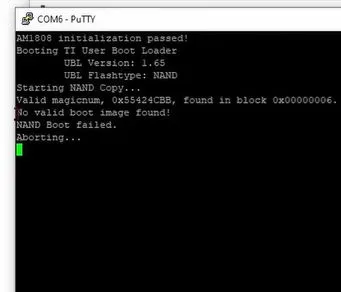
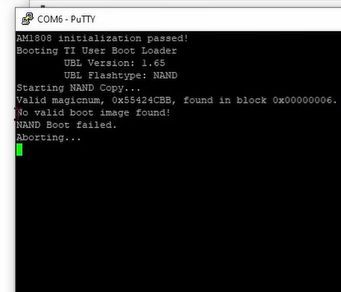
After eliminating a basic power or display issue, the SoC’s boot sequence was traced, including reading from the 128 MB NAND Flash. At first glance the unit appeared to be trying to boot and work as normal, which was confirmed after finding a serial port and seeing the log output on it. This showed that the NAND Flash’s boot image failed validation due to apparent corruption.

After desoldering the TSOP 48 Flash package and stuffing it into a reader, at first glance the data on it looked fine. After a tragic detour with Google’s Gemini chatbot that led to a lot of wasted time, the solution that the human intelligence came up with was to crack open the tracer unit in the set and ogle at its firmware, in particular the bootloader.

Comparing the two Flash dump files, there were a few flipped bits in the bootloader section, likely due to cells in the Flash having lost their charge. Writing the generator’s Flash with a corrected image led to it booting up happily again into the Linux 2.6-based firmware, seemingly no worse for wear. Of course, one has to consider here that the NAND Flash IC clearly has a few leaky cells in it, so replacing it with a fresh one could be a good idea for a long-term fix.

Advertisement

Source link

Advertisement
Continue Reading

Tech

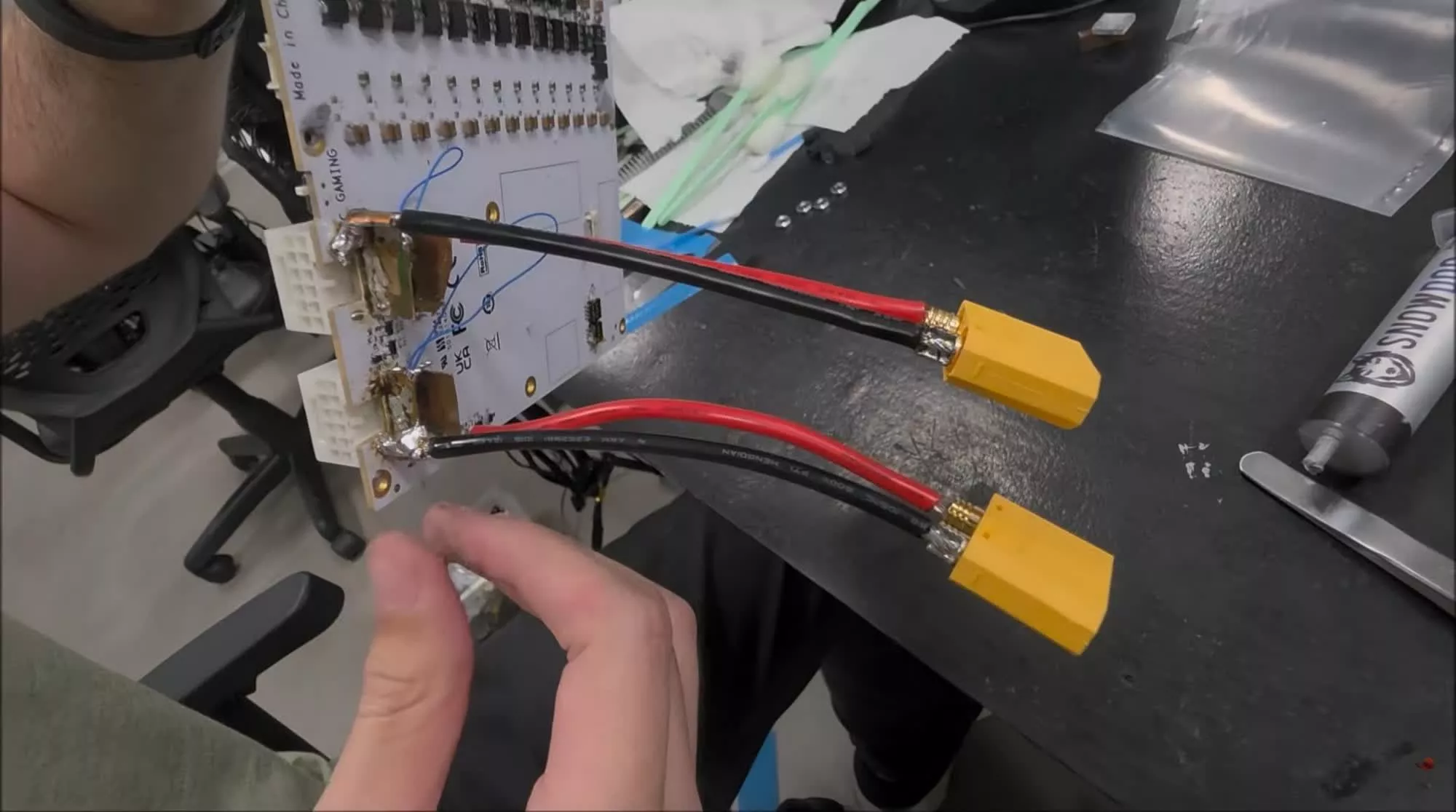
YouTubers “fix” melting RTX 5090 power connector by soldering cables directly to PCB

Published

on

In a nutshell: The RTX 5090 and its predecessor, the RTX 4090, have been plagued by reports of catastrophic thermal failures that can cause the 16-pin power connector to melt, often destroying the card in the process. A team of Brazilian YouTubers has now seemingly found a “solution” to the problem by soldering the power cables directly to the GPU PCB.

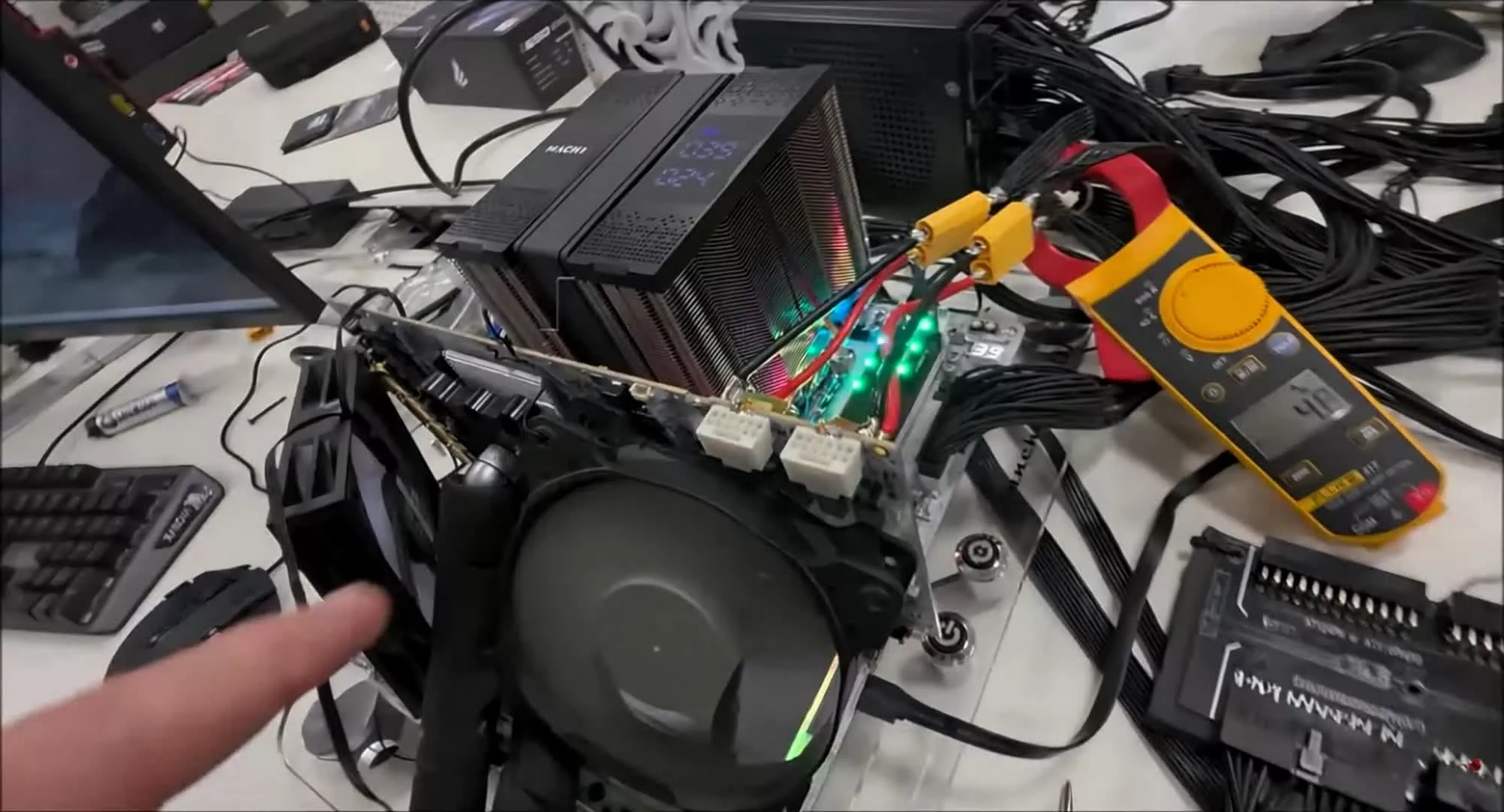
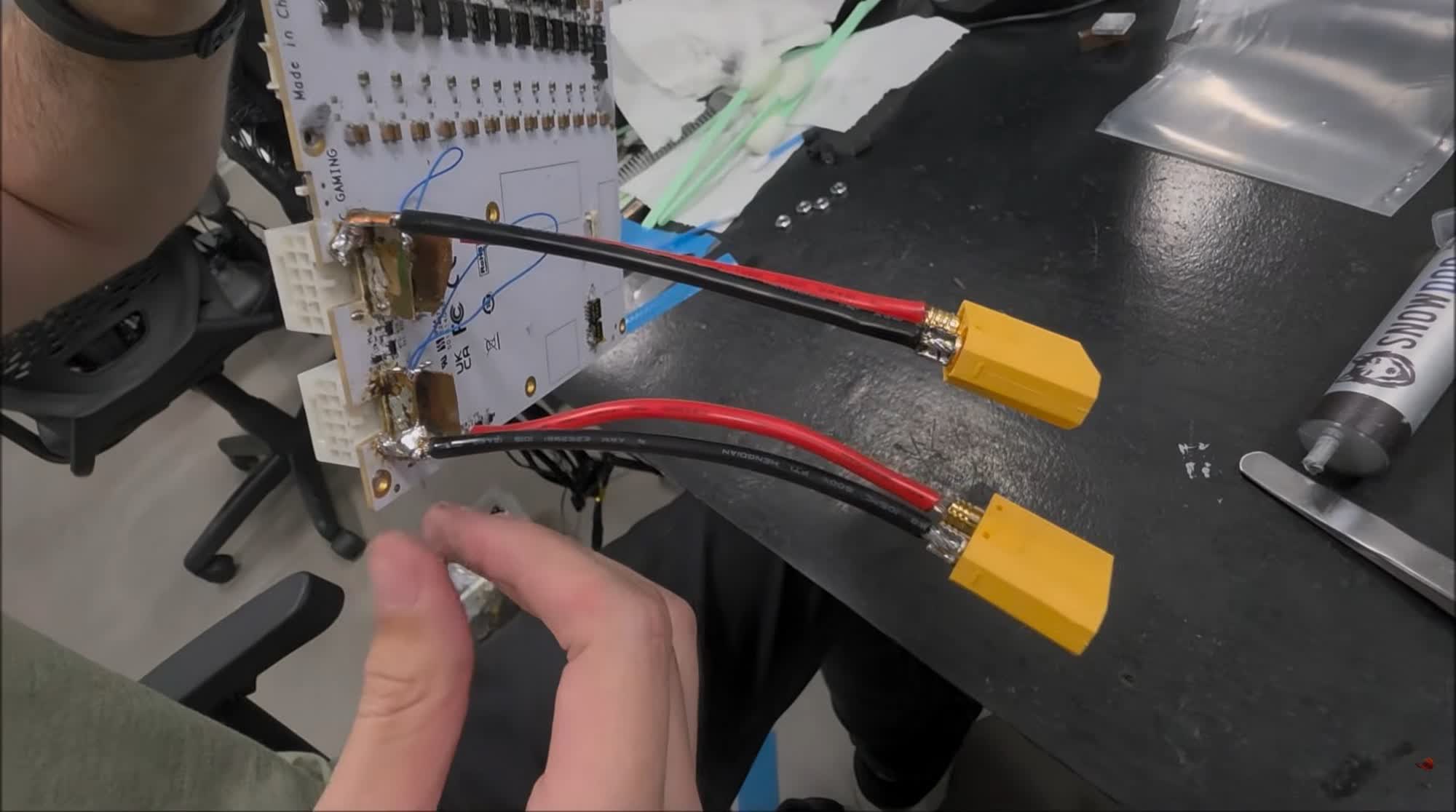
TecLab recently demonstrated a workaround for the RTX 5090 thermal failures by modifying a 5090 to bypass the problematic 16-pin power connectors and route the power wiring directly to the GPU’s PCB instead. For the experiment, they used a Galax GeForce RTX 5090 D HOF OC LAB XOC, which comes with two 16-pin power connectors designed for extreme overclocking.

The modification was carried out in two steps. First, the team used two adapters to accommodate two sets of wires from each 16-pin connector before soldering them to the connector traces on the PCB. Next, they removed the heatsink and the two 120mm fans cooling the GPU and added an industrial-strength water cooler to reduce the GPU’s core temperature.

While the YouTubers did not reveal the GPU’s temperatures after the modifications, the ~50A reading from the power meter connected to the 12V rail suggests that the card was drawing around 600W. For context, the Galax HOF OC LAB XOC can handle up to 2,000W, far more than the 575W TDP of standard RTX 5090 cards, thanks to a custom BIOS designed for professional overclockers.

Advertisement

TecLab acknowledged that its “solution” is not practical for most gamers and insisted that it was intended as a sarcastic take on Nvidia’s repeated failures to fix the long-standing problem, rather than an actual recommendation to disassemble and permanently modify a $5,000 graphics card.

Ever since the RTX 5090 launched in January 2025, dozens of users have complained about melting 16-pin connectors. One of the earliest reported cases surfaced in February 2025, followed by two more reports in April and another in May. The issue was also documented by John Papadopoulos of DSO Gaming, who claimed that the 12V-2×6 cable connected to his RTX 5090 melted while he was playing Wuchang: Fallen Feathers.

Source link

Advertisement
Continue Reading

Tech

Ultra Compact Liene M100 Printer Turns Your Phone Into a 4×6 Photo Lab

Published

on

Liene M100 Photo Printer
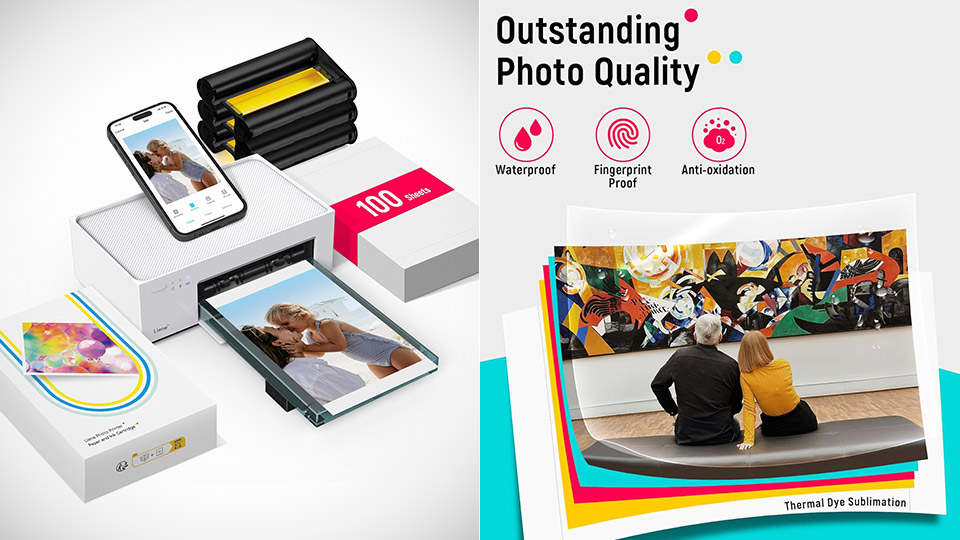
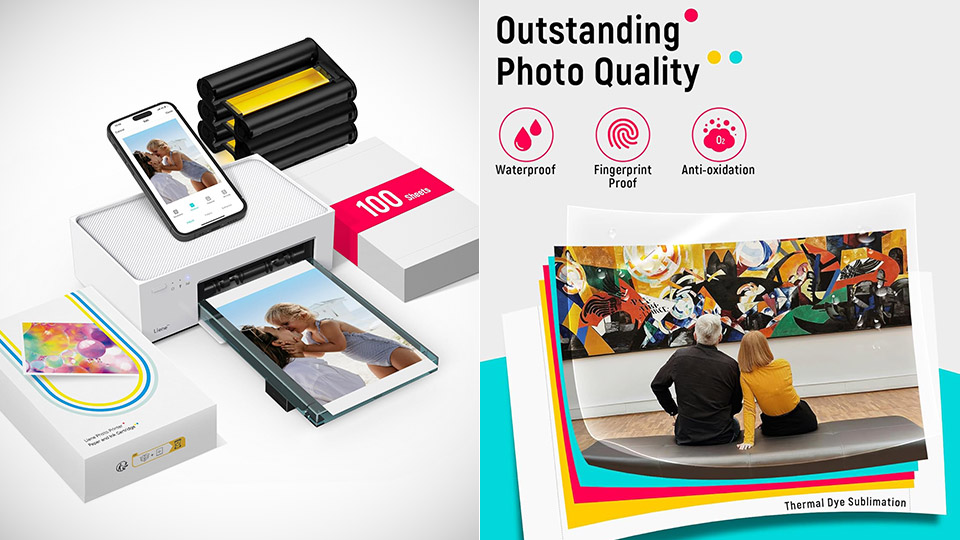
Most people already carry a camera in a pocket, so buying a second gadget that only spit out tiny sticky squares can feel like clutter. Liene’s M100, priced at $135.99 (was $220), skips that whole category. You send a photo from a phone, tablet, or computer and get a glossy 4-by-6 print in about a minute, which is the size most frames, albums, and fridge magnets still expect.


The M100 is built around the dye sublimation process. Using a heat press, it transfers the yellow, magenta, and cyan dyes from a specific ribbon to their own patented paper before applying a clear protective coat for the fourth time. The resulting print measures 3.94 by 5.83 inches on a somewhat larger piece of paper, with enough room for the image to run all the way to the edge once any excess tabs are removed. Resolution is a decent 300 x 300 dpi, with a respectable 256 shades per color, which should be plenty for casual printing into albums and small frames, without the irritating grain that many pocket printers produce.

Sale


Liene M100 4×6” Photo Printer, Phone Printer 100 Sheets & 3 Cartridges, Full-Color Photo, Portable…
  • User-Friendly Portable Photo Printer for iPhone, Android & PC – Get beautiful and colourful memories with Liene 4×6 photo printer! After opening the…
  • Superior Quality 4×6 Photo Printer – Print photos like no other thanks to the thermal-dye sublimation tech adopted by the picture printer for iphone…
  • Wi-Fi Photo Printer for Smartphone – The built-in hotspot of the photo printer makes it easy to print pictures from your phone, avoiding outside…

The device’s exact body dimensions are 8.07 by 4.91 by 3.36 inches, and it weighs around 2.65 pounds. It has a back cassette that can contain 20 sheets of paper and a magnetic tray that snaps on top when you’re ready to pack it away. The official print time is 59 seconds, but you’ll most likely hear the sheet rattling in and out of the machine four times as it applies each color layer and protective coating.

Advertisement


Connecting it to your home network is simple because it establishes its own Wi-Fi hotspot, eliminating the need for you to be connected to the internet at home. Simply launch the free Liene Photo app on your iOS or Android device, join the network, select your JPEG or PNG file, add a border or collage if desired, and submit it to print. USB-C is compatible with both Windows and Mac computers, and AirPrint is available for Apple devices. The fact that numerous individuals may connect to the same hotspot is a wonderful addition, especially if you’re at a family gathering and everyone wants to print their Christmas photos on the same table.

Liene M100 Photo Printer
The prints themselves come out nice and glossy, all laminated up, which is exactly what photographers who have compared this model to the Canon Selphy and Kodak dock printers have said, as they rave about the skin tones, fine detail, and (most importantly) the lack of those annoying inkjet speckles you get from cheaper printers. However, strong sky gradients can cause some banding, but the final quality is much closer to what you’d receive from a real-life photo studio than from a conventional ZINK pocket printer. That protective layer is a significant bonus because it prevents fingerprints, light wetness, and fading, which is wonderful if you plan on storing those photos in an album for years.

Liene M100 Photo Printer
A ribbon cartridge lasts for about 40 prints, so you’ll need to replace them on a regular basis. It goes without saying that this is a photo printer, so you won’t be printing letters, homework, or oddly shaped documents on it, as that’s not its intended use.

Source link

Advertisement
Continue Reading

Trending

Copyright © 2025