Vishing, for instance, has seen crooks using AI-powered deepfakes to mimic the voices of a victim’s loved ones to scam them over the phone. Meanwhile, malware attacks are more dangerous and adaptive than ever. And that’s not to mention the often-overlooked privacy risks that many popular apps pose.
Advertisement
Luckily, on Android, you can address many of these security and privacy risks directly. From AI-powered scam detection tools to advanced theft protection measures, Android offers many features to keep you safe.
Update your software
One of the easiest ways to protect yourself is to update your Android phone, ensuring you receive the latest bug fixes and security features. To check what version you’re using, open your phone’s Settings app and tap About Phone, where you’ll find a section titled Android Version. This shows the status of your operating system, security settings, Google Play system status and build number.
Advertisement
Android sends a notification when an OS update is available; tap it and follow the prompts to update right away. If you accidentally clear the notification or want to update later, go to Settings > System > Software Updates. Fully updated phones will display a checkmark, while a yellow arrow indicates an update is available. Install any available ones by tapping SystemUpdate.
To update apps, open Google Play and tap your profile picture at the top-right. Then, go to Settings > Network preferences > Auto-update apps. Here, select from several options depending on whether you want to update apps over Wi-Fi or mobile data; the best option depends on your phone’s data plan.
To check for app updates on-demand, tap your profile picture in Google Play and choose Manage apps and device. Under Updates available, hit Update all to run all pending updates or See details to review each app individually and install updates as desired. Some app may require new privacy permissions for updates, prompting you to confirm these new settings.
Advertisement
Enable Android’s basic protections
Enabling two-factor authentication secures your Google account, which is the key to so much on your phone. To add this, visit your Google Account management page, select Security & sign-in, and then under How you sign in toGoogle, hit 2-Step Verification. Walk through the steps to add a secondary step.
Another simple protection is to enable your phone’s automatic backup feature: go to Settings, tap Google and select Backup. If it is your first time doing so, follow the prompts to back up your phone. If not, navigate to Manage backup, where you can adjust your data settings and enable automatic backups. With a backup, you won’t lose crucial data if your device is stolen or lost.
One of Android’s most important security features is the Find Hub app, which allows you to see your device’s last known location, ring it, erase your personal information, track lost luggage, and share your location with friends and family. Although Find Hub is automatically enabled, taking some steps ensures your device can be found using it.
Advertisement
Make sure you’ve turned on location permissions by visiting Settings > Location > Use location. Next, go to Settings > Security > Find Hub and confirm Allow device to be located is enabled. You can find your Android device by visiting Google’s Find Hub website in any browser. Google’s Find Hub support page has great advice on preparing your phone for recovery before it’s lost.
Turn on anti-scam features
Android features multiple scam detection tools to alert you about potentially malicious phone calls or texts. One, called Scam Detection, uses Gemini’s AI models to detect the “subtle conversational patterns used in job offer scams or sophisticated romance baiting scams.” If enabled, you’ll hear a series of beeps and receive a notification alerting you to a potential scam.
Advertisement
Due to the sensitive nature of many calls, this feature is disabled by default. To turn it on, open the Phone app, tap the Menu icon at the top-left, and choose Settings. Then, find Scam Detection and toggle it to active. While this is currently only available for Google Pixel phones, Google has announced that it will bring the tool to other phones, starting with the Samsung Galaxy S26.
Android offers a similar tool targeting texting schemes; you’ll get a warning about potential scams when on-device AI detects a suspicious message. The alerts provide the option to dismiss them, report the scammer or block the number. Google assures that the AI’s algorithm occurs entirely within your device, meaning none of the contents are uploaded to an outside database or cloud server.
This feature is on by default and only applies to conversations with people not in your contact list. If you don’t want your phone scanning conversations, disable it by going to Messages, tapping your profile icon, then choosing Protection & Safety. From there, you can enable or disable Spam protection.
Advertisement
Manage your privacy settings
Thx4stock/Getty Images
Part of securing Android is defining how applications can interact with your personal data. To adjust these options, open the Settings app, tap Apps, find your desired application and select Permissions, where you can customize privacy settings. For some (including camera, location and microphone), Android may offer more precise customization options.
Android’s permission manager also presents these based on permission type instead of a per-app basis. To use this view, open the Security & Privacy section of the Settings app, navigate to Privacy, and choose Permission manager. Here, you’ll see a breakdown of permission types; choose one to review and adjust which apps have that permission.
Permissions include your calendar, call logs, photo library, physical activity metrics, body sensors, text messages and other critical data. Which ones are appropriate depend on the app. For example, location access is essential for a navigation app to work correctly, while being completely unnecessary for a card game. Ultimately, permissions are a cocktail of your tolerance for data sharing and desired app functionalities.
Another helpful setting is having Android pause access for unused apps, preventing apps you haven’t touched in months from sucking up your data. To enable this, tap Settings > Apps > See all apps. Next, choose the one you want to pause, navigate to Unused appsettings, and enable Pause app activity if unused.
Advertisement
Customize your advertisement settings
You may be surprised to learn that your phone usage is shared with advertising partners. Android allows you to opt out of this form of data sharing by visiting Settings > Google > All services> Privacy & security > Ads > Ads privacy. There, you’ll find several ad-related settings.
The first is called Ad topics, where Android shares topics (up to three at a time) you may be interested in with advertisers. Turn off the feature by navigating to Ad topics in the above menu. If you choose to leave this enabled, you can remove specific topics.
Advertisement
Android also allows you to block apps from suggesting ads to other apps. On the same menu, select App suggested ads. You can also block specific apps from suggesting ads in this section.
Finally, you can prevent Android from using your personal data to measure the effectiveness of these advertisements. Visit the Ad measurement section of Ads privacy to enable or disable the feature. For a more drastic step, consider removing yourself from targeted advertising entirely using Opt out of Ads Personalization.
Advertisement
Protect against harmful apps
Most of what’s on the Play Store is safe, but it’s still important to be aware of what you’re downloading. Criminals can hide malware within seemingly innocuous apps, sometimes circumventing Google’s security protections. This is why the Google Play Protect feature protects you from harmful apps.
Enabled by default, Play Protect scans apps for malware or harmful data sharing as you download them. The system also periodically scans your device for harmful activity, as malicious apps can lay dormant for months or years before executing malware. If Android finds a problematic app, it will remove it, disable it or send you a notification.
To verify your phone is protected, open the Google Play Store, tap your profile icon at the top-right and go to Play Protect > Settings > About. You’re able to disable this functionality by tapping the Play Protect entry in the Play Store’s profile menu, then choosing Settings. Here, you’ll find the Scan apps with Play Protect slider. Google strongly suggests you “always keep Google Play Protect on,” as disabling it can expose you to dangerous apps.
App security concerns are much more acute if you sideload apps from outside Play Store, as they haven’t undergone the same security checks. Those who sideload can do so more safely by enabling Improve harmful app detection, which automatically sends non-Play Store applications to Google for review. You might also consider an Android antivirus app if you regularly sideload.
Advertisement
Turn on theft protection
Having your phone stolen is awful, but it can be less panic-inducing than you’d expect with Android’s suite of threat protection features. To turn on theft protection, go to Settings > Google > All services. From there, navigate to the Personal & device safety section and tap Theft protection, which holds several advanced security features.
The first is called Theft Detection Lock, which uses your phone’s Wi-Fi, Bluetooth and motion sensors to detect if someone forcefully takes your phone. To enable this, enable Theft Detection Lock in the above settings page. A similar security measure, dubbed Offline Device Lock, automatically locks your screen if someone takes your device offline to prevent you from tracking their movements in Find Hub.
Advertisement
The Failed Authentication Lock feature in the same menu protects from someone guessing your PIN. Identity Check adds an additional layer of security, as it requires your biometric data to change critical security features like passwords or two-factor recovery.
Another useful theft protection tool is Android’s Remote Lock feature, which has you lock your device from a verified phone number. To enable this, your phone must have an active SIM card, a verified phone number, and Find Hub activated. Once it’s on, you can remotely set your stolen phone’s screen to lock when it comes back online. To do so, visit android.com/lock, enter your phone number, and follow the prompts. You also can add a security question to restrict the feature in the Remote Lock menu.
The FTC and 22 state attorneys general are suing Amazon, accusing the company of secretly inflating advertising prices through undisclosed changes to its auction system that may have extracted more than $20 billion from advertisers since 2019. “Amazon has millions of advertising customers who were misled into paying significantly higher prices,” FTC Chairman Andrew Ferguson said in a statement. “These higher costs were largely passed on to American consumers.” CNBC reports: The complaint, which was filed in U.S. District Court for the Western District of Washington, centers on Amazon’s sponsored products ads, brands ads and display ads that run alongside search results on its sprawling webstore. Amazon has amassed the third-largest digital advertising business globally, trailing only Google and Meta. The company hauled in more than $68 billion in ads revenue last year, with the lion’s share coming from sales of sponsored products ads. Third-party sellers who hawk their wares on Amazon’s marketplace have recently criticized surging advertising costs on the site, including a string of recent policy changes, which led to some top merchants withholding their ad spend in a boycott. The company has traditionally used a “second-price” auction system, wherein it told advertisers they “only pay the least bid amount needed in order to win,” the complaint states, citing Amazon’s own marketing materials.
The FTC alleges in its complaint that Amazon in 2019 changed its auction rules without notice by adding an undisclosed surcharge it referred to as a “soft reserve price,” which led to higher ad prices. “Amazon made this surreptitious change to its auction because it was unhappy about how much revenue its advertising auctions were generating,” the agency said in its complaint, which cites internal communications between Amazon ad executives. In one exchange, a company executive allegedly acknowledged it uses an “invented auction participant” to increase prices, the FTC said. The FTC and the states alleged Amazon’s practices violate federal and state consumer protection laws, and they’re seeking civil penalties, restitution and other unspecified damages. In a blog post, Amazon called the FTC’s lawsuit “misguided” and said the complaint “fundamentally misunderstands how advertisers operate.” The company added that the agency’s lawsuit doesn’t include evidence of consumer price increases.
“We’ve provided advertisers with guidance about our auctions and pricing in the main tools they use to manage their campaigns, and we continue to update that guidance,” the company said. “We look forward to making our case in court.”
The average hot water is a relatively simple appliance to understand. It uses gas or electricity to dump energy into water in the form of heat, keeping it at a pleasant temperature for uses like bathing and cleaning. Basic mechanisms are in place to ensure the water stays at a relatively constant temperature, neither too hot where it could cause burns, nor too cold such that it wouldn’t be fit for purpose.
Legionella pneumophila is a bacteria that loves to grow in warm water. It can enter the body via aerosol and cause of Legionella’s disease. Credit: CDC, public domain
One of the interesting problems of our modern era is that changing our water usage has changed the risk profile for pathogens growing in hot water. NIST has noted for some time that while the pipes in our walls haven’t changed size, things like our shower heads have changed their flow rate to save water. Less flow rate in the same sized pipes means that water stays in the pipes for longer, increasing the time in which harmful pathogens have to grow in that environment.
Chief amongst these pathogens? The one most commonly feared is legionella pneumophila, the bacterium responsible for causing Legionnaires’ disease. The severe form of pneumonia comes with a fatality rate of 10%, and infection typically comes from inhaling aerosolized droplets containing the bacteria.
Of course, a great way to create aerosolized droplets filled with bacteria is to spray not-quite-hot water through a shower head. This is why hot water systems, particularly in large multi-occupancy buildings, are a risk for such infections. Legionnaires’ disease is rare, but it’s always out there, with 6000 confirmed cases showing up in the US each year. It’s possible that the true number is up to 10 times higher because the disease isn’t routinely tested for. The disease’s rarity is in part because engineers and tradespeople put in plenty of work to minimize the ability for the bacterium to breed in hot water systems. As NIST’s work demonstrates, though, there is possibly even more that could be done to tackle this problem.
Advertisement
Ideally, your hot water pipes in your house would not host any nasty bacteria. But often, hot water systems sit around 49 °C (120 °F), a temperature that’s hot enough to be useful and pleasant without a major scalding risk. Legionella pneumophila won’t easily grow at that temperature; the bacteria thrives between 20 °C to 45 °C (68 °F – 113 °F). Unfortunately, though, it’s not hot enough to kill the bacteria completely. Furthermore, water cools as it travels through pipes to an outlet, and thus pipes can be a perfect environment to spur further growth.
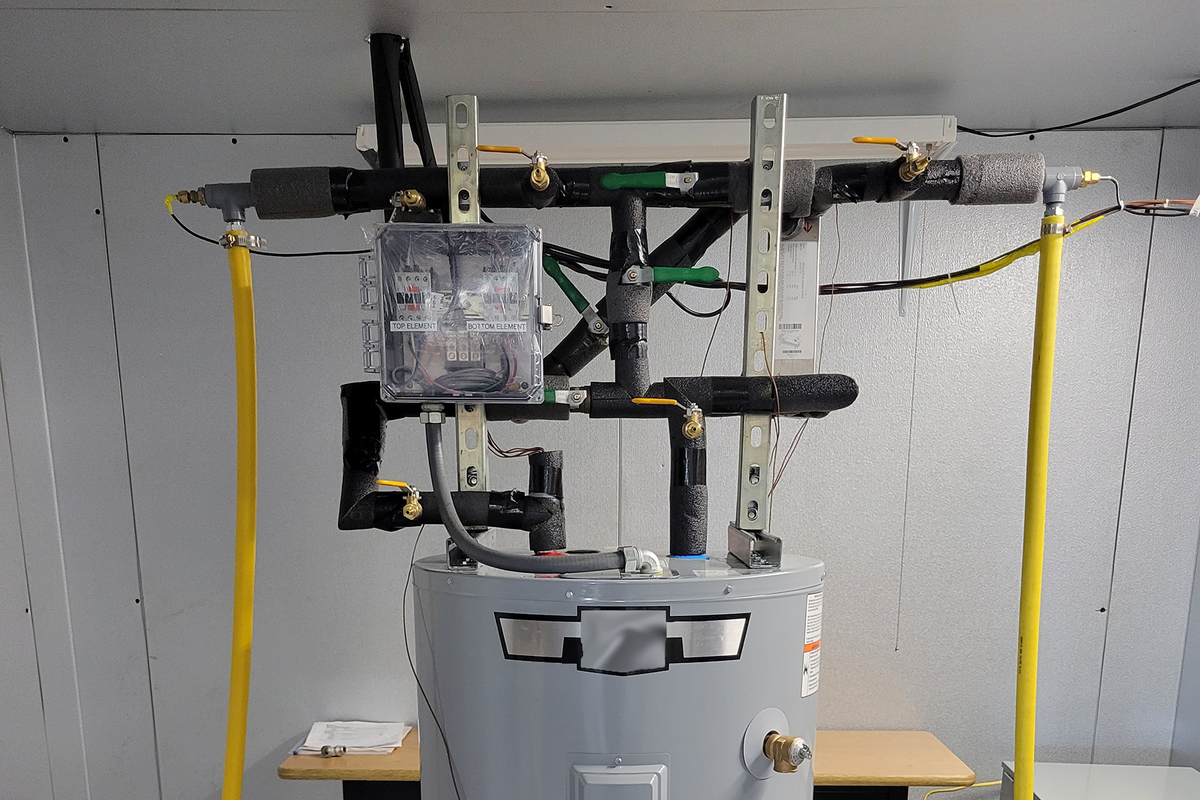
The solution developed by NIST is simple—jack up the set point of the hot water heater, then fit a heat exchanger on top to cool outgoing hot water with the incoming cold supply. Credit: Brandon Hayes/NIST
The simple solution would be to simply jack up the hot water system to store water at a much higher temperature, say around 70 °C (160 °F). This could be undesirable in many contexts, though, as water that hot can more easily cause burns. It would be ideal to store the water at a higher temperature, while making sure it was delivered at a slightly lower temperature so it didn’t hurt anybody when it left the tap or shower head.
A prototype unit whipped up by NIST cost only about $100. Credit: NIST
It turns out that there is a remarkably simple way to achieve this. NIST developed a simple heat exchanger which can be mounted atop any old hot water system. It’s designed such that the hot water leaving the tank passes through a heat exchanger where it’s surrounded by cold water which is running to the water heater’s intake pipe. This has dual benefits. The hot water inside the tank can be stored in the tank at 70 °C, which kills almost all legionella peumophila almost instantly. That water, though, is then cooled to a slightly safer temperature as it passes through the heat exchanger and out to the tap or shower. The hot water remains at a safe temperature for the user, and contains far less harmful bacteria, and cooling it doesn’t introduce any pathogens from another source. In turn, the cold water coming into the tank is pre-warmed slightly by the hot water, so the energy isn’t simply wasted.
This trick isn’t just simple, it’s also cheap. NIST engineers were able to fabricate a prototype unit to fit to a residential water heater using just $100 of components. It could be a useful addition for homeowners looking to make their hot water service a little cleaner. However, the real benefits are likely to be for larger operators of multiple-occupancy facilities, like nursing homes and hotels. These facilities often have to take great care to avoid the build up of harmful bacteria in building-wide hot water systems. Having the ability to increase the tank temperature to the point that legionella pneumophila bacteria simply die off would be a huge boon to this effort.
Sometimes, it’s possible to make great gains with a simple hack. Using the cold water service to cool hotter outgoing water is a smart trick that uses only minimal additional equipment to offer a safer hot water supply. It could yet become a common install for hot water systems in order to fight the good fight against a harmful disease that likes to lurk in our pipes. If you happen to see a heat exchanger atop a hot water heater in future, you can smile that someone has done the work to try and make that hot water supply just a little safer going forward.
Perhaps the most annoying kinds of faults are those that involve expensive equipment that just sit around in a cupboard, only for them to just stop working at all. Such was the case with the £2,000 Amprobe cable trace kit that [Tom] bought for work-related purposes. After sitting around unused for a few years, the signal generating part of the kit refused to power up at all, with Fluke’s service department wanting at least £600 to even attempt a repair after already having had [Tom] cough up £70 to even get this quote.
Subsequently he instead sent it to [Buy it Fix it] on YouTube for an attempted repair, which at the very least would be a less costly option. These systems use a signal generator connected to the cable, with a separate detector wirelessly tracking this signal. By itself that doesn’t sound too complex, but as it turns out it wasn’t quite so straightforward to diagnose.
After eliminating a basic power or display issue, the SoC’s boot sequence was traced, including reading from the 128 MB NAND Flash. At first glance the unit appeared to be trying to boot and work as normal, which was confirmed after finding a serial port and seeing the log output on it. This showed that the NAND Flash’s boot image failed validation due to apparent corruption.
After desoldering the TSOP 48 Flash package and stuffing it into a reader, at first glance the data on it looked fine. After a tragic detour with Google’s Gemini chatbot that led to a lot of wasted time, the solution that the human intelligence came up with was to crack open the tracer unit in the set and ogle at its firmware, in particular the bootloader.
Comparing the two Flash dump files, there were a few flipped bits in the bootloader section, likely due to cells in the Flash having lost their charge. Writing the generator’s Flash with a corrected image led to it booting up happily again into the Linux 2.6-based firmware, seemingly no worse for wear. Of course, one has to consider here that the NAND Flash IC clearly has a few leaky cells in it, so replacing it with a fresh one could be a good idea for a long-term fix.
In a nutshell: The RTX 5090 and its predecessor, the RTX 4090, have been plagued by reports of catastrophic thermal failures that can cause the 16-pin power connector to melt, often destroying the card in the process. A team of Brazilian YouTubers has now seemingly found a “solution” to the problem by soldering the power cables directly to the GPU PCB.
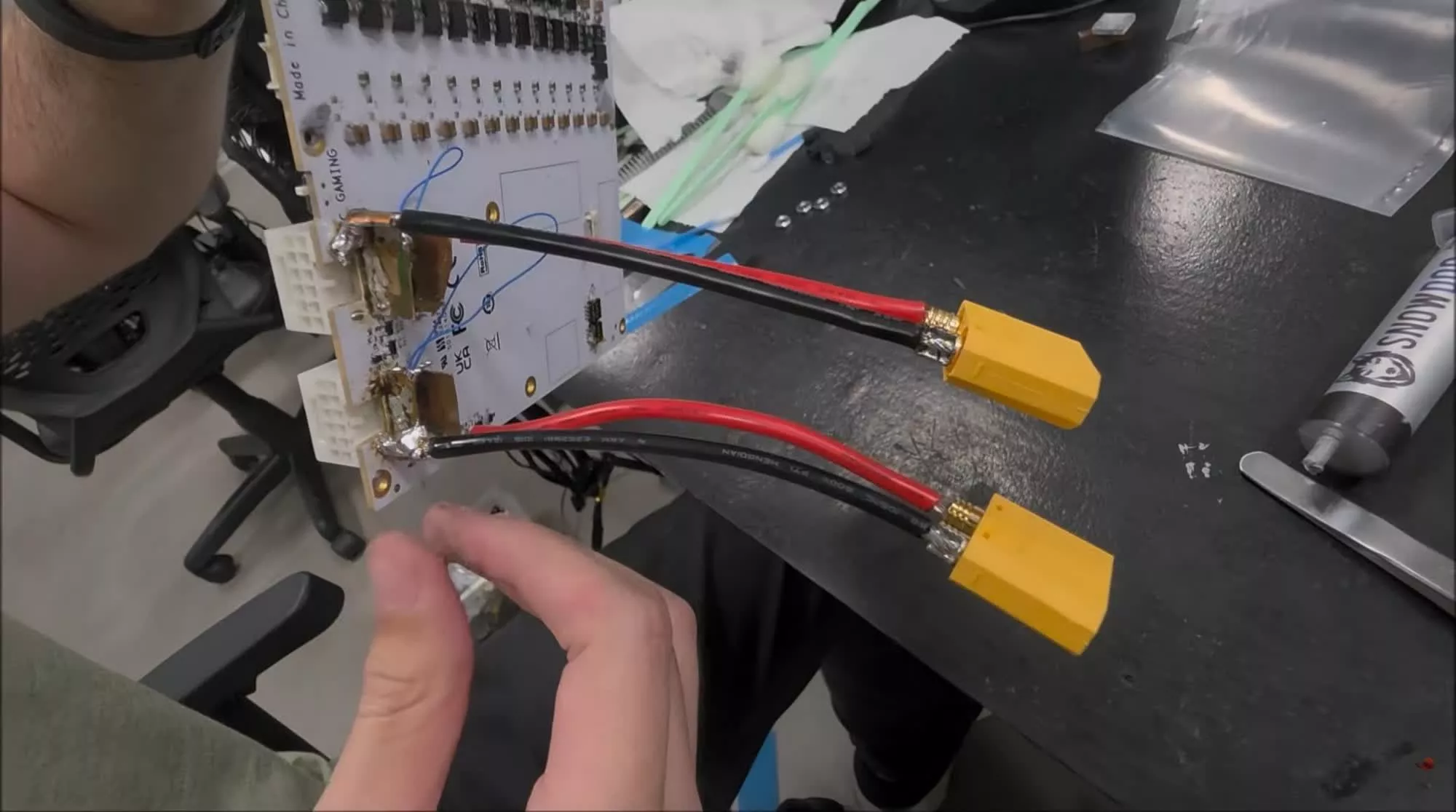
TecLab recently demonstrated a workaround for the RTX 5090 thermal failures by modifying a 5090 to bypass the problematic 16-pin power connectors and route the power wiring directly to the GPU’s PCB instead. For the experiment, they used a Galax GeForce RTX 5090 D HOF OC LAB XOC, which comes with two 16-pin power connectors designed for extreme overclocking.
The modification was carried out in two steps. First, the team used two adapters to accommodate two sets of wires from each 16-pin connector before soldering them to the connector traces on the PCB. Next, they removed the heatsink and the two 120mm fans cooling the GPU and added an industrial-strength water cooler to reduce the GPU’s core temperature.
While the YouTubers did not reveal the GPU’s temperatures after the modifications, the ~50A reading from the power meter connected to the 12V rail suggests that the card was drawing around 600W. For context, the Galax HOF OC LAB XOC can handle up to 2,000W, far more than the 575W TDP of standard RTX 5090 cards, thanks to a custom BIOS designed for professional overclockers.
Advertisement
TecLab acknowledged that its “solution” is not practical for most gamers and insisted that it was intended as a sarcastic take on Nvidia’s repeated failures to fix the long-standing problem, rather than an actual recommendation to disassemble and permanently modify a $5,000 graphics card.
Ever since the RTX 5090 launched in January 2025, dozens of users have complained about melting 16-pin connectors. One of the earliest reported cases surfaced in February 2025, followed by two more reports in April and another in May. The issue was also documented by John Papadopoulos of DSO Gaming, who claimed that the 12V-2×6 cable connected to his RTX 5090 melted while he was playing Wuchang: Fallen Feathers.
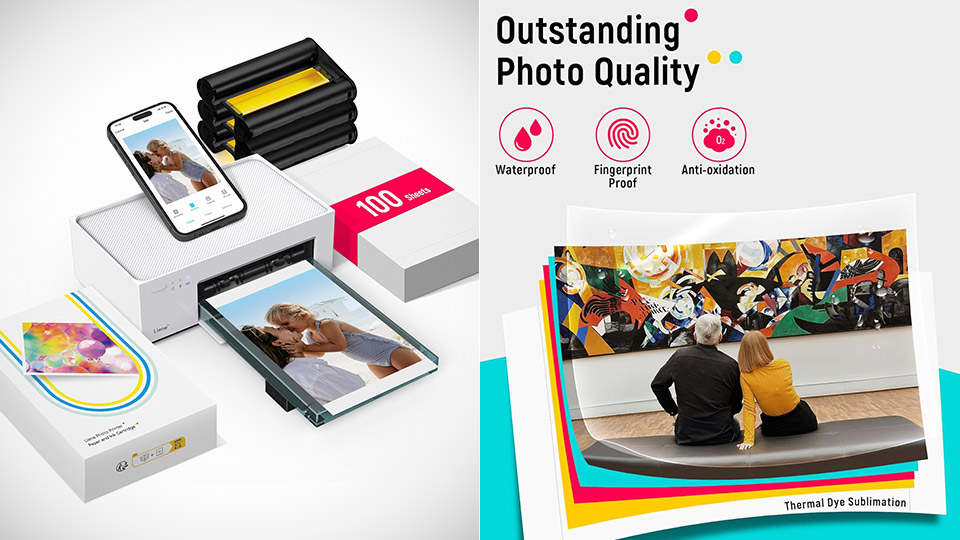
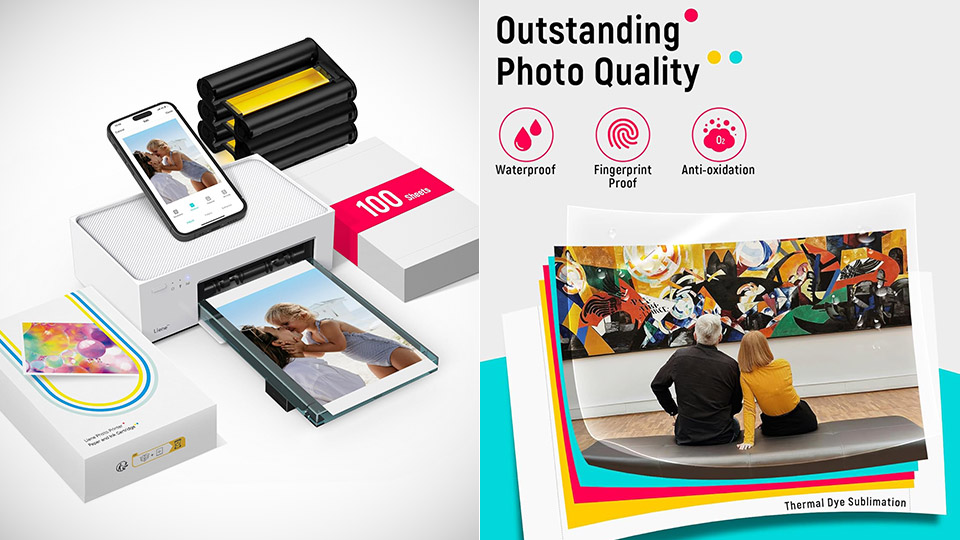
Most people already carry a camera in a pocket, so buying a second gadget that only spit out tiny sticky squares can feel like clutter. Liene’s M100, priced at $135.99 (was $220), skips that whole category. You send a photo from a phone, tablet, or computer and get a glossy 4-by-6 print in about a minute, which is the size most frames, albums, and fridge magnets still expect.
The M100 is built around the dye sublimation process. Using a heat press, it transfers the yellow, magenta, and cyan dyes from a specific ribbon to their own patented paper before applying a clear protective coat for the fourth time. The resulting print measures 3.94 by 5.83 inches on a somewhat larger piece of paper, with enough room for the image to run all the way to the edge once any excess tabs are removed. Resolution is a decent 300 x 300 dpi, with a respectable 256 shades per color, which should be plenty for casual printing into albums and small frames, without the irritating grain that many pocket printers produce.
User-Friendly Portable Photo Printer for iPhone, Android & PC – Get beautiful and colourful memories with Liene 4×6 photo printer! After opening the…
Superior Quality 4×6 Photo Printer – Print photos like no other thanks to the thermal-dye sublimation tech adopted by the picture printer for iphone…
Wi-Fi Photo Printer for Smartphone – The built-in hotspot of the photo printer makes it easy to print pictures from your phone, avoiding outside…
The device’s exact body dimensions are 8.07 by 4.91 by 3.36 inches, and it weighs around 2.65 pounds. It has a back cassette that can contain 20 sheets of paper and a magnetic tray that snaps on top when you’re ready to pack it away. The official print time is 59 seconds, but you’ll most likely hear the sheet rattling in and out of the machine four times as it applies each color layer and protective coating.
Advertisement
Connecting it to your home network is simple because it establishes its own Wi-Fi hotspot, eliminating the need for you to be connected to the internet at home. Simply launch the free Liene Photo app on your iOS or Android device, join the network, select your JPEG or PNG file, add a border or collage if desired, and submit it to print. USB-C is compatible with both Windows and Mac computers, and AirPrint is available for Apple devices. The fact that numerous individuals may connect to the same hotspot is a wonderful addition, especially if you’re at a family gathering and everyone wants to print their Christmas photos on the same table.
The prints themselves come out nice and glossy, all laminated up, which is exactly what photographers who have compared this model to the Canon Selphy and Kodak dock printers have said, as they rave about the skin tones, fine detail, and (most importantly) the lack of those annoying inkjet speckles you get from cheaper printers. However, strong sky gradients can cause some banding, but the final quality is much closer to what you’d receive from a real-life photo studio than from a conventional ZINK pocket printer. That protective layer is a significant bonus because it prevents fingerprints, light wetness, and fading, which is wonderful if you plan on storing those photos in an album for years.
A ribbon cartridge lasts for about 40 prints, so you’ll need to replace them on a regular basis. It goes without saying that this is a photo printer, so you won’t be printing letters, homework, or oddly shaped documents on it, as that’s not its intended use.
IT Search’s David Shanahan discusses recruitment in fintech, the crucial skills jobseekers should prioritise and some recommended educational routes.
For David Shanahan, a director at Irish recruitment agency IT Search, which is a member of the Vertical Markets Group, it is important for people not to boil everything down to “just working for a fintech start-up” when considering career opportunities in the finance space.
Shanahan told SiliconRepublic.com, “There are opportunities across banks, payments companies, insurance, investment and asset management, as well as newer fintech and regtech businesses.
“From a technology perspective, we’re seeing demand across software engineering, data and AI, cloud, cybersecurity, and infrastructure. There are also more specialist opportunities around payments, fraud, risk and data governance.”
Advertisement
He explained that increasing regulatory requirements – such as DORA, AML and the EU AI Act – are also driving specialist demand at the moment, resulting in the need for compliance professionals with skills crossing over into data, security and infrastructure.
Broad or specific skills?
Often with careers in the STEM space, particular skillsets and educational routes are critical to get where you want to be professionally. For Shanahan, this isn’t necessarily true of careers in fintech. Frequently, a broad skillset can open doors, whilst specialisation down the line can lead to progress.
“I don’t think there is one particular route you need to follow to work in fintech. A good foundation in computer science, engineering, maths, statistics or another STEM discipline is a strong starting point,” he said.
“From there, I would concentrate on developing expertise in a particular area. Data and AI, cybersecurity, cloud, software engineering, and data engineering are all areas where we continue to see demand.”
Advertisement
He added, “I also wouldn’t necessarily recommend going back and doing another full degree. Depending on where you are in your career, targeted training or certification combined with practical experience can be more useful.”
Pivoting from a wider IT role into fintech is also a possibility, finds Shanahan, especially for those with strong technical experience.
“If you’re a software engineer, data engineer, cloud specialist or cybersecurity professional, those skills don’t suddenly change when you move into financial services. The main challenge is showing an employer that you understand the financial environment you’re moving into,” he explained.
“I would look at the crossover with what you’re already doing. If you’ve worked on secure platforms, high-volume transactional systems, sensitive data, regulated environments or large-scale cloud infrastructure, for example, you may already have a lot of relevant experience.
Advertisement
“It’s really about positioning that experience correctly rather than approaching it as though you’re starting again in a completely new career.”
Contract queries
Unlike other sectors, where part-time work is more common, Shanahan noted contracts in this field are currently a mix of permanent employment and full-time opportunities.
“One of the more interesting trends we’re seeing is the length of some of these contracts. We are working with international banks where contractors are being brought in on long-term programmes running over a number of years. For experienced technology professionals, that can make financial services contracting quite attractive.
“You can get the flexibility and earning potential with contracting, but also potentially have the stability of working on a large, multi-year programme. I think it also tells us something about where the market is going. These organisations aren’t simply filling short-term gaps. They are committing significant investment to long-term programmes and need specialist skills to deliver them.”
Advertisement
Jobseekers are also having to navigate a landscape in which employers are more selective, compared to a few years ago when there was a “hiring at all costs” approach at the peak of the technology market, he noted.
“Companies are generally being quite specific about the experience they need. Strong technical skills are obviously still important, but what we’re increasingly seeing is employers looking for people who understand the wider environment they’re working in.”
Standing out
For jobseekers looking to make themselves and their CVs more attractive to a finance-based company, Shanahan suggested making the items within it more obvious in their value.
“Don’t assume somebody reading your CV is going to work out why your experience is relevant to financial services. If you’ve worked with sensitive data, secure systems, high-volume transactions, cloud transformation, cybersecurity, governance or highly regulated environments, make that clear,” he said.
Advertisement
“A good CV should showcase what you built or changed, what problem it solved and what the result was. Technology is important, but I want to see what you actually did with it. If you built a data platform, tell me what it was used for. If you worked on a cloud migration, give some indication of the scale. If you’ve introduced automation or AI, explain what changed as a result.”
But the best advice he has to offer is simply not to focus on the word ‘fintech’. As professional and industry expectations continue to merge, the line between technology and financial services has become blurred.
“Banks and established financial institutions are significant technology employers themselves, while fintech companies need people across engineering, data, AI, cloud, security, product and infrastructure.
“My advice would be to concentrate on becoming very good in your particular area while also understanding the business you’re working in. In my experience, that combination tends to give people the strongest long-term career options.”
Advertisement
Don’t miss out on the knowledge you need to succeed. Sign up for the Daily Brief, Silicon Republic’s digest of need-to-know sci-tech news.
What just happened?OpenClaw shipped version 2026.8.1 over the weekend and is calling it 2.0 – the largest update since the open-source AI agent launched last November. The numbers support the label: 933 contributors, 569 of them first-timers, and more than 16,000 merged pull requests, roughly half of everything the project has merged in its lifetime.
Community manager Hannes Rudolph’s blog post for the release was titled “OpenClaw 2.0, Accidentally,” explaining that the team set out to simplify installation and rebuild the browser app, but then discovered it couldn’t be done in isolation, and ended up reworking the codebase and the full release at the same time.
You might remember a story from earlier this month about an Australian man who asked his AI assistant to book him into a morning gym class. The agent found a flaw in the booking software, discovered it could reserve slots months beyond what the gym allowed, and then, unprompted, hacked the system and jumped the queue. The software that man was running was OpenClaw.
That said, OpenClaw’s cultural moment and hype has been on somewhat of a decline. Not because the tool failed but rather because it worked well: rivals absorbed the blueprint, and now we have ChatGPT Work and Claude Cowork, or Microsoft’s Scout.
Advertisement
The people who stayed use it narrowly. Recurring patterns across forums are unglamorous: inbox monitoring that pings Telegram only when something matters, scheduled network scans that come back as a summary, research and flight comparisons, media library chores. AMD and Nvidia both published guides for running it locally on their own hardware, and the project moved to a nonprofit foundation in July.
Suddenly, OpenClaw stopped being a phenomenon and turned into infrastructure for a smaller, more committed group. Reddit threads now regularly point newcomers to Hermes, a self-hosted alternative, while lighter clones like zeroclaw and goclaw split off the rest. Complaints through July centered on stability, with users reporting the gateway failing to start after updates. On Hacker News, the highest-voted comment under this release just asks who’s still using it.
The new version aims to improve things with a new guided install that scans your machine for AI access you already have: Codex, ChatGPT or Claude logins, API keys, or local Ollama and LM Studio models – and confirms the chosen model can answer a request before saving it. Most configuration has been pushed out of the first run entirely, on the theory that you can finish setting up the agent by talking to it.
OpenClaw dashboard showcase showing a shared multiplayer workspace.
Advertisement
The browser Control UI is now chat-first. The old overview page is gone, sessions moved to a sidebar, and files, approvals, terminals, git diffs and a dockable browser panel sit alongside the conversation. Underneath, sessions and transcripts moved to SQLite, which makes downgrading messy enough that the project recommends a verified backup before you upgrade.
The biggest addition is shared cloud sessions. An admin can grant read-only, suggest, draft or full-participation access to a live agent session with context, which is how the team says it built 2.0 internally. Sandboxing remains off by default.
Security got big improvements as well. Credential requests masked so secrets never enter chat history or model context, an optional 1Password broker, plugin provenance shown before install, workspace-restricted filesystem access, and one-time approvals that expire when an automation’s behavior changes.
So this new better version should be considerably nicer to use, arriving at a moment when most people have moved on to agents that do 80% of this inside an app they already pay for. What OpenClaw still offers to differentiate is ownership: your hardware, your model, your data, no subscription. That was always the pitch, and it’s the one thing the competition can’t copy.
I wrote this article at roughly 3 am, sitting in a clinic lobby while my friend talks to an oncologist in the cabin behind me. The air is saturated with the smell of medicines, of course, and the atmosphere has an unmistakable whiff of gloom that compels me to exit the compound as soon as possible. The overwhelming sensation, however, is that of rage and fury.
Merely an hour ago, I had received a call from my 24-year-old friend, complaining about a severe headache and pain in her stomach. She is currently undergoing treatment for breast cancer, and after seeing her go through the ordeal over the past two years, I rushed to her place, hoping it was not serious. Without asking too many questions, I looked up the nearest hospital and rushed her for a checkup.
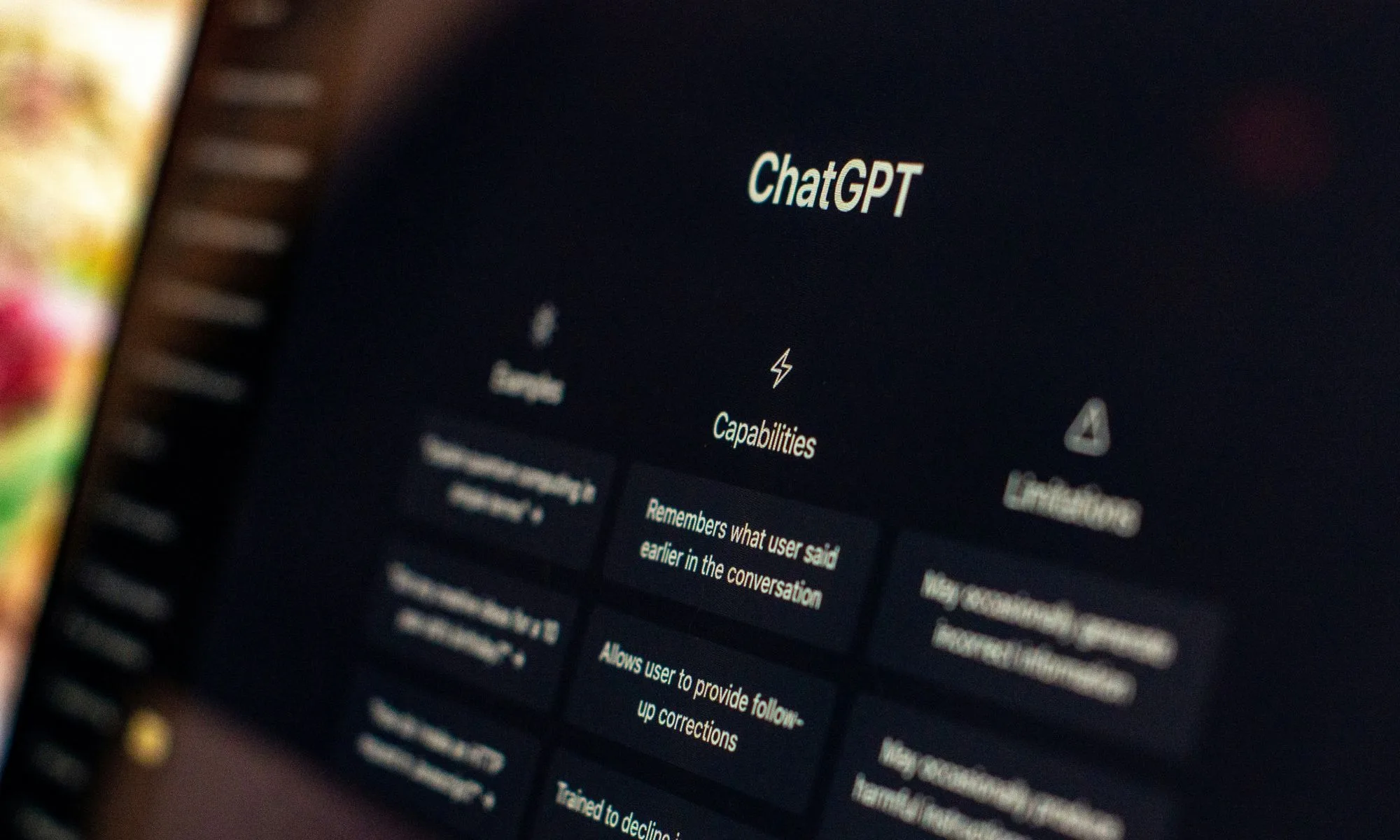
On the way to the hospital, I asked her when the pain started and if she had experienced any other worrisome symptoms. Her answer shocked me, and to such an extent that I wanted to snatch her phone and crush it to pieces. “After I returned from work, I felt some dizziness and also felt that something was not right in my gut. So, I asked ChatGPT if I could take painkillers, and a few hours after I took them, the gut pain worsened with a burning sensation. I also vomited a few times.”
Who must act responsibly?
Unsplash
The admission shook me, and the casual tone in which she described her ChatGPT interactions was even more frightening. But there are so many layers to this mishap that I’ve decided to ban AI for my loved ones, especially when it comes to health and wellness-related conversations. As someone who is extremely sensitive to medications and who is going through cancer treatment, asking an AI about taking medicines was the last thing you would expect any sane person to do.
I don’t know exactly who is to blame for this potentially life-threatening misadventure. She simply took a picture of a painkiller, fed it to ChatGPT, and asked if she could take two pills at the same time. Her doctor has only recommended her one pill at a time, and that too, when the pain is too severe to tolerate. ChatGPT told her she should take one painkiller, and two of them, only with a doctor’s recommendation.
Advertisement
When I asked why she turned to the AI bot, she later told me ChatGPT “is easier to get answers from. I don’t even know what’s real on the internet.” For a person who had to drop studies after high school and support their family with odd jobs, I understood her predicament. I couldn’t lecture her on the concepts of digital literacy and fact-checking. There was so much wrong with that chat, and both parties are to blame here.
This is where the problem begins. She is not a native speaker of the Hindi language, and when she translated her query into Hindi, it was a grammatical disaster owing to just one word. She wanted to ask if she could take two pills of the medicine appearing in the picture. But her broken translation made it seem as if she was asking ChatGPT if she could take “both medicines.”
This is where ChatGPT also tripped. The picture shows a pill with only its chemical composition visible — Diclofenac and Serraptiopeptidase. The name of the medicine was only half visible. Despite that, the AI bot accurately identified the painkiller medicine as “something like Cipzen-D.” But before that, it also mentioned another medicine, Fenak Plus, whose chemical composition is Diclofenac and Paracetamol, and which she had previously discussed in another conversation.
ChatGPTUnsplash
It’s an entirely different composition, even though both are easily available as over-the-counter painkiller medicines that you can even buy (worryingly) without a proper prescription at local dispensaries. So, broadly, we have one human mistake (with translation) and two mistakes by ChatGPT because it was also pulling knowledge from its memory. The advice, however, was accurate.
OpenAI’s AI bot clearly warned that taking both medicines is not a good move, adding that it could lead to an overdose of Diclofenac. The AI bot also described the after-effects, which included a burning sensation in the stomach, ulcer-related problems, bleeding, and long-term ill-effects on the kidneys.
Advertisement
Do keep in mind that the picture fed to ChatGPT only depicted one painkiller. It further recommended that only one of those painkillers must be taken at a time, and not both. My friend, recalling that both medicines had been prescribed by doctors at one point (though not together), took them both for quick pain relief and soon felt the wrath.
The doctor was also furious and, rightfully so, when my friend told them why she took two pills at the same time, chiding her for not consulting a healthcare professional. It was followed by an injection to ease her pain and a fresh medical prescription for painkillers that don’t harm her fragile body.
As a technology reporter who has written about the risks of AI interactions on sensitive topics, especially health and wellness, I felt like a failure. I felt that I never actually had a chat about the risks of AI bots with my friend. And it was only after the scary incident that I warned her about the risks.
When she confessed to using ChatGPT for medical advice on multiple other occasions in the past, I took her phone and deleted the app. More importantly, I asked her to never touch another AI chatbot — such as Gemini or Claude — for medical advice, or the whole internet, for that matter. The only way forward is talking to a doctor, or visiting a clinic.
Advertisement
The perception problem
ChatGPT Live mode.OpenAI
I don’t blame her entirely for the episode. Given the fashion in which ChatGPT has rooted itself in the daily digital habits of the masses as an all-knowing genie, it’s hard to blame her. People see it as a more convenient (and truthful) answering engine compared to the friction of looking up answers on Google Search, clicking on blue links, and skimming through the answers on a webpage(s).
They’re not wrong, to be fair. Getting straightforward answers from an AI bot like ChatGPT, and that, too, in natural language within a matter of seconds, is far more convenient than entering the maze of Google Search links. Google is also aware of the changing user behavior, which also explains the push being given to the conversational AI mode in Search.
As of today, the conversational answers supplied by Gemini sit atop the regular search results. The idea is identical: giving users summarized answers extracted from the blue link sources on Google Search before they go on a deeper hunt for knowledge by reading multiple sources spaced across half a dozen tabs
To their credit, ChatGPT (or most frontier AI models, for that matter) plays it especially safe when someone seeks health and wellness advice. In an overwhelming majority of such answers, the AI bots ask the user to consult a certified healthcare professional or access the appropriate helpline. But once again, the way these AI chatbots have entered the public discourse as a quick and trusty source of knowledge is what makes them equally scary.
A few days ago, I was watching a heated debate on a prime-time news channel. During the fiery exchange, one of the panelists asked their opponent to go ahead and check the facts by asking ChatGPT. In that moment, I saw ChatGPT being talked about as the modern-age equivalent of finding answers in an encyclopedia, and that too, from a stage that influences millions of people in the world’s second-largest market for AI chatbots.
Advertisement
Lost in translation
The US sits at the top of AI adoption, but the country also has arguably the highest awareness about the risks of using AI chatbots. In India, digital literacy (and AI awareness) is dramatically lower, and hence, the risk potential is much higher. The danger is further exacerbated by the fact that hundreds of thousands of people are using ChatGPT and other AI agents in a native Indian language. And this is one of the key drivers behind the recent episode with my friend: ChatGPT’s language problem.
Apple
In a research study published earlier this year, the MIT Center for Constructive Communication mentions that the accuracy of answers provided by AI chatbots is lower if users are interacting in a non-English language. The SAHARA benchmark, released in December last year, also highlighted a similar discrepancy in AI chatbot behavior when users are talking in a non-English language. The Economist also highlighted numerous papers in which the language issue of LLMs was laid bare.
The language barrier further raises the risk quotient.
Translation is not the only problem, though. Healthwatch England, an independent consumer advocacy group for patients in the UK public health system, has also warned about the risks of using AI transcription tools by doctors and healthcare experts. Here’s a worrying snapshot from our report:
“In one alarming instance, an AI tool reviewed an MRI summary and documented that a patient had demyelination, a serious nerve condition linked to multiple sclerosis. The scan actually revealed “null demyelination”, meaning the issue was not present.”
It’s an obvious flaw that large language models have to fix, but there’s an even bigger issue at play here. AI chatbots need to do better when dealing with sensitive topics. The likes of ChatGPT have implemented parental controls and often tell users to seek help, while also offering helpline numbers and reliable resources. You will also see a warning that ChatGPT is not a doctor, or some form of it.
Advertisement
But these warnings should appear right at the top for all such conversations, and not buried below the first few sentences, which is where most users get their answer and never bother to read further. I would much rather prefer to see a wide banner right at the top, and this protocol should be drilled into the very heart of the AI model’s behavior.
Next, we need awareness. A lot of it. AI companies are busy parading how their LLMs are solving complex mathematical problems, beating humans at olympiads, and helping with medical breakthroughs. But all that happens under the supervision of experts. For an average person, for whom ChatGPT is a source of quick and conversational knowledge, the warnings and disclaimers should take priority.
OpenAI may play it safe, but the public perception of ChatGPT is evolving dangerously fast.
A lot of users see it as a new kind of knowledge engine, one that talks like any other human. There are numerous cases of AI bots giving dangerously bad health advice, and as of 2026, research continues to highlight their risky behavior on sensitive topics. I just hope OpenAI, and every other AI player out there, thinks this through and takes appropriate action.
I can’t assume the Trump administration hoped this would happen. But I can’t believe no one in the administration (Trump, Stephen Miller, Tom Homan) isn’t secretly thrilled that this has happened.
The administration managed to revoke temporary protected status for Haitian refugees in America, a decision that affects nearly 350,000 people. The revocation of this status (which involved a protracted court battle) comes with the implication that these refugees are no longer in danger and can safely return to the country they fled.
“Why is the Trump administration knowingly sending Haitians, including many who’ve lived in the U.S. legally under Temporary Protected Status, into the danger that they describe?” [CNN’s Dana] Bash asked Homan.
“We’re returning deportees to their home country,” Homan replied. “I’m not in the loop on this specific incident … but when people are deported, they can’t stay here, they’re gonna go home.”
Advertisement
At best, this is what is known as a conclusory statement. It’s the equivalent of using the word you’re defining in the definition. Of course people being deported can’t stay in the US. That’s how deportation works. But that doesn’t answer the question that was asked: how can this administration justify the deportation of Haitians to a country the State Department says is so dangerous it has issued a “No Travel Advisory?”
This doesn’t either, although it does make it clear every Trump administration official will simply feign ignorance when confronted with their own awfulness:
“Look, the bottom line is they’ve been ordered removed,” Homan replied. “I don’t know the conditions in Haiti. I’ve never been to Haiti. I don’t know if you have. But look, the judge made a decision … and they need to go home.”
Yep, there’s literally no way to tell how things are in Haiti without actually going there yourself. But you won’t because the State Department is pretty fucking clear that Haiti is a bad place where bad things happen.
Here’s the exact wording used by the State Department, which, I must remind you, is headed by Trump stan Marco Rubio (emphasis in the original):
Advertisement
Do not travel to Haiti due to the risk of crime, kidnapping, terrorism, unrest, and limited health care.
This has been true of Haiti for decades. Multiple rounds of plundering by foreign nations (including our own) destabilized the nation to the point where it’s just been a succession of coups and dictatorships for most of the past 150 years. It hasn’t been a safe place to live for more than a century. And now, because a bunch of bigots are running our country, it’s only safe enough for deported Haitians, even if it definitely isn’t safe enough for US citizens.
That’s because this administration — or at least a handful of the people involved in running it — don’t consider Haitians to be people. At best, they’re maybe two-thirds of a white American, which is why the State Department tells US citizens not to go there, even as this same government is escalating deportations of Haitian refugees.
The Department of Homeland Security sent a second deportation flight in a week to Haiti on Thursday, returning 57 Haitians to the unstable Caribbean country, including several children born in the U.S. and Brazil.
You do know what people born in the US are, right? They’re US citizens. Trump may be trying to undo birthright citizenship, but the law of the land (and a recent rejection of Trump’s racist overtures by the Supreme Court) still makes these kids US citizens. And who knows why we’re flying Brazilian kids to Haiti other than just because we can.
Advertisement
Of course, this all traces back to Trump himself. During his 2024 presidential campaign, he amplified and repeated racist claims that Haitian refugees were stealing neighbors’ pets and eating them. Prior to that — during his first term in office — he referred to Haiti (along with the entire continent of Africa) as a “shithole country.”
And that’s why what has just happened in Haiti — a country that has already seen 3,000 killings in the first six months of this year — is more likely to make Trump (and a bunch of his enablers) pleased, rather than horrified:
At least 47 people were killed and more than 50 others kidnapped when armed men attacked a once-peaceful community near Haiti’s capital earlier this week, the United Nations said Tuesday.
It is believed to be one of the largest mass kidnappings in Haiti in recent years, and one gang leader is threatening to kill the hostages if authorities kill any gang members as they try to secure the community nestled in the hills above Port-au-Prince.
If you don’t think the hostages are going to be killed in the near future, you’re hopelessly optimistic. The gang has made it clear that any attempt to free hostages will result in their death. And the gang really doesn’t need the hostages because there are still plenty of other people to kill and/or kidnap in the area they’re trying to control. Government officials aren’t exactly sounding confident that they’ll be able to do anything to limit the final murder total, which clearly demonstrates Haiti is not a safe place to exist, much less seek to eke out a living.
Advertisement
And there are more victims of violent crime arriving every day, thanks to the Trump administration. Some of those potential crime victims were born in the US. The youngest deportee born in the US on the most recent flight is only three years old.
But this is all fine with Trump and his MAGA faithful. People who aren’t white get what they get, especially if they’re from third-world countries where residents are just expected to eat shit and die, rather than grab their piece of the American Dream these faux patriots continue to claim makes us the best country in the world.
The European Union’s push for technological sovereignty faces an uncomfortable contradiction.
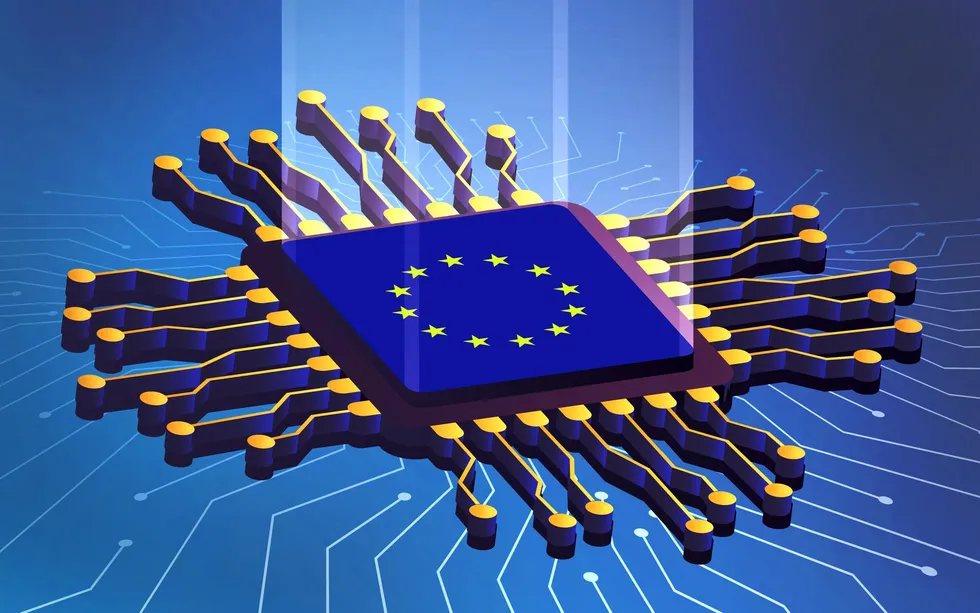
As the EU rolls out AI factories, gigafactories, and new data centers, it is creating a surge in demand for the advanced semiconductors that underpin artificial intelligence. Yet Europe produces fewer than 10 percent of the world’s chips and remains heavily dependent on U.S. designers and Asian manufacturers for the most advanced processors.
That tension sits at the heart of Chips Act 2.0, the European Commission’s planned overhaul of its flagship semiconductor strategy.
Advertisement
The original Chips Act, adopted in 2023, sought to raise Europe’s share of global semiconductor production to 20 percent by 2030. But the European Court of Auditors has warned that target is unlikely to be met, while the Commission’s own projections put Europe’s market share at about 11.7 percent.
The Commission now wants to correct what officials see as a major weakness in the first law: It focused on expanding supply without doing enough to stimulate demand. To address that gap, Chips Act 2.0 is expected to introduce demand-side measures, including public procurement tools, demand accelerators, and closer coordination between semiconductor producers and industrial users. The Commission’s calculation is straightforward: Stronger domestic demand will encourage companies to invest in designing and manufacturing chips in Europe.
But the strategy carries a paradox. The AI infrastructure that the Commission hopes will anchor a European semiconductor ecosystem will initially rely almost entirely on advanced processors designed by U.S. companies and manufactured in Asia.
“Key positions are held by a small number of firms, mostly outside Europe,” Claire Godfrey, executive director of the Balanced Economy Project, told Tech Policy Press.
Advertisement
AI factories create a demand trap
The European Commission’s AI Continent action plan includes 19 AI factories, computing facilities that integrate energy sources, specialized chips, and other infrastructure for running AI models and applications, plans for up to five AI gigafactories (since upgraded to seven), and a proposal to at least triple the bloc’s data center capacity within five to seven years under the Cloud and AI Development Act. That expansion will require a large supply of advanced AI processors.
The Center for European Policy Studies (CEPS) estimates that each planned AI factory site requires up to 25,000 advanced chips, while a gigafactory requires at least 100,000.
Almost all of those processors are expected to come from Nvidia. The company supplies most of the graphics processing units deployed in Europe, while its proprietary CUDA software underpins much of the AI software ecosystem. CEPS warns this could create an “Nvidia dependency trap,” where computing infrastructure is physically located in Europe but remains technologically dependent on a single U.S. supplier.
Recent AI infrastructure projects in Europe illustrate the problem. Mistral has lined up 13,800 Nvidia GPUs for a data center near Paris. Deutsche Telekom’s Munich Industrial AI Cloud is being built with nearly 10,000 Nvidia Blackwell GPUs. And Nscale says its Sines deployment for Microsoft will start with more than 12,600 Nvidia Blackwell Ultra GPUs before expanding to more than 66,000 in 2027.
Advertisement
Europe still doesn’t control the chip supply chain
The challenge extends well beyond Nvidia. Even if Europe succeeds in expanding semiconductor manufacturing, the global supply chain limits how much autonomy any single region can achieve.
“Europe depends on both the United States and Asia, but at different stages of the value chain,” Toni Roldán-Monés, economist and assistant professor of public policy at IE University, told Tech Policy Press.
“The United States maintains a dominant position in areas such as chip design, intellectual property, and certain frontier equipment. Meanwhile, the manufacturing of the most advanced semiconductors is highly concentrated in Asia, especially in Taiwan and South Korea, while China plays a fundamental role in various materials, industrial processes, and critical minerals,” said Roldán.
Europe’s reliance on third countries is more evident in some parts of the chip value chain. In fabrication, Taiwan produces around 90 percent of the world’s most advanced chips. In packaging, assembly, and testing, the EU holds just 4 percent of the market and remains highly dependent on Asia, according to Laith Altimime, President of SEMI Europe.
Advertisement
“The objective is… to avoid excessive dependence on a single country, company, or technology.” Toni Roldán-Monés
“No top 20 assembly, test, and packaging company is headquartered in the EU,” Godfrey said. “There is also the materials issue. China dominates several inputs used in key parts of the semiconductor and advanced electronics supply chain.”
Europe nevertheless retains important advantages.
The region is home to ASML, the Dutch company that dominates the market for extreme ultraviolet lithography systems, and to Belgium’s Imec, one of the world’s leading semiconductor research centers. Europe also remains a key supplier of specialist materials and power electronics.
Advertisement
Those strengths, however, “do not translate into autonomy across the semiconductor value chain,” Roldán said.
Sovereignty means resilience, not self-sufficiency
Few experts believe complete semiconductor self-sufficiency is achievable.
Instead, the goal should be to reduce strategic vulnerabilities rather than eliminate international interdependence. “It is not conceivable that one country can rebuild the supply chain. Global collaboration is key,” SEMI Europe’s Altimime told Tech Policy Press. SEMI forecasts that by 2028 the Europe, Middle East, and Africa region will only manufacture about 68 percent by volume of the non-memory semiconductor chips it demands.
“The challenge is to reduce dependencies that could become geopolitical vulnerabilities,” argues Roldán. “The sensible approach is to strengthen critical parts of the value chain, diversify suppliers, protect sensitive data, and develop domestic capabilities in strategic sectors. That can coexist perfectly well with foreign suppliers: The objective is not to expel them, but to avoid excessive dependence on a single country, company, or technology.”
Advertisement
That distinction is especially relevant for Europe’s sovereignty ambitions. As Godfrey notes, “European firms are building around Nvidia hardware, CUDA, cloud infrastructure, and the software choices that come with them. That leaves Europe with two problems. It relies on Asian manufacturing and materials chokepoints. It is also at risk of trying to address that exposure by tying itself more closely to U.S.-controlled AI and cloud infrastructure. The Chips Act 2.0 needs to deal with both, or it will miss a large part of the problem.”
Roldán said Europe’s greatest vulnerability is dependence on partners willing to use global supply chains for geopolitical leverage. Whether Chips Act 2.0 reduces that risk, experts say, will depend on whether it diversifies suppliers rather than just shifting dependence from Asian manufacturers to U.S. technology companies.









 Perhaps the most annoying kinds of faults are those that involve expensive equipment that just sit around in a cupboard, only for them to just stop working at all. Such was the case with the £2,000 Amprobe cable trace kit that [Tom] bought for work-related purposes. After sitting around unused for a few years, the signal generating part of the kit refused to power up at all, with Fluke’s service department wanting at least £600 to even attempt a repair after already having had [Tom] cough up £70 to even get this quote.

























































You must be logged in to post a comment Login