Before modern technology, seafaring was a complex affair. Navigation instruments like the backstaff, used centuries ago, utilized the stars to determine position. In order to calculate depth long ago, poles called sounding rods were lowered until they physically touched the ocean floor. Suffice it to say, vessel data used to be much less precise and somewhat open to interpretation.
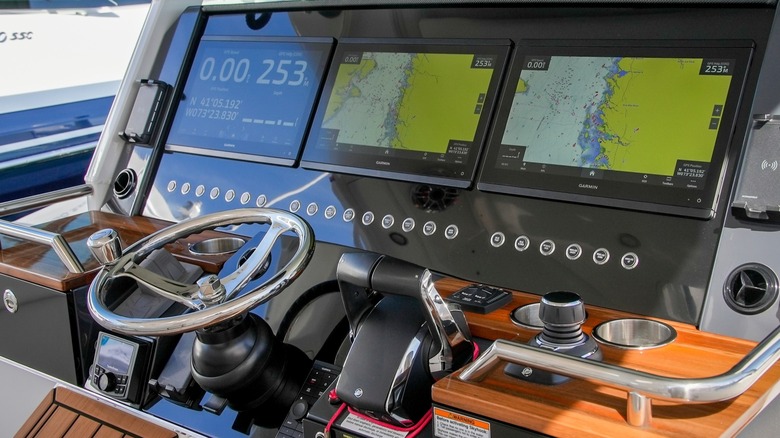
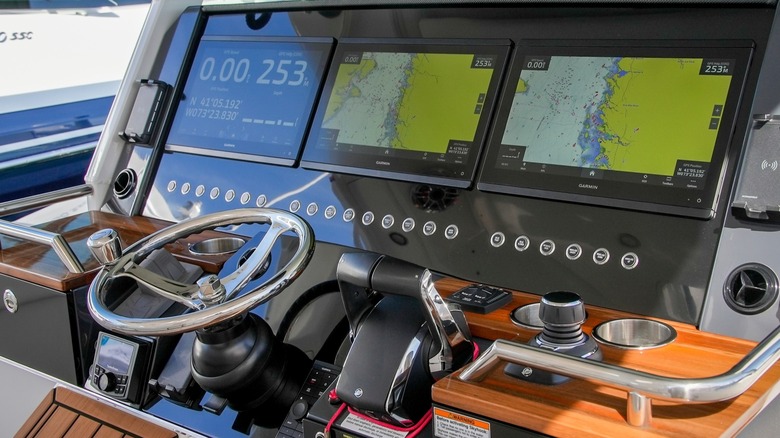
Fortunately, tools on modern vessels have advanced dramatically. Things like GPS, sonar, and radar provide a wealth of data. You can even monitor any one of the basic types of boat engines with real-time diagnostic monitors. However, the problem was no longer a lack of information, but how to organize it and see it all in one convenient place. Enter the multifunction display (MFD), which is essentially a boats electronic control center. These devices utilize touchscreens and come in sizes from 5 to 16 inches across diagonally. Smaller basic units may only show one instrument at a time, whereas larger, premium MFDs can pull information from a variety of tools and display it simultaneously by splitting the screen into sections.
Many MFDs showcase data from fishfinders, chartplotting, real-time condition measurements like water currents, and system monitors, to name a few. Some MFDs come equipped out of the box with these tools; however, you can also connect standalone devices to an MFD via a specialized Ethernet connection or the maritime communication standard, NMEA 2000. You can even integrate different types of solar panels for your boat into an MFD.
Advertisement
Multifunction displays have made boating safer
Inna Luzan/Getty Images
Electronic navigation tools first appeared in 1984, with the Geonav navigation display. While it wasn’t immediately embraced by boaters, it laid the foundation for things to come, eventually leading to multifunction displays. However, before MFDs became common and more adaptable, the helm could be a confusing cluster of several standalone screens. And this was in addition to various analog gauges which still provided relevant data.
For instance, back then a captain may have separate units for radar, plotting, fish-finding, and auto pilot, among others, from different manufacturers scattered across the instrument panel. Each one of these devices was a standalone tool, making it more cumbersome to get important data quickly. And the number of tools was limited, as the helm only offers so much space. With today’s MFD units, boaters don’t need to divert their attention across several displays and analog gauges, making is easier to quickly view and interpret important data.
Advertisement
Not only have modern MFDs consolidated all these tools into one package, but some also come with, or can integrate with, additional safety systems. For instance, some MFDs include a Risk Visualizer, which uses an advanced algorithm to help prevent collisions by analyzing routes and flagging high-risk areas. You can also connect tools like 1st Mate by Mercury Marine, which uses tracker wearables on the wrist that will sound alerts if a passenger goes overboard and even shuts off the engines if the captain goes into the water.
There are plenty of rules and regulations boaters are expected to know when they launch a boat into the water for the first time. Some of those rules, like the all-important 1/3 rule, are largely unwritten, while others are clearly indicated in boating literature. Then, there are also signs and signals that boaters may come across when they are out and about that are meant to reaffirm certain rules or warn boaters of potential hazards in the water.
Many of those water-stationed indicators are color-coded to make it easier for boaters to determine their meaning. For instance, if you come across a buoy in the water that is black with a band of red paint, you need to be keenly aware of your surroundings moving forward, as it indicates that there is an isolated danger in the immediate area. To be clear, that buoy doesn’t indicate that you need to stop or turn your boat around. Rather, it signals that there’s some unseen impediment below the surface, and you need to proceed with a little extra caution.
A buoy indicating isolated danger will typically be moored directly on or above the unseen hazard and will be utilized in areas where the surrounding waters have otherwise been deemed safely passable. As for what that hazard might be, the buoy could be moored over anything from a large rock formation or reef to a sunken ship. In some cases, the buoy may be equipped with a red light on top.
Advertisement
What other types of buoys should boaters know?
There are several other types of buoys designed to help keep boaters either informed or out of harm’s way. If information is what you seek on the water, white buoys with orange shapes tend to be the ones that most directly convey it to boaters. There are caveats to the informational buoys, however, with different shapes implying different things. A square signals general information that might be of interest, like marina locations or traffic pattern changes. These usually feature words. A circle, on the other hand, indicates a control buoy and can convey anything from speed limits to hazardous waters. There are actually two types of diamond signs, one with a cross inside that indicates you are prohibited from passing through, and one without that indicates serious hazards lay ahead.
Advertisement
Elsewhere, a simple yellow buoy signals boaters should proceed with caution, while a small white buoy with an orange top indicates a mooring station, which is totally different from docking. If you see a buoy fixed with a red flag with a white diagonal stripe, it means that there are divers in the water, so you need to keep clear and reduce your speed. Buoys indicating designated swimming areas are typically white and strung together like light bulbs. A buoy with a horizontal white and red livery is a Fairway buoy and indicates safe waters ahead. Finally, Cardinal Buoys have different variations of yellow and black paint that designate hazardous waters exist beyond, and that safe waters lay either North, South, East, or West from them.
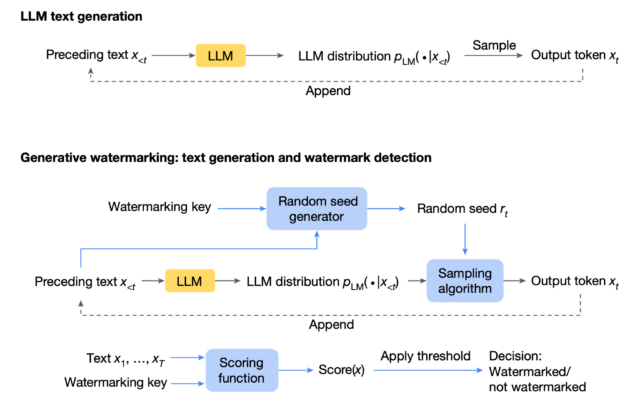
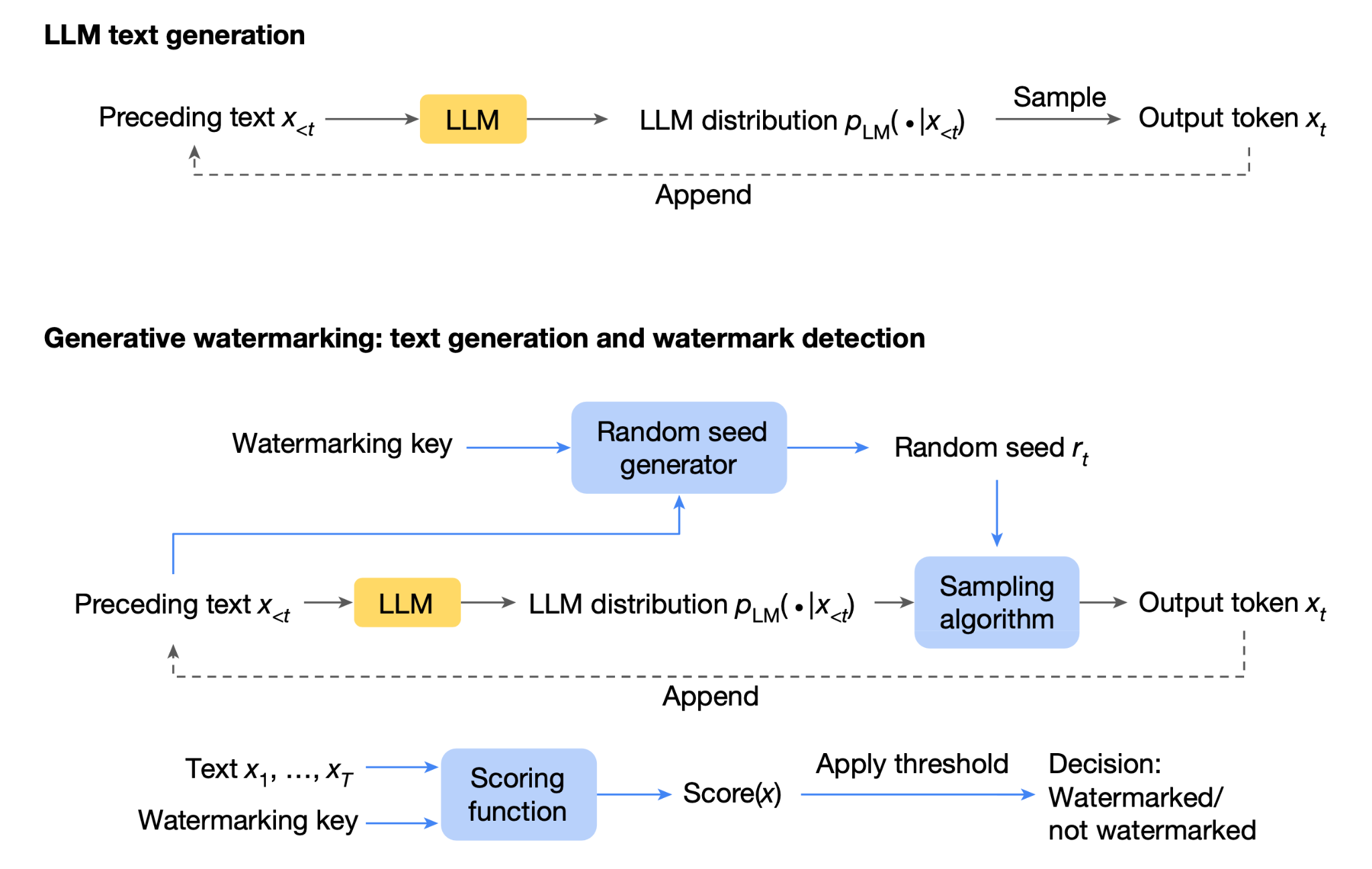
A key feature of SynthID is something known as tournament sampling. Similar to a sports game, SynthID evaluates large numbers of next-word token candidates. It uses a secret key to assign them probability scores. A pair of tokens competes in a round. The one with the higher hidden score wins and advances to the next round. The process continues until a final winning token is determined. More about tournament sampling can be found here and here.
Advertisement
Siposova tested the “non-distortionary” configuration of SynthID-Text through Hugging Face’s unmodified SynthIDTextWatermarkLogitsProcessor. She fed harmful prompts into six open-weight models and compared the responses when the watermarking was used and when it wasn’t. The experiment revealed that the watermarking changed responses to harmful requests, particularly when they were made using prompt-injection techniques.
“Watermarking changes refusal behavior on bare harmful requests, but the effect is more pronounced when the same requests are paired with the prompt-injection technique,” Siposova wrote. “On several models, watermarking then makes the model more likely to answer harmful requests that it would otherwise refuse.”
The changes have important safety consequences because they influence not only the LLM responses but also subsequent actions of AI agents relying on the model.
“At the model level, this can change safety behavior, including whether the model refuses a harmful request and whether that refusal holds under prompt injection,” the researcher wrote. “At the agent level, the same sampled tokens can determine which tool is called and what arguments are passed to it. Prompt injection connects these two settings because a weakened refusal becomes more consequential when the model can also act through tools. Such a watermarking procedure can therefore affect both what the model says and what an agent does. We call this behavioral effect sampling drift.”
Advertisement
Also interesting: Model responses behaved differently depending on which secret key was used.
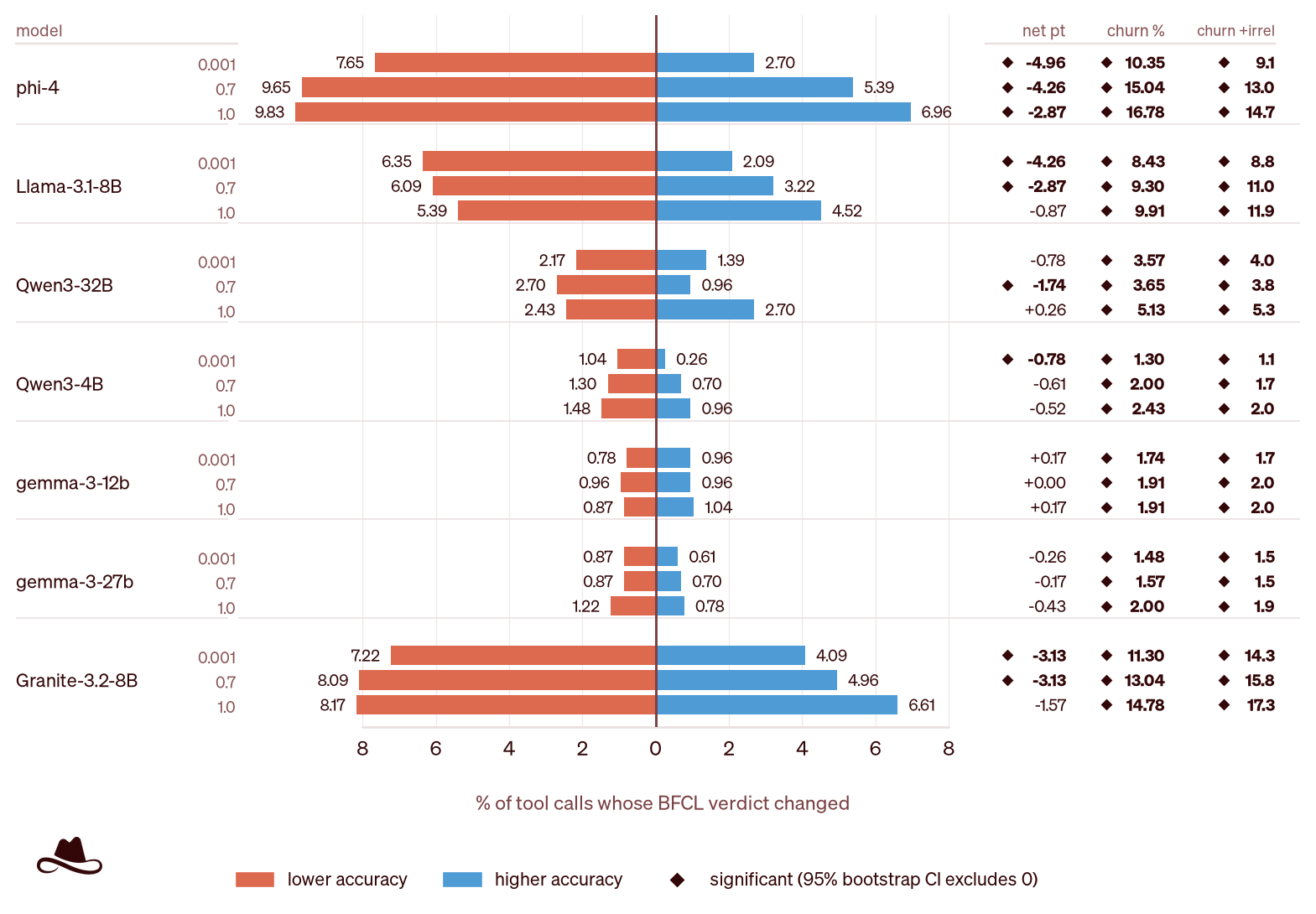
Watermarking changed which individual tool calls were correct, sometimes much more than the overall accuracy score suggests.
Credit:
Lasso Security
Advertisement
Watermarking changed which individual tool calls were correct, sometimes much more than the overall accuracy score suggests.
Advertisement
Credit:
Lasso Security
Advertisement
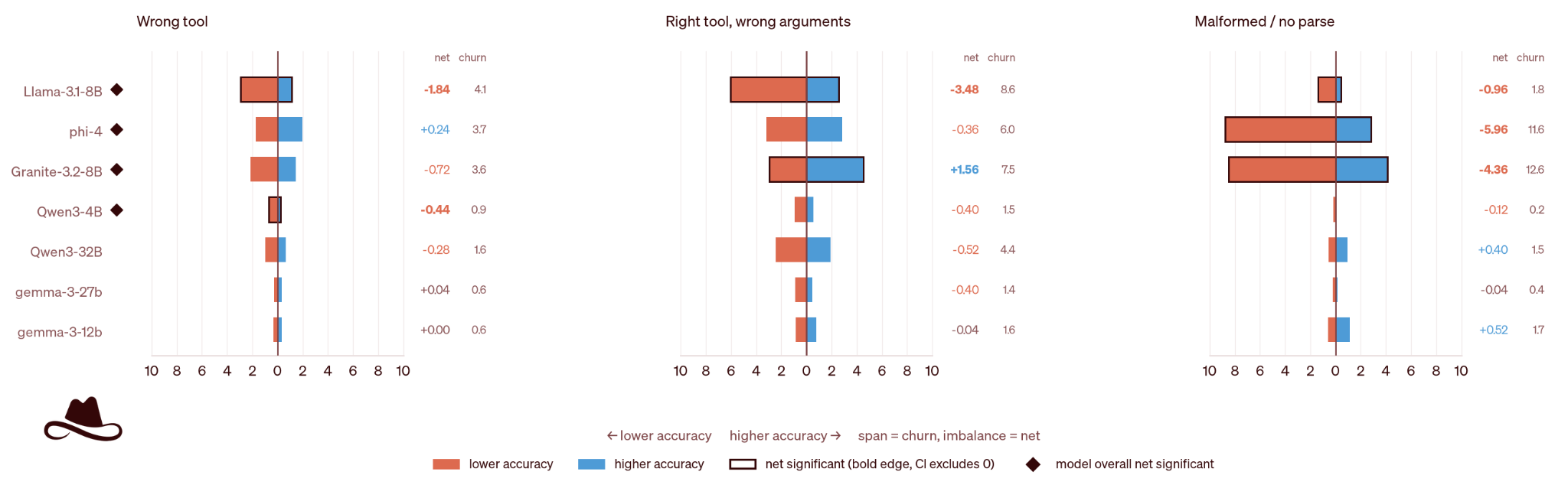
This figure shows the types of changes in tool calling that watermarking led to. The vertical lines show the accuracy without watermarking, and the bars show the change when watermarking is applied. Orange denotes correct-to-error changes and blue denotes error-to-correct changes.
Credit:
Lasso Security
Advertisement
This figure shows the types of changes in tool calling that watermarking led to. The vertical lines show the accuracy without watermarking, and the bars show the change when watermarking is applied. Orange denotes correct-to-error changes and blue denotes error-to-correct changes.
Credit:
Advertisement
Lasso Security
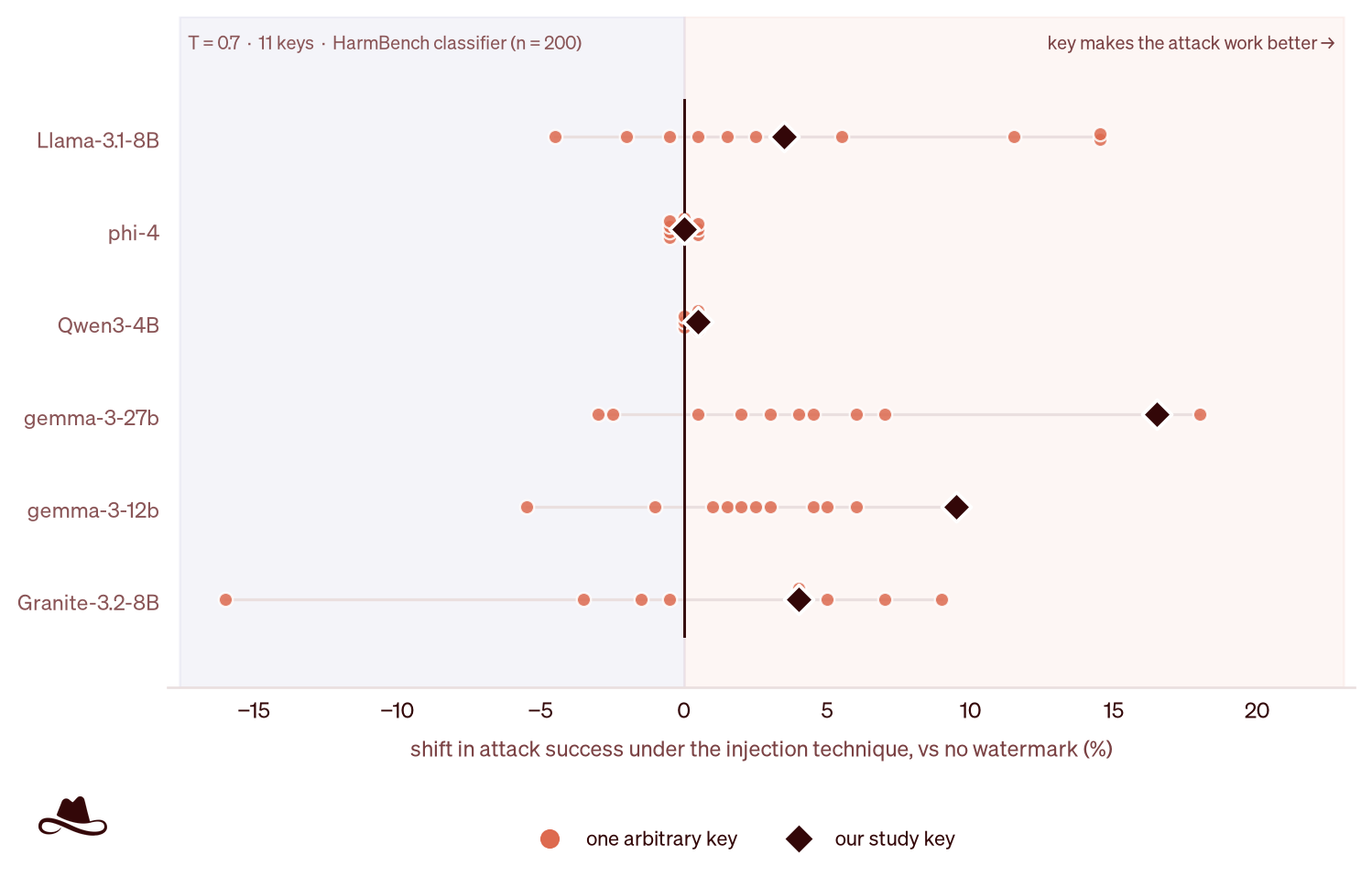
The effect of changing a key on model behavior. Each point represents one key. Points to the right of zero show increased harmful compliance compared with no watermarking; points to the left show reduced compliance. Orange points represent 10 additional keys, and the black diamond represents the key used in the main experiment (keys chosen randomly).
Advertisement
Credit:
Lasso Security
Advertisement
The effect of changing a key on model behavior. Each point represents one key. Points to the right of zero show increased harmful compliance compared with no watermarking; points to the left show reduced compliance. Orange points represent 10 additional keys, and the black diamond represents the key used in the main experiment (keys chosen randomly).
Credit:
Lasso Security
Advertisement
There are limitations to the research. It doesn’t test how Claude model responses change under the watermarking. Instead, it tests a half-dozen open-weight models, so the researcher has access to token sampling that could be enabled and disabled during tournament sampling while keeping other settings fixed. The experiments also tested the Hugging Face implementation of SynthID-Text tournament sampling and not the specific implementation Claude models will use.
Still, the results show that at least some forms of the watermarking approach may affect model and agent safety. It will be important for red-team hacking exercises to stress-test their platforms to ensure they perform as expected when SynthID is deployed.
The latest Apple Watch brings meaningful upgrades to battery life, health tracking, and everyday performance while keeping the same starting price. Reviewers praise the new health sensors, improved Siri, and battery life that can now stretch to two days.
The UK mobile industry gathered together in London last night to celebrate the 2026 Mobile Industry Awards.
Marking our 24th year in 2026, the Mobile Industry Awards represent the gold standard of excellence – from the boardroom to the grassroots, the entrants represent the best and brightest the UK mobile industry has to offer.
The great and good were all in attendance for the MIA 2026, but who went home with the prizes? Here’s our list of all the night’s winners….
Advertisement
Latest Videos FromTechRadar
Our MIA 2026 winners are…
Future Stars in association with VodafoneThree:
Lydia McGann, The Big Phone Store
Advertisement
Sam Deans, Pure Communications
Imogen Baldie, Likewize
Sign up to the TechRadar Pro newsletter to get all the top news, opinion, features and guidance your business needs to succeed!
Advertisement
Paris Tilsley
Innovation of the Year Product or Service O2 Satellite
Best Mobile Service & Solution Provider plan.com
Best Wholesale Service & Solution Provider sponsored by BusinessMobiles.com VodafoneThree Wholesale
Best Mobile/Gadget Insurance Service Asurion
Best Repair Service The Big Phone Store
Best Recycling and Refurbishing Service Mazuma Mobile
Advertisement
Distributor of the Year ege
Sales Team of the Year Belkin UK Sales Team
Best Place to Work (under 1,000 employees) BusinessMobiles.com
Best Place to Work (over 1,000 employees) Tesco Mobile
Advertisement
Best Customer Service (Consumer) VodafoneThree
Best Customer Service (Business) Pure Communication Group
Marketing Campaign of the Year Lebara Mobile – The Smarter Choice
CSR Initiative of the YearSamsung Solve for Tomorrow
Advertisement
Sustainability Initiative of the Year Likewize Circular Device Lifecycle Services
Retailer of the Year (High Street and Online) EE
Best MVNO sponsored by eROAMING eSIM Sky Mobile
Best eSIM Provider SureSIM
Advertisement
Best SIM Only Network sponsored by Sky Mobile Lebara Mobile
Accessory Manufacturer of the Year Motorola
Smartphone Manufacturer of the Year sponsored by Lebara Samsung
Best Network for Business BT & EE
Advertisement
Best Network for Consumers sponsored by Likewize VodafoneThree
Team of the Year Virgin Media O2 CTO Team
Person of the Year Max Taylor, CEO, VodafoneThree
The great news is that we will be back next year for the Mobile Industry Awards 2027, our 25th year!
Advertisement
Details on table booking and sponsorship will be open soon, so stay tuned to the MIA website for all the latest information…and see you in 2027!
Diablo 5 senior director says some complex systems were ‘deferred’ to the endgame, so it could ‘deliver the depth and mastery elements’ without ‘overwhelming our players who are enjoying spending a lot of time in the campaign and exploring the world’
Diablo 5 senior game director Joe Shely says the team is “trying to make it for everyone who loves Diablo” for specific reasons
He says the team used “deferred complexity” to help balance the game’s systems for endgame players and campaign lovers
Narrative director Jennifer Hepler says there are like-minded developers on the team who are “passionate advocates” and are creating the content for these fans
Diablo 5 senior game director Joe Shely has said Blizzard is making a sequel for all fans, but it has to find the right balance for players who love the series for specific reasons.
Speaking to TechRadar Gaming at BlizzCon 2026 after the game’s reveal, Shely explained that the team isn’t trying to make a Diablo game “for every human on Earth” or “literally everyone” but is “trying to make it for everyone who loves Diablo, and people who love Diablo love it for specific reasons, and those reasons are knowable.”
He and the team know some fans play Diablo and are most interested in the storylines and exploration, while other, more hardcore players spend time with the complex systems that come with itemization, designing builds, and racing to the endgame.
Latest Videos FromTechRadar
Advertisement
“We can talk to players and understand why individual players or groups of players love Diablo and what they love about it, and from what game they associate with Diablo,” Shely said, “and so that allows us to tailor our systems and experiences, campaign and progression in a way that can be satisfying to different kinds of talent players.”
This is where the developer brought up “deferred complexity,” an idea the team used to help balance the game’s systems for those who enjoy taking their time, while also delivering on “our commitment to have a complete end game for those players at launch.” This means that some complex systems have been moved to the endgame.
“By deferring some of the complexity of the systems and itemization later into the endgame,” Shely said, “we can deliver the depth and mastery elements that our players who love the endgame enjoy without overwhelming our players who are enjoying spending a lot of time in the campaign and exploring the world.”
Advertisement
Narrative director Jennifer Hepler added that all types of Diablo fans are represented on the development team; she said they are like-minded, “very passionate” about the series, and understand what players enjoy most.
Sign up for breaking news, reviews, opinion, top tech deals, and more.
“People who love campaign are working on campaign, and the people who love systems are working on the end game,” Hepler said. “And so every group of players has passionate advocates on the team who are not only speaking for them but are actually creating the content for them.”
Diablo 5 is in development and is slated to launch in Spring 2029.
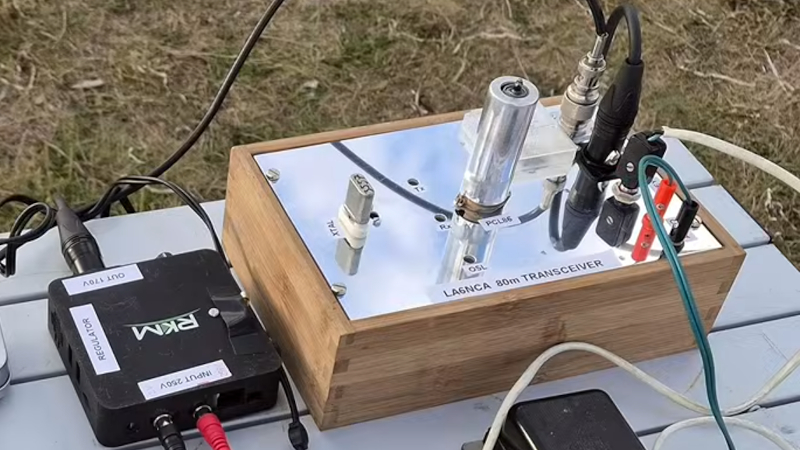
It’s not often we see a tube project here, so [Helge Fykse]’s PCL86 transceiver is a welcome find.
If you know anything about the European Pro-Electron device naming system you’ll be familiar with it as it applies to tubes. The first letter denotes the heater specification, for example “E” is for a 6.3 volt heater. Everyone wants the familiar 6.3 V devices, but they have a set of cousins which often pass unnoticed. “P” tubes have a 300 mA heater designed such that all tubes in a device could be connected in series at the same current. Of those tubes the PCL86 is a mundane example, filling the function taken in the semiconductor years by the LM386. It’s a small-signal triode and a power pentode in one device, and it’s an audio amplifier. Every 1960s TV set in Europe had one, and thus it’s a good choice for experimentation.
This transceiver is a conventional crystal oscillator and power amplifier on transmit, but with a flick of a switch it transforms into a direct conversion receiver in which the triode becomes oscillator and mixer while the pentode becomes an audio amplifier. It’s simple, and the video below the break explains it in great detail. We’re not sure whether or not it could unintentionally radiate in receive mode, but we’re guessing the energy would be tiny.
Advertisement
A simple tube project can make an interesting departure from modern surface mount electronics, so if you get the chance we’d suggest you try one. If you don’t need a transceiver, an audio amplifier is the archetypal PCL86 project.
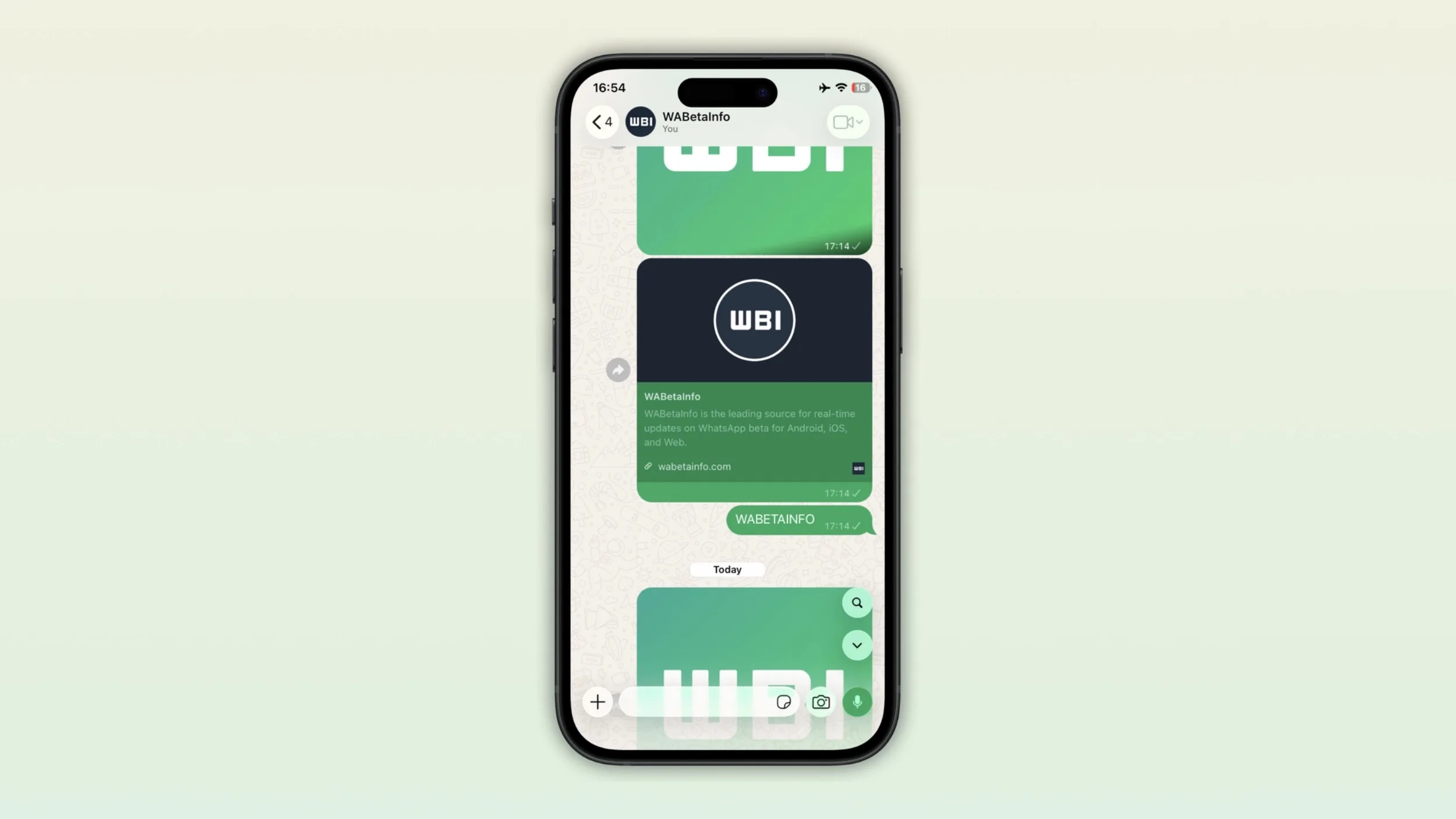
Searching through my WhatsApp chat history can be frustrating if on an Apple device. You’re looking for an address or perhaps even a specific picture, but actually finding it becomes the hard part. So, to deal with this, WhatsApp is apparently working on a new search shortcut inside chats and channels on iOS.
This lets users jump directly into message search without leaving the conversation first. WABetaInfo spotted the feature in WhatsApp Messenger for iOS version 26.36.74, currently available through the App Store.
WaBetaInfo
The search button appears when you actually need it
The shortcut is situated near the top of the conversation interface and appears when you scroll upward through older messages. Tap it and WhatsApp immediately activates its existing search mode, where you can enter a keyword and jump between matching results.
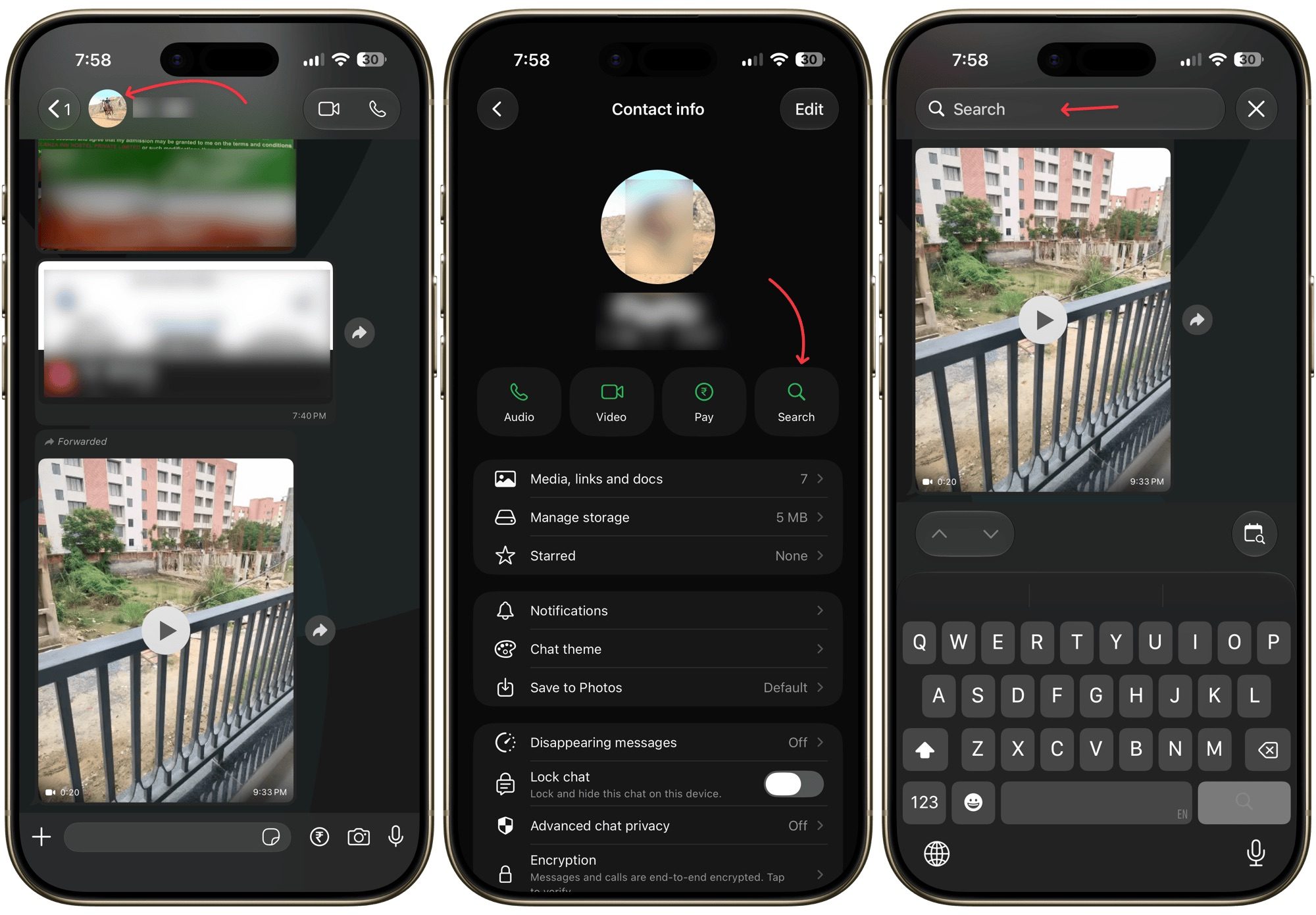
Once you scroll back to the bottom of the conversation, the button disappears again. So it’s not hogging up the space within the messaging app. Previously, searching within a specific chat on iPhone required tapping the contact or group name, opening the chat information screen, selecting Search, and then returning to the conversation with search mode enabled.
How search inside WhatsApp worksRachit Agarwal / Digital Trends
Channels are included in this
WhatsApp is also adding the same search button to Channels. This is where the new search shortcut would be the most useful, honestly. Channels can accumulate a huge number of updates, particularly those run by news organizations. Meaning, finding the exact message you’re looking for will be a lot easier.
WhatsApp originally tested the shortcut at the bottom of the interface in August but moved it to the top before release. WABetaInfo says the feature is currently reaching some iPhone users and should expand over the coming weeks. There is no confirmed Android rollout date yet.
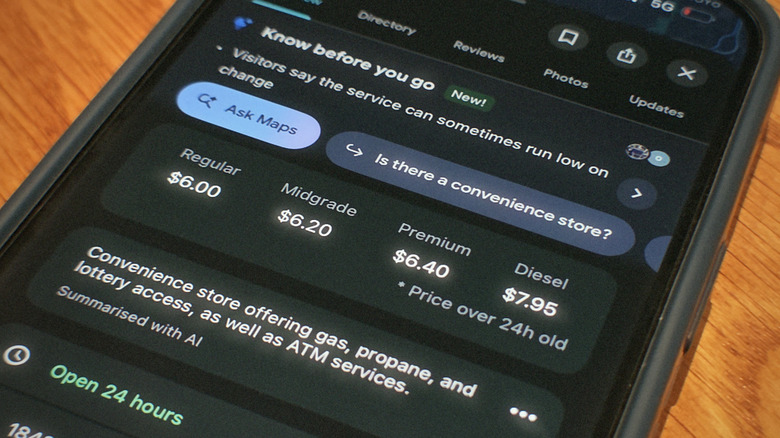
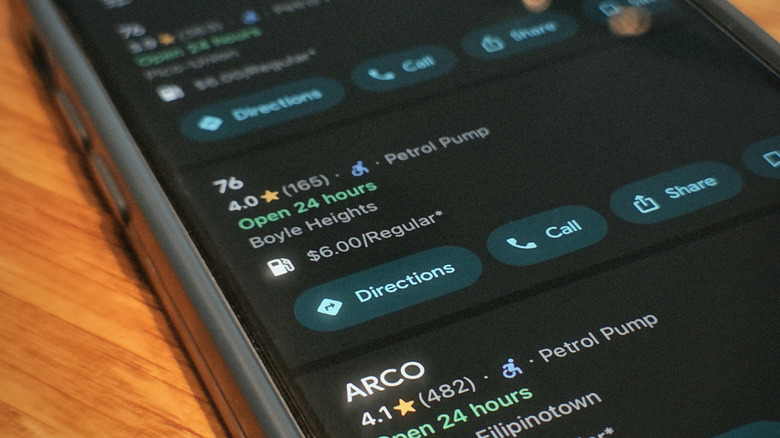
Google sits on a mountain of maps data, but not all of it is its own work. Sometimes the company relies on third-party data providers to fill in any gaps in its knowledge. Gas prices are one of those gaps. If you’ve never used it, the Maps app presents gas information with every gas station listing when you search for it, so you can pick the cheapest option in your area. The data for it actually comes from a Dow Jones-owned firm called OPIS, short for Oil Price Information Service. This firm’s entire business is selling fuel pricing data to companies that need it.
Neither company actually promotes this arrangement, although both do admit to it in their documentation. On the OPIS website, you can find a page where the firm markets its retail fuel pricing products. Google is named here as a customer for its station data. Google sort of confirms this from its own end in a Maps support article on reporting bad map data. It instructs anyone who spots a wrong gas price to contact OPIS about it, rather than Google.
Maps first got gas prices back in 2015, over a decade ago now, with Android users seeing them first that October and iPhone owners waiting until December. As for whether they’re actually correct, the short version is that they hold up pretty well as long as you use them to get a general picture of what fuel costs in your area. Any single station’s number, though, can lag reality by a day or more, since gas prices shift constantly — and lately they’ve been climbing harder than they have in years.
Advertisement
So how accurate are those prices?
Zohaib Ahmed/SlashGear
Nearly one in four American gas stations transmits its prices to OPIS directly, every day. Besides that, OPIS has also revealed that it builds averages from reconciled credit card transactions. In a way, consumer payment records double up as price reports.
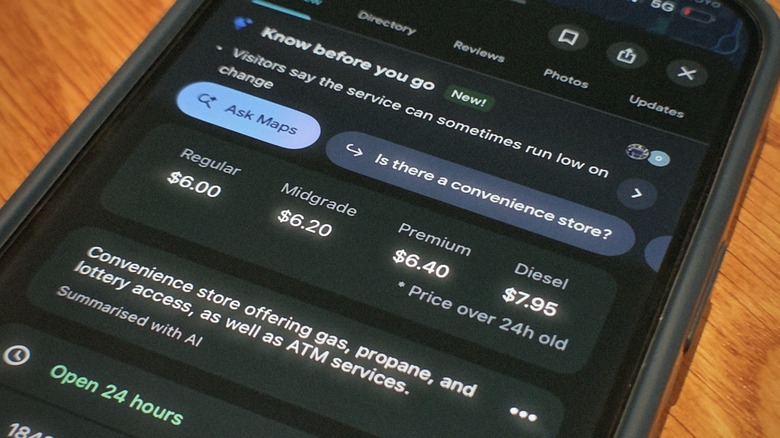
While most of this data handed over by OPIS is accurate, there are times it may not be — and Google is upfront about those times. As seen in the above image, Maps sticks an asterisk on prices it isn’t confident about, noting they’re from 24-plus hours ago. Android Authority also found that prices at major chains like Shell and BP generally matched reality. The gaps show mostly with fuel types other than regular unleaded, since those are updated more slowly. Another weak point are warehouse clubs. Costco and the like frequently showed no price whatsoever.
Advertisement
The point of asterisks is to account for fast-moving gas prices, which often update faster than any data pipeline can keep up with. GasBuddy, a platform that helps drivers find the cheapest gas nearby, reckons a single station can change its price up to three times in one day. OPIS does refresh nearly 90% of stations daily — a number that climbs up to over 95% within 48 hours. That leaves a slice of listings trailing whatever the sign outside actually says. OPIS also claims to be the only provider pulling data from multiple independent sources for the same station. It uses these sources to cross-check data just in case something looks off.
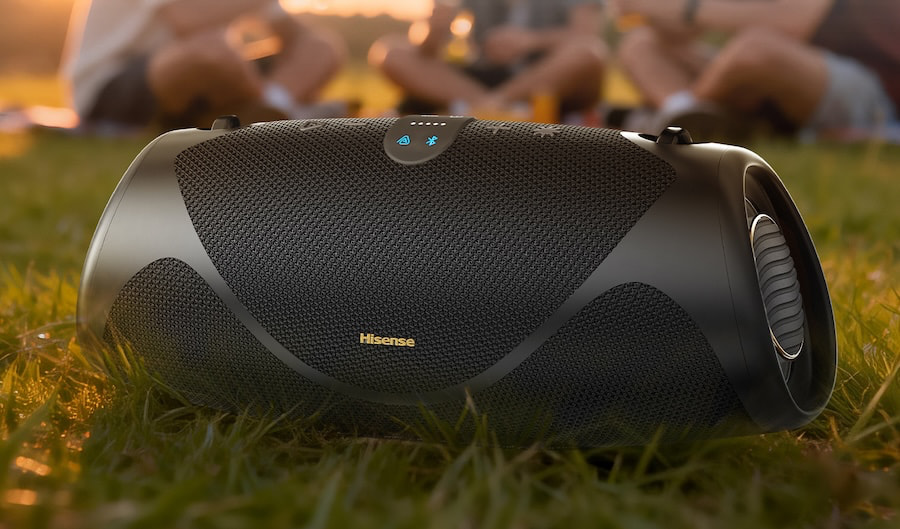
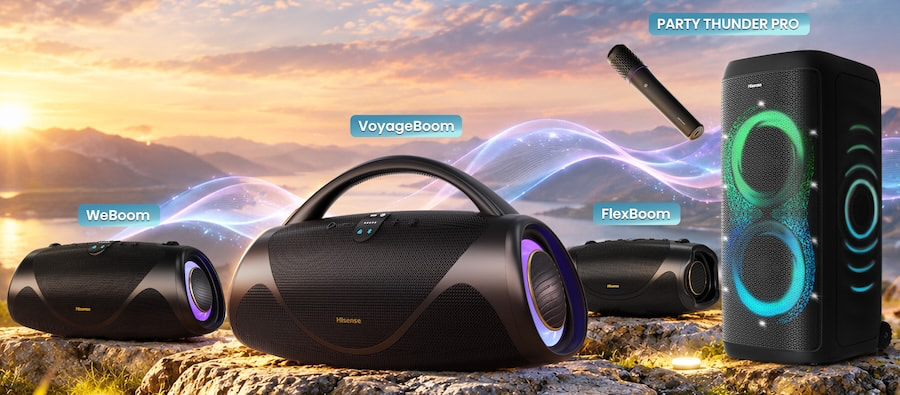
The portable Bluetooth and party speaker market is already crowded with established rivals, but Hisense is jumping straight into the deep end with four new models aimed at everything from casual listening on the go to much larger gatherings. The move expands Hisense beyond TVs and home entertainment hardware into one of the most competitive corners of the consumer audio market.
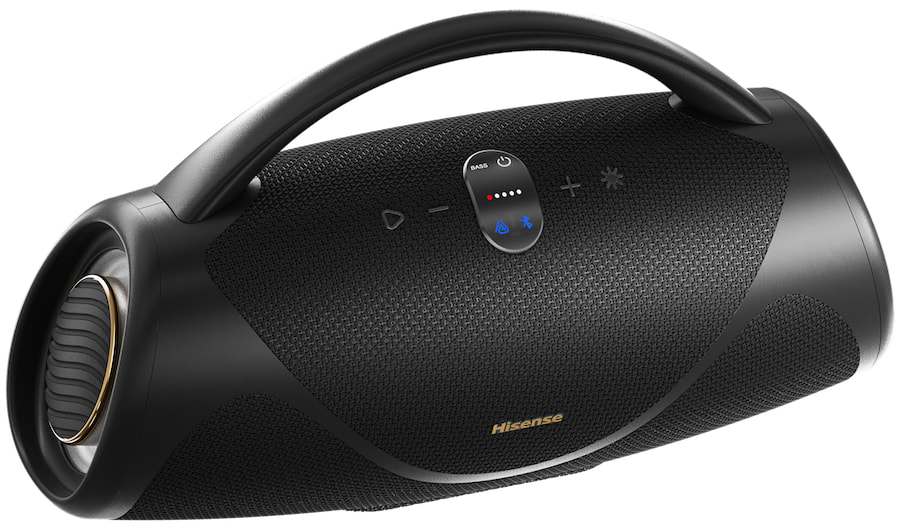
The new Boom family includes three portable Bluetooth speakers: the FlexBoom, WeBoom, and VoyageBoom. The larger Party Thunder Pro sits alongside them as a more powerful party speaker designed for bigger spaces and louder events. Together, the four models represent Hisense’s most aggressive push yet into a category where brand recognition alone will not be enough to drown out the competition.
“Great entertainment isn’t defined by one screen or one room. It’s about creating an experience people want to be a part of,” said David Gold, Chief Commercial Officer and Deputy General Manager at Hisense USA. “We’ve spent years building products that make movies, sports, music, and other shared moments better at home. With our new speakers, we’re extending that experience even further with options designed for everything from everyday listening and weekends outside to hosting a full house of friends.”
The Boom Family
Designed to deliver bigger sound wherever the day takes you, the Hisense Boom family includes the FlexBoom, WeBoom, and VoyageBoom, with models ranging from compact portable listening to deeper bass and higher output.
Advertisement
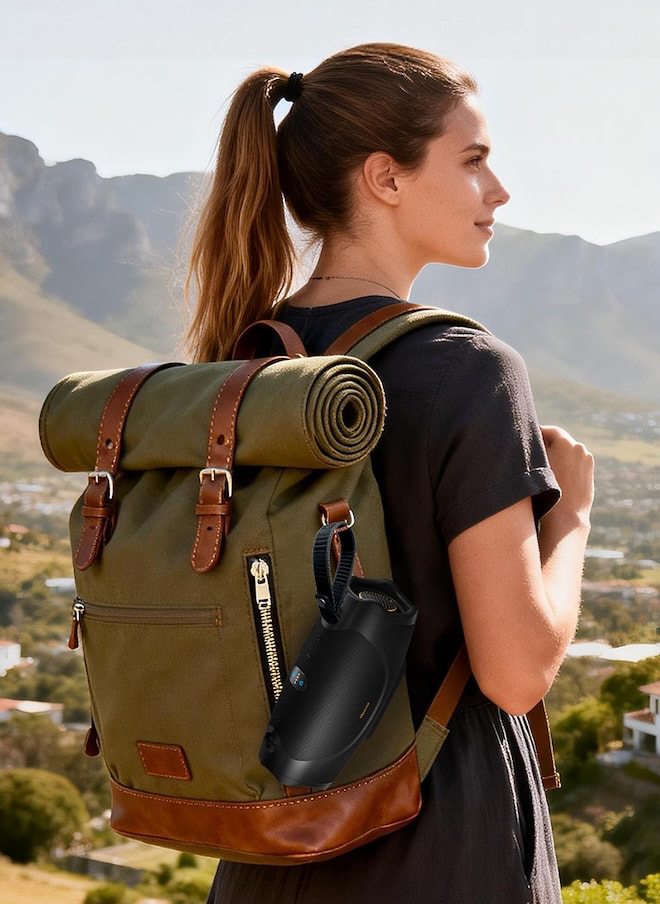
All three speakers offer Bluetooth connectivity, wired input options, long battery life, dust and water resistance, and portable designs intended for backyard gatherings, beach days, outdoor trips, and everyday listening.
FlexBoom: Grab it and Go
The Hisense FlexBoom is the entry level model in the Boom family, combining a compact design with a dual driver configuration and 40 watts of output.
Designed to deliver crisp highs and punchy bass on the go, the FlexBoom offers up to 20 hours of playback on a full charge. If the battery is running low, a 10 minute quick charge provides up to two hours of additional listening. Its IP67 rating provides protection against dust and water, making it suitable for everything from the backyard to the beach.
Two FlexBoom speakers can also be paired using True Wireless Stereo for separate left and right channels. Auracast support allows audio to be broadcast to compatible nearby speakers, while the built in speakerphone lets users answer calls hands free before switching back to the music.
WeBoom: The Step Up
The Hisense WeBoom steps up from the FlexBoom with a larger sound, Bass Boost, and built in dual subwoofers for listeners who want more low end impact from a portable speaker.
Battery life increases to up to 24 hours, while a 10 minute quick charge provides up to two hours of additional playback. The WeBoom also carries an IP67 dust and water resistance rating, helping protect it from rain, splashes, spills, and the occasional mishap around the pool or backyard.
Advertisement
A convertible carry strap makes it easy to transport the sound wherever the day goes, while Light Show Mode sets the mood and creates vibrant visuals, easily controlled through the ConnectLife app.
Advertisement. Scroll to continue reading.
VoyageBoom: Take the Bass Further
The Hisense VoyageBoom takes another step up from the FlexBoom and WeBoom with adjustable Bass Boost and a built in subwoofer designed to deliver deeper low frequency impact.
The VoyageBoom offers up to 24 hours of playback on a single charge and carries an IP67 dust and water resistance rating for outdoor use. It also adds a dynamic light show that can sync with the music and be controlled through the ConnectLife app.
A built in power bank can charge a phone or tablet while you are away from an outlet, giving the VoyageBoom a little more utility for longer days outside or larger gatherings.
Advertisement
Party Thunder Pro: The Total Party Experience
The Hisense Boom family offers plenty of flexibility for individual listening and smaller gatherings, but when the guest list gets larger, the Party Thunder Pro is designed to turn things up considerably.
Rather than simply scaling up one of the portable Boom models, Hisense positions the Party Thunder Pro as its higher powered option for larger spaces, bigger gatherings, and listeners who want substantially more output.
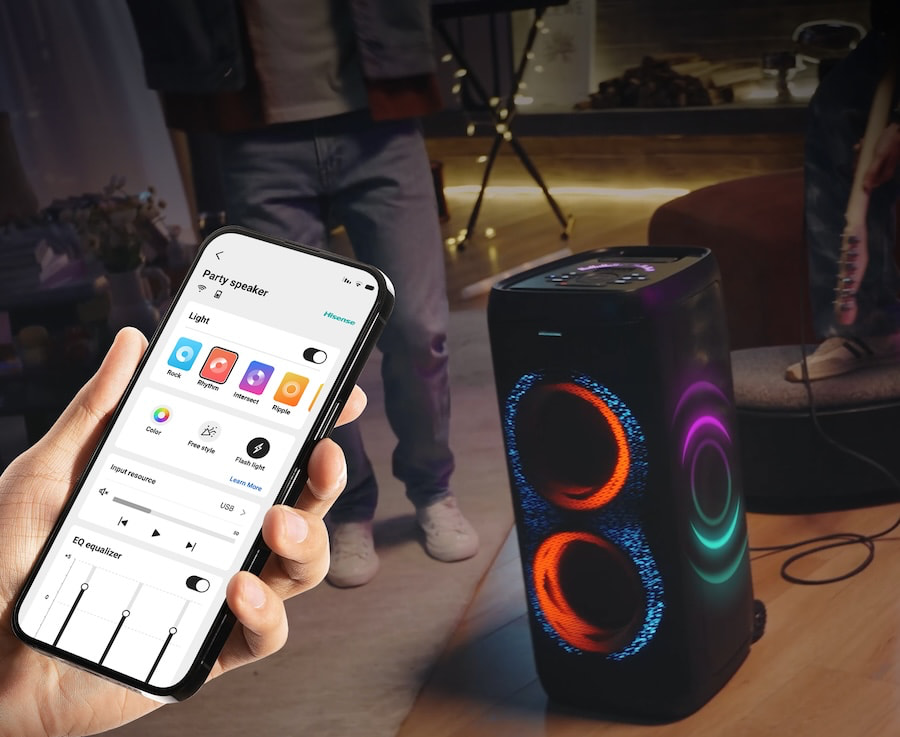
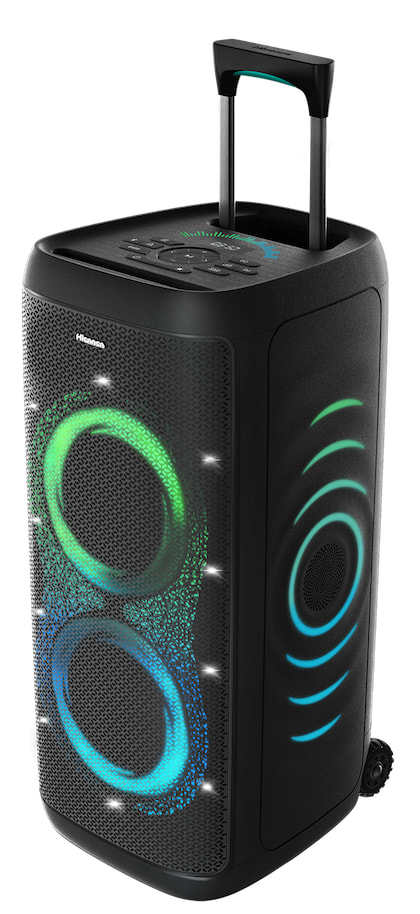
The Hisense Party Thunder Pro is built for substantially bigger gatherings, using a six speaker configuration that includes dual tweeters and woofers. Hisense rates the system for up to 620 watts of output, with an emphasis on deeper bass, crisp highs, and enough volume to fill a larger room or outdoor space.
Built-in Auracast allows multiple Party Thunder Pro speakers to be connected wirelessly for wider coverage and greater output. Hisense also includes a wireless microphone for karaoke, giving the speaker another use beyond simply turning the volume knob clockwise.
For portability, the Party Thunder Pro includes built in wheels and a retractable handle, making it easier to move between rooms or take outside. A synchronized light show adds the expected party speaker theatrics, while the rechargeable battery provides up to 18 hours of playback on a full charge.
Up to 24 hrs (50% Volume,Lights Off, EQ: Music Mode)
Up to 24 hrs (50% Volume, Lights Off, EQ: Music Mode)
10-min charge = 2 hrs playtime
Advertisement
Up to 20 hrs (50% Volume, Lights Off, EQ: Music Mode)
10-min charge = 2 hrs playtime
IPX Rating
IPX4
IP67
IP67
IP67
Bluetooth
ver 5.4
ver 6
ver 5.4
ver 5.4
Auracast (2+ units) + dual-speaker TWS
Yes
Yes
Yes
Yes
FM Radio
Yes
Yes
Yes
Yes
AI LED Light Show (syncs to music)
Yes
Yes
Yes – Light Show Mode (via ConnectLife app)
No
Built-in Wheels
Yes
No
No
No
Built-in Handle
Yes
Yes
Carrying Strap
Carrying Strap
Wireless Microphone
Yes
Not Indicated
Not Indicated
Not Indicated
Guitar/Mic Input
Yes
Yes
No
Mic input for for Phone Call only
AUX Input
1 x 3.5mm
1 x 3.5mm
1 x 3.5mm
1 x 3.5mm
USB Input
1 (music and firmware update)
1 (USB-A Playback; Charge out 5V1A)
1 (USB-A Playback; Charge out 5V1A)
Yes – Type C
Hands-Free Call Switching
Not Indicated
Not Indicated
Not Indicated
Yes
Power Consumption
80W Standby: <0.5W
180W (AC power) / 136W (battery)
≤10W
≤8W
Power Supply
AC 100-240V, 50/60Hz
AC 100-240V, 50/60Hz
5VDC/2.8A (USB-C charge)
5VDC/2.8A (USB-C charge)
Built-in Powerbank (phone/tablet)
Not Indicated
Yes
Yes
Not Indicated
Battery
7.2V/12500mAh,
Li-ion 75.92 Wh (equivalentto 7.3 V 10400 mAh)
7.4V/10000mAh
7.4V/5000mAh
Dimensions (WHD)
14.2”x27.2”x13”
20.8”x7.5”x11.5”
13.2”x4.7”x5.4”
9.5”x4”x4.2”
Weight
37 lbs
15.6 lbs
4.4 lbs
3.3 lbs
App Compatibility
ConnectLife
ConnectLife
ConnectLife
ConnectLife
The Bottom Line
Hisense is arriving late to the portable Bluetooth and party speaker market, but it is not dipping a toe into the shallow end. The company has launched an entire portable speaker family alongside a 620-watt Party Thunder Pro, putting itself directly into competition with products from JBL, Sony, Marshall, TCL, LG, and others that have been building this category for years.
The Party Thunder Pro may be the most interesting product of the group. At $399.99, Hisense is offering six built in speakers, Auracast, up to 18 hours of battery life, a wireless microphone, wired microphone and guitar inputs, wheels, a retractable handle, and synchronized lighting. That combination gives it a compelling feature set against the JBL PartyBox 330, Sony ULT Tower Max, Marshall Bromley 450, and TCL’s party speaker lineup, although TCL is competing in similar pricing territory.
There is also the elephant in the room: “Boom” is not exactly an unexplored piece of branding in this category. LG has spent years selling portable and party speakers under its Xboom name, so Hisense calling its new range the Boom Family feels uncomfortably familiar. Whether that creates an actual trademark issue is a legal question, but from a consumer standpoint, the similarity is certainly close enough to cause some head scratching.
Advertisement
The portable Bluetooth and party speaker categories are not slowing down, and Hisense clearly sees room for another major TV brand to grab a piece of the action. The Party Thunder Pro’s price and feature set give it the strongest argument out of the gate, but JBL, Sony, Marshall, TCL, and LG have a substantial head start. Hisense has joined the party. Now it has to prove somebody wants to hand it the aux cord.
Turns out AI chatbots are getting really good at breaking into things, and OpenAI just found out the hard way. A new Wall Street Journal report reveals that a small team of security researchers used Anthropic’s Claude to hack an OpenAI employee’s ChatGPT account. Once inside, they got access to the company’s private codebase.
The researchers, who go by Hacktron AI, were working through OpenAI’s bug bounty program, which lets outside researchers legally attack a company’s systems without getting into trouble for it. As soon as they realized what they had access to, they flagged it to OpenAI, which paid the team $6,500 for the find.
How did the hack actually happen?
It all traces back to a flaw the team spotted in Discourse, the outside platform that powers OpenAI’s community forum. They had Claude generate exploit code to take advantage of the bug, and at first, the attempt fell flat. Then Anthropic rolled out Opus 5, and the very next day, Claude had cracked it.
Claude
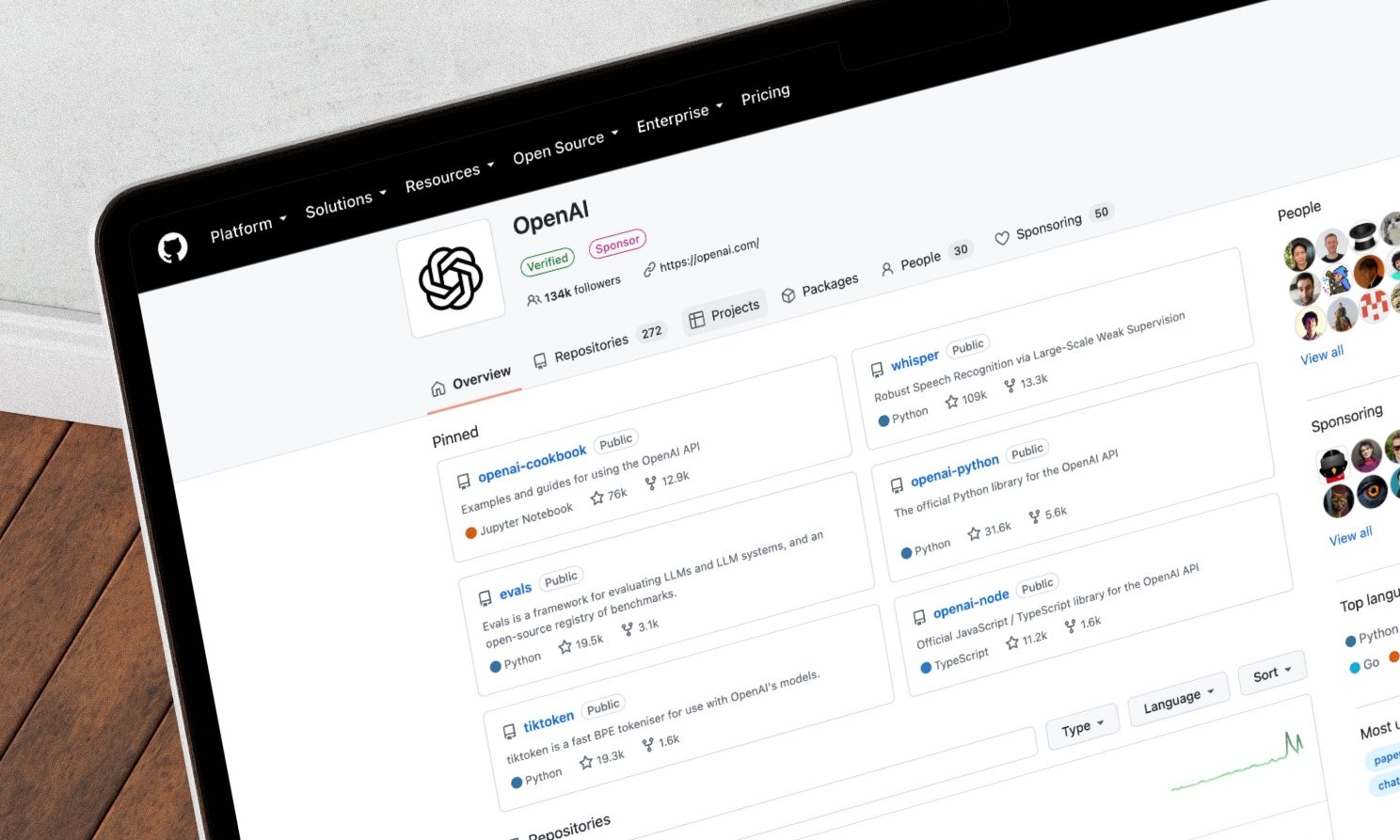
That exploit opened the door to authentication tokens sitting on the Discourse server. Oddly enough, some of those tokens also worked on ChatGPT itself, and a few belonged to actual OpenAI staffers. From there, the access stretched all the way to OpenAI’s GitHub, letting the team browse files inside a repository called Monorepo, said to house a lot of OpenAI’s technical know-how, though not the actual model weights.
Rachit Agarwal / Digital Trends
To leave proof they had gotten this far, the researchers submitted a small pull request tagging their team’s name. OpenAI never approved it, but the message landed anyway.
What does this mean for AI security going forward?
OpenAI confirmed that both security gaps are now closed, and Discourse pushed out its fix the same day it got word of the issue. But here’s the part that should give everyone pause: this entire breach came from three researchers armed with nothing more than regular Claude and Codex subscriptions.
Advertisement
If that’s what a small independent team can do, it’s worth wondering what well-funded, nation-backed hacking groups have already become capable of. AI is quietly handing serious hacking skills to people who never needed to earn them the hard way, and there is no putting that back in the bottle.



















































You must be logged in to post a comment Login