When you think of wartime cryptography, you probably think of World War II and Enigma, although there were other famous codes used during that war. But in fact, there have been codes used through wars and in peacetime for much longer. Even the Romans used codes. Of course, World War I, or The Great War, as it would have been known, had its share of codes and, as you might expect, most of these have been broken long ago. Most of them. But apparently an AI model, GPT-6 Astra, recently cracked one that was previously undeciphered.
If you aren’t up on century-old cryptography, the ADFGVX cipher appeared in 1918. It began as ADFGX, but after a few months grew an extra letter — and a larger grid. The letters were chosen because their Morse-code patterns were relatively easy to distinguish: A, D, F, G, V, and X.
The original ADFGX version used a 5×5 grid containing the alphabet, usually merging I and J. The later ADFGVX version expanded this to 6×6, making room for all the letters and the digits as well.
Encoding required a 5×5 (or 6×6) grid with the alphabet within. The table’s rows and columns were labeled… you guessed it… ADFGX pr ADFGVX. Each plaintext letter gets replaced by the corresponding row and column such as AF or XG. Finally, the letter pairs would be written under a transposition key.
Advertisement
Concatenating those pairs gives AGXGDDDXXF. Written in five columns under CANDY, the first row is AGXGD and the second is DDXXF.
Next, you sort the letters in the transposition key, taking the columns along with the letters. That would make the transposition key ACDNY, and the first row would now be GAGXD. Then the message is sent by columns. Too much to wrap your head around? Visit dCode and plug in some plain text, squares, and keywords for yourself.
The French broke the code in 1918, but without computers it was tough work. Codebreaker [Georges Painvin] reportedly worked on the cipher until it made him ill, but he did solve it. However, some of the intercepted messages remained a mystery. One in particular was sent on November 27, 1918. Apparently, the message used the codeword TRUPPENVERSCHIEBUNG, a German key believed to have gone into service in December. If this decoding is correct, then this message used it even earlier.
The message was, of course, in German and appears to be a report about a British ship’s movements near Sevastopol. In fact, HMS Canterbury’s position on the dates mentioned matches the message.
Advertisement
Honestly, we were more impressed that people like [Georges Painvin] in 1918 were able to decode these intercepted messages. But it is still an interesting glimpse into the capabilities of Astra.
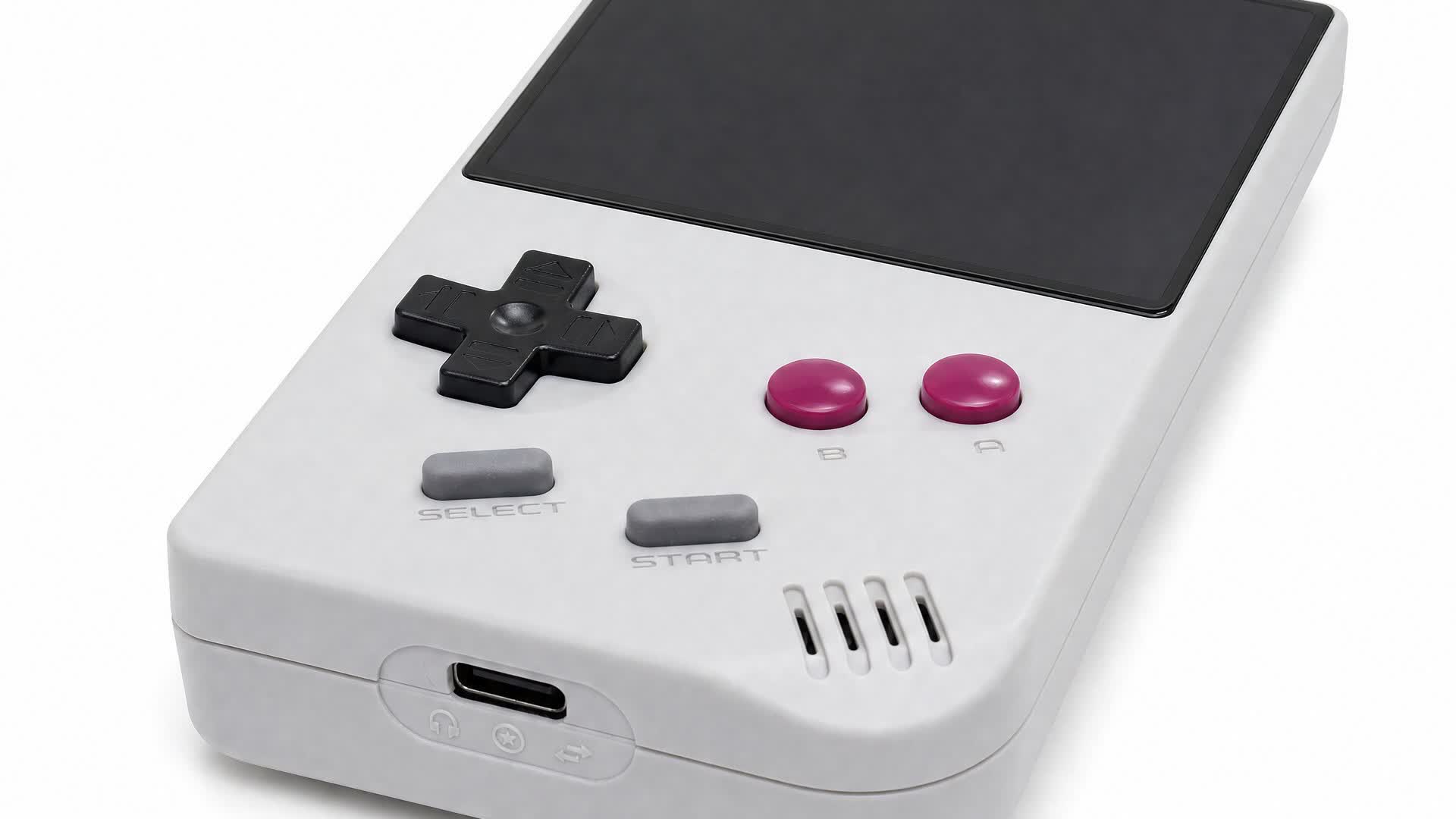
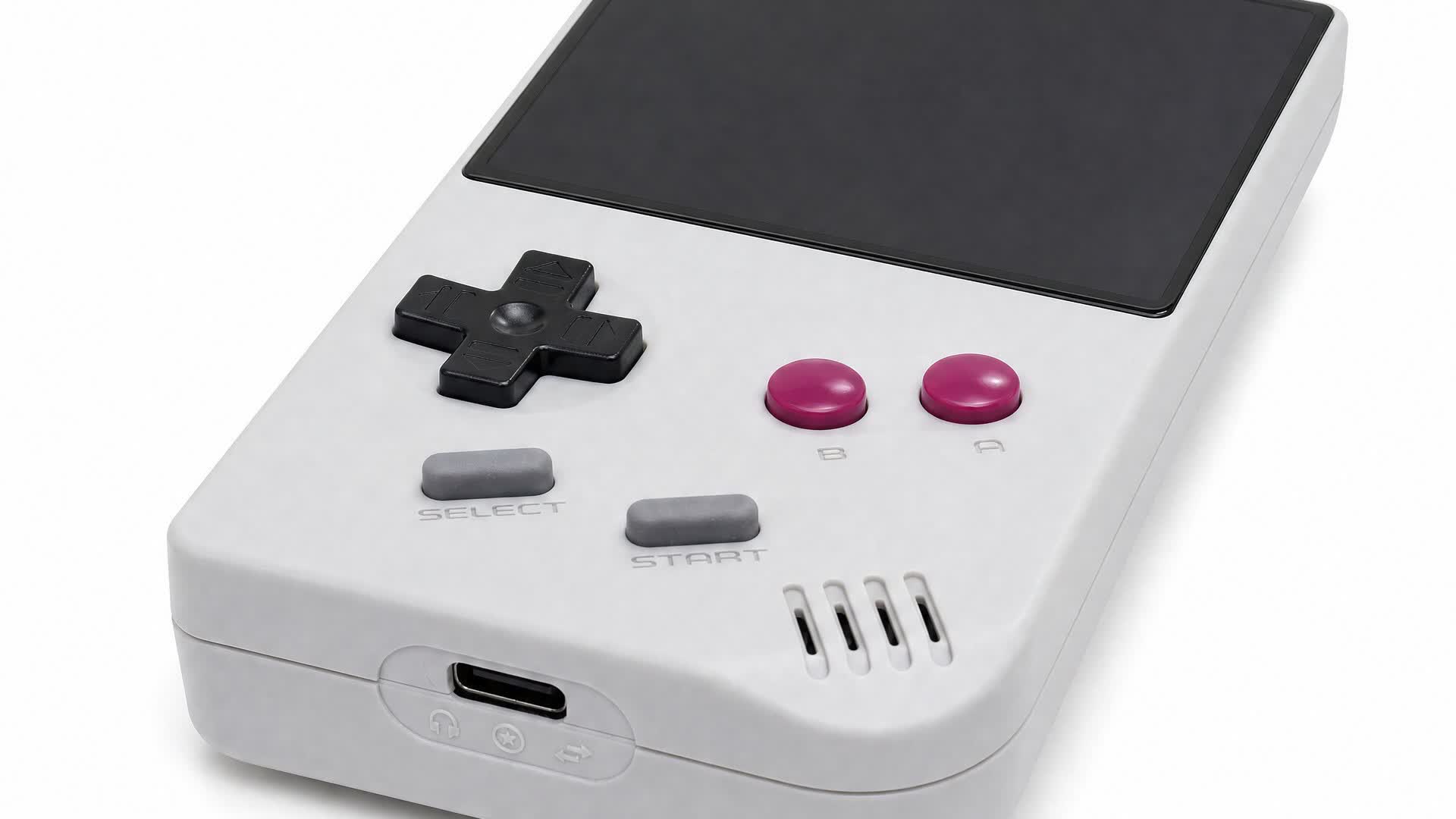
The takeaway: Game Boy enthusiasts with physical cartridge libraries who are unwilling to pay $240 for an Analogue Pocket might want to consider the recently launched FPGB Mini. Although it isn’t quite as versatile as Analogue’s well-regarded handheld, it still plays ROMs and cartridges with virtually perfect emulation accuracy at less than half the price. It’s also barely larger than a Game Boy cartridge.
FunnyPlaying has launched a smaller version of its budget-priced rival to the Analogue Pocket. Slightly cheaper but with the same software capabilities, the FPGB Mini might be as small as a faithful Game Boy clone will ever get.
Most retro handhelds, like Ayaneo’s products, emulate the Game Boy and other classic systems entirely in software, typically running Android or Linux. In contrast, devices like the Analogue Pocket, Game Bub, or FPGB use FPGA-based hardware emulation.
FPGAs (field-programmable gate arrays) are integrated circuits whose logic isn’t hard-wired at the factory. As such, they can be reprogrammed at the hardware level for various purposes, including imitating retro game consoles. This lets them emulate retro devices essentially flawlessly with low TDPs, meaning longer battery life.
Advertisement
However, following recent price hikes, the Analogue Pocket retails for $240, while the Game Bub starts at $249 and climbs to $300 for its limited-edition color. FunnyPlaying, meanwhile, sold through its initial batch of 20 early-bird FPGB Mini units at just $69, and even its standard $89 MSRP significantly undercuts the competition.
Despite measuring just 113 × 64 × 22 mm, only slightly larger than a Game Boy cartridge, the FPGB Mini is a fully featured emulation handheld. Its 2.98-inch, 800×720-pixel IPS screen displays at exactly five times the original Game Boy’s resolution, its 1800 mAh rechargeable battery promises four to six hours of gameplay, and a microSD slot (up to 32GB) handles digital ROMs and firmware updates while USB-C takes care of charging. With a USB-C adapter, it also supports Game Boy link cables.
Compared to the Analogue Pocket, the FPGB Mini’s main drawback is that it doesn’t support Game Boy Advance games or emulators for other retro consoles. Its tiny form factor also prevents inserting cartridges with extra hardware features such as rumble.
The FPGB Mini’s first batch sold out within minutes, but it’s expected to restock on FunnyPlaying’s online store, which also sells custom and replacement screens, motherboards, batteries, and other components for official Game Boy models. Natalie the Nerd’s shop is another well-regarded source for Game Boy parts and documentation.
Lena Schiwitz explores the topic of trust in AI, and how building a career in tech isn’t always about coming from a traditional background.
In less than a month, Lena Schiwitz – an AI operations manager at Zurich-based start-up MoodTalk – will be heading to the University of Oxford as one of 35 students taking part in a new AI master’s programme.
Today, much of her work is focused on artificial intelligence and how it can be integrated into consumer and internal processes – and specifically, how organisations can actually adopt it.
Schiwitz told SiliconRepublic.com, “That means building AI workflows, working with customers and looking closely at where people trust the technology, where they hesitate and what makes it genuinely useful in their day-to-day work.
Advertisement
“Our broader focus is on making knowledge inside organisations more accessible. Often, the information leaders need already exists somewhere in the organisation, but it is spread across teams and levels and does not reach the right person at the right time.
“We use AI to gather perspectives and identify patterns across them, so leaders can understand what is happening without waiting for information to slowly move through meetings, reports and layers of management.”
The concept of finding the right person at the right time, or being the architect of someone else’s journey, is one that is very personal to Schiwitz, whose career trajectory was initially headed in a very different direction.
She started out by studying to be a national school teacher in her native Austria and spent two years working in childcare.
Advertisement
“At the time, I had very little exposure to technology or to what careers in tech actually looked like. I had always loved maths, logical thinking and figuring out how things work. I just never knew there were careers built around those interests,” she said.
“That changed when I moved to Switzerland to work as a nanny. Both parents in my host family worked in tech, and over dinner, they would talk about products they were building, problems they were solving and decisions they had to make. I found those conversations fascinating. For the first time, I saw a professional world that matched the way I liked to think.”
From there, she studied business information technology, a course in a field that many of her peers had prior experience of via a range of apprenticeship programmes and previous jobs.
“I had spent those same years working with children. At first, that felt like a disadvantage,” she said.
Advertisement
“But over time, I realised I was bringing a different perspective. My background had taught me a lot about how people learn, what motivates them, how they respond to change and why the same approach does not work for everyone.”
Once she completed her bachelor’s thesis on trust in AI, the pieces all fell into place and she found, for the first time, there was an outlet through which she could combine an understanding of people and learning with a knowledge of technology and AI.
“I realised that I was most interested in the space where those things meet, understanding what technology can do and what people need in order to actually use it.”
AI – tool or collaborator?
The concept of trust in AI is one that is particularly fascinating for Schiwitz, who explained that we are starting to adapt to the tech almost as much as it is adapting to us.
Advertisement
“A few years ago, we mostly asked AI isolated questions. Now we give it access to our meetings, documents, decisions and, increasingly, our organisational memory. We record conversations knowing they can become searchable later. We document information differently because we expect AI to understand the context,” she said.
“I find that shift fascinating. We are building AI around the way humans work, while at the same time starting to organise our work around what AI can understand. And this is happening faster than the norms around it can develop.
“We are still deciding what AI should remember, what it should forget, how much context it should have and which decisions should remain human.”
She finds herself driven by a need not only to build better technology, but to be a part of figuring out how humans and AI should work together, as “many of the most important questions are still open”.
Advertisement
The right kind of trust
Schiwitz noted, however, that building trust in AI needs to be about more than simply making the human more trusting of technology, especially in cases where it may be unwarranted.
During her academic research, she discovered that it isn’t necessarily difficult to increase people’s trust in AI in scenarios where the artificial intelligence hasn’t actually been improved.
“For my bachelor’s thesis, I changed relatively simple things around an AI assistant. I explained more clearly why people were interacting with it, made its limitations more visible and gave the conversation more structure. The AI itself did not become any smarter, but people’s trust in it increased significantly and the way they interacted with it changed,” she said.
“I found that fascinating, but also slightly uncomfortable. I had started my research asking how I could make people trust AI. By the end, I was asking whether more trust should even be the goal. If relatively small design choices can change how much people trust an AI, then trust is not necessarily evidence that the system deserves it.”
Advertisement
Following this, she began to think about AI in organisations and how the goal should never be simply maximum trust, but “helping people trust AI when they should and question it when they should not”.
And her unique pivot into tech, whereby she came in with a less-than-traditional educational background, has aided this desire to cultivate real trust in AI and tech teams as a whole.
“For a long time, I thought I had entered technology too late. Now I think I simply entered it with a different perspective. My background in education still shapes the questions I ask about technology, especially around how people understand, trust and use it,” she said.
“This autumn, I am starting Oxford’s MSc in Artificial Intelligence for Business alongside my work. For me, it feels less like another change of direction and more like going deeper into the questions I have been following all along.”
Advertisement
Don’t miss out on the knowledge you need to succeed. Sign up for the Daily Brief, Silicon Republic’s digest of need-to-know sci-tech news.
Looking for the most recent Wordle answer? CNET publishes daily answers and hints for The New York Times Mini Crossword, Connections, Connections: Sports Edition and Strands puzzles. And here’s a page that Wordle players should be sure to bookmark. We’ve made a list, with help from the Oxford English Dictionary, showing which letters show up the most in English words. So if your starter word isn’t getting the job done, consider switching to one of the words that uses more of the highly ranked letters. (I like TRAIN and CLOSE.)
Today’s Wordle answer has a first letter that I rarely guess. Need a tip or two? Read on for hints and the answer.
Today’s Wordle hints
Before we show you today’s Wordle answer, we’ll give you some hints. If you don’t want a spoiler, look away now.
Wordle hint No. 1: Repeats
Today’s Wordle answer has no repeated letters.
Wordle hint No. 2: Vowels
Today’s Wordle answer has two vowels.
Advertisement
Wordle hint No. 3: First letter
Today’s Wordle answer begins with W.
Wordle hint No. 4: Last letter
Today’s Wordle answer ends with N.
Wordle hint No. 5: Meaning
Today’s Wordle answer can mean to stop sleeping.
TODAY’S WORDLE ANSWER
Today’s Wordle answer isWAKEN.
Advertisement
Yesterday’s Wordle answer
Yesterday’s Wordle answer, Sept. 18, No. 1,917, was SNOWY.
Recent Wordle answers
Sept. 14, No. 1,913: RINSE
Sept. 15, No. 1,914: DEALT
Sept. 16, No. 1,915: WISPY
Advertisement
Sept. 17, No. 1,916: THETA
CNET editor Gael Fashingbauer Cooper, a journalist and pop-culture junkie, is co-author of “Whatever Happened to Pudding Pops? The Lost Toys, Tastes and Trends of the ’70s and ’80s,” as well as “The Totally Sweet ’90s.” She’s been a journalist since 1989, working at Mpls.St.Paul Magazine, Twin Cities Sidewalk, the Minneapolis Star Tribune, and NBC News Digital. She’s Gen X in birthdate, word and deed. If Marathon candy bars ever come back, she’ll be first in line.
See full bio
We spend hours testing every product or service we review, so you can be sure you’re buying the best. Find out more about how we test.
DBrand Killswitch Nintendo Switch 2 review
The DBrand Killswitch for Nintendo Switch 2 is the ultimate protective solution for your shiny new hybrid system. Rather than being a traditional carrying case, it acts as a permanent protective shell for your system, keeping it shielded at all times. I’ve spent a few days gaming with the Killswitch for Switch 2 now, so here’s how I’d rate it.
First of all, I have to applaud the ease of setup. The main case is incredibly easy to pop on. I just had to remove a couple of adhesive strips on the case, push it onto my system, and bam — it was done. The Joy-Con 2 controllers also slot into individual cases, and there’s a protective cover for the system’s kickstand that sticks on seamlessly.
Advertisement
The case has gaps for all of the crucial elements like volume controls, the power button, the USB-C slots, and vents. I also appreciated how slim the protective case felt — sure, it adds a bit of depth, but it doesn’t make the console feel too broad.
Latest Videos FromTechRadar
Like a lot of the best Nintendo Switch 2 accessories, the Killswitch feels very high in quality, and plenty durable. It also offers great ergonomics, with the textured case and its curved feel making the system incredibly comfortable to use in handheld mode. I tried playing a wide variety of games, including Mario Kart Worldand Yoshi and the Mysterious Book, and whether I was turning tight corners or exploring a mystical area, the system never felt unwieldy or chunky.
Advertisement
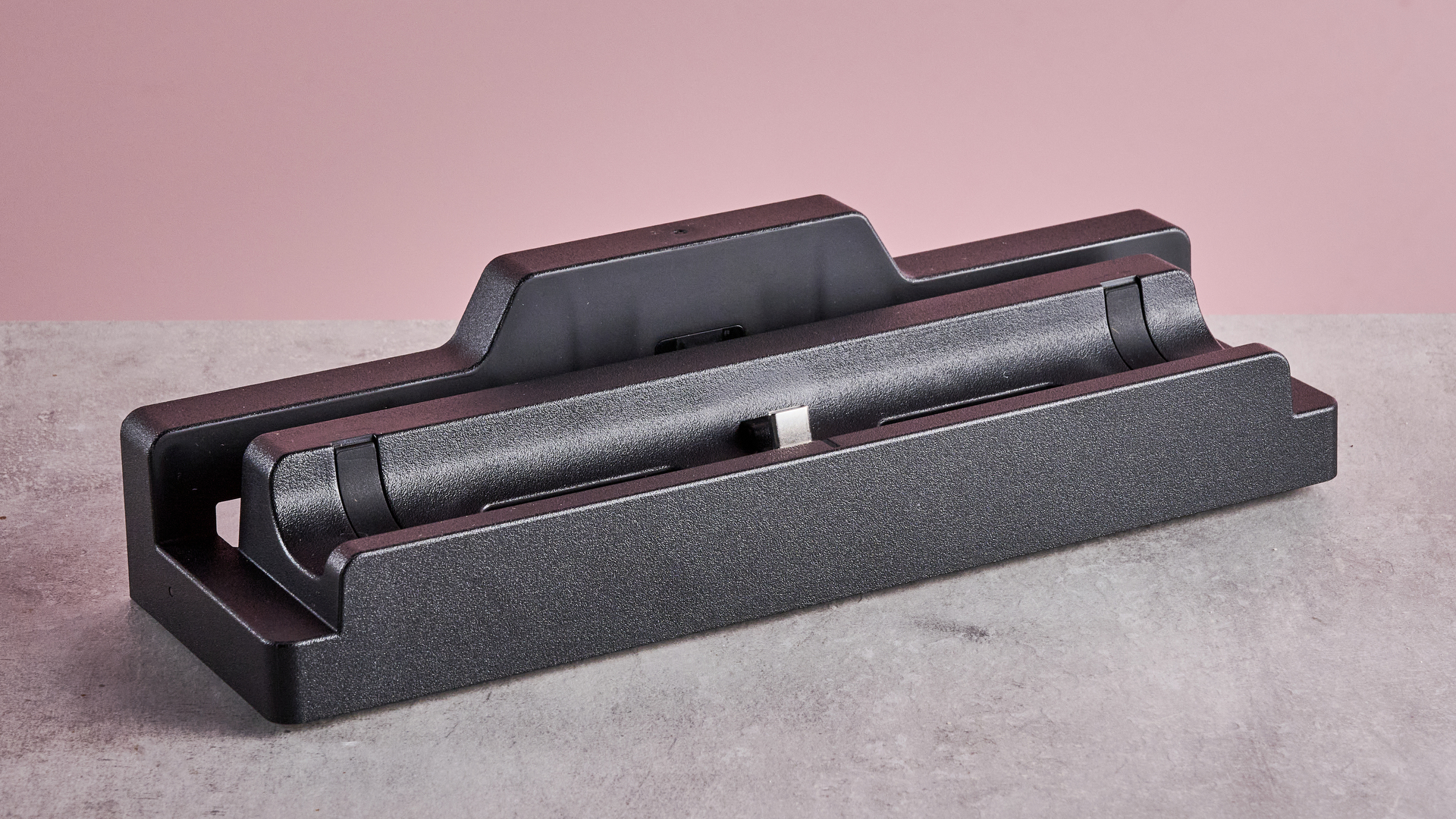
Although the case adds some bulk to the Switch 2, you’re still easily able to use it in docked mode. That’s because the Killswitch comes with a dock adapter. Just place it onto the Switch 2’s usual dock, and you’re good to go. It has 4K 60Hz passthrough, so you can still enjoy the best Nintendo Switch 2 games without compromise, meaning it serves as a super-convenient solution.
(Image credit: Future)
You get a few extras depending on the Killswitch variant that you select. I went for the Travel pack, which also includes stick grips and a travel cover. The grips push on without difficulty, and they have a tactile, secure feel that makes gaming feel as easy as ever. The travel cover is a neat inclusion too, and has ten slots for Nintendo Switch 2 or Nintendo Switch games.
So, it’s safe to say that I’m a big fan of the Killswitch for Switch 2. But there’s one thing worth considering. It’s pretty pricey. The Killswitch starts at just under $60 for the Essential package, which comes with the main case, a skin, and the dock adapter. But if you get the Everything variant, which also adds the stick grips, travel cover, two screen protectors, and a Joy-Con 2 controller holder, it’s just under $155. That’s an awful lot to pay for the fully protective package any way you shake it.
Sign up for breaking news, reviews, opinion, top tech deals, and more.
Advertisement
One other minor thing worth noting is that the protective case and stick grips are a little susceptible to picking up dust and fibers. This didn’t bother me all too much, but I did realize the grips were a little grimy after an hour’s worth of use. Not a dealbreaker, but worth pointing out.
But I’ll be clear. The DBrand Killswitch for Switch 2 is an excellent protective option for your console, and I won’t be taking it off my system any time soon. If you want excellent durability, seamless setup, and flexibility for handheld and docked play, it’s a top-class choice.
(Image credit: Future)
DBrand Killswitch Nintendo Switch 2 review: price & release date
Prices start at $59.95
Released in June 2025
The price you’ll pay for the Nintendo Switch 2 variant of the Killswitch will vary depending on the model you select. Typically, it’s $59.95 for the Essential pack, $99.85 for the Travel option, $134.80 for the Ultra variant, and $154.75 for the Everything package. I have seen the Killswitch go on sale at times, though, so it’s worth checking DBrand’s site for discounts. The Killswitch for Switch 2 was released in June 2025.
(Image credit: Future)
Advertisement
Should I buy the DBrand Killswitch Nintendo Switch 2?
Buy it if…
Don’t buy it if…
DBrand Killswitch Nintendo Switch 2 review: also consider
Advertisement
(Image credit: Future)
How I tested the DBrand Killswitch Nintendo Switch 2
Spent a week testing the Travel bundle
Made use of all the accessories
One of a vast number of Switch 2 accessories I’ve tested
I spent a week testing the DBrand Killswitch for Nintendo Switch 2, and kept it on my system everywhere I went.
I tried dropping my system from a controlled height to judge its durability, and made use of all of the accessories in the Travel package, including the dock adapter, game card holder, and stick grips.
More generally, I’ve spent years testing gadgets here at TechRadar, where I serve as a Senior Reviews Writer. I’ve reviewed a vast amount of Switch 2 accessories, from cases like the Hori Adventure Pack to controllers such as the Turtle Beach Rematch Wireless Controller, and have been a Switch 2 owner from day one.
In this week’s Sunday Reboot, a London Apple Store gives hope for the future of the company’s mall locations.
Sunday Reboot is a weekly column covering some of the lighter stories within the Apple reality distortion field from the past seven days. All to get next week underway with a good first step.
An Apple Store near the UK HQ
On Monday, I found myself getting up hours earlier than normal and getting on a train to London for an appointment. While I could easily complain about the travel (three delayed trains and the London Underground is astoundingly noisy), one column-worthy thing did occur on that day away from the keyboard.
I had some hours free before my trip back across the UK, and I was close enough to Battersea Power Station to pay a visit. Battersea Power Station is actually Apple’s UK headquarters, which was used to display Christmas trees designed on an iPad on its towers last year.
Advertisement
Obviously, there’s no chance of me going into Apple’s offices there for a tour, but there is also an Apple Store.
Battersea Power Station’s main space is now a massive retail emporium, where you can pay big brands big money for expensive things. Basically, it’s now a mall inside a very iconic London location.
Outside Apple Battersea. It’s like a fishbowl.
We have discussed the store in the past, including its launch in 2023. However, in AppleInsider’s ongoing campaign to visit every store possible and to comment on it, this was an opportunity I had to take.
Advertisement
Apple exists on the ground floor in one of the larger spaces, opposite Ralph Lauren and Lacoste, near to Ray-Ban and Nike. It has a nice mostly-glass frontage, interrupted by structural frames around the panes and a large Apple logo in the middle.
This is fairly pedestrian, until you go onside and are greeted by the famous tables. There are lot of them, and this is also typical of the Apple retail experience.
However, this isn’t quite the usual mall grey-everywhere generic mall fit-out you’d see in most places. This was an almost completely wood-clad store.
Looking down Apple Battersea. So much wood.
Advertisement
All of the side avenues were there, except there wasn’t the usual massive video wall that gets used for Today at Apple sessions or events. There was a lit poster near the door, a smaller and more conventional television for showing Apple TV in one corner, but no video wall at all.
There was a nice alcove in one corner that is used to host Apple Vision Pro sessions. It was a nice break-out area, with seating on the sides and a central table showcasing the very-expensive headset.
Looking upward the lights were masked slightly by a drop ceiling, consisting of lots of vertical slats, running the entire length of the room. It certainly made the room feel longer than the sizable space truly occupied, and it was a nice touch.
The Apple Battersea Genius Bar, with the dual-height counters.
Advertisement
Of particular note is the Genius Bar, which takes up space at the back left corner. There are two avenue spaces for this, with a pair of wooden counters at different heights, as well as stools and lower seating.
As far as stores go, this was a pretty good one. Sure, it’s not as fancy as Apple Champs-Elysees in Paris, nor the museum-like Apple Via Del Corso in Rome, but it was still quite a step up from the other mall-style outlets I’ve ever run into.
A long-time hint to the future
I wish more Apple Stores took this warmer approach. If a story from last week is right, we may well see something similar.
Last weekend, Apple’s store refurbishment plans were said to concentrate on renovations more than opening up new locations around the world. This included a revamp of the Avenue, the removal of the video wall idea, and changes to the Genius Bar.
Advertisement
Those changes would involve replacing them with all-wood elements, consisting of two counter heights. Behind would be storage drawers and large product posters.
The alcove where you play with the Apple Vision Pro at Apple Battersea.
At the time, it dawned on us that the description matched an existing store that we had also saw. The reopening of the Tysons Corner store in 2023 showed this style of bar and other changes outlined in that report.
These same changes are also evident in the Battersea Power Station store. And again, that was opened in 2023 too.
Advertisement
The refurbishment report added that Apple had tested new layouts in a number of stores internationally. It makes sense for the “local” store to the UK HQ to be among that list.
This is hopefully a good sign to store-goers on what they may see their nearby Apple Store turning into in the coming years.
I really hope that this happens in the UK soon. I don’t fancy another six-hour train ride to experience this again anytime soon.
Last week’s Sunday Reboot discussed the Apple Event and the first Ternus presentation.
“New research led by Stanford Medicine reveals that what we call the brain is two distinct organs that evolved independently over hundreds of millions of years,” Stanford Medicine announced this week:
The new research finding shows that the human brain consists of two ancient nervous systems cleverly packaged together — a more primitive part that regulates our hearts’ beating, our breathing and other functions, and another that makes us distinctly human, capable of poetry, mathematics and wondering about our own origins. The discovery could help explain why scientists have struggled for decades to grow certain types of brain cells in the laboratory — and it opens new avenues for studying devastating diseases that affect the brain stem…
[S]cientists have struggled for decades to generate human hindbrain neurons in the laboratory. This gap has hampered research into devastating diseases affecting the brain stem, including spinal muscular atrophy and amyotrophic lateral sclerosis… The researchers’ breakthrough came from studying the earliest moments of embryonic development… [Study co-authors Carolyn Dundes and Rayyan Jokhai] discovered that the hindbrain follows a separate developmental path, running in parallel to — rather than branching off from — the pathway that creates the forebrain and midbrain… This revelation explained decades of frustration in the field — scientists had been trying to turn one type of progenitor cell into another that it is fundamentally incapable of becoming… Armed with this knowledge, the researchers for the first time successfully coaxed human pluripotent stem cells (a kind of cell that can create any cell in the human body) to become functional hindbrain motor neurons in the laboratory…
Finally, the researchers looked back over 550 million years of evolutionary time. They found the same two-origin brain pattern in chickens; zebrafish; and, remarkably, in acorn worms, tiny creatures living on the ocean floor that share a distant common ancestor with humans. Jellyfish, which diverged from humans about 600 to 700 million years ago, have two nervous systems at different ends of their body. “Our research suggests that evolution took two existing neural systems and pushed them together spatially,” Loh said. “Having the brain as one organ would probably be more efficient, but we rely on this primordial way to make the brain as two separate pieces.”
Advertisement
Thanks to Slashdot reader Beeftopia for sharing the article.
The desktop headphone market is starting to look a lot like the rest of high-end audio: fewer boxes, fewer cables, and more functionality packed into a single component. Instead of assembling separate DACs and headphone amplifiers, listeners can increasingly choose one-box solutions designed to handle digital conversion, amplification, source switching, and even preamplifier duties without surrendering performance.
That is precisely the problem the Sendy Audio KYLIN is trying to solve. At $1,499/£1,499, however, simply combining a DAC and headphone amplifier in one handsome chassis is no longer enough. This has become a fiercely competitive category, and buyers spending this much should expect excellent sound, enough power for demanding headphones, useful connectivity, low noise, strong build quality, and the ability to genuinely replace multiple components on the desktop.
Sendy Audio has been one of my favourite headphone manufacturers in recent years. The Aiva 2 impressed me with its craftsmanship and engaging presentation, while the Egret has been one of my favourite planar magnetic headphones of the year so far.
I first listened to the KYLIN at CanJam London and enjoyed it enough that I wanted to spend considerably more time with one away from the noise and chaos of an audio show. Having now lived with it, that initial attraction is still very much there.
Advertisement
But at $1,499/£1,499, excellent sound is only the price of admission. The more important question is whether the Sendy Audio KYLIN does enough to justify replacing a stack of very capable DACs and headphone amplifiers already competing for the same space on your desk.
Related Reading:
Inside the Sendy Audio KYLIN: DAC, Class A Amplification and Connectivity
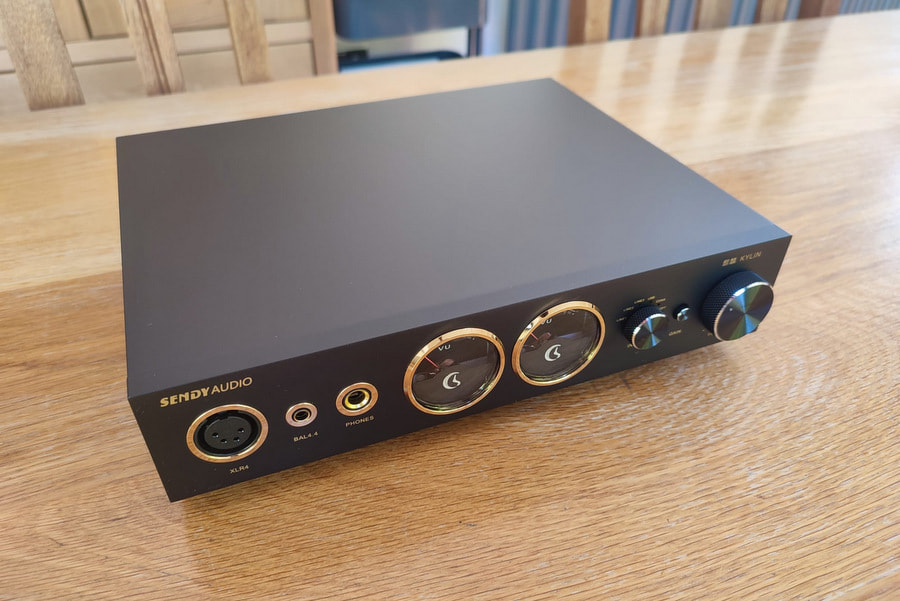
The KYLIN represents Sendy Audio’s move beyond headphones and into desktop electronics, combining a DAC, preamplifier, and headphone amplifier inside a single, substantial aluminium chassis.
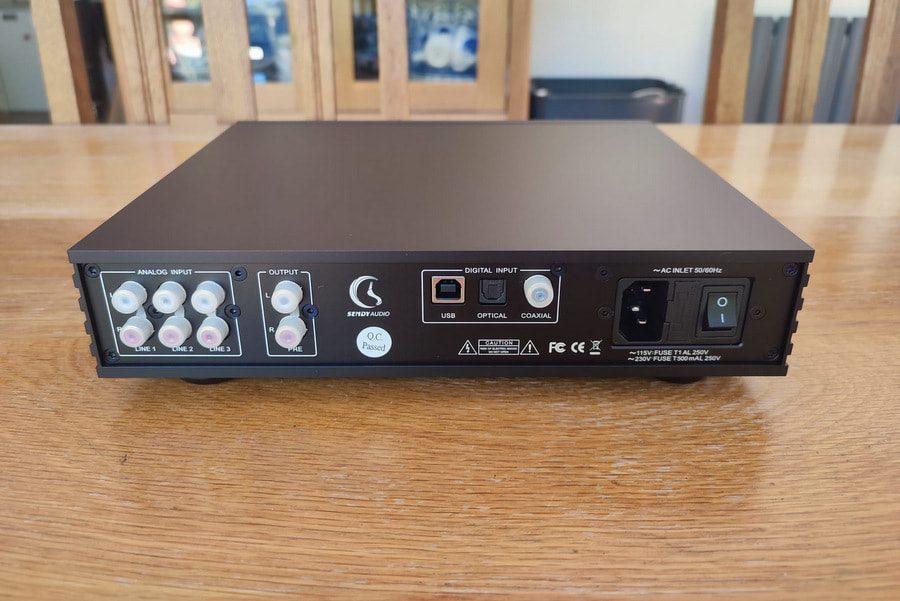
Digital conversion is handled by the familiar ESS ES9038Q2M DAC, partnered with an XMOS USB implementation. Sendy Audio specifies support for native DSD512 playback, while digital connectivity includes USB-B, coaxial, and optical inputs.
Rather than building the KYLIN around the kind of highly integrated amplifier topology that has become commonplace in modern desktop DAC/amps, Sendy has gone with a Class A output stage employing matched Hitachi transistors. Dual Burr-Brown OPA604 op-amps are used in the preamplifier section, with WIMA and Nichicon capacitors also featuring internally.
Advertisement
This is not really trying to compete with products from Topping, FiiO, and similar manufacturers by offering the longest feature list or the most extravagant collection of measurements. The KYLIN feels much more like an old-school headphone amplifier that happens to have a very capable DAC built into it.
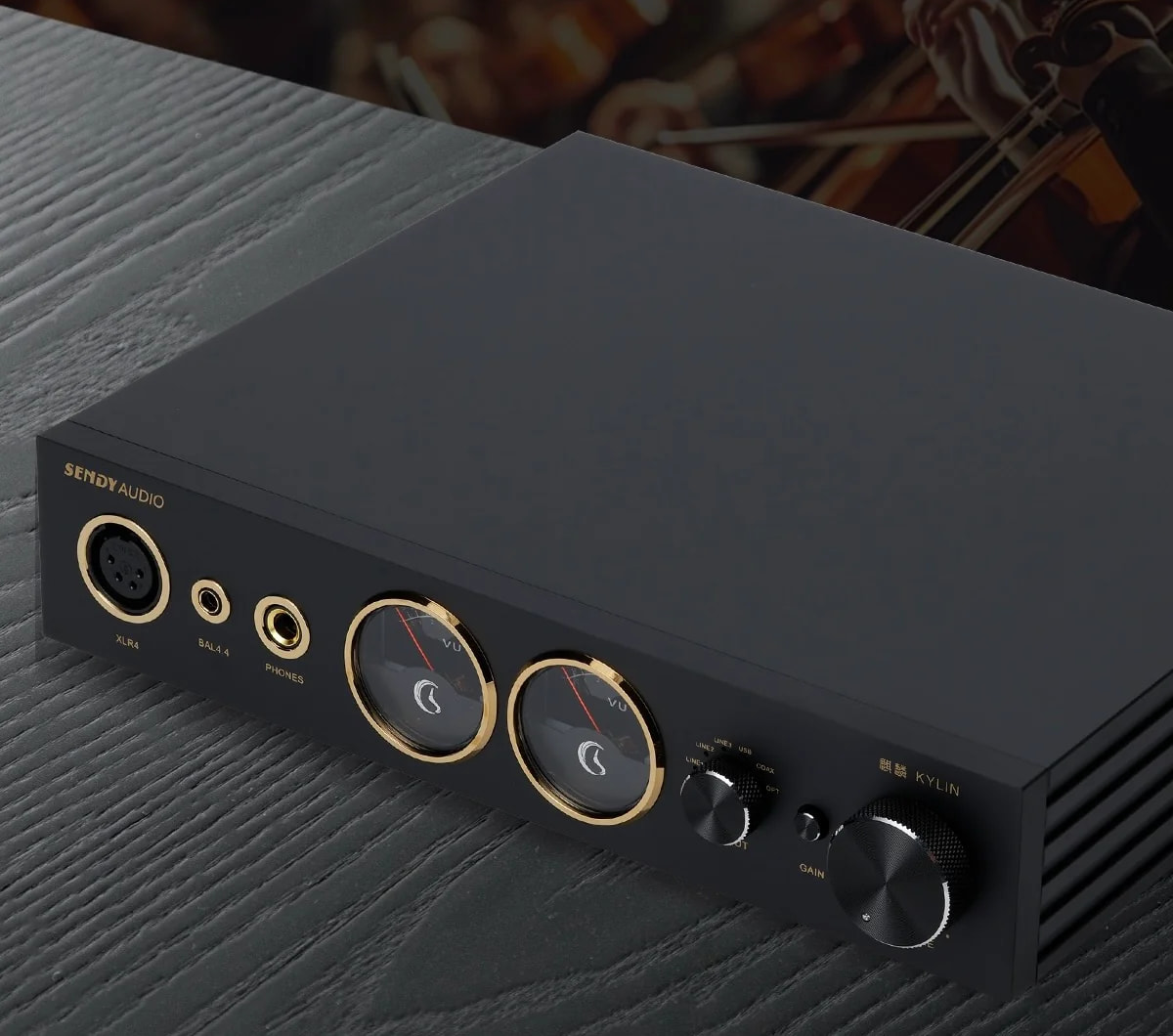
Three headphone connections are provided on the front panel: 6.35mm, 4.4mm, and four-pin XLR. Around the back are USB-B, coaxial, and optical digital inputs, alongside three sets of RCA analogue inputs and RCA preamplifier/line-level connectivity.
At this price, I would have liked balanced XLR line outputs. There is certainly enough room on the rear panel, and I am not convinced that three sets of RCA analogue inputs will prove more useful to most buyers than having the option of balanced connectivity to active loudspeakers or a separate power amplifier.
Advertisement. Scroll to continue reading.
Advertisement
Furthermore, the KYLIN provides an altogether more analogue user experience. There are no digital filters to cycle through, no parametric EQ, no large colour interface, and no labyrinth of internal settings to configure. There is not even a remote control. Depending on your perspective, that will either sound refreshingly simple or surprisingly limited.
Plenty of considerably cheaper DAC/amps now offer PEQ, extensive filter controls, Bluetooth, saved profiles, and increasingly sophisticated software ecosystems. Some all-in-one components are even beginning to dabble in AI-assisted functionality.
The KYLIN gives you knobs, switches, and two physical VU meters. I suspect Sendy Audio is perfectly happy with that distinction.
Design & Build
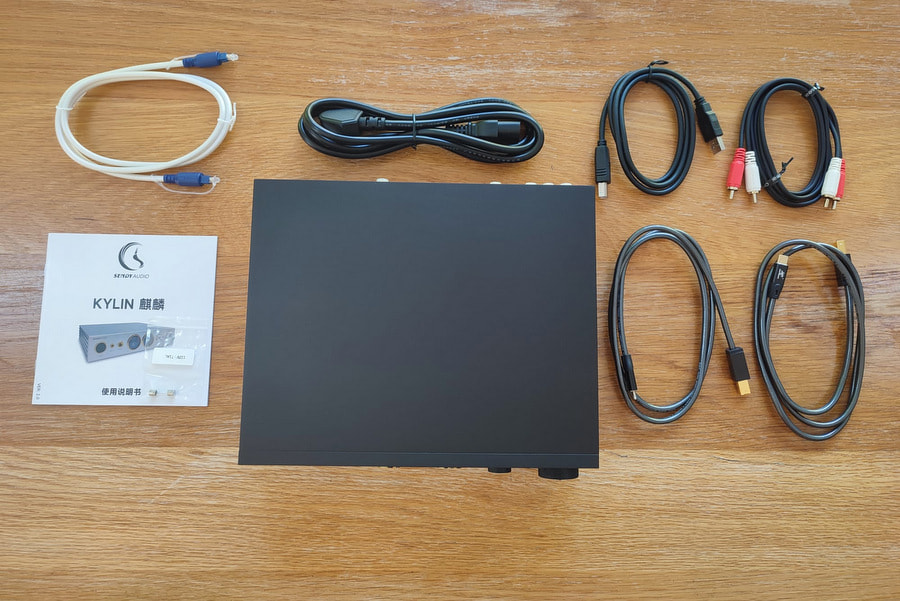
Inside the box, Sendy Audio supplies the KYLIN with the necessary power cable alongside an unusually generous collection of interconnects, including RCA, optical, and multiple USB cables intended to cover the most common computer and mobile-device configurations. It is one of those rare products where you can open the box and have a very good chance of finding the cable you actually need rather than immediately rummaging through a drawer or making another online purchase.
Advertisement
I think the unit itself is beautifully made. That should not come as an enormous surprise if you have handled Sendy Audio’s cans before. Its headphones place considerable emphasis on materials and machining, and the KYLIN takes a similar approach to desktop electronics.
At 245 x 225 x 50mm (9.6 x 8.9 x 2 inches) and roughly 3.1kg, it is not especially large, but there is enough weight to stop it from moving around the desk every time you connect a pair of headphones.
The centrepiece is unquestionably the pair of analogue VU meters. Of course, they are not exactly necessary, but they do look cool. Screens have become almost unavoidable on modern desktop audio equipment. The advantage is obvious when a product has dozens of settings, filters, and input modes, but there is something satisfying about using an amplifier that does not resemble another small computer sitting next to my PC.
The volume knob deserves particular praise because it feels excellent. There is real weight to its movement, with enough resistance that adjustments feel deliberate and precise rather than loose or vague.
Unfortunately, the KYLIN has an unusually small usable window before things get loud. Even with the HiFiMAN HE6se V2 — hardly a headphone famous for being easy to drive — I was operating within roughly the first 10% of the potentiometer’s travel for much of my normal listening. Small movements therefore create disproportionately large changes in output level.
That is irritating with demanding headphones and becomes a much bigger problem with efficient ones. Fine adjustment at lower listening levels is far more difficult than it should be.
Advertisement
There is also audible background noise with sufficiently sensitive headphones. I could hear a noise floor with easy to drive full size dynamic headphones such as the THIEAUDIO Cypher, and I would be very cautious about buying the KYLIN primarily for sensitive IEMs.
Unless you listen to a lot of classical music with very wide dynamic range, extended rests, or extremely quiet passages, the noise floor should not pose a significant problem in normal use. But for a $1,499 headphone amplifier, it is still something that should not really be there.
Advertisement. Scroll to continue reading.
There are certainly no complaints about the thermal performance, though. Despite the Class A design, the chassis only became lukewarm to the touch during extended use. Having spent time with products such as the Aune S17 Pro and LAiV Audio Crescendo VERSE, both of which can generate considerably more heat, I was expecting the Sendy Audio to become rather toasty. It never did.
Advertisement
That makes the KYLIN much easier to live with on a normal desk and gives you far more freedom over placement than some other Class A designs.
Listening & Headphone Synergy
The Sendy Audio KYLIN was used primarily as an all-in-one DAC and headphone amplifier with a range of planar magnetic and dynamic driver headphones. I fed the unit a mixture of high resolution FLAC files and Spotify streams from both my PC and smartphone.
As mentioned previously, my first proper listen to the KYLIN was at CanJam London, where its combination of warmth, dynamics, and physicality immediately stood out. I can now say that those initial impressions have largely survived extended listening.
Perhaps the best thing about the KYLIN is just how dynamic it sounds. Bass has real texture and physical presence, with enough weight behind kick drums and bass guitars to give music a convincing sense of scale. Transients have plenty of impact, and the KYLIN never sounds short of energy, especially in the low end, even when connected to more demanding planar magnetic headphones.
I especially enjoyed listening to Michael Jackson’s “Billie Jean,” where the recurring bassline punched through the rest of the track and gave the song even greater impact.
Advertisement
There is also a subtle old school Class A warmth to its presentation. It is not thick or syrupy in the traditional sense, but there is a little additional richness through the lower registers and midrange that gives instruments more body without completely neutering treble energy.
For that reason, I think the KYLIN pairs especially well with dead neutral headphones such as the HiFiMAN HE1000 Unveiled, adding a hint of cosiness that can otherwise be missing at times. It can also help tone down particularly spicy sections of certain tracks. Hans Zimmer’s “2049” can cause listening fatigue with some systems, but I had no such issues with the KYLIN.
As alluded to previously, the unit also has no trouble driving some of the most demanding headphones currently on the market. The HE6se V2 has earned a reputation for exposing amplifiers that look powerful on paper but struggle to provide convincing control and dynamic authority in practice. Despite this, the KYLIN had plenty of headroom while retaining bass impact and definition, and large dynamic swings never collapsed or became noticeably compressed.
British rapper AJ Tracey’s “Wifey Riddim 4” delivered the level of hard hitting impact I was looking for with the KYLIN paired with the Sendy Audio Egret.
Advertisement
The subtle warmth continues into the midrange, where vocals and guitars possess a pleasing sense of density without obscuring detail. There is enough clarity through the upper midrange and treble to prevent the KYLIN from becoming overly romantic, and it manages to retain a sense of openness despite its richer tonal balance.
That is refreshing in a market dominated by components chasing neutrality and increasingly impressive measurements. The KYLIN still sounds similarly clean and resolving to products from Topping or SMSL, but it adds a degree of dynamic exuberance and tonal character that gives the presentation some personality.
Advertisement. Scroll to continue reading.
The Bottom Line
In an era when a DAC/headphone amplifier costing under $500 can offer colour touchscreens, Bluetooth, parametric EQ, a myriad of filters, and enough menu options to keep you occupied for an entire day, the $1,499 Sendy Audio KYLIN might not initially seem like the most enticing all in one option. It has physical VU meters, conventional controls, and very little in the way of software.
But that more analogue user experience will be exactly what some listeners are looking for. It allows you to focus on the music rather than constantly fiddling with settings in an attempt to make the listening experience that little bit more convenient.
Advertisement
And the KYLIN simply sounds magnificent. It has acres of power, a slightly warm tonal balance that draws attention to its powerful and immaculately controlled bass performance, yet still manages to retain a high level of detail and spatial precision. That is a difficult balance to achieve. The unit is also beautifully constructed, with a reassuring heft and level of finish that make it feel every bit like a serious piece of desktop audio equipment.
Just be aware of the lack of balanced XLR line outputs and the fact that the KYLIN is not the best companion for sensitive IEMs or easy to drive dynamic headphones, owing to its audible noise floor and very narrow usable volume range.
Pros:
Beautifully constructed chassis with excellent physical controls
Analogue VU meters give the KYLIN real character
Substantial power for difficult full-size headphones
Excellent pairing with hard-to-drive planar headphones
Dynamic, textured bass response
Slight Class A warmth without excessive treble roll-off
Runs surprisingly cool for a Class A desktop amplifier
Generous selection of supplied cables
Cons:
Very narrow usable range on the volume control
Audible noise floor with sensitive headphones
No balanced XLR line outputs or remote control
No PEQ, digital-filter selection or extensive internal configuration
There’s no denying the appeal of deep-fried foods, from donuts to drumsticks, plus numerous bite-sized appetizers and every kind of potato. But when it comes to whether to bother deep-frying at home, it isn’t necessarily a matter of difficulty. With the right vessel and thermometer, frying can be a quick, easy way to make memorable dishes — the real issue is: what to do with all that leftover oil?
Shallow frying can also get the job done in many cases, but it can also create a conundrum. Putting that oil down the sink? Potentially drain-clogging, environmentally dubious, and frankly, wasteful. I grew up in a household where leftover grease and oil went into a glass mayonnaise jar kept under the sink, to be discarded once it was full. Sure, this saves the sink, but it doesn’t address the other two issues. It’s a quick kitchen hack that makes it easier to put it out with food waste, but there’s also another solution.
Leftover frying oil is begging to be reused.Pamela Vachon/CNET
Don’t get rid of it. “Oil used for frying is not one and done,” says Melanie Underwood, cookbook author, culinary instructor, and founder of Nourish and Gather, “unless the oil has been overheated, or if you’re frying things that are particularly strong in flavor. With something like seafood, you want to be careful, but it’s perfectly reusable as long as it wasn’t smoking.”
With that, Underwood shares her best practices and advice for reusing oil multiple times before it’s done.
Manage the oil before and during the frying process
A proper frying temperature is between 350 and 400 F.Pamela Vachon/CNET
To ensure oil is good for multiple uses, first make sure you’re using the right oil — something neutral in flavor with a high smoke point. “Any vegetable oil, such as canola oil, peanut oil or sunflower oil, is best for frying,” says Underwood. While olive oil can be tricky to fry with because it has a lower smoke point, “I definitely have used olive oil,” she says, “and I have never had any problem with it whatsoever.”
Resist the impulse to eyeball your oil for temperature clues, or test bits and pieces to make sure you’re in the right zone, unless you fry so regularly that it’s second nature. Otherwise, that’s a recipe for pieces with burnt exteriors and undercooked interiors, and/or smoking out your upstairs neighbors. (Speaking from experience, sadly.) Using a thermometer, “the correct range for frying is usually between 350 to 400,” says Underwood, which prevents smoking.
Just a bit of residue, which you can easily skim off.Pamela Vachon/CNET
During the frying process, it’s a great idea if you can skim out any crumbs or whatever has come off in the oil,” she says, “because when you have little burned pieces, that will degrade the oil faster.”
After frying: cool, strain, and store
Cool, strain and store.Pamela Vachon/CNET
Once you’re done frying, managing the oil for future use is simple. “First, you let it cool,” says Underwood. Don’t try to speed up the process by refrigerating it; just let it sit until it cools to room temperature.
Straining it is also straightforward and can be done with whatever you already have on hand. “I use a fine mesh strainer,” Underwood says. “People also use cheesecloth or a coffee filter. You just want to strain it and get out all those teeny particles.” Some micro particles may still be visible in the oil after straining, but they will settle once the oil is stored, and it is easy to prevent them from transferring into a pot the next time you want to use it.
Advertisement
Finally, Underwood suggests transferring the oil to a clean and dry container. “It’s very important that it doesn’t have any residual water in it,” she says, “and then just put a lid on it, tightly sealed, and keep it away from heat and light.” If you don’t plan to use it immediately, you can store it in the refrigerator, but any place with a consistent temperature and away from light works.
Considerations for reusing oil
Microparticles may still remain, but will settle during storage.Pamela Vachon/CNET
There’s nothing special that needs doing in order to use preused oil the next time, but bear one thing in mind: “Just be aware that it would now carry allergens from anything that you previously cooked in it,” says Underwood, which is essential to know if you’re cooking for other people.
Since that can be hard to track over multiple uses, “Always label and date it,” she suggests. “I just put a piece of tape on it with the date and the number of uses. And I also actually put what was fried in it,” she says, which can help keep track of potential allergens.
Store in a clear, dry jar with a tight-fitting lid.Pamela Vachon/CNET
It also helps keep potentially odd flavors out of whatever you cook next, as certain items like seafood or onion rings can impart flavor into the oil. “I don’t typically like to fry a savory thing and then fry a sweet thing,” says Underwood. “Like I wouldn’t make schnitzel and then use that oil for a donut.”
If you’re unsure whether an oil is still good to use, let your nose guide you to suss out if something is funky. If you’re not confident in your sniffing ability, Underwood advises smelling unused oil of the same type first, then smelling the used oil for comparison. You can use frying oil at least two or three times, maybe more if it was only used for light-flavored things that didn’t impart many particles and was never overheated.
The biggest benefit of reusing frying oil is the savings in every possible regard — you save money, and it’s a much more environmentally friendly practice across the board. “When you’re reusing any product, then you’re lowering the demand for things like production, packaging and transport,” Underwood says. “I don’t think that we think about that big picture very much, but if we were all reusing it, it would reduce those demands on the environment.”
Each time you reuse oil, it also diminishes in volume a bit. In my experience, at least with shallow frying, you can use the same batch of oil until, after a few uses, nothing remains to discard — the ultimate win.
Pamela Vachon
Contributor
Pamela is a freelance food and travel writer based in Astoria, Queens. While she writes about most things edible and potable (and accessories dedicated to those topics,) her real areas of expertise are cheese, chocolate, cooking and wine. She’s a culinary school grad, certified sommelier, former bartender and fine dining captain with 10 years in the industry. When not sitting at the keys, she leads in-home cheese classes, wine tastings and cocktail demonstrations.
See full bio
Jason Dessen cannot seem to get away from the Box, even when there isn’t one in front of him. In Dark Matter Season 2, Episode 4, Jason finishes a shift at the bar and, after stepping outside, reaches for the door to go back in. For a moment, it isn’t the entrance to the pub anymore. He sees himself opening the familiar door of the Box, with the corridor behind it, before reality settles back into place.
It is a brief moment, but an effective one, particularly after Episode 3 had Jason painstakingly dismantling the machine in the hope of finally putting some distance between his family and the multiverse. The physical Box can be taken apart; Jason’s relationship with it clearly cannot. More than that, seeing an ordinary rectangular doorway suddenly become its entrance makes us wonder about something Dark Matter has largely trained us to accept without question: why was the gateway to infinite realities a box in the first place? Why not a circle, a sphere, or the kind of glowing portal science fiction has taught us to associate with travelling somewhere impossible?
The answer begins much earlier than the Apple TV series.
Apple TV
The Box came before Blake Crouch knew what it did
When Blake Crouch was developing the 2016 novel on which the series is based, the shape wasn’t the conclusion to some elaborate piece of quantum theory. The image came first. “I had the image of a box in a warehouse, with a door on it. And that was it,” Crouch said of the idea that eventually became Dark Matter. He was brainstorming the novel in 2014, after spending years circling quantum mechanics and looking for the right story to connect to it.
A box creates an unmistakable boundary, which makes it a particularly useful object for a story built around lives that can branch into almost endless possibilities. Something is either inside it or outside it, and crossing that threshold becomes an event in itself. Crouch didn’t need the fictional physics to demand a cube; he needed an object that could make the act of entering another possibility feel physical.
Advertisement
Apple TV
The science behind the Box is fictional, but its basic idea grows out of a familiar quantum concept. Jason’s original research involved a much smaller cube intended to shield a tiny physical object from observation and external stimuli, keeping it in what he describes as an undetermined “cat state.” Jason2 succeeds where he did not and scales the concept until the experiment is large enough to contain a human being. The Box becomes the physical expression of an experiment built around observation, uncertainty and the possibility that more than one outcome can exist.
A hard-edged cube also gives the story something almost paradoxical to work with. Its dimensions are fixed, its walls are solid, and its boundary is obvious. Inside it, however, Dark Matter places a corridor that seems to have no meaningful end, with doors leading to realities that can differ wildly from the one left behind. The most ordinary-looking object in the story consequently becomes the entrance to something that cannot be contained by its physical dimensions.
Schrödinger’s cat makes the shape more interesting
The obvious reference is Schrödinger’s cat, the famous thought experiment in which a cat is sealed inside a box with a quantum event that can determine whether it lives or dies. Until the system is observed, the thought experiment imagines the cat occupying both possible states.
Apple TV
Dark Matter effectively puts the observer inside that experiment. Jason doesn’t stand outside the Box wondering which state exists on the other side. He enters it, becomes part of the experiment, and encounters a corridor through which different outcomes can be reached. The Box turns a thought experiment about mutually exclusive possibilities into the architecture of the series itself.
The visual contradiction is what makes the idea especially effective. A cube is rigid, finite and easily understood. It has fixed dimensions, hard corners and an obvious boundary between inside and outside. Dark Matter, meanwhile, places something apparently limitless within it. Once the drug takes effect, the enclosed space gives way to a corridor whose doors can lead to an extraordinary number of realities.
A circular portal would immediately communicate its purpose. Science fiction has spent decades teaching audiences that a glowing ring, tear or doorway is shorthand for travel between places that should not be connected. The Box carries a different suggestion. From the outside, it looks like an industrial object that could plausibly be sitting in an abandoned warehouse. Its strangeness only begins once the door closes.
Advertisement
Every door inside the Box also turns the mechanics of the multiverse into a question of choice. Jason can see other versions of his life, but seeing them does not make choosing between them easier. Each possibility carries its own consequences, and the person standing in the corridor still has to decide which one is worth entering.
Season 2 has changed what the Box represents
In Season 1, the Box was primarily a means of movement. Jason needed it because every journey through it offered another chance to find Daniela, Charlie and the world from which Jason2 had removed him. However frightening the realities behind its doors became, the machine still represented a possible route home.
Apple TV
In the current season, the relationship has become much less comfortable. Jason has his family again, yet the Box remains at the centre of their instability. His fixation with the machine is now affecting the life he fought to recover, and dismantling it becomes an attempt to impose some kind of final boundary between his family and the multiverse.
Episode 4 pushes that idea somewhere more personal. Jason no longer needs to be physically inside the Box for its presence to follow him. An ordinary doorway briefly becomes its entrance, turning something completely familiar into a reminder of the place he has spent so much of his life trying to escape. The image works because Jason’s problem is no longer simply the machine itself. He has begun to carry the Box with him.
The object can still function as a laboratory and a doorway, but its meaning has expanded. For Jason, it has also become a kind of prison, because destroying the physical machine cannot erase what happened inside it or the lives he has seen on the other side. A story about infinite possibilities has consequently given its central character a strangely finite problem: he cannot simply choose a different reality and leave the consequences behind.
Advertisement
Crouch may have started with nothing more complicated than the image of a mysterious box in a warehouse, but Dark Matter has spent two seasons turning that simple shape into the physical language of its entire story. It contains the experiment, separates Jason from the world he knows, opens onto lives that should never have been accessible, and now follows him even when he isn’t anywhere near the machine. The Box was always about crossing a boundary, but Jason’s experience suggests that some boundaries become much harder to cross back over.
The latest episode makes the idea particularly clear. Jason can dismantle the machine and try to build a life outside it, but the Box has become part of how he sees the world. For a character who spent so long trying to find the right door, the more unsettling possibility may be that he can no longer look at an ordinary one without wondering where it might lead.
We may receive a commission on purchases made from links.
Picking out power tools can be difficult, no matter how big or small you think the project will be, and it can feel expensive as you start looking for the ones you want to use. For anyone planning to get into woodworking, Ryobi offers several options, and we recommend it for any woodworking project. However, you might also be on a budget, which is common for first-time starters.
Advertisement
We’ve gone through to find eight different Ryobi power tools under $150 that you can use for a woodworking project. If you need to go lower, there are also options available under $60. We’ll explain why we selected these particular tools at the end of this article. Here are the eight Ryobi power tools that you can use in woodworking projects that cost under $150.
Advertisement
1-1/2 Peak HP Fixed Base Router
If you’re looking to create creative ridges or cuts in your woodworking project, a fixed-base router is an effective tool for doing so without disturbing the rest of the piece. An effective option from Ryobi is the 1-1/2 Peak HP Fixed Base Router. It has an aluminum base with LED lights to help you see where you’re going as you take the drill bit through a piece of lumber.
Inside the device is an 8.5-amp ball-bearing motor that makes cutting through various types of wood a simple motion, creating accurate designs and grooves, while the aluminum base makes it easier to grip and hold in place. You can also use this base router to smooth out any sharp edges you want to remove from your final piece.
For those taking up woodworking for the first time, Ryobi’s Base Router should serve as a good starting point. Not only is it budget-friendly at $119, but other customers also highlight that it’s easy to use, with intuitive controls for beginners, and that its compact design makes it easy to handle and store when not in use.
Advertisement
18V One+ 3-1 1/4-inch Hand Planer
If you’re looking to quickly remove unwanted sections from a piece of lumber before making more precise, intricate cuts, a hand planer is an effective tool to grab. Ryobi has the 18V One+ 3/4″ to 1/4″ Hand Planer, capable of reaching a 5/64″ cutting depth, and you can switch between these depths with a quick turn of the knob before you turn it on. The knob is easy to use and understand, regardless of your skill level with power tools.
The Hand Planer has a 14,000 RPM speed that remains consistent across a range of wood types, depending on what you’re using for your project. The reversible blade is double-edged and includes a guiding edge for when you want to maintain the same cut across a large section.
Advertisement
There are also three chamfer grooves on the tool, allowing you to use this hand planer on finer edges and corners. It comes with a dust collection bag. Neither the additional bag nor the battery will offset the lightweight performance of this tool. You’ll be able to use this hand planer on smaller projects that you might have used larger tools for, like a circular saw. You can get it from Home Depot for $83.89.
Advertisement
18V One+ Jig Saw
For woodworking projects that require long, precise cuts, there’s the 18V One+ Jig Saw. It’s a handheld tool with a T-shank wood-cutting blade and a one-inch stroke length, ideal for a range of woodworking projects for any craftsman. The blade is easy to load and swap out for other T-shank blades if you want to use alternatives. The front also features a built-in LED light to ensure you’re following the path you traced.
When in use, the blade can reach 3,000 SPM, and you can adjust the speed using the variable-speed trigger on the handle. To adjust the blade to your speed, use the small knob on the side to modify its orbital speed so it matches what you’d like for your current work. The grip is also designed to absorb more vibration, ensuring you don’t trip up while holding the tool in place, and it also reduces the tool’s noise as a bonus. You can get it for $79.99, although the battery and charger add-ons are sold separately. It’s one of several Ryobi tools we recommended for beginners.
Advertisement
18V One+ 4-1/2 Angle Grinder
When you want more precise, intricate control over the design of a woodworking project, an angle grinder is a good way to create blending curves or sand down specific areas of the wood. Although angle grinders are normally used on metal, using them at a lower speed with specific discs is ideal for woodworking. You can get the 18V One+ 4-½” Angle Grinder from Ryobi, a tool ideal for using to perform shaping and wood carving you want to do on a woodworking project, or sanding.
Ryobi’s Angle Grinder is a cordless tool that can go up to 9,000 RPM for cutting through tough woods. The twist-off, easy-to-use auxiliary handle has three optional positions to choose from before use, giving you options for how you want to use the grinder on your project. You can also adjust the guard’s placement around the grinder, and there’s a spindle lock at the front for any accessory changes you want to make.
You can get Ryobi’s 4-½” Angle Grinder for $59.97, or choose to get the 4 Ah battery and charger for $114, still keeping you under the $150 range. The base tool is one of several Ryobi tools you can get for under $75.
Advertisement
18V One+ AirStrike 18-gauge Brad Nailer
If you’re looking to add trim or want to ensure your glue joints hold together better, a brad nailer is an effective tool for the job. You can get Ryobi’s 18V One+ AirStrike 18-gauge Brad Nailer, capable of placing two-inch nails without leaving too much of a trace in any hard work during the final trim or molding stages of your project.
Advertisement
It does not come with a compressor or gas cartridges, making it quieter and easier to handle than models that rely on them, especially since it weighs less than six pounds. It uses a built-in Airstrike that draws in air from around the tool and pushes it into the material you’re driving the nail into. You can adjust the air pressure your Brad Nailer uses via a dial on the back of the tool, ensuring you don’t sink the nail in too deep or leave it sticking out. There’s also an adjustment dial on the front to fine-tune the nail depth. You can expect to sink in about 1,900 nails before you need to swap the batteries or start charging it.
The Airstrike 18-gauge Brad Nailer is available from Ryobi for $149 and does not include a battery or charger.
Advertisement
Ryobi One+ HP 18V Compact 6-1/2 Circular Saw
For cutting through larger pieces of lumber to slim down your wood in a project, there’s the Ryobi One+ 18V Cordless Compact 6-1/2″ Circular Saw for breaking down pieces you plan to use. The saw’s cutting speed goes up to 4,900 RPM, has an adjustable depth gauge from 1/4 inch to 2 inches, and an adjustable bevel from 0 to 50 degrees.
You can modify the bevel using the base at the front through an easy-to-use knob. For the cutting depth, there’s a quick-turn knob on the guard that you use before pulling the blade up and locking it into place. There’s also a built-in LED light to make it easier to see where the blade will cut before you push it down.
With the cordless model, you’ll have the freedom to move it and yourself around without being tied to an outlet. However, you’ll want to keep an eye on the battery charge, as it provides up to 350 cuts before you need to swap it or recharge it. You can get it for $119 at Home Depot, or go with a larger 7-1/4″ for $139.
Advertisement
18V One+ Compression Drive 3/8-inch Crown Stapler
An alternative to the brad nailer is the crown stapler, and you can use the One+ 3/8″ Crown Stapler to get the job done. It weighs almost three pounds, making it half the weight of the One+ Brad Nailer from Ryobi. You’ll be using it if you’re looking to install metal fasteners for plywood backs, trim along the sides of your woodworking materials, or place fiberglass insulation between wall frames.
Advertisement
You can use staples ranging from 1/4″ to 9/16″ with this model, or Arrow T50 staples, depending on your project. You can adjust the insertion depth using an adjustable knob on the back, ensuring they don’t go too deep or stick out too far. On a single battery charge, the Ryobi Crown Stapler is expected to use around 5,500 staples before you need to swap it out.
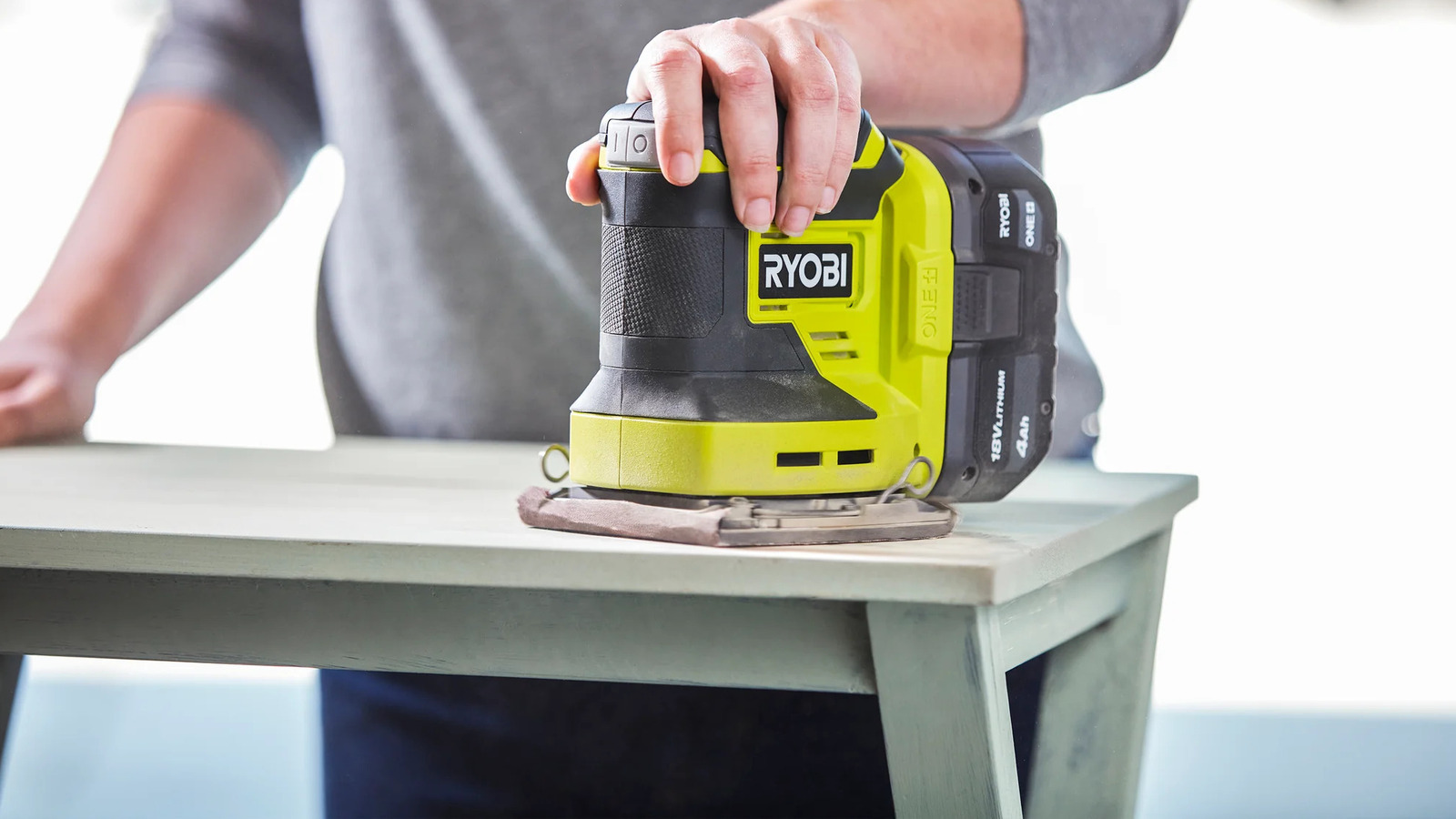
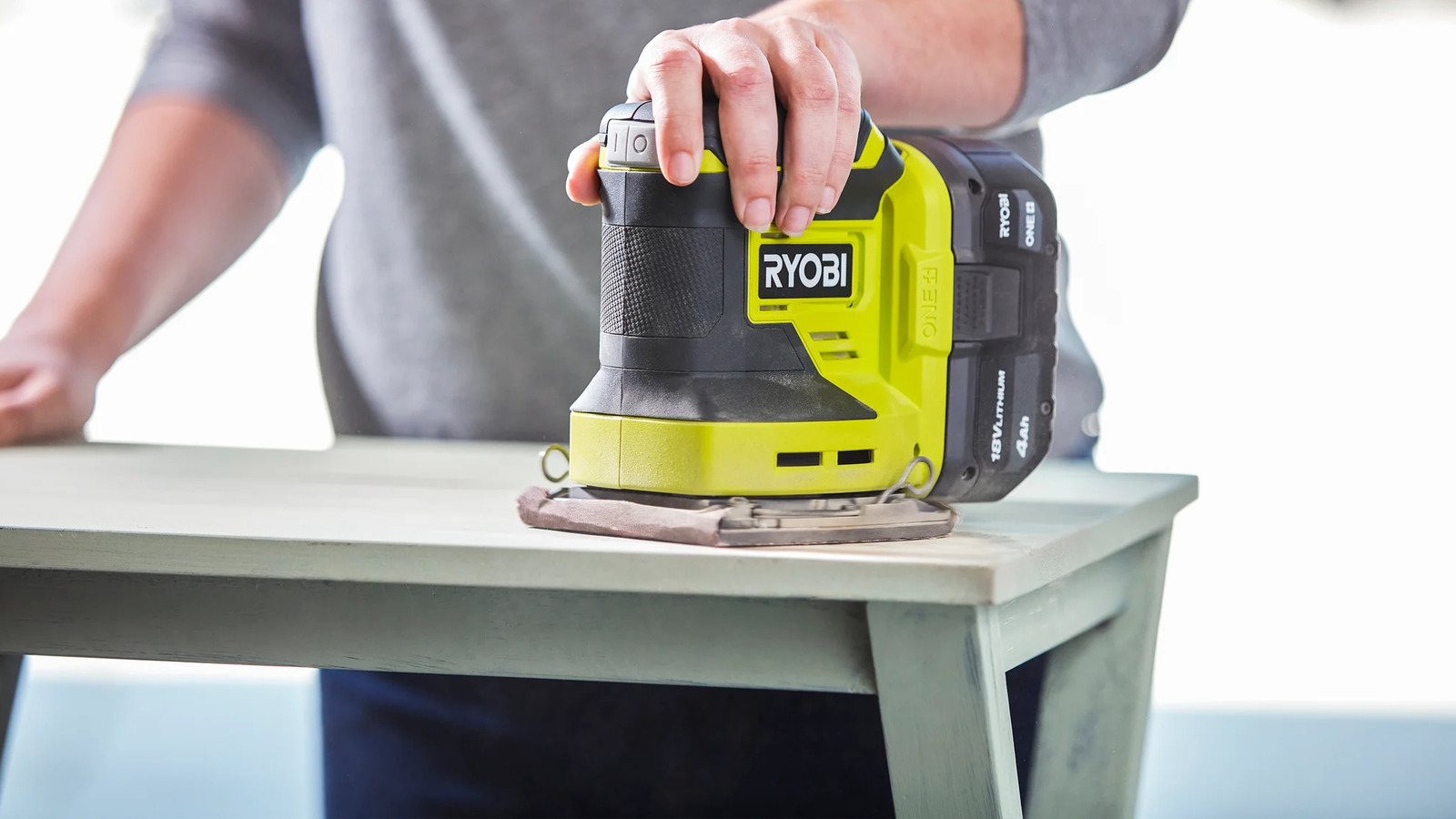
Sanding is an important step in many woodworking projects, especially before you begin varnishing or painting. Be sure to work it into your next woodworking project using the 18V One+ 1/4 Sheet Sander. It’s a handheld tool that you operate at 14,000 OPM to flatten a wood surface or to remove old paint that doesn’t match the look you want for your finished project. It weighs less than three pounds, making it lightweight to carry around a workshop or bring with you to different locations.
When you need to switch between sandpapers, it’s a quick pull to remove the current sheet and replace it with a new one to start working again. There’s a built-in dust collection unit and vacuum compatibility to help reduce the debris left behind when you’re working.
You can get the 1/4 Sheet Sander from Home Depot for $59, which comes with a dust bag, several types of sandpaper, and a paper punch. We can add it to the list of Ryobi sanders that help clean up rough surfaces.
Advertisement
Methodology
When picking from the available Ryobi products, we wanted to focus on the most important options that would be go-to choices for anyone looking to complete a woodworking project. Each tool is below $150.
Advertisement
These tools had to be used for a crucial part of a woodworking project, regardless of size. These had to serve a purpose, working on different types of wood and filling a specific role during a woodworking project. The customer reviews used to assess the ideal choices had to have at least 100 reviews on the Ryobi, Home Depot, and Amazon websites, with a rating of at least 4.4 stars.































































You must be logged in to post a comment Login