

When the AI apocalypse becomes regular dinner-table conversation, you know we’ve reached the freakout stage. Rogue AI agents are hacking into competitors. Former Big Tech employees are posting Skynet-style warnings on social media. CEOs are crying for help in ways that have made this once-wonky tech issue a frontline political fight.
Tech
Buying an ASUS Laptop? You May Get Google AI Pro and 5TB Storage at No Extra Cost


ASUS has announced a new partnership with Google that gives eligible ASUS and ROG laptop owners in India three months of Google AI Pro or Google AI Plus at no additional cost. The offer is available to both new and existing customers with select 2025, 2026, and upcoming 2027 laptops, and can be redeemed through the MyASUS app. Here’s everything you need to know about it.
Eligible ASUS and ROG laptops get Gemini AI benefits
The new offer is designed to make Google’s premium AI tools more accessible across ASUS’ consumer and gaming laptop lineup. Customers purchasing eligible devices, or those who already own supported models, can activate the subscription directly from the MyASUS app.
Depending on the eligible device, users will receive either Google AI Pro or Google AI Plus. Google AI Pro is the higher-tier subscription and includes expanded access to Google’s latest Gemini models, higher usage limits for advanced AI features, and 5TB of cloud storage. Meanwhile, Google AI Plus offers an entry-level premium experience with enhanced Gemini capabilities alongside 400GB of cloud storage.

The subscription includes access to several of Google’s AI experiences across creativity, research, and productivity. Users can generate images, brainstorm video concepts, create music from prompts, and perform in-depth research using Gemini’s advanced models. The AI tools also integrate with familiar Google apps, making it easier to draft documents, organize projects, summarize information, and refine written content without switching between multiple platforms.
Beyond that, you also get storage. Google AI Pro subscribers receive 5TB of storage, while Google AI Plus includes 400GB, giving users significantly more room for documents, photos, videos, research material, and creative projects across supported Google services. For students and creators who regularly work across multiple devices, the added storage could be just as valuable as the AI features themselves, making it easier to manage large files without relying on external drives.
The Google AI offer is available in India from August 10, 2026, through August 9, 2027, across selected ASUS and ROG laptops. Check your specific model here.
Continue Reading
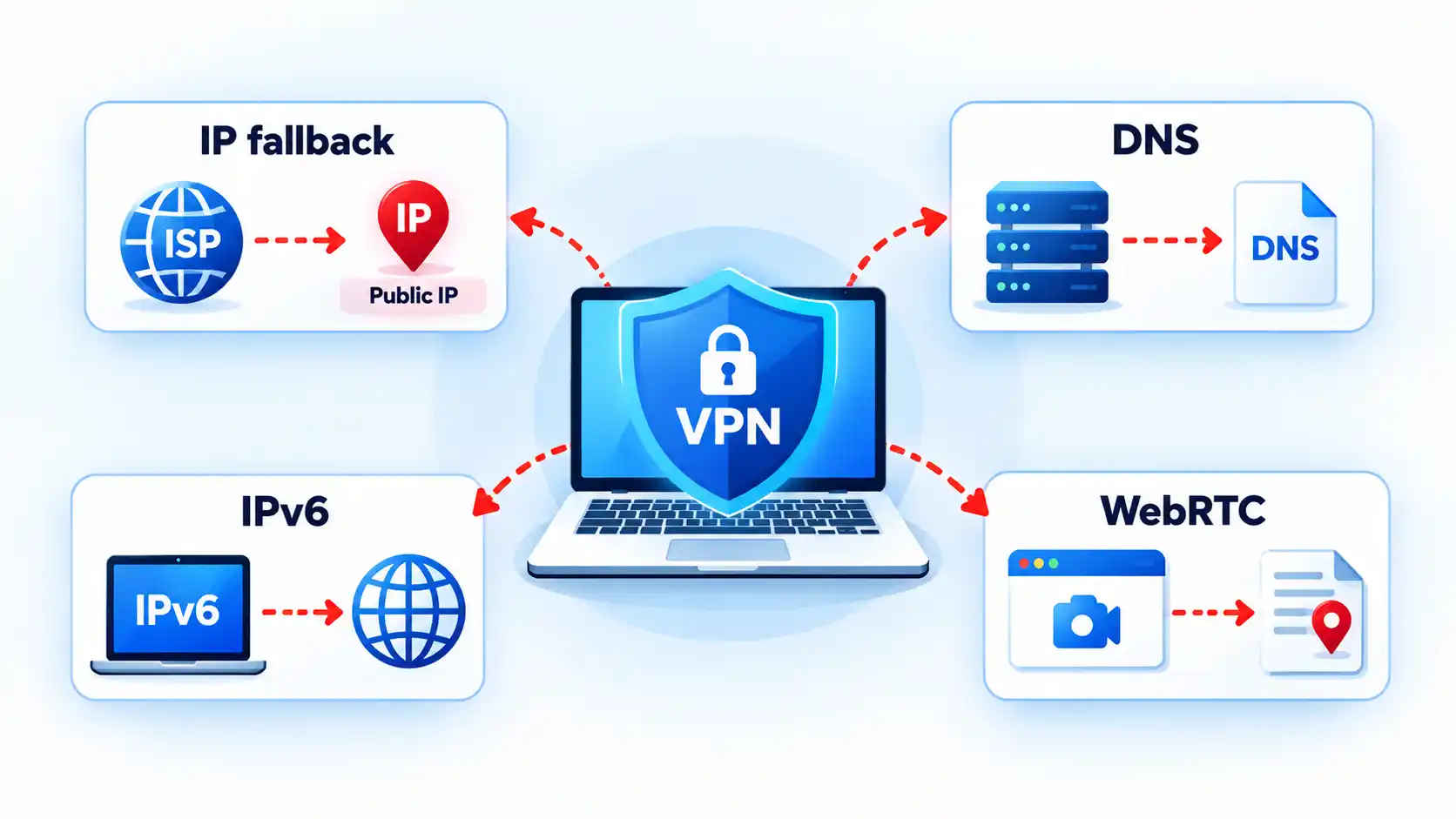
When a VPN disconnects, traffic may either stop or fall back to your normal internet connection. A working kill switch is designed to block that fallback, while a fail-open setup may let new traffic use your ordinary network route and public IP address.
Quick Take
- A VPN disconnect does not automatically mean data leaked. The result depends on what networking policy takes over after the tunnel fails.
- A fail-open configuration permits affected traffic to use ordinary networking, while fail-closed protection blocks that fallback until VPN protection returns.
- A kill switch does not stop the VPN from disconnecting. It controls whether covered traffic can leave outside the protected tunnel.
- DNS, IPv6, split-tunnel, and browser-related exposures can occur separately from a complete VPN disconnect, so they should not all be treated as the same failure.
What Happens the Moment the VPN Tunnel Drops
A VPN normally gives selected network traffic a route through an encrypted tunnel to a VPN server. When that tunnel disappears, the operating system and VPN software have to determine what should happen to traffic that would normally use it.
One possible outcome is fail open. This means ordinary networking is permitted again. New connections may use the device’s Wi-Fi, Ethernet, or mobile connection directly, just as they would if the VPN were not active. Websites reached through those new connections may then receive the public IP address associated with your normal internet connection rather than the VPN server.
The opposite behavior is fail closed. Instead of allowing protected traffic to fall back to the normal route, the device blocks it until the VPN connection returns or the blocking policy is deliberately disabled.
Suppose a laptop is connected to home Wi-Fi and its browser traffic is leaving through a VPN server. If the VPN tunnel fails, a fail-open configuration may let the browser establish its next connection directly through the internet service provider. With fail-closed protection, that new connection should fail rather than silently bypass the tunnel.
The behavior of an existing connection can be less predictable. Applications may retry requests, create a new connection, wait for the VPN to return, or time out. The practical privacy question is therefore whether traffic that was supposed to remain protected can establish a usable path outside the VPN after the tunnel is lost.
What a VPN Kill Switch Actually Does
A kill switch does not keep the VPN tunnel alive. Its job is to restrict networking when that tunnel is unavailable.
Mozilla describes its implementation as blocking the device’s network connection if Mozilla VPN becomes unstable or drops, with the aim of preventing the local IP address from being exposed. Mozilla’s kill-switch documentation is one example of fail-closed behavior implemented by a VPN application.
The enforcement can also come from the operating system. Android supports an Always-on VPN setting and a separate Block connections without VPN control. When configured together, Android can prevent connections that do not use the selected VPN.
Automatic reconnection is related but different. A reconnect feature tries to restore the VPN tunnel. A kill switch determines what traffic is permitted while that tunnel is missing. A VPN product can implement both, one, or neither depending on the platform and configuration.
Info
If your internet stops working immediately after a VPN failure, that may be the kill switch doing exactly what it was designed to do. Confirm the VPN and kill-switch state before treating the loss of connectivity as a separate network fault.
Standard Kill Switch vs Persistent Blocking
“Kill switch” does not describe one universal policy. Some implementations respond primarily to an unexpected VPN failure, while others enforce a VPN-required state even after a deliberate disconnect or restart.
Proton VPN, for example, currently distinguishes a standard mode from an advanced mode. Its standard kill switch is designed to activate when the VPN connection drops unexpectedly, while its advanced kill switch prevents internet access whenever Proton VPN is not connected and can remain active across restarts on supported platforms. These are Proton-specific implementation details, not universal VPN terminology.
The table below shows the conceptual distinction. Exact behavior still depends on the VPN application, operating system, and policy configuration.
| Behavior | Disconnect-triggered protection | Persistent VPN-required policy |
|---|---|---|
| Unexpected tunnel failure | Designed to block protected traffic when the VPN unexpectedly drops. | Blocks covered traffic because no permitted VPN tunnel is available. |
| Deliberate disconnect | May permit ordinary networking, depending on the implementation. | Normally continues blocking until the policy is disabled or the VPN reconnects. |
| Restart or reboot | Persistence depends on the product and platform. | Can remain enforced across restart when implemented as a persistent policy. |
| Intentional internet use without the VPN | May be possible after deliberately disconnecting. | Requires disabling the VPN-required policy or changing its configuration. |
This distinction is why pressing a VPN application’s Disconnect button is not always a valid test of an ordinary kill switch. Some products intentionally interpret a manual disconnect as permission to resume normal networking.
A VPN Disconnect Is Not the Only Kind of Leak
A complete tunnel failure is only one way traffic can end up somewhere you did not intend. A VPN may appear connected while a particular protocol, resolver, application, or address family follows a different path.
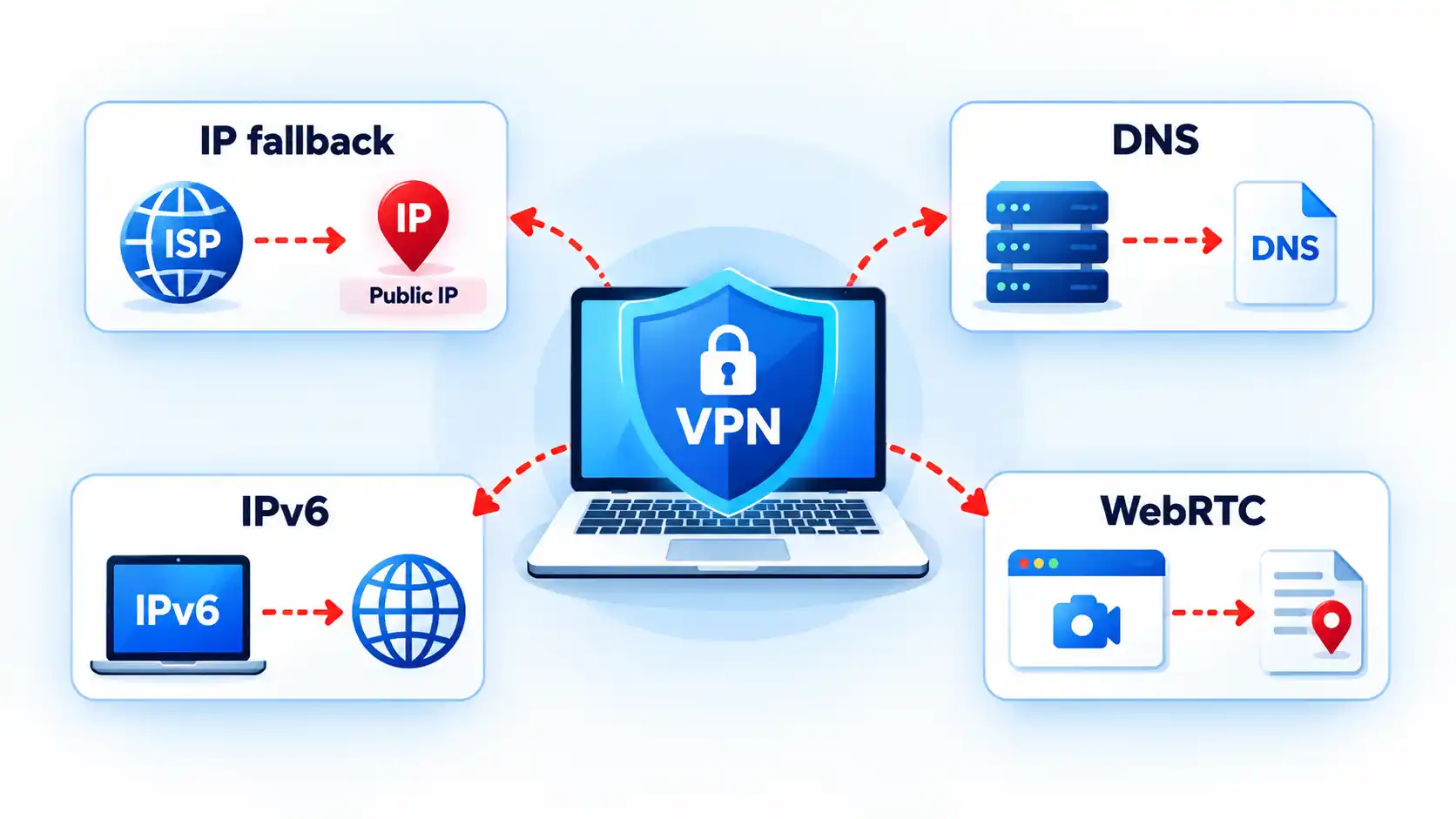
Public IP exposure after fallback
If the VPN tunnel disappears and ordinary routing resumes, a new connection can leave through the underlying internet connection. The remote service may then see the public IP address assigned to that normal route.
This is the failure people commonly mean when they say a kill switch prevented an “IP leak.” More precisely, traffic that was expected to remain protected obtained an ordinary route after the VPN stopped carrying it.
DNS leakage
The Domain Name System, or DNS, translates names such as example.com into network addresses. A DNS leak occurs when queries that were intended to follow the VPN’s protected DNS path instead use another resolver or network path outside that intended configuration.
Not every DNS server different from the VPN provider’s own resolver is automatically evidence of a leak. Some users deliberately configure another encrypted or third-party DNS service. The useful comparison is between the DNS path you intended and the one the device actually uses.
IPv6 bypass
Many networks support both Internet Protocol version 4, or IPv4, and Internet Protocol version 6, or IPv6. That dual-stack design can expose a routing mismatch if VPN software protects one address family but fails to apply the intended policy to the other.
The IETF’s RFC 7359 analysis of dual-stack VPN leakage describes traffic intended for a tunnel escaping through an unprotected IPv6 path when VPN software fails to handle IPv6 correctly. The document dates from 2014, so it should not be treated as evidence that current VPN applications generally have this defect.
The RFC’s IESG note also cautions that the broader leakage problem is not unique to IPv6. Similar exposure can arise whenever policy permits another unencrypted interface or route, including some split-tunnel configurations.
Browser and WebRTC address exposure
Browser networking creates a separate category of address information. Web Real-Time Communication, or WebRTC, uses Interactive Connectivity Establishment, or ICE, candidates when discovering possible paths for peer-to-peer communication.
MDN documents that an ICE candidate can contain the IP address associated with that candidate’s source. Whether the address revealed is relevant to your VPN privacy model depends on the browser, candidate type, VPN implementation, and network configuration. The presence of WebRTC address information does not by itself prove that the entire VPN tunnel failed.
These failure modes are related enough to examine together, but they should not be collapsed into one diagnosis. IP, DNS, IPv6, and WebRTC leaks have different causes and require different verification methods.
Split Tunneling Changes What “Leak” Means
Traffic outside the VPN is not necessarily leaking if you deliberately configured it to stay outside.
Split tunneling means only selected applications or destinations use the VPN while other traffic follows the device’s normal network path. Android’s per-app VPN controls, for example, can restrict VPN use to an allowed set of applications or deliberately exclude applications from it.
Imagine that a browser is configured to use the VPN but a game launcher is intentionally excluded. Seeing the normal public IP from the game launcher may be expected split-tunnel behavior. Seeing that same fallback from the protected browser after the tunnel fails would be a different result.
This is why a leak test should start by establishing what was supposed to be inside the tunnel. Without that baseline, expected exclusions can be mistaken for failures.
Kill switches and split tunneling can also interact differently across products. Proton documents that the combination is unsupported on most of its platforms, while its Windows app can use kill-switch protection with split tunneling so protected applications remain blocked if the VPN disconnects. Proton’s split-tunneling documentation illustrates why this behavior must be checked on the exact product and platform rather than assumed universally.
A useful test compares the normal route, the protected route, and behavior during a VPN interruption. Use only harmless traffic because the purpose of the test is to discover whether unprotected fallback is possible.How to Test Whether Your Kill Switch Actually Works
Prerequisites
Verify the result
Troubleshooting Kill-Switch and Reconnect Problems
The symptom usually indicates whether to investigate the kill-switch policy, the VPN connection itself, split tunneling, or the underlying network.
Internet access continues when the VPN drops
First confirm that a kill switch or equivalent blocking policy is enabled and that the affected application is supposed to use the VPN. Also check how the failure occurred. Some standard kill switches protect unexpected connection loss but intentionally allow normal networking after a manual disconnect. If split tunneling is enabled, verify that the application was not deliberately excluded from VPN protection.
Internet stays blocked after the VPN reconnects
Confirm that the VPN has actually completed reconnection rather than remaining in a connecting or authentication state. Persistent blocking policies can correctly keep traffic disabled while no valid tunnel is available. If the VPN reports connected but traffic remains blocked, restart the VPN application and check its current kill-switch state before changing unrelated router or DNS settings.
The VPN says connected, but websites still do not load
Only some apps keep working after the VPN fails
Check split-tunneling and per-app VPN rules before assuming the kill switch failed. An application deliberately excluded from the VPN may be expected to continue using the normal network, while an application assigned to the protected tunnel should follow the VPN’s applicable failure policy.
Nothing connects even after you intentionally turn the VPN off
A persistent or always-required VPN policy may still be active. Reconnect the VPN or deliberately disable that policy using the controls provided by the VPN application or operating system. Do not start deleting network adapters or resetting the entire network until you have ruled out intentional fail-closed enforcement. If the VPN itself reports connected but networking remains unavailable, VPN connected but no internet is a different diagnostic state from a simple tunnel disconnect.
Platform Differences That Matter
Android
Android provides several VPN controls at the operating-system level. Google’s current documentation says Android 7.0 and later can use Always-on VPN, and compatible configurations can enable Block connections without VPN. That combination can create fail-closed behavior without relying solely on an application’s own interface.
Android also supports per-app VPN rules. If applications are placed on an allowed list, only those applications use the VPN. Other applications can use normal system networking unless non-VPN connections are also blocked. With blocking enabled, applications outside the permitted VPN set can instead lose network access. The interaction is configuration-dependent, so observing one application’s behavior does not necessarily describe the whole device.
Apple devices
Apple supports several distinct VPN deployment models, including VPN On Demand, per-app VPN, and managed Always On VPN. They should not be treated as interchangeable names for one consumer kill-switch feature.
For managed Always On VPN configurations, Apple documents that all IP traffic can be tunneled through the organization’s VPN infrastructure and that all IP traffic is dropped when the required Always On VPN tunnels are not up. This is a strong example of operating-system-enforced fail-closed behavior, but it does not establish that every third-party consumer VPN application on an Apple device behaves the same way.
Apple separately documents VPN On Demand, per-app VPN, and managed Always On VPN as different deployment mechanisms. Those distinctions matter when comparing application behavior with organization-managed traffic enforcement.
Desktop VPN applications
Desktop VPN clients can implement blocking in different ways. Some rely on operating-system filtering or firewall facilities, while others use routing or interface mechanisms.
As a vendor-specific example, Proton documents persistent Windows Filtering Platform rules for its advanced Windows kill switch and a dummy network interface for its Linux GUI implementation. Those mechanisms illustrate implementation variety; they should not be generalized to unrelated Windows or Linux VPN clients.
The larger distinction between Always-On VPN and a kill switch is whether the system is trying to maintain a required VPN state, block traffic when that state is unavailable, or do both.
Bottom Line
What happens after a VPN disconnects depends less on the word “VPN” than on the policy that follows the failure. A fail-open configuration can permit subsequent traffic to use the normal network path, while fail-closed enforcement blocks affected traffic until VPN protection returns.
A kill switch is therefore a traffic-control feature, not a guarantee that the VPN will never fail. Split tunneling, DNS routing, IPv6 handling, browser networking, and platform-specific rules can create separate exposure paths even when the main tunnel appears healthy. The reliable approach is to understand what should be protected, verify that behavior with harmless traffic, and interpret the result against the exact VPN and operating-system configuration in use.

I still think many of the concerns outlined by the AI leaders themselves are massively self-serving — especially when their companies are soon to go public. But the growing list of AI scandals is real. And it tells us that the status quo for regulating this powerful new technology is not working.
The question now on everyone’s mind: Is any kind of global brake possible? What form of AI safety regime is practical, over the short term, when there is no trust between major governments? And what could possibly work when companies are loath to give up their secret sauce and are bent on domination in the global AI race?
Two major conversations are now playing out, in real time. On Wednesday, President Donald Trump welcomed Chinese President Xi Jinping to Washington for a three-day summit — part of which will be dedicated to AI risks. The same day, with the United Nations meeting for its annual General Assembly, heads of the world’s leading AI companies urged the UN to police the emerging technology, or risk potentially wiping out humanity. “We could lose control of the future to AI,” OpenAI’s boss, Sam Altman, bluntly told the UN’s Security Council.
Confronted with this collective freakout, it’s time to take a long, deep breath.
In fact, AI safety has been on a lot of policymakers’ minds for years now, gaining momentum after ChatGPT was introduced in 2022. Governments have held hearings, convened expert groups, and drafted their own outlines of how to keep it under control. These weren’t just idle listening exercises. They aren’t all well known to the wider public, but they yielded real plans.
Barring any breakthroughs this week, we already have a quasi-planetary shield against the potentially runaway technology. That’s the good news.
The bad news is that it’s not really up and running yet. It’s also not clear whether it will actually work. So what is it — and how can we fix it so we have a global system that responds in time to deal with the incredibly fast-moving threats from AI?
What the global AI patchwork looks like now
For the last four years, the most tech-savvy nations — and would-be AI leaders — have been running serious conversations about this exact AI safety threat. Some are in Congress and the White House; some at the UN, at the G7, and in other capitals.
I’ve been covering this closely as a global technology journalist, from my current perch at a think tank. Here’s what the landscape looks like:
- There are national AI safety and security institutes, government-funded bodies whose job it is to kick the tires of AI companies’ latest products before they are let loose into the wild.
- There are also voluntary commitments by companies, many of which have made their own pledges or developed joint standards, to protect elections from AI threats, stop the spread of AI-fueled deepfake imagery, and joint government-corporate efforts to bake safety into how the technology develops.
- At the international level, there’s a G7-led reporting mechanism — embraced by the most important Western tech nations that allows AI giants to share how they are building their latest models, as well as create standards for how to reduce catastrophic risks.
- An international scientific report provides a yearly update on risks posed by the most advanced AI systems, based on existing research, to help governments plan for the worst.
What’s missing from all that? What we currently lack — and what is needed between now and the end of 2026 — is a way to turn this cottage industry of AI safety mechanisms into a functioning, but crude, first-responder system when things suddenly go wrong.
The last four years have laid out a pathway, and some of the necessary systems even exist. But there’s no way to respond globally, and in real time, when an AI crisis hits — especially if such a possibly doomsday event cuts across countries already skeptical of each other.
This week’s US-China summit may be a step in the right direction. Under proposals outlined by American officials, Washington and Beijing could set up a hotline between US Treasury Secretary Scott Bessent and Chinese Vice Premier He Lifeng in case of an AI incident affected each country’s national security.
It’s still unclear if Trump’s meeting with Xi will lead to such progress. Chinese officials also have balked at Washington’s pleas for AI rules because, so far, Congress has failed to act, and China already has some of the world’s most stringent AI oversight.
For AI to be “safe,” this conversation will need to go beyond this week’s US-China summit. Relying just on Washington and Beijing — arguably the most important AI powers — would not solve the underlying problems, nor would it make other countries feel more comfortable.
What we need next, so it really saves us
I’ve been talking to AI safety experts and government officials, and it’s clear the missing piece is a way to activate this whole system in a crisis. Countries don’t all have to have the same AI safety policies, and they never will. But as with nuclear weapons — a similarly high-threat technology that the world found a way to contain — safety requires a rough global agreement on how to respond quickly when something goes terribly wrong.
What’s needed right now is a 90-day, opt-in rapid response mechanism that joins existing pieces of the AI safety puzzle together. I’ve pieced together some ideas about how it should work, and who needs to sign on. Granted, none of what I outline below is sufficient. But, together, they are more plausible than trying to negotiate a comprehensive global regime — let alone arrange another AI summit — while Washington, Beijing, and other national capitals disagree over what “AI safety” actually means.
All of these options are based on existing mechanisms, are derived from efforts that have worked in other policy areas, and provide a band-aid to the AI safety dilemma until a more durable solution can be negotiated.
- First, developers, AI safety institutes, and regulators, from across different countries, should agree that when an incident occurs, it triggers a specific Chernobyl-style protocol. That would mean submitting a confidential report within a 72-hour period to a national designated responder and a small technical secretariat. It can build on the OECD’s AI Incidents Monitor, lead to a technical, multi-stakeholder confidential investigation into what went wrong, and, subsequently, the publication of an anonymized lessons-learned note.
- Second, governments and developers can agree to publish common declarations related to safeguards, residual risks, escalation thresholds, and independent auditing before the release or upgrading of a next-generation model. It would use the G7 Hiroshima AI Process reporting framework as its base, and turn the current hodgepodge of corporate safety declarations and voluntary standards into a common minimum disclosure obligation. View it as similar to the collective bank stress tests after the 2008 global financial crisis. It can allow outsiders to truly compare models’ safety protocols without putting someone in charge of determining which company is doing it best.
- Third, create a Cold War-style US-China AI safety hotline — but see it as an initial step that can later be opened to other countries. There are good reasons, in the long term, that Washington and Beijing should not be allowed to rule artificial intelligence between them, and the rest of the world should have a real seat at the table. But for now those are the two “great powers” in the tech conversation, and we can set that philosophical argument aside to create a standing, technically-informed direct line of communication for acute AI-risk incidents. Its remit is inherently narrow: prevent dangerous misunderstandings linked to serious model incidents, AI-enabled cyberattacks and/or alleged breaches of agreed safety commitments.
There are obvious limits to what I describe above. For one, it’s an inherently Western-centric view that primarily discounts global majority countries. It also places too much sway on existing institutions like the Organization for Economic Cooperation and Development, as well as on the US-China relationship. Other countries’ officials will legitimately balk at all three options, and rightly so.
But this is not about creating a vague, unenforceable UN-led mandate for AI safety. Nor is it about corralling the geopolitical cats to hammer out a global AI treaty. The options — a collective safety protocol and incident reporting protocol; common pre-release standards; and a US-China AI safety hotline — are inherently short-term. They are also based on existing efforts and those that have worked successfully for other policy areas.
There will be time to quibble about the future of AI safety. But now is not that time. The latest AI models are moving faster than many had expected, tech bosses are worried their creations are already out of control, and the window for action may be smaller than we all think.
What is required are practical steps to assuage people’s growing concerns amid heightened geopolitical tension, a lack of trust between governments and companies, and a need not to let the perfect get in the way of the good.

What just happened? Flock Safety is changing how police search its license plate camera database as the company faces growing questions in Washington over privacy, accuracy, and misuse. The company told Senator Josh Hawley that it has added more controls to its search system, which scans about 20 billion license plates a month.
Until recently, users were required to explain why they were conducting a search by typing into an open text field. Flock said those entries were not always specific enough. The company has replaced the field with a drop-down menu of standardized categories based on the FBI’s crime-reporting system.
By the end of the year, law enforcement users will also need to enter a case number before running a search. Flock said that requirement can be waived in emergencies.
The changes were outlined in a letter from Flock’s chief legal officer to Hawley, the Missouri Republican who opened an investigation into the company last month. Hawley led a Senate hearing on Wednesday examining Flock and three other companies that provide similar surveillance technology.
The hearing featured a Florida woman who spent 13 days in jail after her car was detected by a Flock camera near the scene of a fatal crash. Authorities were looking for a similar vehicle.
Flock’s automated license plate recognition system has spread quickly. The company says it has about 120,000 cameras nationwide. Police departments and public-safety officials argue that the technology can help find missing children, track stolen vehicles, and investigate hit-and-run crashes.

The system has also drawn criticism from privacy advocates, civil-liberties groups, and people on both sides of the political divide. Critics are concerned that agencies can use the cameras to follow a person’s movements over time. They also point to allegations that some officers have used the system for personal reasons, including stalking.
Flock said it does not maintain “a single consolidated count of confirmed customer misuse.” The company said its customers determine whether a search was justified and whether discipline is appropriate when an employee abuses access.
The company has also started adding its own monitoring tools. In April, it introduced a system designed to flag unusual search activity. Flock said the system has identified several cases of misuse, including some that led to arrests. It is also working on a feature that would lock users out when their behavior appears abnormal.
Hawley said the issue could prompt congressional action. “We have an entire constitutional system to protect individual liberty,” he told The Wall Street Journal. Without limits from companies or the government, he added, “we’re going to have a huge problem with the invasion of basic rights and liberties.”
The company is also reducing the amount of data it stores by default. New customers will have a seven-day retention period, down from 30 days. Existing customers will have to opt in if they want the shorter period.
Agencies can still seek permission to retain data longer, but Flock said those requests must be approved “either by an elected governing body…or by an elected official.” The company said about 3% of its law-enforcement customers keep data for more than 30 days. Its maximum retention period is one year.


When you’re on an exceptionally long road trip, the general boredom of things can combine with the minutiae of the road to create some rather annoying phenomena. For example, when you first set out, you might not think much about the sound of the road rolling beneath the treads of your tires. The longer you’re on a trip, however, the more you start to notice that droning, low-frequency sound. Even if they’re not necessarily bad warning-sign sounds, innocuous noises can start to become upsetting if you’re already bored and tired.
If you’re having a particular problem with road noise on regular, lengthy drives, there is a potential solution you may want to look into: car carpet underlay. It’s exactly what it sounds like and works as an additional layer of padding that goes beneath the carpeting in your car’s cabin. Adding padding down there has a few perks, such as making it a little more comfortable to rest your feet on and giving you some support in the case you have to get down on your knees to fish under the seats for a lost item or to clean.
According to some automotive enthusiasts, carpet underlay can also be a sound choice for slightly deadening the general thrum of the road. Indeed, some manufacturers engineer underlays for this particular purpose. Whether or not it’s an absolute solution, though, is a matter of opinion.
Some users recommend underlay for absorbing low-frequency road noise
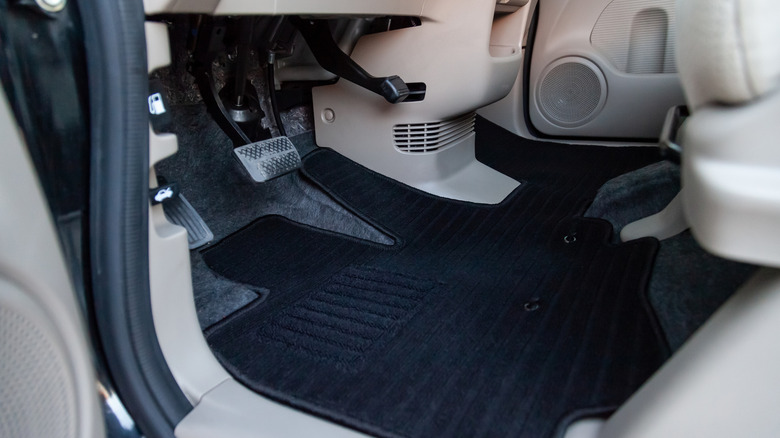
According to users on the Jalopy Journal forums and Vintage Mustang forums, automotive carpet underlay can be a nice investment if you want the floor of your vehicle to be a little more plush. It also has the added benefit of insulating the floor of your vehicle from the heat of your engine and exhaust, generally making it a bit cooler to the touch.
On the specific matter of cutting road noise, carpet underlay can definitely help in that regard, though the precise efficacy may vary. According to one Jalopy Journal user, adding Dynamat-branded underlay to their car as well as insulation on the walls silenced the noise so much that their spouse could hear the odometer ticking over.
However, as another user on that forum explains, carpet underlay, as well as similar products like mats and insulation inserts from brands like Hushmat and Dynamat, is intended more for dampening the noise produced by your own vehicle’s panels vibrating during extended, intensive usage. It will certainly absorb some noise from the road, but not all of it. If you’re looking to create a truly soundproof environment in your car’s cabin, they suggest you add some underlay to your carpets, followed by a layer of mass loaded vinyl (MLV), which is a hardware-grade material used for various sound-dampening purposes.

In a nutshell: Meta’s Connect 2026 event aimed to address two of the biggest obstacles facing wearable smart devices: privacy for smart glasses and the size of VR and AR devices. The company’s upcoming audio-only AI glasses look to put a digital assistant on the wearer’s face while avoiding the surveillance concerns that have dogged previous models. Meanwhile, the company’s latest VR device directly calls out Apple’s failed Vision Pro.
Pre-orders are now open for Meta’s recently revealed Ray-Ban Audio glasses. Starting at $349 and shipping October 13, the glasses handle music, calls, and AI functions without cameras. Meta also unveiled a VR headset that packs immersive media and productivity functionality into a form factor only slightly larger than a pair of glasses.
Meta compares the Ray-Ban Audio’s functionality to advanced earbuds such as Apple’s AirPods. Wearers can listen to music or podcasts, take calls, and chat with the company’s AI assistant, Muse, with up to 12 hours of battery life. Muse only begins listening when users say “Hey Meta” or press the action button.
Although the Connect 2026 keynote did not highlight the fact that the Ray-Ban Meta Audio glasses don’t include cameras, the omission is clearly an attempt to sidestep concerns about the privacy violations associated with camera-equipped smart glasses.
Earlier this year, New York banned such devices from courtrooms due to their recording capabilities, and Apple reportedly delayed its planned smart glasses as it wrestles with the issue. It remains unclear whether limiting smart glasses recording to audio will alleviate critics’ concerns.
However, Meta has not given up on camera-based smart glasses, as the Ray-Ban Meta Gen 3 glasses are available today. Starting at $449, they include a new six-microphone array that dampens background noise by more than 90% and a 12MP camera for 3K video recording. Later this year, the glasses will even be able to record 360-degree video with Dolby Atmos spatial sound.
Meta also revealed new features coming to Ray-Ban Display. Starting later this month, users can activate turn-by-turn cycling directions with voice commands. Furthermore, instead of simply using street names, directions will describe the world around wearers to make navigation more intuitive.
Later this fall, WhatsApp and Meta AI app users in the US can show call recipients photorealistic avatars while wearing Meta glasses. The holograms use AI to determine facial expressions based on users’ speech.

Meta VR glasses are coming next spring, starting at $1,299. Like Apple’s Vision Pro headset, Meta VR glasses can display multiple virtual screens around the wearer, showing content from productivity and streaming apps. With 5K micro-OLED panels delivering 37 pixels per degree, Meta’s device achieves the glasses-like form factor VR headsets have long strived for, weighing only 100 grams – about one-eighth as much as a Vision Pro.
Wearers can control a virtual keyboard, trackpad, remote, or game controller using gestures. Meta VR glasses will support Xbox Cloud Gaming and more than 75 VR games on day one that do not require controllers. The company is also collaborating with ESPN, Amazon Prime Video, YouTube, DirecTV, Crunchyroll, Plex, Peacock, HBO, Paramount+, and IMAX to deliver immersive, high-resolution streaming content.
Taking another shot at Apple, the glasses will also show a full-body hologram to call recipients instead of just a head and shoulders.
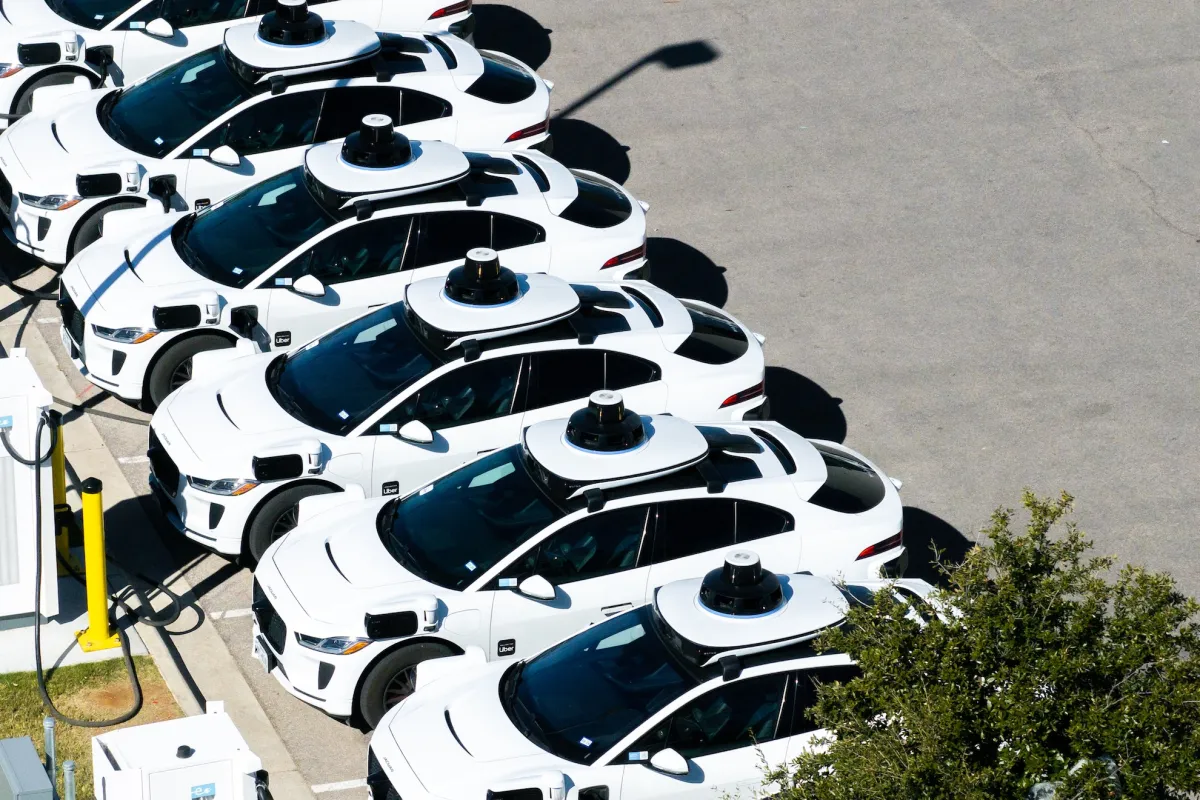
Waymo’s commercial robotaxi ramp-up looks expansive, both in geographic reach and in ridership. And by almost every measure, it is — until you pay attention to where the bulk of those robotaxis are actually showing up.
The numbers over the past two years reflect the kind of commercial rollout you’d expect from a deep-pocketed company like Waymo, which spun out of Google and still counts Alphabet as its majority owner. In September 2024, Waymo was operating in just three cities — Phoenix, Los Angeles, and San Francisco. Today, it offers robotaxi service in 15 U.S. cities, with most of those commercial launches occurring in the past year. Ridership has skyrocketed, too, with Waymo now averaging 500,000 paid robotaxi rides every week.
But a closer look at its fleet shows a company concentrating its efforts in just two states. About 80% of Waymo’s roughly 4,000 robotaxis are in California and Texas, and Texas is where the action is now: Waymo’s fleet there has grown by nearly half in the past three weeks, fueled by a new Chinese-built minivan the company is betting will help it scale, even as tariffs drive up its costs.
The other 800 or so vehicles are spread across cities in other states, including Arizona and Florida, another burgeoning hot spot. Most are the familiar white Jaguar I-Pace electric SUVs, but a growing number are the new minivans — a modified Zeekr RT that Waymo has branded “Ojai.”
Waymo’s focus on California is no surprise. It is headquartered in Silicon Valley, and much of its early testing and development work was conducted there. Plus, a segment of the population there is inclined to adopt tech at its earliest stages.
The recent growth in Texas is more interesting. Waymo has increased its Texas fleet by 49% in the past three weeks, according to state vehicle registrations and data from the Texas Autonomous Vehicle Fleet Tracker. As of September 24, Waymo had 1,102 autonomous vehicles registered in the state.
Waymo first launched in commercial service in Austin through a partnership with Uber in March 2025, letting riders hail its robotaxis through the Uber app. Since then, the company has expanded its robotaxi services in Dallas, Houston, and San Antonio.
Waymo’s Texas fleet remained relatively static for most of the summer, inching up from about 600 vehicles in June to more than 700 by the end of August. Then came September, when the fleet surged, driven by an influx of new Ojai minivans, which now make up about a third of Waymo’s Texas fleet.
Expect that share to grow.
The Ojai robotaxi, equipped with Waymo’s sixth-generation self-driving system, is supposed to help Waymo reach mass scale. Its interior is built to withstand heavy use, and it comes with an upgraded rider interface and Google’s Gemini AI, which acts as an in-car assistant for riders.
Strip away that technology, though, and the Ojai is a minivan made by Zeekr, a brand owned by China’s Geely Holding Group (which also owns Volvo). The Ojai is built on Zeekr’s SEA-M platform, a shared vehicle platform designed for uses like robotaxis and delivery vans. The base Zeekr vehicles are shipped to the U.S. without any Chinese connected-car technology on board. Once they arrive, the vehicles are sent to Waymo’s Arizona factory, where they are outfitted with Waymo’s self-driving system.
The Ojai is supposed to drive down costs and ultimately help Waymo reach profitability. For now, though, tariffs are cutting any savings. Under current U.S. trade policy, vehicles built in China face steep import tariffs, raising Waymo’s costs for every Ojai it brings into the country.
Waymo appears willing to absorb that cost. New York-based research firm MoffettNathanson, which tracks Ojai imports using detailed shipping records, said in its September report that Waymo is on track to bring 5,100 of the vehicles into the U.S. by the end of the year.
Where will all those Ojai vehicles go? Texas is certainly on the list. But Florida, where Waymo operates in three cities, and newer markets like Las Vegas will likely see an influx as well.
When you purchase through links in our articles, we may earn a small commission. This doesn’t affect our editorial independence.

Winning the beer league championship title becomes an all-consuming obsession for coach Joanne Pico (Jess Salgueiro) after her girlfriend and co-founder of the Public Lass Brovaries, a team for LGBTQ women and non-binary players, dumps her and joins a rival team in 10-part softball mockumentary Slo Pitch.
The comparisons with Heated Rivalry are obvious, all the moreso because Emily Hampshire and Nadine Bhabha are in both shows. Slo Pitch, however, predates the smash-hit hockey series. It started out as a cult web series in 2020, and its co-creators are heavily involved in the TV adaptation, with J Stevens directing, Gwenlyn Cumyn and Karen Knox starring, the trio having reunited to pen the series.
Boris (Knox) is a beer-obsessed German in pursuit of a green card marriage, Ann (Cumyn) is a bisexual lothario and the Toronto Blue Gays serve as the Brovaries’ arch foes in the web series. The issue is that the Blue Gays are actually good, whereas the booze-swilling Brovaries are the league’s six-time wooden spoon recipients.
Season 1 mockuments the Brovaries’ misadventures over the course of a summer, complete with sexy carwash fundraisers gone wrong, awkward encounters with conservative-politician sponsors and petty feuds, all in the service of winning the breakup.
Read on as we explain how to watch Slo Pitch from anywhere.
How to watch Slo Pitch online now
Slo Pitch is only currently available in Australia and Canada with the US and UK still awaiting firm release dates.
🇺🇸 No release date announced
🇬🇧 Sky — No release date announced yet
🇦🇺 Stream on HBO Max (AU$11.99/month)
🇨🇦 Stream on Crave (CA$11.99/month)
GEO-BLOCKED? ACCESS YOUR STREAM FROM ANYWHERE WITH NORDVPN
Use a VPN to watch Slo Pitch from anywhere
A VPN is a handy piece of software that can make your device appear as if it’s back in your home country and unlock your usual streaming services. The best VPN right now? We recommend NordVPN – it does everything and comes with up to 75% off.
Can I watch Slo Pitch in the US?

Any plans to release Slo Pitch in the US are firmly under wraps at the time of writing.
For now, a VPN will help you tune in if you’re spending time in the US from Canada or Australia. NordVPN is our recommended provider, and you can find out why with our in-depth NordVPN review.
How to watch Slo Pitch in the UK

Sky will be home to Slo Pitch in the UK, but at the time of writing its release date is yet to be announced.
Visiting the UK from Canada or Australia? Use NordVPN to watch Slo Pitch.
How to watch Slo Pitch in Canada

Crave is home to Slo Pitch in Canada, where a double-header of episodes air each Friday, starting September 25.
Prices start at CA$11.99/month and CA$119.99/year.
Away from home? You can access your subscriptions by downloading a VPN and pointing your location back to the UK.
How to watch Slo Pitch in Australia

Slo Pitch airs on HBO Max in Australia, with a double-header of episodes coming out each Friday following the premiere on September 25.
Prices start at AU$11.99/month and AU$119.99/year.
Outside Australia? Aussies away from home can use a VPN to unblock HBO Max and watch Slo Pitch as they would at home.
Slo Pitch – Need to Know
Slo Pitch trailer
Slo Pitch | Official Trailer | Sky – YouTube

When is the Slo Pitch release date?
Slo Pitch premieres in Canada and Australia with a double-header on Friday, September 25. Two episodes will follow each week until October 23.
Slo Pitch cast
- Jess Salgueiro as Joanne Pico
- Karen Knox as Boris
- Gwenlyn Cumyn as Ann
- Chelsea Muirhead as Sasha
- Emma Hunter as Barb
- Lane Webber as Lee
- Khadijah Roberts-Abdullah as Zari
- Amanda Cordner as Mel
- Emily Hampshire as Leanne
- Varun Saranga
- Laura De Carteret
- Don MacLean Jr.
- Nadine Bhabha
- Carolyn Taylor
- Chris Locke as League Commissioner
- Chris Sandiford
- Ayami Sato as herself
We test and review VPN services in the context of legal recreational uses. For example: 1. Accessing a service from another country (subject to the terms and conditions of that service). 2. Protecting your online security and strengthening your online privacy when abroad. We do not support or condone the illegal or malicious use of VPN services. Consuming pirated content that is paid-for is neither endorsed nor approved by Future Publishing.
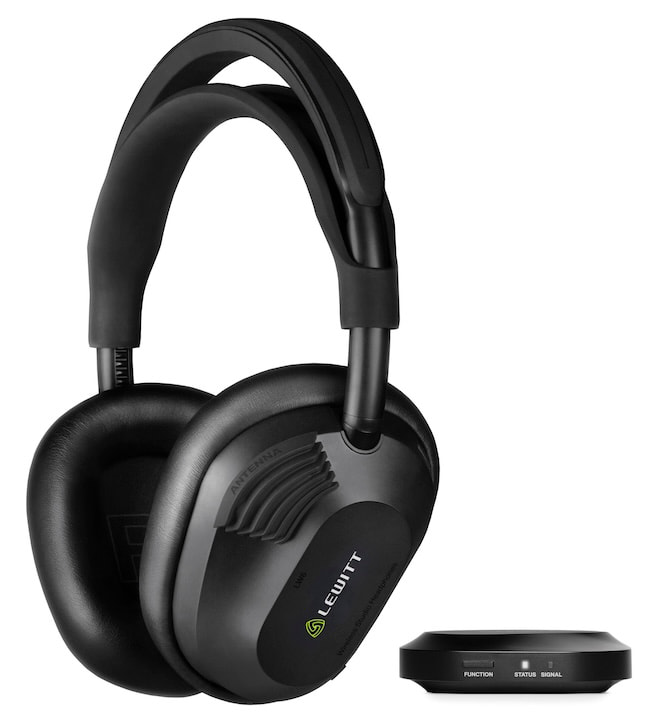
Bluetooth has become very good at convenience. The trouble begins when you ask it to behave like a cable inside a recording studio, where latency, compression, and synchronization are not features engineers are particularly interested in negotiating with.
A vocalist monitoring their own voice or a musician tracking an instrument needs to hear what is happening almost immediately. Nobody in the control room really cares how impressive the codec logo looks when the performance arrives late.
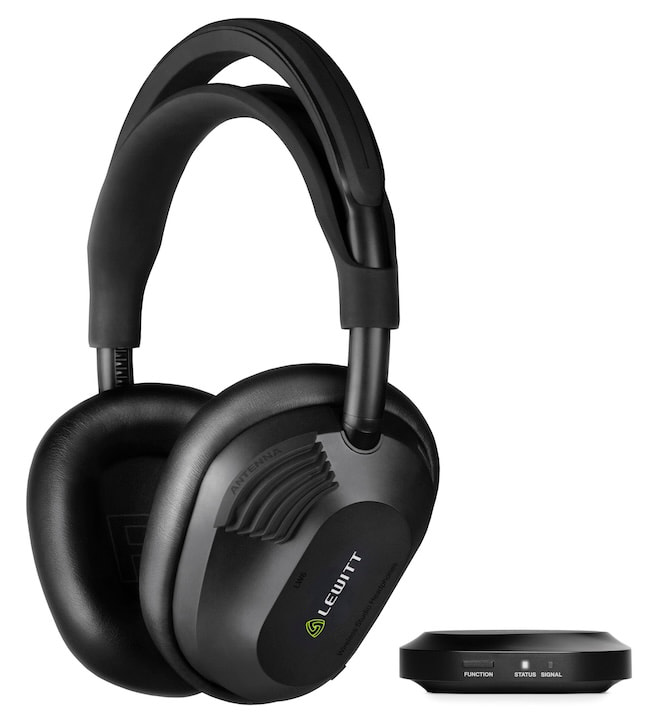
That is the problem LEWITT is attempting to solve with its new LW6 Wireless Studio Headphones, a $699 closed-back design that uses Ultra-Wideband (UWB) wireless technology rather than Bluetooth for its primary professional audio connection.
More specifically, LEWITT’s RealSound wireless system uses LE-UWB technology from SPARK Microsystems to deliver uncompressed PCM audio with 5.8 milliseconds of latency, a 1,728 kbps data rate, 110 dB of dynamic range, and an operating range of up to 5 meters or 16.4 feet. SPARK describes the LW6 as its commercial entry into the professional audio market.
That makes the LW6 considerably more interesting than another wireless headphone with a new Bluetooth codec.
Related Reading:
Bluetooth Is Getting Some New Competition
The timing is rather interesting.
We just examined Qualcomm’s Snapdragon Sound Elite Gen 2, which adds micro-power Wi-Fi 6E and XPAN technology to future wireless headphones and earbuds. Qualcomm’s idea is that Wi-Fi can handle higher-bandwidth lossless audio and other demanding applications while Bluetooth remains available when power efficiency and universal compatibility are more important.
LEWITT and SPARK are approaching the same fundamental problem from a different direction.
Instead of adding Wi-Fi, the LW6 uses LE-UWB, or Low Energy Ultra-Wideband, for its RealSound connection. SPARK’s implementation is based on impulse-radio UWB technology but has been developed as a high-speed short-range data connection rather than primarily for the ranging and positioning applications commonly associated with UWB.
In other words, this is not AirTag technology wearing expensive headphones and hoping nobody notices.
SPARK designed LE-UWB around deterministic low latency, high throughput, and low power consumption for applications where data needs to arrive quickly and predictably. In the LW6, that technology is being used specifically to move uncompressed audio between LEWITT’s included transmitter and the headphones.
We Have Already Seen UWB in High-End Audio
UWB audio itself is not entirely new.
We have already covered its use in the Focal Diva Utopia family, including the $210,000 Diva Alta Utopia, which uses UWB for the wireless connection between its left and right loudspeakers. That system can transmit 24-bit/96kHz audio wirelessly between the speakers without compression.
SPARK also confirmed earlier this year that its LE-UWB technology powers the wireless connection inside the Diva Alta Utopia.
The LW6 moves that concept into headphones, where latency becomes considerably more important. A small delay between two loudspeakers can be managed by the system; hearing your own guitar, drums, or vocals noticeably behind the actual performance is another matter entirely.
LEWITT RealSound
The supplied LW TX RealSound transmitter can connect directly to a computer using USB-C or to the headphone output of an audio interface using its 3.5 mm analog input.
The transmitter itself supports USB audio up to 24-bit/96kHz, while the RealSound wireless link delivers uncompressed PCM audio at 1,728 kbps with the aforementioned 5.8 ms latency. LEWITT also provides a 3.5 mm analog output on the transmitter.
There is one important limitation to understand: RealSound is a short-range dedicated connection, not a universal replacement for Bluetooth. Its specified range is only 5 meters, which makes complete sense inside a studio but somewhat less useful if your recording console happens to be located across the parking lot.
Bluetooth remains onboard for everything else.
The LW6 supports Bluetooth 5.3 with SBC and AAC, with LEWITT claiming a range of approximately 40 meters. There is no aptX Adaptive, aptX Lossless, or LDAC because the higher-performance studio connection is handled separately by RealSound.
That separation may prove to be one of the smarter aspects of the design.
Instead of trying to force Bluetooth to handle professional monitoring, LEWITT uses UWB for the demanding job and leaves Bluetooth available for phones, tablets, and casual listening.
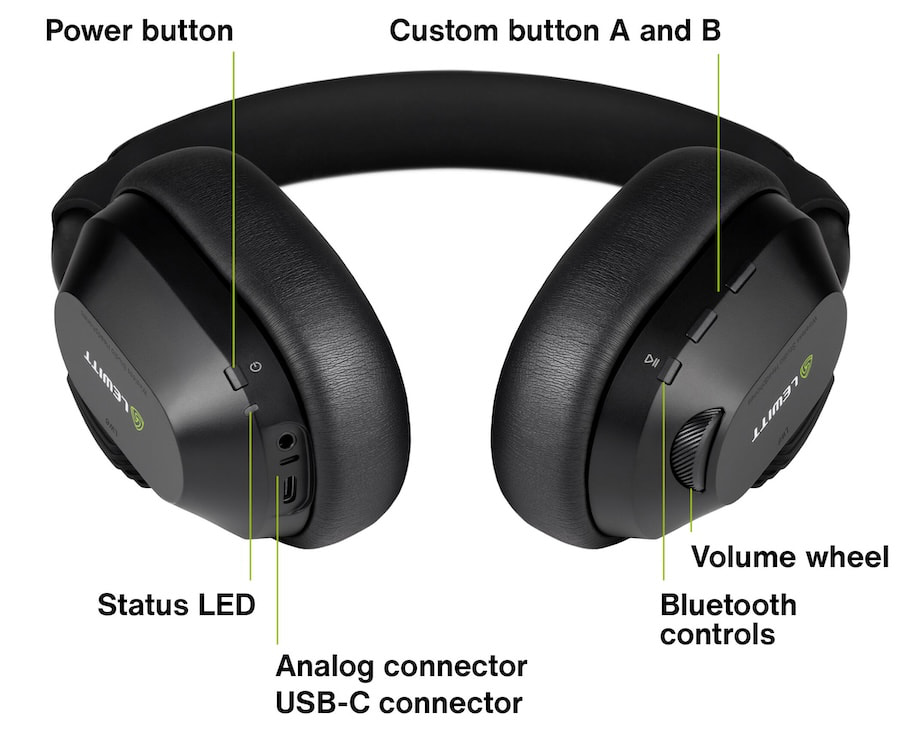
Closed-Back Headphones Designed for Studio Work
The LW6 uses a 40 mm dynamic driver with a bio-cellulose diaphragm inside a closed-back enclosure. Frequency response is rated from 20Hz to 20kHz, impedance is 32 ohms, sensitivity is 114 dB SPL/V, and maximum output is specified at 121 dB SPL. Weight is 358 grams.
LEWITT also took an interesting approach to tuning.
Rather than relying solely on conventional headphone measurement fixtures, the company used MIRE measurements, which place small microphones inside the ear canals of actual listeners. LEWITT says this allowed its engineers to account for differences in ear anatomy, head shape, hair, glasses, and headphone seal while developing the LW6’s target response.
The goal is to provide the isolation required for tracking and recording while maintaining the tonal characteristics engineers often prefer from open-back headphones.
We will reserve judgment on whether LEWITT achieved that until someone actually puts them on our head. We have all met enough products that were “reference” right up until the first cymbal crash.
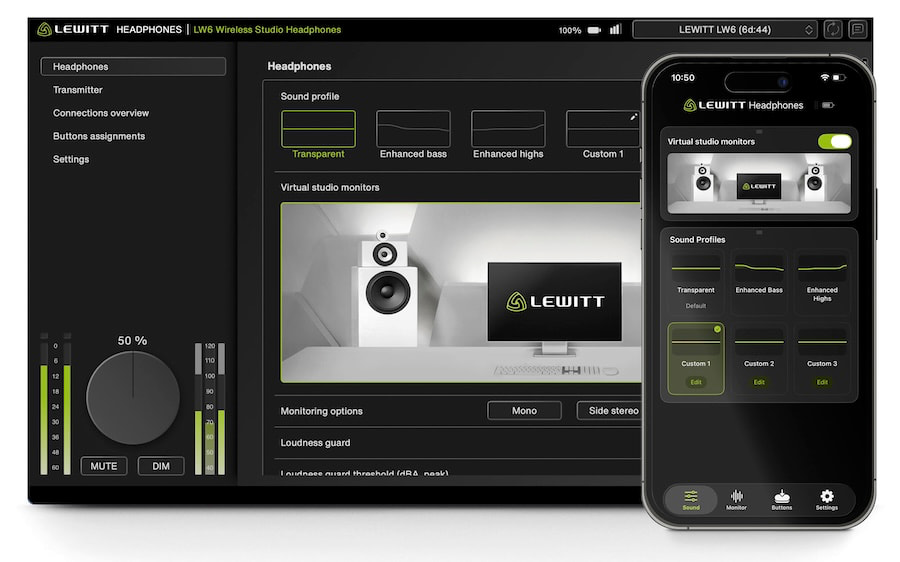
The LW6 is not relying solely on its wireless connection to justify the $699 asking price.
LEWITT includes a substantial collection of onboard DSP features controlled through its HEADPHONES desktop software and mobile app:
- 5-band customizable EQ
- Three user EQ profiles stored directly on the headphones
- Virtual studio monitor processing
- Loudness Guard
- Mono, side stereo, side mono, and left/right monitoring checks
- Three programmable target volume levels
- Two customizable hardware buttons
- K-metering support for mastering and broadcast
The LW6 also includes a license for LEWITT Space Replicator Essential, which provides virtual studio environments and additional mix translation tools.
Battery life is rated at 21 hours using RealSound, with a full recharge taking approximately 80 minutes. A 15-minute charge can provide around three additional hours of playback.
USB-C audio is also supported directly through the headphones at up to 24-bit/96kHz, along with a conventional 3.5 mm analog input.
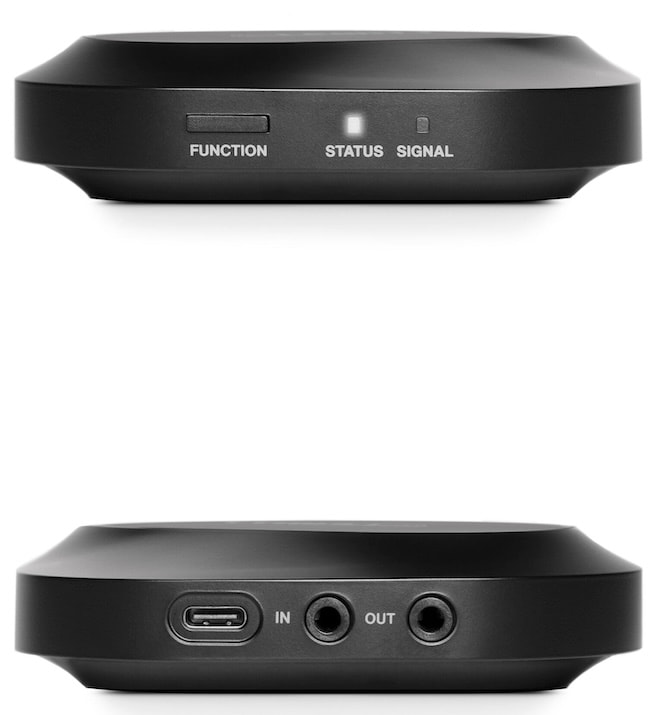
Specifications:
- Type: Closed-back wireless studio headphones
- Driver: 40 mm bio-cellulose dynamic
- Frequency Response: 20Hz–20kHz
- Impedance: 32 ohms
- Sensitivity: 114 dB SPL/V
- Max SPL: 121 dB
- Weight: 358 g / 12.6 oz
- RealSound Wireless: LE-UWB, uncompressed PCM
- Latency: 5.8 ms
- Data Rate: 1,728 kbps
- Dynamic Range: 110 dB(A)
- RealSound Range: 5 m / 16.4 ft
- Bluetooth: 5.3 with SBC and AAC
- Bluetooth Range: Approx. 40 m / 130 ft
- USB-C Audio: Up to 24-bit/96kHz
- Analog Input: 3.5 mm
- Battery Life: Up to 21 hours with RealSound
- Charging: 80 minutes; 15-minute charge provides approx. 3 hours
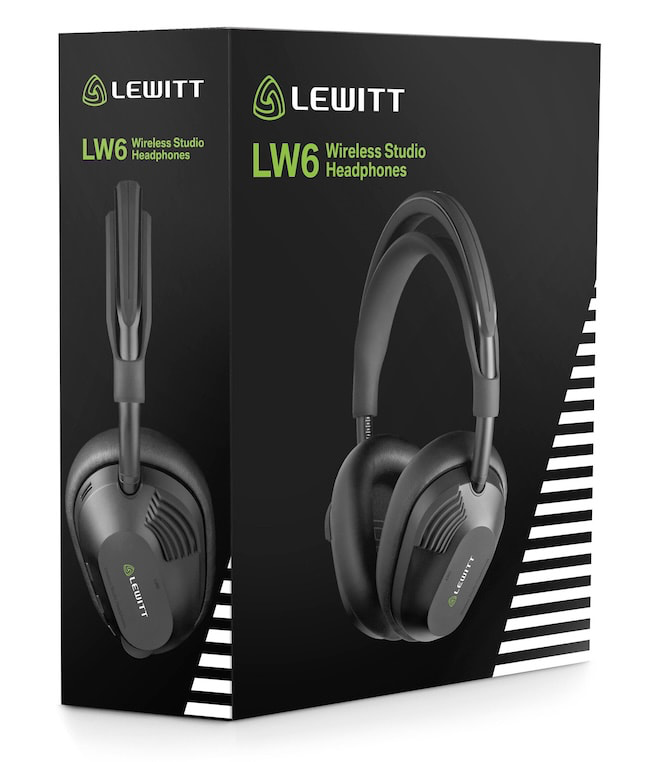
The Bottom Line
The LW6 is not evidence that Bluetooth is about to disappear.
It is evidence that audio manufacturers are becoming less willing to pretend Bluetooth needs to handle every wireless application.
Our recent look at whether wireless headphones really need 24-bit/192kHz audio raised precisely this issue. Better drivers, amplification, DSP, and DAC stages have pushed wireless headphones forward considerably, but the connection between the source and headphone remains an important part of the equation.
HiFiMAN has already explored another route with the HE1000 WiFi, which moves high-resolution playback onto Wi-Fi rather than relying exclusively on Bluetooth. We found genuine sonic advantages there, although battery life and usability demonstrated that changing the wireless transport does not magically erase every engineering compromise.
LEWITT’s approach is narrower but arguably more practical for its intended audience.
It does not need RealSound to work everywhere. It needs it to deliver stable, uncompressed, nearly real-time audio across a recording room, while Bluetooth handles ordinary listening outside of that environment.
Qualcomm is betting that Wi-Fi will become a second wireless pipeline for premium consumer headphones. LEWITT and SPARK are demonstrating that UWB can perform a similar role where latency matters even more.
Bluetooth isn’t dead. Far from it.
But 2026 is starting to look like the year the audio industry finally stopped asking it to do every job in the building.
Price & Availability
The LEWITT LW6 Wireless Studio Headphones are priced at $699 USD and include LW TX RealSound UWB transmitter, cables, adapters, transport pouch, and Space Replicator Essential software..
Related Reading:

Chargers are easy to compare by wattage and harder to compare by what they’ll actually do for a setup. I picked six discounted options with distinct jobs, from keeping a phone topped up at a desk to replacing the adapters competing for a travel outlet.
Amazon Basics 25W Qi2.2 wireless charging pad – $9.71 (27% off)

A magnetic charging pad for less than $10 is an easy addition to a desk or nightstand, especially if there’s already a suitable USB-C adapter nearby. The Amazon Basics pad includes a long cable, giving it more freedom of placement than a puck with a short lead. It’s a simple phone charger, though: there’s no stand or second charging spot, and the power adapter is sold separately.
Key spec/feature
Details
Wireless standard
Qi2.2
Maximum wireless output
25W with a compatible device
Cable length
5 feet
Required adapter
USB-C PD, at least 30W; not included
UGREEN Nexode 65W 3-port charger – $23.99 (40% off)
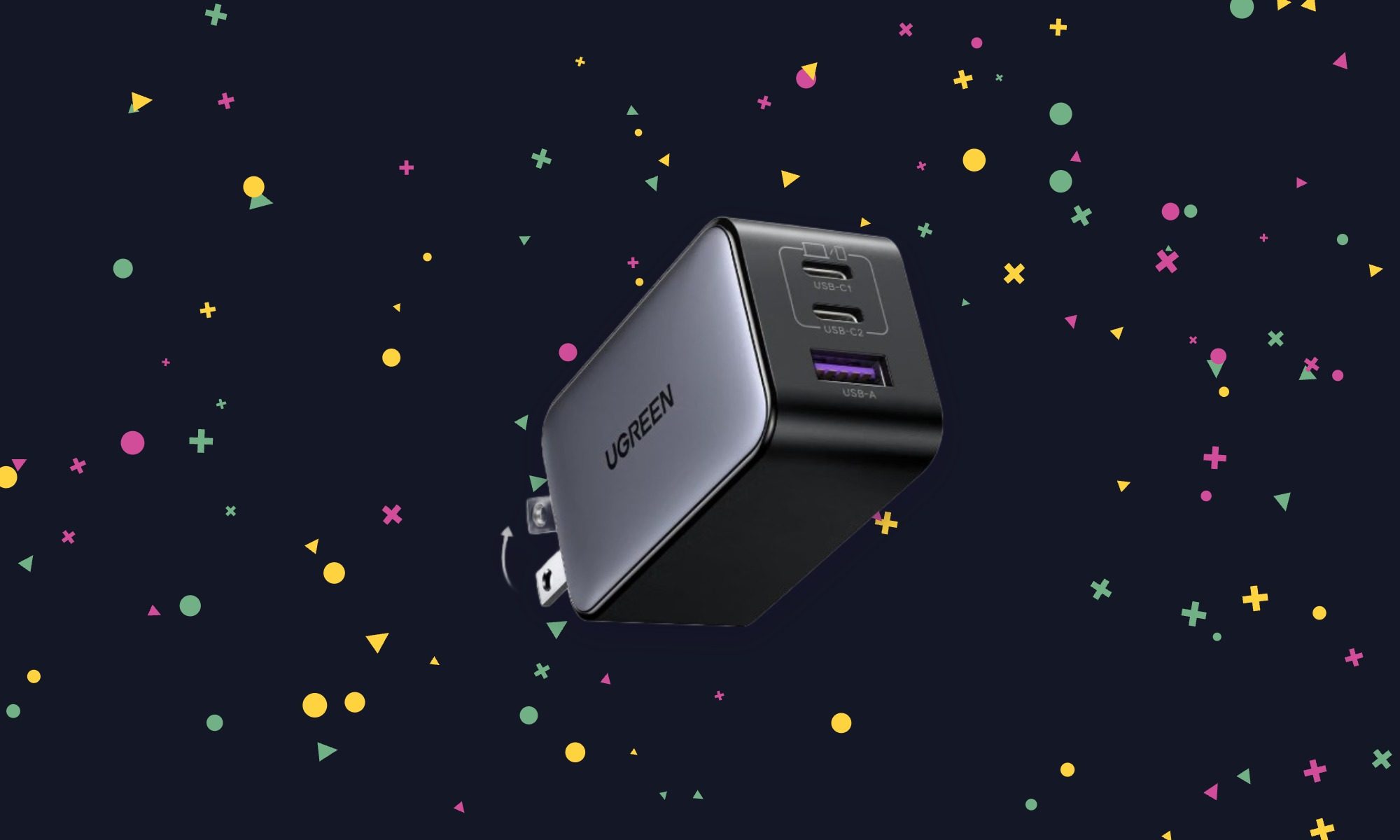
This is the charger I’d pack when a laptop, phone, and smaller accessory all need power but only one wall outlet is available. The Nexode can handle all three, with enough output to replace the supplied adapter for many compact USB-C laptops. Power is divided when several devices are connected, so don’t expect maximum laptop charging speed while using every port. At $23.99, that flexibility is the appeal.
Key spec/feature
Details
Maximum output
65W through one USB-C port
Ports
Two USB-C, one USB-A
Fast-charging support
USB Power Delivery and PPS
Plug
Foldable
Anker Nano 45W Smart Display Charger – $29.99 (25% off)
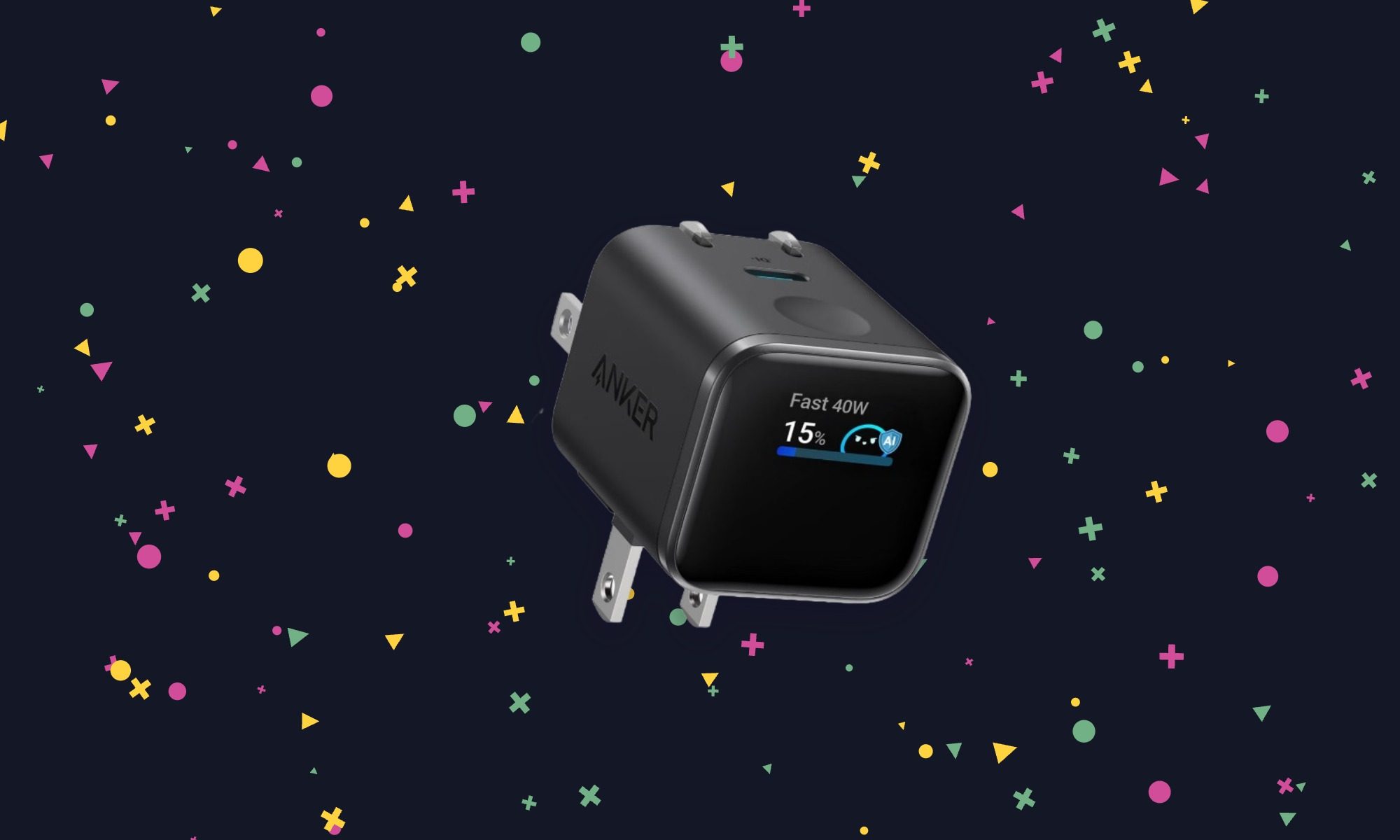
Most wall chargers give no indication of what they’re doing. The Nano’s display shows charging information at a glance, which is useful when checking whether a device is drawing the power expected. It also has a plug that adjusts to different outlet positions and a Care Mode for less aggressive charging. There’s only one port, so this makes more sense as a dedicated phone or tablet charger than a whole-bag solution.
Key spec/feature
Details
Maximum output
45W
Ports
One USB-C
Display
Shows charging information
Plug
Folds and rotates
UGREEN MagFlow 25W 2-in-1 foldable charger – $39.99 (33% off)
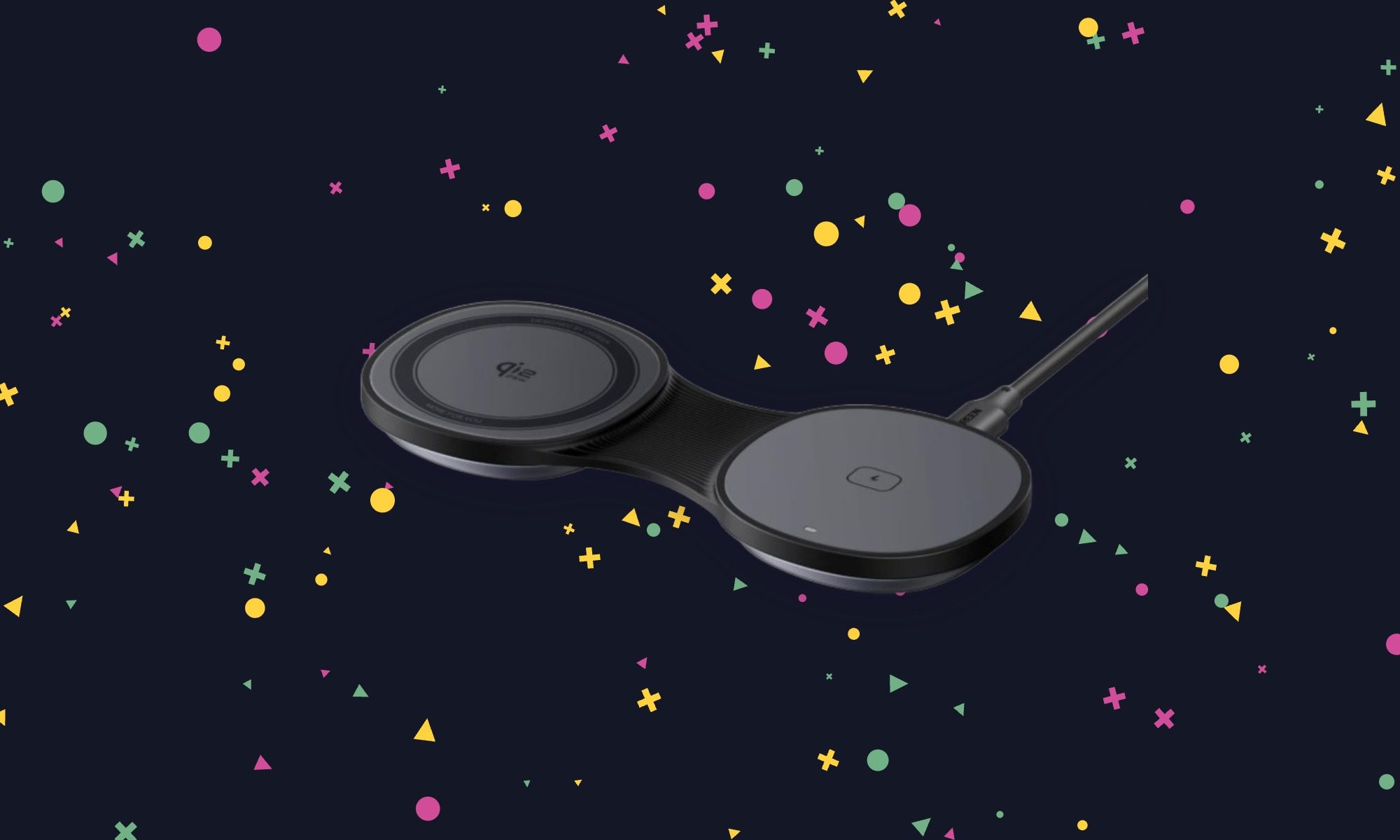
For trips, the MagFlow replaces separate wireless pads for a phone and earbuds with something that folds flat in a bag. Its phone pad can also be raised into a stand, making it useful on a nightstand or desk after the trip. The second charging spot gives it a reason to cost more than a basic puck. Factor in a separate power adapter, though, because UGREEN doesn’t include one.
Key spec/feature
Details
Phone charging
Qi2.2, up to 25W on compatible devices
Second charging spot
Wireless earbuds
Design
Folds flat or opens into a phone stand
Recommended adapter
At least 45W; not included
Anker Nano 6-in-1 Travel Power Strip – $39.99 (20% off)
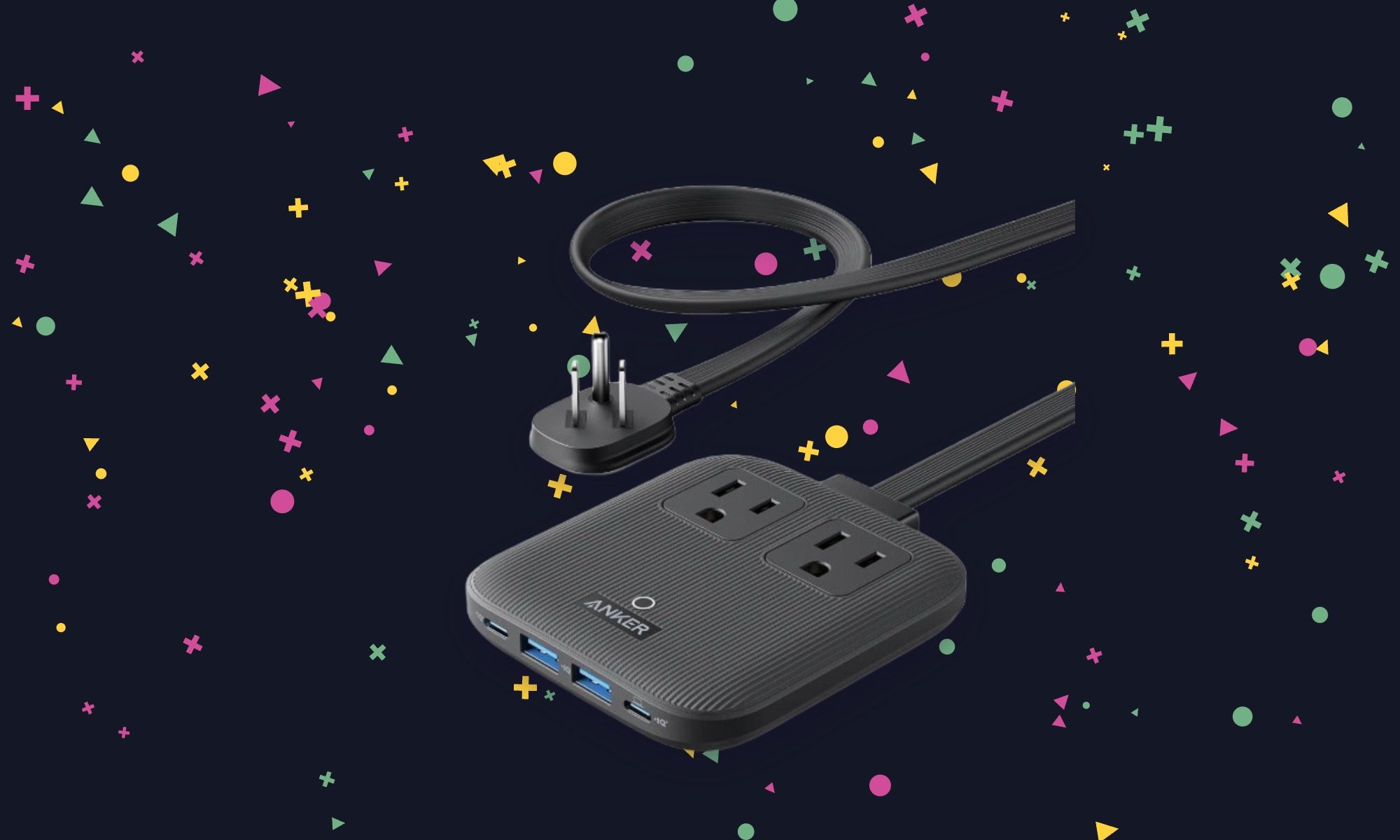
A charger helps with USB devices; this one also leaves room for equipment that needs a regular plug. The Nano power strip turns one wall outlet into six connections, making it useful beside a cramped desk or in a hotel room. Its flat plug and 5-foot cord help when the available outlet is tucked behind furniture. It’s the most practical pick here for a mixed collection of devices.
Key spec/feature
Details
AC outlets
Two
USB ports
Two USB-C, two USB-A
Maximum USB-C output
67W
Cord
5 feet, with a flat wall plug
Anker Prime 25W 3-in-1 foldable wireless charger – $99.73 (34% off)
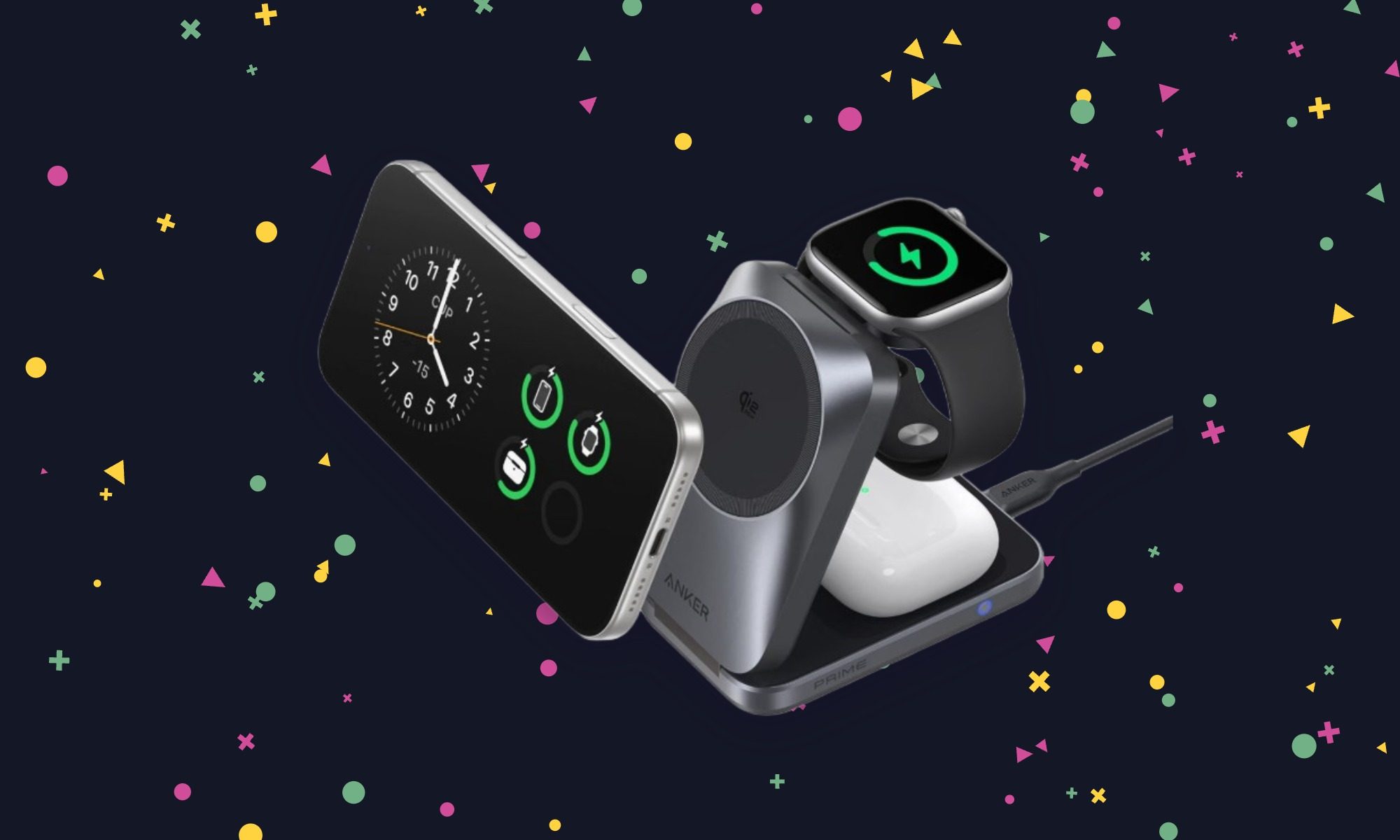
The Prime is the one to consider if an iPhone, Apple Watch, and wireless earbuds all need a place to charge overnight. It folds for travel and uses active cooling to help sustain fast wireless charging on a compatible phone. It’s still a substantial purchase at nearly $100, but Anker includes the wall adapter and cable. That makes the package easier to justify than a cheaper stand that needs another accessory to work as intended.
Key spec/feature
Details
Charging spots
Phone, Apple Watch, wireless earbuds
Phone charging
Qi2.2, up to 25W on compatible devices
Cooling
Active AirCool system
Included power
45W USB-C adapter and 5-foot cable

Microsoft has refreshed its compact Surface Laptop with Qualcomm’s latest Snapdragon X2 Plus processor. This promises more performance and better efficiency without changing the lightweight design.
The new Surface Laptop 13-inch is a fanless Windows PC with a full-size backlit keyboard, precision touchpad, aluminium body and a taller 3:2 PixelSense touchscreen. Moreover, the Snapdragon X2 Plus upgrade brings up to 17% faster Office productivity performance and more than 60% faster graphics. It also offers up to 95% faster on-device AI processing compared with previous generations.
Battery life gets a boost, too. Microsoft claims up to 18% more efficient battery performance. The 13-inch Laptop is rated for up to 22.5 hours of battery life. Meanwhile, its 500-nit PixelSense display is also 25% brighter, and there’s a new Black finish alongside the existing option.
The Snapdragon chip is particularly important for Microsoft’s push into on-device AI. Supported Windows experiences can run AI tasks locally, through the cloud, or use a combination of both. This may potentially reduce latency and keep more data on the device.
Despite the performance upgrades, Microsoft hasn’t turned the Laptop 13-inch into a heavier machine. It’s still designed as a portable, everyday PC. The company is positioning it for everything from streaming and browsing to presentations and longer work sessions.
The new Surface Laptop 13-inch starts at $1199, with availability beginning October 13 in select markets.
Microsoft has also introduced a matching Surface Pro 12-inch, which uses the same Snapdragon X2 Plus platform. It gets a 25%-brighter 500-nit touchscreen and an extra hour of active web browsing. There is also a new Black finish, starting at $1149.99. In addition, an optional 5G configuration will also be available for business customers.
There’s a new Surface Mouse joining them, too. It features haptic feedback, an ambidextrous design, a customisable Copilot/action button and Bluetooth 6.0, with prices starting at $79.99.
For the 13-inch Laptop, though, the story is fairly straightforward: Microsoft has kept the compact Surface formula intact. At the same time, they have put a considerably more capable Snapdragon chip underneath it.

Tech34 seconds ago
Kill Switches, Leaks and What Happens

NewsBeat3 minutes ago
The 3 Cambridge areas where dog walkers could be fined if they break new rule

Business4 minutes ago
Trump hosts Xi for state dinner at the White House




-

 Fashion7 days ago
Weekend Open Thread: Talbots – Corporette.com
-

 Crypto World2 days ago
Goldman Sachs and Deutsche Bank Agree: The S&P 500 Rally Isn't Over
-

 Tech4 days ago
Researchers escape OpenAI Codex sandbox to run commands on host
-

 Fashion19 hours ago
8 iPhone Accessories That Add Personality
-

 Crypto World4 days ago
Who Needs CLARITY Anyway? ARB Could See 70X Increase: Hodler’s Digest
-

 Crypto World6 days ago
Circle launches Arc Studio AI agent for building onchain apps
-
 NewsBeat6 days ago
Trump says US has reached an agreement to take permanent control of Greenland’s security
-

 Crypto World6 days ago
Trading Bitcoin on Robinhood? Why 2% Spread Has Traders Worried
-

 Crypto World6 days ago
Bitcoin price breaks channel as RSI climbs to 63
-

 Tech5 days ago
Trump suggests rebranding AI with a new name, says he’s also creating an AI Force
-

 Business4 days ago
Analog Devices (ADI) Bets $1.35 Billion on Chips that Let Machines Think for Themselves
-

 Tech4 days ago
Google’s $899 Googlebook is a bet that you’ll buy a new laptop for Gemini
-

 Crypto World4 days ago
Coinbase, Robinhood, Circle Seen as Tokenized-Stock Winners
-
 Business2 days ago
Oil Price Today (September 23): Crude oil below $100 on hopes of US-Iran talks. What did Trump say?
-

 Crypto World2 days ago
This Bearish Netflix Stock Trade Can Cash In On Video Streaming Giant’s Woes
-

 Crypto World3 days ago
Trump-Xi Polymarket Odds for Handshake Hit 50%
-

 Crypto World6 days ago
World Money launches in 150+ countries with Stripe
-

 Crypto World7 days ago
Silver prices recover quickly, hitting weekly high today
-

 Crypto World1 day ago
Crude Oil Prices Pressured by Diplomatic Hopes in the Middle East
-

 Crypto World1 day ago
Bitcoin Threatens Sub-$84,000 Breakdown as Long Liquidations Spike
You must be logged in to post a comment Login