

Join Mikko Hyppönen and security leaders from the NFL, CHANEL, and Atlassian for a two-hour digital summit on what AI-speed attacks change, what defenders should stop doing, and how to validate, decide, fix, and re-validate at machine speed.
Tech
How AI Job Matching Works: Signals, Ranking and Limits

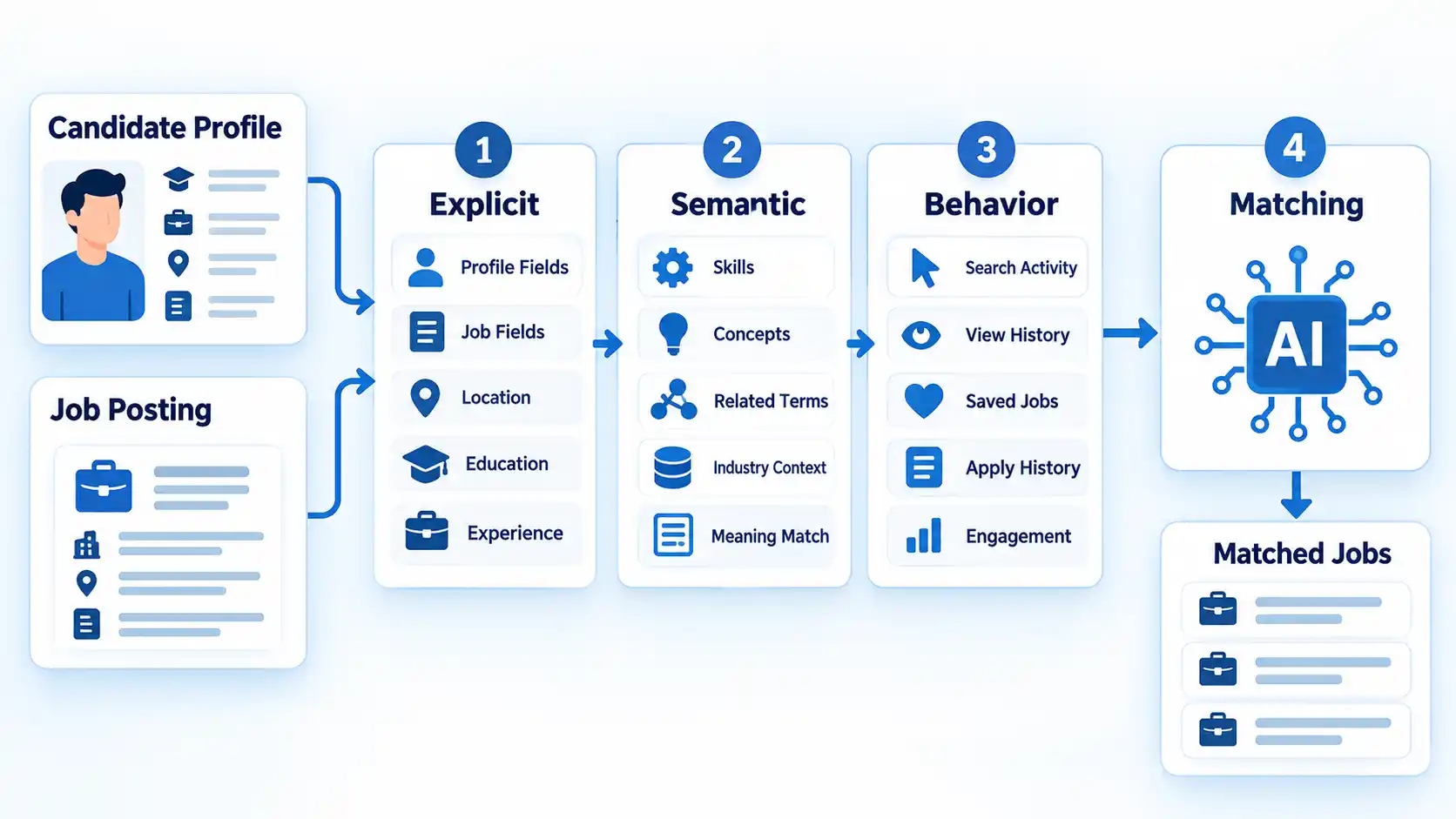
AI job matching turns information about a candidate and a job into signals, narrows the available pool, scores plausible matches, and ranks the results. More advanced systems can also use semantic similarity, behavior, and feedback, but a high-ranked match is still an estimate of relevance rather than proof that a person and job are objectively compatible.
There is no single algorithm that every job platform uses. Different systems can use different data, models, filters, ranking objectives, and feedback signals. The useful way to understand AI job matching is therefore as a common pipeline rather than as one universal formula.
AI Job Matching Is a Ranking Problem, Not a Mind Reader
AI job matching does not understand a person’s career in the same way a human recruiter or career adviser might. Instead, software converts available information about people and vacancies into data it can compare.
A signal is a piece of information a system can use when estimating how relevant a candidate and job appear to each other. Signals can come directly from profile fields, job postings, resumes, search preferences, or interactions with the platform.
Consider a nurse searching for a remote role. The candidate side might contain a nursing qualification, years of experience, location, preferred work arrangement, and listed skills. A vacancy might contain a title, required license, location rules, schedule, experience requirements, and employment type. A matching system can compare some of those details and use the result to narrow or order vacancies.
The same general idea works in the opposite direction when recruiters search for candidates. LinkedIn’s current Recruiter documentation describes a process in which candidates matching requested keywords and facets are selected and then ranked using additional signals such as work-experience or skill similarity and likelihood of response.
One important limitation appears before any sophisticated ranking occurs: both sides can be incomplete. A candidate may omit a relevant skill or certification, while a job description may leave an important requirement unstated. Missing information therefore does not necessarily mean the candidate lacks a qualification or that the job lacks a characteristic.
Step 1: Turn Profiles and Job Posts Into Matching Signals
The first technical challenge is converting messy information into signals the system can actually compare. These signals fall into several broad categories, although individual platforms can define and combine them differently.
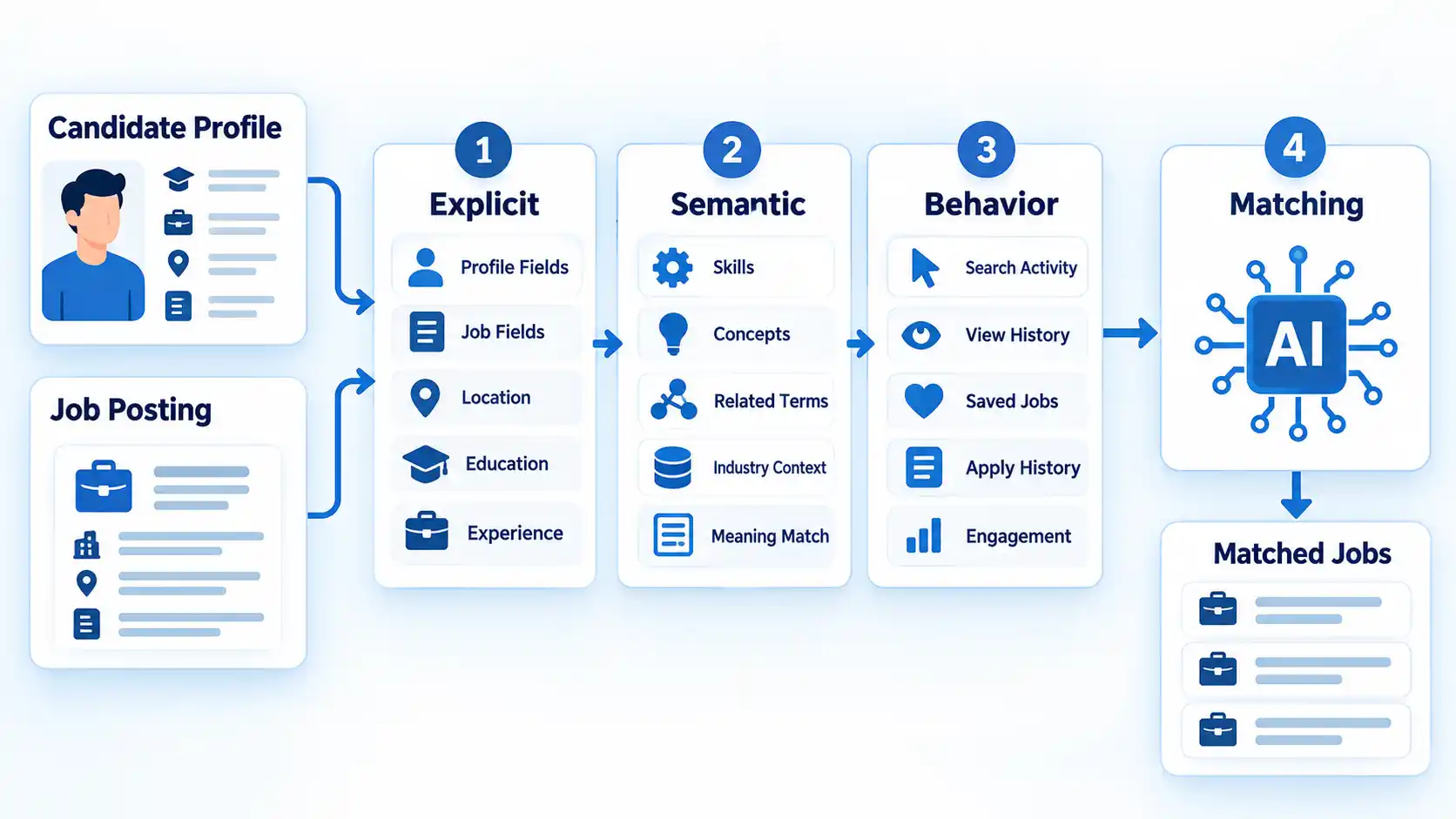
Explicit signals
Explicit signals are information that a user, recruiter, employer, or platform records directly. Examples include job title, location, employment type, degree, certification, salary preference, years of experience, and whether a person wants remote, hybrid, or on-site work.
LinkedIn’s current job-recommendation documentation says recommendations can use preferences including job titles, locations, location types, and employment types. It also says profile-based recommendations can consider information from a member’s headline, About section, experience, education, and location preferences.
Explicit information is useful because its meaning can be relatively clear. If a person selects remote work, the platform does not need to infer that preference from unrelated behavior. The limitation is that explicitly entered information can be incomplete, outdated, inconsistent, or too broad.
Inferred and semantic signals
Platforms can also derive signals from unstructured text. A skill, occupation, or concept may appear in a resume, profile summary, work history, or job description without being stored as a neatly selected field.
Semantic matching means comparing meaning or related concepts rather than depending only on identical text. For example, “SaaS” and “Software as a service” can describe the same concept even though the wording differs.
LinkedIn’s current Skills filter distinguishes explicit skills from implicit skills extracted or inferred from profile content. It also gives a concrete example in which a search for “SaaS” can return members whose profiles use “Software as a service” instead.
Semantic inference can expand useful matches, but it creates another failure mode: an inferred skill or concept can be wrong. Mentioning a technology in a project description does not always mean the person is proficient in it, and similar terminology can have different meanings in different industries.
Behavioral signals
Interactions can become signals too. Saving a vacancy or candidate, hiding a recommendation, messaging someone, applying for a job, or repeatedly searching for a particular role can provide evidence about likely interest or responsiveness.
LinkedIn’s Recommended Matches says recruiter actions such as saving, hiding, and messaging candidates are used as real-time hiring signals. It also describes job-posting signals such as titles, locations, and skills and member-side signals such as being open to work.
Behavior is useful but ambiguous. A user may ignore a job because it is irrelevant, because important information is missing, because they have already seen it, or simply because they never noticed it. Treating every interaction as a perfect description of preference can therefore teach a system the wrong lesson.
The table below separates the main signal categories from what they can reasonably tell a matching system. Every signal is a proxy for something the platform wants to estimate rather than a complete description of the person or job.
| Signal type | Example | What it can tell the system | Main limitation |
|---|---|---|---|
| Explicit profile or job fields | Job title, location, degree, employment type, listed skills | Directly stated requirements, qualifications, or preferences | Information may be missing, outdated, broad, or entered inconsistently |
| Inferred or semantic signals | Skills or concepts extracted from profile, resume, or job-post text | Potential similarity even when the same exact words are not used | An inference can misread context or overstate experience |
| Behavioral signals | Clicks, saves, hides, searches, applications, or messages | Possible interest, disinterest, or responsiveness | An action may have several explanations and may not reflect true preference |
| Outcome or feedback signals | Employer response, interview progression, hire, or another observed outcome | Whether previous matches led to later-stage outcomes | Historical outcomes can reflect earlier human decisions, unequal exposure, or other biases |
Step 2: Apply Constraints and Retrieve Plausible Matches
After signals exist, a platform does not necessarily run its most detailed scoring process against every possible person-job pair. Large marketplaces can contain enormous numbers of profiles and vacancies, so matching can begin by reducing the search space.
A hard constraint is a condition treated as required for a particular search or matching operation. Depending on the system and user-selected filters, examples can include a location requirement, employment type, occupational credential, or another must-have condition.
Retrieval is the stage that finds a manageable set of plausible candidates or jobs before more detailed ranking. It answers a broad question such as “Which possibilities are worth evaluating further?” rather than “Which one should appear first?”
LinkedIn’s current recruiter documentation describes this separation directly: candidates matching requested keywords and facets are selected and then ranked using other factors. Its current AI Search documentation also says natural-language requests can be translated into structured filters such as location, skills, and job titles.
This distinction creates an important failure point. If a strict filter removes someone during retrieval, the later ranking system may never evaluate that person. A qualified candidate can therefore disappear because a requirement was entered too narrowly, a profile field is missing, a job title is unusual, or an equivalent qualification is represented differently.
Retrieval quality matters as much as ranking quality. A ranking model cannot promote a relevant result that was never retrieved.
Step 3: Score and Rank the Remaining Matches
Once the system has a smaller set of plausible matches, it must decide which results deserve the most prominent positions.
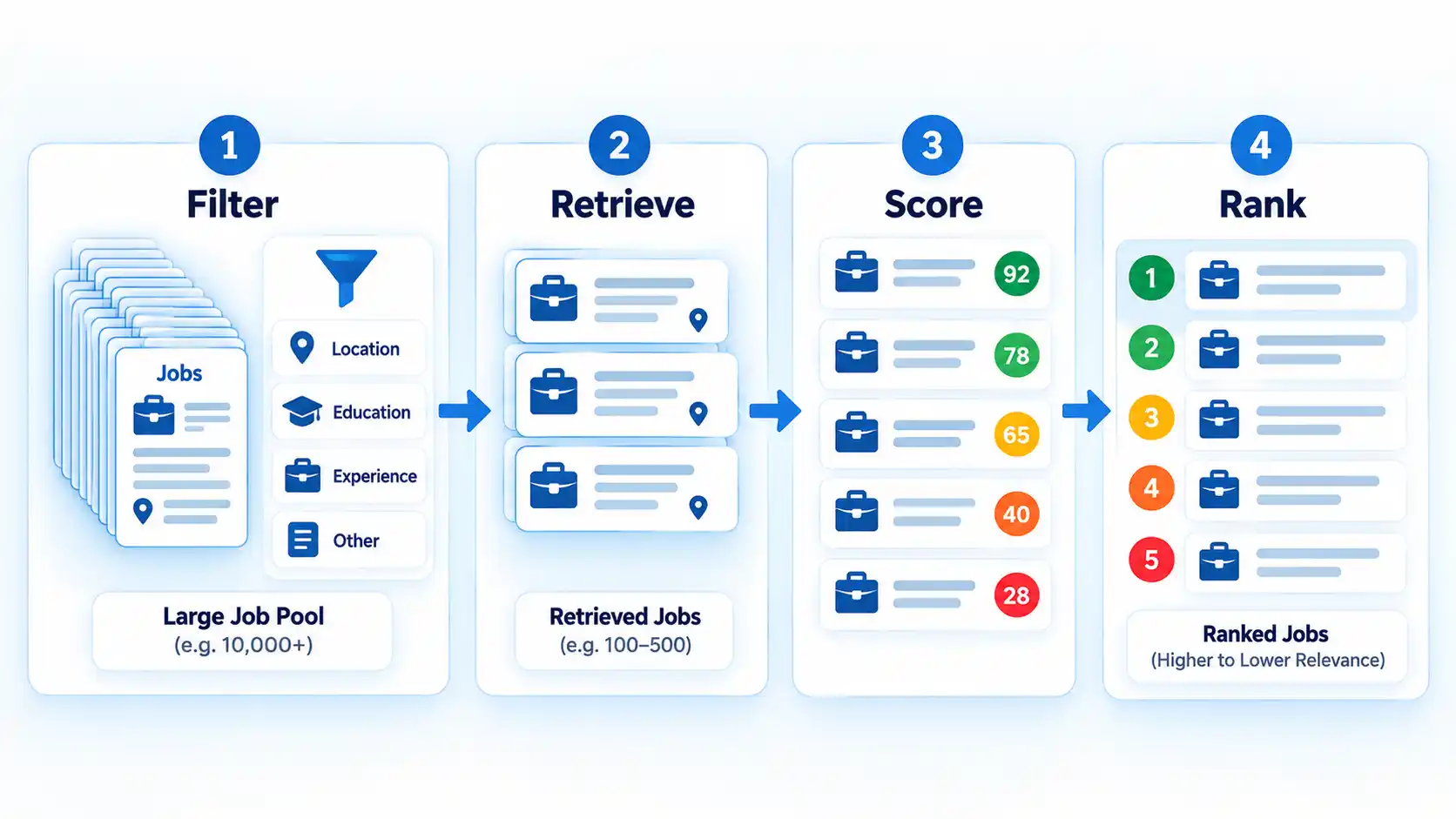
A relevance score is a model-produced value used to compare matches under the system’s chosen objective. Its exact meaning depends on the product. A score might reflect similarity, predicted responsiveness, expected usefulness, or a combination of signals.
It should not automatically be interpreted as a probability of being hired.
Current LinkedIn Recruiter documentation provides a concrete example of multi-signal ranking. It says candidates can be ranked using factors including similarity between their work experience or skills and the search criteria, together with the likelihood that an interested candidate will respond. LinkedIn says those factors are weighted using machine-learning models.
A simplified matching system might face a trade-off like this:
- Candidate A has very strong skills similarity but does not satisfy the preferred location.
- Candidate B has slightly weaker skills similarity but matches the location and employment preferences closely.
- Candidate C satisfies the stated search criteria but appears less likely to respond.
These are illustrative examples, not LinkedIn’s published scoring formula. The final order depends on the objectives and weights used by a particular system. Commercial platforms usually do not disclose a fixed percentage for every signal, so it would be misleading to assign arbitrary weights to skills, location, experience, or activity.
Some recommendation architectures use more than one ranking pass. Reranking means taking an already retrieved or initially ordered set and applying another model or scoring stage to refine the order.
A 2026 job-recommendation study, for example, combined metadata filtering, TF-IDF lexical retrieval, Sentence-BERT semantic retrieval, and optional cross-encoder reranking. The research demonstrates one possible hybrid architecture; it does not establish that LinkedIn, Indeed, Lensa, or every commercial job platform uses Sentence-BERT, cross-encoders, or the same model sequence.
Why Keyword Matching and Semantic Matching Produce Different Results
Keyword matching and semantic matching solve related but different problems.
Lexical or keyword matching looks for words, phrases, or standardized terms. It works well when a candidate and job use the same vocabulary. If both contain “project manager,” the connection is straightforward.
The weakness appears when equivalent ideas use different language. A job might request “Software as a service” experience while a candidate writes “SaaS.” A narrow exact-text approach could miss that relationship.
Semantic matching attempts to capture related meaning so concepts can still appear similar without identical wording. This can help retrieve profiles or vacancies that strict text matching might miss.
The two approaches do not have to compete. The 2026 research system cited above combined lexical and semantic retrieval rather than replacing one with the other. Structured filters can preserve precise constraints while semantic retrieval can broaden matching across terminology differences.
Semantic matching also has limits. Two phrases can appear related to a model while carrying different practical meanings. “Machine learning research” and “machine learning operations,” for example, overlap in vocabulary and domain but can require substantially different experience. Better semantic recall therefore does not automatically mean better job fit.
Job Matching Can Be a Two-Sided Recommendation Problem
Job recommendation differs from many ordinary recommendation systems because a useful match may depend on both sides of the marketplace. It is not enough for a job seeker to like a vacancy if the role has requirements the person does not meet, and an employer’s preferred candidate may have no interest in the location, schedule, salary, or role.
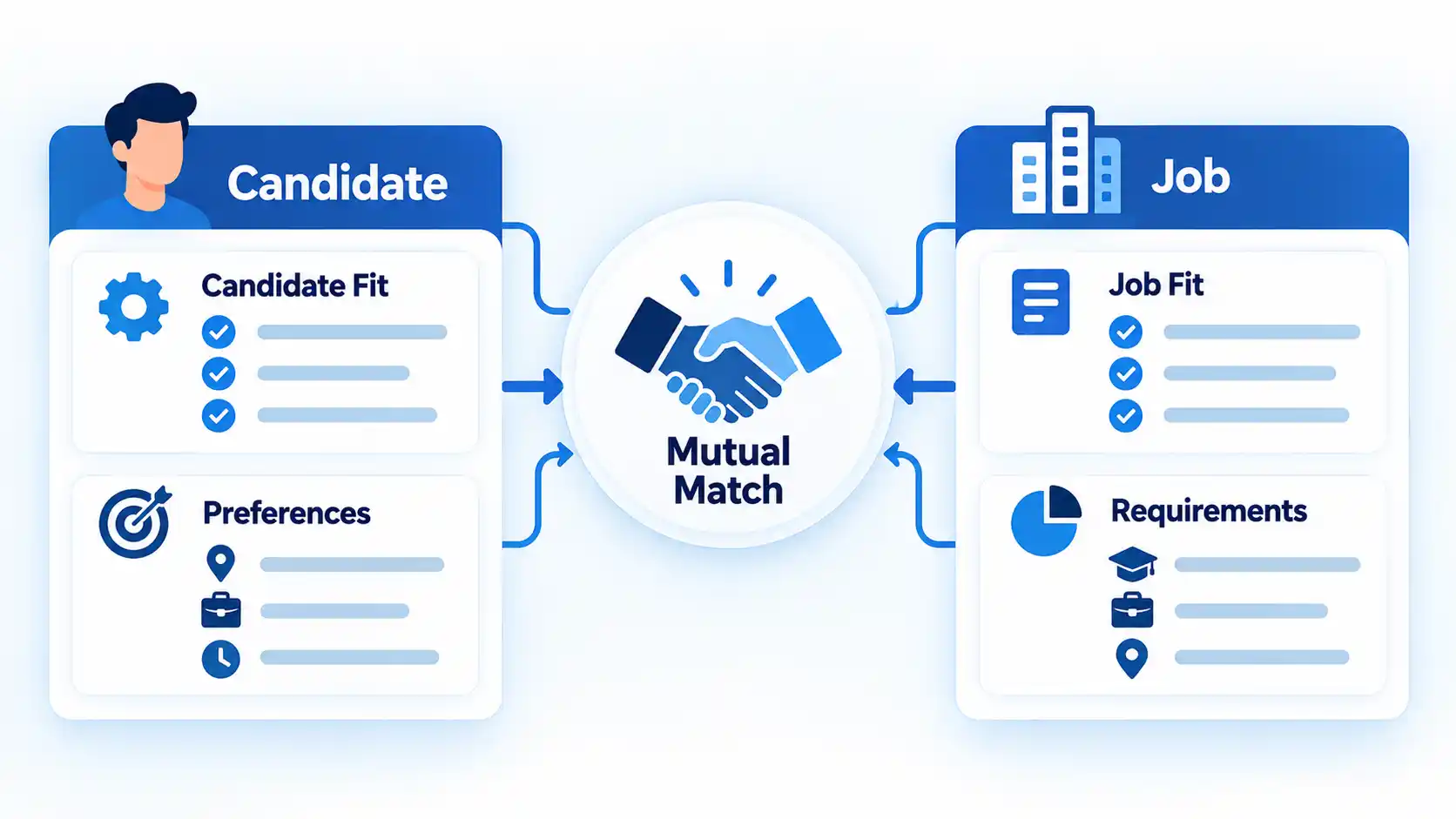
Researchers often describe this as a reciprocal recommendation problem because relevance can operate in both directions. A review of job recommender-system research identifies reciprocity as an important feature of the domain and also highlights data availability, temporal effects, fairness, and generalizability as evaluation challenges.
Consider two candidates for the same vacancy. Candidate A strongly prefers the job but lacks a mandatory professional license. Candidate B has the license and relevant experience but wants a fully remote role while the vacancy requires daily on-site work. A single similarity measure does not capture both sides of those constraints and preferences.
Indeed’s public explanation of its own matching system similarly describes a two-sided marketplace and a process of understanding people and jobs, narrowing and ranking possible matches, and learning from subsequent outcomes.
This does not mean every platform optimizes the same objective. A system might optimize for a useful recommendation, an application, a response, an interview, a hire, or another measurable outcome. Unless a platform documents its objective, the safest interpretation of a ranking is that the system estimates relevance or expected usefulness according to its own design.
Feedback Can Improve Rankings, but It Can Also Reinforce Mistakes
Matching systems can use what happens after recommendations are shown as additional information. A feedback loop occurs when earlier recommendations generate behavior that later influences future recommendations.
Possible feedback signals include clicking or saving a vacancy, hiding a recommendation, applying, replying to a recruiter, progressing to an interview, or being hired when the platform can observe that outcome.
Indeed says its system uses outcomes including applications, employer interview progression, ignored jobs, and successful hires as feedback for later matching. LinkedIn separately documents recruiter actions such as saving, hiding, and messaging candidates as signals in Recommended Matches.
This can make a system more responsive, but feedback is not neutral ground truth. Suppose a platform initially shows a software engineer mostly fintech jobs. If the person can interact only with the jobs the system exposes, later behavior may appear to confirm a strong fintech preference even if healthcare or education-technology roles were rarely presented.
This illustrates a filter-bubble risk. A 2025 LinkedIn research paper on large-scale job matching explicitly identifies cold start, filter bubbles, and bias as practical challenges in its research context. The paper describes a particular signal-integration system rather than establishing that every production job recommender experiences these problems to the same degree.
Cold start is the related problem that appears when the system has little historical information about a new user, new vacancy, or new type of role. In that situation, profile content, job metadata, skills, titles, or other non-behavioral signals can become especially important.
The Main Limitations of AI Job Matching
AI can make large job markets easier to search, but every stage of the pipeline introduces assumptions and possible errors. These are parallel failure modes, not a ranking of which problem is worst.
- Incomplete candidate profiles: a system cannot reliably use qualifications that are missing, outdated, or represented ambiguously.
- Weak job descriptions: vague titles, inflated requirements, missing conditions, or unclear working arrangements reduce the quality of the information being matched.
- Cold start: a new candidate, employer, vacancy, or occupation may have little interaction history from which to learn.
- Incorrect inference: semantic models can infer a skill, occupation, seniority level, or relationship that does not accurately describe the candidate or job.
- Feedback loops: future recommendations can become too dependent on what the system previously chose to expose.
- Optimizing the wrong outcome: more clicks or applications do not necessarily mean better jobs, stronger fit, better conditions, or successful hires.
- Ranking and exposure effects: higher positions receive more opportunity for attention, so ranking affects what users can see and act on.
- Bias and proxy variables: harmful patterns can enter through data, labels, system design, human processes, or variables correlated with sensitive characteristics.
- Changing labor-market patterns: occupations, terminology, skills, qualifications, and hiring behavior evolve, so relationships learned from older data may become less useful.
- Opaque scoring: users may see an ordered list or match label without knowing which signals dominated the result.
Bias deserves especially careful treatment. NIST’s current harmful-bias research page explains that bias can arise from more than training data and that AI systems can perpetuate or amplify harmful patterns. Removing one obvious sensitive field is therefore not enough to establish that a system is fair.
Ranking creates another issue: exposure. A result shown near the top has more opportunity to receive attention than one placed much lower. NIST’s TREC Fair Ranking work explicitly studies systems that balance result quality with fair exposure. That benchmark is not specific to employment, so it is used here only to illustrate the broader ranking principle that ordering affects who or what receives attention.
These concerns become more consequential when automation moves from recommending opportunities toward evaluating applicants. Job recommendation should therefore be separated from AI resume screening, where employer-side systems may evaluate or narrow applicant pools rather than simply recommend vacancies.
What a Match Score Does and Does Not Tell You
A high-ranked job or candidate generally means the system estimates that result to be more relevant under its available signals, filters, data, and optimization objective than at least some of the alternatives it considered.
That is useful, but it is narrower than many people assume. A high match score does not automatically prove that:
- the applicant satisfies every meaningful qualification;
- the employer will respond or offer an interview;
- the person will enjoy the role or workplace;
- the employer offers good conditions;
- the recommendation is free from bias;
- the score represents a probability of being hired; or
- the top-ranked vacancy is objectively the best opportunity available.
Real platforms show how these general ideas become product features. Lensa’s AI-assisted job matching, for example, provides a platform-specific case of AI-assisted job discovery and matching, while LinkedIn and Indeed document different combinations of preferences, profile information, search filters, behavioral signals, and ranked recommendations.
The safest way to use a match is as a search aid rather than a verdict. A ranking can reduce the number of possibilities you need to inspect, but broader job search strategies such as checking the employer, tailoring an application, reviewing requirements, and preparing for interviews still happen outside the matching score.
AI job matching is therefore most useful when its output is treated as an informed shortlist. The system can estimate relevance from the information it has, but the candidate and employer still provide context, verification, judgment, and decisions that a ranking cannot fully represent.
Continue Reading
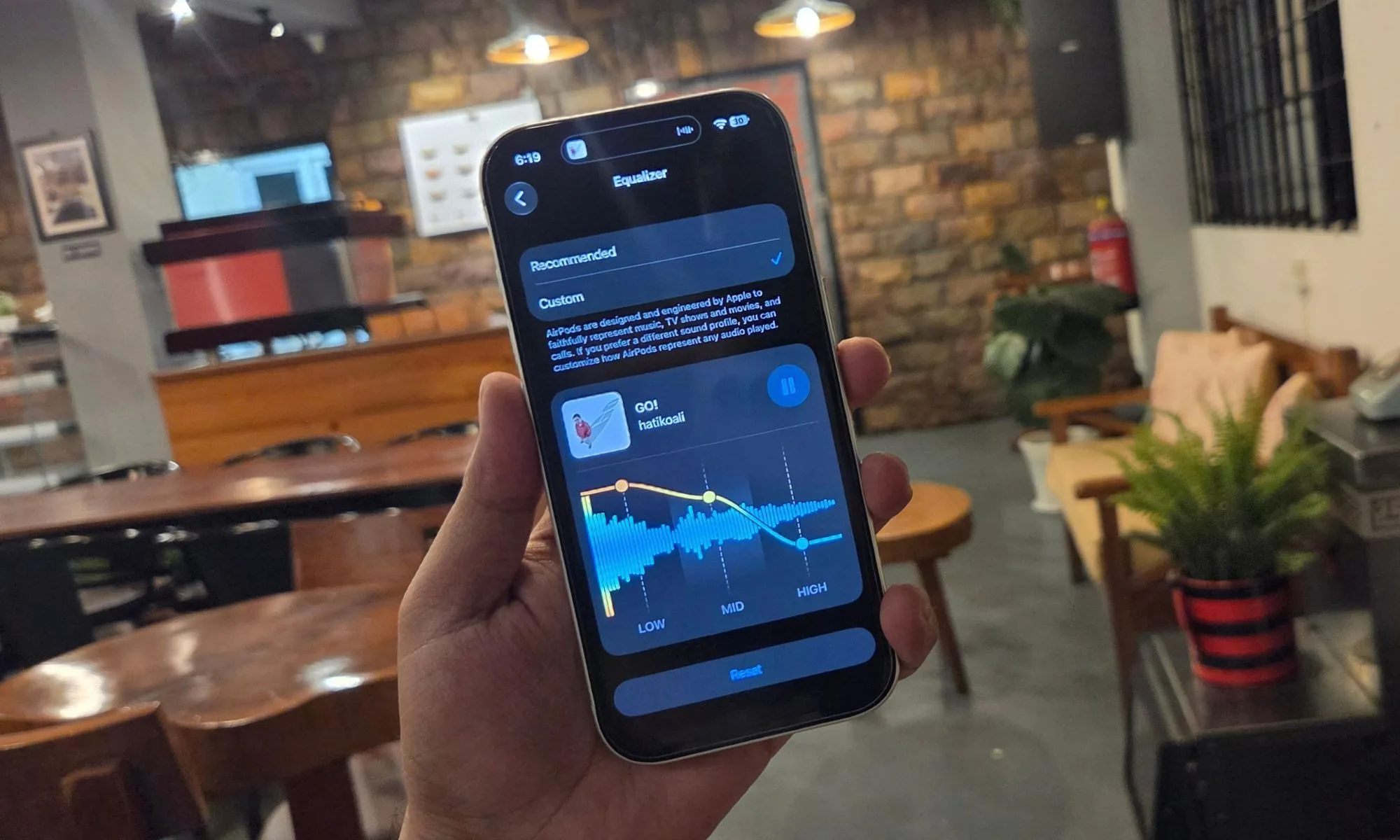
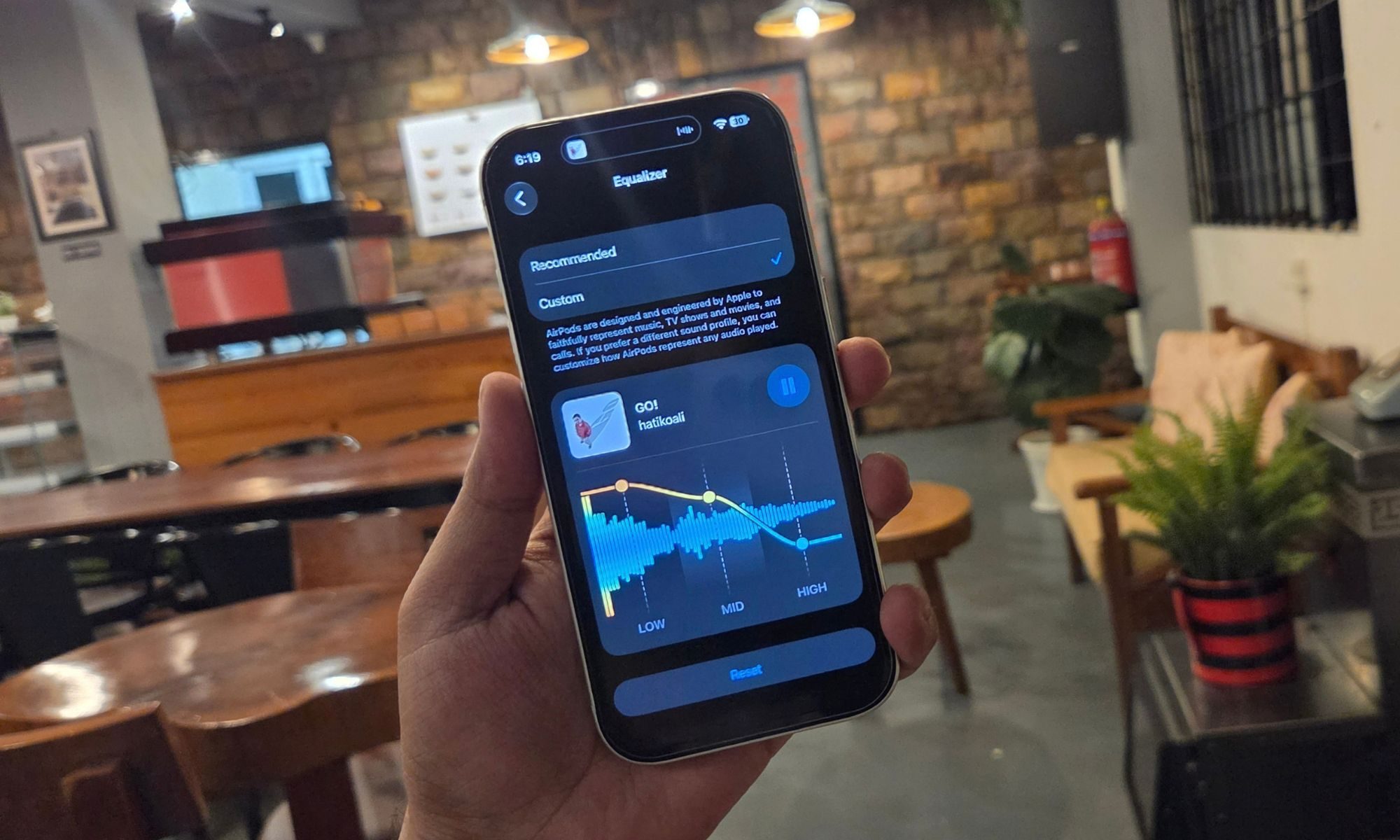
I just adjusted the frequency response to my favorite Kazakh Hip-Hop track, and my AirPods Pro obliged, blasting soul-pleasing bass beats in my ear canals. In hindsight, I think this is how “Go” by Hatiko Ali was always meant to be listened to. Wading into an entirely different world, I slightly raised the mids and found myself lost in the melodious voice of Shafqat Amanat Ali.
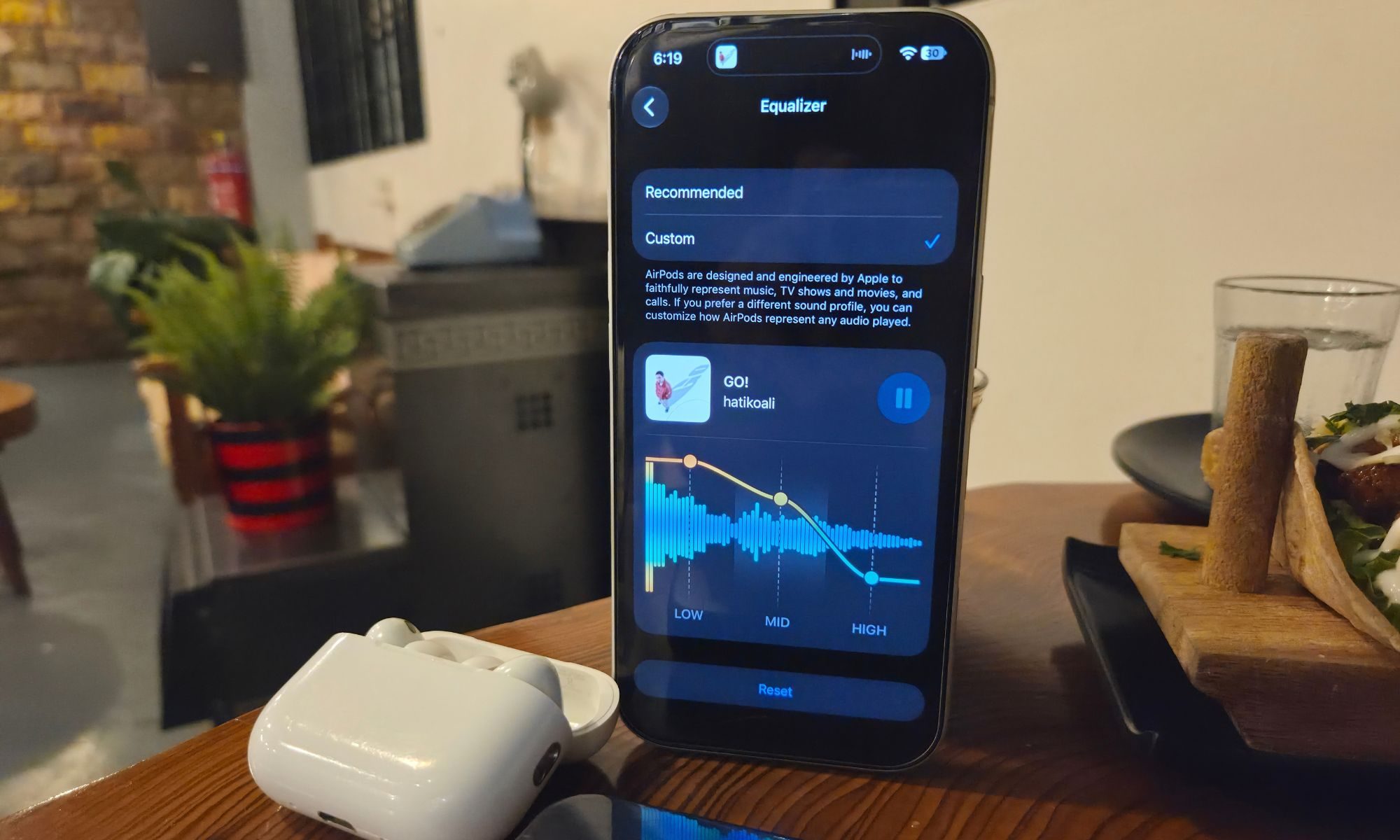
Just over a week ago, that wouldn’t have been possible. But thanks to iOS 27, and the latest AirPods firmware, Apple has finally added a custom tri-band EQ to give users a flexibility that they’ve been asking for years. It’s not as fleshed out as what you get with the likes of Sony, but the difference is easily noticeable, and utterly satisfying.
So, what’s the big deal?
It won’t be an overstatement to say that Apple put true wireless earbuds into the mainstream. It’s next to impossible to walk in a buzzy place, a workspace, or even on public transport, and not see a few skulls rocking the distinctly white earbuds sold by Apple. And for good reason. They pair seamlessly, offer a bunch of cool features such as Find My tracking, and deliver fantastic noise isolation.
Of course, they sound pretty good. Apple, however, has also been pretty stubborn in the sound department, preventing audiophiles from customizing how the AirPods sound. For years, Apple has maintained that the AirPods have been tuned by experts and that they sound just fine out of the box. Apple never served a custom EQ (aka equalizer) for its earbuds, something nearly every other major audio brand offers.
With the release of iOS 27, Apple has finally made a course correction. So far, you could only pick between three presets in the name of customization: Balanced Tone, Vocal Range, and Brightness. Annoyingly, these settings were buried under Headphone Accommodations. That’s not a name where I would ever go looking to tweak the audio profile of my AirPods. And yeah, it wasn’t enough.
Does it make a difference though?
Absolutely.
Look, I won’t mince words here. Everyone has a different taste in music, and even when it comes to the same band — or even a track — what you like in a particular song is going to be different from the next person. Likewise, given the flexibility, you might occasionally want to enhance a certain element of a track, like the vocals raised and the background instruments suppressed, in a song.
I know. I know. Music purists are going to balk at the idea. They would say you should listen to a song the way it was intended to be listened to. Or, to put it more accurately, listen to it the way a music artist is serving it. Simply put, just enjoy it in its pristine state. I disagree with that notion. You should listen to a song in the unique flavor that pleases your senses. There’s a reason lo-fi and slowed-reverb tracks are all the rage. Apple’s tri-band EQ finally gives you that freedom.
While listening to Nine Inch Nails’ “As Alive As You Need Me To Be” from the “Tron: Ares” soundtrack, I always felt it was a tad chaotic. I wanted to hear the rock ferocity of Reznor’s voice on this track, without it being suppressed by the background instruments. Well, on the EQ page, I pulled down the high-band while raising the mid and low band output. That changed the entire song’s vibe.
The distinct mechanical grit in Reznor’s voice became more obvious, with all its visceral aggression and layered vocal texture — all against a more pronounced bass chorus. Moving over to “A Drowning” by How to Destroy Angels, an inverted V-shaped EQ graph (bring down the low and high bands, enhance the mids) is the best way to enjoy Mariqueen Maandig’s vocals in all their controlled elegance and chilling precision against the dark backdrop.
But how?

Well, as mentioned above, make sure your iPhone is running the latest iOS 27 build, and you have the updated firmware installed on any of the AirPods models listed below:
Next, pair the AirPods to your iPhone and follow this path:
Settings > (Name of your AirPods) > Audio & Routing > Equalizer > Custom.
Thankfully, the EQ changes you make on your iPhone will also reflect when the AirPods are connected to your iPad or Mac. “Custom EQ settings are stored on your AirPods and carry over to any other paired devices,” explains Apple.
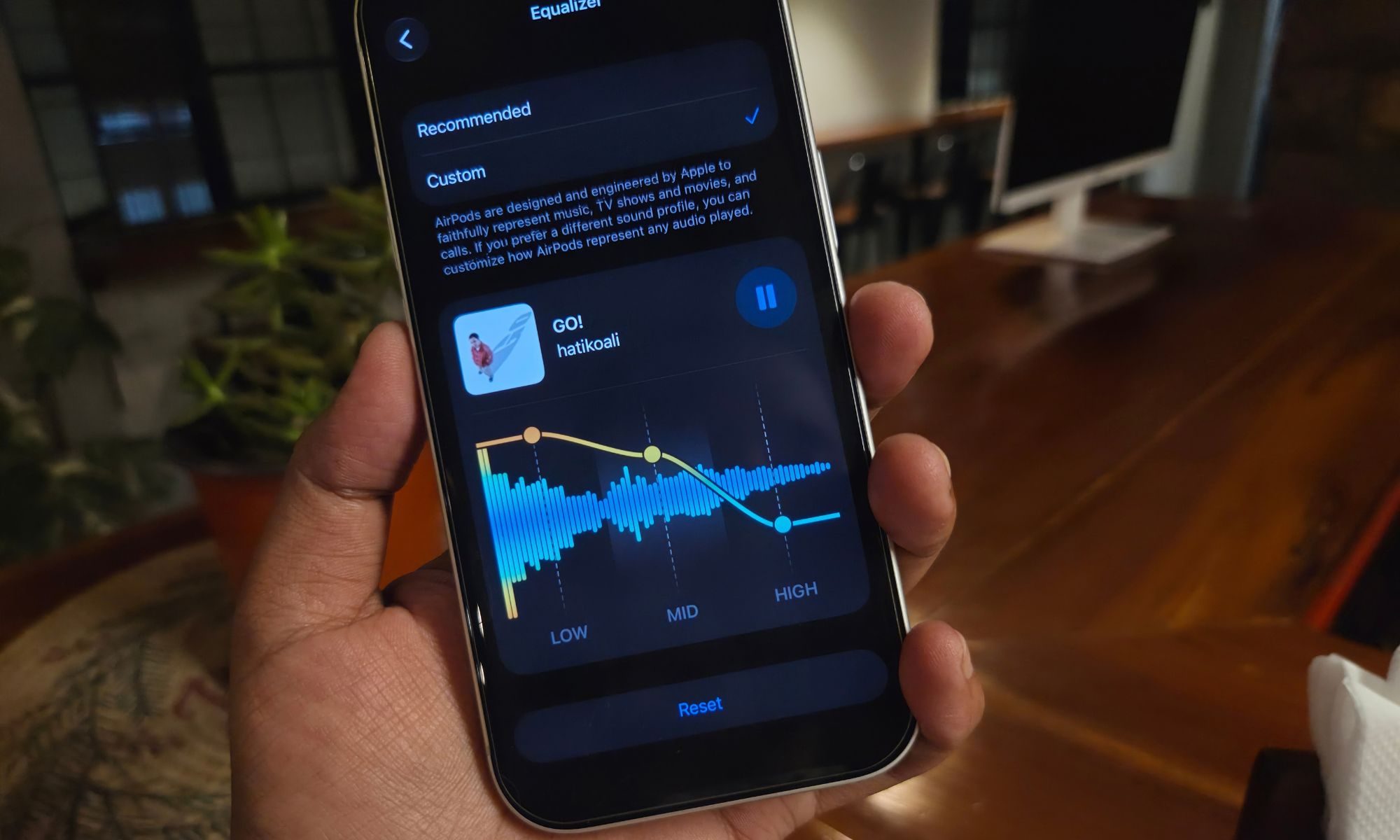
As mentioned above, you don’t necessarily have to go down the path. The AirPods (especially the Pro and Max) are tuned pretty well, and if you just want to enjoy music without losing brain cells over mids, lows, and highs, stick with the pre-applied “Recommended” profile. But if you ever wondered what a track would sound like if certain melodious or instrumental elements were adjusted, head over to the EQ page and play around. Trust me, it’s a rewarding exercise.


In JD Power’s 2026 U.S. Tech Experience Index (TXI) Study, the company took a closer look at the smart technology in new vehicles — the technology that “makes everyday driving easier without demanding the driver’s attention”, like a big infotainment screen. When it comes to smart technology innovation, Hyundai has ranked the highest for mass-market car brands seven years in a row — and the tied runner-ups, GMC and Kia, are not very close. Its three-row mid-size SUV, the Palisade, received JD Power’s mass-market Advanced Technology Award in the Driver Assist category specifically for its blind-spot camera.
Most vehicles have blind-spot monitoring these days, but the Palisade displays a live camera feed of your blind spots right in the vehicle’s digital instrument cluster every time you use a turn signal. The Blind-Spot View Monitor (BVM) has a camera feed for both the left and right turn signals. Once the turn signal is shut off, the images will disappear from the display.
Depending on the trim, the Hyundai Palisade also comes with the automaker’s SmartSense, its safety-focused technology suite. This includes Highway Driving Assist, which keeps you at a safe distance and speed from other vehicles on the highway. Lane Keeping Assist can guide you along your chosen lane. It also has Forward Collision-Avoidance Assist 2, which applies the brakes after warning you of a potential collision with another car or pedestrian. Similarly, Blind Spot Collision-Avoidance Assist will warn you of possible dangers while merging lanes, and Reverse Parking Collision-Avoidance Assist ensures that everything is clear while you back into a parking spot.
What are the key findings of JD Power’s 2026 TXI study?
When it comes to technology, JD Power’s 2026 U.S. TXI Study revealed that drivers prefer smart technology features to passenger screens and more complex features, like hands-free driving. When it comes to the passenger screen, 35% of surveyed drivers have never used it, with most saying it’s one of the more problematic features in vehicles with an abundance of screens and technology. There’s a reason automakers are starting to back away from screen-focused cabins.
Level 2 driving assistance programs, which still require drivers to pay attention to the road, are preferred to Level 2+ systems, which let you take your hands off the wheel. According to Doron Hikry, JD Power’s Director of Customer Success, this could be due to drivers being less comfortable with more automation (which can also be seen with self-driving robotaxis).
Instead, the study found that drivers prefer smart tech that stays in the background, providing more comfort and fewer problems. One of the highest-ranked smart tech features was smart ignition, which turns the car on and off without a key in the ignition. “The technology customers value most is often the technology they barely notice because it simply works,” said Hikry.


Anthropic has just announced a new Claude Marketplace, and it brings all AI-related tools into one place, including plugins, connectors, agents, and more.
Claude’s marketplace is already public, and Anthropic says it’s already offering more than 2,000 connectors and plugins.
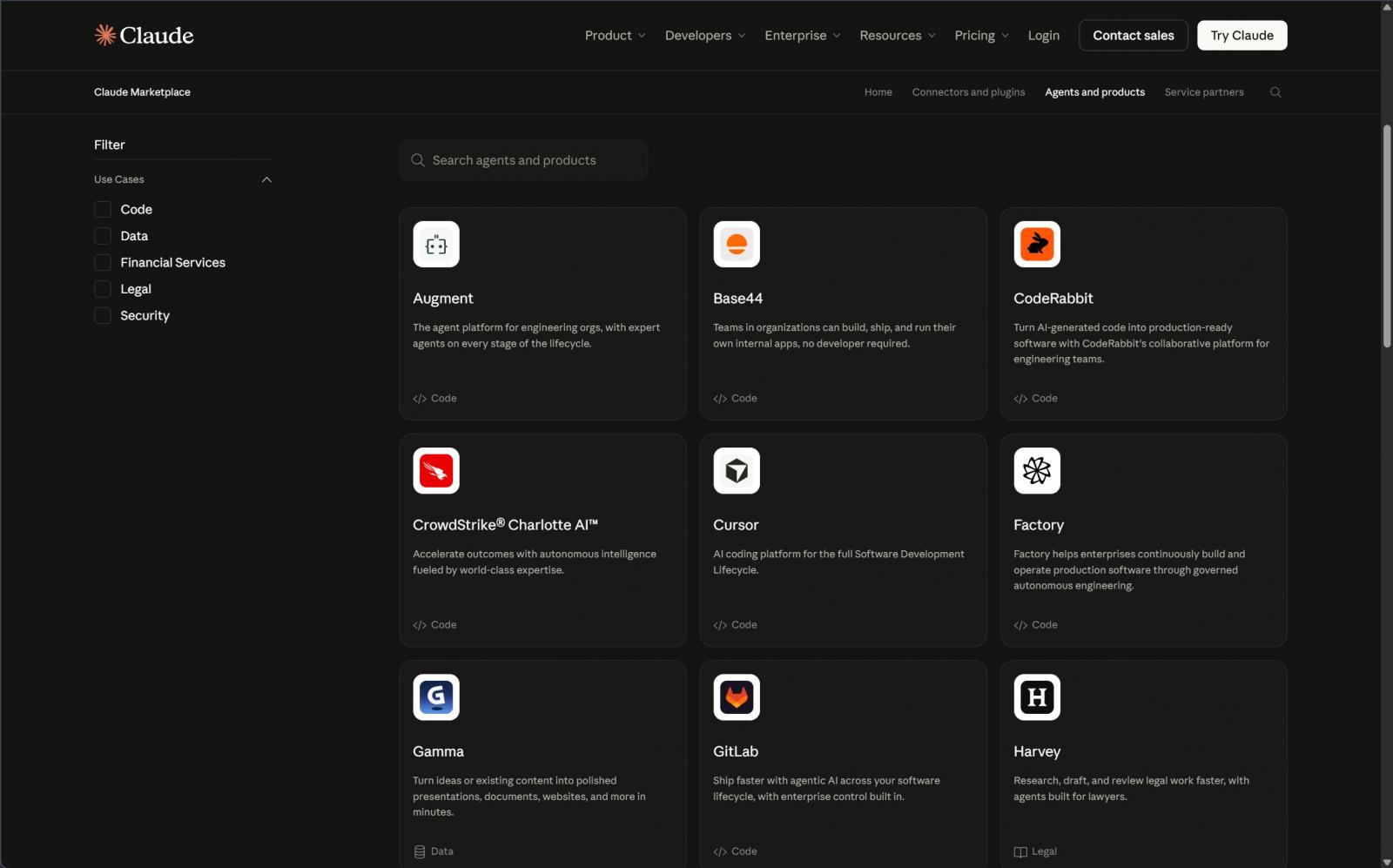
These plugins or connectors are available from companies like Atlassian, Google, Microsoft, Notion, Salesforce, and others, so it’s not just Anthropic filling up the marketplace.
Anthropic is also allowing companies to buy Claude-powered agents and products from partners such as CrowdStrike, Cursor, Harvey, Legora, Lovable, and Snowflake.
In a blog post, Anthropic noted that Claude Marketplace also includes consulting and systems integration partners.
This includes Accenture, Boston Consulting Group, and Deloitte, for companies that want help deploying Claude across their organization.
Claude has always allowed users to connect more of the apps they already use, but having a marketplace similar to the Play Store allows you to go beyond basic integrations.
Anthropic also wants developers to build for Claude
Having Microsoft or Google’s support alone may not be enough for the marketplace to succeed, and we have seen similar problems when OpenAI launched an apps marketplace. It didn’t work out, and Anthropic wants to avoid that mistake by allowing anybody to publish their products.
If you’re a developer, you can create connectors and plugins using Model Context Protocol (MCP) and Agent Skills, while companies selling Claude-powered software can apply to have their products listed.
Anthropic says the goal is to make it easier for teams to discover products that already work with Claude, while giving developers and partners a direct way to reach existing Claude customers.
In a way, Anthropic is building a Google Play Store for AI-related features, but only time will tell if it works out.
You can try Claude’s marketplace on Anthropic’s website.



When people study World War II and the overall conflict, it’s not uncommon to focus one’s attention on tanks, airplanes, and massive ships like the Essex-class aircraft carriers used by the United States Navy. It’s easy to focus on these impressive pieces of military machinery and the people who operated them, but there’s one aspect of that historical conflict that’s rarely discussed: fuel. They say an army marches on its stomach, which remains true of the people doing the fighting, but when it comes to moving massive warships, you need fuel.
Modern warships primarily use three fuel sources: gasoline, diesel, and nuclear power. Yet one of those technologies wouldn’t arrive until the world’s first nuclear submarine, the USS Nautilus (SSN-571), entered the fleet in 1954. A decade earlier, WWII warships used a variety of fuels to move across the water, depending on a ship’s age and who operated it. There were four main fuel types that WWII warships used, including diesel fuel, gasoline, fuel oil, and coal.
Coal was mostly gone by the time the war ended, but some of the older ships used in the conflict continued to feature coal furnaces. The U.S. Navy used two of the weirdest ships in the fleet during the conflict: two converted paddle-wheel steamers to train personnel, and both used coal. Most vessels used diesel or heavy fuel oil, while smaller vessels like PT boats used 100-octane aviation gasoline. German U-boats, which caused widespread disruption throughout the Atlantic Ocean, used diesel fuel, as did American subs, so there was a variety of fuel types utilized throughout the conflict.
The many fuels of WWII warships
Most of the ships that used coal in the early 20th century had either been decommissioned or converted by the time WWII rolled around. The last U.S. Navy battleship fueled by coal was the USS Texas (BB-35), but it was converted to oil-fired boilers in 1925. After coal was largely abandoned for fuel oil, battleships like the USS Iowa (BB-61) had much better fuel efficiency, allowing for larger, faster vessels. The USS Iowa carried 2.5 million gallons of fuel oil to power the mighty warship, and the same fuel kept aircraft carriers in operation.
Essex-class carriers carried 1.5 million gallons of fuel oil, not to mention the 240,000 gallons of aviation fuel needed for their air wing. German U-boats, as well as Allied submarines, used diesel fuel while on the surface for propulsion, which also charged their batteries. While submerged, submarines used their batteries to power electric motors, as their diesel engines needed air to function. Regarding fuel oil, it was the most common energy source for WWII warships on all sides, as most surface vessels used it by 1939.
This included destroyers, frigates, cruisers, corvettes, and more. The world’s navies used different forms of fuel oil for various ships, all of which were distilled from crude oil. Regardless of the type, fuel oil was used to power ships via their steam boilers, and the U.S. Navy didn’t switch from Naval Special Fuel Oil (NSFO) until it adopted the NATO standard F-75/76 in 1969, so NSFO was its primary fuel source throughout WWII.


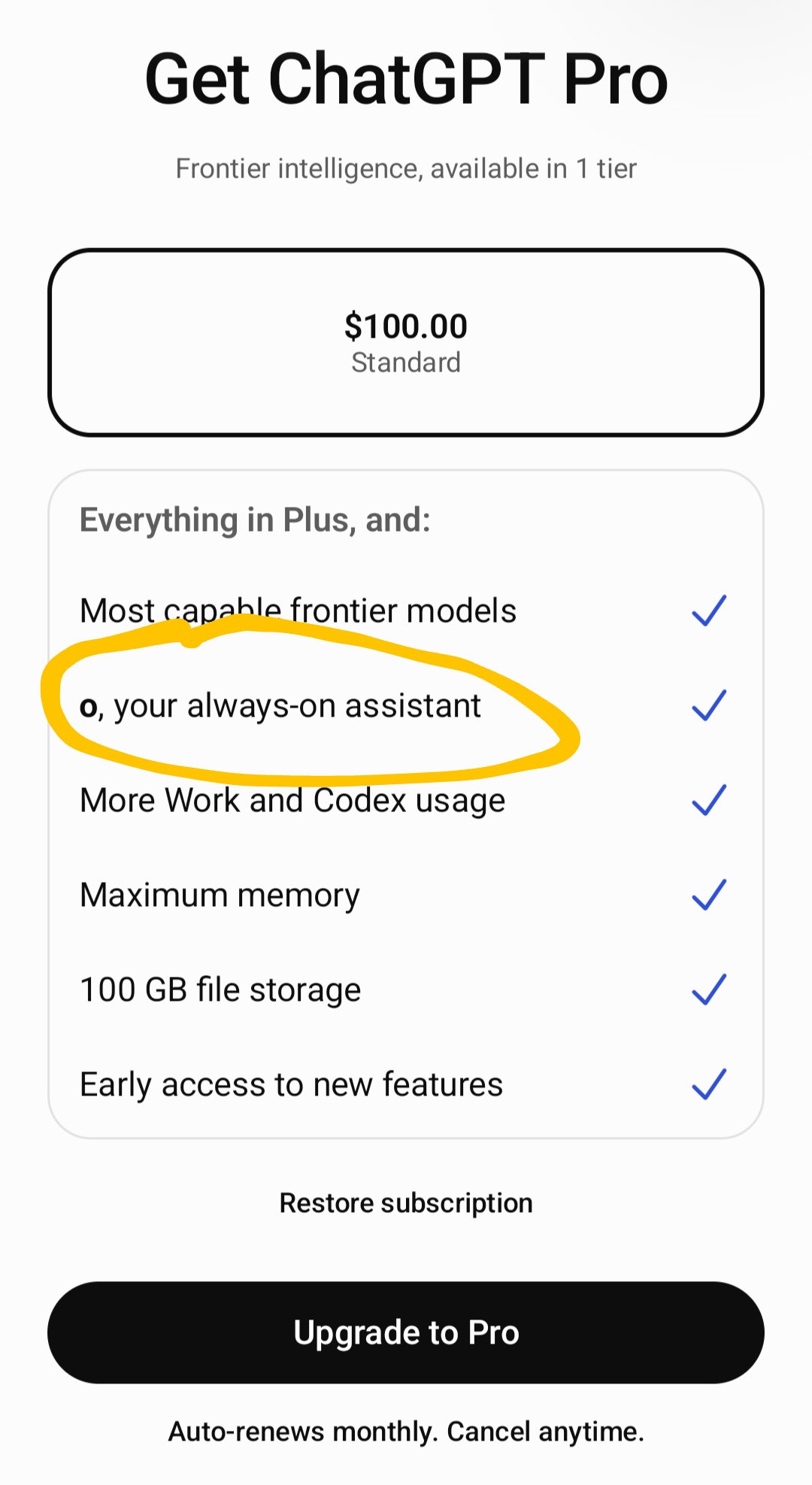
OpenAI is testing a new always-on assistant called “o”, and references to the unannounced feature briefly appeared online.
OpenAI hasn’t confirmed or denied that it’s working on a new always-on assistant, but as some users spotted on X, “o, your always-on assistant” was briefly listed as one of the benefits of the $100 ChatGPT Pro plan.
Source: Jake on X
This feature was listed alongside more Work and Codex usage, maximum memory, 100GB of file storage, and early access to new features.
Moreover, there’s a dynamic configuration with a reference to display_name: "o" alongside an email_suffix: "-o", and this seems to suggest that the assistant could eventually have some form of email capability or identity.
That makes sense for an “always-on” assistant, which could continue helping with your tasks when you’re not actively using ChatGPT, but we don’t yet know exactly what OpenAI has planned.
OpenAI could reveal more at DevDay
OpenAI has already confirmed it’s hosting DevDay 2026 on September 29 in San Francisco, and it’s expected to announce a number of new features.
The event would give us a closer look at what its teams are building, along with technical sessions, demos, and new tools, so I wouldn’t be surprised if we hear more about “o” there.
There have also been references to an internal “Aeon” system around custom agents for ChatGPT workspaces, but “o” appears to be a separate consumer-facing experience.
Join Mikko Hyppönen and security leaders from the NFL, CHANEL, and Atlassian for a two-hour digital summit on what AI-speed attacks change, what defenders should stop doing, and how to validate, decide, fix, and re-validate at machine speed.

The staggering $900 discount delivers the lowest price on record for the M5 Max MacBook Pro 16-inch.
Amazon has issued a steep price cut on Apple’s high-end 16-inch MacBook Pro with an M5 Max chip. This laptop in Apple’s silver finish has an 18-core CPU and 32-core GPU, along with 36GB of unified memory and a spacious 2TB SSD.
Save $900 on 16″ M5 Max MacBook Pro
Retailing for $4,399, the $900 discount brings the price down to $3,499, the lowest on record. To put the value of the deal in perspective, Amazon is charging $300 for the exact same spec in Space Black.
Units are in stock and ready to ship at press time, with delivery as soon as tomorrow for Prime members depending on your delivery address.
You can find this deal and more in our 16-inch MacBook Pro Price Guide, with highlights across the range below.
16-inch MacBook Pro deals
- 16″ MacBook Pro M5 Pro (18C CPU, 20C GPU, 24GB, 1TB, Standard Display): $2,814 ($185 off)
- 16″ MacBook Pro M5 Pro (18C CPU, 20C GPU, 48GB, 1TB, Standard Display): $3,367 ($232 off)
- 16″ MacBook Pro M5 Max (18C CPU, 32C GPU, 36GB, 2TB, Standard Display): $3,499 ($900 off)
- 16″ MacBook Pro M5 Max (18C CPU, 40C GPU, 48GB, 2TB, Standard Display): $4,499 ($500 off)
14-inch MacBook Pro sale prices
- 14″ MacBook Pro M5 (10C CPU, 10C GPU, 16GB, 1TB, Standard Display): $1,839 ($160 off)
- 14″ MacBook Pro M5 Pro (15C CPU, 16C GPU, 24GB, 1TB, Standard Display): $2,351.99 ($148 off)
- 14″ MacBook Pro M5 Pro (18C CPU, 20C GPU, 24GB, 2TB, Standard Display): $2,989 ($210 off)
- 14″ MacBook Pro M5 Max (18C CPU, 32C GPU, 36GB, 2TB, Standard Display): $3,499 ($600 off)
The vinyl revival has created no shortage of affordable turntables, but listeners still need reasonably priced phono preamps from companies that actually know how to design them. Space is another consideration, especially as more people build desktop, bedroom, and smaller living-room systems where another full-width component is not particularly welcome.
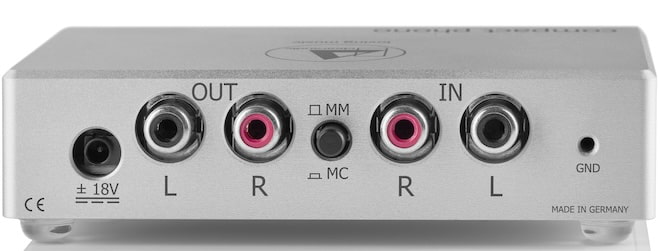
Clearaudio is addressing both issues with the new Compact Phono, an external phono stage measuring just 80 x 115 x 26 mm (3.15 x 4.53 x 1.02 inches). Despite its pocket-sized dimensions, this is not a stripped-down accessory designed merely to get a turntable working. The Compact Phono supports both Moving Magnet (MM) and Moving Coil (MC) cartridges and is designed to deliver the performance expected from a company with decades of experience building turntables, cartridges, and phono stages.
For vinyl listeners looking to improve upon the phono stage built into an amplifier or turntable without adding another large box to the system, that combination of flexibility, pedigree, and space-saving design makes the Compact Phono considerably more interesting.
Active Feedback
At the heart of the Compact Phono is what Clearaudio calls an Active Feedback Topology, built around extremely low-noise, high-precision operational amplifiers. Rather than asking a single gain stage to do everything, amplification is divided across two stages. The first provides most of the gain, which helps preserve the very small signal coming from the cartridge while maximizing the signal-to-noise ratio.
The second stage handles additional filtering at both ends of the frequency spectrum. A 16Hz subsonic filter reduces very low-frequency energy caused by record warps and turntable rumble, while a 70kHz ultrasonic filter is designed to suppress high-frequency cartridge resonances that can compromise stability even though they sit well above the audible range.
The practical benefit is lower noise, better control of unwanted frequencies, and a more stable signal path while maintaining the required RIAA equalization. That is particularly important with low-output moving-coil cartridges, where the phono stage has to provide substantially more gain without turning background noise into part of the performance.
Maximum Flexibility for MM and MC
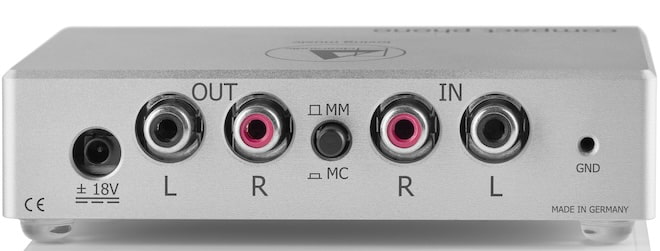
The Compact Phono is designed to work with everything from conventional Moving Magnet cartridges to low-output Moving Coil designs. In MM mode, input loading is fixed at 47 kΩ / 100 pF, while MC mode uses 100 Ω / 100 pF. Gain is set at 40 dB for MM and 60 dB for MC, providing the additional amplification required by the much lower output voltage of most Moving Coil cartridges.
Those gain figures are higher than Clearaudio offered with some of its previous compact phono stages, but the more important specification may be the 29 dB of headroom in MC mode. Headroom determines how much signal the phono stage can accommodate above its normal operating level before overload becomes an issue. With highly dynamic recordings and cartridges capable of producing larger transient peaks, that extra margin reduces the likelihood of the input stage being pushed into clipping or distortion.
The practical advantage is straightforward: the Compact Phono provides sensible loading and gain for both major cartridge types without requiring internal adjustments, while offering considerably more operating margin than its tiny enclosure might suggest.
Construction and Power
Clearaudio designed a dedicated power supply for the Compact Phono that delivers ±18 V to the phono stage, with two linear voltage regulators used to provide a stable, low-noise supply to the audio circuitry. Inside, the electronics are built around a four-layer PCB with separate ground and power-supply planes, an approach intended to keep signal paths short, reduce impedance, and limit unwanted electrical interference.
Selected thin-film resistors and high-quality capacitors with tight tolerances are used throughout the circuit. In a phono stage, component consistency is particularly important because small variations can affect RIAA equalization accuracy and channel matching. The electronics are housed in a low-resonance metal enclosure with isolating feet that provide additional mechanical protection.
Power efficiency has also improved significantly. The Compact Phono consumes just 0.7 watts during operation, compared with 2.3 to 2.7 watts for Clearaudio’s predecessor models. With consumption already this low, there is no separate standby mode.
The result is a compact phono stage that generates less heat and consumes considerably less power while still using the regulated power supply, carefully laid-out circuitry, and tightly specified components expected from a serious MM/MC design.
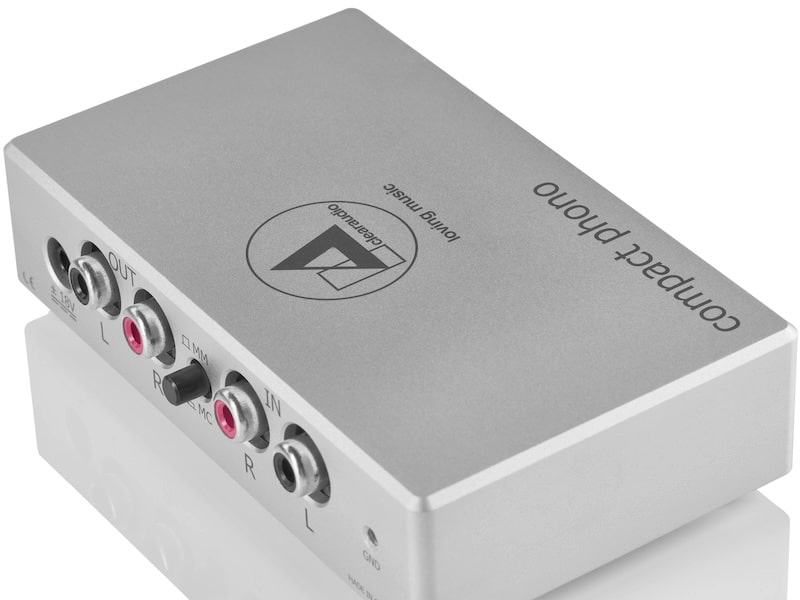
Clearaudio Compact Phono Preamp Specifications
| Clearaudio Model | Compact Phono |
| Product Type | Phono Preamp |
| Price | $639 / £490 / €490 |
| Mode | MM / MC switchable by pushbutton. |
| Subsonic / Ultrasonic Filter | Yes |
| Amplification Output | 40 dB (MM mode)
60 dB (MC mode) |
| RIAA | Nach RIAA (Zeitkonst.: 75µs / 318µs / 3180µs) |
| RIAA Accuracy | ± 0.5dB @ 20Hz – 50kHz |
| THD | < 0.0065% |
| Signal-to-Noise ratio | 76dB (A) (MM mode)
65dB (A) (MC mode) |
| Headroom | 29dB / MC |
| Max. Output Voltage | 10V eff (1 kHz) |
| Channel Separation | > 80dB @ 1kHz |
| Output Impedance | 100Ω |
| Inputs | Unbalanced (RCA) |
| Outputs | Unbalanced (RCA) |
| Power Consumption | Max. consumption: 0.7 watts
Consumption in operation: 0.7 watts No standby Off mode: 0.0 watts (Power supply disconnected) |
| Power Supply | ±18V DC / 300mA (external power supply) |
| Total Weight | Approx. 310g (Preamp) |
| Dimensions (W/D/H) | Approx. 3.15 × 4.53 × 1.02 inches
Approx. 80 x 115 x 26mm |
| Manufacturer’s Warranty | 2 years |
The Bottom Line
At $639, the Clearaudio Compact Phono is neither the least expensive MM/MC phono preamp nor the most adjustable. The iFi ZEN Phono 3 costs $249 and offers four gain settings from 36 to 72 dB, multiple loading options, balanced output, and an intelligent subsonic filter. The $249 Andover Audio SpinStage provides extensive MM loading adjustments and a current-mode MC circuit, while Cambridge Audio’s $399 Alva Duo supports MM and MC cartridges and adds a built-in headphone amplifier. Pro-Ject also offers several MM/MC alternatives with considerably more cartridge-loading flexibility, including its balanced Phono Box S3 B and tube-based Tube Box S3 B.
So what makes the Compact Phono interesting? It packs serious MM/MC capability into an exceptionally small 80 x 115 x 26 mm enclosure without making everyday operation unnecessarily complicated. Switching between MM and MC is handled externally rather than through internal jumpers, while 40 dB and 60 dB gain settings, 29 dB of MC headroom, 16Hz subsonic and 70kHz ultrasonic filtering, a regulated ±18V power supply, and just 0.7 watts of power consumption suggest that Clearaudio concentrated its engineering effort on noise, headroom, stability, and efficiency rather than loading menus and rows of switches.
That makes the Compact Phono less about winning a specification war and more about delivering Clearaudio’s analog engineering in a space-saving design that can sit beside almost any turntable without taking over the shelf. The iFi and Andover models remain formidable values, while Pro-Ject offers greater adjustability for listeners who regularly experiment with cartridges. The Clearaudio makes the stronger case for someone who wants a compact, straightforward MM/MC phono stage from a company that has been designing serious analog playback equipment for decades.
Price & Availability
The Clearaudio Compact Phono is available in black and silver from authorized dealers at a suggested retail price of $639 (US) / £490 / €490.
Related Reading:


As the cable TV industry continues its slow death, live TV streaming services have become solid alternatives, allowing users to watch cable channels without a long-term commitment and at a lower cost. For cord-cutters, Sling TV and Hulu are among the best live TV streaming services on the market. And as such, you’d expect either to top J.D. Power’s live TV streaming rankings of 2026, but that couldn’t be further from the truth. According to the 2026 U.S. Television Service Provider Satisfaction Study by J.D. Power, YouTube TV is the top dog in live TV streaming services. Per the survey, YouTube TV ranked top, scoring 643 points out of 1,000.
According to J.D. Power, this was enough for the service to retain its top spot for the fourth consecutive year. With a 643 score, the service outperformed the segment average, which stood at 627 in the study. After YouTube TV, Sling TV clinched second position with 625, while Hulu followed closely in third, with 622 points. DirecTV was ranked fourth (593 points), while Fubo rounded out the top five with 585 points. The survey measures customer satisfaction with their current live TV provider and is based on a variety of factors.
It considers user perception of factors such as value for money, quality of service, trust, ease of doing business, and problem resolution. That means customers are generally more satisfied with YouTube’s live TV streaming service than the alternatives. The 2026 study was conducted by collecting responses from 33,137 subscribers between August 2025 and July 2026.
What do users and experts say about YouTube TV?

YouTube’s live TV streaming service costs $82.99/month, so it’s definitely not cheap, but it still comes out on top in customer satisfaction according to the survey. But what do other experts and users say about the service? According to experts at CNET, YouTube TV is the best live TV streaming service overall because of its channel portfolio, easy-to-use interface, cloud DVR, and reliability. PC Mag also ranks the service as a top option, citing its excellent channel lineup, sports viewing features, intuitive interface, and robust DVR features. However, it lists the platform’s steep price as one of its biggest downsides, although the site also offers cheaper genre-based packages.
CableTV.com as well as Tom’s Guide also recommend the service as the best option overall despite its hefty price. However, user reviews of YouTube TV are mixed. On Trustpilot, for example, the service doesn’t have a good standing with users. As of this writing, it has an average TrustScore of 1.3 out of 5 from 207 reviews. Users on the site highlight several issues that have negatively affected their experience, including steep monthly prices, price hikes, and ads in content.
Considering Trustpilot’s TrustScore places more weight on recent reviews, some of the platform’s low ratings appear to have been posted toward the end of 2025, when the platform lost some key channels, such as ESPN, ABC News, and NatGeo. On Reddit, some say YouTube TV can be worth it depending on where you live. Others vouch for the sports package, while some consider it pricey. Of course, there are several cheaper YouTube TV alternatives that you can consider so you don’t have to stick with it.
Live TV streaming services are cheaper and better than cable

Overall, the survey shows that customers are more satisfied with live TV streaming services than with traditional cable or satellite TV. According to the study, customers are much less satisfied with cable, with the segment’s average score at 549 out of 1,000 vs. 627 for live TV streaming. Verizon’s Fios topped the list in the cable/satellite segment for the second consecutive year with a score of 586, followed by Spectrum with 564. Although live TV streaming maintained its lead in customer satisfaction, the survey shows cable improved while live TV streaming lost points compared to 2025.
In the 2026 survey, cable gained 18 points in customer satisfaction, while the live TV streaming segment lost 3 points. That trend has been happening since 2024, according to J.D. Power. Carl Lepper, a senior director at J.D. Power, says “traditional TV providers have steadily improved customer satisfaction every year since 2024 by strengthening their value proposition and improving affordability perceptions.” That said, cable has plenty of catching up to do, with the top service, Verizon Fios, barely beating the fifth live TV streaming service in customer satisfaction.
Generally, live TV streaming services are considered cheaper, and the survey did put that into perspective, revealing that you can save $41 per month on average if you skip cable. And that’s despite live TV streaming services raising prices by about $5 per year.

Looking for a different day?
A new NYT Strands puzzle appears at midnight each day for your time zone – which means that some people are always playing ‘today’s game’ while others are playing ‘yesterday’s’. If you’re looking for Sunday’s puzzle instead then click here: NYT Strands hints and answers for Sunday, September 27 (game #938).
Strands is the NYT’s latest word game after the likes of Wordle, Spelling Bee and Connections – and it’s great fun. It can be difficult, though, so read on for my Strands hints.
Want more word-based fun? Then check out my NYT Connections today and Quordle today pages for hints and answers for those games, and Marc’s Wordle today page for the original viral word game.
SPOILER WARNING: Information about NYT Strands today is below, so don’t read on if you don’t want to know the answers.
Latest Videos FromTechRadar
NYT Strands today (game #939) – hint #1 – today’s theme
What is the theme of today’s NYT Strands?
• Today’s NYT Strands theme is… A form of art
NYT Strands today (game #939) – hint #2 – clue words
Play any of these words to unlock the in-game hints system.
- TALES
- SPOT
- TONE
- SUGAR
- BRAG
- POSTAL
NYT Strands today (game #939) – hint #3 – spangram letters
How many letters are in today’s spangram?
• Spangram has 9 letters
NYT Strands today (game #939) – hint #4 – spangram position
What are two sides of the board that today’s spangram touches?
• First side: bottom, 3rd column
• Last side: top, 5th column
Right, the answers are below, so DO NOT SCROLL ANY FURTHER IF YOU DON’T WANT TO SEE THEM.
NYT Strands today (game #939) – the answers

The answers to today’s Strands, game #939, are…
- WOOD
- CLAY
- GLASS
- SOAPSTONE
- BRONZE
- MARBLE
- SPANGRAM: SCULPTURE
- My rating: Easy
- My score: Perfect
Some NYT crossover here, as yesterday we had a Sculpture Media category in Connections — although plaster was missing from that particular group of four.
Regardless, it still took me a while to realize that we were looking for materials, a failing that’s highlighted by the fact that I had both soap and stone in my list of non-game words before realizing that SOAPSTONE was a thing.
Anyway, this poor piece of gameplay aside this was a relatively easy search and a nice start to the week.
Yesterday’s NYT Strands answers (Sunday, September 27, game #938)
- SUNSCREEN
- MOISTURIZER
- CLEANSER
- SERUM
- TONER
- SPANGRAM: BEAUTYCARE
What is NYT Strands?
Strands is the NYT’s not-so-new-any-more word game, following Wordle and Connections. It’s now a fully fledged member of the NYT’s games stable that has been running for a year and which can be played on the NYT Games site on desktop or mobile.
I’ve got a full guide to how to play NYT Strands, complete with tips for solving it, so check that out if you’re struggling to beat it each day.


Cloudflare has fixed a vulnerability in Containers and Sandboxes that allowed customers with a Workers Paid account to recover residual data from other customers’ containers on the same physical host.
Cloudflare Containers is a service available on the Workers Paid plan that lets developers run containerized applications on Cloudflare’s infrastructure, alongside Cloudflare Workers.
Developers and companies building applications on Cloudflare typically use it, including those running backend services, processing jobs, and code execution environments.
The flaw was reported through HackerOne on September 4 by Oren Yomtov, a security researcher at technology company Accomplish.
Exploiting it would let an attacker read other customers’ files, including directory listings, SQLite databases, Chromium profiles, .env files, and credential files.
According to Cloudflare’s disclosure, the issue was in a shared storage pool configured to skip zeroing reused 64 KiB blocks.
“When the thin volume backing a container’s root disk was deleted, its physical blocks were returned to a pool that served workloads belonging to multiple customer accounts,” Cloudflare explains.
By writing only 4 KiB to an unused region of a new container’s disk, the researchers could cause a reused 64 KiB physical block to be allocated. Without the zeroing operation, only the 4 KiB write would overwrite the block, leaving in a readable state the remaining 60 KiB that may contain data from a previous customer.
They found residual material on 18 of 24 container placements and across 20 of 22 underlying nodes tested, including directory structures, database pages, and structurally complete SQLite databases.
“The vulnerability would potentially have allowed for a customer with a Workers Paid account to recover residual data from storage blocks previously used by other customers’ Containers on the same underlying host,” Cloudflare says.
“A successful exploitation would have crossed the tenant-isolation boundary and could disclose filesystem metadata, directory structures, database pages, and application data.”
An attacker would not have control over the victim or host, nor would they be able to read an actively attached disk.
Risk evaluation and real exposure
Cloudflare says the researchers only used scripts that performed checks and returned aggregate counts, not actual disk contents, so no real customer data was exposed in this evaluation.
The researchers also did not demonstrate any way to change another customer’s data or disrupt their workloads on Cloudflare’s service.
Cloudflare removed the setting that caused the skipped block zeroing, retired existing container disks, and cleared cached snapshots that may contain old mappings, finishing all mitigation actions by September 19, 2026.
After examining logs, telemetry, and historical data, the company found no evidence that customer data was exposed via the method described by Accomplish.
Cloudflare applied the fixes to its infrastructure automatically, and customers need to take no action to address the risk.
Join Mikko Hyppönen and security leaders from the NFL, CHANEL, and Atlassian for a two-hour digital summit on what AI-speed attacks change, what defenders should stop doing, and how to validate, decide, fix, and re-validate at machine speed.

Sports24 seconds ago
USA captain credits Trump for inspiring comeback victory at Presidents Cup

NewsBeat1 minute ago
Protesters disperse after blocking controversial Orange Order parade

Business2 minutes ago
Walmart CEO says retailer won’t use customer data to personalize prices





-

 Fashion2 days ago
Weekend Open Thread: J.McLaughlin – Corporette.com
-

 Crypto World5 days ago
Goldman Sachs and Deutsche Bank Agree: The S&P 500 Rally Isn't Over
-

 Fashion4 days ago
8 iPhone Accessories That Add Personality
-

 Entertainment5 days ago
These 17 Fall Amazon Dresses Seriously Look Like Anthropologie
-

 Tech5 days ago
Reolink’s solar 4K security camera falls to its lowest price in months
-

 Crypto World7 days ago
Coinbase, Robinhood, Circle Seen as Tokenized-Stock Winners
-

 Crypto World5 days ago
This Bearish Netflix Stock Trade Can Cash In On Video Streaming Giant’s Woes
-

 Crypto World5 days ago
Trump-Xi Polymarket Odds for Handshake Hit 50%
-

 Tech6 days ago
Google’s $899 Googlebook is a bet that you’ll buy a new laptop for Gemini
-

 Crypto World4 days ago
Crude Oil Prices Pressured by Diplomatic Hopes in the Middle East
-
 Business5 days ago
Oil Price Today (September 23): Crude oil below $100 on hopes of US-Iran talks. What did Trump say?
-

 Crypto World4 days ago
Bitcoin price tests $83,600 Supertrend support after $87K rejection
-

 Crypto World4 days ago
Bitcoin Threatens Sub-$84,000 Breakdown as Long Liquidations Spike
-

 Crypto World6 days ago
Meta Jumps 11% As Muse Shines and Investors Show an Appetite for Advancing AI
-

 Crypto World5 days ago
BitGo says Bitcoin absorbed Fed hike, CLARITY failure
-

 Crypto World5 days ago
Did Jim Cramer Just Give GameStop Stock the Kiss of Death When He Said the Turnaround Is Working?
-

 Crypto World7 days ago
Bitcoin price holds above $81K as key catalysts line up
-

 Crypto World6 days ago
Trump, Xi Meet on S&P 500's Best Day Since Early August: Will Markets Stay Bullish?
-
 Tech4 days ago
UiPath’s Dines says AI needs a manual and launches Cartographer to write it
-

 Tech7 days ago
Amazon blocks Meta’s Muse AI assistant in new standoff over agentic shopping
You must be logged in to post a comment Login