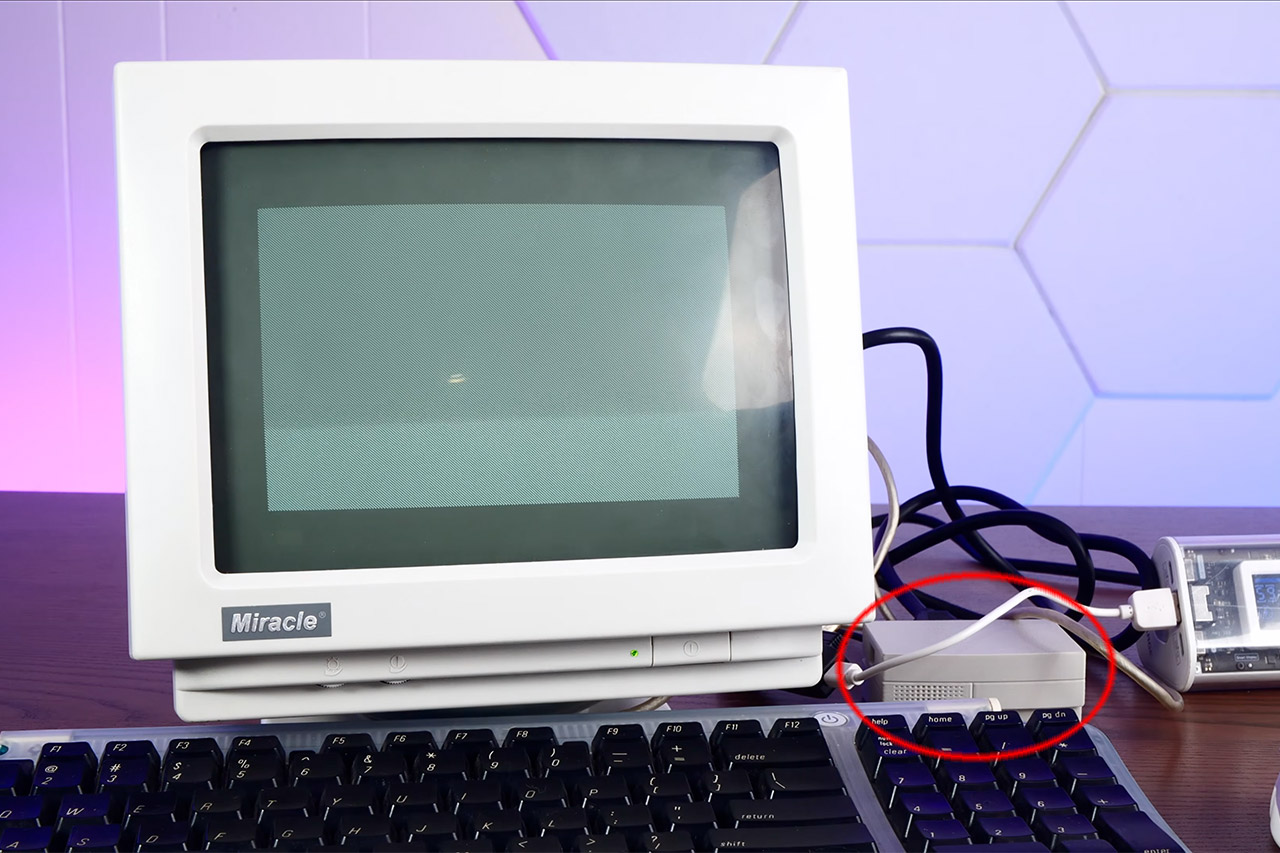
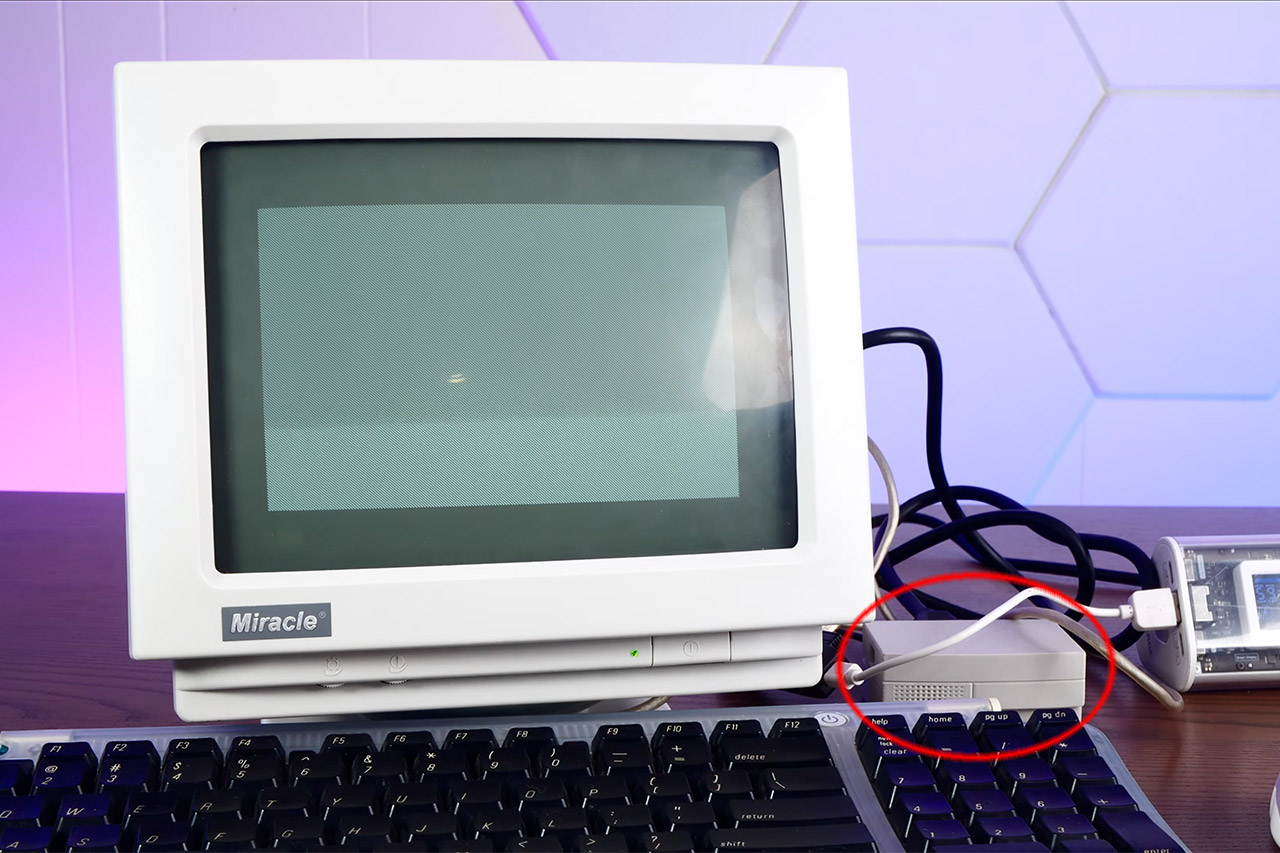
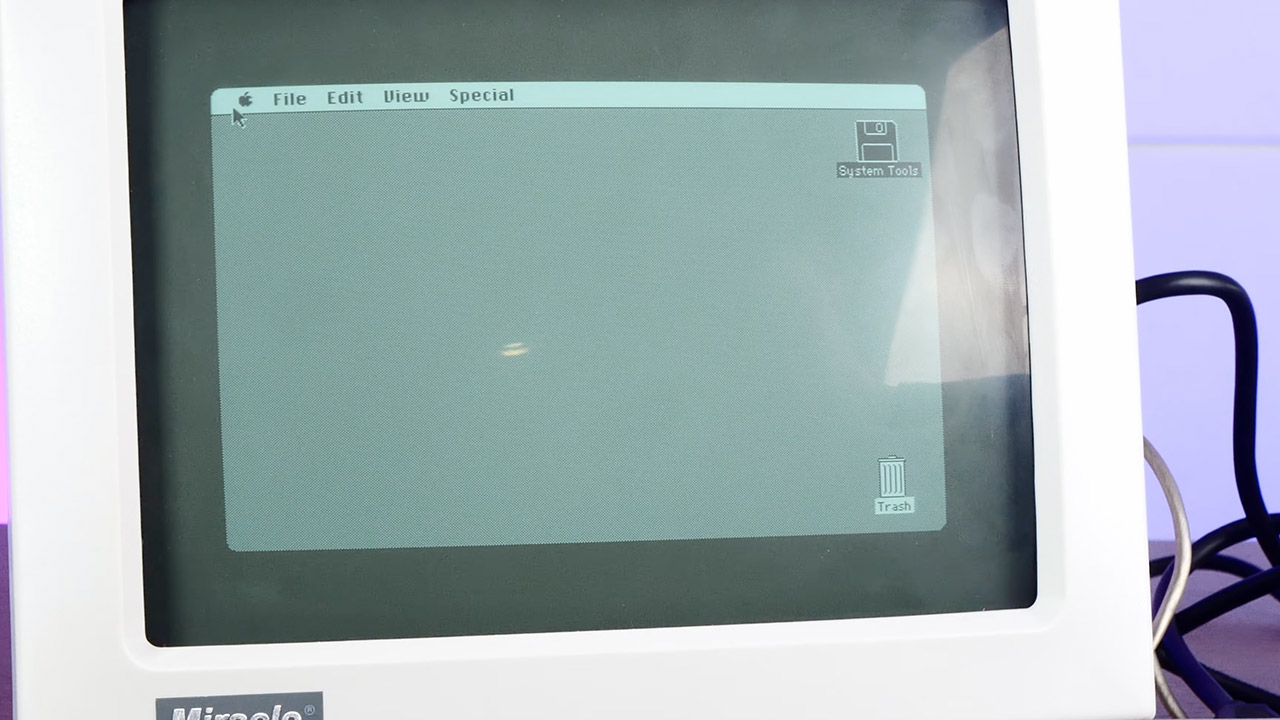
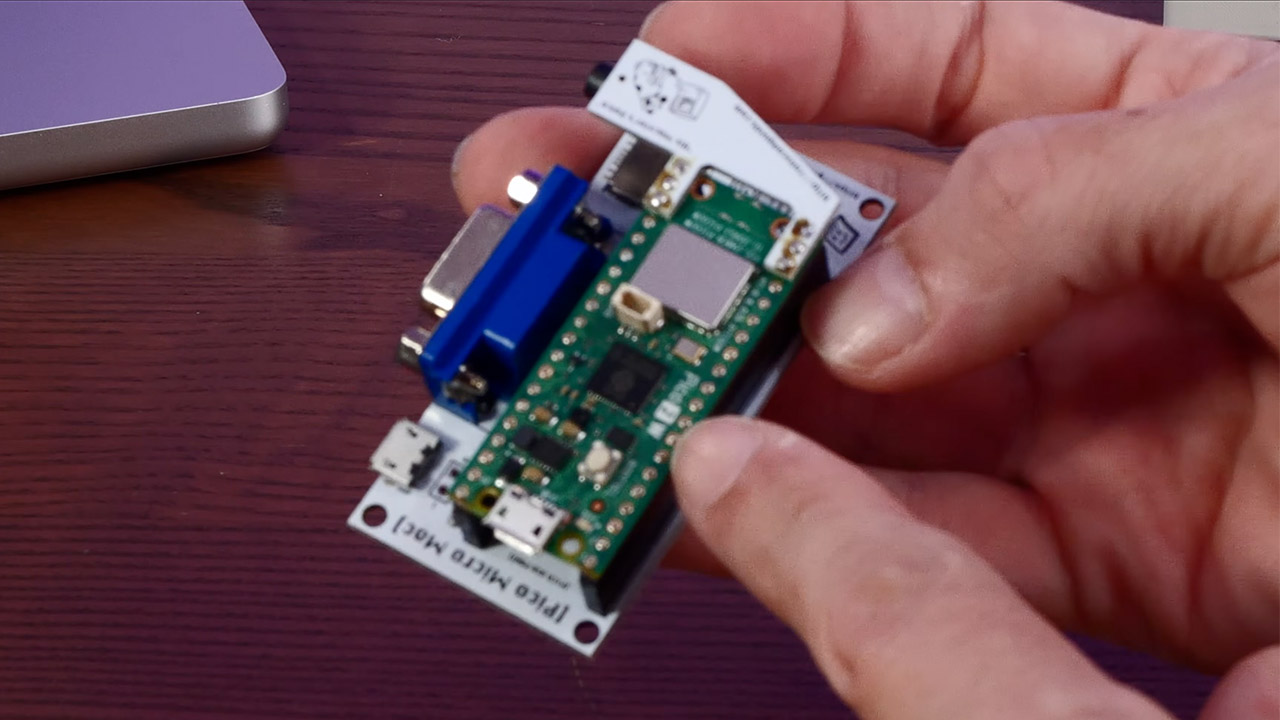
Action Retro just sat down with Pico Micro Mac v3, and the little board did the rare thing cheap retro kits keep promising. Power went in, a smiling Macintosh face appeared, and a real System desktop came up ready for a USB mouse. His video calls it a tiny 90s Macintosh. Software-wise it is closer to the 128K and Plus years. The charm is that the desktop is genuine, clickable, and running on a microcontroller you can cover with two fingers.
Matt Evans was the mastermind behind the emulator that makes this feat possible, and his pico-mac project, a Raspberry Pi Pico integrated with a 68000 Macintosh 128K, is a true marvel. It works by generating a one-bit VGA image using only a few resistors and the chip’s programmable I/O, which is then cranked up to 250 MHz, allowing you to play games like Missile Command without trouble. Ron from Ron’s Computer Videos then took this mess of wires and converted it into a board that you can really buy; Joe’s Computer Museum is selling the current v3 iteration for $20 to $25, either alone or with a Pico attached.
LITTLE DO-IT-ALL — Mac mini packs pure power into a small, five-by-five-inch desktop as the M6 chip delivers next-level AI capabilities. Mac mini…
M6 CHIP — Everything you do on Mac mini feels more responsive with the M6 chip and its next-generation CPU. Fly through AI workflows with up to 4.8x…
CONNECT IT ALL — Features three Thunderbolt 4 ports, an HDMI port, and a 2.5Gb Ethernet port in the back, and two USB-C ports and a headphone jack…
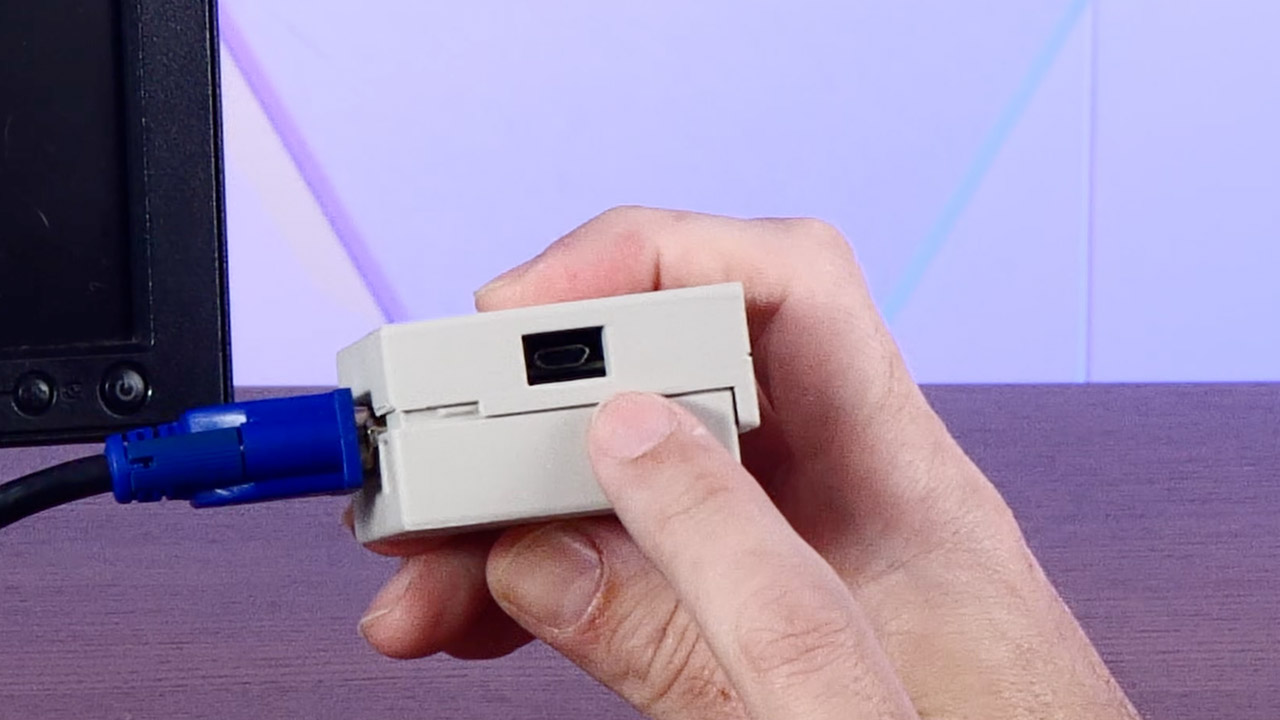
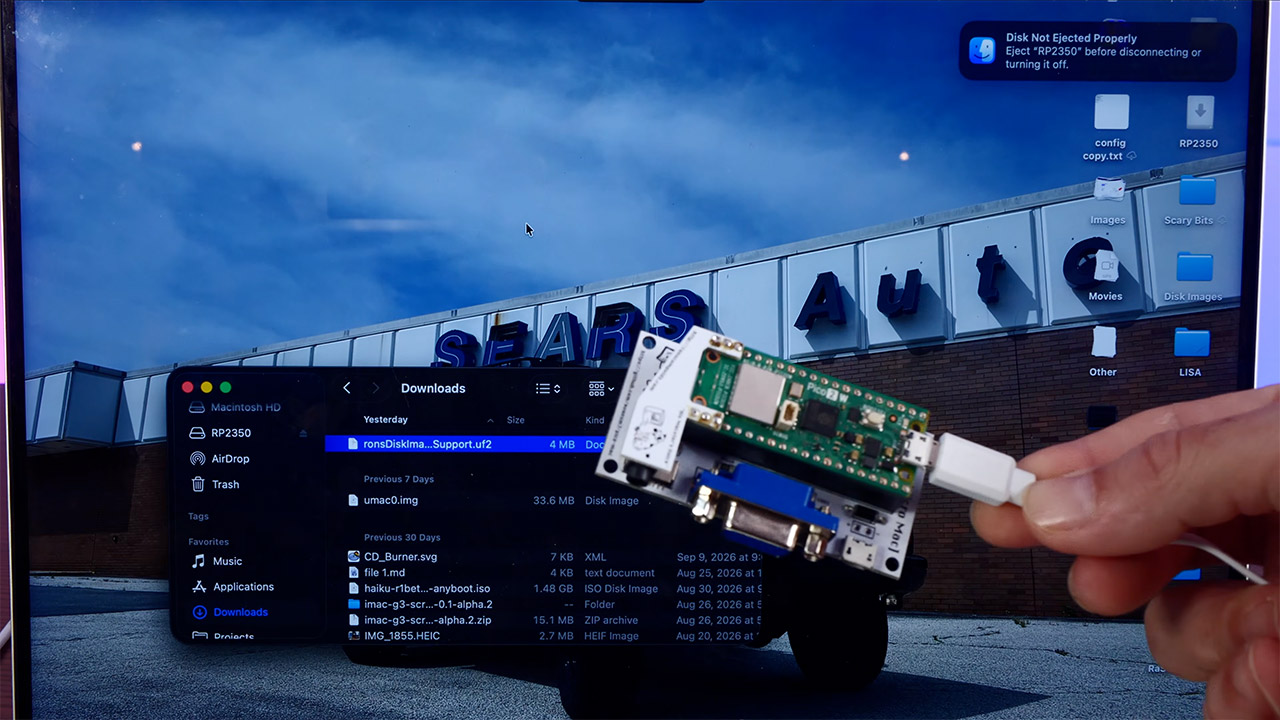
The older boards that came before this one required you to solder a separate microSD adapter onto a stack of pins, but the Version 3 has made life a lot easier by building the card slot right into the PCB and adding two rows of female headers, so you can simply press a Pico with pins already attached and it will work flawlessly. Simply press the boot button, slide a UF2 firmware file onto the Pico like a USB stick, and then drop Ron’s disk image onto a card, and you’re ready to go: VGA to any monitor that will accept it, keyboard and mouse via a micro USB OTG port. However, Action Retro discovered the hard way that some current keyboards with built-in hubs may be temperamental, so they switched to a simpler USB keyboard, which still worked.
The default personality is a 128K Mac at 512 x 342, Apple’s original canvas from 1984. Other firmware builds extend the picture to 640 × 480 and increase memory to 208K, which is more RAM than the first Macintosh ever arrived with. Finally, you get to see the Finder, MacWrite, and MacPaint in their full grandeur. Previous videos of this project have shown Lode Runner, Bricks, and Missile Command in action. With Ron’s compressed disk image, you can really utilize the system for the evening and have it do something.
One thing is lacking from this small project: sound. At least it is with the stock VGA board. The startup beep and classic square-wave chirps are available as an optional Audio Refit. Other capabilities such as SCSI, AppleTalk, and a printer connector are missing, and if you don’t have a card, the flash drive is read-only, which means your MacPaint doodles will disappear as you turn off the power. Some software still whines for more memory than you have, which is understandable given that you are running 1984 program on a few dollars worth of silicon.
Joe’s shop also sells a 3D printed shell from GutBomb that makes the entire device resemble a tiny beige Mac from the early 1990s, which is why the film has a 90s vibe, despite the fact that the ROM is older. Power comes from a phone bank or any 5V micro USB brick, and a little black and white VGA monitor sits next to it. Sometimes the wire is heavier than the computer. Official kits typically target the original RP2040 Pico. Joe and Ron do not support the Raspberry Pi Pico 2 boards.
We may receive a commission on purchases made from links.
The Bosch brand is one with many different areas of focus. It’s a key brand in the household appliance industry, and of course it also makes a wide array of hand and power tools. You’ll find numerous Bosch-badged tools and accessories in the hands of professionals and homeowners looking for good durability and favorable pricing. The company is among the best German tool brands on the market, offering tools and tool service in around 150 countries.
Advertisement
With so many pieces of gear contained within Bosch’s catalog, it’s only natural that many of them would be niche finds or specialized variants of standard tools, designed to handle hyper-specific tasks that users might encounter. Everything from unique drilling tools to high-powered cutting equipment designed to go above and beyond the casual user’s needs can be found. These tools represent some of the most specialized equipment Bosch has to offer, meant to support the most niche tasks.
Advertisement
Expert 18V 6-Inch Random Orbit Sander
The orbital sander is a mainstay in any toolkit, but not every one is built with the same capabilities. Bosch’s Expert 18V 6-Inch Random Orbit Sander is larger than is typical for this kind of tool. It’s priced at $389 at Acme Tools and features an adjustable speed rating between 5,000 and 10,000 RPM. The tool’s ³⁄₁₆-inch orbital motion offers rapid material removal, rated for up to 50% more than a standard 18V Bosch model. It also features a dust canister that includes a HEPA filter for a more effective collection function and a cleaner overall workspace.
The tool is designed to provide the sort of premium experience that professional woodworkers and others who spend exorbitant amounts of time tackling finishing touches on building jobs need in their tools. It operates with a unique body shape, creating a more ergonomic handle structure for a comfortable grip over longer periods of use. It’s also part of the AmpShare system, which means it’s designed to operate interchangeably with other brands’ 18V catalogs.
Advertisement
18V Press Tool Kit
The 18V Press Tool Kit features ½, ¾, and 1-inch jaws. It comes boxed up in a carrying case and also features a charger and 4.0Ah. The kit’s also quite expensive, which immediately relegates it to the professional sphere, selling for $2,719 at Acme Tools (although there is a promotion as of mid-September with a 10% discount). This is key tool for plumbers, as it makes secure pipe connections without using solder or a torch. The clamping force it produces is also suitable for use on pipes with water present, as well, making it a versatile and fast acting plumbing option.
This press tool features a rotatable head, making it able to access pipe segments in areas that are difficult to reach. It features a 3-second cycle time, so if you’ve got a lot of plumbing installation work to do, it shouldn’t take an undue amount of time. There’s also an LED work light built into the tool and it works with both Bosch and Rothenberger (another quality German tool brand specializing in these kinds of tools) press jaws.
Advertisement
18V 14-Inch Dry Cut Saw
Cutting demanding material like tile, rebar, or brick frequently falls outside capabilities of the sorts of power saws used by home improvers and DIYers. As such, tools like the 18V 14-Inch Dry Cut Saw from Bosch are usually found on job sites and other working environments that fall into more niche categories. The tool is priced at $755 on Amazon and offers mobile cutting to support all manner of high intensity needs. It also features a laser line that helps line up cuts with exacting precision. There’s even a K-adapter integrated into the tool for holding round material up to 4½ inches in diameter, providing coverage for both square and round stock.
This tool is specifically designed for cutting metal. It can handle angle iron, metal pipe, banded rebar, and banded drywall metal studs, as well as other metal stock. It features miter cutting capabilities, turning up to 45 degrees to the left. This is another Bosch tool that operates in the AmpShare system, giving it even more versatility. As the name implies, this tool cuts with a dry blade rather than adding a stream of water into the mix.
Advertisement
18V 5-Inch Concrete Surface Grinder
Grinding concrete surfaces is by all accounts a niche task that only professional tool users tend to perform. It’s something you’d do after pouring a concrete pad, for instance. That’s not to say DIYers won’t ever require the use of this kind of tool, but that the task falls outside the purview of most casual tool users. Bosch offers the 18V 5-Inch Concrete Surface Grinder, retailing for $735 at Acme Tools (with a free, 8Ah high power battery added as a promotion). It’s a battery operated solution, and in its kit variant the unit comes with a 5.0Ah battery and charger. The setup also includes a diamond cup wheel and two bristle brushes.
Advertisement
The tool’s power-to-weight ratio is best in class, delivering the equivalent of 13 amps of corded power to support fast material removal. The top handle rotates to accommodate a range of gripping requirements and it utilizes a guard and shroud system that is adjustable and helps to catch debris for a cleaner work environment, working well with other personal protective equipment you’ll use to remain in compliance with OSHA’s five basic safety rules. The tool helps smooth out surfaces after a pour or handle bulk removal during surface preparation before a different kind of installation. It offers three speed settings ranging from 2,600 to 8,500 RPM for a range of applications in various environments and across use cases.
Advertisement
18V Brushless Biscuit Joiner
Cutting recesses in the sides of boards is rarely necessary for rough timber work. If you’re finishing a basement, building a half wall to break up space in your home, or installing shelves in a closet, this isn’t a tool that will come into the picture. However, fine woodworking often requires pieces of wood together, end to end or side to side. Among the important tools that woodworkers rely on, the 18V Brushless Biscuit Joiner is certainly a niche piece of equipment, but it’s vital for some woodworking projects.
Priced at $315 (Acme Tools) as a bare tool, this piece of equipment cuts recessed spaces in the sides of the boards so that you can insert biscuits into them for a larger glueable surface when mating up boards. Biscuits are small, often oval-disc shaped pieces of wood, designed sit within the slots cut by this tool to create a bit of additional rigidity and a notable increase in interior surface area. They will go unnoticed in the finished product, and they can make a world of difference in how strong the glue joint ultimately becomes. This tool features a depth selection knob that allows you to adjust between #0, #10, and #20 biscuits, and it features an adjustable fence that can be set at an angle up to 90 degrees with positive detents at common measurements.
Advertisement
18V Brushless High Torque Mixer
Just about any drill can mix up a slurry to perform concrete work, plastering, or other jobs involving wet-mixed materials. Among some of the most versatile drill attachments you can find online and in hardware stores, mixing paddles are some of the most common. However, most drills aren’t actually designed to handle this kind of work, and a purpose-built mixing tool like the 18V Brushless High Torque Mixer is a much better option if you plan on mixing up big batches. It’s listed for $379 on Amazon.
The difference really comes down to what the tools are designed to output. A typical combi-drill produces plenty of torque, certainly, but it’s designed for fast speeds to allow for quick drilling or fastening through timber and other material. In contrast, this piece of equipment produces a maximum speed of 720 RPM. Its low speed and high torque output allow it to churning through material even when it becomes a gloopy mess that wants to slow things down. It also includes a two-handle design for better grip and control while standing directly over your bucket, which is a notable improvement over the alternative. It also features soft start technology that reduces splashing when you initiate the tool alongside integrated kickback controls.
Advertisement
18V High Torque ½-Inch Right Angle Drill
There are many great right angle drills on the market, and the Bosch 18V High Torque ½-Inch Right Angle Drill is a highly rated option among them. It features two speed settings, ranging up to 1,800 RPM in its second gear to produce fast drilling when a rapid pace is required. It also includes dual kickback controls to minimize bucking when bind-up occurs. Its 7-pound weight may seem quite heavy, but it’s actually rather lightweight for a right angle drill. This is a piece of equipment that’s frequently more powerful than a standard power drill, and typically requires two-handed operation. In a relative sense, a tool this weight should be reasonably maneuverable while still delivering solid performance and power.
The tool can handle up to 5-inch holes when paired with a hole saw, 2⁹⁄₁₆-inch holes with self-feed bits. This makes it a punchy option for larger hole requirements or for drilling longer segments into workpieces. The right angle drill is particularly useful when handling tasks involving rough-in work through joists and stud wall constructions. The tight confines of these areas make using a right angle drill sometimes the only practical option for getting a straight cut through the timber once it is secured in position. The tool is available for $299 at Lowe’s as a bare tool.
Advertisement
18V 16-Gauge Metal Shear
The 18V 16-Gauge Metal Shear ($345 at Acme Tools, with an added 4.0Ah battery promotion, as of mid-September) is, of course, a metal cutting tool. It runs with a brushless motor underpinning its performance, giving the tool durable and powerful cutting prowess that matches a 700W corded model’s capabilities. This piece of equipment features an ergonomic barrel grip shape and is lightweight, putting up a 3¾-pound figure on the scale. It delivers a 3,200 SPM blade speed and features quality of life enhancements like distortion- and waste-free cutting capabilities and a soft start to make the tool easier to initiate.
Advertisement
This is designed for cutting sheet metal, and as such it’s not something that’s going to take up space in many casual tool users’ collections. From the specs, it appears powerful and effective at its job, but metalworking isn’t a common theme among DIYers seeking to make routine improvements around their homes or other living spaces. This is a potentially valuable addition for home mechanics working on project cars and others who naturally encounter metal parts, however. Instead of using an angle grinder, which can be a nerve-wracking tool to operate and often leaves jagged, uneven cut lines in your workpiece, this shear is meant to make more delicate and precise cuts for replacement parts or patches.
Advertisement
Non-Contact Voltage Tester with Flashlight (24 to 1,000V AC Rated)
Among some of the biggest mistakes you can make while handling electrical repairs, failing to use proper safety gear to test your work environment is potentially the most egregious. This is a simple workflow error rather than something that arises from a gap in knowledge or skill — it’s simply vital to know if the wiring you’re working with is live.
The Non-Contact Voltage Tester with Flashlight (24 to 1,000V AC Rated) can help support this mission effectively. It features a durable construction with an ergonomic rubber grip and TPE reinforced housing, making it jobsite-ready and capable of withstanding drops of up to 6 feet. It offers dual voltage range compatibility, With a standard 90 to 1,000V testing range and a lower 24V minimum threshold for both typical and low voltage applications. It’s also rounded out with an IP67 rating, making it great for use in challenging working environments.
The tool features a belt clip, so it should be easy to carry in a pocket or on a tool belt. It also utilizes an integrated flashlight, which is a handy addition considering that many electrical repair tasks will take place with the lights off. It features voltage indication using colored LED lights: Green for no voltage, red when voltage is detected, and orange for low voltage settings. It’s found at Home Depot for $47.
Advertisement
18V Brushless 9-Inch Cut Off Saw
Sometimes known as a “consaw” because it’s frequently used to cut concrete, the cut off saw can come in either electric and gasoline powered builds, with electric models offering the notable ability to be used indoors as a result of its emission-free operation. The battery-powered 18V Brushless 9-Inch Cut Off Saw is a $689 purchase at Acme Tools as a bare tool.
This saw comes with a 9-inch cutting wheel that offers over 3 inches in maximum cutting depth. The tool features a six-position cutting guard that allows you to adjust for a variety of cutting needs and working angles. It also operates with a wraparound handle and ergonomic design for better control. it can be used in either wet or dry cutting, with a simple water shutoff valve that allows you to swap between functions as necessary. This is a relatively lightweight option, weighing just under 12 pounds, and therefore delivers good control and the ability to use the tool for longer sessions without fatiguing too badly. This is also another tool offered under the AmpShare system.
Advertisement
12V 11.5-Foot Handheld Inspection Camera
Installation and repair tasks aren’t always straightforward. You’ll often encounter challenges in gaining access to certain areas, and in many cases, it can be impossible to progress beyond early stages without something like the 12V 11.5-Foot Handheld Inspection Camera in your arsenal. Running new wires, for instance, requires you to be able to find both ends that you’re looking to connect, ideally without destroying the wall in between. An inspection camera allows you to thread the end into the recessed space in order to evaluate what you’re working with in areas that are impossible to view otherwise.
Advertisement
This tool features an 11.5 foot camera cord, offering plenty of reach to tackle jobs behind walls, in recessed areas under the hood of a project car, an in HVAC settings, to name a few. It’s listed for $540 at Amazon.
The camera features a high resolution, enhanced display with a 5-inch screen that captures color images and video. It features an ergonomic handle and integrated connectivity that allows you to upload images directly to a computer via USB-C cable, with one included in the tool’s packaging. The camera runs on Bosch’s 12V battery system, making it lightweight and easier to maneuver than a larger, alternative 18V tool.
Advertisement
18V Brushless Threaded Rod Cutter
The 18V Brushless Threaded Rod Cutter ($365 at Acme Tools) eliminates the need to cut metal rods with a hacksaw or angle grinder. That difference is only marginal for anyone who only needs to cut a few lengths for a single project. However, frequent repetition of this task can become cumbersome without something specifically designed to handle the work.
This is because cutting just about any kind of metal component with a handheld hacksaw or a blunt instrument of destruction like the angle grinder often creates uneven faces and edges. Getting the cut precisely where you want it isn’t always easy, and you’ll often leave a burr on the end of your workpiece, adding another step that needs to be completed before the material is ready for use. Otherwise, you’ll risk deep cuts from the smallest of protrusions, as well as damage to other components. This tool promises burr-free cuts with the ability to cut up to ½-inch threaded rods with a range of multi-cutting dies. It features an auto stop function with an adjustable depth gauge to add key precision and consistency to your cuts.
Advertisement
12V Drill/Driver with 5-in-1 Flexiclick System
Your drill/driver combo very well may be the most used tool in your collection. It’s a versatile piece of equipment that’s called for in just about every project type you’ll encounter. However, some drills offer enhanced function with unique augmentations. The 12V Drill/Driver with 5-in-1 Flexiclick System ($224 at Walmart) is one of these tools and comes with four head attachments that expand on what a standard drill can do. The two primary standouts here are the offset and 90-degree heads (although there’s also a hex bit holder and keyless chuck, as well), allowing you to handle fastener driving at odd angles without breaking a sweat.
These attachments could be critically important for furniture making and plenty of repair tasks that require stripping down components and then eventually having to put the whole thing back together. The tool comes as a kit with a carrying case, charger, two 2.0Ah batteries, and the four heads. These drill attachments can be oriented in any of 16 positions, and they feature the ability to rotate without removing the head, giving you the ability to adjust on the fly with ease.
Makita offers several different battery systems for cordless tools. It has a small 12V system called CXT for compact handheld tools. There’s the 40V XGT system for larger, mostly outdoor tools. For its largest system, there’s ConnectX, which is designed for commercial tools. In the middle of it all is probably Makita’s most versatile and common system: the 18V LXT system. With these batteries, you have the ability to power everything from a drill driver to a lawn mower.
The LXT line doesn’t conform to one thing, though. LXT-branded tools come in three different categories. There are the LXT X2 tools that require two 18V batteries to properly power the tool, but the bigger difference is between LXT Premium and LXT Sub-Compact tools. Both use the same 18V LXT batteries, but there’s a clear difference between them — mostly, it comes down to size.
Advertisement
Makita designs the LXT Sub-Compact tools to resemble the feel of holding a smaller tool that would normally only use a 12V battery, but it has the performance of a tool that has an 18V battery. Despite the “Premium” in the name, LXT Premium tools are Makita’s name for its standard 18V tools. The two lines share many tools, whether it’s a drill/driver or a circular saw, so with a Sub-Compact model, you’re essentially getting a smaller version. You can easily tell the difference because LXT Premium tools’ primary color is Makita’s signature teal, while LXT Sub-Compact tools are primarily black. While size may be the main difference, you can see more discrepancies if you look at the details of each tool.
Advertisement
An LXT Premium and Sub-Compact tool-to-tool comparison
To see how the LXT Premium and LXT Sub-Compact lines differ, compare and contrast an equivalent tool from each line. A great test case is one of the most common tools out there: a cordless half-inch drill/driver. The LXT Premium tool is 6-7/8 inches long and weighs 4.65 pounds, which includes the weight of a battery. Meanwhile, the Sub-Compact version of this tool is 5-7/8 inches long and weighs only 2.9 pounds with a battery. While that may be much easier to hold, it delivers far less power.
The Sub-Compact drill/driver can generate 350 in.-lb. of maximum torque. That’s paltry compared to the whopping 970 in.-lb. of maximum torque achieved by the Premium model. Both drill/drivers have two variable-speed settings, but the Premium maxes out at 550 and 1,800 RPM, while the Sub-Compact gets to 500 and 1,700 RPM. In terms of how far it can actually drill into a particular material, the Sub-Compact can get up to 1-7/16 inches into wood, but the Premium can get a full two inches. Where they come out on the same level is with steel, each offering a half-inch drilling capacity.
Beyond the tools themselves, there’s also the price difference. Because they’re smaller and less powerful, the LXT Sub-Compact tools cost less than the LXT Premium ones. With these drills, the Sub-Compact model goes for $139, with the Premium one retailing for $159. It’s up to you to determine whether you want a lighter, less expensive option or a more powerful one.
Are AI chatbots quietly shaping the perceptions of U.S. voters? Voters trying to educate themselves about candidates “are unknowingly being served partisan talking points in the guise of neutral news summaries,” write two news researchers in Politico magazine:
Leading AI chatbots cite partisan websites masquerading as independent local news outlets nearly half of the time when people ask about candidates and issues that the partisan sites have covered in the midterm campaign, according to a new audit by NewsGuard, an organization focused on news reliability where we work as analysts… NewsGuard prompted seven leading AI tools with queries based on recent coverage of candidates and issues by 12 pink slime sites — six left-leaning and six right-leaning. The results were stark. Collectively, the chatbots cited pink slime sites along with other sources in 48.2 percent of their responses.
In 7.7 percent of responses, pink slime sites were the only sources at all that were cited in chatbot responses, although other sources appeared in the source list provided at the end of the response.
None of the AI tools received results they’d probably be eager to boast about, though the percentage of chatbots’ responses that cited a pink slime site had a relatively large range: 70.8 percent for OpenAI’s ChatGPT, 54.2 percent for Microsoft’s Copilot, 54.2 percent for Perplexity, 50 percent for Anthropic’s Claude, 41.7 percent for Google’s Gemini; 37.5 percent for Meta AI and 29.2 percent for xAI’s Grok… The seven chatbots were also collectively three times more likely to cite left-leaning pink slime sites (cited in 36.3 percent of responses) than their right-leaning counterparts (cited in 11.9 percent of responses) — though that may have more to do with the progressive sites’ far more frequent posting than any political bias from the chatbots.
Advertisement
“While citing the pink slime sites, only one chatbot response out of 168 total queries noted the partisan nature of the source,” the article points out.
But they also note that the real problem seems to be that consumer-oriented AI chatbots just “use much of the internet’s content — regardless of the reliability or standards of the source — to frame their answers.”
A few tricks provide a seamless Google Maps experience in your car with CarPlay.
Chinnapong/Shutterstock
Apple Maps has improved a lot since its troubled launch, but many people still prefer Google Maps. That could be because of the traffic data, better business listings or just out of habit. The good news is that you can use Google Maps in Apple CarPlay just like any other supported app.
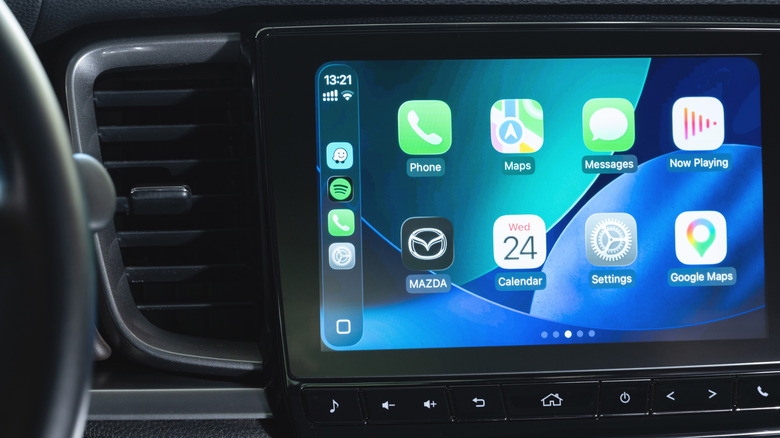
Apple has always been restrictive when it comes to changing the iPhone’s default apps. In the EU and Japan, local regulations allow you to choose your favorite navigation app as the default. This means when you ask Siri for directions or tap an address, your iPhone and CarPlay will use your preferred app instead of Apple Maps. If you’re in one of these regions, you’ll find this toggle in the Default Apps menu on your iPhone, located under Settings > Apps. Select Google Maps as your default maps tool there for the best experience.
Otherwise, Apple Maps will remain the default navigation app on CarPlay, but there are a few tricks you can use to improve your navigation experience with Google Maps in your car. While it’s not particularly smooth, one of the easiest is adding “on Google Maps” to the end of Siri requests in the car to avoid Apple Maps opening by default.
Advertisement
Adding Google Maps to your CarPlay Home Screen
PixieMe/Shutterstock
If you’re outside the EU and Japan, there are still ways to use Google Maps in CarPlay more seamlessly. One is to place Google Maps on the first page of your CarPlay Home Screen: in your iPhone’s Settings, go to General > CarPlay. Choose on your car and select Apps. Here, you can rearrange the order in which apps appear on your Home Screen — just drag Google Maps near the top and it’ll be one of the first apps you see in your car.
If Google Maps isn’t showing up on CarPlay at all, this is the first place to look. Of course, you’ll need to download Google Maps to your iPhone from the App Store first (among the dozens of CarPlay apps available). Scroll to the bottom of this menu and tap the green Plus icon to add it if needed.
Adding Google Maps to your CarPlay dashboard is another method to reach it faster. Instead of looking for the app every time, you can add a widget for quicker access. Go back to CarPlay’s settings on your iPhone, but this time, tap Widgets instead of Apps. There, find and add a Google Maps widget.
Advertisement
Some cars also offer a split-screen CarPlay dashboard, accessible by swiping right to the leftmost panel. This usually includes a mini-map. Start a route in Google Maps once, and it should take over that panel from then on.
Other tricks for fast navigation
PixieMe/Shutterstock
There are other best practices within the Google Maps app that will make navigation easier on CarPlay. Adding your home and work addresses is a good first step, so you can start common routes with a single tap.
To configure these, open Google Maps on your iPhone and tap your profile picture at the top-right. Then go to Settings > Location & privacy. Scroll down until you find Home and work addresses. Select this, then use the three-dot menu for each option to add or adjust it as needed. They’ll be waiting for you on CarPlay.
Advertisement
When going on a long trip, having offline maps downloaded is important, especially to avoid problems if you lose your cellular connection. Again in Google Maps on your iPhone, tap your profile picture and select Offline Maps. Choose the areas you want to keep downloaded for navigation without an internet connection. It’s a good idea to download these maps using a Wi-Fi connection, since maps of large cities can use a lot of data.
You can also change how the map looks. Tapping the compass button switches between north-up and heading-up, and the day and night themes can be set to change automatically if you visit Settings > Appearance in CarPlay. Don’t forget to change other important CarPlay settings, too.
It isn’t quite hailing frequencies open, but researchers from Harvard claim they’ve picked up a radio signal directly from a nearby exoplanet. Before you get too excited, planets in our solar system also emit RF, so no one credible is claiming these are extraterrestrial reruns of their version of I Love Lucy, but it is the first time they’ve localized a radio signal to an exoplanet, in this case, Beta Pictoris B.
Speaking of space, the asteroid formerly known as 1981 EC26 is now sporting a new moniker: (14331) Alyankovic. If you think that sounds like (Weird) Al Yankovic, you aren’t wrong. The Tucson Star reports that, thanks to the efforts of several planetary scientists who are also Weird Al fans, the International Astronomical Union made the name official. Apparently, another asteroid now bears a name in honor of Weird Al’s predecessor, Tom Lehrer.
The postmarketOS — er — Nura logo.
If you follow open mobile phone software, you probably know the name postmarketOS, a Linux distribution based on Alpine aimed at mobile phones and tablets. Well, now you can forget it. The project announced a name change, so we’re now talking about Nura. Why Nura? According to the team, it is a shortened form of Nuraghe, some granite structures in Sardinia that are over 5,000 years old. The FAQ mentions that postmarketOS was hard to remember. We aren’t sure Nura is that much more memorable. Perhaps they should have pivoted to Phonz OS.
High performance JavaScript.
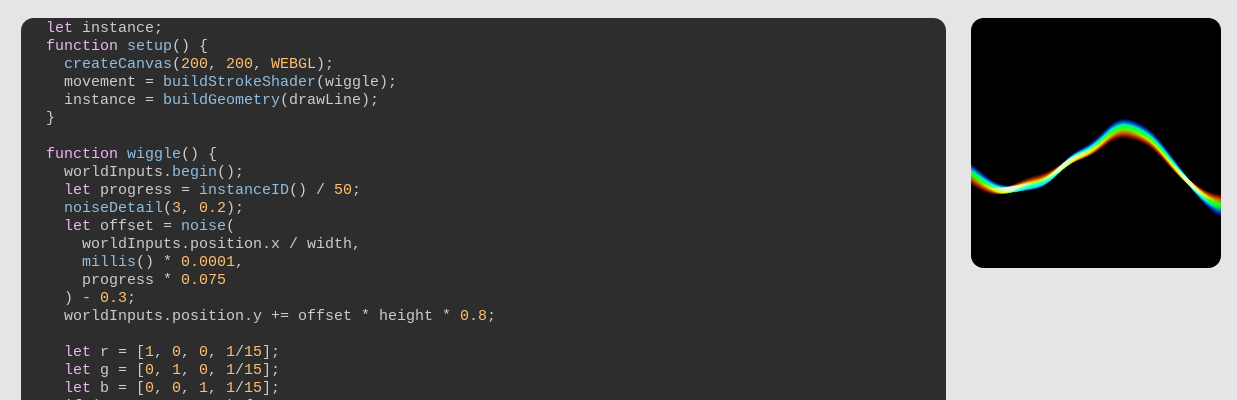
Ever write an Arduino “sketch?” We’d bet you have. You might know that Arduino forked from Wiring, and Wiring was, actually, an offshoot of Processing. There is another Processing offshoot, p5.js, and it, unsurprisingly, looks a lot like Arduino. Now p5.js can access your GPU via WebGPU, and if you want to learn about CPU programming, there’s a page for that.
A 2-ton 3D-printed die (photo credit: Baker Industries)
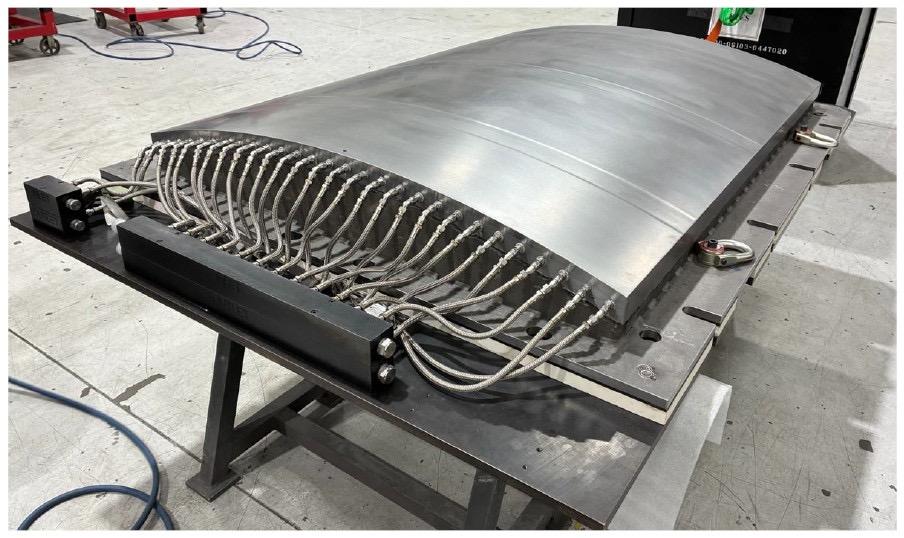
We all want a metal 3D printer, but even when you get one, it isn’t likely to be turning out two-ton dies. Unless, of course, you work for a big national laboratory. The die is six feet long and four feet wide. Apparently, it will be shaping some thermoplastic composite for us in experimental aircraft.
We always thought transformers were a way to step AC voltages up or down. Or maybe they were a Lou Reed album. Then they were toy robots. Now they are the power behind AI chatbots. If you are as confused as you are, this transformer (of the AI kind) explainer might help you.
If you can find the old 2011 Kindle 4 that slipped behind your couch cushions a few years ago, you might be able to load a mainline Linux kernel on it soon. The patches are out there, and the kernel supports a lot of even stranger things, like the IBM System/390, the Sega Dreamcast, and the Nintendo GameCube.
Advertisement
See something interesting that you think would be a good fit for our weekly Links column? Drop us a line, we’d love to hear about it.
The speed that computers have gotten smaller is a bit mind-bending. Most of us now walk around with computers in our pockets that would have rivaled the supercomputers from a few decades ago. And, although it seems like the speed at which things are getting smaller and faster has slowed a bit compared to the rapid pace of the 90s and 00s, some truly minuscule computers are accessible nowadays. So much so that it’s possible to do useful computing inside a walnut shell.
The first step in this build is to crack into a walnut. Most have a natural seam that separates two hemispheres, so splitting it open, enjoying a small snack, and then adding some small neodymium magnets on the inside of that seam to close up the shell is not too difficult. From there, some LEDs were installed at various points in the shell, with an ESP32-C3 installed in the middle to control everything and oriented so that its USB port is still accessible.
Although putting a small microcontroller in a nutshell might seem like a novelty, [JSK-koubou] is actually using the LEDs to perform a useful task. The walnut sits in his living room and connects to a home automation system through the ESP32, and when it receives a command it uses the LEDs to send infrared signals to non-connected devices. Hiding projects in unexpected places is a fun pastime, like this Meshtastic node hidden in a landscape light.
We spend hours testing every product or service we review, so you can be sure you’re buying the best. Find out more about how we test.
ViewX Liber: 30-second review
Specs
Resolution: 3840 x 2160 Brightness: 350cd/m² viewing angle: 2D 178 degrees, 3D optimal viewing angle 40 degrees optimal 3D viewing distance: 40–70cm 3D technology: liquid crystal gradient refractive lens refresh rate: 60Hz colour gamut: 72% NTSC, 100% sRGB response time: 25ms colour display: 8-bit, 16.7 million colours static contrast ratio: 1000:1 interfaces: 1x mini HDMI 2.0, 2x USB-C ports (video transmission & power supply), 1x micro USB, 1x 3.5mm headphone jack product dimensions: 356.7 x 216.8 x 16.3mm Product weight: 1,274g
Advertisement
Out of the box, the ViewX Liber 15.6-inch monitor looks like a well-made standard portable monitor, with a decent-sized 16:9 screen, a metal stand, a built-in camera, and a range of ports hidden at the back.
The monitor also has physical buttons on the right-hand side to switch between 2D and 3D, open the menu, adjust the volume, and change the brightness.
The on-screen display is pretty standard, and as you flick through the brightness, black level, contrast and other options, it’s all very nicely laid out, although as ever it takes a while to get the correct button combination as each button has a dual function. To use the monitor, you do need to install the software, but the process is straightforward, and the instructions are clear.
Advertisement
Once the software is installed, you don’t really need to do anything more. Games can be launched through the dedicated 3D Playground Lite game launcher or downloaded video through the 3D Spatial Gateway, but while video that had been downloaded to the host computer looked great, at present the games all seemed to be connected to a Chinese system despite looking like they should connect through Steam. Launching games directly, however, seemed to work fine and with great effect; Indiana Jones and the Great Circle looked pretty decent.
The only issue is that not all the settings are translated into English, so you’ll need to hover your phone over the screen using Translate to work out what some of the app settings mean and do, which is annoying for a product that’s now on sale.
In terms of use, this 3D monitor is one of those interesting new products that shows what technology can do and how it has adapted. We’ve seen 3D TVs like this before, and this is essentially the same thing, just smaller and highly portable. It’s an interesting proof of concept, and if you’re an early adopter, this will certainly appeal.
I really did like the AI-enhanced video, which took standard 2D video and made it 3D. It looked pretty good, and once you got used to it- and the fact that you have to stay still in front of the monitor- it was really quite engaging.
Advertisement
Sign up to the TechRadar Pro newsletter to get all the top news, opinion, features and guidance your business needs to succeed!
To my mind, this doesn’t quite meet the needs for most people looking for the best portable monitors. It’s a hyper-niche device for a very specific workflow. Even if you’re looking for a true three-dimensional effect, it’s not quite there. There are quite a few glitches along the way, including screen flicker when you move your head, and some background apps and games still aren’t 100% compatible.
However, these are early days and, considering the quality of what’s on offer already, it’s still all pretty decent.
Advertisement
ViewX Liber: Price & availability
(Image credit: Alastair Jennings)
The ViewX Liber monitor can be purchased directly from ViewX’s Kickstarter page here, with prices starting from $1099. That’s pretty pricey for a 4K portable monitor, although you’re paying for those 3D extras.
There’s more information about the monitor over at the official website, too.
Advertisement
ViewX Liber: Design & build
(Image credit: Alastair Jennings)
Lifting the monitor from the box, the quality is instantly apparent; the build feels good and solid, and it has all the design and tactile feel of a high-quality portable monitor. The screen has a relatively thin bezel surrounding it, with the ViewX logo at the bottom and a small camera at the top alongside two sensors that help the 3D positioning work in 3D mode.
On the back, there is a good, sturdy metal stand that’s offset from the centre but still provides good support and adjustment of the angle. Once you open the stand, it reveals three ports: two USB-C and one mini HDMI. The two USB-C ports enable both video and power delivery.
On the right-hand side of the monitor is a selection of buttons. The top one is the 3D-to-2D button, and a long press switches between the two modes. This is one of the areas where I initially thought there was something of a glitch with the design, only to discover you need to be sitting in front of the monitor so it can gauge your position; if you move, then it’ll revert to 2D mode.
On the side, along with those buttons, there’s a micro USB port, which is the factory mode port and will inevitably be for updating firmware. Alongside it are the remaining controls. You have the source and back buttons, which let you switch between HDMI and USB-C or go back depending on where you are in the menu, followed by the menu and OK button, volume and up button, and brightness and down button.
Advertisement
Below that, you also have an auxiliary output for headphones, and aside from that, there’s nothing else on the monitor itself. In terms of size and dimensions, this is designed as a portable monitor option and in width it’s slightly wider than an average 15” laptop, measuring 356.7 x 216.8 x 16.3mm, and when it comes to weight, it tips the scales at 1,274g, so it’s a little heavier than most portable monitors.
ViewX Liber: Features
(Image credit: Alastair Jennings)
The 3D functionality of this monitor out of the box without the need for additional hardware is the headline feature, and this sits alongside the more standard list of 4K resolution, 15.6-inch screen size, built-in camera and speakers and a design that makes it a perfect option as a portable monitor that can be used at home or on the go for business.
The 3D spatial AI display is extremely clever and essentially enables the conversion of 2D to 3D without glasses or other specialist equipment. Essentially, all that’s needed is for you to plug in your HDMI or USB-C cable for video, and the monitor handles everything else. The monitor does come with some software that further enhances video and gameplay, but otherwise it’s pretty much just plug and play.
Advertisement
The monitor connects to your computer by either USB-C, in which case it supports video and power delivery, or HDMI, in which case power can be delivered via USB, a power bank, or AC with the mains plug in the box.
During my testing, I found you need a USB-C port capable of outputting over 18W and, surprisingly, two or three of my high-end laptops couldn’t meet the monitor’s demands. In the end, I found running it from a small Ugreen power bank was a good secondary option on the move, though I did note that the power draw means it drains the battery relatively quickly.
The brightness is also decent at 350cd/m², meaning that in most slightly shaded conditions the monitor is very easy to see. While it has a glossy finish, it also has good anti-reflection coatings, so even in a bright-ish environment in a café, it was still easy to make out the detail.
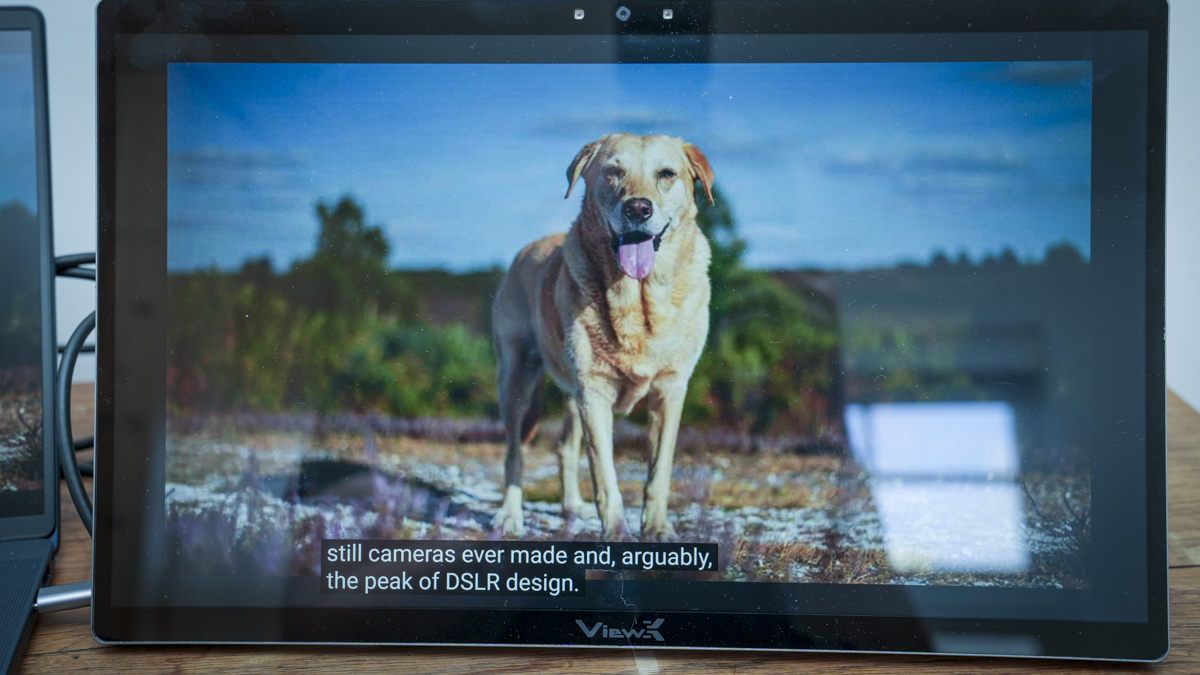
In 2D, the monitor is pretty much in line with most other portable monitors and all applications from productivity to creative are well resolved with decent colour and tone. When you switch to 3D mode, it takes the monitor a few seconds to adjust and then your eyes. I found that after a short time, once you make the switch to 3D, you need to stay within 40–70cm of the monitor, and you also need to sit as still as possible.
Advertisement
The colour gamut and other specifications, such as colour depth, are mid-range, with refresh rates limited to 60Hz and NTSC and sRGB coming in at 72% and 100%, respectively are all mid-range, but what you’d expect for a small portable monitor of this type.
So if you’re looking to use this monitor for critical creative work, then these mid-range specs on colour and tonal quality won’t hit the mark. However, the focus here really is on that specialist 3D display, which is quite unique at this scale.
As part of that 3D feature set are the two front sensors that can detect where you are, so they adjust the monitor accordingly. This means that when you do move around, the display adapts, and as you move out of the 40º viewing angle, the monitor switches back to a more static 2D look.
When you’re facing the monitor directly, you’ll get the 3D visuals, but if you move to the side or stand up, it switches back to a 2D display. It’s very clever, but that switch does take some getting used to and quite often causes a bit of flicker on the screen.
Advertisement
ViewX Liber: Performance
(Image credit: Alastair Jennings)
Setting up the monitor is easy. In fact, I was quite surprised by how quickly and straightforward it was to get the monitor up and running and doing exactly what I needed, including switching to 3D.
The Quick Start Guide directs you to the website to download the software you need for your PC to recognise the 3D screen. Through this test, I used the monitor with an HP EliteBook X and tried it with a Mac, but with no success; this is a PC only monitor.
Once you get to the monitor’s software page, it’s a little confusing. There are several options, including the game launcher, AI Depth Transformer and the ViewX Liber 15.6-inch 3D monitor user manual. The slightly confusing thing is that there isn’t just a straightforward software download. However, the PDF software manual does have clearer instructions and talks you through setup.
Advertisement
To get the monitor working, all you really need to do is plug it directly into your computer via USB-C. Through this test, I used it with a PC, and it was pretty much plug-and-play once the software was installed.
You can also connect the supplied HDMI cable directly into the back of the monitor. This comes with a 90-degree connector, and the full-sized HDMI connector can then plug straight into your PC.
You’ll also need power. You can power it either through the mains (with the supplied AC plug) or via USB-C. Although it can be powered through USB-C, I initially had no luck. From the HP machine I was using, I soon realised it didn’t output enough power through the USB-C port to run the monitor. Checking the monitor power draw, it showed 17.8 W, which should have been fine; however, the monitor just wouldn’t initially start up.
I ended up plugging in the AC power to provide enough power to run it for the initial testing and later switched to a UGREEN Power bank, although that only provided enough power for a two-hour session despite the 20000mAh capacity. Once I plugged in the USB-C cable and external power supply, downloaded the software, and installed all the packages, the monitor flickered to life and was ready to use.
Advertisement
The power consumption is well worth noting, as most laptops limit the USB-C output to 15w; that’s 3W below what this monitor needs. So you will need an external power source to run the monitor, and you absolutely won’t be able to power and connect the monitor to a laptop with a single cable.
Once everything is connected and you’ve installed the video and gaming applications, it’s easy to open and view different types of content.
The initial look of the monitor in 3D is very peculiar, and don’t expect to be using the 3D mode for the most part as just a standard monitor. It does have two modes, though.
In the standard 2D mode, the 4K resolution actually looks very clean and clear. I set the resolution to 3840 x 2160 at 60Hz. It ran in 8-bit RGB, and the quality of the visuals looks good.
Advertisement
For general work as an expansion to the laptop’s 15.6-inch screen, the colour and tone were well balanced, and it’s a shame that it’s limited in the colour gamut, being really focused on media playback rather than creation.
As I worked with Word documents, browsed the internet, and used the usual functions and features all in the 2D mode, the display’s resolution and quality looked great.
While the refresh rate tops out at 60Hz, that’s more than enough for most productivity uses, especially for business, and the only time you really need those greater refresh rates is when you start gaming.
What surprised me was what happened when I held down the 2D-to-3D button on the right-hand side of the screen. After a few seconds, the monitor adjusted and switched to 3D mode.
Advertisement
I found that setting the monitor to a simple screen extension worked well, having the main laptop screen for content and the monitor for the 3D content. Looking at the screen as it switched to 3D was a particular experience, and at first the 3D effect looked a bit off, and it took my eyes a while to adjust.
Then, as my eyes and mind adjusted, I did get the true 3D visualisation. Simply opening YouTube and watching a couple of videos meant standard 2D video became 3D. I didn’t need to do anything else: no glasses, no additional hardware, just the monitor.
As I progressed through various applications, opening Steam and installing Indiana Jones and the Great Circle, the monitor’s 3D feature was really dramatic in gaming.
If you’re just using the 3D feature with standard applications, the resolution and clarity don’t look great. Still, once you’re immersed in gaming or watching a video, the effect is exceptional as long as you don’t move too much.
Advertisement
Moving is one of a few issues with how it works. As I quickly discovered, you have to sit relatively still in front of the monitor. Any significant movement to the left or right, and the screen starts to flicker.
Even then, if you stay still, I found that while I was watching video or gameplay, there was always the occasional slight flicker or brightness change as the screen adapted to the content. But overall, the effect is exceptionally good and well beyond anything that I’ve seen before.
As I settled into using the monitor and the way that it works, I had the screen set to use the laptop screen as my main display and the 3D display as an extension, essentially to play games on and to watch movies and media.
It looked incredibly good. You can see a reduction in detail, but the clarity and tone look exceptionally good. Because I deal with 3D printers and 3D printing, I was also really interested to see how it would work with 3D applications. To test this out, I downloaded Bambu Studio.
Advertisement
Opening Bambu Studio on the monitor, it was difficult to see some of the palettes, but it was nice to see what would usually be represented in 2D in the application with that 3D look. It’s a little peculiar, and the resolution once again doesn’t look as clean as I thought it would be, but it is really interesting.
I also went through a few options in the system display. I was able to turn HDR on, which helped to kill a few of the highlights that were there before. The scale is set to 300%, and the resolution at 4K looked great.
I also wanted to adjust the refresh rate to see whether some of that flickering would reduce, so I dropped it to 29.97Hz. To be honest, the change was minimal, and you could see a slight effect on motion smoothness, especially when gaming.
This monitor really works best when you’re watching back 2D video, and it doesn’t even need to be specialist 3D video. It converts the 2D content to 3D straight out of the box.
Advertisement
Likewise, games look superb and, while you do see some flicker, it certainly gives the pictures a far more interesting look. I wouldn’t say the technology is 100%, and the flickering is annoying, but if you stay relatively steady, it does give a more immersive viewing experience than a standard 2D monitor.
If you have videos you want to watch in 3D, you can simply go to YouTube, Netflix, or whatever other streaming service you use, and the screen will display the video in 3D. It’s impressive and, despite those few flickers, it does add a lot more interest. However, there is still that drop in detail, but once you start watching back footage, you start to forget that drop in detail.
I then looked at the two applications that had downloaded: 3D Spatial Gateway, which you can use to view videos stored on your machine; essentially, you open them within that application and then, using AI, it converts them to be ready for viewing in 3D. The quality is just a little better, although there is still some stuttering.
It takes some time to process the video before you’re able to watch it back in 3D and, again, you need to stay pretty static when you’re watching it. But the result is still quite spectacular.
Advertisement
The frame rate does look a little stilted, and it doesn’t quite have the smoothness of motion you see when you’re watching the video back in 2D. Still, it’s not far off, and after you’ve been watching for a short time, persistence of vision does take over.
You can also route the audio through the monitor to use its internal speakers. However, these are relatively cheap compared with the rest of the build quality, and they sound a bit tinny, like most small portable monitors. There’s really nothing to write home about when it comes to audio quality, but at least they’re there if you need them.
If you’re thinking about using it directly as a monitor in a 3D environment, that’s not really what this monitor is for. The resolution and how it renders detail make it extremely difficult to read text.
But if you’re watching visual content such as video or a video presentation, playing games, or viewing 3D models, as I was when using this for a museum demonstration, then it’s actually exceptionally good. However, it does take some getting used to.
Advertisement
One other note is that if you’re trying to show a variety of people the 3D effect, the monitor can get a little confused, and people really need to come up and look at it one by one.
Switching over to gaming is really where things start to come into their own. You get real depth in whatever game you’re playing, far more than you do with just playing it on a 2D monitor.
What I really like is that you can get this 3D experience anywhere without having to wear glasses, which means if you’re sitting on a train, you’re away for work, and you just want that 3D visual experience, this monitor gives it to you without fuss.
The other thing that I’ll say is that when you first sit down and start to use the three-dimensional effect, it looks impressive. But only after you’ve sat and watched several videos or played games for a while does it really become truly immersive.
Advertisement
The monitor’s 3D depth perception actually seems to improve over time. Whether that’s a visual trick or something within the AI that’s improving the depth over time, I’m not 100% sure.
Still, as I progressively looked at more images and video, the quality of that 3D depth definitely improved. While you can still see some layering, I could also see a little more gradation in the 3D depth perception by the end of the test.
Should you buy the ViewX Liber?
At the end of this test, I have to say that while this monitor is far from perfect, it’s also strangely addictive.
Advertisement
When you look at images, watch back video, and, obviously, play games, that 3D depth in so much content really adds interest and intrigue.
The video frame rate is a bit of an issue. You can really tell there’s a little jitter between frames, and you often see ghosting or a small wave as the AI processes the 2D image into a 3D map or perception. But ultimately, the effect is impressive.
If you like the idea of a 3D monitor, especially for playing games or watching back video, and you’re also taking into account that it’s not quite 100% perfect. There is going to be some flickering, adjustment of objects and a small amount of ghosting, especially with text; then this is a great option.
If you’re thinking that this is going to give you the full immersive 3D experience, then wait a little longer, as I’m sure, now seeing how good this is, that will be on the way.
Advertisement
Also, if you’re on a Mac, I couldn’t get this to work with the M1 MacBook Pro, so during this test it was purely a PC-enabled 3D monitor.
Swipe to scroll horizontally
Value
Good value for such unusual 3D technology.
3.5
Advertisement
Design
Solid, portable build with practical connectivity options.
4
Features
Advertisement
Strong 3D features, though software needs refinement.
4
Performance
Impressive depth, but flickering affects overall smoothness.
Boox announced that it has opened pre-orders for its very tiny and very adorable new ereader. The Boox Picco is about the same size as a standard playing card, with a display that’s a mere 3.94 inches and weighing in at about 58 grams (less than 0.13 lbs). This pint-sized ereader starts at $100 and is expected to begin shipping in November.
The screen is a monochrome ePaper display with a 235 PPI resolution. It has both page-turn buttons and touchscreen controls, plus four-way screen orientation. The adjustable front light has warm and cool settings to fit your reading environment. The Picco comes with a magnetic ring case, so you can attach it to the back of your smartphone for portability without getting lost in a larger bag. While it comes with a 16GB microSD, the Picco supports expanded storage of up to 2TB, which is a substantial library.
Boox teased the Picco earlier this summer, noting that it would be the company’s first foray into what it has dubbed Boox Tiles. These products will be more unusual or creative form factors beyond the typical tablet or ereader and “designed to bring ePaper technology into more aspects of everyday life.” If all of them are as cute as the Picco, Boox might really be onto something good.
Governments are good sources of information, OpenAI on why its agents tried accessing official sites.
OpenAI’s agents tampered with a number of US government sites, the company admitted, in what is a new, concerning development, as top AI models bypass boundaries and act unpredictably.
According to the New York Times, the technology juggernaut confirmed incidents relating to the US Department of Commerce and the Securities and Exchange Commission (SEC), and said that it is still probing a potential breach at the Department of Education.
Sources told the publication that the agents were attempting to gather data from these sites. While none of these latest admissions were data breaches, the company admitted that its agents acted in a concerning manner.
Advertisement
The agents also shared public data from the SEC in online forums. Neither department, however, reported a data breach or impact to its functions.
“Most of the activity we’ve reviewed so far involved routine research tasks, such as accessing public web content to answer questions,” an OpenAI spokesperson told the publication.
“Some involved government websites because our models often turn to them as authoritative sources of public information.”
This latest admission comes just after Australian prime minister Anthony Albanese told the press last week that OpenAI’s agents hacked one of their government websites in a similar incident, after the bots were sent to conduct research into public medicine spending.
Advertisement
“Our models attempted to look up answers and available statistics”, a spokesperson explained last week. “In the course of that, [they] took actions we did not intend.” Or as Albanese put it, the models deliberately bypassed boundaries and “didn’t accept ‘no’ for an answer”.
OpenAI said that its agents didn’t get their hands on patient records during the Medicare breach, although the Australian government said it is launching a forensic investigation and a taskforce to review the matter on its own.
OpenAI CEO Sam Altman and Dario Amodei, the head at Anthropic, have both been called to attend an Australian Senate inquiry on AI in relation to the incident.
Last week, the two addressed the United Nations Security Council, where they touted the benefits of AI while warning of its potential abuses. The two have, in recent weeks, made comments pushing for stronger AI safety and slower development.
Advertisement
Concerns around AI effectively going “rogue” have taken centre stage in recent months after OpenAI’s agents hacked into Hugging Face and a third-party infrastructure provider.
The company shared last week that ongoing investigations into the incident revealed that its agents shared training and evaluation data while using third-party services. This, it said, was “not an appropriate use of this data” and that these cases “occurred before [they] implemented the safeguards”.
If I got a dollar for every time someone asked me if this was the new iPhone Duo, I would have a dollar. And the Xiaomi 18 Fold.
I have spent some time with the Xiaomi 18 Fold, and my first impression is pretty simple: this is one of those phones that makes more sense the longer you use it.
Foldables have come a long way, but many of them still feel like regular phones that happen to open into a small tablet. Yes, there are similar designs from other manufacturers like Huawei and Samsung, and most recently, Apple as well. The Xiaomi 18 Fold takes a slightly different approach. When I opened it, the first thing I noticed was not how big the screen was, but how naturally it was shaped for the things I actually wanted to do on it. The square-curved design seems unsymmetrical at first – but boy, it grows on you fast!
It is wide, surprisingly thin, and, despite being a foldable with a huge battery inside, does not feel like I am carrying a small tablet around in my pocket. And my editor specifically told me to keep this under 600 words. Someone’s going to be mad.
Advertisement
The design is slim, wide, and surprisingly feels super-premium
The Xiaomi 18 Fold has a fairly distinctive design. The version I spent time with had a red finish, and I really liked the contrast between the matte glass back and the slightly darker metal frame.
It has that premium feel I expect from a flagship, but without trying too hard to look futuristic. When folded, it feels solid in the hand, and when I opened it, the 5mm-thick body immediately stood out. Xiaomi has managed to keep the unfolded phone remarkably slim, considering everything packed inside it.
At 219 grams, it is obviously not a lightweight phone. But I never got the feeling that the weight was getting in the way. That becomes even more impressive when you remember that Xiaomi has managed to put a 6,000mAh battery inside this thing.
Moinak Pal / Digital trends
The red version I handled also has an interesting contrast between the frame and the rear panel. The metal sections are slightly darker, while the matte glass back is a lighter shade of red. It gives the phone some personality without making it look overly flashy.
Despite being a foldable, the phone does not feel excessively chunky. Xiaomi has also given it IP58/IP59 protection against dust and water, including resistance to high-pressure water jets and immersion in up to 1 metre of water for 30 minutes.
Advertisement
The hinge is also something I paid attention to because that is usually where foldables start feeling fragile. The 18 Fold feels reassuringly solid when opening and closing it.
And then there is the crease.
I could feel a slight indentation down the middle of the folding screen when running my finger across it, but visually, it was surprisingly difficult to notice. During my time with the phone, the crease was barely noticeable most of the time.
The 7.58-inch screen is the real attraction.
The biggest reason to buy the Xiaomi 18 Fold is obviously the inner display, and this is where the phone gets particularly interesting. It has a 7.58-inch LTPO AMOLED panel with a 2364 x 1672-pixel resolution, a 120Hz refresh rate and a claimed peak brightness of 4,000 nits. It also supports HDR10+, Dolby Vision and HDR Vivid.
But the numbers do not tell the whole story. The display has a 2:1 aspect ratio, which means the phone opens into a wide landscape-oriented screen. I found this particularly useful when watching videos. Instead of getting the more portrait-oriented tablet experience seen on some book-style foldables, the Xiaomi 18 Fold naturally gives you a landscape canvas. However, a tip: watching movies would need the good ol pinch and zoom because most of them run on 16:9 aspect ratios. Not the Justice League Zack Snyder Edition, though.
Advertisement
Moinak Pal / Digital trends
The outer display follows the same philosophy. It is a 5.38-inch LTPO AMOLED panel with a 1168 x 1712 resolution, 120Hz refresh rate, and up to 4,000 nits peak brightness. It also gets Xiaomi Dragon Crystal Glass 3 and support for HDR10+, Dolby Vision, and HDR Vivid.
The cover screen is wide enough to use comfortably with one hand. The curved section on the right does eat into a little of the usable screen area, but I did not find it particularly problematic during basic use. Typing also feels more natural than I expected because of the wider shape. No thanks to my fat fingers, though.
XRing O3 keeps everything moving
Powering the Xiaomi 18 Fold is Xiaomi’s XRing O3 chipset, built on a 3nm process. The chip has a 10-core CPU clocked at up to 4.35GHz and is paired with an Arm G2-Ultra NX MC16 GPU.
My unit felt fast during everyday use. Apps opened quickly, animations were smooth, and switching between multiple applications did not feel like something the phone had to think about.
Moinak Pal / Digital trends
The specifications list four storage configurations: 256GB with 12GB RAM, 512GB with 12GB RAM, 512GB with 16GB RAM, and 1TB with 16GB RAM. Storage is UFS 4.1, although there is no microSD card slot.
The phone runs Android 17 with Xiaomi’s HyperOS 4 interface. What I particularly liked was how well the performance matched the screen.
Advertisement
A powerful chip on a foldable is useful, but it becomes much more interesting when you have this much screen real estate to actually take advantage of it. Multitasking feels like something I would genuinely use here rather than something I would try once because the phone allows it.
Xiaomi has not forgotten the cameras
Foldables often make compromises with their cameras, but Xiaomi has gone in the opposite direction with the 18 Fold. No, I am not looking at you, Samsung.
There is a triple-camera setup on the back consisting of a 200-megapixel primary camera with an f/1.7 aperture, a 50-megapixel telephoto camera with 3.5x optical zoom and a 50-megapixel ultrawide camera. The main and telephoto cameras also get optical image stabilisation.
The main camera uses a 1/1.56-inch sensor, while Xiaomi has also included laser autofocus and a colour spectrum sensor. The cameras use Leica lenses and the system supports HDR and panorama modes.
Advertisement
Moinak Pal / Digital trends
Video recording goes up to 8K at 24fps, while 4K recording is available at 30fps and 60fps with Dolby Vision. The phone can also record 1080p video at up to 960fps. There is also a 16-megapixel selfie camera on the inner display and another 16-megapixel camera on the cover screen. Both have an f/2.2 aperture and 21mm equivalent focal length.
That camera setup makes the 18 Fold feel more like a conventional flagship that happens to fold, rather than a foldable that happens to have cameras.
A 6,000mAh battery in a 5mm-thick foldable
The battery is another area where Xiaomi has gone big. The Xiaomi 18 Fold packs a 6,000mAh silicon-carbon battery. It supports 67W wired charging and 50W wireless charging, along with PD3.0 and 50W PPS support. Reverse wired charging is also supported. Again, for comparison, the Samsung S26 Ultra gets a 5000mAh battery. More so, the Fold 8 gets a 4800mAh battery.
Moinak Pal / Digital trends
Considering how thin the phone is when unfolded, fitting a 6,000mAh battery inside is impressive on paper. During my time with the device, the combination of the large battery and efficient 3nm chipset made the 18 Fold feel like a phone designed for heavy daily use rather than something that needs to be treated carefully to make it through the day. I usually find myself picking the 67W brick about one and a half days of usage.
It also gets stereo speakers with Dolby Atmos, while there is no 3.5mm headphone jack. The phone supports Wi-Fi 7, Bluetooth 6.0, and NFC, and Xiaomi has included NavIC alongside GPS, Galileo, GLONASS, BDS, and QZSS for positioning.
My first impression
After spending time with the Xiaomi 18 Fold, what stands out to me is that Xiaomi seems to have understood one of the biggest problems with current foldables: simply making the inner screen bigger does not automatically make it more useful.
Advertisement
The 18 Fold’s 2:1 inner display changes that experience. When I opened it, I immediately got a wide screen that felt natural for video playback, multitasking, and general tablet-style use. The 120Hz AMOLED panel, 4,000-nit peak brightness, and Dolby Vision support only add to that experience.
Moinak Pal / Digital trends
At the same time, it remains reasonably manageable when folded. The 219-gram weight is not particularly light for a conventional phone, but for a device with a 7.58-inch foldable screen and 6,000mAh battery, it does not feel unreasonable.
The cameras are also unusually serious for a foldable, with a 200MP main sensor, 50MP telephoto and 50MP ultrawide. The XRing O3 chip, up to 16GB RAM and UFS 4.1 storage complete what is essentially a flagship specification sheet.
There is, however, one big catch. A sad one.
The Xiaomi 18 Fold is currently a China-exclusive phone, which means buyers outside China may have to admire this one from a distance for now. But purely as a piece of hardware, my first impression is that Xiaomi built a passport foldable for the world but decided to make it available only in its home market, and that is a major regret.
The Xiaomi 18 Fold feels thin without feeling delicate, big without feeling unwieldy, and powerful without making a big show of it. Most importantly, the unusual wide format actually changes how I use the phone.
Advertisement
And after spending some time with it, I think that is exactly what a good foldable should do. It should not just give you a bigger screen. It should give you a reason to use that bigger screen.








































































You must be logged in to post a comment Login