


Join Mikko Hyppönen and security leaders from the NFL, CHANEL, and Atlassian for a two-hour digital summit on what AI-speed attacks change, what defenders should stop doing, and how to validate, decide, fix, and re-validate at machine speed.
Tech & AI
$10B AI Startup Instinct Brings Its Agent Into AI Group Chats—Even If Your Friends Never Signed Up


AI group chats just became the newest battleground in Silicon Valley’s race to put artificial intelligence into everyday conversations. Instinct, the AI agent startup now valued at $10 billion following its latest funding round, announced this week that its assistant can join group chats with friends—even those who have never downloaded the app or created an account.
The feature, rolling out first to early access users before a broader release, is designed to tackle one of the most mundane but persistent headaches of modern social life: the endless back-and-forth required to plan anything with more than two people. Instinct says its agent can help coordinate travel itineraries, hunt down concert tickets, run fantasy football leagues, organize carpools, or settle who’s bringing the mashed potatoes to Thanksgiving dinner.
How AI Group Chats Work Without Everyone Signing Up
What sets Instinct’s approach apart is its willingness to let the AI operate in group settings where not every participant is a customer. According to founder Noah Shinn, a user’s personal Instinct agent will first ask permission before connecting with a group’s shared Instinct agent, and users retain control over which group chats they trust the AI to participate in—plus the ability to revoke that trust at any time.

Shinn also detailed privacy safeguards built into the system: the group-facing agent is siloed from a user’s personal account and cannot access it directly. Before sharing any information or taking action on a user’s behalf, the personal agent must get explicit permission. The company has also built in a safeguard for group dynamics—if new members join a chat, any pending replies from a user’s personal agent are held back until that permission question is resolved again, preventing information from leaking to people who weren’t part of the original conversation.
“Making plans with friends usually turns into a frustrating back-and-forth over times and places,” Shinn wrote on X, announcing the launch. “With Instinct in the group, you can explore options together, agree on a plan and get it done, all in one thread.”
A Crowded Fight for the Group Chat
Instinct isn’t alone in betting that AI group chats represent the next frontier for consumer assistants. The company has been locked in an escalating rivalry with Meta’s Muse, and the two have traded blows in recent weeks, each adding the ability to make phone calls on a user’s behalf. Muse, however, has not yet matched Instinct’s group chat functionality—though Meta’s older, more established Meta AI assistant already works inside group conversations on WhatsApp, Messenger, Instagram, and Facebook, giving the social media giant a built-in distribution advantage across billions of existing conversations.
OpenAI is also circling the same territory. Last week, the ChatGPT maker introduced “Dots,” personal AI agents that can be deployed inside ChatGPT Spaces—collaborative workspaces where the Dots and human users work side by side. While the implementation differs from Instinct’s friend-group approach, it signals that every major player in consumer AI now sees shared, multi-person conversations as essential turf to claim.
The strategic logic is straightforward: individual AI chatbots are useful, but much of real life happens in groups—families, friend circles, roommates, project teams—where coordination problems multiply. Whoever builds the assistant that can smooth over those group dynamics without alienating the people who haven’t opted in stands to gain a meaningful distribution edge, since a single user bringing an AI agent into a chat can effectively introduce it to everyone in that conversation.
What Comes Next
For now, Instinct’s AI group chats feature is limited to early access users, though the company says it will expand access “soon.” Interested users can ask their existing Instinct agent to add them to the waitlist for the feature, along with other recent additions like phone-calling capabilities.
As AI agents increasingly operate in shared spaces rather than one-on-one exchanges, questions about consent, data boundaries, and who controls what an AI can say or do on a person’s behalf are likely to become more pressing. Instinct’s layered permission system—asking before connecting agents, siloing group access from personal accounts, and pausing replies when group membership changes—offers one model for navigating those concerns. Whether it satisfies users and regulators alike as AI group chats become more common remains to be seen, but the race between Instinct, Meta, and OpenAI suggests the feature is here to stay.
Sources:
Explore more on this topic with Vexel Search.
Continue Reading
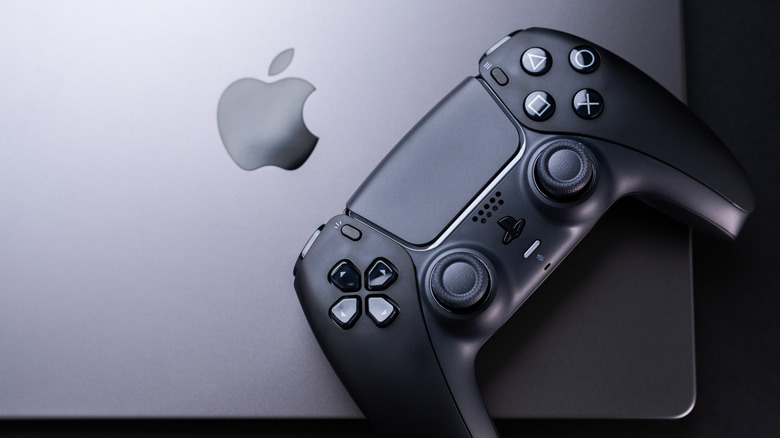
The gap between Mac and PC is finally closing, but be careful before you pick a Mac as your primary gaming platform.
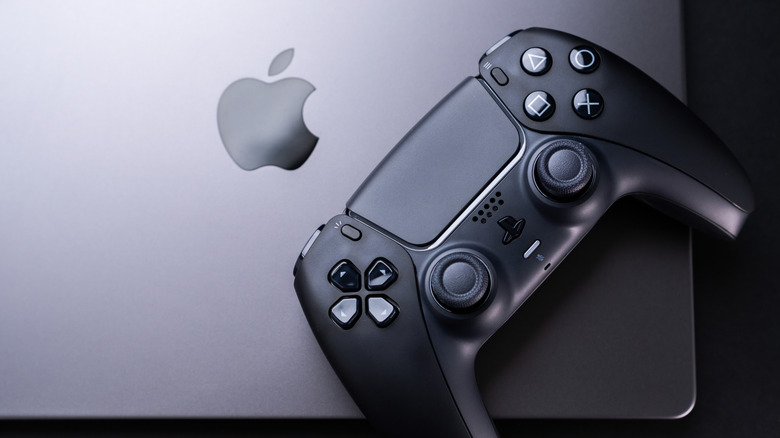
Macs have never exactly been gaming machines. For a long time, not only was the hardware lacking, but many developers never bothered to bring their titles to macOS. But the situation is different now with Apple silicon — the M-series chips are powerful, and there are new tools to easily port PC games to Mac.
But can a MacBook really handle demanding games? Technically, it can, but there are many other factors you should consider before choosing a Mac as your gaming machine. Yes, the gaming landscape on macOS is much better now than it was six years ago, but there’s still a huge gap between Macs and Windows PCs.
What a MacBook can and can’t handle
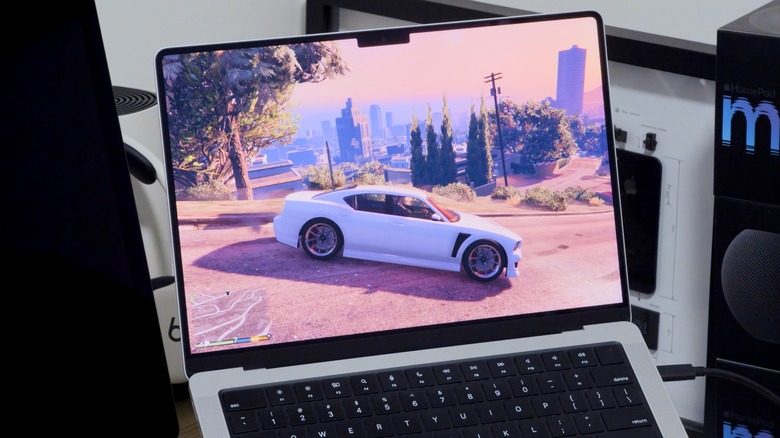
Thanks to Apple silicon, hardware is no longer a Mac’s weak point. If you have one of the latest Macs, such as an M5 MacBook Pro, it will likely run most games well — even some big names you might not have expected. Apple lists Assassin’s Creed Shadows, Dead Island 2 and Cyberpunk 2077 as some of the titles a Mac can run natively. The list of Mac-compatible games has been growing a lot, with more and more titles coming to macOS alongside their Windows versions.
And even if your favorite game doesn’t have a macOS port, there may still be an alternative. Apple has created something called the Gaming Porting Toolkit, which helps developers port Windows games to macOS using native translations. While this tool is intended for developers, anyone can use it to run PC games on a Mac with just a few lines of code. I’ve been using it to run GTA V on my M4 Pro MacBook Pro, and the results are pretty solid; I can get a steady 60 frames per second with high graphics settings. It’s not perfect and there are a few glitches here and there, but it works well overall for a game being translated in real-time.
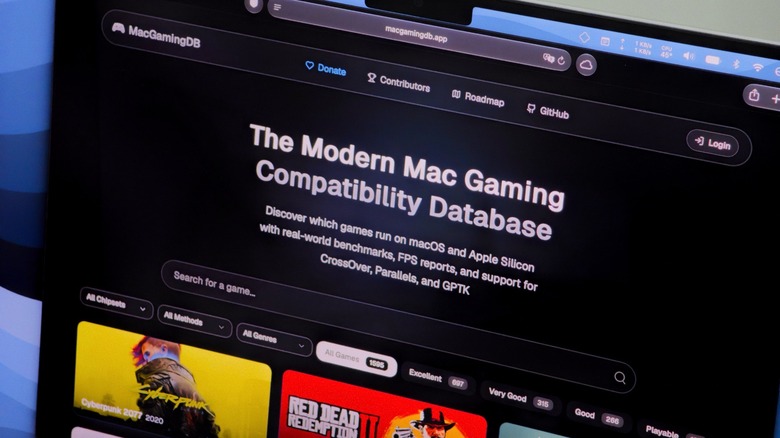
If you’re not sure which games your Mac can run, it’s worth checking out MacGamingDB. This is a community-run website that provides compatibility details for thousands of titles, making it easy to quickly find out how your favorite game performs on a specific Mac model. It saves you a lot of time, since you don’t have to download gigabytes of data just to find out the game doesn’t work.
Which MacBook to buy, and when to look elsewhere
If you really want to game on a MacBook, the MacBook Pro is your best option. Even the base model with the M5 Pro chip and 24GB of RAM gives you enough power to run most modern games smoothly. If you need more, you can upgrade it with an M5 Max chip, which adds more RAM and a better GPU.
Of course, don’t expect a MacBook Neo to perform the same as the latest MacBook Pro line. Both the MacBook Neo and the MacBook Air have less powerful processors and no internal fan, which makes them less suitable for running demanding games. They can still run some titles, but performance won’t be ideal and you’ll have to lower the resolution and graphics settings a bit.
But if you’re serious about gaming, you should probably buy a PC instead. A Windows PC will likely cost you less for the same graphical power, and it will run all games natively without you having to worry about compatibility issues. You might also want to check out cloud gaming services like GeForce NOW or Xbox Cloud Gaming to stream games on your MacBook, so hardware won’t be an issue. You just need a good internet connection.
Security teams at Google, JPMorgan Chase, Weaviate, France’s interministerial digital directorate (DINUM) and the city government of Tangerang in Indonesia have each fixed the same type of flaw in their Model Context Protocol (MCP) servers. Independent researcher Syed Anas Mohiuddin reported all five, he wrote in an update published this month.
MCP is the standard AI agents use to call tools and data sources. The flaw is server-side request forgery (SSRF). An MCP server takes a URL, path or endpoint from an agent and builds an outbound request from it, without checking where the address actually resolves. That lets whoever steers the agent decide what the server talks to, including internal systems.
In May, Mohiuddin argued that the problem was structural. If it was, he predicted, teams that share no code or owner would all produce it.
“Watching the same mistake come back from a hyperscaler, a bank, and a national government, one report at a time, is the moment the May argument stopped being a guess,” Mohiuddin wrote.
Five fixes
Google’s MCP Toolbox for Databases had an HTTP client with no restrictive redirect policy and no check on target IP addresses, according to the GitHub advisory. A crafted path parameter could send its requests to internal or external endpoints. The flaw, CVE-2026-14540, carries a high rating of 8.0 and affects versions 0.3.0 to 1.4.0. Google’s fix adds a guard against DNS rebinding and lists of allowed and blocked IP ranges, and credits Mohiuddin.
JPMorgan’s open-source repository includes a documentation-search MCP server with two tools that fetch content. One checked domains against an allowlist. Its sibling fetched any URL the caller supplied, Mohiuddin wrote. JPMorgan forked the component from an AWS project that never fetched the caller’s URL at all. JPMorgan’s Responsible Disclosure team confirmed the finding and deployed a fix, he wrote. The finding is medium severity, he wrote.
Weaviate restricted its Google module’s endpoint settings to Google API hosts, he wrote. DINUM’s official MCP server for France’s open-data platform fetched URLs supplied by data producers, which could point at internal or cloud metadata addresses. Its fix, titled “harden SSRF on external APIs”, opens with “Reported by Syed Anas Mohiuddin”.
In Tangerang’s Wazuh MCP server, a tool advertised SSRF protection but only rejected literal IP addresses, according to a high-severity advisory published on 3 September. It never resolved hostnames.
Rapid7 fixed a different bug he found, CVE-2026-97228, in its Bulk Export MCP server. The bug allowed GraphQL injection within the operator’s own access, and Rapid7 rates it low, at 2.7, its database entry says.
Still open
On 2 September, Mohiuddin privately reported issues in five MCP servers under the US General Services Administration’s Technology Transformation Services. They include servers for Veterans Affairs benefits claims, CMS Blue Button, regulations.gov, USASpending and CDC PLACES. All five are still in triage and not fixed, he wrote.
In the Veterans Affairs case, the server logs full error responses from the benefits API without redaction, according to Mohiuddin. Those can contain a veteran’s name, Social Security number, date of birth and address. He is withholding code-level detail until maintainers patch the servers. His report on Japan’s Digital Agency grants server, which had no authentication, also remains open.
‘Protocol pivoting’
Mohiuddin calls the wider attack class “protocol pivoting”. An attacker plants text in content an MCP tool returns, shaped like a task for Google’s A2A protocol. An orchestrating agent passes it to a subagent, which runs it because it trusts the orchestrator.
“Every piece in that chain did exactly what it was designed to do, which is what makes this so tricky to catch,” Douglas McKee, Rapid7’s director of vulnerability intelligence, told Ars Technica.
Markus Vervier of X41 D-Sec told Ars that the technique is a form of indirect prompt injection. Mohiuddin will present the findings at MCPCon North America in San Jose on 23 October.

This year, the United States hit a milestone nobody asked for: more measles cases than any year since 1991, six decades after a vaccine was first developed. Fear and misinformation convinced families to walk away from settled science. Children paid the price.
I bring this up not to talk about vaccines, but to talk about literacy.
On July 15, Lynn Vasquez of the New Mexico Public Education Department met with lawmakers alongside Mark Angel, CEO of Amira Learning, to defend the use of the company’s AI-powered literacy screener in public schools across the state. New Mexico has been under a court order since 2018 to improve outcomes for its most underserved students, and officials turned to Amira in 2025 to help improve reading proficiency.
The software lets teachers “listen” to 5- and 6-year-olds as they read aloud, catching the hesitations, substitutions and decoding errors that reveal struggle but are easy to miss. It allows educators to intervene early and more accurately, delivering on the promise of the science of reading. The state initially required districts to administer the Amira Reading Assessment to K-2 students at the beginning, middle and end of the school year.
Meanwhile, parents in cities including Santa Fe and Albuquerque have organized in opposition to the tool, urging their districts to opt out of participation – an option now available across the state. Their objection isn’t with reading assessments, but with data privacy fears and a growing discomfort with anything called AI.
In September, that argument stopped being local. New York City, the largest school system in the country, announced a one-year moratorium on student-facing generative AI for roughly 600,000 students in 2-K through eighth grade. Days later, Los Angeles pulled generative AI from every student’s district device. Both policies target generative tools like chatbots. Amira isn’t one of them: it listens to a child read aloud and flags where they stumble. But once “AI” becomes the enemy, a reading screener lands in the same bucket as ChatGPT.
Whatever you think of these policies, the reasoning coming out of New York and Los Angeles will be quoted in state capitals for the next year, New Mexico’s included.
The same machinery turns in both stories: settled science on one side, fear and misinformation on the other, children holding the bill. I have seen this movie. I know how it ends, and who pays.
I spent 15 years as a Google executive championing classroom technology, and I’ve been called a techno-optimist more than once. Most education technology has not earned your trust: schools have been sold engagement dressed up as learning, apps that babysit rather than teach.
Classroom technology demands skepticism that sorts products without evidence from the rare ones with it. Yet when skepticism stops sorting and starts banning, it becomes panic. Fear in education carries real costs. In New Mexico, it is tallied in third graders who can’t read.
Politics have derailed settled reading science before. In 2000, the National Reading Panel reviewed the research and found that children learn to read best with explicit, systematic instruction in phonics and phonemic awareness. Washington funded that science through Reading First, then killed the program after the Education Department’s inspector general found officials had steered schools toward favored products. Emily Hanford’s 2022 podcast, “Sold a Story,” forced a reckoning. As of November 2024, more than 40 states have passed science of reading laws.
A Costly Experiment
New Mexico cannot afford to run the same experiment. The state’s fourth graders post the lowest reading scores in the nation. According to a study commissioned by the Annie E. Casey Foundation, children not reading on grade level by the end of third grade are four times more likely to drop out of high school. In New Mexico, that’s not a statistic. It’s a pipeline, and everybody knows which kids are in it.
The state’s own numbers show the technology is working. In July, the NMPED shared a report with lawmakers that revealed the impact of Amira during the previous school year. The screener flagged 16.7% of first graders, roughly one in six, as showing signs of dyslexia, in line with national estimates. Under the previous computer-based screener, the figure reached 45%. Nearly half the state’s six-year-olds carried a label they didn’t deserve, often because their first language wasn’t English, and the old test couldn’t tell the difference.
Fewer false positives means intervention dollars reach children who actually need them: a machine enabling judgment, not replacing it.
Of course, critics raise legitimate questions. Thirty-five New Mexico lawmakers sent a letter to the state’s education department wanting to know what happens to children’s voice recordings. Los Alamos and Santa Fe paused the screener over parent concerns that Amira was training its products with the recordings for commercial use.
Any parent can fairly ask about data privacy or whether the tool struggles with kids who have accents or speech differences – and how that’s being addressed. AI speech-recognition tools sometimes fail to accurately assess speakers who have accent or speech differences because they were not specifically trained to recognize different accents. Those challenges deserve vendor testing and public answers, not a shrug.
But I was that kid. I grew up in Hell’s Kitchen, raised on welfare by a single mother from Argentina. English was something I assembled at school, piece by piece. The analog status quo sorted kids like me quietly, by teacher impression, by gut feel: no audit trail, no accuracy study and no appeals process.
Human judgment has biases, too, but you can measure a machine’s error rate and fix it. You cannot audit a hunch. If the tool mislabels children with accents, prove it and demand the fix. That’s governance; pulling the tool just hides the bias where nobody can see it.
Uneven Stakes
The stakes are not evenly distributed. Some families organizing opt-outs may have the books, tutors and confidence to work the system. The children that New Mexico is failing have a screener, and may have nothing else. A kindergartner cannot opt herself back in at 16, when the problem nobody caught becomes a life problem everybody can see.
By all means, govern. Write the rules of procurement. Tell parents in plain language what gets recorded, how long it’s kept and who can use it. Demand the data of the software’s accuracy and throw out every product that can’t produce it.
Albuquerque shows what that could look like. This school year, the district kept the screener, communicated with parents about the rationale for voice recordings and opted to store recordings for a shorter time period.
Every state is now going to be asked whether it wants what New York and Los Angeles want. New Mexico’s problem is not AI. It’s that most of its children aren’t reading proficiently. Solve that one first.
Jaime Casap spent 15 years as Chief Education Evangelist at Google, advising school systems and education leaders on classroom innovation and technology policy. Raised by a single mother in Hell’s Kitchen, he is the co-author of “Our First Talk About Poverty.”

On Friday morning, Shivon Zilis, a top executive and lieutenant of Elon Musk at his brain chip implant company Neuralink—as well as mother of four of the 14 children he is known to have fathered—took to his social media platform, X, to announce an abrupt shift in their relationship.
“It’s hard to go from in love to let go in a week with no warning, but that’s just how it is sometimes,” Zilis wrote, sharing a screenshot of the X account @BigTechAlert that showed Musk had unfollowed her there. Zilis’ post continued: “I feel happy that I got to show Elon how it feels to be deeply understood, nurtured, and peacefully loved with stability and gentleness,” followed by warm praise and best wishes for Musk. “I do hope and pray he and I can be great friends and coparents,” Zilis concluded, leaving some ambiguity as to what exactly changed between them and whether she remains a director of operations and special projects at Neuralink, though it does not appear as if she has left the position.
While this was a strange revelation of a private matter, it seemed hardly out of the ordinary for Musk’s dizzyingly complicated family life. At this point, all four of the women confirmed to have had children with him—Zilis, ex-wife Justine Wilson, Claire Boucher (better known as Grimes), and Ashley St. Clair—have used X to share details of their time with him or push back against his own claims.
Both Wilson and St. Clair participated in filmmaker Alex Gibney’s sprawling new documentary Musk, in theaters nationwide on October 16 and screening at the WIRED World Fair in Miami next month. St. Clair, a former conservative influencer, alleges that she rejected a nondisclosure agreement worth $40 million that would have prevented her from talking about her tumultuous association with Musk. Among an ensemble of tech entrepreneurs, journalists, and former Musk employees, the pair stand out as arguably the most important critical voices in the film, shedding light on Musk’s rise in Silicon Valley as well as his turn toward MAGA extremism during the 2024 election.
At a run time of nearly four hours, Musk sounds like daunting viewing, though once it’s over, you’ll find yourself wondering if it could’ve been a 10-part miniseries. That’s how much ground there is to cover, from the unrealistic ambitions of landing on Mars and the corporate colonization of Texas to the fatal collisions involving “self-driving” Teslas and the annihilation of the US Agency for International Development by the so-called Department of Government Efficiency (DOGE) at the beginning of Trump’s second term. (WIRED’s reporting is cited in the documentary, which features interviews with global editorial director Katie Drummond and contributing editor Zoë Schiffer.)
Alongside a fast-moving, comprehensive account of Musk’s career as an all-powerful and untouchable oligarch, his former romantic partners provide crucial context about exactly who he is, piecing together a devastating portrait of the type of man to “let go” of a significant other by unfollowing her on social media.
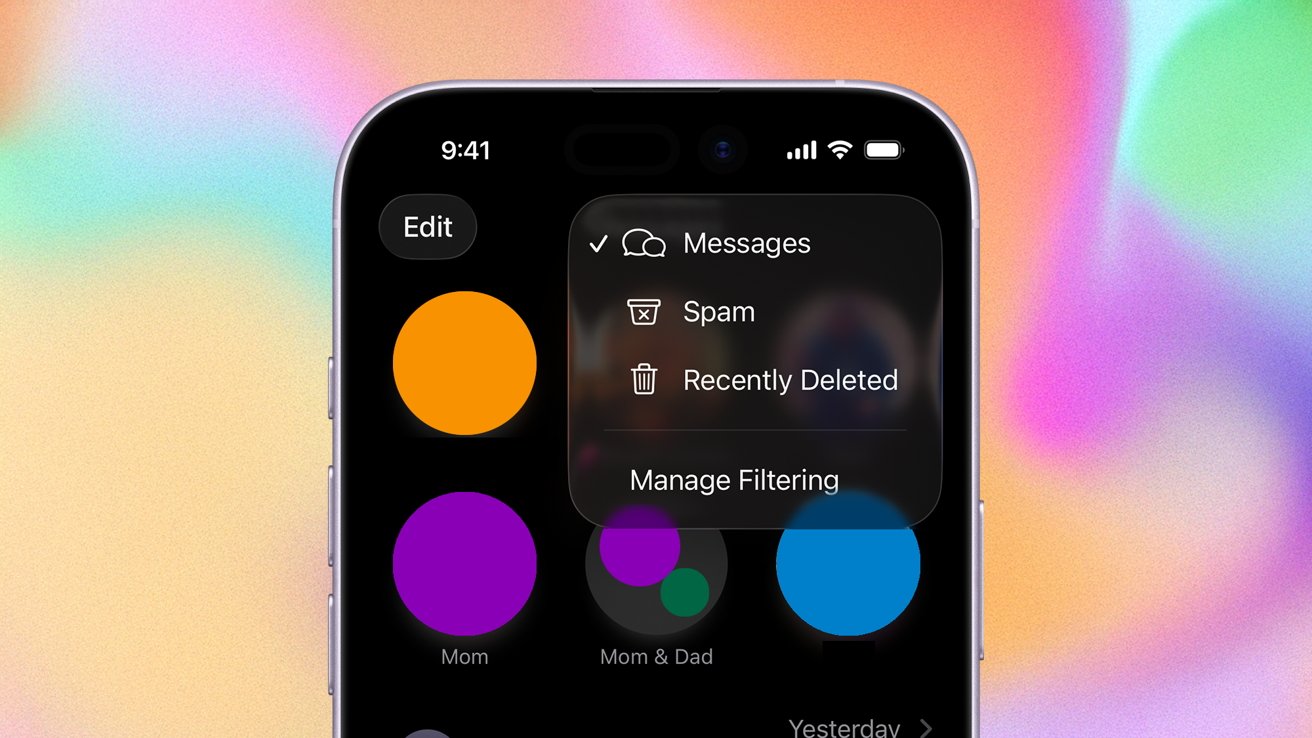
If your Messages inbox is catching a lot of stray, unwanted messages, we’ll show you how to filter, report, and block spam messages on iOS 27.
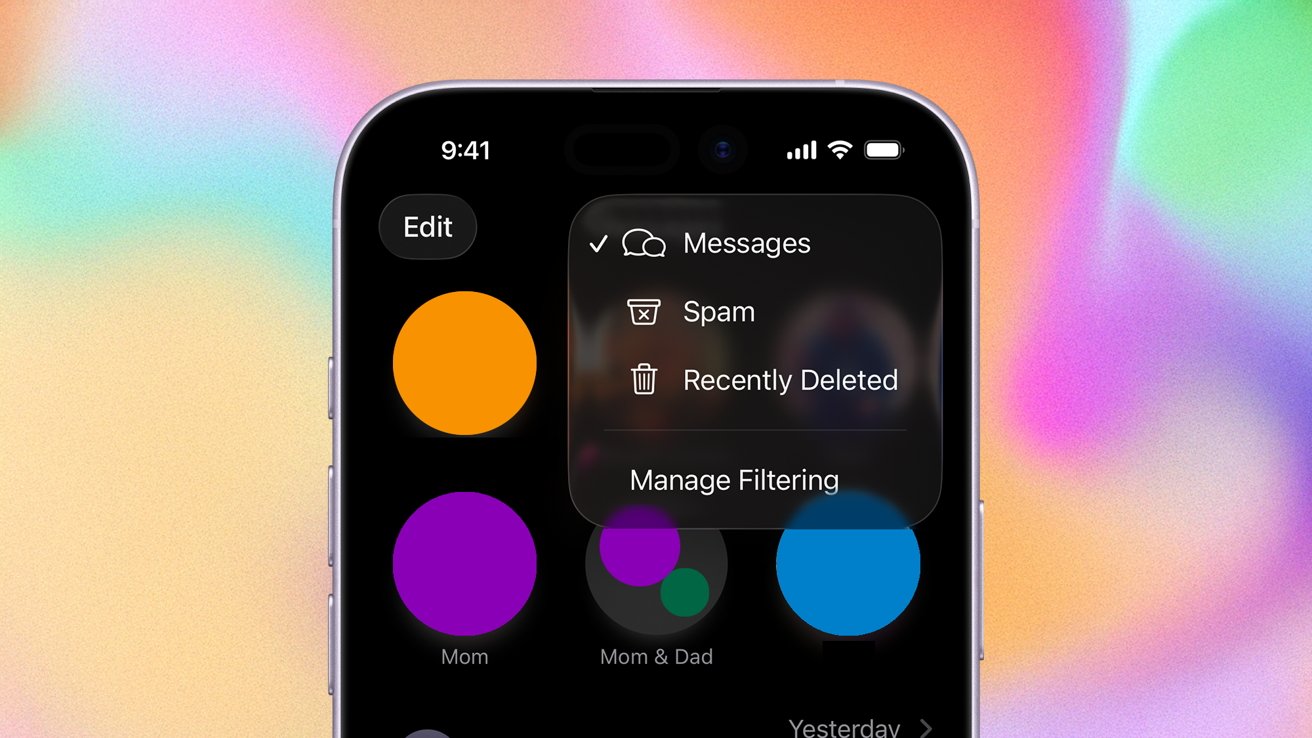
Learn how to filter, report, and block messages on iPhone
At WWDC 2025, Apple announced that it would be bringing enhanced message filtering capabilities to Messages. As promised, they rolled out as part of iOS 26, released in September 2025. They continue to be available in iOS 27.
The new features are designed to help manage the onslaught of texts everyone seems to get these days. Here’s how to do it.
Continue Reading on AppleInsider | Discuss on our Forums
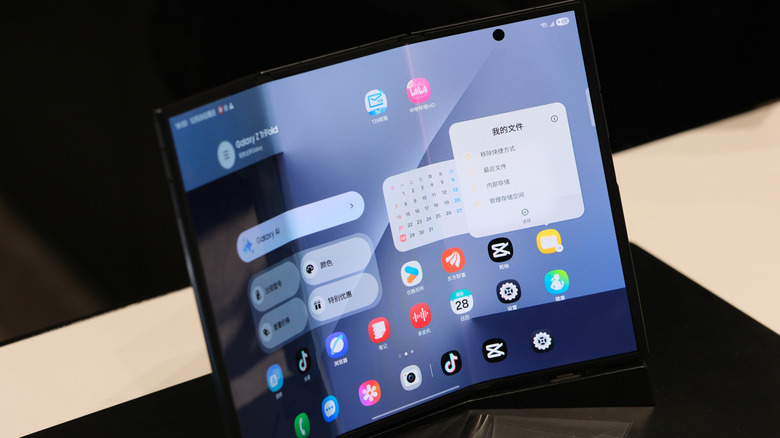
Your phone can fold in half, but your keys shouldn’t join it.
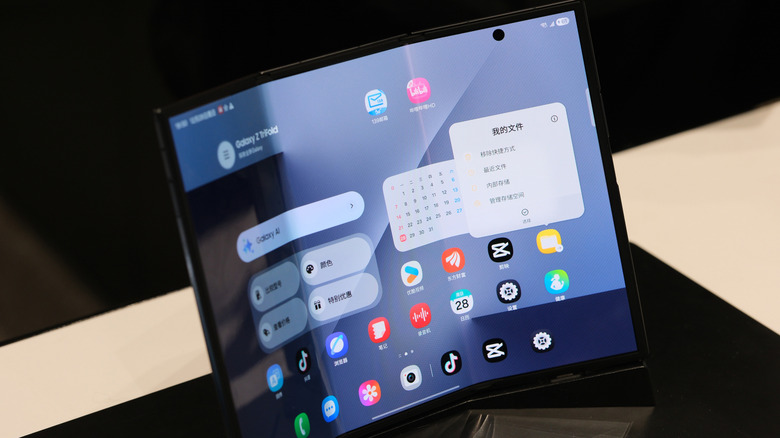
The most common mistake you should avoid when using foldable phones is dropping them. But that’s common knowledge and doesn’t make for a very exciting discussion. You’re probably thinking about the inside foldable screen, where the most common way to damage it is closing it on something that shouldn’t be there. Samsung’s foldable care page warns that cards, coins or keys can scratch or even puncture a Galaxy foldable’s inner display.
That seems straightforward enough; just make sure your car keys aren’t sitting on top of your phone when you try to close it. But if you work a particularly dirty job or live near the beach, that complicates matters. You can’t always spot dirt easily, and beach sand will find its way into absolutely anything.
Keep in mind that not all foldables are on equal footing. Some foldable screens are a bit softer and weaker than others. The Galaxy Z Fold8 and Fold8 Ultra, for instance, have an IP48 rating, whereas the new iPhone Duo boasts an IP68. The first digit describes the degree of protection against solid objects; a 4 means objects 1mm thick or larger can’t enter, while 6 indicates a dust-tight device.
Treat the inner screen with care
A foldable’s inner screen is far from a conventional slab-phone display. It has to fold, after all, so don’t assume you can press on it as firmly as you would on a standard phone’s outer glass. That includes actions you’ve probably done without thinking, like scratching a speck from the screen with your nail.
Another mistake is peeling off a factory-applied inner screen film because it looks like disposable shipping protection. This was surprisingly easy to do early on, but now the edges are tucked in and better hidden. Samsung highly recommends leaving these protective layers alone. On the flipside, don’t stick an unapproved screen protector over a foldable display. These phones aren’t like their slab cousins, so any old screen protector won’t do. Only use a protector or stylus the manufacturer specifically lists as compatible with that model.
You don’t have to baby a foldable phone, though it may seem that way coming from a traditional smartphone. These precautions just require you to be a little more particular when handling the folding screen. Avoid any concentrated force or closing it on anything other than open air.
What is the lifespan of a foldable phone?
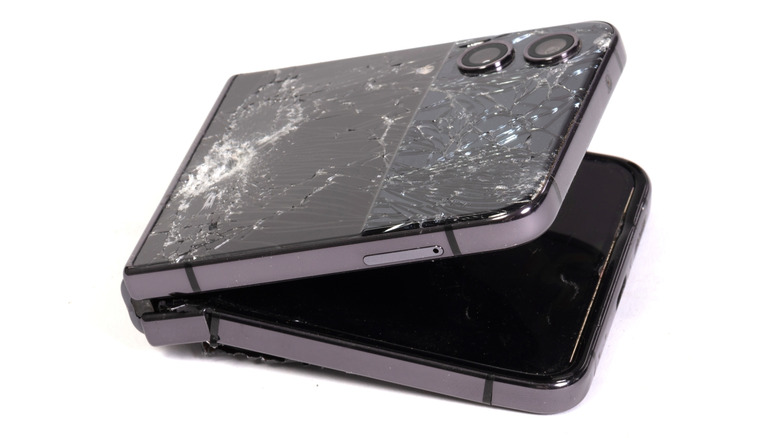
There is no specific lifespan for foldables, though there are suggestions and indicators. For instance, we know that manufacturers test the hinges and screens by folding the phones between 200,000 and 500,000 times. If you open your phone 100 times a day, that would be 5 to 10 years.
However, that’s not a guarantee. Samsung claimed the Galaxy Z Fold7’s display remained functional after 500,000 folds in lab testing. Sounds pretty reassuring, but a controlled test doesn’t mean the Fold7 would survive that many opens and closes throughout your daily life. In the past, Samsung’s claim of 200,000 folds on the original Galaxy Fold fell short. When you hear figures tossed around, treat them as general benchmarks and marketing numbers.
Besides, it’s far more useful to check for dirt before you close the phone than to count your folds each day. Don’t push heavily on the display or use the wrong stylus. Use a soft cloth to clean marks on the screen instead of digging at them with your fingernail. And while the IP68 rating sounds great, Apple notes that the iPhone Duo’s water and dust resistance may diminish with normal wear. Nothing lasts forever, but wear increases faster when moving parts are involved.
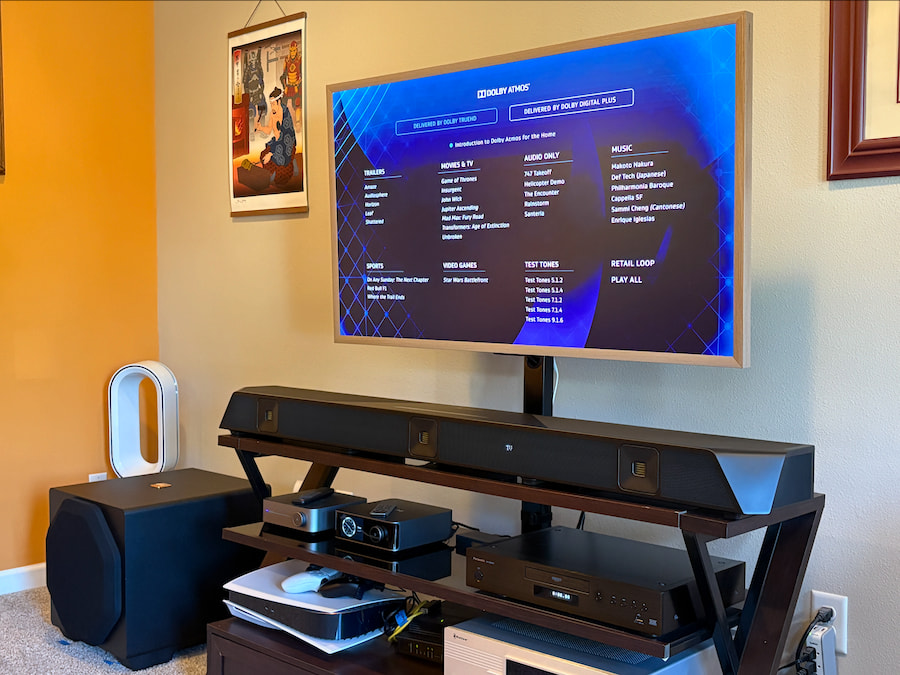
In the world of home theater, there are traditional A/V systems and powered speakers, and there are soundbars. Then there’s the Nakamichi Dragon, a premium-priced soundbar system designed to bridge the gap between those worlds like no other setup I’ve encountered.
I reviewed the latest version, which includes a single 12-inch subwoofer in an 11.1.6-channel configuration and lists for a whopping $3,800, although it often sells for considerably less. The Dragon delivers exhilarating performance, especially with 3D audio formats like Dolby Atmos, but before you consider buying one, you’ll want the whole story.
Skip the reading? Click play above or watch the Nakamichi Dragon review on YouTube.
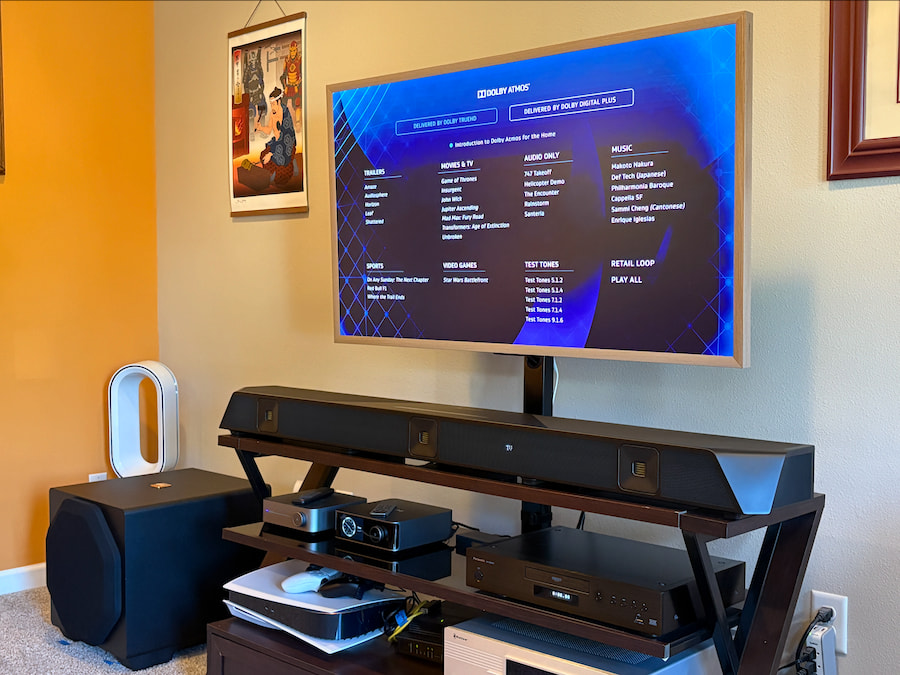
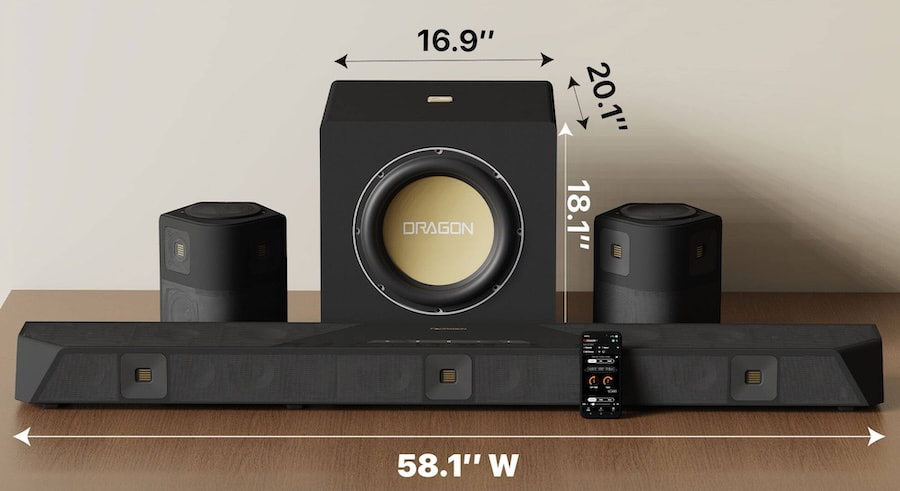
The Dragon’s sheer size and weight make it a real chore to unbox and set up. The soundbar alone weighs more than 32 pounds, and at 58 x 4.4 x 7.7 inches (W x H x D), it barely fit on my mid-size console. The subwoofer weighs about 80 pounds and extends nearly 18 inches deep.
The surround speakers are much easier to manage, although they feel a little cheap considering the price. They do offer some interesting technology, including a top-mounted dial that lets you physically adjust the direction of the upfiring drivers. The overall angular design is big and bold and practically demands an equally large TV to match.
The 11.1.6-channel model I tested comprises 28 speakers, including the 12-inch subwoofer, and you can add up to foursubs if you dare. The main soundbar houses 17 drivers, including four upfiring drivers for height effects and three 1.5-inch AMT tweeters. Each surround speaker adds two more 1.5-inch AMT drivers, two 3.5-inch drivers for side and rear surround effects, and a 3-inch upfiring driver.
Nakamichi rates the system at a claimed 3,000 watts of total power. Connections include three HDMI 2.1 inputs, one HDMI eARC port, optical input and output, 3.5mm analog input and output, and Bluetooth 5.0 with aptX HD. Oddly, there’s no Wi-Fi for features like Spotify Connect or AirPlay.
Audio support is extensive, including Dolby Atmos via Dolby TrueHD and the major DTS formats, including DTS Pro.
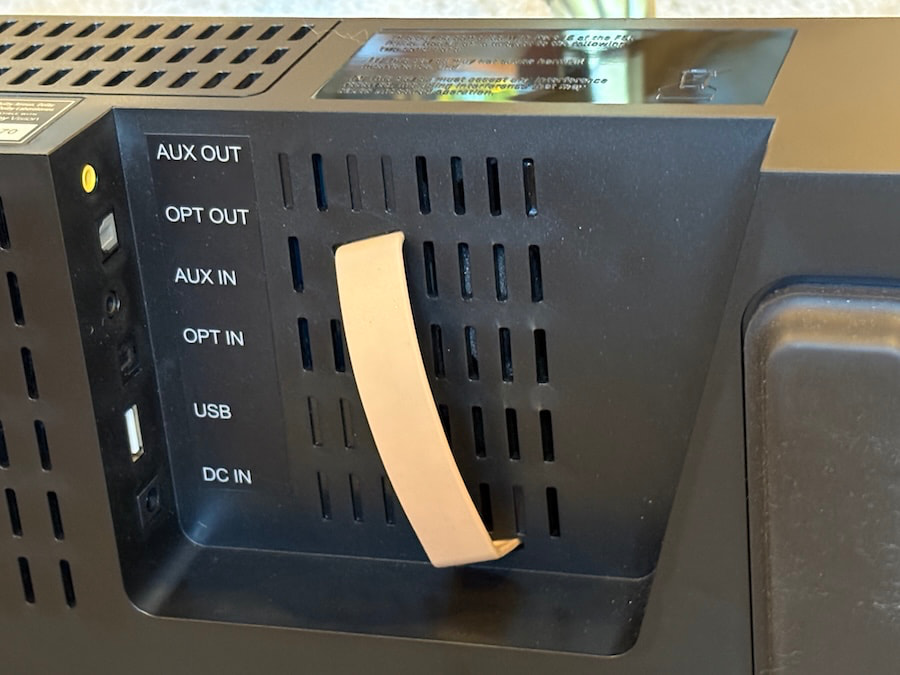
Controls and setup are handled through a loaded, old-school remote and an on-screen display that looks like it was pulled straight from a legacy A/V receiver. There’s no companion app for deeper adjustments, another odd omission at this price, and no automatic room calibration.
Instead, you can select from preset room sizes or manually enter your room measurements, which I recommend for the best results. You’ll still need to tweak several settings, especially the subwoofer, which is far too loud by default in a medium-sized room.
Those adjustments live inside the Auto Setup and Calibration menus. The available settings are extensive, but also fairly complicated, so expect to spend some time getting everything dialed in.
Performance is full throttle, from clear, forward dialogue to high-flying — and impressively precise — overhead effects and bass that can literally shake your windows. The low-end punch was far too much for my room before adjustment, although the system is admittedly better suited to larger spaces.
The overhead effects can be similarly aggressive. You can always dial them back, but it is undeniably fun to hear emphasized details like the almost visceral hull creak during the crash scene in Guardians of the Galaxy Vol. 2.
My biggest criticism is the overall sound signature, which can feel too thin and tightly wound, especially with lower-quality content. It lacks the full-bodied warmth of traditional speakers and even some less expensive soundbars, including Samsung’s HW-Q990.
Music is also less convincing than I expected at this price. The Dragon can be spectacular with movies, but it is not the system I would choose if two-channel music listening were a major priority.
The Bottom Line
If you’re after unearthly bass, cinematic surround sound, and powerful, almost surreal height effects, the Dragon is worth considering. I still take issue with its overall finesse and warmth, especially through the midrange, but there’s no denying how detailed, dynamic, and immersive it can sound with 3D audio soundtracks.
I think many A/V enthusiasts will find a better return by going with moderately priced speakers from brands like Klipsch, Polk, or SVS and a traditional A/V receiver. On the other hand, folks who want simplicity will find it in more versatile setups like Sonos’ Arc Ultra ($1,099) with a Sonos sub ($899) and Era 300 speakers ($499 each), or more affordable packages like Samsung’s HW-Q990.
That said, you’ll have a hard time finding this level of intensity, immersion, and sheer bass impact from another all-in-one home theater system. If that kind of larger-than-life presentation is what you’re after, the Nakamichi Dragon delivers in a very big way.
Pros:
- Massive, earth-shaking bass
- Powerful and adjustable overhead effects
- Clear dialogue even in chaotic scenes
- Loads of physical inputs
- Deep-dive settings and loaded remote
Cons:
- Difficult physical setup and complicated settings
- Sound signature is thin and forward
- No Wi-Fi or auto-calibration
- Cost is similar to traditional A/V setups
Our Ratings:
★★★★★★★★★★ Performance
★★★★★★★★★★ Build Quality
★★★★★★★★★★ Features
★★★★★★★★★★ Usability
★★★★★★★★★★ Value
Where to Buy:
Related Reading:
OpenAI is preparing to add invisible watermarks to text generated by ChatGPT and Codex in the European Union.
The watermark will not be visible when you read or copy the text. Instead, OpenAI says its new textGrain technology slightly changes the model’s word choices to create a statistical pattern that can later be detected.
“Over the coming weeks, we will add an invisible watermark to eligible ChatGPT and Codex text output in the European Union,” OpenAI explained.
OpenAI is not making this a global default yet.
Starting today, API developers worldwide can opt in to watermarking for supported models, but it remains disabled by default.
The company is also opening applications for its watermark detector, although access will initially be limited to approved researchers and expert organizations.
OpenAI admits its AI watermark can disappear when you edit the text
Text watermarking is far from perfect, and OpenAI’s own tests show that fairly normal editing can significantly reduce its ability to detect AI-generated text.
“In an evaluation of 400-token passages, replacing 10% of words with synonyms reduced detection from about 92% to 66%. Replacing 25% of words reduced it to 17%,” OpenAI noted.
At a 1% false-positive target, OpenAI detected the watermark in about 80% of 200-token psychology responses, compared with roughly 95% when the text reached 400 tokens.
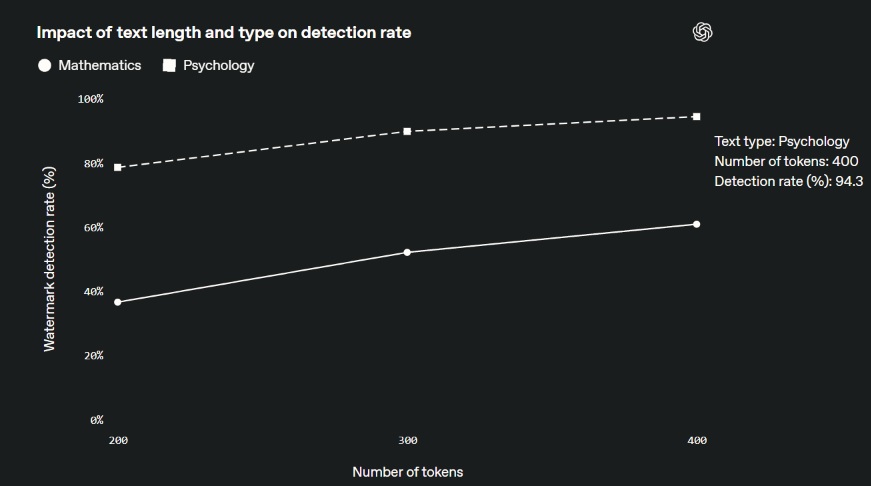
Detection was even worse for subjects such as mathematics, where the model has less freedom to choose different words.
“The absence of a detected watermark does not prove human authorship,” OpenAI warned. “Text generated with OpenAI tools may be too short, edited, or translated for detection to work reliably.”
OpenAI also says a detected watermark does not reveal who generated the text, their account, prompt, or conversation, and it cannot tell how much of the final work was written or edited by a human.
Interestingly, OpenAI says watermarking does not meaningfully affect the quality of GPT-6 Astra, with benchmark results remaining broadly similar when textGrain is enabled.

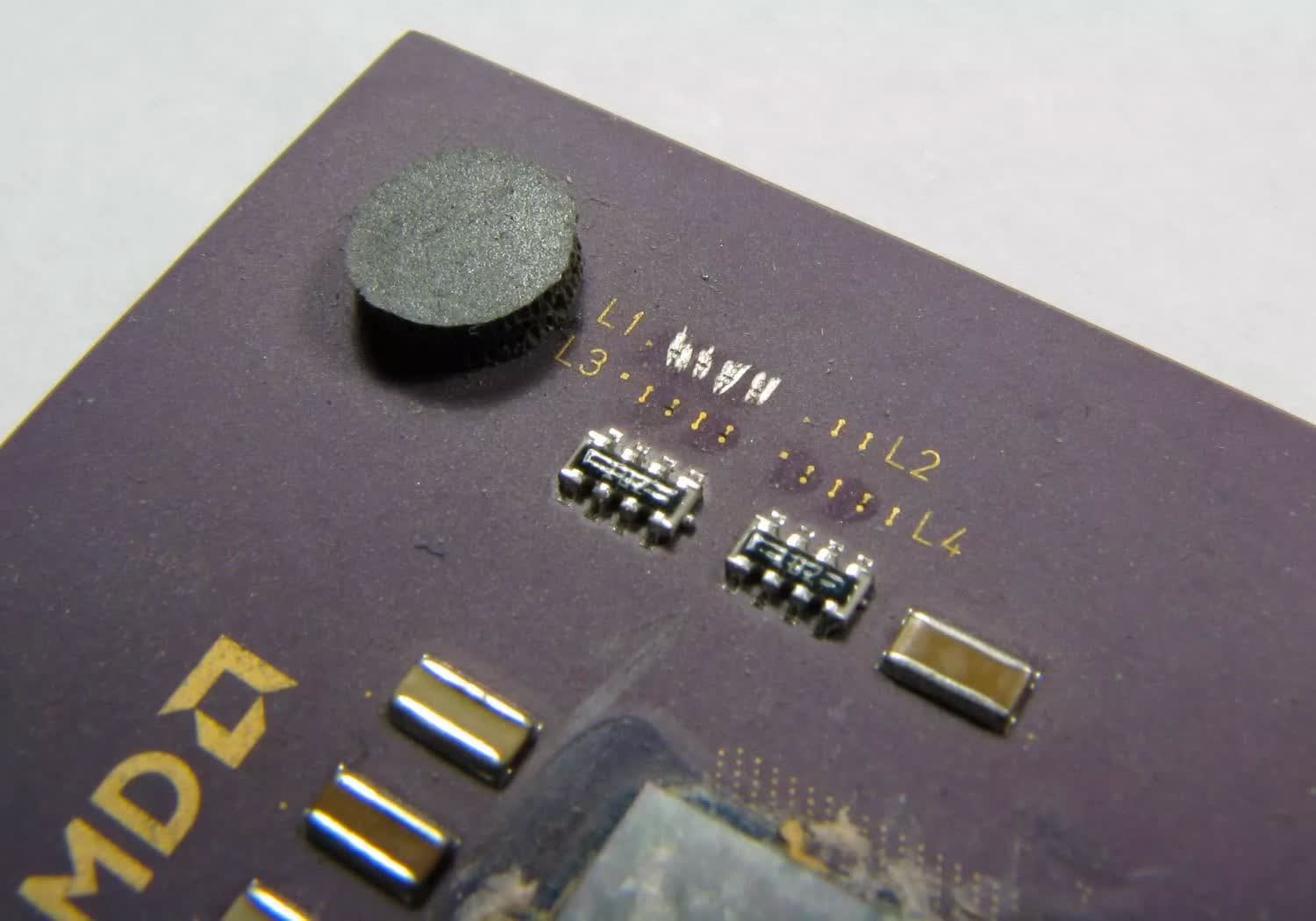
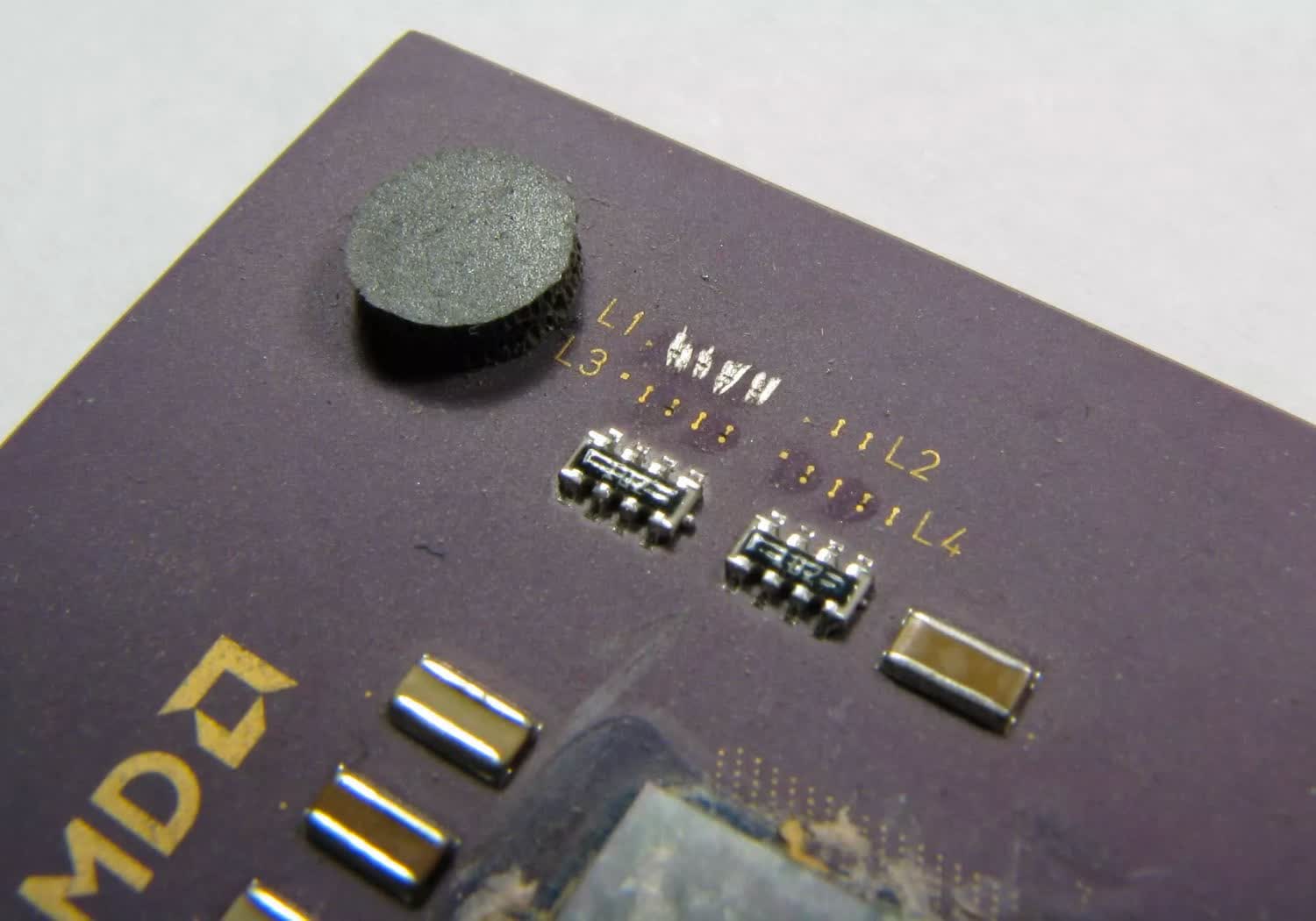
Fun fact: The “pencil trick” involved drawing over tiny laser-cut L1 bridges with graphite to re-enable locked multipliers on certain CPUs.

Verdict
The Apple Watch Ultra 4 is a great smartwatch that has a bit more battery life to play with and features that make it a more insightful training and health companion. It just might not be enough to warrant an instant upgrade for Ultra 3 owners.
-
Battery lasts over 2 days
-
Same slick mix of smartwatch features
-
Readiness scores and vitals modes are nice additions
-
No change in design
-
Some software features not available yet
-
Heart rate tracking not spotless
SQUIRREL_PLAYLIST_10208757
Key Features
-

Review Price:
£749
-
Longer battery life
The Apple Watch Ultra 4 can last for up to 50 hours with regular use.
-
S11-powered Audio Intelligence
Adds automatic sound recognition and Shazam, with Live Rewind and Siri Recap arriving later.
-
New Health Sensing System
Higher-frequency heart-rate sampling powers new Readiness scores, HRV recovery insights and daytime/nighttime Vitals views.
Introduction
Apple’s Ultra has been the smartwatch for endurance sports and outdoor lovers for years now. However, it has also become the Watch that gets the best that Apple has to offer, whether that’s in fitness tracking, communication features or just lasting the longest.
For the Apple Watch Ultra 4, Apple has focused on taking existing features and making them more reliable and useful, now wanting to track health and fitness stats at a more detailed level. It’s also making Siri more useful, and it’s going to keep you away from the charger for longer too.
There’s also more to come, as Apple’s Audio Intelligence will be able to hone in on voices and sounds around you once it properly arrives in a few months’ time.
That all still comes at a cost that makes it roughly the price of picking up two of the latest Apple Watch Series 12 smartwatches, so the question is, should you spend more? Is the Ultra 4 a strong upgrade on the Ultra 3? Here’s what I’ve found.
Design and screen
- Same design as Apple Watch Ultra 3
- Slightly heavier than Ultra 3
- Introduces new sensor system
The Apple Watch Ultra 4 is basically identical to the Apple Watch Ultra 3. It has the same 49mm-sized grade 5 titanium case, the same overall case thickness, the same physical buttons, and the same strap style options. There’s technically a touch more weight to handle, but it’s a negligible amount you just don’t notice day-to-day.
Many will be happy that Apple hasn’t made drastic changes. I was sort of hoping it might follow the trend of adding in a proper flashlight, but that hasn’t happened.

It remains a smartwatch that, while blockier than most other smartwatches, does have the typical Apple build quality and comes with a strap that’s easy to remove and replace. I always find it startling how quickly I adjust to having that large case sitting on my skinny wrists.
Something you can’t fault is Apple’s ability to pick and match up case colours with strap options. I had the black Ultra 4 and opted to combine it with the burgundy trail loop, and it’s a stylish combination. You can still use Ultra 3 straps with it if you’re not willing to give up on some favourite bands you’ve already picked up.

Flip the watch over, and you’ll find the biggest design difference with the Ultra 3. Apple has introduced its new health sensing system, which takes care of tracking various biometric data, including heart rate and temperature.
Apple says it’s increased the surface area for the electrodes that conduct readings, added larger LEDs and can now monitor metrics like heart rate more frequently than previous watches. The new sensor didn’t seem to alter how the watch sat on my wrist and works with the same-style charging puck as previous Ultras.

Performance and software
- Runs on watchOS 27
- New S11 chip unlocks new audio features
- Siri Recap and Live Rewind features not yet live
The Ultra 4 comes packed with Apple’s new S11 chip, which it’s dubbed its most powerful wearable chip. That’s powering watchOS 27, where key software highlights include a version of Siri that goes beyond answering simple queries and functions a bit more like ChatGPT. There’s now a new grid layout to get to the apps you use most in a quicker fashion, with more features on the health and fitness front.

The Siri improvements are intriguing ones. If you open up the Siri app on your iPhone, you can now see previous conversations you’ve had with the assistant. I was also able to have a conversation about my calendar and delve deeper into a hotel I booked and whether it offered late check-outs. The responses, while not instant, were dealt with pretty swiftly and, crucially, offered useful responses.
The new dynamic grid wasn’t a feature I found hugely life-changing, though I did appreciate using the new tap gesture to navigate Apple’s smart stack screen when I didn’t have a hand free to do it from the watch crown.

Apple is making a big play on voice, with a range of new features it’s tagged as Audio Intelligence. Some features are live, some aren’t. They use the now more powerful S11 chip and the Ultra’s microphone to deliver more sophisticated audio-based features. I was able to use the new sound recognition mode, which was swiftly able to recognise my daughter’s crying. The now quicker reacting Shazam integration identified a song playing on the radio in the gym without me prompting the Watch to do anything.
What isn’t available is the new Live Rewind and Siri Recap modes, which are coming later in the year. Live Rewind lets you record the last 15 seconds of a conversation while Siri Recap can summarise conversations like meetings you’ve had in the day.

Apple does emphasise the private nature of using these audio-based features, including that it doesn’t store recordings or give access to recordings. That said, these are features that have understandably raised eyebrows, and no doubt will continue to do so when users can start putting them to use.
Beyond those new features, the Ultra 4 still performs great at being a smartwatch that handles smartphone notifications, music features, making payments and giving you access to great apps and watch faces in a very polished way. And, yes, it continues to be an iOS-only wearable.
Tracking and features
- New health sensing system brings more accurate heart rate tracking
- New daytime and nighttime vitals views
- Redesigned Health app not yet live
The headline feature on the Watch Ultra 4 is Apple’s new Health Sensing System, which also appears on the Watch Series 12. When combined with Apple’s new chip, it can mainly sample heart rate data at a higher frequency than previous Watches. This should lead to more accurate heart rate tracking and also unlock new health and fitness-related features.

That includes new Readiness scores to assess whether you’re in good shape to take on your day. There’s now more insight into your recovery from a tough day or workout, and a closer look at how vitals data can change from day to night. Some of these features, like readiness scores and HRV recovery, have been available on rival smartwatches for some time.
Let’s deal with accuracy first. I’ve had a mixed experience with the heart rate tracking on previous versions of the Ultra. More so during exercise.

For resting heart rate readings and tracking heart rate during sleep, it’s generally been fine. I’ve used the Ultra 4 for a range of exercises and also raced with it up against a chest strap monitor. While I found the average readings similar, I found it slightly underreported maximum heart rate against a chest strap. The heart rate graphs in general looked similar, and I was pretty satisfied with the performance. It’s not spotless, but it’s been solid on the whole.
Dealing with the Readiness scores next and these require seven nights’ worth of sleep alongside capturing other metrics like sleep scores, heart rate variability and vitals data including respiratory rate and wrist temperature. I’ve been comparing scores to Garmin’s similar training readiness scores and scores generated by third-party app Bevel. Looking at data after a race, I could see those scores were telling me similar things. Basically, it takes some time to recover.

Apple says scores dynamically adjust during the day based on your data. So I could see that on one day my score was a 7 and adjusted to a 6 based on the exertions or running around completing errands and squeezing in a workout during my day.
They’re nicely presented on the watch, but when it comes to reviewing it off the small screen, things get a little more archaic. This is why it’s good news Apple is deciding to overhaul its Health app, even if that overhauled app isn’t quite ready just yet.

Apple is going big on HRV (heart rate variability), which again, isn’t a new metric to smartwatches. It’s a heart rate-based metric closely tied to recovery. I’ve been comparing similar readings to a Garmin watch, and the average measurements have been similar on most days. Like Garmin, the information in isolation doesn’t feel hugely insightful. That’s likely why it has been pulled into the new Readiness and Vitals data to put it to better use.

Moving onto Vitals next, Apple is essentially letting you see a daytime and nighttime view of how data like heart rate, HRV and temperature might change. It’s easy to toggle between the two views, though I wouldn’t say it’s as glanceable as the new Readiness scores.
Another aspect of tracking that Apple promises improvements is with tracking your step counts. I’ve been wearing the Ultra 4 with a range of different smartwatches and smart rings. I found daily step totals typically to be a few hundred steps within daily totals of other trackers. The GPS performance in that half marathon test was strong too, even on a twisty and turning course, where I expected to have issues.
- Over 2 days battery life
- Up to 84 hours in low power tracking mode
- Fully charges in just over an hour
The wait for an Apple Watch that can last a week does unfortunately go on. Instead, Apple has managed to increase the Ultra’s stamina so that it can last over 2 days. That’s up from 42 hours to 50 hours on the Ultra 2.
That improvement is my experience of living with the Ultra 4. I averaged getting two days before I was prompted to turn on the low power mode, and never quite made it to three days. That time included using the GPS, receiving notifications, using music features and interactions with Siri throughout the day and tracking sleep.

Apple has also boosted the battery life when tracking exercise. So now the Ultra 4 can last up to 18 hours in its most accurate GPS tracking mode, which is up from 14 hours. Stick it into Apple’s extended workout mode, and you can expect anywhere from 25 to 45 hours. When I wore the Ultra 4 for a half marathon race, which lasted just over an hour and a half, the battery dropped by 7%.
To compensate for the fact that the battery is shorter than most of the competition, Apple includes a pretty speedy fast charging mode. You can get up to 80% battery from a 45-minute charge or enough battery to cover a night’s worth of sleep tracking from a 5-minute charge.
So, yes the Apple Watch Ultra 4 has better battery life than the Ultra 3. Is it still enough? No. Will an Apple Watch Ultra 4 that can last over 2 days keep some fans happy? I imagine it will, especially with how quickly it can charge up.
SQUIRREL_PLAYLIST_10208757
Should you buy it?
You own an Apple Watch Ultra or Ultra 2 and looking for an upgrade
If you’ve got an older Apple Watch Ultra, it’s worth skipping the other Ultras and going for this as it gives you more for the same price.
You want the best smartwatch for battery life
The Ultra 4 offers the biggest battery yet on an Apple Watch, but it still falls quite short of smartwatches that cost a lot less.
Final Thoughts
The Apple Watch Ultra 4 is Apple’s most capable smartwatch yet, combining longer battery life with more detailed health and training insights and a selection of promising Audio Intelligence features. The new Health Sensing System and Readiness scores make its data more useful, while accurate GPS tracking and slick everyday performance ensure it remains an excellent all-round smartwatch.
However, the familiar design and limited availability of some headline features make it a modest upgrade over the Ultra 3, especially given its premium price. It’s a compelling choice for newcomers and owners of older models, but Ultra 3 users have little reason to upgrade just yet.
To see how it compares to the competition, take a look at our selection of the best smartwatches.
How We Test
We thoroughly test every smartwatch we review. We use industry-standard testing to compare features properly, and we use the watch as our main device over the review period. We’ll always tell you what we find and we never, ever, accept money to review a product.
- Worn as our main smartwatch during the testing period
- Health data compared against other wearables
FAQs
Does the Apple Watch Ultra 4 have a blood pressure sensor?
No, the Apple Watch Ultra 4 does not have a blood pressure sensor. You can still pair with compatible external blood pressure monitors to share data to Apple Health.
Full Specs
| Apple Watch Ultra 4 Review | |
|---|---|
| Manufacturer | Apple |
| Screen Size | 1.9 inches |
| IP rating | IPX6 |
| Waterproof | 5ATM |
| Size (Dimensions) | 44 x 12 x 49 MM |
| Weight | 63 G |
| Operating System | watchOS 27 |
| Release Date | 2026 |
| First Reviewed Date | 05/10/2026 |
| Colours | Natural titanium, black titanium |
| GPS | Yes |
| UK RRP | £749 |
| USA RRP | $799 |

Sports12 minutes ago
Fred Couples shares his 5 best tips for hitting crisp iron shots | Instruction

Entertainment24 minutes ago
‘I Spat in His Face 16 Times’: Inside the Wild Making of The Name of the Rose

Tech & AI37 minutes ago
Can A MacBook Handle Heavy Games? Here’s What You Should Know


-

 Fashion3 days ago
Weekend Open Thread: Veronica Beard
-

 Tech & AI5 days ago
Figure F.02 Robots Meet Molten Steel as Arnold Schwarzenegger Watches in Finland
-
 Tech & AI6 hours ago
Common Mistakes You Should Avoid When Using Foldable Phones
-
 Business & Hustles7 days ago
OpenAI rebrands AI agents as ‘dots’ amid security fears
-

 Tech & AI7 days ago
Alternatives to Animal Testing Are Finally Taking Off
-

 Business & Hustles7 days ago
Develop sets $458 million growth capital budget
-

 Business & Hustles7 days ago
UK chancellor uses bitcoin to mock Nigel Farage
-
 Tech & AI4 days ago
Fireflies.ai Launches Fireflies Talk for Free, Unlimited Voice Dictation
-
 Tech & AI4 days ago
Excellent hardware badly hampered by too-small SSD
-

 Tech & AI6 days ago
OpenAI Pulls Plug on New AI Model as Industry’s Safety Cracks Widen
-
 Crypto5 days ago
OpenPayd’s MiCA Approval Signals Europe’s Stablecoin Infrastructure Is Going Mainstream
-
 Crypto4 days ago
NEAR Intents hacked days after freezing stolen Bitget funds
-

 Tech & AI4 days ago
Mystery AMD Chip “Gainsborough” Fuels Steam Deck 2 Speculation — But Don’t Get Too Excited Yet
-
 Tech & AI3 days ago
Sony’s new PS5 Pro lottery requires 60 hours of playtime just to apply
-

 Tech & AI4 days ago
Whatever AI Safety Is, It’s Not This
-

 Business & Hustles7 days ago
Bangkok floods threaten to shave 0.3 percentage points from Thailand’s 2026 growth
-

 Tech & AI5 days ago
Photon held a funeral for mobile apps. Now it has $4.5M to help replace them with agents
-

 Tech & AI4 days ago
Can Schools Trust AI Features in Edtech Products?
-

 Fashion6 days ago
Moving to a New City as a Creative? How to Build a Routine, Community, and Life That Feels Like You
-

 Tech & AI7 days ago
What Irish tech companies need to know about the EU’s CRA
You must be logged in to post a comment Login