

Join Mikko Hyppönen and security leaders from the NFL, CHANEL, and Atlassian for a two-hour digital summit on what AI-speed attacks change, what defenders should stop doing, and how to validate, decide, fix, and re-validate at machine speed.
Tech & AI
Is AI pentesting as good as a human pentester?

With the rise of AI pentesting, a lot of people are wondering if it’s as good as a human. Having started as a pentester twelve years ago, and having moved through similar roles to working on Intruder’s AI pentester,
I’ve come to understand the advantages and disadvantages of both. Here’s how they compare.
The strict methodology was never the good bit
You may expect AI pentesters to follow strict methodologies in the way that many human pentests do.
At Intruder, we experimented with this approach early on – structured systems where each agent had a specific vulnerability type to look for. What we found was that agents would miss things outside their remit entirely, or miscategorize what they did find as the one thing they’d been told to look for, causing confusing reports.
A complete lack of structure also failed to produce good results, as completely free agents without any guidance couldn’t break down and manage large applications properly. They could find interesting things, but at the cost of missing a load of other vulnerabilities in our targets.
We’ve put a lot of testing into finding the balance between these approaches, and settled on giving agents freedom with broadly defined roles to help them approach and manage large applications, and stricter guardrails to stop them causing damage.
This does mean that our AI pentester doesn’t tick off the parts of a methodology document that you’d typically see in a human pentest. That may make some people uncomfortable – a strict methodology gives people assurance that someone has gone through your application and tested everything on the list. An unauthenticated SQL injection needs to be found, and a checklist is there to make sure it does.
The methodology gives a lot of people the idea that a human pentest is a perfectly repeatable product, as any tester will be able to follow the methodology, and everything important will get found. The reality is a lot more nuanced than that though, as pentesting is a skilled job, and many of the most impactful findings on a pentest will come from the tester being experienced in noticing weird behaviours and following up on them.
For our AI pentester, we ended up with much more interesting and impactful results by not trying to guide our agents through specific vulnerability types. A good example is a complex authentication bypass the agents found that had been sitting in a codebase through five years of pentests without any human testers picking it up.
The mechanics of that issue mean that you’d never think to write a testing guide that could be strictly followed to identify it, and if we’d tried to limit our AI pentester too much it never would have found it either.
You could say that only finding the common things would still be pretty good, but there’s such an array of vulnerabilities that aren’t common that you find during a pentest. And just because they’re not common, it doesn’t mean that an attacker can’t find them too, especially now AI is being used to enable attacks more.
A strict methodology being carried out by a competent tester only ever provided a low baseline of reliability, and it didn’t even do that perfectly. What makes a pentest good is the part that a skilled tester does outside the checklist, and that’s where AI thrives – following its nose through your application and finding the things that were never going to make a list.
Intruder’s AI pentesting agents deliver the depth of a manual engagement on-demand: no lead time, no scoping calls, a fraction of the cost.
Test with every release, close your window of exposure, and get an audit-ready report in hours.
What they know, and what they can’t ask
Our AI pentests take a white box approach, which means the agents get the source code. They work through the entire codebase and build a picture of not just what every page is, but how the application is meant to function and what requests can be made. Doing this to the level of detail that the AI is able to isn’t feasible for a human pentester during a typical time window for a pentest.
The AI pentester also builds up a sense of what the application is for, and a good example of this is access control – it doesn’t need to be told that low privileged users shouldn’t be able to reach admin functionality, or that a particular bit of data is sensitive.
You can give them extra information as well, just like a human tester. For example, people often specify that they’re worried about their customers being able to access each others’ data, and the pentester has done a great job of focusing on these issues and identifying a lot of them.
What the agents can’t do is ask you for anything you didn’t already give or tell them. If I don’t understand what a part of an application does while I’m doing a pentest, I can ask my contact, and those conversations can be very useful for testing the application properly, and assessing risk in the final report.
I can also clarify the scope with my contact if needed, or ask for permission to verify something when I’m unsure if there’s a risk of disruption.
We’ve had to deliberately make our AI pentesting agents cautious on this front to avoid going out of scope.
Neither finds everything
The freedom that lets AI pentesting agents find something like a complex auth bypass is the same thing that makes them less predictable. They decide where to dig, and that won’t be identical every time.
But pentest results have always varied with the person doing them. It’s why many consultancies will rotate your tester each year – different people find different things on the same application.
This comes down to people’s experience, specialisms, and incidental knowledge.
I’ve found issues because of a blog post or specification I happened to read years earlier and was left sitting in the back of my head. And even the things on a checklist get missed sometimes. People are fallible, and covering an entire application methodically over multiple days can be hard.
Consistent coverage is something we’re actively working to improve, but it’s not something that was ever offered perfectly from anyone. It’s why every human pentest report comes with a disclaimer saying as much, even though most people read it as a formality.
The remediation I couldn’t have written
Every pentester has strong opinions about what makes a good report. I’ve built up many of my own over the years, as have the rest of the current and former pentesters at Intruder. These opinions are what we built our report around.
The executive summary is the hardest page of a report to get right. For a lot of people it’s their entire experience of your work, and at a good consultancy a lot of effort goes into it. We’ve worked to get to the point where the agents are now writing genuinely good ones, and I often read them first on our own reports to get a good overview before diving into detail.
Where they’re still off is scoring risk. They rate things higher than I would, partly because they can’t have the conversations with you that would bring a rating down, and partly because LLMs err towards caution when you start talking about cybersecurity.
That’s the right direction to be wrong in, but it does mean you’ll see things flagged as more serious than they are, and it’s something we’re working on.
Remediation guidance is where the agents excel. After a long week on a pentest it’s tempting for a human to write generic advice, and you catch yourself and try to do better. Unfortunately, you’re usually limited by time and usually by not having the source code.
The agents don’t have either problem, so they’ll tell you the line of code to change, and what to change it to on every issue. They also write about mitigating controls that can help reduce the impact of the issue, or provide a temporary fix.
We’re seeing that speed up how quickly people actually fix things. We had a customer with 78 issues who fixed all of them within a few days, which as a human pentester I have never seen happen. I couldn’t have written the level of detail that made those fixes possible in the time I’d have had.
So is AI pentesting as good as a human?
AI pentesting and human pentesting are different, and once you stop trying to rank them the comparison gets a lot more useful.
The agents are finding serious issues in applications that human testers have already been through multiple times. They’ll read a whole codebase, work through every path in it, and write up every instance of what they find with the fix down to the line of code.
And you can run one whenever you want. For what a single human engagement costs you can run four AI pentests, which means you can do deep testing on a regular basis rather than once a year.
That’s a key thing that is missed by human pentesting, and often applications have undergone a lot of untested changes in between pentests.
See what Intruder’s AI pentester finds in your application. Learn more.
Author
Written by Daniel Thatcher, Security Research Engineer, Intruder
Daniel is a security researcher at Intruder with a background in penetration testing, and a focus on exploiting web applications in black-box scenarios.
Sponsored and written by Intruder.
Continue Reading
Microsoft announced that Windows Server 2022 has reached the end of mainstream support and will remain in extended support until October 2031.
Microsoft unveiled Windows Server 2022 in March 2021 and made it generally available in September 2021 as a Long-Term Servicing Channel (LTSC) release with 10 years of support.
“As of October 13, 2026, Windows Server 2022 has reached end of mainstream support and transitioned to extended support. The October 2026 security update is the last mainstream support update available for this version,” it said.
“Extended support includes security updates at no additional cost, and Windows Server 2022 will continue to receive monthly security updates through October 14, 2031.”
Microsoft has also extended Windows Server 2022 hotpatching until October 2027, one year after the mainstream end date of October 2026, for systems running the Datacenter: Azure Edition.
Before Windows Server 2022 reaches the end of support, Microsoft advised IT admins to upgrade to Windows Server 2025, which began rolling out to Windows Insiders in January 2024 and reached general availability in November 2024.
“Windows Server 2025 is the latest Long-Term Servicing Channel (LTSC) release for Windows Server. To help keep your environment protected and supported, plan your upgrade path to Windows Server 2025 for full mainstream support,” the company added.
According to Microsoft’s lifecycle platform, Windows Server 2025 will reach its end of mainstream support in November 2029, with an additional five years of extended support until November 14, 2034.
Those who want to test it before deployment can use the free 180-day Windows Server 2025 trial available via the Microsoft Evaluation Center. You can find more information about Windows servicing dates on the Windows Lifecycle FAQ page or using the Lifecycle Policy search tool.
On Tuesday, Microsoft also announced that devices running Windows 11 24H2 Home and Pro editions no longer receive security and non-security preview updates and advised customers to upgrade to Windows 11 26H2 (the latest Windows 11 version, also known as the Windows 11 2026 Update).
Last week, it also warned users to upgrade devices running unsupported versions of Windows because they will stop receiving security updates after next year’s Windows Update certificate rotation.

Tech & AI
Fast RF Device Testing with Analog Sources: A Practical Guide to Amplifier and Receiver Characterization


More Information
RF and microwave systems increasingly depend on amplifiers and receivers that perform reliably across wide frequency ranges and demanding signal conditions. Confirming this performance calls for signal sources with wide output power range, low phase noise, and fast switching speed. Amplifier characterization relies on accurately measuring gain, compression, and intermodulation distortion, while receiver verification often involves simulating blockers, calibrating power accuracy, and substituting for local oscillator and clock circuitry during early design stages. This guide walks through these test applications step by step, showing how engineers and technicians can validate RF and microwave hardware across research, development, and manufacturing environments.
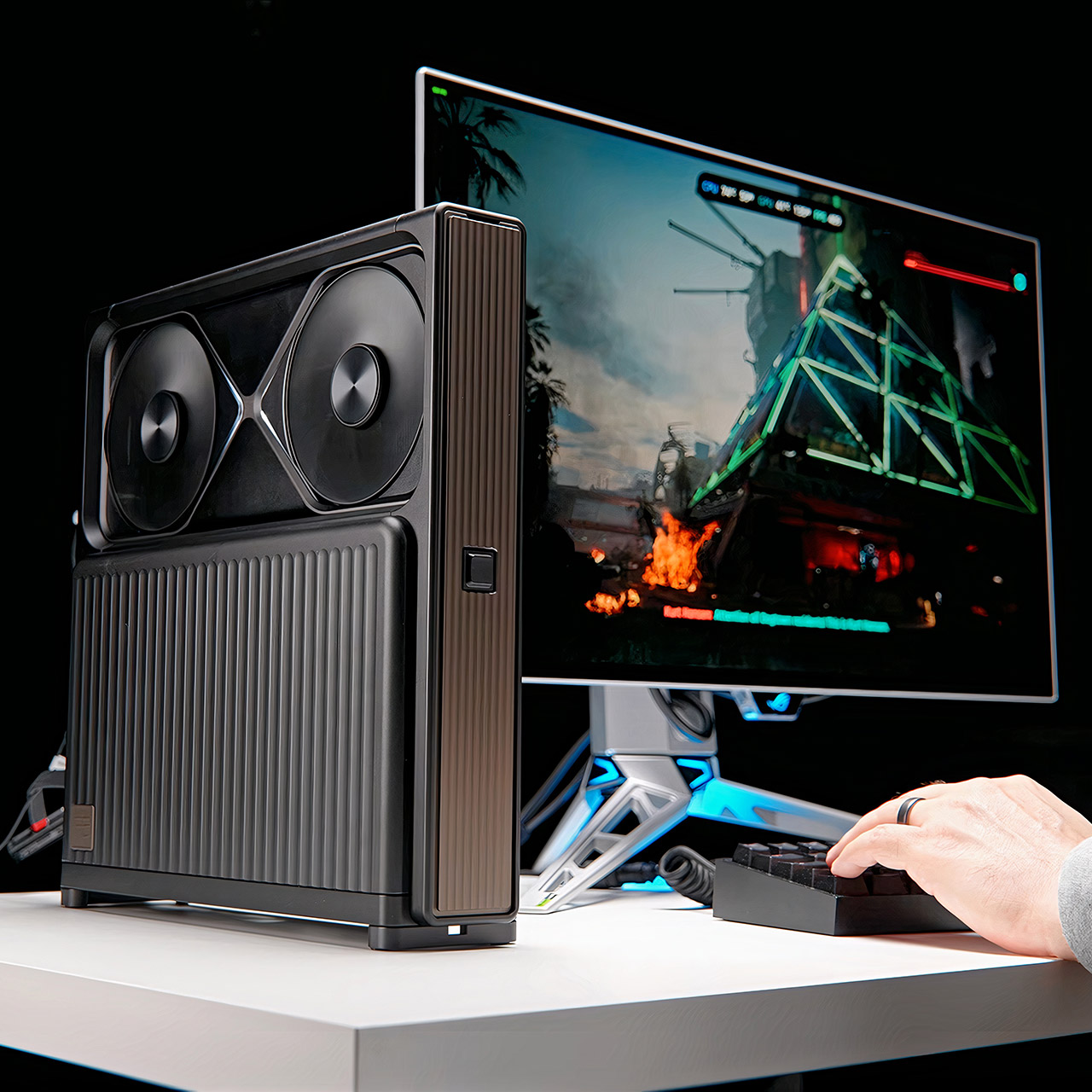
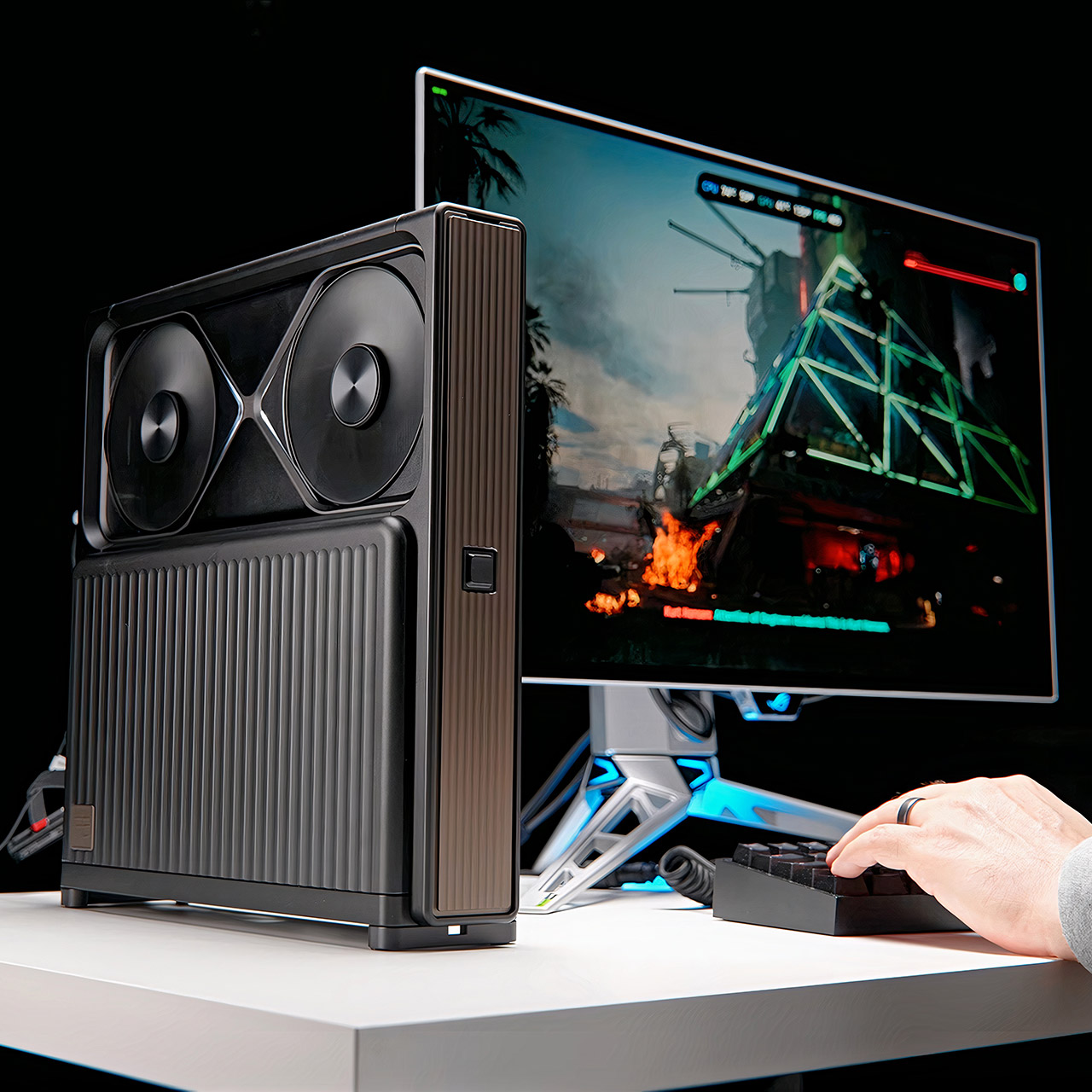
Devyn Johnston has spent years chasing smaller and smaller gaming machines, and this latest effort pushes that habit into territory that feels almost stubborn. Inside the ZCOOI Mugitya FE9, an RTX 5090 Founders Edition sits in a chassis that measures only 56 mm thick across the top and 79 mm at the base, all while still packing a full desktop processor and a 1000-watt power supply. The case arrives as a set of thick CNC-machined aluminum pieces, each finished in black or silver anodizing with a few gray-gold accents on the nameplate and front panel, and the whole collection ships inside its own aluminum carrying case.
Assembly begins by removing the back panel, front cover, and bottom portion, which are all held together with run-of-the-mill screws, so you can just put in the mini-ITX motherboard. Johnston chose an ASUS ROG Strix X870I for this build, which included Wi-Fi 7, a 2.5 gigabit Ethernet port, and a couple of USB 4 ports. He then topped it off with a 64GB of DDR5-6000 RAM, split evenly between the two memory slots, and paired a 2TB Samsung 990 Pro with a second 2TB 980 Pro for a total storage space of 4TB. The power supply is the Corsair SF1000, which is stealthily installed on the bottom panel, and every single cable has been cut to a custom length to ensure that nothing takes up room inside the box.

Acer Nitro V 16S AI Gaming Laptop | AMD Ryzen 7 260 Processor | NVIDIA GeForce RTX 5060 Laptop GPU…
- AI-Powered Performance: The AMD Ryzen 7 260 CPU powers the Nitro V 16S, offering up to 38 AI Overall TOPS to deliver cutting-edge performance for…
- Game Changer: Powered by NVIDIA Blackwell architecture, GeForce RTX 5060 Laptop GPU unlocks the game changing realism of full ray tracing. Equipped…
- Supreme Speed. Superior Visuals. Powered by AI: DLSS is a revolutionary suite of neural rendering technologies that uses AI to boost FPS, reduce…
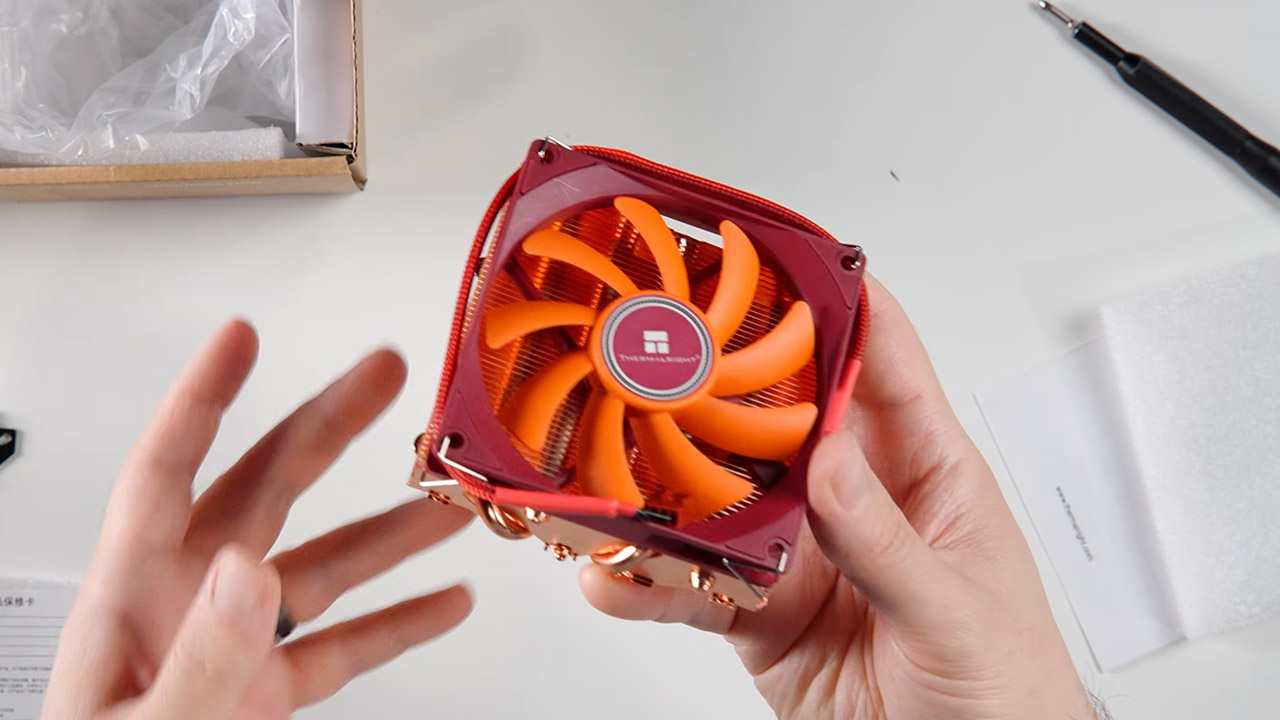
A Thermalright AXP90-X47 low-profile all copper unit provides cooling and stands only 47 mm tall, comfortably fitting within the 49mm clearance on AMD boards. Johnston liked the orange fan so much that he replaced it with a black Noctua model, which allows you to see the blur of the fan spinning from the side panel without detracting from the overall beauty of the build. The graphics card is attached using a solid PCI-E riser rather than a fragile cable, and to get it to fit properly, Johnston removed the original bracket and bolted it directly to the chassis, allowing the coolers to rest behind matching holes in the panels.
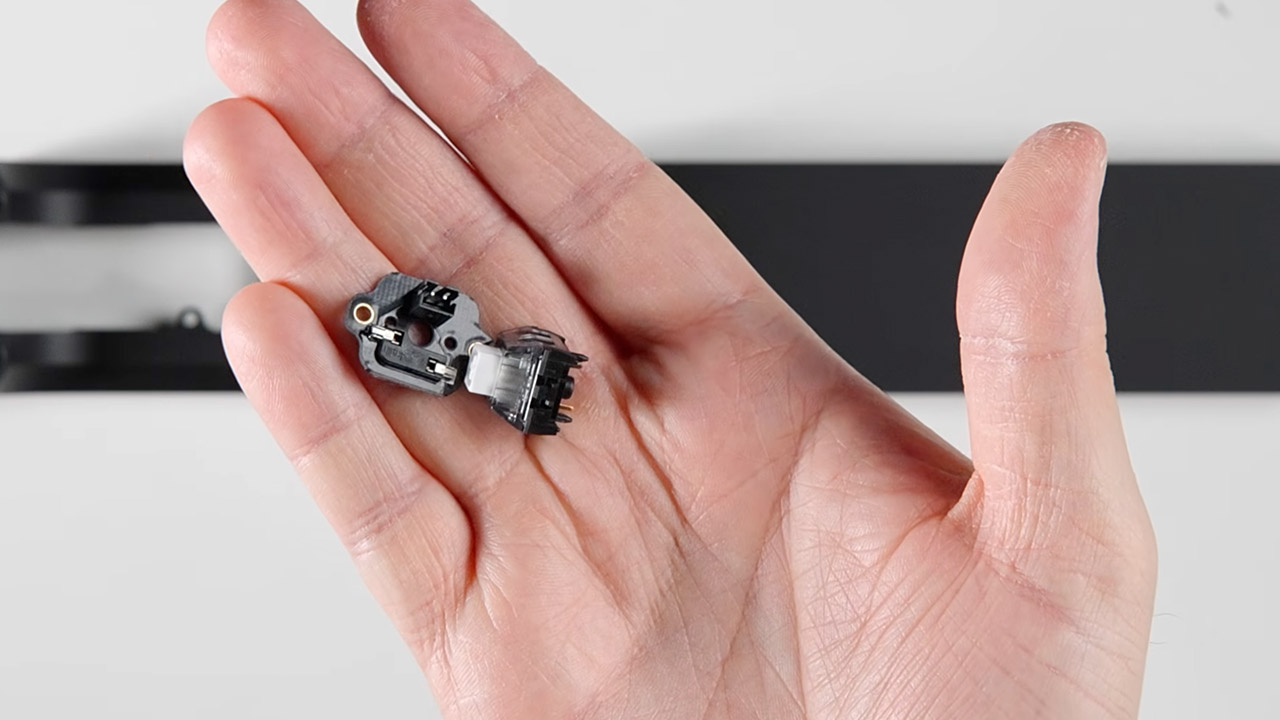
One minor detail turned out to be the standout. The power button is based on a conventional keyboard key, and the case has four removable keycaps in black, white, transparent, and semi-transparent finishes, allowing you to customize it to suit your mood. Once everything is in place, the chassis weighs 6.5 kg and is supported by one of two available foot types, a narrow bar or a broader set for added stability. Magnets hold the side panels and coverings in place, allowing you to open the item with little more than the included aluminum screwdriver.
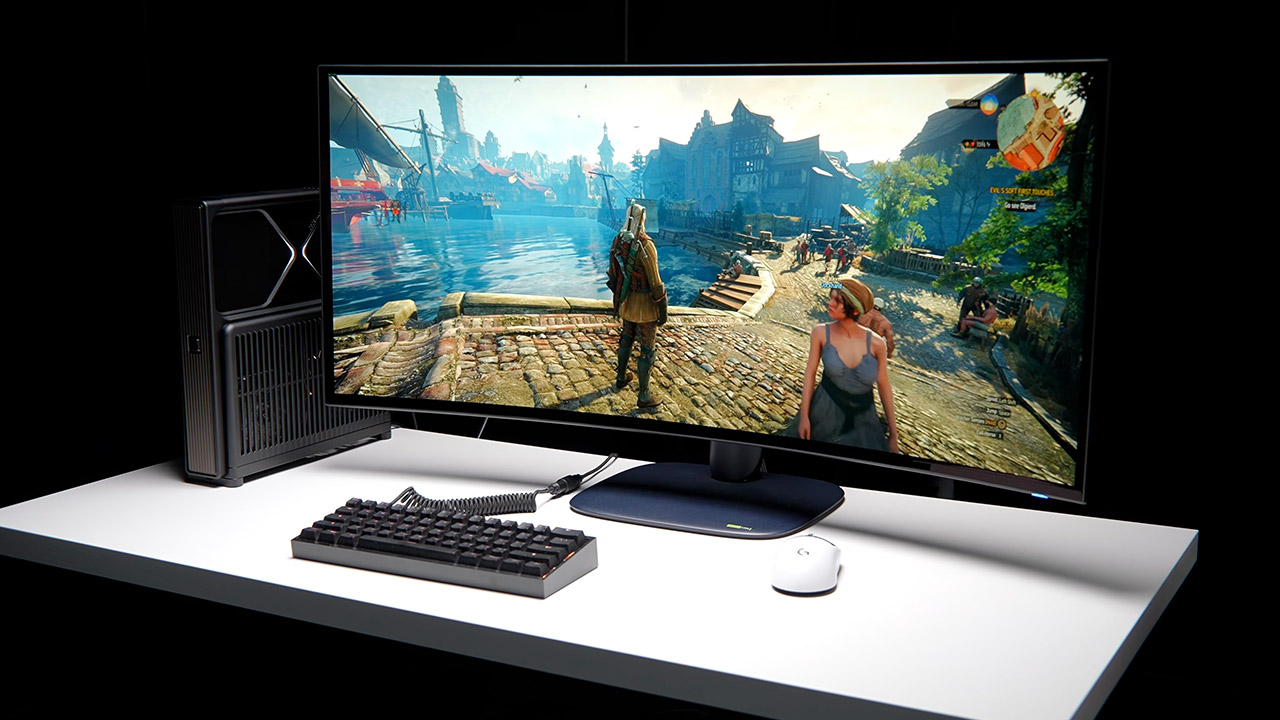
He put the finished machine through its paces, running The Witcher 3 Remastered at a smooth 120 frames per second on extreme with ray tracing and DLSS Quality turned on. The graphics card maintained a consistent 230-240 watts while staying cool at 54 °C, but the 7800X3D drew 53 to 60 watts and peaked at 70°C. Resident Evil Requiem drove the GPU to around 500 watts and 71-74 °C, but it still managed to maintain frame rates around 130. Cyberpunk at a resolution of 5120 by 2160 with strong ray tracing pushed the GPU to roughly 500 watts and 71-72 °C in the middle of the action, while the CPU reached nearly 80 °C under load. Downsizing to 1440p resulted in the GPU maintaining a very respectable 430-450 watts and 67 °C. The only issue occurred during the initial shader compilation, when the CPU soared beyond 95 °C, but as the game stabilized, the temperature remained within the range of what a low-profile cooler can tolerate.

When the system is up and operating, noise levels average around 43 decibels, with an occasional electrical hum from the power source that refuses to go away completely. The design does not allow for additional case fans to be installed, allowing the graphics card’s own cooler and copper heatsink to handle the work. He also has to consider that this case was designed specifically to house the Founders Edition 5090 (as well as the 5080 FE or PRO 6000), so swapping out the graphics card later for something new would necessitate tearing everything down and rebuilding, or ditching the case entirely. Johnston appears to consider this setup as a beautiful piece of technology to admire rather than a tool to be used on a daily basis. Yes, it achieves high frame rates while taking up less area than a typical tower.

A complete system would cost roughly $465 for just the case, before you add in all of the additional components, and the issue is, every component must fit perfectly or the entire thing will not close. When everything is fully put together and the last panel is clicked into place, you have a slab of aluminum that houses a full 5090 and an 8 core processor, all held together by magnetic panels and requiring only one keyboard key to boot up the system.

Besides running controllers with outdated firmware, the affected stores likely also failed to put the devices behind a VPN and create a restricted list of IP addresses allowed to log in. These protections are standard but often not followed. In this case, that failure enabled a mass hack that likely cost tens or hundreds of millions of euros. Spain, Portugal, Poland, Germany, and Belgium were also reportedly affected.
“Two things would have changed the outcome,” researchers at Pen Test Partners said Wednesday. “Cyber hygiene would have prevented the access: take the controller off the public internet, put remote access behind a VPN and an IP allowlist, bring third-party kit onto the network in a controlled, owned and documented way rather than leaving it on a contractor’s own connection, change known and default credentials, and patch to a current release.”
Researchers from security firm Claroty warned of the threat of ignoring these common-sense steps last October. The US Cybersecurity and Infrastructure Security Agency did the same in February.
In an email, Copeland acknowledged a vulnerability “identified in a discontinued, end-of-life generation of controllers” and said the company is working with customers to prevent similar incidents in the future. Danfoss representatives didn’t immediately respond to questions. CNN said the company also cited discontinued models.
So far, the party behind the attack has remained silent. That raises the possibility that the motive was vandalism on a mass scale. Another possibility is a nation-state or other international actor aiming to create a continent-wide disruption.
The incident underscores the tension between the financial and security departments in most businesses. Some companies are loath to spend large sums of money on new equipment when there are no tangible benefits or savings. Only after a devastating hack do they realize why the investment was worthwhile. Executives at affected supermarket chains will likely learn the hard lessons. Less clear is whether the cautionary tale will sway other businesses.


Enterprise investment in artificial intelligence has, understandably, been concentrated on compute. Access to GPUs, model performance and the cost of inference have become central considerations as organizations move AI workloads from experimentation towards production.
Vice President of Cloud Strategy at Wasabi.
However, an increasing proportion of the economic and operational challenge sits elsewhere in the infrastructure stack. AI depends on data at every stage of its lifecycle: datasets must be collected and prepared, training data must be made available to compute, checkpoints and model artefacts must be retained and information may need to move between infrastructure providers as workloads and commercial priorities change.
As these workloads scale, the storage layer is becoming a strategic component of AI infrastructure with significant implications for the economics of enterprise AI.
Latest Videos FromTechRadar
AI is changing the role of storage
Traditional storage strategies have generally been built around considerations such as capacity, availability, performance and retention. AI introduces another dimension: the relationship between storage and the changing requirements of the wider infrastructure environment.
Different stages of an AI workflow have different storage requirements. Data being actively processed may require high-performance infrastructure, while historical datasets, checkpoints and model artefacts may place greater emphasis on durability, security, accessibility and cost. Applying the same storage approach across the entire lifecycle can therefore result in inefficient infrastructure utilization.
The challenge is particularly significant because AI data volumes can be substantial and continue to expand as organizations generate additional training data, model versions and associated artefacts.
The objective should not be to minimize storage expenditure in isolation. It should be to ensure that data is held on infrastructure appropriate to its role, while maintaining the performance, security and accessibility required by the business.
This is the foundation of what can be described as AI storagemaxxing: the systematic optimization of storage across the AI lifecycle to ensure that infrastructure investment is aligned with business and workload requirements.
Data mobility is becoming an infrastructure requirement
Organizations are adopting a broader range of infrastructure providers, including hyperscalers, specialized GPU providers and emerging cloud platforms known as neoclouds. The economics and availability of these environments can change rapidly, creating incentives to move workloads between providers. Compute can be relatively straightforward to reallocate. The associated data is considerably less mobile.
Large training datasets and model artefacts can be expensive and operationally complex to transfer. Where significant charges are associated with moving or retrieving data, organizations may find themselves constrained by infrastructure decisions that were made at an earlier stage of their AI program, creating a form of unintended dependency.
The ability to move data should therefore be considered when designing AI infrastructure, rather than treated as a contingency for a future migration. Open standards and interoperable storage can provide an important degree of separation between data and compute, allowing organizations to adapt their infrastructure strategy as market conditions change.
For technology leaders, this creates a broader consideration than simply assessing the cost of storage capacity. The relevant question is the total economic and strategic cost of retaining data within a particular environment.
Storage optimization must include security
Training datasets, proprietary information and model artefacts can represent significant commercial value. At the same time, the number of applications and automated systems interacting with enterprise data is increasing. Storage resilience must therefore form part of the AI security strategy.
Immutable copies, appropriate access controls and robust recovery processes can help organizations protect critical data from ransomware, accidental deletion and unauthorized modification. These capabilities are particularly important for datasets that would be difficult or expensive to recreate.
Security should consequently be considered alongside performance and cost when determining where AI data resides. A storage environment that reduces expenditure but creates unacceptable recovery or security risks does not represent effective optimization.
Predictable economics will become increasingly important
Storage costs can include capacity, access, retrieval and data transfer. Where these costs are difficult to predict, they can complicate infrastructure planning and influence architectural decisions. This becomes particularly problematic when organizations need to move large datasets between storage and compute environments.
Predictable storage economics allow organizations to make infrastructure decisions based on workload requirements rather than uncertainty over the cost of accessing or moving their data. This distinction will become increasingly important as AI workloads mature. During experimentation, infrastructure decisions can be relatively temporary.
Production workloads, by contrast, may persist for years and generate substantial quantities of associated data, so the storage strategy needs to account for the full lifecycle of that data, rather than the requirements of a single workload or infrastructure deployment.
The strategic role of the data layer
The next phase of enterprise AI adoption will require organisations to look beyond compute optimisation. GPUs will remain critical. Model efficiency will remain important. However, neither can be optimized effectively without considering the data on which AI workloads depend.
AI storagemaxxing provides a useful framework for applying the principle: storage should be treated as part of the AI operating model. Assess storage according to several strategic criteria: whether it is appropriate for the workload, does it provide adequate protection and recovery, are the economics predictable, and could data be moved without friction as infrastructure requirements evolve.
We’ve featured the best AI tool.
This article was produced as part of TechRadar Pro Perspectives, our channel to feature the best and brightest minds in the technology industry today.
The views expressed here are those of the author and are not necessarily those of TechRadarPro or Future plc. If you are interested in contributing find out more here: https://www.techradar.com/pro/perspectives-how-to-submit
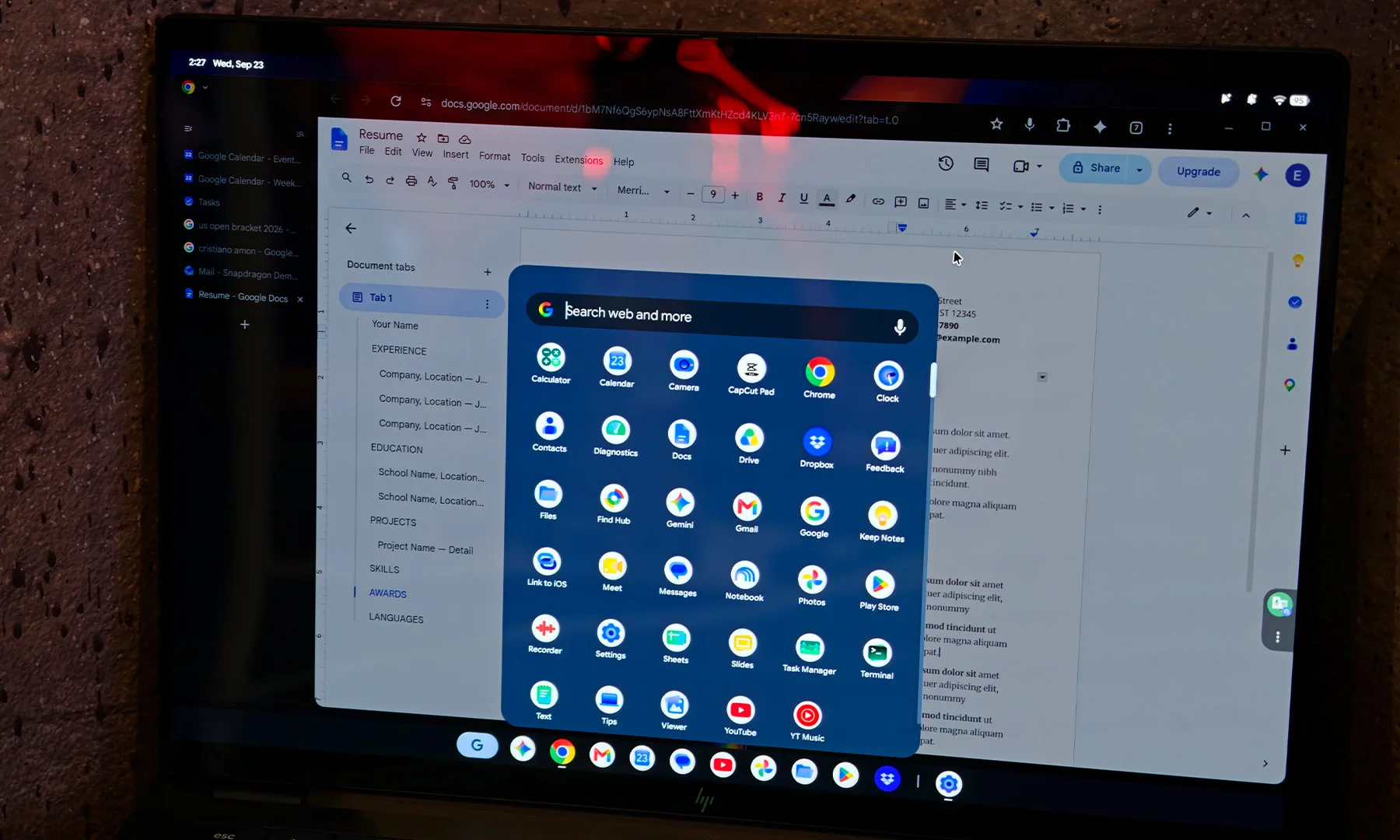
Back when Googlebooks were first unveiled, Google confirmed that some Chromebooks would eventually get the chance to become Googlebooks. Except one person decided that they didn’t want to wait. Reddit user u/mawitime has successfully booted Googlebook OS on an existing ASUS Chromebook Plus.
This gives us one of the earliest looks at how Google’s new Android-based laptop operating system might behave on current Chromebook hardware. Surprisingly enough, the initial verdict is pretty positive. The user says it runs extremely smoothly and can occasionally seem even faster than ChromeOS. The machine isn’t running some brand-new flagship processor either. It has a 12th Gen Intel Core i5-1235U, 16GB of LPDDR5 memory, and 256GB of UFS 3.1 storage.
Don’t wipe your Chromebook just yet
Keep in mind that this is a homemade solution and not an official installation. The Reddit user described this project as “Frankensteined.” Wi-Fi, sound, and Pixel integration don’t currently work, and getting this far took several days. They relied on Google’s Antigravity coding agent during the process and have since been looking into making the setup more repeatable.
So no, this isn’t secretly an easy way to save yourself from buying a new Googlebook. What it does offer is an interesting proof of concept. Googlebook OS can at least boot and provide a responsive desktop experience on hardware several generations behind the laptops Google is currently selling.
Google has plans to do this properly
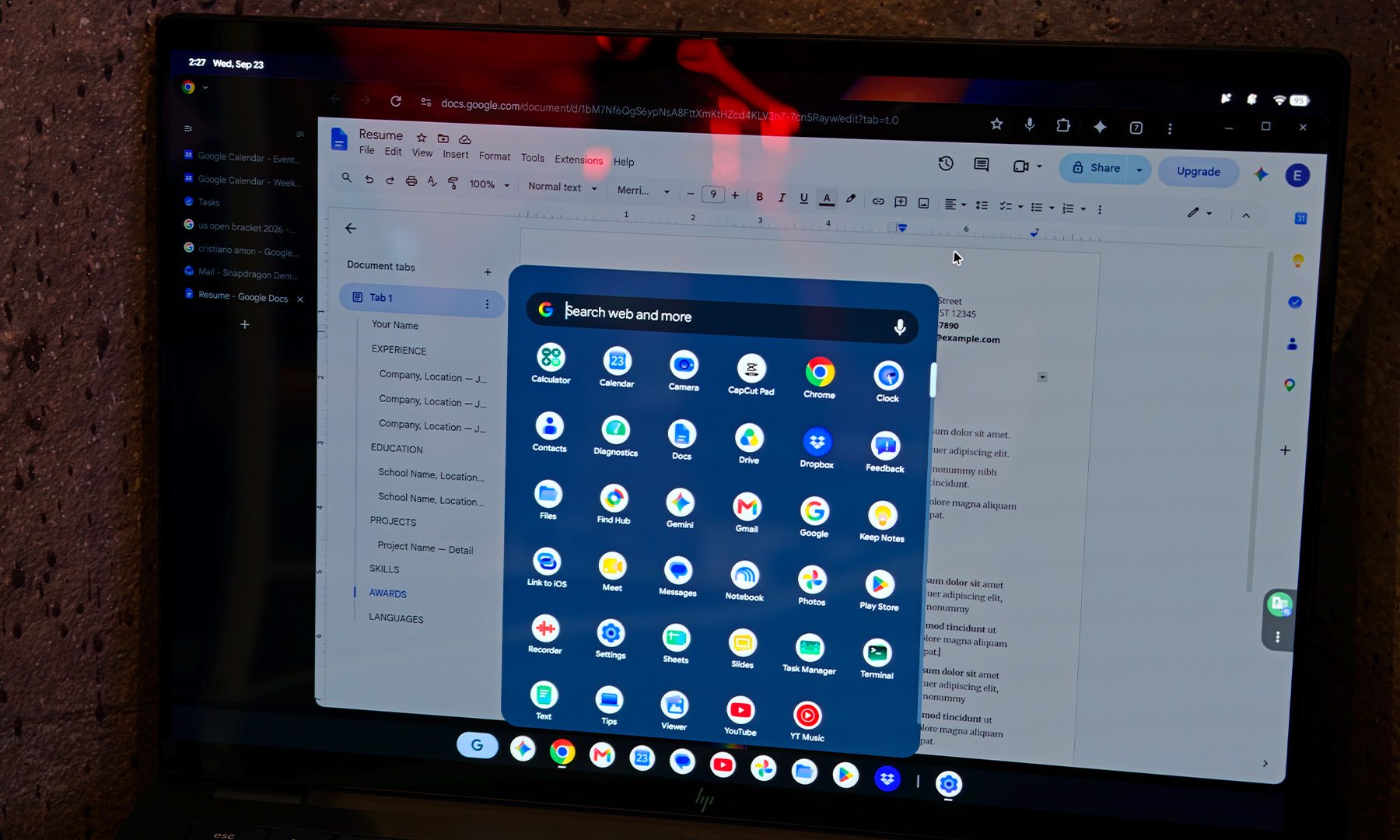
Google officially says many of its newest Chromebook devices will be eligible to transition to Googlebook OS, although it hasn’t announced the full compatibility list or consumer migration process. Existing Chromebooks will continue receiving ChromeOS updates through their supported lifetimes, while qualifying newer hardware will eventually get migration options.
Back in May, we reported that Google VP John Maletis discussed letting existing Chromebooks move toward the new Googlebook experience rather than forcing everyone onto brand-new hardware. This unofficial installation doesn’t tell us which models Google will support. It’s also unclear how polished the official transition will be or whether every Googlebook feature will survive the move. Still, the recent experiment shows that Googlebook OS doesn’t need bleeding-edge hardware to run well.

The Soonpho M7 Pan Tilt Head is a useful photography tool for remotely aiming a decently-sized camera. Only, [Kyle Housley] wanted a little more control than was available out of the box. Hence, he built a custom controller that could deliver just that.
The project is based around an ESP32-S3 paired with an NRF24L01 wireless module. The ESP32-S3 is hooked up to a computer to receive commands over serial on what movements to make. It then transmits over the NRF24L01 to another NRF24L01 module that has been hacked into the original M7’s controller. In doing so, it can command the M7 to move to a given specific pan and tilt position, or to make a smooth motion along a vector. It can also trigger shutter release in the attached camera as needed, to capture whatever is being looked at.
[Kyle] has used this rig to create a motion tracking system for aircraft photography. With a Yolo vision model running on a laptop, the pan-tilt head can be commanded to track aircraft passing by and photograph them when they’re in frame. It’s a pretty slick setup; we’d love to see similar done with the aid of ADS-B data, too—perhaps even with automatic image tagging and upload.
from the handcuffing-artists dept
There have certainly been some bad takes on both sides of the AI in video games argument. In one corner, we have the never-AI-ers who reflexively claim that any use of any type of AI in any game is a total disqualifier. No quarter is given to nuance. No daylight is offered for discussion. It might as well be religion to those folks. Then, on the other side, you have people like Epic Games’ Tim Sweeney, who has not only directed his company to go all in on the use of generative AI in gaming, but actually had the chutzpah to suggest that his rival Steam’s inclusion of AI-use disclosures on its storefront are “irresponsible.”
But Epic has somehow gotten even worse on AI use than that. Rather than suggesting that generative AI is a potential tool for use in gaming, which can often mean its use is employed on the perimeter of game-creation, Epic has decided to make the use of AI compulsory.
According to a new report by Bloomberg, developers on the game were told to implement an “AI-first” production model using Anthropic’s Claude AI models. The team is not to use any more “hand-written code,” and even artists are being pushed to use the technology that has become a punching bag among actual players. The director of the unannounced game reportedly told developers that all art should be “generated with full AI workflows.”
“We’re embracing AI-accelerated development, led by Epic developers who are the visionaries and creative drivers for everything we do,” Jake Jones, communications director at Epic Games, said in a statement.
It’s hard to overstate just how stupid this is. This isn’t handing artists new and interesting paintbrushes to use. It’s taking their paintbrush away entirely and telling the artists to simply tell a machine what to make. That is a terrible idea. It’s also completely antithetical to how other game makers have employed the use of AI. This is going to turn off both the public, which generally hates the idea of artistic interruption through the use of AI tools, and the pool of artists Epic does and could in the future employ.
AI models are getting better at coding, certainly. But what Epic is clearly doing is anti-artist for the sake of speed-running development after cutting human employment.
The upcoming shooter, which Bloomberg reports was supposed to release in March 2027, has now been delayed due to slow progress and understaffed teams. Despite a $1.5 billion investment by Disney in 2024 for collaborations that include this project, the Fortnite maker laid off 1,000 people earlier this year amid the battle royale’s struggles and the costs of ongoing antitrust litigation.
For the group that is dogmatically opposed to the use of AI in gaming, this is their boogeyman come to life. It’s the starkest example of bad corporate behavior enabled by AI that they could want. And it’s very hard to argue against them when there are bad CEOs and bad companies out here pulling this kind of garbage.
I won’t even try. I’ll repeat that I think there is a place for this technology as a tool to enable artists and enable more art. But if the gaming industry is too poisoned at this point to allow for that possibility to be employed responsibly, then so be it.
Filed Under: ai, video games
Companies: epic

Design platform Figma announced a new Markdown-based editor to help define a company’s design, bring in design and code libraries, and integrate with the Payload headless content management system during the company’s first Config event in India. Through some of these features, the company aims to provide a definition for its own and third-party agents to adhere to a brand’s design rules better while creating with AI.
The company debuted a new feature called Figma Specs, which is a markdown editor that lets users define their design language in a simple way. The document can serve as a reference for teams and agents while designing in Figma. Specs can exist as a standalone file in Figma or can co-exist within the canvas. Apart from acting as a text editor, users can reference other Figma elements, such as elements on the canvas and embed FigJam diagrams, code layers, and designs.
What’s more, teams can bring in more context about design, including design libraries, code libraries, and guidelines to manage context for the design system. Agents can also refer to this centralized system to adhere to rules.

In the past week, the company made its agent on canvas available to a wider user base. However, given the non-deterministic nature of AI, the company is providing tools to steer it towards more predictable outcomes.
Figma also made its code layers feature, which adds coding to designs on canvas for more interactive prototypes. The company announced this feature in private beta back in June. At its India event this week, the company is making the function available in public beta to let more users test it out. Users can also ask the agent to turn a design into code or change a part of the code to iterate on a prototype.

“We see Figma as the place where software teams come to decide what they build and ship. And so for that, I think one of the key things to keep in mind about what AI has changed and what it made available is the ability to build,” Figma’s chief design officer Loredana Crisan told TechCrunch. “There are 17-times more lines of code being produced today than in the past. But when you’re looking at releases, only 1.3-times more releases. A lot of that code actually is not necessarily built to ship, but really built to discover what the product is. It’s built to design.”
The company said it is also supporting over 20 new tools with its MCP, including Open Code, Dia, Grok Bot, and Indian AI startup Sarvam.
Last year, Figma acquired open-source headless CMS Payload. Now, the company is integrating it with its Figma Make product for generating dynamic websites and directly managing content. The company said that Payload’s downloads have increased sixfold in the last 12 months.
The company opened its first office in India late last year with sales, partnership, go-to-market, and product support functions. Figma said that the country is its biggest market in terms of users outside the United States. The company noted that the platform works with 40% of India’s top 100 companies listed on the Bombay Stock Exchange.
When you purchase through links in our articles, we may earn a small commission. This doesn’t affect our editorial independence.

Every fall, teachers ride a wave of opening day energy into the new school year, and then that wave breaks. Educators have a name for the slump that follows: the October Blues. It can hit new teachers hard enough to make them question whether they belong in the profession at all. The harder question is whether anything can soften the landing, or whether every teacher simply has to wait it out.
A Rookie Who Never Saw It Coming
Mike Anderson is an educational consultant, a former classroom teacher and the author of Rekindle Your Professional Fire.” He knows the slump from the inside, because his own first year of teaching came with a schedule that would have flattened almost anyone. At 22, he taught fourth grade all day, then raced off to coach two swim teams, with weekend meets on top. He was working more than 100 hours a week, and he never put a name on why he felt so run down.
He later watched a group of struggling teachers in Fairfax County, Virginia, and returned the following fall to find the teachers looking like different people. Their explanation caught him off guard. Later, a year-long tally of lost minutes forced him to rethink what was really wearing him down.
Start Small, Then Ask for Help
Mike’s advice for anyone in the thick of it is to skip the big overhaul. Name the one thing dragging you down, then pick a single bite-sized step that fits. Low on energy? Drink a tall glass of water before the morning coffee. Feeling alone in a building full of people? Commit to a 10 minute walk and talk with a colleague a few afternoons a week.
A slump that lingers is a different story. If the low feeling lasts more than a couple of weeks, Mike says it’s time to reach out to a mentor, an administrator, or a trusted colleague.
What School Leaders Can Do Beyond Snacks and Thank Yous
After a year of logging every drill, meeting and assembly that cut into his teaching time, Mike found he had lost more than 30 instructional days, about a sixth of the school year. He emailed the numbers to his superintendent and got a polite note of appreciation in return. Even so, the exercise showed him that his sense of falling behind was not a personal failing.
For school leaders, Mike points past one-time gestures like a staff appreciation breakfast. He encourages them to build autonomy, competence, purpose, belonging, curiosity, and fun into the daily and weekly rhythm of the school. Opening a staff meeting with a few minutes for teachers to share successes is one small place to start.
Stories Mentioned in This Episode
The “October Blues” Are Coming. Here’s How Teachers Can Beat Them, by Ira Apfel
This Week with EdSurge is a weekly podcast from EdSurge. Subscribe to the EdSurge newsletters for more news and analysis on education and technology.

Tech & AI44 minutes ago
Windows Server 2022 reached end of mainstream support

Tech & AI2 hours ago
Is AI pentesting as good as a human pentester?

Crypto3 hours ago
FCA Crypto Authorisation: Oct 2027 Deadline


-

 Fashion5 days ago
Weekend Open Thread: Quince – Corporette.com
-

 Business & Hustles5 days ago
PwC: Supply-Chain Diversification, AI and Energy Transition Open New Growth Paths for Thailand
-
 Entertainment7 days ago
10 Flawless Movies With the Cleverest Protagonists
-

 Sports6 days ago
Multiple Power Four programs face College Sports Commission investigations over alleged NIL cap evasion
-
 Sports7 days ago
Asiad selection row: Para-shooters allege corruption; PCI denies claims | Asian Games 2026
-

 Crypto4 days ago
XRP Ledger Defends Emergency Patch Amid Criticism
-

 Crypto3 days ago
Rep. Omar Says She Will ‘Not Be Silenced’ After Federal Agents Raid Her Home
-
 Crypto6 days ago
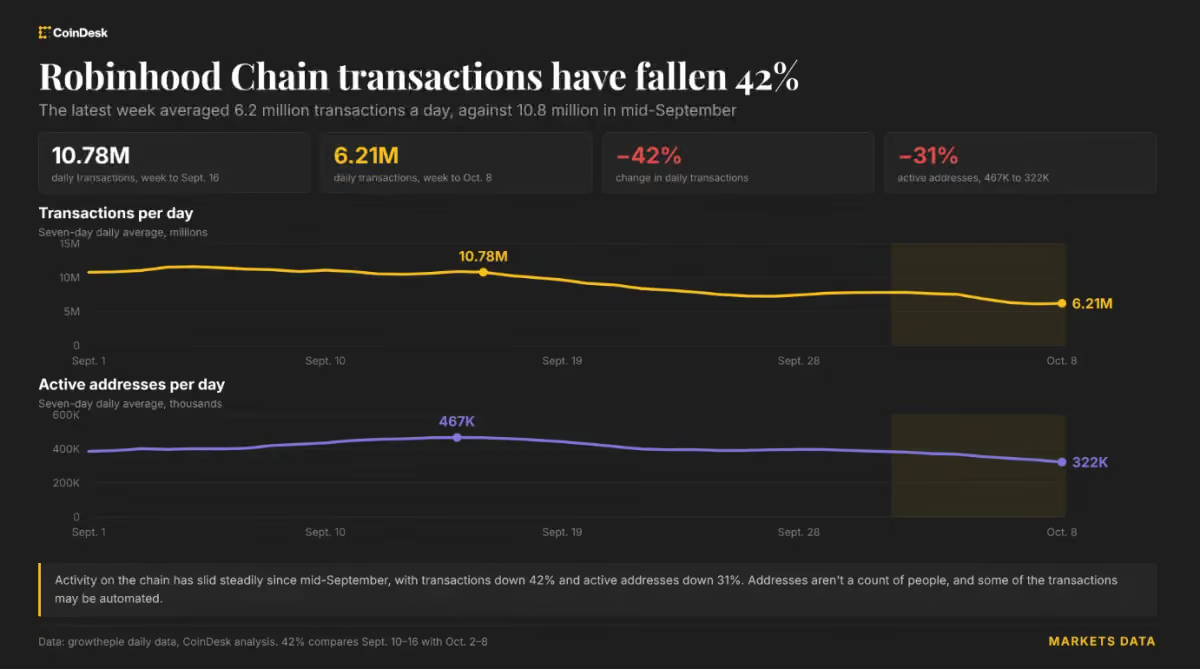
Robinhood Chain slowdown spreads from fees to trading as transactions fall 40%
-

 Sports5 days ago
College Football Week 6 Bets: Three Picks for Saturday’s Biggest Games
-

 Sports4 days ago
Duke receives encouraging update regarding top prospect from class of 2028
-

 Crypto3 days ago
KuCoin unveils 5.0 upgrade with AI tools and unified trading account – CoinJournal
-

 Crypto4 days ago
Saylor Signals Next Bitcoin Buying Plan After September STRC Buybacks
-

 Tech & AI7 days ago
ICE Emails Discuss Using Palantir-Supported Tool to Investigate Voter Fraud
-

 Crypto6 days ago
Mashinsky Accepts Lifetime Industry Ban and Up to $35 Million in Conditional Payments | The Defiant
-

 Sports6 days ago
Morocco and Senegal await AFCON final verdict after arbitration hearing – Sports
-

 Sports6 days ago
Saudi oil crisis affects Neom project, 2034 World Cup plans
-

 Sports3 days ago
Work on Trump’s D.C. muni enrages judge: ‘You did your absolute worst’ | News
-

 Crypto4 days ago
October 11 Crash: What Wiped Out 1.65M Traders
-

 Crypto5 days ago
Justin Sun says Tron post-quantum plan on testnet
-
Crypto2 days ago
ZEC and NEAR Plummet Hard, BTC Recovers From Rollercoaster Ride: Market Watch
You must be logged in to post a comment Login