

The Artemis II space mission is making history.
Tech
Why Traditional App Defenses Aren’t Enough

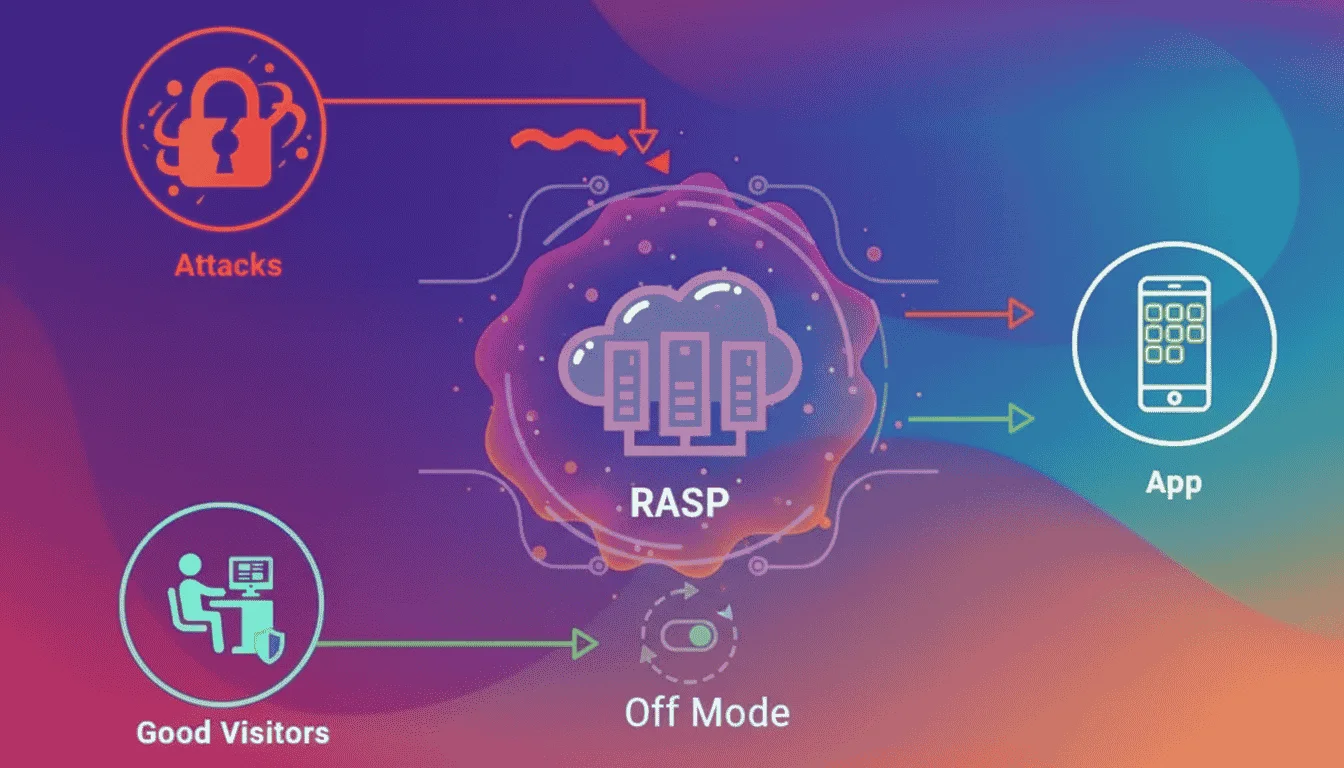
The world of application security is evolving faster than ever. Traditional firewalls and antivirus tools once formed the backbone of defense, but as applications become more complex and decentralized, those perimeter-based models are showing their limits. Enter rasp security, or Runtime Application Self-Protection, a transformative approach that protects apps from within by monitoring their behavior in real time.
The Shortcomings of Traditional Security
Traditional security mechanisms focus on preventing unauthorized access from the outside. While they are effective at blocking known threats, they struggle against dynamic or zero-day attacks that occur inside an application during runtime. Once a hacker breaches the network perimeter, traditional tools often lack visibility into the internal workings of an app.
This gap leaves organizations vulnerable to sophisticated attacks that exploit logic flaws, API misuse, or injected code. In contrast, RASP security embeds protection directly into the application, providing continuous monitoring and immediate response.
What Makes RASP Different
RASP operates within the app itself, analyzing its behavior as it runs. It can identify and block suspicious activity such as code tampering, injection attacks, or unauthorized memory access. Unlike static defenses, RASP adapts dynamically to new threats, offering a layer of resilience that external tools cannot.
For developers, this means improved visibility into real-time attack vectors and reduced dependence on external infrastructure.
Real-Time Defense Mechanism
When a potential threat arises, RASP security doesn’t just log it, it acts instantly. By terminating malicious sessions, isolating affected components, or alerting administrators, it prevents small issues from escalating into breaches.
This real-time intelligence enables faster incident response and minimizes downtime. It also provides detailed analytics to help developers patch vulnerabilities efficiently.
Integration with Modern Development
In today’s agile development cycles, continuous integration and deployment demand flexible security. RASP fits naturally into DevSecOps workflows. Once integrated, it continuously evaluates app behavior without requiring frequent code changes.
This seamless integration ensures that security evolves in tandem with the app, maintaining protection even as features are added or updated.
Business Benefits Beyond Security
Adopting RASP security provides more than just protection, it enhances compliance, reduces financial risk, and builds customer trust. Regulatory frameworks like GDPR and PCI-DSS emphasize real-time monitoring and data protection. RASP supports these requirements by providing continuous runtime visibility and threat reporting.
Moreover, it reduces the operational burden on security teams by automating detection and response.
The Future of App Defense
As cloud-native architectures, microservices, and mobile ecosystems grow, the traditional notion of a security perimeter is fading. Apps need self-defense capabilities that travel with them across environments. RASP security delivers this portability, protecting applications whether they are hosted on-premises, in the cloud, or distributed across hybrid systems.
It represents a shift toward proactive, self-healing security, where apps detect, respond, and recover autonomously.
Conclusion
Relying solely on external defenses is no longer enough in a world of evolving cyber threats. RASP security offers a smarter, adaptive approach that shields applications from within, reducing risk and enhancing resilience.
For organizations looking to modernize their application defense, doverunner provides advanced runtime protection solutions designed to detect and neutralize threats in real time. Its technology empowers businesses to secure mobile and web applications seamlessly without slowing development. Discover how runtime protection can elevate your security posture, request a demo or learn more through DoveRunner’s platform today.
Continue Reading
Farthest humans have ever traveled in space? Check.
First Black, woman, and Canadian astronauts to make it around the moon? Also check.
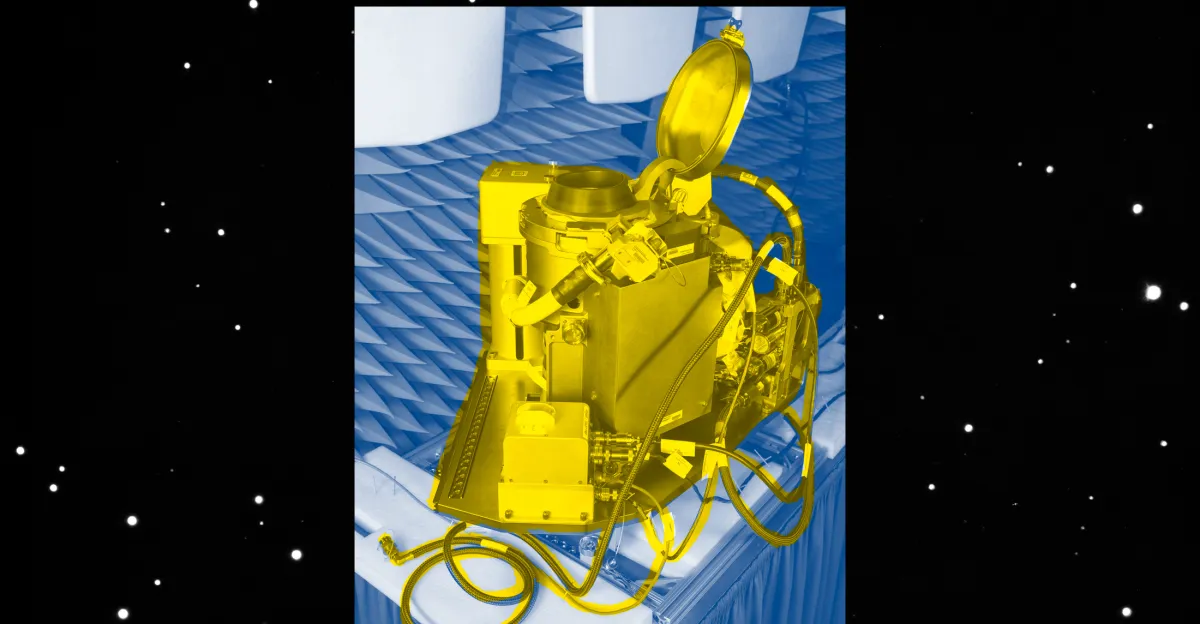
First time a toilet has made this journey? Big, important check.
Because while there are many significant questions about space — Is life out there? Could we settle Mars? How far does the universe stretch, really? — one question holds plenty of gravity: What happens when nature calls in space?
This mission hopes to return with answers.
After years of research, the Orion spacecraft used in the Artemis II mission has departed Earth with an actual toilet, door and all.
In the initial hours after the Orion capsule launched, some of the first reports from the astronauts were about their toilet malfunctioning. They quickly fixed it. But, as they approached the moon, potty problems reigned again.
“If you’re going to do longer missions and eventually potentially even have a base on the moon or go even further onto Mars, you first need to figure out: what are you going to be doing for food, for water, and also for peeing and pooping on the spacecraft and on the surface?” K.R. Callaway, a writer with Scientific American, told Today, Explained co-host Sean Rameswaram.
So the simple presence of a toilet on this mission?
“Definitely history-making,” she said.
To understand the significance, Sean sat down with Callaway to discuss the history and future of space toiletry. Below is an excerpt of their conversation, edited for length and clarity. There’s much more in the full podcast, so listen to Today, Explained wherever you get podcasts, including Apple Podcasts, Pandora, and Spotify.
Tell us about the history of using the facilities in space.
So back in the ’60s and ’70s, [the] Apollo [program] used these bags. They had different ones for peeing, different ones for pooping, but it was still essentially a bag that you would tape onto your body and just go. It obviously didn’t provide a lot of privacy. We aren’t talking like going into a room with a door and doing this; this was just done in the cabin, and it was not super user-friendly either.
They had a lot of issues with leaks. You know, it’s just an adhesive. It can become unstuck and in low gravity, that can be a big problem for particles escaping.
I had a lot of fun going through the Apollo mission transcripts and just looking at all of the ways that astronauts were describing this after use. They were pretty upset about it. During the Apollo 10 mission, they said, There’s a turd floating through the air.
So they had to wrangle that themselves. And even before that, they were having issues. During Apollo 8, there was another pretty notable mission where a crew member was ill. And so the other crew members were chasing down these blobs of both vomit and feces that were just floating wildly through the cabin.
And one of the astronauts you quote in your piece was Ken Mattingly, whose name people might be familiar with from the Apollo 13 mission and of course the Apollo 13 movie.
This was actually one of my favorite quotes that I came across while I was going through the mission transcripts. This is something that Ken Mattingly said on Apollo 16, which is that, “I used to want to be the first man to Mars. This has convinced me that if we got to go on Apollo, I ain’t interested.”
As in, this whole toilet situation is so insufferable, I maybe don’t really want to spend too much time in space anymore.
So NASA, I imagine, after all the Apollo missions, realizes it needs to advance this technology. How does it do so?
I spoke to Melissa McKinley over at NASA. She is the head of the Toilet Project — the Universal Waste Management System is their technical name, though I’ve been assured that just “toilet” is okay to say. And she mentioned that everything that’s happened from the ’60s and ’70s to now has really been a feat of engineering and design.
They’ve been able to implement a vacuum system that uses airflow to pull particles down instead of just having them float through space and relying on you to seal the bag yourself and keep everything in.
Help me picture what it looks like, because I’m guessing it does not look like any toilet in one of our homes.
More like an airplane toilet is how I would describe it.
The toilet has a seat and it has a funnel on the side for collecting urine and everyone gets their own separate piece to attach for the part that actually would touch your skin, luckily.
For the toilet itself, it’s pretty loud in there.
Astronauts have to wear hearing protection and they also have handles to hold on to because you’re working in no gravity or low gravity and you need a little bit of help to stay in the right position.
So these aren’t plastic bags anymore. Where’s this stuff going? Are we just shooting it out into space?
We are partially shooting it out into space. For urine, it is collected and then it’s going to be vented a couple of times. It’s going to be a controlled process, so it will be just a lot of liquid at once, but yeah, that is where the urine is going.
For poop, they are storing that on board and then it will be kept in an area of the spacecraft that will actually burn up upon reentry. It’s not coming back to Earth with them, but it is going to stay with them for a while.
And yet, all this testing, all this hype about this new toilet, and one of the first stories we get once the astronauts are up in Earth’s orbit is that something has gone wrong with the toilet! What happened?
Already the toilet has had a few issues. It’s kind of the equivalent of a plumbing issue, but for space.
When they were trying to use it on one of the early days of the mission, they found that there was an error. The issue ended up being with the fan that helps to get the airflow to help with the urine collection — kind of a big problem. And luckily with ground control support, [astronaut] Christina Koch was actually able to fix this almost immediately after it had happened.
The latest I heard over the weekend is that they had toilet trouble again, so maybe not the best plan to have your astronauts also be your plumbers. What’s the latest on this very expensive, very important toilet?
It did seem to break again over the weekend. From what the NASA people were saying, it seems like it’s the same problem again with the urine collection system. The engineers have looked into it a little bit more deeply and they think that it might be ice blocking the tube that would help fully collect the urine.
Astronauts have reported issues with that system collection and then also a smell coming from the toilet area. Definitely a problem that they say they’re going to just keep working on.
This whole toilet thing can feel inconsequential considering what we’re really doing up there in space: exploration, making history, trying to get to Mars one day, all the rest. Why is the toilet important?
One of NASA’s goals with this particular toilet is that it’s a modular design, which means that they can put it not just in the Artemis II capsule, but they can also put it in a lot of different space vehicles.
They could potentially even adapt it to be on a Mars mission and longer-term missions. They can adapt it so that they can do what the ISS does in terms of liquid recycling and make longer-term, more sustainable missions possible.
Even though it seems very mundane to us as something that you use every day, for being in space, it’s actually one of the key things that stands in the way of making space more homelike and more able to be a place where we can do longer-term science.
If you can’t figure out the facilities, you’re never gonna figure out Mars.

Aiper Scuba V3
MSRP $949.99
Released February 2026

“The Scuba V3 punches above its weight-class with both outstanding performance and value”
Pros
- Lightweight
- Cleans well
- Intuitive app
Cons
- Will not clean the water surface
- Mediocre battery life
Instant Insight
I have always maintained that owning a pool is like owning a boat – you will spend 90% of your time maintaining and cleaning it and 10% of your time enjoying it, especially if you live in Oregon as I do. Over the years, we have seen robot cleaners evolve from erratic, cord-tangled wall-bumpers to reliable vacuums, and technology keeps getting better, especially in the age of AI. Priced at $1,199 MSRP (with a street price currently around $970 USD), the Aiper Scuba V3 is not trying to be the cheapest impulse buy at the pool store, but instead, positions itself as a premium AI-driven assistant that brings sophisticated navigation of high-end robot vacuums to the bottom of your backyard oasis.
New for 2026, the Aiper Scuba V3 robotic pool cleaner has new AI features and more value, although it sacrifices some tech to offer such a good value. The Scuba V3 is currently priced between the top-of-the-line Scuba X1 Pro Max ($1699) and the Scuba X1 ($899.99), offering newer AI-focused features for just $70 more. The Scuba V3 is equipped with AI Vision and dToF(Direct Time of Flight) sensors, which give this pool cleaner more of an organized purpose than recklessly bouncing around the pool.

During my tests, the Scuba V3 proved to be a reliable, hardy worker with long battery life. If you already have a pool cleaner that is a few years old and working great, it’s not worth spending money on the Scuba V3, but if you are in the market, then I would recommend jumping into the pool cleaner ecosystem. Paired with the Aiper EcoSurfer S2 skimmer, both of these devices should do the job in keeping your pool spotlessly clean.
Aiper V3 Specifications:
Here is how the Aiper Scuba V3 measures up :
| Specification | Details |
| Dimensions (L x W x H) | 17.48 x 14.96 x 8.58 inches |
| Weight (Dry) | 18.1 pounds |
| Suction Power | 4,800 Gallons Per Hour (GPH) |
| Filtration Level | 3-micron MicroMesh™ Multi-layer Filtration |
| Debris Basket Capacity | 3.5 Liters |
| Battery Energy Content | 149.76 Watt Hours (Lithium-ion) |
| Run Time | Up to 150 minutes per charge |
| Charging Time | 5 Hours via Wireless Charging Dock |
| Navigation Technology | AI Patrol, dToF, VisionPath™ Adaptive Planning |
| Drive System | Tank treads with dual scrubbing brushes |
| Cleaning Zones | Floor, Walls, Waterline (JetAssist™) |
Design and Weight: Like a paper tank
Like most pool cleaners on the market, the Scuba V3 uses a tank tread design to move the unit around. And like the rest of the products in the Aiper robot pool cleaner line-up, the casing is made up of a piano black finish that looks high-quality. Rather than the gold or carbon fiber surround found on the more expensive Aiper units, the V3 has some light blue trim, which would indicate more of a value virtue signal. Dimension-wise, the Scuba V3 is considerably smaller than the Scuba X1 or Scuba X1 Pro Max, which are not only taller, longer, and wider, but also considerably heavier.
I put some charts below that show the weight of the Scuba V3 compared to others in its price range – it comes in on the lighter side in the comparison (when not wet), which is nice for those who really have trouble pulling these cleaners out of their pool. Aiper sells a caddie to help you transport their pool cleaners to and from the pool, but would surmise that most people can skip the caddie, as the V3 is pretty light.

I found that the tank treads did a great job moving the V3 around my pool, and they stuck to the side of the pool without issue, despite a suction lower than that of higher-end models. Underneath, you have four scrubbing brushes – two in the front and two in the back – that do a good job agitating algae, mineral deposits, and debris before the suction kicks in. The debris is funneled into a newly designed 3.5-liter collection basket wrapped in a Micromesh filter.
The overall build quality feels premium; the plastics are thick, the moving parts feel solid, and there are no flimsy latches that feel destined to snap off after a single summer in the sun. I noted in my Beatbot Aquasense 2 Ultra review that they put extra screws and parts in the box, which is a clear sign to me that something is going to wear out.
The Aiper Scuba V3 is a thoughtful and rugged piece of engineering.

When you are dealing with robotic pool cleaners, dry weight directly correlates to user experience, specifically, how miserable it is to pull the machine out of the water once it has finished its cleaning cycle. Here is how the competitive landscape breaks down:
- The Featherweights (Under 20 lbs): The Aiper Scuba V3 (18.1 lbs) and the Dolphin Liberty 400 (17.9 lbs) are the clear winners here. Aiper managed to pack the V3 with a complex AI vision system and heavy-duty tank treads without inflating its mass. It is incredibly easy to retrieve one-handed using the included hook. We also included the corded Dolphin Nautilus CC Plus (20.8 lbs) as a baseline to show that premium cordless tech doesn’t necessarily mean a heavier machine.
- The Middleweights (23 to 25 lbs): The highly anticipated Beatbot Sora 70 (23.0 lbs) sits right in the middle of the pack. While it is about five pounds heavier than the Scuba V3, that extra weight is justified by its internal buoyancy chambers, which allow it to float up and clean the surface of the water (a feature the V3 lacks). The older Aiper Scuba S1 Pro (25.0 lbs) and Beatbot Aquasense Pro (24.3 lbs) also live in this tier, representing the maximum weight most users can comfortably lift without straining their backs.
- The Heavyweight (30+ lbs): Aiper’s flagship model, the Scuba X1 Pro Max (33.1 lbs), is an absolute behemoth. While it offers a staggering 5-hour battery life and 8,500 GPH of suction, pulling 33 pounds of dead weight (plus trapped water) out of the deep end is a genuine physical workout.

Ultimately, the Scuba V3 strikes a near-perfect balance, offering premium AI navigation in a chassis light enough that anyone in the family can confidently deploy and retrieve it.
Navigation: The most important part of any robot cleaner
I get asked a lot about what makes these pool cleaners so much better than the other, and the answer is simple: Does it clean the pool to your satisfaction, and is it low maintenance? Sounds simple, but as you know, it’s not that easy. Pools come in a lot of shapes and depths, so to get a pool clean, you need a good brain to tell the cleaner how to navigate (and you need long battery life, too).
Powered by what Aiper calls its “Cognitive AI Navium Mode” and “VisionPath Adaptive Path Planning,” this robot uses an integrated underwater camera combined with dToF (Direct Time of Flight) optical sensors. Think of dToF as a form of laser radar; it sends out light pulses and measures how long they take to bounce back, creating a highly accurate 3D map of your pool’s interior. When you drop the Scuba V3 into the water, it doesn’t just wander. It assesses the shape of the pool, detects obstacles with its optical sensors, and plans a precise, overlapping, lawnmower-style route.

But the really cool trick is the “AI Patrol” mode. I actively tested this by tossing a handful of fine potting soil and a few sunken leaves into the deep end. The Scuba V3’s camera has a 2-meter detection range and is trained to recognize over 20 different types of debris. As it cruised nearby, I literally watched the robot alter its path, turn directly toward the dirt pile, and suck it up before resuming its standard grid.
It was like watching a predator spot its prey.
There is a very visible difference in how the Scuba V3 seems to navigate compared to the Scuba X1, for example. The V3 looks very “aware” almost like a living being; it’s creepy at first. Furthermore, Aiper equipped the front of the unit with dual LED headlights. This allows the AI vision system to function perfectly during night cleanings, illuminating the murky depths so it never loses its way. And for the privacy-conscious, Aiper guarantees zero image storage and zero image upload – what happens in your pool, stays in your pool.
Performance: Suck it up, kid
In all my robot pool cleaner testing, I am still wondering what the point of diminishing returns is when it comes to gallons per hour (GPH) of suction. Spend more on a pool cleaner and get a higher suction rate, but what is the minimum you need for good performance in the category? I have yet to find that out. The Scuba V3 measures in at 4800 GPH, which isn’t nearly at the top of its class, but not weak either. The higher-end and slightly more expensive Scuba X1 comes in at 6600 GPH, which feels like A LOT more compared to the V3, but in my tests, the Scuba V3 did just fine.

During my two-week testing period, my pool was subjected to a barrage of spring pollen, wind-blown sand, and the inevitable barrage of leaves. The V3 offers multiple cleaning modes, but “Auto” (which hits the floor, walls, and waterline) and “AI Patrol” were my easy-option choices. Let’s talk about the filtration first. The basket utilizes a 3-micron MicroMesh filter. For context, a single strand of human hair is about 70 microns thick.
This mesh is so fine that it doesn’t just trap leaves and twigs; it captures that incredibly annoying, cloudy silt and fine sand that usually blows right through the exhaust of cheaper robotic vacuums. You can pull the micro-mesh filter out and use the standard filter if you want. I’m located here in Western Oregon, where I do not need to deal with sand or fine debris, as you might get in Arizona or Nevada, so I typically stick with the standard filter.

Wall climbing is where the Scuba V3 truly shows off. It scales the vertical walls of my pool effortlessly. But the standout feature is the JetAssist™ horizontal waterline cleaning. Many robots will climb a wall, poke their nose out of the water, and fall back down. The V3 climbs up to the waterline and then uses a directed jet of water to push itself horizontally along the pool tile, vigorously scrubbing the scum line with its dual brushes.
It looks like it is defying gravity.
It did a solid job of cleaning the waterline, cleaning about 1 inch higher up on the side; it literally hit the brick surround that hangs over the pool. One area that the V3 needs help with (and most pool cleaners do) would be the stairs. The Scuba V3 would make it up the first step no problem, then struggle with the second on occasion. I still had to manually clean the stairs every couple of weeks to finish the job thoroughly, though.
It is important to understand where the Scuba V3 sits in terms of raw power. Here is a quick visual breakdown of how it compares to its direct competitors:
- Aiper Scuba X1 Pro Max: 8,500 GPH
- Aiper Scuba S1 Pro: 6,000 GPH
- Beatbot Aquasense Pro: 5,500 GPH
- Aiper Scuba V3: 4,800 GPH
- Dolphin Nautilus CC Plus: 4,500 GPH
The Aiper App and connectivity: Now with a weather forecast
I’ve always liked the Aiper app and find it to be easy to operate their products. It’s also easy to set up a new Aiper device with the app. Like their previous products, you need to install the app, turn the Scuba V3 into Bluetooth mode, connect the device to the app, and then set up Wi-Fi. 9/10 on the ease of use scale.

I find the interface to be clean and functional. It’s easy to find instructions and support for your product through the app in the event that you throw out the setup guide. Aiper calls their app AI Navium because it’s an “advanced, cognitive AI mode designed for intelligent pool and yard management”. The key selling points by Aiper include:
- Cognitive Cleaning plans: It will generate weekly cleaning plans based on AI analysis
- Weather/History Sync: Analyzes local weather and past cleaning logs to determine optimal cleaning times
- Vision Path Integration: Combines AI vision and dToF (direct time of flight) sensors for precise navigation
- Smart Yard management: You can store different yards and products so that the system can schedule devices based on yards.

AI Navium is an attempt by Aiper to get you to buy into their entire ecosystem of products so they can fully automate your yard. From sprinkler systems to pool cleaners and pool skimmers. I can’t really give you a detailed review of the AI Navium ecosystem based on a couple of products.
I love the idea of scheduling based on the weather, but it feels more gimmicky than anything. For me, it’s as simple as dumping the cleaner into the pool and coming back a few hours later and expecting the pool to be clean. How the cleaner does that isn’t really important to me.

I want to point out, like I do for all of my pool cleaner reviews, that once the cleaner is submerged, you will lose a Wi-Fi connection to it. WiFi signals will not travel through water unless you have a special Wi-Fi communication device like the Aiper HydroComm, which will set you back $300-$400.
The Aiper HydroComm product not only extends Wi-Fi to your submerged cleaner, but also gives you pool chemical readings so you know if you need to add more chemicals to your pool. You decide if you need something like that. For me, personally, I am not changing the cleaning settings mid-cycle, so I am perfectly fine without a Wi-Fi connection while it’s underwater.
Skimming off the top

The Aiper Scuba V3 does have one feature missing that might be important to a lot of people – the ability to skim the top of the water to get floating debris. Here is why I don’t think this is that important: I would prefer to have a dedicated skimmer like the Aiper EcoSurfer S2 than to have it built into the pool cleaner itself. Once my pool bottom and walls are clean, I will pull the cleaner out, but I like to keep the EcoSurfer S2 running all day and sometimes all night.
Since it’s powered by solar, the battery literally never runs out, so you have a product that will likely suck up the debris before it hits the bottom of the pool. It’s like preventative maintenance, and I think the Aiper Ecosurfer S2 is the best skimmer on the market. Aiper sells both the Scuba V3 and the Ecosurfer S2 together in a package that saves you around a hundred bucks; that’s what I would personally recommend.
If you want a pool cleaner that also skims on the top, there are plenty to choose from, but I highly recommend you get one with long battery life so it has plenty of time to clean the surface. Larger pools might give your pool cleaner an impossible challenge in this department if you do not size up the cleaner’s battery with your pool. You can read my Aiper Surfer S2 review if you want to know more about it.
Battery life
Battery life is what will really matter to you, especially if you have a larger pool. In my real-world testing, a full charge reliably delivered around 140 to 150 minutes of continuous cleaning. For my standard 15,000-gallon pool, this was more than enough time for the V3 to meticulously scrub the entire floor, climb every wall, and trace the entire waterline. Once the V3 was finished with the floor and walls, I had about 30 minutes of batter life leftover, not enough for another cleaning before it needed a recharge, but enough time leftover for me to run some errands and know that it’s still floating at the surface waiting for retrieval (the Scuba V3 will find an edge of the pool and float there thanks to its fans, waiting for you to pick it up out of the pool).
Aiper packs a wireless charging dock with the Scuba V3, which lets you just set the robot on the dock without plugging anything into it. Typically, only more expensive robot cleaners come with a dock like this. The Beatbot Sora 70, for example, doesn’t come with a wireless dock and has a price tag of over $300 more. Using the charging dock, fully charging the Aiper Scuba V3 took a few hours to get to a full charge – pretty standard.

The chart at the top of this response illustrates how the Aiper Scuba V3’s battery life stacks up against leading cordless robotic pool cleaners in the $900 to $1,900 price bracket.
As the data shows, the Aiper Scuba V3 ($949) sits squarely in the middle of the pack with its 150-minute run time. Here is a breakdown of what that means for your purchasing decision:
- The Direct Competitors: The Scuba V3 goes toe-to-toe with the Polaris Freedom, which typically retails for around $1,300 and offers an identical 150-minute battery life. However, the V3 heavily outperforms the similarly priced Dolphin Liberty 400 (~$1,200), which taps out after just 90 minutes of cleaning.
- The Budget Alternative: Interestingly, Aiper’s own older model, the Scuba S1 Pro ($549), actually delivers 30 more minutes of runtime (180 minutes total) for less money. While you sacrifice the V3’s advanced AI Vision navigation and wireless charging dock by dropping down to the S1 Pro, it remains a fantastic option if sheer battery longevity on a budget is your top priority.
- The Premium Upgrades: If you have an exceptionally large pool that demands marathon cleaning sessions, you will have to pay for it. The Beatbot Aquasense Pro ($1,861 and one of my favorites) pushes past the 3-hour mark with 205 minutes of bottom-cleaning endurance, while Aiper’s flagship Scuba X1 Pro Max ($1,830 and another favorite of mine) dwarfs the competition with an astonishing 300 minutes (5 hours) of battery life on a single charge.
Ultimately, while the Scuba V3 doesn’t claim the crown for the longest-lasting battery on the market, 150 minutes is more than sufficient for the average 15,000-to-20,000-gallon residential pool.
Durability and Warranty

When you drop $1,199 on a piece of technology that lives underwater, you want absolute confidence that it isn’t going to short out or fall apart after a few months. The Aiper Scuba V3 feels incredibly robust. The outer shell is made of a high-impact, UV-resistant plastic that showed absolutely no signs of fading or chalking despite sitting out in the sun for hours on end. The tank treads are thick rubber, showing minimal wear even after aggressively scrubbing abrasive pool plaster for two weeks.
Internally, the brushless motors are sealed tightly, and the elimination of the physical charging port via the new wireless dock removes the most common point of failure for underwater electronics (water leaking into the battery compartment).
Aiper backs the Scuba V3 with a comprehensive 2-year warranty. In the world of pool robotics, 2 years is the standard benchmark, though some higher-priced competitors (like Beatbot) stretch to 3 years. Aiper’s customer service has built a solid reputation over the last few years, offering 24/7 support and a 30-day free return window if the robot simply doesn’t gel with your pool’s specific layout. Furthermore, Aiper regularly pushes over-the-air firmware updates via the AI Navium app, ensuring the robot’s navigation algorithms continue to improve over time.

Full disclosure on my part: I only had the Aiper Scuba V3 for about a month, and while I had no issues with reliability, one month isn’t nearly long enough to test a pool cleaner in my opinion. So I’ll come back to the review and update it after I have the Scuba V3 for a while longer. I would recommend checking out the customer reviews on their website and any user reviews that might show up on Amazon, Google, and Reddit.
Should you buy the Aiper Scuba V3?
If you are in the market for a new pool cleaner, I would highly recommend the Scuba V3 and the Ecosurfer S2. With both products, you will have a spotless pool in no time. I think the Scuba V3 is a great value for the price; you get an effective cleaner built by a supportive company, a wireless charging doc and a very intuitive app to use.
How I Tested The Aiper Scuba V3
To evaluate the Aiper Scuba V3, I used it as my exclusive pool cleaning solution for 14 consecutive days in a 15,000-gallon, rectangle-shaped, in-ground plaster pool located in a high-wind environment prone to heavy debris. Testing involved subjecting the robot to both high-load days (deliberately dumping measured amounts of fine potting soil, sand, and larger cherry tree leaves into the deep end) and low-load days featuring standard ambient dust and bugs.
I tested the robot in all available app modes, closely monitoring the AI Patrol’s ability to recognize and divert toward specific debris clusters. Battery runtimes were measured from the moment the robot submerged to the exact moment it engaged its Smart Waterline Parking feature. Navigational efficiency was visually tracked to ensure overlapping floor coverage without repeated blind spots, and the wireless charging dock was evaluated for ease of use and consistent charging times in an uncovered outdoor environment.
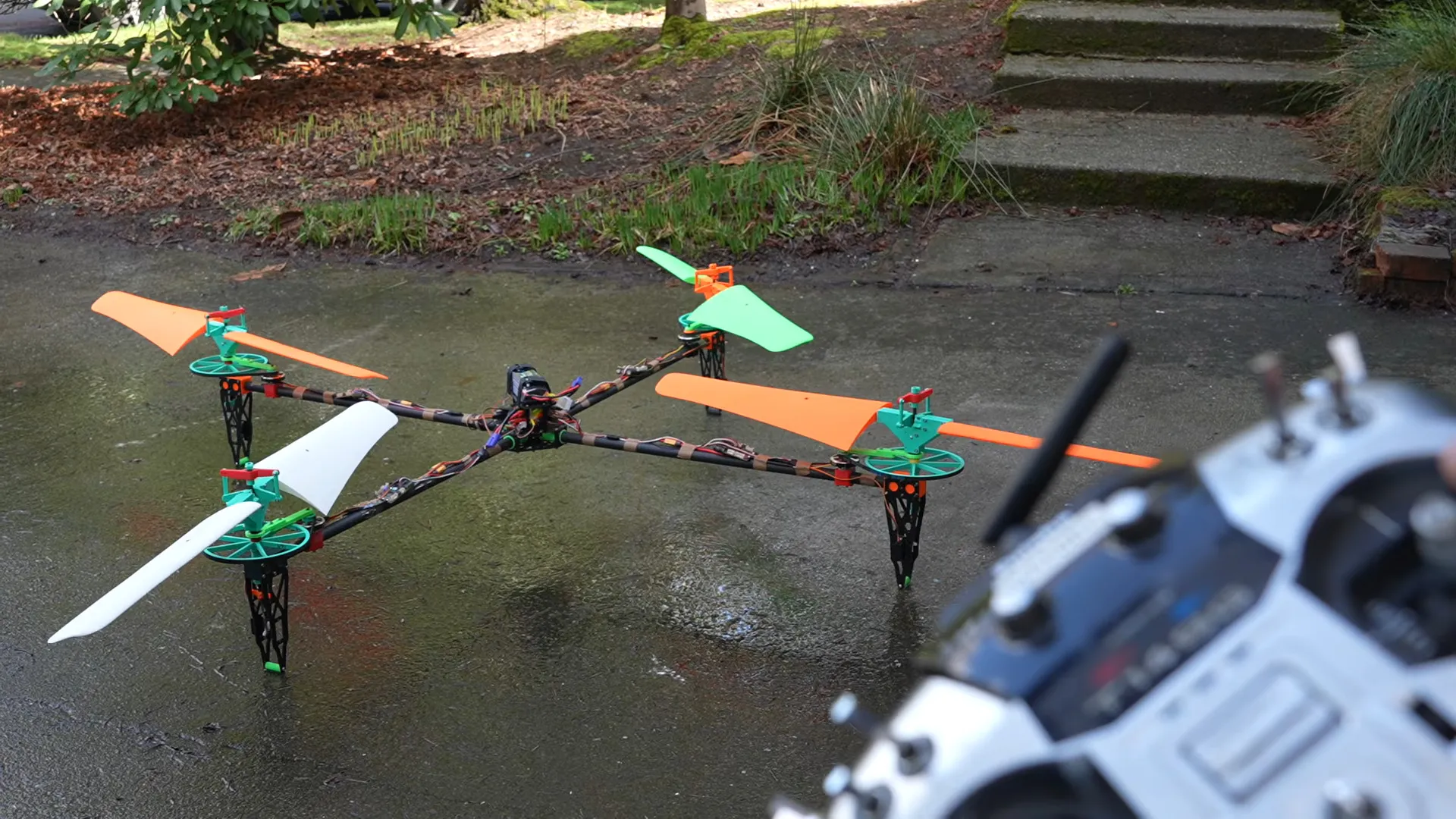
Quadcopters tend to have very poor efficency because of their high disk loading. High disk loading– that is, how much weight each square meter of area swept by the propellers must carry–is almost unavoidable with conventinal quadcopters, which are controlled by throttling the four props. Make the propellers too big, and their inertia slows down that control loop, leading to stability problems. [rctestflight] had an idea to solve this, by borrowing a technology from the world of fixed-wing aviation: variable-pitch propellers.
In aircraft use, they are not new, dating back to the end of the first world war. They’re made for everything from the largest turboprops to the 75 kW(100 HP) Rotax 912. By varying the propeller pitch, you can keep the engine turning in its ideal RPM range but still vary thrust by taking a larger or shallower ‘bite’ out of the air with each sweep of the prop. You can probably see how this applies to the quadcopter: a well-designed pitch-change mechanism is going to be much quicker than throttling a big prop with lots of rotational inertia. That’s the theory.
To test it, [rctestflight] builds some large 3D-printed variable pitch props, hooks them up to regular drone motors via a belt drive, before going on–you guessed it–an RC test flight. To make that work, he’s got the pitch servo being driven from what should be the flight controller’s thrust output to each motor. Aside from the vibrations from imperfect balance on the 3D-printed props, it flies quite well– and much better with pitch control than trying to vary the RPMs of those heavy props. He’s even able to reverse the propeller pitch, making this perhaps the first quadcopter capable of autorotation. Well, almost, given that it lost control and came apart when he cut the throttle.
As for efficiency, it is exactly what you’d expect from this disk loading– so, higher than a conventional quad–even with losses from the belt drive and the high-friction surface of a 3D print. Speaking of 3D-prints, the props did hold up to the maximum RPMs he could throw at them, so no ‘kaboom’ in this video. There is a fun rotary subwoofer bonus at the end, though.
Overall, [rctestflight] thinks his variable-pitch quadcopter proves the concept, but that if you’re going to all this effort you may as well build a helicopter and have fewer points of failure. We kind of have to agree. That is how it worked out historically, after all.
This isn’t the first time we’ve seen hackers trying to improve drone efficiency– there was the hybrid ‘giant propeller’ drone a while back, and the ‘slap a wing on it’ technique featured more recently.
Tech
Microsoft Moves: Longtime exec Julia Liuson to retire; new accessibility chief; and other changes


Big tech moves today from Microsoft: Longtime executive Julia Liuson is leaving, Neil Barnett is the company’s new chief accessibility officer, and Nanda Ramachandran has been named chief marketing officer for Windows & Devices.
They’re part of a broader wave of executive departures and changes at Microsoft as CEO Satya Nadella looks to flatten the company’s reporting structure and adjust to the new realities of AI in its product development and marketing.
— Liuson is departing after more than 34 years with the Redmond, Wash. tech giant, effective in June, multiple news outlets report.
According to her LinkedIn profile, Liuson has been president since 2021 of Microsoft’s Developer Division, which includes Microsoft Azure services for developers, Visual Studio and the .NET Framework. The division has evolved to integrate with GitHub, which the company acquired in 2018.
Liuson joined Microsoft in 1992 as a software design engineer after graduating from the University of Washington. A company biography states she was the first woman promoted to corporate vice president of development at Microsoft.
A company spokesperson called Liuson’s departure “a thoughtful, planned decision to retire from her full-time role and step into her next chapter,” adding that she will work full-time through June and then transition into an advisory role.
“We’re grateful for the impact Julia and the broader team have delivered for developers and customers, and we’re focused on maintaining momentum as we head into the next fiscal year and beyond. Our developer and AI strategy — and our commitment to customers — remain unchanged,” the spokesperson said.
Liuson will continue reporting to Microsoft CoreAI chief Jay Parikh in her advisory role, The Verge reported, citing an internal memo. A replacement for Liuson has not been publicly named.
Microsoft in recent years has been aggressively recruiting AI leaders from Google DeepMind, Allen Institute for AI, Meta and elsewhere to bolster its AI technologies. That includes Parikh, who joined in 2024 from Lacework and was previously at Meta.

— In his new role, Barnett will lead Microsoft’s accessibility efforts within its Corporate, External & Legal Affairs organization.
Barnett has been with the company since 2001 and 12 years ago became the leader of a team focused on online safety, privacy and accessibility support.
He succeeds Jenny Lay-Flurrie in the role.
“Neil brings a rare combination of unwavering advocacy, strong operational and people leadership combined with clarity, conviction, and purpose,” Lay-Flurrie said on LinkedIn. Over the past decade, he built and scaled the company’s neurodiversity program and Disability Answer Desk, which has supported more than two million customers.
— Lay-Flurrie, who has been with Microsoft for more than 21 years, moved into her new role in February as head of the Trusted Technology Group. This division addresses accessibility, digital safety, privacy, responsible AI, enterprise resilience, and responsible business practices. (See additional GeekWire coverage of Lay-Flurrie’s new role.)

— Ramachandran joins Microsoft from Google, where for the past 12 years he was vice president of Pixel Business, which includes phones, tablets, laptops and other devices. Ramachandran is based in the San Francisco Bay Area and previously held leadership roles at Samsung Mobile and Motorola.
As the new CMO of Windows & Devices, he shared his excitement to build hardware including Microsoft’s Surface computers and growing Windows.
“We are transitioning into the next phase of computing, and helping steer Windows and our devices into the era of the agentic OS is an incredible opportunity,” he said on LinkedIn.
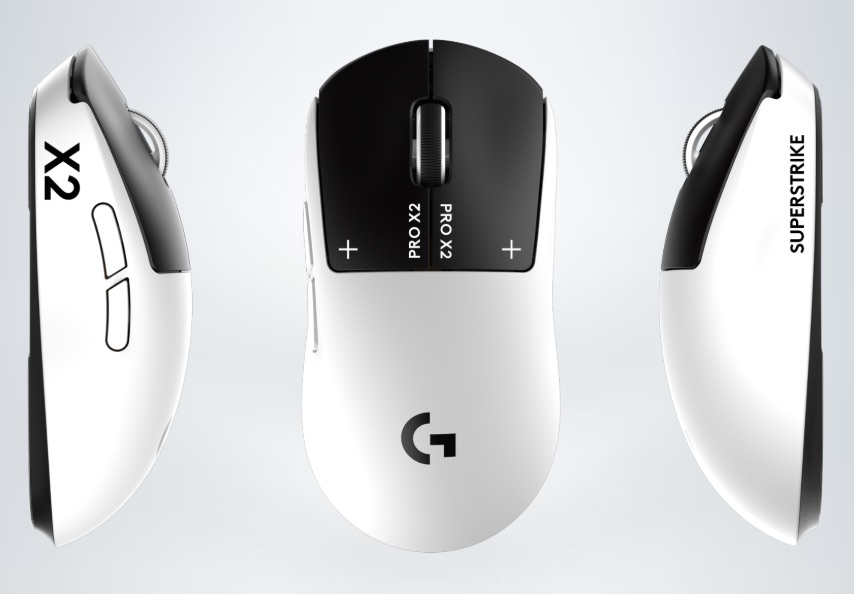
The gaming mouse world has pretty much been the same for the last few years, with the only real improvement being weight savings. Now, Logitech has just introduced a new high-end gaming mouse in India, the Pro X2 Superstrike, and it’s bringing something genuinely new to the table. With it, the company is trying to rethink how mouse clicks work entirely, replacing traditional mechanical switches with a new system designed for faster response and better control. Here’s what you need to know about it.
A New Way to Click
The biggest highlight of the PRO X2 SUPERSTRIKE is its Haptic Inductive Trigger System (HITS), which ditches conventional microswitches in favor of inductive analog sensing paired with real-time haptic feedback.
In simpler terms, clicks aren’t just registered—they’re felt instantly. The system allows players to adjust the sensitivity of each click, with multiple actuation levels and reset points to suit their playstyle. Whether you prefer quick taps in FPS games or more deliberate clicks in strategy titles, the mouse can be tuned accordingly. Logitech claims this setup can reduce click latency by up to 30 milliseconds, and if this is true, it’ll reshape the landscape altogether. We have the Pro X2 for testing purposes, so keep an eye out for the full review dropping soon.
Beyond the click tech, the PRO X2 SUPERSTRIKE packs serious hardware. It features Logitech’s HERO 2 sensor with up to 44K DPI and supports an 8K polling rate, meaning it sends data to your PC every 0.125 milliseconds. The mouse is also capable of tracking extremely fast movements, with support for high acceleration and precise tracking even during rapid flicks. Despite all that, Logitech has kept the weight down to around 65 grams, making it suitable for long gaming sessions without fatigue. It also includes PTFE feet for smoother gliding and a battery life of up to 90 hours, which should easily last through extended sessions.
The Logitech G PRO X2 SUPERSTRIKE will be available in India in a Lunar Eclipse color option, priced at ₹23,995.


A threat actor tracked as UNC6783 is compromising business process outsourcing (BPO) providers to gain access to high-value companies across multiple sectors.
According to the Google Threat Intelligence Group, dozens of corporate entities have been targeted through this method to exfiltrate sensitive data for extortion.
Austin Larsen, GTIG principal threat analyst, says that UNC6783 typically relies on social engineering and phishing campaigns to compromise BPOs working with targeted companies.

However, there have been instances where the hackers have also contacted support and helpdesk staff within targeted organizations, in an attempt to obtain direct access.
The researchers say that UNC6783 may be linked to Raccoon, a persona known to have targeted multiple BPOs that provide services to large companies.
In social engineering attacks over live chat, the threat actor directs support employees to spoofed Okta login pages hosted on domains that impersonate those of the target company and follow the pattern
Larsen says that the phishing kit deployed in these attacks can steal clipboard contents to bypass multi-factor authentication (MFA) protection, enabling the attacker to register their device with the organization.
Google has also observed attacks where UNC6783 distributed fake security updates to deliver remote access malware.
After stealing sensitive data, the threat actor proceeds to extort victims, contacting them via ProtonMail addresses with payment demands.
While GTIG did not offer more information about Raccoon, threat intelligence account International Cyber Digest recently disclosed that someone using the alias “Mr. Raccoon” claimed a breach at Adobe, which the company has yet to confirm.
The attacker claimed to have gained access to Adobe data after compromising an India-based BPO working for the company. They deployed a remote access trojan (RAT) on an employee’s computer and subsequently targeted the employee’s manager in a phishing attack.
Mr. Raccoon said that they stole 13 million support tickets containing personal data, employee records, HackerOne submissions, and internal documents.
In conversations with BleepingComputer, the threat actor behind the CrunchyRoll breach confirmed that they were also behind the Adobe attack, but did not provide any evidence.
Google’s Mandiant listed several defense recommendations against UNC6783 attacks, including deploying FIDO2 security keys for MFA, monitoring live chat for abuse, blocking spoofed domains that match Zendesk patterns, and regularly auditing MFA device enrollments.

Automated pentesting proves the path exists. BAS proves whether your controls stop it. Most teams run one without the other.
This whitepaper maps six validation surfaces, shows where coverage ends, and provides practitioners with three diagnostic questions for any tool evaluation.
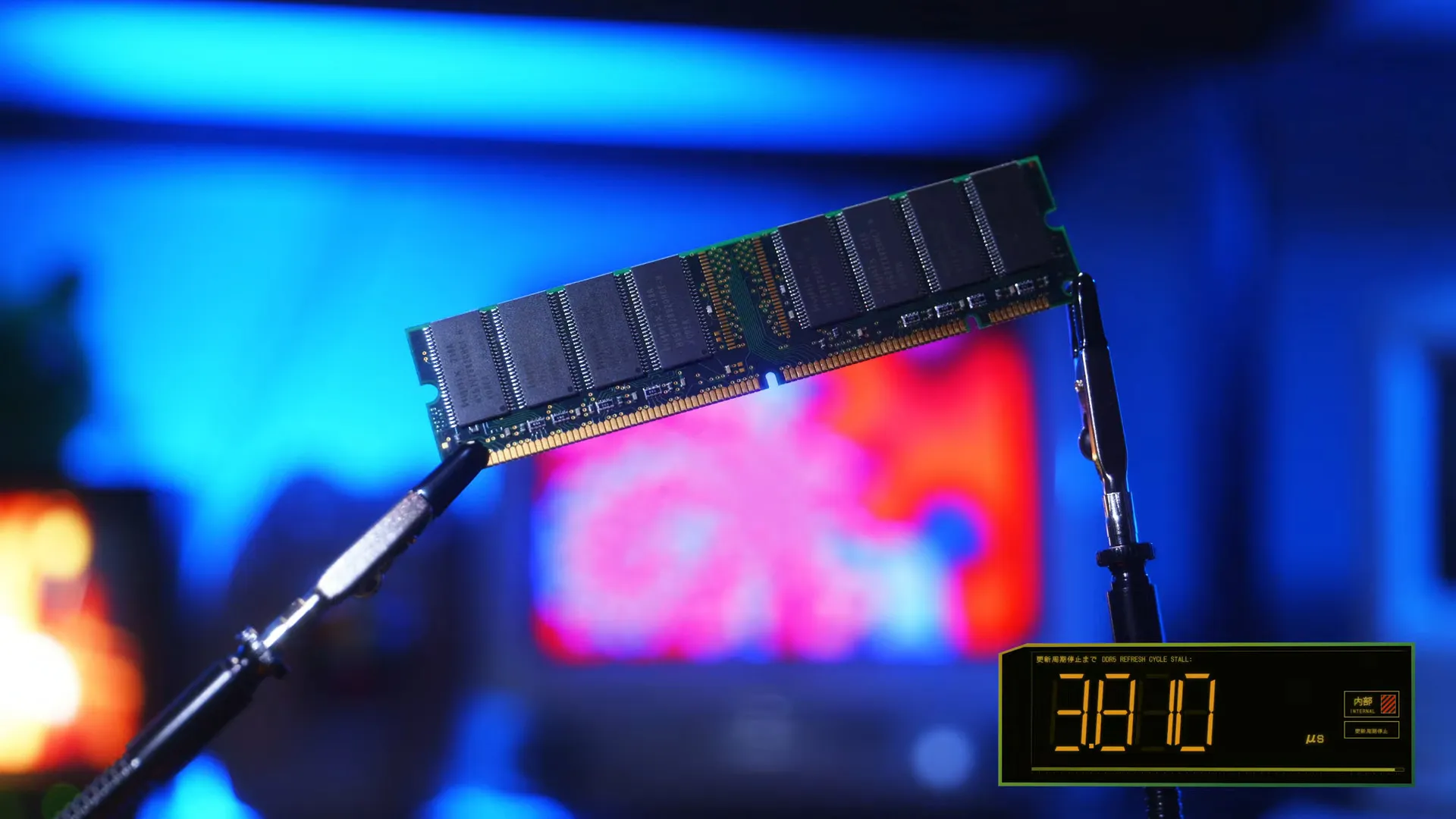
Modern computers use dynamic RAM, a technology that allows very compact bits in return for having to refresh for about 400 nanoseconds every 3-4 microseconds. But what if you couldn’t afford even such a tiny holdup? [LaurieWired] goes into excruciating detail about how to avoid this delay.
But first, why do we care? It once again comes down to high-frequency trading; a couple nanoseconds of latency can be the difference between winning or losing a buy order. You likely miss all the caches and need to fetch data from the remote land of main memory. And if you get unlucky, you’ll be waiting on that price for a precious 400+ nanoseconds! [Laurie] explains all the problems faced in trying to avoid this penalty; you try to get a copy of the data on two independent refresh timers. That’s easier said than done; not only does the operating system hide the physical addresses from you, but the memory controllers themselves also scramble the addresses to the underlying RAM!
For the real computer architecture nerds, there’s a lot more to it, and [Laurie] goes over it in meticulous detail in the video after the break.
Thanks to [Keith Olson] for the tip!
Tech
Remember The “Ministry Of Truth” Freakout? Rubio Is Now Doing Something Far Worse Through Elon Musk’s X

from the ah-yes,-the-ministry-of-truth dept
Remember when the Biden administration set up something called the “Disinformation Governance Board” and the entire MAGA universe lost its collective mind? It was the “Ministry of Truth.” It was “government speech police.” It was the single most Orwellian thing any American administration had ever done in the history of civilization. Nina Jankowicz, the researcher tapped to lead it, received death threats. The whole thing was shut down within weeks because of the outcry.
Of course, all of it was an exaggeration. That board was actually set up to coordinate efforts to counter foreign disinformation — not to police Americans’ speech. We said so at the time, even while criticizing DHS for the monumentally stupid way they named and rolled it out. The name was terrible. The communication around it was worse. But the underlying mission — helping coordinate the government’s own efforts to respond to (not censor) foreign influence operations — was legitimate and, frankly, important in this era of information warfare.
Well, Secretary of State Marco Rubio just signed a cable doing something that sounds vaguely similar, but way worse. Specifically, he’s directing U.S. embassies and consulates worldwide to launch coordinated campaigns countering foreign propaganda — and the cable explicitly endorses Elon Musk’s X as an “innovative” tool for the effort. It also admits that this is pure psyops work:
The cable instructs those embassies and consulates to pursue five broad goals: countering hostile messaging, expanding access to information, exposing adversary behavior, elevating local voices who support American interests, and promoting what it calls “telling America’s story”. Embassies are told to recruit local influencers, academics and community leaders abroad to carry counter-propaganda messaging, an approach designed to make American-funded narratives feel locally organic rather than centrally directed.
“These campaigns seek to shift blame to the United States, sow division among allies, promote alternative worldviews antithetical to America’s interests, and even undermine American economic interests and political freedoms,” the cable says. “Using digital platforms, state-controlled media, and influence operations, they pose a direct threat to US national security and fuel hostility toward American interests.”
Notably, the cable tells diplomatic offices to coordinate their work with “the Department of War’s Psychological Operations” – the military unit more commonly known as Miso, or Military Information Support Operations, formerly Psyop, which is part of the Pentagon.
This is far more expansive than anything the Disinformation Governance Board ever even contemplated — and the same people who screamed about the Ministry of Truth are, once again, completely silent.
Kate Klonick has written an excellent deep dive on this for Lawfare, tracing the structural transformation that made this possible. She puts it plainly:
The idea that the State Department would issue a formal cable endorsing a specific social media platform by name as a tool of U.S. diplomacy—let alone military psychological operations—would have been, until recently, almost unthinkable. But the structural transformation that has taken place over years has made the news feel almost ordinary today. It was a transformation that dismantled, piece by piece, the legal accountability, operational independence and institutional resilience that once made such a cozy relationship between government and platforms inconceivable.
And see if any of this sounds familiar:
Rubio identifies five operational goals—countering hostile messaging, expanding information access, exposing adversarial behavior, elevating local voices sympathetic to U.S. interests, and “telling America’s story”—and instructs embassies to recruit local influencers and community leaders to carry U.S.-funded narratives in ways designed to feel organically local rather than centrally directed.
Why, that sounds quite similar to what the Biden DHS said about the Disinformation Governance Board. Except, suddenly: no partisan freakout. No weeks of stories on Fox News. No screaming in the NY Post about speech police. Gee. I wonder why.
The U.S. State Department is instructing embassies to recruit local influencers to carry U.S.-funded narratives in ways designed to feel organically local rather than centrally directed. This is, by definition, a covert influence operation. It’s the kind of thing that, when other countries do it, we call propaganda. It’s the kind of thing the Global Engagement Center was specifically designed to expose.
Oh, right. About the Global Engagement Center.
You may recall that one of the early moves of the returning Trump administration was to shut down the GEC, the State Department office specifically created to help identify and counter foreign influence campaigns. At the time, Rubio — the same Marco Rubio who just signed this cable — framed the shutdown as a free speech victory:
Under the previous administration, this office, which cost taxpayers more than $50 million per year, spent millions of dollars to actively silence and censor the voices of Americans they were supposed to be serving. This is antithetical to the very principles we should be upholding and inconceivable it was taking place in America.
That was always a lie. The GEC (just like the Disinformation Governance Board) didn’t “silence and censor” Americans. It studied foreign influence campaigns — the kind run by Russia’s Internet Research Agency, by ISIS recruitment networks, by Chinese state-linked information operations — and helped expose them. It’s the kind of work that requires sustained expertise, institutional knowledge, and sophisticated analytical capacity. The kind of thing you can’t just spin up overnight when you suddenly realize you need it.
So all of the hand-wringing about the Disinformation Governance Board, the GEC, and the idea that governments were too close to social media platforms was a bunch of nonsense all along. It was always about trying to gain and then keep power, destroying the institutions that dealt with foreign disinformation campaigns until they could capture them for their own purposes.
Klonick traces how Twitter/X became susceptible to exactly this kind of capture:
Musk systematically dismantled Twitter’s trust, safety, and content moderation infrastructure. The teams that had worked, however imperfectly, to maintain platform integrity not just for commercial reasons but to limit the spread of coordinated inauthentic behavior, state-linked influence operations, and targeted harassment were gone within months of Musk’s ownership. With both the corporate accountability architecture and the internal operational safeguards stripped away, the platform’s amplification and suppression mechanics became, in effect, tools that could be deployed at anyone’s, but namely Musk’s, discretion.
Before Musk’s acquisition, the major US tech platforms — whatever their flaws — generally bent over backwards to avoid being captured as instruments of state messaging.
The Rubio cable, on the other hand, specifically endorses X’s Community Notes feature as a tool for countering “anti-American propaganda operations without compromising free speech.” Klonick correctly identifies this as:
…a remarkable exercise in circular reasoning: the government endorsing, for use in state-directed information operations, a moderation tool on a platform owned by a former (and perhaps still current) senior government advisor.
But it’s worse than circular reasoning. Community Notes is a crowdsourced system. Its outputs are determined by which users participate and how they coordinate. While it’s (actually very cleverly) designed to avoid brigading attacks, that does not mean it’s perfect in avoiding manipulation. If the U.S. government can organize sympathetic actors to use Community Notes to surface pro-American narratives as part of a formal PSYOP-adjacent campaign, then so can every other government on the planet. China can coordinate its own actors. Russia already runs exactly these kinds of operations. Iran has entire units dedicated to this. The cable essentially advertises to every adversary exactly how to game the system — and the people who actually understood these vulnerabilities, the trust & safety teams, the GEC researchers, the disinformation scholars, are exactly the people this administration spent years attacking and driving out of their jobs.
Oh, unless they expect Elon Musk to tilt the playing field to their advantage — which is exactly the kind of thing these very same people were loudly freaking out about when Biden was president.
Now, some might point out that the broader “censorship industrial complex” crusade wasn’t only about counter-messaging efforts like the DGB and the GEC. It was also about the Murthy v. Missouri case, which dealt with something categorically different: the allegation that the Biden administration pressured platforms to remove third-party users’ speech. The Rubio cable, by contrast, directs government employees themselves to use the platform for their own messaging. These are genuinely different things.
But the supposed animating principle behind the entire crusade was that the government had no business being entangled with social media platforms on matters of information and speech. Not just “the government shouldn’t pressure platforms to remove user content,” but the much broader claim that any government-platform coordination on information amounted to a sinister censorship machine.
Jim Jordan’s “censorship industrial complex” hearings didn’t just target White House communications with platform trust & safety teams. They went after researchers. They went after the GEC. They went after nonprofits studying foreign manipulation. The message was that any institutional involvement in the information ecosystem was inherently suspect. That principle, it turns out, had an expiration date — specifically, January 20, 2025.
And remember, in the Murthy case itself, the Supreme Court rejected the argument that the Biden admin’s communications with platforms constituted coercion. The plaintiffs couldn’t even establish standing because they couldn’t show the government actually changed platform behavior. Meta felt totally comfortable telling the White House “no” — as Zuckerberg himself admitted repeatedly on Joe Rogan, just weeks before telling Elon he was happy to silence people at the Trump White House’s request.
So the same political movement that treated government staffers sending cranky emails — emails that platforms felt perfectly free to ignore — as an existential constitutional crisis now sees nothing wrong with a formal State Department cable directing coordination with a specific privately-owned platform and military PSYOP. If the principle only matters when your political opponents are the ones in the White House, it was always just about weaponizing the systems of government for your own benefit.
Klonick puts the broader structural picture together:
The privatization of Twitter removed all traces of public accountability. The gutting of content moderation infrastructure removed operational resistance. The political alliance between the administration and the tech sector removed institutional resistance. And now a formal diplomatic cable removes the last pretense of arms-length separation between U.S. government messaging objectives and the platforms that carry them.
The legal questions that Murthy left unresolved—about when government pressure on private platforms crosses the constitutional line—will almost certainly be relitigated in this new context. But the more immediate reality is that the internet Americans and global audiences navigate is increasingly shaped not merely by the preferences of platform owners and advertisers, but by the strategic communication objectives of the U.S. government, implemented through platforms that have every financial and regulatory reason to cooperate.
This is the pattern we’ve watched unfold for years: wrap your power grab in the language of the thing you’re destroying. Call fact-checking “censorship.” Call attempts to expose foreign influence campaigns “the speech police.” Dismantle the institutions that actually did the thing you claim to value, then use the resulting vacuum to do exactly what you falsely accused your opponents of doing — only bigger, more openly, and with military coordination.
The sheer audacity of the sequencing is what makes all of this so infuriating. They spent years pointing at the Disinformation Governance Board and screaming “Ministry of Truth!” They shut down the Global Engagement Center while Rubio called it censorship. They destroyed the research infrastructure and the institutional knowledge that actually helped identify and counter foreign influence operations. And now, having cleared the field of anyone who might push back, they’re running their own influence operations through a platform with no independent oversight, no transparency mechanisms, and no institutional resistance — and they’re doing it openly, through formal diplomatic channels, in coordination with military psychological operations.
Klonick closes with the right question:
The question is no longer whether the government can use social media as a tool of statecraft. It already is. The question now is whether any institution—legal, normative, or structural—retains the capacity to check it.
Given that the people who claimed to care about checking government entanglement with social media are now the ones wielding it most aggressively — and spent years systematically destroying every institution that might have served as a check — don’t hold your breath.
Filed Under: counterspeech, disinformation, disinformation governance board, foreign influence, global engagement center, marco rubio, psyops, state department
Companies: x

As the world held its breath on Tuesday night, news of a ceasefire and the potential reopening of the Strait of Hormuz brought a collective sigh of relief. But with shipments stalled in the strait for over a month, the disruption to global shipping will not resolve immediately.
“Traffic through Hormuz dropped by about 95 percent [during this conflict]. As a result, prices surged, and not just for crude oil but also for refined products like jet fuel, diesel, and gas oil,” says Carsten Ladekjær, CEO at Glander International Bunkering, which specializes in supplying fuel and lubricants to the global shipping industry.
The impact has been uneven across regions. Countries heavily dependent on Middle Eastern energy—particularly in Asia—have been most affected. India sources around 55 percent of its energy imports from the region, China about 50 percent, Japan 93 percent, South Korea 67 percent, and Singapore 70 percent, according to Ladekjær.
While the ceasefire signals a possible reopening, key details remain unclear. “Even with a ceasefire, reopening won’t be immediate,” Ladekjær says. “There’s a backlog, with ships waiting to leave, and likely a controlled process for who gets out first. Iran still appears to be managing that.”
Energy markets reacted quickly. Brent crude fell to around $94 from $110 earlier in the week—a drop of roughly 15 percent.
“Refined products like diesel and jet fuel have dropped even more, because markets are forward-looking—they price in expectations,” says Arne Lohmann Rasmussen, chief analyst and head of research at Global Risk Management. “But we’re still well above prewar levels, which were around $60 to $70.”
A System Under Backlog
Around 1,000 ships remain in the Gulf, including hundreds of tankers awaiting passage.
As of this writing, more than 800 cargo ships and tankers are stuck inside the Persian Gulf, with over 1,000 additional vessels waiting on both sides of the Strait of Hormuz.
Under normal conditions, roughly 150 vessels pass through the strait daily. Experts say clearing the backlog will take time, as ships must be sequenced through, refueled, and repositioned.

“That’s a logistical nightmare. We don’t yet know what the current capacity will be, especially from a security standpoint,” says Lohmann Rasmussen. “It’s not something that can be solved overnight. There are logistical issues, security issues, and even communication challenges.”
Though the market has already seen a correction, that doesn’t mean prices at the pump or in storage will drop immediately.
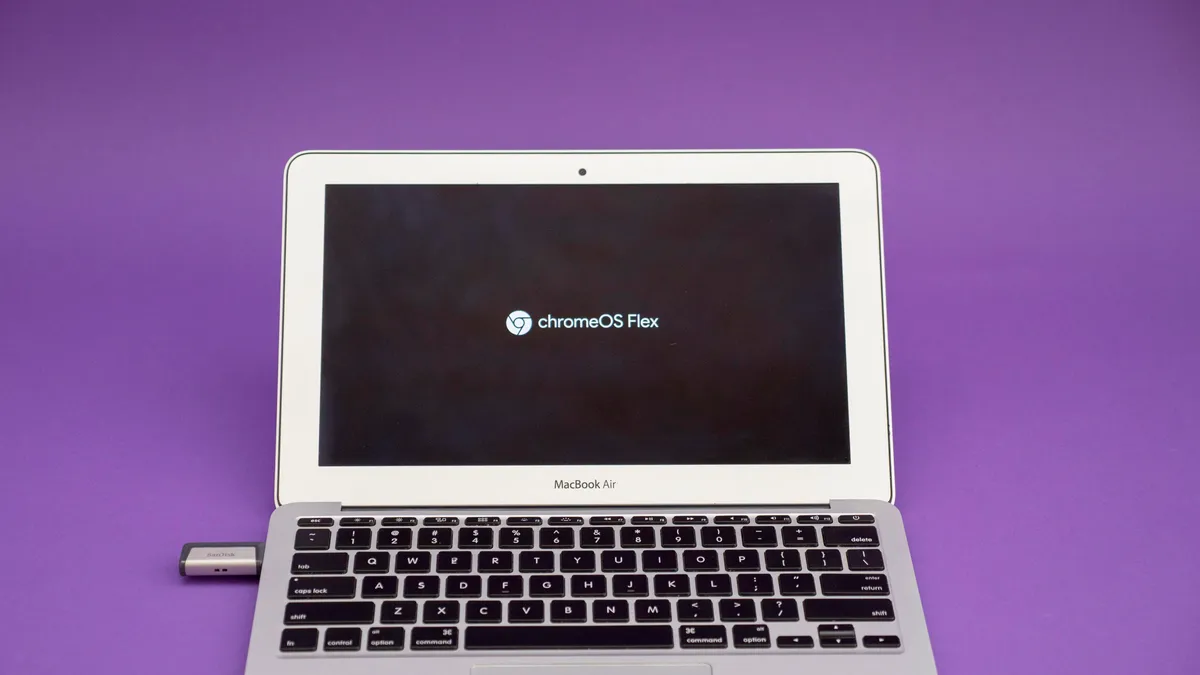
Google is issuing you its periodic reminder that you aren’t tethered to Microsoft’s operating system if you own a PC. In fact, the search giant is making it easier than ever to switch over to ChromeOS Flex.
As part of a new partnership with Back Market, a refurbished electronics company, Google is now offering ChromeOS Flex USB Kits to make installing its signature OS a breeze on PCs and Macs alike.
Whether you’ve been purposefully avoiding a Windows 11 update or you’re one of the more than 500 million computer owners with a PC that is too old for an operating system upgrade, your Windows 10 PC hasn’t received an update since last October when Microsoft ended its support for it. (Microsoft’s Extended Security Updates program will keep pushing critical updates your way until this coming October for $30, a fee I doubt many people clinging to an old PC are willing to pay.)
When your operating system stops getting updates, you’re facing down the barrel of a security nightmare — no more exploits will get fixed, leaving your system (and potentially sensitive data) vulnerable to bad actors. Google’s ChromeOS Flex continually supports older devices than Windows 11, which could make it a good alternative until you upgrade to another PC.
The new Back Market USB kit is available now for $3, or you can download ChromeOS Flex for free by following the simple instructions included at the end of this article.
A quick ChromeOS Flex history lesson
Google’s ChromeOS isn’t available to install on a laptop or desktop like Windows or Linux, but the next best thing is Google’s ChromeOS Flex. Formerly known as Neverware CloudReady, the OS is primarily built for businesses and education. But ChromeOS Flex is free for personal use, and it’s so lightweight that it’s great for breathing new life into a computer that’s struggling from the demands of Windows, MacOS or Linux.
Google acquired Neverware in December 2020, and the result was ChromeOS Flex. While CloudReady was good, Flex is much closer to the experience you’d get with a Chromebook or other ChromeOS device. That includes the official Chrome browser, support for Family Link (or school-issued) accounts, and Phone Hub, which lets you connect to an Android phone to view notifications and share files between the phone and laptop. The one thing you don’t get is access to the Google Play Store and Android apps.
ChromeOS Flex runs well even on old hardware. That’s why it’s such a good option for repurposing a laptop that can no longer run current versions of Windows, MacOS or Linux. Google guarantees Flex to work, however, only on a growing list of certified models. If your model isn’t certified, that doesn’t mean it won’t work, though. It just means that full functionality and performance aren’t a given.
You can wipe a laptop’s drive and install ChromeOS Flex or run the OS off a thumb drive to test it out first.
You choose: Trial run or full install
One of the best features of ChromeOS Flex is that you can run it off a USB flash drive or SD card to test it out first without completely overwriting your current OS. For best performance, it’s not recommended to run Flex full-time from a flash drive, but it will let you see if it works for your needs.
Installing ChromeOS Flex is quick and painless. The first step is to gather everything you need:
- A USB thumb drive or SD card 8GB or larger
- A Windows, Mac or Linux computer to install ChromeOS Flex on
Note that installing ChromeOS Flex will completely erase your entire hard drive. Any important files should be backed up first. You’ll also need a ChromeOS, Windows PC or Mac device with the current version of the Chrome browser installed. This will be used to create the ChromeOS Flex USB installer, and it doesn’t need to be the same device you plan to install it on. The thumb drive will also be completely erased when creating the installer.
To run ChromeOS Flex, the target laptop (or desktop) will need to be Intel or AMD x86-64-bit compatible (newer than 2010 for the best experience), have 4GB RAM or more, have at least 16GB of storage and you’ll need full administrator access to the BIOS. Once you have everything you need, it’s time to create the USB installer.
- Open a Chrome browser window on a ChromeOS, Windows PC or Mac device and add the Chromebook Recovery Utility extension via the Chrome web store. This is what you’ll use to build the USB/SD card installer.
- Go to the Chrome browser’s extensions menu located at the top right of the Chrome browser window (it looks like a tiny puzzle piece). Click on it, and a drop-down list of extensions will appear. Find the Chromebook Recovery Utility on the list and click on it to launch. The utility might need to be toggled on, too, which can be done by clicking on Manage Extensions at the bottom of the drop-down list of extensions.
In the Recovery Utility, instead of selecting a model to recover, you’ll select ChromeOS Flex.
- When the Chromebook Recovery Utility launches, you’ll be asked to identify what model Chromebook you’ll be recovering. However, there will be a link labeled Select a model from a list in the dialog box. Click that link, and from the Select a manufacturer drop-down list that appears, select Google Chrome OS Flex. Below that drop-down is another labeled Select a product from which you’ll choose Chrome OS Flex.
- Next, insert your flash drive or SD card into the device you’re using to create the installer, select it as your target drive and then click Create now. The creation process takes up to 20 minutes but mine was done in half that time. Once the installer is finished, the drive can be ejected and is ready to use.
When the installer is done, your USB drive or SD card are ready to use to run or install ChromeOS Flex.
You’re almost done. It’s time to grab the laptop you want to convert to a Chromebook. Make sure the laptop is turned off and insert your ChromeOS Flex installer thumb drive or SD card.
The next step is to boot the laptop from the thumb drive instead of the internal storage drive. This requires you to press a boot key while the laptop is booting. Boot keys vary by manufacturer. For instance, on a MacBook Air, the boot key is the Option key. Google has a list of boot keys for major manufacturers if you’re not sure what yours is.
Turn on the laptop and, as it boots, press the boot key to interrupt the boot process. You may need to press and hold the key, or press it repeatedly, to enter the boot menu. If done correctly, the laptop should give you the option to select which drive you’d like to boot from: the laptop’s internal drive or your USB drive. Select the USB drive and press Enter.
Once you enter the boot menu options, select the USB installer drive you created to get started.
If you’ve done everything correctly, you’ll see the ChromeOS Flex splash screen followed by a Welcome to ChromeOS Flex screen. (If not, retrace your steps using Google’s installation guide.) From there, you can choose to test the OS and run it directly from the flash drive or install ChromeOS Flex on the internal storage. Doing the latter gives you the best performance; however, it also erases all content from the internal drive, and the native OS can’t be recovered. If you aren’t 100% certain you want to use ChromeOS Flex, try running it from the USB drive first.
The full OS installation can take up to 20 minutes (my MacBook Air took less than 5 minutes, though). Regardless of how you run it, the setup process is the same. Select a Wi-Fi network, agree to Google’s terms of service, choose whether the Chromebook is for yourself or a child, and then sign in with your Google account information.
Sign in to ChromeOS Flex with a Google account and password and you’re ready to get to work.
Ta-da, Chromebook! At least, close enough for most needs. Performance will depend on what your laptop has. My install was on an early 2015 MacBook Air, and it’s much faster than it was with MacOS on it. The only downside for my particular model is that the built-in webcam is not supported, but an external USB webcam worked just fine.
If you’ve got a USB flash drive and an old laptop, it’s certainly worth the minimal effort to test out and, again, it’s free.

NewsBeat46 seconds ago
End fracking ‘loophole’ before Burniston vote – campaigners

Business1 minute ago
FBI report finds crypto scams accounted for over $11B in losses in 2025

Crypto World3 minutes ago
Michael Saylor Predicts Bitcoin Bottom, Sees Digital Credit as Catalyst


-

 NewsBeat6 days ago
Steven Gerrard disagrees with Gary Neville over ‘shock’ Chelsea and Arsenal claim | Football
-

 Business6 days ago
No Jackpot Winner and $194 Million Prize Rolls Over
-

 Fashion5 days ago
Weekend Open Thread: Spanx – Corporette.com
-

 Business5 days ago
Expert Picks for Every Need
-

 Business3 days ago
Three Gulf funds agree to back Paramount’s $81 billion takeover of Warner, WSJ reports
-

 Sports4 days ago
India men’s 4x400m and mixed 4x100m relay teams register big progress | Other Sports News
-

 Business7 days ago
Login and Checkout Issues Spark Merchant Frustration
-

 Tech1 day ago
How Long Can You Drive With Expired Registration? What Florida Law Says
-
Business4 days ago
No Jackpot Winner, Prize to Climb to $231 Million
-
 Tech6 days ago
Commonwealth Fusion Systems leans on magnets for near-term revenue
-

 Fashion3 days ago
Massimo Dutti Offers Inspiration for Your Summer Mood Board
-

 Fashion1 day ago
Let’s Discuss: DEI in 2026
-
Politics5 days ago
Wings Over Scotland | The quality of mercy
-

 Business4 days ago
Akebia Therapeutics, Inc. (AKBA) Discusses Pipeline Progress and Strategic Focus on Kidney Disease Treatments at R&D Day – Slideshow
-
 Tech7 days ago
Following Artemis II’s Journey Around The Moon
-

 Fashion6 days ago
Statement Sunglasses: The Accessory Shaping Modern Fashion
-

 Business7 days ago
Investor reactions to Trump’s speech on Iran war
-

 Tech7 days ago
Daily Deal: The Modern No-Code Development Bundle
-
Sports7 days ago
Justin Jefferson’s Situation Remains Unchanged after JSN’s Deal
-

 Politics7 days ago
Trans kids protest the Department of Education
You must be logged in to post a comment Login