Join Mikko Hyppönen and security leaders from the NFL, CHANEL, and Atlassian for a two-hour digital summit on what AI-speed attacks change, what defenders should stop doing, and how to validate, decide, fix, and re-validate at machine speed.
Tech & AI
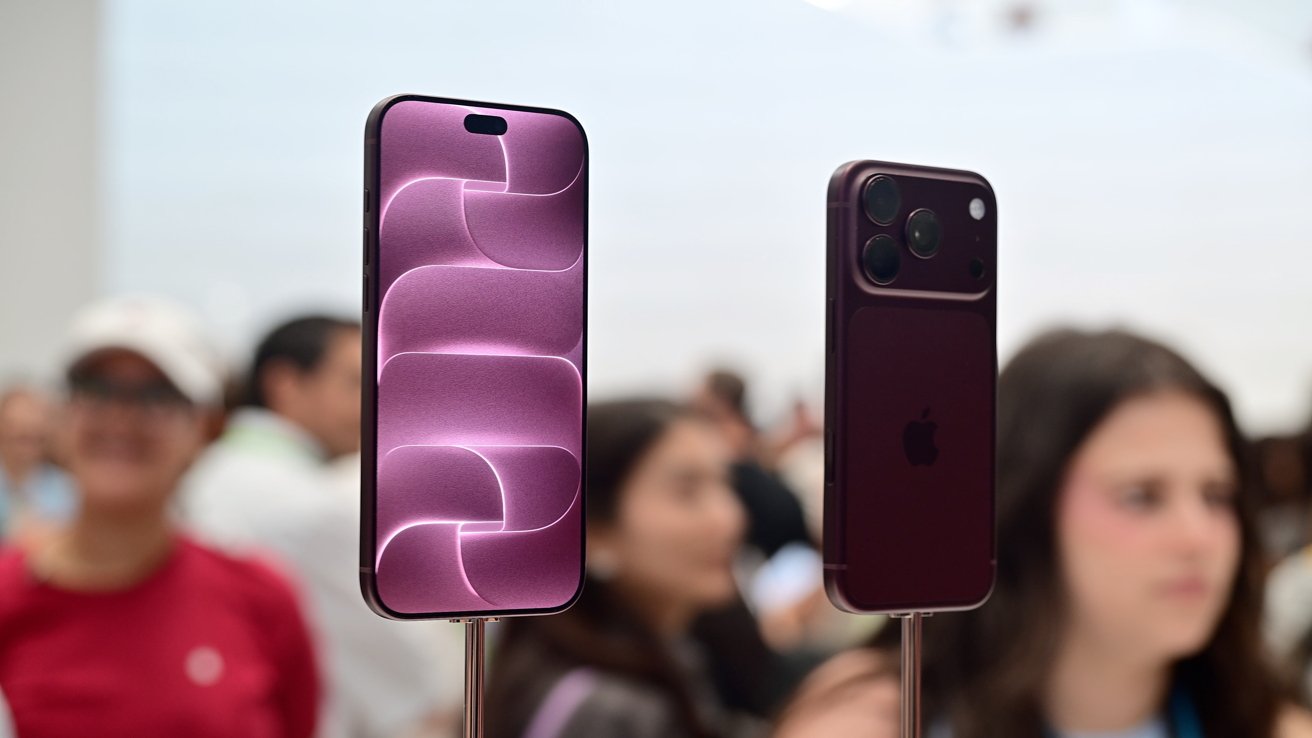
iPhone 18 Pro Max review: The best iPhone, probably
In any other year, I’d find a novel way to say that the iPhone 18 Pro Max is the best iPhone ever. While that’s true at the time of writing, it’s probably only going to be that for a vanishingly small amount of time.
This year is the first where the iPhone Pro Max isn’t the most exciting model in Apple’s lineup. That honor goes to the iPhone Duo, Apple’s first foldable device and one that won’t hit store shelves until weeks after this review is published. And that leaves me at something of a disadvantage.
If you’re reading this after Friday, October 23, 2026, you already know how the iPhone Duo stacks up. Early reviews will be out, and early adopters will have their new phones in their pockets.
There’s no denying the iPhone Duo’s shadow leaves the iPhone 18 Pro Max in an unusual position. For a few weeks, it sits atop the iPhone lineup, with a premium price point and top-tier features.
And the truth is, it’ll still have those post-Duo. The arrival of the foldable iPhone won’t make the iPhone 18 Pro Max any less of a stellar device. And let there be no doubt about it: this is every bit the flagship iPhone.
But no matter how good the display is, how impressive the A20 Pro might be, or how long its battery lasts, I can’t tell you whether or not you should buy it. I don’t even know if it’s the best iPhone for me right now.
However, what I can tell you is that the iPhone 18 Pro Max is the best iPhone Pro Max ever. Let me explain why.
iPhone 18 Pro Max review: Design
The design of any new iPhone is always the first thing you notice, and it’s no different with the iPhone 18 Pro Max. Unfortunately, that means you also notice that it looks very familiar indeed.
At first blush, the iPhone 18 Pro Max is identical to the iPhone 17 Pro Max that was released a year prior. At 6.43 inches tall, 3.07 inches wide, and 0.34 inches deep, the two share the same dimensions. It’s a hair heavier at 8.78 ounces compared to the 17 Pro Max’s 8.22 ounces.
The aluminum unibody design is maintained, this time with 40% recycled metal. But the two-tone finish on the rear is gone, replaced by a seamless unified matte finish. Apple chose to make the glass match the metal this time around.
The colors have changed this time out, too. Out is the stunning Cosmic Orange of the iPhone 17 Pro lineup, with Deep Blue following it through the door. In come Burgundy, Glacier Blue, and Black to join the existing Silver option.
There’s a design change on the inside, too, with Apple revamping the iPhone’s vapor chamber. The aim is to help the new A20 Pro chip (more on that later) stay cool for longer.
Back to the exterior, the iPhone 18 Pro Max still features the large camera area we’ve become accustomed to. Perhaps “large” doesn’t do it justice, but it does at least mean the iPhone 18 Pro Max doesn’t wobble when on a table.
Moving around the edges, the iPhone 18 Pro Max maintains the same layout as its predecessor. That means you’ll find the power and Camera Control button on the right, the volume and Action Button on the left, and a USB-C port on the bottom.
That USB-C port offers fast USB 3 data transfer speeds of up to 10 Gbps. Charging is faster this time around, bumping the maximum speed up to the 45W mark when paired with a suitable charging brick. The iPhone 17 Pro Max topped out at around 40W.
Finally, the iPhone 18 Pro Max is IP68-rated, as has become the norm. That means it’s capable of surviving up to 30 minutes underwater at up to six meters depth.
iPhone 18 Pro Max review: Display
You know what you’re going to get from an iPhone Pro Max, and that’s the biggest display of the lineup. This year that means a 6.9-inch Super Retina XDR display, just as it did last year.
Running through the most important specifications, the display has a 2868 x 1320 resolution for a pixel density of 460 pixels per inch. It has a typical peak brightness of 1,000 nits, which increases to 3,000 nits outdoors when the need arises.
This is also a ProMotion display, meaning it has a variable refresh rate from 1Hz to 120Hz for buttery smooth scrolling. It also helps to avoid tearing and other weirdness with fast-paced games.
Like the iPhone 17 Pro Max, the 18 Pro Max sports Apple’s Ceramic Shield 2 finish and an anti-reflective coating. The latter means it’s easier to see what’s on-screen under bright lights. The former should help prevent day-to-day scratches.
One area where the 18 Pro Max does differ from the outgoing model is its Dynamic Island. The change also impacts another important feature in the form of Face ID.
This year, Apple has placed the infrared sensor used for Face ID behind the display. In previous years, a hole was cut in the display to allow infrared light in.
Now, the sensor sits behind a row of display pixels with some of the sub-pixels removed to allow infrared light to pass through. Other pixels around the area have been made brighter to compensate. The effect is that the sensor is invisible to the naked eye.
Thankfully, it also doesn’t seem to have impacted performance. Face ID continues to work as it always has, unlocking the iPhone 18 Pro Max just as quickly and reliably as the iPhone Air I’ve been using the last 12 months.
Moving the infrared sensor means the iPhone 18 Pro Max now has a smaller Dynamic Island as standard. But it also means that it can now display up to three Live Activities simultaneously. It won’t change anyone’s life, but it’s a welcome feature regardless.
iPhone 18 Pro Max review: Cameras
For many, buying the Pro iPhones is all about getting the best cameras. That’s no different in 2026, with Apple bringing its best camera features to the iPhone 18 Pro and iPhone 18 Pro Max.
The iPhone 18 Pro Max has three rear cameras, two of them the same as the ones found on the iPhone 17 Pro Max.
That means buyers will get a 48-megapixel telephoto camera with a 4x optical zoom. That’s paired with a 48-megapixel ultra wide camera. Up front, there’s an 18-megapixel Center Stage camera for selfies.
But the 48-megapixel Fusion Main camera is where the new magic happens.
48-megapixel Fusion Main camera
We’ll cut to the chase. The iPhone 18 Pro Max has the first variable aperture to ever find its way to an Apple smartphone. And Apple is making a big deal about it.
Apple’s physical mechanical aperture has four settings: f/1.48, f/1.8, f/2.8, and f/4. It defaults to f/1.8, which just so happens to be almost identical to the iPhone 17 Pro Max’s fixed f/1.78 aperture.
As photographers will no doubt tell you, the aperture of a camera dictates how much light is allowed into its sensor. The sensor captures the image, so giving it more or less light will change the resulting image in any given situation.
For that reason, allowing as much light into the sensor as possible is obviously beneficial when taking nighttime shots. It should also allow for sharper images when taking shots in daytime lighting because the sensor doesn’t need to be open for as long. There’s simply less chance for the image to be blurry.
Finally, photographers like to adjust the aperture because it gives them more creative control. Choosing a narrow aperture and extending the shutter time can capture stunning motion blur, for example.
In theory, bringing a custom aperture to the iPhone 18 Pro Max opens the door to all of these benefits. In reality, whether or not you see them will depend on how you use your iPhone’s camera.
If you’re an iPhone photographer and you like to dive in and tweak settings, you’ll love the custom aperture. Apple has added new Pro Controls to the Camera app so you can tweak them to your heart’s content.
But for the rest of us who just want to take a good photo with our phones, the custom aperture is less noticeable. We simply won’t spend our time changing these settings to create the amazing images we know these phones can capture.
The good news is the iPhone 18 Pro Max still has the ability to make automatic choices for all of the settings photographers like to tweak. And it does an excellent job of doing it, too.
I’ve been using the iPhone 18 Pro Max as a point-and-shoot camera, doing little more than tapping what I want to focus on. The results have been hugely impressive. Photos look great, videos are vibrant, and my iCloud storage is almost full. All signs of a good camera.
None of this is to say I haven’t noticed any improvement as a result of that variable aperture. There’s one big one, and it’s very welcome.
I’ve never really been a fan of the iPhone’s Night mode, the feature that captures as much light as possible in low-light situations. I’ve always found it to result in images that are too soft and overly bright.
But the iPhone 18 Pro Max’s variable aperture has allowed me to turn Night mode off completely. And I’m able to take photos that much better resemble what I can see with my own two eyes. I’m a big fan.
48-megapixel Fusion Ultra Wide camera
The ultra wide camera is something that I rarely missed during my last year with the iPhone Air, but it’s back with the iPhone 18 Pro Max. With its 48-megapixel sensor, it’s capable of capturing some lovely images and videos at 0.5x.
The usefulness of a 0.5x camera will depend on your location and the subject you’re trying to capture. I’ve said in previous reviews that I rarely find myself in need of such a camera, and that’s still the case today.
But like many features, the iPhone’s ultra wide camera is nice to have, just for those times when it proves to be useful. It helps that it does an admirable job when those times come around, including the iPhone’s macro mode.
Apple’s ultra wide cameras doing double duty as macro cameras is nothing new, of course. It’s been doing it for years, and it’s another nice-to-have feature. Just in case.
Designed for capturing close-ups of a subject, like a flower, the macro camera is more than up to the job. The Camera app automatically switches to macro mode when it’s needed, but you can manually enable it as well.
48-megapixel Fusion Telephoto camera
Behind the main camera, the telephoto is the one I’ve found myself using the most during my testing. Like the other cameras, it has a large 48-megapixel sensor, but this time with a 4x optical zoom attached to it.
Apple’s Camera app also offers an 8x zoom for those times when you need to get a little closer. But it’s a faux zoom: Apple simply switches from capturing a 24-megapixel shot to a 12-megapixel one, punching in on the pixels in the center of the sensor.
For objects even further away, a 40x digital zoom is available. Let’s just say that I suggest putting your iPhone back in your pocket and getting physically closer to your subject instead. Your photos will thank you for it.
That is to say, especially at 4x, the iPhone 18 Pro Max’s telephoto camera takes excellent shots. And you might be surprised how often it comes in useful, from capturing a dog on a walk to getting a closer look at a new building in the distance.
Apple’s decision to ditch the 12-megapixel telephoto camera for a 48-megapixel Fusion camera on the iPhone 17 Pro Max was a good one. It’s a decision that remains so with its successor today.
iPhone 18 Pro Max review: Performance
While new cameras often drive new iPhone sales, Apple’s new chips help bring new features to those cameras. They also make iPhones some of the best-performing phones in the world. One even powers the MacBook Neo.
For the iPhone 18 Pro and Pro Max, Apple introduced the A20 Pro. Built on TSMC’s new 2nm platform, it’s incredibly capable and impressively power-efficient.
Each A20 Pro ships with six CPU cores (two performance, four efficiency) and seven GPU cores with per-core Neural Accelerators. It also doubles the number of Neural Engine cores from 16 to 32 for the first time.
It’s no surprise that Apple has brought even more Neural Engine cores to the iPhone, especially if it intends for the A20 Pro to be used in a future MacBook Neo.
These cores, coupled with improved GPU performance, make the A20 Pro the perfect chip for faster, local AI workloads. With Siri AI on board, the iPhone 18 Pro Max is best placed for faster responses and generative AI processing.
Keeping that chip cool is a priority for the iPhone 18 Pro Max, which is why Apple has expanded and redesigned its vapor chamber thermal design. It provides up to 40% better sustained performance for longer gaming sessions and video work. All while keeping the iPhone from getting too hot to the touch.
All of these changes, coupled with up to 50% increased memory bandwidth, make the iPhone 18 Pro Max a dream to use. It’s fast, it’s reliable, and it doesn’t hiccup.
Of course, all of those things could be said about the A19 Pro, too. I never once found the iPhone Air lacking in performance. I highly doubt many iPhone 18 Pro Max buyers will, either.
My testing has shown the iPhone 18 Pro Max to be a capable gaming device, especially when paired with a controller. Touchscreens are great for some things, but I have yet to be convinced that gaming is one of them.
Games perform admirably, and, importantly, the iPhone 18 Pro Max has yet to get overly warm. It cools down pretty rapidly once the gaming gives way to my usual social scrolling and Reddit browsing.
Wrapping up the speeds and feeds section of this review, this iPhone uses Apple’s N1 wireless networking chip. That means Bluetooth 6 and Wi-Fi 7 support, with Thread networking tech thrown in.
Interestingly, the UK iPhone 18 Pro Max I’ve been testing uses Apple’s C2 cellular modem. If you buy an iPhone 18 Pro in the United States, you’ll get the same modem as well. But not if you choose the iPhone 18 Pro Max.
As for why that’s the case, Apple hasn’t said. What we do know is that the iPhone 18 Pro Max sold in the United States seems to be the only model not to use the C2. Whether that’s down to Apple’s ongoing agreement with Qualcomm, we may never know.
The good news is that it likely matters not one bit. Just a quirk of Apple’s supply chain and no more.
iPhone 18 Pro Max review: Battery
Ever since the iPhone Pro and Pro Max received feature parity in terms of camera technologies, there are two reasons to choose the latter. The Pro Max has the larger display, which is important to some people. For others, it’s all about the battery life.
Bigger displays mean bigger phones, and Apple can use that extra space to install larger batteries. The iPhone 18 Pro Max has a big ol’ battery, and that’s reflected in how it performs.
Apple says the iPhone 18 Pro Max is rated for up to 45 hours of video playback on a single charge. That sounds impressive but ultimately means very little.
That’s why Apple now offers “typical use” figures, with a claimed iPhone 18 Pro Max battery life of up to 30 hours. The iPhone 18 Pro is rated for 24 hours.
I’m writing this review after a week with the iPhone 18 Pro Max, and I’ve found no reason to doubt Apple’s claims. The first few days of any new iPhone are always full of app-installing and data-caching, so battery life often suffers.
But since then, I’ve found the iPhone 18 Pro Max to be every bit the battery life champ it’s claimed to be. I can easily see it lasting two days between charges if needed, especially during light usage.
The good news keeps coming, too, because charging the iPhone 18 Pro Max is incredibly fast. Even a relatively short time connected to a charger can make a huge difference.
The iPhone 18 Pro Max can be charged to 50% capacity in around 15 minutes when using a charger rated for at least 60W. It’ll need to be a charger that supports Adjustable Voltage Supply, so your older charger might not be up to the task.
Wireless charging is also surprisingly impressive. 30 minutes connected to a MagSafe charger will get you to 50% battery.
All of this is to say that even when an iPhone 18 Pro Max battery is low, getting it back to 50% or more isn’t the chore it once was. Just remember Apple won’t give you any kind of charger in the box, although it still ships iPhones with USB-C cables. For now, at least.
iPhone 18 Pro Max review: Better than ever
The iPhone 18 Pro Max is the best non-folding iPhone money can buy. For a lot of people, it will simply be the best iPhone, too. The iPhone Duo won’t be for everyone, even if we put its $1,999 price to one side.
This thing has the best display ever put into an iPhone. It has the fastest chip. Its main camera has its first variable aperture. The battery lasts longer than ever before. It has fast wireless networking. It has fast wired connectivity. It comes in some cool colors.
I could go on. The iPhone 18 Pro Max runs faster for longer thanks to its new cooling system. It has great stereo speakers, and it even looks good.
As Steve Jobs famously said, “Are you getting it?”
The iPhone 18 Pro Max also runs iOS 27, Apple’s latest iPhone software. That brings new Apple Intelligence features and Siri AI, albeit in beta form for the time being.
It also means new child safety features. Accessibility improvements. A custom EQ for AirPods owners. Improved iCloud Shared Album support.
“Are you getting it?”
If you’re someone who normally buys the biggest, best, and most feature-laden iPhone, you already know you’re buying an iPhone 18 Pro Max. I’m here to tell you that you won’t be disappointed with what you get.
But there’s a wildcard. The iPhone Duo is the new king, but it’s no Pro Max. It won’t have a variable aperture, nor will it have a telephoto camera at all. There’s no Face ID.
Money no object, the iPhone 18 Pro Max buying decision comes down to a trade-off. You need to decide which matters most to you. Better cameras and Face ID, or an iPhone that turns into an iPad.
I write this review still not knowing my answer to that question. Hopefully, by the time you read it, you’ll know yours.
iPhone 18 Pro Max review: Pros
- The most performant ever
- Adjustable aperture is big for photographers
- No phone takes better photos or videos
- A big, gorgeous display
- Multi-day battery life
iPhone 18 Pro Max review: Cons
- The iPhone Duo is the new hotness, and it looms
- It’s one heavy phone
- A $100 higher starting price
Rating 4.0 out of 5
The iPhone 18 Pro Max is for those who want the best features, the longest battery life, and the biggest display. Its new main camera will make these new Pro phones the go-to for photographers and videographers everywhere.
But if you buy the iPhone Pro Max because it’s the coolest phone that Apple has to offer, the iPhone 18 Pro Max might not hit the spot. If you’re ready for something new after years of big slabs of metal and glass, the iPhone Duo might be worth considering instead.
Where to buy the iPhone 18 Pro Max
Deals on Apple’s iPhone 18 Pro and iPhone 18 Pro Max are in effect now, with wireless carriers offering up to $1,200 off via bill credits.
You can jump straight to the offers below or compare incentives in our iPhone 18 Pro Max Price Guide.

- Get up to $1,200 off the iPhone 18 Pro Max with any condition trade-in on an Experience Beyond plan at T-Mobile*
- Get an iPhone 18 Pro Max from $2.78/mo with eligible trade-in and plan at AT&T*
- Get up to $1,200 off via myPlan with a qualified trade-in at Verizon*
*Terms and conditions apply. Please see the wireless carrier’s site for details.
Tech & AI
Elon Musk Eyes ‘Complete Phone Coverage in America’ as SpaceX Clears Hurdle
Elon Musk’s reach spans multiple global industries, placing the billionaire (sometimes trillionaire, depending on the stock market) at the center of the electric-vehicle industry, space exploration, artificial intelligence and national politics. He’s already involved in telecommunications through his company SpaceX and its global satellite internet service, Starlink, but recent developments may soon expand his influence with satellite-to-cellular coverage.

SpaceX announced on X Thursday that it has agreed to acquire nationwide 800 MHz low-band spectrum to help build Starlink Mobile into a major US cellular carrier. By acquiring these low-band airwaves, SpaceX said it aims to improve signal propagation, allowing satellite coverage to bypass physical obstacles like building walls, dense foliage, and hilly terrain
“This is the last critical piece of the spectrum puzzle needed for SpaceX to provide complete phone coverage in America,” Musk posted on X.
A SpaceX representative did not immediately respond to a request for comment.
Under the terms of Thursday’s announcement, SpaceX will acquire investment firm Grain Management’s nationwide 800 MHz low-band spectrum portfolio for an estimated $8 billion. The deal gives the satellite operator up to 14 megahertz of paired airwaves, enabling two-way data transmission between satellites and mobile devices. The acquisition remains subject to approval by the Federal Communications Commission, which has not yet set a timeline for a decision.
Acquiring the low-band spectrum is crucial for Starlink Mobile’s cellular ambitions. Unlike the high-frequency beams used currently, these low-band airwaves possess the physical properties required to pierce concrete walls, dense foliage and urban infrastructure, effectively solving the indoor dead zone problem that has long limited satellite-to-phone connectivity.
Also this week, the FCC gave SpaceX the go-ahead to launch 15,000 satellites, which the company said can deliver more than 100 times the bandwidth of its current satellites. These satellites are direct to device, meaning that they can transmit phone calls, texts and other data straight from space to devices on the ground. SpaceX said the new satellites will bring “high-speed service directly to unmodified devices anywhere in the world.”
What does it mean for consumers?
For people looking for an alternative to the big three cellphone carriers AT&T, T-Mobile and Verizon Wireless, Starlink Mobile could eventually be an option.
If and when the FCC approves the deal with Grain Management, Starlink Mobile will combine its newly acquired low-band spectrum with a massive, freshly approved fleet of 15,000 next-generation satellites. This hybrid network will use a mix of satellite beams and ground infrastructure to penetrate walls and eliminate indoor dead zones across the US while leveraging its high-bandwidth frequencies to deliver high-speed data directly to ordinary mobile devices. SpaceX plans to accelerate deployment of the new system next year.
But according to analyst Tim Farrar, an industry expert with research firm Telecom, Media and Finance Associates, simply acquiring low-spectrum bandwidth in this week’s deal won’t be enough to compete strongly against AT&T, T-Mobile and Verizon Wireless, which uses thousands of cellphone towers.
“It’s still a very limited amount of spectrum, and to get reliable building penetration in urban areas, SpaceX would have to deploy towers on the ground,” Farrar told CNBC.
Last month, T-Mobile’s chief financial officer, Peter Osvaldik, dismissed the idea that Starlink’s satellite-to-cell service could adequately compete with the traditional wireless coverage offered by the major carriers. “It’s not a competitive threat,” Osvaldik said at the Global TMT Conference.
“By the time the signal has gotten to your phone, you have no signal strength left,” he added. “You can have a million satellites up there with all the spectrum in the world, you can’t break the fundamental laws of physics.”
Tech & AI
PC shipments fall 20.1 percent in “sharpest decline” since Q1 2023
PC shipments saw a steep drop of about 20 percent in Q3 2026, analysts reported this week.
The industry saw its “sharpest decline since “Q1 2023,” Omdia said in an announcement toady. Global shipments of laptops, desktops, and workstations fell 21.2 percent year over year (YoY) to 58.1 million devices, the analyst said.
Desktop PC shipments (including desktop workstations) decreased 23.5 percent to 11.7 million units, and laptop shipments (including laptop workstations) declined 20.6 percent to 46.4 million, per Omdia.
IDC shared similar findings. The analyst said this week that PC shipments fell 20.1 percent YoY to 62.7 million units, compared to 78.5 million in Q3 2025.
The industry also shipped 9.1 percent fewer PCs in Q3 2026 than it did in Q2 2026, when 68.2 million units shipped, per IDC.
The 20.1 percent YoY decline is the biggest drop that the IDC has ever recorded during a year’s third quarter, the IDC said, per PCMag.
The drop in shipments is also notable considering that Q3 PC shipments usually surpass Q2’s numbers.
“If looking at all quarters, then we have seen other quarters in recent years with larger declines, such as 2022 Q4, which was -28.2 percent, and 2023 Q1, which was -28.7 percent. Both were coming off pandemic highs,” Jitesh Ubrani, research director for consumer devices at IDC, told PCMag.
In its announcement this week, IDC said that many PC vendors and sales channels stocked up on PC shipments earlier in the year in anticipation of memory price hikes. That meant minimal demand remained during Q3.
“[Sales] channels are now worried about carrying too much inventory into a market where high prices are suppressing demand,” Ubrani said in a statement.
Tech & AI
Features, Pricing, Privacy, and Limitations
PDFBear is a broad browser-based PDF toolkit that covers common jobs such as converting, merging, splitting, compressing, signing, and organizing files without installing desktop software. Its standard tools can be useful for occasional PDF work, but the free-plan limits, cloud file handling, Premium-only AI features, and a few unclear product details are worth understanding before you upload important documents or pay.
This is a research-based review, not a hands-on performance test. The verdict therefore focuses on what PDFBear currently offers, what its published policies say, where those policies create practical trade-offs, and which claims cannot be independently confirmed from the available evidence.
Quick Take
PDFBear makes sense if you want a convenient browser toolkit for routine PDF work and your files fit its current limits. Look more carefully before using it for sensitive documents, large automated workloads, or AI-heavy work, because files are processed online, AI features can involve third-party providers, and Premium AI use is still subject to fair-use limits.
Is PDFBear Worth Using?
PDFBear is worth considering for occasional browser-based PDF work because its standard toolset covers many everyday tasks without requiring a paid subscription. The current free plan includes standard conversion, merge, split, compression, and signing tools, with files up to 50 MB.
The main question is not whether PDFBear has enough tools. It does. The more useful question is whether its operating model fits the documents you handle.
If you mainly need to convert a Word document, combine a few PDFs, compress an attachment, rotate pages, or sign a document from a browser, the free tier may cover the job. A registered free account currently supports unlimited conversions with up to 30 pages or images per conversion, while guests are limited to five conversions per day with up to 10 pages or images each.
Premium becomes more relevant when you need optical character recognition (OCR), AI document tools, larger page batches, priority processing, or longer file availability. OCR is the technology that turns text inside scanned pages into searchable and selectable text.
The biggest caution is privacy rather than basic functionality. PDFBear is an online service, so documents are uploaded for processing instead of remaining entirely on your computer. That does not automatically make the service unsuitable, but it matters if the file contains information you would normally avoid sending to a third-party cloud service.
How This PDFBear Review Was Researched
That distinction matters because feature availability does not prove quality. A service can offer PDF-to-Word conversion without that establishing how accurately it reproduces a difficult document. Likewise, PDFBear advertises priority processing for Premium users, but that does not provide an independent benchmark for how much faster it is.
Independent review evidence is also limited. G2 currently shows six PDFBear reviews with a 2.4 out of 5 average. Six reviews can surface individual experiences, but the sample is too small to support a broad conclusion about reliability, support quality, or typical user satisfaction.
What PDFBear Can Do
PDFBear is more than a single converter. Its current tool catalog covers conversion, organization, optimization, editing, signing, security, OCR, and AI-assisted document work.
The standard tools include familiar jobs such as converting Word, Excel, PowerPoint, images, and other formats to PDF; converting PDFs back to common formats; merging and splitting documents; compressing files; rotating or organizing pages; signing PDFs; filling forms; and applying basic document-security tools. PDFBear says these standard tools are available without Premium.
The service also includes more specialized tools such as OCR, Chat with PDF, summarization, translation, and a PDF question generator. These are materially different from a normal file conversion because some depend on artificial intelligence and are reserved for Premium accounts.
That separation is useful when deciding whether you actually need a subscription. Someone who occasionally merges invoices and converts Office files has a very different workload from someone extracting text from hundreds of scanned pages or asking an AI system to summarize long reports.
PDFBear operates through a web browser, so its core tools do not require desktop installation. That cross-device convenience is one of the service’s clearer strengths, especially when you move between computers or only need a PDF tool occasionally.
PDFBear Free vs Premium: Limits and Pricing
The free plan handles routine PDF work, while Premium mainly raises processing allowances and unlocks OCR, AI features, batch processing, priority service, and an ad-free experience. The distinction is easier to understand when the limits are placed side by side.
| Feature | Free | Premium |
|---|---|---|
| Standard PDF tools | Included | Included |
| Maximum file size | 50 MB | 50 MB |
| Guest use | 5 conversions per day, up to 10 pages or images each | Not applicable after upgrading |
| Registered-account conversions | Unlimited conversions, up to 30 pages or images each | Unlimited tasks, up to 200 pages or images per conversion |
| OCR | Not included | Included, subject to applicable fair-use limits |
| AI document tools | Not included | Included, subject to fair-use limits |
| Batch processing | Not included | Included |
| File retention | 30 days after last activity | While subscribed, then 30 days after the subscription ends |
| Priority processing | No | Yes |
| Current price | $0 | $13.99 monthly or $99.99 yearly; the yearly plan is shown as $8.33 per month |
PDFBear currently offers a 7-day Premium trial and a $99.99 yearly plan. Its FAQ also lists a $13.99 monthly option. Prices and promotional terms can change, so check the checkout page before subscribing.
There is an important qualification behind the word “unlimited.” Standard Premium tasks may have no daily conversion limit, but PDFBear’s AI features remain subject to fair-use controls. The Terms describe per-file page limits, a monthly AI allowance, a maximum upload size of 50 MB per file, and restrictions on automated or unusually high-volume processing.
Premium is therefore better understood as a higher-capacity individual plan than an unrestricted bulk-processing service. If your workflow is automated, shared across many people, or processes unusually large numbers of documents, a normal Premium account should not be assumed to cover it.
Warning
PDFBear’s official documentation currently conflicts regarding watermarks on free conversions. Its pricing page lists watermark-free PDF output as a Premium-only feature, and its developer documentation states that free conversions receive a small “PDFBEAR.COM – Free Ver.” badge. Conversely, its FAQ states converted files carry no watermark. If clean, unbranded output is essential for client-facing documents, portfolios, or resumes, run a sample test on the exact tool before relying on the free tier.
Because those first-party statements conflict, do not assume one rule applies uniformly to every free website workflow. Testing your specific file path beforehand prevents unexpected formatting revisions when submitting time-sensitive files.
How PDFBear Handles Your Files and Privacy
Uploading a PDF to an online converter means the document leaves your device for processing. For routine files that may be an acceptable trade-off for convenience, but sensitive documents deserve a closer look at storage, deletion, sharing, and AI processing.
Files are transferred through encrypted HTTPS connections while moving between your device and PDFBear. HTTPS protects data in transit, but it is not the same as an independent guarantee that no security incident can occur.
For a free account, a file is removed 30 days after its last activity. Downloading the file or opening its share link counts as activity and resets that timer. Premium files remain available while the subscription is active and are removed 30 days after the subscription ends.
Signed-in users can also delete files manually from the file manager. PDFBear’s Privacy Policy states that uploaded and converted files may be stored on S3-compatible infrastructure such as Wasabi or Amazon Web Services.
Sharing creates another consideration. A shared page is configured so search engines should not index it, but anyone who has the share link can view the file until it is deleted. A no-index setting reduces search-engine discovery; it does not restrict access to one named recipient.
AI tools add another data path. When you use Chat with PDF, summarization, translation, the question generator, or other AI-assisted functions, relevant file content or text may be sent to a third-party AI provider to generate the result. Ordinary conversion should not be described as the same process simply because AI tools are available elsewhere on the service.
If a document contains confidential business information, identity documents, medical information, financial records, private legal material, or another category your organization restricts from external AI services, that distinction matters. Follow the applicable data policy rather than assuming an online AI feature is suitable because the underlying website uses HTTPS.
PDFBear states that human review is not part of its normal automated document-processing workflow. That is a provider statement about its operating practice, not an independent security certification, so it should not be treated as proof that every possible privacy or security risk has been eliminated.
Where PDFBear Falls Short
The first limitation is structural: PDFBear is primarily an online workflow. If your requirement is that a confidential document never leave your own computer, a remote processing service is the wrong model regardless of how convenient its interface may be.
The 50 MB per-file ceiling can also become restrictive with high-resolution scans, image-heavy reports, design files, or long archives. Premium raises the number of pages or images allowed in a conversion, but the current Terms still cap an uploaded file at 50 MB.
Premium’s AI tools also come with limits behind the headline feature list. OCR, Chat with PDF, summarization, translation, and the question generator are included with Premium, but AI usage has monthly and per-file fair-use controls. Heavy AI users should not interpret Premium as unlimited automated document analysis.
There is also no basis for promising flawless output. PDFBear’s Terms state that conversions and AI outputs are not guaranteed to be error-free and advise users to keep backups of important files. That matters most for complex tables, uncommon fonts, scanned text, forms, and intricate layouts, where a converted result should be checked before you rely on it or discard the original.
Free-output watermarking remains unclear because PDFBear’s own current pages disagree. If an unbranded PDF is essential to your workflow, confirm the result with the specific free tool before relying on it repeatedly.
Independent review evidence is too limited for a strong reliability verdict. G2 currently lists only six PDFBear reviews. That is enough to justify reading individual complaints or praise before subscribing, but not enough to establish how the service performs for most users.
PDFBear Alternatives
The most useful alternative depends on why PDFBear does not fit. Replacing it with another cloud converter does not solve much if your actual concern is keeping documents off third-party servers.
If your main task is Merge PDF, compare free PDF merger tools by processing location, free-use restrictions, offline support, and document controls. That comparison is more useful than paying for a broad PDF suite when combining files is the only job you regularly perform.
If you still want another browser-based conversion and editing service, CocoDoc PDF Converter is another option to evaluate. The important comparison is not simply which site has more tools. Check the current free limits, processing model, privacy policy, pricing, and the exact functions you need before moving a sensitive or repeated workflow.
For documents that must stay local, prioritize an offline desktop application or a browser-local tool whose processing genuinely occurs on your own device. Dedicated desktop software such as PDFgear or open-source editors like LibreOffice Draw process files entirely on local hardware without sending document bytes across the network. Choosing a true offline tool or a client-side WebAssembly processor changes the privacy model far more meaningfully than switching between two competing cloud converters.
Who Should and Shouldn’t Use PDFBear
PDFBear is a reasonable fit for people who occasionally need common PDF tasks from a browser and do not want to install dedicated desktop software. The free account is especially relevant when your files stay below 50 MB and your conversions fit within the current 30-page or image allowance.
Premium makes more sense when OCR, AI document tools, batches of up to 200 pages or images, priority processing, or longer file availability are part of your regular work. Even then, the AI fair-use policy should be checked if you expect unusually heavy use.
PDFBear is a weaker fit if you require local-only processing, routinely work with files above 50 MB, need independently benchmarked conversion accuracy, or plan to automate high-volume PDF processing through a normal consumer Premium account.
It also deserves extra scrutiny when the documents are highly sensitive. The service publishes information about HTTPS, retention, deletion, storage providers, and AI subprocessors, which gives you useful policy details to evaluate. Those disclosures still do not remove the basic fact that an online workflow transfers document data to external infrastructure.
If your decision comes down to privacy, start with the data rather than the tool list: identify what the document contains, whether external processing is permitted, whether an AI feature is involved, and how soon you need the result removed. That will usually tell you more than a long feature comparison.
Verdict
Our Verdict
PDFBear is most convincing as a convenient browser toolkit for ordinary PDF jobs rather than as an unrestricted professional document-processing platform. Its free standard tools, 50 MB file allowance, and registered-account conversion limits should cover many occasional tasks, while Premium adds OCR, AI, batch, and priority features. The decision changes when privacy, local-only processing, very large files, or heavy AI usage matters: documents are processed through online infrastructure, AI features can involve third-party providers, and Premium AI use remains subject to fair-use limits. Use PDFBear when its convenience and published controls fit the sensitivity and size of your files; choose a local or more specialized workflow when they do not.
Tech & AI
Cyber exec arrested in case allegedly tied to ShinyHunters hackers
Canadian cybersecurity executive Edward Dubrovsky has been arrested in Pennsylvania in connection with alleged extortion activity that multiple reports have linked to the FBI’s ongoing crackdown on the ShinyHunters hacking group.
Dubrovsky, 54, has had senior roles at cybersecurity firms that help data breach and ransomware victims negotiate extortion payments with cybercriminals.
Yesterday, FBI Director Kash Patel announced that agents had arrested “another suspected co-conspirator of the ShinyHunters group”. The New York Times reported that the suspect was a Canadian citizen arrested in Pennsylvania and believed to be a primary co-conspirator in the recent ShinyHunters FBI Jobs hack.
Last night, both Politico and KrebsOnSecurity reported that Dubrovsky was arrested in Pennsylvania, where he was attending a cybersecurity conference.
Publicly available court records show that Dubrovsky appeared in the Eastern District of Pennsylvania after being taken into custody. A later court order says he was transferred to the Eastern District of Texas, where the charges were filed, with the order stating that he remains in custody.
While the complaint is currently under seal, the docket lists conspiracy and extortion-related charges.
“18:371 AND 1030(a)(7)(B) – CONSPIRACY TO THREATEN TO IMPAIR THE CONFIDENTIALITY OF INFORMATION WITH THE INTENT TO EXTORT MONEY; 18:1951(a) AND (b)(2) – INTERFERENCE WITH COMMERCE BY THREATS (HOBBS ACT EXTORTION AND CONSPIRACY TO COMMIT HOBBS ACT EXTORTION),” reads the case docket.
While the FBI has not publicly confirmed that Dubrovsky is the suspected ShinyHunters co-conspirator, KrebsOnSecurity reports that multiple sources linked Dubrovsky’s arrest to the ShinyHunters investigation.
Dubrovsky previously co-founded Canadian cybersecurity company CYPFER and has also been associated with CyberSteward, another firm specializing in ransomware negotiation and cyber-extortion response.
Politico reports that CyberSteward is a trade name used by CYPFER and that the firms help organizations negotiate and send extortion payments to cybercriminals.
Dubrovsky also recently published a book, “Cyber Extortion Strategic Response,” about handling cyber extortion.
According to KrebsOnSecurity, Dubrovsky had previously posted on LinkedIn that he planned to attend the NetDiligence Cyber Risk Summit in Pennsylvania with the CyberSteward team.
ShinyHunters is an extortion group known for stealing data from web applications and cloud-based SaaS platforms, then demanding ransom payments from victims or the stolen data would be published.
Over time, the ShinyHunters name has been used by numerous threat actors involved in data theft and extortion campaigns worldwide.
In addition to conducting its own breaches, the group has also operated as an extortion-as-a-service operation, helping other hackers extort organizations they had already compromised into paying ransom demands.
More recently, ShinyHunters has increasingly targeted cloud environments and enterprise SaaS platforms, often using stolen credentials, authentication tokens, phishing, and social engineering to gain access to corporate systems and steal data.
According to the FBI, ShinyHunters and associated actors have breached more than 140 organizations and collected more than $70 million in extortion payments over the past year.
The FBI has stepped up pressure on the group since the breach of its jobs portal, with multiple arrests and detentions linked to alleged ShinyHunters members in recent weeks.
Because the complaint against Dubrovsky remains sealed, it is still unclear what he is accused of doing or whether the case is connected to the FBI breach.
Tech & AI
UK Vegetables 20-50% Less Nutritious Than In the 1960s
The Telegraph reports that the nutritional value of fruit and vegetables has fallen by up to 50% since the Sixties, according a new study from researchers at startup studio Deep Science Ventures.
The study “found that humans needed to consume twice the number of vegetables to get the same level of minerals such as potassium, magnesium or copper as would have been present in their food 60 years ago.”
The study found that many crops had lost 20% to 50% of several key nutrients… The decrease in nutrient and vitamin value is thought to be down to declining soil quality and crops being selectively bred for their ability to grow quickly, rather than there being any focus on their health benefits… It raises the prospect that the advice to eat five portions of fruit and vegetables a day, introduced in the UK in 2003, may need to be updated. The report added that people on weight-loss drugs could be most at risk from the lack of nutrients, as the treatments could cause them to consume less food…
Nature-friendly farming techniques, such as planting crops that restore nutrients to the soil, could help improve the health benefits of vegetables, according to the researchers.
In short, according to
Will Summers, a senior associate at the firm, “we’ve been quietly hollowing out what’s inside our food.”
Thanks to Slashdot reader Bruce66423 for sharing the article.
Read more of this story at Slashdot.
Tech & AI
Creality Sermoon P1S 3D Scanner Launches With PC-Free Operation and 0.02mm Accuracy
3D scanners are useful for everything from reverse engineering and automotive work to creating digital models of physical objects. However, many professional scanners still rely heavily on a connected computer, which can make scanning large objects or working in the field more cumbersome. To address this problem, Creality launched the Sermoon P1S. The scanner has onboard processing, 256GB of storage, and a 6-inch touchscreen, letting users capture objects, check scan coverage, and do common processing tasks without constantly connecting to a computer.
Four Scanning Modes & High-End Hardware

The Sermoon P1S combines 34 cross laser lines, seven parallel laser lines, a blue laser line, and NIR structured light. These modes are designed for different types of objects and surfaces. The 34 cross laser lines focus on larger surfaces, while the seven parallel lines target finer details. The single blue laser line can help capture recessed areas such as grooves and deep holes. NIR structured light is designed for smaller and medium-sized objects and detailed surface capture.
For blue-laser scanning, Creality claims up to 0.02mm accuracy, with volumetric accuracy of 0.02mm + 0.08mm/m. Blue-laser scanning reaches up to 60fps in standalone mode and 100fps when connected to a PC.

The scanner weighs 807 grams with its battery and runs on an 8-core Qualcomm CPU clocked at up to 3.36GHz, an Adreno 740 GPU, and an FPGA. It also has 16GB LPDDR5X RAM and 256GB UFS 4.0 storage. Users can operate the scanner independently or connect it to a PC wirelessly or through USB 3.0. Wi-Fi 7 enables wireless connectivity, while two replaceable 3,300mAh batteries and PD 3.0 fast charging support longer scanning sessions. The P1S can also operate outdoors, with blue-laser scanning supporting environments up to 110,000 lux. With the included NIR filter, NIR scanning supports up to 80,000 lux.
Creality’s software supports scanning, optimization, and basic model processing, with support for STL, OBJ, and PLY formats. It also includes AI-assisted hole filling to help repair missing surfaces. Users can then move the resulting models into CAD, 3D modeling, or fabrication software. Creality says it will continue updating the scanner through OTA updates. The Creality Sermoon P1S is available worldwide from September 22, 2026, through the Creality Store. It normally costs $2,299, but an early-bird price of $2,099 is available through October 12, offering a $200 discount.
Tech & AI
How To Enable Live Activities On iPhone And CarPlay
Keep track of important updates without having to open the app every two minutes.
At a time when most Android phones had already switched to tiny hole-punch cutouts to house their front-facing cameras, the iPhone 14 Pro launched with a long pill-shaped cutout. Apple has used this as its standard since then, aside from the budget “e” phones and iPhone Duo, and even made it smaller for the iPhone 18 Pro series.
This is because iPhones pack more than just a camera inside the cutout; there are additional sensors required for Face ID to work. Instead of hiding the pill with cleverly designed wallpapers, Apple leaned into it with the Dynamic Island, using the surrounding area to turn an otherwise awkward design constraint into a useful part of the iOS experience.
Your iPhone’s Live Activities show up on the Dynamic Island when using your phone. They display information you might want to keep an eye on without having to constantly switch back to the associated app: timers, navigation directions, music playback and sports scores can be displayed as Live Activities. Many third-party apps like food delivery and flight tracking services have also adapted to use the Dynamic Island.
Live Activities should be enabled by default, but if you don’t see them for certain apps, check if they’ve accidentally been turned off. On your iPhone, navigate to Settings > Apps and select any app that’s been giving you trouble. Make sure the Live Activities slider is enabled. Though Live Activities work independently of regular notifications, you might want to also enable notifications for the app if you’re not seeing the expected updates.
These activities will also appear on the Lock screen when you’re not using your device. To make sure this is enabled, visit Settings > Face ID & Passcode. Confirm your passcode, then scroll down to the Allow Access When Locked section and be sure Live Activities is on.
Using Live Activities on CarPlay
CarPlay makes it easy to access vital info from your iPhone without getting too distracted while driving. As part of this, it can display Live Activities so you can track the status of a food delivery or updates for an upcoming flight.
Live Activities from your iPhone are automatically displayed on the CarPlay Dashboard, the split-screen view to the left of your app list. If you’re using an app that covers the entire screen, Live Activities will still be shown as notifications at the bottom of the display. If they become too distracting, you can always turn the feature off in CarPlay or disable Live Activities for specific noisy apps, as above.
In case you’re not seeing them, open the Settings app in CarPlay, scroll down and make sure the Live Activities toggle is enabled. You should also confirm the Suggestions in CarPlay (or Suggestions in Dashboard) option is turned on. If they still don’t appear, try turning off Driving Focus if it’s running.
Besides this, you can add widgets to CarPlay for quick controls and information from apps without having to open them. Widgets live in the leftmost section of the CarPlay Dashboard. Spend a little more time in the Settings app, and you’ll discover more ways to customize how CarPlay looks on your car’s display.
Tech & AI
Apple’s foldable iPhone could greet you like you’re the main character
Apple could add a personal touch to its upcoming iPhone Duo launch, letting buyers see their names on the screen the first time they turn on their new phones. According to Bloomberg journalist Mark Gurman, Apple retail stores in the US will have a system to customise the device’s initial greeting, so it displays a message such as “Hello, Mark” instead of the usual generic welcome.
The feature is expected to be exclusive to the iPhone Duo and limited to the US, with support for English and Spanish. It is a small change, but one that could make unboxing a new iPhone feel a little more personal.
Apple is adding a personal touch to the iPhone Duo experience
The custom greeting is a small software detail, but it fits Apple’s broader approach of making its products feel personal from the moment users start using them. Instead of seeing the same welcome screen as everyone else, buyers could see their own names appear during the initial setup.

According to Gurman, the feature will be available only at Apple retail stores in the US, and only on the iPhone Duo. Customers can choose between English and Spanish. Apple has not announced whether the personalisation will extend to online orders or other iPhone models.
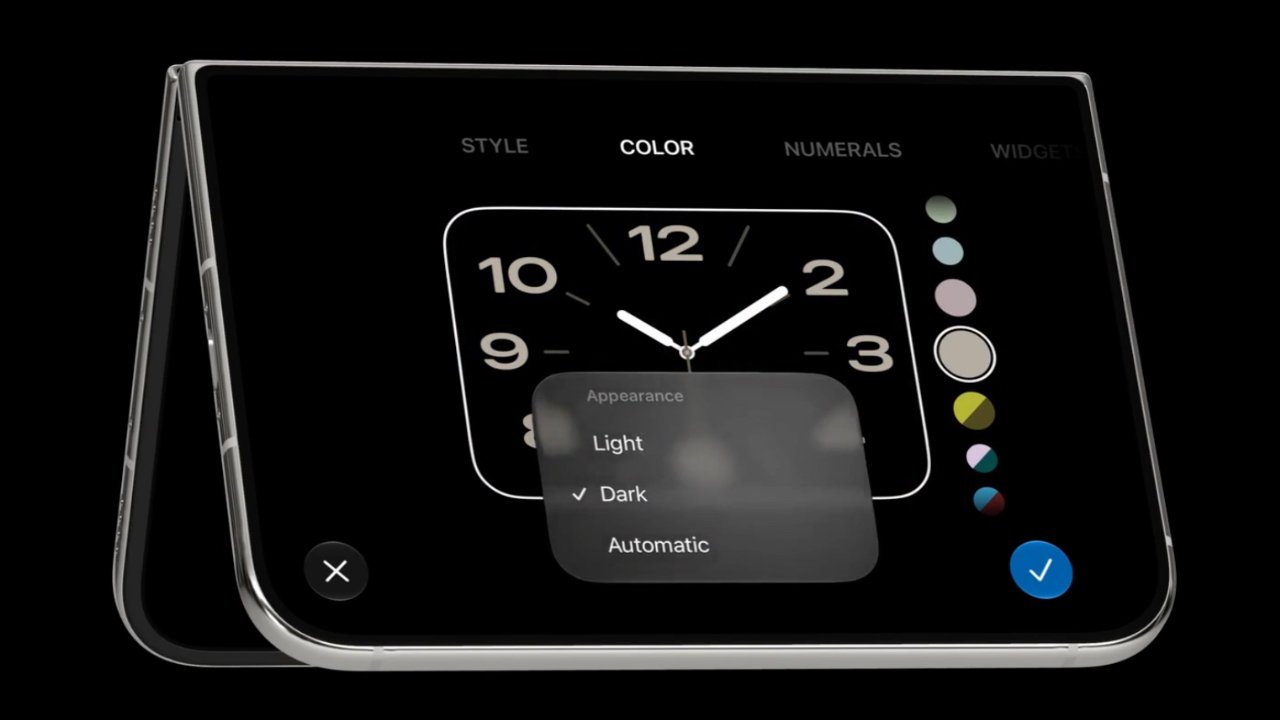
The feature is also a reminder that Apple’s first foldable iPhone is being treated as a special launch. The iPhone Duo opens into a 7.6-inch display and has a 5.4-inch outer screen when folded. Apple has positioned it as a device for multitasking, gaming, and watching content, rather than simply a conventional iPhone with a hinge.
iPhone Duo starts at $1,999 in the US
The timing is notable because Apple’s first foldable iPhone is approaching its retail launch. The company says US pre-orders begin on October 16, with availability starting October 23. The iPhone Duo starts at $1,999 for 256GB, with higher-capacity versions costing more.

The device opens into a 7.6-inch inner display and has a 5.4-inch outer screen when folded. Apple is pitching it as a device for multitasking, gaming and watching content, combining the flexibility of a larger screen with a phone-sized design.
For US buyers considering a $2,000 phone, a personalised greeting will hardly be the deciding factor. Still, it is a memorable flourish for a product that marks Apple’s entry into the foldable-phone market. The bigger questions remain how well the folding design holds up, how useful the larger display proves in everyday use, and whether buyers think the price is justified.
For now, the name-on-screen feature remains an unconfirmed retail detail. Apple has yet to explain exactly how stores will set it up or whether the option will expand to other devices.
RELATED COVERAGE:
Tech & AI
5 Malaysian companies are building the ecosystem for AI growth
[This is a sponsored article with MDEC, but the editorial team had full control over the content. ]
If you haven’t been living under a rock, you’d know that Malaysia is now at the centre of Southeast Asia’s AI infrastructure boom.
New data centres are continuously being announced across Johor and the Klang Valley, with the most recent ones being China’s Alibaba and Singapore-based Digital Decarbonization Solutions Platform (DDSP).
As more and more global technology firms expand their cloud and AI capabilities here, it’s easy to get awed by the billion-ringgit investment flowing into our digital economy. These investments also reflect Malaysia’s growing strengths under the Malaysia Digital (MD) national strategic initiative, which is accelerating the development of a robust digital and AI ecosystem.
But have you ever wondered why Malaysia is chosen for these expansions?
Out of all our SEA-blings, why Malaysia?
Today, Malaysia is one of the few countries in the Southeast Asia region that has built something worth betting on before the hyperscalers arrived.
NationGate, a Penang-based manufacturer, had spent years quietly qualifying for one of NVIDIA’s most exclusive global partnerships. They’re currently one of only four companies across all of Asia that have earned the right to assemble NVIDIA’s most advanced AI servers.
Similarly, SNS Network in Cyberjaya is making high-performance GPU computing accessible to businesses that would otherwise struggle to afford the hardware themselves.
MDEC’s Founders Center of Excellence (FOX) programme has also assembled a cohort of high-growth Malaysia Digital (MD) status software companies, giving them the strategic support to scale, expand regionally and contribute to Malaysia’s growing AI ecosystem.
So how does each layer actually work? Let’s break it down.
The hardware layer: Building the machines that power AI


You probably won’t see NationGate’s name on your AI tools, but their systems run on the infrastructure the firm helped build.
Founded in 2010 by Datuk Ooi Eng Leong and his wife Tan Ah Geok, NationGate started as a general electronics manufacturing services provider before pivoting into AI server assembly. That pivot proved timely.


As demand for AI infrastructure accelerated worldwide, NationGate emerged as one of its beneficiaries. In just 2024 alone, the firm’s revenue reportedly surged from RM638 million to RM5.27 billion, an increase of more than eightfold.
Beyond the NVIDIA partnership, what makes NationGate’s position defensible is its operational depth. The company assembles servers using NVIDIA’s H200 and B200 AI GPU chips—among the most sought-after in the world—and ships them primarily to Singapore, Malaysia, and Thailand.


It also offers servers using the older H100 chips and Intel rack servers, positioning NationGate to serve both cutting-edge AI workloads and more cost-sensitive enterprise deployments. This diversification is highly important as AI infrastructure demand continues to expand faster than supply can keep up.
The access layer: Putting GPU power within local (and global) reach
As one of Malaysia’s leading ICT distributors and super server suppliers, SNS Network is far from a new player in the AI boom.
The Ipoh-founded company built its name in the local tech supply chain as a distributor of hardware and servers to businesses. But as competition in AI server distribution grew, SNS Network shifted its focus into GPU-as-a-Service (GPUaaS).


Called SNS AI Factory, it’s a fully managed AI cloud infrastructure service built with NVIDIA and Dell Technologies. Instead of buying expensive hardware, companies can rent computing power for workloads across industries like financial services, healthcare, retail, manufacturing, and telecommunications.
Its GPUaaS also addresses another challenge facing AI adoption: data sovereignty.
For banks, hospitals, and government agencies, sensitive data often cannot be freely stored or processed overseas due to regulatory and security requirements. By keeping the infrastructure in Malaysia, companies can easily overcome these barriers to adopting AI.


Pricing starts at around RM35,000 per GPU per month, as SNS Network aims to offer more companies access to AI infrastructure without large upfront costs. “[This] allows (companies) flexibility to scale their computing needs on demand,” stated its Managing Director, Ko Yun Hung.
The intelligence layer: What gets plugged in
Hardware alone doesn’t build an AI economy. Data centres and GPU clusters are only the foundation. What matters is what gets built on top of them.
That’s where Malaysia’s MD status ecosystem and the MDEC Founders Centre of Excellence (FOX) programme come in. An invitation-only initiative, FOX provides Malaysian companies with strategic support, investor access, and regional expansion opportunities to scale up.
Three MD status companies show how this plays out.
Glem.ai tackles the deployment gap. Its AI platform helps large organisations, regulated industries, and government users scale AI deployments without being locked into a single vendor.


This addresses the practical roadblocks that often prevent AI projects from moving past the pilot stage. As its CEO, Ryan Tay, puts it plainly: “Our focus has always been on solving the real barriers that stop enterprises and institutions from deploying AI at scale: data sovereignty, governance, and production reliability.”
Since its launch last year, the company has won the Talent Innovation Award at ITEC 2025 in Beijing, showing what’s possible when local innovation is nurtured with the right support and opportunities to scale internationally.


On the other hand, DeltaSpike addresses the blind spot that tends to get discovered too late. As AI becomes more integrated in critical business workflows, it also becomes a target. This gap is what DeltaSpike aims to fill with its Agentic SOC: an intelligence-drive, automation-first security operations model designed to proactively contain security threats.
“Our goal is to embed intelligent, proactive protection into the DNA of business growth. This investment serves as a mandate to accelerate Malaysia’s cybersecurity capability while providing a robust security anchor for Southeast Asia,” shared its Chairman,Taufik Othman.


DeltaSpike’s vision has since attracted institutional backing. In April 2026, DeltaSpike secured a strategic investment from VentureTECH to accelerate its capabilities and regional expansion across Southeast Asia.
Last but not least is Cloud Space, a cloud and AI infrastructure solutions provider focused on helping businesses deploy scalable digital systems across regional markets.
As Malaysia’s 2025 Google Cloud Country Partner of the Year, Cloud Space helps enterprises modernise legacy systems, migrate to cloud infrastructure, and deploy AI-enabled applications at scale.
Google Cloud’s President of Global Partner Ecosystem, Kevin Ichhpurani, commended the firm in 2025, stating, “Cloud Space’s commitment to delivering innovative cloud solutions and measurable outcomes for clients has made a significant impact over the past year.”


More than the sum of its parts
Taken on their own, NationGate, SNS Network and MD status companies Glem.ai, DeltaSpike, and Cloud Space are already strong stories. But what makes Malaysia’s position interesting is how they connect.
Each layer feeds the next. Easier access to GPU infrastructure lowers the barrier for enterprises to experiment with AI, which drives demand for local AI applications. As adoption grows, it increases the need for more computing capacity underneath.
Over time, this builds a full ecosystem that continues to attract foreign investment, accelerate AI adoption and reinforce Malaysia’s position as a regional digital hub.
As Malaysia’s AI ecosystem continues to grow, the capabilities being built today will help advance the aspirations of Malaysia Digital 2030 (MD2030) while laying the foundations for Malaysia’s vision of becoming an AI Nation by 2030.
- Learn more about MDEC and the MD Status here.
Featured Image Credit: NationGate / Pixabay
Tech & AI
Turkey’s social media ban for under-15s starts on 1 November
Turkey will bar social media platforms from serving children under 15 from 1 November, under rules published in the country’s Official Gazette, Inci Ozbek reported for Bloomberg.
Platforms must check users’ ages when they sign up, using a token from Turkey’s e-government system. Anyone found to be under 15 must be blocked.
Existing accounts must be checked by 31 March 2027, and those held by under-15s shut down.
Strict limits for older teens
Accounts for 15 to 17-year-olds will be private by default and filtered. They cannot show personalised ads or offer livestreaming, and platforms must block screenshots of them.
Teens can only message accounts they already follow, and endless scrolling feeds must be switched off, Daily Sabah reported.
Parents must get tools to manage settings, limit screen time and approve purchases.
The rules cover platforms including Instagram, Facebook, X, TikTok, Snapchat, YouTube, WhatsApp, Telegram, Discord and Reddit, Daily Sabah said.
Fines of up to 3%
Firms that break the rules face fines of up to 3% of global revenue, ad bans and cuts to their internet bandwidth under Turkey’s internet law.
Parliament passed the law in April, a week after a school shooting.
Turkey joins a growing list of countries trying to keep children off social media. Australia led the way, but its under-16 ban has struggled with enforcement.
-
Sports3 days agoSaracens’ Venter Brands Premiership Rugby ‘Autocratic’ Over £5,000 Media Fine
-
Entertainment2 days ago10 Flawless Movies With the Cleverest Protagonists
-
Sports3 days agoEnzo Maresca all smiles as Man City return to training after guilty verdict
-
Sports3 days agoSouthampton’s Eckert Spared Ban as FA Suspends Six-Week Sentence Over Spygate
-
Sports2 days agoAsiad selection row: Para-shooters allege corruption; PCI denies claims | Asian Games 2026
-
Sports2 days agoMultiple Power Four programs face College Sports Commission investigations over alleged NIL cap evasion
-
Fashion13 hours agoWeekend Open Thread: Quince – Corporette.com
-
Crypto3 days agoCrypto.com Teams Up With Insilico Terminal to Give Traders Free Pro-Level Tools
-
Sports23 hours agoCollege Football Week 6 Bets: Three Picks for Saturday’s Biggest Games
-
Business & Hustles14 hours agoPwC: Supply-Chain Diversification, AI and Energy Transition Open New Growth Paths for Thailand
-
Crypto1 day agoRobinhood Chain slowdown spreads from fees to trading as transactions fall 40%
-
Sports2 days agoMorocco and Senegal await AFCON final verdict after arbitration hearing – Sports
-
Crypto1 day agoMashinsky Accepts Lifetime Industry Ban and Up to $35 Million in Conditional Payments | The Defiant
-
Tech & AI2 days agoICE Emails Discuss Using Palantir-Supported Tool to Investigate Voter Fraud
-
Crypto3 days agoESMA gives EU crypto platforms 3 months to drop non-MiCA stablecoins such as USDT
-
Sports4 days agoHarry Kane Ties Peter Shilton’s 125-Cap England Record in Wembley Win Over Czech Republic
-
Sports1 day agoSaudi oil crisis affects Neom project, 2034 World Cup plans
-
Tech & AI5 days agoCommon Mistakes You Should Avoid When Using Foldable Phones
-
Sports3 days agoInternationals make history with emphatic Bridges Cup win at Trump Turnberry | News
-
Crypto3 days agoBitcoin ETF Outflows Hit $485M, Erasing October Inflows


You must be logged in to post a comment Login