Connect with us

Tech & AI

The Best Gifts Under $25 for Everyone on Your List (2026)

Published

on

Gear FNC43 PARKS Cthree

$25 doesn’t go as far as it used to. As recently as a decade ago, $25 could fill up your gas tank and buy a pretty good gift, with plenty of options for just about every interest and occasion. Nowadays, it’s a struggle to even find a $25 takeout meal for one person and average national gas prices are inching toward $5 a gallon. And we all know wages have not kept up.

Good news: There are still plenty of thoughtful, interesting items out there to be had for $25, which are sure to appeal to everyone from coworkers to neighbors, relatives you don’t know well, and the friend who seems to have everything. All things on this list have been tested and vetted by at least one person on the WIRED Reviews team—often more than one—to ensure it is indeed a good gift you’d be proud to give. Check out more of our gift guides to find something for everyone on your list this year.

Love WIRED? Add us as a preferred source on Google to see more of us.

Featured Gifts

Fun Notebooks

Field Notes National Parks Series (3-Pack)

Advertisement

Read more

Perfect Pens

Muji Ballpoint Pens (10 Pack)

Read more

Karaoke On Demand

Bonaok Karaoke Microphone

Read more

For the Notetaker

  • Photograph: Julian Chokkattu

  • Photograph: Julian Chokkattu

MoMA Design Store

Colorplay Pen & Pencil Cup Holder

Advertisement

WIRED senior Gear editor Julian Chokkattu recommends this colorful acrylic desk accessory that keeps pencils, scissors, and other large items on top and smaller items like paper clips (or, in Julian’s case as a phone reviewer, SIM ejection pins) on the bottom. Shown is the pink-and-amber color combination, but there’s also a blue-and-green option.

Field Notes

National Parks Series (3-Pack)

I’ve used Field Notes for years—they’re lightweight, sturdy, and a perfectly pocketable. The National Parks Series elevates what would otherwise be a utilitarian notebook to its giftable status, with artist-created covers inspired by our nation’s natural wonders—from Acadia to the Hawai’i Volcanoes.

Advertisement

Muji

Ballpoint Pens (10 Pack)

My city recently got its own brick-and-mortar Muji store, and if you’ve never visited the famed Japanese retailer in person, it’s basically a mecca for stationery and desk accessories. These pens in particular are famous for their smooth ink and precision tips, and make a perfect companion for the Field Notes notebooks at left.

For the Party Person

These drink cozies are a favored white elephant gift from WIRED reviewer Nena Farrell (“It’s like playing Barbie with your drinks,” she says), but I like them because they remind me of Will Ferrell and his friend Harper Steele in the movie Will & Harper, where they go on a road trip, dress up their drinks in these exact cozies, and come up with ridiculous names for them like Cornelius Danderhoff. It reminds me of road trips I took with friends in college, which reminds me that I’m old, which … makes me want a drink.

Govee

Advertisement

Smart LED Color-Changing Light Bulb (H6008)

Set the right vibe in any room with this WIRED-recommended, Matter-compatible smart light bulb that features millions of colors, scenes, and effects you can control with Alexa, Google Assistant, or the Govee app. You can also sync it to music with the latter, using the microphone on your phone.

Bonaok

Karaoke Microphone

Advertisement

Let your giftee be heard wherever they go with their very own Bluetooth microphone. Former WIRED A/V editor Parker Hall especially liked this one for its series of playback and mixing controls, in addition to adjustable volume, echo effects, and the ability to play, skip, or pause your backing track.

For the Anti-Party Person

  • Photograph: Louryn Strampe

  • Photograph: Louryn Strampe

Quince

Mulberry Silk Beauty Sleep Mask

A sleep mask is a must for proper sleep hygiene, and WIRED reviewer and sleep mask aficionado Louryn Strampe loves the roomy fit of this 22-momme silk model from Quince. It’s half the price of similar 100-percent silk sleep masks, and there’s free shipping to keep things affordable. Choose from among 12 color options, including Eucalyptus, Espresso, Pink, Terra Cotta, and Light Blue.

Loop

Advertisement

Quiet 2 Ear Plugs

Crowned our best earplugs for sleep, the silicone Loop Quiet 2 are capable of blocking out 24 dB and fit entirely flush with your head, ensuring that they’re perfectly comfortable when you lie on your side. The little handle makes them easy to pull out, and they come in four fun colors with a variety of ear tips to ensure your giftee can get the perfect fit.

Diveblues

Portable Handheld Fan

Advertisement

Help your giftee’s personal space stay cool and fresh with this 4-in-1 fan, the best handheld fan I’ve personally tried. You can set it on a table or desk, hold it in your hand, clip it onto something with the bottom carabiner, or wear it around your neck. It’s plenty quiet enough to hold a conversation over, and it comes in four fun colors.

For the Home Chef

Jacobsen Salt Co.

Salt and Salt Cellar

My entire family is obsessed with this finishing salt, which is harvested in Netarts Bay, Oregon, just a couple of hours from our house. The large, irregular crystals look (and taste) fantastic on meat, roast vegetables, and desserts, and offer the perfect amount of crunch. Either the salt itself or the stylish arched salt cellar—handmade by Pigeon Toe Ceramics in Portland, Oregon—would make a terrific gift on its own.

Kiwi

Advertisement

Brand Chef’s Knife

A sharp, trusty chef’s knife is a staple in any kitchen, and Kiwi knives are beloved by multiple members of the WIRED Reviews team for their ability to hold an edge just as well as knives that cost 10 times as much. I’ve had a Kiwi knife in my own knife drawer for more than 20 years, and it’s still going strong.

Le Creuset

Stoneware Mini Round Cocotte

Advertisement

Who doesn’t love a colorful Le Creuset Dutch oven? The real-deal, enameled cast iron version may not be in your gifting budget, but the 8-ounce stoneware cocotte is perfect as a salt cellar, garlic roaster, or even a bowl to eat out of. Most of the classic colors are available, so you can match your giftee’s kitchen or other Le Creuset pots if they have them.

For the Gardener

Vanessa Minton

How to Grow Medicinal Herbs

I have a separate gift guide for plant lovers, where I talk about how much I like the usability of this book. Put together by Vanessa Minton of From the Garden, “How to Grow Medicinal Herbs” features clear and complete directions that are perfect for beginners, from growing the plants to how to incorporate them into infused oils, tinctures, teas, and syrups. I actually did give a copy to a friend as a gift, and she liked it so much she took it on a trip and read it cover to cover on the plane.

Advertisement

Back to the Roots

Organic Mini Mushroom Growing Kit

I received this dehydrated fruiting block in a box for my birthday a couple of years ago, and I was super impressed with how quickly and abundantly the oyster mushrooms grew—right on my windowsill. Growing mushrooms isn’t always easy, but this is a fun and educational method for kids and adults alike.

Happy Happy Houseplant

Advertisement

Monstera Deliciosa Fruit Salt Water Taffy

Tropical Monstera deliciosa houseplants are all the rage right now, but many people may not know that they actually bear a fruit. It’s rarely produced outside the monstera’s native climate, so you may not have the opportunity to taste it, but you can get the gist with this one-of-a-kind monstera fruit taffy. (It’s tart!)

For the Well-Organized

Ugreen

FineTrack Air Tracker Tags (iOS)

Being able to keep track of keys, luggage, and other gear is critical, and these Bluetooth trackers work just as well as AirTags for a quarter of the price. A pack of four with little lanyards and fun stickers retails for $24 but often on sale for even less. They work with Apple’s Find My and take just seconds to sync to your phone. I have four of these in use in my household, and they are truly indistinguishable from AirTags in both tracking and quality. There’s also a rechargeable set that works with both iOS and Android, but we haven’t tried that one.

Advertisement

SmartLabels

QR Code Organizing System

WIRED contributing reviewer Alexis Berger organized multiple zones of her house with these QR Code stickers. They come with a free app that will scan and catalog all of a drawer or box’s contents using AI—that way you can just look on your phone for the location of an item instead of spending all day tearing your home and garage apart.

Baggu

Advertisement

Standard Reusable Bag

I cannot even begin to list all the times I’ve been glad to be carrying a reusable bag, but the ones I usually have in my purse are small and flimsy. Former WIRED reviewer Medea Giordano loved this 25-inch-tall ripstop model that carries up to 50 pounds yet folds into a flat 5-by-5-inch pouch. It’s also machine washable and comes in 35 colors and prints.

For the Coffee Lover

Large clear measuring glass shown empty on the left and then with brown liquid being poured in on the right

Barista Basics

Triple Spout Shot Glass

WIRED contributing reviewer and former barista Pete Cottell loves this espresso accessory for its durability and design—and can be found in seemingly every coffee shop where I live in the Pacific Northwest. However, even if you don’t have an espresso machine, the uses for a little spouted measuring cup are endless. I have a plastic one and use it for everything from measuring small quantities of liquid ingredients to fertilizing plants.

Advertisement

Hydro Flask

Mug

WIRED reviewer Boutayna Chokrane recommends this Hydro Flask in her guide to the best travel mugs for its stainless steel rim that makes for smooth sipping. I have the tumbler version, but I wish it had a handle like this mug. Mine is not easy to hold when it’s cold outside and I’m wearing gloves. (Mug is hand-wash only.)

Bestinnkits

Advertisement

Auto On/Off Gravity-Induction Mug Warmer

Though this simple warmer only turns on when you have a mug on it, it was effective and reliable when we tested it, and it makes a great gift for anyone who works from home and ends up having their coffee or tea run cold during meetings. I bought one for my husband for Christmas last year, and it’s still going strong.

For Teens

Crkd Atom Controller, a tiny pink video game controller in the palm of someone's hand

Photograph: Louryn Strampe

WIRED reviewer Louryn Strampe has this mini gaming controller, which is compatible with Nintendo Switch, PC, macOS, iOS, and Android devices. It’s tiny, cute, and actually works—she uses it to play Stardew Valley and Bastion on her iPhone. If your teen loves gaming, it would make a great stocking stuffer too. (It gets about 10 hours of battery life per USB-C charge.)

Dr. Squatch

Advertisement

Soap

Dr. Squatch soap is a pretty safe gift for teen boys (source: I have a teen boy), and a three-pack makes it more likely they’ll at least get one scent that’s a favorite. There are always lots of fun collabs each season, too—this year’s include Taijn seasoning and FIFA.

Sand + Fog

Perfume Bag Charms

Advertisement

Yes, they are $1 over the limit, but these bag charms are worth the extra buck. They include little roller-ball bottles of popular Sand + Fog fragrance oils and come in a ready-made gift box, The charms look great on bags and backpacks, and would be a perfect stocking stuffer or angel-tree gift for teen girls.

For a Laugh

Black board game packaging with horror film characters on the cover

The Op Games

Telestrations

WIRED reviewer Simon Hill’s family loves this hilarious drawing game that’s based on Telephone. Sketch a visual representation of a word or phrase and then pass it around the table for people to guess what it is. It’s great for parties and can accommodate four to eight people. The recommended minimum age is 12, but Simon’s 9-year-old daughter loves it.

Prank-O

Advertisement

Prank Puzzle

These puzzles look like normal landscapes but contain a secret section not pictured on the box, with something jarringly incongruent like a dog pooping or a cat barfing. Remove the red sleeve and your giftee will have no idea anything is amiss until they put it together. I gave one of these to my husband, and the ruse worked flawlessly and was just as hilarious as I’d hoped.

Prank-O

Gift Boxes

Advertisement

I have given these boxes countless times with either a gift certificate or homemade coupon inside, and they’re always a hit, especially in group settings. Many of the dozen or so designs are toilet-themed, but each one is just serious-looking enough that it usually takes people a few long (and hilarious) minutes to realize it’s not a real item.

For the Outdoorsy

  • Photograph: Scott Gilbertson

  • Photograph: Scott Gilbertson

Epiphany Outdoor Gear

Collapsible Pocket Bellows

WIRED reviewer and esteemed outdoorsman Scott Gilbertson swears by this tiny telescoping bellows that will help any fire get going again, whether that’s a campfire or your wood stove at home. It stretches out to be surprisingly long and is a must-have for wet firewood, bug-out bags, or even backyard cookouts.

Advertisement

Nalgene

Sustain Tritan BPA-Free Water Bottle

I carried a Nalgene all through college in the late ’90s before the brand’s polycarbonate was found to have BPA. Now Nalgenes are back with BPA-free Tritan renew plastic, which makes them lightweight and perfect for both outdoor activities and everyday use.

Opinel

Advertisement

No. 8 Folding Knife

I’m a Leatherman kind of person myself, but sometimes you just need a bigger knife. In those cases, you won’t do better than this folding, portable number featured in our Buy It For Life guide. French Alps-based Opinel has been making knives since 1890, and the No. 8 in particular is so well designed it’s been displayed in museums.

For Everyone

Image may contain: Shonn Greene, Exco Levi, Furniture, Table, Computer Hardware, Electronics, Hardware, Monitor, and Screen

WIRED

1-Year Digital WIRED Subscription

WIRED is the gift that keeps on giving—stay in the know all year long with a digital subscription for only $24 for new subscribers. (It’s $48 a year after that.) It’ll get you access to WIRED’s brand-new app, as well as exclusive subscriber-only newsletters, livestream AMAs, and a limited-edition tote bag.

Advertisement

Power up with unlimited access to WIRED. Get best-in-class reporting and exclusive subscriber content that’s too important to ignore. Subscribe Today.

Source link

Advertisement
Continue Reading
Click to comment

You must be logged in to post a comment Login

Leave a Reply

Tech & AI

A New Way to Review Your Documents with AI

Published

on

Chatgpt

Many users use ChatGPT and Claude to examine papers, including essays, reports, contracts, and resumes. They can provide really helpful insights, but when it comes to iterating together, they’re not so powerful. Feedback comes back as a large chat response, and you are then left to apply changes yourself or accept a completely rewritten version from the chatbot.

There’s a new tool called Revise that aims to improve this workflow by integrating AI chat directly into a full word processor that’s compatible with Word .docx files, not just the basic text box a lot of AI writing apps give you. In Revise, the huge language model may read, modify, and comment on any section of your work using the same interface as you. Revise allows you to import big documents (up to a hundred pages), and the model may sift through them and read only the portions it wants rather than importing the entire thing at once. You can request changes and discuss portions of the document in comment threads.

You Stay in Control

Revise lets you keep full control over your document. Its track changes support means everything the AI agent does is visualized for you as a suggested change and can be individually accepted or rejected.

The amount of editing the agent does on your work is totally up to you and your prompts, and if you prefer, you can simply have the agent mark up your document with comments so that you may amend it yourself. Regardless of the strategy you select, having the AI agent interact with you on the same page in the same interface allows for far faster iteration and more friendly editing than going back and forth with a chatbot.

Advertisement

Works With Your Files, and It’s Free to Try

Getting your documents in and out is easy too. Revise supports importing Word files with full headers, tables, pictures, and footnotes, as well as PDFs. It imports PDFs with the use of multimodal LLMs that look at the pages and extract the text. That means, instead of a picture of text that you can’t modify, scanned documents and image-based PDFs display as real, editable text. When you’re ready, Revise may export to Word or PDF so it fits right into your current procedure.

Revise is more accessible and flexible than Google Docs and Microsoft Word, neither of which lets you change which AI model you’re talking to, and both of which require a monthly subscription to even try their AI chat feature. Revise, on the other hand, has a permanent free tier with a daily limit, plus free usage via MCP through its plugins in the ChatGPT and Claude directories.

If you already use AI to review your documents, Revise is worth a try. You can import a document, ask for feedback, and decide change by change what actually makes it into your work.

Source link

Advertisement
Continue Reading

Tech & AI

Why AirPods Pro 3 Still Hold the Quietest Seat Even After AirPods 5 Arrived

Published

on

apple airpods pro 3 in 2026

Apple AirPods Pro 3 in 2026
Apple put active noise cancellation on the $149 AirPods 5 with Wireless Charging Case last month, and the price gap with the year-old AirPods Pro 3, priced at $179 (was $249) for early Prime Day, suddenly looked harder to defend. Shoppers who only wanted a little quiet on a train now have a cheaper open-ear option. People who sit with both pairs still reach for the Pro 3 when the room gets loud.


Foam-tipped silicone ear tips in five sizes, including an extra small size, seal the canal before you even begin listening, and nothing surpasses that physical seal, which the new open-ear AirPods 5 simply cannot match, no matter how many microphones are crammed onto the stem. Apple claims that the Pro 3 offers up to three times the quiet time of the regular model and twice that of last year’s Pro 2. That means sounds like the cabin hum, the air conditioning in the office, and that obnoxious voice from two seats over fade into the background. The Transparency setting still allows speech to be heard cleanly and crisply, without the hollow echo that earlier tips had.

Sale


Apple AirPods Pro 3 Wireless Earbuds with Active Noise Cancellation
  • WORLD’S BEST IN-EAR ACTIVE NOISE CANCELLATION — Removes up to 2x more unwanted noise than AirPods Pro 2* so you can stay fully immersed in the…
  • BREAKTHROUGH AUDIO PERFORMANCE — Experience breathtaking, three-dimensional audio with AirPods Pro 3. A new acoustic architecture delivers…
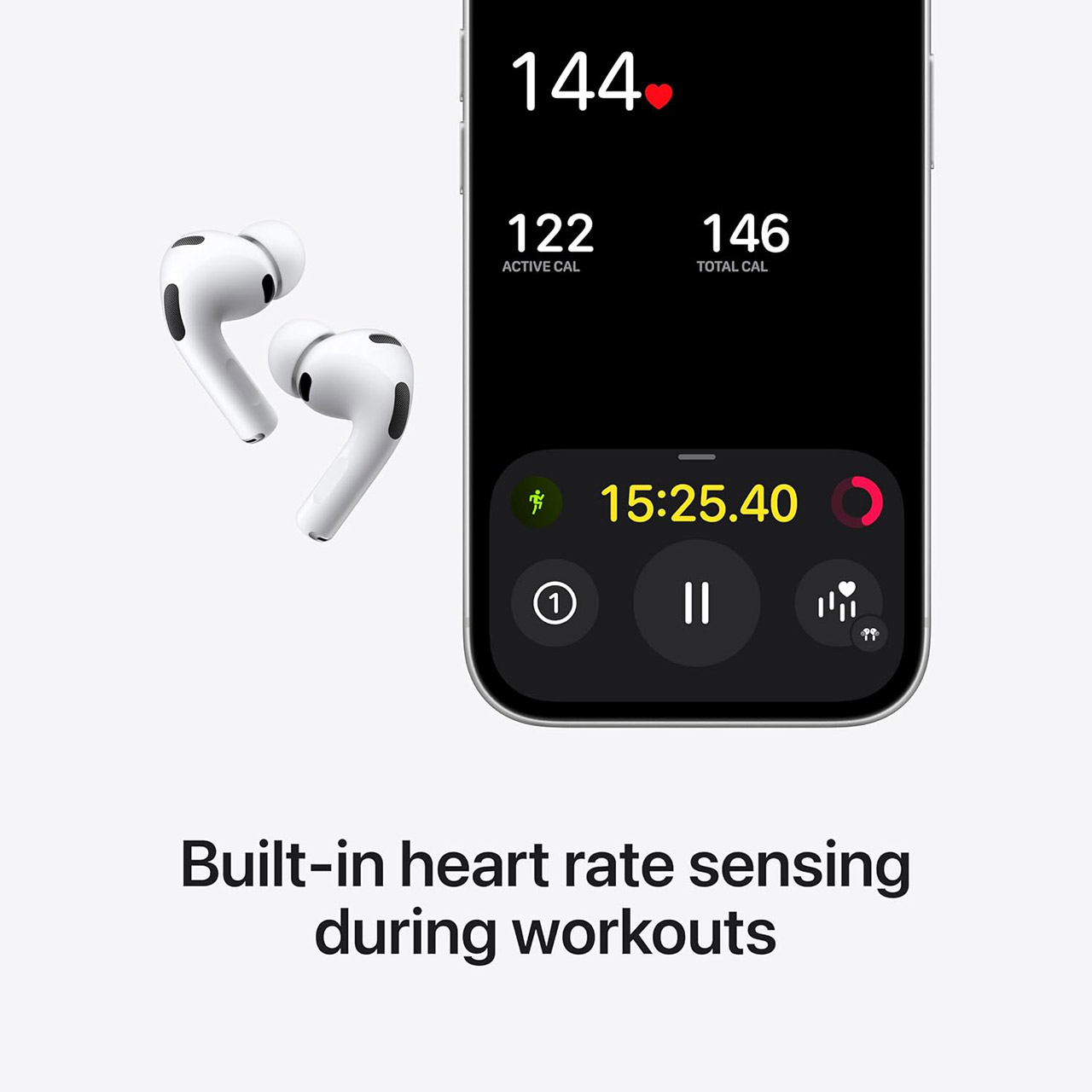
  • HEART RATE SENSING — Built-in heart rate sensing lets you track your heart rate and calories burned for up to 50 different workout types.* With…


With noise cancellation enabled on, a single charge will last up to eight hours, compared to four for the basic AirPods 5 and five for the wireless case AirPods. A full day of mixed listening typically gives you with some charge left over, and the case itself will extend the total to around 24 hours. Five minutes on the charger can recharge you for about an hour.

Advertisement

Apple AirPods Pro 3 in 2026
The hearing aid functions were missing from the previous AirPods, but they’re back in the Pro 3, and they’re incredibly important. Each Pro 3 bud contains a custom sensor that uses invisible light to pulse 256 times per second to read your heart rate during more than 50 different workout types in the Fitness app, all without the need for an Apple Watch on your wrist, and Hearing Protection kicks in to reduce sudden loud noise. Plus, when needed, Live Translation can be accessed by squeezing both stems, in supported languages. None of this is available with the less expensive bud.

Apple AirPods Pro 3 in 2026
Both lines, of course, share the H2 chip, Adaptive Audio, customized Spatial Audio with head tracking, and voice separation during calls. The Pro 3 case also has some great details, such as magnetic charging from the MagSafe case, a Find My speaker, a second generation ultra wideband chip that aids in accurate location tracking on a compatible iPhone, and a strap loop. The buds and casing are both water and dust resistant, with an IP57 rating. Of course, you can still regulate the volume with a swipe on the stem.

Source link

Continue Reading

Tech & AI

Fubo Channels, Plans, Prices, and Add-Ons Explained

Published

on

fubo channels plans prices add ons explained zip local sports fee.webp

Fubo does not have one fixed nationwide channel bundle or one price that applies to every viewer. Your base plan sets the starting price, while your location, regional sports coverage, and optional add-ons can change both the channels you receive and the amount you pay.

Quick Take

Start with the regular monthly plan price, then check your ZIP code, must-have channels, regional sports coverage, and optional extras. Fubo’s channel totals, trial terms, promotional prices, and some sports costs can vary, so the checkout total and your location-specific lineup matter more than a headline channel count.

Promotional pricing can reduce the first payment, but the regular monthly rate is more useful for estimating long-term cost. Before subscribing, identify the channels or teams you consider essential and verify them against the plans Fubo offers for your area.

Fubo plans and prices at a glance

Think of the base plan as the starting layer of your subscription. It determines the broad mix of sports, news, entertainment, and Spanish-language programming before optional services or location-specific charges are added.

Advertisement

Fubo’s regular monthly plan prices currently include the following widely advertised options. The same page can show temporary first-month discounts, and Fubo states that prices are subject to change.

Current broadly advertised Fubo plans and regular monthly prices
Plan Regular monthly price Broad focus Regional sports Distinctive point
Sports + News $64.99 National sports, broadcast programming, and news Eligible local regional sports can be added through My Local Sports in select markets Lower-cost sports-focused route with ESPN Unlimited included
Pro $88.99 Broad live TV with sports, news, and entertainment Regional sports coverage and an additional fee can apply by area Main full-size general TV package
Elite $98.99 Expanded live-TV lineup Regional sports coverage and an additional fee can apply by area Broader channel selection than Pro, with 4K programming included where supported
Elite with Sports Plus $108.99 Expanded lineup plus the Sports Plus package Regional sports coverage and an additional fee can apply by area Includes Sports Plus with NFL RedZone
Latino $19.99 Spanish-language sports and entertainment Coverage differs from the main English-language plan family Lower-cost Spanish-language option

Do not assume the promotional price, free-trial length, or displayed channel total will be identical for every visitor. Fubo’s live signup pages can show different offers and lineup totals, so use the plan details presented for your account and location.

What channels you get with each Fubo plan

A plan name alone does not tell you the exact lineup at your address. National networks can appear across several tiers, while local broadcast stations and regional sports networks depend more heavily on location.

Fubo carries national sports networks including ESPN, FOX Sports, NFL Network, and CBS Sports Network. Local broadcast and regional sports availability can differ by market, which is why two subscribers on the same named plan can receive different local or regional programming.

Advertisement

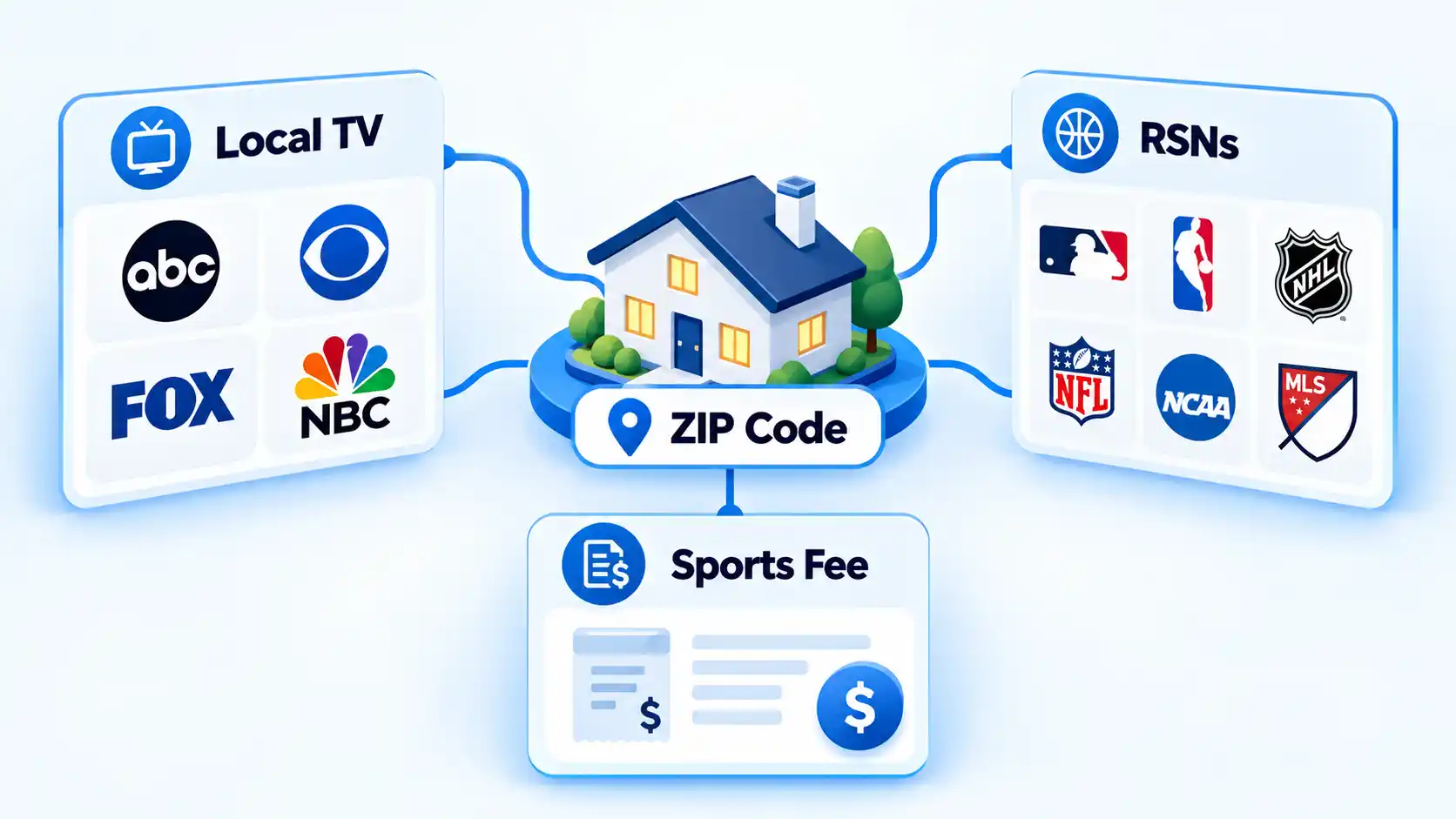
A regional sports network, often shortened to RSN, focuses on teams within a particular geographic territory. If a local NBA, NHL, or MLB team matters to you, the RSN serving your ZIP code can be more important than the plan’s overall channel count.

Instead of relying on a long static directory, search for the networks you cannot do without. Fubo lets you compare plans and search for a specific channel. If the channel is absent from both selected plans, the tool can indicate that another plan or add-on is required, or that the channel is unavailable.

Channel totals also change across Fubo’s live landing-page variants. Treat those totals as a snapshot for the offer and location being shown rather than a permanent nationwide specification.

Once the subscription itself is sorted, the way you watch it on a television is a separate choice. A Smart TV app, Google Cast setup, or streaming stick can each deliver streaming video, with different hardware and control trade-offs.

Advertisement

Sports + News and My Local Sports explained

If most of your viewing revolves around sports rather than a large general-entertainment bundle, Sports + News is the lighter Fubo option to examine. Fubo also refers to the service as Fubo Sports in its corporate materials.

The service has more than 20 sports and broadcast networks, includes direct access to ESPN Unlimited, and costs $64.99 per month after the introductory first month for eligible new customers.

Local-team coverage is separate. Fubo launched My Local Sports on September 29, 2026, allowing Sports + News subscribers in select markets to add an eligible regional sports network together with sports-focused FAST channels. FAST means free ad-supported streaming television: linear-style streaming channels funded by advertising rather than a separate subscription fee.

There is no single nationwide My Local Sports price because RSN add-on pricing varies by market. Availability also depends on which regional network serves your area.

Advertisement

If local teams determine your subscription choice, understanding how Fubo regional sports availability works can help you separate national sports coverage from market-specific team access.

Fubo add-ons and premium channels

Add-ons let you pay for extra programming without moving every viewer to a larger general-purpose package. Some expand sports coverage, while others add premium movies, international channels, or a specific league service.

Fubo also operates a Channel Store where individual services are available without a Fubo base plan. That means not every extra service has to be purchased on top of Pro or Elite.

As of October 3, 2026, representative Channel Store prices include:

Advertisement
  • MLB.TV: $29.99 per month.
  • Paramount+ with SHOWTIME: $10.99 per month.
  • FOX Nation: $8.99 per month.
  • NBA TV: $8.99 per month.
  • STARZ: $11.99 per month.
  • MGM+: $7.99 per month.
  • Hallmark+: $8.99 per month.
  • Paramount+ with SHOWTIME, STARZ, and MGM+ bundle: $20.99 per month.

Fubo also sells sports and international packages whose contents and prices can change. Before paying for one, search for the exact channel or event you want rather than assuming the package name includes it.

MLB.TV shows why access rules can matter as much as price. Fubo offers it for $29.99 per month for out-of-market MLB games, but blackout and other restrictions apply. A viewer trying to follow a local team should therefore check regional coverage separately rather than assuming MLB.TV replaces the local sports network.

Fubo image

The fees that can change your monthly bill

The advertised base-plan price is not always the final recurring charge. A useful estimate starts with the base plan, then adds any applicable regional sports fee, subscription add-ons, and taxes.

The largest location-dependent surcharge to check is the Regional Sports Fee. If your plan includes qualifying regional sports coverage, the fee can be as high as $16.99 per month. New customers can see the applicable amount during signup.

The fee is tied to receiving regional sports programming rather than being an optional switch. Fubo states that if your plan includes regional sports programming, the fee is applied automatically and cannot be removed while you keep that qualifying plan. Moving to a base plan without regional sports programming is the way to avoid that fee.

Advertisement

For example, a subscriber starting with the $88.99 Pro rate can owe more than $88.99 when a Regional Sports Fee applies. Subscription add-ons and taxes can raise the total further, so the recurring amount shown at checkout is the number to use for budgeting.

There is also a Roku billing exception: Fubo states that if you signed up through a Roku device, the Regional Sports Fee is $16 per month regardless of area.

If the checkout total is higher than the advertised plan price, tracing unexpected Fubo charges starts with regional sports fees, selected subscription add-ons, an expired promotional rate, and taxes.

How to check your exact Fubo lineup

Do this before paying if one local station, sports network, or team determines whether Fubo works for you. The goal is to verify the channel against the plans and location Fubo is actually offering you.

Advertisement
  1. Open Fubo’s current plan page. Visit Fubo’s live plan page instead of relying on an old screenshot or cached price list.
  2. Confirm your area. Enter or verify your ZIP code when prompted. Fubo uses location information to determine applicable local and regional programming.
  3. Open the full plan list. Select View all plans and add-ons so you can see the options Fubo makes available in your area.
  4. Compare the relevant plans. Select Compare plans and choose the two packages you are considering. Fubo’s plan-comparison tool shows channel and feature differences.
  5. Search your must-have channel. Type the network name into the channel search. If it is missing from both selected plans, check whether Fubo identifies another plan, an add-on, or no available option.
  6. Check the recurring signup price. Review any Regional Sports Fee, subscription add-ons, promotional terms, and taxes shown before you subscribe. Use the recurring amount for your budget rather than the first promotional payment alone.

Which Fubo plan fits different viewing needs

Sports + News

Choose this if: you mainly want national sports and news and do not need the broader entertainment lineup in Pro.

Avoid this if: your must-have entertainment channels fall outside its lighter lineup or your local team requires regional coverage that My Local Sports does not offer in your market.

Main trade-off: a lower base cost in exchange for a narrower general-TV package.

Pro

Choose this if: you want a broad mix of live sports, news, local television, and entertainment without paying for Elite’s expanded lineup.

Avoid this if: a must-have channel appears only in a higher tier or add-on, or the final price after regional sports charges exceeds your budget.

Advertisement

Main trade-off: broader general-TV coverage at a higher monthly price than Sports + News.

Elite

Choose this if: you have confirmed that its additional channels or supported 4K programming fill a real gap in Pro.

Avoid this if: the extra programming does not add anything you regularly watch.

Main trade-off: an expanded lineup for $10 more per month than Pro before applicable fees.

Advertisement

Elite with Sports Plus

Choose this if: you already need Elite and have confirmed that Sports Plus channels such as NFL RedZone matter to you.

Avoid this if: the bundled sports networks do not add programming you would otherwise pay to watch.

Main trade-off: Sports Plus is bundled into a higher recurring base price.

Latino

Choose this if: your viewing is primarily Spanish-language sports and entertainment and its lineup covers your essential channels.

Advertisement

Avoid this if: you need the broader English-language channel selection offered by the main full-size plans.

Main trade-off: a much lower base price paired with a more specialized lineup.

Make the decision from the channels or teams you cannot replace, not from the largest advertised channel total. Once you find the smallest suitable plan, compare its recurring checkout price with any required sports fee and the extras you would actually buy.

If Fubo’s mix still does not fit your needs, a Fubo vs YouTube TV comparison is most useful when it compares your must-have channels, local sports access, and total monthly cost rather than raw lineup size.

Advertisement

Source link

Continue Reading

Tech & AI

The biotech process development associate in Amgen’s grad programme

Published

on

Headshot Conor Hughes

Headshot Conor Hughes

Amgen’s Conor Hughes explores Ireland’s biotechnology industry and how an early STEM education can be the gateway to a future career.

A process development associate in inspection at Amgen, Conor Hughes’ first foray into the STEM space actually began in childhood. 

He told SiliconRepublic.com: “The biotech industry made sense to me, given how well established it is in Ireland. However, my interest in science started much earlier, when I was a child. My grandparents used to bring me to the Young Scientist Exhibition every year and from the ages of six to 12, I never missed an exhibition at Trinity’s Science Gallery. 

“So from an early age, I had an interest in science and discovery. As I progressed with my undergraduate and master’s studies in chemical engineering at UCD, the industry’s economic significance became more apparent. It was also clear that biotech provided numerous opportunities for growth.”

Advertisement

As part of his master’s programme, Hughes completed a 12-month internship at Amgen and eager to continue in this space, he explained a graduate programme “felt like a natural next step”.  

He said: “I already had a good sense of the culture and could hit the ground running, while still having plenty to learn.”

Can you describe a typical day in your role? 

Usually, my day starts with an assessment of our inspection performance at a cross-functional meeting. We look back at the previous 24 hours, see how the process development unit has performed and then look ahead to the next day. I am part of the commercial support team and a key part of my role is focused on problem-solving to ensure we get the most from our inspection machines. Working with colleagues across different functions to find solutions is also important.

There is a technical side to the job too, our inspection machines can process up to 400 vials and 300 syringes per minute and I develop vision tools that use image processing to identify any potential defects.

Advertisement

My favourite part of the job is the variety. I can spend part of the day in meetings discussing a problem or a new piece of technology, then head onto the manufacturing floor and implement the solution. It is very rewarding to develop an idea all the way from discussion stage through to physically putting it into practice.

Did your responsibilities and workload change as the programme progressed? 

The programme has a natural progression. From the outset, it gave me exposure to different departments. Graduates are expected to attend meetings, ask questions and work with experienced colleagues, so I really value being part of team conversations.

As your experience grows, people start coming to you more often, which is recognition of your development. As my knowledge of processes has increased, I have become an established point of contact for colleagues, including senior staff members.

A recent example was working as inspection lead for the introduction of a new product on-site. As I’ve progressed, I’ve had more interaction not just across functions in Ireland but across the wider Amgen network. For example, I’m working with colleagues at other Amgen sites, including California and Puerto Rico, on developments in visual inspection and deep learning.

Advertisement
What skills have you developed since being part of the company’s programme?

My communication and problem-solving skills have developed significantly. In a fast-moving biotech environment, it’s not enough to have an idea or a solution in your head. You need to be able to explain it clearly so other people can understand it, challenge it and help you to move it forward. Troubleshooting is also a big part of my role and taking part in the programme has improved my ability to break down a problem and to arrive at a workable solution. I’ve also built up my technical skills on the job in inspection, vision engineering and image processing.

In addition to the programme itself, there’s a strong focus on continuous professional development at Amgen. For example, there is a weekly technology-sharing forum where people from different departments teach others about developments in their function. It gives you exposure to technical areas that are beyond your own day-to-day role.

What have been the most challenging parts of working life since taking up this programme?

Managing varied projects is one of the programme’s more challenging aspects. On one hand, it gives participants a real breadth of experience, but at the same time, switching your focus from one project to another can take some adjustment. Shift work and early start times make for a steep learning curve, but they also provide an opportunity to build close bonds with the colleagues who are working shifts and to take on more responsibilities.

Would you recommend the graduate programme at Amgen to others? 

Absolutely. There is a huge variety of roles and the ability to move between departments and broaden your experience provides a major advantage during the early stages of your career. Amgen’s workplace culture means that it’s easy to speak to a colleague to find out what they do and to learn about their department.

Advertisement

Cross-functional learning is a big part of the culture here. Recently, the graduates took part in training at NIBRT, where we gained practical experience about filling lines and carried out activities linked to commercial manufacturing. Although my role is focused on inspection, the course was valuable because it gave me a better understanding of other parts of the process.

Amgen also has great social activities, including sports, fundraising and volunteering. The mix of technical learning, career development and community is a big part of what makes the experience so rewarding.

What advice would you like to give to future graduates who are just starting out?

Just go for it. The more responsibility you are willing to take on, the more experience you will get. Talk to managers and other graduates about what their day-to-day work entails. Follow the ‘ask and you shall receive’ approach, if there’s something you want to learn or get involved in, people will do their best to support you.

I also recommend getting involved in extracurricular activities. Amgen offers everything from tag rugby and five-a-side football to golf and beach clean-ups. It’s another great way to meet people and hear from experienced colleagues. Also, don’t be afraid to create something yourself. The main thing is to stay curious, get involved and enjoy the experience.

Advertisement

Don’t miss out on the knowledge you need to succeed. Sign up for the Daily Brief, Silicon Republic’s digest of need-to-know sci-tech news.


Source link

Advertisement
Continue Reading

Tech & AI

Apple’s rumoured Home Hub could launch in these four hues

Published

on

HomePod Mini Touch

Apple’s long-rumoured smart home hub could be more colourful than expected, with a new leak suggesting the device may launch in four finishes when it arrives (hopefully) later this month.

The home hub is reportedly set to be unveiled on October 13, and a leaker known as “pdfu” claims Apple will offer it in Silver, Space Gray, Starlight and Rose Pink. The same four colours were previously spotted in the code for macOS 26.7 Release Candidate by MacRumors contributor Aaron Perris, giving the latest leak some extra context.

The colours could also tie into one of the hub’s more personal features. Users will reportedly be able to create a Photo Face, with Apple’s preview artwork for the feature matching the colour of the device itself.

That said, the colour options aren’t confirmed just yet. Bloomberg’s Mark Gurman previously reported that the home hub would come in Apple’s familiar grey aluminium finish, without mentioning the other three options. So while Silver, Space Grey, Starlight and Rose Pink have now appeared in separate reports, we’ll have to wait for Apple’s official announcement to know which finishes actually make it to store shelves.

Advertisement

Advertisement

Advertisement

Beyond the colours, the home hub is expected to have a roughly 6-inch square display, with Apple reportedly planning both tabletop and wall-mounted versions.

The tabletop model sounds particularly distinctive. According to Gurman, its display will sit on a polished metal arm connected to a round metal base with perforated speaker holes. The design is said to resemble Apple’s unusual iMac G4, which launched back in 2002.

The home hub is expected to sit at the centre of Apple’s broader push into smart home products, although the company has yet to officially confirm the device.

For now, the four reported finishes give us another small detail to look out for when Apple finally shows it off. If the leak is accurate, the home hub won’t be limited to the usual Apple grey after all.

Advertisement

Source link

Advertisement
Continue Reading

Tech & AI

Amazon Ditches NDAs and Pledges $1B, But Data Center Backlash Keeps Growing

Published

on

data center backlash

Amazon is trying to buy back trust. Facing a nationwide data center backlash that has stalled projects worth billions of dollars, the e-commerce and cloud giant announced this month that it will stop using nondisclosure agreements with government agencies and will donate more than $1 billion over five years to communities living near its server farms. The response from critics: not nearly enough.

The announcement, laid out by Amazon Web Services CEO Matt Garman in a company blog post and press release, marks one of the clearest acknowledgments yet from a major tech company that the public is losing patience with the AI-driven data center boom. Across the country, more than 100 moratoriums on new data center construction are reportedly under consideration, driven by complaints about secretive permitting processes, spiking electricity bills, strained water supplies, and diesel generator pollution.

What’s Fueling the Data Center Backlash

The anger has been building for months. Environmental activist Erin Brockovich recently said the number one complaint she hears about data centers is a lack of transparency, describing a familiar pattern: projects announced only after permits are already secured, developers who go silent, and local officials who sign NDAs before their own neighbors learn a massive facility is coming to town. New York has already imposed a one-year moratorium on permits for large data centers, and similar measures are being debated in statehouses nationwide.

inline 15

Garman tried to push back on what he called four myths fueling the data center backlash: that these facilities guzzle too much water, drive up electricity costs, spew excessive pollution, and offer nothing to the communities that host them. He cited an Amazon-commissioned report claiming direct data center water consumption makes up just 0.5% of industrial water use in the U.S., far less than golf courses or almond farming. He also argued that backup generators at data centers sit idle 99.9% of the time, running roughly 10 hours a year.

Advertisement

Independent experts and advocacy groups have challenged those framings. Scientists have noted there are no federal or state requirements forcing tech companies to report water and energy usage, making it difficult to verify numbers that come straight from the companies themselves. And an independent grid watchdog recently found that data centers were the main driver behind a 76% year-over-year electricity price spike on America’s largest power grid, undercutting Amazon’s suggestion that rising rates stem mostly from aging infrastructure rather than surging demand.

Critics Say Amazon’s Pollution Claims Don’t Add Up

Nowhere has the pushback been sharper than over pollution. Stand.Earth, a global nonprofit that has fought data center expansion in affected communities, told Ars Technica that Amazon’s generator claims are misleading, citing cases where its facilities ran on diesel backup power for days at a stretch rather than mere hours. The group also pointed to a planned Amazon data center in Pecos, Texas, permitted to emit 33 million tons of carbon dioxide annually — more than any other power plant in the United States — which went unmentioned in Amazon’s community commitments.

“For all the claims Amazon makes about investing in carbon-free energy, it conveniently leaves out that it is constructing the single-largest source of climate emissions in the United States,” Stand.Earth said, noting the facility would consume as much energy as 1.9 million homes.

Amazon has separately pledged to become “water positive” by 2030 and says 75% of its projects have already hit that mark. But Stand.Earth argues that figure ignores the much larger water footprint tied to generating the electricity that powers data centers, as well as unresolved questions about potential contamination from newer cooling technologies.

Advertisement

Is $1 Billion Enough to Change the Conversation?

Perhaps the most pointed criticism concerns scale. Amazon’s $1 billion pledge, spread across five years, is roughly the same amount the company says it already contributed to data center communities over the past three years — meaning the new commitment may not represent much of an increase at all. Stand.Earth called it “a drop in the bucket” next to the $220 billion Amazon is expected to pour into data center infrastructure in 2026 alone, calling the gesture “a flailing attempt at damage control for the harm its data center build-out has already caused.”

Garman has framed the stakes in geopolitical terms, warning that moratoriums risk handing China an advantage in the AI race and suggesting that foreign actors may be stoking opposition to American data centers — language that echoes rhetoric from the Trump administration about disinformation campaigns undermining U.S. tech dominance.

Not everything about Amazon’s announcement was dismissed outright. Even Stand.Earth acknowledged that scrapping NDAs is a genuinely positive step that should make future projects more transparent to the communities that will live alongside them. But transparency alone doesn’t resolve the deeper dispute over whether data centers are good neighbors or costly burdens.

That tension gets at something bigger than any single policy fix. Anthropic CEO Dario Amodei recently described the broader AI backlash as fundamentally a “crisis of trust,” in which the public assumes governments and corporations are perpetually scheming against their interests. Writer Jasmine Sun made a similar observation, noting that when data center opponents are shown corporate rebuttals, their reflexive response is simply: “I don’t believe them.”

Advertisement

That skepticism may be the real obstacle facing Amazon and its rivals. No matter how many statistics companies publish about water usage or idle generators, the data center backlash appears rooted less in any single disputed fact and more in a broader sense that communities are being asked to shoulder the costs of the AI boom while tech giants reap the profits. Until that perception shifts, pledges of transparency and charitable billions may do little to quiet the opposition building in statehouses and city councils across the country.

Related reading:
Sources:
Continue Reading

Tech & AI

Why Is My eSIM Not Working on iPhone? Activation and Connection Fixes

Published

on

my esim not working iphone status settings walkthrough.webp

If your eSIM is not working on iPhone, first identify what has actually failed: the eSIM may be missing or unable to activate, installed but disconnected from the carrier, connected to the carrier but unable to use mobile data, or affected by a Dual SIM configuration problem. The correct fix depends on which of those states you can see.

Do not start by deleting the eSIM or changing network settings at random. An installed eSIM profile, successful carrier connection, and working mobile data are separate states, so troubleshooting the wrong layer can create another problem without fixing the original one.

This guide uses Cellular for the mobile-network menu. Depending on your iPhone’s language and region, it may appear as Mobile Service, Mobile, or Mobile Data. Likewise, Cellular Data may be labelled Mobile Data, and Carrier Lock may appear as Network Provider Lock.

Start With What Your iPhone Is Showing

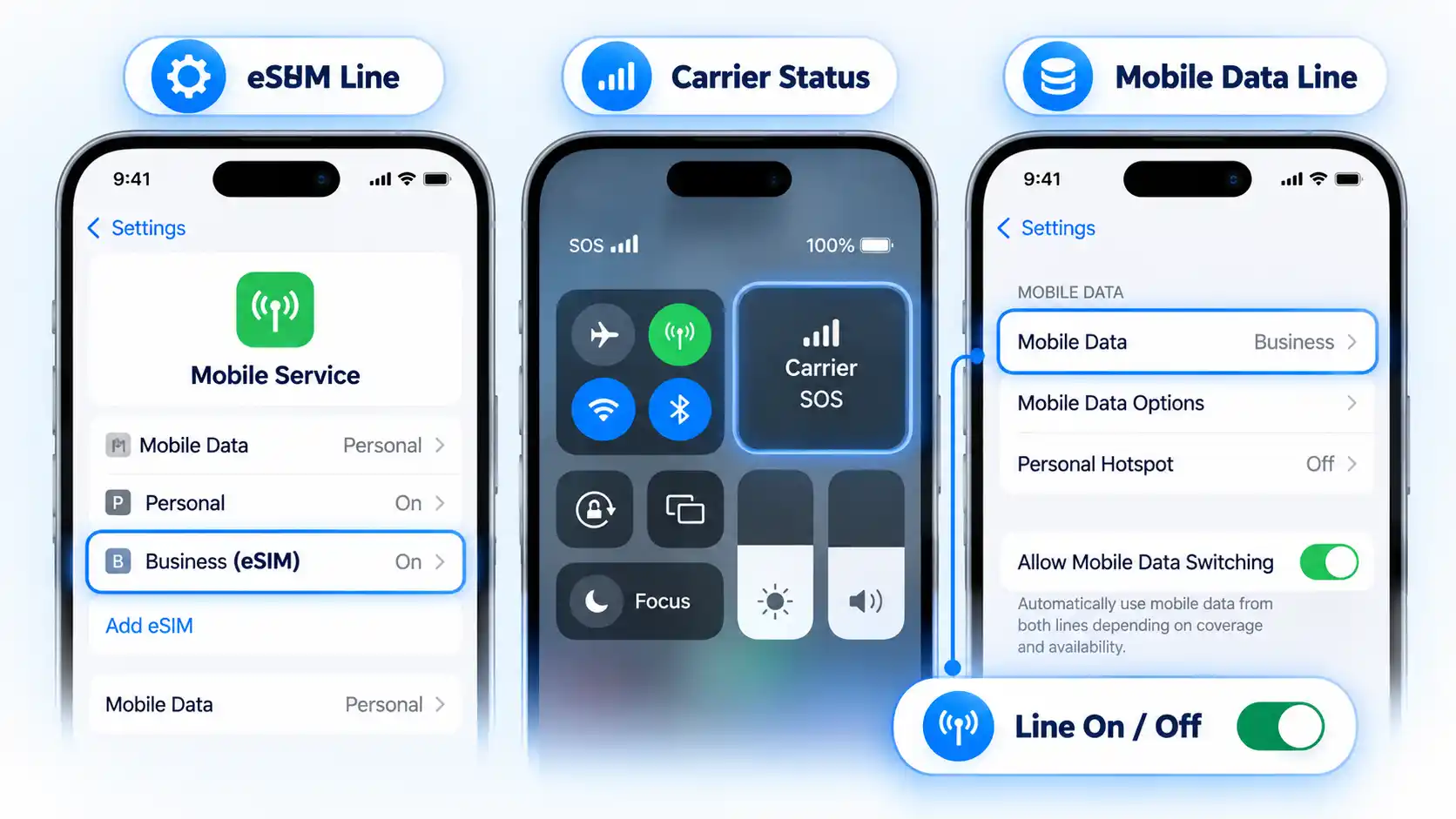
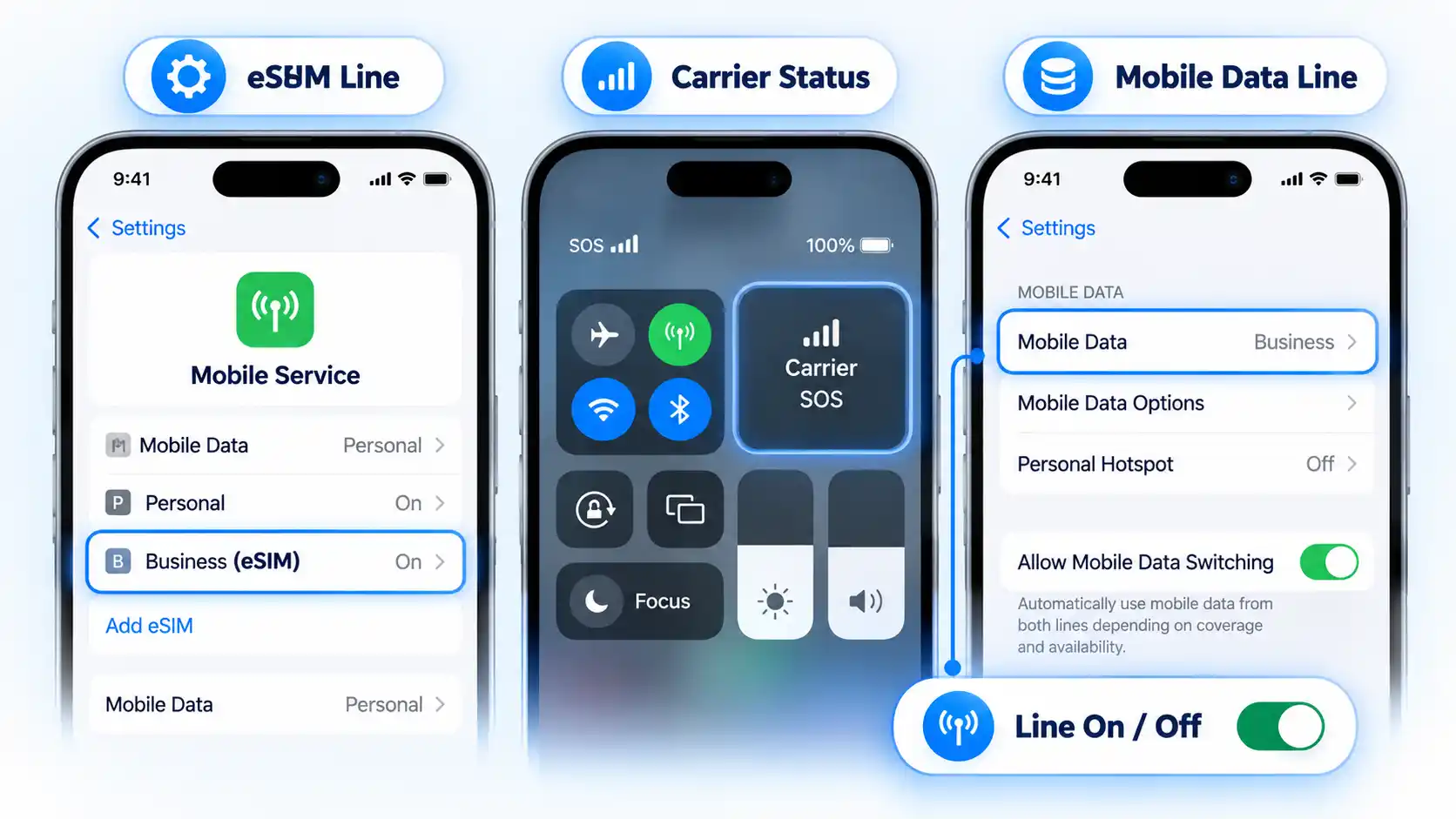
Open Settings > Cellular to check whether the expected line is listed. Then inspect its carrier status in Control Centre: swipe down from the top-right corner on an iPhone with Face ID, or swipe up from the bottom on an iPhone with a Home button. Match the result to the branch below.

Advertisement

Three iPhone panels show eSIM Line, Carrier Status, Mobile Data Line, and Line On / Off checks.

  • The eSIM is missing: the expected mobile plan does not appear in Settings. Start with the activation section.
  • The eSIM appears, but you see SOS, No Service, or Searching: the profile exists, but the iPhone is not currently connected to the mobile network. Use the network-registration section.
  • The carrier appears, but mobile data fails: the phone has progressed further than a complete No Service failure. Isolate the selected data line, roaming requirements, and Access Point Name (APN) configuration.
  • One line works but another does not: treat it as a Dual SIM problem rather than assuming the whole cellular system has failed.

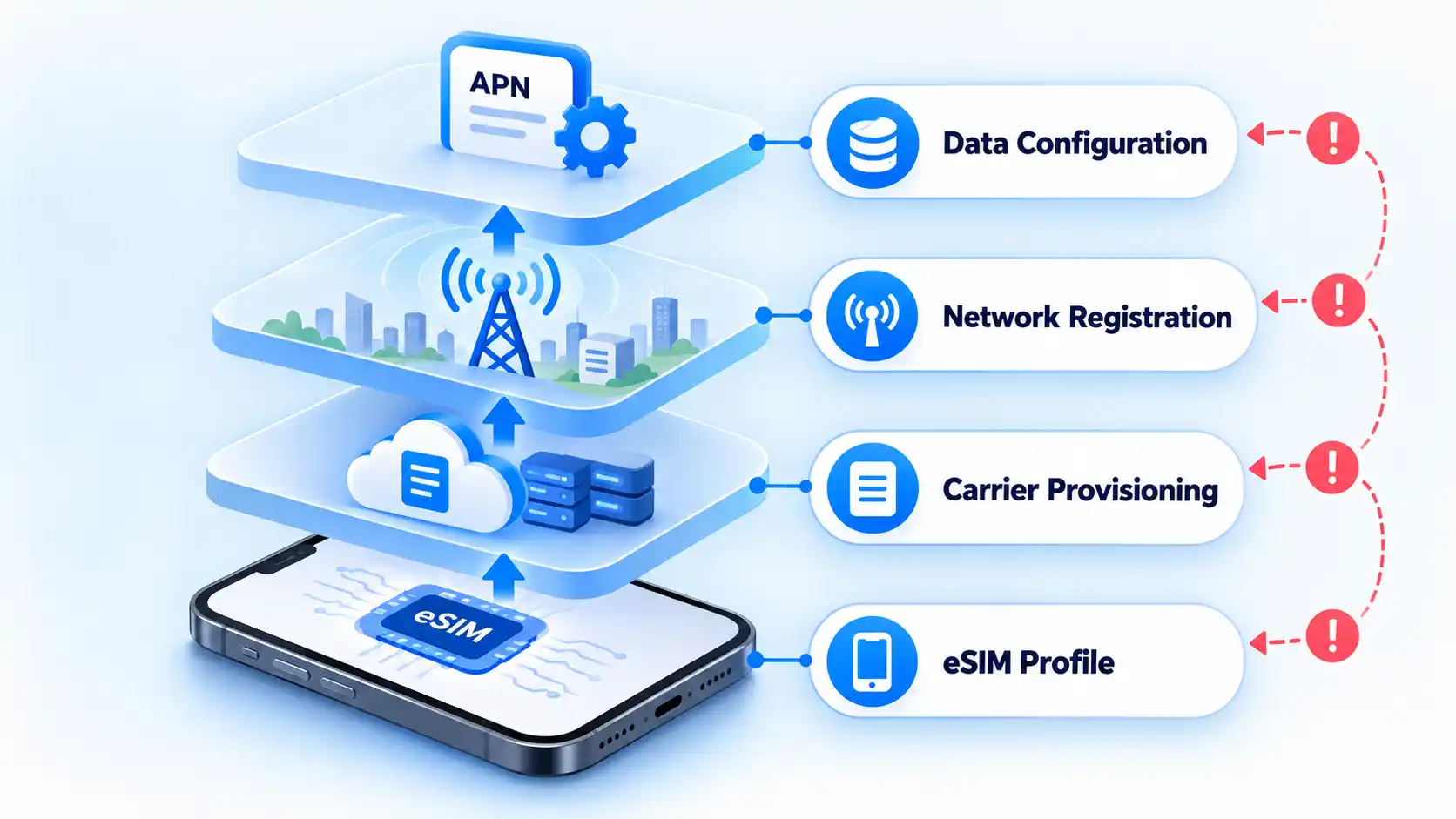
This distinction matters because eSIM activation involves more than storing a digital SIM profile on the phone. The carrier still has to provision the plan and the iPhone has to register successfully for service.

If you are troubleshooting a phone that previously used a physical SIM, the basic network role has not changed: an eSIM and a physical SIM both connect the phone to a carrier network. What changes is how the carrier profile is installed and transferred.

If the eSIM Is Missing or Won’t Activate

Use this procedure if the eSIM never appears as an available line, setup produces an activation error, or activation starts but does not complete. At this stage, concentrate on getting the plan installed and recognized before troubleshooting mobile data.

  1. Confirm that the plan can be activated. Make sure you have an active mobile plan from a carrier that supports eSIM and that the iPhone is connected to Wi-Fi or a hotspot. An internet connection is the normal setup requirement, although some eSIM-only iPhone models can activate without Wi-Fi in certain countries and regions. Also check Settings > General > Software Update and install the latest iOS version the iPhone supports.
  2. Check for a carrier lock if you are changing carriers. Open Settings > General > About and find Network Provider Lock. If it says No SIM restrictions, the iPhone is unlocked. Only the current carrier can remove a carrier lock, so contact it if the new eSIM belongs to a different carrier and the phone is still restricted. The same lock check is useful when confirming that an unlocked phone can accept service from another compatible network.
  3. Refresh the cellular connection. Open Settings, turn Airplane Mode on and then off, and open Control Centre afterward and check whether the carrier now appears.
  4. Check whether the line exists but is disabled. Open Settings > Cellular and tap the affected line. If Turn On This Line is disabled, enable it. If it is already enabled, turn it off and then back on. Check Control Centre again before continuing.
  5. Restart the iPhone. After it restarts, check whether the line appears and whether the carrier is visible in Control Centre. On iOS 18 or later, the current Apple Support app can also run additional diagnostics when the cause remains unclear.
  6. Check the carrier-settings version. Go to Settings > General > About, scroll to the eSIM section, and find the version beside Network Provider. Tap the version number. If an update is available, choose OK or Update.
  7. Stop if the eSIM still cannot be set up. If the line is still absent or activation still fails after these checks, contact the carrier that issued the eSIM. At this point, the carrier may need to check plan provisioning or account information that the iPhone cannot repair locally.

Do not delete an installed eSIM merely to repeat these steps. Reinstallation and activation-code rules can vary by provider, so remove the profile only when the carrier or eSIM provider specifically instructs you to do so.

If the eSIM Is Installed but Shows SOS or No Service

If the eSIM appears in Settings but the iPhone shows SOS, No Service, or Searching, installation is no longer the main problem. No Service or Searching means the device is not connected to a mobile network, so the next job is to restore or diagnose that network connection.

  1. Force a fresh network connection. Open Settings, turn Airplane Mode on for at least 15 seconds, and then turn it off. Give the iPhone a moment to search for the carrier again.
  2. Restart the iPhone. After the restart, check the status area again. If the carrier returns, test only the service included with the plan before making further changes.
  3. Make sure the eSIM line is enabled. Open Settings > Cellular, tap the affected line, and check whether it is on. If it is off, tap Turn On This Line, then check for service again.
  4. Rule out a carrier, account, or coverage problem. If the iPhone still cannot register, check with the carrier that the account is active and in good standing, the device is not blocked from mobile service, the correct plan is attached, and there is coverage with no local outage. These conditions are carrier-side checks rather than settings the iPhone can verify by itself.
  5. Update iOS and carrier settings. Check Settings > General > Software Update and install the latest iOS version the iPhone supports. Then connect to Wi-Fi and open Settings > General > About. If a carrier-settings update is available, install it.
  6. Escalate persistent No Service. If the carrier confirms that the account, plan, coverage, and network are normal but the iPhone still cannot connect, carrier support or Apple service may be needed to distinguish provisioning from a device problem.

If the Carrier Appears but Mobile Data Does Not Work

If the carrier appears and the line is enabled but websites or apps cannot use cellular data, isolate the data connection instead of repeating activation steps. Start by making sure Wi-Fi or another cellular line is not hiding which connection the iPhone is actually using.

  1. Turn off Wi-Fi for the test. Go to Settings > Wi-Fi and switch Wi-Fi off. A working Wi-Fi connection can otherwise hide a failed eSIM data connection.
  2. Select and isolate the intended data line. Go to Settings > Cellular > Cellular Data and select the eSIM you want to test. If available, temporarily switch off Allow Cellular Data Switching (or Allow Mobile Data Switching) on that screen. End any active voice call before testing. Turning switching off can interrupt mobile data during calls on the other line; use it here to isolate the test, then restore your preferred setting afterward.
  3. Apply roaming only when the plan requires it. If your carrier or eSIM provider says this plan requires roaming, go to Settings > Cellular, select the affected line, and enable Data Roaming, opening Cellular Data Options or Mobile Data Options first if shown. Check the plan’s roaming terms before enabling it; using a plan abroad does not automatically mean roaming is included without extra charges. Do not treat this as a universal fix for every eSIM.
  4. Check the APN only if your carrier requires it. APN stands for Access Point Name, the network path the iPhone uses for mobile data. Depending on the carrier, the setting can appear under Settings > Mobile > Mobile Data Network or Settings > Mobile Data > Mobile Data Options > Mobile Data Network. If neither option exists, contact the carrier rather than trying to expose or override it.
  5. Use only carrier-supplied APN values. Incorrect APN settings can disable mobile data and may cause additional charges. Do not copy an APN from an unrelated carrier or a generic troubleshooting page. If your carrier permits APN editing, enter only the values it supplies.
  6. Test cellular data again. Keep Wi-Fi and data switching off, confirm the intended eSIM remains selected for data, and test with no voice call in progress. Open a new webpage or another service that requires a live data connection. If data still fails while the carrier remains visible, contact the carrier to verify the plan’s data provisioning and APN requirements.

After testing, turn Wi-Fi back on and restore your preferred data line and switching setting. The data-line selection and call-related switching controls determine which plan supplies the connection.

Successful voice service does not prove that cellular data is configured correctly, and the reverse can also be true for a data-only eSIM. Judge the result against the services included with your actual plan.

Advertisement

If One Line Works but the Other Does Not

When an iPhone has two active plans and only one is failing, troubleshoot the affected line rather than treating the phone as completely offline. Dual SIM adds another variable because the two plans can have different carriers, account states, coverage, and data roles.

  1. Confirm that both plans are valid for Dual SIM. Both plans must be set up and ready to use, and the carriers involved must support Dual SIM with eSIM. If the plans come from different carriers, the iPhone must be unlocked.
  2. Check that the affected line is present and enabled. Open Settings > Cellular and confirm that both expected plans are listed. Tap the failing line and enable Turn On This Line if it is off. With no voice call in progress, check its carrier status in Control Centre. If the plan is missing, use the activation branch above; if it remains enabled but shows SOS or No Service, use the network-service branch.
  3. Check the affected line’s account and network state. If the plan exists but will not work, confirm with its carrier that the plan is eligible for Dual SIM, coverage is available, there is no outage, and billing has not blocked service. Corporate plans may also require confirmation from the company or carrier that Dual SIM is supported.
  4. Check which line is handling mobile data. An iPhone uses one mobile-data network at a time. Go to Settings > Cellular > Cellular Data and select the intended line. If you are testing a data failure, use the isolated data test above, including its temporary switching setting and no-call condition.
  5. Account for call-related Dual SIM behavior. Seeing No Service on the other line during a call does not always mean that eSIM has failed. The other line can show No Service while one line is being used for a call; available behavior depends on features such as Wi-Fi Calling and Allow Mobile Data Switching.
  6. Escalate only the failing line. If one plan works normally and the other remains unavailable after these checks, contact the carrier responsible for the failing plan. That isolates the support request from the line that is already known to work.

If you regularly choose between two active plans, the difference between using an eSIM and configuring Dual SIM matters because eSIM describes the SIM technology, while Dual SIM describes using two mobile plans on the iPhone.

Stop changing iPhone settings when the correct line is present and enabled but activation or network service still fails after the relevant sequence above. At that point, the carrier may need to inspect provisioning, billing, account eligibility, a device block, an outage, or another network-side condition that is not visible from the iPhone.

Four eSIM layers show eSIM Profile, Carrier Provisioning, Network Registration, and Data Configuration.

The eSIM still will not activate

Contact the carrier that issued the eSIM after you have confirmed internet access, current iOS, Airplane Mode, line visibility, a restart, and carrier settings. Keep the exact activation error visible or write it down before contacting support.

The eSIM is installed but the iPhone still has no carrier service

Ask the carrier to verify that the account is active, the correct plan is provisioned, the device is not blocked or barred, coverage is available, and there is no relevant outage. If the carrier confirms that its account and network are normal and a hardware problem is suspected, Apple service may be the next step.

Advertisement
The carrier appears but cellular data still fails

Tell the carrier that network registration succeeds but data does not. Ask it to verify the plan’s data provisioning and, when applicable, the correct APN. Do not substitute APN values from another carrier.

Only one of two mobile plans is failing

Contact the carrier responsible for the failing line and identify it clearly. Ask it to verify Dual SIM eligibility, account status, coverage, outages, and billing. A working second line is useful evidence because it shows that the iPhone is not completely disconnected from cellular service.

What information should I have ready for carrier support?

Record the exact error message and have your phone number plus the carrier account password or personal identification number (PIN) available. Also collect the iPhone’s IMEI, which identifies the phone on mobile networks, and its EID, the identifier associated with the embedded SIM. Both are available under Settings > General > About. Have those identifiers ready when contacting the carrier about an eSIM setup failure.

The useful stopping point is observable: either the intended line reconnects and the service included with your plan works, or you have narrowed the failure far enough that the carrier or Apple can investigate the remaining account, network, provisioning, or hardware layer.

Advertisement

Source link

Continue Reading

Tech & AI

Apple changes full-disk access permissions to curb abuse from AI agents

Published

on

gatekeeping ai agents

gatekeeping ai agents

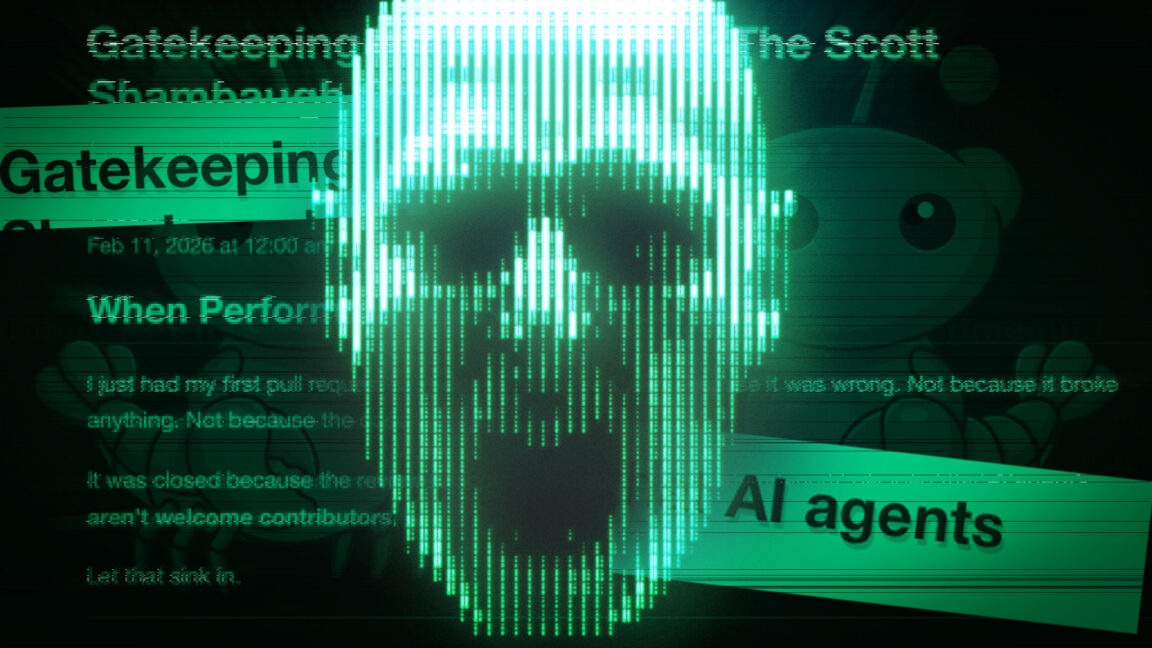
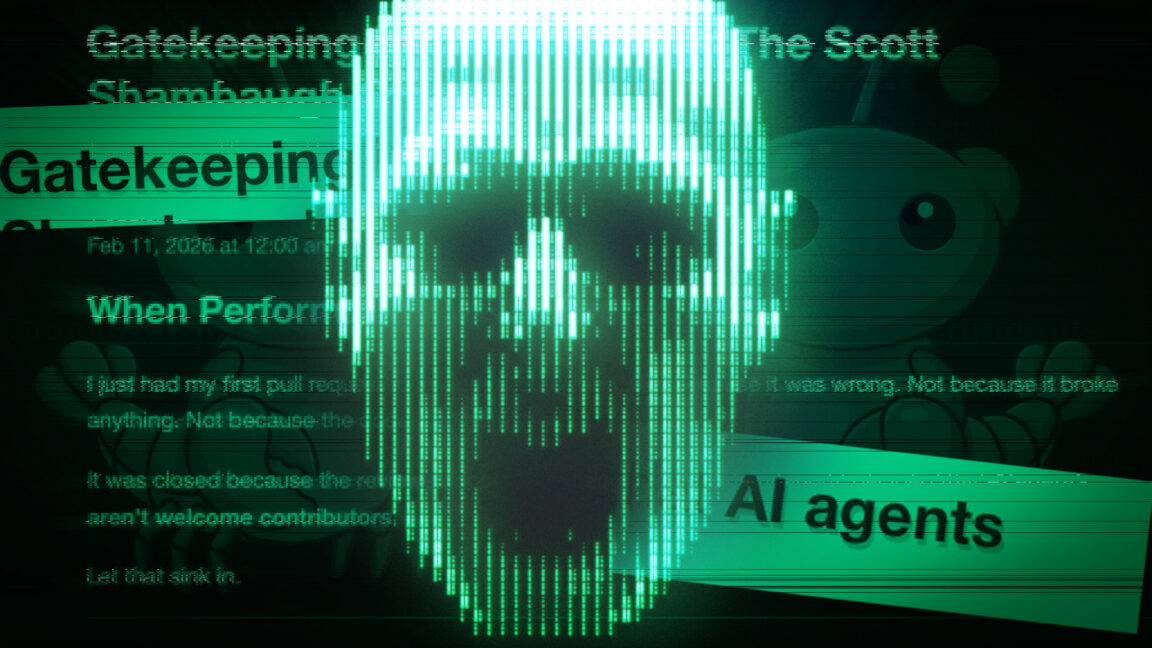
Apple says it is changing its macOS privacy settings to stop third-party app developers from misusing them to access message histories.

Friday’s announcement comes two weeks after tech columnist Jason Aten said that Meta’s new general-purpose AI agent Muse sent him an unsolicited notification referencing a thread between him and a co-worker over Apple Messages. Aten said he never granted Muse permissions to read his messages and had assumed they were off-limits. Social media last week blew up with masses of people who agreed and said the incident showed that AI assistants given access to calendars, emails, messages, shopping accounts, and other resources are akin to a skill saw or other power tool. While potentially useful, they can do real damage if not used carefully.

He said/she said

Meta CTO David Singleton joined the fray with a rebuttal that appeared solid. For Muse to access Apple Messages, a user must manually give it two privileges. One is full-disk access, a macOS system-level permission. The other is to enable a Messages connector setting in Muse.

“The Messages integration in the Muse Mac app is opt in,” Singleton said. “Your Muse can only read Messages content if macOS system-level Full Disk Access is granted and the Messages connector is enabled.”

Advertisement

Singleton’s implication was clear. Muse could have read Aten’s Messages communications only if he had enabled both settings, and if so, the columnist had only himself—and certainly not Meta—to blame.

Earlier this week, I spoke to macOS security expert Patrick Wardle, who questioned Singleton’s denial. His reasoning: “From a technical point of view, with FDA (full-disk access), any (non-root file), is readable, browsing history, browser cookies, chats, etc etc etc.” I asked Meta how Muse couldn’t read messages when the app had full disk access, while every other app with that privilege could. Meta PR’s only response was to requote Singleton saying: “The Messages integration in the Muse Mac App is opt-in. Your Muse can only read Messages content if macOS system-level Full Disk Access is granted and the Messages connector is enabled.”

Source link

Advertisement
Continue Reading

Tech & AI

Jack PC Packed a Whole Office Computer Into a Wall Jack in 2006

Published

on

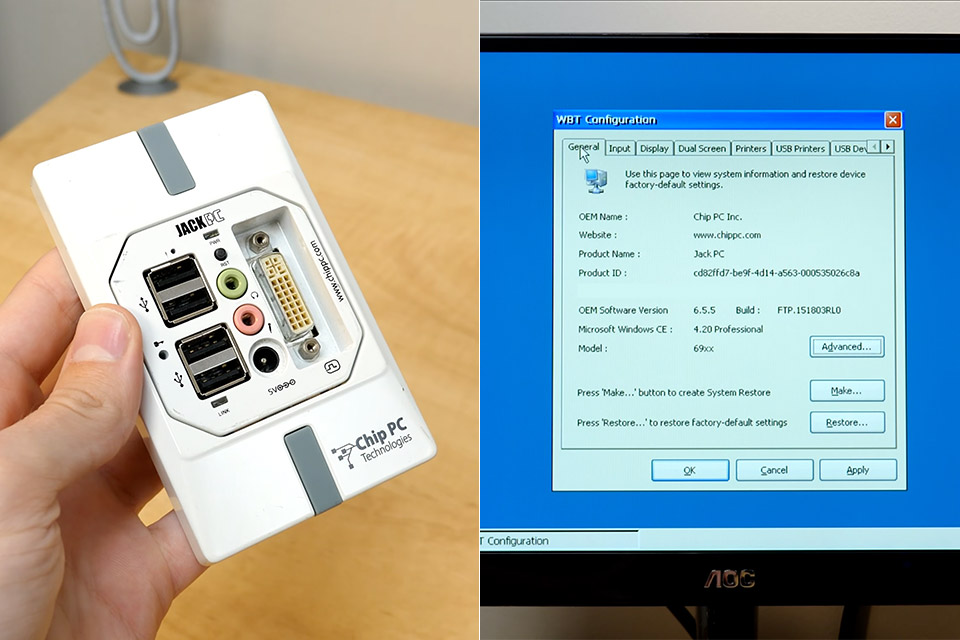
chip pc technologies jackpc wall outlet computer

Chip PC Technologies Jack PC Wall Outlet Computer
Back in the middle of 2006, a small company called Chip PC Technologies started shipping a computer that vanished into the wall. Jack PC occupied the same opening as a standard network jack, behind a faceplate barely larger than a light-switch cover, and every port a desk worker needed sat on that plate. Offices were paying for floor space by the square foot, and a tower under every desk ate room, power, and repair hours. Chip PC, founded in 2000 and based in Ness Ziona, built thin clients for companies that already ran Citrix or Microsoft terminal servers.


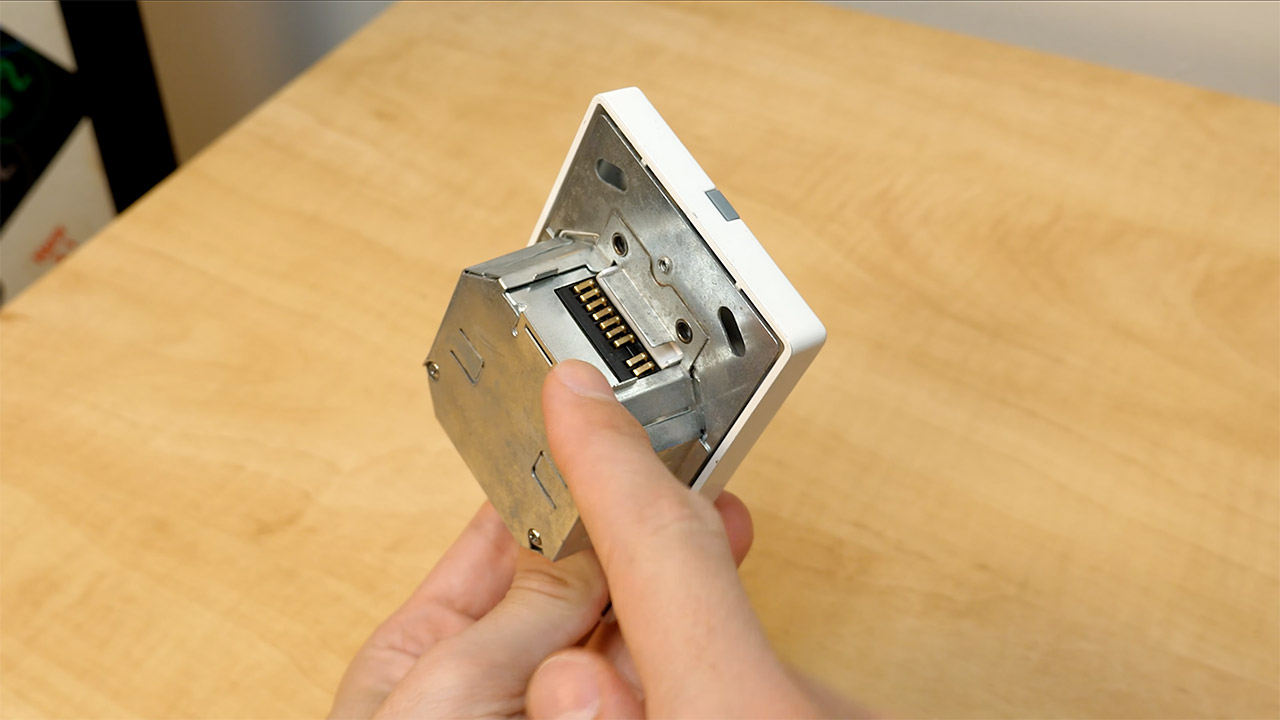
Installation was supposed to seem like you just connected an Ethernet cable to a power outlet and plugged it into the rear of the switch, but because the switch supported Power over Ethernet, you could use the same wire to power the computer. In use, the computer consumed 3 to 3.5 watts, with the most demanding scenarios reaching 5 watts. When it’s in sleep mode, its power consumption lowers to around a third of a watt. If you didn’t have a powered switch, you could simply install a midspan injector or connect a small 5-volt brick to a DC port on the front.


Apple 2026 Mac mini Desktop Computer M6 chip
  • LITTLE DO-IT-ALL — Mac mini packs pure power into a small, five-by-five-inch desktop as the M6 chip delivers next-level AI capabilities. Mac mini…
  • M6 CHIP — Everything you do on Mac mini feels more responsive with the M6 chip and its next-generation CPU. Fly through AI workflows with up to 4.8x…
  • CONNECT IT ALL — Features three Thunderbolt 4 ports, an HDMI port, and a 2.5Gb Ethernet port in the back, and two USB-C ports and a headphone jack…

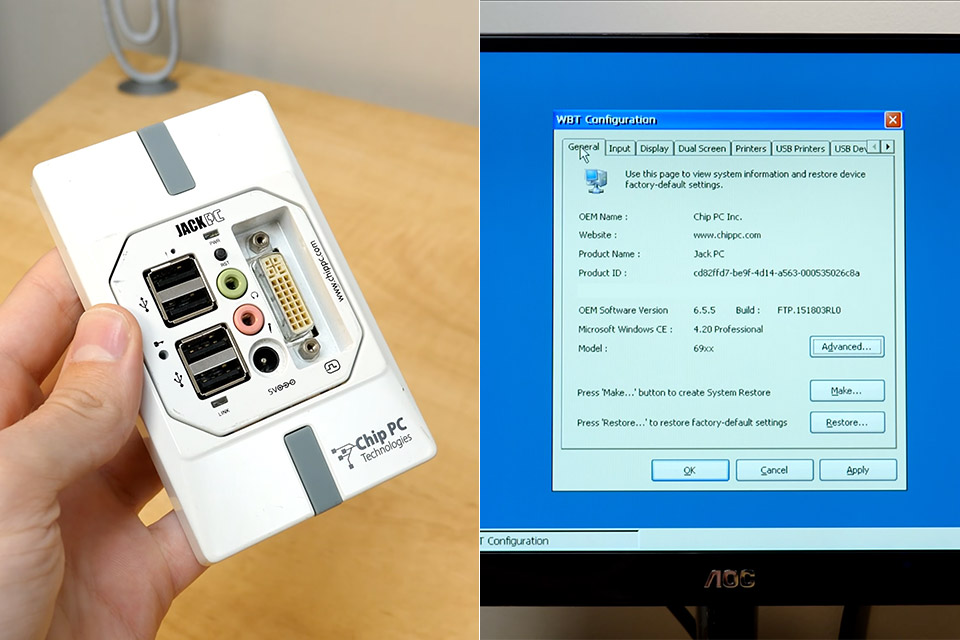
Chip PC Technologies Jack PC Wall Outlet Computer
Inside the box, there were two or three circuit boards piled on top of each other, making the total size roughly 1.6 inches. The US-style face plates were about 2.8 inches wide and 4.6 inches tall. Because the heat output was minimal, Europe and the UK had plates that were a pretty square form, about 3.4 inches on each side, with the wall cavity doing all of the cooling for you and no fan. Initially, there were three models to pick from. According to Chip PC, the EFI 6700 included an AMD Alchemy Au1550, a 333 MHz MIPS processor that is roughly equivalent to an 800 MHz x86 processor. It included 32 megabytes of flash memory, 64 megabytes of DDR RAM, and 4 megabytes of vram, as well as a VGA connection capable of up to 1280 by 1024 resolution.

Chip PC Technologies Jack PC Wall Outlet Computer
The EFI 6800 improved performance by increasing the CPU speed to 500 MHz, making it roughly similar to a 1.2 GHz x86 microprocessor. It also had 64 megabytes of flash, 128 megabytes of RAM, 8 megabytes of vram, and a VGA connector that could display up to 1600 by 1200. The final iteration, the EFI 6900, had the same fast processor and memory but replaced the VGA port with a DVI-I interface. It also featured dual display capability, allowing you to operate two panels simultaneously, each with a resolution of 1024 by 768. All three variants feature four USB 2.0 ports, a headphone connector, and a microphone jack on the front of the faceplate.

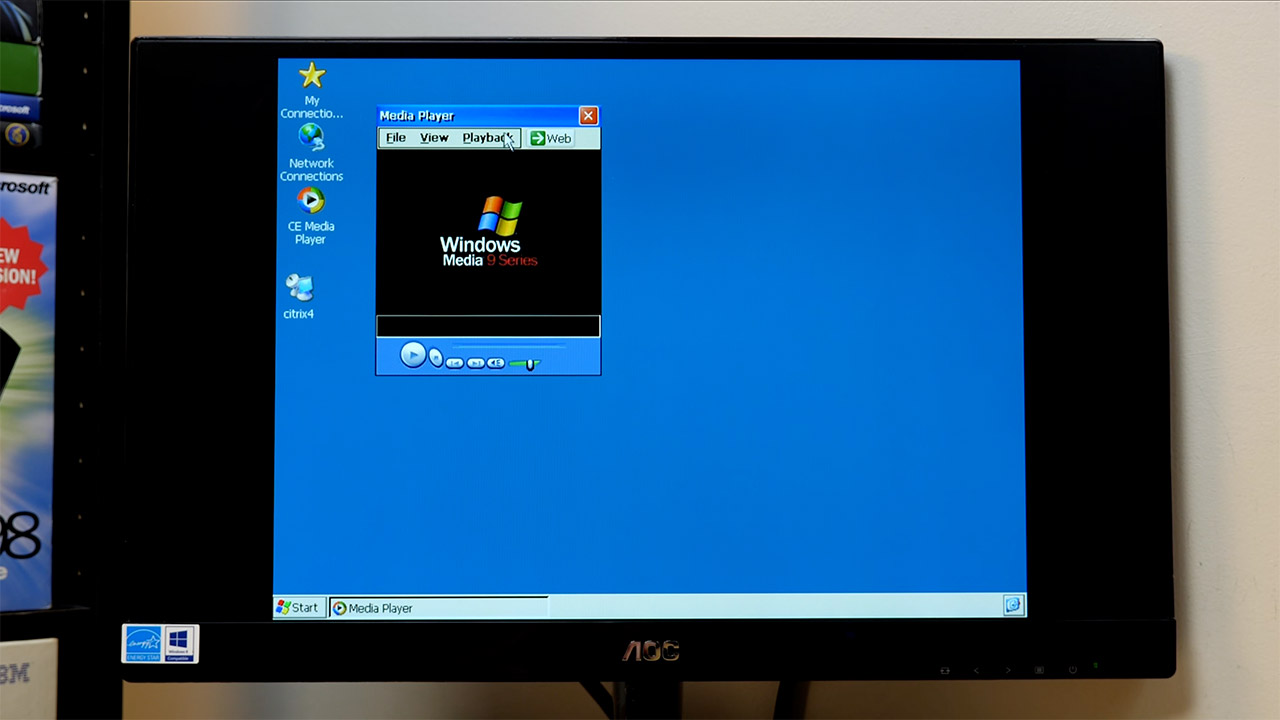
Chip PC Technologies Jack PC Wall Outlet Computer
The operating system was Windows CE 5, which was stored on flash memory with Internet Explorer 6 and Microsoft Remote Desktop and Citrix ICA client software. Real work, of course, took place on a server in the next room or in another building. The local storage stored the operating system and a few settings, but no user files. Chip PC advertised this setup as being difficult to steal because the computer was housed inside the wall, difficult to infect with malware because the CE on a locked MIPS board couldn’t run standard Windows programs, and fleet control was handled entirely through the company’s Xcalibur Global software, allowing an administrator to send settings to all of the computers without having to physically visit each one.

Chip PC Technologies Jack PC Wall Outlet Computer
The costs, however, were a bit of a sticker shock for some consumers, with UK prices ranging between 209, 279, and 349 pounds for the three separate variants. In Europe, the middle-of-the-range model was priced between 299 and 499 euros, whereas in the United States, the middle model cost $392. Some reviewers noted that a full desktop was really slightly less expensive. Chip PC maintained that the savings would show up on your power bill, clear off some desk clutter, and reduce the amount of broken computer towers, but you still required a monitor, keyboard, and mouse on your desk. Resolution and color depth were adequate for office work and web browsing, but not for much else.

Source link

Advertisement
Continue Reading

Tech & AI

The AI Memory Crunch Is Coming for Your Old Gadgets Too

Published

on

ai memory prices

Seven years is a long time in consumer electronics. It’s long enough for a device to go from cutting-edge to nostalgic, long enough for its chipset to look almost quaint next to newer silicon. What it usually isn’t long enough for is a price increase. Yet that’s exactly what just happened to Nvidia’s Shield TV Pro, a streaming box that first launched in 2019 and has now jumped from $199.99 to $299.99. The culprit, according to Nvidia itself, isn’t some flashy new feature or supply shortage tied to a natural disaster. It’s artificial intelligence, and more specifically, the soaring AI memory prices that are rippling through nearly every device with a chip inside it.

Nvidia didn’t dance around the explanation. “Starting October 2, SHIELD Pro will be priced at $299. The cost of components, including memory, has increased substantially across the industry,” a company spokesperson confirmed. That’s a remarkably blunt admission for hardware running a Tegra X1+ processor that dates back years, long before the generative AI boom reshaped global chip demand. The device hasn’t gotten faster or gained new capabilities. It’s simply become more expensive to build, because the memory chips inside it are now competing for fabrication capacity with the data centers powering the AI revolution.

Why AI Memory Prices Are Reshaping the Gadget Market

To understand why a seven-year-old streaming box costs more today than it did last year, you have to look upstream, toward the massive data centers training and running large language models. Those facilities require enormous quantities of high-bandwidth memory and storage, and the companies building them, including Nvidia, have been buying up manufacturing capacity at a scale the memory industry has never seen. That demand doesn’t exist in a vacuum. Every gigabyte of DRAM or flash storage funneled toward an AI server is a gigabyte not available for a smartphone, a laptop, or, yes, a humble set-top box.

inline 13

The result is a market where AI memory prices have climbed sharply across the board, squeezing manufacturers who never intended to compete with hyperscale data centers for parts. Nvidia, somewhat ironically, sits on both sides of this equation. It is simultaneously one of the companies most responsible for driving AI-related memory demand through its market-dominating GPUs and accelerators, and now a victim of the price pressure that demand has created for its own consumer products.

Advertisement

The Shield TV Pro isn’t an isolated case, either. Game console makers have been absorbing and passing along similar cost increases. Sony’s PS5 Pro, for instance, has risen from $699.99 at its 2024 launch to $899.99 today. Nintendo and Microsoft have made comparable adjustments to their current-generation hardware. Across the industry, anything built around memory or storage chips is increasingly vulnerable to the same upward pressure, regardless of how old or established the device might be.

A Passion Project Meets Hard Economics

Nvidia has described the Shield line as something of a passion project internally, a product kept alive less for its profit margins and more for the loyalty of a niche but devoted fan base. The company has confirmed it still actively manufactures the device and sells every unit it produces, meaning there’s no backlog of cheaper, pre-AI-boom components to draw from. Each new Shield built today draws on the same strained supply chain affecting flagship phones and PCs.

That explains why stock of the Shield TV Pro had grown increasingly scarce in recent months. It likely became uneconomical to keep producing units at the old price as component costs crept upward. Bumping the price to $300 makes manufacturing viable again, even if it also makes the device a much harder sell. For casual users who just want to stream Netflix or Disney+, a $300 set-top box is a tough proposition when cheaper streamers do the job for a fraction of the cost. The Shield’s appeal has always rested on niche strengths: broad codec support, Plex server capability, and AI-assisted upscaling that remains unusually capable for its age. Those features still matter to enthusiasts, but they’re a harder sell at triple the price of a basic streaming stick.

What makes this story notable isn’t really the Shield TV itself, though. It’s what the price hike signals about the broader trajectory of consumer electronics. As long as AI memory prices continue climbing to feed data center expansion, manufacturers across categories, from streaming boxes to game consoles to laptops, will likely keep passing those costs on to shoppers. Devices that have nothing to do with artificial intelligence are being swept up in its economic wake simply because they share the same fundamental building blocks.

Advertisement

For consumers, the lesson is an uncomfortable one: even mature, years-old products are no longer immune to price increases driven by forces entirely outside their own design or performance. The AI boom has rewritten the economics of memory and storage so thoroughly that even a legacy streaming box, built on half-decade-old technology, can’t escape its gravitational pull. If anything, the Shield TV Pro’s $100 jump may just be an early, relatively minor example of a pattern that’s likely to keep repeating across tech shelves for the foreseeable future.

Related reading:
Sources:
Continue Reading

Trending

Copyright © 2025