Connect with us

Tech & AI

The FPGA Chronicles: Exploring The Tang Nano 20K

Published

on

FPGAchronicles scaled

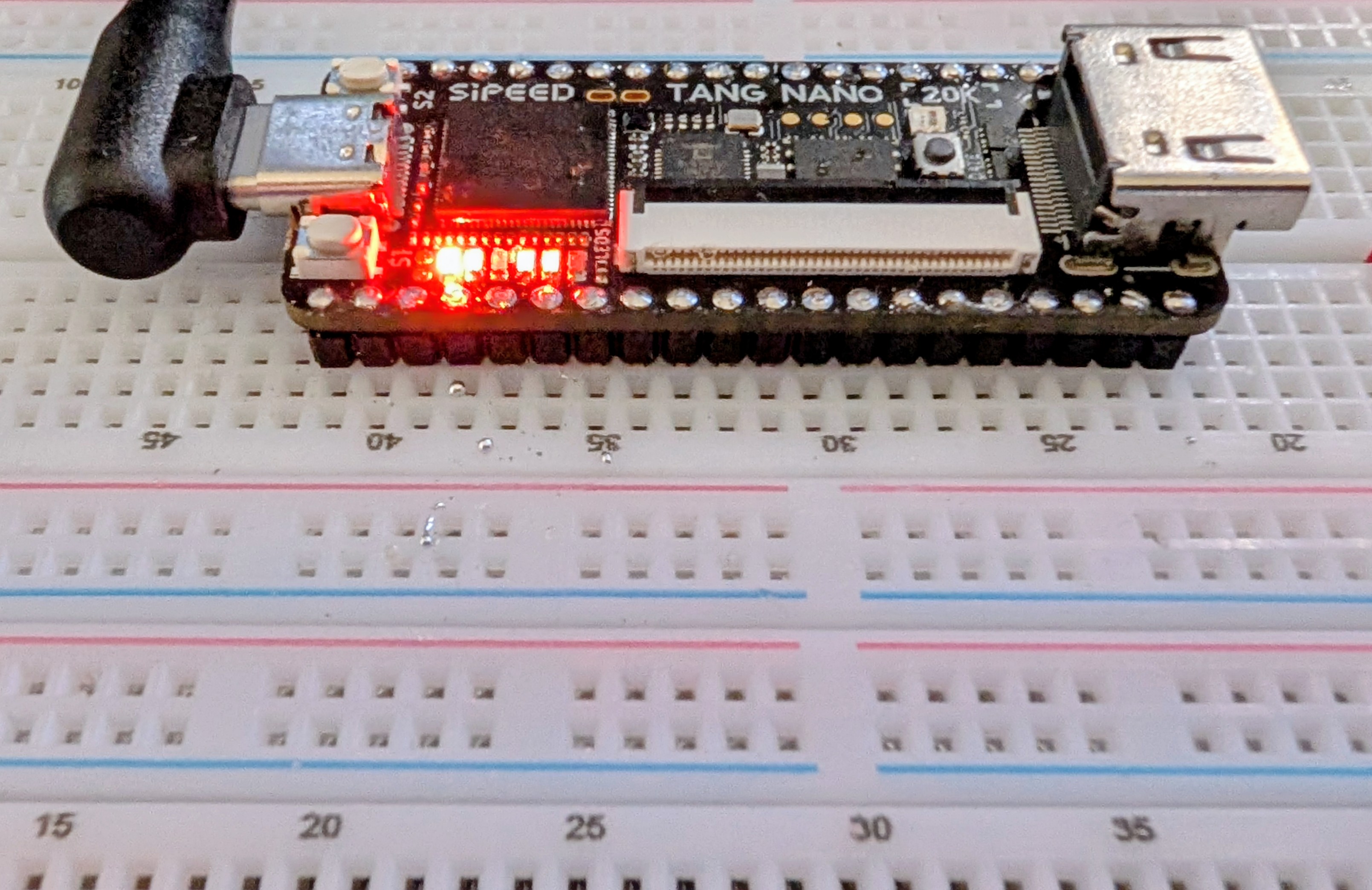
FPGAs used to be mysterious, expensive devices, but these days you can buy surprisingly capable boards for very little money. Some years ago, I did an FPGA Bootcamp over on Hackaday.io. Much of that material still applies, but the hardware is dated. So I decided it was time to update it, using the inexpensive Tang Nano 20K and its GOWIN GW2AR-18 FPGA as the main platform, with perhaps a few excursions into other FPGAs.

History and Motivation
Once upon a time, if you wanted to have a custom IC, you went with a wheelbarrow full of money to a semiconductor company. However, some smart person at a semiconductor fab eventually realized they could make a chip with a lot of uncommitted blocks on it and then, for a custom chip, only design the wiring that connected them together. This still required a wheelbarrow full of money, but it was a smaller wheelbarrow.

Then one day, someone realized they could do the same thing but make the electrical connections between the blocks configurable. Maybe have fuses you can blow, or use EEPROM or RAM cells to remember which blocks are connected to which. It is complicated, sure, but then you can make many of these chips and sell them to people who could, in theory, make their own custom chips without your help.

When do you need an FPGA? A classic classroom exercise for an FPGA, for example, is a traffic light because it shows off how to do state machines, which are important for some kinds of FPGA designs. But other than as a learning example, why would you do this? Even a simple 8-bit CPU can handle a traffic light.

Suppose instead that you have hundreds of digital sensors on a rocket, and any one of them must raise an alarm within a few microseconds. A processor has to sample inputs in groups, service interrupts, or rely on extra hardware. An FPGA can simply implement the equivalent of one enormous OR gate. It watches every input continuously, and unrelated logic elsewhere in the FPGA does not steal execution time from it. Can you do it with a microcontroller? Probably, but not easily. For some classes of problems, an FPGA is the better answer.

Advertisement

Of course, you can also build a CPU on your FPGA and some FPGAs have CPUs in the same package. This is often a sweet spot because then things that are easy to do in software, you do in software. Things that are easier to do in hardware, you do in the FPGA.

The 20K Solution

How big of an FPGA do you need? It is hard to compare FPGAs because the blocks are different. Think of PC memory. You can talk about 1 GB vs 4 GB, but the full picture depends on the memory speed, bandwidth, and timing. FPGAs are the same way. Two FPGAs may have a similar number of building blocks, but one may have much more powerful building blocks than the other. However, the 20K board’s FPGA is quite capable, even if it is hard to compare it directly to other FPGAs from other vendors.

It uses GOWIN’s GW2AR-LV18QN88C8/I7, which contains 20,736 four-input look-up tables (LUT4s) and 15,552 flip-flops. The exact maximum clock rate depends heavily on the logic and routing, so there is no single useful “FPGA clock speed,” but the device is quite comfortable in the low hundreds of MHz for appropriately pipelined designs.

Where the chip shines is memory. Most FPGAs have distributed RAM, which eats up resources on the chip, and block RAM, which are dedicated RAM cells. The GOWIN has both of these options. It also has a separate 8 Mbyte, 32-bit SDR SDRAM right in the package. Of course, you have to eat up some FPGA resources to talk to it, but not as much as you might think, and certainly not as much as it would take to place an 8 Mbyte RAM in the FPGA fabric.

Advertisement

There are other special-purpose blocks, like 48 18×18 multipliers, you can configure in a few ways. The Nano 20K board also has a programmable clock generator, QSPI flash (64 Mbits), and connections for audio, LCD, microSD, and HDMI. A microcontroller lets you program the clock generator, flash the chip via JTAG, or provide a virtual serial port back to the host.

Simply FPGA

The basic workflow for an FPGA is:

  1. Define the logic you want using an HDL (we will use Verilog, but VHDL is also common).
  2. Define a “top block” that connects to the outside world.

  3. Set up constraints that mainly tell the device which pins connect to which ports on the top block.

  4. Run a synthesis process that converts your HDL to primitives.

  5. Run a place and route process that assigns primitives to specific chip resources and produces a “bitstream.”

  6. Download the resulting bitstream to the FPGA’s RAM or to the configuration flash (which makes it survive a power cycle).

You can do all of these things with GOWIN’s IDE or open-source tools that we’ll talk about later.

Inside

You might think you just want to draw schematics. Some FPGA tools allow that, but the GOWIN IDE does not. It can, however, draw schematics to show you what you asked for. Turns out, if you are doing something large, schematics are a pain. Why draw out a 7-segment decoder when you can just describe it using a software-like language?

Advertisement

Inside the chip, there aren’t really uncommitted gates per se. There are lookup tables. So if you specify that Z=A|(BC)|(A^D) it doesn’t really go find an AND gate, an OR gate and an XOR gate. It just develops a table and programs that table to produce that function. That’s why LUTs — Look Up Tables — are important.

Simplicity

So let’s look at the simplest possible thing you might do.


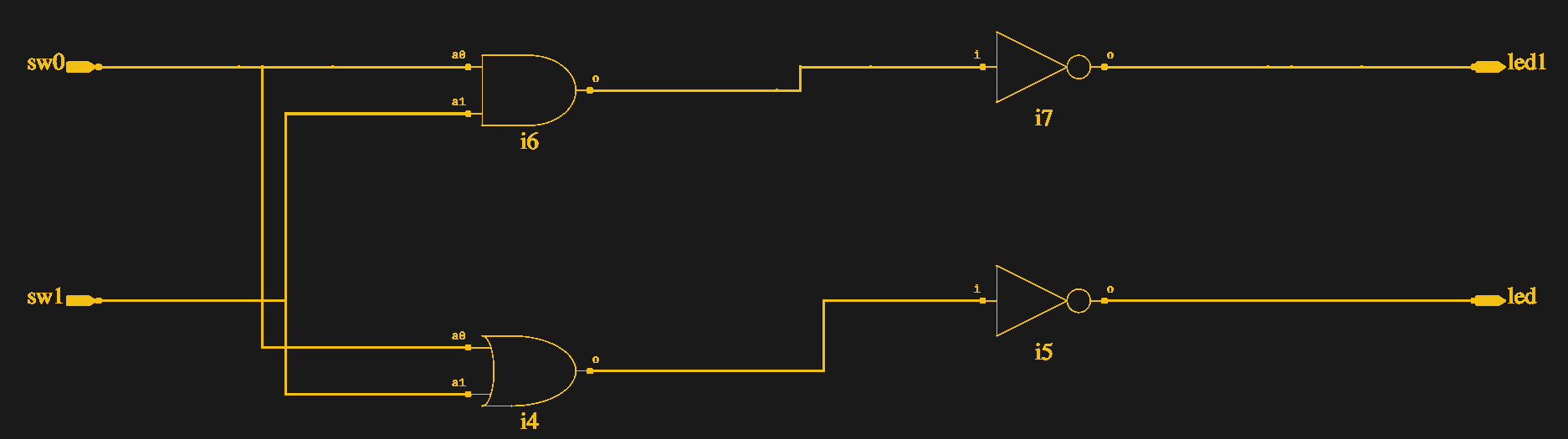
module top(output led1, output led, input sw0, input sw1);
assign led=~(sw0|sw1);
assign led1=~(sw0&sw1);
endmodule

We’ll talk more about Verilog later, but for now note that nothing “executes” these lines one at a time. This literally tells the FPGA design software to connect the two switches to a logic gate and then invert the result and connect it to the LED. At run time, this isn’t code, it is wiring.

The LEDs on the board are active low, so this just takes two inputs (presumably switches), computes the OR and AND, and outputs them to the LEDs. The switches on the 20K are pulled down so there’s no need for a pull up or pull down in the FPGA. The output is a logic one when you press the swtich.
Advertisement

How do you connect the devices to your “code?” You need a constraint file, and that’s easiest done through the “Floorplan” editor (see the figure). It builds a file which you can change if you prefer to work with a file:


IO_LOC "led" 15;
IO_PORT "led" IO_TYPE=LVCMOS33 PULL_MODE=UP DRIVE=8 BANK_VCCIO=3.3;
IO_LOC "led1" 16;
IO_PORT "led1" IO_TYPE=LVCMOS33 PULL_MODE=UP DRIVE=8 BANK_VCCIO=3.3;
IO_LOC "sw1" 88;
IO_PORT "sw1" IO_TYPE=LVCMOS33 PULL_MODE=NONE BANK_VCCIO=3.3;
IO_LOC "sw0" 87;
IO_PORT "sw0" IO_TYPE=LVCMOS33 PULL_MODE=NONE BANK_VCCIO=3.3;

That’s it. The schematics come in two flavors. One shows what you’d expect (see the figure). The other shows opaque LUT boxes.

The video below walks through the design from starting the project to watching it work on a breadboard.

Installing

The final project in Bootcamp 0.

I’m glossing over a lot of details. While the GOWIN software runs on Linux, I had to do a lot to get it to work. Since I wasn’t on a supported distro, I had to work out the dependencies myself, but that wasn’t too hard.

The problem was when I tried to execute the program. The first problem was with libfreetype.so.6. I removed the private copy and linked it to my system copy. That got me a little further. However, to get it all running, I needed to set (or add) GOWIN’s lib directory to LD_LIBRARY_PATH to prevent it from picking up system libraries.

Advertisement

The programmer also needed a little work to not run afoul of other drivers on the system. The specific cure there for me was to build the file: /etc/udev/rules.d/99-tang-nano-20k.rules with these lines:

SUBSYSTEM=="usb", DRIVER=="ftdi_sio", ATTRS{idVendor}=="0403", ATTRS{idProduct}=="6010", ATTR{bInterfaceNumber}=="00", RUN+="/bin/sh -c 'echo $kernel > /sys/bus/usb/drivers/ftdi_sio/unbind'"

Of course, my fixes may or may not help your problems. If you are lucky, you won’t need any fixes at all. The open-source tools are perhaps a little easier to deal with, and we’ll look at those too. However, some of the GOWIN tools are nice, and you can check an option to have it always use your choice of external editors, which is a nice feature.

Next Time

If you need a refresher on digital logic, the original FPGA Bootcamp 0 lets you learn about logic design using a free tool in your browser. No FPGA required at all. Meanwhile, we’ll be looking later at open-source tools, IP, synchronous logic, and using the built-in logic analyzer, among other things. If you want to talk about this series, drop by our Discord server.

When you finish up your next FPGA project, don’t forget to send us a tip. You might see your project on Hackaday.


Advertisement

Source link

Continue Reading
Click to comment

You must be logged in to post a comment Login

Leave a Reply

Tech & AI

Grab AirPods Max 2 for $429 ($120 off)

Published

on

69334 146187 airpods max 2

Save $120 on Apple’s over-ear AirPods Max 2 headphones at Amazon today, with every color marked down to $429.

Continue Reading

Tech & AI

Polling: Americans Uncertain On RFK Jr.’s Vaccine Stance, Very Certain That They Hate Him

Published

on

from the we’re-done-with-you dept

In my many, many posts about RFK Jr. and his disastrous tenure as Secretary of HHS, there are two themes that have hopefully broken through all the noise.

The first is that Kennedy is a miserable communicator, in a way that is totally purposeful. He talks out of both sides of his mouth all the time, such that he’s able to claim to both sides of the vaccine “debate” that he’s said what they want him to say. “Go get the MMR vaccine” he’ll say when confronted by a measles crisis that is spinning out of control. Then he’ll get in front of anti-vaxxer groups and brag about how he is changing the childhood MMR vaccine schedule, while claiming it is untested and dangerous. This leaves the public confused. It’s how you get outbreaks of once-defeated diseases.

The second is that the public generally understands that Kennedy is a problem and doesn’t like what he’s doing. We saw that trend begin in polling going back to the middle of 2025, as well as when the White House briefly flirted with understanding that Kennedy’s bullshit was becoming a massive liability for the now-approaching midterms.

Well, more recent polling demonstrates both of these things together in one poll. The public is generally confused about what Kennedy’s stance on the MMR vaccine is, but they are not at all confused about the fact that they hate him. Let’s start with the MMR vaccine.

Advertisement

Americans’ uncertainty of where Kennedy stands on the MMR vaccine might in large part be traced back to Kennedy himself. He has rarely provided unflinching support for the highly effective vaccine.

More than 1,900 adults responded to the poll, conducted from August 4 to 17. Of all participants, 31% correctly stated that Kennedy recommends the MMR vaccine, up from 23% in August 2025. But most indicated that Kennedy either doesn’t recommend the vaccine (29%) or are unclear about his position (40%).

I will quibble slightly with the wording in the post, specifically the word “correctly.” This is putting way, way too much weight on Kennedy’s statements that people should in fact get the vaccine. While he’s done that, I’ve already described how Kennedy talks out of both sides of his mouth on the subject. Kennedy has spent his entire career claiming that vaccines are dangerous in part because they aren’t tested. He’s made other claims about the ingredients in the MMR vaccine being deadly or causing other afflictions like autism, even long after those ingredients were removed. To view his statement that he wants people to get a vaccine that he claims is dangerous and untested as though it came with a wink and a pair of crossed-fingers isn’t in any way unreasonable. To claim the only correct answer to the polling question is that Kennedy recommends the MMR vaccine is simplifying things in the extreme.

Later in the post, CIDRAP even acknowledges much of this when talking about the current measles outbreak.

On August 2, after years of unproven claims about the MMR vaccine and an assertion that childhood vaccines cause autism, Kennedy denied responsibility for the measles outbreaks. “I’ve never questioned the efficacy of the MMR vaccine,” he said on CNN. “A measles vaccine is effective. It stops measles in about 97% of the cases.”

But the overall point here is that Kennedy’s purposeful waffling is the direct cause of a public that is confused on what Kennedy actually wants them to do to combat the measles outbreak and plays a huge part in the outbreak existing to begin with. This resurgence absolutely is his fault. It’s his life’s work, in fact.

Advertisement

And the public appears to be very aware of that in his favorability polling and the negative side of the respondents is getting more extreme.

A total of 23% of respondents said that their opinion of Kennedy is favorable, unchanged from August 2025. Half report an unfavorable view of him, with 42% saying they see him very unfavorably and 8% somewhat unfavorably. While the public’s overall unfavorable rating of Kennedy has not changed since August 2025, significantly more participants said their opinion is very unfavorable in 2026 than in 2025 (42% vs 37%).

That the White House hitched its wagon to this absolute turd of a cabinet secretary is strategic political suicide. It makes no sense. Trump could raise his favorability ratings full points almost immediately by firing this clown and committing to actually sound healthcare policy. That may sound like a small thing overall, but in the current climate of political inertia, it really isn’t.

I can’t explain why Kennedy has such as grip on Trump. I don’t know why it is that the White House is so enamored with this kind of political weight as it swims towards a midterm election that sure looks like it’s going to be a GOP ass-kicking.

But I do know we’re all worse off for it.

Advertisement

Filed Under: anti-vaxxers, hhs, measles, mmr vaccine, rfk jr., vaccines

Source link

Advertisement
Continue Reading

Tech & AI

Top tips for double checking AI info in your academic research

Published

on

count

Allison Faix and Samantha Duncan of Coastal Carolina University discuss the easy steps researchers can take to ensure that their work is accurate.

Almost 25pc of adults in the United States are using artificial intelligence chatbots on a daily basis, a 2026 Pew Research Centre study found.

At the same time, another recent study found that 48pc of the information that popular free chatbots gave in response to questions about the news contained errors.

As librarians, we know that if students are using AI chatbots to help with their academic research, they shouldn’t assume that the information they’re given is accurate.

Advertisement

Not all AI is the same. Here are four steps we recommend to question information AI generates, including by checking the original source and considering issues that aren’t always easy to spot.

Find the best fit

First, we think it makes sense to spend time choosing the right AI tool for the task at hand.

AI tools, be it ExLibris’ Primo Research Assistant, Research Solutions’ Scite, Anthropic’s Claude or OpenAI’s ChatGPT, are trained with various datasets and use different algorithms to generate results. They should not be used interchangeably.

Advertisement

Some tools might be better or worse at answering specific kinds of questions, and the types of answers they generate can vary.

People might choose ChatGPT, for example, at the beginning of their research process, because it can provide overviews and summaries to help with understanding concepts.

In subsequent stages, they might choose a tool such as Primo Research Assistant or Scopus AI, which can help find and examine peer-reviewed research that has been vetted by academics.

Students conducting academic research could also see whether their library subscribes to an artificial intelligence tool like LeapSpace or Consensus, which draw their data from peer-reviewed, scholarly research.

Advertisement

Using these specific AI tools doesn’t eliminate the need to evaluate their answers, but it provides more certainty that the data has gone through a review process.

Tools such as Anthropic’s Claude, meanwhile, may also draw from academic research, but to what extent is unclear. According to Anthropic, Claude states that it is trained on a proprietary mix of publicly available information from online sources, public and private datasets, user data and synthetic data generated by other models.

Finally, it can be helpful to read librarians’ reviews about AI tools to help select the best fit. People can also take a simple online test such as ROBOT to help them consider which tool to use.

Ask more questions

Advertisement

Second, asking follow-up questions is an important part of evaluating the answers AI tools generate. Even if the answer an AI tool gives sounds good, it is useful to take time to learn more about it.

Checking one’s own emotions is also important, because AI chatbots have been known to flatter users by giving answers based on the user’s own biases, or what the user wants to hear, rather than just facts.

Ask the AI to tell you where it got the information, how confident it is that the answer is correct and what might be missing. Ask the AI why it believes the answer is correct, or ask it to explain how it came up with an answer.

It’s helpful to also make sure your prompt is phrased in a neutral way. For example, asking “What does psychological research say about social media and anxiety?” rather than “Tell me why social media causes anxiety” may produce different responses.

Advertisement

Check the source

Third, it is useful to trace any claims the AI chatbot makes to their original sources.

Students may be familiar with using the SIFT process to evaluate websites. This process asks people to stop, investigate the source, find better coverage and trace claims to their original source.

Start by asking the chatbot to cite its sources, if it did not do that already.

Advertisement

Then, go to each source and read enough to figure out whether the AI is using the information in the right context. Also, look into who authored the source and whether they have expertise in the topic. If the AI won’t cite the sources it used, or if the sources it cites don’t include the information it said they did, pull out any claims it is making and do further research.

Can you find other, credible sources that back up what the AI is saying, using Google or a library database? Can you figure out where the AI may have gotten the information and whether that source is credible?

If this seems like a lot of work, you could always go directly to library databases instead of using AI tools.

Not all issues are easy to spot

Advertisement

Fourth, there are other, less visible issues that can play out when using AI tools.

For example, it might not always be easy to tell whether an AI tool is missing important perspectives or is giving biased information.

Remember that you, not the AI tool, are the researcher. It might be easy to rely on an AI tool to generate a summary of important sources, but deciding for yourself what sources to use helps you learn about a topic more deeply.

Research shows that most AI tools focus on sources such as websites, internet forums and other online content that is freely available and written in English. Consider what expert knowledge might be missing from AI datasets and seek out those viewpoints when needed.

Advertisement

Last, remember that you need to cite the AI tool you used if you are quoting or paraphrasing text generated by it in your work, just as you would cite any other source.

Artificial intelligence is changing fast. As librarians, we think it is important to continually evaluate whether the tools you are using are still working for you.

These tips are a good place to start to help sharpen your evaluation skills.

The Conversation

By Allison Faix and Samantha Duncan

Advertisement

Allison Faix is the instruction coordinator at Kimbel Library at Coastal Carolina University. Her work focuses on information literacy, source evaluation, misinformation and teaching students how to assess online information. She has published and presented on approaches to evaluating sources, including the SIFT method and the ACRL information-literacy framework, and more recently on evaluating generative AI output. She has also been active professionally in academic librarianship and has contributed to research and teaching initiatives at Coastal Carolina.

Samantha Duncan is an instructional design librarian at Coastal Carolina University’s University Libraries. Her work focuses on instructional design, digital learning and the use of emerging technologies in higher education. Before joining Coastal Carolina, she worked at McMaster University, where she contributed to Beyond the Exam, a project exploring more flexible and authentic approaches to online assessment.

Don’t miss out on the knowledge you need to succeed. Sign up for the Daily Brief, Silicon Republic’s digest of need-to-know sci-tech news.

Advertisement

Source link

Continue Reading

Tech & AI

82% of approved electronics are tested in China, but the FCC wants that figure down to zero by 2028

Published

on

2026 10 12 ts3 thumbs f86

2026 10 12 ts3 thumbs f86
The restrictions would cover test labs and certification bodies in countries that deny reciprocal treatment to their US counterparts. Chairman Brendan Carr says fewer than 4% of electronic devices are tested in American labs.
Read Entire Article
Source link

Continue Reading

Tech & AI

A Spanish museum built a Cray-1 replica powered by 30 old Mac minis

Published

on

2026 10 11 ts3 thumbs 5d2

2026 10 11 ts3 thumbs 5d2
The Museo de Historia de la Computación spent 18 months developing the exhibit. The replica preserves the appearance of the 1976 machine without trying to reproduce its internal hardware. Built to mark the 50th anniversaries of the Cray-1 and Apple’s founding, the model is now on permanent display at the…
Read Entire Article
Source link

Continue Reading

Tech & AI

The Pros And Cons Of Importing Foreign Phones To The US

Published

on

intro 1791478375

There’s a lot to consider before buying a new phone from abroad.

There are plenty of smartphone options to choose from in the US, from the iPhone to the Pixel. But there are also really interesting phones you’ll never find in an American store. Xiaomi’s foldables like the Mix Fold, Honor’s Magic series and OPPO’s Find X phones are a few examples that offer unique designs or features not generally seen in the US. 

While phones like these are harder to find in the country, it’s possible to import them, but bringing a phone from abroad has its downsides. You may have problems using your phone with local carriers or getting warranty coverage, among other trouble. If you’re considering an imported phone, always check a few points first.

Advertisement

What you should know before buying a phone from another country

Buying an imported phone has become a lot easier in recent years. Most smartphones are now designed to work globally on most cellular bands. Still, some phones may not work with those used by your US carrier. Start by checking whether the phone you’re considering is compatible with your carrier’s frequency bands. Buying the wrong version could leave you stuck on the LTE network with no 5G support.

Carrier-specific features can cause issues too. Features like Wi-Fi calling, VoLTE and visual voicemail usually require certification for each device. So even if your imported phone works fine on your carrier’s 5G network, it might not be able to access all these features in the US. Network requirements may also change, so a model that works fine today may run into problems in the future. It’s worth checking forums like Reddit to see what people who’ve bought the phone you want have to say. 

Then there are software updates; the rollout of Android updates may be tied to carriers or regions. Also, some Chinese phones are not compatible with Google Play Services, which are a core part of the Android experience most people expect. You may have to install updates manually, and the software might include Chinese apps and services that aren’t relevant to you (or readable).

Additionally, getting warranty service in the US for these phones may not be easy. Some of these brands have no official representation in the country, which also means no customer support. Dealing with problems like a dead battery or a cracked screen may require taking your phone to a third-party repair shop with no official authorization from the manufacturer. 

Advertisement

The benefits of importing a smartphone

If you’re okay with all these hassles, importing a phone from abroad can be a lot of fun and open you up to new hardware that isn’t available in the US. There are a lot of Chinese companies putting out exciting products, like three-screen foldables, flagships with DSLR-quality cameras and devices with massive batteries. The Xiaomi 18 Fold is a new foldable phone that looks similar to the iPhone Duo, but it has a bigger battery and better cameras. It also costs less (the equivalent of about $1,640 currently), but you’ll need to buy it abroad if you want to use it in the US.

For those who want the latest releases, importing a phone often gives you the chance to get it before the official US launch. Also, many international models still support two physical SIM cards — a feature that most phones sold in the US have already ditched in favor of eSIM. If you don’t mind the potential drawbacks, it can be a rewarding experience. But if it’s important that you have official support nearby and know all features will work properly on your network, it’s easier to buy a phone that’s officially supported in your country.

Advertisement

Source link

Continue Reading

Tech & AI

How Coding Can Cultivate Deep Civic Engagement

Published

on

Digital Footprints Event

Growing up in Joliet, Illinois, my understanding of history was largely shaped by recurrent classroom materials and historical figures I’ve only read about in textbooks. Back then, my education felt like a passive process of memorizing facts rather than connecting with living stories. Classroom technology also felt abstract and disconnected from what I learned about culture and history.

Moving to Alabama in 2002 to attend Miles College, a historically Black college, building a life in Birmingham after graduation and dedicating myself to education laid a deep, personal foundation in the heart of the civil rights South. However, it wasn’t until 2025, on the Institute for Common Power’s Truth and Purpose Learning Tour, that something profound shifted in me. The rigorous six-day journey through the historic landscape of the civil rights movement — from Atlanta’s Sweet Auburn district to Montgomery, Selma and Birmingham — fundamentally transformed the way I look at history and how I will teach it for the rest of my life.

Up to that point, I had taught computer science and other mandated lessons primarily as a career skill, focusing on logic, syntax and software mechanics. But after this transformation, I was determined to lead my scholars from passive consumers of technology to active creators who could use code to immortalize the very faces they passed on their streets every single day. Because of this transformation, I believed the most important code they would ever write was no longer meant for the screen — it was now meant to awaken the world to the brilliance right outside their doors.

As part of the Institute for Common Power’s Truth and Purpose Learning Experience, I spent six transformative days traveling across Alabama and Georgia alongside a cohort of fellow educators. Designed as an intensive professional development initiative to move education to action, this group brought us face-to-face with scholars, community organizers and everyday folks. 

Advertisement

The tour grounded us in what the Institute for Common Power calls “Movement Learning,” a three-tiered educational framework built on three essential acts:

  1. Learning from social movements that preceded us to understand the deep historical roots, structural disparities, tragedies and triumphs born from our past.

  2. Learning by physically engaging in the exact geographic sites where history occurred.

  3. Learning how to project and create change as we move actively toward a more equitable future.

We explored historic sites in Birmingham, stood on the historic Edmund Pettus Bridge in Selma, engaged with urban farming at the Jones Valley Teaching Farm to understand food deserts and why systematic disinvestment makes them disproportionately prominent in Black communities, and discovered local landmarks I never knew existed in my own backyard.

Returning to South Hampton K-8 School after those six days, I had an urgent mission: my scholars needed to see code not just as computer logic, but as an opportunity to engage with the legends they walk among every day. I came to understand that teaching STEM is most powerful when paired with interdisciplinary learning and cultural history, transforming technical skills into a profound vehicle for civic agency and community storytelling. 

Connecting U.S. History with Our High-Tech Future

Digital Footprints Event

When I returned to my classroom from the tour, my middle schoolers were completing a unit in Apple’s Swift Playground, using the built-in “All About Me” app template. In that unit, my scholars had learned how to write SwiftUI structures, configure stack layouts and display dynamic image views and text fields about their personal hobbies. The standard curriculum stopped at self-reflection, but I saw an immediate opportunity for a civic leap.

As Black History Month wrapped up, we pivoted our computer science curriculum into a new initiative: “Coding Birmingham’s Black Legacy.” I didn’t want to assign students another coding exercise; I wanted to transform our classroom into a digital archive and design studio. 

Advertisement

Instead of coding apps about themselves, our seventh and eighth graders applied their newly acquired coding skills to build interactive iOS applications honoring local pioneers who shaped society and had deep connections to Birmingham. The first step in translating these rich historical narratives into functional mobile experiences was designing a structured technical framework from the ground up.

The Technical Architecture: Engineering a Four-Screen App

To bring these historical figures to life, students moved beyond simple drag-and-drop interfaces into structural Swift programming. Using Swift Playground on iPads and MacBooks, they engineered a standardized yet customizable four-screen interactive app navigation path for each hero:

  • Screen 1: Title and Hero Page – Custom visual layout featuring the pioneer’s full name, stylized color palettes, high-resolution portrait framing and user navigation triggers.

  • Screen 2: AI-Assisted Biographical Summary – A structured text view presenting a concise, engaging overview of the pioneer’s life story, historical significance and lasting impact on social justice.

  • Screen 3: Interactive “Did You Know?” Fun Facts Card – Dynamic list views highlighting key policy achievements, community milestones or surprising biographical facts.

  • Screen 4: Digital Artifacts and Media Gallery – Embedded video playback containers, archival photographs, historical artifacts, primary source documents or links to digital museum records.

Screen 1

Screen 1

Screen 2

Screen 2

Screen 3

Screen 3

Screen 4

Screen 4

A critical layer of our technology workflow involved integrating generative Artificial Intelligence (AI) into the historical research process. Many of our selected pioneers, such as local civil rights leader Charles Mauldin or retired Judge U.W. Clemon built complex, multi-decade legacies as, respectively, an activist and Alabama’s first Black federal judge.

Beyond interviewing these living legends, students used AI tools like Gemini, Claude and ChatGPT as research co-pilots. They practiced prompt engineering, asking AI models to synthesize lengthy biographical archives, isolate key historical milestones and reframe complex legal or political terminology into clear summaries appropriate for an app interface. 

Advertisement

Students didn’t just summarize history; they unlocked the human heart of those Birmingham pioneers, making profound legacies accessible and genuinely felt by anyone who opens the app. By turning historical archives into experiences, they demonstrated how technology equips young creators to tell their community’s stories in their own terms. 

When Code Meets Community: The Library of Innovation Showcase

The climax of our project took place in February2025. Our school’s “Library of Innovation” became an interactive tech showcase. Hosted by our students, their showcase brought together parents, school leaders, local residents, stakeholders and several of the actual pioneers featured in the apps.

Students showcasing their apps to local community members.

Students showcasing their apps to local community members.

The atmosphere was electrifying. I watched in awe as 13-year-old coders stood beside their screens, proudly guiding community elders through app navigation paths, explaining line-by-line Swift code and demonstrating how AI helped them summarize local history. Their eyes lit up with pride as living legends interacted with apps built in their honor. 

In that moment, Movement Learning’s true promise came alive. Technology didn’t isolate our students behind screens; it re-anchored them to their roots and proved that their voices, written in lines of Swift code, belong at the center of Birmingham’s ongoing legacy.

Advertisement

Empowering the Next Generation of Digital Storytellers

Supported by the newly established Institute for History & Equity, this approach brings to life founder and executive director Terry Anne Scott’s concept of historical empowerment, ensuring that by empowering students to code the stories of the legends walking among them, we teach them they have the power to code the future. By studying the resilience and innovation of local civil rights pioneers and community leaders, students realize that systemic change is driven by ordinary people taking extraordinary action. They stop viewing history as something passive and start seeing themselves as active architects of their communities.

When we combine place-based, Movement Learning with modern digital tools like Swift Playground and generative AI, we do far more than teach computational logic and technical skills. We cultivate deep civic agency in our students. 

For educators everywhere, this highlights a vital realization: when we look beyond standard screen time and leverage coding as a canvas for community storytelling, we unlock an unprecedented level of student engagement and investment. Technology ceases to be just another subject to test and evolves into a dynamic vehicle for youth to champion social justice, honor local legacy, and discover their own voice.

My journey from Joliet, Illinois, to Miles College and South Hampton K-8 taught me that history isn’t just something we read about; it is something we live and build upon. 

Advertisement

By empowering middle schoolers to code the stories of the legends walking among them, we help them recognize their power to code the future.

Source link

Advertisement
Continue Reading

Tech & AI

Revenant XSpark’s XYAA Makes Its Gaming Debut in Capcom’s Dragon’s Dogma 2

Published

on

Xyaa x Dragon Dogma 2 1

Capcom’s Dragon’s Dogma 2: Dark Arisen features Indian gaming creator Shagufta “XYAA” Iqbal as an Official Pawn. Players can recruit her character through the game and take her along on their adventures. The game launches worldwide on October 9, 2026, bringing XYAA into a major international gaming title. In the game, Pawns are AI-controlled companions who assist players in combat and exploration. Players can recruit XYAA’s character through the Rift system and include her in their parties.

Her Official Pawn comes in four versions at Levels 8, 20, 30, and 50. Each version features changes to her appearance, equipment, and abilities as she progresses. XYAA retains the Archer class in every version, linking her in-game role to her competitive gaming background. This collaboration falls under Capcom’s Official Pawn program, which brings creators and personalities into the game. Indian gaming creator BeastBoyShub and international creators are also part of the program.

The latest version of the game also has new content for gamers. This includes a storyline in Norgan, a northern area covered in snow, new enemies, and 12 new dungeon quests.

XYAA’s Capcom Collaboration and Gaming Journey

With her appearance in Dragon’s Dogma 2: Dark Arisen, XYAA has moved from representing video game marketing to becoming part of the gameplay. People worldwide can use her virtual character and travel with her on their adventure missions. This association offers Indian gamers a chance to be part of the big names in video games worldwide. XYAA began playing Counter-Strike 1.6 in 2011, then moved to Valorant and went on to compete in international gaming tournaments for India. Her achievements include a top-four finish for India at the 2023 World Esports Championship.

Advertisement

She was also the only woman from esports nominated for the National Creators Award. Her partnership with Capcom aligns with Revenant XSpark’s focus on creating new opportunities for gaming talent. Founded in 2021, the organization works across competitive esports, creator management, brand solutions, publisher partnerships, content, and entertainment. It has worked with more than 400 brands across different sectors.

The game launched worldwide on October 9, 2026, for Nintendo Switch 2, PlayStation 5, Xbox Series X|S, and PC. The franchise has also built a sizeable global audience, with cumulative sales exceeding 14 million units as of March 31, 2026.

Source link

Advertisement
Continue Reading

Tech & AI

Sunday Reboot: Touch MacBook Pro's nice, but I want macOS on iPad

Published

on

69324 146178 68616 144631 66579 139653 M5 MacBook Pro display xl 1 xl

In this week’s Sunday Reboot, the touch-enabled MacBook Pro looms, but the Mac-iPad divide still exists for some reason.

Open laptop on a desk displaying a scenic welcome screen with clear blue water, large rocks, distant snow-capped mountains, and a tree under a bright sky in a softly lit room
Imagine the MacBook Pro, but with OLED and a touchable display.

Sunday Reboot is a weekly column covering some of the lighter stories within the Apple reality distortion field from the past seven days. All to get next week underway with a good first step.
Continue Reading on AppleInsider | Discuss on our Forums

Source link

Continue Reading

Tech & AI

13 Best Gifts for Every Traveler Should Have (2026)

Published

on

Expandable Small Carry On Large Check In Suitcase Set 255Bcourtesy of Quince255D

Even the most seasoned globe-trotter likely finds traveling stressful. Between panic-packing, navigating cramped terminals, and living out of a suitcase, each phase of being away from home can be overstimulating. That’s why the best gifts for travelers are ones that focus on ease and peace of mind.

Jet-setters may think they have their travel routine down to a science, but the perfect gift can enhance any experience, whether it’s a three-day business retreat or a two-week adventure across Europe. Below, find my favorite gifts for frequent travelers, from an essential suitcase set and a portable e-reader to comfortable compression socks and the perfect neck pillow.

For more travel gifts, check out our guides to the Best Travel Tote Bags, Gifts for Women, and the Best Stocking Stuffers.

Featured in This Gift Guide

A Matching Luggage Set

Quince Expandable Small Carry-On & Large Check-In Suitcase Set

Advertisement

Jump to review

Vacation Reading

Amazon Kindle Paperwhite and Paperwhite Signature Edition (2024, 12th Generation)

Jump to review

A Matching Luggage Set

Quince

Expandable Small Carry-On & Large Check-In Suitcase Set

Every traveler needs a luggage set that includes a checked case and a carry-on. Chances are, the jet-setter in your life already has one they love. But if they’re due for a refresh, this set from Quince is an excellent (and expandable) gift. The brand makes some of my favorite travel gear, with pieces that look remarkably similar to designs from premium brands—but at a fraction of the price. This set comes in a range of minimalist colors and has all the features you could want in luggage, including 360-degree spinner wheels, a TSA-approved lock, and high-quality zippers.

Advertisement

Vacation Reading

Amazon

Kindle Paperwhite and Paperwhite Signature Edition (2024, 12th Generation)

For the bookworm who’s always traveling, the Kindle Paperwhite is the obvious gift. Reviewer Nena Farrell says the 12th-generation model has the highest contrast ratio of any Kindle and lasts up to three months on a single charge. Whether you’re reading in direct sun or a dim plane cabin, its 7-inch display is crisp and easy on the eyes thanks to its warm backlighting. Plus, its IPX8 waterproofing rating means you can confidently read poolside without worrying about water damage. The Signature Edition adds wireless charging, auto-brightness, and double the storage at 32 GB.

Check out our guides to the Best Kindles and the Best E-Readers for more recommendations.

Passport Control

Calpak

Luka Zip Passport Wallet

Advertisement

If you’re traveling abroad—or just don’t yet have your Real ID—a travel wallet is a must. The puffy Luka from Calpak comes in 23 colors, so you’re sure to find an option that fits your giftee’s vibe. It’s got plenty of room for cash, cards, your passport, and other documents, and it zips securely for peace of mind. Just note that it is quite large—about the size of a mass-market paperback. On the plus side, this makes it easy to find at a glance in a big bag or backpack. On the minus, a flight attendant once asked me to put it in the overhead compartment when she saw it on my lap. —Kat Merck

Travel Organizer

Eagle Creek

Pack-It Reveal Carry-On Set

Frequent travelers who don’t use collapsible cubes when packing are struggling, and they don’t even know it. Give them this travel tip: Eagle Creek’s set is the best, made of durable fabric with compression and high-quality zipper pulls. Editor Kat Merck says there’s just enough mesh for air circulation to prevent odor buildup or fabric degradation, and the bottom and back of the cubes are opaque for privacy. They’re water-resistant and designed with a top handle. The largest cube in this set is also split into two sections for clean clothes and dirty laundry. Eagle Creek also sells larger sets for extended stays and slim cubes to help you maximize narrow spaces in your luggage.

Advertisement

Source link

Continue Reading

Trending

Copyright © 2025