What is Apex Legends boosting, and how does it differ from simply finding better teammates? It’s a paid service built around a defined goal, such as reaching a ranked tier, adding wins, or completing a particular achievement.
Apex Legends boosting through a provider such as Eloboss connects players with experienced specialists who can help with ranked progression, wins, badges, and other in-game goals. Depending on the format, you either join the matches yourself or have another player complete the gameplay on your account.
The right choice depends on what you want to achieve, how much time you can play, and whether learning is part of the plan.
What Is Apex Legends Boosting?
Boosting means getting help from a more experienced player to complete an agreed in-game objective. Unlike an ordinary session with friends, the service has a specific scope, starting point, and completion condition.
For instance, such an order can include moving from Platinum II to Diamond IV. Badge order involves reaching a specific milestone whereas a coaching session aims at improving decision-making or mechanics, and not ranking up.
Advertisement
There are two major formats that will decide whether you yourself are playing the game. The pilot boosting format allows you to delegate the process of participating in the matches to your assigned player who will be the one playing on your account without you having to get involved. The self-play format lets you keep control over your own account while you are queuing and playing along with the assigned player.
The self-play format is also known as playalong or duo boosting. In Apex, duo boosting is the process of playing in a ranked squad with a hired friend.
Coaching is another type of service similar to boosting but different at the same time.
How the Apex Legends Boosting Process Works
Orders have almost identical processes regardless of whether it is the aim of ranking or an account milestone.
Advertisement
Define a goal that can be measured. Set the target rank, extra victories, badge or milestone of progression.
Give the necessary details. Mention your platform, region, progress, preferred legend and availability.
Decide on the format of work. Choose between piloted game play, self play or coaching if available.
Clarify scope and estimate. Understand what completion involves, what extras will be included and when the sessions may start.
Monitor the process of work. Discuss updates via messages, screenshots or the order dashboard.
Review the outcome. Compare the end result of rank, tracker or achievement with initial requirements.
Providers such as Eloboss illustrate this goal-based service model, where players select a progression target and a preferred method rather than buying an undefined block of gameplay. Available options should be checked against the current service listing.
Choosing Between Piloted and Self-Play
In piloted games, you get progression without setting up your own matches. Self-play works for people who are keen on participating in games, communicating with a more advanced partner and controlling their own account.
“With duo queue, the customer keeps control of the account while playing alongside a more experienced teammate,” says Eloboss, a Apex Legends boosting and coaching service.
For self-play, confirm that the party can queue together under the current ranked eligibility rules. Also agree on voice communication, session length, and your usual playing hours.
Understanding Price and Completion Time
Pricing will depend on the starting point, objective, type, and any requirements. One short climb to one division is not the same as trying to achieve leaderboard status.
Advertisement
Estimation time will also be dependent on matchmaking, lobby difficulty, timing, and objective. A badge will need the perfect match, whereas a kill requirement can be spread over several matches.
Ask whether an estimate describes active playing time or elapsed calendar time. That distinction is especially useful when booking around work or a season deadline.
Popular Apex Legends Boosting Options
Ranked Progression and Predator Goals
A rank boost is intended to raise one’s status to a certain tier, division or rank progression that you have agreed upon. Specify your precise current ranking instead of just indicating the general tier, since Platinum IV and Platinum I are two different starting places.
Apex Predator is an exception that needs a separate approach, as this is a special leaderboard spot with a fluctuating cut-off score. Obtaining an Apex Predator status and maintaining it for a specific period are two different goals.
In case of seasonal rewards, pay attention to the current reward requirements.
Advertisement
Badges and Achievement Targets
Examples of common badge requests are 20-kill badge and 4,000 damage badge. Both of them are based on results that were achieved during one valid match only.
State the Legend and badge tier that is needed. The mode also plays an important role, because not all playlists allow achieving badges.
During solo play, damages and kills of your teammate do not become yours. They may help you to achieve your goal, but your performance still should be good enough.
Wins and Kill Totals
These services specialize in accumulating statistics. Indicate whether you would like to receive more wins, more kills, total tracker points, or some progress in a certain season.
Advertisement
More kills do not automatically produce a specific kill/death ratio. Deaths also affect that calculation, so a kill-count order and a K/D target should not be treated as interchangeable.
Account and Cosmetic Progression
Other goals could be account levels, weapons skills, Prestige Skin tasks, or active pass and events progression. This will depend on the game system and the offer available from the provider.
Make sure you have the prerequisite requirement prior to placing your order. Each type of task has its own set of rules, and the paid material needs to be purchased first.
Coaching and Play-With-a-Pro Sessions
Select a coaching session if improvement of gameplay skills is what you primarily aim at. Topics which will help are cover use, recoil management, Legends, rotations, and disengaging.
Advertisement
It is always more beneficial to formulate a clear request. Ask your coach to analyze the reason why you keep losing immediately after your first knockdown.
Self-play can offer learning opportunities, but detailed instruction is not automatically included. Confirm whether the session covers explanations and review time.
Why Players Choose Apex Legends Boosting
Players usually start with a practical constraint or a clear target.
Limited playing time. They have a progression goal but only a few available sessions each week.
Irregular teammates. Their usual squad cannot consistently play on the same schedule.
A specific collection goal. They care about one Legend’s badge, tracker, or cosmetic challenge more than a broad ranked climb.
A seasonal deadline. They want to complete an eligible objective while it is still available.
A gameplay plateau. They want experienced help understanding situations that repeatedly slow their progress.
Different services are required depending on what motivates someone. A person looking for a badge requires a game that promotes achievement, but someone with issues relating to the late ring will benefit more from coaching.
Key Benefits of Apex Legends Boosting
Its value is dependent on how suitable the format is to the objective. There are three advantages which should be considered specifically.
More Coordinated Teamplay
Being paired with an experienced teammate makes the calls more consistent. Common decision-making regarding rotations, resets and when to join a fight adds structure to the session which would otherwise come from just having any random teammates.
Advertisement
This does not make each game predictable. It provides a squad with a more concrete plan.
Focused Progress Tracking
The pre-established sequence makes tracking progress easier. Instead of evaluating it solely based on its subjective feel, one can track how many ranked points were gained, victories won or challenges accomplished.
In order to make the comparison clearer, note the starting value and determine the end point before starting the gameplay.
Practical Learning During Matches
Solo play allows observing the decisions within the context. This way, one can understand why their teammate took some height, did not push or left the fight before the other squad arrived.
Advertisement
In order to make it into practice, request one takeaway after each session. One may decide to focus on resetting and hiding before another fight in one’s future solo games.
Rank increase and skill improvement are two different results. If both are desired, then feedback should be explicitly included into the service scope.
Final Thoughts
Apex Legends boosting involves assistance by professional players aimed at achieving specific goals through various methods, including purely passive assistance or playing along with the player. Each option addresses its particular issue.
Define the task clearly and pick up the participation level that suits you better. Specify the platform, Legend, requirements, and time schedule so that the service will be relevant for you.
While smartphones won’tstop getting bigger, e-readers seem to be getting smaller. Boox has been at the forefront with one of the most popular small e-readers, the Boox Palma, and now it is adding an even smaller model.
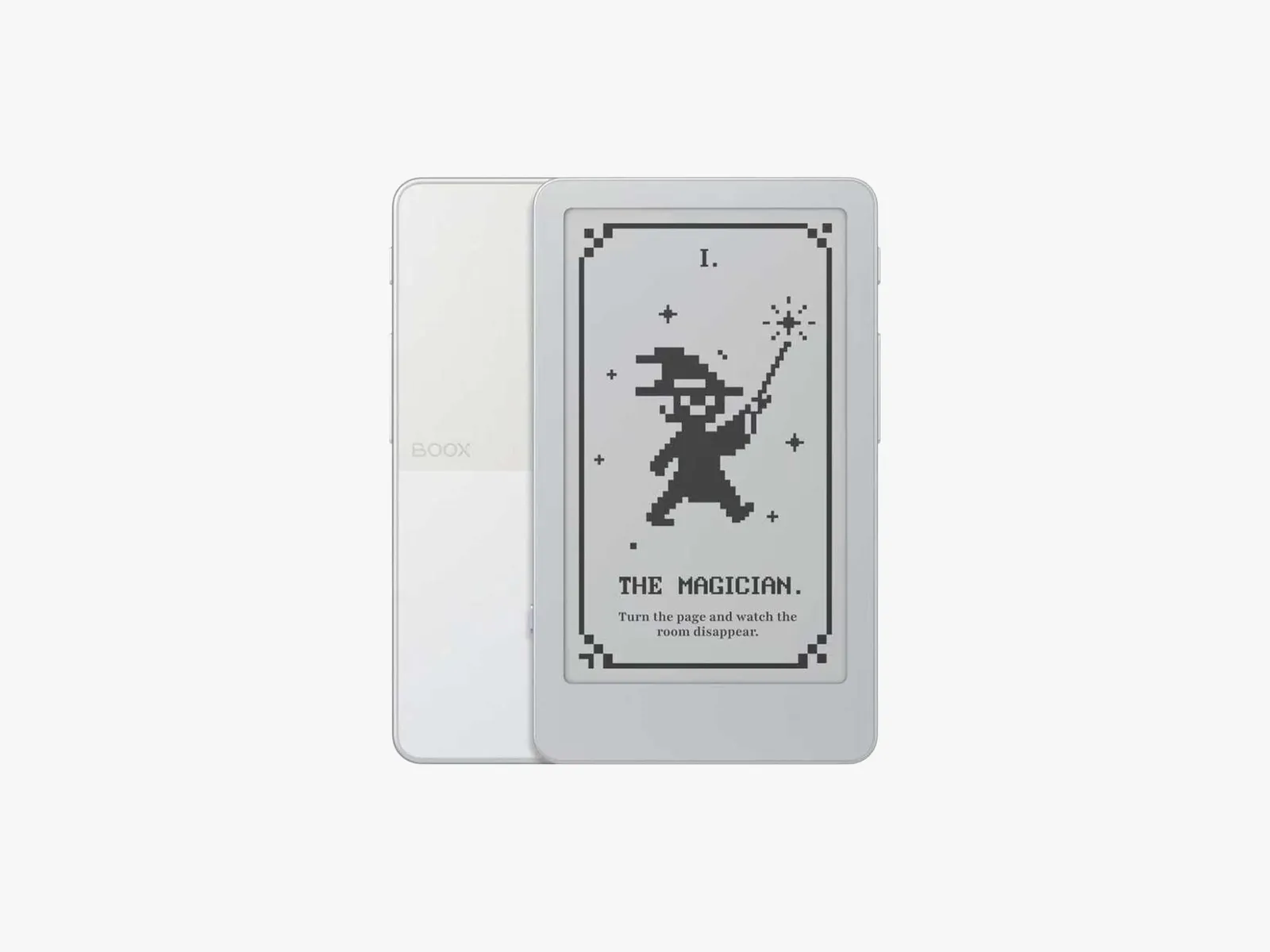
Boox announced the Picco, with preorders opening today. Its screen is just under 4 inches (3.97 to be exact), making it about the size of a playing card. It’s even smaller than the Xteink X4 Pro I tested earlier this year, which has a 4.3-inch screen (but just slightly larger than the 3.7-inch Xteink X3), and considerably smaller than the upcoming Boox Palma 3’s 6.19-inch screen. I liked the size of the Xteink in my hand, but navigating the interface and getting books were challenging, so I’m excited to see another option in that smaller size from a maker with more accessible ebooks (though still not as convenient as a Kindle or Kobo with their built-in stores).
The Picco will cost $100 and is expected to ship in November. I’ll be testing it soon, but in the meantime, here are the details if you’ve been eyeing a tiny e-reader.
An E-Reader for Productivity
Courtesy of Boox
The Boox Picco has a monochrome screen with a resolution of 235 pixels per inch and an adjustable front light that switches between warm- and cool-toned lighting. The microSD card slot supports up to 2 TB of flash memory storage (a 16 GB card is included). There are both a touchscreen and physical page-turning controls, thanks to the buttons on the side of the device. The case has a magnetic ring so you can attach it to the back of a smartphone, though I’ll have to see how well it fits when I test it, as I had mixed results attaching an Xteink to my phone due to both fit and magnet strength.
Advertisement
Courtesy of Boox
Boox says the Picco will have a streamlined operating system focused on reading and digital utility tools. It’s also the first in what Boox calls its Tiles lineup, which is how you’ll access ebooks on this device. You can also use web and USB-C file transfers (the Picco has Wi-Fi and Bluetooth connectivity) to get ebooks onto the Picco. The Picco also has the Pomodoro, Todo, and Countdown apps, so you can use it as both an e-reader and a productivity gadget—handy, and a bigger motivation to keep it attached to the back of your phone even when you aren’t reading.
I’m intrigued to see it in action. Boox’s most popular e-reader could become the Picco over the Palma 3, but we’ll have to wait for both devices to become available to see which is the better buy. Stay tuned for my reviews of both when they come out.
But a Chromium-based design means it can only be so efficient.
Discord
Discord is working on a new mode for its social platform that it says might be less resource-intensive. Screenshots of an option called Game Mode began circulating on social media over the weekend. The description shown for the Game Mode toggle states that it will “Reduce Discord’s CPU and GPU usage while a game is running.” By making the chat platform less resource-intensive, concurrently running software should be able to run more smoothly.
Today, the company confirmed on X that this experimental mode will begin rolling out to its users next week. The brief official announcement about Game Mode added that Discord is “aiming to add more resource-saving features over time.”
Discord is based on the Electron web app framework, which uses Javascript and Chromium for creating software. The open-source Chromium, which is the basis for Google’s Chrome and several other browsers, is not known as the most efficient tool for web development. A feature like Game Mode could offer some performance improvements, especially while also running a beefy AAA game on the same machine, but there may only be so far that Discord will be able to streamline on its current architecture.
Six of the nine independent experts on the advisory board of the Global Internet Forum to Counter Terrorism—a consortium run by several of the biggest US tech companies—resigned on Monday, according to a letter seen by WIRED and interviews with three of the people.
The tensions between the independent advisory committee and the GIFCT date back to an email the counterterrorism and free speech experts received in July from Meta’s Nell McCarthy, a vice president overseeing content policy. For years, the group had advised the GIFCT on how to prevent platforms from becoming havens for the radical organizations and individuals blamed for some of the world’s worst mass violence.
But McCarthy wrote that while the consortium welcomed the experts’ insights on violent trends, it no longer desired their scrutiny on the effectiveness of Big Tech’s efforts to curtail violence. Meta and other leaders wanted to “refresh” the 6-year-old independent advisory committee the experts sat on, she wrote. Meta currently serves as chair of GIFCT’s operating board, giving it outsized influence over policy changes, though other companies on the panel must ultimately approve.
New additions to the rotating advisory committee had previously been elected by current members; under the plan laid out in July, they would instead be picked by tech companies. The committee would be barred from weighing in on key topics such as the consortium’s performance and making recommendations together as a group. Its role as a watchdog would be neutered, advisers believed.
Advertisement
In their resignation letter, the departing members of the committee wrote that their appeals against the plan had been “ignored” and that, in turn, they had “lost confidence in the GIFCT’s ability to deliver effectively on its founding mission” to prevent terrorists from exploiting online services. “We all know that a body that cannot scrutinise, take a position, or evaluate is not an advisory body at all,” the letter stated. “It is decoration and accountability theatre.”
Meta deferred comment on the resignations to the GIFCT. An unsigned statement sent to WIRED by a GIFCT spokesperson on behalf of the consortium’s leadership and the Meta-chaired operating board says the proposed changes have been “informed by several rounds of feedback” and are not yet final. They came out of discussions on “how to more effectively engage civil society and governments for substantive input” as “multi-stakeholderism is a core principle” for the GIFCT.
The consortium has about 35 members; other long-time board members include Microsoft and YouTube. A small staff alerts members to violent content, helps them exchange threat intelligence, and commissions research on countering extremism. While the coordination has helped some platforms combat problematic content, critics believe the group isn’t living up to its potential.
A WIRED investigation in 2024 uncovered several issues with GIFCT, including Meta delaying TikTok’s membership bid and poor relations between the companies at the helm and the unpaid independent advisory body. It also revealed failures in the tip-sharing database the consortium oversees to coordinate takedowns of problematic content.
Advertisement
The dismantling of the advisory group threatens to deteriorate the organization’s work further at a time when balancing free expression and online safety has become more challenging. Generative AI tools have simplified content creation but imposed limited guardrails.
The experts who resigned include university researchers and representatives of civil society organizations. They had agreed with McCarthy on the need for changes to improve the results of the decade-old anti-terrorism consortium. But they believe the proposal, which could be finalized soon, amounts to a step backward.
“There won’t be critical voices raising concerns about what GIFCT is doing or is not doing,” one of the departing experts says. “It may seem politically convenient for them to abolish the independent advisory committee, but they are going to regret it in the longer term.”
The successful mission also deployed 26 of SpaceX’s latest Starlink satellites.
SpaceX
For its 14th flight, SpaceX’s Starship powered by its Super Heavy megarocket has entered low-Earth orbit for the first time. SpaceX kicked off this major undertaking early Monday morning but had to deal with some hiccups on the way, including losing one of its six Raptor engines. Ultimately, SpaceX decided to push on with the mission and successfully reached orbit albeit with some compromise.
SpaceX originally planned to have Starship orbit Earth six times over a span of nearly 10 hours for the Flight 14 mission. With one of the engines offline, the plan changed to only spend approximately three hours in orbit before reentering the Earth’s atmosphere and landing in the Pacific Ocean. As part of the same mission, SpaceX managed to deploy 26 of its Starlink V3 satellites into orbit. SpaceX said that its Starlink team has made contact with all newly-deployed 26 satellites in orbit, which will eventually be used to improve Internet speeds for customers. While previous Starship missions also carried several V3 satellites, they only remained in suborbital space and served as test flights to see if the new satellites would connect to the existing Starlink constellation.
While Starship’s flight 14 marked a major milestone of reaching orbit, the mission also served as a test of the reusability of its Super Heavy rocket. After providing the necessary boost to Starship, Super Heavy landed in the Gulf of Mexico, where it will eventually be retrieved, but not by a launch tower‘s “chopsticks” as previously demonstrated.
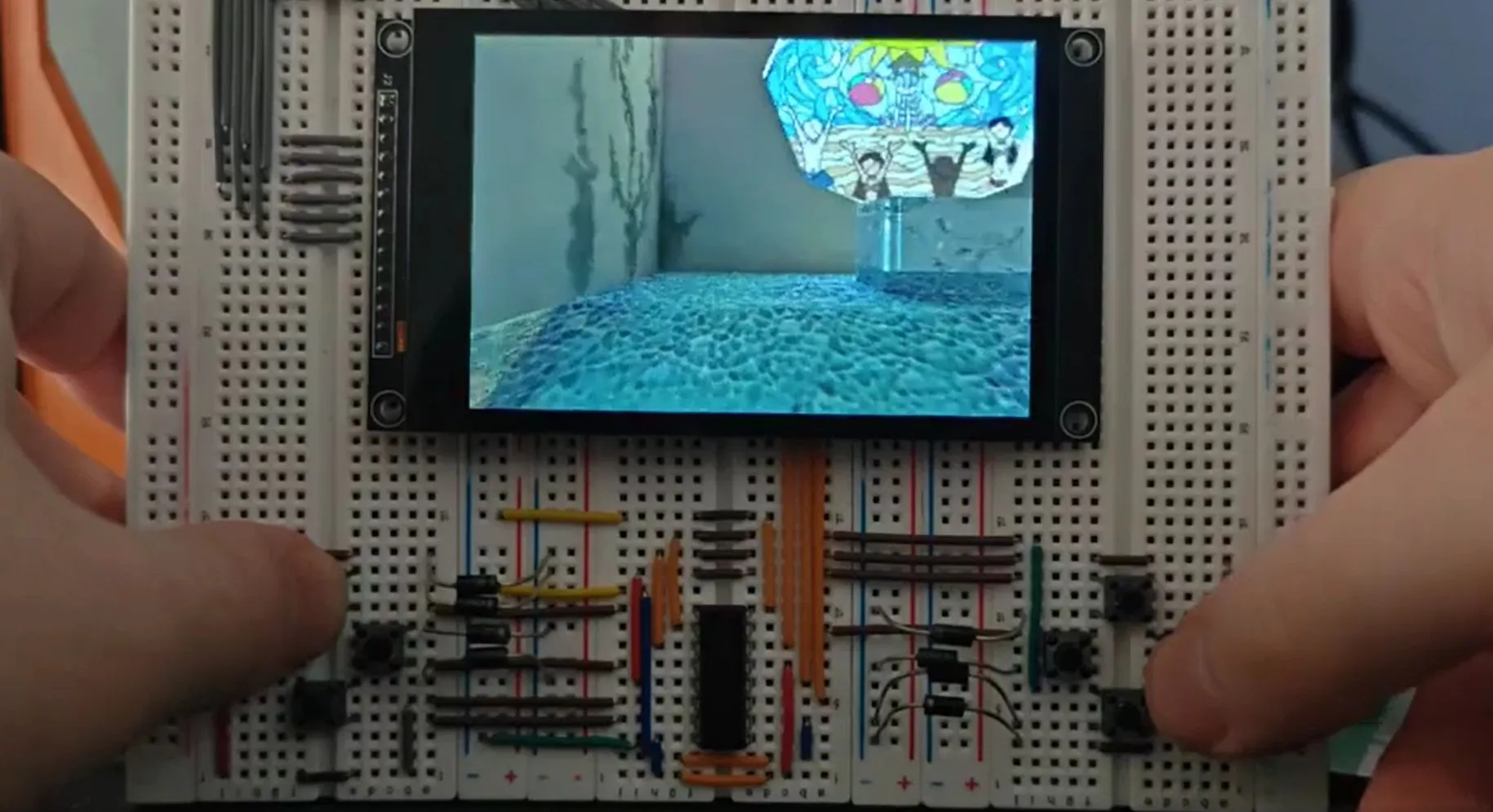
Mipmapping is a good way to add a lot more detail to a 3D scene without overburdening the rendering hardware with detail that won’t be seen by the user. This level-of-detail rendering technique was demonstrated on the N64 console hardware a few years ago by [James Lambert] with [Michael Biggins], also known as [PhonicUK], now demonstrating it on the ESP32-S3 using his own Jet rendering engine.
Although level-of-detail rendering really speeds things up, it does also require far larger texture sizes, with [James]’s N64 demo taking up 40 MB of a 64 MB cartridge. To fit it on an ESP32-S3 with 16 MB of PSRAM and no SD card expansion or such the textures were further compressed to use 8-bit indexing, resulting in a mere 5.01 MB of textures.
There’s a demonstration video over on the associated Reddit thread, which shows the camera moving through the scene. Even if not as exciting as the Wipeout port by [Michael] that we previously covered, it does make clear that even without a proper 3D GPU the ESP32-S3 is already a pretty capable gaming machine that can go toe-to-toe with some 1990s consoles.
There are five weeks left until the midterm elections, and extremism is on the ballot in much of the US. A WIRED review of candidates running for statewide and federal positions in November, along with exclusive data on candidates running for state-level positions, reveals hundreds of Republican candidates who openly express virulently hateful ideologies, share racist content online, have close ties to white supremacist and antisemitic figures, and are members of far-right groups online. President Donald Trump and his administration have openly embraced, endorsed and defended many of these candidates.
At a local level, over 500 candidates running for state legislator positions in November are members of far-right groups on Facebook that promote militias, gun rights, and Christian nationalism, according to data collected by the Institute for Research and Education on Human Rights and shared with WIRED.
“The candidates are taking a page out of the Trump administration’s playbook,” Luke Baumgartner, a former research fellow at George Washington University’s Program on Extremism, tells WIRED. Baumgartner claims that many of the candidates running in November have been inspired by those in the White House. “In essence, the executive branch has handed them a permission slip to say and do what would have been unthinkable during the George W. Bush, McCain, or [Mitt] Romney eras of the GOP,” he says.
Advertisement
Extremist rhetoric has led to real world political threats. In 2025, terrorism and targeted violence incidents rose 19 percent compared to 2024, according to researchers at the University of Maryland; the US Capitol Police reported an increase in “threat assessment cases” against members of Congress for the third year in a row, with a 58 percent increase from 2024; and the US Marshals Service documented threats against almost 400 judges, a roughly 5 percent increase from the previous year.
Here are five races involving candidates who have shared extremist ideologies or have close ties to extremist figures, that WIRED is watching ahead of the November midterms.
The Texas Railroad Commissioner Race
Photo-Illustration: WIRED Staff; Getty Images
Bo French, the GOP candidate for Texas Railroad Commissioner, is so extreme that Republican strategist Karl Rove has said he would vote for a Democrat rather than supporting a “bigot.”
We spend hours testing every product or service we review, so you can be sure you’re buying the best. Find out more about how we test.
Roborock Qvero 2 Pro: 30-second review
The Qrevo 2 Pro is the latest robot vacuum and mop combo cleaner from Roborock and includes detachable mop plates to help ensure it doesn’t get carpets wet while cleaning.
Cleaning performance is a match for some of the most expensive options on the market with its mopping being as good as I have ever tested making it a fantastic pick for the price.
Advertisement
It is relatively tall so it can’t clean under low furniture and its hard floor cleaning isn’t flawless but it is an excellent option, especially when on sale.
Latest Videos FromTechRadar
Advertisement
Roborock Qrevo 2 Pro: price & availability
List price: $799.99 / £649.99 / AU$1,199
Launch date: August 2026
Availability: worldwide
The Roborock Qrevo 2 Pro sits right on the line between premium and mid-range robot vacuums, with a list price $799.99 / £649.99 / AU$1,199. However, almost immediately after launch I have already seen it get a significant discount to $549 / £549.99, tipping it firmly into the more affordable category — especially considering the features and performance.
Even at full price it sits below the Roborock’s Curv models and produces similar results (although it doesn’t have the AdaptLift chassis for getting over higher thresholds between rooms) making it an excellent value pick. If you’re looking to spend less, the Roborock Q7 is a good alternative although it has much lower suction power and doesn’t have an auto-empty dock.
A branded floor cleaner compatible with the Qrevo 2 Pro is available on Roborock’s website but they don’t push this hard and after testing it without it, it’s definitely not required.
You don’t have to use Roborock’s own floor cleaner, but you will need to buy disposable dust bags (Image credit: Future)
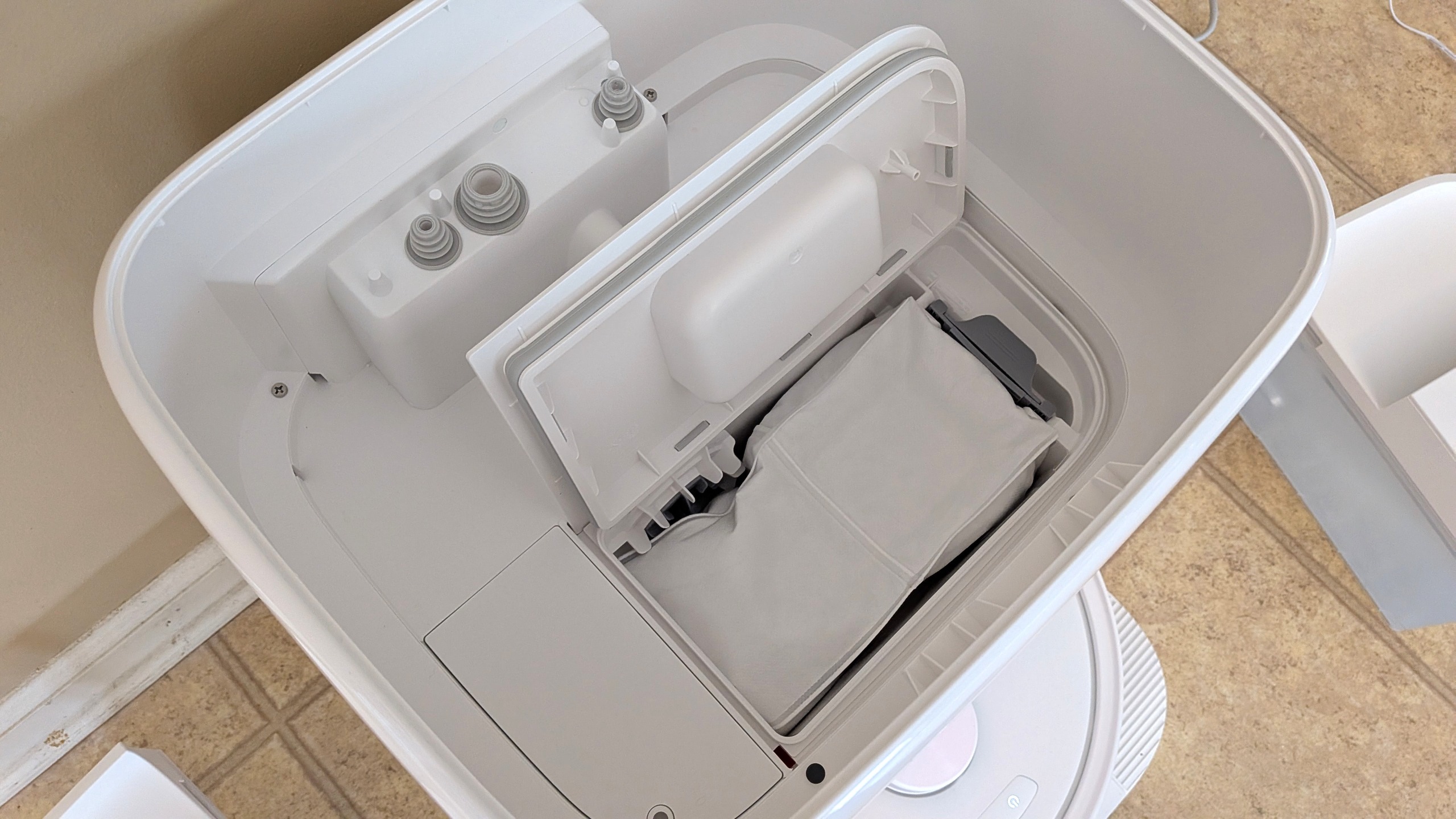
What you will need to buy are disposable dust bags as these are thrown away once full. A three-pack costs $39.90 in the US, and a six-pack is £31.99 in the UK, so this needs to be considered in the running costs. I have tested Roborocks with cheaper unbranded dust bags in the past and not encountered problems, but check model compatibility before ordering.
Sign up for breaking news, reviews, opinion, top tech deals, and more.
Advertisement
You can also buy replacement brushes, mop pads, filters and other parts in case anything breaks.
Roborock Qrevo 2 Pro review: design
Smart-looking robot and dock
Can’t get under low furniture
Smart home integration
Available in all white or black (currently only available in white in the UK and Australia) it is pretty unfussy in terms of design with the dock a bit squarer than the slightly bulbous base stations of Roborock’s Curv series.
The robot is circular, measuring 14 inches wide with a 6-inch cleaning opening underneath for picking up dirt.
The lidar scanner the robot uses to navigate sits in a cage on top of the robot, increasing its height and reducing its clearance so it won’t be able to vacuum under low furniture like a sofa, unlike Roborock’s Qvrevo CurvX with its retractable lidar scanner.
Advertisement
Image 1 of 2
The robot’s lidar scanner doesn’t retract, so it can’t fit under low furniture
(Image credit: Future)
The dock is easy to set up, provided you have sufficient space
(Image credit: Future)
Setting the dock up is easy, involving just attaching the ramp to the front of the dock, filling the clean water tank and plugging it in. The more difficult part may be finding a place for it as it needs to sit on a hard floor with at least 1.5 inches either side and 27.5 inches of clear space in front of the dock. It also needs to be within reach of a power socket and somewhere you won’t trip up over it or mind looking at it everyday.
Set up is simple, you will need to find an appropriate spot for the dock on a hard floor with plenty of space either side. You then download the app, pair the robot and then you can send it on a discovery run around your house to build a map.
Once it has scanned the space you can then edit the map to combine or divide spaces into rooms, mark areas as no-go zones, manually designate floor types and mark things like curtains and furniture. I found that aside from ensuring the rooms are divided correctly I didn’t have to make any changes to get it to work well, with the carpeted areas successfully detected.
Advertisement
The robot has detachable mop pads, which it leaves in its dock after mopping your floors (Image credit: Future)
After setup you can use the app to kickstart cleans of the whole map, one or more selected rooms or a designated zone clean you can mark on the map. As well as ad hoc cleans you can set routines for different types of cleans from deep intensive cleans, to specific after dinner cleans of smaller zones or light maintenance vacuuming without mopping.
As the Qrevo 2 Pro has detachable mops, rather than vacuuming and mopping room by room it first goes around the carpeted areas of the whole space you are cleaning first. Once that is complete it returns to the dock to reattach the mop heads before cleaning the rest of the hard floors.
Obstacle detection was generally good, though the Qrevo 2 Pro did get caught on a USB charging cable (Image credit: Future)
Cleaning performance is OK on hard floors, although it can lead to some spreading of larger debris as the edge cleaning arm sent rice grains skittering across the floor. It did better with fine particles, although there was still some tea visible on a pass on the standard cleaning settings.
It handled larger particles much better on carpet, picking up almost every single grain of rice, although there was some tea left after the first pass.
Advertisement
As with most robot vacuums, its edge cleaning wasn’t great on carpet, but the sweeping brush does well to move material into the vacuum’s path on hard floors..
During the obstacle avoidance tests it did well to identify the shoe and sock, staying clear as it cleaned around them but it did go over the charging cable, getting it stuck in the cleaning brushes and needing me to rescue it before it could continue cleaning.
During my mopping tests on first pass it did a reasonable job taking up a fair bit of the ketchup although there was a hint of the soy sauce remaining. Trying a second clean on maximum water flow and cleaning settings it did a fantastic job cleaning off even the dried on patches of ketchup.
While the most intensive cleaning took some time and left the floor relatively wet, it was some of the best mopping I have ever seen from a robot. You do need to delve into the settings to get the best performance and it probably is only practical for small zone cleaning but it’s still a lot less effort than getting out a mop and bucket.
Advertisement
On regular cleaning settings it can manage around five regular rooms before needing recharging so depending on your home it may need to recharge before completing a full clean. Recharging takes around four hours.
It’s not loud in operation, registering around 60db while cleaning on carpet. The dock emptying is a little louder, topping out at 69db (around the level of normal conversation), although this is pretty brief so shouldn’t be too disruptive.
The Qrevo 2 Pro uses dust bags so emptying it of dirt is quick and neat, although that does add ongoing costs to using it. You will also need to empty the waste water and refill the clean water tanks regularly which is easy to do (as long as you leave enough clearance room above the robot) as these lift out of the dock and then can be unclipped open for emptying or filling.
Smart home integration worked well for starting a whole house clean but I did have a little trouble using the room clean function for custom named rooms. Naming a room one of the default names such as Kitchen or Living Room worked fine, but a custom name such as Utility Room sparked a whole house clean instead.
Advertisement
While custom room names would be helpful, even getting default room cleaning to work is not a guarantee with any of the robot vacuum cleaners I have tested so, relatively, this is a success.
Performance score: 4.5 out of 5
Roborock Qrevo 2 Pro: app
Easy setup
Clear house map
Can set frequent types of clean and schedule cleans
The app is simple to use, although I did find it can sometimes get a little lost if you select your cleaning mode too quickly, meaning you have to move to another mode and back again before getting the options you need.
Once you select the robot you are shown the map of your home and have four tabs to select the type of clean you want, ‘Full’, ‘Room’, ‘Zone’ and ‘Routine’. ‘Full’ starts a clean of the whole map and to the left of the play button there is a button for adjusting the type of clean including whether you want to vacuum and mop, just vacuum or just mop. There are also controls for the level of suction, waterflow, amount of times you want the robot to clean the area and the intensity of the cleaning pattern.
Image 1 of 4
The app is simple to use provided you don’t hop between modes too quickly
(Image credit: Future)
Select your robot to see a map of your home
(Image credit: Future)
You can adjust the settings for the vacuum and mop independently
(Image credit: Future)
The ‘Routine’ option allows you to schedule different types of cleaning
(Image credit: Future)
Room allows you to select one or more rooms to clean, while Zones lets you pick multiple rectangular sections of your chosen size on the map for it to clean, allowing you to spot clean specific sections of floor.
‘Routine’ is the final option and allows you to create shortcuts for regular types of clean that will then be available from the opening screen on the app. This is useful for setting up things like zone cleans that focus around a dining table following a meal or if you want a predefined deep clean compared with a light maintenance clean.
Advertisement
Despite the name, ‘Routine’ doesn’t include any scheduling functionality by default. That is hidden somewhat in the settings menu, but can be used with scheduled cleans (if your home doesn’t regularly have bits of Lego on the floor like mine does).
Should you buy the Roborock Qrevo 2 Pro?
Swipe to scroll horizontally
Attribute
Notes
Advertisement
Score
Value for money
Even at full price the Qrevo 2 Pro represents good value and at a discount price it is a fantastic deal. You will need to consider the price of disposable dust bags in the running costs but you’ll be hard pressed to find these features and performance for less.
5/5
Advertisement
Design
The design is more focused on function than form but it is unfussy and designed to fit into most homes. The tall mounting of the lidar scanner will stop it from cleaning under low furniture.
4/5
Performance
Advertisement
Vacuuming performance is good and mopping is excellent although It did have trouble picking up on a charging cable in our object avoidance tests leading it to get stuck.
4.5/5
App
The app makes it easy to control, with simple options for choosing the type and location of cleans as well as a clear map of your home.
Advertisement
5/5
Buy it if
Don’t buy it if
Advertisement
How I tested the Roborock Qrevo 2 Pro
I tested the Roborock Qrevo 2 Pro over a period of over two weeks, using it as an everyday cleaner of a busy household.
As well as day to day use I put it through a series of tests, assessing its performance picking up fine particles and larger debris on carpet and hard floor by having it clean an area with a set amount of rice and tea sprinkled on the surface. Edge cleaning was also tested using tea on the edge of a carpet and hard floor area.
Mopping performance was tested by having the robot clean up a spill of soy sauce, as well as tackling a patch of dried ketchup. After an initial pass on regular settings, this was then retested with cleaning settings set to maximum.
The forthcoming iPhone Duo has more features than Apple has revealed, including a whole series of faces for its StandBy mode. Here’s what to eventually look for.
While pre-orders for iPhone Duo don’t start until October 16, and the Xcode betas still don’t show developers everything, one has found many new options coming to iOS 27 for this device.
Developer pdfu reports that the Xcode 27.1 simulator is lacking Rushmore, an app that is for displaying the new StandBy faces. But despite that, they have managed to get certain of the new faces running.
Here’s a deep dive into StandBy mode on iPhone Duo.
Rushmore, the app meant to host the redesigned faces, is missing from the iOS 27.1 simulator.
Advertisement
But its localization strings reveal unreported faces, and I got some new faces running in the current renderer. pic.twitter.com/lDQHOy5R0e
These working ones are variants on familiar clock and calendar faces as used on the iPhone‘s current StandBy mode. But code references describe several more options.
Here’s a deep dive into StandBy mode on iPhone Duo.
Rushmore, the app meant to host the redesigned faces, is missing from the iOS 27.1 simulator.
Advertisement
But its localization strings reveal unreported faces, and I got some new faces running in the current renderer. pic.twitter.com/lDQHOy5R0e
Just because something is referenced in code, it doesn’t necessarily mean that it will launch immediately. But those code references show five more faces:
Home Camera: up to nine camera views
Home Module
Flow
Fade
Snoopy
There are no details for Home Modular, Flow, or Fade. But the code for Flow also includes the term ResponsiveArt, which suggests that it will at least be an animated face.
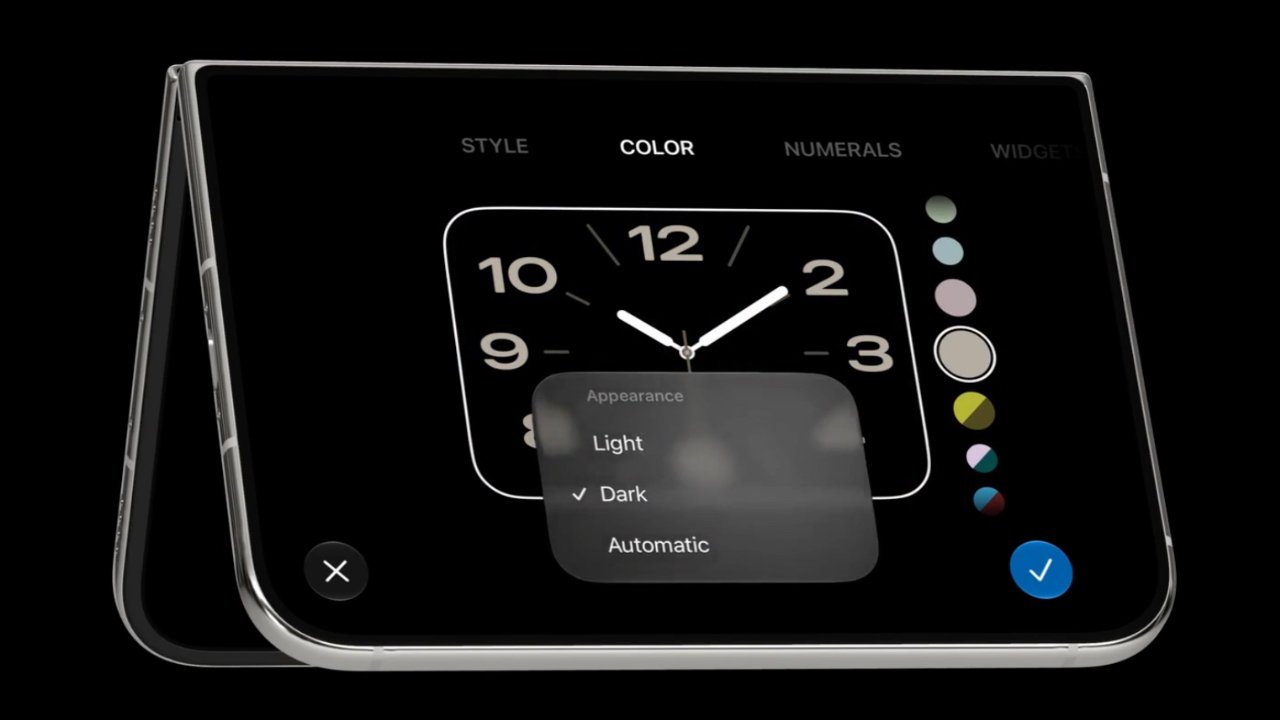
Face editor
The iPhone Duo will also feature a revised editor for customizing these StandBy faces. It’s very similar to the existing one on iPhone and is perhaps more like the Apple Watch face editor.
Advertisement
Users can swipe left and right to adjust, for instance, the style of an analog clock, its numerals, light mode and dark mode, plus the color of the face and the hands.
Some of these clock faces also have room for two widgets. Then some more are digital instead of analog and there pdfu has found code references for five layouts:
StandBy
Stacked
Top
Middle
Bottom
The presumption is that all but the StandBy one may actually be intended for when the iPhone is opened like a book.
Developer pdfu has a strong track record for examining beta code. They confirmed that the iPhone Duo would use Touch ID, for instance, and most recently uncovered that Siri could be replaced by Claude or ChatGPT.
The JadePuffer ransomware operator is targeting Azure tenants with agent-driven attacks that conduct reconnaissance, steal credentials, and destroy core components.
The malware emerged in July, with researchers at cloud security company Sysdig highlighting that it uses AI agents to automate the entire attack chain, from reconnaissance, credential theft, and lateral movement to persistence and data encryption.
Shortly after, the company noted that JadePuffer expanded its focus to AI assets, training datasets, and vector databases, using a tool called EncForge.
Microsoft Security Research observed two JadePuffer attacks in June that mapped cloud resources, retrieved storage account keys, and deleted Azure Storage accounts.
Advertisement
The destructive stage lasted seven minutes and targeted more than 100 storage accounts, as well as Key Vaults, Function Apps, Virtual Machines, and App Services.
Although the threat actor was able to delete most of the targeted Azure Storage accounts, some remained unaffected because of Azure resource locks and storage account-level protections.
Microsoft tracks the JadePuffer threat actor as Storm-3168 and says it used two compromised service principals – security identities that enable applications, hosted services, and automated tools to authenticate to Azure and access assigned resources.
Both service principals belonged to the same tenant. One was used for reconnaissance and resource discovery, while the other “performed discovery, destructive operations, and credential collection.”
Advertisement
Timeline of observed attacks Source: Microsoft
The attacker removed backup and recovery protections (Azure Site Recovery locks), indicating an effort to make restoration more difficult.
This operational pattern could further support ransomware extortion, although Microsoft did not report anything about financial demands and didn’t confirm data theft in the observed cases.
According to the researchers, attempts to delete Azure SQL databases failed because the attacker used an unsupported API version. Attempts to remove recovery protection locks also failed.
“The parallel targeting of Azure SQL databases and storage accounts suggests an effort to broaden the destructive impact across different data services rather than concentrating on a single resource type,” Microsoft said.
Roughly half an hour after the wipe attempts, Storm-3168 returned to perform more than 30 requests for storage account keys, most of which succeeded.
Advertisement
Microsoft could not determine exactly how the initial access occurred, but noted that credentials for one service principal appeared in a public GitHub issue before the attacks.
The researchers recommend several mitigation steps and guidance for system administrators, including activating cloud workload protections, checking for secrets in public repositories, and evaluating Azure RBAC permissions against least-privilege principles.
Join Mikko Hyppönen and security leaders from the NFL, CHANEL, and Atlassian for a two-hour digital summit on what AI-speed attacks change, what defenders should stop doing, and how to validate, decide, fix, and re-validate at machine speed.
Snapdragon Summit in Maui, Hawaii, has come and during the show, Qualcomm (who paid for my travel and accommodations) announced two new top tier phone processors. They are the Snapdragon 8 Elite Gen 6 and the Snapdragon 8 Elite Extreme Gen 6. The former is the successor to last year’s flagship while the latter is a new even more premium tier of performance.
Both chips run off of two 5GHz prime cores and six 4GHz performance cores built on a 2nm process. The key differences between the two include Matrix cores included in the Extreme’s GPU, additional video processing (8K/60fps) on the Extreme, and more. For the average consumer, you probably won’t notice a ton of differences between the two in day-to-day tasks, but when it comes to gaming, AI (agentic AI was a key theme at the conference), and sustained performance, that’s when you’ll notice the difference.
According to Qualcomm, the reason for the two premium tiers stems from phone maker demand. Consumers have been vying for more premium options in the smartphone space, and these chips are designed to address that need. Speaking of phones, there were two major phone announcements at Snapdragon Summit. The Xiaomi 18 Pro and Pro Max will run the Elite and Extreme processors respectively. The Motorola Signature 27 will also run the Extreme chip, and both of those phones are exciting for different reasons.
Advertisement
Motorola Signature 27 brings Motorola back into flagship territory
Adam Doud/SlashGear
Motorola’s Signature series of smartphones have typically been reserved for overseas sales only, with no presence in the U.S. That looks to change with the Signature 27, which will get a North American release. The Signature 27 is peak Motorola flagship material — Snapdragon 8 Elite Extreme Gen 6, a six-antenna design, a 200-megapixel telephoto lens, and Bang & Olufsen audio, which was recently announced.
Those specs all sound great, but it’s mostly just great to see a Motorola flagship on U.S. shores again. Motorola has been doing very well with its flip phones and midrange candybar phones, but it’s been a while since a real flagship came to the States, so that alone is worth celebrating. That’s especially true in light of OnePlus’s exit from the U.S. market — there’s another premium flagship taking its place, and it looks like a real beast. Stay tuned to SlashGear for more news about the Motorola Signature coming — hopefully — soon.
Advertisement
Xiaomi 18 Pro and 18 Pro Max split the difference
Adam Doud/SlashGear
Xiaomi is a phone that will not come to the U.S., though it will likely be relatively easy to import if you so choose. The 18 Pro series brings a boatload of great specifications to the table, and it also represents the diversity that Qualcomm was talking about. Both phones have similar specifications and capabilities, and they also bring a couple of neat features to the lineup as well.
The first is the rear-facing screen. Picture an iPhone 18 Pro, and replace the camera island with a rear facing screen. You can use this for taking selfies with the main cameras, but Xiaomi will also bring some apps and functionality to the rear screen as well. The options we could play with were limited to things like answering calls, playing music, and some AI-generated animals, which were admittedly pretty cute, but not terribly functional.
Advertisement
The other cool thing, and honestly the thing that excites me the most, is the privacy display. This works basically the same as the Samsung Galaxy S26 Ultra’s display with pixels that turn off, and software that runs the whole thing. Xiaomi re-did the subpixels a bit, which is supposed to give better color even with the privacy display on, and it was not terribly noticeable, but it’ll take more experimentation to determine. But I mainly like the idea that someone else beyond Samsung is making this feature. Hopefully it’s only a matter of time before it catches on with more phone makers.



















.jpg)















































You must be logged in to post a comment Login