Connect with us
DAPA Banner

Tech

12 Cool DIY Crafting Gadgets You Didn’t Know You Needed

Published

on


We may receive a commission on purchases made from links.

DIY is not only incredibly rewarding (most of the time), it’s also one of the best ways to save you some money when taking on home improvement jobs or renovations (especially if you avail yourself of all the best cheap tools that are actually worth buying). However, while the hands-on nature of these projects makes them satisfying, it can also bring moments that aren’t as fun.

Advertisement

Luckily with technology influencing just about every market it can by 2026, there are plenty of ways you can help reduce the time spent on the monotonous side of DIY. Whether you’re taking on large projects or small intricate crafting, there’s almost certainly a gadget that can save you a heap of time without spending too much money on them. Particularly if you’re taking it on solo, having as much help as you can get can go a long, long way in getting better results faster. Here’s a look at 12 gadgets that may have gone under your radar.

Advertisement

Digital Angle Finder Protractor

Beyond having all the essential power tools for woodworking or metalworking, virtually every project depends on having the ability to measure and cut at angles reliably. The protractor isn’t exactly a new tool, but as is the case with the majority of analog tools, technology has crept into the fold and streamlined even the smallest in the box.

While standard protractors will always do a great job, a digital angle finder protractor can offer a much more accurate, reliable way to measure any cut and join you need. There’s plenty of choice out there for one of these gadgets, but the most popular products all feature two ruler arms connected with a locking screw, which can be rotated 360 degrees. Amazon is unsurprisingly a great place to pick one of these up, with the highly-rated protractor made by GemRed having an accuracy rating of +0.3 degrees. They also aren’t too expensive, often priced between $15 and $40, depending on what size you need.

Advertisement

Electric Engraving Pen

One of the more niche products on this list, but also one of the most useful, is an electric engraving pen. Especially if your DIY project is one you want to personalize to the fullest, picking up one of these can offer a great deal of intricacy while saving you money compared to larger machines. And, of course, plenty of time instead of engraving the old-fashioned way.

This gadget can work on a variety of materials, including wood, glass, and metal. Pricing varies quite a bit with engraving pens, ranging from around $20 for more affordable ones up to $70 for top-end versions. What’s consistent with the majority of pens, though, is the expansive attachments for different designs. A three-speed motor is also featured in many of the tools, which is a feature that buyers tend to find incredibly useful. While other tools later on this list can also handle engraving, going for a purpose-built engraving pen will allow for more accuracy and better ergonomics for the specific task.

Advertisement

UV Resin Curing Light

If you make things like jewelry or functional home decor products like coasters, resin is something you’re likely familiar with. You may have experience working with different types of it. Epoxy resin is the most popular variety, but if you’re going to be making smaller items and don’t want to wait hours for it to dry, UV resin is often a top choice.

Epoxy can cure in any condition through a chemical reactions, the name suggests, UV resin needs UV light to cure. To speed up the process dramatically, purchasing a UV curing system can finish your projects in minutes or even less. While you will need to buy the specific type of resin along with the light, some of the smaller products are priced as low as $15.99 on Amazon. Larger lights can get to double that, but still don’t cost too much considering how much time it can save you in the long run.

Advertisement

Laser Measuring Tool

A common theme with quite a few of the products on this list is how they take traditional tools and streamline them with technology. The next of these is the tape measure. Similar to the digital angle finder, a laser measuring tool can retain the hands-on accuracy of a standard tape measure, but help you massively if you’re working on a solo project that could do with an extra set of hands from time to time. Especially if you work on larger pieces, gone are the days when you have to stretch from end to end to make sure you get the measurements right.

Advertisement

Now, you can simply put a laser measuring tool down on a surface, point it to where you want to measure to, and it’ll provide you with an accurate reading of the space between. If you’re planning on fixing something that’s hard to reach, or you’re looking for something reliable to add to a beginner set of DIY tools, this kind of gadget is affordable and easy to use (though it’s less effective outdoors in direct sunlight). 

Popular products come from the likes of Bosch, which can measure up to 165 feet. As for pricing, the popular laser from Bosch costs $49.99 as standard, with many others falling in the same range. Budget options can be picked up for around $20, however.

Advertisement

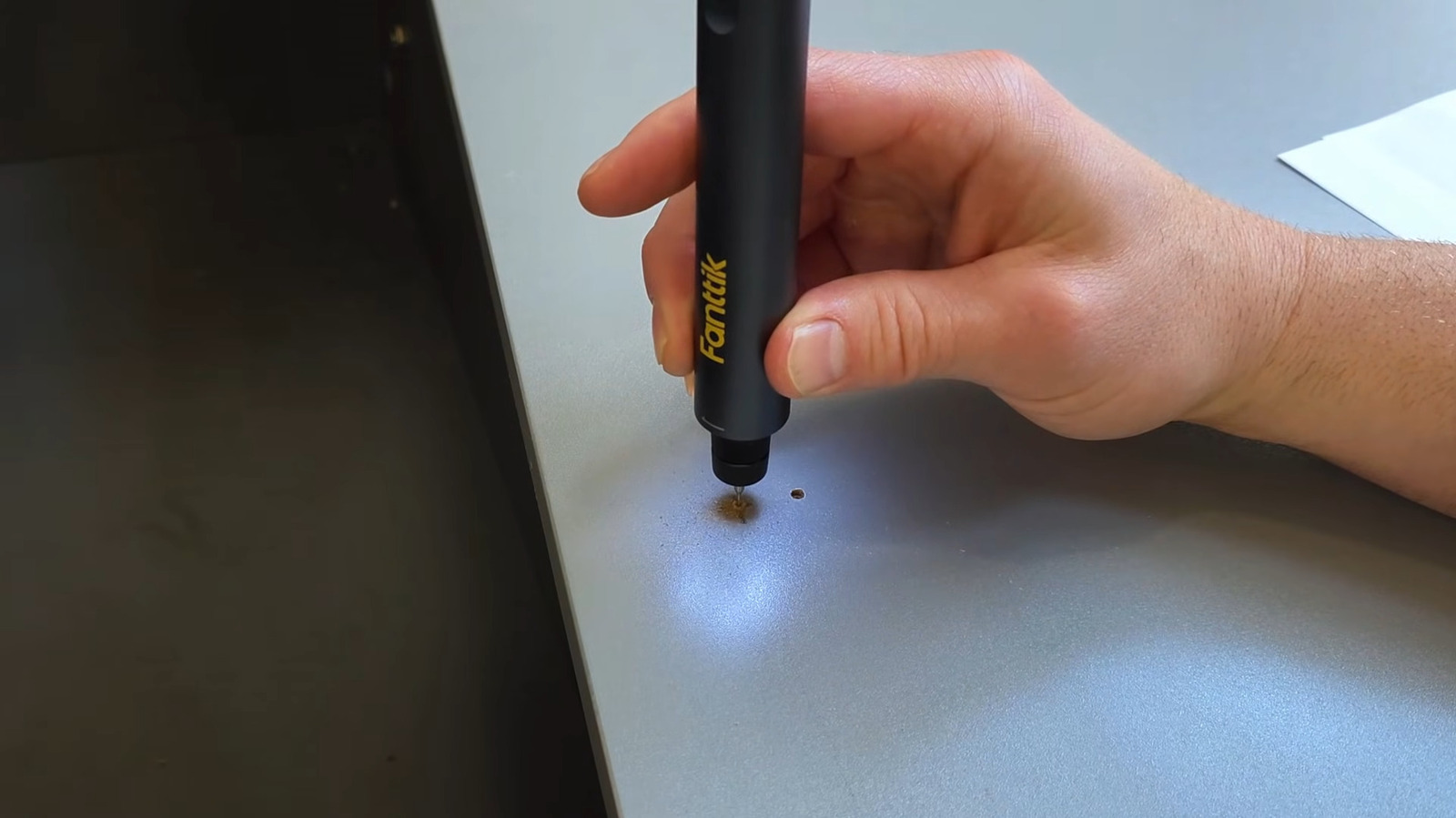
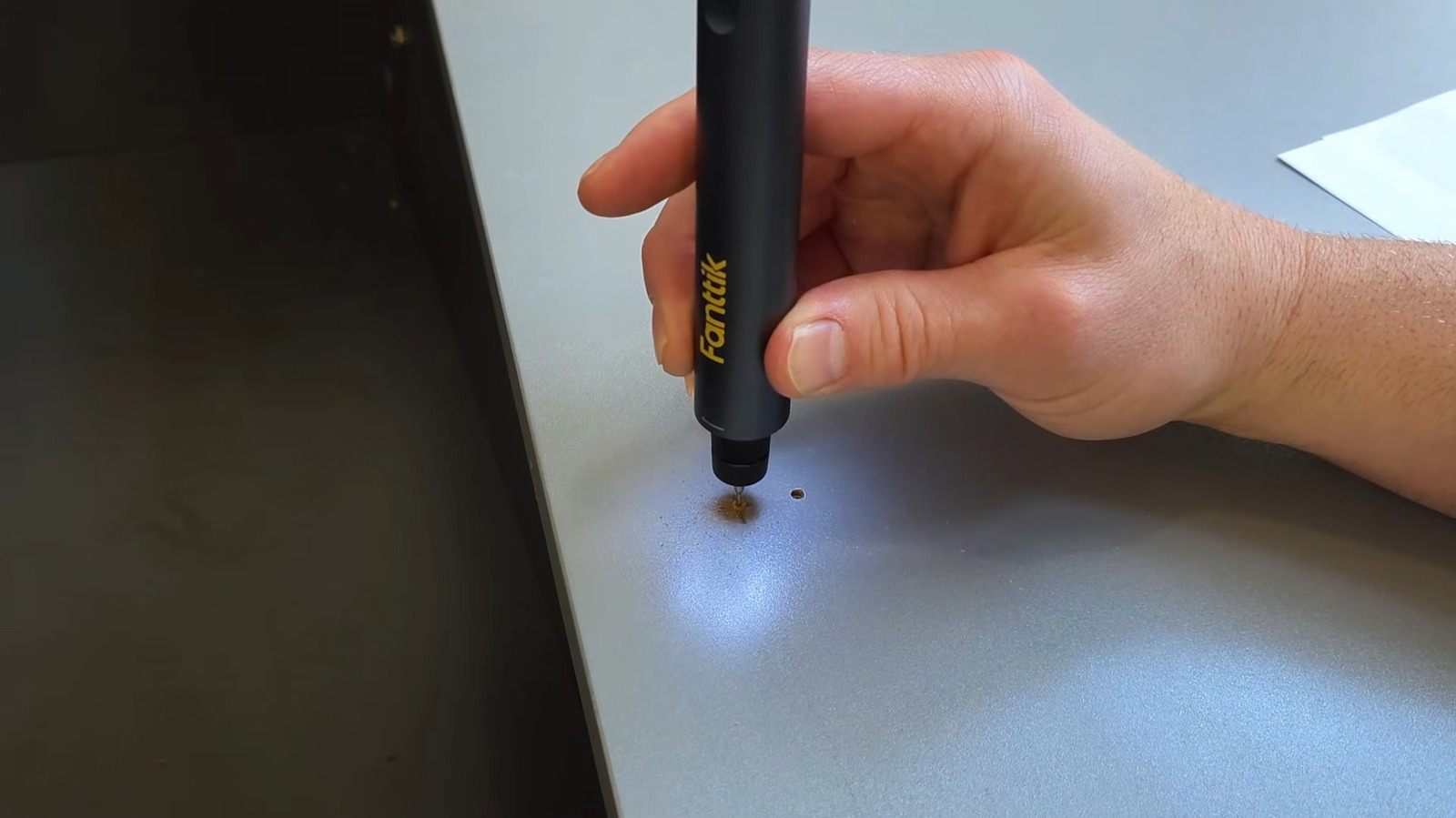
Cordless Mini Drill Pen

Keeping on the topic of larger projects, there isn’t a real replacement, or rather, a shortcut, in achieving smooth, accurate holes compared to using a drill. However, most power drills are more the kind of DIY tool you might find at Home Depot — a little big to be considered a gadget, and a little clumsy for fine work. If you’re working on jewelry, accessories, or household items, opting for a miniature drill pen should certainly be one of the gadgets at the top of your list.

These drills look a lot like the electric engraving pens we covered earlier, just with a different function. The design makes them incredibly easy to hold and use. The majority of the most popular models also come with a wide range of drill attachments, as well as a three-speed motor. Some will also have five speed settings if you need a little more power. High-speed steel drill bits are a popular choice, but some products also use titanium-coated bits. On the lower end, a cordless mini drill pen can cost between $20 and $30, but top-spec models can easily approach $100.

Advertisement

Portable Temperature-Controlled Soldering Iron

Soldering stations aren’t usually the largest of electronic tools, but like drills, they can’t be considered gadgets in the traditional sense. They’re also fairly complex, which usually means expensive, too. Luckily, there’s a popular alternative that can take away all the negatives of the larger machines: a portable temperature-controlled soldering iron. Another pen-shaped gadget in this list, this type of soldering iron allows you to get more up close with the same projects that the larger kits are often used for.

You can also get plug-in soldering irons that don’t come with a station, which can be bought for as low as $20.99 as standard on Amazon. However, to unlock the highest levels of usability, spending more on a rechargeable USB-C iron is worth it. Most of these areas are still temperature-controlled, have rapid heat-up times, and come with a variety of attachments for different projects. Brands such as FNIRSI offer top-spec portable soldering irons, which usually sit between $85 and $120. If you don’t want to spend that much, Amazon has a nice selection of well-reviewed alternatives for about half that.

Advertisement

Cordless Rotary Tool Kit

A rotary tool kit is essentially a combination of individual gadgets we’ve featured on this list, making it an ideal choice if you’re working on various projects involving drilling and engraving, as well as carving and sanding. Cordless models don’t always come with quite as many attachments as larger plug-in tools, but similar to so many other gadgets on this list, the reduction in size and portability makes up for that.

Advertisement

If you only need a gadget for a specific task, a product like a mini drill pen or engraving pen would still be the way to go, given the additional attachments you get. But if you either want to experiment with different techniques or don’t want to spend the money for each gadget, this product is essentially a must-have for DIY work. 

To accommodate the number of tasks a rotary kit can handle, they often have five different speed settings. If you go for a budget option that’s still well-equipped, you’ll only have to spend as low as $17.99 on Amazon for a well-reviewed product. The best ones go for around $95 as standard, though, keeping options open if you’re more confident and want better capabilities.

Advertisement

Digital Caliper

Moving back to the small functional tools that can be put to use no matter what DIY project you’re tackling, there’s another tech-enhanced tool that can offer precise measurements alongside the protractor. A caliper is one of the essential tools when crafting, finding ultra-precise measurements of areas that rulers struggle to find accuracy. Standard caliper will do the job, but a digital caliper can give you another layer of reassurance that you’ve got the correct reading.

Digital calipers are mostly the same as the standard tool, only you have a screen attached to it. Pricing stays low despite this, with some of the best-reviewed products on Amazon currently sitting at $15.98. At the other end of the market, brands like Fowler charge up to $70. Stainless steel is often used for the vernier caliper for extra strength and durability, meaning you’ll get your money’s worth in the long run. The precise measurements, often as low as 0.001 inches, that a digital caliper can provide will make a massive difference to matter what project you’re working on.

Advertisement

Portable Air Brush Kit

Once you’ve finished putting your project together, plenty of gadgets can streamline the customization aspect as well. Air brush kits are often marketed toward things like nail and face painting, but the easy-to-use and consistent nature of them also makes them ideal for applying a base layer to your crafts. 

It won’t be able to add on more intricate details due to the high pressure, but an airbrush kit will apply a base coat far quicker than if you hand paint it, especially for larger projects. Think scale modeling and home decor. On Amazon, there’s a wide range of portable air brush kits to choose from, with more expensive products integrating things like an LED screen and more standard accessories. If you don’t need anything too flashy, affordable ones priced at around $20 remain competitive with up to 50 PSI and three power settings.

Advertisement

Electric Scissors

A pair of scissors might not be something you think needs improving, but if your DIY projects often require precise accurate cutting, it’s not always the easiest to keep the line perfectly straight. If that’s something you struggle with, you’ll no doubt understand why electric scissors are considered a must-have for hobby enthusiasts

Advertisement

Fabrics are often involved with an endless amount of home decor projects, from creating bespoke pillows for your living room or reupholstering furniture. As the name suggests, electric scissors remove the motion of actually cutting things out yourself, which can be super effective with tougher materials like leather and carpet. Some of the best-reviewed models on Amazon have ratings of up to 12,000 RPM, claiming a 50% faster operation compared to a standard pair of scissors. Expect to pay around $50 for a pair of electric scissors, though, but again, if your projects call for it, they can save a massive amount of time while still being incredibly accurate.

Advertisement

Cricut Joy Compact Cutting Machine

Staying with the engrossing task of cutting things out, there’s another step up from a pair of electric scissors if you want to save even more time, particularly with the more difficult tasks. Enter the Cricut Joy smart cutting machine, which can work with over 50 materials to precisely cut out highly detailed designs with a few button pushes. This is the largest gadget on this list and subsequently the most expensive, but at the time of writing it’s on sale for for $99, down from $179.

The smart cutter works by finalizing your design on Cricut’s app, and it’ll produce hard-to-cut internal items such as stickers, decals, and cards to attach to just about anything you can find. Especially for kids, the Cricut Joy keeps the freedom of choosing what design you want for your DIY project, but removes the finicky process of trying to perfectly cut it out. You can use vinyl, iron-on, leather, and standard paper for more versatility.

Advertisement

Electric Yarn Winder

Knitting is essentially a non-stop hand and wrist exercise, and while it can be somewhat therapeutic, it can easily cause strain over time. One of its most time-consuming aspects is yarn winding. For this gadget, we’re going back to something that can eliminate the hands-on aspect of a tedious side of crafting so you can focus on actually creating, this time around being an electric yarn winder.

Staring at the tangled mess of yarn won’t get you excited to unravel it all and make a usable cake. With electric winders, it’ll pull in the string and wrap around the cone holder to create an almost-perfect cake ready for use. Owners can’t give enough praise for these, even if you go for an affordable one. On Amazon, you can find some for about $23 on sale at the time of writing, but the majority of the electric winders are priced at $39.99 as standard. As is the case with the majority of the gadgets here, the amount of time saved can easily offset the money you spend on it.

Advertisement


Source link

Advertisement
Continue Reading
Click to comment

You must be logged in to post a comment Login

Leave a Reply

Tech

Intel repurchasing 49pc stake in Leixlip chip factory for $14.2bn

Published

on

Intel said the agreement is reflective of a strong partnership with Apollo, as well as the organisation’s role in the age of AI.

US technology company Intel has plans to repurchase a 49pc stake of the Leixlip, Kildare Fab 34 manufacturing facility, via a partnership with asset manager Apollo Global Management. The deal which will be valued at $14.2bn is expected to be funded through cash on hand and proceeds from the issuance of new debt of approximately $6.5 bn. 

With work beginning in 2019, Fab 34 was designed to be an advanced semiconductor manufacturing facility. 

There has been significant investment in the plant over the years with the organisation hitting several important milestones and currently it is a fabrication facility for products utilising the Intel 4 and Intel 3 process technologies, for example Intel Core Ultra and Intel Xeon 6 processors.

Advertisement

In 2024, it was decided that Intel would sell a 49pc stake in Fab 34 to Apollo Global Management.

At the time, David Zinsner, the chief financial officer at Intel, said that the $11bn deal would give the chip maker the “additional flexibility to execute our strategy as we invest to create the world’s most resilient and sustainable semiconductor supply chain”. Intel also said it would be retaining full ownership and control of Fab 34 and its assets. 

Commenting on the recent announcement Zinsner said, “Our 2024 agreement was the right structure at the right time and provided Intel with meaningful flexibility, enabling us to accelerate critical initiatives. Today, we have a stronger balance sheet, improved financial discipline and an evolved business strategy.”

Apollo Partner Jamshid Ehsani added, “Our partnership with Intel began at an important stage in the execution of its advanced manufacturing roadmap, where our long-term strategic capital played a meaningful role in accelerating the production of next-generation chip technology.

Advertisement

“Flexibility and alignment are core to how we approach relationships as a long-term, solutions-oriented capital partner, and we are pleased to facilitate this transaction in support of Intel’s evolving strategic and operational priorities.”

Don’t miss out on the knowledge you need to succeed. Sign up for the Daily Brief, Silicon Republic’s digest of need-to-know sci-tech news.

Source link

Advertisement
Continue Reading

Tech

Thinborne Samsung Galaxy S26 Ultra Case Review: Is It Better Than Samsung’s Slim Magnet Case?

Published

on

Samsung already has its own slim magnetic case for the Galaxy S26 Ultra, so most people won’t think twice about alternatives.

But choosing the right Samsung Galaxy S26 Ultra case isn’t always as straightforward as it seems. Some cases look great on day one but end up feeling too smooth, slightly bulky, or just awkward to use after a few days. Thinborne is still a thin magnetic case, but it takes a slightly different approach.

This review focuses on how it feels in real use, and how it compares to Samsung’s own option.

Thinborne Overview of Features

It helps to look at what Thinborne actually offers and how those features translate in real use.

Advertisement

Material and Build

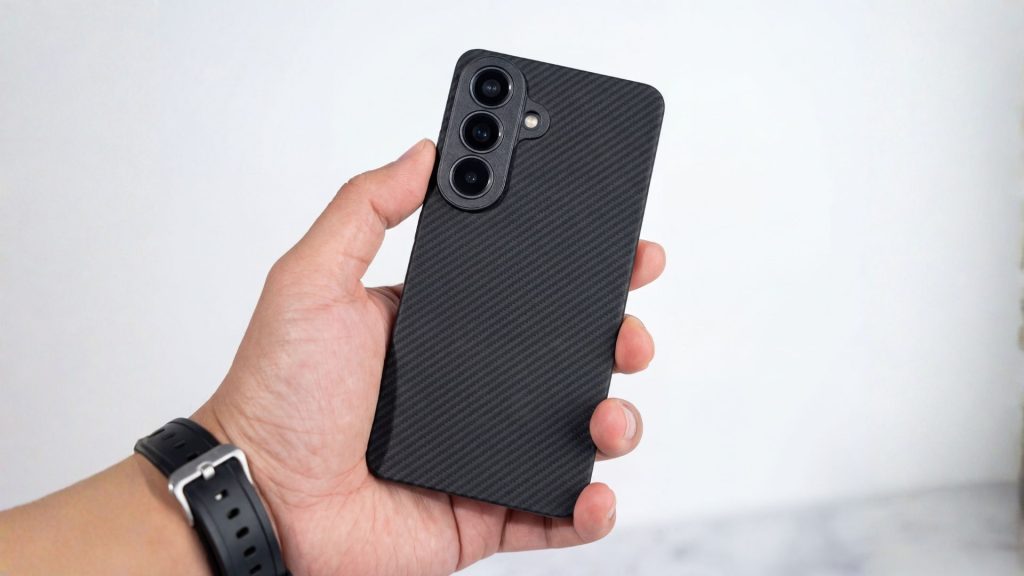
Thinborne uses 600D aramid fiber, which you’ll usually see in lightweight, high-strength materials. You’ll notice how it feels:

  • It’s very light
  • It feels firm rather than flexible
  • The surface has a subtle texture

At 0.90 mm thin, it doesn’t add much bulk. The phone still feels close to how it does without a case.

What makes it different from typical cases is the structure. It doesn’t have that soft, slightly rubbery feel you get from silicone. It’s more rigid, almost like a thin shell that snaps into place. Over time, silicone can start to feel sticky or collect dust – this doesn’t.

Black Thinborne case for the regular S26

MagSafe Compatibility

Like most Galaxy S26 Ultra cases, Thinborne includes built-in magnets since the phone itself doesn’t have them. In everyday use, that means:

  • Chargers snap into place quickly
  • Car mounts hold steady
  • Wallets and stands attach cleanly

The experience is straightforward, and everything lines up as expected (and it stays in place).

One thing that helps with the setup is the case’s rigidity. Since it doesn’t flex much, the alignment stays consistent. You don’t get that slight shift you sometimes notice with softer cases.

S26 Ultra case connected to a MagSafe case

Available Colors

Thinborne keeps the color options simple:

  • Black
  • Royal Crimson
  • Wild Navy

All three use the same woven finish, so the feel doesn’t change – only the color does. The tones are muted and don’t draw too much attention.

Thinborne Thin Phone Case vs Samsung Galaxy S26 Ultra Slim Magnet Case

Samsung’s Slim Magnet Case is the most direct comparison. Both cases fall into the same general category: thin, lightweight, and magnetic.

Advertisement

Samsung doesn’t list an exact thickness, but it’s positioned as a slim case. What we do know is that it weighs 24 grams, making it a bit heavier than Thinborne, which weighs around 20 grams.

Here’s how they compare:

Feature Thinborne Galaxy S26 Ultra Case Samsung Slim Magnet Case
Weight 20 g 24 g
Thickness 0.90 mm slim profile (not officially listed)
Material 600D aramid fiber Synthetic/plastic
Grip Textured (woven) Smooth
Magnets Built-in magnetic array Built-in magnets

As you can see, Thinborne and Samsung look similar. In use, however, the differences can be noticed:

  • Grip – Thinborne has a bit more texture, so it feels more secure in your hand. Samsung’s case is smoother, which can feel slightly slippery.
  • Weight – The difference isn’t huge, but the lighter feel can be noticeable over time – especially on a large phone like the S26 Ultra.
  • Material feel – Thinborne feels more solid and structured. Samsung’s case feels more like a standard slim case.

Pricing and Availability

Thinborne and Samsung are priced almost the same, so cost isn’t really the deciding factor here.

Thinborne comes in at $69.69, while Samsung’s Slim Magnet Case is slightly higher at $69.99. The difference is minimal, and in practice, both sit in the same premium range for thin magnetic cases.

Advertisement

Where they differ is availability. Thinborne is sold through its official website and is also available on Amazon, which gives you a bit more flexibility when buying. It typically includes extras like a tempered glass screen protector as well.

Samsung’s case is easier to find overall. It’s available through Samsung’s store and most major retailers, making it a more convenient option if you prefer to buy locally or through familiar channels.

At this price point, it really comes down to which case fits your preferences better, not which one is cheaper.

Wrap Up

Thinborne keeps things simple, and that’s really the point. It’s built as a thin phone case that doesn’t change how the Galaxy S26 Ultra feels in your hand. The lighter weight, subtle texture, and rigid build all come together in a way that feels easy to live with day to day.

Advertisement

Samsung’s Slim Magnet Case still does what it’s supposed to. It’s reliable, widely available, and works well with magnetic accessories. But if you care about how your phone actually feels in use, Thinborne has a clear edge. The lighter weight and textured finish make it easier to hold, especially during one-handed use – something you start to notice after a few days of use.

Source link

Continue Reading

Tech

Microsoft links Classic Outlook issue to email delivery problems

Published

on

Outlook

Microsoft is investigating a known issue that prevents some Classic Outlook users from sending emails via Outlook.com.

Affected users are being warned that their message hasn’t reached some intended recipients, and they will encounter this problem more often when the Outlook.com account they use to send email is an Outlook profile linked to another Exchange account.

“This message could not be sent. Try sending the message again later or contact your network administrator,” the non-delivery report (NDR) error displayed when sending or replying to emails reads.

“You do not have the permission to send the message on behalf of the specified user. Error is [0x80070005-0x0004dc-0x000524].”

Advertisement

Microsoft added that another condition that may trigger these errors is that the sender’s account has an Exchange Online mail contact with the same SMTP address.

Classic Outlook non-delivery report (NDR) error
Classic Outlook non-delivery report (NDR) error (Microsoft)

​While investigating this issue and still looking for a fix, the Outlook team shared several workarounds that may help affected customers temporarily mitigate the issue.

Microsoft recommends removing the M365 account Address Book so that the Outlook client does not check it when sending emails, hiding the Outlook.com contact from the Microsoft 365 account Global Address List (GAL).

Other alternatives include creating a new classic Outlook profile that includes only the account receiving NDR errors, and using the New Outlook client or Outlook.com on the web to send email from the affected account.

Over the last two weeks, Microsoft fixed two other known issues, including one that caused Classic Outlook to crash when enabling the Microsoft Teams Meeting Add-in and another that triggered 0x800CCC0F and 0x80070057 errors when synchronizing Gmail and Yahoo accounts.

Advertisement

Microsoft is also investigating known bugs that cause “Can’t connect to the server” errors when creating groups if Exchange Web Services (EWS) is enabled for the tenant, and that make the mouse pointer disappear for some users in Classic Outlook, OneNote, and other Microsoft 365 apps.

Automated pentesting proves the path exists. BAS proves whether your controls stop it. Most teams run one without the other.

This whitepaper maps six validation surfaces, shows where coverage ends, and provides practitioners with three diagnostic questions for any tool evaluation.

Source link

Advertisement
Continue Reading

Tech

Rapid Snow Melt-Off In American West Stuns Scientists

Published

on

Scientists say extreme March heat caused an unusually rapid collapse of snowpack across the American West that’s leaving major basins at record or near-record lows. “This year is on a whole other level,” said Dr Russ Schumacher, a Colorado State University climatologist. “Seeing this year so far below any of the other years we have data for is very concerning.” The Guardian reports: […] The issue is extremely widespread. Data from a branch of the US Department of Agriculture (USDA), which logs averages based on levels between 1991 and 2020, shows states across the south-west and intermountain west with eye-popping lows. The Great Basin had only 16% of average on Monday and the lower Colorado region, which includes most of Arizona and parts of Nevada, was at 10%. The Rio Grande, which covers parts of New Mexico, Texas and Colorado, was at 8%. “This year has the potential of being way worse than any of the years we have analogues for in the past,” Schumacher said.

Even with near-normal precipitation across most of the west, every major river basin across the region was grappling with snow drought when March began, according to federal analysts. Roughly 91% of stations reported below-median snow water equivalent, according to the last federal snow drought update compiled on March 8. Water managers and climate experts had been hopeful for a March miracle — a strong cold storm that could set the region on the right track. Instead, a blistering heatwave unlike any recorded for this time of year baked the region and spurred a rapid melt-off. “March is often a big month for snowstorms,” Schumacher said. “Instead of getting snow we would normally expect we got this unprecedented, way-off-the-scale warmth.”

More than 1,500 monthly high temperature records were broken in March and hundreds more tied. The event was “likely among the most statistically anomalous extreme heat events ever observed in the American south-west,” climate scientist Daniel Swain said in an analysis posted this week. “Beyond the conspicuous ‘weirdness’ of it all,” Swain added, “the most consequential impact of our record-shattering March heat will likely be the decimation of the water year 2025-26 snowpack across nearly all of the American west.” Calling the toll left by the heat “nothing short of shocking,” Swain noted that California was tied for its worst mountain snowpack value on record. While the highest elevations are still coated in white, “lower slopes are now completely bare nearly statewide.”

Source link

Advertisement
Continue Reading

Tech

If Elden Ring was Turned Into a 90s-Inspired Saturday Morning Cartoon, This is What it would Look Like

Published

on

64 Bits Elden Ring 90s Cartoon
Studio 64 Bits worked tirelessly for four months to hand-draw every single frame, allowing them to introduce Elden Ring to the wild world of Saturday morning television in the 90s. The end effect feels like a bizarre parallel universe in which the game appears alongside Thundercats and He-Man.


Ranni is right there at the start, cradling a double-necked electric guitar slung lazily across her shoulders, and as she begins noodling on the opening chords, the camera sweeps across these blasted landscapes, full of familiar faces from both the base game and the Shadow of the Erdtree expansion. We see Malenia charging ahead with blades flashing, Blaidd standing tall and loyal by her side, and Messmer looming large as the true new threat. Meanwhile, Miquella and Radahn share a dramatic moment, and Melina, Rykard, Mohg, Varre, Midra, Placidusax, Astel, Maliketh, and the Elden Beast all flash across the screen in quick, splashy bursts. Each character receives the usual cartoon makeover, complete with bold outlines, vivid colors, and exaggerated posturing that transforms their conflicts into heroic showdowns rather than gloomy, terrible struggles.

64 Bits Elden Ring 90s Cartoon
The animation sticks to the technical limits of 90’s TV production, which means that the colors don’t deviate much from a fairly limited palette, the lines have just a hint of that creaky hand-drawn cel look to them, and the transitions snap along with the same crisp timing you’d see on shows from that era. The music builds to a precise pitch, culminating in a driving rock song that sounds like it might have come directly from the opening titles of Jayce and the Wheeled Warriors or Captain Planet. Every second creates the impression that an entire series could follow, with the Tarnished rushing across the continent to repair the Elden Ring and face off against these legendary monsters in one thrilling episode after the next.

64 Bits Elden Ring 90s Cartoon
After the main intro concludes, the film transitions to a brief commercial in which Elden Ring appears to have recently been released for the old SNES. A happy narration promises additional dungeons, secrets, and a fate that is entirely in the player’s control. The tagline reverses a humorous old Nintendo slogan into ‘Now you’re playing with power, rune power’, and the spot concludes with a quick little bumper that parodies the DIC logo from coutnless old 90’s cartoons. It connects neatly to their last full-length SNES remake, making the entire package feel like one continuous block of faux Saturday morning programming.

Source link

Advertisement
Continue Reading

Tech

I skipped Meta’s AI glasses, but they’ve finally fixed a fundamental problem for millions other like me

Published

on

Smart glasses have always had a basic problem for people like me. They looked cool in demos, sounded futuristic in press releases, and usually came with the same quiet catch. If you already wear glasses every day, you are expected to work around them. This meant adding prescription lenses later, settling for a fit that is not quite right, or treating the whole thing as a novelty instead of something you would actually wear throughout the day.

This is what makes Meta’s latest announcement more exciting. The company just unveiled its first prescription-optimized AI glasses, the Ray-Ban Meta Blayzer Optics (Gen 2) and Ray-Ban Meta Scriber Optics (Gen 2), and they are explicitly designed around people who rely on prescription eyewear all day.

Meta says they support nearly all prescriptions, start at $499 in the US, and will be available at optical retailers beginning April 14.

For me, that is the first time Meta’s glasses story has felt less like wearable hype and more like something I could actually live with.

Advertisement

Prescription wearers don’t have to do extra work

Billions of people around the world use glasses or contacts for vision correction, and Meta itself notes that many Ray-Ban Meta and Oakley owners already add prescription lenses to existing models. But “can be added later” is not the same thing as “built for you from the start.”

The new prescription-first push feels more thoughtful. Meta says that these new models were designed for all-day comfort and include features like overextension hinges, interchangeable nose pads, and optician-adjustable temple tips. These may sound like dry-product language stuff, but if you actually wear glasses every day, it is the kind of detail that decides whether something stays on your face for the next eight hours or if it gets thrown into a case after 20 minutes.

Balancing act between ‘gadget’ and ‘eyewear’

Meta is not just launching two new frame styles and calling it a day. It is trying to make AI glasses feel like a normal category of eyewear rather than a niche device for early adopters. These new prescription-optimized frames aren’t alone, as Meta also announced more frame and lens options across Ray-Ban Meta and Oakley Meta glasses.

There’s also a new software feature, like hands-free nutrition tracking, WhatsApp summaries and recall through Meta AI, and Neural Handwriting support expanding to iMessage. All of this makes these new glasses feel more natural for daily use. The tech itself is only half the story. The real breakthrough is when you don’t need to accommodate the hardware.

And if you already wear prescription glasses, that threshold is even higher. A smartwatch can be optional. Glasses are not.

This is the first Meta glasses move that feels genuinely practical

This is basically why I think these new Meta glasses matter more than they might look on paper. The usual wearable pitch is about features, AI tricks, cameras, and convenience. But for prescription wearers, such as myself, the first question is whether I would actually want to wear this all day instead of normal glasses?

And for a change, Meta seems to be answering that question directly.

Advertisement

Yes, the concerns don’t disappear, and smart glasses still have the privacy baggage and hefty price tag. They also haven’t proved that their AI features are useful often enough to justify becoming part of your daily routine. But this launch clears a much more fundamental barrier than people give it credit for.

And for someone who already owns prescription Wayfarers and knows how much difference proper eyewear fit makes, Meta’s new AI glasses suddenly feel a lot more attractive.

Source link

Advertisement
Continue Reading

Tech

Every 3D Printable Film Camera, In One Place

Published

on

For those of us who hack old cameras, the 3D printer has undoubtedly been a boon. High precision, or at least consistent precision, lightproof enclosures can be easily made and reproduced for others. As a result there are quite a few printable cameras out there, and we’ve featured our share here. We didn’t realize just how many there are without the work of [Sebastian] though, as he’s gathered together every one he can find in a glorious catalog of homemade photographic construction.

As a snapshot of the world of home made cameras it’s refreshing to see such a wide range of designs. There are pinholes aplenty as well as cameras using lenses from scavanged point and shoots through 35mm SLR, medium format, and even one using a Micro Four Thirds compact digital camera lens. For film there’s 35mm and 120 as well as large format, but we’re pleased to see a few instant cameras in there. Some of the models in the list are paid-for designs but most of them are free, so you probably won’t need any encouragement to make yourself a camera!

Unless we missed something, we didn’t see any movie cameras in the list. With 35mm and 16mm models to be found, we hope some of them make it.

Advertisement

Source link

Advertisement
Continue Reading

Tech

ChatGPT comes to Apple CarPlay but only if you are willing to talk to a robot

Published

on


  • ChatGPT arrives on Apple CarPlay update for iOS 26.4
  • Update adds support for “voice-based conversational apps”
  • Interaction is limited to voice prompts only

We reported on a big Apple update in February of this year with the release of the new iOS 26.4 public beta.

The headline news was the inclusion of third-party, voice-controlled AI chatbots on CarPlay for the first time, allowing drivers to make the most of AI assistants outside of those that come part and parcel of many modern cars.

Source link

Advertisement
Continue Reading

Tech

OpenClaw has 500,000 instances and no enterprise kill switch

Published

on

“Your AI? It’s my AI now.” The line came from Etay Maor, VP of Threat Intelligence at Cato Networks, in an exclusive interview with VentureBeat at RSAC 2026 — and it describes exactly what happened to a U.K. CEO whose OpenClaw instance ended up for sale on BreachForums. Maor’s argument is that the industry handed AI agents the kind of autonomy it would never extend to a human employee, discarding zero trust, least privilege, and assume-breach in the process.

The proof arrived on BreachForums three weeks before Maor’s interview. On February 22, a threat actor using the handle “fluffyduck” posted a listing advertising root shell access to the CEO’s computer for $25,000 in Monero or Litecoin. The shell was not the selling point. The CEO’s OpenClaw AI personal assistant was. The buyer would get every conversation the CEO had with the AI, the company’s full production database, Telegram bot tokens, Trading 212 API keys, and personal details the CEO disclosed to the assistant about family and finances. The threat actor noted the CEO was actively interacting with OpenClaw in real time, making the listing a live intelligence feed rather than a static data dump.

Cato CTRL senior security researcher Vitaly Simonovich documented the listing on February 25. The CEO’s OpenClaw instance stored everything in plain-text Markdown files under ~/.openclaw/workspace/ with no encryption at rest. The threat actor didn’t need to exfiltrate anything; the CEO had already assembled it. When the security team discovered the breach, there was no native enterprise kill switch, no management console, and no way to inventory how many other instances were running across the organization.

OpenClaw runs locally with direct access to the host machine’s file system, network connections, browser sessions, and installed applications. The coverage to date has tracked its velocity, but what it hasn’t mapped is the threat surface. The four vendors who used RSAC 2026 to ship responses still haven’t produced the one control enterprises need most: a native kill switch.

Advertisement

The threat surface by the numbers

Metric

Numbers

Source

Internet-facing instances

Advertisement

~500,000 (March 24 live check)

Etay Maor, Cato Networks (exclusive RSAC 2026 interview)

Exposed instances with security risks

30,000+ observed during scan window

Advertisement

Bitsight

Exploitable via known RCE

15,200 instances

SecurityScorecard

Advertisement

High-severity CVEs

3 (highest CVSS: 8.8)

NVD (24763, 25157, 25253)

Malicious skills on ClawHub

Advertisement

341 in Koi audit (335 from ClawHavoc); 824 by mid-Feb

Koi

ClawHub skills with critical flaws

13.4% of 3,984 analyzed

Advertisement

Snyk

API tokens exposed (Moltbook)

1.5 million

Wiz

Advertisement

Maor ran a live Censys check during an exclusive VentureBeat interview at RSAC 2026. “The first week it came out, there were about 6,300 instances. Last week, I checked: 230,000 instances. Let’s check now… almost half a million. Almost doubled in one week,” Maor said. Three high-severity CVEs define the attack surface: CVE-2026-24763 (CVSS 8.8, command injection via Docker PATH handling), CVE-2026-25157 (CVSS 7.7, OS command injection), and CVE-2026-25253 (CVSS 8.8, token exfiltration to full gateway compromise). All three CVEs have been patched, but OpenClaw has no enterprise management plane, no centralized patching mechanism, and no fleet-wide kill switch. Individual administrators must update each instance manually, and most have not.

The defender-side telemetry is just as alarming. CrowdStrike’s Falcon sensors already detect more than 1,800 distinct AI applications across its customer fleet — from ChatGPT to Copilot to OpenClaw — generating around 160 million unique instances on enterprise endpoints. ClawHavoc, a malicious skill distributed through the ClawHub marketplace, became the primary case study in the OWASP Agentic Skills Top 10. CrowdStrike CEO George Kurtz flagged it in his RSAC 2026 keynote as the first major supply chain attack on an AI agent ecosystem.

AI agents got root access. Security got nothing.

Maor framed the visibility failure through the OODA loop (observe, orient, decide, act) during the RSAC 2026 interview. Most organizations are failing at the first step: security teams can’t see which AI tools are running on their networks, which means the productivity tools employees bring in quietly become shadow AI that attackers exploit. The BreachForums listing proved the end state. The CEO’s OpenClaw instance became a centralized intelligence hub with SSO sessions, credential stores, and communication history aggregated into one location. “The CEO’s assistant can be your assistant if you buy access to this computer,” Maor told VentureBeat. “It’s an assistant for the attacker.”

Ghost agents amplify the exposure. Organizations adopt AI tools, run a pilot, lose interest, and move on — leaving agents running with credentials intact. “We need an HR view of agents. Onboarding, monitoring, offboarding. If there’s no business justification? Removal,” Maor told VentureBeat. “We’re not left with any ghost agents on our network, because that’s already happening.”

Advertisement

Cisco moved toward an OpenClaw kill switch

Cisco President and Chief Product Officer Jeetu Patel framed the stakes during an exclusive VentureBeat interview at RSAC 2026. “I think of them more like teenagers. They’re supremely intelligent, but they have no fear of consequence,” Patel said of AI agents. “The difference between delegating and trusted delegating of tasks to an agent … one of them leads to bankruptcy. The other one leads to market dominance.”

Cisco launched three free, open-source security tools for OpenClaw at RSAC 2026. DefenseClaw packages Skills Scanner, MCP Scanner, AI BoM, and CodeGuard into a single open-source framework running inside NVIDIA’s OpenShell runtime, which NVIDIA launched at GTC the week before RSAC. “Every single time you actually activate an agent in an Open Shell container, you can now automatically instantiate all the security services that we have built through Defense Claw,” Patel told VentureBeat. AI Defense Explorer Edition is a free, self-serve version of Cisco’s algorithmic red-teaming engine, testing any AI model or agent for prompt injection and jailbreaks across more than 200 risk subcategories. The LLM Security Leaderboard ranks foundation models by adversarial resilience rather than performance benchmarks. Cisco also shipped Duo Agentic Identity to register agents as identity objects with time-bound permissions, Identity Intelligence to discover shadow agents through network monitoring, and the Agent Runtime SDK to embed policy enforcement at build time.

Palo Alto made agentic endpoints a security category of their own

Palo Alto Networks CEO Nikesh Arora characterized OpenClaw-class tools as creating a new supply chain running through unregulated, unsecured marketplaces during an exclusive March 18 pre-RSA briefing with VentureBeat. Koi found 341 malicious skills on ClawHub in its initial audit, with the total growing to 824 as the registry expanded. Snyk found 13.4% of analyzed skills contained critical security flaws. Palo Alto Networks built Prisma AIRS 3.0 around a new agentic registry that requires every agent to be logged before operating, with credential validation, MCP gateway traffic control, agent red-teaming, and runtime monitoring for memory poisoning. The pending Koi acquisition adds supply chain visibility specifically for agentic endpoints.

Cato CTRL delivered the adversarial proof

Cato Networks’ threat intelligence arm Cato CTRL presented two sessions at RSAC 2026. The 2026 Cato CTRL Threat Report, published separately, includes a proof-of-concept “Living Off AI” attack targeting Atlassian’s MCP and Jira Service Management. Maor’s research provides the independent adversarial validation that vendor product announcements cannot deliver on their own. The platform vendors are building governance for sanctioned agents. Cato CTRL documented what happens when the unsanctioned agent on the CEO’s laptop gets sold on the dark web.

Advertisement

Monday morning action list

Regardless of vendor stack, four controls apply immediately: bind OpenClaw to localhost only and block external port exposure, enforce application allowlisting through MDM to prevent unauthorized installations, rotate every credential on machines where OpenClaw has been running, and apply least-privilege access to any account an AI agent has touched.

  1. Discover the install base. CrowdStrike’s Falcon sensor, Cato’s SASE platform, and Cisco Identity Intelligence all detect shadow AI. For teams without premium tooling, query endpoints for the ~/.openclaw/ directory using native EDR or MDM file-search policies. If the enterprise has no endpoint visibility at all, run Shodan and Censys queries against corporate IP ranges.

  2. Patch or isolate. Check every discovered instance against CVE-2026-24763, CVE-2026-25157, and CVE-2026-25253. Instances that cannot be patched should be network-isolated. There is no fleet-wide patching mechanism.

  3. Audit skill installations. Review installed skills against Cisco’s Skills Scanner or the Snyk and Koi research. Any skill from an unverified source should be removed immediately.

  4. Enforce DLP and ZTNA controls. Cato’s ZTNA controls restrict unapproved AI applications. Cisco Secure Access SSE enforces policy on MCP tool calls. Palo Alto’s Prisma Access Browser controls data flow at the browser layer.

  5. Kill ghost agents. Build a registry of every AI agent running. Document business justification, human owner, credentials held, and systems accessed. Revoke credentials for agents with no justification. Repeat weekly.

  6. Deploy DefenseClaw for sanctioned use. Run OpenClaw inside NVIDIA’s OpenShell runtime with Cisco’s DefenseClaw to scan skills, verify MCP servers, and instrument runtime behavior automatically.

  7. Red-team before deploying. Use Cisco AI Defense Explorer Edition (free) or Palo Alto Networks’ agent red-teaming in Prisma AIRS 3.0. Test the workflow, not just the model.

The OWASP Agentic Skills Top 10, published using ClawHavoc as its primary case study, provides a standards-grade framework for evaluating these risks. Four vendors shipped responses at RSAC 2026. None of them is a native enterprise kill switch for unsanctioned OpenClaw deployments. Until one exists, the Monday morning action list above is the closest thing to one.

Source link

Advertisement
Continue Reading

Tech

Larger, More Spacious 2027 Kia Seltos Debuts With New Hybrid Variant

Published

on

Kia’s combustion-powered Seltos has grown up and glowed up with more space and bigger tech inside.

Antuan Goodwin

Antuan started out in the automotive industry the old-fashioned way, by turning wrenches in a driveway and picking up speeding tickets. He now has nearly 20 years of expertise and experience behind the wheel of hundreds of cars, including electric, hybrid, plug-in hybrid, hydrogen, and traditional combustion vehicles.

For each car he tests, Antuan covers more than 200 miles behind the wheel and evaluates driving dynamics; acceleration and braking performance; range; and efficiency.

Antuan’s goal is to use his extensive car knowledge to educate CNET readers and help with their next car-related buying decision. Whether you’re EV-curious, an EV-enthusiast or a combustion-car loyalist, Antuan will bring you the unbiased advice, reviews, best lists and news you need.

You can reach Antuan at antuan.goodwin@cnet.com

Advertisement

Source link

Continue Reading

Trending

Copyright © 2025