Connect with us
DAPA Banner
DAPA Coin
DAPA
COIN PAYMENT ASSET
PRIVACY · BLOCKDAG · HOMOMORPHIC ENCRYPTION · RUST
ElGamal Encrypted MINE DAPA
🚫 GENESIS SOLD OUT
DAPAPAY COMING

Tech

12 Gadgets Under $25 That Deserve A Spot In Your Home Office

Published

on


We may receive a commission on purchases made from links.

What began for millions as a hasty laptop setup at the dining table has evolved into a dedicated workstation where they spend most of their productive hours. Contrary to what you may think, you don’t have to spend thousands of dollars to enjoy the comforts of a professional workspace. 

Ergonomic furniture is vital for your posture and productivity, but it’s only a piece of the puzzle. To work at your best, you need to iron out the small bottlenecks that hurt productivity, like tangled cables or poor lighting that makes you rearrange your setup for video calls. 

Advertisement

Luckily, it doesn’t cost much to fix these issues. We’ve compiled 12 sub-$25 gadgets to elevate your home office productivity and comfort without burdening your wallet. Our suggestions span several product categories, including peripherals, connectivity hubs, digital storage, and ergonomic mounts, so you can optimize every inch of your home office real estate.

Advertisement

Multi-button mouse

If you use a regular three-button mouse, you’re leaving efficiency wins on the table. The standard middle-click is handy, but extra buttons will supercharge your workflow, letting you bypass the keyboard finger gymnastics for switching windows and tabs or copying and pasting.

The Redragon M612 Predator is a wired mouse with nine physical buttons. All buttons are programmable, and you can customize the scroll-up and scroll-down functions, giving you 11 mappable inputs. Amazon users and reviewers at TechGearLab laud its comfortable and supportive shell and the value it offers despite its low price tag. TechGearLab highly recommends the M612 for gamers on a tight budget and has given it their Best Buy Award.

But for a liberating wireless setup, the Tecknet Bluetooth Mouse is probably the better option. Users love its build quality and comfort, and it supports 2.4GHz USB and Bluetooth 5.0/5.3, connecting up to three devices simultaneously — excellent for multi-device workspaces. There are seven buttons, including a side scroll for tackling broad spreadsheets. The manufacturer states that the buttons are non-programmable, but you can remap them using third-party software. Irrespective of your choice, the additional buttons will save you minutes of navigation daily.

Advertisement

Laptop stand

A laptop is designed for portability at the expense of ergonomics. Unlike a desktop, you can move around with it and work on the couch or the dining table, but none of these makeshift workspaces is good for your productivity, posture, and long-term health. Even a laptop flat on your desk forces a steep downward angle, hunching your neck, spine, and shoulders. 

For a more ergonomic posture, you need a stand to elevate your screen — like this Amazon Basics Laptop Stand. Its Z-shaped, hinged frame raises the height by 7 inches, and non-slip silicone pads keep your device in place. The hollow aluminum frame also boosts ventilation.

Both Amazon buyers and the pro reviewers at Wired compliment its remarkably sturdy and stable build that doesn’t sag under the laptop’s weight. A common complaint across both camps is the stiff hinges that take effort to adjust. But it’s reassuring because it proves that the stand can support heavier hardware, including the robust workstations ranking among the best laptops of 2026.

Wrist comfort tends to be a compromise with laptop stands because of the elevated keyboard height. To maximize ergonomics, use an external keyboard and mouse with the stand so that your arms are at desk level. The split configuration allows your upper body to effortlessly maintain a more natural and relaxed posture.

Advertisement

Wireless keyboard

A wireless keyboard is a must when using a monitor or an elevated laptop stand. It’ll ensure a more ergonomic wrist position along with a neat, cable-free aesthetic. A full-size keyboard gives your fingers more breathing room than a cramped laptop keyboard, and the 10-key design can make spreadsheets easier. Media keys and programmable hotkeys can also tighten your workflow.

The Logitech MK270 is a low-cost wireless mouse and keyboard combo. Customers on Amazon like the simple setup because the keyboard and mouse connect to the computer with a unified 2.4GHz USB dongle and work immediately. Wireless connectivity is stable and highly responsive.

Advertisement

PCWorld noted that it worked perfectly during testing and favored the responsive typing experience, but criticized the keyboard’s cheap build. The advertised battery life is three years, with many users reporting it lasts beyond eight to 10 months.

The keyboard has four multimedia keys (play/pause, mute, and volume) and four hotkeys (home, e-mail, PC power, and calculator). Three hotkeys are programmable using Logitech’s old SetPoint software — you can assign keystrokes or open apps. Despite lacking premium materials, this entry-level keyboard delivers excellent bang for the buck for remote workers.

Advertisement

Adjustable monitor arm

The benefits of an adjustable monitor stand extend beyond ergonomics and healthy posture. Most monitors come with tabletop stands, but along with limited adjustability, they eat up your desk’s real estate. An adjustable monitor arm clamps to your desk’s edge and lifts the monitor, freeing space for peripherals and documents. And if you have a multiple-monitor setup, you get precise screen alignment for multitasking. Monitor arms often have integrated cable channels to route wires for a more organized layout.

The Wali Single Monitor Mount is an absolute steal — many Amazon users compliment its easy assembly, sturdy build quality, and overall functionality.

The mount supports 13 to 34-inch screens and works with most flat and curved models. It has a weight capacity of up to 26.4 pounds for flat screens and 19.8 pounds for curved ones. The arm extends nearly 20 inches outward and 17 inches upward, offering 180 degrees of swivel, 360 degrees of rotation, and 70 degrees upward and 45 degrees downward tilt.

BTOD rated it the best monitor arm for vertical height range under $50 (it’s currently priced under $25). It praised the mount’s thick steel construction and liked that its integrated cable management didn’t require a screwdriver for routing cables. Although not suited for expensive or heavy displays, the Wali mount could be great for someone using regular monitors.

Advertisement

Cable management box

Work can be hard enough — you don’t want a tangled mass of cables worsening it. Other than disrupting your workspace’s feng shui, messy cables are a visual distraction that overwhelm the senses and increase stress. Plus, there’s the safety concern of tripping over cords, or children and pets fiddling with them.

A smart way to clear the clutter is with an aesthetic container like the Naeety Large Cable Management Box. Cable ties and magnetic cable clips are handy for bundling wires, but they don’t hide them entirely. The Naeety box pack has a 16-inch and a 12.6-inch plastic bin with wooden tops. The large size fits a six or eight-plug power strip, while the medium size can house a four-plug extension.

Advertisement

Since there are no openings at the top or sides, cables exit only from the two endpoints, making routing restrictive. Some Amazon customers complain that the wooden lids don’t sit securely with too many wires or large charging blocks, but the included adhesive cable clips and ties somewhat alleviate these concerns. It does clasp securely once the lid is locked in place, so small children can’t easily open it.

Writers at The Spruce note that it’s made from materials resistant to fire, impact, and scratches, making it a durable and elegant home office upgrade.

Advertisement

Two-port GaN fast charger

All the devices at your home office desk need power, making space on a power strip precious. A multi-port charger will help you power more devices while freeing up outlets on your extension cord. And to take advantage of recent advancements, consider a gallium nitride (GaN) fast charger. Unlike older silicon chargers, GaN chargers are smaller, cooler, and more efficient, making it easier for them to output higher wattage and power multiple devices.

Belkin Dual-Port GaN Charger’s 50W output is advertised to charge the iPhone 16 Pro and Samsung S25 Ultra from 0 to 50% in 27 and 28 minutes, respectively. Each port outputs 50W when connected to a single device and splits the wattage when two devices are connected. Buyers on Amazon liked its speedy charging, dual port connectivity, foldable prongs, and travel-friendly compactness that’s also handy for fitting into crowded cable management boxes. However, many wished it included a USB-C cable. 

CNN reviewers ranked the Belkin 45W GaN charger as the best USB-C charger for phones after testing it against the Mophie Speedport 45W and the Anker Nano. While the writers tested the 45W model, the higher-tier 50W version is currently a smarter purchase because of its lower price. You can further maximize this accessory by pairing it with USB-C cables that do more than charge your phone.

Advertisement

Ring light

Although upgrading to the best laptops with high-quality cameras is wise, hardware specs can’t do much without good lighting. Proper lighting elevates your video quality during digital meetings and makes you appear more polished and professional. Natural window light is superb, but outdoor light is unpredictable (and useless for evening meetings). For greater control over your lighting, you need a ring light, which is a circular LED device that casts even light on your face. It prevents harsh shadows, making you appear brighter and minimizing skin imperfections.

The UBeesize 12-inch Desk Ring Light is a budget favorite on Amazon. User reviews extensively praise its ease of setup, brightness, and adjustability. Along with 10 levels of brightness, it has three color temperatures — warm white, cool white, and daylight.

TechGearLab liked the swift setup and gave the ring light its Best Buy award. The light also includes a stable mini tripod with a textured ball joint for precise angle adjustment. Pro tip: during meetings, ensure the light is at eye level and slightly off-center to avoid unflattering shadows and eye strain.

Advertisement

The phone holder’s handy, but TechGearLab notes that it’s not very compatible with bulky phone cases, like Otterbox. Nonetheless, if the focus is on the webcam feed, this wallet-friendly light won’t disappoint.

Advertisement

Webcam

Remote work is bound to get you on video calls, but most built-in laptop webcams offer subpar camera quality. Underpowered laptop webcams are common because manufacturers prioritize performance, display quality, and sleek designs, leaving you with a grainy, washed-out feed.

You can improve image quality by adjusting your laptop’s placement or lighting, but the hardware eventually limits you. A more effective solution is an external webcam. While the best 4K webcams will set you back over $99, the NexiGo N60 is wallet-friendly at under $25.

Although it delivers 1080p at 30fps, reviewers at CNET commend its performance and find it outshines the 720p webcams on most laptops. Amazon users appreciate its noise-cancelling mic, but the CNET reviewer criticized its tinny sound.

It has a wide 110-degree field of view, which is helpful if more than one person needs to be in frame. The webcam’s shutter boosts privacy, and its mount tilts and swivels to improve framing without adjusting the entire display. Since it connects via USB-A, you may need an adapter if your laptop has only USB-C ports, but it’s a minor trade-off for a more professional video conferencing experience.

Advertisement

Smart lights

Smart lights bring varied benefits to a home office, and there’s no going back to regular lights once you get used to them. For starters, you can auto-schedule or manage these lights through your smartphone or voice assistant, so you don’t have to interrupt your flow to control them. (Still, standing up hourly is beneficial for your health — don’t let automation make you a desk potato.)

And often, your home office may share space with your bedroom or other living spaces. Smart lights can change from white to warm (or another hue, if you’re feeling creative) to signal to your brain that the working hours have concluded.

The TP-Link Tapo Smart Light Bulbs L535E are a two-pack set with millions of colors and adjustable brightness up to 1,100 lumens. They’re Matter-certified with built-in Wi-Fi, allowing you to control them directly using Apple’s HomeKit and Siri, Google Home, and Alexa. PCMag reviewers have rated it the best smart bulb overall in 2026 and note that it’s among the brightest in the publication’s roundup.

Advertisement

Lots of Amazon users appreciate the simple setup and app usability, though a few experienced platform-syncing bugs. The majority, however, applauded its fast response time, wide color range, and hub-free ecosystem flexibility. For a smoother transition, make sure you learn these three things before installing smart lights.

Advertisement

Surge protector

Your home office desk will likely house more gadgets beyond the laptop. Printer, monitor, table lamp — all these devices require outlets, making an extension cord vital for consolidating your desktop layout. But an unprotected power strip is risky because voltage spikes can fry connected hardware, damaging devices worth thousands of dollars. Electrical fluctuations can also overheat circuitry to become a major fire hazard.

For device safety, you’ll need robust surge protection, like the Belkin 12-Outlet Surge Protector Power Strip. Popular Mechanics highly recommends it to protect gadgets against power surges and spikes. Its 12 outlets can power all your gear at once and the 8-foot cable lets you position your workstation away from the wall socket.

The power strip’s protection indicator uses dual lights to confirm your devices are protected, and changes if the protection fails or there’s a grounding issue. Crucially, it provides 3,780 joules of surge protection, meaning it can survive many minor and a few major power fluctuations. For greater assurance, you get Belkin’s Connected Equipment Warranty, under which the company will fix or replace products damaged by electrical charge when connected to the surge protector — up to $300,000. No wonder it tops our surge protector brand rankings.

Amazon buyers appreciate its sleek profile, ample well-spaced outlets, indicator lights, and hefty warranty. Although it’s missing USB ports, its diverse premium features more than make up for it.

Advertisement

USB-C hub

Modern laptops are great — easy on the eyes and highly portable. Sadly, they sacrifice ports to achieve a slender profile, retaining barely one or two USB-C and a USB-A port. If you’re using a keyboard, monitor, and mouse, you’ll run out of ports, and it’s a hassle swapping cables. And USB-C-only connectivity on your laptop means USB-A accessories are incompatible without an adapter. 

Your one-stop solution is a USB-C hub for additional connectivity. The Anker Multi-Port Adapter offers seven ports — two USB-A 3.0, two USB-C (one data and one charging), one HDMI, and one SD and microSD card. Only the HDMI port has video output, but it supports 4K at 60Hz for smooth visuals. 

Customers on Amazon praise its reliable performance and ports, though a few would’ve liked an additional USB-C data port. There are a few mixed reviews about the HDMI output, with some users getting 4K at 60Hz but others capping out at 30Hz. This drop in refresh rate, however, occurs only if your device has DisplayPort 1.2 and not 1.4.

Advertisement

A reviewer at How-To Geek aptly described the Anker USB-C Hub as the best boring upgrade he’d ever bought, sharing that while it’s not flashy, it’s still a quality-of-life improvement. Consolidating your connections through this slim hub will eliminate your laptop’s port hiccups. 

Advertisement

Portable flash drive

As convenient as online transfer is, it can stall when your internet speed isn’t blazing. And emailing large files or uploading them to transfer across machines can feel sluggish. Sometimes, it’s faster to use a local flash drive. Ideal for moving large files, the “sneakernet method” dates back to floppy disks, when people physically carried storage between computers. Compared to slow internet, it now ensures swift and reliable data transfer.

The SanDisk Ultra Dual Drive is apt for modern home offices because it has a USB-C and USB-A connector, so you can share files without needing an adapter. It’s available in sizes from 32 GB to 256 GB, with the 64 GB drive under $25 on Amazon. Amazon buyers loved the dual drive compatibility. Most of them liked the read/write speeds, but some wanted it faster. Since this is a flash drive, its speeds are limited — up to 150 MBps.

TechGearLab rated this the best flash drive featuring a Type-A and Type-C combo. The reviewer appreciated the transfer speeds, but noted slowdowns when transferring many small files. In the reviewer’s test, the flash drive took 26 minutes to transfer 5 GB of small files. If you need something massively faster and have a bigger budget, don’t miss the market’s fastest portable SSDs with transfer speeds above 1,000 MBps.

Advertisement

Methodology

We finalized all the gadgets on this list through a multi-tier evaluation. At the time of publishing, all products were under $25 and available on major platforms, like Amazon, Best Buy, and Walmart.

We compiled the gadget categories based on our remote-work experience, but we selected individual items based on personal experience and research. The products averaged over four stars with more than 1,000 verified buyer reviews, signifying consistent real-world performance across diverse home office setups. We made one exception to the 1,000-review count for a more recent hardware release from a well-established brand whose reliability is widely endorsed by industry experts.

The devices were also tested by reviewers at established consumer-tech publications, so you’d get a balanced perspective of how well they work from both regular remote workers and expert hardware analysts. Not to mention, all the items solve specific home office pain points to enhance comfort, productivity, or both.

Advertisement


Source link

Advertisement
Continue Reading
Click to comment

You must be logged in to post a comment Login

Leave a Reply

Tech

What are people getting wrong about the modern-day job hunt?

Published

on

Leda Stawnychko of Mount Royal University and Mehnaz Rafi of the University of Calgary discuss what is true and false about searching for a job in 2026.

Job searching has never been more accessible – or more confusing. Platforms like LinkedIn, Indeed and employer career pages let candidates submit applications with just a few clicks. What happens after they click ‘submit’, however, has become fertile ground for misinformation.

Social media is filled with ‘career influencers, resume writers, recruiters and companies promising insider knowledge of how hiring really works. Much of this advice focuses on misinformed claims about applicant-tracking systems (ATS) and artificial intelligence.

These services profit from jobseekers’ uncertainty and convincing people they need specialised services, tools and products to ‘beat’ the ATS and secure interviews.

Advertisement

The result is that many job seekers spend time and money following advice that has no basis in evidence. Here are four common myths about the job application process and what the research actually says.

Myth 1: 75pc of resumes are rejected

Perhaps the most widely repeated claim online is that 75pc of resumes are automatically rejected by an ATS before a human recruiter ever sees them.

The statistic originated from a 2012 sales pitch by Preptel, a resume optimisation company that went out of business the following year. No methodology was ever published, yet the figure has spread widely.

In reality, an ATS is software that helps employers manage applications, and its capabilities vary widely. Some systems function as digital filing cabinets, simply storing and organising applications.

Advertisement

Others automatically screen for basic requirements, such as mandatory eligibility questions. At the most sophisticated end, systems use AI to rank applicants, recommend candidates and analyse asynchronous video interviews.

The advanced AI-powered tools are typically found in large organisations, including many Fortune 500 companies, which receive enormous volumes of applications. In Canada, most employers do not use AI in hiring, and small businesseswhich employ more than 60pc of the workforce – are especially unlikely to rely on ATS.

Small businesses typically lack both the application volumes that make ATS worthwhile and the procurement infrastructure to adopt and maintain them.

For most Canadian jobseekers, the better strategy is to focus on clearly communicating how their skills and experience match the role, and on building relationships within their profession.

Advertisement

Myth 2: AI can write a winning resume

A common message from career influencers is that AI can generate a tailored resume or cover letter that dramatically improves your chances of getting hired. While AI can help candidates prepare application materials more efficiently, it is not a shortcut to a stronger application.

As more candidates rely on the same tools and prompts, applications increasingly sound similar and recruiters take notice.

Far from providing a competitive advantage, AI-generated applications may have the opposite effect. 74 pc of hiring managers report identifying them, and 80pc view them unfavourably.

The best approach is to use AI to augment your own voice. That means using it to refine and sharpen your draft, not replace its substance.

Advertisement

Research on Canadian hiring suggests candidates secure more interviews when their applications contain more detail, clarity and structure. Since today’s recruiters review a myriad of applications that look and sound the same, they tend to respond to the ones that stand out by communicating qualifications in an authentic voice.

Myth 3: Use ‘ATS-friendly’ resume templates

Resume writers and career influencers claim that using an ‘ATS-friendly’ template is essential for ‘beating’ the ATS. Some even sell templates that promise to ‘optimise your resume to secure interviews.

In reality, there is no universal ATS-friendly resume because the software employers use varies widely from one company to another. Additionally, modern ATS can extract information from common resume layouts, including columns or tables.

Their main limitation is that they are designed to process text, not images, graphics or icons. That means a clean, readable resume should be the actual target, not a template bought online.

Advertisement

If ATS doesn’t automatically reject resumes the way the influencer economy claims, then optimising for a system that largely doesn’t work that way is solving the wrong problem. The real audience for your resume is a person, not an algorithm.

The better approach is to write for both systems and people. Use clear headings, relevant keywords and concrete examples that show how your experience matches the role.

Myth 4: More applications, more interviews

Another myth is that, with the right prompts, the job search can be fully automated, allowing candidates to submit hundreds of applications with little effort. More applications should lead to more interviews, the logic goes.

In practice, this approach often comes at the expense of thoughtful job-seeking, such as identifying positions and employers that genuinely match your skills and interests, and crafting applications that reflect that fit.

Advertisement

AI is most effective when it enhances, rather than replaces, a candidate’s work, helping to avoid what has become known as ‘workslop’ – a term for generic, AI-generated content.

Candidates are best served by using AI for brainstorming and polishing while ensuring the final version accurately and authentically reflects your experiences, accomplishments and voice.

The fundamentals haven’t changed

Today’s labour market may look different, but the fundamentals of a successful job search haven’t changed much. In that sense, the best thing job seekers can do may be to ignore most of what they’re being sold.

The strongest applications are those that clearly connect a candidate’s experiences to the role, provide concrete evidence of their abilities and communicate in an authentic voice.

Advertisement

Technology may help employers manage applications, but hiring decisions are ultimately made by people. That makes professional networks, trusted referrals, strong communication and leadership skills more valuable than ever.

Put the time you’d spend on template optimisation into one good conversation with someone in your field. The research suggests it’ll go further.


The ConversationBy Leda Stawnychko and Mehnaz Rafi 

Leda Stawnychko is an associate professor of strategy and organisational theory at Mount Royal University. She also holds adjunct academic appointments at the University of Calgary’s Haskayne School of Business and the Cumming School of Medicine. With more than two decades of leadership experience across international public, private and nonprofit sectors, she is dedicated to cultivating effective, adaptive and transformative leaders.

Advertisement

Mehnaz Rafi is a PhD candidate and sessional professor in the Haskayne School of Business at the University of Calgary. Before pursuing her PhD in organisational behaviour, she received her MSc in management from the Smith School of Business at Queen’s University. She is passionate about leveraging her decade of research experience in quantitative, qualitative and mixed-method designs to create meaningful impact in the world. 

Don’t miss out on the knowledge you need to succeed. Sign up for the Daily Brief, Silicon Republic’s digest of need-to-know sci-tech news.

Advertisement

Source link

Continue Reading

Tech

Nothing’s Phone 4B Is Cheaper Than the Phone 4A, With a Bigger Battery

Published

on

Phones from British tech startup Nothing have never failed to impress us with unique designs that set them apart amid the otherwise mundane landscape of similar-looking Android devices. The design of the Phone 4B, which Nothing announced on Tuesday alongside the Nothing Ear 3A, isn’t quite as distinctive as the company’s other handsets, but at first glance, there’s still plenty to recommend it.

Let’s start with the battery. In our review of the Phone 4A, which the company unveiled back in March, one of our few criticisms of the device was that the battery life could be better. The Phone 4B actually comes with the biggest ever battery of any Nothing phone, at 5,200 mAh, even though this model is significantly cheaper than the Phone 4A.

It’s still unlikely to rival the best phones on the market for battery life — Apple’s latest iPhones and the OnePlus 15 in our independent testing — but we’re talking about a budget phone here. But it’s great to see Nothing acknowledging that battery life is one area in need of improvement and taking action relatively quickly.

Advertisement

Nothing’s design language has always hinged on its deployment of transparent elements, and the Phone 4B, while largely opaque, nods to this with a transparent camera bump on the top rear side of the phone. Under this bump is a refined version of its light-up Glyph bar — a row of individually controlled mini-LEDs that provide notifications, charging progress, recording indicators and personalized alerts.

It’s touches like this that continue to set Nothing apart from its rivals — especially at the budget end of the phone spectrum. There’s no cost-cutting on the processor either, with a Snapdragon 6 Gen 4 chip inside. That’s one model removed from the processor inside the 4A, but Nothing says the Phone 4B comes close to its older sibling in performance.

Again, like the Phone 4A, the 4B offers a 50-megapixel main camera and an 8-megapixel ultrawide camera, but doesn’t have the 4A’s telephoto camera with optical zoom. Small compromises like this throughout have allowed the Nothing to keep the price low, which for many people in search of an affordable but fun phone, will be compromises worth making. 

The Nothing Phone 4B will be available in black, white and blue starting at £299 ($400), with drops happening in the company’s stores from July 11, before going on sale online on July 17.

Advertisement

Source link

Continue Reading

Tech

A ‘painful’ reset for Xbox: 3,200 job cuts, studio spinoffs, and a vow to return to growth in 2027

Published

on

(Microsoft Image)

Xbox CEO Asha Sharma laid out a wide-ranging plan to overhaul Microsoft’s gaming division Monday, calling it the most significant restructuring in Xbox history and disclosing that the business has been losing 64 cents on every dollar invested in its game studios.

As detailed in a memo to employees, the changes include roughly 3,200 job cuts through the fiscal year — about 20% of the Xbox workforce — the spinoff of four game studios, a new COO, and a plan to flatten management from as many as 14 layers to no more than five.

“We will return to growth in 2027,” Sharma wrote. “History is full of companies that mistake longevity for inevitability. We will not be one of them.” 

@media (max-width: 600px) {
aside.callout { float:none !important; max-width:100% !important; margin-left:0 !important; margin-right:0 !important; }
aside.callout .callout-img { display:none !important; }
}

Sharma, a startup veteran and former Microsoft AI leader, was named Xbox CEO in February

“I know this is painful,” she wrote. “These changes will directly affect people who have poured their creativity into building XBOX. Many joined us through acquisitions, while others were recruited here, or sought us out because they loved this industry and loved XBOX. Today’s decisions do not reflect their talent or dedication.”

Advertisement

But she also reiterated what she said in a memo last month: Xbox’s business is not healthy, operating at margins 3-10x lower than industry peers after years of heavy spending that failed to produce the expected growth. 

About 1,600 of the Xbox job cuts take effect Monday as part of a broader round of 4,800 layoffs across Microsoft. The remaining Xbox reductions will come in the months ahead. Sharma acknowledged that a year-long restructuring “creates additional challenges” but said “it is not possible to make all the necessary changes in a single day.” 

Sharma said the cuts reach across Activision, Bethesda/ZeniMax, Blizzard, King, Mojang, and Xbox Game Studios, though no publicly announced games are being cancelled.

Several game studios will be spun out as standalone ventures, removing the costs from Microsoft’s books while giving the studios a chance to survive on their own.

Advertisement
  • Compulsion Games (South of Midnight) and Double Fine Productions (Psychonauts) will return to their management teams as independent studios, keeping their intellectual property and current projects. 
  • Ninja Theory (Hellblade) and Undead Labs (State of Decay) will shift to new owners with funding to complete their current games. 
  • In France, Arkane (Dishonored, Deathloop) is beginning a legally required consultation with its employee works council to determine its future. 

Sharma will also take on direct oversight of game studios Mojang (Minecraft) and King (Candy Crush), Xbox’s two largest studios by monthly active players. 

In addition, she is establishing a new chief operating officer role with end-to-end financial responsibility across content, hardware, platform, and services. Helen Chiang, a nearly two-decade Xbox veteran who led Mojang and the Minecraft franchise, has been promoted to the role. Dave McCarthy, a 17-year Xbox veteran who helped build the platform, is retiring. 

Across the division, Sharma wrote in the memo, Xbox will cut vendor spending by 50% and reduce management layers from as many as 14 to no more than five.

The overhaul follows a 25-year period in which Microsoft largely subsidized Xbox as a strategic bet on the living room. Microsoft CEO Satya Nadella has said that era is over, noting that YouTube creators make more money from Xbox games than Microsoft does.

Source link

Advertisement
Continue Reading

Tech

Hisense UR9 RGB MiniLED: An Affordable TV in Its Class

Published

on

RGB Mini-LED TVs have officially arrived, and Hisense’s UR9 was the first to hit the market, followed by Sony’s Bravia 7 Mark II and TCL’s RM9L. I wouldn’t blame you if you weren’t jazzed to learn what the new display technology means, particularly if you were just getting used to terms like OLED, QLED, and art TV. Thankfully, understanding why the Hisense UR9 RGB MiniLED is a step up in picture quality compared to its competitors is more about the experience it provides than knowing the technical terms.

Even so, the general function of mini RGB tech is not so difficult to understand: Traditional LED and QLED televisions achieve their bright and colorful images by shining white or blue LEDs through an LCD panel. The newer mini RGB works by emitting red, green, and blue lights, resulting in better color accuracy, excellent contrast and brightness, and finer control over color zones. LG and Samsung use new tech called micro RGB, claiming it to be more advanced than mini RGB thanks to smaller LEDs, although both achieve roughly the same result.

The UR9 is the flagship in Hisense’s lineup, but it isn’t priced that way at just $2,000 for the 65-inch model I tested. What you get with the UR9 is an improved picture quality compared to the brand’s other models, which are typically priced lower than sets from big names like Samsung, Sony, and LG. I’ve tested countless Hisense entry-level models over the years, including a few that had poor contrast and brightness, putting them more in line with TCL, Roku, and Amazon Fire TV bargain models that cost around $800.

Advertisement

Not the case with this gaming monster, with its unusual-but-welcome 180-Hz refresh rate (330-Hz variable) when you link a high-end computer to the DisplayPort connection on the side. Overall, I was impressed by the picture quality at this price point, even if the UR9 can’t quite compete with the latest (but pricey) Samsung and LG models that use micro RGB tech.

Standard Setup for a Unique Television

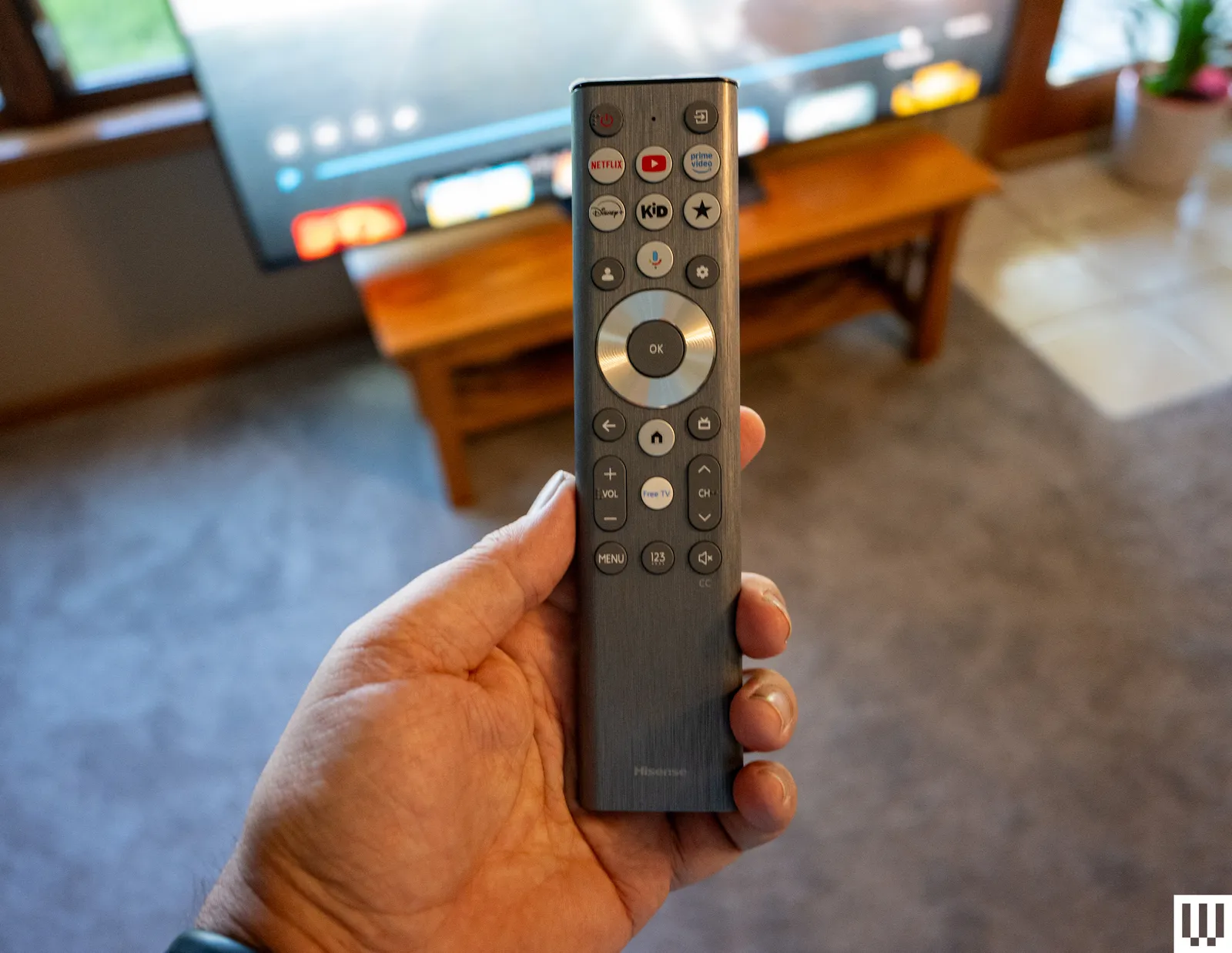
Image may contain Electronics and Remote Control

Photograph: John Brandon

The all-black, notably thin (only 1.8 inches!) UR9 comes with a stand that’s much easier to assemble than the Sony Bravia 7 Mark II RGB TV. Once in position on my stand, setting up the Google TV operating system was simple, save for dealing with a known bug with the Google Home app’s QR code that required manually entering my Gmail address and password. The UR9 uses Wi-Fi 6E, which is faster than Wi-Fi 6.

Source link

Advertisement
Continue Reading

Tech

Alleged pro-Russia hacktivist arrested in Palencia

Published

on

SECURITY

Palencia man suspected of links to CARR, Z-Pentest, and NoName057(16), plus helping a Ukrainian hacker flee to Russia

Spanish police have arrested a man they believe is affiliated with at least two pro-Russia hacktivist groups linked to attacks on critical national infrastructure (CNI).

Arrested in March at his home in Palencia, central Spain, the man is suspected of having close ties to CyberArmy of Russia Reborn (CARR) and Z-Pentest, and may have carried out attacks on behalf of NoName057(16).

Advertisement

All three hacktivist groups were named by the UK’s NCSC earlier this year as part of an advisory warning about the dangers these groups pose to Western CNI.

The cyber arm of GCHQ, the UK’s signals intelligence agency, said organizations should not underestimate pro-Russia hacktivist groups, despite them being known largely for relatively low-impact DDoS attacks.

Jonathon Ellison, NCSC director of national resilience, said at the time: “We continue to see Russian-aligned hacktivist groups targeting UK organizations, and although denial-of-service attacks may be technically simple, their impact can be significant.

“By overwhelming important websites and online systems, these attacks can prevent people from accessing the essential services they depend on every day.”

Advertisement

A month earlier, US officials said CARR was working with, or receiving instructions from, Russian military intelligence (GRU).

Policía Nacional first announced the detention of the unidentified man on Monday, although the arrest was made months ago following an FBI tip-off.

In August 2025, the feds alerted Spanish police to the man’s alleged involvement in trying helping a Ukrainian hacker, a member of CARR, flee to Russia via Poland and Belarus

He was said to have provided “logistical and support cover” to facilitate the Ukrainian’s escape.

Advertisement

After the Palencia man’s arrest, officers found evidence suggesting he was in close contact with other members of these pro-Russia hacktivist “terrorist groups.” Police said he assisted in “coordinating actions and providing support” for the different outfits’ activities, including those of NoName057(16).

NoName057(16) has been active since at least 2022, and is known for targeting public and private organizations, NATO countries, and those whose interests do not align with Russia’s.

Police also seized computer equipment from the man’s residence and cryptocurrency storage devices, freezing a wallet suspected of containing proceeds of cybercrime.

The FBI’s Cyber Division said in a statement: “Last December, the FBI announced Operation Red Circus, our ongoing effort to disrupt Russian state-sponsored cyber threats to the United States and our interests abroad. As part of that announcement, the FBI and partners released a joint Cybersecurity Advisory on pro-Russia hacktivist groups conducting opportunistic attacks against critical infrastructure, including the water, agriculture, and energy sectors. 

Advertisement

“A mission priority of Operation Red Circus is targeting and arresting individuals for their roles in hacktivist groups such as Cyber Army of Russia Reborn to mitigate planned, malicious cyber-campaigns.

Years of pursuit

Authorities have been hunting pro-Russia hacktivists, particularly CARR members, for years. CARR has been active since at least 2022, when it began with low-level attacks in Ukraine shortly after Russia’s invasion.

The US named Yuliya Vladimirovna Pankratova as CARR’s leader and Denis Olegovich Degtyarenko as its primary hacker in 2024. The pair were sanctioned after CARR was tied to attacks on US and European water facilities earlier that year that specifically targeted human-machine interfaces at water supply, hydroelectric, wastewater, and energy facilities.

CARR also gained access to the SCADA system of a US energy company, which allowed them to control alarms and pumps connected to tanks.

Advertisement

Mandiant previously attributed these attacks to Sandworm, a cyber unit inside Russia’s GRU. However, the sanctions pointed to a hacktivist element and added further color to the relationship between Russia’s military and cybercrime community.

Separately, pro-Russia Ukrainian hacktivist Victoria Eduardovna Dubranova, 33, was extradited to the US late last year after being charged with offenses related to attacks carried out by CARR and NoName057(16).

Dubranova was linked to attacks on water facilities and a Los Angeles meat processing facility in November 2024, which spoiled thousands of pounds of meat and triggered an on-site ammonia leak. ®

Source link

Advertisement
Continue Reading

Tech

OPPO Enco Air 5 Review: The Budget Earbuds Most People Should Buy

Published

on

OPPO’s Enco earbud series has time and again delivered some of the best value devices, and for good reason. Take last month’s Enco Air 5 Pro as an example. They combined well-balanced audio and strong ANC capabilities into a package that cost ₹4,999. While we still think they are great value, I’d also admit that spending that much isn’t feasible for many budget-conscious buyers. Keeping that in mind, OPPO has just announced the non-Pro version, the Enco Air 5. It follows the same recipe as its bigger brother, with 52dB of ANC and a 54-hour battery life, but trims the price down to just ₹3,099.

So, when OPPO called asking if I’d like to test the Enco Air 5, I said yes, of course. For some context, I have been using the buds for almost a month, during which I’ve taken them to countless gym sessions, gone on evening walks while listening to my favorite music, and even taken them with me to cover an esports tournament in Jaipur. If you can’t be bothered to read the full review, then yes, they are worth the price. Here’s why.

OPPO Enco Air 5 Review

Hisan Kidwai

Advertisement

Summary

Everything about the Enco Air 5 feels well balanced. The design is understated yet premium, the comfort is good enough for hours of use, and the companion app is packed with genuinely useful features. The sound tuning gives every part of a track room to breathe without letting one frequency overpower another. Even the ANC does a commendable job of cutting out everyday noise.

Advertisement

Design & Comfort

Design of the enco air 5

What does it take to design a great pair of earbuds? To some brands, it’s about a fun design that stands out amongst others, even if that comes at the cost of comfort. I could name a dozen such earbuds, but the truth is, the ones I keep using after reviews are those that don’t stand out. I don’t care whether you have a brand-new design or a new LED light strip. An earbud needs to be sophisticated yet stylish enough not to look cheap. And no other brand does that better than OPPO. The new Enco Air 5 are no exception. They feature the same oval-shaped case that I have come to love.

While the dimensions are almost identical to the 5 Pro, the finish is indeed different. I got the Lavender Purple variant, which I’d say looks quite good. It adds a pop of color in an otherwise bland earbud world. Even though it’s very difficult to put the feel of the finish into words, I’ll try anyway. The finish reminds me of those large chalky medicine tablets. The matte finish is a little rougher than the 5 Pro, and it held up quite well in my regular use. I didn’t see any smudges, nor was there any damage to the case when I dropped it at the airport while taking out my boarding pass. The case can be opened with one hand, and there’s also a satisfying click every time you close the lid. There’s also a physical pairing button, which is always appreciated.

A person holding the earbud

As for the earbuds themselves, they are shiny this time around, so a bit more difficult to keep clean. Comfort is a tricky thing to answer, since everyone’s ears are different. My ears are small, so bigger earbuds like the Noise Master Buds 2 were difficult to manage. Fortunately, the Enco Air 5 were not the same. They fit perfectly inside my ear canals, without causing any discomfort. For my 6 AM flight, I put them on before leaving home, and after 4 hours of travel, they were still sitting comfortably.

Still, if the regular medium-sized tips are not to your taste, there are several bundled inside the box. So, experiment to find the best fit. The earbuds are also IP55 rated, and survived my gym sessions in the brutal Indian summers just fine.

Sound Quality & ANC

Different earbuds

The Enco Air 5 earbuds come with a 12mm dynamic driver featuring a titanium-coated PET diaphragm, AAC and SBC codecs, and Bluetooth 6.1. During my testing, I used the Ultimate Sound preset, but if that’s not your jam, there are Thundering Bass and Pure Vocals, along with a full equalizer, which we will talk about soon enough.

On tracks such as “After Hours,” “The Pina Colada Song,” and “Runaway,” the earbuds sounded very well balanced. The sound tuning is fantastic: the highs don’t feel sharp, the mids/vocals sound very clear, and the lows are there. Don’t get me wrong, you won’t get the rumble of a big headphone, but the Enco Air 5 in the bass boost mode packs a punch. Despite the lack of high-res audio support, I found the instrument separation decent and the soundstage wide enough, though not quite as expansive as on the more expensive Enco Air 5 Pro.

If you’d like your instruments placed all around the room, like at a concert, OPPO has its Live Audio feature. It’s not my favorite thing in the world to experience music with, but it works very well to place different elements perfectly around you. I believe the best way to appreciate this is with a movie, and I watched the first episode of Silo season 3 with these connected to my MacBook. The latency was pretty minimal, and the audio was super clean. Even the call quality has been upgraded compared to the previous generation.

Advertisement
Enco Air 5 on a table with the buds out

On the topic of ANC, I was headed to Jaipur to attend a BGMI esports event. If you’ve seen such events, then you’d know they can get loud—really loud. And what better place to test the ANC capabilities of the Enco Air 5? I’ll be straight: you won’t cancel every noise there is, but that doesn’t mean the ANC is bad. In the event, the earbuds suppressed about 80% of the crowd noises, which was great news. On the flight, most of the jet engine rumble was canceled, without any music on. If you do have music running, it’s very easy to cut off the world for a moment of peace.

OPPO claims about 13 hours of battery life on a single charge for the earbuds without ANC on and about 6.5 hours with ANC. I can confirm those numbers are accurate, since I got roughly 5.5 hours with ANC turned on at all times. The case provides a couple of extra charges, so the total output should be around 24-25 hours, depending on your use case. Still, battery life is great overall.

Controls & Companion App

While many people ignore them, controls are a major factor when choosing earbuds. This is because poor controls can be frustrating. Very fortunately, that’s not the case with the Enco Air 5 earbuds. They keep things simple and functional. You get the basics like double-tap to play/pause the music, triple-tap to skip forward/rewind, and tap and hold to turn on ANC.

All of these can be customized to your liking using the HeyMelody app on Android and iOS, or just the Bluetooth settings page if you have an OPPO/OnePlus device. The app has always been great, and you also get Spotify Tap. It connects to your Spotify app and plays a song based on your listening habits whenever you tap your earbuds. I’m an Apple Music user, so I couldn’t test it much, but from what I’ve heard, it’s a great addition. Beyond that, there’s Sound Space, a collection of sounds that help you concentrate better or get work done among the annoying people who watch reels at high volume. Finally, there’s a full 10-band equalizer that lets you tune the sound output precisely to your liking.

Verdict

A person holding the Enco air 5

At ₹3,099, the OPPO Enco Air 5 are another pair of super-easy-to-recommend earbuds. There are no headline features, but everything about the Enco Air 5 feels well balanced. The design is understated yet premium, the comfort is good enough for hours of use, and the companion app is packed with genuinely useful features. The sound tuning gives every part of a track room to breathe without letting one frequency overpower another. Even the ANC does a commendable job of cutting out everyday noise.

Source link

Advertisement
Continue Reading

Tech

This DIY Belt-Fed Potato Cannon Turns Single Shots Into a Stream of Spuds

Published

on

DIY Belt-Fed Potato Cannon
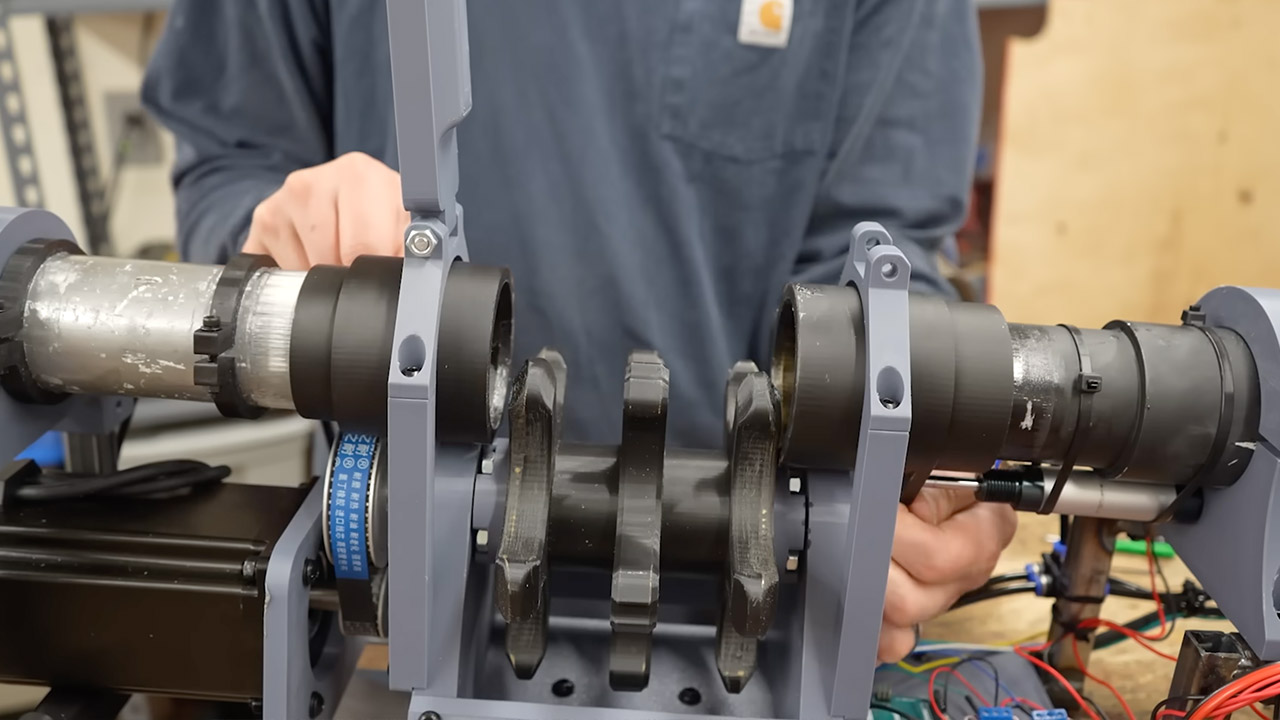
Current Concept, a maker who tackles ambitious mechanical builds, decided the classic potato cannon needed an upgrade. Single-shot models require constant reloading by hand. His version adds a belt that carries multiple potatoes forward one at a time, paired with sliding seals and a stepper-driven feeder. The result edges closer to the automatic fire many enthusiasts dream about, even if real-world limits keep it from true full-auto speed right now.


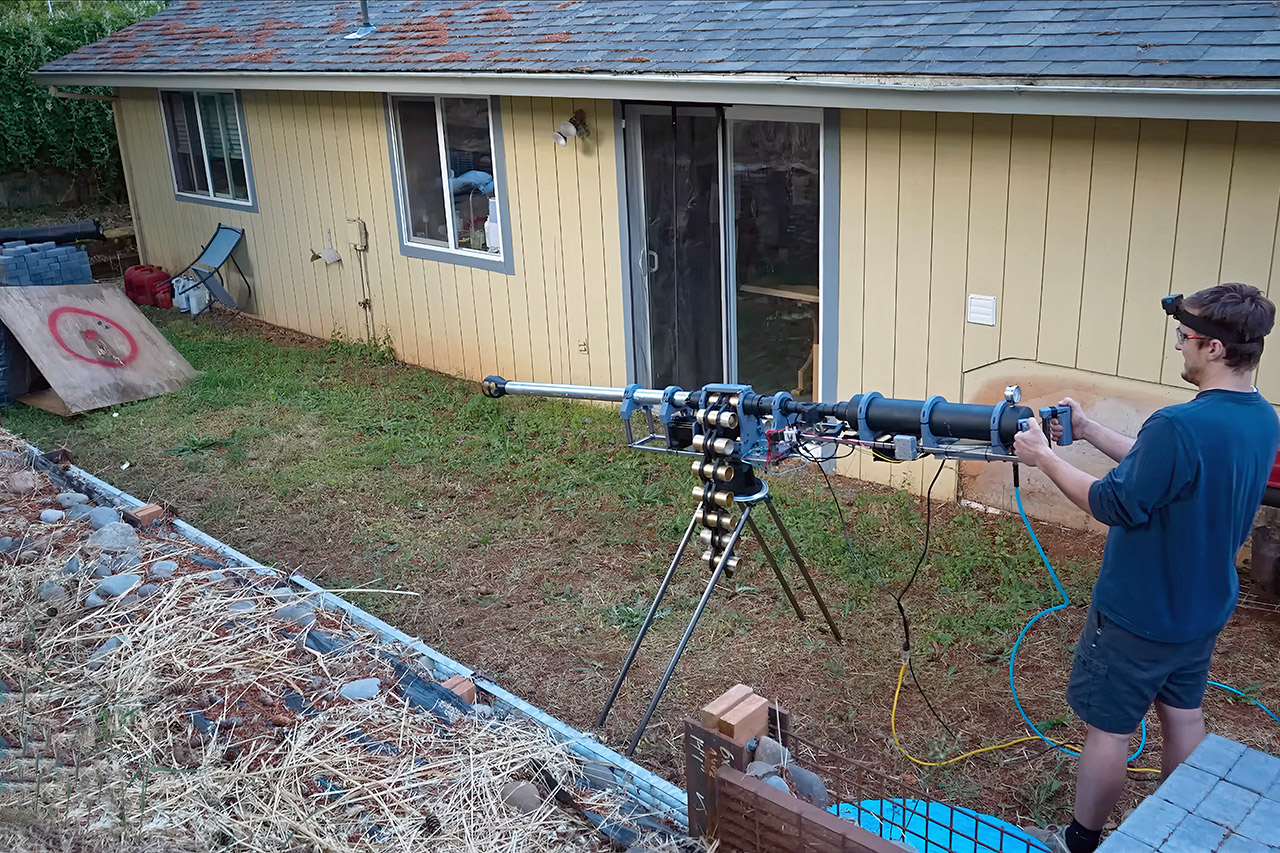
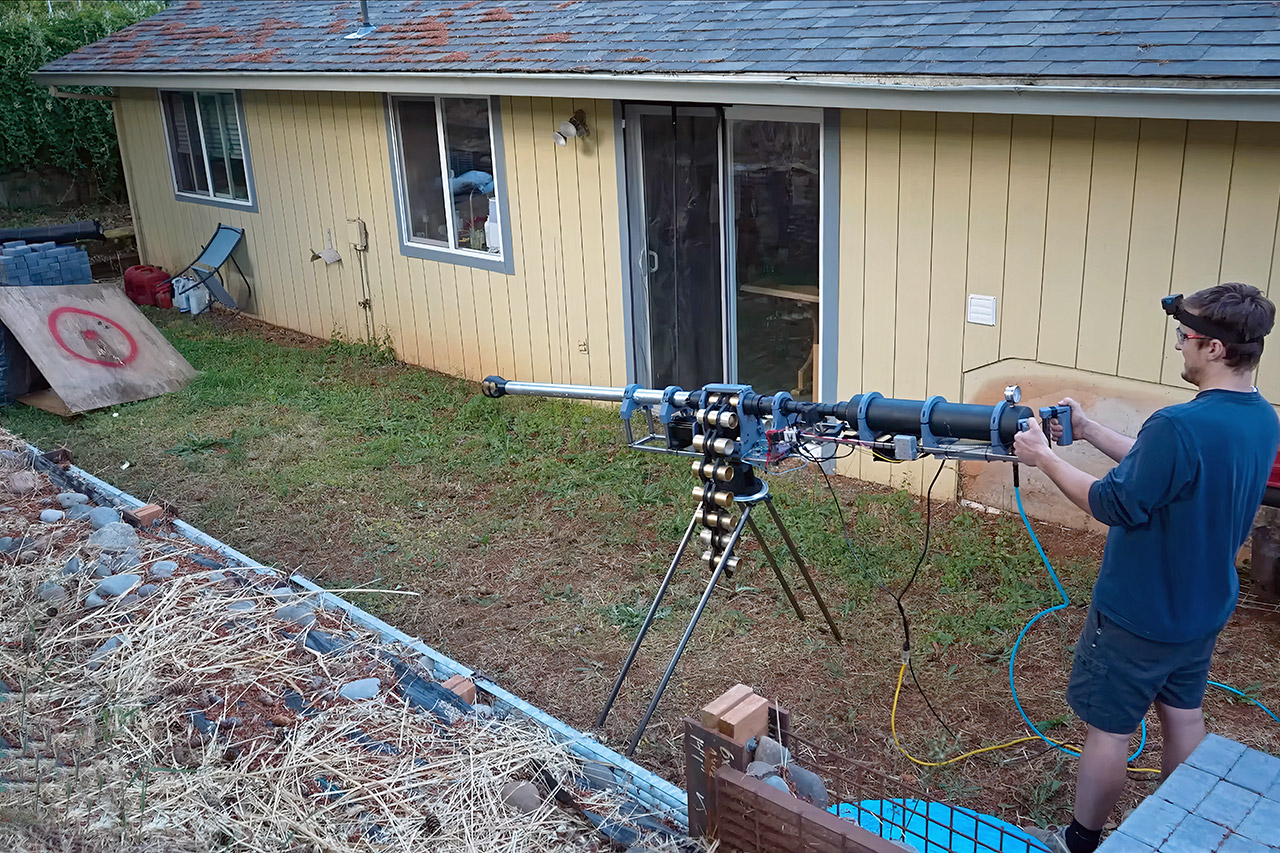
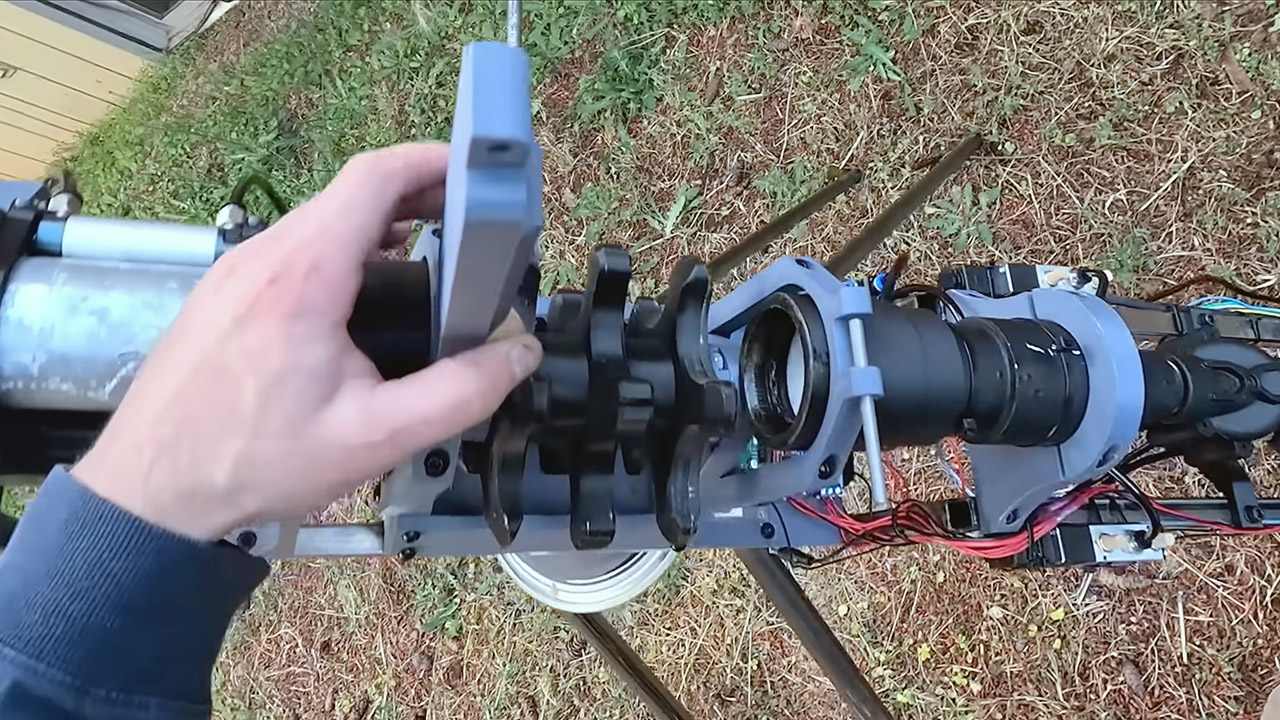
A long, sleek silver barrel spreads out in front of you, and you can’t help but stare. Behind it lies an ominous-looking black pressure chamber, missing just a sinister scowl. The brass-colored belt, which runs between those two parts, is loaded with one potato each tube. It’s all connected to a bipod for optimum stability, giving the entire thing a solid feel. Someone passing by might mistake it for a serious piece of equipment put up in the backyard.

Sale


Bambu Lab A1 mini 3D Printer + LED Lamp Kit, Set Up in 20 Mins, High Speed & Precision, Full-Auto…
  • A1 mini + LED Lamp Kit for Creative Light Projects: Bring your ideas to life with the included LED Lamp Kit. Simply print compatible lamp models and…
  • The Perfect 3D Printer for Beginners: A1 mini 3D Printer is designed to make 3D printing easy from day one with automatic calibration, simple setup…
  • Experience the Bambu Lab Ecosystem: Access MakerWorld’s huge library of ready-to-print models, manage prints through the Bambu Handy app, and enjoy…

The project began with an old air cannon that Current Concept already had. He simply slapped on a new pressure chamber that appears more traditional for a cannon, and then assembled the entire thing onto a steel frame that he purchased as a pre-cut kit from eBay. The frame had been held together with a powerful adhesive. The belt itself was an anomaly he discovered in the back of his closet, with each potato simply sitting within its own tube casing, ready for the firing sequence to begin.

Advertisement

DIY Belt-Fed Potato Cannon
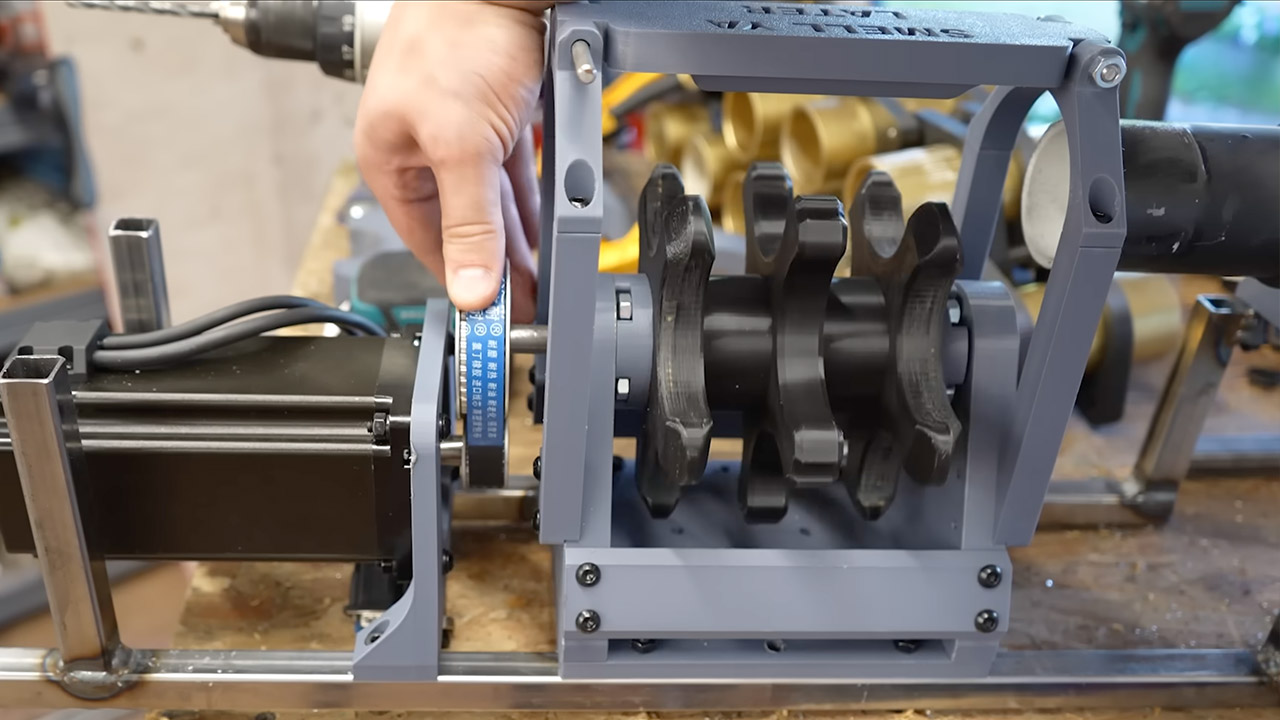
A 3D-printed indexer that resembles a nice little wheel powers the entire feeding mechanism. This is rotated around by a powerful stepper motor. You can count the motor steps and then use a custom-made key to ensure everything is lined up correctly. Initially, the indexer used a simpler star-shaped feeder that was prone to alignment errors. So a more detailed 3D model was constructed, and things began to operate smoothly, with the belt sliding in and out without snags.

DIY Belt-Fed Potato Cannon
Current Concept’s largest engineering problem was most likely sealing the device under pressure. At 60 to 80 pounds per square inch, any space between the chamber and barrel allows air to escape. However, Current Concept developed a solution in 3D-printed sliding coverings that are moved by pneumatic pistons. When a potato rotates into position, the pistons simply push the covers shut over the casing to form a temporary seal. The air then shoots through the chamber and out of the barrel, ejecting the potato. The covers then retract, the belt moves on to the next casing, and the process continues indefinitely.

DIY Belt-Fed Potato Cannon
Because the onboard reservoir can only contain compressed air for one shot, it is powered by an external compressor. This means that the launcher can only fire around once every six seconds while the chamber repressurizes. The mechanical components could cycle much faster, but the air supply is slowing things down, causing the rocket to function in semi-automatic mode for the time being.
[Source]

Source link

Continue Reading

Tech

Why The NES Put Out A Wobbly Picture

Published

on

The NTSC television standard is a masterpiece of mid-century engineering, to pack a color image into the transmission bandwidth of a monochrome one, and to do so while maintaining backward compatibility with earlier monochrome TV sets. In terms of its timings and choice of sync and carrier frequencies it’s elegantly thought out for maximum quality on a 1950s round-CRT color TV set.

The trouble is, that while the standards are exacting, the receivers are quite forgiving, and will display adequately even with substantially off-spec video. [Nicole Express] is here with an in-depth examination of a time when that was pushed just a little bit too far, explaining why the Nintendo Entertainment System (NES) displayed wobbly color images.

We’re treated to a run-through of the NTSC standard itself, and a look at how some of the other consoles and home computers of that era either had similar problems, or managed to avoid them. The key lies in the exacting timing required to achieve perfect interlacing, and the NES’s use of a single crystal to provide all the clocks. The dot clock on adjacent frames was almost right, but not quite, leading to a side-to-side wobble that while barely perceptible, was exacerbated by some graphics. It’s a fascinating read.

We’ve looked at composite video in detail in the past.

Advertisement

NES image: JCD1981NL, CC BY 3.0.

Source link

Advertisement
Continue Reading

Tech

Our pick of the best, tested by experts

Published

on

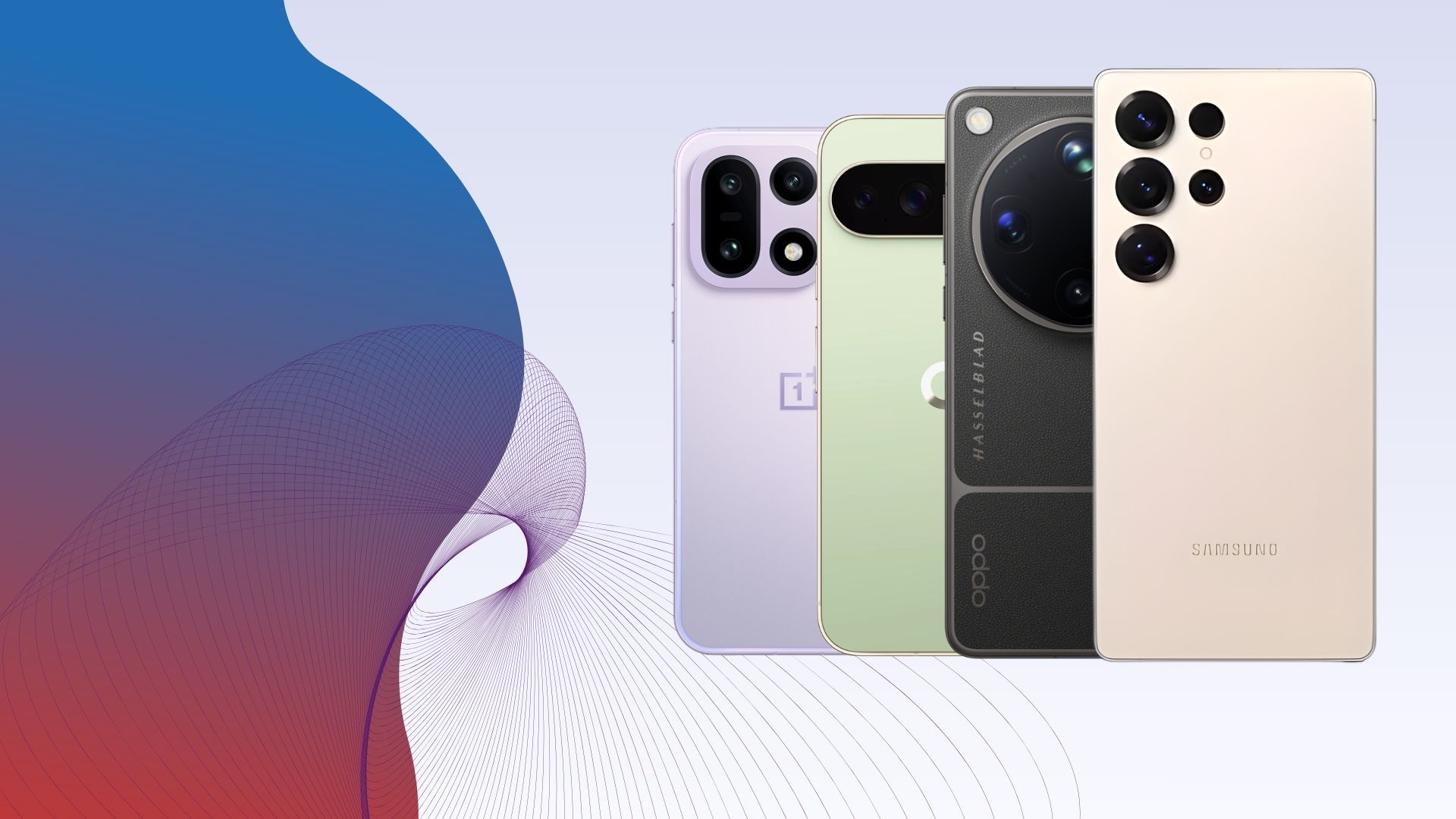
While the latest iPhones are undeniably impressive, the days of Android users envying Apple are long gone. The phones in our best Android round-up don’t just rival Apple’s handsets – many of them surpass them, earning top marks from our team of tech experts.

Android’s biggest strength has always been – and still is – choice. With standout options from Samsung, Google, OnePlus and more, you can pick a phone based on the features you care about most, something that’s much harder to do in the iPhone lineup.

Love streaming or mobile gaming? There are handsets here with cutting-edge chipsets and stunning OLED displays. Prefer taking photos? You’ll find phones with versatile camera systems and more lenses than you’ll know what to do with.

That flexibility is what makes Android such a compelling option for so many people, but it also means it’s easy to get lost in spec sheets and marketing jargon. That’s where we come in.

Advertisement

Every phone in this list has been used as our reviewer’s main handset and put through a rigorous series of tests to see how it performs in the real world. We log battery drain, charging speeds, processor performance and camera quality, among other key metrics.

Only once those tests are complete do we deliver a final verdict and score. And only the phones that truly stand out make it into this guide.

Advertisement

If you want to see how iPhones compare to the very best Android phones, check out our best phones guide. If you’re on a tighter budget, we’ve also got dedicated round-ups for the best mid-range phones and the best cheap phones.

Advertisement

Whichever phone you end up choosing, you can save even more with the right plan – our best SIM deals guide can help you find a great contract to match your new handset.

Best Android phones at a glance

SQUIRREL_ANCHOR_LIST

Learn more about how we test mobile phones

All the phones included in our Best Android phone list have been thoroughly tested and used by one of our expert reviewers. We will never review a phone based purely on specs and benchmark scores. We use them as our everyday device for the review period, which is usually at least five days but often a lot more.

Whenever you read a phone review published on Trusted Reviews, you should be confident that the reviewer has put their personal SIM card into the phone, synced across their most-used apps and logged into all their typical accounts. We do this so you’ll feel confident in our review and trust our verdict.

Advertisement

Our review process includes a mixture of real-world tests, along with more than 15 measured tests and industry-standard benchmarks. We believe this gives the most rounded view of a device.

Advertisement

  • Privacy screen tech is genuinely impressive

  • Lighter and thinner than before

  • Great performance

  • New Galaxy AI smarts

  • Very familiar camera hardware

  • Battery life isn’t the best around

  • No magnetic Qi2 charging

Advertisement

The Samsung Galaxy S26 Ultra is one of the most capable big-screen Android phones you can buy right now, and its 6.9-inch Dynamic AMOLED 2X display is a genuine highlight. 

The headline feature here is the built-in Privacy Display, which prevents the person next to you on the train from reading your messages. Functioning similarly to a privacy screen protector but more intelligent, it selectively hides notifications rather than blanketing the entire display at once. Picture quality does take a visible hit when it’s active, particularly in the strongest mode, but it’s a clever and genuinely useful addition.

Design-wise, the S26 Ultra adopts wider, curvier corners that bring it closer in look to the standard S26 models, and at 214g it’s a touch lighter than its predecessor. That does mean saying goodbye to the titanium frame, but the phone still feels properly premium in the hand. 

Camera performance is consistently strong, with the 200MP main sensor now sporting a wider f/1.4 aperture that pays dividends in trickier light, delivering brighter and more detailed shots. Colours are more neutral and balanced than in previous generations, and the dual zoom system holds up well to around the 30-40x mark.

Advertisement

Performance is genuinely exceptional. The custom Snapdragon 8 Elite Gen 5 for Galaxy chipset, paired with 12GB or 16GB of RAM, turns in seriously high Geekbench 6 scores, and a 67.6% stability score across a demanding 4K 20-minute gaming benchmark shows sustained gaming is better handled than before. 

Battery life is fine rather than outstanding, though the bump to 60W wired and 25W wireless charging makes midday top-ups a bit less of a chore. 

Seven years of OS upgrade support rounds out an impressive package, taking the phone all the way to Android 23. If you want a great all-rounder anchored by a standout screen, it’s a cracking pick, though know that the competition is fiercer than it’s ever been.

SQUIRREL_PLAYLIST_10208275

Advertisement
  • Class-leading camera performance

  • Top-notch 6.8-inch screen

  • Highly customisable software

  • Some of the best battery life around

  • It’s on the thick and heavy side

  • No built-in magnetic charging

Advertisement

There’s no shortage of capable camera phones in the Android market, but the Oppo Find X9 Ultra stands out as one of the most versatile shooters you can buy right now, and that’s largely down to its ridiculously capable four-lens rear setup.

That array pairs an upgraded 200MP main sensor with a 200MP 3x telephoto, a 50MP ultrawide and a rare 50MP 10x periscope lens for serious long-range shooting. 

Crucially, all four lenses pull their weight. Oppo has done a great job keeping colour science and detail consistent across every camera, so shots look natural no matter which lens you reach for.

The supporting cameras hold up brilliantly too. The 3x telephoto pulls out sharp detail with punchy but believable colours, and the ultrawide handles landscapes with plenty of bite. Even the 10x periscope, usually the weak link in a setup like this, proved surprisingly handy at gigs and football matches, grabbing far more detail than you’d expect.

Advertisement

As is typical with Ultra phones, that camera stack does make the handset chunky and heavy at 9.1mm and 236g. But given how much it can do, that feels like a fair trade.

Inside, you get the Snapdragon 8 Elite Gen 5, a 144Hz AMOLED display, and a massive 7300mAh battery that easily sees you through a full day. So while the cameras are the headline act, the Find X9 Ultra is a proper flagship all round.

Advertisement
  • Brilliant large display with wonderful colours and contrast

  • Consistent camera performance in any condition

  • Fluid and playful software

  • Strong suite of AI features

  • It’s a bit of a brick

  • Performance lags behind rivals in gaming/benchmarking tests

  • Camera results often seemed over AI processed

It’s no secret at this point that if you want the cleanest, most iOS-like experience within the Android tent, then you absolutely need to nab a Pixel phone. Google’s stock Android, which is uncluttered and very customisable, is just a joy to use, and compared to some of the bloatware-ridden Android overlays that we’ve come across in our many tests, it really shows off Android in its best light.

While you could upgrade to the Pixel 10 or even the Pixel 10 Pro if you’re budget is somewhat restrained, we’d argue that the Pixel 10 Pro XL is worth the added expense for the feeling of luxury that you get here with its suite of high-end features, the most important of which being its super large 6.8-inch display.

Advertisement

With a 120Hz OLED panel that packs 3300 nits of peak brightness, the Pixel 10 Pro XL’s display is a total feast for the eyes. Not only do all of your favourite apps look great, and scrolling through social media feels buttery smooth, but it’s the incredible colour that the screen is able to show when streaming from the likes of Netflix or Disney Plus that really makes it stand out. If you enjoy using your smartphone as your main entertainment hub, then you’ll appreciate the offering here.

As with any Pixel phone however, beyond the excellent software experience, the real draw is the camera set-up. Particularly when it comes to portrait photography, Google’s computational processing can deliver eye-catching shots unlike any other, and when paired with the XL’s triple-camera array, headlined by a beefy 50MP main camera, you’ll have a hard time taking a bad shot here. Even at night, the 10 Pro XL can still deliver impressive colours, so you can capture that epic night-out with ease.

What’s been great to see is that, in spite of all of the upgrades afforded to the Pixel 10 Pro XL, Google hasn’t neglected arguably the most important factor of all: battery life. From our testing, the massive 5200mAh cell can really go the distance, offering up to two days of use on a single charge, so you’ll never have to worry about needing to seek out a charging outlet before the end of the day.

SQUIRREL_PLAYLIST_10207882

Advertisement
  • Stylish design with unique finishes

  • Top-end processing power without getting warm

  • Huge battery and rapid charging

  • Gorgeously detailed, smooth screen

  • No more Alert Slider

  • Only four OS upgrades promised

Advertisement

If sheer power is what you’re after, then the OnePlus 15 is a great option. Not only does it run on Snapdragon 8 Elite Gen 5, the chip of 2026, but OnePlus worked with mobile game developers to enable the full 165Hz gaming experience offered by the 1.5K display.

In fact, gaming on the OnePlus 15 feels especially seamless as you can now play at up to 165fps in the likes of Call of Duty, giving you the edge when playing online. 

Although we touched briefly upon the display earlier, it’s worth mentioning just how feature-packed it is. The 6.76-inch AMOLED panel delivers vibrant colours, a rapid 3200Hz touch response rate and impossibly thin 1.15mm bezels too. 

Flip the handset over and you’ll note that the OnePlus 15 looks exceptionally similar to Oppo’s Find X9 Pro. However, the exact camera hardware on offer with the OnePlus 15 is different. 

Advertisement

While on paper it may seem like the OnePlus 15’s cameras are unchanged from the OnePlus 13, as both are fitted with the same 50MP trio, there are a few notable differences to keep in mind. For example, the main 50MP camera now has the same sized sensor as the iPhone 17 Pro Max while its telephoto lens has a larger 1/2.75-inch sensor too.

While the cameras might not be quite as impressive as the Find X9 Pro, it’s worth remembering that is a camera-focused handset – and more expensive too. Generally we’d say the OnePlus 15 is a decent all-rounder, able to make light work of most scenarios and does a better job of surpassing the 3.5x zoom mark than even the Pixel 10

With a mighty 7300mAh cell, the OnePlus 15 alleviates any battery anxiety you might have. Even busy days with over five hours of screen time still saw us end the day with up to 40% battery remaining.

Thanks to its Snapdragon 8 Elite Gen 5 chip, mighty battery capacity and brilliant gaming support, the OnePlus 15 is truly one of the best all-rounders for 2026.

Advertisement

SQUIRREL_PLAYLIST_10208212

  • Class-leading low-light photography

  • Super bright display

  • Up to two-day battery life

Advertisement
  • Honor AI is still a mixed bag

  • Arguably the most dull-looking flagship phone

Although at first you’d be forgiven for thinking the Honor Magic 8 Pro looks the same as its predecessor, a closer inspection shows some welcome updates. While the camera module is larger than before, the handset is thinner and lighter than the Magic 7 Pro, at just 8.4mm and 213g respectively, and now sports the AI Button at the right-hand side. 

Not only that, but the display is smaller too at 6.71-inches compared to the Honor Magic 7 Pro’s 6.8-inch. Even so, we still found the OLED panel delivers vibrant colours and contrast, with its LTPO 120Hz refresh rate helping everything feel delightfully smooth. 

Flip the handset over and you’ll be greeted by the impressive trio of rear lenses, including a 50MP main, 50MP ultrawide and a beefy 200MP 3.7x telephoto lens too. All three lenses are consistent and result in matching contrast, highlights and colour too. While the ultrawide did have a tendency to capture darker and slightly distorted images, and certainly doesn’t match the Oppo Find X9 Pro, it’s still enough for everyday snapping. 

Advertisement

There’s also plenty of presets and filters to choose from too, if its neutral setting is slightly too pale and over-exposed for your liking. 

Where the camera particularly excels is with Honor’s SuperNight capabilities which is able to extract impressive amounts of colour and detail even in darker conditions. 

Powering the Honor Magic 8 Pro is the flagship Snapdragon 8 Elite Gen 5, which will likely be behind most of the best smartphones of 2026. Naturally, we can confirm that everything from replying to emails, social media scrolling and gaming feels lightning fast, without a hint of lagging. 

Finally, the Magic 8 Pro supports 100W wired and 80W wireless charging. Yes, you will need Honor-branded chargers to benefit from such speeds, but even without you can still expect impressively fast recharging. For example, we concluded that with a 65W adapter, the Magic 8 Pro saw a full charge in just 70 minutes and got to 50% in under 30 minutes too.

Advertisement

Overall, if you want a brilliant flagship Android that not only runs smoothly but impresses with its night photography prowess and speedy charging, then the Honor Magic 8 Pro is a brilliant option for most.

SQUIRREL_PLAYLIST_10208194

Advertisement
  • Beautiful design and a compact, pocketable form

  • Cover screen is arguably still the best out there

  • Vibrant, bright, colour-rich photos from cameras

  • Great battery life for a flip phone

  • It’s very expensive for a phone of this type

  • Main display feels narrow and cramped

  • Aggressive battery management can interfere with notification promptness

Samsung’s Galaxy Z Flip line might’ve popularised the modern clamshell foldable, but the Motorola Razr 70 Ultra makes a strong case that style and practicality don’t have to come at the cost of performance.

If you pick one up, you’ll likely be drawn first to the finish. The Pantone Orient Blue Alcantara back is a genuinely lovely thing to look at and hold, with gently curved edges that stop it feeling uncomfortable against your palm. The fabric-like texture does attract dust and lint, but that’s a small price to pay for a foldable that feels this distinctive in the hand.

Advertisement

The cover screen remains the Razr’s headline act. Bright, quick to respond, and paired with software that lets you run most of your usual apps without flipping the phone open, it’s the best external display you’ll find on any foldable right now. The main 7-inch display is arguably too tall and narrow for its own good, but for everyday use it gets the job done.

Being a foldable hasn’t forced Motorola to cut corners on cameras either. The 50-megapixel main and ultrawide sensors deliver punchy, colour-rich shots, particularly in good outdoor light. There’s no dedicated telephoto, but the 2x crop-zoom still holds up well enough for most situations.

Under the hood you get a Snapdragon 8 Elite, a 5000mAh battery and 68W charging that hits 50% in just 20 minutes. That makes it one of the quickest and most powerful clamshells you can buy today. It isn’t a huge leap over its predecessor, but if you want a foldable that turns heads and backs it up with genuine day-to-day capability, the Razr 70 Ultra is well worth your attention.

SQUIRREL_PLAYLIST_10208532

Advertisement
  • Lightest book-style foldable around

  • Ultra thin design makes it really nice to use

  • Larger, wider, wholly more useful screens

  • Same main camera as Galaxy S25 Ultra

  • Relatively small 4400mAh battery

  • Slow 25W wired charging

  • Zoom camera could be better for the price

Advertisement

The Samsung Galaxy Z Fold 7 marks a genuine leap forward for Samsung’s book-style foldable, finally delivering the ultra-slim, lightweight design many have been waiting for.

Shedding much of the bulk and weight of its predecessors, the 4.2mm-thick Fold 7 is now among the thinnest foldables around, and at 215g, it’s both lighter than the book-style competition and even the Galaxy S25 Ultra. It makes it a joy to handle, and it’s almost unnoticeable in the pocket as a result.

Samsung has also nailed the usability of both displays this year. The wider 6.5-inch cover screen is genuinely practical for everyday tasks, while the 8-inch internal panel feels more solid with a way less intrusive crease. Both screens are bright, vibrant and ideal for everything from gaming to multitasking.

Camera performance is another highlight, with the main 200MP sensor borrowed from the S25 Ultra delivering sharp, detailed shots that put the Fold 7 on par with regular bar phones. General performance is equally impressive, thanks to the Snapdragon 8 Elite and up to 16GB of RAM.

Advertisement

Battery life and charging remain the main drawbacks with a 4400mAh cell and 25W charging falling far behind rivals. Still, for most users, the Fold 7 will comfortably last a day, and the overall package is compelling enough to make it the standout book-style foldable of 2025.

SQUIRREL_PLAYLIST_10207783

Advertisement
  • Immense power

  • Solid endurance

  • Gaming-centric software is a pleasant touch

  • Camera performance is underwhelming

  • More expensive than predecessors

The RedMagic 11S Pro may not be the most well-rounded Android phone on this list, but it absolutely delivers where it matters most for its target audience: gaming.

There are plenty of gaming-focused features packed in here, from the two side-mounted touch triggers that give you gamepad-style controls during play, to the dedicated red slider that activates the Game Space Mode for a console-like performance boost. 

Advertisement

The design leans into its gaming identity too, with a blocky, aggressive aesthetic that nods to older handsets in the line, complete with a liquid cooling window that lets you watch the coolant being pumped around inside, plus customisable lighting for good measure.

The real highlight is the overclocked Qualcomm Snapdragon 8 Elite Gen 5 paired with 16GB of RAM, which puts the 11S Pro among the best performers we’ve tested. That power is matched by a large 6.85-inch 144Hz AMOLED display running at 1216×2688 with peak brightness of 1800 nits, making it a genuinely great panel for long gaming sessions.

Battery life is another strong suit, with the 7500mAh cell comfortably covering a couple of days on a single charge depending on how hard you play. The cameras are not the best you will find at this price point, so if photography is a priority you may want to look elsewhere. But if you want a phone that puts gaming first and still handles the daily grind, the RedMagic 11S Pro is a solid pick.

Advertisement
  • Completely flat rear

  • Flagship-level AI features

  • Great camera performance

  • Too many similarities with Pixel 9a

  • Older Tensor G4 chipset

  • Bezels remain relatively thick

  • No PixelSnap support

The Pixel 10a is the latest in Google’s mid-range series, though the gap between it and last year’s 9a is smaller than you might expect. And, as the 10a settles onto shelves, prices on the 9a should continue to drift downward, making a decision between the two even trickier.

Advertisement

That said, the most obvious change with the 10a is the fully flat back, which gives it a clean, minimal look. The downside is that the phone sits completely flush on any surface, meaning scratches are a real risk if you go caseless. The bezels have also been trimmed slightly, and while it’s not a dramatic difference, it does give the 10a a marginally fresher feel. The 6.3-inch pOLED display gets a meaningful brightness boost too, hitting 2000 nits in high brightness mode, and it delivers the same punchy, vivid colours that the Pixel line has always been known for.

Under the hood, the Tensor G4 chip returns alongside 8GB of RAM, keeping day-to-day performance smooth and ensuring you get access to Google’s full suite of AI features, from Magic Editor to Best Take. Crucially, the seven-year OS update guarantee also carries over.

The cameras are carried over unchanged from the 9a, with a 48MP main sensor and a 13MP ultrawide. Given how strong Google’s image processing is, that still puts the 10a ahead of much of the mid-range competition on cameras, with sharp, detailed shots and impressive low-light performance. There is no telephoto lens, so if zoom is a priority for you, you will need to look elsewhere.

Battery life is a strong point, with the large 5100mAh cell delivering excellent stamina. Wired charging has also been bumped up to 30W compared to the 9a’s 23W, which brings the full charge time down to around an hour and 40 minutes.

Advertisement

SQUIRREL_PLAYLIST_10208265

  • Thin, comfortable and durable design

  • Great battery life and all-round performance

  • Bright, vibrant dual screens

  • Consistent and solid camera performance

Advertisement
  • MagicOS is complicated and unintuitive

  • Aggressive (and unneccesary) battery optimisation

The Honor Magic V6 might just be the best-looking book-style foldable you can buy right now, and a large part of that comes down to how it feels in the hand. It’s remarkably thin and light for a device of this type, yet the build quality feels solid throughout, and with an IP68/69 rating it can shrug off dust and water without needing to be babied.

Both screens are genuinely stunning. The cover display and 7.95-inch inner panel each run at 120Hz, with the cover screen capable of peak brightness hitting 6000 nits, which means videos look punchy and outdoor use is never a squinting exercise. There is still a crease on the inner screen, though it is faint enough that it is very easy to ignore.

Powering everything is the Snapdragon 8 Elite Gen 5, one of the fastest chips currently available, and it shows. Demanding titles like Destiny Rising, Genshin Impact and Call of Duty run without breaking a sweat, and everyday apps feel equally snappy. Battery life is equally reassuring, with a 6660mAh cell that comfortably gets you through a full day on a single charge.

Advertisement

If you want a book-style foldable that pairs serious durability and outright performance with two of the best screens you will find on any foldable right now, the Honor Magic V6 is an exceptionally strong choice – it’s just Honor’s MagicOS skin that stops it from being the go-to recommendation. 

  • Speaker system is no gimmick – it sounds fantastic

  • Brilliant big display

  • Really speedy performance and fast charging

Advertisement
  • Denim finish will divide opinion

  • Cameras aren’t that good

  • Software still needs some taming

Few phones deliver as much firepower for the money as the Poco F8 Ultra, making it one of the strongest value propositions on this list.

Pick it up and you know straight away this isn’t your average flagship. The denim-inspired back panel will split opinion, but the matte aluminium frame and rounded edges feel a lot like Apple’s iPhone 17 Pro range, and you get proper IP68 dust and water resistance to go along with that premium feel.

That 6.9-inch AMOLED display is a genuine highlight too, hitting 2000 nits at peak brightness and delivering colours that pop, perfectly suited to both films and gaming. Pair it with the Bose-certified triple-speaker setup and things really click, with films sounding bigger and games gaining that extra layer of atmosphere.

Advertisement

On the performance front, the Snapdragon 8 Elite Gen 5 inside makes this one of the fastest phones you can buy right now, with even the most demanding titles barely making it break a sweat. Then there’s the 6500mAh battery, which cruised through two days in our testing, with 100W fast charging refilling it from flat to full in just under 45 minutes.

The one area where the F8 Ultra falls short is the camera setup. If photography is your top priority, you would be better served by something like the Oppo Find X9 Ultra. But if you want raw speed, a stunning display and outstanding battery life without spending flagship money, the Poco F8 Ultra is a remarkable package.

Advertisement

FAQs

Should I buy a 5G phone?

While not vital, all phones featured in our chart offer 5G, so they are futureproofed.

What’s the best Android phone?
Advertisement

The Samsung Galaxy S26 Ultra is the best Android phone available right now.

Which Android phone has the best camera?

The Oppo Find X9 Ultra is currently our top pick, though the Samsung Galaxy S26 Ultra, Google Pixel 10 Pro XL and Honor Magic 8 Pro are close runners-up.

Advertisement

Test Data

  Samsung Galaxy S26 Ultra Oppo Find X9 Ultra Google Pixel 10 Pro XL OnePlus 15 Honor Magic 8 Pro Motorola Razr 70 Ultra Samsung Galaxy Z Fold 7 RedMagic 11S Pro Google Pixel 10a Honor Magic V6 Poco F8 Ultra
Geekbench 6 single core 3519 3618 2293 3553 3650 2872 2318 3814 1753 3584 3398
Geekbench 6 multi core 10713 11019 5856 10642 10680 8725 8828 11773 4551 10497 9990
Geekbench 6 GPU 24611 25132 19315 270021 8803 23634
3DMark Solar Bay 46.9 50.6 43.5 12175 42.8
AI performance 3643 1287 5785
Max brightness 1800 nits
1 hour video playback (Netflix, HDR) 6 % 8 % 4 % 4 %
30 minute gaming (light) 6 % 7 % 5 %
Time from 0-100% charge 53 min 58 min 91 min 45 min 70 min 51 min 87 min 61 min 98 min 59 min 45 min
Time from 0-50% charge 19 Min 21 Min 31 Min 19 Min 26 Min 20 Min 31 Min 30 Min 31 Min 21 Min 19 Min
30-min recharge (included charger) 67 % 49 % 70 % 69 % 72 %
15-min recharge (included charger) 36 % 28 % 42 % 36 % 40 %
30-min recharge (no charger included) 75 % 54 % 71 % 49 % 50 % 49 %
15-min recharge (no charger included) 39 % 37 % 40 % 24 % 28 % 19 %
3D Mark – Wild Life 7281 6984 6166 7056 6238 5574 7762 2608 6264 6870
3D Mark – Wild Life Stress Test 67.6 % 50.1 % 71.23 % 91 % 57.3 %
GFXBench – Aztec Ruins 49 fps 90 fps 70 fps 112 fps
GFXBench – Car Chase 51 fps 90 fps 71 fps 119 fps

Full Specs

  Samsung Galaxy S26 Ultra Review Oppo Find X9 Ultra Review Google Pixel 10 Pro XL Review OnePlus 15 Review Honor Magic 8 Pro Review Motorola Razr 70 Ultra Review Samsung Galaxy Z Fold 7 Review RedMagic 11S Pro Review Google Pixel 10a Review Honor Magic V6 Review Poco F8 Ultra Review
UK RRP £1279 £849 £1099 £1199 £1799 £709 £499 £2001.99 £749
USA RRP $899 $1499 $1999 $849 $499 $729
Manufacturer Samsung Oppo Google OnePlus Honor Motorola Samsung Nubia Google Honor Poco
Screen Size 6.9 inches 6.8 inches 6.8 inches 6.78 inches 6.7 inches 7 inches 8 inches 6.85 inches 6.3 inches 7.95 inches 6.9 inches
Storage Capacity 256GB, 512GB, 1TB 512GB, 1TB 256GB, 512GB, 1TB 256GB, 512GB 512GB 512GB 256GB, 512GB, 1TB 256GB 128GB, 256GB 256GB, 512GB 256GB, 512GB
Rear Camera 200MP + 50MP + 50MP + 10MP 200MP + 200MP + 50MP + 50MP 50MP + 48MP + 48MP 50MP + 50MP + 50MP 50MP + 200MP + 50MP 50MP + 50MP 200MP + 12MP + 10MP 50MP main + 50MP ultrawide 48MP + 13MP 50MP + 64MP + 50MP 50MP + 50MP + 50MP
Front Camera 12MP 50MP 42MP 50MP 50MP 50MP 10MP + 10MP 16MP selfie camera 13MP 20MP 32MP
Video Recording Yes Yes Yes Yes Yes Yes Yes Yes Yes Yes Yes
IP rating IP68 IP69 IP68 IP69K IP69K Not Disclosed Not Disclosed IPX8 IP68 IP69K IP68
Battery 5000 mAh 7050 mAh 5200 mAh 7200 mAh 6270 mAh 5000 mAh 4400 mAh 7500 mAh 5100 mAh 6600 mAh 6500 mAh
Wireless charging Yes Yes Yes Yes Yes Yes Yes Yes Yes Yes Yes
Fast Charging Yes Yes Yes Yes Yes Yes Yes Yes Yes Yes Yes
Size (Dimensions) 78.1 x 7.9 x 163.6 MM 77 x 9.1 x 163.2 MM 76.6 x 8.5 x 162.8 MM 76.7 x 8.1 x 161.4 MM 75 x 8.3 x 161.2 MM 74 x 7.2 x 171.5 MM 143.2 x 4.2 x 158.4 MM 76.54 x 8.9 x 163.82 MM 73 x 9 x 153.9 MM 156.7 x 145.6 x 4 MM 77.8 x 8.3 x 163.3 MM
Weight 214 G 236 G 232 G 211 G 219 G 199 G 215 G 230 G 183 G 219 G 218 G
Operating System OneUI 8.5 (Android 16) ColorOS 16 (Android 16) Android 16 OxygenOS 16 (Android 16) MagicOS 10 (Android 16) Android 16 OneUI 8 (Android 16) Android 16 (RedMagic OS 11) Android 16 MagicOS 10 HyperOS 3 (Android 16)
Release Date 2026 2026 2025 2025 2026 2026 2025 2026 2026 2026 2025
First Reviewed Date 25/02/2026 22/04/2026 27/08/2025 13/11/2025 13/01/2026 18/05/2026 17/07/2025 27/05/2026 04/03/2026 16/06/2026 26/11/2025
Resolution 3120 x 1440 3168 x 1440 1344 x 2992 1272 x 2772 1256 x 2808 1224 x 2992 2184 x 1968 1216 x 2688 1080 x 2424 2172 x 2352 1200 x 2608
HDR Yes Yes Yes Yes Yes Yes Yes Yes Yes
Refresh Rate 120 Hz 144 Hz 120 Hz 165 Hz 120 Hz 165 Hz 120 Hz 144 Hz 120 Hz 120 Hz 120 Hz
Ports USB-C USB-C USB-C USB-C USB-C USB-C USB-C USB-C port, SIM port, headphone jack USB-C USB-C USB-C
Chipset Snapdragon 8 Elite Gen 5 for Galaxy Snapdragon 8 Elite Gen 5 Google Tensor G5 Qualcomm Snapdragon 8 Elite Gen 5 Qualcomm Snapdragon 8 Elite Gen 5 Snapdragon 8 Elite Qualcomm Snapdragon 8 Elite for Galaxy Qualcomm Snapdragon 8 Elite Gen 5 Leading Version Google Tensor G4 Snapdragon 8 Elite Gen 5 Snapdragon 8 Elite Gen 5
RAM 12GB, 16GB 12GB, 16GB 16GB 16GB 12GB 16GB 12GB, 16GB 16GB 8GB 12GB, 16GB 12GB, 16GB
Colours Violet, Sky Blue, Black, White, Silver Shadow, Pink Gold Tundra Umber, Canyon Orange Moonstone, Jade, Porcelain, Obsidian Infinite Black, Ultra Violet, Sand Storm Sunrise Gold, Sky Cyan, Black, White Blue Shadow, Silver Shadow, Jet-black, Mint Nightfreeze, Sub Zero Obsidian, Fog, Berry, Lavender Black, White, Denim Blue
Stated Power 60 W 80 W 120 W 100 W 68 W 25 W 80 W 30 W 100 W

Source link

Advertisement
Continue Reading

Tech

The first American autonomous ground vehicles are fighting in Ukraine

Published

on

Forterra, a US builder of autonomous vehicles, revealed today that more than 100 of its self-driving ATVs have been deployed in conflict zones in Ukraine for the past nine months, in what the company believes is the largest deployment of autonomous ground vehicles in combat by any US defense tech company.

“I believe this to be true of every defense technology that’s ever been created—until you hit the realities of combat, you’re just not going to know,” Scott Sanders, Forterra’s chief growth officer and a former US Marine officer, told TechCrunch.

Funded by US defense dollars, the mission is part of growing effort to transform the US military through its support of Ukrainian resistance to Russian invaders. While aerial drones have garnered much of the attention in the fight, the dynamics they’ve created — extensive no-go zones where surveillance can lead to death from above — have led Ukrainian strategists to seek ground-based autonomy as well.

“There’s nowhere to hide,” Sergeant Major Corey Wilkens, who leads a program developing autonomous vehicles and tactics for the US Army, explained. “You become very, very vulnerable to be able to be attacked by [first-person view drones], other sorts of drones dropping munitions, artillery, mortar, the full range of things that they have.”

Advertisement

Ukraine is already building its own uncrewed ground vehicles (UGVs) to help move supplies and munitions, or evacuate wounded soldiers, but they are typically battery-powered and can only carry up to 250 kilograms, according to a soldier in the Ukrainian army who has worked with the vehicles and who TechCrunch won’t identify for security reasons.

Forterra’s Lancer vehicles, based on Polaris ATVs and equipped with a custom-built sensor and compute stack, are gas-powered and can carry 750 kilograms of cargo, making them more versatile and useful. “The bottom line is that this UGV for logistics and just maintaining our defense is the most important UGV in Ukraine,” the soldier said. “It’s fucking fantastic, and we are dying to get more.”

They didn’t feel that way at first. The Ukranian Armed Forces have had have mixed experiences with Western contractors bringing new tech to the battle, and at first Forterra’s offerings felt a little too geared for the high-end requirements of the US Army. Modifying the vehicle for the situation—particularly, by adding a Starlink satellite internet antenna—made it a huge value add.

Since arriving in Ukraine last October, the vehicles have driven more than 2,500 miles across more than 1,100 missions, carrying 777,440 pounds of total weight and completing 52 casualty evacuations. Some has been lost in combat, particularly if they get stuck in deep mud or other terrain where Russian forces can target them at leisure.

Advertisement
A Forterra Lancer that met its end on the battlefield in Ukraine. Image Credits:Forterra / Forterra

Forterra has learned some useful lessons — about electronic warfare, updating their software from afar, how to maneuver in challenging conditions, and ensuring their vehicles don’t break down. The company, which has raised more than $500 million in venture funding from funds like XYZ Venture Cpaital and Moore Strategic Partners, is now better positioned to compete for lucrative national security contracts.

They’ve also seen the limits of autonomy: For now, Ukranian soldiers have mainly been teleoperating the vehicles in combat zones, in part because they’re too valuable to lose and in part because autonomous vehicles aren’t quite ready for the realities of war.

While, for example, the vehicles can navigate autonomously across diverse terrain, they’re not quite at the point where they can identify unexpected enemy forces and react appropriately. “We actually need to be able to respond to the enemy threats, live, while it’s in front of the enemy, which the autonomy doesn’t know how to do yet,” the Ukrainian soldier explained.

Forterra, which began work on autonomous vehicles 20 years ago, is working on how to combine the kinds of algorithms that gave us self-driving cars with newer generative AI software that allows machines to react to their surroundings in a generalized way. As with other autonomous systems, one of the key obstacles is gathering the right data.

“There’s a lot of things you have to do that aren’t available in an open source model because they’re not things that humans do, whether that’s figuring out how to navigate a minefield or [operating] a weapon system,” Sanders told TechCrunch. “You need to be able to turn the dials and some things more of a classical robotics approach, and then leverage AI where you need to.”

Advertisement

Competitors in this space are solving similar challenges, like Scout AI, which raised $100 million earlier this year to train foundation models and develop a suite of autonomous platforms for the military that includes UGVs. Other startups like Field AI and Overland AI are trialling UGVs with the US military.

Even with the limitations on UGVs, American military experts are convinced that its time to invest in these tools. “Ground autonomy is achievable now and we’ve seen it,” Wilkens said.

Scott Philips, the chief innovation officer at Forterra, visited a Ukranian unit’s operations center to see the vehicles in action first-hand, winning respect from the unit for visiting an area in range of Russian attacks.

“What struck me most was seeing exactly where the seams are: which steps are still manual, where data has to be re-entered or re-verified by hand, and where the team has already found ways to automate or speed things up,” Philips told TechCrunch. “That’s the kind of ground truth you can’t get from a slide deck because it shows you precisely where better tooling could take pressure off the people doing this work in real time.”

Advertisement

One challenge issued by the Ukrainians: Make it cheaper. Forterra’s Lancers aren’t expensive for their category, thanks to relying on Polaris’ commercial supply chain for the vehicle itself, but they are still too valuable to be deployed as freely as UAVs can be.

“Attrition is just a fact of this battlefield, and we have lost a few at this point, and it hurt, and we need more, and therefore we need them cheaper,” the Ukranian soldier told TechCrunch.

When you purchase through links in our articles, we may earn a small commission. This doesn’t affect our editorial independence.

Source link

Advertisement
Continue Reading

Trending

Copyright © 2025