
Tech
15 Hidden iOS 27 Features You Can Check Out in the Developer Beta


Apple spent a lot of time talking about artificial intelligence at WWDC this year, including how Apple Intelligence is getting a boost from Google’s Gemini models. Apple unveiled Siri AI, a major overhaul of its voice assistant that can hold longer conversations, answer questions about what is on your screen and pull relevant information from your messages, emails and photos.
Siri AI is only one part of iOS 27. Apple also announced more advanced photo-editing tools, expanded parental controls, updates to its Liquid Glass design and several performance improvements intended to make the iPhone feel faster and more responsive.
Some of the most immediately useful changes, however, are much smaller. After installing the iOS 27 developer beta, I noticed new features tucked inside apps you already use every day: a faster way to pull up your Safari tabs, a separate alarm-volume setting, new tools for saving and organizing photos, and a Custom EQ option for AirPods.
The iOS 27 developer beta is available now, with a public beta expected in July and the full update arriving this fall. Developer betas can be buggy and may affect battery life, app compatibility and everyday performance, so you should avoid installing them on your primary iPhone unless you are comfortable dealing with unfinished software.
Here are some of the less obvious iOS 27 features worth checking out.
Expand the edges of a photo with Extend
The Photos app is getting a new Extend tool that can expand an image beyond its original borders. You can use it to straighten a crooked horizon, change the aspect ratio of a photo or give your subject more breathing room in the frame.
Photos’ new Extend tool can expand an image beyond its edges.
Extend uses generative AI to create the additional parts of the image, similar to generative-expand tools already available in some photo-editing apps. Apple has also added a Spatial Reframing feature, that allows you to touch and drag to adjust the perspective of an image.
Create a Shortcut by describing what you want
The Shortcuts app can be powerful, but building an automation from scratch requires some patience. In iOS 27, you can simply describe what you want a shortcut to do, and the app will assemble the required steps for you.
You could ask it to create a shortcut that texts someone when your phone is about to die or go into Focus mode when you arrive at work. You may still need to make a few adjustments, but you no longer have to start from scratch.
Shortcuts can now build an automation from a simple description.
AirDrop files up to 80% faster
AirDrop is also getting a speed boost. Apple says some AirDrop transfers can be up to 80% faster in iOS 27, making it quicker to send photos and files to someone nearby.
There is some fine print, though. Apple tested the improvement by transferring multiple photos totaling 30MB between nearby contacts while the phones were not connected to a Wi-Fi network. Your own results will depend on what you’re sending and the conditions around you, but any improvement should be noticeable if you regularly use AirDrop to share large batches of photos.
Open the Camera app faster in Low Power Mode
Low Power Mode can help stretch your battery when your iPhone is running low, but it can also make parts of the phone feel slower. In iOS 27, Apple says the Camera app launches faster when Low Power Mode is turned on.
That is a small improvement, but it matters when you are trying to quickly capture something before the moment passes and your phone dies
Move between Wi-Fi and cellular more smoothly
I always have issues in that moment of limbo when I’m leaving my apartment and too far away to have good Wi-Fi service, but not far enough for my phone to automatically disconnect. It always ends up disrupting whatever I’ve got going on my phone, like a download, stream or FaceTime call, and then I end up having to disable Wi-Fi.
In iOS 27, Apple says the phone can more seamlessly transition between Wi-Fi and cellular data as you move around, without you having to open the Control Center and manually turn off Wi-Fi.
Keep texting while a video is still sending
Sending a large video through Messages can be annoying when you have a weak connection. Until the file finishes uploading, the conversation is pretty much on hold, because text messages are sent in order.
A new continuous-send feature lets you keep sending texts while a large photo or video is still being delivered. Messages also adds a send indicator to each outgoing message, making it easier to see what has already gone through and what’s still in progress.
Show both sides of a FaceTime call
Dual Capture in FaceTime lets you stream video from your front and rear cameras at the same time during a one-on-one call. That means the other person can see your face while you show them what is happening in front of you.
It could be useful when you are giving someone a tour, showing them a view or asking for help with something in front of you without constantly flipping the camera back and forth. There is one limitation: Apple says Dual Capture is available only on the iPhone Air and iPhone 17 lineup.
Save any frame from a video as a photo
The Photos app now lets you save a single frame from a video as a photo with a tap. That means you no longer need to pause a clip at exactly the right moment, take a screenshot and crop out the video controls afterward.
There’s already a feature to take stills while you’re shooting a video, which I use when I’m recording a live concert, but it’s nice to have the feature for after, especially when there’s a great still image buried somewhere inside them.
Review several selected photos at once
Selection View gives you a faster way to review and modify a group of photos after selecting them in your library. You can also manage included metadata, such as location information.
This should make it easier to clean up a batch of pictures before sharing them, rather than opening each one individually and making the same changes over and over again.
Rate your photos and videos with stars
If your photo library is overflowing with thousands of images, iOS 27 gives you another way to organize the ones you really care about. You can now assign photos and videos a rating from one to five stars.
Once you have rated your photos, you can filter your library and collections by rating. That could make it easier to narrow down a set of pictures for Instagram or keep track of the images you still need to edit.
Sync new photos to iCloud immediately
Photos also includes an option to prioritize syncing new images and videos to iCloud for one day, even if it comes at the expense of battery life or system performance.
Normally, your iPhone may delay some syncing to conserve power or handle other tasks. The new setting is useful when backing up your photos matters more than preserving battery life, like after a photo shoot or an event where you captured something you don’t want to lose.
Customize the EQ on your AirPods
AirPods are getting a Custom EQ setting that lets you adjust the lows, mids and highs. That gives you more control over how your music sounds without relying on a broader EQ setting.
You could boost the bass, pull back the high end or make smaller adjustments based on your own preferences. It is not a replacement for a full professional equalizer, obviously, but it should be more than enough for people who want their AirPods to sound a little more personalized.
Set your alarm volume separately from everything else
This feature should’ve been available on the iPhone a long time ago: You can set your alarm volume independently from the rest of your system volume.
That means you can keep videos, music and other audio relatively quiet without worrying that your alarm will also be too soft to wake you up. I’ve had times when I’ve missed an alarm because the volume was at zero, but hopefully, no more.
Give a widget an entire Home Screen page
Widgets can now take up an entire Home Screen page if you want them to. Apple calls them extra-large widgets, with support for apps including Calendar, Photos and Music.
A full-page Calendar widget could make it easier to see your schedule at a glance, while a Photos widget could turn one page of your Home Screen into something like a digital photo frame. I don’t think I want a widget to take up my entire screen (isn’t that what apps are for?), but it could make sense for the apps you check often but only quickly want to glance at.
See all your Safari tabs with one tap
Safari has a small change that makes it much easier to see all the tabs you have open. Instead of double tapping on the tab button, you now only have to tap once to view all your tabs. It’s a minor interface tweak, but it removes some of the friction from jumping between webpages, especially if you regularly keep hundreds of tabs open at once, like me.
For more from WWDC, check out some of the biggest announcements and how to download the iOS 27 developer beta.

Tech
Nimble claims its new, domain-specialized Web Search Agents cut token costs in half while boosting retrieval accuracy
Nimble, a New York City-based tech startup VentureBeat previously covered for its efforts to re-invent web search for enterprises by using multiple AI agents to improve accuracy and depth, is taking another step toward its vision of a world in which agents do most of the web searching instead of us typing and reviewing the results manually.
Nimble today launched Web Search Agents, a new retrieval system designed to help AI agents perform more 21% more accurate web research while using significantly fewer tokens — 51% less compared with leading AI search alternatives on comparable, according to the firm.
While Nimble did not disclose its specific benchmarking methodology or competitors evaluated, the results underscore a growing trend in enterprise AI: optimizing retrieval has become as important as improving the underlying language models themselves.
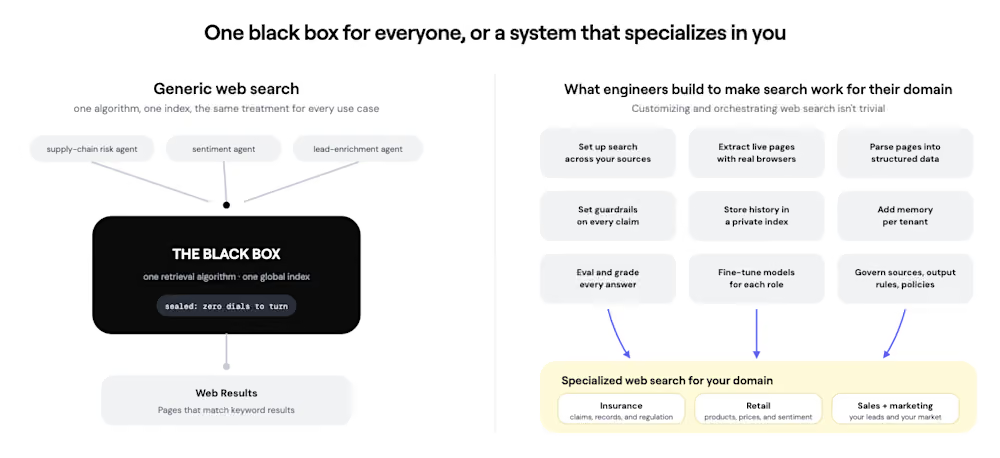
Nimble’s leadership says the product combines self-learning retrieval strategies, proprietary web indexes, and live web access to deliver domain-specific search capabilities that outperform general-purpose web search services for enterprise workloads.
“Our research team built self-learning retrieval algorithms that learn a customer’s domain,” said Nimble CEO and co-founder Uri Knorovich in an interview with VentureBeat. “They find the exact information more efficiently, reduce the amount of multi-hop reasoning required, and lower token usage while improving accuracy.”
Rather than positioning itself as another general search engine, Nimble is targeting developers building autonomous agents that require continuously updated information from the public web for research, lead generation, competitive intelligence, compliance, and other business-critical workflows.
It’s also designed to slot in seamlessly to an enterprise’s existing systems and workflows.
“You can run the agent directly through the Nimble API with zero infrastructure,” Knorovich said. “For large enterprises, we’re partnering with Microsoft, Oracle, Snowflake, and others so customers can deploy these agent systems inside their own infrastructure.”
How does it work and stack up to other, existing AI-powered search and agentic systems? Read on to find out.
Moving beyond generic AI web search into specialized search agents that fit your enterprise’s needs
Most AI applications today rely on general-purpose search application programming interfaces (APIs) for search engines and public knowledge bases that return broad collections of files, leaving the language model responsible for determining which sources are relevant.
That process often requires multiple retrieval steps, additional reasoning, and significant token expenditure before an agent produces an answer. This is obviously inefficient and raises the cost spent to run AI search looking through irrelevant sources.
Nimble argues that before long, every enterprise will need its own methods for searching, retrieving, and validating external information since each enterprise relies on its own distinct preferred sources, signals, and standards of trust.
As such, instead of applying one search strategy to every workload, Nimble’s Web Search Agents are designed to learn the characteristics of a specific domain and adapt how information is retrieved, providing agents with structured, relevant context rather than forcing them to sift through large amounts of generic search results.
“Instead of one generic retrieval model, we build specialized retrieval models for each customer’s domain, making them faster, cheaper, and more accurate,” Knorovich explained. “A single enterprise can run hundreds of different agents. Each one has its own domain expertise, guardrails, goals, and search algorithm. The optimization starts with the second search, without requiring any setup from the customer.”

Its goal is not only to reduce redundant retrieval, but also to shorten multi-step research paths and avoid repeatedly sending raw pages through a language model for parsing, resulting in the 51% reduced token figure the company cites.
The distinction is particularly relevant for long-running enterprise agents performing research over hours or days rather than answering simple consumer questions. In those scenarios, reducing unnecessary tool calls can significantly lower operating costs while improving answer consistency.
That emphasis reflects a broader shift occurring across the AI tooling ecosystem. As foundation models become increasingly capable, infrastructure vendors are competing on everything surrounding the model—including retrieval, orchestration, memory, observability, and governance.
Optimizing retrieval for production AI
The launch builds on Nimble’s broader strategy of becoming an enterprise web intelligence platform rather than simply a web scraping provider. Earlier this year, the company introduced its broader Agentic Search Platform following a $47 million Series B financing, positioning itself as infrastructure that transforms the live web into structured, machine-readable data for AI systems.
The company’s latest release extends that vision with a concept it calls “Harness as a Tool,” which powers its new domain-specialized Web Search Agents. Rather than requiring engineering teams to assemble separate search APIs, browser automation, extraction pipelines, validation logic, memory systems, and orchestration code, Nimble packages those capabilities behind a managed interface.
The harness can determine what to search, navigate pages when conventional indexes are insufficient, extract relevant information, validate the results, and return the final context in a form designed for downstream agents.
Nimble also says the system retains domain-specific memory and builds proprietary indexes that improve as customers run more searches.
“The biggest research breakthrough is adding semantic memory and a caching layer to the agent,” Knorovich told VentureBeat. “The agent learns usage patterns and domain expertise over time, so every subsequent search becomes faster and more efficient.”
As for what domains Nimble can tackle, the company says it can address virtually any knowledge work domain.
“We’ve seen customers build investment banking analysts, competitive intelligence agents for product managers, go-to-market research agents, newsroom monitoring, insurance applications, life sciences research, and supply chain optimization,” Knorovich said. “Our customers surprise us every day with new agent use cases.”
However, for enterprises concerned about data privacy and retention, Knorovich assured VentureBeat that: “Nimble is zero-data-retention by design. Customer queries are never stored in our environment, and when customers deploy semantic memory and self-learning models, that knowledge stays in their own tenant—not ours.”
Customer deployments point to operational gains
Nimble supported the announcement with early customer examples from AI-native software vendors and enterprise users.
AI-native CRM company Rox reported achieving a 20× reduction in token costs after adopting Nimble’s retrieval infrastructure while simultaneously improving the quality and completeness of information available to its AI agents.
Although the company did not disclose detailed workload measurements or a reproducible baseline, the example illustrates the operational savings retrieval optimization can provide for high-volume agent deployments.
Nimble says its infrastructure currently supports more than 90 million searches each day across Fortune 500 enterprises and AI-native companies operating mission-critical workflows where accuracy, completeness, and enterprise control are essential.
API, SDK and MCP support target AI builders
The platform is immediately available through an API, SDK, and Model Context Protocol (MCP) integration, allowing developers to connect Nimble directly into AI agents regardless of the orchestration framework they use.
Developers can use the platform for several categories of web intelligence, including:
-
Low-latency live web search
-
Deep multi-step web research
-
Web crawling
-
Structured dataset generation
-
Domain-specific information retrieval
The company also provides documentation and pre-built agents for common web extraction tasks while allowing developers to build custom retrieval agents using natural-language descriptions instead of manually maintaining scraping logic.
Nimble is offering two notably different consumption models. Developers can begin with a pay-as-you-go Agent API priced from $0.025 per Web Search Agent request at the listed low-effort setting. Companies that want Nimble to configure and manage custom data delivery can instead buy annual managed plans beginning at $2,500 per month.
Where Nimble fits in the emerging agentic search stack
Nimble enters a market that has rapidly expanded beyond traditional web search into autonomous research agents capable of planning, browsing, reasoning, and synthesizing information. Products such as ChatGPT Deep Research, Google Gemini Deep Research, Alibaba’s Tongyi DeepResearch, Perplexity, and Sakana Marlin all seek to automate knowledge work that previously required hours—or, in Marlin’s case, potentially weeks—of human research.
Rather than competing head-to-head as another end-user research assistant, however, Nimble is positioning itself one layer lower in the AI stack—as the web intelligence infrastructure that powers those agents or custom enterprise applications built on leading foundation models.
That distinction reflects an increasingly important architectural shift in enterprise AI. Most “Deep Research” systems optimize the overall research workflow, generating search plans, iteratively gathering information, and producing synthesized reports.
Nimble instead argues that the retrieval layer itself has become the primary bottleneck for enterprise AI deployments. If an agent retrieves too many irrelevant pages or performs unnecessary search iterations, token consumption, latency, and operating costs all increase before the model even begins its main reasoning process.
“Customers across life sciences, insurance, healthcare, pharma, retail, and digital-native companies are all telling us the same thing: we need to feed our agents with more accurate context, and we need to reduce the amount of tokens every task consumes,” Knorovich said.
The launch blog makes that argument more concrete by describing how teams frequently rebuild the same retrieval stack themselves. A production agent may start with a search API, then accumulate browser controls, parsers, extraction components, validation steps, memory, caching, evaluations, and custom workflow logic. Nimble is positioning its harness as a managed alternative to that growing engineering burden.
In Nimble’s view, improving retrieval before reasoning begins is more valuable than simply giving a language model more documents to analyze. The company’s Web Search Agents therefore adapt retrieval strategies to a particular workload, combining proprietary indexes with real-time web retrieval and task-specific search policies rather than applying the same search algorithm across every domain.
That makes Nimble less of a direct competitor to OpenAI’s or Google’s research assistants than to developer-focused retrieval infrastructure such as Exa and Tavily. Those platforms also provide AI-native search APIs and research capabilities, but Nimble differentiates itself by emphasizing self-learning retrieval strategies, proprietary indexing, enterprise governance, managed delivery, and token efficiency for production agents.
For organizations building their own AI systems, the distinction could become increasingly important. Foundation models are becoming more capable across the industry, shifting competitive differentiation toward the infrastructure surrounding them—including retrieval, orchestration, memory, observability, and governance. Nimble’s strategy reflects that broader trend, betting that better web intelligence can deliver larger operational gains than incremental improvements in model reasoning alone.
Enterprise infrastructure versus AI research assistants
The different positioning is also reflected in pricing.While consumer-facing AI research assistants are generally sold as productivity subscriptions for individual users or teams, Nimble is pricing its managed service as enterprise infrastructure designed to power production applications. Its pay-as-you-go API, however, gives developers a lower-cost path to test the underlying agent technology before committing to a managed deployment.
|
Platform |
Primary audience |
Primary focus |
Lowest publicly available price (USD) |
|
Nimble |
Developers and enterprises |
Managed web retrieval and orchestration infrastructure combining specialized search, browsing, extraction, validation, proprietary indexing, and memory |
$0.025 per Agent API request (low-effort setting). Managed service starts at $2,500/month (Startup plan, billed annually). |
|
ChatGPT Deep Research |
Professionals, enterprises, and knowledge workers |
Autonomous multi-step research with iterative browsing, synthesis, and citations |
$20/month (ChatGPT Plus). Higher limits are available with Pro, Team, Enterprise, and Edu plans. |
|
Google Gemini Deep Research |
Consumers and enterprises |
Research planning integrated with Gemini, Google Search, and Google’s productivity ecosystem |
$19.99/month (Google AI Pro, U.S.). Higher-capacity AI Ultra and enterprise Workspace offerings are also available. |
|
Tongyi DeepResearch |
Developers and AI researchers |
Open research model for long-horizon information-seeking and agentic search |
Free (open source). Users are responsible for their own infrastructure and cloud compute costs. |
|
Perplexity |
Consumers, professionals, and enterprise teams |
AI-powered web search and cited research |
Free entry tier. Perplexity Pro starts at $20/month with Enterprise Pro available separately. |
|
Exa |
Developers and AI platform builders |
AI-native search, content retrieval, and asynchronous research agents |
Free developer tier (includes monthly credits). Paid Search API pricing starts at approximately $7 per 1,000 requests while Agent runs range from $0.012 to $1.00 per run depending on effort level. |
|
Tavily |
Developers building AI agents |
Search, extraction, crawling, and research APIs for agents and RAG workflows |
Free developer tier (1,000 monthly credits). Pay-as-you-go usage starts at approximately $0.008 per credit. |
|
Sakana Marlin |
Enterprises, strategy teams, financial institutions, and research organizations |
Ultra Deep Research for hours-long strategic reasoning and executive-grade reports |
Pay-as-you-go from approximately $0.61 per credit (¥98/credit) with with 100 credits required per research run (approx $61 per run). The first subscription tier is Pro at approximately $936/month (¥150,000/month) followed by Team at approximately $2,495/month (¥400,000/month) with Enterprise pricing available by quote. |
The comparison reveals three increasingly distinct markets.
-
ChatGPT Deep Research, Gemini Deep Research, and Perplexity operate primarily as user-facing research assistants.
-
Exa and Tavily provide developer-facing retrieval and research APIs.
-
Nimble and Sakana Marlin occupy more enterprise-oriented territory, but at different layers: Nimble supplies retrieval infrastructure, while Marlin performs long-horizon strategic analysis.
Sakana Marlin is particularly useful as a counterpoint. It is positioned as a “Virtual CSO” rather than a search API, running autonomous research loops for as long as eight hours and producing executive-ready reports, references, and supporting materials.
Nimble, by contrast, is designed to sit beneath those kinds of systems, supplying the specialized retrieval, browsing, extraction, validation, and orchestration that enterprise agents need to gather reliable external information before reasoning begins.
The comparison therefore should not be read as a direct price-to-price evaluation. A $20/month ChatGPT Plus or $19.99/month Google AI Pro subscription buys an individual AI workspace with Deep Research capabilities.
Nimble’s $2,500/month managed plan funds concurrent production agents, managed ETL, MCP integration, web-page capacity, storage, and hands-free data delivery.
Sakana Marlin’s approximately $936/month (¥150,000/month) Pro plan pays for extended, compute-intensive strategic research workflows.
Each price reflects a fundamentally different product boundary and deployment model rather than simply a different level of AI capability.
Why retrieval is becoming the next AI battleground
As enterprise AI systems mature, the industry is increasingly recognizing that model quality alone does not determine application performance.
Large language models frequently fail not because they cannot reason, but because they lack timely, trustworthy external information. That reality has fueled rapid investment across retrieval-augmented generation, AI-native search, web intelligence platforms, knowledge graphs, browser automation, and agent infrastructure.
Nimble’s launch reflects this evolution by focusing less on building another frontier model and more on improving the quality of information flowing into existing ones.
Whether the company’s reported 21-point improvement in answer quality and 51% reduction in token usage hold up across a broad range of enterprise deployments remains to be independently validated.
The larger strategic bet is that, as frontier models become more interchangeable, companies will differentiate themselves through the data, retrieval policies, trusted-source rules, memory systems, and orchestration layers surrounding those models. Nimble is not trying to build the researcher that sits in front of the user. It is trying to become part of the infrastructure that determines what the researcher can find, how efficiently it can find it, and whether the resulting evidence is complete enough to support production decisions.
Web Search Agents are available through Nimble’s API, SDK, and MCP integrations, with a free trial available for developers evaluating the platform.

from the and-by-“efficiencies”-we-mean-“destruction” dept
Quick background: the $8 billion FCC Universal Service Fund (USF) applies a small surcharge on traditional phone lines to fund broadband expansion to unserved rural homes, schools, and libraries (of which the U.S. has a lot thanks to rampant telecom monopolization).
While the USF, like all government programs, hasn’t been absent of fraud (usually at the hands of private companies), it’s generally done a lot of good for people stuck on the wrong side of the digital divide. The kind of boring, steady infrastructure work that doesn’t get headlines, or mentioned in books about “abundance.”
Enter Trumpism, which has been taking a merciless hatchet to absolutely any effort, anywhere across government, to try and ensure that Americans — whether rural Trump supporters, struggling school kids, or inner city urban residents — have affordable access to the internet.
The USF is technically overseen by the Universal Service Administrative Company (USAC), which has been tasked since 1998 with overseeing more than $9 billion in broadband subsidies annually. Now FCC boss Brendan Carr has announced a full review of the program, something he says is necessary for the sake of efficiency:
“In taking up this effort, we will improve oversight, reduce administrative costs, and increase
accountability of USAC and its Board of Directors. Our end goal is to ensure Americans receive the best bang for their buck on universal service spending—a commonsense win for government efficiency and accountability.”
This being Trumpism and Brendan Carr, there are obviously red flags in the way they’re going about this.
One being that the Trump administration’s version of “efficiency” and “accountability” — as we saw with DOGE — generally involves the mindless dismantling of useful programs by clowns who have very little functional human empathy or understanding of the things they’re destroying.
One other issue is that Carr historically has never meaningfully opposed giant telecom monopolies like AT&T on any policy battle of note, so the idea that he’s seriously going to root out fraud and abuse of the USF program is laughable. At best it’s likely that the program is retooled to ensure big telecom monopolies get more money in exchange for significantly less subsidy oversight.
Certain Trump Republicans had been pushing for the USF to be destroyed entirely, though that gambit was surprisingly scuttled by the Supreme Court last year. So now the name of the game for that sector of Trumpism will be to destroy the program while trying to make it seem like they’re not destroying the program. Especially when it comes to helping minority communities afford internet access.
Republicans have taken a hatchet to broadband affordability programs across the board, including killing the FCC’s Affordable Connectivity Program (ACP), which provided a $30 broadband discount for low-income Americans — as well as killing a program that provided free Wi-Fi to rural school kids at no additional cost to taxpayers.
The Trump admin also illegally dismantled the Digital Equity Act, which was a bare-bones effort to stop race and class discrimination in broadband upgrades, hijacked billions in infrastructure bill broadband grants to the benefit of Elon Musk, and destroyed what’s left of U.S. federal consumer protection and corporate oversight, ensuring that U.S. ISPs face zero meaningful penalties should they rip you off.
You know, the real flyover country populism-type stuff everybody was clamoring for.
Filed Under: brendan carr, broadband, fcc, telecom, usf
Tech
FTC sues Hims & Hers for allegedly sharing patients’ medical data with advertisers Meta and Snap

The Federal Trade Commission is suing healthcare giant Hims & Hers for allegedly sharing its customers’ medical and healthcare information with advertisers and tech giants, like Meta and Snap, as well as for misleading consumers about its privacy practices.
The lawsuit is the federal consumer watchdog’s latest crackdown in recent years on healthcare companies that share sensitive information with outside companies without their customers’ knowledge. Hims & Hers, now a publicly traded company, provides prescription medication for sexual wellness, mental health conditions, weight loss, and other issues, and as such handles a large amount of sensitive patient data.
Companies typically try to learn more about their customers by installing code on their websites in order to share users’ information with advertisers, like Meta and Snap, which then use the data to provide information about who is visiting their websites and when.
In its complaint filed in a California federal court, the FTC alleged that Hims & Hers placed pixel-sized trackers provided by Meta, Snap and other tech and advertising giants, including Microsoft, Pinterest, Reddit and X. These trackers, the FTC said, “captured and shared users’ health information,” contrary to Hims & Hers’ own privacy policy. The FCC alleges the company also used Meta’s tools to track users’ clicks and other actions that users took on its website.
The FTC also accused Hims & Hers of deceptive billing, and drawing up policies that allegedly made it difficult for customers to cancel, in violation of federal consumer protection laws.
Hims & Hers did not explicitly deny the FTC’ s claims in a statement on its website. The company claimed its privacy policy “makes clear” that users “may choose how their data is used,” and said it is “confident” in its position. Hims & Hers said it plans to defend against the FTC’s allegations.
The FTC has previously taken action against telehealth startup Cerebral, alcohol recovery provider Monument, as well as data giant GoodRx and therapy provider BetterHelp. These companies were similarly accused of sharing patients’ sensitive data through their websites to third-party tech giants and advertisers.
The use of pixel-sized trackers has previously revealed how people’s sensitive data gets shared with the companies who provide the code, highlighting how misconfigurations can result in unwanted data collection.
In 2024, TechCrunch found that the U.S. Postal Service was sharing logged-in users’ home addresses with Meta, LinkedIn and Snap by using their pixel tracking code. The USPS removed the code soon after.
When you purchase through links in our articles, we may earn a small commission. This doesn’t affect our editorial independence.

Qantas completed a record-breaking 24-hour, 24-minute test flight from Melbourne to Toulouse on Tuesday. “The specially adapted A350-1000ULR airliner is due to debut with the Australian carrier’s nonstop Sydney-London route from 2027,” reports The Guardian. From the report: Tuesday’s flight is thought to be the longest ever by a commercial plane, beating the previous record of 22 hours and 42 minutes set by a Boeing 777-200LR in 2005 between Hong Kong and London via the Pacific in 2005.
Flight-tracking provider Flightradar24 said the trip was the second-most-tracked flight ever on its channels — behind a 2022 flight carrying Queen Elizabeth II’s coffin — with more than 3.6 million people following its progress northwards via Canada. Qantas has ordered 12 modified A350-1000ULR aircraft, designed to connect Australia’s east coast with London and New York in about 20 hours.
For listeners with smaller rooms, loudspeaker shopping often comes down to two mildly absurd choices: buy standmounts and discover the stands consume nearly as much floor space as towers, or buy full-size floorstanders and watch your living room get annexed by MDF.
Q Acoustics has finally inserted something between those two choices.
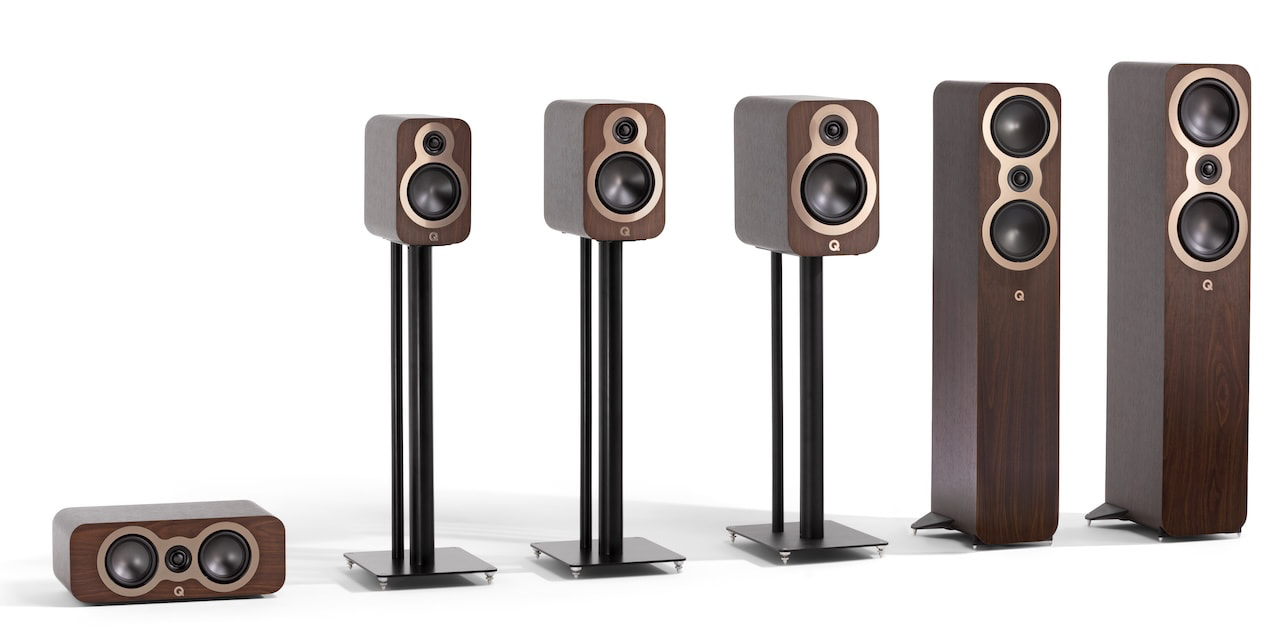
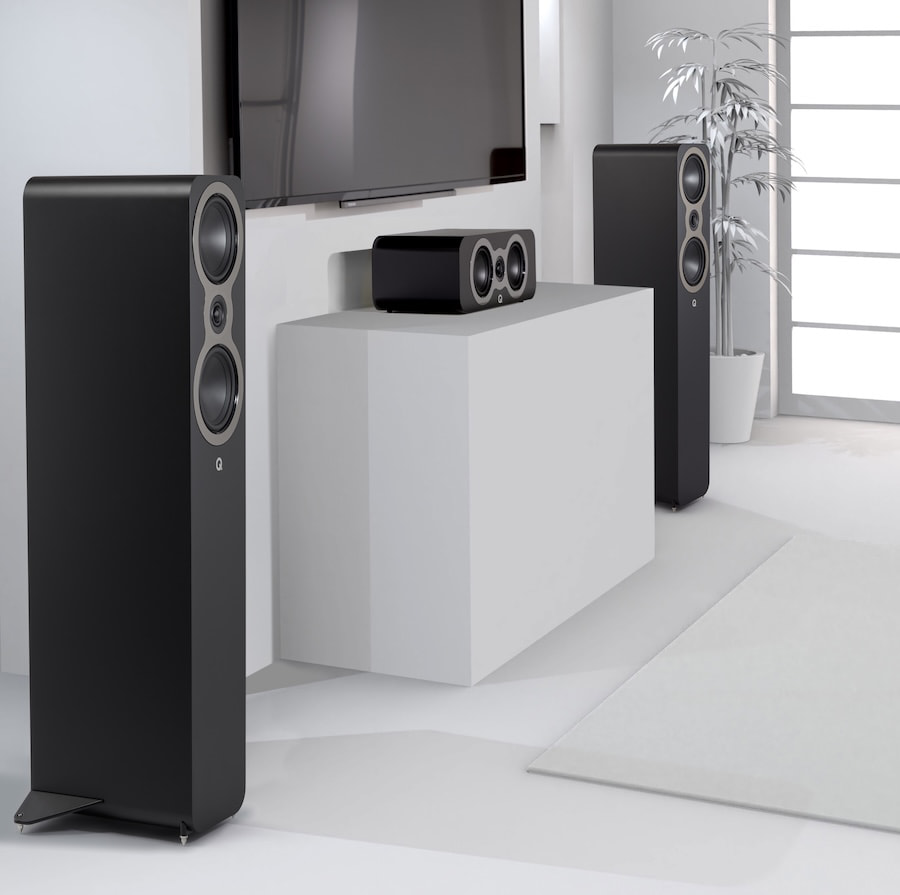
The new Q Acoustics 3040c is a compact floorstanding loudspeaker designed to deliver more scale and bass extension than the 3030c standmount without the size and visual presence of the larger 3050c. Priced at £599, €899 or $1,099 per pair, it becomes the sixth passive loudspeaker in the 3000c range and completes a lineup that now covers everything from desktop and bedroom systems to multichannel home theaters.
There is, however, an interesting wrinkle for American buyers: the 3040c costs only $100 less than the larger 3050c.
This is not the floorstander to buy because it saves a pile of money. It is the one to consider because it saves space.
Related Reviews:
The Missing 3000c Model
When Q Acoustics introduced the 3000c Series in 2024, the range included three bookshelf or standmount models, one large floorstander and a center-channel speaker. The original lineup incorporated technology developed for the more expensive 5000 and Concept Series, including C3 Continuous Curved Cone midrange and bass drivers, mechanically isolated tweeters, P2P cabinet bracing and HPE pressure equalization in the floorstanding model.
What it did not include was a smaller tower.
The 3040c fills the rather obvious gap between the $699 per pair 3030c and $1,199 per pair 3050c. According to Q Acoustics, customer feedback indicated demand for a more compact and agile floorstander that could deliver greater scale than a bookshelf speaker without overwhelming tighter living spaces.
That makes sense. A standmounted 3030c may have a smaller enclosure, but once suitable stands are added, its practical footprint is not necessarily much smaller. The 3040c places everything into one cabinet, moves the tweeter closer to seated ear height and extends the claimed low-frequency response to 43 Hz.
It also means there is no stand shopping, no filling hollow metal columns with sand and no discovering that the attractive stands cost almost as much as the loudspeakers.
Twin C3 Drivers

The two-way 3040c uses a pair of 4.75-inch C3 Continuous Curved Cone midrange and bass drivers positioned above and below a 0.9-inch tweeter.
Q Acoustics originally introduced its C3 driver architecture with the 5000 Series. The cone profile combines the bass performance of a conventional straight cone with the midrange control and dispersion characteristics of a flared design. The goal is tighter low-frequency performance, reduced distortion and smoother integration with the tweeter.
The 3040c’s tweeter is hermetically sealed and mechanically isolated from the front baffle. Separating it from pressure changes and vibration generated by the two larger drivers is designed to reduce distortion and prevent the midrange and bass drivers from coloring the treble.
That approach originated higher up the Q Acoustics food chain in the Concept and 5000 Series before migrating into the more affordable 3000c models. The company has not merely installed another woofer in a stretched 3020c cabinet and headed to the pub.
Bracing and Pressure Control
Compact towers present their own cabinet problems. Their tall internal volume can encourage standing waves and pressure buildup, neither of which does imaging, bass definition or tonal accuracy any favors.
Q Acoustics addresses that with P2P Point to Point bracing in the areas of the enclosure most susceptible to low-frequency vibration. The 3040c also uses HPE Helmholtz Pressure Equalizer tubes to reduce internal pressure and suppress standing waves, technology previously reserved for the 3050c within the 3000c range.
The rear-ported cabinet includes the low-profile terminal panel introduced with the 5000 Series. Its recessed binding posts help keep speaker cables from protruding excessively behind the cabinet, although “close to the wall” should not be confused with “pressed against it.” Rear ports still need room to work.
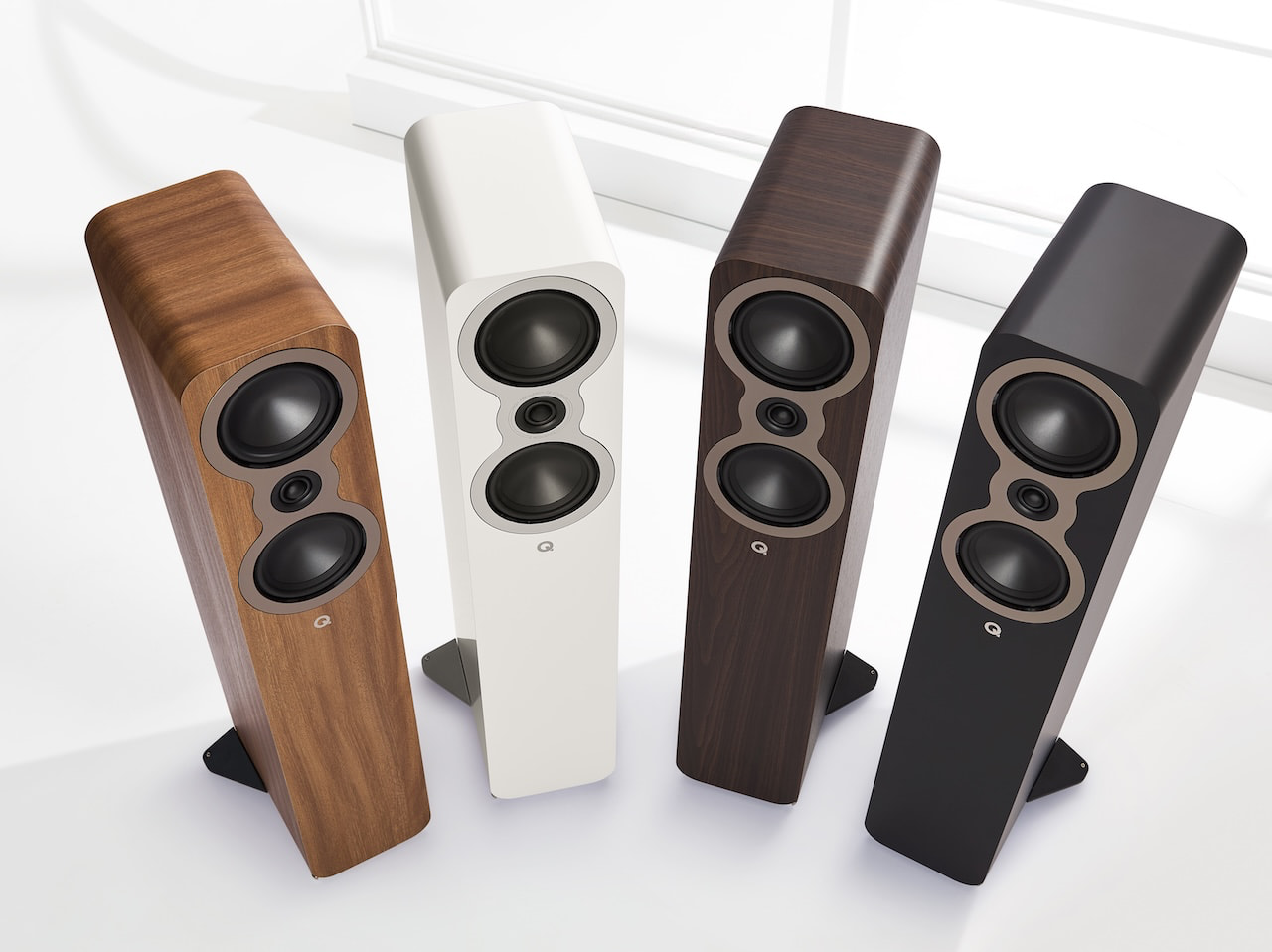
A solid aluminum stabilizer extends from the base and includes spikes that can be adjusted from above. Including the stabilizer and spikes, each 3040c measures 37.1 inches high, 11.2 inches wide and 11.1 inches deep, with a weight of 32.1 pounds.
Four finishes are available: Satin Black, Satin White, Pin Oak and Claro Walnut.
What Might It Sound Like?
We have not heard the 3040c, so any declarations about its sonic performance will have to wait until a review pair arrives.
We do, however, have considerable experience with the technology surrounding it.
Our review of the 3020c found it more transparent, detailed and dynamically alert than the softer-sounding 3000i models it replaced. It also proved more revealing of amplifier quality and tonal balance than its affordable price might suggest.
The 5000 Series demonstrated how much flexibility exists within the same basic driver platform. The 5040 offered a leaner, more neutral and highly detailed presentation, while the larger 5050 delivered greater bass weight, warmth and room-filling impact.
That history gives us a useful framework, but not a verdict. The cabinet volume, crossover and twin-driver configuration will determine whether the 3040c leans toward the speed and clarity of the smaller 3000c models or adopts some of the additional tonal weight of the 3050c.
On paper, its 88 dB sensitivity, 6-ohm nominal impedance and 4-ohm minimum should make it compatible with a broad range of integrated amplifiers and A/V receivers. Q Acoustics recommends between 25 and 120 watts per channel.
A competent 50 to 100-watt amplifier should be a sensible starting point, but our experience with the 3020c and 5000 Series suggests that amplifier character will matter. Buyers using brighter or leaner electronics should audition the combination rather than assuming every box with binding posts will produce the same result.
Stereo and Home Theater
The 3040c could be particularly useful as the front left and right channels in a compact home theater, paired with the 3090c center speaker and one of the smaller 3000c models for surround duty.
Its claimed 43 Hz extension is respectable for a tower this size and may be sufficient for music in a small or medium-sized room. It does not eliminate the need for a subwoofer when reproducing deep electronic bass, pipe organ recordings or movie soundtracks with meaningful low-frequency effects.
The existing 3060S remains Q Acoustics’ slimline subwoofer option for the range, although larger rooms and more ambitious home theaters may benefit from something with greater output and deeper extension.
Specifications:
| Specification | Q Acoustics 3040c |
|---|---|
| Design | Two-way floorstanding loudspeaker |
| Midrange and bass drivers | 2 x 4.75-inch C3 Continuous Curved Cone |
| Tweeter | 0.9-inch mechanically isolated |
| Frequency response | 43 Hz to 30 kHz at -6 dB |
| Sensitivity | 88 dB |
| Nominal impedance | 6 ohms |
| Minimum impedance | 4 ohms |
| Recommended amplifier power | 25 to 120 watts |
| Crossover frequency | 2.4 kHz |
| Effective cabinet volume | 26.8 liters |
| Dimensions | 37.1 x 11.2 x 11.1 inches |
| Weight | 32.1 pounds each |
Who Is This For?
The Q Acoustics 3040c makes the most sense for listeners who want the scale and convenience of a floorstanding loudspeaker but have a smaller living room, den, apartment or dedicated listening space. It also deserves consideration from 3030c buyers who would otherwise need to purchase stands and might prefer a cleaner, more integrated installation.
Home theater users looking for compact front channels that visually and acoustically match the rest of the 3000c family are another obvious audience.
Who Should Look Elsewhere?
Listeners with larger rooms, a preference for high playback levels or a need for greater low-frequency weight should consider the 3050c, 5040 or 5050.
American buyers with enough room for the 3050c face the most difficult decision. At only $100 more, the larger tower may offer greater scale and bass capability for very little additional money. The 3040c has to win that argument through placement flexibility, proportions and room compatibility rather than price.
Q Acoustics 3000c Series Pricing
Stereo loudspeaker prices are per pair. The 3090c center channel and 3060S subwoofer are priced individually.
- Q Acoustics 3010c compact bookshelf: £249 / €379 / $399
- Q Acoustics 3020c bookshelf: £299 / €499 / $549
- Q Acoustics 3030c standmount: £399 / €629 / $699
- Q Acoustics 3040c compact floorstander: £599 / €899 / $1,099
- Q Acoustics 3050c large floorstander: £749 / €1,099 / $1,199
- Q Acoustics 3090c center channel: £229 / €379 / $399
- Q Acoustics 3060S subwoofer: £399 / €499 / $549
The Bottom Line
The Q Acoustics 3040c is not merely a discounted 3050c. It is a space-specific alternative for listeners who want more than a standmount can provide but do not need a large tower looming beside the television.
That makes it more useful than a last-minute addition designed to fill an empty position in the catalog. The 3000c Series already offers some of the strongest value in the affordable loudspeaker category, and the 3040c addresses a legitimate gap without stripping away the driver and cabinet technology that made the rest of the range successful.
The pricing is particularly attractive in the United Kingdom and Europe. In the United States, the narrow gap between the 3040c and 3050c makes room size the deciding factor.
Smaller can be smarter. It just is not automatically cheaper.
Related Reading:
Comparing Our Favorite Vacuum Cleaners
Honorable Mentions
Bissell PowerClean FurFinder for $260: This was our previous top pick for the best cordless vacuum. It got bumped though because the regular Bissell PowerClean ($200) is a touch cheaper since it doesn’t come with the FurFinder upholstery attachment, while Dyson and Ryobi’s vacuums have more powerful suction for pet hair.
Black and Decker Dustbuster Flex for $130: This is another cool handheld vacuum that’s great for cars or even indoor areas like staircases. It has a 4-foot hose, longer than most compact vacuums, and a handy little charging mount that the accessories clip into. Thank goodness for the charging mount, though, since the battery only lasts 15 minutes.
Dyson Spot+Scrub Ai Robot Vacuum for $1200: This is Dyson’s first robot vacuum that doubles as a mop, and it serves both purposes well. It uses the same app as other Dyson vacuums and can learn multiple floors of your home. The base station is large and unique, with a visible dustbin that’s certainly a callback to the clear dustbins of the brand’s cordless vacuums. Dyson says it has artificial intelligence to spot stains and scrub them away, but I couldn’t tell a difference and it didn’t spot the cherry stains I intentionally created. It’s also tall, so it was often bumping into cabinets and low furniture.
Dyson V8 Cyclone for $400: This is a new version of the long-favored Dyson V8, but I wasn’t super impressed when testing it side by side with the only slightly more expensive V10 Konical. It did a fine job and has 150 air watts of power, but I’d recommend the V10 over the V8 any day.
Dyson V10 Konical for $500: I expected to prefer the V8 Cyclone, but the V10 Konical did a better job vacuuming up debris in my tests, comes with a HEPA filter, and has a built-in light so you can better spot dust and dirt when using it on hard floors. When tested and scored against all of the new and current Dyson vacuums, the V10 Konical was in third place, ahead of both the V8 Cyclone and the V15 Detect. It’s a great buy if you want a Dyson vacuum but don’t want to manage multiple heads, and it will be compatible with Dyson’s base station that comes out later this year.
Dyson V15Detect for $846: There are a lot of Dyson vacuum models, and the older V15 Detect is a good choice if you want two vacuum heads included without spending close to a grand. There’s an option to upgrade and get a Submarine wet roller head if you want it to double as a mop. It performed solidly in testing against Dyson’s other vacuums, but wasn’t the best. I’d recommend looking for it on sale for under $700; anything higher and there’s no point in not buying the Gen5Detect or V16 Piston Animal instead.
Dyson PencilVac Fluffycones for $600: This is a new take on a stick vacuum with the motor and dustbin built into the slender handle. There’s both a Fluffycones version, which I tested, that has four fluffy cone-shaped rollers in the head, and a cheaper Fluffy version. I was impressed with the maneuverability of the PencilVac Fluffycones and often find myself grabbing it between runs of my robot vacuum to keep debris and cat litter under control. It’s also lightweight and easy to push, and it has a freestanding charging mount. But it’s a little pricey for being only for hard floors.
Ecovacs Deebot X11 Omnicyclone for $1100: If you want a newer robot vacuum, the Ecovacs Deebot X11 Omnicyclone has a unique design with no dust bag. Instead, it has a rounded canister like a Dyson or stick vacuum, circling the debris to keep it from tangling. It’s a great robot vacuum overall, especially if you don’t want to buy dust bags over and over.
Eufy X10 Pro Omni for $700: This was our previous top robot vacuum pick. It’s a well-priced option that can vacuum and mop, and has a solid 8,000 Pa of suction power. But Eufy does have a newer model that you can pick up for just a little more if you want a self-cleaning roller mop instead of roller pads, with almost double the suction power.
Roborock Saros 20 for $1,600: Roborock’s latest robot vacuum is overall pretty good, but WIRED reviewer Adrienne So noticed it left debris behind on her hard floors, specifically on the divider when it moved from her carpet onto hard flooring. This could be a fault of the super-high suction, which hits 36,000 Pa. There are a few other features she hoped would work better, too, including the AdaptiLift (which raises the vacuum up on uneven surfaces) and beta stain-detection feature. We’re in touch with Roborock about these issues.
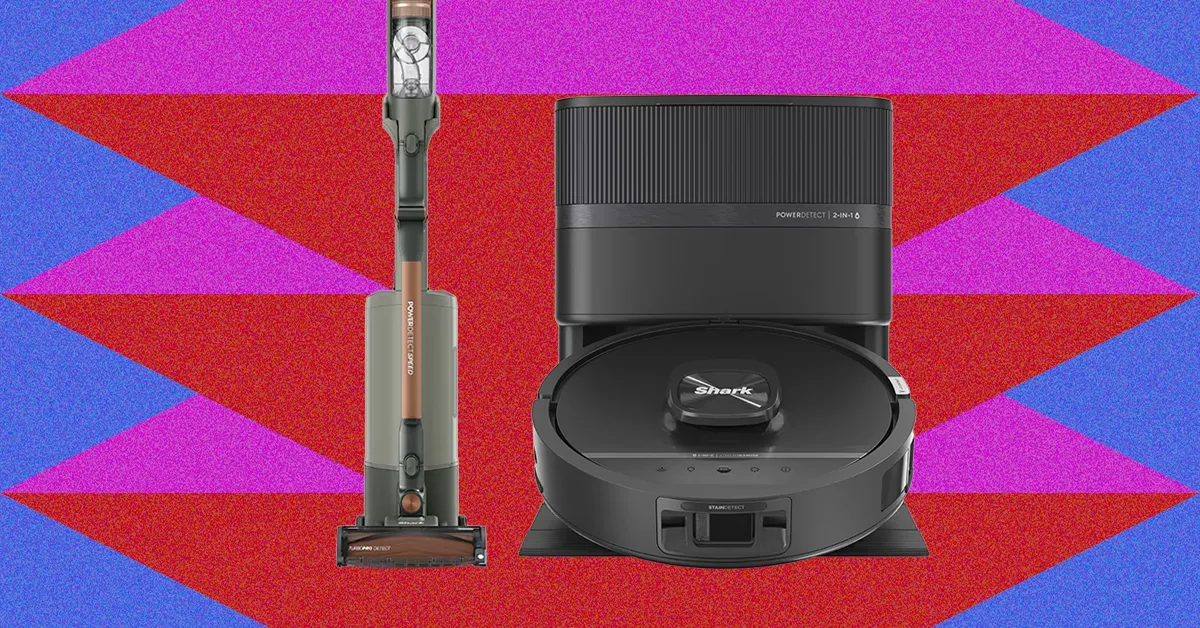
Shark PowerDetect Cordless Vacuum for $418: This is the original PowerDetect vacuum I recommended, with 380 watts of power, three cleaning models, two accessories, and an option to upgrade to include a self-emptying vase station. It can bend to get under furniture and often outpaced Dyson vacuums in my tests, especially when cleaning up sand or cereal on carpet. I prefer the Shark PowerDetect Speed a little more since it’s cheaper and has more options for its base station, but either vacuum is a smart buy.
Tineco Pure One Station 5 for $459: If you want a cordless stick vacuum but don’t want to deal with emptying it all the time, this Tineco vacuum comes with a self-emptying docking station. You’ll eventually have to empty the station, but it’s a great bonus feature and keeps the vacuum from falling over around your home since it’s stored safely in the docking station.
Worx Cordless Cube Vacuum for $120: This adorable, cube-shaped vacuum is one of my favorite handhelds, and is my go-to for vacuuming the car since it’s so easy to hold. It can also store all of its accessories inside itself, and the hose is four feet long to reach your entire carpeted car trunk.
FAQs
Which Style Vacuum Is Right for You?
To help you choose which one to buy, here’s what makes each vacuum style great.
- Cordless Vacuums or Stick Vacuums: These vacuums look like the name suggests, with a long, sticklike arm that connects the vacuum head to the canister and controls. You’ll need to hold this up in a way you wouldn’t have to with an upright vacuum, but these are powerful and super mobile. They make for a great main vacuum, and are especially useful if you have multiple floors to vacuum since they’re easy to carry up and down stairs.
- Robot Vacuums: Robot vacuums and are controlled with an app and allow for hands-free cleaning. Several models that double as mops, too. You’ll have to spend time moving furniture for the best clean possible, and you’ll usually still want a regular vacuum of some kind. But these are a huge help for frequent cleans in homes with kids and pets.
- Handheld Vacuums: Handheld vacuums are ideal for targeted cleans or for cleaning specific places like stairs and cars. Most stick vacuums can transform into a handheld vacuum, but true handhelds are much lighter and have a more compact design (but also sacrifice battery power and dustbin capacity).
What About Upright Vacuums?
An upright vacuum is the classic, original vacuum style that sits straight up on its own, is much heavier than a cordless stick vacuum, and requires an outlet connection to operate. We don’t have an upright vacuum we recommend, since cordless stick vacuums have become the main focus for most shoppers (and as frequent vacuumers ourselves, we usually reach for cordless and robot vacuums anyway). We’re considering upright vacuums to test in the future, however, so feel free to comment on this guide with models we should consider.
Do You Need a Stick Vacuum and a Handheld Vacuum?
Do you need a handheld vacuum if you already have a cordless vacuum? Likely not, because most stick vacuums can transform into a handheld vacuum. Stick or cordless vacuums usually allow you to remove the stick between the vacuum head and canister base and instead connect those two pieces directly, making it into a handheld vacuum. It’ll be much heavier than a handheld-only vacuum and might be irritating for some use cases, but you don’t need both unless there’s a specific reason. A handheld is a good add-on if you already have an upright vacuum you love that doesn’t need replacing.
How Often Should You Replace Your Vacuum?
Vacuums last about five years, depending on the use frequency and build quality. Some cheaper stick vacuums might last only a year or two, though, so it’s worth investing in a better vacuum rather than a cheap dupe. If you’re curious what signs might indicate your vacuum needs replacing, check out our guide to how long vacuums can last.
Power up with unlimited access to WIRED. Get best-in-class reporting and exclusive subscriber content that’s too important to ignore. Subscribe Today.

A former Comcast retail employee alleges that a Connecticut store manager tied the lowest-performing salesperson to a chair each month and had co-workers smash a cream pie into their face, recording the incidents as a sales-motivation tactic. The plaintiff says he resigned after reporting the alleged assaults and is seeking damages for constructive discharge and emotional distress. Ars Technica reports: A Comcast store in Plainville, Connecticut, “had a policy that the highest-ranked Retail Sales Consultant for the prior month was instructed by his or her supervisor — Ms. Peterson, the Comcast Store manager — to tie the lowest-ranked sales consultant for the prior month to a chair in the back office and thereafter assault that person by violently smashing a cream pie in their face,” the complaint alleged (PDF).
Plaintiff David Figueroa’s lawsuit said he was hired as a retail sales consultant on February 2, 2026, and was supervised by store manager Sully Fuentes Peterson. Figueroa alleges that Peterson “designed and implemented” the pie-in-face ritual to meet goals related to sales and positive responses in customer surveys.
“Defendant did not inform the Plaintiff prior to his acceptance of Defendant’s offer of employment that the Comcast Store has a policy of subjecting Retail Sales Consultants to public assaults by co-workers — at the direction of Ms. Peterson, the store manager — for the purpose of increasing Defendant’s sales and profitability,” the lawsuit said.
Figueroa resigned on February 27, and he alleges it was a constructive discharge. The lawsuit says the defendant, Comcast, was negligent because it “reasonably should have known” about the store management’s policies and that the policies could harm employees. Comcast “failed to properly supervise the Comcast Store’s management team,” allowing store management to humiliate employees “for the purpose of promoting the Defendant’s revenues and profits,” the lawsuit alleged. Comcast said in a statement: “The Company has zero tolerance for harassment, humiliation, or any behavior that compromises a respectful and safe workplace. This matter is in litigation so we will not comment on the specific allegations, other than to say that we disagree with the claims in the complaint and its characterization of the alleged events, and intend to fully respond through the legal process.”
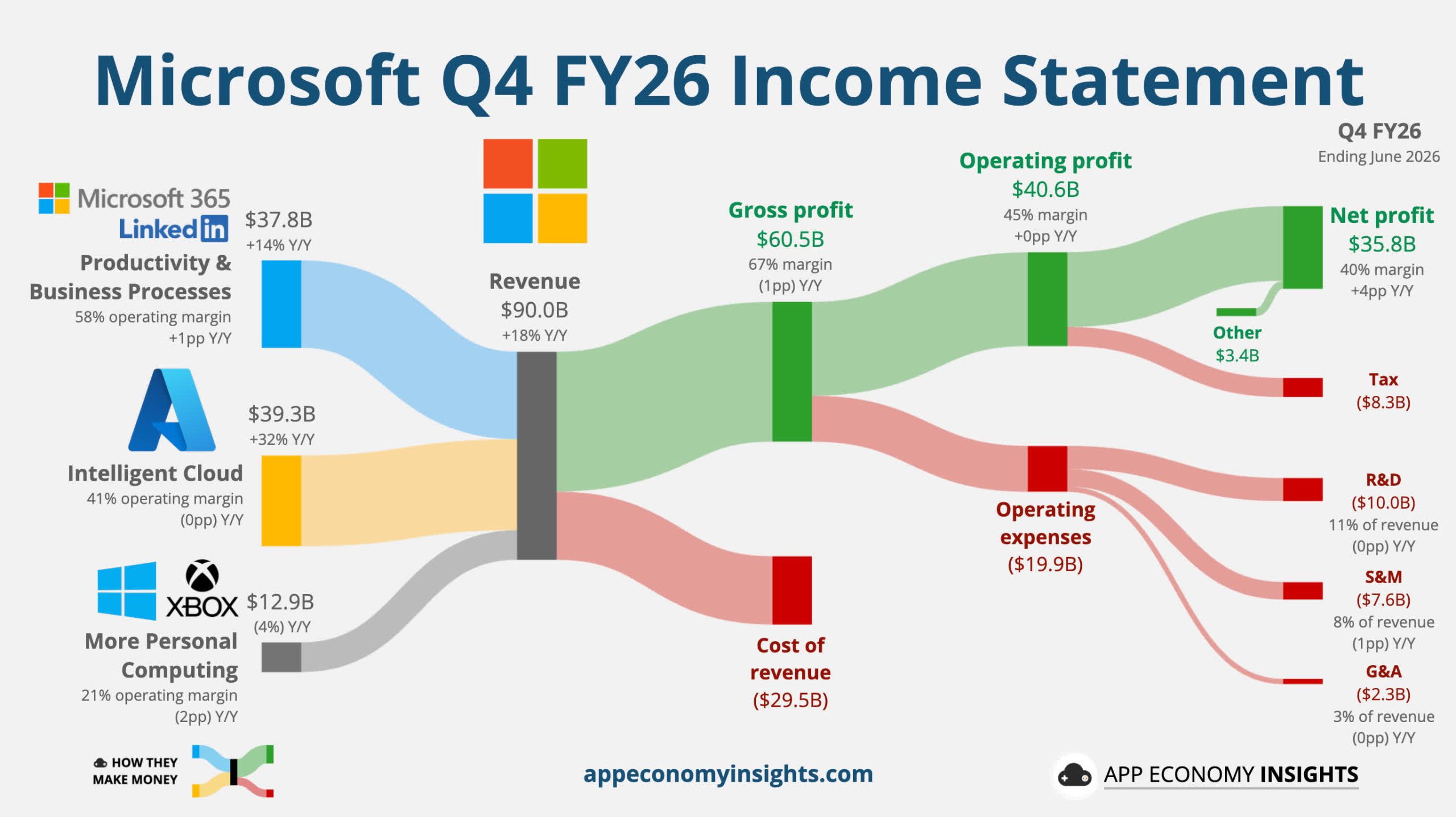
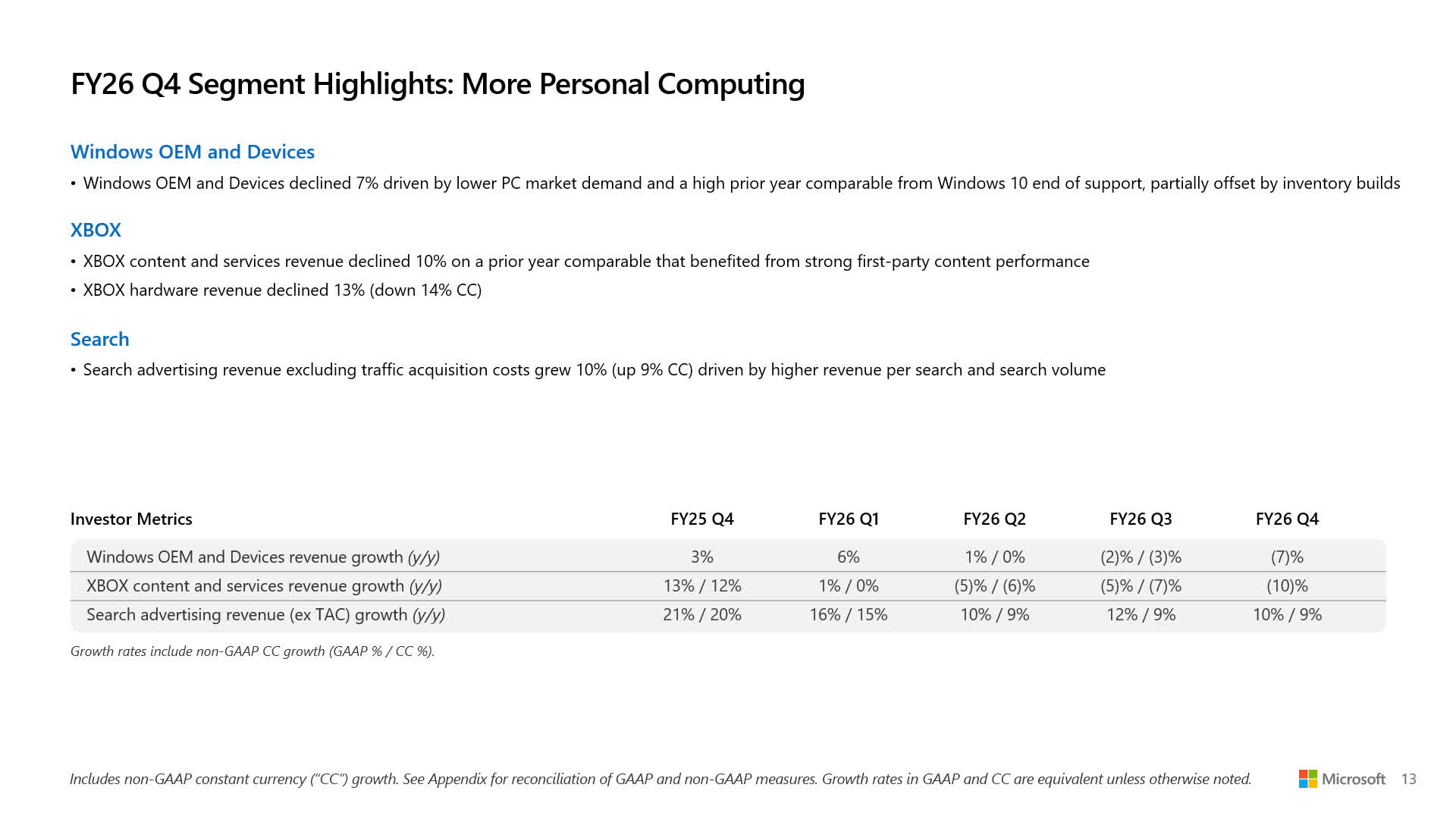
Bottom line: While Microsoft continues to ride the AI wave, Xbox continues to struggle. New CEO Asha Sharma recently began implementing plans for a radical course correction, but it is still too soon to predict their impact. The company’s fourth-quarter financial results for 2026 show a 10% fall in Xbox content and services and a 13% decline in hardware revenue, while Microsoft’s overall profits jumped by 31%.
While Xbox’s 13% YoY drop in hardware revenue is not as bad as last quarter’s 33% plummet, it still caps off a full year of uninterrupted declines. Price hikes and worrying PR surrounding the brand are likely the primary factors, and the situation is expected to worsen when Xbox Series S|X consoles become at least $100 more expensive starting in August.
Xbox content and services revenue also fell by 10% YoY this quarter, compared with a 5% decline last quarter, which Microsoft again attributed to strong performance during the same quarter last year. The company is likely still referring to titles such as Call of Duty: Black Ops 6 and Minecraft, but this past quarter saw the release of one of Microsoft’s most successful titles, Forza Horizon 6.
– ASHA (@asha_shar) July 29, 2026
During the Q4 earnings call, Microsoft CEO Satya Nadella expressed hope for Xbox to return to profitability in fiscal year 2027. Asha Sharma, who replaced Phil Spencer as Xbox CEO in February, has already begun implementing changes to that end, some of which are controversial.
To boost hardware sales, the company is partially reversing its policy of releasing in-house titles, such as Gears of War E-Day, on rival platforms. Microsoft also confirmed a renewed push for major franchises such as Fallout and The Elder Scrolls. However, rolling layoffs affecting 3,200 positions this year and the loss of five game studios have drawn sharp criticism and sown doubts about future game development at Xbox.
Meanwhile, the AI boom continues to lift Microsoft’s overall fortunes. Revenue increased 18% YoY, and profits rose 31%, both in Q4 and for FY26 overall, mostly due to cloud and AI services. The company announced that Azure revenue exceeded $100 billion for the first time this year.
Although tech giants remain bullish on AI, the boom’s longevity remains unclear. Apple recently regained its status as the world’s most valuable company and joined the $5 trillion club, largely because it has kept AI at arm’s length, causing investors to see it as an island of stability.
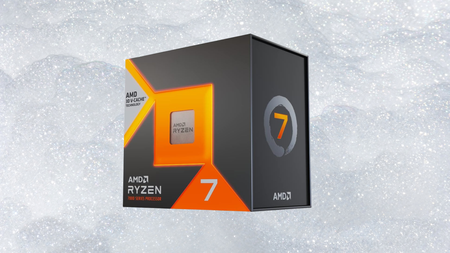
AMD’s Ryzen 7 7800X3D still tops plenty of gaming benchmarks against newer chips, and it has just dropped to one of its lowest prices yet.
That price is $339.99 at Amazon, down from its $449.00 list price, a saving of $109.01, or 24%, on the Ryzen 7 7800X3D, the chip our tech expert called nothing short of impressive in his review.
Save 24% on AMD’s Ryzen 7 7800X3D, still one of the best gaming CPUs around
With 3D V-Cache that still tops gaming benchmarks against newer chips, AMD’s Ryzen 7 7800X3D drops to $339.99 at Amazon, a 24% saving.
Storey pointed to 3D V-Cache as the chip’s crowning glory, an extra layer of cache stacked on top of the processor that boosts average frame rates in certain games without needing a faster clock speed to do it.
The reasoning behind that design is that Ryzen chips are built from chiplets called Core Complexes, and stacking cache directly onto one of them cuts the latency that would otherwise come from cores fetching data across the chip’s internal Infinity Fabric interconnect.
That approach comes at the cost of slightly lower clock speeds and wattage than a non stacked design, though Storey still measured strong single core performance from the 7800X3D’s eight Zen 4 cores and sixteen threads in his testing at the time.

He rated the price to performance value as solid even at launch, noting the 7800X3D has no true non-3D equivalent and sits closest to the standard 7700X, while both chips share access to DDR5 memory and PCIe 5.0 support on the AM5 platform.
Storey’s main reservations were that this platform only supports DDR5 memory, that AM5 motherboards remain pricey compared with the wider market, and that Intel’s competing chips can still edge ahead in raw performance depending on the exact workload and games involved.
Despite those reservations, the 7800X3D still holds a 4.8 star average from more than 8,000 reviews and a number three ranking among Amazon’s best selling processors, which is no small feat in a market flooded with newer CPU launches years after its original launch.
None of that stops Storey’s verdict from holding up today, a solid, efficient and reliable pick for anyone building an AMD gaming PC, and at $339.99 instead of $449.00 the Ryzen 7 7800X3D is an even easier chip to recommend.
SQUIRREL_PLAYLIST_10148964

If you’ve been staying inside all summer due to heat domes and poor air quality from the wildfires, August is shaping up to be a good month to get out of the house and look up at the sky. Among the various cool events happening is a planet parade with six planets visible at once.
The show starts the evening of Aug. 12 and continues until around Aug. 17 or 18, depending on your location. This planet parade includes Mercury, Jupiter, Mars, Uranus, Saturn and Neptune, and like most prior parades, the planets line up on a nice curve, so it should be a little easier to see all of them. The parade is visible across the US and Canada.
You need to wake up early for this one, as the best time to see the parade is just before sunrise. This is due to Jupiter and Mercury not popping up above the eastern horizon until about 15 to 20 minutes before the sun. The good news is that Mercury and Jupiter are right next to each other and typically quite visible. A pair of binoculars should help immensely, but make sure to be careful since the sun will follow Mercury and Jupiter over the horizon in pretty short order.
The rest of the planets are much higher in the sky and present less of a visual risk. Mars is higher in the eastern sky and is visible without the need for visual aids. Uranus will be higher in the eastern sky, trending south. Following that curve, you can see Saturn in the southern sky as a yellowish dot. Neptune is nearby at the end of the line. Uranus and Neptune require a telescope or high-powered binoculars to view, and if you want a superior view of Saturn, that amplification will help too.
You have about a week if you want to do this. Before Aug. 12, Jupiter trends too close to the sun to be safely visible, and after around Aug. 17-18, Mercury ends up too close to the sun to be viewed safely. Before and after that date, you can still see a five-planet parade for quite some time.
Venus is also technically visible at night. It sets along the western horizon just after sunset, so it’s not visible at the same time as Mercury and Jupiter. However, if you don’t mind pulling an all-nighter, you can see all seven planets in the sky on the same night.
Do I need any amplification devices for this?
The inclusion of Neptune and Uranus means that you will need some sort of amplification device to see all the planets. Binoculars work, as both Uranus and Neptune can be seen (albeit faintly) with a good pair, and they’ll also help you see Mercury before sunrise.
A telescope is a much better tool since you can more easily see the rings of Saturn along with the other planets. We don’t recommend using a telescope to find Mercury, since you may accidentally catch the sun, which is not a good idea.

Part of a triple feature coming on Aug. 12
If you’re looking for one single day to go out and view the sky for the rest of the year, Aug. 12 makes a compelling case. The planet parade ramps up then, and continues for the next week. It is always fun to see a bunch of planets from the solar system in a single night, but in terms of thrill, it’s arguably the least interesting thing happening on Aug. 12.
The Perseids meteor shower is set to peak on the evening of Aug. 12, which means those who go out to see all the planets can virtually guarantee some meteor sightings as well, since Perseids is one of the most active meteor showers of the year. In a fortuitous turn of events, the Perseus constellation, the point from which the Perseid meteors appear to originate, is right next to Mars and Uranus. That means you can scout out the parade and see meteors at the same time since they’re in the same part of the sky. The timing and placement don’t get much better than that.
If that isn’t cool enough, nature has one more thing to toss into the equation: Aug. 12 is also the date of the next solar eclipse. North America is largely sitting this one out, but if you draw a line from Washington state to North Carolina, all the states north of that line will get at least a partial solar eclipse with about 20% coverage. Since the sun isn’t completely covered, proper safety measures for solar eclipse viewing are highly advisable to avoid eye injuries.
Three prominent celestial events happening in one 24-hour span are pretty rare, so if you’re up for it, it’s a great day to look up.

Olivia Colman & Alexander Skarsgård’s Weirdest Movie Yet Officially Debuts First Trailer

Top 10 Affordable Tropical Wallpapers

Migrants storm EU border: Thousands charge up beaches and climb over fences to force their way into Spanish enclave as it declares ‘total emergency’


-

 Fashion6 days ago
Weekend Open Thread: Brooks Brothers
-
 Sports4 days ago
Commonwealth Games boxing: Jadumani Singh seals dominant 5-0 win over Pakistan’s Sumama Rehman to enter quarter-finals | Commonwealth Games News
-

 Business18 hours ago
Why Trees Belong on the Risk Register
-

 Tech4 days ago
Intel is reversing course and bringing hyper-threading back to its server chips
-

 Crypto World5 days ago
Ripple bought a bank in pieces. The $4 billion audit
-

 Politics3 days ago
Luke Littler dismantles Gerwyn Price to retain title in Blackpool
-

 Politics2 days ago
The Part of the Electric Transition Nobody Wants to Discuss
-
 Entertainment6 days ago
A New Post-Apocalyptic Gundam Anime Series Blasts Into SDCC
-

 News Videos4 days ago
BITCOIN JUST ENTERED THIS CRITICAL ZONE…
-

 Fashion6 days ago
16 Dresses for the High Summer Event
-

 Sports6 days ago
2026 3M Open leaderboard: Scottie Scheffler finds putter in Round 1, sits three back
-

 News Videos7 days ago
The Peugeot Family: How 200 Years of an “Old Money” Dynasty Died in A Boardroom
-

 Business1 day ago
Major shareholder moves on Canyon
-

 Crypto World4 days ago
XRP Ledger adds $2.6B as RWA inflows rank second
-

 Politics4 days ago
Spain sweeps the board at 2026 World Cup with individual awards
-

 News Videos3 hours ago
Bitcoin Enters the 3rd Stage of the Bear Market
-
 Entertainment2 days ago
‘Stargate’ Creator’s New Sci-Fi Series Returns for Season 3 Tomorrow
-

 Tech5 days ago
Anthropic launches Claude Opus 5, a cheaper AI model for coding, agents and enterprise workflows
-

 Crypto World2 days ago
Kraken Enables Retail Access to Jersey Mike’s IPO via Tokenized Shares
-

 Entertainment5 days ago
Sara Gilson Killed By Husband After Viral “Pedophile” TikTok Video
You must be logged in to post a comment Login