

Connect with us
DAPA Banner

Tech

5 Handy Uses For Smart Sensors You Probably Didn’t Think Of

Published

on


We may receive a commission on purchases made from links.

A smart motion sensor typically detects the presence or movement of a person, while a smart switch is most often used to turn lights on or off. These devices are already useful just as they were designed, but did you know that you can actually program them to let you accomplish other useful things?

With a little creativity, you can use a smart sensor to warn you if you’re forgetting something, to catch if something goes wrong before it becomes a major problem, or to just generally make your life easier. Most of the features also do not require complex programming — you can either install the smart sensor directly where needed, or, at worst, add a timer via your preferred home app and keep notifications on.

Advertisement

Let’s look at a few handy uses for smart sensors that you probably haven’t considered yet. You might be surprised what these things can accomplish with a little bit of ingenuity.

Advertisement

Warn you if you left a door or window open

Contact sensors are pretty simple smart devices, as their primary purpose is to warn you when the two pieces are not in contact. These are most commonly used for doors and windows — you can program them to send a notification on your phone when you leave your house, and you left a window or door open. There are also several creative uses for contact sensors, including automatically turning on lights and running a home routine.

Though these sensors are typically attached to doors and windows, that does not mean they’re limited to those used for access. If you often second-guess yourself about whether you’ve properly closed your fridge door, especially when you’re on vacation for a couple of days, attaching a contact sensor to it will help you avoid that problem. You can then set the sensor to warn you if the door is open for too long. If you still need to check, just open your phone and check the device’s status.

You can also install the sensor inside a cupboard or cabinet if you’re guarding stuff. For example, if you keep chocolates in your pantry and don’t want your kids raiding your sweets without your knowledge, you can set the sensor to warn you when the cupboard door opens, allowing you to check your smart security camera to see who’s the culprit.

Advertisement

Get notifications for mail or packages

Smart mailbox alarms exist to ensure you don’t miss letters or packages that might’ve arrived when you were asleep or weren’t home. After all, we rarely receive snail mail these days, but the letters that do come in are quite important, like a jury duty summons or your tax return check. These sensors work similarly to a motion sensor in that they detect movement in your inbox.

Because of this, you do not need to purchase a smart mailbox alarm — if you already have an extra motion sensor at home, you can install it in your mailbox and set it to alert you if it detects movement. However, this might not work for larger packages that won’t fit in your mailbox. So, if you want to get alerted when an Amazon package arrives at your doorstep, consider getting a Ring camera.

Advertisement

This smart doorbell camera can tell you when someone’s at your door, but you can also program it to notify you if it detects movement on your porch. This means it can double as a security camera while simultaneously notifying you if someone leaves a package at your doorstep.

Advertisement

Control the exhaust fan bathroom automatically

Smart switches are often used for remotely turning on devices using voice commands. But because you can control them with an app, you can make them do a lot of other clever things beyond switching on or off on your command. One thing you can do is program your bathroom exhaust fan to work automatically based on which light you turn on.

The biggest problem some people encounter with bathroom exhaust fans is that they do not work optimally. Most exhaust fans turn on when you switch on the bathroom lights — this is a problem for some people, as it can cause a cold draft while they’re showering. And when you switch off the light after showering, it also turns off the exhaust, leaving excess moisture stuck inside your bathroom.

If you use a smart switch to control the lights and the exhaust fan in your bathroom, you can program it so that you don’t have to think about the exhaust fan. For example, you can set the exhaust fan to automatically turn on when you switch on the light for your toilet area to keep the area fresh. But for your shower, you can instead command the exhaust fan switch to turn on minutes after you turn off the light. That way, you don’t get chilly while you’re bathing, while the exhaust fan will still ensure that moisture is exhausted after you leave the restroom.

Advertisement

Avoid extensive water damage by catching leaks early

You might think that a water leak sensor is an unnecessary smart device for your home, especially if you live in a newly constructed dwelling. But if you live in an older home or experience freezing winters in your area, this might be a prudent investment. That’s because a leak sensor will warn you if you have a problem with your plumbing before it becomes a major issue, making it one of the smart gadget upgrades you can install in your bathroom or kitchen.

As the name suggests, these devices alert you when they detect a water leak. That way, you can immediately shut off your taps before the water spreads all over your floor. Since these smart devices send a notification to your phone, you also get warned wherever you are in the world as long as you’re online.

This is crucial if you’re away for an extended period. That way, you can immediately inform a trusted person to turn off the taps in your home and avoid coming home to extensive (and expensive) water damage.

Advertisement

Toggle perimeter and safety lights as necessary

Smart switches can be programmed to automatically turn on and off your perimeter and safety lights based on sunrise and sunset times. However, this only takes into account the position of the sun and does not consider meteorological effects. So, if you want to ensure that your lights turn on when the skies get too dark, you can install a smart light sensor.

With a smart light sensor installed, you can then use it to command all the lights around your home to switch on when it gets too dark — whether through the setting of the sun or because of a snowstorm — and turn off when there’s enough light to save on electricity costs. You can even use it to automatically adjust the dimmable lights in your home, ensuring a consistent brightness level throughout the day and night.

Advertisement

You can also pair a smart light sensor with a smart motion detector to specific areas in your home. That way, you can program lights in common areas, like your hallway or garden, to turn on only when someone is in the area and it’s dark. You can also use it to automatically lower or raise smart blinds to help keep the temperature in your home under control or to maximize natural light.


Advertisement

Source link

Continue Reading
Click to comment

You must be logged in to post a comment Login

Leave a Reply

Tech

Save $130 on the Samsung Galaxy Watch 8 Classic: rotating bezel, sleep coaching, and running coach for $369

Published

on

The Samsung Galaxy Watch 8 Classic is down to $369.99 at Amazon in a limited-time deal, a $130 saving off its $499.99 list price. That’s 26% off a smartwatch that brings back the physical rotating bezel, adds meaningful health tracking features, and packages it all in a 46mm cushion design that sits comfortably on the wrist. For Android users in the market for a serious daily watch, this is the deal to move on.

What you’re getting

The rotating bezel is the defining feature of the Classic line, and it’s worth being direct about why it matters. Navigating menus and notifications with a physical dial is faster and more precise than swiping on a touchscreen, and it’s the kind of interaction that makes the watch feel considered rather than generic. The Quick Button adds a second layer of hardware control, letting you assign shortcuts to the functions you use most.

The health and fitness tracking is where the Watch 8 Classic earns its keep day to day. Sleep Coaching goes beyond basic sleep tracking by analyzing patterns over time and offering actionable guidance, while Running Coach provides real-time form and pacing feedback during runs. The Energy Score feature aggregates sleep, activity, and recovery data into a single daily readiness metric, which gives you a more honest picture of how prepared your body is for training than step counts alone ever could.

The 46mm size hits the right balance for most wrists, large enough to be readable at a glance without feeling oversized under a cuff. The cushion case design softens the profile while keeping the rotating bezel prominent, and build quality is exactly what you’d expect from Samsung’s Classic tier.

Advertisement

Why it’s worth it

The rotating bezel, coaching features, and Energy Score tracking add up to a smartwatch that covers a lot of ground in a single device. With $130 off a limited-time price, the Galaxy Watch 8 Classic lands in a bracket where the competition charges more for less, and the deal won’t stick around indefinitely.

The bottom line

The Samsung Galaxy Watch 8 Classic at $369.99 is a well-rounded smartwatch that delivers on both fitness tracking and daily usability. The rotating bezel, sleep and running coaching, and 46mm cushion design make this a straightforward recommendation for any Android user ready to upgrade, and the $130 saving makes the timing right.

Source link

Advertisement
Continue Reading

Tech

Gamer Restores the Original PlayStation Portal From Two Decades Ago

Published

on

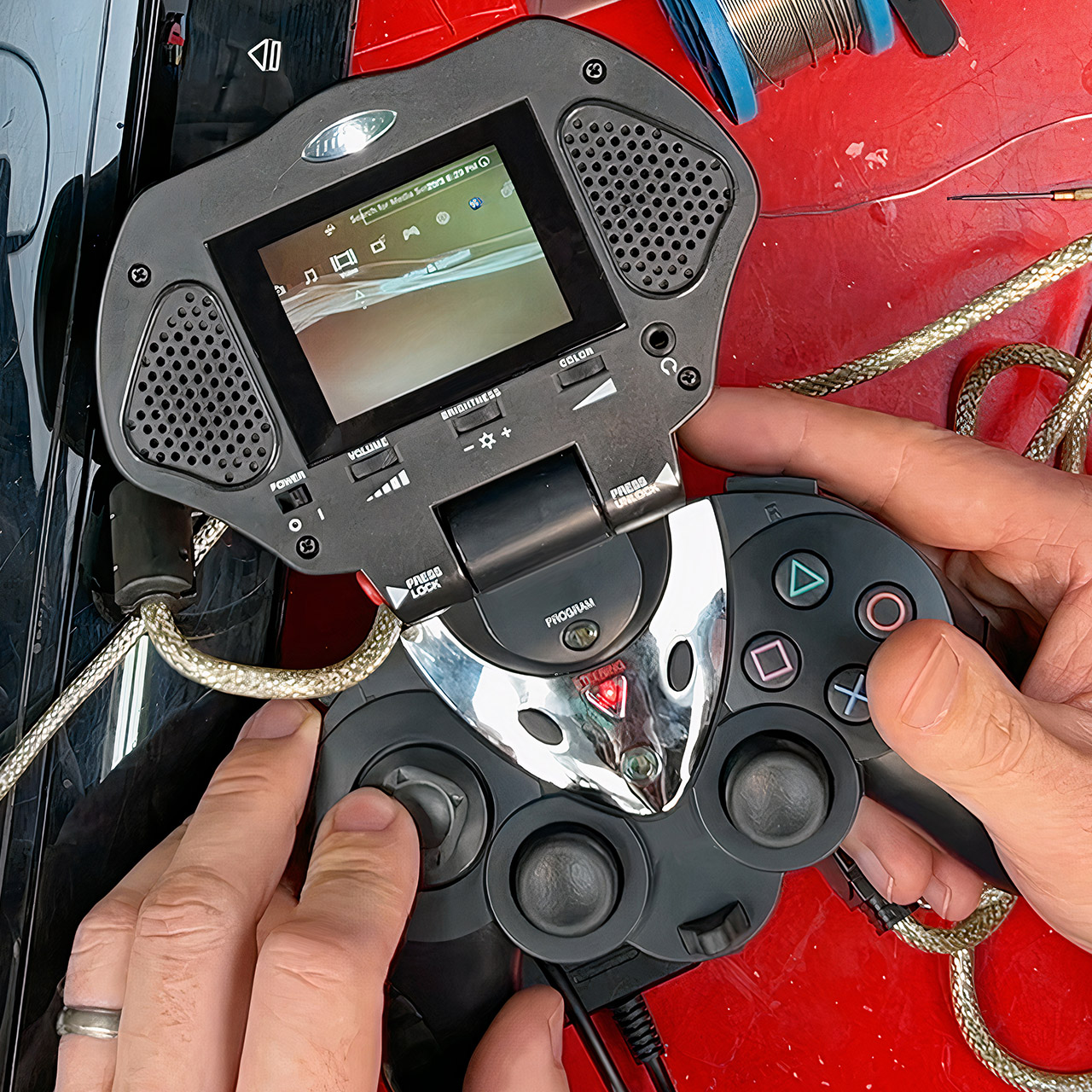
Original PlayStation Portal Intech Controller and Game Screen
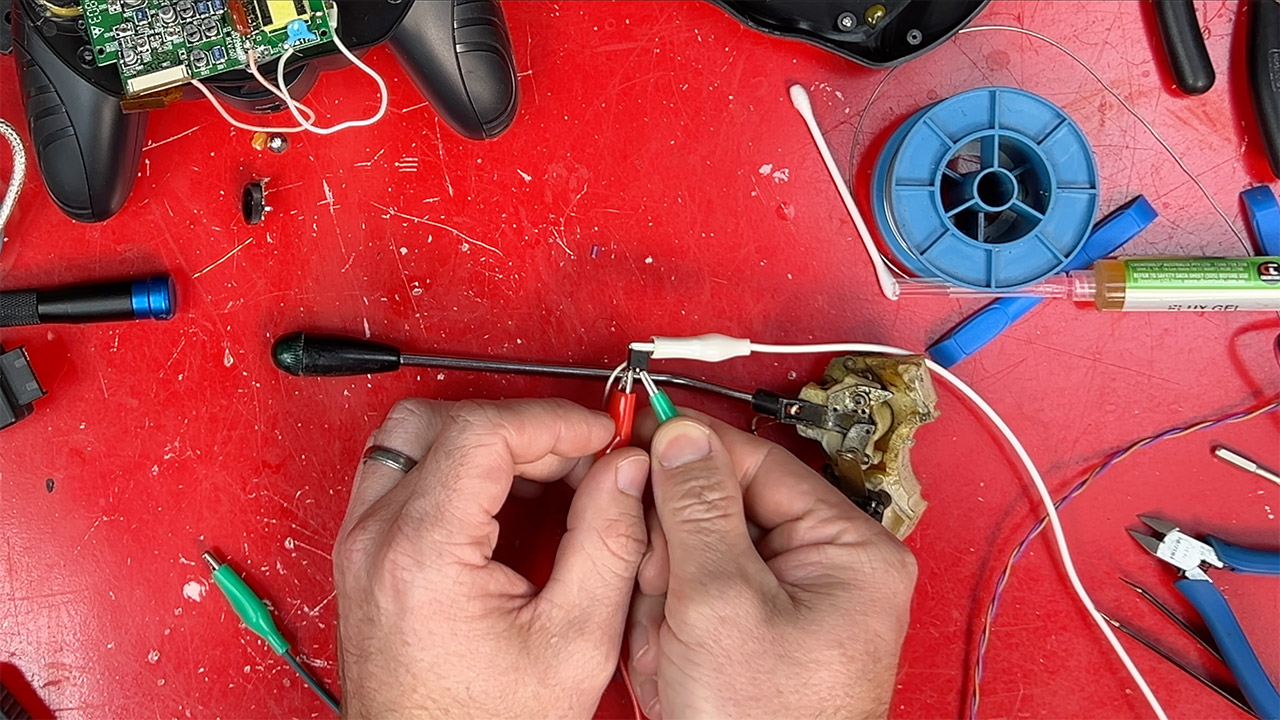
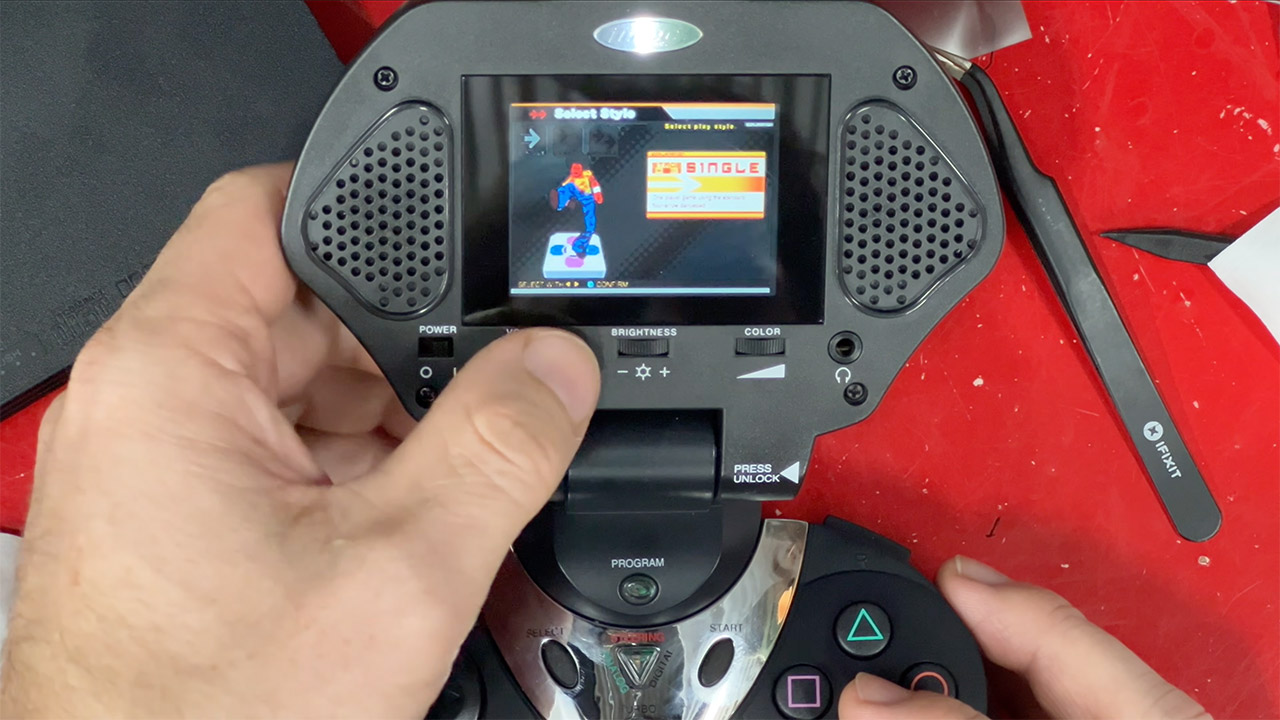
James Channel continues to shed light on old, forgotten gaming gear that still has a few tricks up its sleeve. His latest segment delves deeper into a device from 2003 that appears to be an early prototype for the PlayStation Portal. More specifically, the Intech Controller and Game Screen (model PS2-750). It’s an odd combination of a full PlayStation 2 controller and a little built-in screen and speakers that allows you to play on the go, away from the big living room TV.


This device turned up in pretty shape after sitting unused for years. James begins the unboxing process by cracking it open and going over the connections required to hook everything together. Three connections connect the handheld device to the console: one goes into the controller port, another handles the video and audio signal, which can be routed to the TV, and a third provides power via a dedicated 7.5v supply. Once everything is connected, the screen displays whatever the PS2 is outputting, and the controller responds to the inputs. Stereo speakers are included into the machine, and a headphone port is available if you want a quieter experience.


PlayStation 5 Portal Remote Player – Midnight Black
  • Play Your Game Collection with Remote Play – PlayStation Portal Remote Player can play compatible games you have installed on your PS5 console…
  • Cloud Streaming from the Game Catalog and Classics Catalog – Discover an awesome library of PS5 games on the PlayStation Portal Remote Player with…
  • Cloud Streaming for PS5 Games in Your Library – With PlayStation Plus Premium, stream select digital PS5 games in Your Library from PlayStation Store…

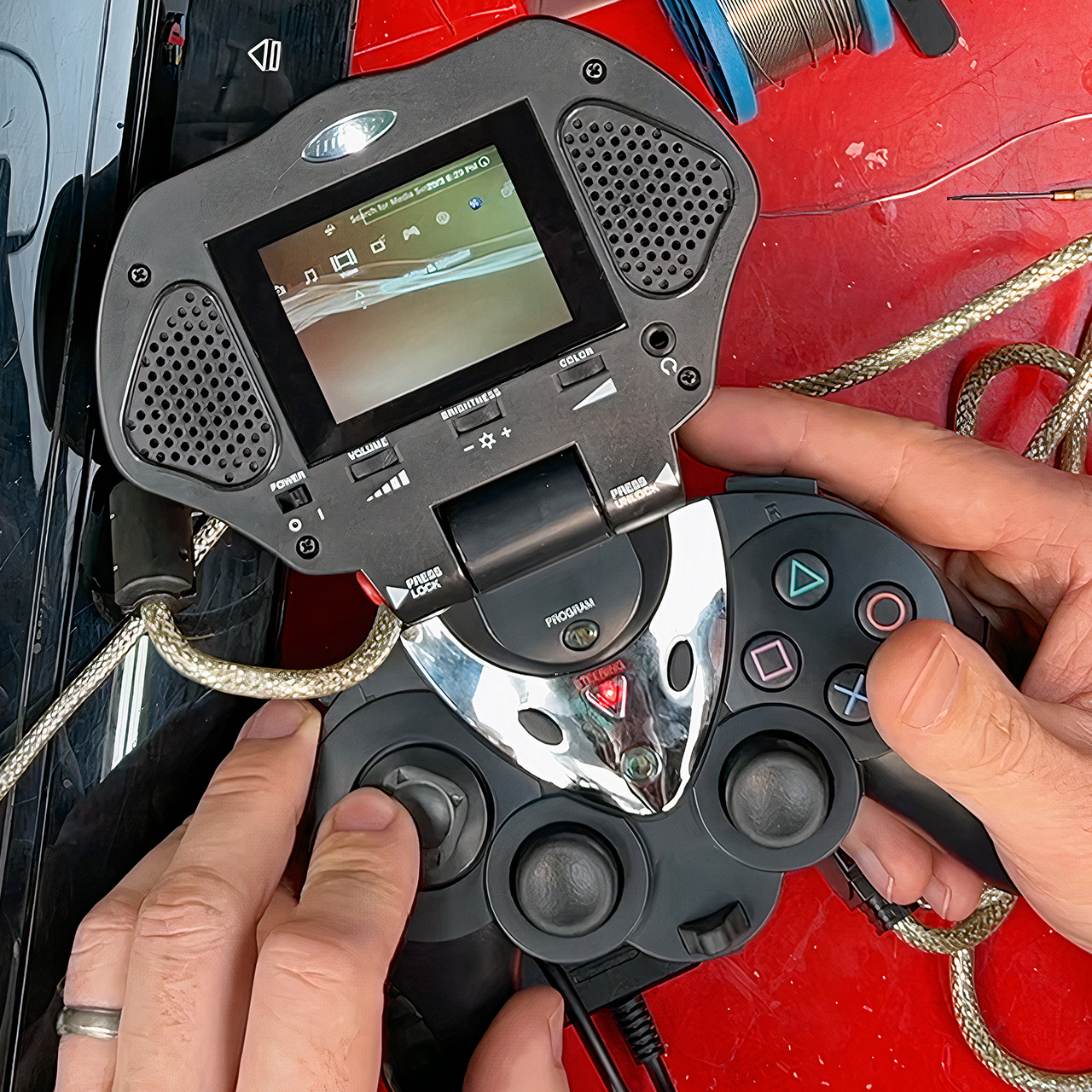
Original PlayStation Portal Intech Controller and Game Screen
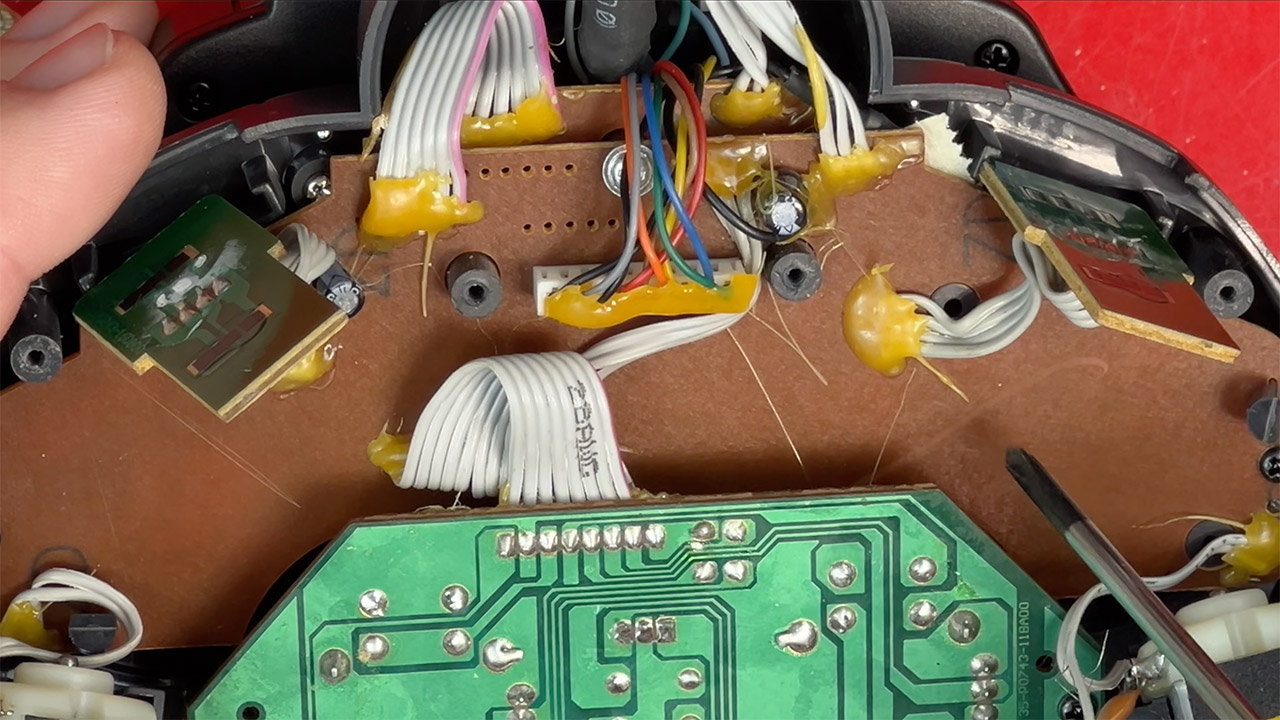
As James disassembles the device, you can clearly see the type of build you’d expect from a third-party attachment back in the day: simple yet a little rough around the edges. Everything is held together using brown circuit boards and plenty of hot glue. Inside, you’ll discover a modest 2.5-inch LCD with an old-school fluorescent backlight from before LEDs were popular. The controls on this gadget include dual analog sticks, a directional pad, some face buttons, shoulder triggers, and a few extras such as a turbo button and a programmed macro key. Even a rumbling motor for vibration feedback with adjustable strength. He points out that the screen is only compatible with NTSC consoles, and the text in some games can become crowded, especially if the game is running at a higher resolution.

Original PlayStation Portal Intech Controller and Game Screen
When James finally has the chance to turn it on, things don’t go well. A burnt smell and dead audio indicate that at some point in the past, someone crossed their wires and installed the incorrect voltage polarity. He traced the damage to a basic 7808 voltage regulator that overheated, melting some of the surrounding electronics. He painstakingly desoldered the damaged component, replaced it with a new one, and was able to turn the volume back on after a rivet fused in the heat. It turns out that the LCD also has vinegar syndrome, which is a typical condition in which the polarizing layer on the screen fades and causes the image to appear dark or blurry. James was able to rig up a remedy by carefully cutting a new layer from a spare laptop screen, aligning it, and fixing it in place to restore the colors to their old state.

Original PlayStation Portal Intech Controller and Game Screen
With all of the repairs completed, James tests it with some actual games, including Dance Dance Revolution and Katamari Damacy. It’s very surprising that the small screen can offer playable visuals, even if the colors are washed out by today’s standards. The controller still feels familiar for short periods, but the directional pad is stiff and the grips have become sticky with age. He even gets the controller side to operate with a PlayStation 3 by simply plugging in a USB adapter, demonstrating that the input side is still functional after all these years.

Source link

Advertisement
Continue Reading

Tech

Russia’s VPN Crackdown Caused Bank Outages, Telegram Founder Says

Published

on

Russia’s “great crackdown” on VPNs — and a clampdown on Telegram’s messaging platform — had an unintended side effect, reports Bloomberg. It “triggered the widespread banking outage seen across the country this week, Telegram’s billionaire founder Pavel Durov said.”

“Telegram was banned in Russia, yet 65 million Russians still use it daily via VPNs,” Durov said Saturday in a post on Telegram. “The government has spent years trying to ban VPNs too. Their blocking attempts just triggered a massive banking failure; cash briefly became the only payment method nationwide yesterday.” Attempts on Friday to limit VPN use could have sparked the disruption affecting banking apps, The Bell and other Russian media reported, citing industry sources who weren’t identified.

The outage may have been caused by an overload in the filtering systems run by Russia’s communications watchdog, according to the reports, with experts warning that major restrictions risk undermining network stability… Separately, payments for Apple Inc.’s app store and other services became unavailable in Russia from April 1, the US company said on its website, without saying why. Earlier, RBC newswire reported that the Digital Development Ministry had asked mobile operators to disable top-ups, which could help limit VPN use….

Durov, who’s being investigated in Russia for allegedly aiding terrorist activity, compared the situation in his home country to Iran, where similar restrictions prompted widespread adoption of VPNs instead of the intended shift to state-backed messaging apps. “Welcome back to the Digital Resistance, my Russian brothers and sisters,” said Durov, who has lived in Dubai and France in recent years. “The entire nation is now mobilized to bypass these absurd restrictions,” he wrote, adding that Telegram would continue adapting to make its traffic harder to detect and block.

Advertisement

Source link

Continue Reading

Tech

Haier is betting big that your next TV purchase will be one of these

Published

on

Haier is best known for appliances. It’s the no.1 global brand, owner of the Candy brand in Europe and Hoover in the UK.

I, myself, was unfamiliar with the name before attending its One Vision Conference in Liverpool; I’m definitely aware of who they are now.

That unfamiliarity perhaps represents the hill Haier has to climb in the UK. In the not-too-distant future, it is about to jump out of the frying pan and into the living room with the launch of their first TVs.

And it has very ambitious plans.

Advertisement

Higher and Haier

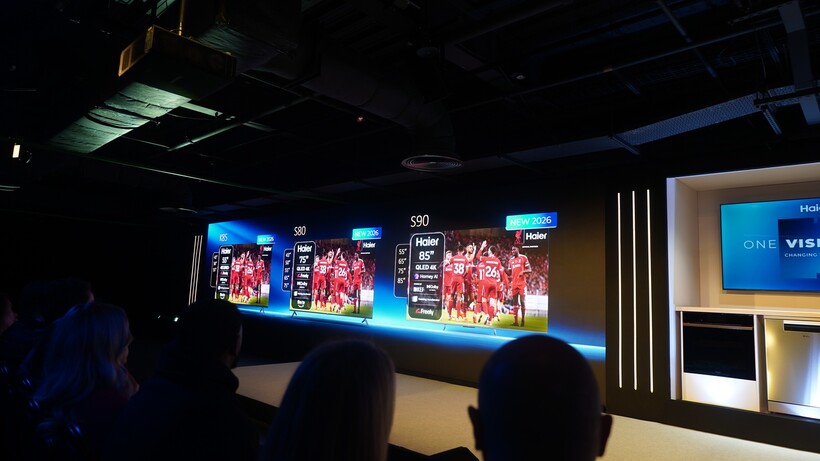
Haier TV line-upHaier TV line-up
Image Credit (Trusted Reviews)

Haier unveiled three TVs in the K85, S80, and S90 (the latter two might raise an eyebrow or two at Samsung with those model names). These three TVs follow Haier’s approach of good, better, and best, a narrative that helps them onboard customers for the experience that suits them.

Advertisement

Want a simple TV experience? That’s what the K85 is for: a TV that isn’t driven by specs but aims to offer value. The S80 is aimed at families and kids, the picture quality receives a boost from the K85’s LED to a QLED screen; and the sizes get bigger too (up to 85-inches).

Then we get to the S90 – the ‘best’ in the range for the time being – featuring Haier’s Homey AI chip for picture processing with “enhanced” motion handling, gaming modes, and Dolby Atmos sound system tuned by British hi-fi brand KEF (though I saw a soundbar system included with the S90, so perhaps this is not a built-in system). They all feature Fire TV and Freely, providing over Wi-Fi access to the UK’s favourite apps.

Haier’s goals are ambitious, given that it has no previous experience in the TV market.

Advertisement
Haier KEF audio systemHaier KEF audio system
Image Credit (Trusted Reviews)

It views the TV market as a “major growth pillar”, aiming for 50% of its European growth to be driven by TVs in the next three years. Similar to TCL a few years ago, Haier understands it is playing catch-up in UK and needs to build up a presence. What impressed most about the presentations was the confidence they exuded, but then hubris does come before a fall…

But Haier seems to have at least the basics figured out. It has a roadmap in terms of launch with 2026/27 primed for launches of Mini LED and Quantum Dot Mini-LED models. It already has ideas about (maybe) launching 163-inch Micro LED TVs, and they’re in the process of establishing a base in Poland to cut down lead times to the UK in terms of shipping.

Advertisement

Can it deliver on the promises? Will it be a case of too much, too quickly? We’ll have to wait and see.

Haier Fire TV interfaceHaier Fire TV interface
Image Credit (Trusted Reviews)

The shifting sands of the TV market…

As I mentioned when it emerged that TCL was buying a controlling stake in Sony’s TV business, the sands of the TV market are shifting in ways that I don’t think we’ve seen before.

Japanese giants such as Sony and Panasonic have had to seek help from Chinese manufacturers who offer more scale and efficiency. Samsung and LG have found their market share eaten into by Hisense and TCL, both of whom started out in the UK offering value-focused offerings before leaping into the premium market.

Advertisement

Haier senses there was an opening in the market for another player to exist, and to be fair, there is one.

Advertisement

The market share of both Samsung and LG had declined, and Haier believes the market is shifting towards Chinese brands. While Samsung and LG are about a combine 50% of the UK market, the Chinese brands have a market share that by the end of 2026 will inch somewhere close to 30%.

Haier One VisionHaier One Vision
Image Credit (Trusted Reviews)

Haier is most similar to TCL in that they’re playing catch-up, but like its performance in the home appliance area, this isn’t an obstacle but a challenge to be overcome. As one of those ‘everything’ Chinese companies like Xiaomi and Huawei that have many toes dipped in many waters, Haier has experience across a broad range of markets. It’s not approaching the TV market with blinkers on, but it believes it has a compelling hand.

It remains to be seen if they can deliver on the talk. There’s been no mention of pricing, which will be the most important factor. Haier talked about not wanting to be dragged into a price war and undercutting its competitors as TCL has done, but can it offer a premium experience that customers will want?

Advertisement

If I had a quibble about Haier, it’s that what they showed was nothing new; we’ve seen on an annual basis TVs of this type. When Sky entered the TV market, it struggled with TV performance but it offered a unique proposition that no other brand could match. It remains to be seen what compelling hook Haier can offer as it looks to make a splash in the TV market.

Source link

Advertisement
Continue Reading

Tech

Garmin Approach S50 review: a mid-range banger that shoots well below its handicap

Published

on

Why you can trust TechRadar


We spend hours testing every product or service we review, so you can be sure you’re buying the best. Find out more about how we test.

Garmin Approach S50: One-minute review

Sitting in the mid-range of the brand’s golf watch range, the Garmin Approach S50 is an excellent course companion. It includes all of the brand’s suite of excellent golfing features, as well as just the right amount of extra health and fitness, and everyday functionality to offer a golf-first, near-complete package.

It’s the golfing pedigree that shines the brightest, of course, and it puts those features into action brilliantly as a course companion. It enhanced my time and game on the course with its accurate yardages, automatic shot tracking and score logging, golf course and hole graphics, and the excellent PlaysLike feature — which factors in elevation and weather — is brilliant.

Advertisement

Source link

Advertisement
Continue Reading

Tech

Italian court says Netflix must refund customers up to $576 over price hikes

Published

on


An injunction action brought by consumer group Movimento Consumatori against Netflix Italia’s price increases has been upheld by the Court of Rome.
Read Entire Article
Source link

Continue Reading

Tech

Samsung just gave up on its own Messages app

Published

on

Samsung is finally doing what it probably should’ve done years ago: killing its own Messages app. And while this might sound like just another app shutdown, this isn’t just a feature getting deprecated. It’s Samsung basically saying, “Yeah, just use Google’s app instead.”

Samsung Messages is officially getting the boot

Samsung has officially announced that its native Messages app will be discontinued in July 2026, with users being pushed toward Google Messages as the default replacement. Once the cutoff hits, Samsung Messages won’t function like a normal texting app anymore, and in most cases, users will need to switch if they want to keep sending regular texts.

Now here’s the interesting part: this didn’t come out of nowhere. Samsung has been slowly backing away from its own app for years. As reported by 9to5Google, new Galaxy phones already ship with Google Messages as the default, and in some cases, Samsung Messages isn’t even pre-installed anymore. So yeah, this isn’t a sudden decision. It’s just the final nail in the coffin.

This feels less like a shutdown… and more like a surrender

Instead of maintaining its own app, Samsung is fully handing things over to Google, betting on a more unified Android messaging experience powered by RCS. On paper, it makes sense. Compared to Samsung Messages, Google Messages is more consistent across devices, supports modern features like read receipts, better media sharing, and encryption, and plays nicer with carriers.

But there’s also a slightly bitter aftertaste here. Android used to be all about choice, and Samsung was one of the biggest champions of that. Now, it’s essentially removing its own alternative and nudging everyone into the same app.

You must be kidding, Google messages, the design is awful, the marked messages, i can’t differentiate them from the other i cant see the unread messages, tell me what is good in Google messages?

— Grwilliam (@Grwilliam5) April 5, 2026

Advertisement

And the internet has noticed. Some users are fine with it, others are already complaining about losing a familiar interface and being forced into Google’s ecosystem. Samsung might be simplifying things, but it’s also slowly becoming just another skin on Google.

Source link

Advertisement
Continue Reading

Tech

The Xiaomi 17 Ultra has some impressive add-ons that make snapping photos really fun

Published

on

In the U.S., discussions about top camera phones largely center around iPhones, the Samsung Galaxy series, and, lately, the Google Pixel. In contrast, people in Asia and parts of Europe get a wider range of choice with companies like Xiaomi, Oppo, and Vivo upping their camera game.

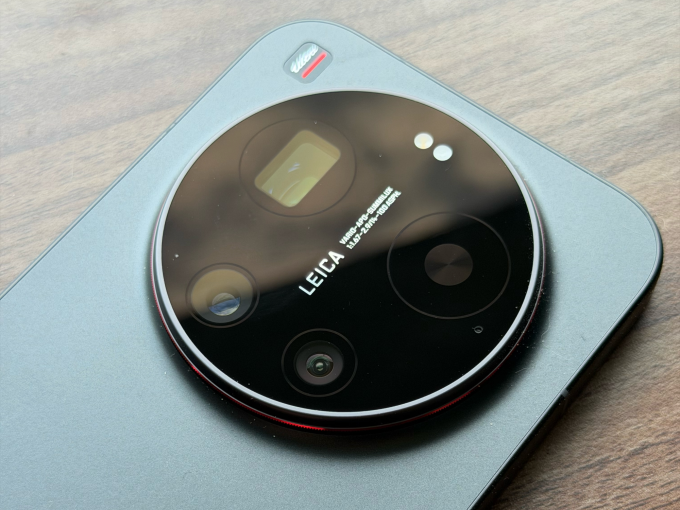
The Xiaomi 17 Ultra, which recently had its global launch, is one of those devices, with a big camera bump that houses a versatile set of sensors, and a partnership with the storied German camera maker Leica to supply software-level changes and sensibilities to how scenes are shot.

The camera has tons of options to choose from, ranging from different focal lengths on the hardware side to various filters and settings to change how the final image looks.

Image Credits: Ivan MehtaImage Credits:Ivan Mehta

Xiaomi has also released external add-ons that snap on like a cover to the camera, as well as a USB-based accessory that provides hardware buttons to shoot video or photos. While these add-ons don’t particularly add a lot of features, it makes one-hand operation of the camera easier.

Besides the camera, Xiaomi has packed its phone with top components to compete with the best phones of the year. I will talk about the camera in detail, but let me get the rest of the hardware description out of the way.

Advertisement

Hardware

The Xiaomi 17 Ultra uses Qualcomm’s latest Snapdragon 8 Gen 5 processors, which will be the choice of flagships this year. On the front, there is a 6.9-inch AMOLED screen with 1200 x 2608 pixels resolution and 120Hz refresh rate.

The screen is quite bright at a peak brightness of 3,500 nits. This is handy in operating the phone in bright conditions and also makes for a good video-watching experience.

Techcrunch event

San Francisco, CA
|
October 13-15, 2026

Advertisement

The 6,000 mAh battery is possibly one of the best outcomes of the Silicon/Carbon-Ion tech Xiaomi is using. Given the sheer size of the battery, it can last you a couple of days of light to medium usage, and also has good standby time. While the battery is big, the phone is still lighter than the iPhone Pro Max, so that is also a win for the company’s engineering team.

The phone supports 90W of wired charging, and you can use the charger Xiaomi supplies with the phone or any PD (Power Delivery) 3.0 or PPS (Programmable Power Supply)-based charger. It also supports 50W with Xiaomi’s own charger.

Advertisement

The Xiaomi 17 Ultra has 16GB of RAM and two memory options of 512GB and 1TB.

Camera

Xiaomi is using a 1-inch type 50-magapixel sensor with an f/1.67 aperture for the main camera, aiming to gather more light. The camera takes sharp and vivid photos without losing the white balance. The sensor is good at catching details in different lighting conditions. Just like the iPhone Pro Max, with the main camera, you can switch to 23mm, 28mm, and 35mm equivalent framing.

The phone has a rather unique 200-megapixel telephoto lens. Instead of offering staggered optical zoom options like 2x and 4x, it has continuous optical zoom from 3.2x to 4.3x. On the face of it, this doesn’t seem like a lot, but when taking photos of pets or framing certain objects within the frame, it is very handy. One limitation is that on the camera UI, you can easily jump to 75mm, 85mm, 90mm, and 100mm focal lengths, but you need to press down the zoom control and move around the dialer if you need to get to other focal lengths between 75mm and 100mm.

The company is using a 50-megapixel ultrawide camera with an f/2.2 aperture. This lens is also helpful for very impressive macro shots. Largely, this camera is sufficient, but it does lose a bit of detail as compared to the other two cameras in certain shots. There is also a 50-megapixel selfie camera, but remember to turn off all the beauty filters.

Camera controls are a standard affair, but the option for you to get one object’s photo in different looks is aplenty. By default, the camera follows a Leica authentic color scheme, but with one tap, you can change it to Leica Vibrant. There is a filter option that gives you options like positive and negative film; Leica-specific filters like vivid, natural, black & white, speia, and blue; and Xiaomi’s own filters like cinematic, monsoon, teal mist, and scarlet.

The company’s two add-ons are called The 17 Ultra Photography Kit and The 17 Ultra Photography Kit Pro. The base version acts like a cover and snaps to the phone directly. It connects to the phone through Bluetooth, has a two-stage shutter button (for autofocus and capturing shots), and a video recording button. The case uses contact charging for its battery.

Advertisement
Xiaomi 17 Ultra Photography Kit Image Credits: XiaomiImage Credits:Xiaomi

The Xiaomi 17 Ultra Photography Kit Pro packs a cover and another camera-grip-like controller that attaches to the phone via USB-C. The Kit Pro also has a 2,000 mAh battery to power its operation. The grip allows you to hold the phone with one hand easily.

On top of the grip, there is a dedicated shutter button and a video recording button. There is also another customizable dial that can control exposure, filters, ISO, shutter speed, or white balance. You can also use this dial to skim through the gallery. The Kit Pro also comes with a ring, where you can fit in compatible 67 mm camera filters.

I used the Kit Pro consistently when I was moving around the streets because I could easily grip the phone with one hand and take photos with a good number of camera controls at my fingertips. Plus, using a camera-like add-on made it fun to snap photos and videos. I really appreciated having a hardware zoom control.

Xiaomi 17 Ultra Photography Kit Pro Image Credits: Ivan MehtaImage Credits:Ivan Mehta

Both kits activate a fastshot software mode within the camera, which has easily accessible controls for street photography.

The Xiaomi 17 Ultra will face competition in the global market from upcoming devices such as the Vivo X300 Ultra, which also has a swanky photography kit including a 2.35x telephoto extender, and the Oppo Find X9. But because of the earlier launch of its phone, Xiaomi might enjoy this momentum. Apart from the camera, the phone packs a punch if you are okay with a big camera housing on the back.

The Xiaomi 17 Ultra starts at €1,499 in Europe. The Photography Kit is priced at €99.99, and the Photography Kit Pro is priced at €199.99.

Advertisement

Source link

Continue Reading

Tech

Today’s NYT Connections Hints, Answers for April 6 #1030

Published

on

Looking for the most recent Connections answers? Click here for today’s Connections hints, as well as our daily answers and hints for The New York Times Mini Crossword, Wordle, Connections: Sports Edition and Strands puzzles.


Today’s NYT Connections puzzle isn’t terrible if you know your Broadway shows. Read on for clues and today’s Connections answers.

The Times has a Connections Bot, like the one for Wordle. Go there after you play to receive a numeric score and to have the program analyze your answers. Players who are registered with the Times Games section can now nerd out by following their progress, including the number of puzzles completed, win rate, number of times they nabbed a perfect score and their win streak.

Advertisement

Read more: Hints, Tips and Strategies to Help You Win at NYT Connections Every Time

Hints for today’s Connections groups

Here are four hints for the groupings in today’s Connections puzzle, ranked from the easiest yellow group to the tough (and sometimes bizarre) purple group.

Yellow group hint: Boogie down.

Advertisement

Green group hint: A portion of a business or venture.

Blue group hint: Popular arcade game.

Purple group hint: Broadway, baby.

Answers for today’s Connections groups

Yellow group: Events with dancing.

Advertisement

Green group: Interest.

Blue group: Components of Whac-A-Mole.

Purple group: Musicals with last letter changed.

Read more: Wordle Cheat Sheet: Here Are the Most Popular Letters Used in English Words

Advertisement

What are today’s Connections answers?

completed NYT Connections puzzle for April 6, 2026

The completed NYT Connections puzzle for April 6, 2026.

NYT/Screenshot by CNET

The yellow words in today’s Connections

The theme is events with dancing. The four answers are ball, hoedown, hop and rave.

The green words in today’s Connections

The theme is interest. The four answers are claim, concern, share and stake.

Advertisement

The blue words in today’s Connections

The theme is components of Whac-A-Mole. The four answers are holes, mallet, mole and timer.

The purple words in today’s Connections

The theme is musicals with last letter changed. The four answers are carouser (Carousel), Evite (Evita), olives (Oliver) and wicket (Wicked).

Source link

Advertisement
Continue Reading

Tech

New FortiClient EMS flaw exploited in attacks, emergency patch released

Published

on

Fortinet

Fortinet has released an emergency weekend security update for a new critical FortiClient Enterprise Management Server (EMS) vulnerability that is actively exploited in attacks.

Tracked as CVE-2026-35616, the flaw is an improper access control vulnerability that allows unauthenticated attackers to execute code or commands via specially crafted requests.

The issue was patched Saturday, with Fortinet confirming it has been exploited in the wild.

“Fortinet has observed this to be exploited in the wild and urges vulnerable customers to install the hotfix for FortiClient EMS 7.4.5 and 7.4.6,” warns Fortinet.

Advertisement

Fortinet says the vulnerability impacts FortiClient EMS versions 7.4.5 and 7.4.6 and can be mitigated by installing one of the following hotfixes:

The vulnerability will also be fixed in the upcoming FortiClientEMS 7.4.7. FortiClient EMS 7.2 is not affected.

The flaw was discovered by cybersecurity firm Defused, which described it as a pre-authentication API access bypass that allows attackers to bypass authentication and authorization controls entirely.

Defused shared on X that they observed the flaw being exploited as a zero-day earlier this week before reporting it to Fortinet under responsible disclosure.

Advertisement

Internet security watchdog Shadowserver has found over 2,000 exposed FortiClient EMS instances online, with the majority located in the USA and Germany.

The vulnerability follows a separate critical FortiClient EMS flaw, CVE-2026-21643, reported last week and also actively exploited in attacks.

Both vulnerabilities were discovered by Defused, with Fortinet also crediting Nguyen Duc Anh for the latest flaw.

Fortinet is urging customers to apply the hotfixes immediately or upgrade to version 7.4.7 when it becomes available to mitigate the risk of compromise.

Advertisement

Automated pentesting proves the path exists. BAS proves whether your controls stop it. Most teams run one without the other.

This whitepaper maps six validation surfaces, shows where coverage ends, and provides practitioners with three diagnostic questions for any tool evaluation.

Source link

Continue Reading

Trending

Copyright © 2025