If you want to learn how to code, but in your own time and without it costing an arm and a leg, here are some useful resources.
In 2026, despite the rising popularity of vibe coding, there are a multitude of STEM-based careers that require employees to have strong, traditional coding skills. You may want to improve yours or even begin from scratch, but if you find that standard courses are costly or too time consuming, it can be a deterrent.
But fret not, because there are plenty of opportunities to develop coding, skills be it with personal or professional goals in mind – and they don’t have to drain your time or your finances.
So, if you want to build on your programming skills, but aren’t sure where to go, the following six resources could be exactly what you are looking for.
Advertisement
Codewars
Codewars is a site for the students and professionals who want to broaden their skills, but who also want to have a little fun along the way.
The platform aims to help learners “achieve mastery through challenge” via training with peers on code kata – small coding exercises – that continuously challenges. Users can sharpen their skills, go up in the ranks though the challenge board, engage with a broad community of fellow learners and receive instant feedback to determine if progress is being made.
You can even create your own challenges and questions and put them to the wider community. The creators aptly refer to the site as a coding dojo and whether you are a student or sensei, there is definitely something to be gleaned from Codewars.
Exercism
UK-based Exercism describes itself as a platform focused on “building a place where anyone can learn and master programming for free, without ever feeling lost or stupid”. Students of all abilities can learn how to code in 83 different languages via articles, videos and project work, with the goal being to have fun and progress, without stress or competition.
Advertisement
The platform also offers a wide community of peers with which to collaborate and build friendships, as well as a wide network of mentors to guide the learning process.
FreeCodeCamp
FreeCodeCamp is exactly what it sounds like. This free platform is a resource through which students can learn how to code via a collection of podcasts, videos, articles and interactive lessons.
The available curriculum is expansive, can be engaged with via a number of different spoken languages and comes with a free certificate of completion. There are available learning options for beginners all the way through to advanced students and engagement is solely at the discretion of the user.
LeetCode
If you are a professional or a recent graduate preparing for a job interview that will likely demand robust coding skills, LeetCode is the ideal resource to test yourself in advance. The free-to-use platform supports 14 popular coding languages and enables users to debug and write their own online projects.
Advertisement
Students can test their coding knowledge by answering some of the more than 4,300 questions available. Users can also engage with a wide community of peers, participate in contests, challenge themselves and earn rewards.
If you have some skills but are looking to hone them, with future career opportunities in mind, this is definitely the place for you. For those who want a broader experience, there is also a premium paid feature.
The Odin Project
The Odin Project, which is a free open-source learning platform, is an ideal site for a student or professional looking to advance their coding skills. The goal is to empower students to embark upon a career that requires coding, particularly those looking to become developers, though it is open to anyone who wishes to use it.
The platform offers a hands-on introduction to all of the essential tools you’ll need to build real, working websites and also offers information on what web developers actually do and the foundations they might need for advancing their education. “This project is designed to fill in the gap for people who are trying to hack it on their own but still want a high-quality education,” according to the site.
Advertisement
Programiz
Programiz’s mission is to create a space in which learners can learn how to program easily and at their own pace. The platform offers tutorials in a variety of languages, the browser is free to use and no installation is required.
Programiz claims to teach the skill of coding step by step, via the use of online compilers available in more than 20 languages and interactive lessons that offer a guided path to learning programming with practical code that runs in your browser.
Don’t miss out on the knowledge you need to succeed. Sign up for the Daily Brief, Silicon Republic’s digest of need-to-know sci-tech news.
The United States Navy once operated an iconic twin-engine, two-seat, variable-sweep-wing fighter known as the F-14 Tomcat. If that sounds familiar, it’s because it’s the same plane that Tom Cruise immortalized in the film “Top Gun.” The Navy ultimately retired the 4th-generation F-14 in favor of the F/A-18 Hornet, destroying most of them to ensure none of their spare parts found their way to Iran, which had purchased a sizable number before the Iranian Revolution ended relations between the U.S. and Iran.
Fortunately, some F-14s survived and are on display in museums around the United States, where people can see the legendary fighter jet. One aircraft in particular began a long trek from one museum to another, traveling 2,700 miles to get from the National Naval Aviation Museum in Pensacola, Florida, which had two F-14s, to the Pueblo Weisbrod Aircraft Museum in Pueblo, Colorado.
Advertisement
The task of moving the F-14 fell to Worldwide Aircraft Recovery. Due to the plane’s size, the drive between the two cities, which would normally be 1,300 miles by car, covered more than twice the distance.
Advertisement
The T-14 Tomcat’s 2,700-mile trek from Florida to Colorado
Unfortunately, flying the F-14 wasn’t an option, which is why it had to travel by road. That wasn’t a problem for Worldwide Aircraft Recovery, which specializes in recovering aircraft and transporting them. The F-14 measures 22 feet wide without its wings, significantly wider than the nine to 12 feet of a typical roadway lane.
Because some states denied Worldwide Aircraft Recovery’s request to operate on their roads, the trip required the plane to travel through Alabama, Mississippi, Tennessee, Kentucky, Indiana, Illinois, Iowa, Missouri, Nebraska, and Kansas, before finally reaching Colorado. The trip took two weeks, with night driving occurring only in Florida, Alabama, and Nebraska. Most of the transit was conducted during daytime, with some states requiring police escorts as the truck carried the F-14 on their roads. Normally, the 1,335-mile drive would take you from Florida through Alabama, Mississippi, Louisiana, Texas, and New Mexico, so you can see how circuitous the drive was.
Receiving a T-14 Tomcat is a great addition to the Pueblo Weisbrod Aircraft Museum, as the U.S. destroyed most of its F-14s, making complete aircraft remarkably rare in the country. After the aircraft arrived, museum staff began the arduous task of reassembly, and once completed, it will find a home inside the museum, where it will be displayed for the public.
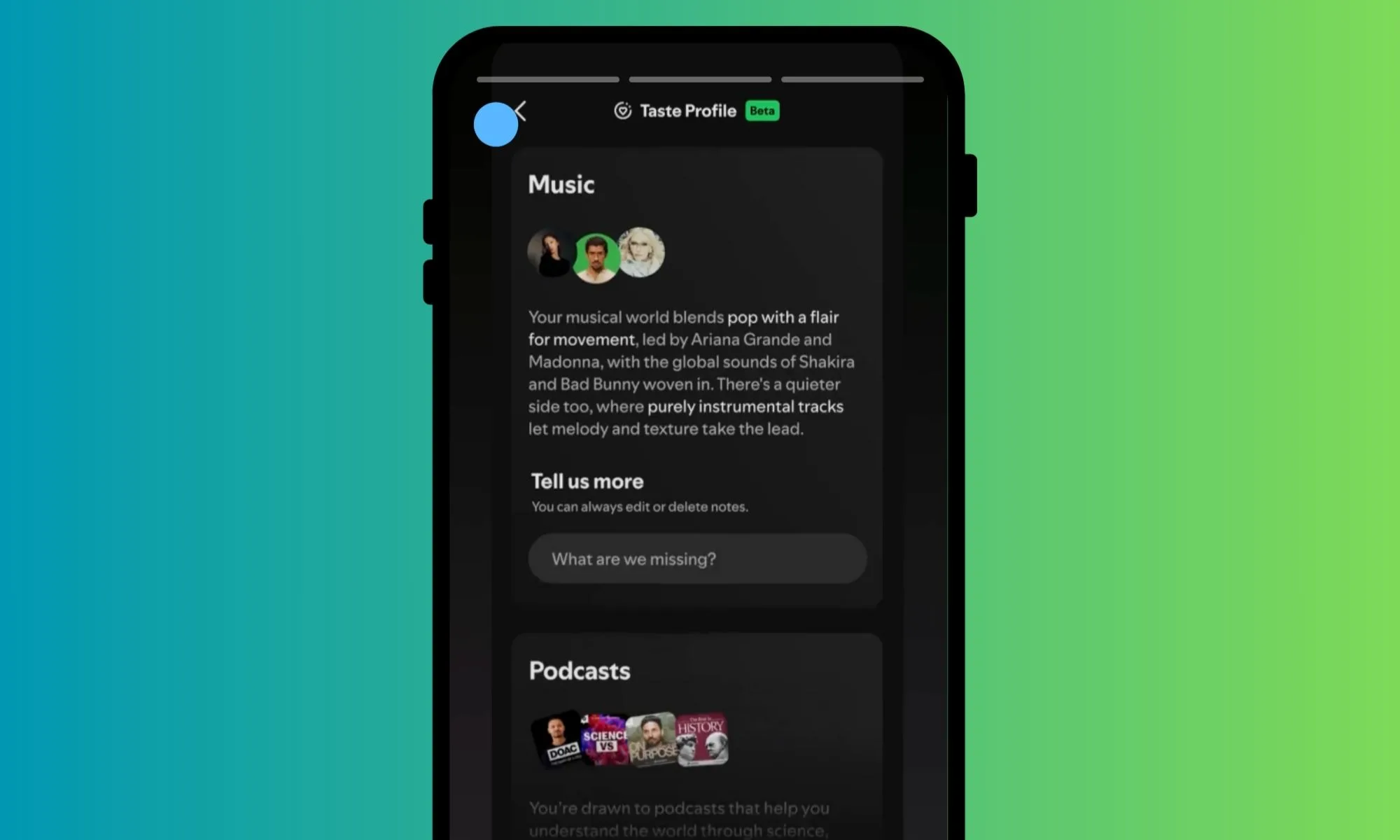
In October last year, Spotify started testing a new feature that let users prevent certain songs from affecting their called Taste Profile. The whole idea behind this new trick was to let users customize their music feed and what they see on the homepage based on their specific preferences. Officially, Taste Profile became its own feature and went into the testing phase in May this year, but only for a limited audience. Now, it’s finally making its way to the US market.
Earlier today, Spotify announced that Taste Profile is now available to all users who are above 18 years of age in the US. “Taste Profile gives you more control over your recommendations, whether you want to explore beyond your usual interests or fine-tune what you already love. For the first time, you can see Spotify’s brief interpretation of your taste across music, podcasts, and audiobooks,” says the company.
Spotify
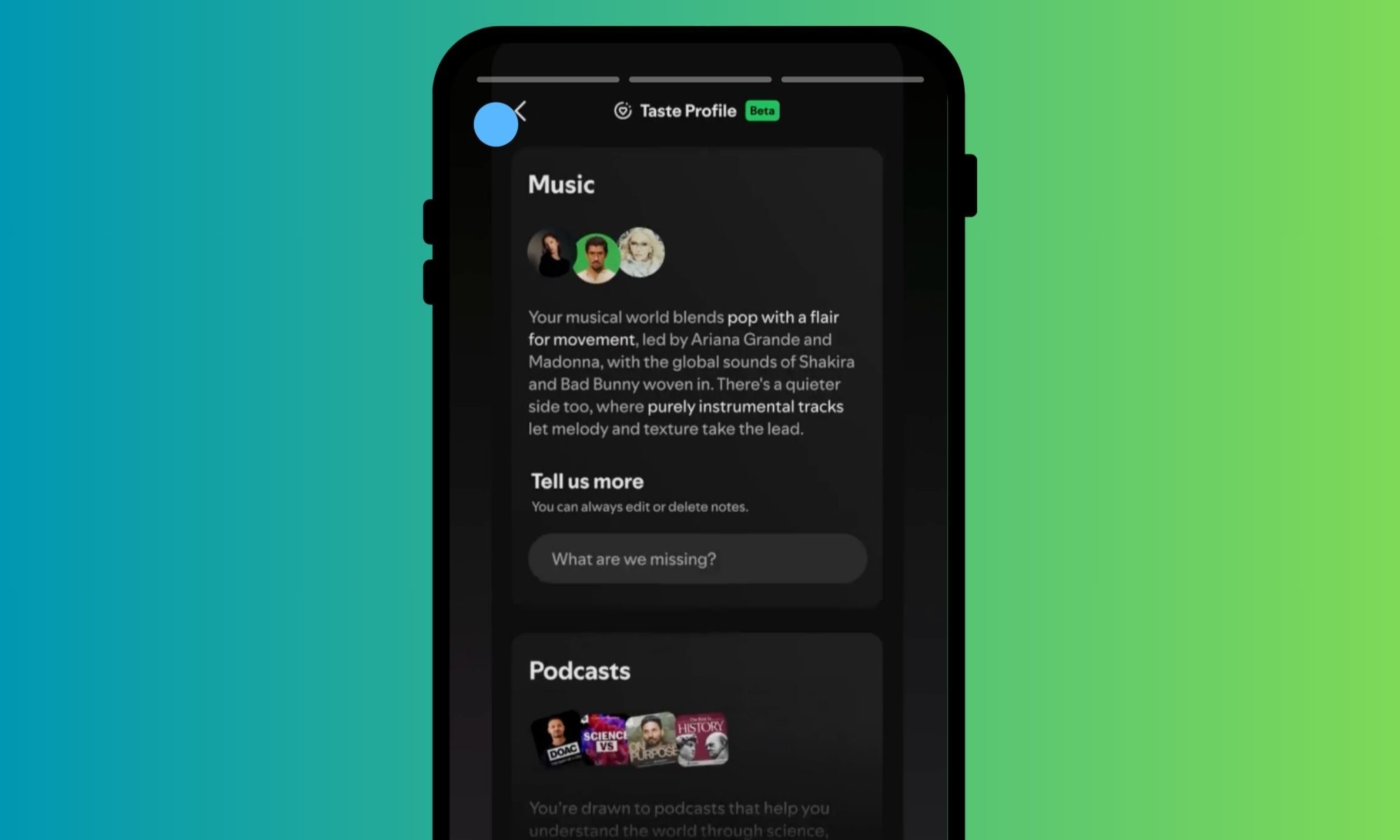
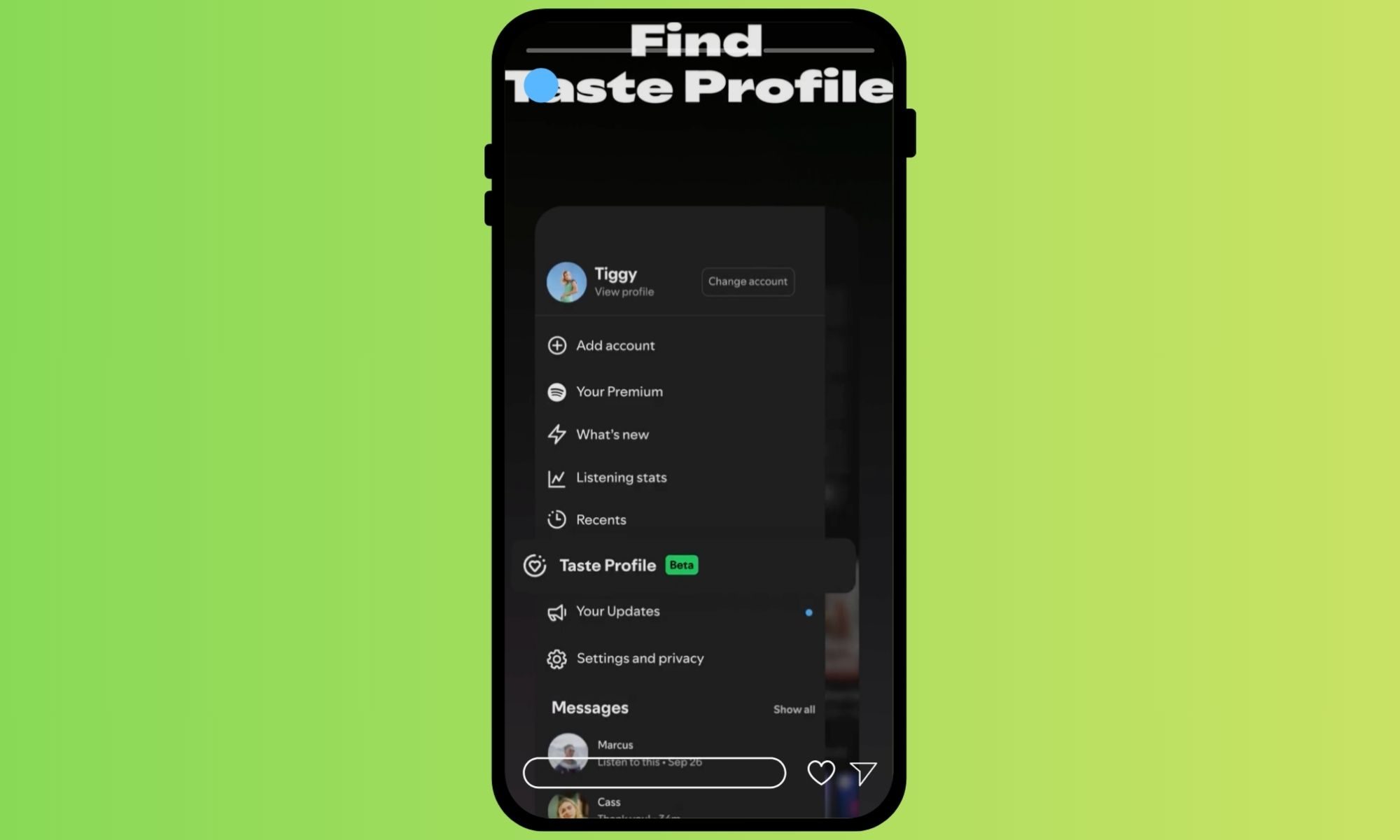
The best part about this feature is that it’s not an overtly technical upgrade and doesn’t need any learning curve. Instead, it takes a conversational approach. So, when you swipe on the homepage and access the Taste Profile option in the side menu, you get a text box where you can write in natural language what it is that you want Spotify to show you more or less of. You can ask it to play more Pink songs in the evening, or surface more news-focused podcasts.
Spotify says these notes ultimately dictate what you see on your home feed, whether it’s discovery of new music, podcast, or a certain kind of audiobooks. Interestingly, the conversational notes that you feed into the Taste Profile search box don’t only cover genres of music, but they also dynamically respond to a certain mood, emotion, or areas of interest, like history, technology, or art.
Spotify
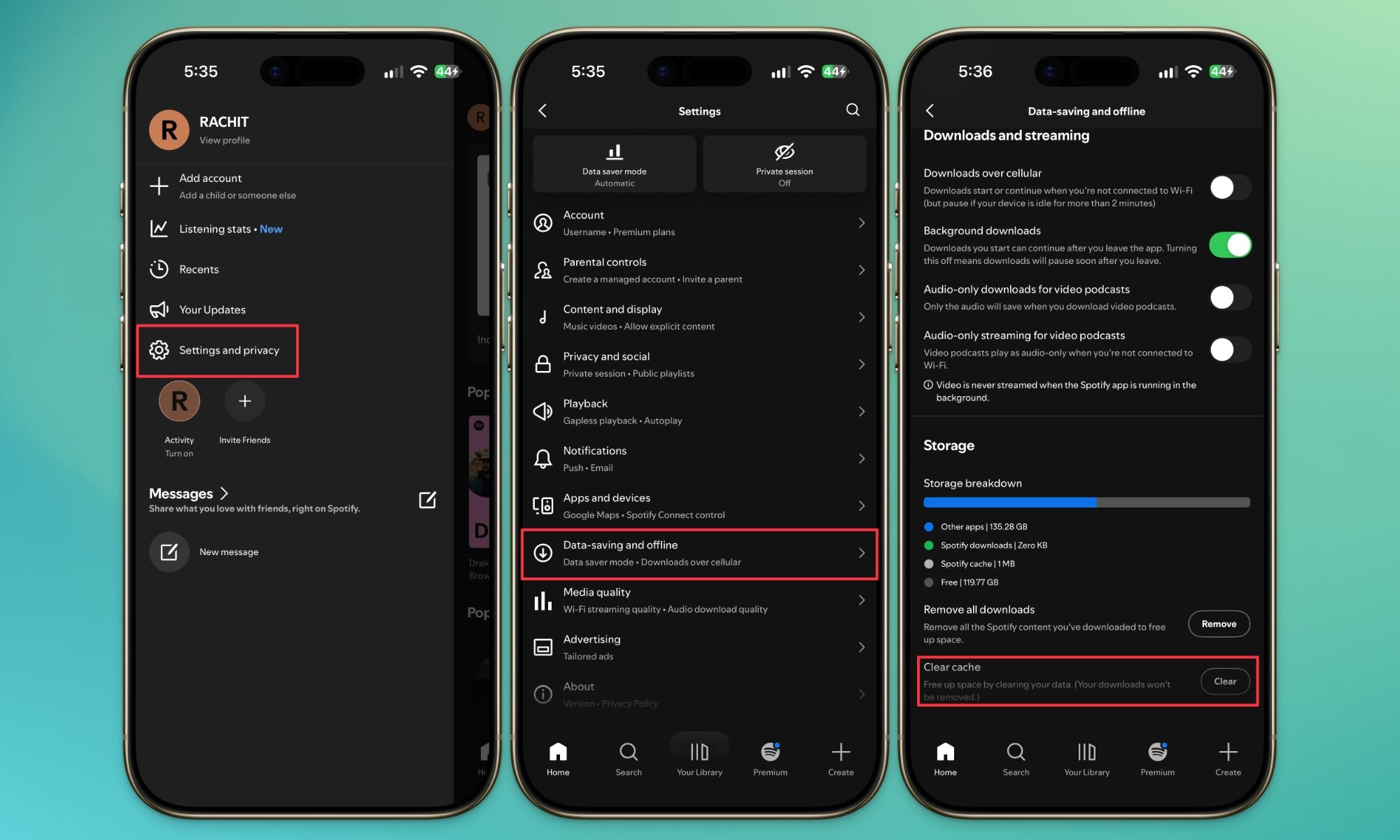
You just have to describe what exactly it is that you want to hear more of, and your home feed and recommendations will be tailored accordingly. In order to check out the new feature, tap on the profile picture icon in the top corner, open the menu panel, click on Taste Profile, and type your note underneath the Tell us more, label.
Spotify says that once you have dropped a note to adjust your Taste Profile, you will see the changes reflected within a few hours. There’s also an option to edit or delete the notes that you have previously fed into the Taste Profile system. Spotify is separately working on a cache limit feature that lets users handle how much space Spotify’s temporary files take up on your phone’s storage.
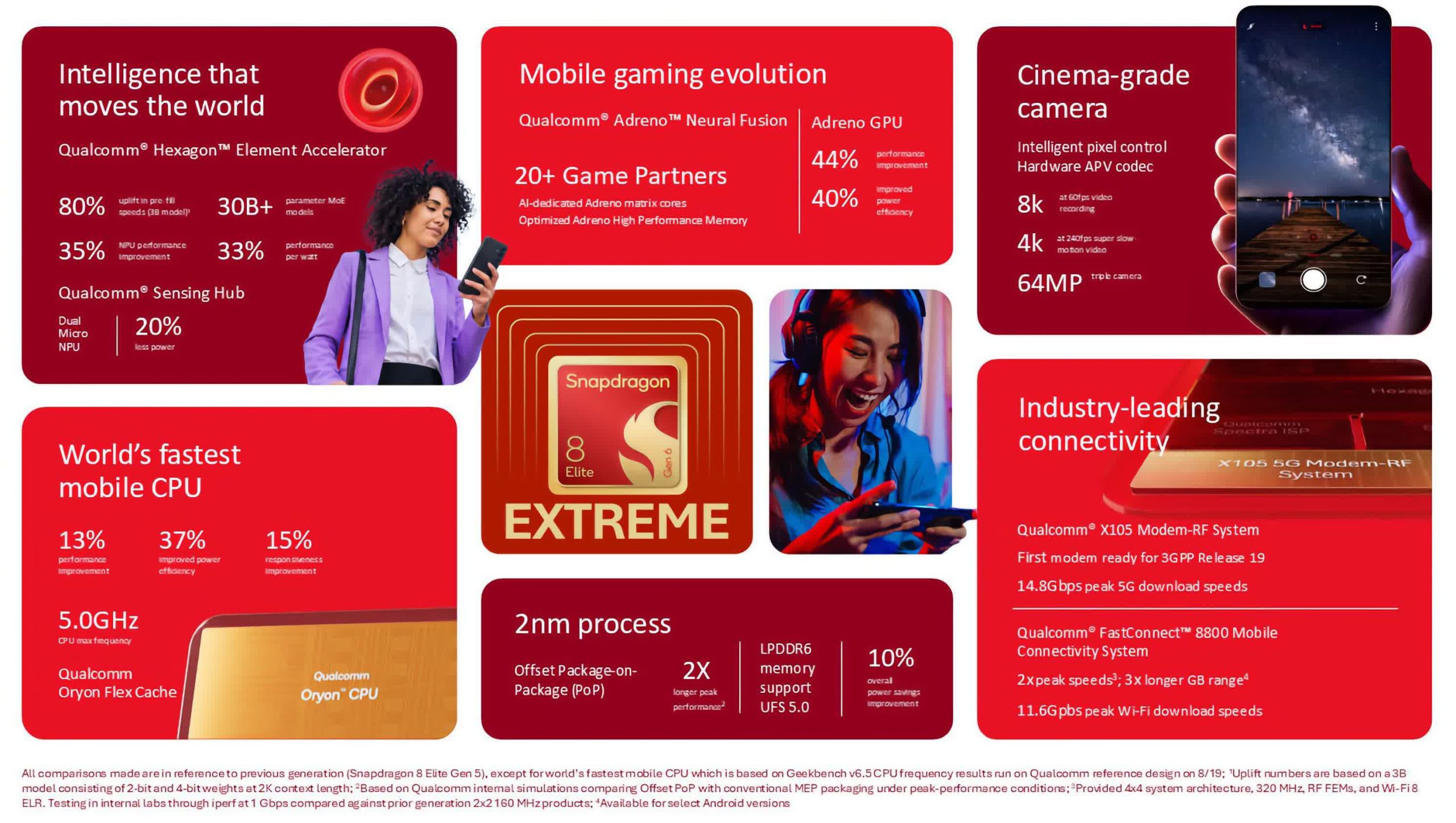
First look: Echoing Apple’s recent iPhone 18 unveiling, Qualcomm has introduced two new Snapdragon 8 Elite mobile processors with AI assistants as a primary focus. While the chips significantly outperform the Snapdragon 8 Elite Gen 5 in CPU performance, GPU performance, and power efficiency, Qualcomm clearly sees AI agent support as the new lineup’s main selling point.
Qualcomm revealed the Snapdragon 8 Elite Gen 6 and 8 Elite Extreme Gen 6 at this year’s Snapdragon Summit. The mobile SoCs will power future flagship Android devices from Doubao, Honor, Motorola, Oppo, RedMagic, Stepx, Vivo, and Xiaomi.
Built on a 2nm process node that enhances power efficiency by 37%, both chips feature two Oryon Prime CPU cores that achieve 5GHz, six 4GHz performance cores, and 16MB of Flex Cache. While the standard Elite Gen 6 improves CPU performance by 10% over its predecessor, the Extreme variant extends the gain to 13%.
Advertisement
GPU and NPU performance enhancements are much more impressive. The new Adreno GPUs outperform the Elite Gen 5 by 35% and 44% in the standard and Extreme models, respectively, while raising power efficiency by 40%, partially thanks to AI rendering via the new Adreno Neural Fusion.
Meanwhile, the Elite Gen 6’s Hexagon NPU runs AI applications 14% faster in the standard model and 35% faster in the extreme variant, with AI performance-per-watt increasing by 20% and 33%, respectively.
Most of Qualcomm’s trailer for the Snapdragon 8 Elite Gen 6 focused on showing AI agents automating various everyday tasks that might take humans multiple steps. In one clip, an agent automatically sorts a newly recorded video and provides options for editing it. In another, a jogger receives a notification about a nearby property that meets their preferences, with the option to automatically share a photo and book a viewing appointment.
Advertisement
Regarding sound, AI also facilitates audio separation and voice isolation. Even the Qualcomm X105 5G wireless modem is AI-enhanced, improving energy efficiency while also increasing upload and download speeds. Meanwhile, Qualcomm’s Wi-Fi 8-compliant FastConnect 8800 can achieve 10Gbps with a 4×4 Wi-Fi configuration, tripling the gigabit range over prior models.
Camera performance is another notable difference between the two tiers. 8 Elite Extreme Gen 6-powered phones can record video at up to 60fps in 8K, while the cheaper SoC only achieves 30fps at that resolution.
The earliest devices powered by Snapdragon 8 Elite Gen 6 will include the RedMagic 12Pro+, iQOO 16, and iQOO Pad Ultra.
In its first annual report under its new persona, Research Ireland reports it managed €610m in committed funding and paid out €313m to researchers in grants.
Advertisement
That investment leveraged a further €310m, which includes €129m from the EU, nearly €77m in private funding, €24m from Enterprise Ireland and €25m from other Government funding sources. Non-Exchequer funding rose to €227.3m, up 14pc since 2024.
According to the 2025 report published today (23 September), the agency gave out nearly €290m in 1,053 new awards across its range of programmes.
Its funding supported more than 3,000 PhDs and 1,000 senior researchers, and nearly 1,500 postdoctoral fellows. 40pc of its funded principal investigators and co-principal investigators are women, along with 51pc of grant holders, it reports.
Collectively, the researchers supported by the agency’s funding delivered nearly 6,000 publications, 167 invention disclosures and launched eight new spin-outs.
Advertisement
Speaking at the annual report’s launch, Minister for Further and Higher Education, Research, Innovation and Science, James Lawless, TD said that the report provided an opportunity to reflect on the impact of public investment in research.
“It also comes at a time of continued momentum, with Research Ireland advancing key initiatives including the new RINN network, Global Talent Ireland and working in collaboration with the Higher Education Authority to deliver Inspire, helping to ensure Ireland can deliver and support world-class research and innovation.”
Michael Horgan, the Research Ireland’s chairperson added: “The creation of Research Ireland marked an important step in strengthening Ireland’s research and innovation system.
“Since its establishment, the agency has successfully brought together the strengths and expertise of the organisations that formed Research Ireland, while maintaining a commitment to excellence, transparency and impact.”
Advertisement
Don’t miss out on the knowledge you need to succeed. Sign up for the Daily Brief, Silicon Republic’s digest of need-to-know sci-tech news.
Cloud migrations often fail or require significant rework because important risks are discovered too late. Hidden dependencies, incompatible workloads, an unprepared target environment, unrealistic migration waves, incomplete testing, data-cutover problems and weak rollback planning can all turn a manageable move into a production incident.
The safest approach is to identify uncertainty before cutover, validate each workload against its target environment, migrate in manageable waves, and define clear acceptance and rollback criteria before production traffic moves.
What Does “Cloud Migration Failure” Actually Mean?
A cloud migration does not have to collapse completely to be unsuccessful. Failure can take several forms. A cutover might be abandoned and reversed, an application might move but no longer meet its functional or performance requirements, or the migration might technically complete while leaving serious operational problems that require immediate rework.
For example, an application could start normally in its new cloud environment while a reporting service remains on-premises. If the two components communicate frequently across a connection with higher latency, the reports may become too slow for their intended use even though both systems remain individually available.
Advertisement
It helps to distinguish four outcomes. A migration blocker prevents a planned workload from moving. A cutover failure prevents the new environment from taking over production successfully. A post-migration defect appears after the workload has moved. Strategic underperformance occurs when the migration technically works but does not deliver the wider business result that justified the project.
This article focuses mainly on the first three because they are closely tied to migration planning, workload preparation and execution. Broader questions about whether cloud transformation achieved its business goals belong in the surrounding digital-transformation strategy.
Failure Usually Starts Before Cutover
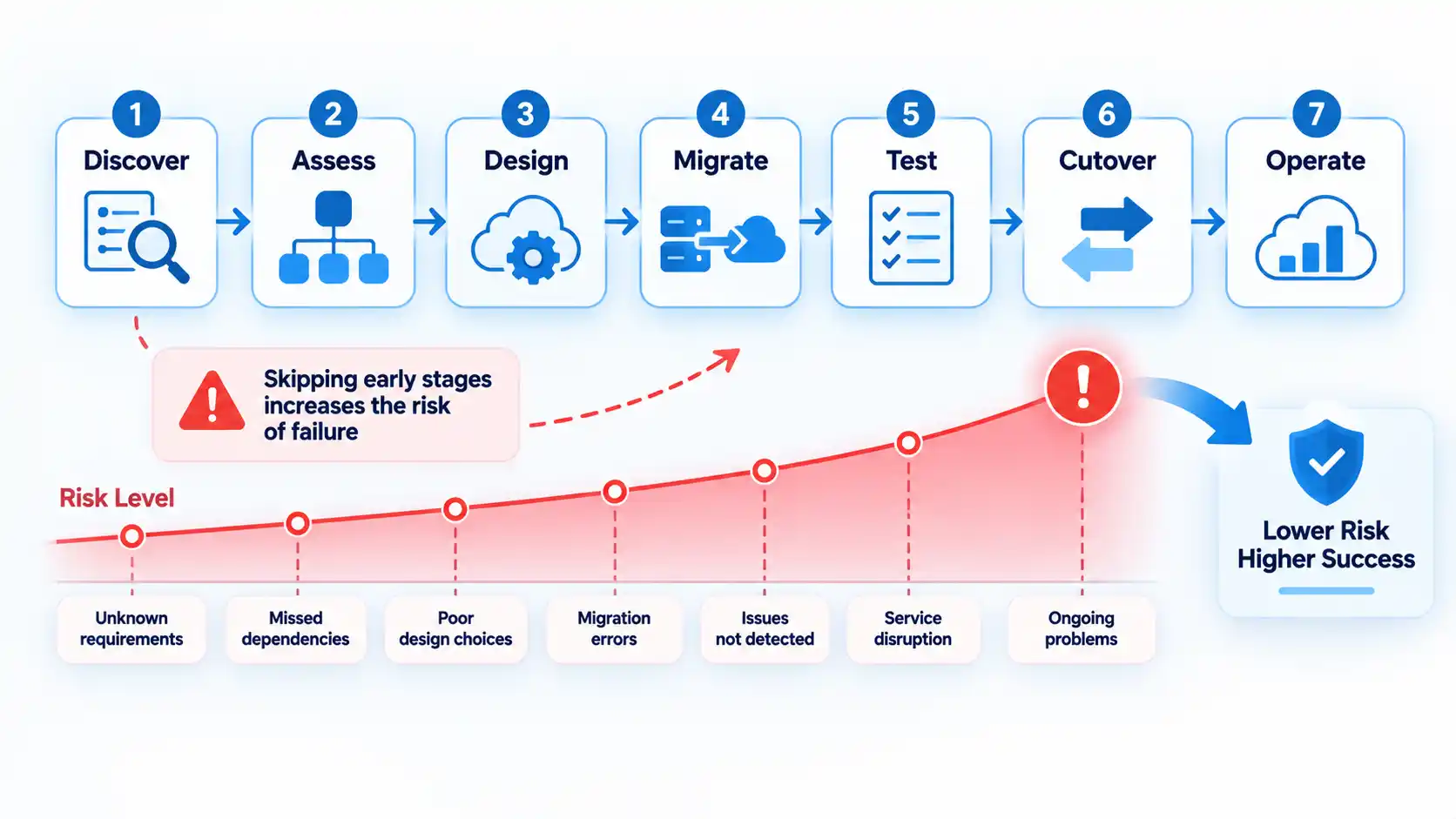
Cutover is often where a migration problem becomes visible, but the underlying mistake may have happened weeks earlier. Cloud migration normally moves through discovery, assessment, target design, wave planning, workload preparation, testing, cutover, validation and ongoing operation.
Google Cloud’s migration-planning guidance places workload discovery, dependency mapping, migration-strategy selection and foundation design before migration-wave planning. It also recommends running migration risk assessment alongside continuing discovery so workload-specific risks can refine later decisions.
Advertisement
AWS follows the same general pattern. Its portfolio analysis and migration-planning guidance calls for a high-fidelity inventory, dependency information, a migration strategy for each application, platform readiness and a high-confidence migration-wave plan.
This lifecycle view matters because many apparent migration failures are really assessment or preparation failures that become visible only when production traffic is involved.
Where Cloud Migration Risks Usually Enter the Lifecycle
The same production symptom can originate at different stages. This table shows where several common problems are introduced and the control that should exist before the migration advances.
Common cloud migration risks by lifecycle stage
Migration stage
Typical failure
What exposes it
Risk-reduction control
Discovery and assessment
Applications, infrastructure or dependencies are missing from the migration plan.
A required database, service, identity system or integration stops working after part of the workload moves.
Maintain a verified application inventory and dependency map using discovery data plus application-owner review.
Target design
The cloud environment cannot meet workload networking, identity, security, availability or performance requirements.
The workload deploys but cannot operate safely or meet its required service levels.
Validate workload requirements against the target architecture before scheduling production migration.
Wave planning
Dependent or high-risk workloads are sequenced poorly or too much work is grouped into one wave.
Migration teams exceed capacity, dependencies are split, or cutover windows become unrealistic.
Group related systems, consider business calendars and increase complexity gradually across waves.
Preparation and testing
Compatibility problems or missing integrations are not discovered before production.
Tests pass in an incomplete environment but fail during real traffic or business workflows.
Use production-representative test environments and resolve compatibility blockers before cutover.
Cutover
Data, routing or rollback steps are incomplete or poorly coordinated.
Users reach inconsistent systems, recent transactions are missing or rollback becomes difficult.
Define final synchronization, routing, acceptance criteria, decision ownership and rollback procedures in advance.
Post-migration operation
The team declares success before verifying real-world workload behavior.
Performance, integrations, scheduled jobs, monitoring or support gaps appear after go-live.
Run production validation, monitor the stabilization period and resolve issues before closing the migration wave.
The table is not a ranking. A weakness early in the lifecycle can create several downstream symptoms, and multiple controls may be needed for the same workload.
Advertisement
Incomplete Inventory and Hidden Dependencies
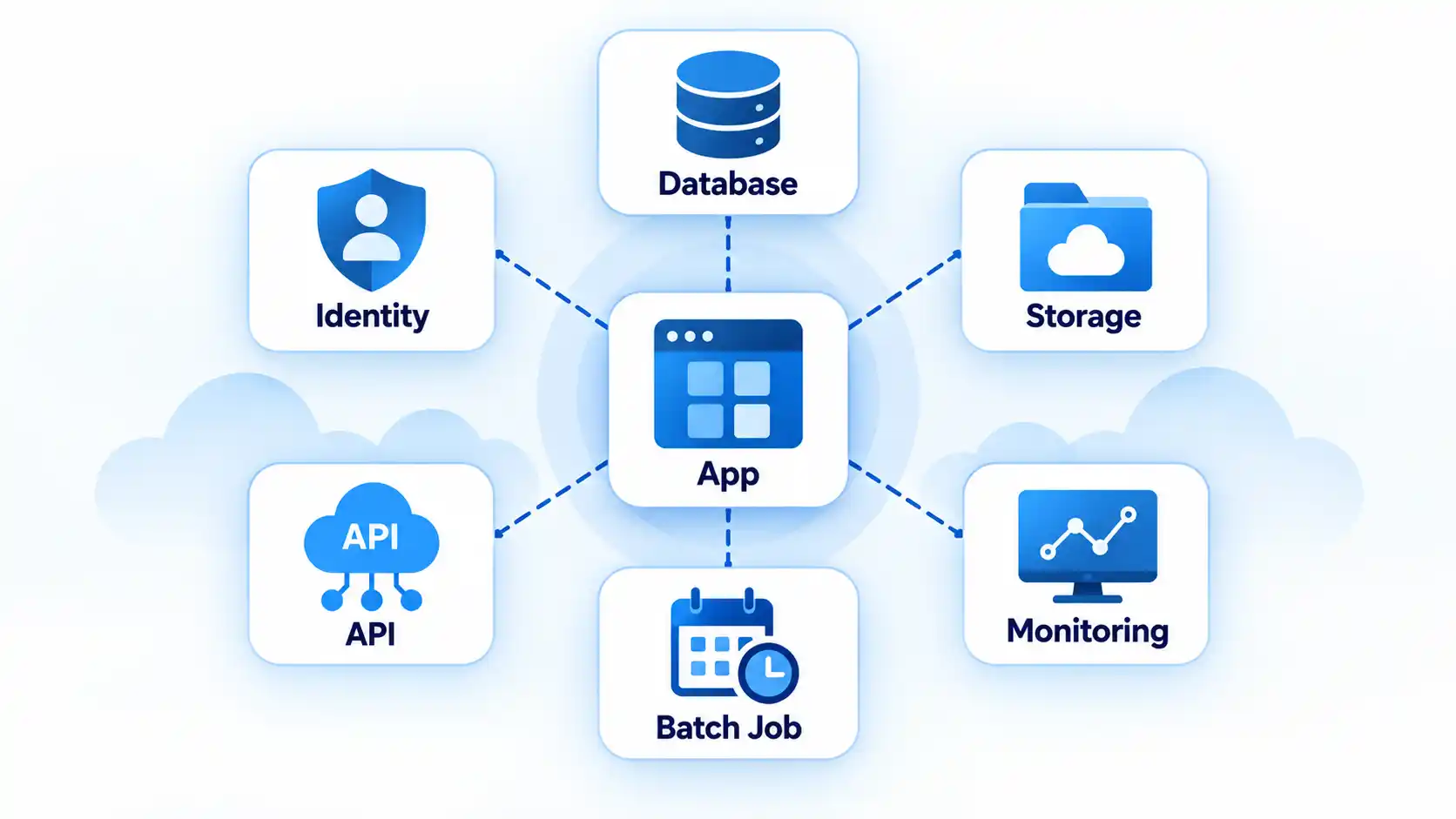
You cannot safely sequence systems you do not fully understand. A workload may appear to consist of one application server and one database while actually depending on identity services, file shares, third-party application programming interfaces (APIs), batch jobs, monitoring systems, scheduled tasks and other applications.
AWS describes high-confidence dependency data as an important input to migration-wave planning because both technical and nontechnical relationships affect how systems should be grouped. Its wave-planning guidance includes application dependencies, infrastructure dependencies and operational considerations among the inputs used to form migration waves.
Consider an application that makes frequent database calls. Moving the application while leaving a latency-sensitive database behind can make the application appear slow or unreliable even though both components remain individually healthy. A shared database creates another complication because several applications may have to move together or remain temporarily connected across environments.
Discovery therefore needs more than a spreadsheet compiled once at the beginning. Automated discovery can provide communication and infrastructure data, but application owners are still important because technical telemetry may not reveal monthly batch jobs, business-calendar restrictions or integrations that run infrequently.
Advertisement
Google’s migration risk guidance recommends continuing discovery and assessment during wave planning so new workload-specific information can refine scope, priorities and risk mitigation.
Choosing the Wrong Migration Strategy for a Workload
Another failure pattern is applying the same migration method to every application. A workload that can be moved largely unchanged has different requirements from one that depends on unsupported software, requires substantial architecture changes or is better replaced with another service.
Rehosting, often called lift-and-shift, is not inherently a bad strategy. It can be appropriate when the objective is to move with minimal application change. The problem arises when a team chooses it without understanding compatibility, architecture or business requirements.
For example, moving a legacy application unchanged does not resolve a dependency on an unsupported operating system or a hardcoded network address. In that case, remediation, replatforming, refactoring or another workload strategy may be needed before production migration.
Advertisement
Choosing the migration strategy for each workload should follow its compatibility, dependencies, business requirements and acceptable level of change.
Where teams need to distinguish the trade-offs more directly, the difference between rehost, replatform and refactor comes down largely to how much of the existing workload is preserved and how much engineering change the migration can justify.
Building the Migration Plan on Incomplete Business Requirements
A workload can be technically ready to migrate and still be scheduled at the wrong time or moved using the wrong availability assumptions. Migration planning therefore needs business information as well as infrastructure data.
Microsoft’s cloud adoption plan template for migration includes workload criticality, data sensitivity, compliance requirements, maintenance windows, business freeze periods, geographic restrictions and success metrics among the information that should inform migration planning.
Advertisement
Two recovery terms are particularly useful. Recovery Time Objective (RTO) is the targeted time for restoring a service after disruption. Recovery Point Objective (RPO) describes the acceptable data-loss window, expressed as a point in time. Those requirements influence backup, replication, migration and rollback design.
A month-end finance system illustrates the problem. The software may be technically straightforward to move, but a migration window that overlaps financial close could create unacceptable disruption. Likewise, a customer-facing transaction system with a very low downtime tolerance needs a different migration approach from an internal development environment that can be unavailable for several hours.
Migrating Before the Cloud Foundation Is Ready
Workload readiness and target-environment readiness are separate questions. An application can be prepared for migration while the cloud environment still lacks the services and controls required to operate it safely.
Before production migration, teams need to know how identity, network connectivity, Domain Name System (DNS), access control, logging, monitoring, backups and operational support will work in the target environment. Larger organizations may formalize these shared capabilities as a landing zone, while smaller environments may implement a simpler foundation.
Advertisement
Google’s migration-planning guidance places foundation design before migration-wave execution and lists identity and access management, networking, logging, monitoring, billing and security among the target-environment concerns that should be established and tailored to workload requirements.
Moving first and designing these controls later increases rework. An application may technically start but remain difficult to monitor, inaccessible to the correct users or connected through temporary network arrangements that need to be redesigned shortly after go-live.
Compatibility Problems Discovered Too Late
“It works on-premises” does not guarantee that a workload can move unchanged. Older software may contain assumptions about operating systems, drivers, network addresses, local storage or authentication that do not fit the target environment.
Microsoft’s current workload preparation guidance identifies issues including unsupported operating system versions, legacy network drivers, local file input/output dependencies, hardcoded IP addresses and hardcoded user accounts as compatibility problems that should be resolved before production deployment.
Advertisement
The important lesson is not that every application must become cloud-native. Compatibility needs to be verified rather than assumed. A stable legacy application may still be suitable for cloud virtual machines if its operating system, networking, storage and supporting software can operate correctly and remain supportable.
Problems should be remediated and retested before the production move. Discovering a blocker while users are waiting for cutover completion leaves the team with fewer safe options and greater pressure to accept temporary fixes.
Security and Governance Are Added After the Move
Security becomes harder to retrofit once workloads have already been deployed around weak assumptions. Identity, access control, data protection, network design, logging and incident response should therefore influence migration planning rather than becoming a cleanup project after cutover.
Microsoft’s secure cloud adoption guidance recommends integrating security considerations into every phase of cloud adoption and includes confidentiality, integrity, availability, incident preparedness and landing-zone security among the areas that require planning.
Advertisement
This does not mean every migration needs identical controls. Requirements depend on the workload, data, organization and applicable obligations. A public marketing site and a financial transaction system should not receive identical risk treatment simply because both are moving to cloud infrastructure.
Governance matters for the same reason. Teams need clear rules about who can provision resources, who approves access, how activity is logged, how exceptions are handled and who owns security decisions after migration.
Migration Waves Are Too Large or Poorly Sequenced
A migration wave is a group of workloads moved within the same planned period. Waves make a large migration program easier to control, but poor grouping can create new risk.
AWS recommends combining prioritization, dependency information and business drivers when building waves, and its portfolio migration guidance recommends prioritizing simpler, noncritical applications in early waves while considering security, operational and platform readiness.
Advertisement
Microsoft similarly recommends grouping dependent systems and using lessons from completed waves to refine later planning. Its migration-wave planning guidance also emphasizes business timing, team capacity, testing, rollback procedures and success criteria.
A common mistake is moving too many critical workloads together because a calendar deadline is approaching. That concentrates technical complexity and can exceed the capacity of migration, application, security and support teams at exactly the point where fast decisions are needed.
Waves should be revised as the organization learns. A dependency discovered during one migration may change the grouping or timing of several later workloads.
Testing Does Not Resemble Production
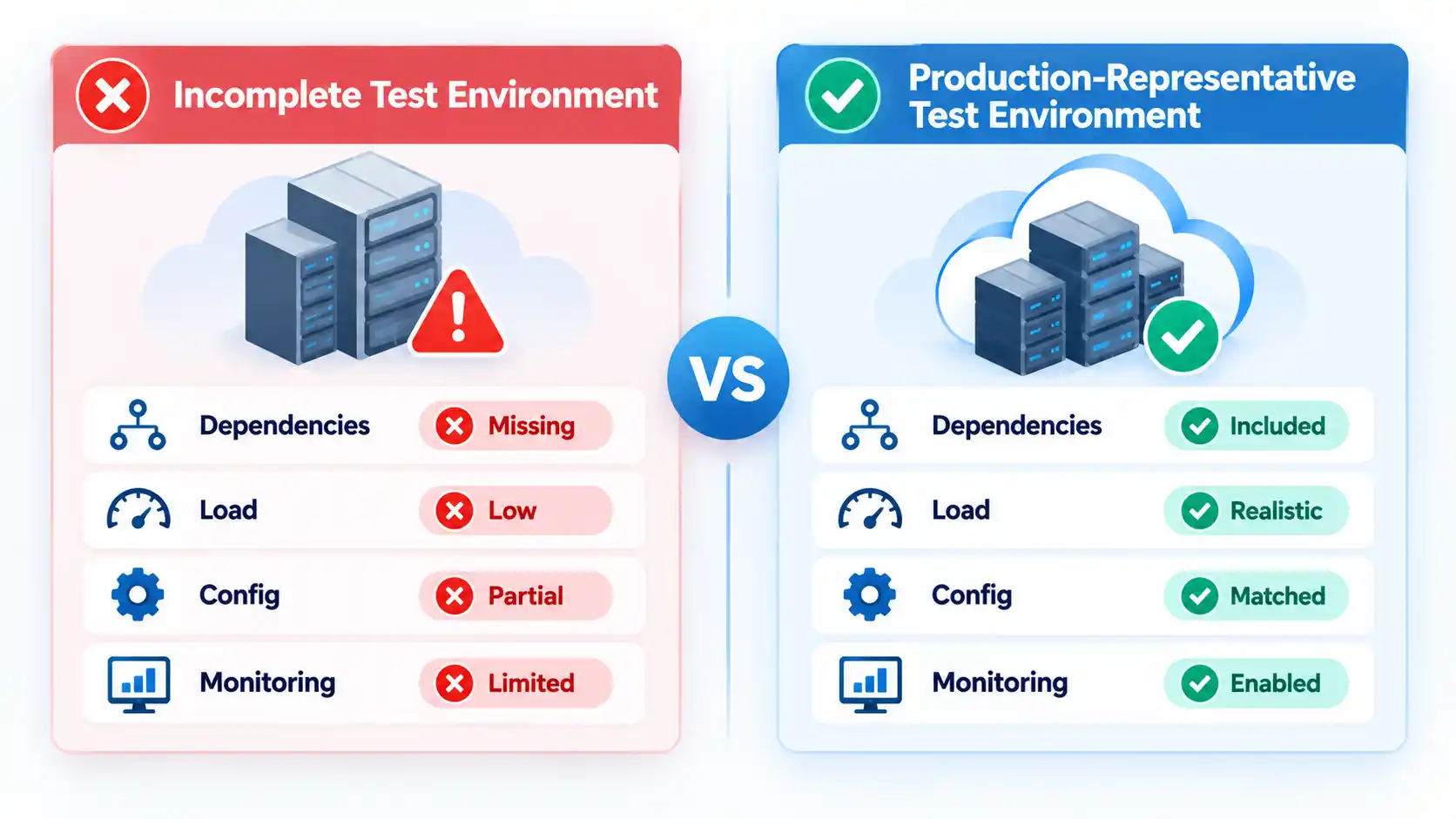
A test environment can produce reassuring results while still failing to represent the conditions that matter in production. Missing integrations, different identity configuration, unrealistic traffic or configuration drift can hide defects until cutover.
Advertisement
Microsoft’s workload-preparation guidance says test environments should contain the required dependencies, configurations and integrations because missing components can produce false positives or leave problems undetected. Its environment guidance describes configuration drift as discrepancies between environments and recommends keeping staging as close to production as practical.
Testing should cover more than whether the application opens. Functional tests confirm expected application behavior. Integration testing verifies communication with databases, identity systems and external services. Performance testing checks whether the target environment can handle realistic demand. User acceptance testing verifies important business workflows from the user’s perspective.
Microsoft’s pre-migration validation guidance specifically calls for functional, integration, regression, performance and stakeholder acceptance testing before production deployment.
For example, a migrated order-processing application might pass a basic login test but fail when it attempts to call a payment integration, create a scheduled export or process peak transaction volume.
Advertisement
The practical standard is not perfect duplication of production. It is enough similarity that testing exercises the dependencies, configuration and load characteristics most likely to affect production behavior.
Data Synchronization and Cutover Are Underplanned
Moving compute is only one part of migrating a stateful application. Databases, files and transaction data may continue changing while the target environment is being prepared, so teams need a defined point at which data is synchronized and production traffic switches.
AWS’s cutover guidance describes a sequence that can include an ingestion freeze, final backup, final data synchronization, routing changes, testing and validation before the migration is considered complete.
This becomes especially important when users can create new data immediately after cutover. Once transactions exist only in the new environment, rolling back to an older source environment can discard or conflict with those changes unless a reconciliation or replication method has been prepared.
Advertisement
DNS changes, load-balancer changes and other routing steps also need to be coordinated with application readiness. Redirecting users too early can expose an environment that has not completed data synchronization or acceptance testing. Maintaining two writable environments without an intentional synchronization design can introduce a different consistency problem.
A cloud migration cutover checklist can turn acceptance criteria, data synchronization, rollback triggers and post-cutover validation into explicit go-live controls.
The Rollback Plan Exists Only on Paper
A useful rollback plan answers two questions before cutover begins: when should the team stop? and how will service be restored?
AWS recommends defining rollback checkpoints, a strategy for handling the rollback and its data, and a named contact who decides whether to fix forward or return to the previous environment. Its cutover guidance also distinguishes rollback before new data is created from rollback after the cloud system has accepted new transactions.
Advertisement
That distinction matters. Before new writes occur, rollback may involve restarting the source environment and reversing routing changes. After new transactions have been recorded in the cloud environment, the source data may be stale and the team needs a way to reconcile, replicate or restore the newer data.
A practical rollback plan therefore includes the trigger, decision owner, technical procedure, data-handling method, expected restoration time and validation procedure. Microsoft also recommends documenting rollback triggers, backup and restoration procedures, recovery validation steps, and regularly testing those procedures before they are needed.
Tested backup and recovery planning supports this process, but a backup by itself is not a complete rollback strategy. Traffic routing, application state, data consistency and acceptance checks still have to be handled.
Skills and Ownership Gaps Appear During Execution
Cloud migration is not only a tooling problem. Someone must understand the application, someone must own the platform, someone must make security decisions, and someone must decide whether production acceptance criteria have been met.
Advertisement
Microsoft’s migration-plan template explicitly includes operating-model responsibilities, workload ownership and cloud training because teams need clear accountability before workloads move. The planning framework also recommends documenting platform and workload responsibilities rather than assigning them after deployment.
A common failure pattern is that the migration team can move the workload, but nobody is clearly responsible for monitoring it afterward. Another is that a business owner is unavailable during cutover, so technical staff cannot confirm whether an important workflow is functioning correctly.
For each migration wave, identify the workload owner, platform owner, security contact, migration lead, business acceptance owner and escalation path. Small organizations may combine several roles, but the responsibilities still need to be explicit.
The Team Declares Success at Cutover
Routing production traffic to the new environment is a milestone, not the end of the migration. Workloads need post-cutover validation under real operating conditions before the wave is considered complete.
Advertisement
Validation should confirm user access, important business transactions, integrations, scheduled jobs, monitoring, performance, backup behavior and error rates. The operations team also needs updated documentation and a clear support path.
AWS’s migration-planning guidance treats test, cutover, validation, wave closure, lessons learned and resolution of post-migration issues as parts of the migration-wave lifecycle rather than treating cutover as the finish line.
A stabilization period is useful because some issues appear only under real traffic or after scheduled processes run. An overnight batch job, for example, may reveal a missing file path several hours after daytime users have successfully tested the application.
How to Reduce Cloud Migration Risk Before Go-Live
Before approving production cutover, confirm that the major uncertainties identified during planning have been converted into observable readiness conditions. These checks are parallel gates rather than a substitute for a detailed cutover runbook.
Advertisement
Verify the result
The workload inventory and dependency map have been validated against current discovery data and application-owner knowledge.
A migration strategy has been assigned to the workload and its major components, with known compatibility blockers resolved or explicitly accepted.
The target environment has the required identity, networking, security, logging, monitoring, backup and operational controls.
The test environment includes the dependencies, integrations and configuration needed to represent important production behavior.
Functional, integration, performance and business-acceptance results meet the migration’s documented success criteria.
The final data synchronization and traffic-routing process has been rehearsed or otherwise validated for the workload.
Rollback triggers, decision ownership, technical steps and data-reconciliation requirements are documented and understood by the cutover team.
Application, infrastructure, security and business owners are available for the planned cutover and escalation window.
Post-cutover monitoring, operational ownership and stabilization support are ready before production traffic moves.
No checklist can remove every migration risk. Its value is that unresolved assumptions become visible before time pressure and production impact make them harder to address.
Conclusion
Cloud migrations become safer when teams discover uncertainty early rather than trying to compensate for it during cutover. Complete workload and dependency information, realistic testing, controlled migration waves, a prepared target environment and a usable rollback strategy give teams more options when something behaves differently from the plan.
The most important shift is to treat migration as a lifecycle rather than a transfer event. Cutover is only one stage. The quality of discovery, assessment, preparation and validation around it largely determines how much unresolved risk reaches production.
If you weren’t already aware, it will probably come as no surprise to hear that the pioneering computer-animation studio Pixar built its early workflow on Silicon Graphics SGI workstations. These were beefy Unix machines that, as the name implied, were developed for graphical work. When the age of the RISC workstation came to a close, many Unix users were pushed onto Windows NT — but not at Pixar. At Pixar, they learned to love the penquin.
It comes down to hardware rather than software. You know the story: PCs got faster and cheaper with different vendors competing for a giant market, while the world of RISC workstations couldn’t keep its lead. Pixar would have been happy staying on Unix workstations, even SGIs if that had been a practical option — but with every project increasing the load on the render farms, it wasn’t. Yet Pixar’s entire workflow was predicated on a Unix environment. They had written a couple million lines of code for their internal use, and really didn’t want to port it over to Windows, even after a mistaken rm command nearly cost the world Toy Story 2.
The path of least resistance would be to port to something more similar to IRIS’s Unix environment, something POSIX compliant. That path led Linux, and by 2001, the port was done. By 2003, a new render farm using Xenon processors brought the whole studio to Linux and x86, which has since become an industry standard.
Advertisement
We’re left with only two questions: one, why didn’t more industries — like the CAD/CAM world — that were also reliant on Unix Workstations follow Pixar and Hollywood onto Linux, and two, why did Pixar go with Linux instead of some variety of BSD? [Crierlon] doesn’t address either question, but we’re betting some of you might have an idea. Let us know in the comments if you have the inside scoop; inquiring minds want to know!
The year’s not nearly over, but 2026 has already delivered a glut of exciting Android phones. Still, we can’t help but think about what might come next. Every phone-maker has distinct ideas about what features they’d like to add and improve with every generation. Some of these things, like design, they can do alone, but others require close collaboration with their partners.
Two such partners are Google and Qualcomm – the former on the software side and the latter on the hardware side. Every summer at Google I/O, we learn about a slew of new software features that will enhance existing and upcoming Android phones. Then, every fall, Qualcomm, which makes the chips, gives us a glimpse of what power and features those companies, like Samsung and Motorola, will have to play with in upcoming releases.
On Tuesday at the Snapdragon Summit in Hawaii, Qualcomm announced a pair of powerful new chips – the Snapdragon 8 Elite Gen 6 and Snapdragon 8 Elite Extreme Gen 6.
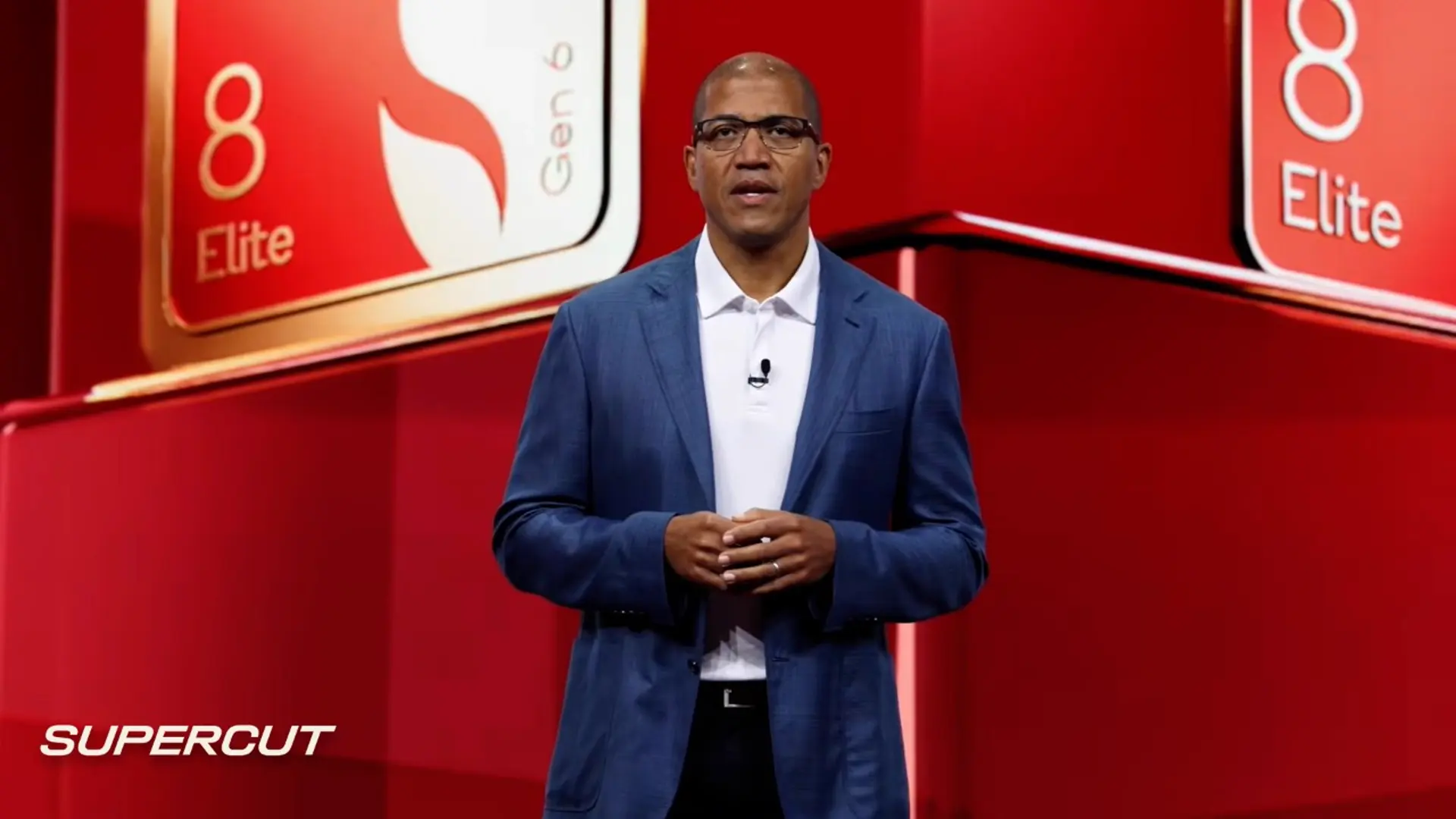
“We’re just now at the beginning of the agentic age, and Snapdragon is the platform built for it,” added Qualcomm CEO Cristiano Amon, in his Snapdragon Summit keynote.
Advertisement
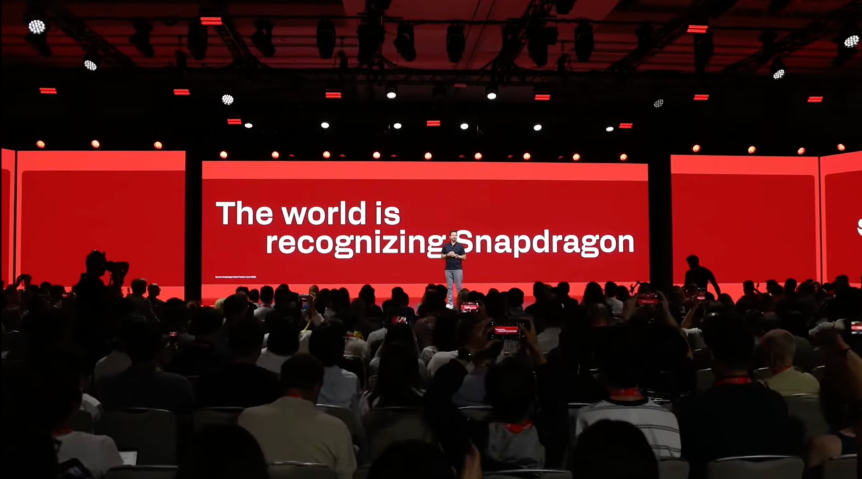
Qualcomm hosted its first of several keynotes to kick off the 2026 Snapdragon Summit in Hawaii.
Of the new dual chips, it’s the 8 Elite Extreme Gen 6 that will really take phones to the next level of performance and AI capabilities. The chip “represents the pinnacle of Snapdragon innovation, purpose-built for the most advanced AI workloads and the experiences that will define the agentic era,” said Qualcomm product marketing manager Charlie Beeman in a briefing ahead of the announcement.
The Extreme sees inevitable improvements to speed, connectivity and efficiency, but more interesting are the tweaks Qualcomm has made to enable new experiences and features that it simply wasn’t possible to include on prior Android phones.
“It brings an enormous amount of compute power to a smartphone, and therefore opens up a lot of new opportunities in terms of the applications that could be developed,” said Ben Wood, chief analyst at FDM CCS. “But it’s a bit of a chicken and egg situation because until that’s enabled on the phones, we won’t know what those applications are going to be.”
A question mark lingers over how different phone-makers will tap the power of the Elite Extreme, but Qualcomm has given us some distinct areas where we can expect to see new experiences. Here are three to look out for and look forward to.
Camera
“How’s the camera?” is pretty much the first question everyone will ask when coming across a new smartphone in the wild. Phone-makers know that image quality and camera capabilities are priorities for any new device, and while a lot of that comes down to choices made by the manufacturer, Qualcomm chips still run the show when it comes to the phone’s imaging pipeline.
Both of the new Snapdragon chips will enable a refined camera experience with intelligent stabilization and every pixel now carrying 16 bits of data. The image signaling processor is also tightly coupled to the NPU, a specialized chip that accelerates AI and machine learning tasks. This will enable AI to work on an image while it’s being captured, instead of after. This allows for a dramatic leap in raw throughput and professional-grade video, and a far deeper understanding of every pixel in your scene.
Advertisement
“Each element of the scene is processed individually, helping ensure every shot looks natural, consistent, and remarkably true to life,” said Lekha Motiwala, Qualcomm’s senior director of product management, speaking at Snapdragon Summit.
The new Snapdragon chips will boost camera capabilities.Katie Collins/CNET
And the Extreme version of the chip offers more capabilities, such as enabling phone cameras to record video in 8K resolution at 60 fps or film in 4K resolution at 240 fps for super-slow-mo footage.
“You’ll see this coming for the first time in Snapdragon-powered smartphones,” said Motiwala. “It’s not just about getting a shot. It’s about preserving a moment as you experienced it.”
Personalized AI
There’s simply no way for AI to be personal without it really getting to know you. Agentic AI that lacks personal context – past, present and future – would be like speaking with a different stranger each time you pick up your phone.
The 8 Elite Extreme Gen 6 is engineered to collect that context, hold onto it and draw from it whenever needed. This is all thanks to Qualcomm’s new Sensing Hub, which, with its dual micro-NPUs, can support models up to 200 million parameters. The company’s updated Personal Scribe can then remember who said what, why it matters and learn from your messages, emails and conversations to build your private knowledge graph.
Advertisement
It could expand an AI agent’s ability to give you nuanced answers to questions, help you recall when and to whom you made specific promises, and make future plans for you based on a whole range of factors, such as your availability, schedule, travel preferences and need for relaxation or concentrated working time.
With its ability to run over 30 billion different models on device, the Elite Extreme Gen 6 is definitely leading the way when it comes to running agentic AI. “When you have this level of capability, your work starts before you even open your inbox,” said Amon. “Here, an agent digests your [Snapdragon] Summit invitation, understands the dates, the flights, the venue details, key moments inside it, and it builds a plan.”
Gaming
Phones can be overlooked as gaming devices, but for Qualcomm, providing a best-in-class mobile gaming experience remains a priority.
With the 8 Elite Extreme Gen 2, the company is introducing an AI-rendering technology called Adreno Neural Fusion, which is supported across major game engines, including Unreal, Unity and Messiah. It can deliver upscaled images with “rock-solid frame rates” at lower power, according to Matthew Grossman, manager of product marketing at Qualcomm.
Advertisement
Adreno Neural Fusion is “a proprietary technology designed by Qualcomm from the ground up, not an off-the-shelf implementation,” said Chris Patrick, Qualcomm’s SVP and general manager of handsets. “It’s a tightly integrated architecture that brings graphics and AI together to knock a new class of intelligent gaming experiences.”
The 8 Elite Extreme Gen 6 opens up new possibilities for gamers.Katie Collins/CNET
In addition, AI-dedicated Adreno matrix cores run advanced models, and the chip features 18MB of high-performance memory. So what does this mean for your mobile gaming experience? The answer is better picture quality, higher frame rates and longer play times with games drawing less power than in the past. It’s a win-win-win.
Katie Collins
Principal Writer
Katie is a UK-based news reporter and features writer. Officially, she is CNET’s European correspondent, covering tech policy and Big Tech in the EU and UK. Unofficially, she serves as CNET’s Taylor Swift correspondent. You can also find her writing about tech for good, ethics and human rights, the climate crisis, robots, travel and digital culture. She was once described a “living synth” by London’s Evening Standard for having a microchip injected into her hand.
See full bio
Open your phone’s storage settings, and there’s a good chance Spotify is sitting near the top of the list, holding on to gigabytes you never agreed to give it. It’s one of those small annoyances that you only notice when your phone starts nagging you about running out of space.
Thankfully, it looks like Spotify has finally noticed it too. Android Authority has dug into the Spotify app and found signs of a new Cache Limit feature that puts you in charge of how much space Spotify’s temporary files can occupy on your phone.
Why is Spotify hogging so much storage?
Every time you play a podcast or a song, Spotify saves some of that data, along with the artwork, on your device. This keeps playback smooth and cuts down on data when you replay something. The catch is that you can’t control any of it. Your offline downloads are kept elsewhere, but this hidden stash keeps piling up until it’s taking gigabytes of your storage.
Rachit Agarwal / Digital Trends
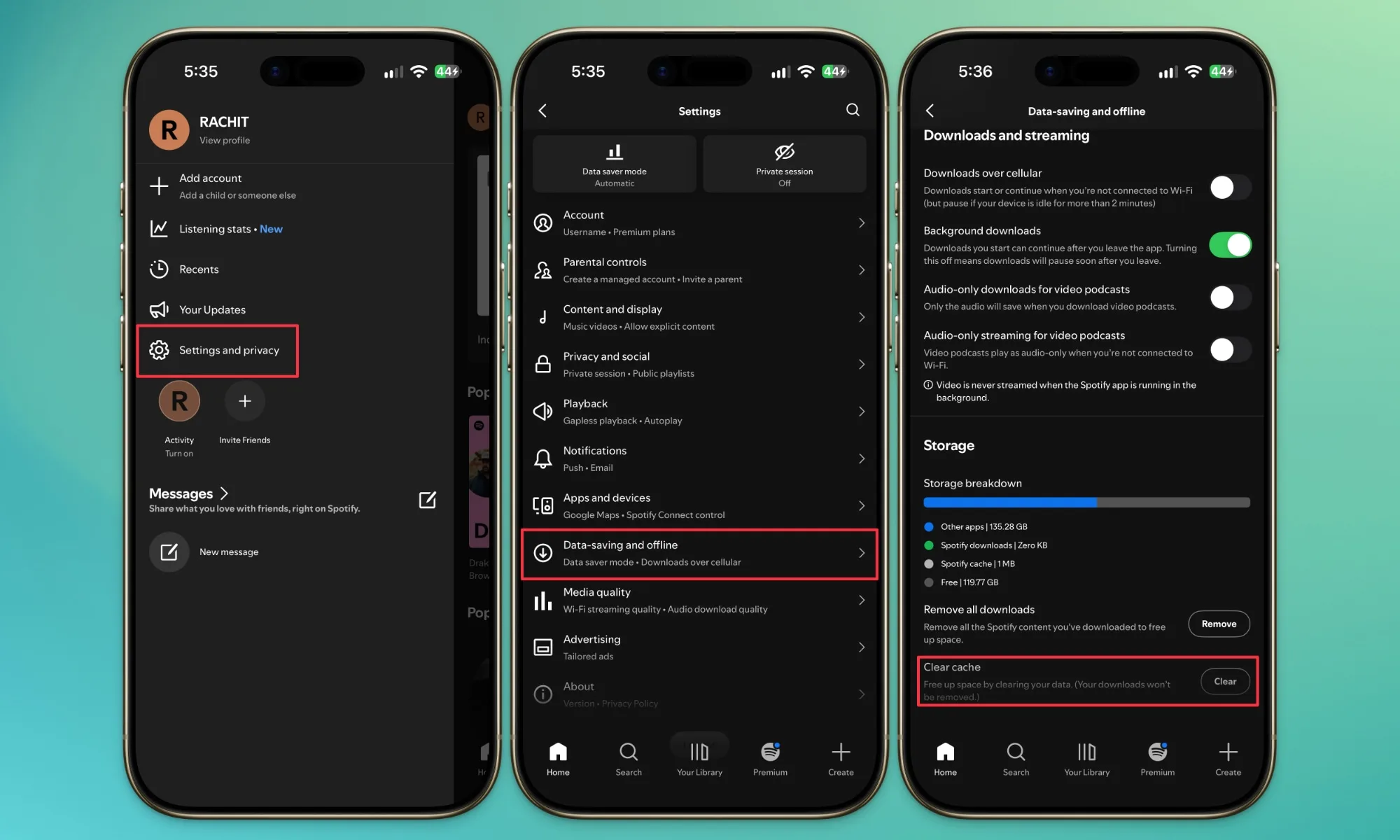
With memory prices climbing and bigger storage options costing a small fortune, that wasted space really stings. Yes, you can wipe it yourself from Settings → Data saving & offline → Clear cache, but repeating that chore over and over is tiring. Spotify fans have been asking for a fix on Reddit and the official forums for close to ten years now.
How will the new cache limit work?
The code, found by Android Authority in Spotify for Android v9.1.88.815, points to a new menu where you pick the maximum space the cache is allowed to use. Pick a tiny number, and you’ll see “A small cache may affect playback and increase data usage.” Pick a bigger one, and it tells you, “A larger cache means smoother playback and less data usage.” There’s also a “Spotify recommended” option if you’d rather not decide.
Advertisement
You’ll also be asked to choose a limit right after clearing your cache. The best part is that your saved songs and podcasts stay safe no matter what number you pick. For now, Spotify hasn’t said a word about it, and you can’t use it yet. Beta testers will probably get it first, followed by everyone else. I’m hoping it shows up soon, because my phone could use the extra space.
Imagine posting something critical of the government, watching your reach quietly evaporate, and never being able to prove it wasn’t organic.
X just killed that uncertainty. The platform is expanding its “Under the Hood” tool to show users exactly when a government legal demand choked their post’s reach. It will even show users which country made the request.
We’ve expanded Under The Hood after seeing people’s appreciation of more transparency into government-required content filtering.
X rolled out a transparency feature in August 2026. As part of the feature, the platform already allowed eligible users (those with at least 10 posts in the last month) to download a JSON file showing whether their account or any post had its visibility reduced at the request of a government body.
Now, that file also names the exact posts withheld, along with which government made the request. This level of detail remains unmatched, even compared with popular social media platforms.
Even if you’re a non-technical user, you can drop the file into an AI chatbot and ask it to explain in simple words (one of the AI use cases I don’t condemn).
X
Who does this actually matter for?
In my opinion, the real weight of the change will fall on journalists, activists, and dissidents in countries where governments regularly lean on platforms to bury inconvenient posts and silence critics.
This isn’t hypothetical: X itself lost a 2023 court battle in India over stalled compliance with blocking orders and paid roughly a $60,000 fine, proving these legal demands are frequent, real, and previously invisible to the people they targeted.
Advertisement
Governments use everything from hate-speech statutes to election rules and terrorism laws to request (or even order) these takedowns. However, free-expression groups warn that authoritarian regimes often use the same laws to muzzle political dissent.
Arista Networks has released security patches for a zero-day flaw that is being actively exploited and affects VeloCloud Orchestrator (VCO) On-Prem deployments.
VCO is a cloud-based centralized management platform that helps admins configure, monitor, and manage VeloCloud SD-WANs (Software-Defined Wide Area Networks) and associated edge devices.
Tracked as CVE-2026-93952, this maximum-severity flaw stems from an improper input validation weakness and affects VCO deployments where certificate-based authentication from the VeloCloud Edge to VeloCloud Orchestrator (VCO) is configured.
Remote threat actors can exploit the vulnerability to access privileged internal VCO host functionality in low-complexity attacks that don’t require privileges on the targeted system or user interaction.
Advertisement
“This issue was discovered externally and is known to be actively exploited,” the company warned in a Tuesday advisory. “Access to the public portion of the VeloCloud Edge authentication certificate is required. A successful attack requires network access to the VCO web interface. VCO tenant or operator credentials are not required for this exposure.”
Arista says that it has already patched hosted deployments running VCO 5.2.3.16 or later and VCO 6.4.2.8 or later and that it will also release security patches for VCO instances running 6.1.3.7 and below and 7.0.0.2 and below.
The U.S. Cybersecurity and Infrastructure Security Agency has also added CVE-2026-93952 to its Known Exploited Vulnerabilities catalog on Tuesday and ordered U.S. federal civilian executive branch agencies to secure their networks by Friday, September 25.
Indicators of compromise
While security patches are being deployed, admins should restrict access to the VCO web interface to administrative networks, review recent administrator activity for unusual changes, and monitor for connections from known malicious IP addresses.
Advertisement
Admins should review VCO web access logs for suspicious activity, such as requests containing encoded characters, unusual URL-like path components, references to local or internal services, or high request rates.
Arista also advised security teams to block the 142[.]93.149.77 and 104[.]248.126.159 IP addresses and review nginx logs for the x-vc-opt HTTP header, and said that unexpected outbound HTTP or HTTPS activity originating from the VCO host may also warrant further review.
“If compromise is suspected, operators should preserve VCO web access logs, backend application logs, system logs, database logs, and relevant file-system timestamps before remediation where operationally feasible,” it added, and advised customers to contact the Arista Networks Technical Assistance Center (TAC) if they need additional assistance.
Since the start of the year, Arista patched two other zero-day flaws (CVE-2026-7473 in May and CVE-2026-16812 in July) that were being actively exploited in attacks and affected Extensible Operating System (EOS) and on-premises VeloCloud Orchestrator deployments, respectively.
Advertisement
Arista Networks is a Fortune 500 company and one of the largest United States corporations by revenue, with more than 10,000 customers worldwide.
Join Mikko Hyppönen and security leaders from the NFL, CHANEL, and Atlassian for a two-hour digital summit on what AI-speed attacks change, what defenders should stop doing, and how to validate, decide, fix, and re-validate at machine speed.



























































You must be logged in to post a comment Login