Over the weekend in China, a humanoid robot shattered world half-marathon record—the human record—by seven minutes.
The star performer was a robot developed by the Chinese company Honor (the smartphone maker), which finished the 13.1-mile race in 50 minutes, 26 seconds. The human record, set by Ugandan Olympic medalist Jacob Kiplimo, is 57 minutes, 20 seconds. The result marks an impressive milestone especially considering that, just a year earlier, the fastest robot at this half-marathon event took two and a half hours to complete the same distance.
But Honor’s robot was not the only participant. The event consisted of more than 100 humanoid robots from 76 institutions across China. The robots lined up alongside 12,000 human runners in Beijing’s E-Town, albeit on separate courses to avoid accidents. The contrast in performance between humans and robots was more than evident.
Run, Robot, Run
A humanoid robot is designed to mimic the structure and movement of the human body, with legs, arms, and sensors that allow it to interact with its environment. In this case, the winning robot incorporated features inspired by elite runners: long legs (almost a meter), advanced balance systems, and a liquid cooling mechanism, similar to that of smartphones, to prevent overheating during the race.
Advertisement
In addition, many of the participating robots operated autonomously, meaning without direct human control. Thanks to artificial intelligence algorithms, they could adjust their pace, maintain balance, and adapt to the terrain in real time. Notably, the Honor robot that achieved the 50-minute mark operated autonomously. The Chinese manufacturer presented another robot, operated by remote control, that ran the same stretch in even less time: 48 minutes, 19 seconds.
As expected, there were some accidents in the race. Some robots fell down, others veered off the path, and several needed technical assistance along the way. While the physical performance of humanoid robots has advanced rapidly, their reliability is still developing. Of course, the laughter and jeers are no longer as frequent as they used to be, replaced by applause and exclamations of surprise.
The winning robot, “Blitz,” from smartphone manufacturer Honor was on display at the awards ceremony after the Beijing E-Town Robot Half Marathon.
Photograph: Lintao Zhang/Getty Images
Robot Superiority
Just like the robots that went viral for their impressive martial arts display a few weeks ago, this long-distance race is part of a broader strategy by China to show off its leadership in the development of advanced robots.
Advertisement
You don’t need to be a robotics expert to see that this achievement demonstrates that machines can outperform humans at specific physical tasks under controlled conditions. (It’s hard to imagine that the winning robot could achieve the same result, for example, if it started to rain during the race.) But humans still have a few tricks up their sleeve: Running in a straight line is very different from performing complex real-world activities, such as manipulating delicate objects or interacting socially.
However, it’s understandable that the image of a robot crossing the finish line in record time, ahead of human athletes, raises several questions. Is this the beginning of a new era in which machines redefine physical limits?
One could argue that a car is a machine, and those have always been faster than humans. But a humanoid robot is designed to mimic humans. It’s more alarming to see one beat humanity at its own game—even if so many of them are still tripping over themselves.
This story originally appeared in WIRED en Español and has been translated from Spanish.
During an investor call following the release of AMD’s first-quarter 2026 earnings, CEO Lisa Su confirmed that the Epyc Venice processors remain on schedule for launch later this year. The server CPUs will mark the debut of the Zen 6 architecture and AMD’s first move to TSMC’s 2nm process technology. Read Entire Article Source link
A leader in almost everything tech and home-office related for over 40 years, Swiss-founded Logitech offers a vast array of products, including keyboards, consoles, webcams, and tech gear made especially for education, business, and gaming. We at WIRED know the company’s wares well (obviously), so we’ve found the latest Logitech promo codes and deals to save on any type of tech purchase.
Logitech makes seriously great Bluetooth keyboards, keyboard cases, and smart pencils that made our Best iPad Accessories list. We also named the Logitech Pro X 2 the best gaming headset in our wireless headphones guide. If you want to keep the spirit of playfulness alive, fellow F1 enthusiast (and senior editor of product reviews) Parker Hall raved about Logitech’s high-tech wheel, pedals, and seat racing simulation set to help you become the Lewis Hamilton of your gaming fantasies. Check out these Logitech discounts we’ve found to help you ball (technologically) on a budget.
Get a Free Gift With Select Purchases at Logitech
Right now, Logitech wants to reward you for choosing them, with tons of free gifts with select purchases at Logitech. These Logitech deals include major savings, like a free Logitech Desk Mat when you buy any two Ergo Products, ($23 value), or a free Logitech Accessory Case when you purchase a Crayon & Combo Touch Case ($30 value). There are tons of savings on accessories, like a free Wooden Headset Stand when you buy a qualifying Logitech Zone Headset, ($40 value), or a free MX Keyboard Sleeve when you purchase a qualifying MX Mini Keyboard ($30 value). Plus, you can claim a free 6-month Perplexity Pro membership, worth $120, when you buy an eligible MX Series, Ergo Series, or iPad Keyboard case over $119.
Save up to $100 On Refurbished Premium Gear
The Logitech outlet is one of the best ways to save big on your important tech purchases on premium gear with exclusive gear. With the outlet, you’ll find like-new refurbished devices and limited-time favorites to shop before they’re gone forever (so be sure to check often and act soon!). Some of the best deals we’ve seen so far include: $50 off a refurbished X56 HOTAS VR flight simulator controller, $60 off a refurbished G715 wireless gaming keyboard, and $20 off a refurbished Folio Touch for iPad Air and Pro models.
Advertisement
Tips and Tricks for More Logitech Discounts
Even if you don’t have a promo code on hand, Logitech has plenty of ways to save, with free shipping on orders of $29 or more (a super-easy mark to hit). Many products also qualify for a gift with purchase, so take advantage of a free MX travel case, keyboard sleeve, or 1 month of Adobe Creative Cloud. And for a limited time, when you buy one product, you can get a second for 25% off.
With an array of helpful products for students, Logitech is making it easier to get all this game-changing tech. Students can get a 25% discount on products after registering and verifying their student status with UNiDAYS.
{Logitech 20% Off: Students & Heroes
Logitech wants to benefit as many people as it can, with a 20% discount for some of our most valuable community members who can benefit from this important, but sometimes pricey tech. That’s why Logitech is offering a 20% Logitech promo code discount of 20% off for heroes and students—this includes students, teachers, medical professionals, military, and first responders. Just verify your status to get the Logitech discount code.
25% Off Logitech Gaming Gear
Logitech G Play Days sales event is a celebration of all things gaming. During the Logitech G Play Days sales event, you’ll save with exclusive promotions and score 25% off select gear for a limited time. So whether you (or a friend) is in need of a new gaming headset or wants to upgrade your keyboard, there’s gear (and discounts) for every type of gamer.
Advertisement
Shop Trending Logitech Products
As mentioned, Logitech has nearly every type of tech product needed for productivity in your office or school, but also has some really innovative tech products for home and gaming. Looking to get serious about your WFH (or gaming) setup? Logitech’s MX Keys S Advanced Wireless Illuminated Keyboard is a bestseller because of its portability, ergonomic design, and cheap price point. The bestselling MX Vertical Advanced Ergonomic Mouse is occasionally discounted, so save your hand the cramps and carpal tunnel (while saving some coin, too).
In Polymarket’s prediction market, “most people end up losing money,” reports the Washington Post — typically a few bucks.
“Since Polymarket launched in 2022, a few thousand people have lost the bulk of the money… and an even smaller group — .05 percent of users — has gone home with most of the overall profits, according to a new analysis from finance researcher Pat Akey and colleagues.”
A lot of users aren’t that good at predicting the future. They’re losing money at roughly the same rate as online gamblers betting on sports and other real-life events at traditional sportsbooks, according to the U.K. gambling regulator’s analysis of 2024 data. On Polymarket, the odds of making a profit are slightly higher on weather and tech markets — and a little lower on sports…
On Polymarket, just 1,200 people took more than half the profits — $591 million, or more than $100,000 each. [“The top 1% of users capture 76.5% of all trading gains,” the researchers write.] When you dabble in prediction markets, you’re competing against these sophisticated players who consistently win. Most of those 1,200 big winners didn’t place just a few smart bets. They appear to be pros making thousands of trades, mostly in the past year and a half, that were probably automated. One user made $3 million since January on more than a million trades about the Oscars, according to TRM Labs…
Advertisement
The most profitable participants are also just good at picking what to bet on, Akey found, winning so often it was statistically unlikely to be dumb luck. They had some sort of edge — expertise, deep research or, perhaps, inside knowledge. “Our results suggest that the informational benefits of prediction markets come at a cost to unsophisticated participants,” the researchers conclude.
A new NYT Connections puzzle appears at midnight each day for your time zone – which means that some people are always playing ‘today’s game’ while others are playing ‘yesterday’s’. If you’re looking for Sunday’s puzzle instead then click here: NYT Connections hints and answers for Sunday, May 10 (game #1064).
Good morning! Let’s play Connections, the NYT’s clever word game that challenges you to group answers in various categories. It can be tough, so read on if you need Connections hints.
What should you do once you’ve finished? Why, play some more word games of course. I’ve also got daily Strands hints and answers and Quordle hints and answers articles if you need help for those too, while Marc’s Wordle today page covers the original viral word game.
Advertisement
SPOILER WARNING: Information about NYT Connections today is below, so don’t read on if you don’t want to know the answers.
Latest Videos From
NYT Connections today (game #1065) – today’s words
(Image credit: New York Times)
Today’s NYT Connections words are…
Advertisement
COLOR
CREEP
SHANDY
KARMA
KNIVES OUT
SLIP
PYRAMID
RHYME
STEAL
CHINATOWN
KEYED
SNEAK
SEVEN
PONZI
ELEGY
VERTIGO
NYT Connections today (game #1065) – hint #1 – group hints
What are some clues for today’s NYT Connections groups?
BLUE: Crime films
GREEN: Types of plan
YELLOW: Move slowly without being seen
PURPLE: Hidden anatomy
Need more clues?
We’re firmly in spoiler territory now, but read on if you want to know what the four theme answers are for today’s NYT Connections puzzles…
Sign up for breaking news, reviews, opinion, top tech deals, and more.
Advertisement
NYT Connections today (game #1065) – hint #2 – group answers
What are the answers for today’s NYT Connections groups?
BLUE: DETECTIVE MOVIES
GREEN: KINDS OF SCHEMES
YELLOW: MOVE STEALTHILY, WITH “IN”
PURPLE: BODY PARTS SURROUNDED BY TWO LETTERS
Right, the answers are below, so DO NOT SCROLL ANY FURTHER IF YOU DON’T WANT TO SEE THEM.
Advertisement
NYT Connections today (game #1065) – the answers
(Image credit: New York Times)
The answers to today’s Connections, game #1065, are…
YELLOW: MOVE STEALTHILY, WITH “IN” CREEP, SLIP, SNEAK, STEAL
GREEN: KINDS OF SCHEMES COLOR, PONZI, PYRAMID, RHYME
BLUE: DETECTIVE MOVIES CHINATOWN, KNIVES OUT, SEVEN, VERTIGO
PURPLE: BODY PARTS SURROUNDED BY TWO LETTERS ELEGY, KARMA, KEYED, SHANDY
My rating: Easy
My score: Perfect
Today’s purple group looks a lot more gettable than normal and I’m annoyed at myself for not taking more time over today’s game. Congratulations if you saw the four BODY PARTS SURROUNDED BY TWO LETTERS.
Instead, I rushed in spotting the four DETECTIVE MOVIES — not that I saw the link at first, just that they are all great films.
Next, PONZI could only be here for one thing, although I did hesitate over the fourth tile, getting caught up in thinking SLIP scheme could be something as well as SLIP stream.
Advertisement
With just eight tiles left CREEP, SLIP, SNEAK, and STEAL were impossible to resist.
Yesterday’s NYT Connections answers (Sunday, May 10, game #1064)
YELLOW: MUSIC PLAYER BUTTONS PLAY, REPEAT, SHUFFLE, SKIP
GREEN: DESTINED BOUND, CERTAIN, FATED, SURE
BLUE: VERBS IN MAKING A MOJITO GARNISH, MUDDLE, POUR, STIR
PURPLE: WHAT “SPRING” MIGHT REFER TO COIL, FOUNTAIN, LEAP, SEASON
What is NYT Connections?
NYT Connections is one of several increasingly popular word games made by the New York Times. It challenges you to find groups of four items that share something in common, and each group has a different difficulty level: green is easy, yellow a little harder, blue often quite tough and purple usually very difficult.
On the plus side, you don’t technically need to solve the final one, as you’ll be able to answer that one by a process of elimination. What’s more, you can make up to four mistakes, which gives you a little bit of breathing room.
Advertisement
It’s a little more involved than something like Wordle, however, and there are plenty of opportunities for the game to trip you up with tricks. For instance, watch out for homophones and other word games that could disguise the answers.
It’s playable for free via the NYT Games site on desktop or mobile.
A new NYT Strands puzzle appears at midnight each day for your time zone – which means that some people are always playing ‘today’s game’ while others are playing ‘yesterday’s’. If you’re looking for Sunday’s puzzle instead then click here: NYT Strands hints and answers for Sunday, May 10 (game #798).
Strands is the NYT’s latest word game after the likes of Wordle, Spelling Bee and Connections – and it’s great fun. It can be difficult, though, so read on for my Strands hints.
Want more word-based fun? Then check out my NYT Connections today and Quordle today pages for hints and answers for those games, and Marc’s Wordle today page for the original viral word game.
Advertisement
SPOILER WARNING: Information about NYT Strands today is below, so don’t read on if you don’t want to know the answers.
Latest Videos From
NYT Strands today (game #799) – hint #1 – today’s theme
What is the theme of today’s NYT Strands?
• Today’s NYT Strands theme is… A nice medley
Advertisement
NYT Strands today (game #799) – hint #2 – clue words
Play any of these words to unlock the in-game hints system.
DRIES
GAPE
MULES
BEND
STIR
SOAR
NYT Strands today (game #799) – hint #3 – spangram letters
How many letters are in today’s spangram?
• Spangram has 11 letters
Advertisement
NYT Strands today (game #799) – hint #4 – spangram position
What are two sides of the board that today’s spangram touches?
First side: left, 5th row
Last side: bottom, 3rd column
Right, the answers are below, so DO NOT SCROLL ANY FURTHER IF YOU DON’T WANT TO SEE THEM.
Advertisement
NYT Strands today (game #799) – the answers
(Image credit: New York Times)
The answers to today’s Strands, game #799, are…
JUMBLE
HODGEPODGE
VARIETY
MISHMASH
RAGBAG
SPANGRAM: ODDSANDENDS
My rating: Easy
My score: Perfect
After struggling to see yesterday’s blatantly obvious words I roared through today’s messy selection — all of which probably says a lot about my brain and/or my organizational skills.
Sign up for breaking news, reviews, opinion, top tech deals, and more.
Advertisement
I really love all of these words and personally I think they sum up the glorious VARIETY and reality of life, where nothing is in straight lines or ordered and everything comes at you in a MISHMASH.
I also really enjoyed how today’s words revealed themselves to me, with the spangram slowly becoming obvious after I solved the words surrounding it.
Advertisement
Yesterday’s NYT Strands answers (Sunday, May 10, game #798)
OVERT
BRAZEN
GLARING
BLATANT
OBVIOUS
FLAGRANT
SPANGRAM: CLEARCUT
What is NYT Strands?
Strands is the NYT’s not-so-new-any-more word game, following Wordle and Connections. It’s now a fully fledged member of the NYT’s games stable that has been running for a year and which can be played on the NYT Games site on desktop or mobile.
I’ve got a full guide to how to play NYT Strands, complete with tips for solving it, so check that out if you’re struggling to beat it each day.
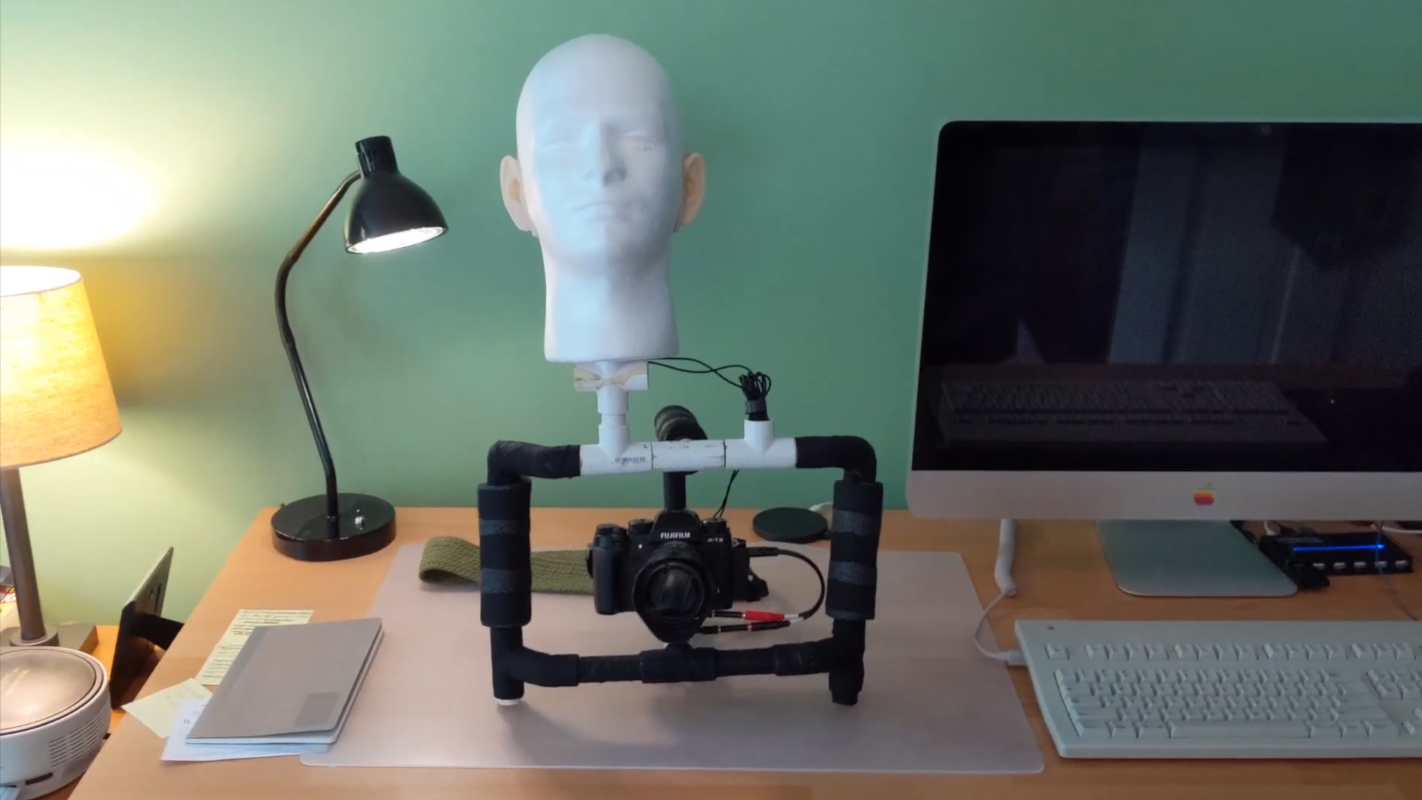
For as many speakers as someone can cram into a surround sound system, humans still (generally) only have two ears to listen to those sounds with. This means that, for recording purposes, it’s possible to create incredibly vivid three-dimensional sounds with just two microphones, provided that there’s an actual physical replica of a human ear attached to each microphone. This helps ensure that all the qualities of the sounds are preserved in a way a real human would experience them, and as [David Green] demonstrates, these systems don’t need to be very expensive.
This build doesn’t just use models of human ears for recording sounds through. The silicone ears are mounted on a styrofoam mannequin head as well, which provides some sound isolation between the two microphones, much like a real human head. The ears are mounted in appropriate locations with the microphones installed inside, and the entire microphone apparatus is positioned on a PVC rig with a camera so that binaural audio will be recorded for anything [David] points it at.
Although he had some issues interfacing two microphones using 19th-century technology instead of soldering everything together, the build still eventually came together, and only for around $70 USD. However, this build is a bit dated now, so prices may have changed by now. It’s still a great way to produce realistic stereo sound without breaking the bank, but it’s not the only way of getting this job done.
A developer has built a remarkably thin computer that is almost the same size and thickness as a standard credit card, potentially opening the door to a new category of ultra-portable computing devices.
Called the “Muxcard,” the experimental device combines a fully functional microcomputer, wireless connectivity, NFC support, sensors, and an E Ink display into a body measuring just 1mm thick – thin enough to fit inside a regular wallet alongside bank cards. The project, created by GitHub user “krauseler,” has quickly drawn attention from the maker and hardware enthusiast community for pushing the physical limits of compact electronics.
A tiny computer designed to fit in your wallet
Despite its slim form factor, the Muxcard includes surprisingly capable hardware. The device is powered by an ESP32-C3 microcontroller and integrates a 1.54-inch flexible E Ink display, NFC hardware, an IMU motion sensor, Bluetooth and Wi-Fi connectivity, and a miniature lithium-polymer battery.
Muxcardkrauseler/Github
The engineering challenge was not simply shrinking components, but making them durable enough to survive everyday bending and pressure inside a wallet. According to project details shared online, the creator used flexible PCBs and carefully separated sensitive components into “islands” connected through bend-tolerant sections to reduce mechanical stress.
One of the biggest hurdles involved integrating the E Ink display into such a thin device. Traditional connectors were reportedly too bulky, forcing the creator to hand-solder connections directly onto the display flex cable. Power management also became a major challenge because ultra-thin batteries offer extremely limited capacity.
Advertisement
Why this matters beyond a DIY project
At first glance, the Muxcard may seem like a niche experiment for hobbyists. However, the project reflects a broader trend toward invisible and ambient computing – devices becoming smaller, thinner, and more seamlessly integrated into everyday objects.
Muxcardkrauseler/Github
The use of an E Ink screen is particularly important because it consumes almost no power while displaying static information, allowing the card to remain functional for longer periods despite its tiny battery. The low-power design could make devices like this suitable for secure identification, digital business cards, two-factor authentication systems, event passes, or minimalist smart home controls.
For consumers, projects like the Muxcard offer a glimpse into how future computing devices may evolve beyond phones and wearables into objects people already carry every day.
What comes next
The Muxcard remains an experimental open-source project rather than a commercial product. However, the hardware files and firmware have already been published online for non-commercial use, meaning developers and enthusiasts can attempt to build their own versions.
As flexible electronics, thin batteries, and low-power displays continue improving, concepts like the Muxcard could eventually influence future digital IDs, secure authentication tools, and ultra-portable computing devices.
A new Linux zero-day exploit, named Dirty Frag, allows local attackers to gain root privileges on most major Linux distributions with a single command.
Security researcher Hyunwoo Kim, who disclosed it earlier today and published a proof-of-concept (PoC) exploit, says this local privilege escalation was introduced roughly nine years ago in the Linux kernel’s algif_aead cryptographic algorithm interface.
Dirty Frag works by chaining two separate kernel flaws, the xfrm-ESP Page-Cache Write vulnerability and the RxRPC Page-Cache Write vulnerability, to modify protected system files in memory without authorization and achieve privilege escalation.
Also, while Dirty Frag belongs to the same class as the Dirty Pipe and Copy Fail Linux vulnerabilities, it exploits the fragment field of a different kernel data structure.
Advertisement
“As with the previous Copy Fail vulnerability, Dirty Frag likewise allows immediate root privilege escalation on all major distributions, and it
“Dirty Frag is a case that extends the bug class to which Dirty Pipe and Copy Fail belong. Because it is a deterministic logic bug that does not depend on a timing window, no race condition is required, the kernel does not panic when the exploit fails, and the success rate is very high.”
This kernel privilege escalation affects a wide range of Linux distros, including Ubuntu, Red Hat Enterprise Linux, CentOS Stream, AlmaLinux, openSUSE Tumbleweed, and Fedora, which have not yet received patches.
Dirty Frag demo (Hyunwoo Kim)
Kim released complete Dirty Frag documentation and a PoC exploit with distribution maintainers’ agreement after an embargo on full public disclosure was broken on May 7, 2026, when an unrelated third party independently published the exploit.
“Because the embargo has currently been broken, no patch or CVE exists. After consultation with the maintainers on linux-distros@vs.openwall.org and at their request, this Dirty Frag document is being published,” Kim said.
Advertisement
To secure systems against attacks, Linux users can use the following command to remove the vulnerable esp4, esp6, and rxrpc kernel modules (however, it’s important to note that this will break IPsec VPNs and AFS distributed network file systems):
This new zero-day disclosure comes as Linux distro maintainers are still rolling out patches for “Copy Fail,” another root privilege escalation vulnerability now actively exploited in attacks.
“This type of vulnerability is a frequent attack vector for malicious cyber actors and poses significant risks to the federal enterprise,” the U.S. cybersecurity agency warned at the time. “Apply mitigations per vendor instructions, follow applicable BOD 22-01 guidance for cloud services, or discontinue use of the product if mitigations are unavailable.”
Advertisement
In April, Linux distros patched another root-privilege escalation vulnerability (dubbed Pack2TheRoot) that had been found after a decade since it was introduced in the PackageKit daemon.
Update May 08, 09:58 EDT: The two page-cache write vulnerabilities chained by Dirty Frag are now tracked under the following CVE IDs: the xfrm-ESP one was assigned CVE-2026-43284, and the RxRPC isye is now CVE-2026-43500.
AI chained four zero-days into one exploit that bypassed both renderer and OS sandboxes. A wave of new exploits is coming.
At the Autonomous Validation Summit (May 12 & 14), see how autonomous, context-rich validation finds what’s exploitable, proves controls hold, and closes the remediation loop.
We spend hours testing every product or service we review, so you can be sure you’re buying the best. Find out more about how we test.
Edifier M90: One-minute review
When you get into audio, it quickly becomes clear that the best stereo speakers won’t be enough. Sure, they’ll cover your living room, but what about your desktop? Your TV set-up? It’s time to buy more speakers!
…or you could accept the the Edifier M90 speakers’ pitch, which is to just buy one pair of speakers that have absolutely loads of connection options. Not only do they have the basics — Bluetooth 6.0 and aux-in — they have support for optical, USB-C in and HDMI eARC.
Advertisement
That latter’s a big selling point here, so you can plug the Edifier M90 speakers into your TV without losing audio fidelity, as it’s something not offered by too many similar options.
Latest Videos From
But the real appeal is being able to do all of these things at once: I could connect the Edifier M90 to my TV, turntable, MP3 player and phone all at the same time, and use the remote to flick between them easily. They replaced every part of my hi-fi set-up, just like that.
And you’re not replacing them with just anything, either. Thanks to their big mid-bass drivers, these things deliver powerful mids and bass frequencies, defying their relatively compact stature to fill small and medium rooms.
In some cases, the treble was a little weaker than it could have been, but the Connex app equalizer can go some way in fixing that. Although, that may be the only time you use the app, as it doesn’t do much else…
Advertisement
If anything will put buyers off the Edifier M90, it’s the price. It’s not expensive for what you get, but it’s a big step up from the Edifier M60, and some might not deem the improved specs or eARC addition worth it.
Sign up for breaking news, reviews, opinion, top tech deals, and more.
Edifier M90 review: Price and release date
(Image credit: Future)
Announced in January 2026
On sale in US, not UK or AU yet
Priced at $369 (about £270, AU$520)
The Edifier M90 were unveiled at the start of 2026, at CES on January 6, and have been slowly rolling out to physical and online store shelves ever since.
They’re priced at $369 (about £270 / AU$520, but a release in the UK or Australia has yet to be confirmed). That’s quite a step up from the $199 / £159 / AU$289 Edifier M60, but it’s fitting for the spec and size increase.
Advertisement
Depending on where you live, these are cheaper or pricier than the five-star Dali Kupid, which go for $599 / £299 / AU$599, and they closely match the $399.99 / £333.32 / A$620 Fluance RI71, two options that are on our list of the best stereo speakers.
Edifier M90 review: Specs
Swipe to scroll horizontally
Drivers
1-inch tweeter, 4-inch mid-bass driver
Advertisement
Bluetooth
Bluetooth 6.0
Connections:
Bluetooth, AUX, USB-C, HDMI eARC, optical
Advertisement
Edifier M90 review: Features
(Image credit: Future)
USB-C, Bluetooth, optical, 3.5mm and HDMI eARC connections
App lets you change remote presets
Built-in amplification and DAC
Perhaps the most tempting reason to buy the Edifier M90 is its range of connection options. You can hook it up to outputs via Bluetooth (at the 6.0 standard), 3.5mm aux-in, USB-C, optical, or HDMI eARC — all at the same time, to jump between using the remote.
The last of those connections is perhaps the most intriguing addition, letting you connect them to your TV so they can be an alternative to a soundbar. This is still relatively uncommon in bookshelf speakers like this (though it’s growing).
Edifier has an app, called ConneX, which you can use for a few extra features. Like the remote, ConneX lets you jump between input sources, control your media playback, and see what you’re actually listening to.
But you can also use the app to customize what the remote’s EQ buttons do, tweaking the settings on a nine-band equalizer. You can also set up a custom mode, which I turned into a movie-tuned balance.
Advertisement
As you can tell from that short list of features, ConneX is far from necessary — I didn’t use it for the first few weeks of testing, and didn’t open it again after setting up my equalizers — and I can see many users ignoring it completely.
This means you’re not getting any in-app streaming support (since there’s no Wi-Fi) or multi-room support. There’s no automatic room correction for the sound or anything like that either.
Edifier M90 review: Sound quality
(Image credit: Future)
1-inch driver + 4-inch mid-bass driver
50W output for each unit
Solid bass and mids, trebles could fall out a little
Each Edifier M90 unit has a one-inch tweeter and four-inch mid-bass driver, totaling 50W of amplification, which is naturally doubled for the pair. That’s 100W in total, and it was sufficient for my medium-sized living room as an ersatz soundbar or bookshelf speaker — for a desktop setup, it’ll offer more than enough oomph.
The larger driver does a great job in making a subwoofer feel unnecessary, with bass lines broadcast around my living room and mids given glorious prominence in tunes. Frankly, I was surprised by how much low-end I’d get from songs, given that it’s only 2.0 sound, but it was a supported, scooping bass that maintained clarity.
Advertisement
Higher lines such as tinkling piano, higher-pitched vocals and strings maintained the clarity and detail of bass, but were sometimes a little lost in the mix for certain tracks. Dope Lemon’s Marinade is my go-to track for stereo imaging, and its rhythm guitar was hard to make out from the specific speaker I should have been able to hear it in.
Meanwhile, Michigan Rattlers’ Desert Heat’s sax wasn’t as sparkling as on some other speakers I’ve tested.
Testing the M90s alongside a TV, you’re naturally not getting the soundstage or blasting power of a really big soundbar, but I was pleased with the performance as a solid step up from my set’s built-in speakers. I put it through its paces through a variety of genres, and it was only big, bombastic battle scenes where it felt like it was struggling to express everything.
Advertisement
Edifier M90 review: Design
(Image credit: Future)
Familiar boxy design in white or black
8.35 x 5.24 x 8.86 in / 21.2 x 13.3 x 22.5cm, 6.6lbs / 3kg each
Some controls on back of unit
The Edifier M90 will look familiar to people who’ve been shopping around the brand’s options, as it’s a doppelganger for the M60. You’re getting two clean and simple speakers, with a large woofer topped by a smaller tweeter, in either white or black.
The speakers are 8.35 inches tall, 5.24 inches wide and 8.86 inches deep, so they can fit on your desktop by your monitor, or on a bookshelf (as you can see in the pictures). They’re light enough not to worry fragile shelves, and to be easy to move about your apartment too.
While the M90 look clean at the front, there’s a mess at the back. One of the speakers has five different jacks hidden around the corner – not including the audio input – as well as a power switch and volume dial. We’ll get more into this jacks in the Features section, but because of them, the back of my unit quickly became a mess of cables (as you’ll see in the images).
It’s a little annoying that these controls are hidden around the back of the speaker, but the remote makes up for it.
The in-box remote takes two AAA batteries, and it’s nice and small. It has the expected buttons — volume, skip tracks, mute — as well as options to quickly change the input, which I found useful for changing between my TV connection, Bluetooth phone, and any wired options such as a turntable.
Advertisement
You can also use the remote to flick between three presets: Classic Dynamic and Monitor, which you can set up yourself.
Edifier M90 review: Value
(Image credit: Future)
Fits many niches in your home hi-fi set-up
Not quite as good as any one unit it replaces
The Edifier M90’s price step up from its sibling might give some buyers pause, and a good argument would be made for other stereo speaker setups, which could get you more for your money — especially when it comes to better stereo imaging.
But when you consider how versatile the M90s are, the value proposition becomes a little clearer. These aren’t just for your bookshelf, but can be used for your desktop and TV as well. And so they could be a great value option rather than buying separate pieces of tech for your hi-fi setup — a real all-rounder.
Advertisement
Should I buy the Edifier M90?
(Image credit: Future)
Swipe to scroll horizontally
Edifier M90 scorecard
Attributes
Notes
Rating
Features
Advertisement
The range of connection options is great, but the app doesn’t add much.
3.5 / 5
Sound quality
I was impressed by the bass capability and volume, though could have done with clearer treble.
Advertisement
4 / 5
Design
They’re relatively compact and clean-looking, with a useful remote.
4 / 5
Advertisement
Value
As a Swiss Army Knife for audio, they’re good value for what they offer.
4 / 5
Advertisement
Buy them if…
Don’t buy them if…
Edifier M90 review: Also consider
How I tested the Edifier M90
(Image credit: Future)
Tested for several months
Tested at home connected to phones, laptops, TVs, turntables and more
I used the Edifier M90 for several months before writing this review. In that time I used the M90 alongside a vast range of devices. I connected them wirelessly to several smartphones, via USB-C or aux to phones, MP3 players and laptops, and also to my TV and turntable.
That means they were used for streaming music, records, MP3 tracks, lossless music, movies, TV shows and games. Several devices I’ve tested in the last few months, including the Samsung Galaxy S26 Ultra and Majority MP3 Player, got particular time with the M90.
Advertisement
I’ve been testing audio products for TechRadar for years, including other Edifier speakers, Bluetooth speakers and headphones.
After months of rumours and sly teasers, Google has finally officially unveiled the Fitbit Air – its screenless wearable.
But how does the screenless Fitbit Air compare to the four-star Fitbit Charge 6? Is the Fitbit Air considered an upgrade, or is it only designed with certain users in mind?
We’ve assessed the Fitbit Air’s specs and compared them to the Fitbit Charge 6’s own to help you decide which wearable will suit you best.
At the time of writing, the Fitbit Air is available for pre-order and will launch officially in the US and UK from May 26. With an official RRP of £84.99/$99.99, it’s one of the cheaper options in Google’s Fitbit range.
SQUIRREL_PLAYLIST_10208510
In comparison, the Fitbit Charge 6 is available to buy now and has a higher RRP of £139/$159.95. However, as the Fitbit Charge 6 is a few years old, it’s possible to pick up the wearable with a solid price cut. For example, at the time of writing US customers could pick up the Fitbit Charge 6 for just $119.95 from Google’s official store.
Advertisement
Although both wearables can be used without a subscription, they are compatible with Google Health Premium – the newest monthly plan that unlocks features such as Google Health Coach. This plan will set you back an additional $9.99 a month (the UK price is TBC at the time of writing).
Fitbit Air is screenless
Take one look at the Fitbit Air and Fitbit Charge 6 and the difference is clear: the Fitbit Air is entirely screenless. Much like Whoop, the Fitbit Air is designed to quietly track your health and fitness data without any distraction.
Advertisement
Fitbit Air on wrist. Image Credit (Google)
This might sound confusing to those who have never used a screenless fitness tracker, as you might be wondering how you control the Fitbit Air or track a workout without the use of a screen. Essentially, you can use the companion smartphone app (Google Health) to see your metrics and data, plus manually start or add a workout. However, the Fitbit Air benefits from auto-workout detection which means it will know when you’ve started exercising and will track and log the workout accordingly.
Google Health app. Image Credit (Google)
In comparison, the Fitbit Charge 6 is fitted with a 1.4-inch AMOLED touchscreen display that has a Gorilla Glass 3 covering for scratch resistance. The display is bright, detailed and offers an always-on option (although keep in mind that’ll drain the battery faster). Plus, the inclusion of the display means you’ll have access to Google Wallet, Google Maps and even YouTube Music Controls without needing to rely on your phone.
Fitbit Charge 6 on wrist. Image Credit (Trusted Reviews)
This means the Fitbit Charge 6 can double as a smartwatch, rather than just being a fitness tracker.
Advertisement
Advertisement
Fitbit Air charges faster, but both promise the same battery life
We should disclaim that battery life will vary depending on your individual usage. However, both the Fitbit Air and Fitbit Charge 6 generally promise up to seven days of battery life – however when its always-on display is enabled, the Fitbit Charge 6 drops down to around four days.
The Fitbit Air does promise to offer faster charging than the Fitbit Charge 6, with Google claiming the wearable can go from 0 to 100% in about 90 minutes. In addition, a five minute charge should result in one day of power too.
In comparison, we found that the Fitbit Charge 6 takes around two hours to reach 100% power.
Fitbit Air. Image Credit (Google)
Fitbit Charge 6 has built-in GPS
Although the Fitbit Air can track runs and the like, it doesn’t actually have built-in GPS. Instead, you’ll need to ensure your paired phone is with you. On the other hand, the Fitbit Charge 6 technically benefits from on-device GPS which means you shouldn’t need to carry your phone out with you.
We should disclaim that its GPS isn’t particularly reliable, as we found it works best when your paired phone is with you and the Fitbit Charge 6 can swap between your handset’s GPS and the device’s antenna based on signal strength. However, once you leave your phone at home, we found the Charge 6 struggles to accurately track your route and instead bases distance on the accelerometer instead. This is a known issue, and one that appeared on the 2021 Fitbit Charge 5 too.
Advertisement
Advertisement
Fitbit Charge 6. Image Credit (Trusted Reviews)
Fitbit Air promises more accurate sleep tracking
Google promises that the Fitbit Air sees huge improvements in sleep tracking compared to previous Fitbit models. Not only does the Fitbit Air see in-depth tracking that captures time spent in each sleep stage and breathing regularity, but it also summarises this information into a personalised Sleep Score. This, Google explains, is powered by advanced new machine learning models that are 15% more accurate than before.
The Fitbit Charge 6 does offer impressively accurate sleep tracking, and we even concluded that it feels more accurate than rival offerings. With this in mind, the promise of more accurate tracking is certainly promising.
Sleep on the Google Health app. Image Credit (Google)
Fitbit Air is designed for Google Health Coach
One of the key features of the Fitbit Air is, somewhat annoyingly, sat behind Google’s monthly subscription, Google Health Premium. However, at $9.99 a month, it’s arguably an easier pill to swallow than the likes of Whoop’s annual subscription costs.
Signing up to Google Health Premium unlocks Google Health Coach, a personalised coach that’s built with Google’s Gemini. The Coach promises to deliver personalised guidance based on your metrics, fitness goals and lifestyle too. Plus, Health Coach unlocks the aforementioned Sleep Score and can also answer your specific health and fitness-related questions too.
Advertisement
Advertisement
Early Verdict
The Fitbit Air is easily one of the most exciting Fitbit launches in recent times, and looks set to be a genuinely viable competitor to Whoop. Deciding between the Fitbit Air and Fitbit Charge 6 will depend entirely on your personal preference – if you want a wearable that doubles as a smartwatch then the Fitbit Charge 6 is an easy choice.
On the other hand, if you want a dedicated fitness tracker that benefits from Google’s Gemini-powered Health Coach, then the Fitbit Air is an appealing alternative.
We’ll be sure to update this versus once we review the Fitbit Air, so make sure you visit back in due course.






























































You must be logged in to post a comment Login