We spend hours testing every product or service we review, so you can be sure you’re buying the best. Find out more about how we test.
Edifier M90: One-minute review
When you get into audio, it quickly becomes clear that the best stereo speakers won’t be enough. Sure, they’ll cover your living room, but what about your desktop? Your TV set-up? It’s time to buy more speakers!
…or you could accept the the Edifier M90 speakers’ pitch, which is to just buy one pair of speakers that have absolutely loads of connection options. Not only do they have the basics — Bluetooth 6.0 and aux-in — they have support for optical, USB-C in and HDMI eARC.
Advertisement
That latter’s a big selling point here, so you can plug the Edifier M90 speakers into your TV without losing audio fidelity, as it’s something not offered by too many similar options.
Latest Videos From
But the real appeal is being able to do all of these things at once: I could connect the Edifier M90 to my TV, turntable, MP3 player and phone all at the same time, and use the remote to flick between them easily. They replaced every part of my hi-fi set-up, just like that.
And you’re not replacing them with just anything, either. Thanks to their big mid-bass drivers, these things deliver powerful mids and bass frequencies, defying their relatively compact stature to fill small and medium rooms.
In some cases, the treble was a little weaker than it could have been, but the Connex app equalizer can go some way in fixing that. Although, that may be the only time you use the app, as it doesn’t do much else…
Advertisement
If anything will put buyers off the Edifier M90, it’s the price. It’s not expensive for what you get, but it’s a big step up from the Edifier M60, and some might not deem the improved specs or eARC addition worth it.
Sign up for breaking news, reviews, opinion, top tech deals, and more.
Edifier M90 review: Price and release date
(Image credit: Future)
Announced in January 2026
On sale in US, not UK or AU yet
Priced at $369 (about £270, AU$520)
The Edifier M90 were unveiled at the start of 2026, at CES on January 6, and have been slowly rolling out to physical and online store shelves ever since.
They’re priced at $369 (about £270 / AU$520, but a release in the UK or Australia has yet to be confirmed). That’s quite a step up from the $199 / £159 / AU$289 Edifier M60, but it’s fitting for the spec and size increase.
Advertisement
Depending on where you live, these are cheaper or pricier than the five-star Dali Kupid, which go for $599 / £299 / AU$599, and they closely match the $399.99 / £333.32 / A$620 Fluance RI71, two options that are on our list of the best stereo speakers.
Edifier M90 review: Specs
Swipe to scroll horizontally
Drivers
1-inch tweeter, 4-inch mid-bass driver
Advertisement
Bluetooth
Bluetooth 6.0
Connections:
Bluetooth, AUX, USB-C, HDMI eARC, optical
Advertisement
Edifier M90 review: Features
(Image credit: Future)
USB-C, Bluetooth, optical, 3.5mm and HDMI eARC connections
App lets you change remote presets
Built-in amplification and DAC
Perhaps the most tempting reason to buy the Edifier M90 is its range of connection options. You can hook it up to outputs via Bluetooth (at the 6.0 standard), 3.5mm aux-in, USB-C, optical, or HDMI eARC — all at the same time, to jump between using the remote.
The last of those connections is perhaps the most intriguing addition, letting you connect them to your TV so they can be an alternative to a soundbar. This is still relatively uncommon in bookshelf speakers like this (though it’s growing).
Edifier has an app, called ConneX, which you can use for a few extra features. Like the remote, ConneX lets you jump between input sources, control your media playback, and see what you’re actually listening to.
But you can also use the app to customize what the remote’s EQ buttons do, tweaking the settings on a nine-band equalizer. You can also set up a custom mode, which I turned into a movie-tuned balance.
Advertisement
As you can tell from that short list of features, ConneX is far from necessary — I didn’t use it for the first few weeks of testing, and didn’t open it again after setting up my equalizers — and I can see many users ignoring it completely.
This means you’re not getting any in-app streaming support (since there’s no Wi-Fi) or multi-room support. There’s no automatic room correction for the sound or anything like that either.
Edifier M90 review: Sound quality
(Image credit: Future)
1-inch driver + 4-inch mid-bass driver
50W output for each unit
Solid bass and mids, trebles could fall out a little
Each Edifier M90 unit has a one-inch tweeter and four-inch mid-bass driver, totaling 50W of amplification, which is naturally doubled for the pair. That’s 100W in total, and it was sufficient for my medium-sized living room as an ersatz soundbar or bookshelf speaker — for a desktop setup, it’ll offer more than enough oomph.
The larger driver does a great job in making a subwoofer feel unnecessary, with bass lines broadcast around my living room and mids given glorious prominence in tunes. Frankly, I was surprised by how much low-end I’d get from songs, given that it’s only 2.0 sound, but it was a supported, scooping bass that maintained clarity.
Advertisement
Higher lines such as tinkling piano, higher-pitched vocals and strings maintained the clarity and detail of bass, but were sometimes a little lost in the mix for certain tracks. Dope Lemon’s Marinade is my go-to track for stereo imaging, and its rhythm guitar was hard to make out from the specific speaker I should have been able to hear it in.
Meanwhile, Michigan Rattlers’ Desert Heat’s sax wasn’t as sparkling as on some other speakers I’ve tested.
Testing the M90s alongside a TV, you’re naturally not getting the soundstage or blasting power of a really big soundbar, but I was pleased with the performance as a solid step up from my set’s built-in speakers. I put it through its paces through a variety of genres, and it was only big, bombastic battle scenes where it felt like it was struggling to express everything.
Advertisement
Edifier M90 review: Design
(Image credit: Future)
Familiar boxy design in white or black
8.35 x 5.24 x 8.86 in / 21.2 x 13.3 x 22.5cm, 6.6lbs / 3kg each
Some controls on back of unit
The Edifier M90 will look familiar to people who’ve been shopping around the brand’s options, as it’s a doppelganger for the M60. You’re getting two clean and simple speakers, with a large woofer topped by a smaller tweeter, in either white or black.
The speakers are 8.35 inches tall, 5.24 inches wide and 8.86 inches deep, so they can fit on your desktop by your monitor, or on a bookshelf (as you can see in the pictures). They’re light enough not to worry fragile shelves, and to be easy to move about your apartment too.
While the M90 look clean at the front, there’s a mess at the back. One of the speakers has five different jacks hidden around the corner – not including the audio input – as well as a power switch and volume dial. We’ll get more into this jacks in the Features section, but because of them, the back of my unit quickly became a mess of cables (as you’ll see in the images).
It’s a little annoying that these controls are hidden around the back of the speaker, but the remote makes up for it.
The in-box remote takes two AAA batteries, and it’s nice and small. It has the expected buttons — volume, skip tracks, mute — as well as options to quickly change the input, which I found useful for changing between my TV connection, Bluetooth phone, and any wired options such as a turntable.
Advertisement
You can also use the remote to flick between three presets: Classic Dynamic and Monitor, which you can set up yourself.
Edifier M90 review: Value
(Image credit: Future)
Fits many niches in your home hi-fi set-up
Not quite as good as any one unit it replaces
The Edifier M90’s price step up from its sibling might give some buyers pause, and a good argument would be made for other stereo speaker setups, which could get you more for your money — especially when it comes to better stereo imaging.
But when you consider how versatile the M90s are, the value proposition becomes a little clearer. These aren’t just for your bookshelf, but can be used for your desktop and TV as well. And so they could be a great value option rather than buying separate pieces of tech for your hi-fi setup — a real all-rounder.
Advertisement
Should I buy the Edifier M90?
(Image credit: Future)
Swipe to scroll horizontally
Edifier M90 scorecard
Attributes
Notes
Rating
Features
Advertisement
The range of connection options is great, but the app doesn’t add much.
3.5 / 5
Sound quality
I was impressed by the bass capability and volume, though could have done with clearer treble.
Advertisement
4 / 5
Design
They’re relatively compact and clean-looking, with a useful remote.
4 / 5
Advertisement
Value
As a Swiss Army Knife for audio, they’re good value for what they offer.
4 / 5
Advertisement
Buy them if…
Don’t buy them if…
Edifier M90 review: Also consider
How I tested the Edifier M90
(Image credit: Future)
Tested for several months
Tested at home connected to phones, laptops, TVs, turntables and more
I used the Edifier M90 for several months before writing this review. In that time I used the M90 alongside a vast range of devices. I connected them wirelessly to several smartphones, via USB-C or aux to phones, MP3 players and laptops, and also to my TV and turntable.
That means they were used for streaming music, records, MP3 tracks, lossless music, movies, TV shows and games. Several devices I’ve tested in the last few months, including the Samsung Galaxy S26 Ultra and Majority MP3 Player, got particular time with the M90.
Advertisement
I’ve been testing audio products for TechRadar for years, including other Edifier speakers, Bluetooth speakers and headphones.
Apple’s next-generation Pro iPhone could arrive with one of the biggest camera upgrades the company has introduced in years. But according to new analyst reports quoted by Forbes, that improvement may also come with a significant increase in manufacturing costs – raising fresh questions about whether future iPhone prices could climb even higher.
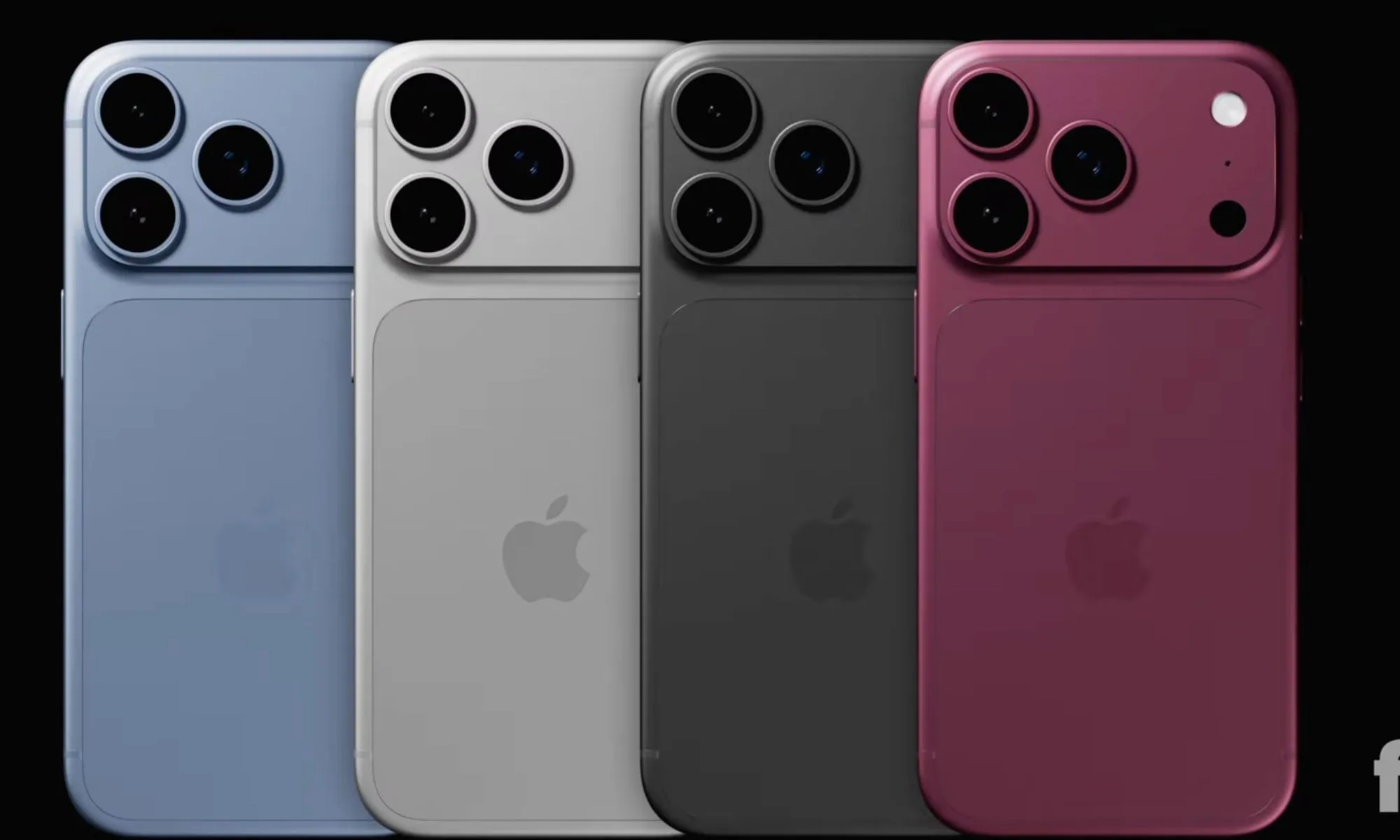
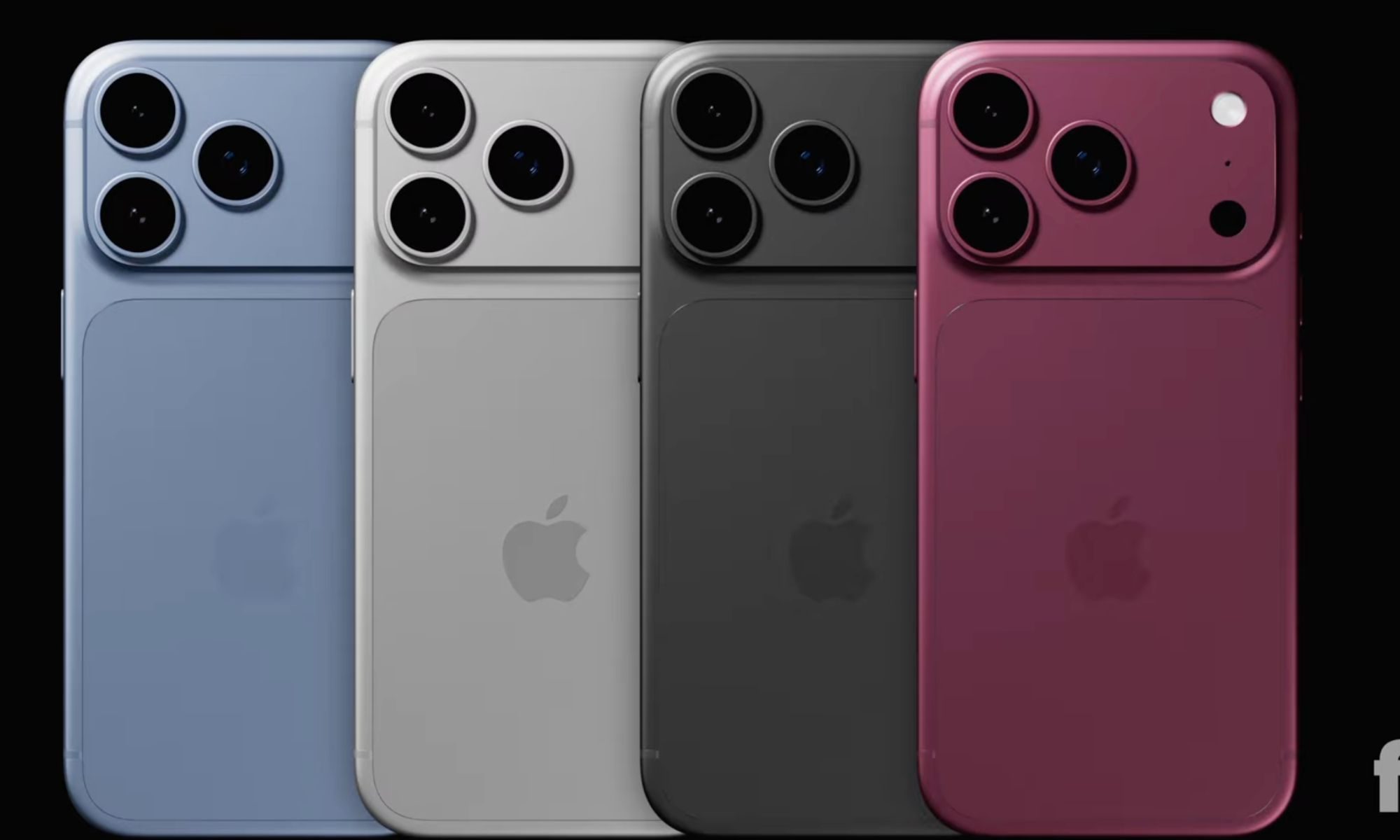
The focus of the latest leak is the iPhone 18 Pro and iPhone 18 Pro Max, which are expected to debut a new variable aperture camera system. Supply chain analyst Ming-Chi Kuo claims the upgraded camera module could cost Apple roughly 50 percent more than the camera hardware currently used in its Pro models.
That may not sound dramatic at first, but camera systems have increasingly become one of the most expensive and important components inside modern flagship smartphones.
A camera upgrade Apple has been chasing for years
Variable aperture technology has been rumored for iPhones for several years, and reports now suggest the feature has finally entered production for the iPhone 18 Pro lineup. Unlike current iPhone Pro models, which use a fixed aperture lens, the new system would allow the camera to physically adjust how much light enters the sensor. In practical terms, that means improved exposure control, more flexibility in challenging lighting conditions, and potentially more natural background blur effects without relying entirely on software processing.
Advertisement
Fpt. on YouTube
Apple has largely relied on computational photography to improve image quality over the years, but a variable aperture would represent a more traditional camera hardware upgrade similar to features already seen on some premium Android phones.
According to Kuo, the new lens assembly is substantially more expensive than the seven-element plastic lens system Apple currently uses. Chinese supplier Sunny Optical is expected to handle a significant portion of production for the upgraded component.
Why this matters
The bigger story may not be the camera itself, but what it could mean for future iPhone pricing.
Apple has so far avoided major flagship price increases despite rising memory costs, more advanced chips, and growing manufacturing expenses. However, reports suggest the iPhone 18 Pro lineup is accumulating several expensive upgrades at once, including new camera technology, next-generation silicon, and additional connectivity features.
Macworld
That has led to growing speculation that Apple may eventually need to pass some of those costs onto buyers.
Online reactions have already been mixed. Some users see variable aperture as a meaningful photography upgrade, while others argue that most everyday users may never notice the difference enough to justify higher prices.
Advertisement
What happens next
Apple is expected to unveil the iPhone 18 Pro series in late 2026, and current reports suggest the devices could arrive alongside Apple’s first foldable iPhone.
For now, it remains unclear whether the higher camera costs will directly affect retail pricing. Apple has historically absorbed some component increases to maintain pricing stability, particularly in highly competitive markets.
Still, if the leaks prove accurate, the iPhone 18 Pro could become a test of how much consumers are willing to pay for advanced camera hardware. Apple clearly believes better photography remains one of the strongest reasons people upgrade their phones. The question is whether buyers will feel the same if the improvements arrive with a heavier price tag attached.
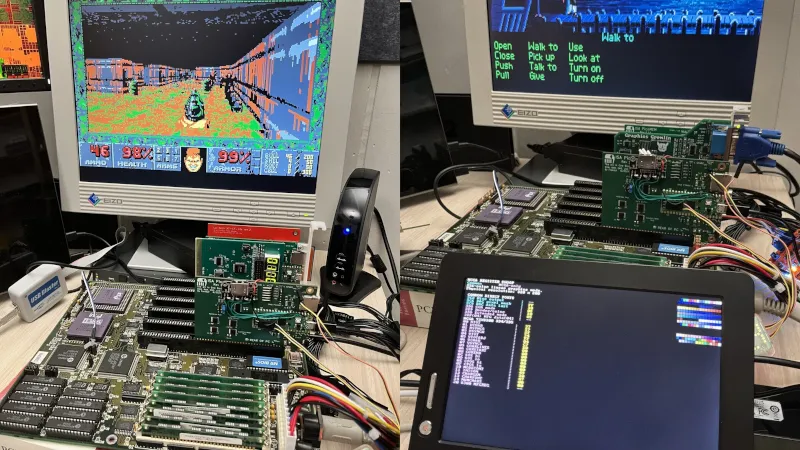
The monitors used on older computers are now becoming difficult to find, as we doubt anything for MDA, CGA, Hercules, or EGA has been manufactured in decades. Even VGA, though there are plenty of surplus flat panels to be found, is not as ubiquitous as it once was. Where does that leave the retrocomputing enthusiast with an ISA PC and no screen? Perhaps [Ian Hanschen] has the answer with the PicoGraph, an ISA-to-USB-to-Displaylink adapter.
In hardware terms, it’s using a PicoMEM, a more general-purpose ISA card for emulating cards with a Pi Pico. The Pico hosts a USB DisplayLink adapter, which can connect to the screen of your choice. The software on the PicoMEM does the heavy lifting and provides MDA, Herc, EGA, and VGA support, as well as support for one of the 1990s Cirrus Logic SVGA chipsets. And yes, it appears to work with DOOM.
The practice of using 2020s microcontrollers to lend functionality to retrocomputers has revolutionised the art. We’ve seen many, with one of the more recent being a minimap add-on for an 8-bit Sinclair Spectrum.
“Unlimited” is a funny term. Unlimited cell phone plans often come with a long list of footnotes, terms, conditions, and exceptions. Mercifully, all of the Big Three cell companies have, by now, ditched throttling on their most expensive plans and include 5G data access in all their unlimited plans. Yet there are still many differences in the services they offer, and there are many differences between each carrier’s various tiers.
Cheaper “unlimited” tiers do offer unlimited talk and text. But they still have rules on how much data you get before they start throttling your speed, and some “unlimited” plans may throttle your data at any given time. It’s been a fixture of cell service plans for years.
It can be overwhelming, which is why I’ve broken it down. Below, I’ve highlighted what each of the three major carriers offers for “unlimited” individual and family plans to help you figure out which unlimited plan is best for you and your budget.
If you absolutely want to avoid slower data speeds at peak times, you’ll likely be choosing among the plans here. But look to our guide to the Best Prepaid Phone Plans for lower costs at the expense of some limitations. Also check out WIRED’s guides to the Best Android Phones, Best iPhones, and Best Cheap Phones.
Advertisement
Update February 2026: We updated prices and plans for all three major carriers. We added T-Mobile’s Essentials Saver Plan and rebranded Better Value Plan as well as AT&T’s rebranded Premium PL, Extra EL, Saver SL, and Value Plus VL plans.
The Best Unlimited Plan Right Now: T-Mobile Experience More/Better Value Plans
The Essentials plan (with autopay, taxes/fees not included): 1 Line for $60/month | 2 Lines $90 | 3 Lines $90 | 4 Lines $100 | 5 Lines $125.
Essentials Saver plan (with autopay, taxes/fees not included): 1 Line for $50/month | 2 Lines $80 | 3 Lines $140
Experience More/Better Value (with autopay, taxes/fees not included): 1 Line for $85/month | 2 Lines $140 | 3 Lines $140 | 4 Lines $170 | 5 Lines $200
Advertisement
Experience Beyond (with autopay, taxes/fees not included): 1 Line for $100/month | 2 Lines $170 | 3 Lines $170 | 4 Lines $215 | 5 Lines $260
T-Mobile has the best 5G coverage among the big three, the highest 5G speeds, the fastest downloads and the best overall reliability, according to analysis from OpenSignal and Ookla. The carrier also makes claims to winning on value, when you take into account perks that include entertainment bundles, airplane WiFi, and access to satellite data in emergencies.
T-Mobile has rebranded its unlimited offerings this year but still offers three (or kinda four) main unlimited talk and text plans: Essentials, Experience More, and Experience Beyond. Only the two Experience plans offer true unlimited 5G data without any throttling or deprioritizing (i.e., making your phone stand in line for data behind other, more important, phones during peak demand.)
For merely occasional jet-setters and those who want consistent phone upgrades, Experience More is the best affordable phone plan among all services. This adds WiFi during flights, 4K video, 60 gigs of high-speed mobile hot-spotting, a modicum of international data, a AA membership, free ad-supported Netflix, and cheap ($3) Apple TV. It’ll also let you upgrade your phone every two years so random children don’t make fun of your ancient iPhone at a rest stop (yes, this has happened to me.)
Advertisement
If you want 3 lines or more and you’re a new T-Mobile customer (or a 5-year T-Mobile customer), you have access to an even better deal. The limited-time-only Better Value plan is in fact., possibly the best deal in phonedom at the moment. For the same price as the 3-to-5 line Experience More plans, you add free ad-supported Hulu, access to the T-Satellite emergency network, unlimited mobile hot-spotting, 30 gigs of international data in hundreds of countries, plus additional watch and tablet lines for just $5 a line. With the exception of phone upgrades every two years instead on every year, the perks are actually better than T-Mobile’s highest price plan, at a much lower price. This sale price is also locked in for 5 years.
Snapchat is already packed with little symbols that can be weirdly hard to decode. You have streaks, emojis, badges, scores, Best Friends, and if you use Snapchat Plus, a tiny solar system that shows where you sit in someone’s closest-friends list.
The feature is called Friend Solar System, though most people just call it Snapchat Planets. It takes your position in a friend’s Snapchat orbit and turns it into a planet. From Mercury to Neptune, these celestial bodies signify how close a person is to you.
The important thing to know is that Snapchat Planets is a Snapchat Plus feature, and it is now off by default for first-time subscribers. To use it, you’ll need to subscribe to Snapchat Plus and manually turn on Friend Solar System from the Snapchat Plus feature management page. Snapchat says the feature can be toggled on or off at any time.
Snap
What are Snapchat Planets?
Snapchat Planets are part of Snapchat’s Friend Solar System feature. When it’s enabled, Snapchat turns a friend’s Best Friends list into a solar system, with that friend as the sun and you as one of the planets around them.
In simple terms, the planet shows where you rank in that friend’s Best Friends list. If you appear as Mercury, you’re their closest Snapchat friend. If you appear as Venus, you’re second. If you appear as Earth, you’re third, and so on.
Advertisement
Snap
You can find this by opening someone’s Friendship Profile and tapping the Best Friends or Friends badge with a gold ring. Snapchat says tapping that badge shows which planet you are in their Solar System.
The planet you see is about your place in their solar system. It does not automatically mean they have the same position as yours.
Snapchat Planets order and meaning
The Snapchat Planets order follows the real solar system, minus Pluto. Mercury is the closest planet, while Neptune is the farthest.
As such, the planets of your friends in order from closest to furthest are as follows:
Mercury
Venus
Earth
Mars
Jupiter
Saturn
Uranus
Neptune
And yes, Pluto gets left out again.
Snapchat
So, if you tap a badge on someone’s profile and see Earth, that means you are third in their Snapchat Friend Solar System. If you see Neptune, you are still in their top eight, just farther out in the ranking.
Snapchat
Best Friends vs Friends: What’s the difference?
Snapchat Planets can appear through two badges: Best Friends and Friends. A Best Friends badge means both of you are in each other’s closest-friends circle. In other words, you are in their top group, and they are in yours too. Meanwhile, a friend’s badge means you are in their Friend Solar System, but the relationship may not be mutual in the same way. You might be one of their top friends, even if they do not appear in the same position on your side.
Either way, tapping the badge is what reveals your planet, provided you have Snapchat Plus and the feature is turned on.
Advertisement
How to see your Snapchat Planet
To check your Snapchat Planet, follow these steps:
Step 1: Open Snapchat.
Step 2: Go to a friend’s Friendship Profile.
Step 3: Look for a Best Friends or Friends badge with a gold ring around it.
Step 4: Tap the badge.
Step 5: Snapchat will show which planet you are in that friend’s Solar System.
If you do not see a badge, it usually means you either do not have Snapchat Plus, Friend Solar System is not enabled, or you are not in that person’s visible friend ranking.
How to turn on Snapchat Planets
Before you can use Snapchat Planets, you need Snapchat Plus. Pricing can vary by region and plan, so the safest way to check the current cost is inside the Snapchat app or through Snapchat’s subscription page. Snapchat also offers multiple Plus-related plans in some regions, and availability can vary.
Once you have Snapchat Plus, you may still need to turn on Friend Solar System manually.
Step 1: Open Snapchat and go to your profile.
Step 2: Tap your Snapchat Plus membership card or banner.
Step 3: Open the Snapchat Plus feature management page.
The astounding growth of the hair-transplant industry in Turkey is not just a medical tourism success story; it’s also a tale of “hacked” medical equipment and algorithmic craftsmanship.
From a biological and evolutionary perspective, human hair is often viewed as an unremarkable mass of keratin that still plays some important functions—protecting our scalps from the sun’s harmful ultraviolet rays and regulating our body temperatures—but, for the most part, is no longer essential to our survival.
Yet, since ancient times, our subconscious perceptions of whether another person is healthy, young, or fertile have been based on visual cues such as skin radiance, the integrity of teeth, and hair density. Deep within our perceptions, hair has become one of the most powerful representations of our identity and self-confidence. It’s key to social communications and perceptions.
Today, the global hair-transplant and restoration industry, which has evolved around this deep psychological and evolutionary need, has grown into a massive, multibillion-dollar industry. Various research firms have estimated the total size of the global hair-transplant market as sitting somewhere between $7.33 billion and $11.61 billion in 2024. And those figures don’t include the underground economy. According to Ministry of Health data, 1.39 million people visited Turkey for medical treatments in 2025. The revenue generated from medical tourism is $3 billion in 2025 (roughly the same as in 2024). While there is no data about how many of these individuals came for hair transplants specifically, it is estimated that one-third of them visited for aesthetic treatments.
Advertisement
The role that hair transplantation plays in promoting Turkey is also noteworthy. For example, Turkish Airlines is occasionally referred to as “Turkish Hair Lines” or simply “Turkish Hair,” a nod to how significant hair transplants are when it comes to tourism to the country. (Similarly, Istanbul Airport has been jokingly referred to as “Istanbul Hairport.”)
It’s possible to see current examples of this in virtually every aspect of popular culture. Last March, a social media user shared a post titled “There won’t be a single bald Spaniard left in the world,” accompanied by an image of the famous soccer player Andrés Iniesta with long hair. It was in response to Spanish prime minister Pedro Sánchez’s stance against the war in Iran, a position that Turkey supports. The post went viral and made headlines on Spanish news channels. Similarly, American basketball star Shaquille O’Neal’s joke in Turkcell’s 5G ads—“I’m here for a hair transplant” while wearing a long curly wig and footage from Turkey’s seven regions—is likely to be talked about for a long time.
Turkey’s global success in hair transplantation and the dominant position the country has achieved are issues too complex to be explained solely by affordable labor, low costs, and favorable exchange rates. Instead it is the result of a bold and at times chaotic yet highly innovative evolution. This includes everything from the adaptation of motors designed for dental devices and sapphire blades used in eye surgery to Anatolia’s ancient craft culture and the master-apprentice relationship transferred to microsurgical techniques.
Makeup for the Modern Man
The development of the institutional infrastructure needed to meet this massive demand in Turkey dates back to the late 1990s. At a time when Turkey’s most famous figures were traveling to Europe for cosmetic surgeries, Dr. Mustafa Tuncer, who attended the Medica trade show in Düsseldorf in 1999, adopted a radical new vision. Tuncer laid the foundation for the Esteworld plastic and aesthetic surgery clinics when he announced, “If Turkey’s celebrities are going to Europe for cosmetic surgery, I will build the best hospital, hire the best doctors, and bring Europeans to Turkey.” Thus, Health Tourism 1.0 began, characterized by fully equipped institutions that combined plastic surgery and hair transplantation under one roof while raising standards to the highest level.
Advertisement
As medical director of the Esteworld Health Group and a member of the second generation of his family to share this vision, Dr. Burak Tuncer says that at the heart of this innovative evolution lies a philosophy with psychological and medical depth—one that does not view the matter merely as a cosmetic procedure. “Hair is a tissue that cannot be replaced or cloned,” he says, adding, “If roots are damaged during the hair-transplant process—whether while being extracted or implanted—we permanently lose that unique tissue. That is why we treat every single strand of hair with the same value and care as we would a kidney or a heart.”
London AI lab Inherent raised $50M from Index Ventures and Radical Ventures to build self-improving AI for scientific discovery. Ex-UK AI tsar Matt Clifford advises.
London-based AI lab Inherent emerged from stealth on Wednesday with a $50 million seed round co-led by Index Ventures and Radical Ventures. Nvidia’s venture arm NVentures also participated, alongside Ex/Ante, Metaplanet, Macroscopic Ventures, and Mythos Ventures. It is among Europe’s largest AI stealth-to-launch rounds in 2026.
The founding team comes from DeepMind, Microsoft, and Reka AI. Tantum Collins and Edward Hughes previously collaborated on cooperative AI research at DeepMind. Louis Kirsch, another co-founder, also worked at DeepMind. Kaloyan Aleksiev came from Reka AI and Microsoft.
Collins has a policy background that most AI lab founders lack. He worked on AI policy at the Biden White House before co-founding Inherent. Matt Clifford, co-founder of Entrepreneurs First and the UK government’s former AI tsar, has joined as an adviser.
Inherent is building a platform called Faraday, named after the scientist. Its purpose is not to answer questions faster. It is to figure out which questions are worth asking in the first place.
Advertisement
“Most AI is built to answer questions. What it can’t do yet is figure out which questions are worth asking, the open-ended curiosity that produced penicillin, the microwave, the GPU,” said Danny Rimer, partner at Index Ventures. “That’s the gap Inherent is building into.”
Faraday pairs human researchers with AI agents that are designed to improve themselves iteratively on hard scientific problems. The company describes this as “AI-native science,” a paradigm it says will look and feel different from the scientific method as practised for the past 400 years.
Index Ventures framed the bet in those terms. “AI-native science will be messier, less legible, but capable of exceptional outcomes,” the firm wrote in a blog post announcing the investment. The conviction is that the most valuable application of frontier AI is not automating existing workflows but enabling discoveries that human researchers could not reach alone.
Inherent is structured as a public benefit corporation, a legal form that requires the company to consider its impact on society alongside shareholder returns. The structure is unusual for a venture-backed AI lab. It signals that the founders view governance as a competitive advantage rather than a constraint.
Advertisement
European AI startups are increasingly demonstrating that they can raise at scales previously reserved for Silicon Valley. Inherent’s $50 million seed sits alongside Peec AI’s $10 million ARR in six months, Lovable’s $100 million single-month revenue, and Mistral’s $300 million ARR. The gap between European and American AI funding is narrowing for companies building in categories where the technology is genuinely new.
Anthropic’s Glasswing project demonstrated that frontier AI can find vulnerabilities at a rate that outpaces human remediation. Inherent’s bet is that the same dynamic applies to scientific discovery: AI agents that can explore hypothesis spaces faster than human researchers can, while humans provide the judgment, taste, and ethical guardrails that agents cannot.
The team’s combination of DeepMind research credentials and White House policy experience gives it unusual positioning. It can credibly pitch to both the scientific establishment and the government institutions that fund basic research. Whether Faraday delivers on the promise of AI-native science will take years to evaluate. The $50 million buys the time to find out.
Rockstar Games has a 2,000-employee studio in Scotland called Rockstar North. And Thursday its workers announced they’d formed a union, reports the gaming news site Aftermath:
The union [part of the wider Independent Workers of Great Britain (IWGB) union] includes workers from Rockstar Games offices in Leeds, London, Edinburgh, Dundee, and Lincoln, the Rockstar Games Workers Union said in a YouTube video published on Thursday… Last year, Rockstar Games employees told Aftermath that the company’s insistence on return-to-office policies was a problem for many workers.
Rockstar Games, for its part, claimed the policies were related to productivity and security concerns… The video posted Thursday outlines what happened over the past several months, starting with the firing of more than 30 Rockstar Games employees in October 2025 for what the company said was “discussing confidential information in a public forum,” a Rockstar Games spokesperson said in a statement to Bloomberg in November. The union disagreed: It said at the time that the workers were gathered in a private Discord server with employees and union organizers — the beginnings of the union announced Thursday. The IWGB is working to fight the firings in court.
Workers and outside union supporters gathered globally after the employees were fired, in front of Rockstar Games’ offices, to protest what the union called union busting by Rockstar Games… “We believe the [firings] were unlawful and retaliatory — connected to the workers’ collective activity of organizing at Rockstar,” IWGB Game Workers Union co-founder Austin Kelmore told Aftermath at the time. “This action by Rockstar came shortly after reaching 10 percent of eligible workers at Rockstar in the union….” [10% is the threshhold for legal recognition by the U.K. government.]
The workers have received support from government officials; in December, UK Prime Minister Keir Starmer called the firings of the unionizing workers “a deeply concerning case.”
A Google security engineer was charged with insider trading after winning $1.2 million using confidential company data to place bets on the cryptocurrency-based Polymarket decentralized prediction market.
36-year-old Michele Spagnuolo, an Italian citizen residing in Switzerland and a Google employee since 2014, appeared on Wednesday in the Southern District of New York.
In parallel, the Commodity Futures Trading Commission (CFTC) filed a separate civil complaint the same day, seeking restitution, disgorgement, civil monetary penalties, and trading and registration bans.
According to the criminal complaint, throughout this scheme, Spagnuolo used his access to an internal software tool containing confidential “Year in Search” data (Google’s annual ranking of top trending search terms), which was marked with a “Google Confidential” banner in red text.
Advertisement
Beginning in October 2025, Spagnuolo allegedly used a Polymarket account under the alias “AlphaRaccoon” to bet on whether specific individuals would appear on Google’s top trending search lists. He also allegedly used confidential data from Google’s internal data tool and placed bets with near-perfect accuracy across approximately 25 unlikely outcomes, while risking roughly $2.75 million in total.
After Google publicly announced its Year in Search results on December 4, 2025, Spagnuolo’s AlphaRaccoon Polymarket account collected approximately $1.2 million in USDC.e winnings.
“From on or about December 4, 2025 through on or about December 10, 2025, when the Polymarket markets regarding Google’s Year in Search resolved, the software released approximately 3,914,362 million USDC.e to the AlphaRaccoon Polymarket account. On or about December 10, 2025, the AlphaRaccoon Polymarket account sent approximately 5.045 million USDC.e, to Wallet-0xAf6,” the complaint reads.
The FBI traced the AlphaRaccoon account to a payment processor account registered in Spagnuolo’s name and linked to an Italian government identification card. After online communities on Discord and X began speculating that AlphaRaccoon was a Google insider, the username was removed from the account, reverting it to an alphanumeric wallet address.
Advertisement
Prosecutors said that Spagnuolo subsequently moved the illegal proceeds through multiple cryptocurrency-swapping services, including one that removes wallet addresses from the blockchain.
“Today’s charges reinforce a decades-old message: corporate insiders cannot use confidential business information to turn a profit in our markets,” said U.S. Attorney Jay Clayton. “As alleged, Spagnuolo violated the duties he owed to his employer and used Google’s confidential business information to make more than $1.2 million in trading profits on Polymarket.”
Spagnuolo now faces a maximum of 10 years in prison on a commodities fraud count and 20 years each on wire fraud and money laundering counts.
Advertisement
Automated pentesting tools deliver real value, but they were built to answer one question: can an attacker move through the network? They were not built to test whether your controls block threats, your detection rules fire, or your cloud configs hold.
This guide covers the 6 surfaces you actually need to validate.
We spend hours testing every product or service we review, so you can be sure you’re buying the best. Find out more about how we test.
Lenovo ThinkTab X11 Gen 1: 30-second review
The ThinkTab X11 Gen 1 is Lenovo’s first serious push into rugged Android territory. It arrives with MIL-STD-810H certification, an IP68 rating, and a genuinely useful screwless removable battery.
To avoid the power demands of PC hardware, Lenovo went with an ARM-based architecture, using the Snapdragon 7s Gen 3 to deliver capable everyday performance. This SoC is combined with a modest 10.95-inch display that is sharp and readable outdoors.
Advertisement
One interesting feature in all SKUs is that this tablet has a replaceable battery. But given the exercise to change it isn’t something you’ll want to be doing on a regular basis, this feature is more about extending the tablet’s life, not giving it extended run time with extra batteries.
While it ticks lots of boxes for performance and durability, the one major weakness of this option is its cameras, which are low quality by modern phone standards
The starting price of around £499 is competitive with the Samsung Galaxy Tab Active5 Pro, which appears to be the inspiration for this device.
Advertisement
If your work takes place on a factory floor, a building site, or in a vehicle cab, this is a credible option. Those looking for a general-purpose consumer tablet should look elsewhere, but if you need a go-anywhere tablet for drone flying or collecting data outdoors, this could be one of the best rugged tablet choices.
(Image credit: Mark Pickavance)
Lenovo ThinkTab X11 Gen 1: price and availability
How much does it cost? £499/€499
When is it out? Available now
Where can you get it? You can get it from online retailers such as Insight in the UK.
Sign up to the TechRadar Pro newsletter to get all the top news, opinion, features and guidance your business needs to succeed!
Advertisement
Availability was confirmed for Europe, the Middle East, and Africa from April 2026. At the time of writing, Lenovo has not confirmed a US retail date, describing the X11 as a commercial product with pricing starting at €499 in the Eurozone.
What’s likely to confuse customers is the sheer number of SKUs that Lenovo has in this product line, which is ridiculous. In the UK alone, they make eight different options. The differences are primarily the storage capacity (typically 128GB or 256GB) and whether it includes mobile phone comms.
But there are models with no (Beidou + GPS + GLONASS + Galileo + QZSS + A-GPS), because the market for people who don’t want to know where they are is obviously huge. Some models come with a pen, while others do not.
The review hardware was a ZAHL0035GB, which comes with 256GB of storage, the Rugged Smart Case and Lenovo Tab Pen XE, but no slot for a mobile SIM.
Advertisement
That puts it directly in the orbit of the Samsung Galaxy Tab Active5 Pro, which carries a street price of between £499 and £549 in the UK, depending on configuration. Samsung uses the same Snapdragon 7s Gen 3 chipset, so the competition is genuinely close on paper.
The UK retailer Insight carries three models, the cheapest being £563.99 inc. VAT for one with 8GB of RAM and 128GB of storage, but no 5G SIM card slot. The top model has 256GB of storage and is 5G-capable, and has a price of £615.49.
Higher-specified configurations with 12GB of RAM and 512GB of UFS 3.1 storage will command a premium when they become available. Lenovo has not published a full pricing matrix for all SKUs at launch. Business buyers will typically be quoted against volume contracts rather than consumer retail pricing, so the headline €499 figure should be treated as a floor.
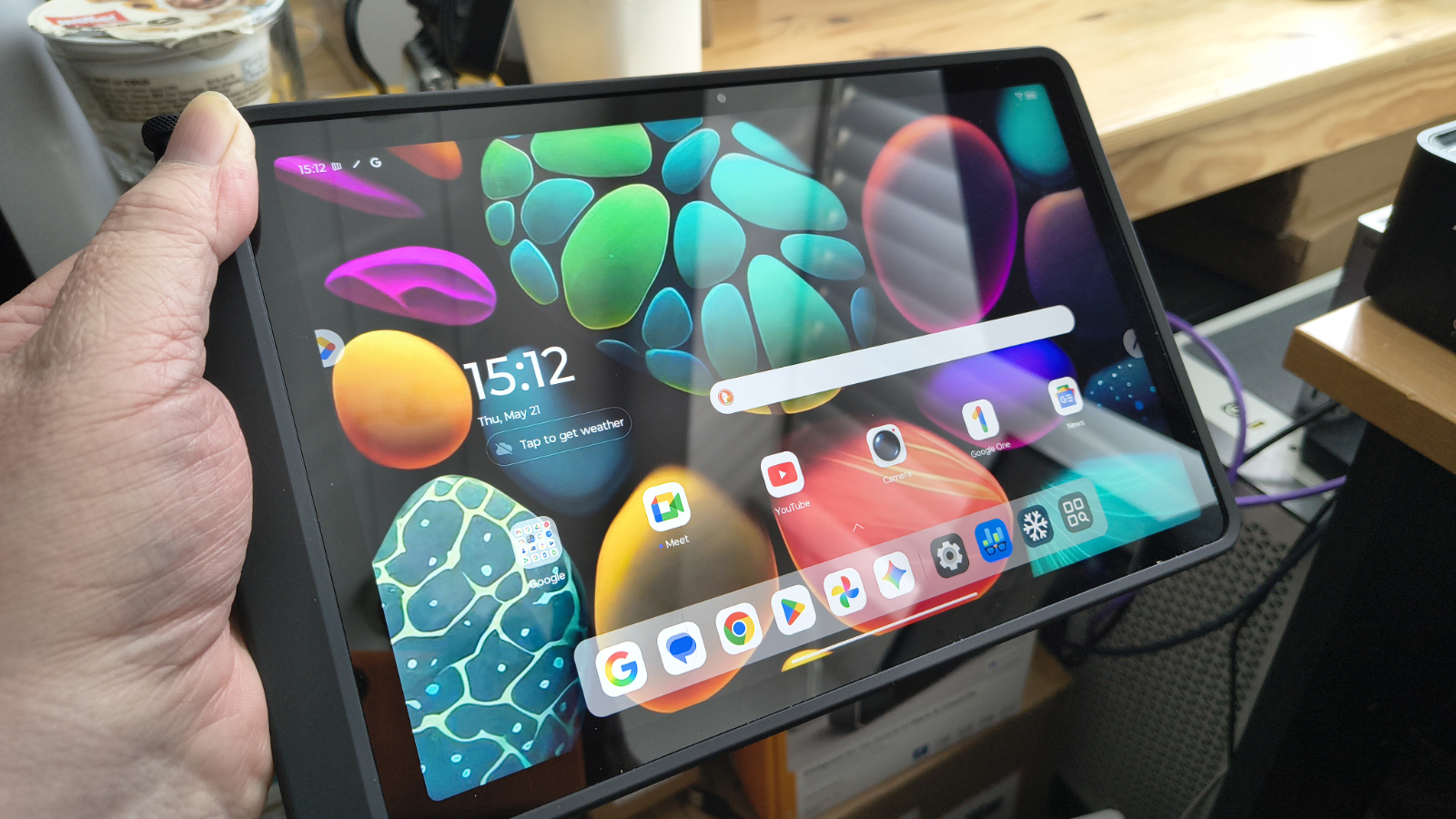
Pick up the ThinkTab X11, and the premise is immediately clear. This is not a tablet designed for the sofa. The chassis is thick by consumer standards, sitting at 9.9mm, and the 650g weight is modest for the category but noticeably heavier than a consumer 11-inch slate.
In the review hardware, it came with a soft silicon bumper that didn’t obscure any of the ports and is relatively easy to remove should you want to access the battery compartment.
The MIL-STD-810H certification covers a demanding set of environmental tests. That includes thermal extremes, vibration, altitude, humidity, and shock. The IP68 rating means submersion in up to 1.5 metres of water for 30 minutes, and that’s without a rubber plug in the USB-C port. For field workers in manufacturing, utilities, or construction, these are not marketing checkboxes. They are basic requirements.
To get inside requires one strong fingernail to be inserted into a cutout on the back that then starts popping clips to remove a cover. To be clear, taking this cover off isn’t easy, and it isn’t something I’ve want to do multiple times. But when the tablet arrives, the battery isn’t installed, so it’s necessary to get it working.
Advertisement
Where I’d place this in the Parthenon of replaceable battery systems is that it’s good that you can swap the battery, especially because it could extend the working life of the device, but it isn’t something you would want to consider doing on a regular basis. Eventually, the clips on the cover will fail, and with them goes the environmental protection.
It’s worth noting that you also need to access the battery area for the installation of a MicroSD, or if you have a 5G capable model, the Nano SIM slot. I think an approach more like the Samsung Active5G with screws might have been a better plan, I’d assert.
That said, most tablets don’t allow the battery to be replaced without entirely dismantling the hardware, and battery exhaustion is a major component in tablets and phones reaching the end of their useful life.
(Image credit: Mark Pickavance)
The display supports glove and wet-touch input, and it’s designed to work with the Lenovo Tab Pen XE, which comes with some SKUs.
Advertisement
That is an important detail on a site where latex gloves are mandatory, or inclement weather intervenes. The Corning Gorilla Glass should handle the usual workplace knocks, and the front-mounted NFC will appeal to logistics and access-control use cases.
An OLED panel might have been a good option, but the IPS panel used is reasonably colourful, and using something better might have driven the price up.
Dual USB-C ports allow simultaneous charging and peripheral connection without an adapter or dock. Although the second port is clearly also designed for an add-on keyboard, which Lenovo didn’t provide for this review. This is such a useful feature, and SoCs generally support more than one USB port, that I do wonder why other brands don’t offer multiple USB ports.
An external feature I’m not a fan of is the camera’s placement, which is positioned deep in the left corner. The upper corners are the common place to hold a tablet and I found that I activated the camera app and saw nothing, as my hand was obscuring the sensor.
Advertisement
If the camera cluster had been placed in the middle, this could have avoided fingers and also provided more natural framing for image and video capture.
Other than that point, and the nail-breaking nature of the battery cover, the design of this tablet is pretty good.
(Image credit: Mark Pickavance)
Design score: 4.5/5
Advertisement
Lenovo ThinkTab X11 Gen 1: hardware
Snapdragon 7s Gen 3
Adreno 810 GPU
10,200mAh battery
The Snapdragon 7s Gen 3 is the same platform Samsung chose for the Galaxy Tab Active5 Pro. On a 4nm process with an octa-core configuration (four Cortex-A720 performance cores and four Cortex-A520 efficiency cores), it delivers capable everyday performance without generating excessive heat in a sealed chassis.
Spoiling my performance reveal slightly, the Snapdragon 7s Gen 3 has a similar performance profile to the MediaTek Dimensity 7400X that I saw recently in the UleFone Amor Pad 5 Ultra.
The Adreno 810 GPU handles the expected range of business and light productivity workloads without difficulty. Video calls, document editing, ERP applications, and camera-intensive tasks are all within its comfort zone. Nobody is buying a MIL-SPEC enterprise tablet for gaming, and the hardware reflects that reality.
Memory options cover 8GB and 12GB LPDDR5, but all the UK SKUs were 8GB. For field workers running one or two dedicated applications, 8GB is sufficient. Environments running multiple concurrent enterprise apps, particularly with persistent background sync, will benefit from the 12GB option. Storage ranges from 128GB to 512GB UFS 3.1, supplemented by a microSD slot.
That combination is practical. Enterprise deployments often include large offline databases, maps, or media libraries. Being able to use a second USB device also allows for an external drive, and it would be easier to replace than the MicroSD card.
Advertisement
(Image credit: Mark Pickavance)
The 10,200mAh battery, charged at 45W, should cover a full shift under typical enterprise workloads. Lenovo has not published an official battery life figure. In my testing that I’ll talk about later, it recharges quickly, which makes the overall capacity less of an issue.
As a total capacity of 10,200mAh isn’t huge, and I’ve seen plenty of rugged phones with more, but in this context, it’s enough to get at least two full working days out of the device, and with curation, the better part of a third day.
The front-mounted NFC is an unusual placement. Most tablets put NFC on the rear, which suits tap-to-pay and general contactless use. Positioning it on the front (upper right) of the screen makes it more accessible for door access control and identity verification, where the user faces the reader.
The hardware specification of the Lenovo ThinkTab X11 Gen 1 is decent, and the choice of the efficient SoC has enabled the battery to be scaled to a level where the machine becomes awkward to carry or only suitable for vehicle mounting.
Advertisement
Lenovo ThinkTab X11 Gen 1: cameras
16MP on the rear
8MP on the front
Two cameras in total
(Image credit: Mark Pickavance)
The Lenovo ThinkTab X11 Gen 1 has two cameras:
Rear camera: 13MP Omnivision OV13B10, AF, LED flash Front camera: 8MP GalaxyCore GC08A8
As seems the norm these days, extracting the correct camera sensors from the Android system provided little hard information about the camera sensors. At one point it the primary sensor could have been from Omnivision, Samsung or Sony.
Advertisement
But thankfully, I dug into the replacement parts list on Lenovo, and that revealed that the main sensor is a 13MP Omnivision OV13B10, and the selfie camera is an 8MP GalaxyCore GC08A8.
Anyone with a decent phone will immediately be thinking how underwhelming these sensors sound, and they’re not exactly cutting-edge. I’m not sure why tablet makers immediately assume that their customers don’t need high-quality images, but it’s a cost-saving that many take.
That said, the pictures taken by the 13MP Omnivision OV13B10 are reasonably sharp, and if you don’t activate HDR mode, the colour makes a stab at being representative.
The problem with a 13MP sensor is that there isn’t much margin for errors. There is no anti-shake compensation, only two levels of digital zoom (1X and 2X), and there are no special modes, like panorama or time-lapse, whatsoever.
Advertisement
However, there are two functions that people will like, the first being that there is a specific camera mode for capturing documents. That’s useful, and the other thing that impressed me is that even with only a 13MP sensor, it will capture both 2K and 4K video. There is no means to change the FPS; it’s 30 FPS by default, but at least you can capture a proper resolution.
I won’t talk about the 8MP fixed focus front-facing camera, to avoid annoying anyone at GalaxyCore. But that it can only capture 1080p video is probably a good thing.
Overall, if you have good lighting conditions, you can make the 13MP Omnivision OV13B10 work for photography and video. Though I wouldn’t expect miracles, and it might have been a better plan if Lenovo had splashed out another dollar or less for a 32MP Samsung sensor.
(Image credit: Mark Pickavance)
Advertisement
Lenovo ThinkTab X11 Gen 1 Camera samples
Image 1 of 10
(Image credit: Mark Pickavance)
(Image credit: Mark Pickavance)
(Image credit: Mark Pickavance)
(Image credit: Mark Pickavance)
(Image credit: Mark Pickavance)
(Image credit: Mark Pickavance)
(Image credit: Mark Pickavance)
(Image credit: Mark Pickavance)
(Image credit: Mark Pickavance)
(Image credit: Mark Pickavance)
Lenovo ThinkTab X11 Gen 1: Performance
Modern and efficient SoC
Workable battery life
Swipe to scroll horizontally
Tablet
Row 0 – Cell 1
Lenovo ThinkTab X11 Gen 1
Samsung Tab Active5 5G
SoC
Advertisement
Row 1 – Cell 1
Qualcomm Snapdragon 7s Gen 3
Samsung Exynos 1380
Mem
Row 2 – Cell 1
8GB/256GB
Advertisement
6GB/128GB
Weight
Row 3 – Cell 1
650g
433g
Advertisement
Battery Capacity
mAh
10,200
5,050
Advertisement
Geekbench
Single
1158
785
Advertisement
Row 6 – Cell 0
Multi
3293
2668
Row 7 – Cell 0
OpenCL
Advertisement
1852
3149
Row 8 – Cell 0
Vulkan
2685
Advertisement
3203
PCMark
3.0 Score
14641
Advertisement
12066
Row 10 – Cell 0
Battery
19h 27m
9h 38m
Advertisement
Charge 30
%
34%
26%
Advertisement
Passmark
Score
15758
13884
Advertisement
Row 13 – Cell 0
CPU
7404
6601
3DMark
Advertisement
Slingshot OGL
5409
5897
Row 15 – Cell 0
Slingshot Ex. OGL
Advertisement
3831
4750
Row 16 – Cell 0
Slingshot Ex. Vulkan
3693
Advertisement
4758
Row 17 – Cell 0
Wildlife
2483
2991
Advertisement
Normally, I’d present the numbers of the review machine against a prior tablet in this instance, but I chose not to here.
That’s because no other tablet I’ve tested could get anywhere near these numbers, including some of the previous Ulefone Pad series. For example, the Ulefone Armor Pad 3 Pro scored only 296 and 1358 on the Geekbench single and multithreaded tests, which is a fraction of what this tablet offers.
Equally, GPU power is a magnitude better with the Pad 3 Pro, managing only 647 points on WildLife, or 18%. I’m sure there are Android tablets available that could go toe-to-toe with the Pad 5 Ultra, but I’ve yet to see them.
Another area this design excels in is battery life, even if I had some issues with getting PCMark to completely exhaust the battery without crashing. That’s not a problem specific to this tablet; it seems to happen with many tablets and phones, where something happens in the background that trips up the PCMark tool.
Advertisement
After running it a number of times, the best result I got was that it ran for 28 hours and 27 minutes, but there was still 39% of the battery capacity left. That result indicates that the total running time of the test using all the battery would be around 46 hours or more, which is substantial.
Using the provided 120W charger, it can recover about 27% of capacity in 30 minutes. That puts the total recovery from empty at between two and three hours. There is no wireless option, and given the battery’s size, that’s probably not a bad thing.
Overall, the performance of the UleFone Armor Pad 5 Ultra is top-notch, and dramatically better than most rugged Android tablets.
(Image credit: Lenovo)
Advertisement
Lenovo ThinkTab X11 Gen 1: Final verdict
I’m going to make one complaint that has nothing to do with the hardware-software combination Lenovo has created. It’s the naming convention.
When I live and breathe platforms on a daily basis, and I can even get confused, then something is badly wrong. Calling something a Lenovo ThinkTab X11 when you already have a Lenovo ThinkPad X11 is a patently dumb idea. And this recent thing of calling them Gen 1 and so on, that’s hyperbolically stupid too.
Here’s a ‘next-gen’ idea: stop now! Lenovo makes far too many SKUs of all its products, and naming them so similarly only causes further customer confusion. Someone wanting an Android tablet doesn’t need a degree in the nuances of Lenovo product naming conventions, if there are any. Rant over, and I should say that this problem isn’t exclusive to Lenovo; it’s all over the commercial platform space.
For the purpose of this review, the ThinkTab X11 Gen 1 is a well-considered entry from Lenovo into a market that Samsung has dominated for years. The removable battery alone separates it from most of the competition. In a sector where devices must survive shifts rather than evenings on the sofa, that matters.
Advertisement
The Snapdragon 7s Gen 3 provides enough headroom for the applications that enterprise Android tablets actually run. The IP68 and MIL-STD-810H certifications are genuine rather than decorative. The dual USB-C configuration is practical and is something that competitors typically do not offer.
There are only two areas that the ThinkTab X11 Gen 2 should embrace when it inevitably arrives. One is to repackage the battery so that the cover is part of the battery, and swapping them in and out is easier. And the other area that needs to be addressed is the cameras, which need to be brought up to the level of entry-level phones from today, not ones from five years ago.
With those things addressed, this would be the perfect rugged tablet solution for many people. In the meantime, the ThinkTab X11 Gen 1 is an affordable option that isn’t a bad device, though Lenovo could have made it even better with a bit of adaptive thinking.
Advertisement
Should I buy a Lenovo ThinkTab X11 Gen 1?
Swipe to scroll horizontally
Ulefone Armor Pad 5 Ultra Score Card
Attributes
Notes
Rating
Value
Advertisement
Competitive vs Samsung Galaxy Tab Active5 Pro at this spec level
“I used to walk into a room and just go ‘ta-da!’ Now, I tiptoe.” This is a line I’ve directly quoted from episode 1 of Russell T Davies‘ blistering new Channel 4 drama Tip Toe, but it’s also the sentiment of any LGBTQIA+ person living in the UK over the last few years.
As Western politics continues to shift to the right, being out and proud is something that’s starting to have a brand-new set of consequences — and instead of shying away from it, Davies presents us with an alarming vision of the future.
Channel 4 explains, “Tip Toe chronicles the escalating, deadly feud between two Manchester neighbors: Leo (Alan Cumming), a vivacious gay bar owner on Canal Street, and Clive (David Morrissey), a conservative electrician with two teenage sons.
Advertisement
Latest Videos From
“As modern prejudices and radicalized opinions creep into their community, everyday friction spirals into shocking violence.”
Except, this isn’t actually the future at all. As a lesbian woman who could easily disguise herself as ‘straight passing’ if I was walking down the street, I watched Tip Toe with a horrific realization that in five years time, if Reform UK really does make good on its prediction of forming a government majority, Davies’ vision could be reality TV.
But speaking to Davies and Cumming, it’s clear that I’ve been naive about what’s happening around the country right now — even if I did need an entire screen-free weekend to get over the trauma of watching these five episodes.
Advertisement
‘Hopefully, this is a wake-up call’
Tip Toe – Brand New Drama From Russell T Davies | Official Trailer | 4TheDrama – YouTube
“I very much was inspired by the spirit of both of those things,” Davies responds when I ask if defining Tip Toe as “Queer as Folk getting the Years and Years treatment” is too reductive.
Sign up for breaking news, reviews, opinion, top tech deals, and more.
“If it was focused in any other way, it wouldn’t be a timely project… it would be an old-fashioned project. This is literally happening to us now. Women can tell us that. Look at the laws on rape statistics and how many rapists are convicted. It’s like every corner of society is shutting this out and yet the establishment just keeps marching on.”
With this analogy, Davies isn’t referring to a blatant sex crime, but the implication that one has happened. Through Leo and Clive’s increasingly hostile encounters, the age-old rhetoric that equates gay men to child abusers comes back into the foreground. This is a thematic cornerstone of Tip Toe, but look around online, and you’ll likely see similar happening there too.
Cumming continues, “This is definitely not a five years time thing, this is happening right now. My hope is that it will be impactful… it sort of feels like it is already in the way that people are reacting to the trailers and promo.
Advertisement
“Hopefully, it will be a wake-up call. I really think that’s what the purpose of this is, to sort of say, ‘look what the f**k is happening and let’s have a chat.’”
My advice for this must-see TV? Stream Tip Toe at your own risk — and be ready for it to sit in your consciousness for every day after.


























































You must be logged in to post a comment Login