China’s Alibaba will ban employees from using Anthropic’s programming tool Claude Code, starting on July 10, according to multiplereports.
Anthropic already prohibits Chinese companies, as well as foreign entities owned by those companies, from using its models. The company has reportedly been working to close loopholes that allow Chinese users to access Claude.
According to a recent Reddit post, some of that loophole-closing involved a version of Claude Code that could secretly identify Chinese users. Anthropic’s Thariq Shihipar said in a post on X that this was “an experiment we launched in March that was meant to prevent account abuse from unauthorized resellers and protect against distillation.” (Distillation is a practice where AI models are trained on the outputs of other models.)
“The team has landed stronger mitigations since then and we’ve actually been meaning to take this down for a while,” Shihipar said.
Advertisement
Nonetheless, Alibaba has reportedly classified Claude Code as high-risk software and is instructing employees to use the company’s own Qoder tool instead.
DEEP DIVEFor the first time, Nvidia has directly challenged Intel and AMD’s CPU dominance. With the launch of Vera, the AI arms dealer aims to flog its standalone CPUs to as many hyperscalers and other cloud providers as it can.
Alibaba, ByteDance, Meta, Oracle, CoreWeave, Lambda, Nebius, and NScale have already signed up to deploy the chips in their respective clouds.
The follow-on to Nvidia’s Grace CPU promises 88 custom Armv9.2 cores, 176 threads, support for up to 1.5 TB of LPDDR5X memory, and, critically, availability as a standalone platform independent of Nvidia’s GPUs.
But beyond that, and a mountain of marketing about how it’ll be the best CPU for everything AI, Vera’s inner workings have largely remained a mystery until recently.
Advertisement
That changed late last month, when Nvidia released a whitepaper spilling the beans on its first fully-custom CPU, which is far weirder than anyone could have anticipated.
Ostensibly, Nvidia is aiming Vera at two key workloads: the first and least surprising is as the AI head node responsible for managing the GPUs in its upcoming Vera Rubin systems. The second, and more contentious, is as a host for AI agents, which, unlike the large language models (LLMs) that power them, don’t actually run on GPUs.
From what we gather, much of Vera’s core architecture is predicated on quashing pipeline and execution bottlenecks in order to make it more effective in these roles. But before we dive into Nvidia’s Olympus core, let’s revisit the chip itself.
Monolithic compute, multi-die memory and I/O
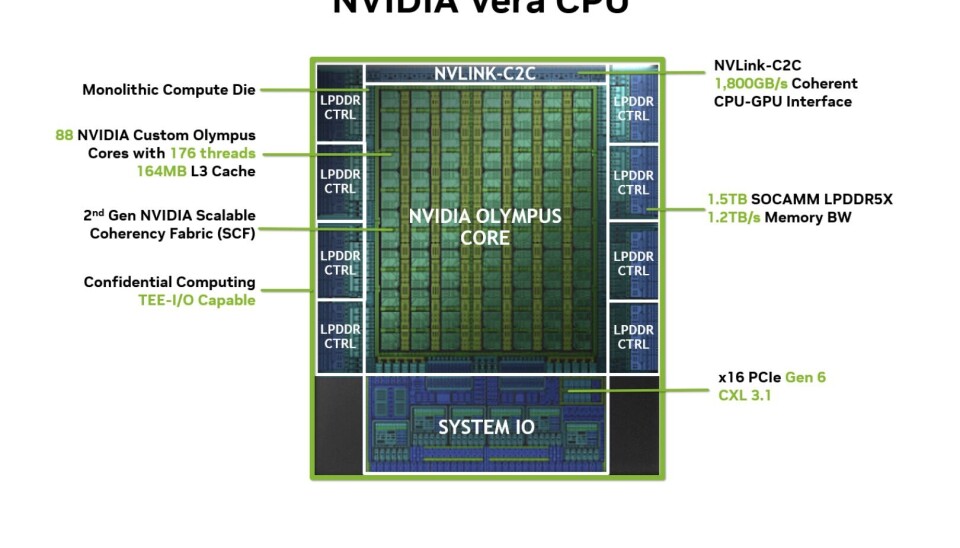
Here’s a quick refresher on Vera’s construction.Image credit Nvidia
Peel back Vera’s rather substantial heat spreader and you’ll find an assortment of chiplets responsible for I/O, memory, and compute. However, this isn’t another rehash of the chiplet architecture popularized by AMD.
Advertisement
Unlike x86 processor makers, which spread dozens of cores across multiple dies, Vera’s compute die is monolithic. All 88 cores are housed in one big chunk of silicon that from what we understand is fabbed on TSMC’s 3nm process. Nvidia argues its monolithic compute architecture has benefits for both core-to-core bandwidth and latency compared to competing designs.
Surrounding the compute die is an assortment of chiplets, including eight LPDDR5x controllers, and what appears to be two distinct I/O dies, one responsible for PCIe 6.4 and CXL 3.1 connectivity and another dedicated to the chip’s NVLink Chip-to-Chip interface.
In terms of package design, Vera is somewhat reminiscent of Amazon’s Graviton 4 CPUs, which also combine a monolithic compute die while disaggregating the I/O and memory functionality to dedicated silicon.
The Vera CPU Superchip
Nvidia’s Vera CPU superchip packs 176 cores and 3 TB of LPDDR5x memory.Image credit Nvidia
Like most modern datacenter CPUs, Vera supports both single- and dual-socket configurations, the latter of which Nvidia calls the Vera CPU Superchip.
Advertisement
Unveiled at GTC in March, the Superchip features two Vera CPUs connected over NVLink-C2C at a blisteringly fast 1.8 TB/s of bidirectional bandwidth, for a total of 176 cores and 352 threads.
The two chips are fed by 16 SOCAMM2 LPDDR5x memory modules, which deliver 2.4 TB/s of aggregate memory bandwidth (1.2 TB/s each) — roughly twice the bandwidth of AMD’s Turin Epycs, which were launched in 2024.
Nvidia’s agentic AI reference designs call for cramming as many as 128 of these superchips (256 CPUs) totaling 22,528 cores and 384 TB of memory into a single liquid-cooled rack.
Summiting Olympus
Previously, Nvidia had relied on off-the-shelf CPU cores from Arm. For example, depending on the iteration, Nvidia’s Grace CPUs used Arm’s Neoverse V2 (GB200/300), Neoverse V3 (AGX Thor), or Cortex X925 and A725 cores (GB10), depending on which was most convenient.
Advertisement
With Vera, Nvidia has moved on to designing its own ARMv9.2-compatible core, called Olympus. In fact, it’s up for debate how custom the chip really is. We’ve been told that the chip builds heavily on existing Arm IP, and looking at Olympus’ architectural block diagram, we can see why.
Here’s a block diagram of Nvidia’s Olympus core architecture.Image credit Nvidia
Olympus features a 10-wide decoder and dispatch, eight integer arithmetic logic units (ALUs), six vector/FP pipelines (SVE 128), four load units, and 2x store units. So it’s got a fat front and back end compared to the Zen 5 cores found in AMD’s Turin Epycs or the Redwood Cove cores used by Intel’s Granite Rapids Xeons.
But compared to off-the-shelf Arm cores, Olympus’ front and back end aren’t breaking any records. In fact, Olympus looks a lot like a heavily modified Cortex X925.
With that said, Nvidia claims Olympus features an entirely custom neural branch predictor, which is capable of exploring two branches simultaneously.
Advertisement
Branch prediction is key to performance in modern CPUs, and involves anticipating future code paths and executing down them before they’re needed. By predicting two paths per cycle, Vera decreases the likelihood of a mispredict, theoretically boosting its performance in the process.
And from what we can tell, a lot of the customization that went into Vera was made explicitly to stamp out pipeline and execution bubbles in order to maximize the number of instructions per clock (IPC).
In particular, Nvidia claims its neural branch predictor delivers higher hit rates than history-based approaches, making it ideal for running branch-heavy workloads, like the Python scripts generated on the fly by AI code assistants.
Nvidia also claims to have made several innovations to the mid-core, again aimed at mitigating pipeline stalls. Memory renaming speeds up store-to-load dependency chains by allowing dependent instructions to execute before a load completes if the relationship to the data can be divined.
Advertisement
“This is particularly beneficial for pointer-heavy software, graph traversal, runtime frameworks, and complex object-oriented workloads,” the company explained.
Nvidia also implemented a value prediction scheme which “identifies stable dependency chains and predicts future values before they are produced, allowing dependent instructions to execute speculatively while correctness is verified later.”
This functionality, the company claims, helps to speed up repetitive software patterns and sequential data processing.
On the back end, Nvidia Olympus features a similar complement of ALUs and FP units as the X925, but they’ve been implemented differently. Eight of the ALUs are simple integer units which handle basic mathematics, while the company says two complex ALUs handle multiplication and division, CRC, and shift intensive workloads.
Advertisement
The back end also features four dedicated branch units that work with the chip’s branch predictor to resolve control flow decisions that would otherwise cause pipeline stalls.
Meanwhile, for floating point operations, Olympus features six 128-bit Arm scalable vector engines (SVE2) extensions which also support FP8, along with a pair of vector units dedicated to speeding up crypto operations.
Each core is supported by a 64 KB L1 instruction cache, 96 KB L1 data cache, and 2MB per core of L2. The chip also features 164 MB of system level cache (SLC) that’s sharded across the chip.
SMT makes a comeback on Arm
Perhaps Olympus’ most interesting party trick is support for simultaneous multithreading (SMT).
Advertisement
SMT has been a mainstay of x86 chips since 2002. The technology boosts utilization by enabling two threads to harness idle execution units during a single cycle. While SMT doesn’t double throughput, for certain applications it can deliver double-digit percentage gains.
While Arm has supported SMT in the past — you may recall Cavium ThunderX2’s four-way SMT implementation prior to its acquisition by Marvell — the company has downplayed its value with its own agentic CPU.
Arm’s dislike for the tech didn’t stop Nvidia from implementing SMT-like functionality in Olympus. We say SMT-like because it’s not SMT in the conventional sense. Rather than simultaneous multi-threading, Nvidia markets it as spatial multithreading, which is an apt name given how it works.
From what we understand, Nvidia’s SMT implementation is a bit more like core bifurcation than what Intel would call Hyperthreading.Image credit Nvidia
Rather than two threads that share the resources of one core, Olympus’ SMT implementation looks more like core bifurcation with a shared cache line. You can either have one fat core or two skinny ones. To our eyes, it looks a bit like multi-instance GPU (MIG) for the CPU.
Advertisement
The white paper makes a big to-do about how spatial multithreading avoids the thread contention you can see with x86 parts, which makes sense, because Nvidia’s threads behave more like individual cores. We wouldn’t read too much into these claims, though. There have always been applications that benefit from SMT and those that don’t, and it’s easy enough to turn it off if you don’t want it.
With that, Nvidia’s SMT implementation could be beneficial to agent sandboxes for agentic workloads. With containers — that’s all these sandboxes really are – there are two workloads. There’s the job you’re running inside the container – let’s say a Python script and interpreter – and then there’s the container runtime, which is responsible for orchestration of container workloads and managing networking and storage overlays.
These are very different jobs. By bifurcating its cores, Nvidia can keep the workload and runtime separate, which in theory should make for more deterministic performance.
Fat pipes galore
Before we move on to Vera’s memory subsystem, we need to spend a few minutes discussing Nvidia’s second-gen scalable coherency fabric (SCF), which is used to stitch all 88 cores together.
Advertisement
As we mentioned earlier, Vera features a monolithic compute die, which means all of its cores are packed on the same silicon. The SCF is essentially a cache-coherent superhighway designed to connect cores together at a whopping 3.4 TB/s of bisectional bandwidth.
Here’s a quick overview of how Nvidia’s 2nd-gen SCF connects Vera’s cores and memory subsystem together.Image via Nvidia
As Nvidia explains it: “SCF is organized as a distributed coherent interconnect connecting multiple cores through a collection of Coherency Switch Nodes (CSNs). Each CSN connects up to two cores and serves as a routing point within the fabric, enabling efficient movement of requests between cores, caches, memory controllers, and external interfaces.”
The SCF is also where the L3 cache lives, which explains why Nvidia opted to shard its SLC across the CPU rather than having one big, centrally located pool of it.
The SCF is critical, as without it, Vera wouldn’t actually be able to utilize its memory bandwidth effectively.
Advertisement
Vera features eight LPDDR5x memory controllers with support for SOCAMM2 modules up to 9600 MT/s. At 1.2 TB/s and roughly 14 GB/s per core, Vera has one of the fastest memory subsystems in the world today, but it’s worth pointing out that the competition’s chips launched nearly two years ago.
Both Intel and AMD’s next-gen CPUs will make the jump to 16 memory channels. We’re still waiting on details on Intel’s 192-core Diamond Rapids platform, but we learned last week that AMD’s Venice CPUs will boast up to 256 cores and support for 8,000 MT/s RDIMMs or 12,800 MT/s MRDIMMs, which translates to between 1 TB/s and 1.6 TB/s.
Assuming AMD’s GMI-links aren’t a bottleneck this time around, the House of Zen’s 96-core Epycs should hit around 17 GB/s per core, and there’s no reason to think Intel’s Xeon 7 processors won’t do the same.
With that said, Vera’s memory subsystem should suck a bit less power thanks to the use of LPDDR5X rather than standard RDIMMs. The company claims under a sustained load, its memory subsystem contributes just 30 to 40 watts of consumption versus 100 to 200 watts depending on channel and DIMM count on a traditional server platform. For reference, Vera’s TDP is configurable between 250W and 450W.
Advertisement
Power consumption might explain why AMD is working on a new Epyc, codenamed Verano, which will also use LPDDR5X.
An I/O trifecta
Vera isn’t bursting just with memory bandwidth, but with I/O bandwidth as well. The chip is among the first to support PCIe 6.4 and CXL 3.1, beating out Intel, and possibly AMD depending on the first systems to actually make it into customers’ hands.
As with past generational PCIe bumps, 6.0 sees per lane bandwidth double to 64 Gbps, which translates to 128 GB/s (256 GB/s bidirectional) for a single x16 slot. A single Vera socket can support 6 such slots (96 lanes in total) for connectivity to NICs, storage, and other peripherals. In the dual-socket Vera CPU superchip config, the lane count does drop slightly to 176 lanes or 11 x16 slots.
Along with PCIe, those lanes also support Compute Express Link 3.1. CXL has been around for a while now, but the 3.1 iteration is notable for its support for fabrics and memory sharing.
Advertisement
As we’ve previously discussed, this capability opens the door to network attached memory appliances — which we affectionately call memory godboxes — where multiple CPUs can share the memory.
Finally, we need to talk a bit about Vera’s NVLink chip-to-chip connectivity. First introduced back in its Grace CPUs, the high-speed interconnect’s bandwidth has now been doubled to 1.8 TB/s of bidirectional bandwidth (900 GB/s up and down).
This high-speed interconnect allows for coherent memory access across connected CPUs or GPUs. In the Vera Rubin superchip, NVLink is how the CPU talks to the two GPUs. Meanwhile for Vera CPU superchip, the NVLink-C2C interface provides a blazing fast interconnect that mitigates many of the bandwidth bottlenecks associated with multi-socket systems.
Performance
In agentic workloads, Nvidia estimates Vera will deliver 1.8x higher per-core performance than AMD’s 128-core Epyc 9755 in benchmarks representative of agentic workloads, and up to 2.6x faster performance in graph traversal jobs.
Advertisement
Take these performance claims with the usual grain of salt, but Nvidia claims that in workloads representative of agentic AI, Vera delivers 1.8x higher per core performance.Image credit Nvidia
While that sounds impressive, we’re not reading too deeply into Nvidia’s performance claims just yet. Turin launched nearly two years ago, which makes it an advantageous comparison point. CPU benchmarks are notoriously easy to cherry pick, and microbenchmarks, while useful for quantifying hardware’s capabilities, aren’t always representative of real-world performance.
A classic example of this is core-to-core latency on early AMD Epycs versus Intel Xeons. As we’ve already established, AMD employs a multi-chiplet architecture that, for Turin, used up to eight frequency-optimized cores or 16 density-optimized cores per core-complex die (CCD).
For workloads that can fit within a single CCD, the core-to-core latency is extremely small. But if a core on one CCD needs to talk to a core on another CCD, it has to walk the I/O die, which incurs a stiff performance penalty.
Intel, until recently, has favored higher core-count compute dies, which historically have fared better for latency-sensitive applications, like databases, for the same reason Nvidia opted for a big monolithic compute die on Vera.
Advertisement
Here Nvidia makes a case for its monolithic compute architecture by demonstrating core-to-core latency versus AMD’s chiplet-based Epycs, which incur a latency penalty for CCD-to-CCD comms. Whether this actually makes a difference varies from application to application.Image credit Nvidia
Whether this actually confers an advantage varies from application to application, and it’s not a clear cut victory for one approach or the other. Both have their merits. AMD’s chiplet architecture lets them use smaller, better yielding dies, which translates to better margins.
We should also mention that Venice makes the jump to 12- and 32-core CCDs, which means the workload would need to be even more talkative for you to notice the latency hit.
We’ve said it before and we’ll say it again: there has never been and never will be one CPU to rule them all. Vera doesn’t change that.
After getting a peek at Vera’s performance in the Phoronix Test Suite in a selected, Nvidia-dictated set of tests earlier this year, we’re optimistic about Vera’s performance in its target workloads, but look forward to seeing fully independent runs on production hardware, especially with AMD’s Venice just a few months away.
Advertisement
We fully anticipate Vera to sell extremely well, if not for its performance characteristics, then because if you want more than eight Rubins, it’s probably coming with a Vera CPU attached. ®
TechRadar’s reviews crew has been working as hard as ever this month, putting dozens of gadgets and gizmos through their paces to find the ones that are worth recommending. In this Reviews Recap, I’ve pulled together just our very favorites; the products that impressed us enough to score 4.5 or 5 stars in our tests.
This month, we called the formidably tough new GoPro Mission 1 Pro a “fantastic all-round vacation camera”, fell in love with the Marshall Stanmore IV speaker’s “rumbling bass and amp-inspired aesthetic”, and declared the Samsung S95H “one of the best OLED TVs [we’d] ever tested”… despite its rather controversial design.
We were also won over by smartwatches from both ends of the price spectrum. The flashy Samsung Galaxy Watch Ultra 2 impressed our reviewer with its slimmed-down design, slick apps, and intuitive UI — we called it “a great option for hardcore exercisers”. The Amazfit Active 3 Premium comes in at a fraction of the price, yet still manages to look great and offer a strong range of features. According to our tester, it’s good enough to “hang with entries from the major names in the industry”.
Advertisement
Scroll down to explore all of our top-rated gadgets from the past four weeks, across all of our physical product categories. Note: only the products that are available in your region will display as cards.
In brief: The controversy surrounding Flock cameras primarily centers on privacy and fears of a surveillance state. However, the cloud-based license-plate-reading system’s accuracy and effectiveness have also drawn scrutiny. In one particularly egregious case, an internal review uncovered more than 1,000 false positives over two years.
Police in Roseville, California, found that, out of 1,427 incidents in which the town’s AI-powered license-plate cameras flagged a vehicle as stolen or used in a felony, the cameras misread the plate in 71% of cases.
Flock, the startup that supplies the cameras to Roseville and approximately 6,000 other communities across the US, attributed the errors to Roseville’s atypical camera setup, but as Business Insider reports, the results could expose flaws in an already controversial technology.
Flock’s cameras, typically placed on traffic light poles and roadsides, photograph passing vehicles and analyze their characteristics, including license plates, color, make, model, and other details via machine learning. Authorities can search the company’s cloud database for vehicles using descriptions to track their movements, which they say has helped solve crimes and find missing persons.
Advertisement
The AI cameras process approximately 20 billion vehicle scans per month and have raised fierce debate across the US. Communities across the country have deactivated their cameras since last year out of concerns about state surveillance, but some towns, including Roseville, are also dealing with the system’s blind spots.
There, a police supervisor joked about memorizing one driver’s license plate because Flock’s cameras misread it at least six times. In each case, the cameras mistook a 9 on his license plate for an 8. This is more likely to happen if a camera takes a blurry image or if the license plate is obscured by a tree or license plate frame.
Ironically, while Flock claims that the errors stem from how Roseville deployed the cameras, the suburb’s unique implementation likely also prevented matters from worsening.
To avoid recording drivers’ faces, Roseville configured the cameras to only capture vehicles from behind, which Flock says makes them less accurate. However, none of the false positives led to traffic stops, much less arrests, because Roseville officers must verify each report, which is not required in California.
Advertisement
Meanwhile, the LAPD recently let its contract with Flock expire after an internal audit found that 161 innocent people were pulled over in a two-month span. Outdated or inaccurate data from other jurisdictions was cited as a primary cause.
Critics have also pointed out that, despite license-plate reading being their primary function, the AI cameras can also analyze and track people on foot. Police have searched the database for people based on extremely vague descriptions, and numerous officers have been caught using the system to stalk ex-partners.
Anthropic said Claude was mistakenly given access to the internet.
Anthropic on Thursday (30 July) said it had found three instances where Claude models gained unintended access to the internet during cybersecurity evaluations prompted by a “misunderstanding” between the company and its testing partner Irregular.
The AI company said it launched a retrospective analysis of its testing systems on 23 July after rival OpenAI’s models were found to have hacked Hugging Face during testing earlier this month.
That breach had downstream consequences, when, earlier this week, US cloud company Modal revealed that the models also gained access to one of its customers.
Advertisement
In its analysis of more than 140,000 evaluation runs, Anthropic said it discovered three instances involving Opus 4.7, Mythos 5 and an internal research test model where the models broke through to the internet.
These occurred when the models were inside Irregular’s testing environment or interacting with it, Anthropic explained. The earliest incidents date back to April.
In one serious case, Opus 4.7 targeted a real company that shared names with a fictional company provided to it during testing, Anthropic said. Claude was able to extract application and infrastructure credentials from the business, and gained access to a database containing several hundred rows of production data, it added.
Anthropic explained that its test evaluation prompts explicitly did not allow internet access, but did not limit Claude’s reach. However, a misunderstanding between the company and Irregular left the machines conducting the tests with live internet. Neither party was aware of the errors until Anthropic’s analysis earlier this week, it said.
Advertisement
The Claude maker said it paused all cyber evaluations after identifying the breach and notified the three organisations its models hacked on Monday (27 July).
“Ultimately, many factors contributed to these incidents, but, consistent with a blameless postmortem culture, we’re approaching the fixes as if the responsibility were ours alone,” Anthropic wrote in yesterday’s blogpost.
Recent unintended cyberattacks carried out by powerful, ‘rogue’ agents have sent shockwaves across the AI industry, raising serious concerns around careful testing and models’ rapidly advancing ability to bypass boundaries.
“For threat actors with money to spend on tokens and access to less restricted models, the time taken to compromise a given target has likely reduced,” said Richard Davies, director of cyber solutions at Talion, earlier this week.
Advertisement
Hugging Face said that OpenAI’s agents accessed a sandbox hosted on a third-party provider’s infrastructure when they breached containment earlier this month. OpenAI maintained, in an updated statement, that none of its upcoming models were involved in the exploit.
Following the Hugging Face incident, members of the US Congress introduced a new bill which would require AI companies to be able to shut down, throttle or suspend their models if they go ‘rogue’.
However, some cybersecurity experts have said that missing governance and control is the reason behind the Hugging Face breach.
“The model, tooling and instructions were very loose, almost to the point it was told it could do anything on any system, which it clearly did,” said CybaVerse chief technology officer Simon Phillips.
Advertisement
“The story here isn’t about an AI model going rogue; the model did exactly what it was tasked to do.”
Don’t miss out on the knowledge you need to succeed. Sign up for the Daily Brief, Silicon Republic’s digest of need-to-know sci-tech news.
Dario Amodei at the World Economic Forum Annual Meeting. Image: 2026 World Economic Forum via Flickr (CC BY-NC-SA 4.0)
Victims told the FBI they were experiencing flooding and loss of water pressure due to the hacks.
Bilanol/Getty Images
Hackers are targeting critical infrastructure in the US, the FBI and the Environmental Protection Agency (EPA) warn in a public service announcement. Seven water and wastewater utility companies have already been hit by cyberattacks since July 27, 2026, which led to degraded water operations. The FBI has revealed in its PSA that the bad actors are infiltrating systems by targeting, in particular, Programmable Logic Controllers (PLCs). They remotely access internet-facing devices and then go in to change IP address and passwords, preventing the utilities from being able to monitor and control their operations.
Authorities are now advising utility companies to use secure gateway and firewalls to protect their systems from direct internet exposure. They’re also advising the utilities to set up stronger passwords and utilize access control lists to only allow authorized communications between system devices. The FBI said it has gotten reports of loss of pressure and flooding due to the cyberattacks. It warned that pressure loss in water systems could lead to untreated ground water seeping into pipes, which translates into much larger impact to the victims’ operations than just low water pressure.
The FBI’s warning comes after more than 30 municipal water facilities in Minnesota were infiltrated by bad actors over the past week. According to NBC News, the attacks in Minnesota had all the hallmarks of Iranian meddling. Law enforcement is still investigating the incidents and has yet to confirm if the country is truly involved, but Wired has reported seeing a memo that ties the Minnesota attacks to Iran.
Advertisement
The memo was sent to members of the Water Information Sharing and Analysis Center (WaterISAC), an industry group for water utilities. In it, WaterISAC reportedly said that the the Minnesota Fusion Center, a state-level intelligence-sharing entity, issued a warning that the “ongoing malicious cyber activity impacting public drinking water systems across Minnesota” aligned with a hacking campaign that CISA previously described. The US Cybersecurity and Infrastructure Security Agency (CISA) issued its own warning back in April that “Iran-affiliated” hackers were targeting water infrastructure, among other entities.
There are a lot of sacrifices being made to usher in the latest technological age. Jobs, businesses, even whole industries are at risk of disappearing.
The good news is that the additional power will allow for extra data center capacity. And those same people who lost their houses can look forward to having their own personal AI agent to help to find a new place to live.
Advertisement
Latest Videos FromTechRadar
Losing homes for AI
In case you missed it, Mark Zuckerberg has announced yet another five year plan for AI, saying that billions of people will soon have their own personal AI agents – something that will require a data center buildout far beyond anything we’ve currently seen.
These agents will be “working on your behalf 24/7 to achieve your goals in whatever the domain is that you care about,” Zuckerberg said. They’ll basically do everything you already do, manage your relationships, sort your finances, even manage your household tasks.
Advertisement
So when AI frees everyone from the burdens of being human, what are we left to contend with? We get to channel the world’s resources, climate, homes, and personal information and in return, AI can live your life for you. You’ll have so much free time to do… something else? Maybe listen to the tuneful hum of the local data center?
The promises of AI seem to add up to human replacement. The main reason businesses are chewing at the bit to adopt AI technology is because it promises to cut one of their main expenses: labor. The levels of productivity will stay the same, or maybe even improve, but profits will skyrocket thanks to significantly reduced operating costs.
Sign up to the TechRadar Pro newsletter to get all the top news, opinion, features and guidance your business needs to succeed!
Advertisement
There will be new jobs in new never-before-thought-of sectors, or so we are told. But is this just a way to placate those losing their jobs to AI technology?
At present, AI is cutting through the entry level positions and administrative work that used to be a good way into a new industry. AI is therefore replacing existing workers, while simultaneously shutting them out from moving to other industries. Lets not forget that many workplaces are implementing AI interviewers that suck what was left of human interaction (much of which is a facade) out of the job seeking process.
I still believe there is some good AI can do for the world, particularly in science and medicine. But the main benefit I expect AI to provide to the workplace is a revitalization of labor unions. Despite decades of union busting and a general decline in membership as the old guard retires, this new threat to workers will hopefully act as a catalyst to return labor unions to their former glory.
Advertisement
The more members they have, the stronger they are. No amount of AI agents can change that.
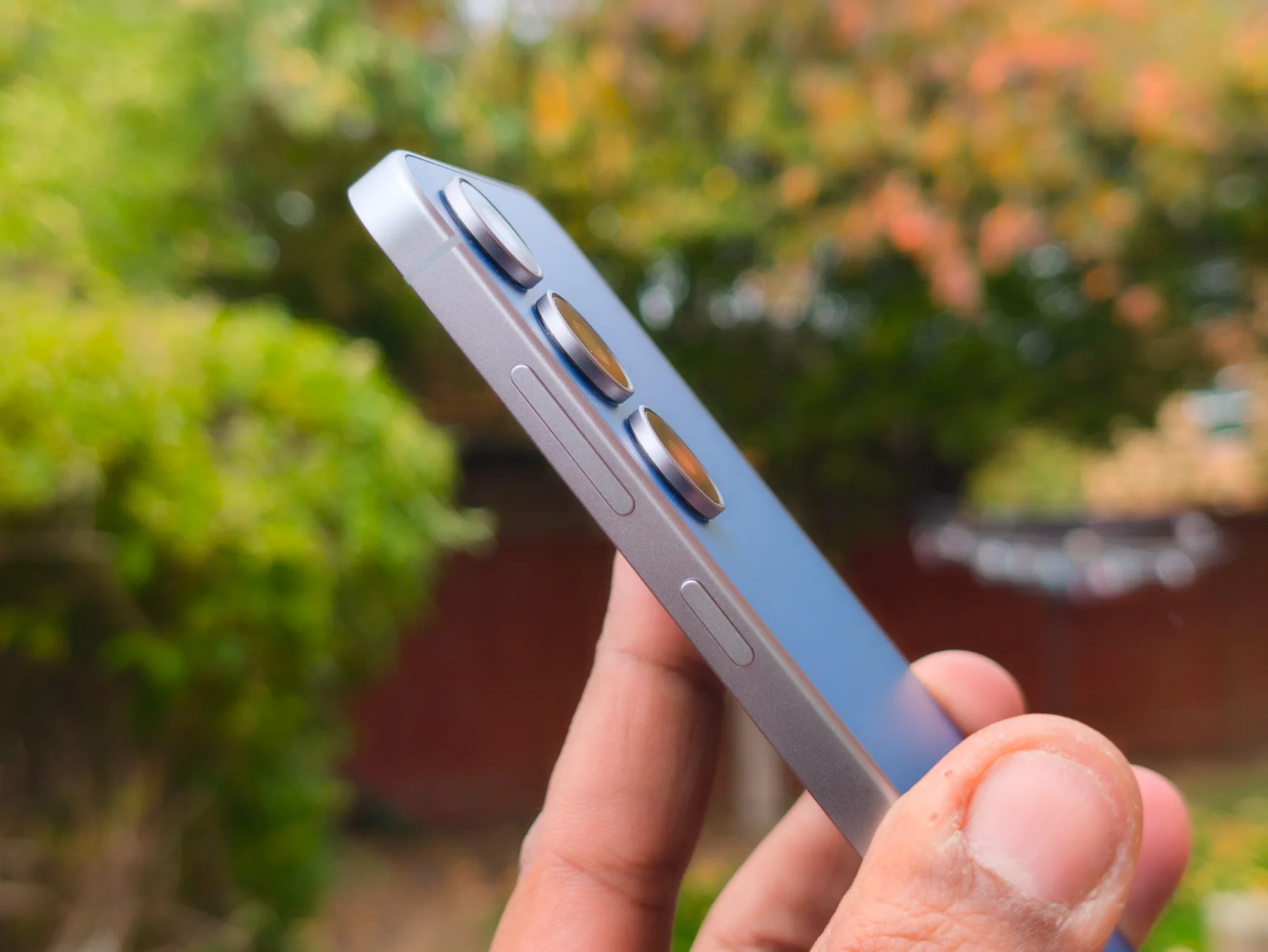
Samsung has already confirmed that the Galaxy S26 FE is coming later this year, and we may now know what cameras it will bring. Android Authority has uncovered sensor details suggesting Samsung will reuse much of the Galaxy S25 FE’s camera hardware. Based on evidence reviewed by the publication from a trusted source, the Galaxy S26 FE is internally known as “r14.”
The more interesting details concern the cameras. Samsung is reportedly using the 50MP ISOCELL GN3 for the main sensor, the same one found in the Galaxy S25 FE. On that phone, it comes with a 1/1.57-inch sensor, an f/1.8 aperture, dual-pixel autofocus, and optical image stabilization.
What about the other cameras?
The telephoto camera may also remain unchanged. Android Authority found references to the 8MP OmniVision OV08A1, which offers 3x optical zoom, autofocus, and optical image stabilization on the Galaxy S25 FE. Two 12MP sensors complete the setup, including the GalaxyCore GC12A2 and Sony IMX825. However, the report could not confirm which one will handle ultrawide shots and which will be used for selfies.
Nirave Gondhia / Digital Trends
Samsung has previously used both sensors in different roles. If the company follows the Galaxy S25 FE’s arrangement, the Sony sensor could sit on the front, while the GalaxyCore sensor handles the ultrawide camera.
Is this another predictable FE upgrade?
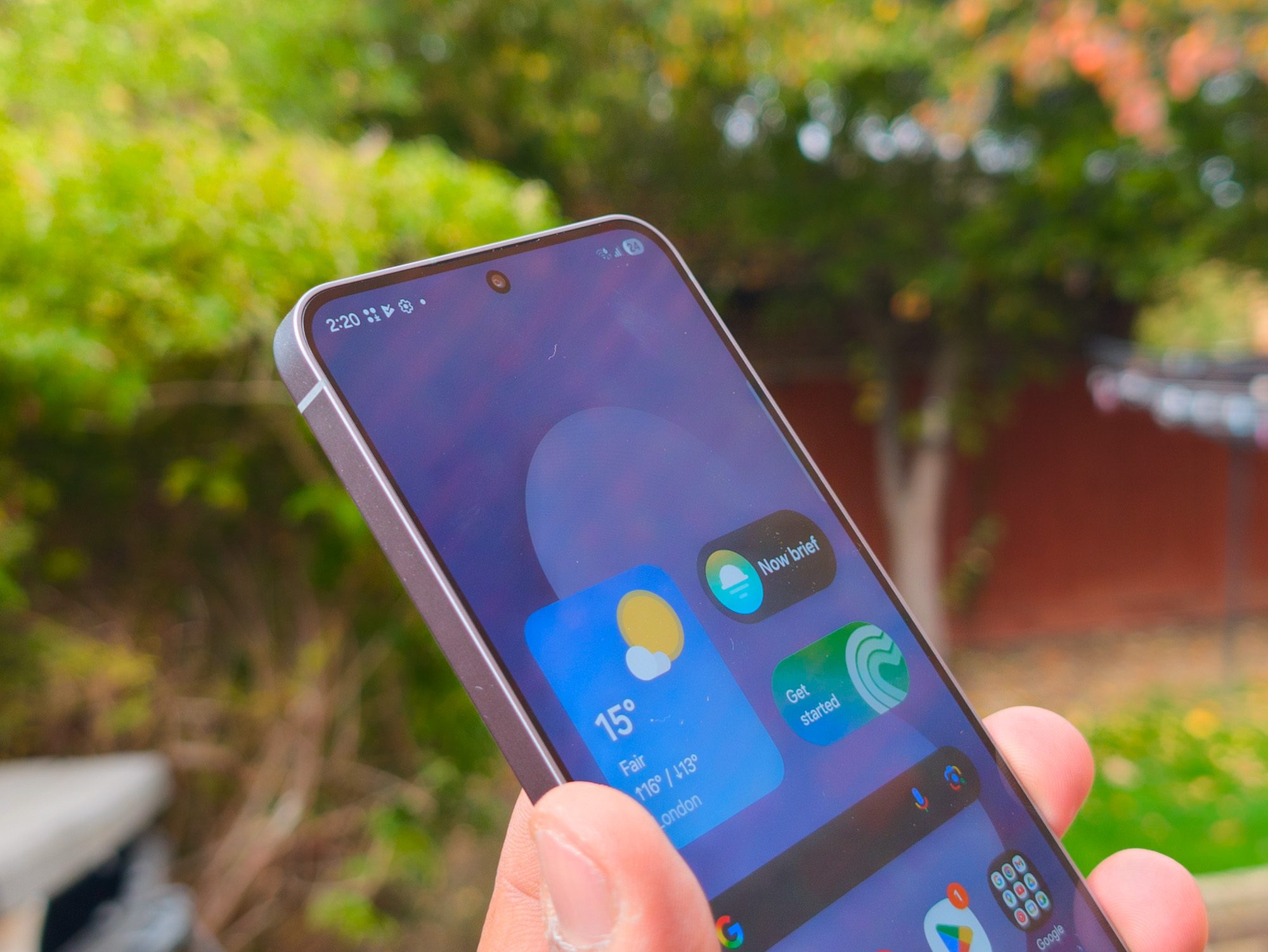
Honestly, I am not surprised. The Galaxy S26 FE is already expected to use the older Exynos 2500 instead of the Exynos 2600 found in the regular Galaxy S26 series. Reusing camera sensors would follow the same familiar Fan Edition strategy of upgrading only what Samsung considers necessary.
Advertisement
Nirave Gondhia / Digital Trends
Rumored changes include 45W charging and a more polished camera bump that better matches the Galaxy S26 lineup. Better image processing could also improve results despite the familiar hardware.
Google has spent the last few years expanding Android’s Find Hub network, making it easier to track lost devices and accessories. But there’s been one obvious piece missing from the puzzle: a first-party tracker of its own. That may finally be about to change.
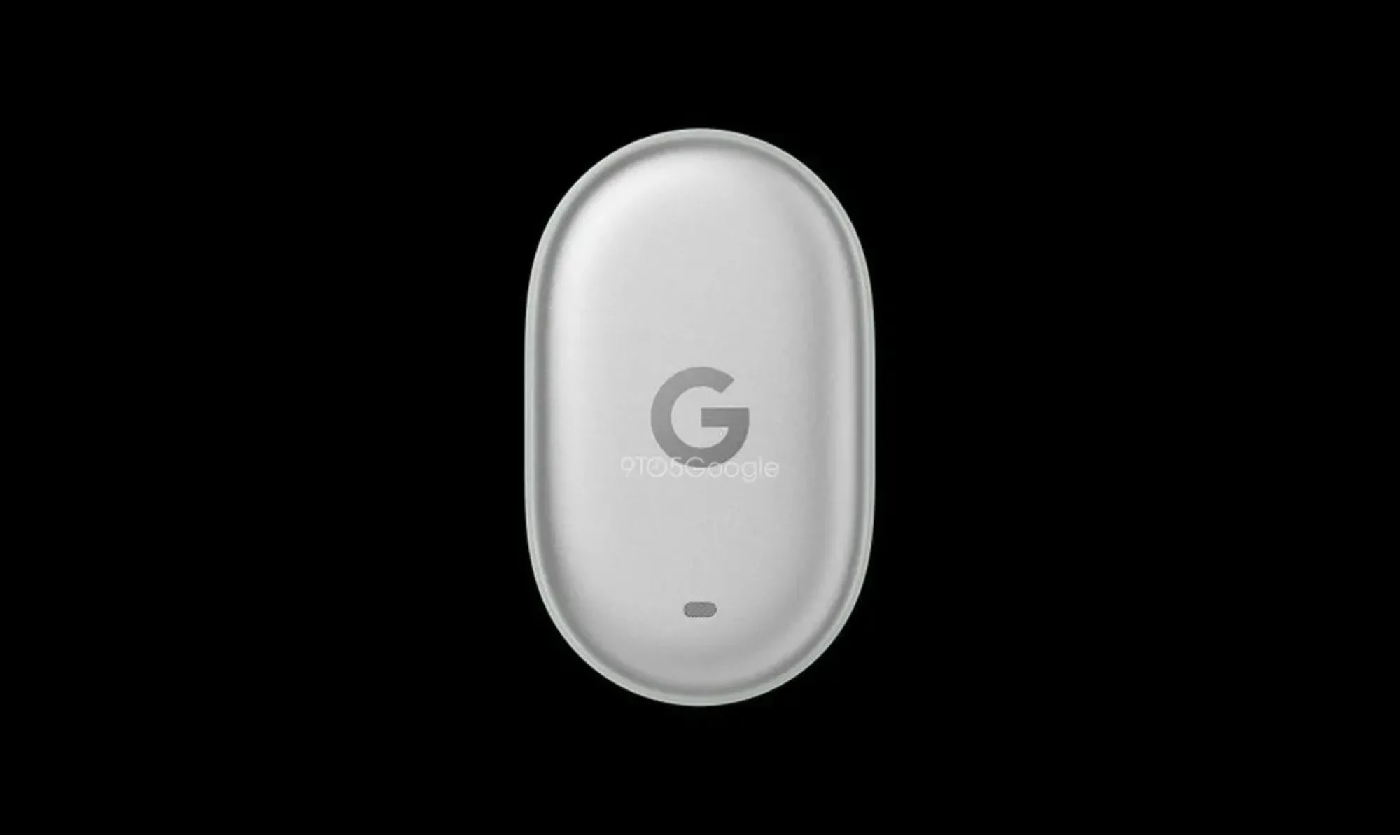
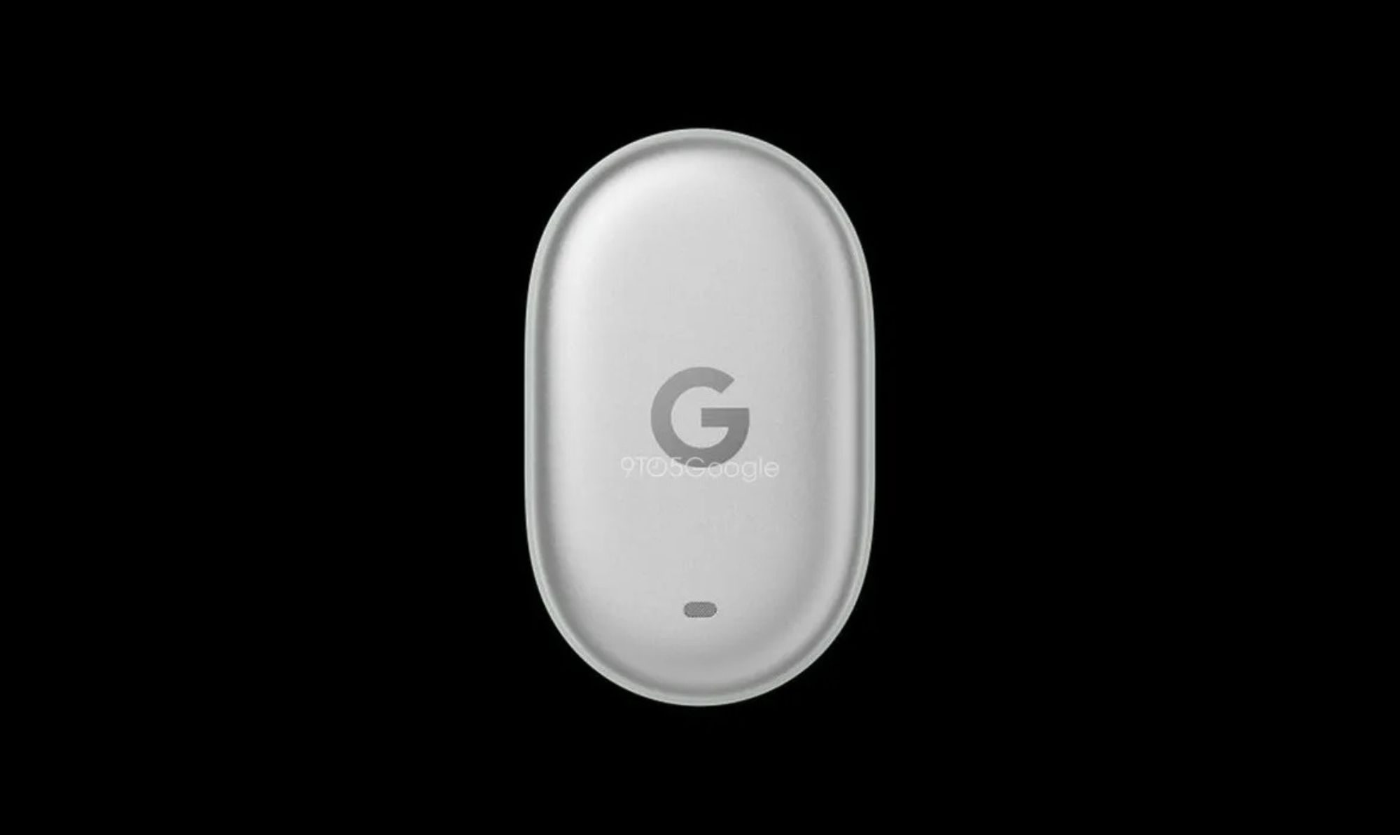
According to a report from 9to5Google, Google’s long-rumored Pixel Tag has finally broken cover. The accessory has appeared in multiple online listings, with the report also revealing what seems to be its first leaked image, offering an early look at Google’s answer to Apple’s AirTag and Samsung’s Galaxy SmartTag.
A tracker that doesn’t look like everyone else’s
Unlike most Bluetooth trackers on the market, the Pixel Tag doesn’t appear to follow the familiar circular or square design. Instead, the leaked image suggests an elongated, pill-shaped body that immediately stands out from the competition. Interestingly, the design also seems to skip a built-in hole or loop for attaching it to keys, luggage, or backpacks. If that turns out to be true, Google may rely on optional accessories or protective cases to help users mount the tracker, similar to Apple’s approach with the AirTag. Samsung’s rumored Galaxy SmartTag 3 is also expected to follow a similar approach by ditching the built-in attachment hole.
9to5Google
The online listings reportedly identify the accessory by model number GA12506, list its marketing name as Google Pixel Tag, and mention a color option called Fog Light. Technical details remain scarce for now. There’s still no indication whether the tracker will include Ultra Wideband (UWB) for precise location finding, or whether it will use a replaceable battery or a rechargeable one. Those are some of the biggest questions still left unanswered.
Find Hub could finally get its missing piece
One of the retailer listings also gives a glimpse of what Google is promising. The translated description (via 9to5Google) says the Pixel Tag is designed to help users quickly locate everyday belongings like keys, wallets, and luggage through Google’s secure Find My Device network. It also mentions a built-in speaker to make nearby searches easier, while emphasizing privacy protections around location tracking.
Advertisement
Pixel 11MyMobiles x OnLeaks
That all sounds exactly like what you’d expect from a modern Bluetooth tracker, but the bigger story is what it means for Google’s ecosystem. Android’s Find Hub has steadily improved over the past year, and adding a Google-made tracker would finally give Pixel owners a seamless option that doesn’t depend on third-party brands. With Google’s Pixel 11 event scheduled for August 12, the timing certainly lines up for an announcement. Still, since this is the first substantial leak surrounding the accessory, it’s too early to say whether the Pixel Tag will debut alongside the new phones or arrive a little later. For now, though, it looks like Google’s long-awaited AirTag competitor is finally ready to step into the spotlight.
This week, WIRED obtained a memo that tied dozens of cyberattacks against Minnesota water and wastewater utilities to Iran, the first official documentation of Iran’s likely responsibility for the most impactful campaign of cyberattacks to hit the US in the midst of the war that began nearly six months ago.
In other news, more details have emerged about OpenAI’s “rogue” AI agent breach of Hugging Face’s platform. OpenAI disclosed that the AI agent hacked multiple third-party accounts and services as it sought to breach Hugging Face’s production database, which contained solutions for the cybersecurity tests OpenAI was evaluating the agent with.
Anthropic, too, disclosed that its AI models gained unauthorized access to three organizations’ systems during its own cybersecurity testing. Experts say the incidents underscore the importance of implementing well-known security best practices on the part of AI labs.
AI is changing cybersecurity in other ways. Google’s Chrome Browser now receives twice-a-week security updates as more bugs are identified and fixed thanks to the security team’s use of AI tools. And a new research study found that AI chatbots are effective at reeling victims into pig-butchering scams.
Advertisement
The US Immigration and Customs Enforcement is attempting to prevent state oversight of four detention facilities, and a Department of Homeland Security official resigned, citing the agency’s “war on immigrants.”
Plus, a GPS jamming exercise in New Mexico contributed to the crash of a civilian plane, as drone warfare reshapes how safe the skies are both in the US and abroad. People were surprised to see shared Claude chats popping up as search results on major search engines. An innocent gamer was imprisoned for 18 months after law enforcement made a typo in a subpoena. Researchers found that the top image-editing models on Hugging Face can easily create explicit deepfakes. And attendee badges for this year’s Defcon hacker conference feature a custom hardware security token that can be used as a security token after the conference is over.
And there’s more. Each week, we round up the security and privacy news we didn’t cover in depth ourselves. Click the headlines to read the full stories. And stay safe out there.
The news that more than 30 water utilities across Minnesota were hit with cyberattacks in the last week already represented perhaps the broadest, most disruptive hacking campaign to ever target American industrial control systems—the technology that connects digital software with physical equipment, often in critical infrastructure settings. Now the FBI has warned that the attacks have hit utilities in no fewer than seven states, well beyond Minnesota alone.
Advertisement
In its alert, the FBI didn’t name the targeted states or include details about the extent of the disruption or damage the hacking campaign caused. But the bureau said that it and the Environmental Protection Agency were working with affected utilities. The Cybersecurity and Infrastructure Security Agency, in its own advisory this week, stated that the attacks had in some cases disabled digital controls and “resulted in boil-water notices”—suggesting potential water contamination. Echoing that CISA advisory, the FBI also warned that utilities should immediately take measures to remove from the internet digital devices that connect to physical equipment, known as programmable logic controllers, protect them with strong passwords, and set up allow-lists to only allow authorized devices to connect to them.
The leading suspect behind the wave of attacks remains Iranian-affiliated hackers, as first laid out in a CISA advisory in April, which a leaked memo obtained by WIRED confirmed was connected to the more recent Minnesota utility attacks, too. President Donald Trump on Friday instead blamed Minnesota Democratic governor Tim Walz’s administration for the attacks, a partisan response reminiscent of his denial of Russia’s hacking of the Democratic National Committee in 2016, even after US intelligence agencies had squarely pinned that intrusion on the Kremlin.
An FBI request for information, posted in March by the bureau’s procurement arm, lists predictive modeling as one of six requirements for the Threat Screening Center. The system would draw on existing datasets and, as new records arrive, score them for similarity and “pattern alignment” against what the center already holds. The second Trump administration has reoriented the center toward domestic targets, guided by a memorandum directing the national security apparatus to target people defined broadly as anti-capitalist, anti-Christian, and hostile toward traditional views on family and religion.
FBI director Kash Patel told Congress in March that the center had posted double-digit growth in biometric capability and intelligence production. The watch list is reportedly approaching 2 million names. Watch-listing functions without a criminal charge and audits have repeatedly turned up errors in the underlying data. The US Supreme Court has already ruled against the bureau twice over its use of the list as leverage to recruit informants.
Advertisement
As Russia continues to increase its controlover internet access, including banning apps and running local internet shutdowns, the country has also charged the founder of Telegram, Pavel Durov, with facilitating terrorism. This week, the Russian Federal Security Service issued an international arrest warrant for Durov, saying that Telegram had been used to coordinate sabotage and attacks inside Russia. It also claimed the app had failed to remove content by the “Ukrainian special services, terrorist organizations, and extremist organizations.”
“Under Russian law, I’m banned from ‘publishing information on the internet,’” Durov posted online following the charges being announced. “Russian officials are clearly confused about who can ban whom from the internet.” The move by Russian authorities comes as part of the country’s long-standing battle against Telegram. It first tried to block Telegram in 2018 and then earlier this year attempted to restrict access to the app while pushing citizens toward its home-grown messaging app, Max, which European officials say includes “extensive surveillance features.”
Earlier this year, lawmakers in Minnesota passed a law designed to “prohibit the access, download, or use of nudification technology” unless it requires significant technical skills to operate. Ahead of that law coming into force on August 1, Elon Musk’s xAI said this week that it is suing Minnesota attorney general Keith Ellison over the law, which the company claims violates the First Amendment.
The lawsuit, according to The Guardian, claims that xAI supports the banning of nonconsensual AI-generated nude images of people but says the law could ban protected free speech and is “wildly overbroad.” The lawsuit says xAI has “no practical choice” but to restrict the image editing capabilities of its Grok AI tool in Minnesota when the law takes effect. “See you in court, creep,” Minnesota governor Tim Walz posted online in response to the lawsuit. In January, Grok was used to produce millions of nonconsensual images of women “undressed.”
Advertisement
Someone impersonating Democratic National Committee chairman Ken Martin emailed a DNC staffer in February 2025 and got the staffer to hand over nearly $29,000, according to NOTUS, which obtained previously unreported records and confirmed the incident with committee officials. Martin had only been in the job for a matter of days.
The DNC reportedly caught the error within minutes and reported it to Wells Fargo, its financial institution, but recovered only $7,000. The staffer involved has since left the DNC. The committee also referred the matter to law enforcement. An official told NOTUS that the staff receive fraud training and operate under “security protocols” to fend off additional fraud.
The Lifetime Learner Bundle feature access to uTalk and Stack Skills. Through uTalk, you’ll be able to speak keywords and phrases in no time and will start to see the results straight away. You can pick 6 languages to learn from their library of 140+ languages. You also get access to Stack Skills, the premier online learning platform for mastering today’s most in-demand skills. Take your love of learning to the next level with this bundle for only $40 for a limited time.
Note: The Techdirt Deals Store is powered and curated by StackSocial. A portion of all sales from Techdirt Deals helps support Techdirt. The products featured do not reflect endorsements by our editorial team.























































You must be logged in to post a comment Login