Anthropic has named Accenture as the first embedded evaluator of its frontier models, with each company expecting to invest at least $1bn over five years. Anthropic will fund the work directly and says in the same announcement that funding should come from pooled or government sources instead, because neither exists yet. Accenture is already Anthropic’s largest Claude Code deployment, and there are still no standards for what embedded evaluators may access or must report.
Each company expects to invest at least $1bn over five years. It is the first concrete implementation of a commitment made in Dario Amodei’s essay six days earlier, which TNW covered when it was published.
The funding line is the one to read
Anthropic states plainly that it will fund Accenture’s work directly. It also says that is not the right long-term arrangement, and that funding should come from pooled or government sources.
Its reasoning is that neither of those exists yet. The company argued for them in its own policy framework in June, and in the meantime intends to work with different evaluators under different funding arrangements.
Advertisement
That is a candid thing to publish. It is also a description of a structural problem that an announcement cannot solve, because the evaluator’s invoice still goes to the evaluated.
METR has not been dropped
The essay that prompted this named METR, a nonprofit, as the kind of body it had in mind. Anthropic says it is in dialogue with METR and other nonprofit evaluators to pilot elements of embedded evaluation using their own funding.
So the picture is two-track rather than a substitution. A consultancy paid by Anthropic starts now, and self-funded nonprofits are in discussion.
Which track produces the first critical finding will tell you more than the announcement does.
Advertisement
The commercial relationship is substantial
Accenture and Anthropic already run a joint business group. Around 30,000 Accenture professionals are being trained on Claude, and tens of thousands of its developers use Claude Code in what Anthropic has called its largest ever deployment.
They also fund a Claude centre of excellence inside Accenture and co-develop offerings for regulated industries. Accenture is a customer, a reseller, an implementation partner, and now the evaluator.
Anthropic does not treat this as awkward. It presents Accenture’s enterprise deployment experience as a qualification, on the grounds that understanding how AI is used in practice informs how you assess it.
The case for that is not weak
The work will be led by Faculty, the British AI company Accenture bought in January. Faculty had already worked with leading labs including OpenAI and Anthropic on model safety before the acquisition.
Advertisement
Scale matters too. Embedding a standing team with employee-level access is a staffing problem nonprofits the size of METR cannot solve, and $1bn over five years buys people rather than announcements.
Anthropic has also made the arrangement non-exclusive. More evaluators are promised within weeks, and Accenture is to do the same work for other developers.
What is genuinely unresolved
Anthropic says there are no standards yet for what information embedded evaluators should have access to, or how they should report what they find. That is the admission underneath the money.
An evaluator with employee-level access and no reporting obligation is a governance arrangement defined entirely by the company being examined. Anthropic says independent evaluators make its accountability more verifiable rather than reducing it, and that the safety of its models remains its own responsibility.
Advertisement
The open question is what happens to a finding that would delay a release, inside a firm whose larger business is selling that release to clients.
The organisations technically capable of auditing frontier models are the ones the industry wants to acquire or contract. That is the constraint every version of this runs into.
Faculty is a London company with a public sector history, bought in January by an Irish-domiciled consultancy, and now the embedded evaluator for an American lab. European AI assurance capability is consolidating into large integrators.
The EU’s own framework leans on independent conformity assessment by bodies without a commercial stake in the product. This is a different model arriving first.
What to watch
Watch whether the nonprofit track materialises and on what terms. Anthropic says more names are coming, and whether any arrives self-funded is the test of whether plurality is real.
Meta is reportedly preparing a new version of its smart glasses without a camera, even as the company’s chief technology officer argues that concerns surrounding the devices are being driven by a small number of problematic users.
Andrew Bosworth, Meta’s CTO and head of Reality Labs, addressed the issue during an Ask Me Anything session on Instagram. He argued that most people use the glasses responsibly, comparing their recording capabilities to smartphone cameras while highlighting the devices’ recording indicator and anti-tampering protections.
However, ongoing privacy concerns and reports of ways to bypass those safeguards suggest that the debate around camera-equipped wearables is far from settled.
Meta defends recording safeguards amid privacy concerns
Bosworth pointed to the glasses’ recording light, which is designed to alert people when the device is capturing video. Meta has also introduced measures intended to prevent users from recording when the indicator is covered or tampered with.
Advertisement
Andy Boxall / Digital Trends
According to The Next Web’s report, a software update addressed a loophole that allowed users to begin recording and then cover the light. Meta also disabled cameras on some devices where the indicator had been physically removed.
The company reportedly said the enforcement affected fewer than one in every 1,000 glasses sold. However, The Next Web reported that a $2 sticker could still defeat the recording indicator, raising questions about whether a visible light alone can provide meaningful privacy protection.
The concern extends beyond the number of users behaving improperly. Unlike a smartphone, which typically makes recording more visible to people nearby, smart glasses can capture footage without an obvious change in the wearer’s behaviour.
Camera-free Luna could change Meta’s approach
The Information reportedly claims that Meta is preparing a camera-free version of its glasses, codenamed Luna. The device is expected to feature six microphones and could be unveiled at Meta Connect on September 23, with shipments potentially beginning in October.
Removing the camera would directly address concerns about people being recorded without their knowledge. However, it would also remove one of the most prominent features associated with Meta’s existing smart glasses.
Advertisement
Meta
The microphones introduce another privacy consideration. While the camera-related concern would be reduced, users could still question whether the device is listening and how that activity is communicated. Unlike a camera, microphones do not currently have an established public indicator convention.
Privacy scrutiny is also increasing in Europe. Authorities in France, Norway and Germany are examining issues involving camera-equipped wearables, while the European Data Protection Board is preparing a report on the category.
Meta’s upcoming Connect event could therefore provide important details about Luna, including its microphone controls, privacy indicators and intended use cases.
The takeaway: Warnings from AI developers have sparked widespread debate over whether, and how, the technology might cause human extinction. While much of that discussion has centered on rogue AI incidents, events in the Middle East suggest that military action driven by hallucinating AI tools may be the more immediate danger.
Sources connected to the US military recently told CNN that the US nearly moved to intercept a Chinese vessel in the Middle East this spring based on false intel from an AI-assisted report. The report was based on an inaccurate chatbot response that identified the ship as carrying materials for a nuclear weapons program.
Two sources said armed military personnel were preparing to board the vessel, with military planes already in the air, before officials took a closer look at the report and discovered it was at least partially AI-generated.
One source described the intel as completely false, saying it nearly started a war between the two nuclear powers. What was actually on the ship remains unclear.
Advertisement
An analyst had asked an unnamed chatbot to assess intelligence on the ship’s manifest, information that originated with Special Operations Command Pacific. It’s still unclear whether the chatbot was commercial or government-owned.
An official familiar with the US military’s AI deployments told CNN, that a government chatbot would likely have been forked or cloned from a commercial product and augmented with government intelligence. Either way, the analyst also used AI to write an intelligence report based on the erroneous response – one that put the military on high alert.
The incident showcases the US military’s push to accelerate AI adoption amid its war with Iran. In January, Defense Secretary Pete Hegseth announced plans to embrace AI more aggressively and eliminate bureaucratic barriers, warning that falling behind on the technology could cede the initiative to China and other US adversaries. Analysts, meanwhile, reportedly face mounting pressure to disseminate reports faster using AI.
The military has primarily used AI for intelligence analysis, logistics, and targeting. Anthropic’s Claude, for example, was central to the US’s opening strikes in the Iran war, including the one that killed Iran’s supreme leader, Ayatollah Ali Khamenei. But AI targeting based on outdated information may have also contributed to a strike on a school in Minab that killed 168 people, mostly children – an attack widely blamed on the US that UN-backed experts have flagged as a possible war crime.
Advertisement
US officials told CNN that the Chinese vessel incident isn’t the only time the military has run into AI hallucinations.
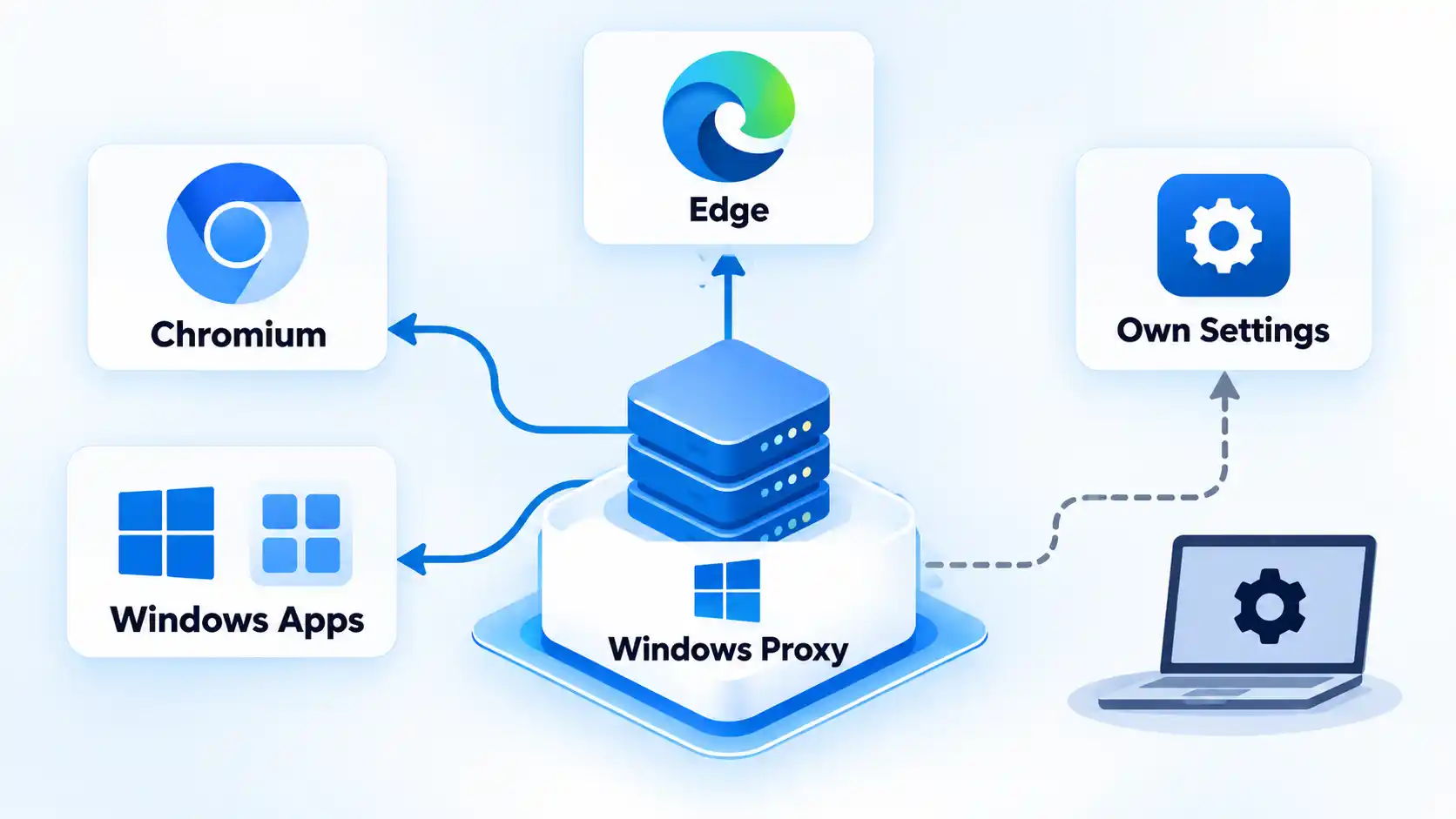
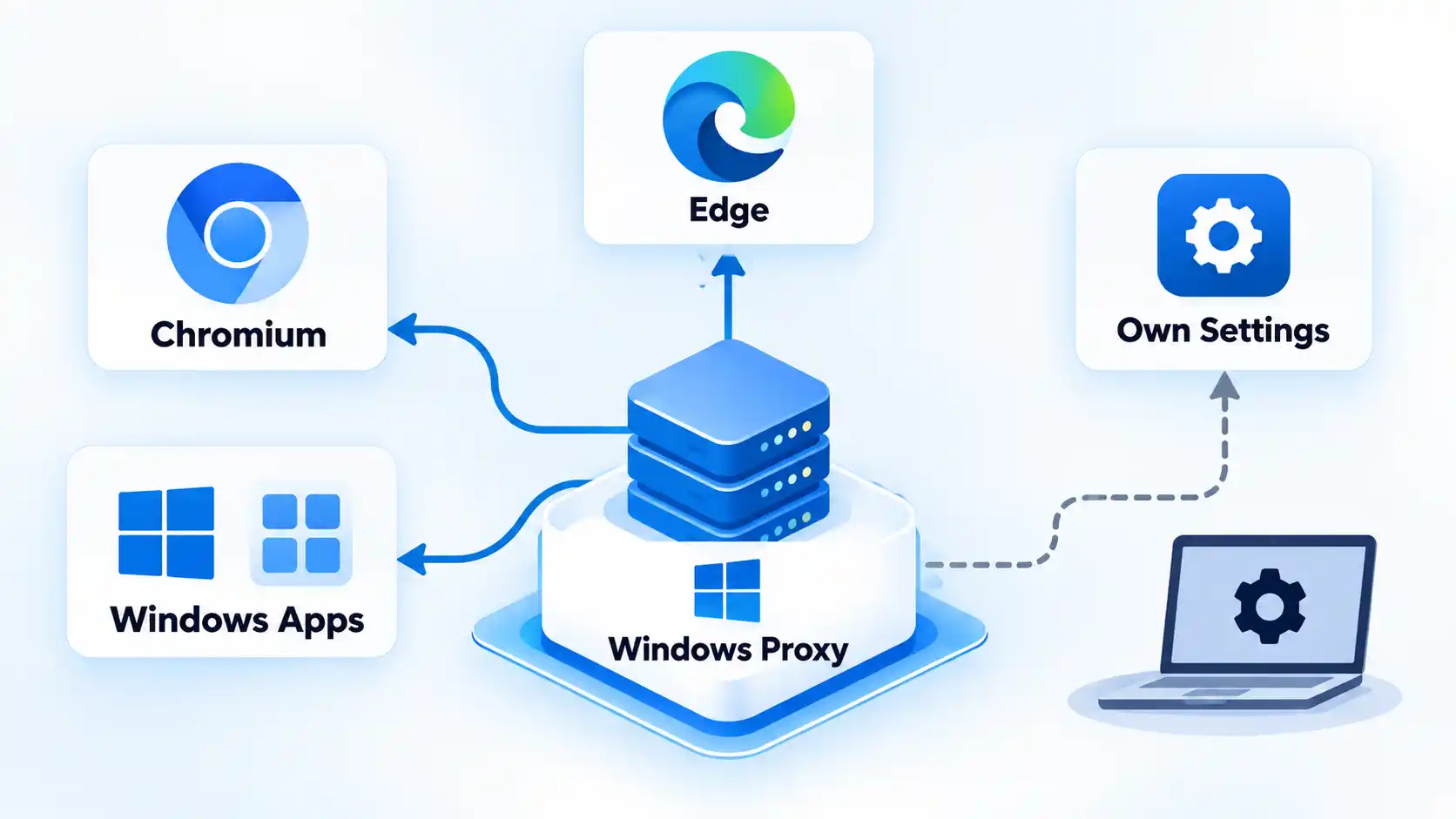
A system proxy is a default operating-system proxy configuration that compatible applications can inherit, but it does not force every app on the device through that proxy. Firefox can either use the system proxy or its own browser-specific settings, while Chrome and Microsoft Edge normally inherit system network settings unless an override changes their behavior.
Quick Take
Think in terms of inheritance rather than “device-wide” versus “browser-only.” Chrome and Edge normally inherit the system proxy, Firefox can inherit or replace it, and some applications use their own networking configuration. Bypass lists, PAC rules, extensions, command-line options, and organization policies can also change which traffic uses the proxy.
System Proxy vs Browser Proxy at a Glance
The important difference is where the proxy configuration comes from and whether an application actually follows it. A system proxy provides a shared operating-system configuration, while a browser-specific proxy lets a browser use settings that differ from the system defaults.
System proxy vs browser-specific proxy
Typical differences between system proxy and browser-specific proxy configuration
Feature
System Proxy
Browser-Specific Proxy
Where it is configured
Operating-system or network settings
Inside the browser or through a browser-specific override
Typical scope
Applications that inherit or honor the system proxy configuration
The browser or browser process using the separate configuration
Chrome / Chromium
Normally inherits system network proxy settings
Can use supported command-line or managed overrides
Microsoft Edge
Uses system network settings by default
Can use command-line or policy proxy overrides
Firefox
Can explicitly select Use system proxy settings
Can use No proxy, manual settings, auto-detection, or a PAC URL instead
Bypass rules
May be defined by the operating system, PAC file, or system proxy policy
May be defined separately by the browser or its override configuration
PAC support
Can be supplied through operating-system proxy configuration
Firefox supports a browser-specific PAC URL; Chromium-based browsers can also use PAC through supported overrides or policy
Possible overrides
An application may ignore or replace the system setting
Extensions, command-line options, or organization policy can change browser behavior
Common failure mode
User assumes every app is proxied when one application uses a different networking path
Browser uses a different proxy, bypass rule, PAC decision, extension, or policy than expected
The useful rule is simple: a proxy setting affects traffic only when the application consults and follows that configuration. The word system describes where the setting is provided, not a guarantee that every application on the computer must use it.
Advertisement
What Is a System Proxy?
A system proxy is a proxy configuration exposed by the operating system for applications and networking libraries that are designed to use the system’s proxy settings.
On Windows 10 and Windows 11, Microsoft exposes proxy controls under Settings → Network & internet → Proxy. Windows supports automatic detection, a setup script, and manual proxy configuration. Microsoft’s current Windows proxy documentation also treats proxy settings associated with a VPN connection separately from the ordinary Windows proxy configuration.
On macOS, Apple’s networking framework exposes the current systemwide internet proxy settings to software that uses those APIs. Apple’s CFNetwork proxy documentation includes system proxy information, proxy exceptions, automatic discovery, and proxy auto-configuration settings.
The important distinction is that the configuration is available at the system level. It does not turn the operating system into a VPN-style tunnel that automatically captures every network connection.
Advertisement
Understanding how proxy servers route traffic makes this distinction easier: proxying depends on which traffic is actually sent through the intermediary.
What Is a Browser Proxy?
A browser proxy is proxy behavior controlled specifically for a browser rather than relying only on the operating system’s default proxy configuration. Browsers do not all implement this in the same way.
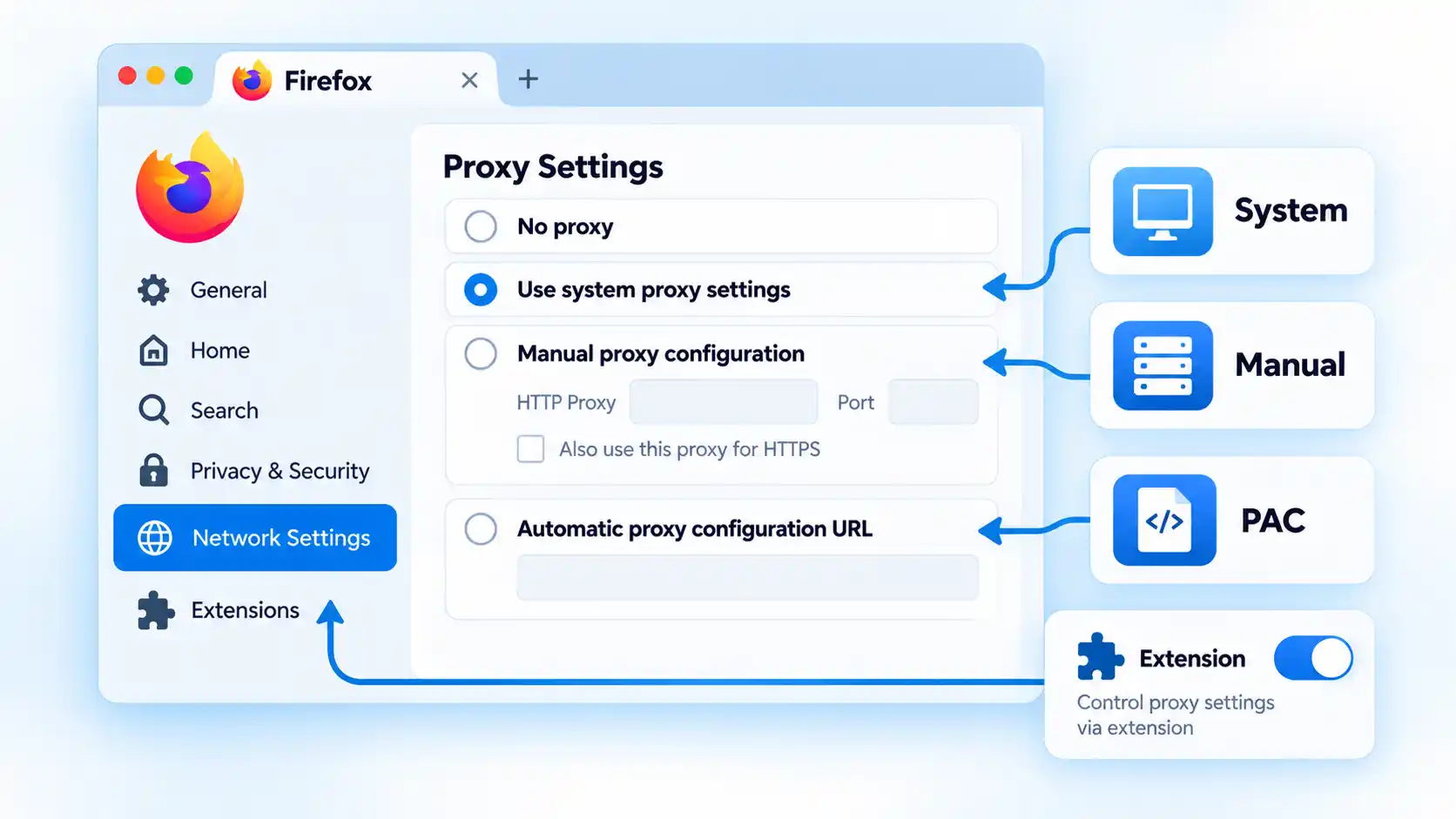
Firefox is the clearest example because it exposes its own proxy mode selector. Mozilla currently offers:
No proxy;
Auto-detect proxy settings for this network;
Use system proxy settings;
Manual proxy configuration; and
Automatic proxy configuration URL.
These are informational configuration modes, not ranked choices. The appropriate mode depends on how the browser is supposed to reach the network.
Chrome and other Chromium-based browsers normally work differently. Chromium’s network settings documentation states that the Chromium network stack uses system network settings by default, including proxy configuration. Chromium also supports proxy-related overrides, but those are exceptions to the normal inheritance model rather than a Firefox-style everyday proxy selector.
Advertisement
Which Apps Use the Windows System Proxy?
The safest answer is: applications that are designed to inherit or honor the Windows system proxy configuration.
Chromium follows the same general model. A normal Chromium or Chrome session therefore typically inherits the system proxy rather than requiring the same proxy address to be entered separately inside the browser.
That still does not mean every Windows application follows the same route. An application can use its own networking library, direct connection mode, internal proxy configuration, organization-managed settings, or another mechanism that does not inherit the ordinary Windows proxy.
Advertisement
This is why changing the Windows proxy can affect Edge and Chrome while another application continues connecting differently.
Windows VPN proxy settings are separate
Windows adds another source of confusion by allowing a VPN connection to have its own proxy configuration. Microsoft documents that VPN-specific proxy settings are configured separately from the normal Windows proxy.
A system proxy therefore should not be confused with a VPN tunnel. Proxy and VPN coverage differ because a proxy affects traffic that follows its configuration, while a VPN uses its own tunnel and routing policy.
Which Apps Use the macOS System Proxy?
macOS also provides shared proxy settings at the system networking level. Apple’s CFNetwork APIs expose the current systemwide proxy configuration and can resolve which proxy should be used for a given URL.
Advertisement
The configuration can contain proxy endpoints, proxy auto-configuration, automatic discovery, exception lists, and a setting that excludes simple hostnames. Apple’s global proxy settings reference documents these values.
The limitation is similar to Windows: “systemwide settings” does not mean that every application is technically forced to use Apple’s CFNetwork proxy resolution. Software that uses its own networking implementation can behave differently.
In practice, changing the macOS proxy can influence applications that rely on the system networking configuration while independently configured software may use another route.
How Chrome and Edge Handle Proxies
Chrome and Edge are useful examples because many users expect every browser to have a Firefox-style independent proxy selector. Chromium-based browsers normally start from the operating system’s network configuration instead.
Advertisement
Chrome and Chromium
The Chromium network stack uses system network settings by default. Its documented proxy-related overrides can specify a custom proxy, a PAC URL, a bypass list, or direct access.
A Chromium session can therefore behave differently from the Windows or macOS system proxy when it is deliberately started or managed with a proxy override. For an ordinary browser session, however, system inheritance is the expected starting point.
Microsoft Edge
Edge also uses system network settings by default, while its supported command-line options can override the proxy mode, custom server, PAC URL, or bypass list.
Managed environments can go further. Microsoft’s current Edge ProxySettings policy can control proxy mode, server, PAC URL, and bypass behavior, so an organization-managed browser may behave differently from an unmanaged browser on the same computer.
Advertisement
These override layers explain why checking only the Windows Settings app is sometimes insufficient when Edge behaves differently from another application.
A developer can therefore see ordinary websites using the proxy while a service running on the same computer connects directly. That is expected bypass behavior, not proof that the system proxy is broken.
How Firefox Handles Proxies Differently
Firefox makes proxy inheritance more visible because the browser exposes an explicit connection-mode selector.
No proxy: Firefox does not use a proxy from this connection setting.
Auto-detect proxy settings for this network: Firefox attempts to discover proxy configuration automatically.
Use system proxy settings: Firefox uses the proxy configuration provided by the operating system.
Manual proxy configuration: Firefox uses browser-specific proxy hostnames and ports.
Automatic proxy configuration URL: Firefox loads proxy-selection rules from a PAC file.
These are informational configuration modes rather than evaluated alternatives.
The practical consequence is that Firefox can behave differently from Chrome on the same machine without either browser being broken. Chrome may inherit the system proxy while Firefox is set to No proxy, a separate manual endpoint, or its own PAC configuration.
Extensions can also control Firefox connections
Mozilla notes that Firefox’s Connection Settings interface can show extensions that control how the browser connects to the internet. An active extension therefore becomes another layer to check when Firefox does not behave like the operating system or another browser.
A comparison of Chrome and Firefox proxy settings should therefore account for system inheritance, Firefox’s explicit modes, extensions, PAC behavior, and browser overrides rather than treating both browsers as identical.
Advertisement
Why One App Uses the Proxy and Another Does Not
When applications behave differently, the cause is often a difference in configuration scope or routing rules rather than evidence that the operating system randomly ignored the proxy.
Warning!
A configured system proxy does not prove that every application is using it. An app may use its own network stack, browser-specific proxy settings, a PAC rule, a bypass list, an extension, a command-line override, or organization policy that sends its traffic somewhere else.
The application uses its own proxy configuration
Firefox can replace the system proxy with a manual endpoint or PAC URL. Other applications can expose independent network settings as well.
Advertisement
The application is configured for direct access
A browser or application can deliberately avoid the system proxy. Chromium and Edge, for example, support explicit direct or no-proxy overrides.
A bypass rule matches the destination
Proxy bypass rules tell the networking layer to connect directly to selected hosts. Apple documents system proxy exception lists, Firefox provides No Proxy For, and Chromium-based overrides can also define bypass rules.
The result can be completely intentional: one website goes through the proxy while another connects directly.
A PAC file chose a different route
A proxy auto-configuration (PAC) file contains logic that can choose a proxy or a direct connection according to the requested destination. Two websites opened from the same browser can therefore follow different routes even though the PAC configuration is working correctly.
Advertisement
The mechanics of proxy auto-configuration matter when routing changes according to the requested destination rather than one fixed proxy endpoint.
A browser extension or policy changed the settings
Firefox can report extensions that control its internet connection, while Edge can receive managed proxy policy from an organization. These layers can legitimately override what a user expects from ordinary system settings.
The destination is intentionally local
localhost and other local addresses can be excluded by proxy rules or browser defaults. A local development service connecting directly while external websites use the proxy can therefore be expected behavior.
How to Tell Which Proxy Layer an App Is Using
You can usually narrow down the active layer without changing every network setting at once. Work from the broadest configuration toward application-specific overrides.
Advertisement
Check the operating-system proxy. Confirm whether Windows or macOS has a manual proxy, PAC file, automatic discovery, or bypass rules configured.
Check the application’s own settings. In Firefox, determine whether it uses the system proxy, no proxy, a manual proxy, or a PAC URL.
Look for browser overrides. Check whether an extension, managed policy, command-line option, or organization configuration is controlling the connection.
Check the destination. A bypass list, PAC rule, or localhost exception may intentionally send that specific host directly.
Compare another application that should inherit the system proxy. If Edge follows the Windows proxy but another application does not, the difference may be application-specific rather than a failed system proxy.
This is an informational diagnostic sequence, not a full configuration procedure. Avoid changing multiple layers simultaneously because doing so makes it harder to identify which setting caused the difference.
If multiple applications continue to ignore a proxy unexpectedly, apps that ignore system proxy settings can require deeper investigation into networking libraries, managed configuration, bypass rules, and application-specific proxy support.
System Proxy or Browser Proxy: Which Should You Use?
Use the system proxy when you want applications that support system inheritance to share one operating-system proxy configuration. This avoids duplicating the same settings inside software that already follows the system configuration.
Use browser-specific settings when the browser needs behavior that differs from the operating system. Firefox is the clearest example because it can explicitly inherit the system proxy, use no proxy, use a manual proxy, or load its own PAC configuration.
Neither approach is universally better. The correct configuration depends on which applications should use the proxy and which configuration layers those applications actually support.
Advertisement
Bottom Line
A system proxy is a shared operating-system proxy configuration, not a guarantee that every application on the computer uses the same route. Chrome and Edge normally inherit system network settings, while Firefox can either inherit them or replace them with its own connection configuration.
When one app appears to ignore the proxy, check the application’s networking model, browser settings, PAC rules, bypass list, extension, policy, and destination before assuming that the system proxy itself has failed.
From October 13-15 at San Francisco’s Moscone West,10,000+ founders, investors, operators, and tech leaders will walk into TechCrunch Disrupt 2026 looking for companies to invest in, products to use, partners to work with, and technologies worth paying attention to.
There are enough Nat King Cole reissues in circulation to fill several record shelves, so another one needs a better reason to exist than an anniversary sticker and 180 grams of vinyl.
Blue Note Records has a considerably stronger case with After Midnight: The Complete Sessions, a new 2LP mono Tone Poet Audiophile Vinyl Series edition arriving November 13, 2026 for $54.98. The expanded release includes all 18 performances from Cole’s four 1956 Capitol sessions, rather than simply reproducing the original 12-track LP.
Joe Harley produced the new edition, Kevin Gray mastered it at Cohearent Audio from the original analog phono reels, and RTI is pressing the records on 180-gram vinyl. The set also includes a deluxe tip-on gatefold jacket and booklet with archival photographs and a new essay by Nat King Cole biographer Will Friedwald.
That is a rather more convincing reason to revisit an album than turquoise vinyl.
Advertisement
Related Reading:
Why Does After Midnight Matter?
By 1956, Nat King Cole had become one of America’s biggest vocal stars, and Capitol was increasingly surrounding him with orchestras and polished arrangements. After Midnight pulled things back toward his jazz roots.
Cole worked with guitarist John Collins, bassist Charlie Harris and drummer Lee Young, with guest appearances across the four sessions by trumpeter Harry “Sweets” Edison, alto saxophonist Willie Smith, valve trombonist Juan Tizol and violinist Stuff Smith.
The smaller ensemble matters because Cole was an exceptional jazz pianist long before recordings such as “Unforgettable” transformed him into a mainstream vocal star. After Midnight lets both sides of his musical personality coexist.
Cole still sings, but the piano is not furniture.
Advertisement
The performances of “Sweet Lorraine,” “It’s Only a Paper Moon,” “Caravan,” “Route 66” and “When I Grow Too Old To Dream” are intimate, loose and filled with enough musical interaction to remind listeners that Cole could sit down with elite jazz musicians and more than hold his own.
What Is Different About the Tone Poet Edition?
The original album contained 12 tracks. The forthcoming edition expands that to 18 performances, adding “I Was A Little Too Lonely,” “You Can Depend on Me,” “What Is There To Say,” “Two Loves Have I,” “Candy” and an alternate take of “You’re Looking At Me.”
That makes the “Complete Sessions” label meaningful.
Advertisement. Scroll to continue reading.
Advertisement
The mastering chain is equally important. Blue Note’s Tone Poet series uses all-analog mastering from original analog sources when available, and Kevin Gray has mastered this edition directly from the original analog phono reels.
Collectors should also note that After Midnight has received excellent audiophile treatment before, including the Analogue Productions 45 RPM edition mastered by Steve Hoffman and Kevin Gray.
Why Is This One Worth Buying?
Because the music deserves it.
After Midnight offers a different perspective on Nat King Cole than the orchestral recordings that made him one of the most recognizable voices of his generation. The arrangements leave room for his piano playing, the guest musicians bring genuine personality to each session, and the repertoire remains remarkably accessible even for listeners who do not own 400 jazz records and argue about matrix numbers before breakfast.
For anyone who does not already own a strong pressing, this looks like one of the more compelling jazz reissues coming this fall.
Flock Safety offered employees voluntary buyouts on Friday, WIRED reported… Without the buyouts, those familiar with the situation suspect the company would have to lay off some of its 1,500 employees.
WIRED writes that people familiar with the program “say they believe that a significant number of the startup’s roughly 1,500 employees may try to depart.”
Flock is making the severance offers as it continues to lose customers… The company has had many of its contracts either not extended or dropped this year, which could leave it short of revenue goals, according to two of the people. A wave of vandalism targeting its cameras has unexpectedly increased expenses. Without buyouts, Flock almost certainly would have to lay off some staff, one of the people believes… People familiar with Flock’s severance plan tell WIRED that some employees may take the offer amid speculation that the company, which has raised about $1.2 billion in venture capital, might resort to selling off parts or all of its business to stay afloat… One advocacy group identified 93 city and county governments that cut ties with Flock in August alone. Overall in 2026, roughly three times as many local governments have dropped Flock compared to the previous five years.
Advertisement
Flock has recently been building products that extend the company beyond its core license plate reader offering. WIRED reported last month that the company has developed AI-powered investigative software to identify drivers, find potential associates based on patterns of movement, and search across police records and other data. A separate WIRED analysis of Flock’s software found tools designed to continuously search camera feeds for people matching written descriptions. WIRED’s analysis of Flock’s code also found potential integrations with drones and other surveillance systems.
Flock’s financial scrambles might explain an incident in Syracuse, New York. The nonprofit news site
Central Current discovered the city’s contract said its license plate data wouldn’t be shared outside the police department, reports Mashable:
But the department had granted access to other agencies, which police said was an accident. Over roughly a year, searches by officers around the country reached Syracuse’s data nearly 4.4 million times. And that wasn’t the only surprise in the paperwork. Central Current also found that Flock could keep using Syracuse data after the contract ended. When the city approved cameras from Axon to replace Flock’s, Flock said Syracuse couldn’t simply end its agreement early. It warned that the city might have to pay for both systems; so even as officials moved to replace the cameras, they faced questions about what Flock could do with the data and what the city might still owe.
Meanwhile, the Texas Department of Transportation “has stopped issuing permits allowing Flock cameras and other automated license plate readers to be installed along state roads…” reports the Texas Tribune. “There were an estimated 13,000 Flock cameras across Texas in August, but hundreds of the devices have been shut down after [governor] Abbott’s funding freeze.”
Advertisement
And in August Florida’s Republican Governor “ordered his state’s transportation department to remove the cameras from state roads, saying he didn’t want ‘a surveillance state.’”
Water timers are nifty devices that can water the lawn at set times or keep that vegetable garden from turning into a dustbowl. When [electronupdate] timer refused to output water on any of its three outlets, he did the right thing. Instead of angrily checking the warranty on the sodding thing, he tore it apart to attempt a repair.
As expected, the design of these devices is quite straightforward. Three solenoids control whether an outlet is open or closed. A control board also handles the user controls and display.
There was no obvious sign of damage, and the PCB was potted in a white substance that should have kept out any moisture. A quick check with a battery revealed that the three solenoids also worked just fine, so the cause likely was somewhere on the — potted — PCB.
These solenoids are rated for 6VDC and take about 20 ms to act, but on an oscilloscope capture it was plain to see that the board was only putting out around 2V. This wasn’t enough to drive the solenoid, raising the question of what had gone wrong on the controller board and setting the stage for some fun epoxy potting compound scraping.
Advertisement
A good bit of elbow grease revealed the control ICs, the H-bridges that drive the solenoids, and the rest of the circuitry, including a power boost circuit with a big electrolytic capacitor. The latter had a bit of suspicious liquid near its base, which turned out to be the culprit. Perhaps the most annoying thing here is that this electrolytic capacitor had the temerity to fail after only four months of use, but at least it was an easy enough fix.
If we had been in there, we might have been tempted to avoid many future battery changes. Impractical, but we wonder if anyone ever built a water timer with a water clock?
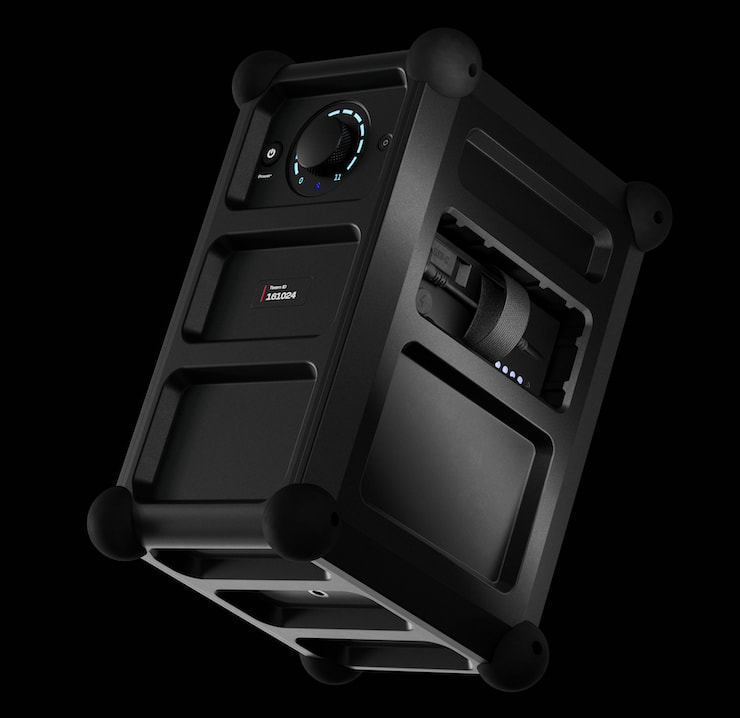
Following the success of the Mix Bluetooth Party Speaker, Danish audio brand SOUNDBOKS has introduced the Rider, which retains some of the Mix’s key features in a smaller, more portable design.
The Rider delivers the same maximum amplifier output as the Mix at up to 72 watts, along with a claimed maximum SPL of 118 dB, up to 35 hours of battery life, and an IP66 rating for protection against dust and water. Its more compact, strap-friendly design is intended to make it easier to carry between locations without giving up the output expected from a larger party speaker.
That is really the problem SOUNDBOKS is trying to solve with the Rider. Many compact Bluetooth speakers are easy to throw into a bag, but their size can limit bass extension and maximum volume when the gathering moves beyond a few people. Traditional party speakers can provide substantially more output, but their larger cabinets and heavier construction make portability more complicated.
The Rider is positioned between those two categories, offering much of the output and durability associated with a party speaker in a form factor designed to be considerably easier to carry.
Advertisement
“Typically, speakers make you trade volume for convenience. We built Rider so you’d never have to choose again,” said Jesper Santon Thomsen, CEO of SOUNDBOKS. “Wherever the moment happens, your sound shows up in full. It’s the smallest speaker we’ve ever made, yet it’s still loud enough to turn an ordinary afternoon into the story everyone tells later. Why plan harder when you can be freer?”
SOUNDBOKS Rider Key Features
Compact and Lightweight: Measuring 13.8 x 9.4 x 7.9 inches and weighing 6.5 kilograms (14.3 pounds), the SOUNDBOKS Rider is the smallest and lightest Bluetooth party speaker in the company’s lineup. That more compact footprint is intended to make the Rider easier to carry without giving up the output expected from a larger party speaker.
Durable Design: Rounded ball corners and an impact-resistant PC/ABS cabinet are designed to withstand bumps, transport, and typical outdoor use without requiring overly careful handling. The Rider also carries an IP66 rating for water and dust resistance, along with a steel grille and SOUNDBOKS’ signature shock-resistant ball corners for additional protection.
Room-Filling Sound: The Rider uses two Texas Instruments Class D amplifiers to drive an 8-inch woofer and 1.2-inch tweeter, with a claimed maximum output of 118 dB SPL. The speaker has a specified frequency range of 40 Hz to 20 kHz and incorporates SOUNDBOKS Adaptive Bass Enhancer DSP to manage low-frequency performance. And because this is SOUNDBOKS, the volume control naturally goes all the way to 11.
Advertisement
Companion App and Control Panel: The SOUNDBOKS APP provides control over EQ adjustments, sound profiles, and speaker locking, allowing users to manage settings from a mobile device (smartphone, tablet). The Rider also provides a control panel with a volume knob and auxiliary input.
Up to 35-Hour Swappable Battery: Battery life is rated at up to 35 hours at mid-volume and approximately 8 hours at maximum output. The removable battery can be swapped out when depleted, while additional battery packs are available separately for extended use. The battery can be recharged via USB-C, with SOUNDBOKS claiming a full recharge in approximately two hours when using its optional charger.
Handle and Strap: The SOUNDBOKS Rider includes an integrated carry handle and is compatible with the optional Strap 2.0. Combined with its 14.3-pound weight and compact dimensions, those options make the Rider considerably easier to carry than a traditional party speaker.
Bluetooth 5.0 TeamUP connection (SKAA) for up to 5 SKAA-enabled speakers
Wired Connectivity
1 × 3.5mm TRS stereo input
1 × 3.5mm TRS stereo input
2 × Combo (XLR and/or 6.3mm TRS) balanced inputs
1 × 3.5mm TRS stereo input
1 × 3.5mm TRS stereo output
Advertisement
App Sound Settings
Volume adjustment
Sound Profiles optimized for different spaces and occasions
Custom EQ
True stereo roles (left/right/mono)
Advertisement
Volume adjustment
Sound Profiles optimized for different spaces and occasions
Custom EQ
True stereo roles (left/right/mono)
Advertisement
Volume adjustment
Sound Profiles optimized for different spaces and occasions
Custom EQ
True stereo roles (left/right/mono)
Advertisement
Advanced Controls
Not Indicated
Advanced TeamUp controls and settings
TeamUp Joined Volume Control
SKAA Pro Mode for reduced latency
Advanced TeamUp controls and settings
Advertisement
TeamUp Joined Volume Control
SKAA Pro Mode for reduced latency
EQ and Gain control for the two ProPanel inputs (XLR and/or 6.3mm TRS)
EQ and Gain presets for ProPanel inputs: Line-in, Mic, Guitar
Advertisement
Connection & Access
Remotely disconnect or power off
Auto-connect for Bluetooth audio
Security PIN code for app and audio connection
Remotely disconnect or power off
Advertisement
Auto-connect for Bluetooth audio
Security PIN code for app and audio connection
Mark as lost or stolen
Remotely disconnect or power off
Advertisement
Auto-connect for Bluetooth audio
Security PIN code for app and audio connection
Mark as lost or stolen
Output (USB-C)
10W USB PD, 5v 2A
10W USB PD, 5v 2A
10W USB PD, 5v 2A
IP Rating
IP66
IP65-rated electronics coating
IP65-rated electronics coating
UI Panel
Volume control knob with LED indicators
Advertisement
Power On/Off button
Bluetooth LED indicator
Volume control knob with LED indicators
TeamUP button with LED indicators
Advertisement
Power On/Off button
Bluetooth LED indicator
Volume control knob with LED indicators
TeamUP button with LED indicators
Advertisement
Power On/Off button
Bluetooth LED indicator
Wireless Link
Not Indicated
SKAA TeamUP
SKAA TeamUP
Battery Life
35 hours at mid-volume
8 hours at full volume
Advertisement
40 hours at mid-volume
8 hours at full volume
2 hours full recharge with The Charger
40 hours at mid-volume
Advertisement
6 hours at full volume
2 hours full recharge with The Charger
Battery Cell Type
12.8V, 7.8Ah Lithium Iron Phosphate (LiFePO4) 99.84 Wh or 7.8 Ah capacity
12.8V, 7.8Ah Lithium Iron Phosphate (LiFePO4) 99.84 Wh or 7.8 Ah capacity
12.8V, 7.8Ah Lithium Iron Phosphate (LiFePO4) 99.84 Wh or 7.8 Ah capacity
Charging Conditions
Charge condition: 0°C to 45°C
Discharge condition: -15°C to 55°C
Advertisement
Charge condition: 0°C to 45°C
Discharge condition: -15°C to 55°C
Charge condition: 0°C to 45°C
Discharge condition: -15°C to 55°C
Advertisement
Product Design
Reinforced ABS casing – IPX6
5-step LED battery-life indicator
Heavy-duty DC connector
Dirt cover over the USB connector
Advertisement
Carry strap (optional)
Battery charge LED indication
Short-circuit protection Overheat protection
Reinforced ABS casing – IPX6
Advertisement
5-step LED battery-life indicator
Heavy-duty DC connector
Dirt cover over the USB connector
Carry strap (optional)
Advertisement
Battery charge LED indication
Short-circuit protection
Overheat protection
Reinforced ABS casing – IPX6
Advertisement
5-step LED battery-life indicator
Heavy-duty DC connector
Dirt cover over the USB connector
Carry strap (optional)
Advertisement
Battery charge LED indication
Short-circuit protection
Overheat protection
Materials
ABS and polycarbonate cabinet
Advertisement
Silicone ball corners
Detachable steel grill (and logo)
ABS and polycarbonate cabinet
Silicone ball corners
Advertisement
Built-in reinforced top hat
Detachable steel grill
Poplar cabinet Powder-coated aluminum frame
Powder-coated steel handles
Advertisement
Silicone ball corners
SMP temperature-flex adhesive
Built-in reinforced top hat
Snap-on removable powder-coated steel grill
Advertisement
Carry Handle
Yes
Yes
Yes – 2 Carry Handles
Mount for Add-On Carrying Strap
Yes
Yes
No
Dimensions (HWD)
35 x 24 x 20 cm 13.8 x 9.4 x 7.9 inches
48 x 34 x 27 cm 18.9 x 13.4 x 10.6 inches
65 x 43 x 33 cam 25.6 x 17 x 13 inches
Weight
6.5 kg / 14.3 lbs
9.7 kg / 21.4 lbs
16.1 kg / 35.5 lbs
What’s in the box
Soundboks Rider
Rechargeable Swappable Battery
Manual
Soundboks Mix
Advertisement
Rechargeable Swappable Battery
Manual
Soundboks 4
The Battery
Advertisement
Manual
Grill Removal Tool
Firmware & Warranty
Firmware updates via the app for sound and performance upgrades
Firmware updates via the app for sound and performance upgrades
Firmware updates via the app for sound and performance upgrades
The Bottom Line
SOUNDBOKS is not trying to win the feature-count war with the Rider. Its strongest argument is the combination of a claimed 118 dB maximum output, a 14.3-pound cabinet, IP66 durability, and a swappable battery rated for up to 35 hours at mid-volume. At $599, it is the entry-level model in the current SOUNDBOKS lineup, but there is nothing particularly entry-level about the price.
That portability comes with some meaningful compromises. Unlike the SOUNDBOKS Mix and SOUNDBOKS 4, the Rider does not support SKAA-powered TeamUp for linking multiple speakers. There is also no Pro Panel, dedicated microphone or guitar input, included microphone, or built-in light show. The optional Strap 2.0 and SOUNDBOKS fast charger also cost extra. What you do get is a 3.5mm auxiliary input, app-based EQ and sound profiles, and the same removable battery concept used by the larger models.
Competition at this price is substantial. The $549.95 JBL Boombox 4 weighs just 12.8 pounds and adds IP68 protection, Auracast, and a user-replaceable battery, while the $419.95 JBL PartyBox On-The-Go 2 Plus weighs roughly the same as the Rider and adds a wireless microphone, karaoke features, a light show, and Auracast support. The $649 Sony ULT Tower 7 offers considerably more party-oriented functionality, although at roughly 50 pounds it belongs in a very different portability class.
The Rider therefore makes the most sense for someone who wants a genuinely portable, rugged speaker that can get very loud without hauling around 30 to 50 pounds of hardware. Buyers looking for karaoke, synchronized lighting, microphone and instrument connectivity, or expandable multi-speaker systems will find more features elsewhere. SOUNDBOKS is betting that some people would rather carry 14 pounds of speaker than a rolling karaoke machine with its own light show. That might be the Rider’s most compelling feature.
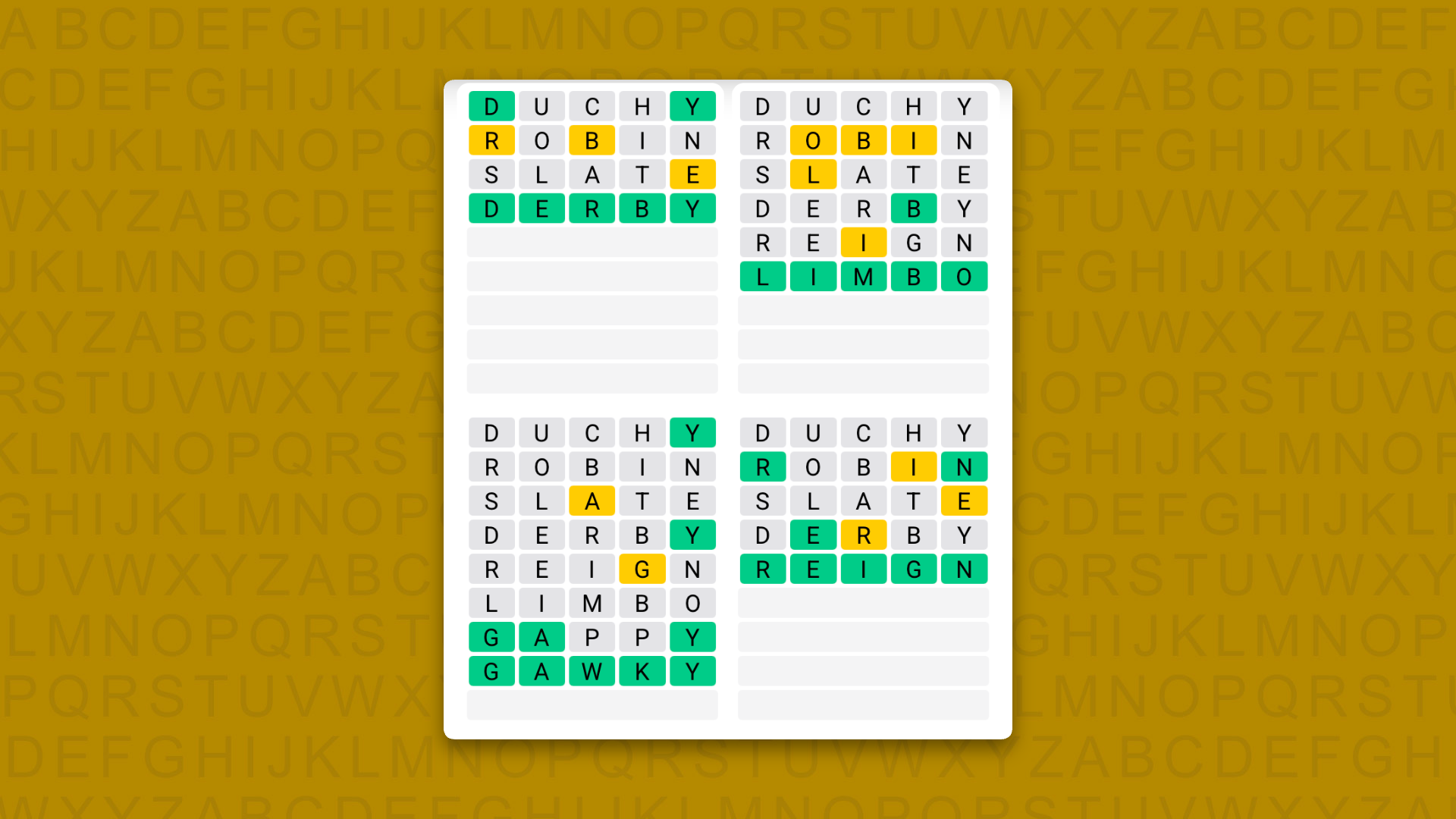
A new Quordle puzzle appears at midnight each day for your time zone – which means that some people are always playing ‘today’s game’ while others are playing ‘yesterday’s’. If you’re looking for Saturday’s puzzle instead then click here: Quordle hints and answers for Saturday, September 19 (game #1699).
Quordle was one of the original Wordle alternatives and is still going strong now more than 1,500 games later. It offers a genuine challenge, though, so read on if you need some Quordle hints today — or scroll down further for the answers.
Enjoy playing word games? You can also check out my NYT Connections today and NYT Strands today pages for hints and answers for those puzzles, while Marc’s Wordle today column covers the original viral word game.
Advertisement
SPOILER WARNING: Information about Quordle today is below, so don’t read on if you don’t want to know the answers.
Latest Videos FromTechRadar
Advertisement
Quordle today (game #1700) — hint #1 — Vowels
How many different vowels are in Quordle today?
• The number of different vowels in Quordle today is 4*.
* Note that by vowel we mean the five standard vowels (A, E, I, O, U), not Y (which is sometimes counted as a vowel too).
Quordle today (game #1700) — hint #2 — repeated letters
Do any of today’s Quordle answers contain repeated letters?
• The number of Quordle answers containing a repeated letter today is 0.
Advertisement
Quordle today (game #1700) — hint #3 — uncommon letters
Do the letters Q, Z, X or J appear in Quordle today?
• No. None of Q, Z, X or J appear among today’s Quordle answers.
Sometimes, even if you don’t need anything in particular, it’s fun to visit your local hardware store like Tractor Supply just to see what’s available. If you have a little bit of cash burning a hole in your pocket, you may be surprised at how many smaller purchases you can puzzle into a budget. If you look carefully, you can find products for less than $20, or even under $10.
Of course, you shouldn’t just buy random implements because they’re cheap; you should grab stuff you actually need. Say, for example, you enjoy working in or near your home garage, whether on automotive projects, DIY pursuits, or assorted small repairs. If you browse around your local Tractor Supply, you may be surprised by how many garage-handy products you can find for less than $20 a pop, including work gloves, wheel chocks, toolboxes, and flashlights. You can find just about everything you need to give your setup a small yet tangible upgrade without spending more than your car cost in the process.
Advertisement
Wells Lamont HydraHyde Insulated Work Gloves
Work gloves are a must-have piece of safety equipment for home mechanics and garage enthusiasts. There’s no shortage of projects and work in the garage where you could get your fingers caught and scraped, so proper hand protection is king. Good work gloves are easy to find, but if you want to go the extra mile, something that also keeps you warm in winter is nice. For such purposes, the Wells Lamont HydraHyde Insulated Work Gloves are an option, and they’re available at Tractor Supply for $19.99.
These gloves, according to their store page, are made of leather that’s undergone a special tanning process that increases its breathability and water resistance. They’re made of 100% split leather cowhide and are designed to stay dry, soft, and breathable all day, plus warm thanks to a layer of 100-gram 3M Thinsulate insulation. They also feature a slip-on elastic wrist cuff for a secure fit and a reinforced leather palm patch for strong grip.
Advertisement
Camco RV Wheel Chocks with Rope
If you have a larger vehicle in or near your garage, like an RV or something comparable, such as a trailer, it’s important to keep those large loads securely chocked while you’re working on them. If anything suddenly starts rolling while you’re working, you could be in serious danger. To keep large vehicles and loads safely secured in place, try employing a Camco RV Wheel Chock, available for $11.99 apiece at Tractor Supply.
Advertisement
These thick wheel chocks are made of hard plastic with baked-in UV protection to keep them from getting brittle and melty in harsh sunlight. They’re designed to keep removable RV trailers in place while you’re removing them from or hitching them to a vehicle so they don’t accidentally roll away or bump into anything. They can safely hold tires up to 26 inches in diameter and have built-in ropes you can use to safely pull them out without having to put your hand right under a tire. Note that these chocks are intended only for consumer-grade vehicles and trailers, not commercial-grade truck trailers.
Advertisement
Wrap-It MagSnap Magnetic Snap Wristband
If you’re fixing or disassembling something in your garage, you’re probably going to end up with a bunch of small components and fasteners scattered all over your work table. If you just leave those things sitting loose, there’s a risk they could roll off and get lost in a dark corner, or otherwise get trapped behind large objects. To reduce that risk, it’s best to keep small metal components firmly in place, and nothing holds them better than a magnet. This is the perfect use case for the Wrap-It MagSnap Magnetic Snap Wristband, available at Tractor Supply for $16.99.
This wristband is jokingly likened to the slap bracelets that were popular with kids in the ’80s and ’90s. It’s a mesh wristband that wraps and snaps firmly around your wrist and, thanks to the 15 magnets hidden within its lining, holds tight to any small metal bits you stick to it. It’s designed to hold a variety of components, such as screws, nuts, bolts, and washers; if you have anything that isn’t magnetic, there’s a pocket on the end of the wristband for other odds and ends.
Advertisement
JobSmart 2-Drawer Mini Tool Box
Something any garage mechanic could use is another place to store a few more tools and components. Of course, once you start buying large tool cabinets and the like, you swiftly run out of space for additional storage. In those situations, the best course of action is to opt for smaller boxes that you can stack on a table or within another cabinet. For small-scale storage, Tractor Supply offers the JobSmart 2-Drawer Mini Tool Box, available for $19.99.
This little tool box features two full-extension sliding drawers, plus a top storage compartment, to store frequently used small implements like screwdrivers, wrenches, and assorted fasteners. It’s made of powder-coated steel for general-purpose resilience, and the sliding drawers have magnetic locking mechanisms to help keep them firmly closed when not in use. As an added perk, it comes in several colors, including red, blue, black, and pink.
Advertisement
COAST RL5 Headlamp
Working on projects in a garage doesn’t always mean you get to work at a well-lit table. For example, if you’re working on the underside of your car, it’s probably going to be pretty dark down there, and you can’t very well hold a flashlight with both hands occupied with tools. For that reason, it pays to have a good hands-free lighting solution in your garage repertoire, like the COAST RL5 Headlamp, available at Tractor Supply for $19.99.
This headlamp comes with dual-beam light settings, letting you switch between flood, spot, or combined beams at low, medium, and high settings, generating a maximum of 550 lumens for comprehensive illumination in most situations. It also has red and green light modes if you’re trying to preserve your night vision while working in the dark. Its body has an IP54 rating for protection against water and dust, so errant drops or caked-on dust are less of a concern, while its silicone-lined strap helps it sit comfortably on your head. It draws power from three AAA batteries, which can last approximately 9 hours of continuous use, though it can also be upgraded with a COAST-branded rechargeable battery.

















 Water timers are nifty devices that can water the lawn at set times or keep that vegetable garden from turning into a dustbowl. When [electronupdate] timer refused to output water on any of its three outlets, he did the right thing. Instead of angrily checking the warranty on the sodding thing, he tore it apart to attempt a repair.












































You must be logged in to post a comment Login