Buying a new or used car can be a stressful and time-consuming process, and dealerships have long looked for ways to reduce the friction. One method some have embraced is at-home test drives, where a salesperson takes a vehicle to a potential buyer’s home or office so they can take it for a spin without needing to get themselves to a showroom. That’s undeniably convenient, but there are a few things to keep in mind when doing so, in addition to the questions you should be asking yourself (like “What’s my budget?”) and the classic mistakes to avoid (like revealing your budget). First, you may not get to drive the actual model you’re interested in, depending on which vehicles the seller chooses to use as demos. Second, you may find the dealer unwilling to talk about terms or financing — let alone seal the deal — without going to the dealership.
At-home test drives have been popular with luxury brands for decades, but became even more popular during the COVID pandemic when many people sought to avoid public transport or unnecessary in-person interactions. Tesla’s started using the technique in 2025 to demonstrate its full self-driving (supervised) feature. At-home test drives are offered by the likes of Nissan and Kia, and sometimes on a dealer-by-dealer basis for brands that don’t offer the service themselves. What’s common regardless of marque, though, is that salespeople are reluctant to talk terms, because of Federal Trade Commission (FTC) rules and regulations around door-to-door sales. In essence, if you get down to brass tacks with a salesperson during a test drive in the U.S., you may be entitled to a three-day cooling-off period during which you can change your mind. That’s good news for buyers, but it means dealers are more cautious.
Advertisement
What the FTC says
Praetorianphoto/Getty Images
The FTC’s cooling-off rule states that “it is unfair and deceptive for sellers engaged in ‘door-to-door’ sales valued at more than $25 to fail to provide consumers with disclosures regarding their right to cancel the sales contract within three business days of the transaction.” The rule covers any transaction made at a place other than the seller’s place of business, so a driveway or curbside sale counts. There are a couple of key caveats to keep in mind, though. First, sellers should remember that, even if the buyer requested the test drive, the rule still applies. However, buyers should bear in mind that if they’ve already visited a dealership and negotiated the terms, and the driveway interaction is only a delivery or signature or other perfunctory process, the cooling-off rule doesn’t apply.
There’s also an exception for deals closed at auctions, pop-ups, roadshows, or other temporary sales locations that aren’t the seller’s lot, but also aren’t the buyer’s home or office. If someone does a driveway deal and the seller doesn’t inform them of the three-day cooling-off period, the seller can be fined up to $53,088. So while salespeople might try to get you to a dealership afterward, at-home test drives can still be incredibly convenient for would-be buyers. Making sure you do a test drive is important. It’s one of our top tips when buying any car, whether new or used.
The growing backlash against surveillance companies like Flock may have reached a tipping point. A new survey has found that more Americans oppose these surveillance cameras than support them.
According to a new YouGov survey of 20,000 people across the U.S. that was shared exclusively with The Washington Post, 46% of respondents opposed the company’s surveillance cameras in their communities, while 38% supported them. This is a reversal from last year, when the majority of survey respondents said they were in favor.
Flock is one of the more visible surveillance companies, operating more than 120,000 license plate readers across the U.S. that can track the whereabouts of vehicles. The company has been embroiled in controversy following reports of police abusing the cameras’ surveillance, which resulted in dozens of U.S. communities rejecting Flock’s cameras or canceling their contracts amid privacy concerns.
The survey also reported that more respondents said the surveillance would not make them feel any safer.
Advertisement
When reached by TechCrunch, Flock claimed there was wide support for its surveillance technology, but acknowledged that “support isn’t unconditional,” and touted the rollout of its recent safeguards. Critics, like the ACLU, have said the company’s new safeguards amount to little, and Flock remains a major threat to civil liberties.
Amid the intensifying backlash, Flock CEO Garrett Langley last week called for a “compromise” between surveillance and privacy, following a rise in vandalism targeting Flock cameras.
If you’ve noticed security cameras in parking lots at Home Depot or Lowe’s — whether on streetlights or standalone trailers with solar panels on them — it’s because both companies have deals with a company called Flock Safety. Among other things, Flock makes Automated License Plate Readers (ALPR) cameras and gunshot audio sensors. The cameras record every license plate they see, along with additional information about passing vehicles, including any bumper stickers, damage, bike racks, aftermarket wheels, or other identifying features. Flock collates this information into a Vehicle Signature and uses AI to create a searchable database, so it’s possible to look for a vehicle’s activities with details other than just its license plate. So why are Home Depot and Lowe’s paying for Flock cameras, and what are they doing with the data from them?
In an FAQ on its website, Home Depot says, “Like many retailers, we use license plate readers in our parking lots. These cameras are used for the purpose of detecting and preventing theft and protecting the safety of our customers and associates. We do not grant access to our license plate readers to federal law enforcement.” However, an investigation by 404 Media reveals the last portion of that statement is only partially correct. Home Depot may only be sharing data with local law enforcement agencies, but those agencies can pass it on to their federal counterparts. The investigation found that Lowe’s, meanwhile, is sharing it with both local police, and other police departments across state lines.
Advertisement
A boon for law enforcement, a bane for privacy advocates
Matthew G Eddy/Shutterstock
In March 2025, Flock published a blog post claiming its technology had helped expose a $20 million money laundering operation using Home Depot and Lowe’s gift cards. Scammers convinced people to buy the companies’ gift cards using computer malware and malicious text messages and then used the proceeds to buy expensive materials or merchandise from the retailers for resale. The appeal for retailers is easy to understand: more data on shoplifters or scammers makes it more likely they’ll be apprehended. But it’s the information on regular customers, and what those with access to Flock-powered databases can do with it, that has civil rights experts and private citizens worried.
Dozens of documented cases of police using Flock to stalk current or former romantic interests, and at least one instance of Texas police using Flock to investigate a woman who left the state for an abortion, are just some of the reasons there’s increasing resistance to the technology from civil society, and some Flock cameras have been vandalized.
Flock says more than 5,000 of its customers are law enforcement agencies. While private businesses using Flock aren’t obligated to share their data with local police, many choose to. Records obtained by the Electronic Frontier Foundation (EFF) show that the Johnson County, Texas Sheriff’s Office can access data from more than 170 Lowe’s locations, many of them outside of Texas, and from dozens of Home Depot locations in the state.
Advertisement
Who has access to Flock cameras matters
bluestork/Shutterstock
While Home Depot says it does not coordinate with Immigration and Customs Enforcement (ICE), Customs and Border Protection (CBP), or other federal agencies regarding immigration enforcement operations, 404 Media found that ICE, which has no contract with Flock, had routinely accessed and used Flock-sourced data with the help of local police.
The American Civil Liberties Union (ACLU) has found that, even when local police departments opt out of sharing data with federal agencies, Flock retains the right to do so. At the same time, the Institute for Justice continues to document how data from Flock cameras has been misused, and has launched an initiative called The Plate Privacy Project to pressure legislators to crack down on its use, improve safeguards, and force Flock and the companies that use its services to be more transparent about how data are handled to ensure they aren’t abused. Whether the mounting pressure is enough to get Home Depot or Lowe’s to change their stance on, and contracts with, Flock remains to be seen.
US Open 2026 has served up a sensational Round 1 draw, headlined by Matteo Berrettini vs Stan Wawrinka, Rafael Jodar vs Thanasi Kokkinakis and Carlos Alcaraz vs Roman Safiullin. The hard-hitting Russian is a less-than-ideal opponent for the No.2 seed and reigning champion, who’s been out of action since April with a wrist injury.
The tie that looks set to steal the show, however, is Berrettini’s clash with 2016 champion Wawrinka. They met for the very first time at Wimbledon two months ago – and produced the match of the tournament. With Wawrinka set to hang up his racket this year, it could end up being his final ever appearance at a major.
The women’s draw, topped by No.1 seed and back-to-back reigning champion Aryna Sabalenka, will get off to a slightly more low-key start, with Paula Badosa vs Daria Kasatkina and Venus Williams vs Sofia Kenin shaping up as the most intriguing matchups on paper.
Advertisement
Former world No.2 Badosa and former No.8 Kasatkina are both unseeded, while 46-year-old Williams’ first meeting with 27-year-old Kenin will likely have the feel of an all-American celebration, both grand slam champions having received wildcards in a bid to maximise viewing figures.
However, there’s a fascinating subplot concerning world No.1 status. By the end of the 2026 US Open, Sabalenka will have spent 99 straight weeks at the top of the rankings, and that’s where it could end. Elena Rybakina, who won her first hard-court major at the Australian Open in January, will leapfrog Sabalenka if she reaches the last four.
Here’s how to watch US Open 2026 from anywhere in the world. We’ve also listed the the seeds, recent winners and prize money below.
Advertisement
Can you watch US Open 2026 for free?
Yes. Free US Open 2026 coverage is being provided by Channel 9 and 9Gem in Australia, with live streaming available via 9Now.
Traveling abroad right now? You can use a VPN to watch US Open for free as if you were right at home.
Advertisement
Use a VPN to watch US Open 2026 live streams
A VPN is handy piece of software that can make your device appear as if it’s back in your home country, so you can unlock your usual service. The best VPN right now? We recommend NordVPN – it does everything and comes with up to 75% off.
How to watch US Open 2026 live streams in the US
US Open 2026 coverage is being provided by ESPN, ESPN2, ABC and ESPN Unlimited in the US.
ESPN Unlimited, which is live streaming every match on every court, costs $31.99/month or $319.99/year, but you can bundle it with Disney Plus and Hulu for $35.99/month.
Advertisement
New to ESPN’s coverage this year is US Open RedZone, a whiparound show that will air on ESPN Unlimited from Sunday, August 30 to Friday, September 4, between 11am and 6pm ET.
ESPN Unlimited includes streaming access to ESPN, ESPN2, ESPNU, ESPNEWS, ESPN Deportes, SECN, ACCN, ESPN+, ESPN on ABC, SECN+, ACCNX, NFL Network and CW Sports.
Alternatively, ESPN, ESPN2 and ABC are available through Sling – specifically the Orange & Blue plan, which starts at $60.99/month. It includes ABC, NBC and Fox in select locations, plus ESPN, ESPN2, FS1, USA Network, FX and more.
Alternatively, ESPN, ESPN2 and ABC are also carried by Fubo, YouTube TV and Hulu + Live TV, each of which offers a free trial to new users.
Advertisement
Outside of the US? Use a VPN while you’re traveling away from home to unlock your stream.
How to watch US Open 2026 live streams in the UK
(Image credit: Other)
In the UK, live US Open 2026 coverage is being provided by Sky Sports.
Sky Sports packages start at £35/month with £22/month pricing available for those who are already customers. Remember you can also access via NOW Sports.
Advertisement
If you’re out of the UK but still want to tune in, explore the VPN route set out above, which will help you access your accounts from anywhere.
How to watch US Open 2026 live streams in Australia
(Image credit: free)
US Open 2026 is free-to-air on Channel 9 and 9Gem in Australia, with live streaming available via the 9Now platform.
$108 million in prize money will be allocated to the players at the 2026 US Open, with the singles champions set to receive $5.5 million each.
$2.8 million will go to each finalist, $1.45 million to each semi-finalist, and $780,000 to each quarter-finalist.
Players will earn $480,000 for reaching Round 4, $290,000 for Round 3, $190,000 for Round 2, and $140,000 for Round 1.
We test and review VPN services in the context of legal recreational uses. For example: 1. Accessing a service from another country (subject to the terms and conditions of that service). 2. Protecting your online security and strengthening your online privacy when abroad. We do not support or condone the illegal or malicious use of VPN services. Consuming pirated content that is paid-for is neither endorsed nor approved by Future Publishing.
There’s no getting around the fact that AI is everywhere. From our smartphones to even our fridges, it seems like all modern gadgets are equipped with AI that promises to make life easier.
AI has also been steadily gaining traction within the beauty industry. Whether it’s an app that scans a selfie to determine potential skin issues or a pair of straighteners that use AI to adapt its temperature to your hair type, the guesswork is being taken out of skincare and beauty.
But can you really trust AI to correctly diagnose a skin issue and provide you with the right advice? Or is this just another elaborate marketing scheme to get consumers to buy from certain brands?
How can AI help with skincare and beauty?
I think many can agree that finding the perfect skincare routine is a pretty tough task. Despite there being plenty of recommendations out there, a product that works for one person may simply not work as well for another – even if you share similar skin concerns.
Advertisement
I’ve spent more money than I’d like to admit on products that either friends or TikTokkers (I know) swear changed their lives for the better, only to find that they didn’t really work for me. In fact that’s sometimes the best case scenario, as I’ve even got a blacklist of products that did the exact opposite of what they promised and made me break out.
Advertisement
I’m not alone in this, as L’Oreal reported in a survey of over 2,000 skincare users, it was revealed that almost 80% relied on “trial and error” to find their holy grail – and usually took around seven products to do so.
In an ideal world, the perfect thing to do would be to visit a dermatologist who can diagnose and offer expert advice based on your exact needs. But seeing a dermatologist takes time and, usually, a fair bit of money too. So that’s where AI comes in.
Advertisement
There are countless apps and services available that promise to assess your skin needs and offer so-called personalised product recommendations, all through a simple selfie or face scan. Cetaphil offers one of the fastest AI skincare tools I’ve used, and doesn’t require any registration. Instead, you simply take a selfie and it gives you a mark out of 100 based on factors like hydration, blemish and redness, oiliness, dark circles and wrinkles, to name a few.
You can even click through all the different factors and see all the “issues” mapped out on your face.
Image Credit (Cetaphil)
From here, you’re provided with a handful of Cetaphil products that are chosen according to your results. So, for example, my report said my skin was shiny – though I prefer the term “glowing”, but whatever – so I was advised to try Cetaphil’s oily skin cleanser. But is that really the best product for me, or is this just Cetaphil trying to get me to invest in its products?
Advertisement
It’s not just skincare that AI has infiltrated. Brands like Dcypher promise to create a shade of foundation specifically for your exact skin tone and undertone.
Advertisement
I recently went on an epic forage through the streets of London in an attempt to find a new foundation shade, after discovering my tried-and-tested formula was recently discontinued. Discovering Dcypher sooner could have saved me both time and, unfortunately, money, as I’d made the silly mistake of buying a few bottles that looked good in-store but didn’t quite sit right in the broad light of day.
Limitations of AI skincare
But how accurate are these AI apps? At surface level, while they might note wrinkles or detect spots, can they really assess the root cause of the issues simply by looking at your skin alone?
Personally, I like the idea of L’Oreal’s Cell BioPrint, which was unveiled at CES back in 2025, but is yet to become readily available. Essentially, the Cell BioPrint is a tabletop device that provides users with a personalised skin analysis. To receive your analysis, you need to put a facial tape strip on your cheek, place it into L’Oreal’s buffer solution and then load this into the machine to receive an analysis.
Image Credit (L’Oreal)
While it’s processing, the device will then take images of your face to correspond with the sample.
Advertisement
Advertisement
Will AI become a regular part of our skincare routines?
I’m not convinced that AI should be an integral part of our skincare routines at this stage. Yes, apps and scanners can detect obvious potential skin concerns, but I don’t think that’s particularly groundbreaking – yet.
Until AI-powered skin tools can assess the root causes of conditions, and offer more in-depth advice on how to help your skin, rather than just providing general product recommendations, then I don’t think it should be something to be relied on. Having said that, it’s fair to say that if you’re not sure where to begin with a new skincare routine, then using an AI scanner could be a good place to start.
Now, not everyone minds the characteristic layer lines you get with Filament Deposition Modeling (FDM) 3D prints, but sometimes you need a smooth surface. If so we might go for filling primer, Bondo, or maybe break out the ABS and vapor smooth. Well, [I changed a thing] has an alternate suggestion: lasers. Laser melting can smooth the walls on a print, or the top surfaces as he shows in two different videos, both embedded below. The results look roughly similar to vapor smoothing, without the chemical exposure small risk of explosion.
Of course, you need a laser to do this, and [I changed a thing] has two diode lasers mounted to the X-axis of his printer. Of the two, the top surfaces were a lot easier to get right than the wall smoothing, which makes sense. Top surfaces are right there for the laser to get at, after all, while with his laser setup [I changed a thing] needs to get at the walls obliquely. [I changed a thing] tries melting layer-by-layer as well as a few methods to get at the walls of a finished print; which works best seems to depend on the size of and geometry of the object, so it looks like this technique is as much art as science right now.
This effort is closely related to the previous work [I changed a thing] did on improving layer adhesion with laser melting. It’s also not the first time we’ve seen laser-driven print smoothing, but that project used non-planar movements to do a post-print laser pass.
The Irish company said its existing identity services and resources will be integrated with the CyberIAM team to form a new identity managed services practice.
Irish-founded and -headquartered cybersecurity company Integrity360 has acquired CyberIAM, a South African cyber identity services company, for an undisclosed amount.
CyberIAM, founded in 2016, employs around 120 in the UK’s London and Chester, and South Africa’s Cape Town.
It specialises in solutions for identity access management; identity governance and administration; privileged access management; and customer identity and access management.
Advertisement
Its enterprise customers come from areas such as financial services, retail, healthcare, insurance, energy, legal and the public sector, according to the companies.
Integrity360 said the acquisition would “significantly strengthen” its capability around identity security in the age of AI deployments, which it said represents a new and prevailing cybersecurity challenge for businesses and organisations.
The Irish company said its existing identity services and resources will be integrated with the CyberIAM team to form a new identity managed services practice – led by current CyberIAM CEO Michael Ribaudo – that will operate from the group’s global security operations centre.
“We could not be more delighted to be welcoming Michael and the whole CyberIAM team to Integrity360,” said Ian Brown, executive chair at Integrity360.
Advertisement
“Identity is now the primary control plane for cybersecurity, and by strengthening our identity capabilities, we are helping customers build the secure foundation they need to embrace AI with confidence.”
Integrity360 said it now projects a revenue run rate of around €230m – with the addition of €18m in revenue from CyberIAM – and has a new total headcount of around 900 working from 16 locations across the UK, Europe, Africa and Canada.
“Thanks to the support of our customers and employees, CyberIAM has grown to become one of the leading experts in identity services helping businesses control and protect human and machine identities,” said Ribaudo.
“With the backing of Ian and the considerable resources, capability and track record of the entire Integrity360 team, we are excited about what we can further achieve for our customers and our employees, and we look forward to expanding further into international markets.”
In June, Integrity360’s CTO Richard Ford spoke to us about how cyber teams can prepare for the continuing emergence of increasingly powerful and capable AI models. In May, the company’s Matthew Olney wrote about the importance of security in both information technology and operational technology.
Don’t miss out on the knowledge you need to succeed. Sign up for the Daily Brief, Silicon Republic’s digest of need-to-know sci-tech news.
Polling finds two-thirds don’t trust this government, or any future one, with access to their encrypted chats
Brits have delivered a fairly unambiguous verdict on giving the government access to their encrypted messages: no, thanks.
Advertisement
New polling commissioned by the Center for Democracy & Technology (CDT) found that 93 percent of British adults believe they have a right to private conversations online, while 89 percent think nobody should be able to access their personal messages without a court order.
Perhaps more awkwardly for Westminster, two-thirds said they would not trust either the current government or any future one with the power to access encrypted messages.
That distrust crosses political lines. Among people who voted in the 2024 general election, 58 percent of Labour voters said they wouldn’t trust any government with the power, alongside 59 percent of Conservatives, 56 percent of Liberal Democrats, 69 percent of Greens and 75 percent of Reform voters.
Public First did the asking, polling 2,000 British adults for CDT in April and weighting the results to reflect the wider population. The margin of error is 2.2 percentage points.
Advertisement
The findings land as the UK government’s appetite for slurping encrypted data continues to collide with the tech industry’s insistence that encryption works best when nobody has a spare key lying around.
That fight became particularly public when Apple withdrew Advanced Data Protection from UK users after receiving a secret Technical Capability Notice (TCN) under the Investigatory Powers Act. Apple challenged the order, and while the US government later said Britain had withdrawn its demand for access to Americans’ encrypted data, reports have since suggested another TCN was issued focusing on British users.
Despite the international row, 55 percent of those polled hadn’t heard about the Apple notice at all. Once presented with the idea, enthusiasm remained thin.
Just 12 percent backed the government being able to secretly order companies to provide access to users’ information while preventing those companies from revealing the order. A third said the government shouldn’t have that power at all, while another 41 percent wanted greater transparency or parliamentary oversight.
Advertisement
Nor were respondents particularly sold on sacrificing security for law enforcement. 53 percent said the security risks of accessing encrypted messages outweighed the benefits, compared with 28 percent who thought the benefits came out on top.
The reasons will sound familiar to anyone who has followed the encryption debate for more than five minutes. 84 percent worried that mechanisms allowing access to encrypted messages could introduce vulnerabilities for hackers and criminals, while 82 percent were concerned the powers could be abused.
Knowing someone might be watching could also change how people behave. 65 percent said they’d become more cautious about what they liked, shared or commented on, while 41 percent said they’d self-censor criticism of public institutions or government officials.
CDT is not a disinterested observer: the digital rights group campaigns for strong encryption and commissioned the research as part of that work. The polling itself, however, was carried out independently.
Advertisement
Commenting on the research, Jim Killock, executive director of Open Rights Group, said: “The British public instinctively know that being able to communicate privately is crucial to our individuality and to the survival of a free and open society.
“The government persists with the myth that it can weaken encryption to target the bad guys only. Attacks on the security of our phones, security tools and messaging apps harm us all and make our democracy weaker.”
None of this is likely to end Westminster’s long-running pursuit of encrypted communications. But if ministers were hoping the public was enthusiastically behind them, the numbers suggest otherwise. ®
Liverpool‘s new manager, Andoni Iraola, will be hoping to claim his first English Premier League win as Reds boss on Saturday, as the Merseysiders welcome to Anfield a Nottingham Forest team that’s also going in search of a first EPL victory under new management.
The Reds battled back to snatch a 2-2 draw with Newcastle last weekend thanks to a Dominik Szoboszlai penalty deep into second-half injury time.
The Oliver Glasner era hasn’t gotten off to the best of starts at Forest, with the former Crystal Palace manager overseeing back-to-back defeats away at Leeds — in the Premier League last weekend, then a 2-0 midweek defeat against the Lilywhites in the Carabao Cup.
Liverpool takes on Nottingham Forest on Saturday, Aug. 29, at Anfield, with kickoff set for 12:30 p.m. BST. That makes it a 7:30 a.m. ET or 4:30 a.m. PT start in the US and Canada, and a 9:30 p.m. AEST kickoff in Australia.
Advertisement
Dominik Szoboszlai’s stoppage-time penalty in Liverpool’s 2-2 draw away at Newcastle last weekend was the Hungarian star’s 16th Premier League goal in 106 appearances for the Reds.Charlotte Wilson/Offside/Getty Images
How to watch Liverpool vs. Nottingham Forest in the US without cable
Today’s match at Anfield will be broadcast on USA Network, which you can access on Sling TV and other, more expensive streaming TV services such as YouTube TV or DirecTV MySports.
Watch the Premier League on USA Network from $46 a month
Sling TV
Sling TV’s Blue plan includes USA Network, making it a great option for those wanting to watch Premier League action. It starts at $46 a month (depending on where you live and whether you get local channels) and includes over 40 channels, including other sports channels like ESPN and FS1.
How to watch the Premier League 2026-27 from anywhere with a VPN
If you’re traveling abroad and want to keep up with all the EPL action while away from home, a VPN can help enhance your privacy and security when streaming.
Advertisement
Virtual private networks encrypt your traffic and prevent your internet service provider from throttling your speeds, and can also be helpful when connecting to public Wi-Fi networks while traveling, adding an extra layer of protection for your devices and logins. VPNs are legal in many countries, including the US and Canada, and can be used for legitimate purposes such as improving online privacy and security.
However, some streaming services may have policies that restrict VPN use for accessing region-specific content. If you’re considering a VPN for streaming, check the platform’s terms of service to ensure compliance.
If you choose to use a VPN, follow the provider’s installation instructions to ensure you’re connected securely and in compliance with applicable laws and service agreements. Some streaming platforms may block access when a VPN is detected, so verifying if your streaming subscription allows VPN usage is crucial.
ExpressVPN is our current best VPN pick for people who want a reliable, safe VPN that works on a variety of devices. It’s normally $15 a month for the basic plan, but if you sign up for an annual subscription, you can save money.
Note that ExpressVPN offers a 30-day money-back guarantee.
Advertisement
Price
$78 for two years
Latest Tests
No DNS leaks detected, 18% speed loss in 2025 tests
Advertisement
Jurisdiction
British Virgin Islands
Network
3,000 plus servers in 105 countries
Livestream Liverpool vs. Nottingham Forest in the UK
This Saturday lunchtime clash is exclusive to TNT Sports in the UK and is one of 52 games the network will be showing live this season.
Watch over 50 Premier League games live in the UK with TNT Sports
TNT Sports
Advertisement
TNT Sports will be offering a sizable 52 matches exclusively live this season to viewers in the UK.
TNT Sports transitioned over to HBO Max in the UK in March. The standalone monthly pass for it currently costs £31 per month. If you’re bundling it with other services, prices start at £25 per month on broadband networks such as BT or EE.
Advertisement
Livestream Liverpool vs. Nottingham Forest in Canada
If you want to stream EPL games live in Canada this season, you’ll need to subscribe to Fubo. The service has exclusive rights to the Premier League once again, showing all 360 matches – including this one.
Watch the Premier League in Canada
Fubo Canada
Advertisement
Fubo is the go-to destination for Canadians looking to watch the EPL, with exclusive streaming rights to every match. The Sports Monthly plan currently costs CA$27 for the first month, then CA$31.50 per month, after the promotional rate expires. If you want to upgrade to the Sports Pro Monthly plan, which includes DAZN access, it costs $55 per month (the first month’s price is $35).
Advertisement
Livestream Liverpool vs. Nottingham Forest in Australia
Livestreaming rights for the EPL are held by Stan Sport, which will show all 380 matches live, including this game.
Watch every Premier League match live in Australia from AU$30 a month
Stan Sport
Advertisement
Stan Sport will set you back AU$20 a month (on top of a Stan subscription, which starts at AU$10). It’s also worth noting that the streaming service is currently offering a seven-day free trial.
A subscription will also give you access to Premier League, Champions League and Europa League action, as well as international rugby and Formula E.
Advertisement
Kevin Lynch is a London-born, Dublin-based writer and journalist. The author of Steve Jobs: A Biographic Portrait, Kevin is a regular feature writer for a number of tech sites and the former Technology Editor for the Daily Mirror. He has also served as editor of GuinnessWorldRecords.com and has been a member of the judging panel for the BAFTA British Academy Video Game Awards.
See full bio
BMW is about to release their most screen-dependent vehicles ever, reports Car and Driver:
Step into the BMW iX3, and you’ll notice something is missing: real buttons. The climate controls are fettered to the center screen, as is nearly every other feature, save for a handful located in the center console — at least the window switches are still on the doors…
But don’t blame a desire for larger profit margins; BMW’s move away from physical switchgear and toward touchscreen dependence is the fault of younger buyers, according to one executive. In an interview with CarExpert, Vikram Pawah, the CEO of BMW Group Australia, said that young buyers prefer the newer controls… According to the executive, younger customers are less patient with their technology. “They want things done quickly, and they’re multitasking,” Pawah said. “And we have to keep that in mind. That’s how customers are evolving. They are multitasking….”
Tesla has always forced functions to its center screen; newer players such as Rivian do the same. And in recent years, established brands like Mazda and Mercedes-Benz have moved more and more functions to touchscreens.
Advertisement
BMW’s iX3 also includes a new safety feature — a side-radar that detects if a cyclist or vehicle is approaching, and delays the release of the electronic door lock “until the danger passes.”
The best endpoint protection software is judged by how well it detects and automatically shuts down threats across every device and cloud workload you run, not by how long its feature list reads on a sales page. Get that comparison right and the rest of the decision, the vendor name, the price tier, the extra modules, tends to sort itself out.
Quick Take
Pick endpoint protection by working backward from your actual environment, not from a rankings list. Map what you’re protecting (laptops, servers, cloud workloads, remote and IoT devices) before you look at a single vendor. Then verify three things directly instead of trusting a spec sheet: how detection holds up against unknown threats, how much of your cloud footprint the tool actually reaches, and how much manual tuning its automation needs before it’s trustworthy. Run a real pilot before you sign anything longer than a month.
Prerequisites
You can’t evaluate endpoint protection software in the abstract, only against a specific environment. Before you take a single vendor call, get three things straight.
Know what you’re actually protecting. Write down company laptops and desktops, on-prem servers, cloud workloads, remote employee devices, and anything IoT or operational-technology-adjacent that touches your network. A tool that’s excellent on Windows laptops and thin on Linux servers or container workloads isn’t a good fit if half your infrastructure sits server-side.
Know your risk profile. A five-person accounting firm and a 400-person healthcare provider shop in the same product category but need very different levels of automation and compliance reporting. Naming your actual biggest cybersecurity risks up front, rather than treating “cyber threats” as one undifferentiated blob, tells you which EPP features are load-bearing and which are nice-to-have.
Know who’s actually running this day to day. If you don’t have a security team watching alerts, self-managed EPP alone will quietly turn into a pile of unread notifications within a few weeks, which is one reason a broader set of cybersecurity solutions for your business, not just an endpoint tool, usually outperforms any single product bought in isolation.
What Endpoint Protection Software Actually Does
Strip away the marketing, and endpoint protection software does two things: it detects malicious activity on a device, and it responds to it, whether that’s quarantining a file, killing a process, or isolating the machine from the network entirely. CrowdStrike’s definition of an endpoint protection platform names prevention, detection, enforcing least-privileged access, threat hunting, threat intelligence, and vulnerability management as the pieces that make those two functions actually work in practice, not a single antivirus engine bolted onto an agent.
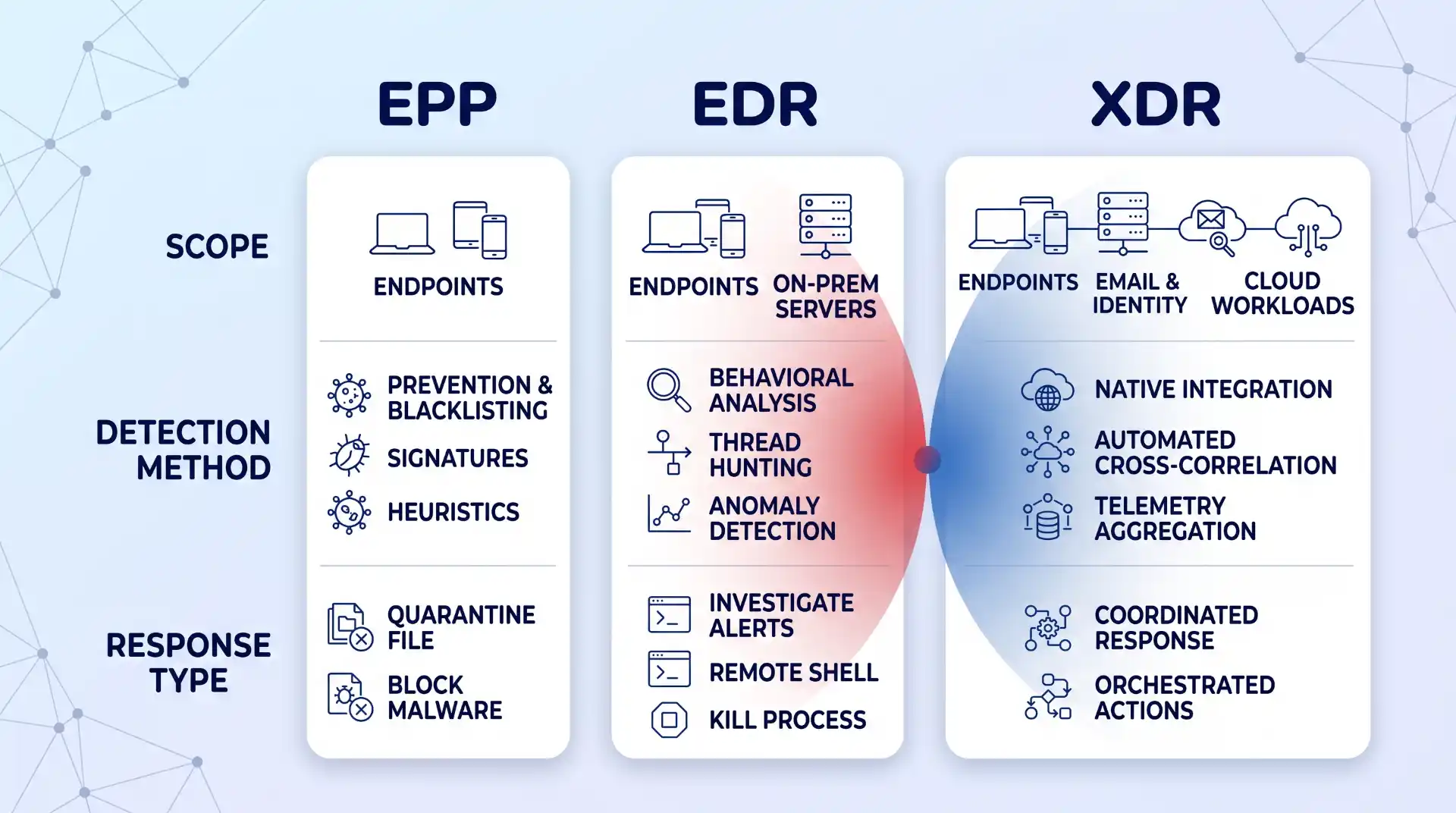
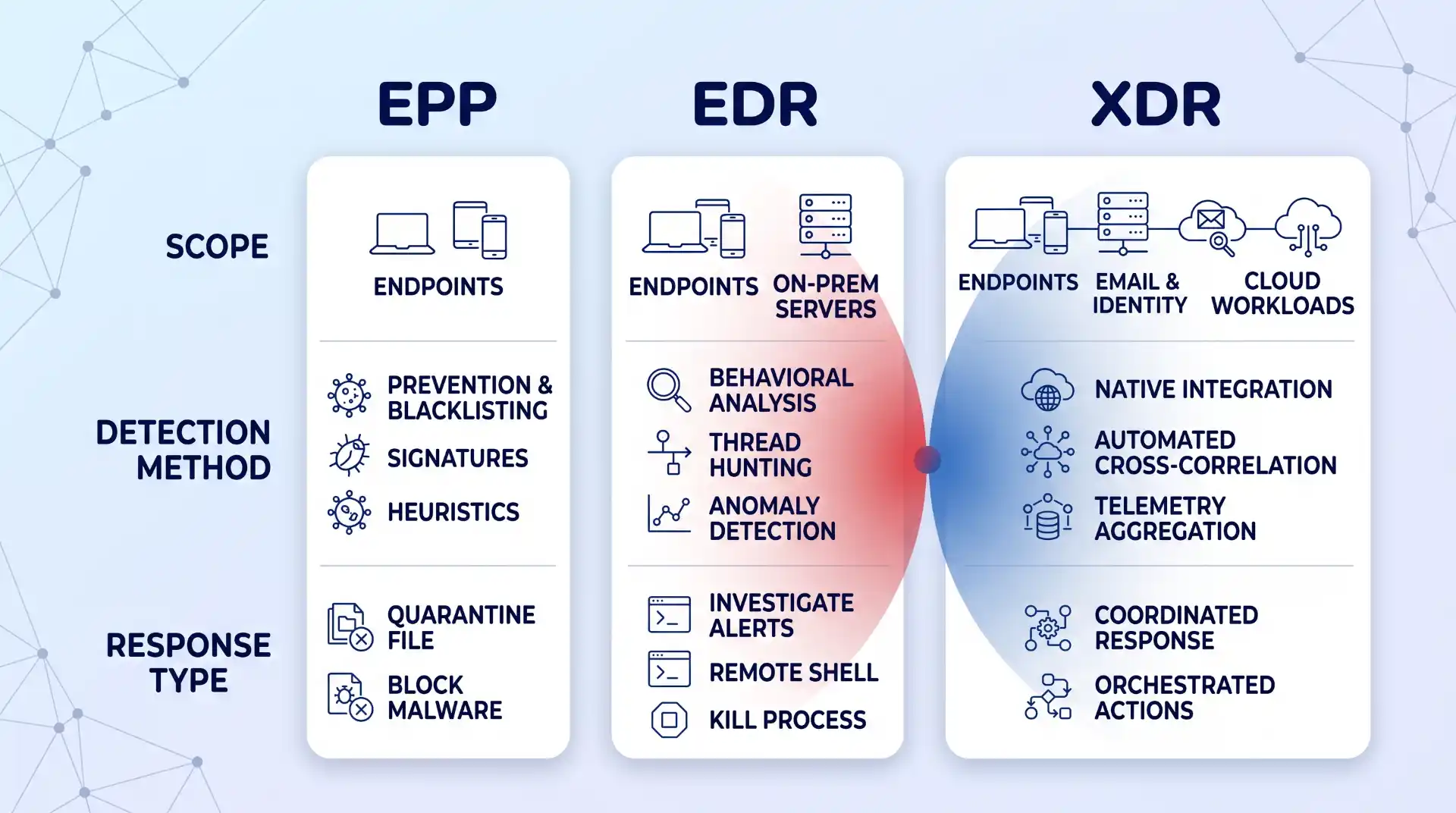
It helps to know where EPP sits relative to two terms you’ll hear constantly while shopping: EDR and XDR. Palo Alto Networks’ comparison of EPP, EDR, and XDR lays out the hierarchy cleanly: EPP is baseline prevention against known threats, EDR adds continuous monitoring and threat-hunting to catch what prevention missed, and XDR extends that monitoring across email, identity, and cloud systems, not just the endpoint. Most vendors now sell EPP and EDR bundled as one product with tiered pricing, which is convenient, but you should still know which capability you’re paying for at each tier, since a sales call will happily blur the line if you let it.
Advertisement
A Step-by-Step Framework for Evaluating EPP Vendors
One branch point worth flagging before you start: if you’re a small team without dedicated security staff, weight Steps 5 and 7 below most heavily, and seriously consider whether a managed option changes your shortlist entirely. If you have a SOC or a dedicated security engineer, Steps 2 and 6 deserve the closest scrutiny, since your team can handle tuning and cross-checking analyst opinions itself. Either way, run every step, but know which two matter most for your situation.
Step 1: Map Your Real Environment First
Before comparing feature lists, sketch a real map of your environment: which devices are company-owned versus BYOD, which servers live on-prem versus in the cloud, and which parts of your workforce work remotely or hybrid. This isn’t busywork. An EPP that assumes a tidy corporate LAN will leave gaps the moment someone logs in from a home network or a coffee shop.
Remote and hybrid work changed what “endpoint” even means. This shift in cybersecurity with remote work is worth reading in full: VPNs and zero-trust models became load-bearing rather than optional, and the number of devices connecting to your network multiplied well past what a single office ever had. Most EPP vendors will claim full remote coverage; few actually extend real behavioral monitoring to a laptop that’s been off the corporate network for weeks. If your team relies heavily on remote access tools, weighing the benefits of remote access against its security trade-offs up front tells you exactly what gaps your EPP still needs to close.
Step 2: Verify AI and Behavioral Detection Depth, Not the Marketing Claim
Every vendor now claims “AI-powered” detection. The distinction that actually matters is whether that AI does behavioral analysis, watching what a process does rather than matching it against a database of known bad files. Signature-based detection can only catch threats that have already been cataloged, and it’s largely useless against anything new. That’s the entire reason behavioral and AI-driven detection exist: to flag deviations from a device’s normal activity even when nothing matches a known signature.
Advertisement
This matters more now because attackers use the same technology. Palo Alto’s research on AI-driven threats points to AI-crafted phishing as one clear example: messages personalized well enough, and delivered convincingly enough, that the signals security-aware employees are trained to spot don’t show up anymore. If your evaluation only asks “does it have AI,” that’s the wrong question. Ask for specifics: does it flag fileless execution, credential-stuffing patterns, or a legitimate binary suddenly behaving abnormally? A guide to defending against AI phishing attacks is worth reading alongside this step, since detection software is one layer against AI-generated social engineering, not a complete answer by itself.
Step 3: Test Cloud and Hybrid Workload Coverage Specifically
Most businesses today run some mix of on-prem and cloud, whether that’s a deliberate hybrid strategy or just years of SaaS tools accumulating. An EPP that stops at the laptop and ignores your cloud workloads is protecting half your attack surface at best.
Microsoft’s explanation of cloud workload protection gets at why this is a distinct problem, not just “cloud, but with an agent installed”: cloud resources get created and torn down constantly, and configurations drift in ways a static, device-based security check never sees. What you actually want to test during evaluation is whether the tool gives consistent policy and visibility whether a workload is running on a physical server, a VM, a container, or something serverless, not just whether it technically “supports cloud.” If your organization leans on cloud storage as part of daily operations, the reasons cloud storage matters for your business are also the reasons it needs its own layer of protection: convenience and accessibility cut both ways, and an EPP that can’t reach that layer is a blind spot by design, not by accident.
Step 4: Confirm Enterprise-Wide Visibility Across Every Asset Class
Visibility is the least glamorous EPP feature and the one that gets skipped over fastest in a sales demo, which is exactly why you should slow down on it. It means being able to see, from one place, what’s happening across every endpoint, cloud workload, and remote connection you mapped in Step 1: what’s running, who has access, and what changed in the last hour.
Advertisement
The test here is concrete: during a demo, ask the vendor to show you a single device or workload you don’t recognize, and watch how many clicks and different screens it takes to get its full history. If the answer involves switching between three consoles or exporting a CSV, that’s not enterprise-wide visibility, no matter what the datasheet says. The gap almost always shows up at the edges: IoT devices, contractor laptops, and anything spun up in the cloud outside your standard image are the places visibility quietly stops.
Step 5: Evaluate Response Automation and How Much Oversight It Still Needs
Automated response is what lets an EPP act at 3 a.m. without waking anyone up: quarantining a file, killing a process, or isolating a device the moment its behavior crosses a threshold. That’s genuinely valuable, and for a small team without 24/7 coverage, it’s often the difference between catching an incident in minutes and finding it a week later in the logs.
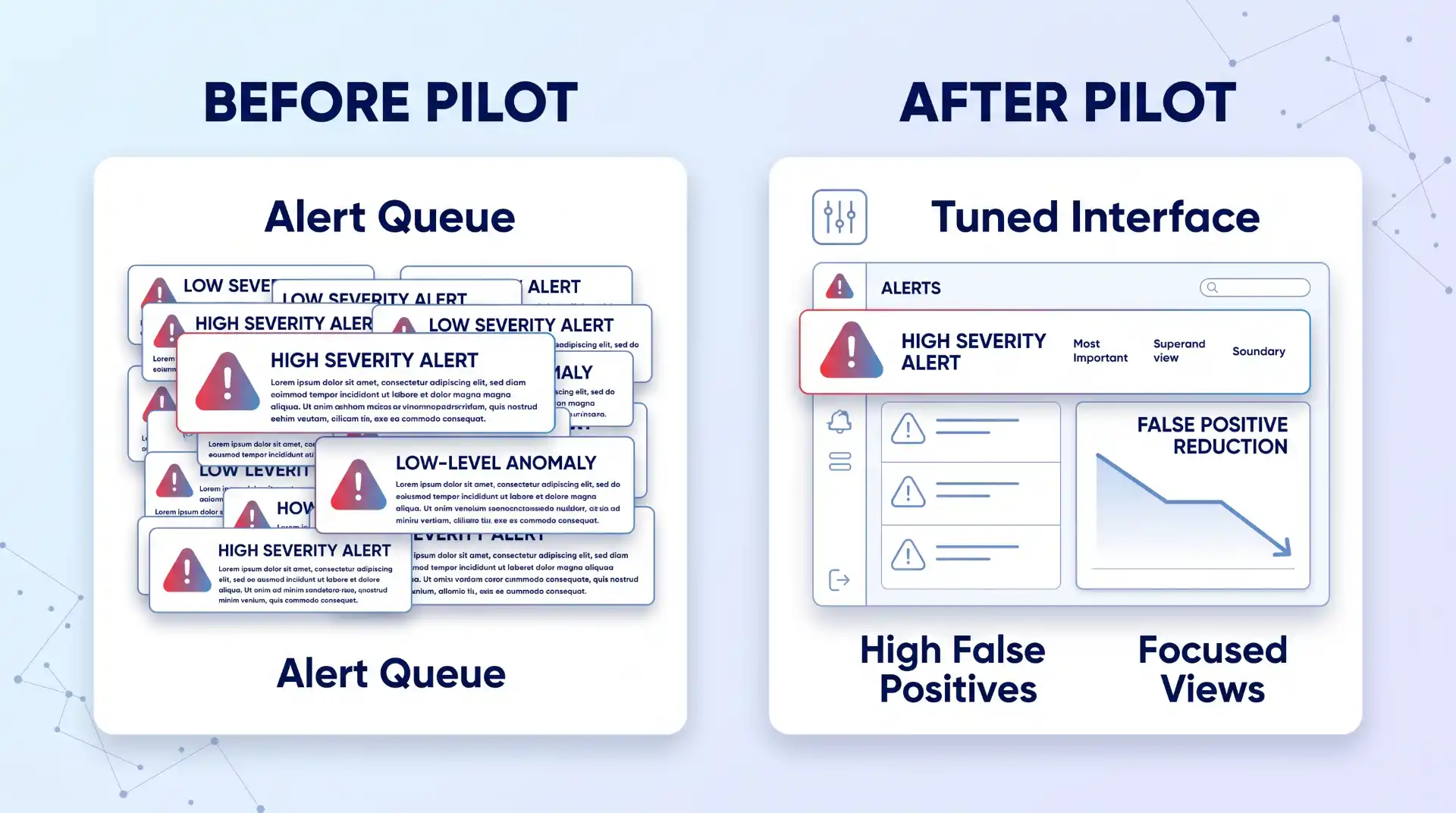
It’s also brittle if you don’t tune it. Automation configured with loose thresholds either misses real incidents or floods your team with false positives until someone disables half the rules out of fatigue, which defeats the purpose entirely. During evaluation, ask specifically how automated actions are scoped: can you set different response levels for a finance laptop versus a test server, and can a human easily review and reverse an automated action that turned out to be wrong? A tool that only offers “on” or “off” for automation, with nothing in between, will eventually either over-trigger on legitimate software or under-react to something real. Faster is only better here if it’s also controllable.
Step 6: Weigh Analyst and Peer Evaluations as One Input, Not the Final Word
Gartner’s Magic Quadrant used to be the single reference point everyone pointed to in this market, and it’s worth knowing the report itself has moved on: Gartner’s own market page for endpoint protection now labels it a report in transition, no longer simply “Magic Quadrant for Endpoint Protection Platforms.” Even analyst frameworks are moving targets, not permanent rankings.
Advertisement
Use it as one input, not the final word. Gartner explicitly frames its Peer Insights reviews as the opinions of individual users based on their own experience, not verified facts or a Gartner endorsement, which is worth remembering before letting five-star reviews substitute for your own testing. Where a Leader or Visionary placement is genuinely useful is as a shortlist filter for vendors worth demoing, not a purchase decision on its own. This is also the point in the process to decide whether you want to run the tool yourself or hand ongoing monitoring to a managed detection and response provider, since that choice changes which vendors and pricing tiers are even relevant to compare.
Step 7: Run a Scoped Pilot Before You Commit
Nothing in a demo or a spec sheet tells you how a tool behaves on your actual traffic, your actual users, and your actual mix of devices. Run a scoped pilot on a representative slice of your environment, not just the newest laptops in the IT closet, before signing anything longer than a month.
Huntress’s own comparison of enterprise options frames the decision as fundamentally dependent on your business context: team size, industry, deployment complexity, and whether you need a managed service layered on top, not a single “best” answer that applies universally. Build your pilot around that same logic. Give the tool two to four weeks, include at least one server and one remote or cloud endpoint, and track false positives and any real incidents alongside how much manual tuning the team had to do to get there. If a vendor pushes back hard on a real pilot and offers only a canned demo instead, treat that as information too.
Verification: How to Know You Picked Right
You’ll know you picked correctly a few weeks after rollout, not on day one. Track three numbers coming out of your pilot or early deployment:
Advertisement
False-positive rate: how often it flags legitimate software or activity as a threat.
Mean time to detect: how long it takes to flag a real issue once it starts.
Mean time to contain: how long it takes to shut the issue down once flagged.
Confirm your cloud and remote endpoints from Steps 1 and 3 are actually showing up in the same console as your on-prem devices, with the same level of detail, not a separate cloud dashboard with limited data. And check that automated responses from Step 5 are logged clearly enough that you could explain to an auditor, six months from now, exactly what the tool did and why. If any of those three checks come back thin, that’s a sign the tool looked right on paper but isn’t actually covering what you mapped in Step 1.
Common Evaluation Mistakes
These four show up more than any others, roughly in order of how often they happen:
Buying on the detection marketing alone. “AI-powered” and “next-gen” appear on nearly every vendor’s homepage regardless of what’s actually happening under the hood, and a glossy comparison chart won’t tell you which claims are real.
Ignoring service-model fit. A five-person team buying a self-managed EPP built for organizations with a full-time SOC will end up with a console full of unread alerts within a month; that’s not a product failure, it’s a mismatch that should have been caught back in Prerequisites.
Skipping the pilot. This is the mistake that costs the most later. A tool that looks identical to competitors on a spec sheet can behave completely differently on your actual traffic, and the only way to find that out is to run it, not read about it.
Missing cloud blind spots. These tend to surface only after rollout, once someone spins up a workload outside the standard image and it simply doesn’t appear anywhere in the console. Catching this deliberately during Step 3 is far cheaper than catching it during an actual incident.
Where This Approach Has Limits
Even a well-chosen EPP has a ceiling. Fileless attacks and advanced persistent threats are specifically built to operate without leaving the kind of artifact a prevention-focused tool is designed to catch, and Infosec Institute’s EPP limitations comparison is direct about it: an EPP solution alone cannot deal with these more skilled attacks. That’s not a knock on any specific vendor; it’s a structural limit of prevention-first tools, which is why EDR and XDR exist as layers on top, not replacements.
There’s also a layer EPP was never built to cover: the application itself. If your business runs custom or cloud-native applications, endpoint protection won’t see an attack that exploits application logic at runtime rather than the operating system underneath it. That’s a separate discipline, and the case for RASP over traditional app defenses is worth evaluating alongside your EPP rather than assuming one tool covers both layers.
Key Takeaways
Endpoint protection software earns its keep on two things: how well it detects what hasn’t been seen before, and how completely it reaches every device and workload you actually run, not just the ones easiest to secure.
Map your environment before you take a single vendor call; a tool that’s strong on laptops and thin on servers or cloud workloads isn’t a fit if that’s where half your infrastructure lives.
Verify AI-driven detection and cloud coverage directly instead of trusting a spec sheet, and never skip a real pilot on your own traffic.
Treat Gartner and peer reviews as a shortlist filter, not a purchase decision.
Go in knowing EPP has a ceiling: fileless attacks, advanced persistent threats, and application-layer risk need additional layers, not a bigger EPP budget.
FAQ
Is free antivirus software the same thing as an EPP?
No. Free antivirus tools generally rely on signature-based detection alone and offer little to no automated response, centralized visibility, or cloud workload coverage. They can be a reasonable stopgap for a single personal device, but they’re not built for the enterprise-wide visibility and response automation an EPP is expected to provide.
How much does endpoint protection software cost?
Pricing varies enough by vendor, deployment size, and whether you add managed detection services that any single number would be misleading here. Treat pricing as something to get in writing for your specific environment during the pilot in Step 7, rather than from a public price list, since per-device costs typically shift once you factor in server coverage, cloud workloads, and support tiers.
Advertisement
How often should I re-evaluate my endpoint protection vendor?
Revisit the decision on a fixed schedule, not only when something goes wrong. An annual review against the framework above, tightened to every six months if you’re in a fast-changing environment like hybrid cloud, catches vendor drift, a tool that’s quietly stopped keeping pace with new threats, before an incident forces the conversation.





































































You must be logged in to post a comment Login