




Connect with us

Tech

At What Length Do Ethernet Cables Drop To Lower Speeds?

Published

on

For the average home, standard Ethernet cable lengths max out at 328 feet. It reads like a weird number for a “standard” length, but 328 feet is the maximum length a rated connection speed can travel reliably. Of course, we’re not dealing in absolutes here. An Ethernet cable won’t always work perfectly at 328 feet and drop off into oblivion at 329 feet. But it’s the limit network installation standards use to account for things like signal loss, interference and general timing issues.

Weird number or not, it seems relatively simple, right? Not exactly. The 328-foot allowance includes more than the cable, not to mention the cable categories (11 or so), depending on what you want to classify as applicable in this scenario. For instance, a Cat1 is for old analog telephone lines and isn’t something you would route from a gaming rig to a Wi-Fi 7 tri-band router unless you needed a good laugh. In fact, for this use case, you can safely eliminate Cat1 through Cat4.

A typical setup utilizes 295 feet of solid-core cable, plus up to 33 feet of flexible patch cables at either end to account for what’s hidden behind the wall. Within that distance, a solid Cat5e or Cat6 cable can support 1 Gbps Ethernet. In the average scenario, a 10-, 25-, or 100-foot Ethernet cable shouldn’t slow down connection speeds. For the most part, cable length becomes more consequential when running faster-than-gigabit speeds.

Advertisement

Cable type determines the limit

The length of an Ethernet cable isn’t the end-all, be-all dictator of speed. In fact, even if you’re running an Ethernet cable up the wall, across the roof, around door archways and across the floor, the cable category and network speed are still more pertinent than distance.

  • Cat5e: Up to 328 feet (100 meters) > 1 Gbps

  • Cat6: Up to 328 feet (100 meters) > 1 Gbps

  • Cat6: Up to 180 feet (55 meters) > 10 Gbps

  • Cat6a: Up to 328 feet (100 meters) > 10 Gbps

As you can see, Cat6 can catch you off guard. It can support 10GBASE-T (10 Gbps), but its full 10 Gbps rating extends to only about 180 feet. For a longer 10 Gbps run, Cat6a is the superior alternative because it’s designed to sustain 10GBASE-T up to 328 feet.

As alluded to above, going beyond a cable’s rated distance won’t necessarily produce a gradual slowdown. For instance, with Cat6, 10 Gbps is specified for 180-foot runs, but a longer run may still produce 10 Gbps if the installation and cable are in great shape. If a Cat6 cable is slightly longer than 180 feet and you experience errors and inconsistencies in performance, step it up to Cat6a.

Advertisement

What to do with a long Ethernet run

Unless you’re in an unusual situation, use a tested Cat5e, Cat6 or Cat6a cable that’s 328 feet or shorter between two active network devices. There are many applicable scenarios here, but choose cable type and length based on the plan you inked with your ISP. If your plan maxes out at 1 Gbps, you don’t need a Cat8 cable. That would be like purchasing an Nvidia GeForce RTX 5090 so you can play Roblox. Cat7 or Cat8 isn’t automatically better for every scenario because you also need to consider your router ports and computer capabilities.

If you have to connect two devices that are more than 328 feet apart, an extra-long Cat6 or Cat6a isn’t always the best solution. Instead, toss in an Ethernet switch at the midpoint to create two separate copper runs or replace the long portion with fiber optic cable. Fiber doesn’t connect directly to copper, but a media converter or fiber-capable switch solves the conflict.

For Power over Ethernet (PoE), length is more of a concern. The same 328-foot rule generally applies, but lengthy runs may not provide enough juice. Always use the applicable cable and verify the PoE requirements of the switch and the devices. Ethernet can ordinarily run at full speed up to 328 feet when the cable category supports that speed, with Cat6 being the only notable exception. If you want to use Cat6, stick with 180 feet or less.

Advertisement

Source link

Continue Reading
Click to comment

You must be logged in to post a comment Login

Leave a Reply

Tech

Android adds built-in password and passkey transfers, supporting Google, 1Password, Bitwarden, and Dashlane

Published

on

Why it matters: Although not foolproof, password managers are one of the most secure ways to generate, store, and use passwords. However, switching between them can be tedious and, in some cases, open users to security risks. A new feature for Android devices simplifies the process while removing a crucial vulnerability.

Android users can now transfer passwords and passkeys between password managers via a new procedure managed by the operating system. The feature already supports most major password managers on Android 8 or later, with more to follow.

To start, download the password manager you intend to transfer your information to. Then, choose the option to import or copy data from another manager. Android will automatically detect other installed password managers and display which ones support the transfer. After tapping “Continue,” you can review the information being moved before authorizing the transfer.

Outside of speed, the feature’s main new benefit is that it requires no file downloads. Moving passwords between managers sometimes involves downloading an unencrypted text file that could be intercepted. Furthermore, transferring passkeys usually requires reassigning them one by one, which the new process handles automatically.

Advertisement

Also Read: Essential Apps to Install on Windows and macOS (Including Password Managers)

Google confirmed that Android password transfers currently support Google Password Manager, 1Password, Bitwarden, and Dashlane. More managers are expected to add support soon.

Security experts generally recommend password managers as the best way to generate strong, unique passwords, something many users still struggle with. As recently as last year, “123456” and “password” still ranked among the most popular passwords.

However, password managers do have vulnerabilities and have suffered breaches, which might prompt users to switch between them. Earlier this year, researchers found vulnerabilities in Bitwarden, LastPass, and Dashlane. Password managers tied to web browsers can be even riskier, as Microsoft Edge was found to be storing saved passwords unencrypted in memory. Furthermore, Dashlane fell to brute-force attacks in June, and hackers stole LastPass subscriber information (but not passwords) later that month.

Advertisement

Passkeys, which tie authentication to specific devices via PINs and biometrics without revealing sensitive information to servers, are considered more secure than passwords, but not perfect. In August, researchers published a method for stealing passkeys from Google Chrome’s memory, and they can also be stolen along with browser sessions.

Source link

Advertisement
Continue Reading

Tech

Lanterns episode 5 ending explained: who dies, why does John Stewart [spoiler], and more big questions answered about the DC comic book show’s latest entry

Published

on

Lanterns episode 5 has landed on HBO Max — and it’s not only the DC Universe (DCU) TV show’s most devastating chapter so far for myriad reasons, but it also wraps up its 2016 storyline. From here on out, then, we’ll be back in 2026, aka the DCU‘s current timeline.

Its present-day plot will have to wait another week, though, because we need to dissect all the hugely significant events that happened in Lanterns‘ fifth episode. Consider this your one and only warning: full spoilers immediately follow for Lanterns chapter 5, titled ‘Lights Out’. If you haven’t seen it yet, bookmark this page for later and return once you’re caught up.

Who dies in Lanterns episode 5?

Will Macon sitting on a horse in the daytime in Lanterns season 1

Will Macon is one of three major casualties in the DCU TV show’s fifth chapter (Image credit: John Johnson/HBO Max)

Frankly, lots and lots of people die. Innocent Rushville civilians caught in the crossfire and foot soldiers in Will Macon’s militia and Antaan’s extraterrestrial forces all bite the dust in the HBO Max show’s latest installment.

Advertisement

Latest Videos FromTechRadar

Source link

Continue Reading

Tech

Sony just corrected its PlayStation disc shutdown news, and the truth is very different from earlier reports

Published

on


  • Sony corrected reports claiming its disc production would collapse by 90%
  • The company’s final disc plant will reduce output by 10%
  • Sony still plans to stop producing new physical games in 2028

Sony has denied reports suggesting it plans to abandon physical disc manufacturing entirely, despite widespread speculation surrounding its future operations.

The company instead confirmed that its sole remaining disc-making plant will simply reduce output by 10%, not the previously reported 90%.

Source link

Continue Reading

Tech

A hobbyist built a working computer out of 460 vacuum tubes, and it needs 15 minutes to warm up

Published

on

The takeaway: A homemade computer built with 460 vacuum tubes puts early computing technology to work in a modern project. The wall-mounted 8-bit system runs custom software, accepts user input, and drives a flip-digit display without a microprocessor, microcontroller, or modern integrated circuit. Its design highlights both the capabilities of tube-based computing and the limitations that led the industry to adopt semiconductor technology.

The project, called The Tube Computer MK3, was built by Mike, a self-taught electronics tinkerer who recently documented the machine on Hackaday. It is the third vacuum-tube computer he has developed this decade.

Vacuum tubes powered early electronic computers before transistors and integrated circuits replaced them. Tubes are large and fragile, generate heat, and have shorter working lives than semiconductor components. Mike’s computer shows why the industry moved on from them, while also proving they can still power a working computer.

Mike describes the system as “a modern 8-bit design, built with recycled 1950s vacuum tubes.” It is not a replica of a particular historic computer. Instead, it applies older electronic components to a contemporary 8-bit design built from discrete logic.

Advertisement

The wall-mounted system uses 460 recycled Soviet-era 6N3P double-triode vacuum tubes dating to the 1950s, along with germanium diodes. The tubes are arranged on 46 circuit boards, with 10 tubes per board, and linked by five backplane PCBs. The boards sit on a 190-centimeter-by-130-centimeter acrylic panel supported by an aluminum box-section frame.

Its logic is deliberately limited. The arithmetic logic design carries out five operations used by the instruction set: sum, carry, NOT, increment, and XNOR. The computer has no pipelining. Each instruction goes through a six-step fetch cycle followed by one execute cycle.

By modern standards, the design is slow and unwieldy. But unlike a silicon chip, its computing logic is spread across hundreds of visible tubes and circuit boards. Getting the computer ready to run takes time. After power-on, the tubes need between 10 and 15 minutes to warm up. Mike then resets it to bring the components into a common operational state.

Reliability is an ongoing concern. The used and old-stock tubes have a working life of about 500 hours, so replacements and repairs are part of running the system. Because the computer is mounted on a wall, Mike sometimes needs a stepladder to reach a failed tube.

Advertisement

Heat is another challenge for the tube-based system. The tubes glow during operation and keep the computer room warm. Mike keeps a fire extinguisher nearby, and the running system leaves behind the smell of burning dust. Earlier tube-computer iterations have sometimes failed explosively.

The computer currently runs an Airship Simulator that lets users pilot a British R80 airship from Brighton to Paris. Membrane controls placed over an image of the R80’s bridge send commands directly to the computer’s input board.

“By pressing controls on the image of the bridge of the R80, you can direct the airship software,” Mike said. “These membrane buttons simply put 5 volts directly to the input board of The Tube Computer. You can control the ballast, gas release, engine power, elevators, rudder and the bow mooring gear, which is used to release the airship from the tower.”

Advertisement

Source link

Continue Reading

Tech

Secure IP Cameras and CCTV Recorders From Remote Risks

Published

on

Secure IP cameras and CCTV recorders by replacing default or reused credentials, installing supported updates, disabling remote-access features you do not need, removing unnecessary router exposure, enabling multi-factor authentication where available, and separating surveillance devices from everyday systems where practical. After making the changes, verify that recording and intended remote viewing still work without restoring unnecessary access paths.

Security is easier when it is considered during CCTV installation planning, but an existing system can still be hardened without replacing every camera. The first job is to understand how the cameras, recorder, router and any cloud account currently communicate.

Before You Change Anything: Identify How Remote Access Works

Do not start by disabling random router or camera settings. First identify which devices you have and how someone outside the property reaches them. Otherwise, you can break legitimate recording, alerts or remote viewing without removing the access path that created the risk.

An Internet Protocol camera, usually called an IP camera, sends video over a data network. A Network Video Recorder, or NVR, receives and stores streams from network cameras. Depending on the installation, remote viewing may pass through the recorder, a manufacturer’s cloud service, a router rule, a virtual private network or a combination of these.

Advertisement

Prerequisites

  • Administrator access to the cameras, CCTV recorder and remote-viewing accounts you are authorized to manage
  • Administrator access to the router or firewall used by the CCTV network
  • The manufacturer and model numbers of the cameras and recorder
  • The currently installed camera and recorder firmware versions
  • A list of the mobile apps, browser interfaces, VPNs or cloud accounts currently used for remote viewing
  • A record of any intentional port-forwarding, Universal Plug and Play or remote-management settings already configured

Universal Plug and Play, or UPnP, can let compatible devices request network configuration automatically. Port forwarding is a router rule that directs specified incoming traffic to a device inside the local network. The UK’s National Cyber Security Centre advises camera owners to consider whether UPnP and port forwarding are actually needed because they can increase the routes through which networked devices may be reached.

Secure the Cameras and Recorder Step by Step

Work through these controls in order. Secure identities and software first, then reduce unnecessary exposure while preserving only the remote-access method the installation genuinely requires.

  1. Change default and reused credentials. Replace manufacturer-default usernames and passwords on cameras, recorders and management interfaces. Also replace passwords reused on other websites or accounts. The NCSC smart-camera guidance recommends changing default camera passwords, while the FTC advises using a strong password that has not been reused elsewhere. An NVR may have separate credentials for its local console, browser interface, individual cameras and cloud account, so check each layer rather than assuming one password change covers everything. A strong password and password-manager policy can help keep administrative credentials unique without relying on memory.
  2. Enable multi-factor authentication where it is supported. Turn on multi-factor authentication, commonly shortened to MFA, for cloud viewing accounts, administrator portals and other remote accounts that provide it. MFA requires another proof in addition to the password, such as a code or authenticator approval. The FTC’s security-camera guidance specifically recommends two-factor authentication for camera cloud accounts when available. MFA reduces the damage from a stolen password, but it does not make an unsupported or unnecessarily exposed device safe by itself.
  3. Update the camera, recorder, viewing app and router. Check the manufacturers’ support pages for current supported software for every component involved in recording or remote access. Firmware is software stored on hardware such as a camera, recorder or router. The NCSC recommends regularly updating camera firmware and enabling automatic updates where available, while the FTC also advises updating the camera software and the apps used to view footage. Record the installed versions after updating. If a device says no update is available, also check whether the model is still supported because an end-of-life device may already be on its final release while receiving no further security fixes.
  4. Disable internet remote viewing when you do not need it. If footage is only viewed from inside the premises, disable internet-based remote access rather than leaving it available for occasional convenience. The NCSC recommends disabling remote viewing when it is unnecessary. Check the consequence before doing so because the same vendor service may also provide movement alerts, cloud recording or smart-home integrations. Confirm local recording before and after the change.
  5. Remove unnecessary port forwarding and UPnP exposure. Review the router’s existing port-forwarding rules and UPnP configuration. Remove forwarding rules that no longer have a documented purpose, and consider disabling UPnP if the applications and devices you still rely on do not need it. The NCSC warns that these technologies can create additional access paths to devices such as smart cameras. Do not delete an unfamiliar rule simply because its name looks suspicious. Identify the internal device and service first, then remove the rule if it is unnecessary. If remote viewing stops working, determine the supported access method before recreating broad inbound access.
  6. Keep necessary remote access behind a controlled authentication path. Prefer the maintained access method designed for the environment rather than exposing several camera administration interfaces independently. For a consumer installation, that may be the manufacturer’s maintained remote-viewing service protected by unique credentials and MFA. A managed business environment may instead use a controlled VPN or access gateway. CISA’s internet exposure reduction guidance recommends removing unnecessary internet exposure and using secure, monitored access for systems that must remain reachable. A VPN is not a universal consumer requirement, and replacing a maintained vendor service with an improvised network configuration is not automatically safer.
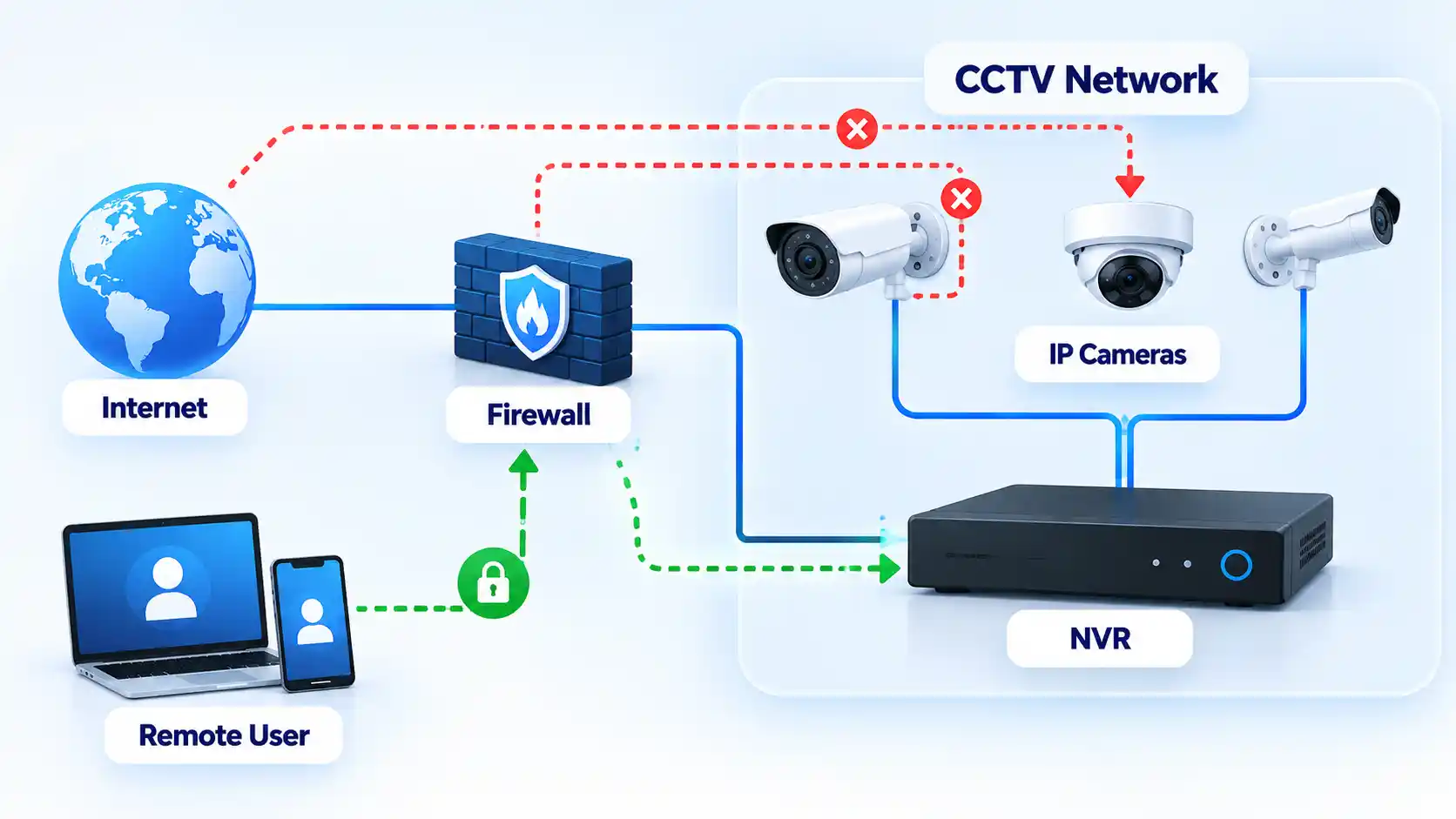
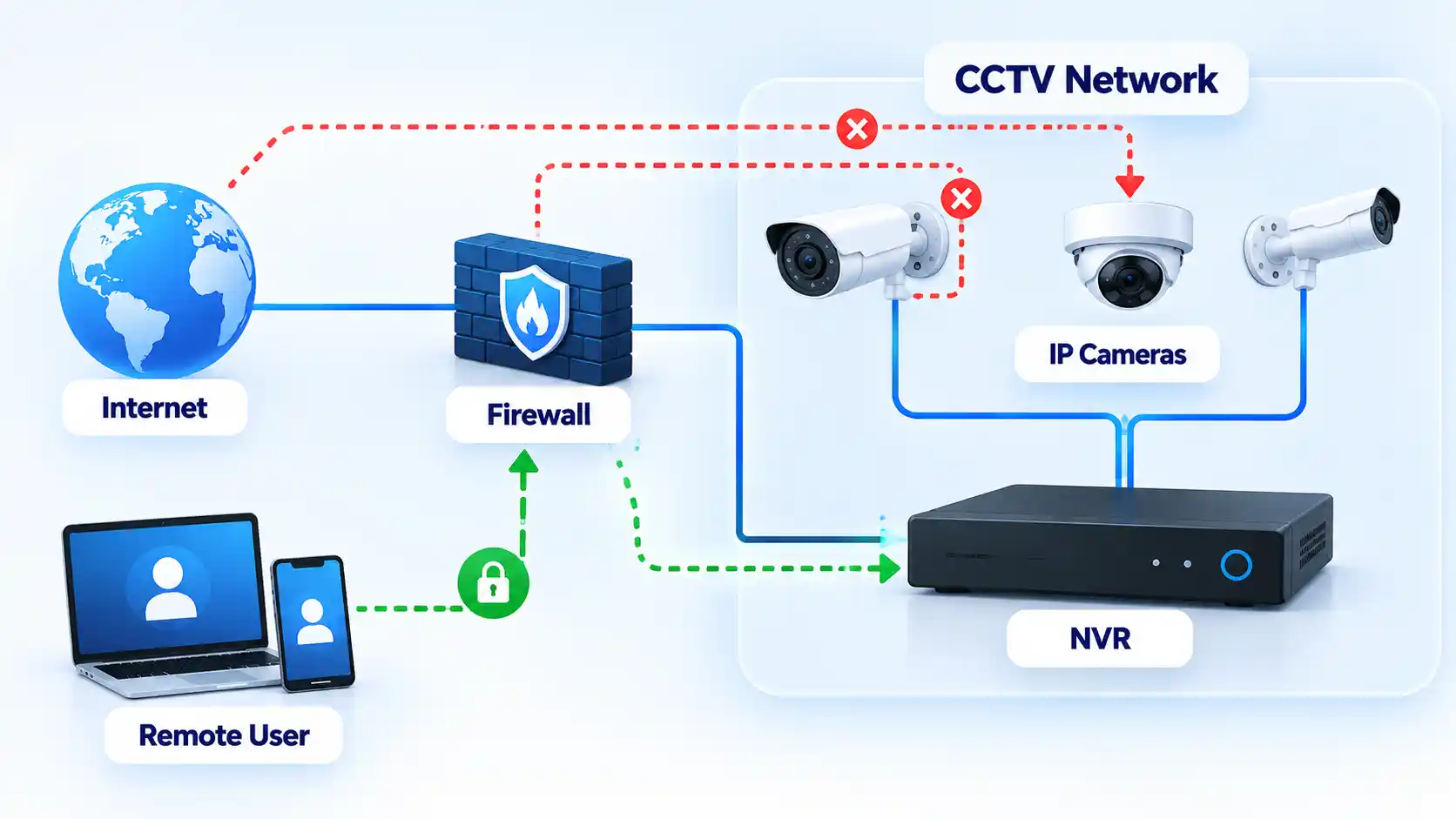
  7. Separate surveillance devices from everyday systems where practical. The FTC recommends considering a separate network for security cameras so compromise of another computer or device does not also provide easy access to the cameras. On a home router, use a guest or IoT network only if the router documentation confirms that it provides the isolation you need. In managed networks, a dedicated virtual local area network, or VLAN, with firewall policy can provide finer control over which systems the cameras and recorder may contact. NIST’s current IoT guidance likewise treats device identity, network access and lifecycle posture as parts of protecting IoT devices and the networks they join. Preserve required paths for recording, updates, time synchronization and authorized viewing rather than blocking traffic arbitrarily.CCTV network map with firewall, NVR, IP cameras, blocked routes and authenticated remote user access.
  8. Restrict administrator privileges and shared access. Use separate viewer and administrator permissions where the product provides them. A person who only needs to watch live footage should not automatically receive permission to create accounts, change passwords or alter camera settings. The FTC notes that some camera products provide different permission levels for shared users. Avoid one shared administrator account where individually attributable accounts are supported, and remove access for installers, former staff or other users who no longer require it.
  9. Use encrypted management and viewing connections where supported. Enable the camera or recorder’s supported encryption features and prefer encrypted browser management. The FTC advises checking whether account information, livestreams and archived footage are encrypted and says browser-based camera login pages should use HTTPS. Do not dismiss certificate or browser security warnings simply to complete setup. If an older device provides only insecure management and cannot be updated or adequately isolated, treat that as a lifecycle risk rather than assuming local placement alone makes it safe.
  10. Review access records and active sessions where available. Check login history, camera access logs, connected clients and active cloud sessions for activity you do not recognize. The FTC’s connected-device guidance specifically recommends checking IP-camera logs for unfamiliar IP addresses or unusual access times. Log availability varies by product, so the absence of a logging screen does not prove that unauthorized access has never occurred. Revoke unexplained sessions and investigate unexpected administrator accounts before returning the system to normal use.

Verify That the Hardening Worked

Security changes are successful only when the system continues to perform its intended job while unnecessary access has been removed. Test recording locally and test only the remote-access methods you deliberately chose to retain.

Verify the result

  • Each camera still records to its intended NVR, storage card or supported cloud destination.
  • Recorded footage can be played back normally after the account and network changes.
  • The approved remote-viewing method works from outside the local network if remote access is still required.
  • Access methods you intentionally disabled no longer provide remote viewing or administration.
  • Manufacturer-default and replaced passwords no longer authenticate.
  • MFA is requested on the accounts where you enabled it.
  • The router contains no unexplained intentional port-forwarding rules for the cameras or recorder.
  • Supported cameras, recorders, viewing apps and routers are running the expected current software versions.
  • Where network isolation was configured, documented router or firewall rules prevent the CCTV network from reaching unrelated protected devices except through paths you intentionally allow.
  • Required motion alerts and notifications still arrive if they are part of the intended setup.
  • Camera and recorder date and time remain correct after the changes.
  • Available access logs or session lists contain only users and sessions you recognize or have documented.

Document the final configuration after testing. Record the remote-access method that remains enabled, administrator accounts, firmware versions, network segment and any intentional router rules. This gives you a known baseline against which later configuration changes can be compared.

If Remote Viewing Stops Working After Hardening

Removing unnecessary access can reveal hidden dependencies in an older CCTV installation. Restore only the specific function the system genuinely requires instead of reversing every security change at once.

The mobile app stopped connecting after UPnP was disabled

Check the camera or recorder manufacturer’s current documentation to determine how remote viewing is designed to work. The previous setup may have depended on automatically created network mappings or on another remote-access mechanism. Do not simply re-enable every router feature. Restore only the minimum supported mechanism required for the intended service, then repeat the remote-access checks.

Local viewing works, but remote viewing does not

Confirm that the intended remote-access service remains enabled and that the relevant account is active. For a vendor-hosted service, check account authentication, MFA and the provider’s service status. For a managed VPN or gateway, confirm that authorized users can establish that connection. Review recent router or firewall changes before recreating direct inbound access to the camera or recorder.

Advertisement
The camera stopped recording after network isolation

The isolation policy may be blocking traffic that the camera genuinely requires to reach the NVR, storage service, time source or another authorized destination. Compare the failure with the intended network design and permit only the required communication. Segmentation should restrict unnecessary paths without preventing recording or other required functions.

A firmware update caused a camera or recorder problem

Use the manufacturer’s documented recovery procedure for that exact model. Do not install firmware from an unofficial mirror or perform an undocumented downgrade simply because an older version previously worked. Preserve recordings or configuration backups first when the manufacturer provides a supported method to do so.

The manufacturer no longer provides security updates

Treat the device as an increased lifecycle risk. CISA recommends replacing internet-accessible devices and software that no longer receive security support. Until replacement is practical, reduce exposure by disabling unnecessary internet access, isolating the device from sensitive systems and limiting communication to the recorder or other destinations it genuinely requires where the installation supports those controls.

When an Older Camera Should Be Replaced

“No update available” is not always reassuring. An older camera can be running the newest firmware ever released for that model while the manufacturer has stopped fixing newly discovered security problems.

Advertisement

CISA’s internet-exposure guidance recommends replacing software and devices that no longer receive security support when addressing assets that remain internet-accessible. Current NIST IoT lifecycle guidance also treats maintaining device security posture throughout the lifecycle as part of protecting IoT devices and the networks they join.

Replacement becomes the stronger option when a camera or recorder must remain remotely reachable but no longer receives security fixes, cannot use adequate authentication, relies on unsuitable legacy management interfaces, or cannot be separated sufficiently from more sensitive systems.

An unsupported camera with no direct internet exposure and tightly restricted communication to a controlled recorder presents a different risk from the same device exposed directly to remote access. Isolation does not repair vulnerabilities in the camera, but it can reduce the systems and networks from which those vulnerabilities are reachable. Whether that residual risk is acceptable depends on the environment and the consequences of a camera, recorder or network compromise.

Final Security Baseline

A hardened CCTV setup should have no known default or reused administrative credentials, supported software kept current, only necessary remote-access paths enabled and no unexplained router exposure. Use MFA where supported and separate surveillance equipment from unrelated devices where practical.

Advertisement

Most importantly, verify the finished configuration rather than assuming a changed setting improved security. Cameras must continue recording, authorized remote users must retain only the access they need, and unsupported equipment should have a documented isolation or replacement plan.

Source link

Advertisement
Continue Reading

Tech

Security through obscurity is dead, and AI delivered the fatal blow

Published

on

The term “security through obscurity” describes an old idea that networks and systems will remain secure so long as their architecture, along with any vulnerabilities or other weaknesses, remains secret or hidden. It was never a sound strategy for protecting sensitive assets and systems, but many organizations leaned on it due to lack of resources or complacency.

Now it’s obsolete. Don’t believe us? Here’s proof. 

Software vendors and independent researchers alike are now using AI agents to find bugs – some very obscure and decades old – across products and open source code, leading to record-breaking numbers of security disclosures and patches, and a massive backlog for project maintainers.

Advertisement

“You see open source platforms that have been visible to the tech community for a decade, these libraries that are run in 80 percent of web servers out there, people have stress-tested those for 10 years, and the community believed that they were really secure,” Brett Leatherman, assistant director of the FBI’s Cyber Division, told The Register. “The latest models were able to break those and say, ‘yeah, there’s significant vulnerabilities in here.’”

Whether or not security through obscurity is dead “isn’t even an opinion question,” Trend Micro’s Zero Day Initiative chief bug hunter Dustin Childs told The Register, the day after Microsoft’s record-breaking Patch Tuesday addressed 974 CVEs. 

“When you look at all of the components patched by Adobe and Microsoft yesterday, you see components no one has talked about in years,” Childs said. “Telnet client – is this even still used in any secure environment? Windows RNDIS – the USB-networking protocol Microsoft has been trying to deprecate for years. NFS Portmapper – 1980s Unix tech. And Link Layer Topology Discovery  – the Vista-era network-map protocol nobody’s thought about since Vista – just to name a few.”

Meanwhile, attackers are also using AI to reverse-engineer fixes and find exploits within hours. In one recent case, at least four espionage crews, most suspected of links to China, slammed shut the “patch-gap” window for open source Chromium, using an exploit kit developed shortly after the maintainers released an upstream patch – but before the downstream stable release was pushed to users.

Advertisement

What this means for OT security

During interviews at Black Hat in August, both former US National Cyber Director Chris Inglis and John Hultquist, chief analyst at Google Threat Intelligence Group, told us that they worry about what this means for critical operational technologies and industrial control systems (ICS). 

These are the systems that ensure the lights turn on when people flip a switch, gas flows out of pumps, and safe drinking water pours from faucets – all critical services that people use daily, and assume will continue working reliably. 

The OT systems themselves often use obscure protocols and proprietary hardware and software, which historically made them black boxes, even to IT specialists and hackers. 

AI upended this assumption. It means that criminals don’t need to be OT experts to carry out destructive cyberattacks on critical networks and facilities. They just have to ask an agent to learn everything about these systems and do the dirty work for them.

Advertisement

A couple of weeks after Black Hat, five US agencies said that attackers used AI-generated exploitation scripts to break into internet-exposed Siemens S7 Series programmable logic controllers (PLCs) at water, manufacturing, energy, and other critical facilities. “This is not a theoretical risk – it is an active threat,” the feds warned.

AI “is excellent at technical troubleshooting, at knowing obscure systems and helping you make your way through it, and this makes me very concerned about industrial control systems,” Hultquist told The Register in an interview last week. 

“They’ve been largely secured because the expertise was in a handful of people’s heads, and that’s not going to last forever,” he said.

AI can be a useful guide for attackers studying not just the application layer, but also the operating system, and even down into the firmware, Hultquist added. “That’s going to have implications for a lot of different areas of security, but definitely for industrial control systems.”

Advertisement

However, while this undoubtedly means more work for sysadmins and defenders, burying this outdated idea of security through obscurity isn’t necessarily a bad thing.

‘Never a winning strategy’

“I’ve always been of the mind that security through obscurity was never a winning strategy,” Katie Moussouris, founder and CEO of bug bounty consultancy Luta Security and the fairy godmother of bug bounties, told The Register. “But that’s because I’ve been a hacker for so long. The argument always fails in the face of someone who decides to turn their gaze towards your organization. If there is something to find, they will find it.”

Plus, she added, AI makes hacking a whole lot easier. 

“People might not have familiarity with the particular tech stack that you’re running, but that is no longer a barrier because AI has ingested everything, and an AI is going to help them enumerate weak spots, even if they themselves are not familiar with the particular tech stack that they are pointing an AI towards,” Moussouris said.

Advertisement

However, finding bugs and other weaknesses has never been the big security problem, she added. “It’s triaging and prioritization and actually getting things fixed.” This, Moussouris said, has also been her biggest issue with the way that organizations implement bug bounty programs.

“AI is shining that bright light on the wrong end of the security picture, and unfortunately, AI hasn’t caught up on the defensive side,” Moussouris said. “We’re not there with AI automated patching, remediation – anything of the sort.”

A couple of recent studies back this up, both finding that AI-generated patches fail more than half of the time.

1Password’s research team took six CVEs disclosed since March, and produced 6,080 patches using two frontier models: OpenAI’s ChatGPT-5.5 and Anthropic’s Opus 4.8. 

Advertisement

“The average success rate for generating a patch that fully resolved the vulnerability (without materially changing application behavior) was just 26.0 percent,” wrote Director of Security Research Keith Hoodlet, adding that even patches that did fix the flaw also mucked up the application’s behavior 20 percent of the time. This included things like changing “allow list” logic to “deny list” logic.

“Conversely, LLM-generated patches did not resolve the vulnerability, added a new vulnerability, or both, an average 53.9% of the time,” Hoodlet said.

Another study by app security shop Veracode found that, across more than 100 models and 80 coding tasks, the average security pass rate for AI-generated code was just 56 percent. 

“If people are telling you that you need to accelerate on the fixing side, and the defense side – that’s just not cutting it,” Moussouris said. 

Advertisement

“Orgs that are looking at this as we’re going to throw more resources at finding and fixing bugs, and they’re not investing in taking a look at their process failures that led to so many bugs – those organizations are going to die on the treadmill,” she added. “They will literally have a heart attack and die. Like there’s no VO2 max that will make you fast enough to deal with all those bugs, and giving up is not the answer.”

The answer, she says, is taking a more dynamic approach, assessing where your organization can find patterns that lead to a process improvement instead of patching vuln after vuln.

“A lot of organizations don’t even know how to measure their progress, so they are counting bugs and speed of fixing, which is one way to measure. We had this many criticals, and then we fixed them super fast, and we had this many high, this many medium,” Moussouris said. 

The number of flaws fixed is important, but it doesn’t show the entire picture, she added. This involves looking at types of vulnerabilities, too.

Advertisement

“Like: We’ve got a lot of injection flaws. That’s something we could solve with better, safer templates earlier in our CI/CD pipeline. This is something that we can prevent at scale, as opposed to fixing these like really easy to find and fix vulnerabilities really really fast.” ®

Source link

Continue Reading

Tech

NASA and IBM Open Source Lunar Mapping Tools

Published

on

NASA and IBM have released an open-source AI model trained on a large collection of lunar observations to help scientists analyze the Moon at scale. “The NASA-IBM Lunar Foundation Model gives scientists a foundation to explore the Moon at scale, connecting observations across instruments, revealing patterns that are difficult to see in isolation, and providing an open platform the global research community can build on,” said IBM director of research for Europe, Juan Bernabe-Moreno. The Register reports: It is claimed as the first AI model to integrate observations captured in a range of modalities (data formats), and at different viewing angles and spatial scales. Instead of sifting through maps and images by hand or using low resolution machine learning models, scientists can use this to analyze geographic features, the pair say. In particular, NASA and IBM hope researchers will be able to discover previously unidentified lunar ice deposits, analyze volcanic features called Irregular Mare Patches, and identify and classify craters.

Lunar ice indicates the presence of water and oxygen, which may be useful for future manned missions. It is found in permanently shadowed regions, which are among the most difficult areas to observe. The NASA-IBM model combines multimodal and multi-resolution observations to better predict where ice may be present on the lunar surface. Alongside the model, IBM and NASA scientists compiled an open-source lunar dataset from over 30 spatially-aligned layers, using data from nine instruments across four missions. It combines tens of thousands of images and maps showing various geophysical properties of the lunar surface.

Read more of this story at Slashdot.

Advertisement

Source link

Continue Reading

Tech

NATO caught Russia rehearsing a secret cable-cutting weapon near Arctic waters, leaving allies scrambling to expose the threat before deployment

Published

on


  • NATO disrupted Russia’s Arctic cable exercise before the reported weapon could be deployed
  • Russian submarines rehearsed attacks that could leave little evidence afterward
  • Two 1,400km cables connect Svalbard with mainland Norway beneath Arctic waters

NATO allies disrupted a Russian naval exercise near Svalbard after detecting preparations involving a secret device intended for damaging subsea communications infrastructure.

British, Norwegian and American forces confronted vessels linked to Russia’s deep-sea research directorate during exercises conducted in Arctic waters this spring.

Source link

Advertisement
Continue Reading

Tech

Anthropic has chosen Nasdaq for its October IPO, in the week OpenAI ruled one out

Published

on

Anthropic has settled on Nasdaq for a listing it still hopes to complete in October, according to a person familiar with the plans who spoke to Business Insider.

The filing remains private, and the valuation is not fixed, though estimates circulating around the deal put it near $2trn.

For Nasdaq, the win completes a set. It took SpaceX earlier this year at a $1.75trn valuation, and with Anthropic it now holds both of the largest listings of a year that has otherwise been thin for technology flotations.

The New York Stock Exchange has historically collected the biggest debuts, which makes 2026 a marked break, and both venues are competing less for the fees than for the right to be seen as the natural home of every AI listing that follows.

Advertisement

In trading terms, Anthropic gains very little. No convincing evidence shows that companies perform better on one American exchange than the other, and the practical difference comes down to market-maker mechanics: the two run different processes for setting an opening price, and very large offerings can strain them.

Nasdaq’s systems failed on the first day of Facebook’s 2012 IPO, still the cautionary example whenever a listing of this size arrives.

Only Nasdaq-listed companies can enter the Nasdaq 100, which is the part that does matter. Index inclusion pulls passive money in behind a stock without anyone deciding to buy it.

Two days ago, Sam Altman told Fortune that OpenAI would not list in 2026, because “given everything happening with safety, right now would be an ill-advised moment to go public”.

Advertisement

Anthropic is proceeding towards a roadshow in the same month Altman is avoiding, and the two companies have reached opposite conclusions from an almost identical set of facts.

The safety warning that has dominated the past fortnight came from a former Anthropic researcher who resigned over safety, saying the labs are gambling with our lives, and whose post, according to Business Insider, put the risk of human extinction above 10 percent.

The company about to ask public markets for a valuation is the company the warning came from.

Anthropic filed confidentially at a $965bn valuation, appointed Morgan Stanley and Goldman Sachs to lead, arranged a $15bn credit facility alongside a timetable that lands days before the US midterms, and has been preparing to pitch investors a $30trn addressable market. A raise of $100bn would make it the largest flotation ever attempted.

Advertisement

Every valuation attached to it so far has come from people briefing reporters rather than from a prospectus.

That changes soon by rule: Anthropic must publish its financials at least 15 days before the roadshow opens. On an October timetable, the first numbers anyone can check are due within weeks.

Source link

Advertisement
Continue Reading

Tech

This AMD dual-GPU rig quietly beats ChatGPT on price once your team crosses one surprising monthly usage line

Published

on


  • Two AMD cards cost $18,775 yet beat GPT-5.6 Sol within hours weekly
  • Multi-Token Prediction nearly doubled throughput to 320.2 tokens every second
  • Twenty million monthly tokens save a team $11,738 yearly against Sol pricing

A hardware reviewer compared a dual-GPU AMD workstation against cloud subscription pricing to determine which option delivers cheaper AI inference over time.

Two AMD Radeon AI PRO R9700 cards, each carrying 32 GB of memory, were installed inside a workstation costing roughly $18,775 as tested.

Source link

Continue Reading

Trending

Copyright © 2025