Following the May 2026 launch of its flagship Velsonic phono preamp, AVID HiFi is expanding its analog lineup with the Pulsus II and Pellar II phono stages. Both models replace long-serving originals: the Pulsus, introduced in 2010, and the Pellar, which followed in 2012. That is a respectable run in any product category, but especially one built around a format that some people were still declaring dead when those first models arrived.
The vinyl train keeps rolling, and there is no sign that anyone has found the brakes. In 2026, buyers have more turntables, phono cartridges, phono preamps, record-cleaning machines, tonearms, cables, mats, clamps, and other playback accessories to choose from than at any point in the past two decades. AVID’s updated Pulsus II and Pellar II arrive in a market that is no longer treating vinyl as a nostalgic side hobby, but as a serious and increasingly sophisticated part of the high-performance audio ecosystem.
On the inside, both models retain much of what made the originals successful, with targeted performance refinements wrapped in a cleaner, more streamlined exterior. AVID is not a company that releases new models every year simply because it has something new to promote. The original Pulsus and Pellar earned considerable recognition for their musicality, engineering integrity, and long-term reliability—qualities that kept both phono stages relevant for well over a decade.
That kind of longevity suggests that AVID got the fundamentals right from the beginning. The Pulsus II and Pellar II are therefore not reinventions for the sake of it, but the result of genuine advances in design, materials, and the company’s deeper understanding of how these circuits can be improved.
Advertisement
AVID Pulsus II and Pellar II: Refined, Not Reinvented
The Pulsus II and Pellar II build on the foundations of their predecessors with refinements in several critical areas. AVID points to more careful component selection and improved noise-reduction strategies, intended to deliver greater transparency, lower noise floors, stronger dynamic expression, and a more natural presentation of music. Both models also offer flexible adjustment options for Moving Magnet (MM) and Moving Coil (MC) cartridges.
As noted earlier, the Pulsus II and Pellar II arrive shortly after the launch of AVID’s flagship Velsonic phono preamp. Together, the three models give serious vinyl listeners a broader range of options based on their cartridge requirements, preferred feature set, and budget.
AVID’s expanded three-model phono preamp lineup reflects the company’s continued focus on meaningful engineering rather than annual cosmetic updates. The Velsonic, Pulsus II, and Pellar II mark a new phase for AVID Hi-Fi in the phono-stage category, with choices that extend from more attainable high-performance designs to a no-compromise flagship.
Plusus II and Pellar II Differences: Highlights
Plusus II
Pellar II
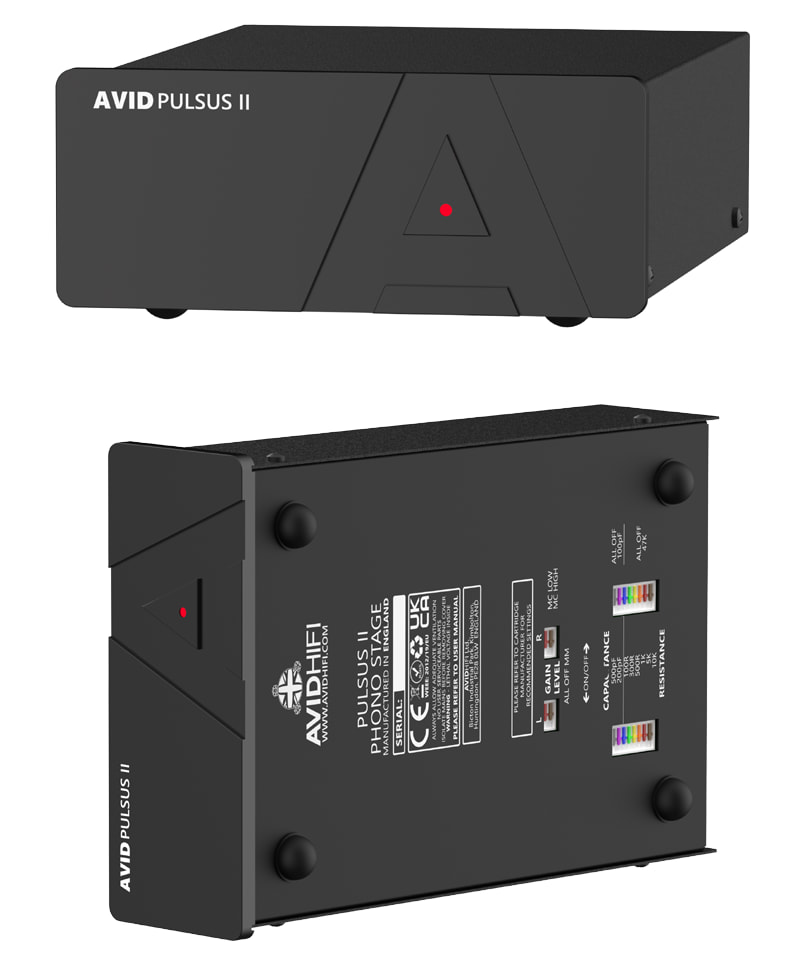
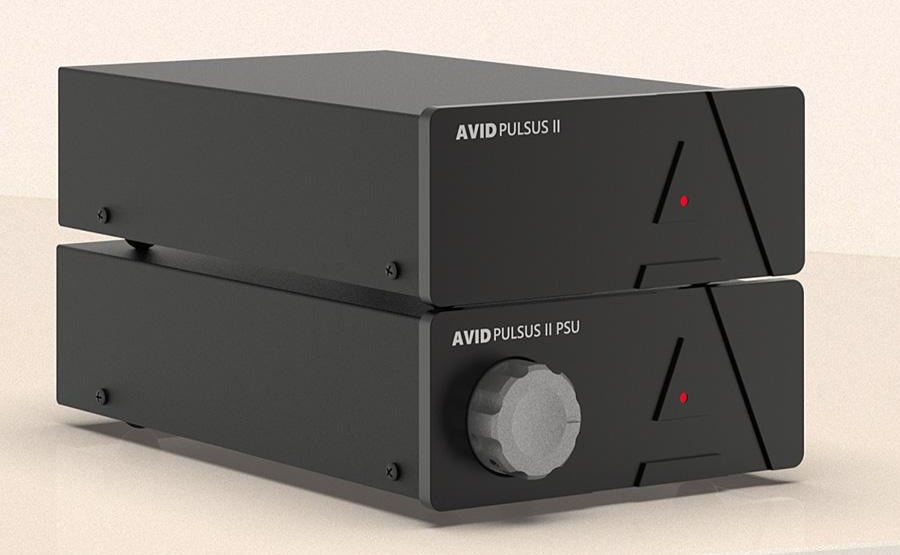
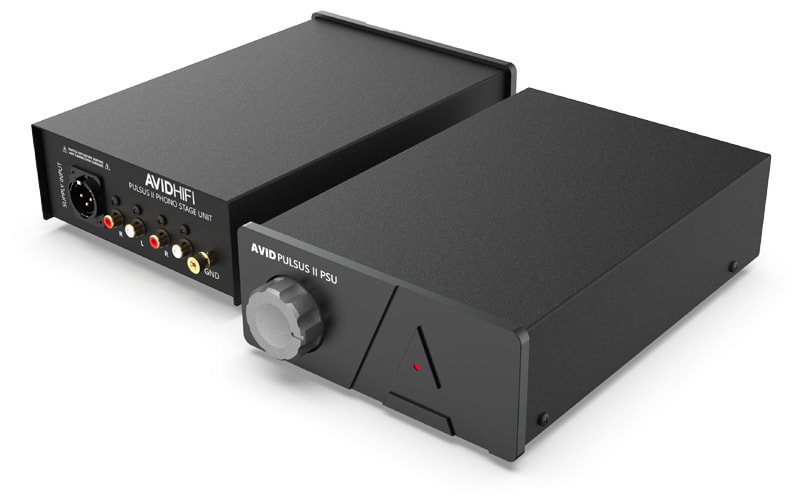
Two-piece form factor with separate Phono Preamp and Power Supply Units
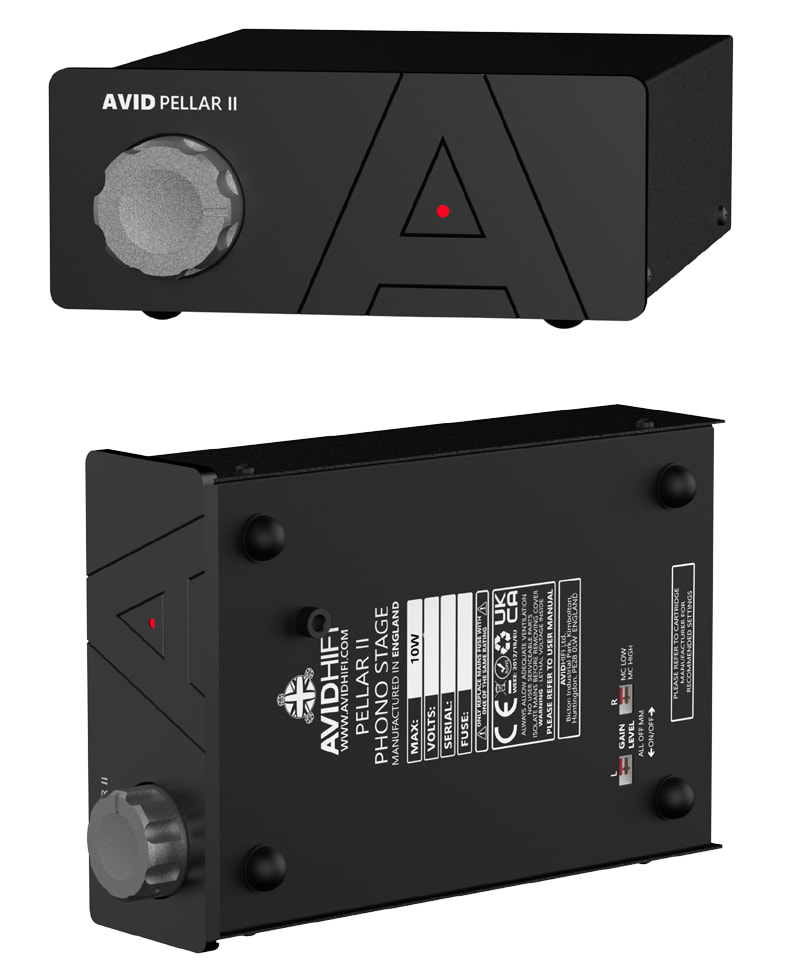
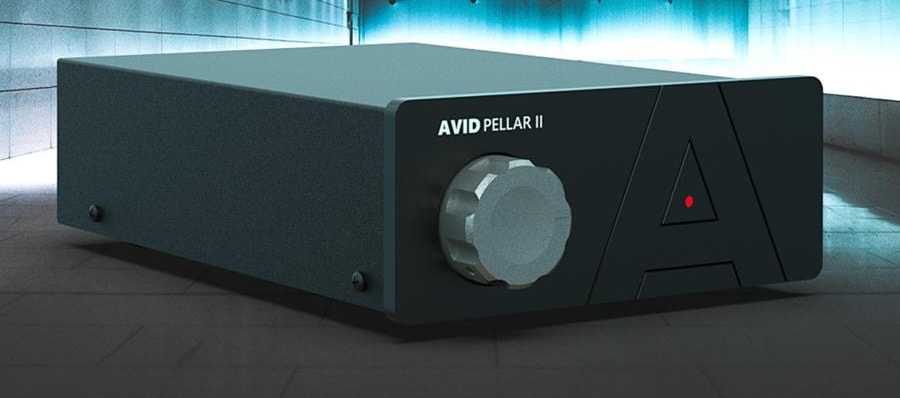
Single-piece Phono Preamp with built-in Power Supply
Dual-mono circuit design with dedicated power regulation
Single board configuration with Low-Noise Op-Amps
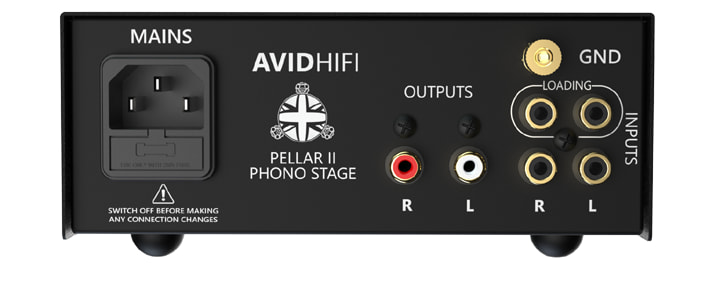
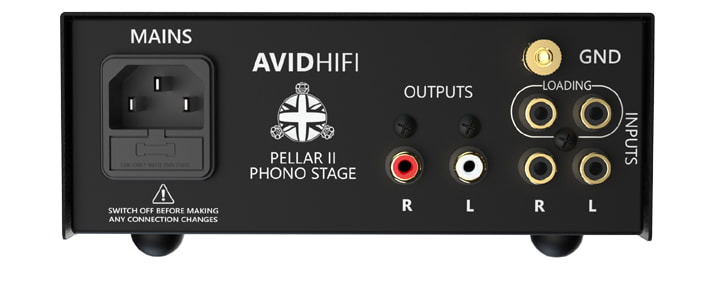
Default cartridge loading for MM cartridges at 47K, along with adjustable Cartridge Loading for MM or MC cartridges as needed via DIP switches at the bottom of the unit.
Preset 47k for MM cartridges with adjustable resistance for MC cartridges via custom plugs or rear-panel loading
Detailed Comparison
AVID HiFi Model
Pulsus II (2026)
Pulsus (2010)
Pellar II (2026)
Pellar (2012)
Velsonic (2026)
Product Type
Phono Preamp
Phono Preamp
Phono Preamp
Phono Preamp
Phono Preamp
Price
£2,995 / €3,995 / $4,695
Discontinued
£1,450 / €1,995 / $2,295
Discontinued
$19,995 / £11,995 / €15,995
Circuit Design
Dual-mono topology with dedicated power regulation
Dual-mono topology with dedicated power regulation
Single-board configuration with low-noise op-amp topology
Single-board configuration with low-noise op-amp topology
Full dual-mono and balanced operation from input to output, which minimizes crosstalk and maximizes channel separation.
Phono Cartridge Compatibility
Moving Magnet (MM)
Moving Coil (MC)
Moving Magnet (MM)
Advertisement
Moving Coil (MC)
Moving Magnet (MM)
Moving Coil (MC)
Moving Magnet (MM)
Advertisement
Moving Coil (MC)
Moving Magnet (MM)
Moving Coil (MC)
Cartridge Loading
High flexibility; multiple resistance (100R–47k) & capacitance (100pf–500pf) settings via bottom DIP switches
High flexibility; multiple resistance (100R–47k) & capacitance (100pf–500pf) settings via bottom DIP switches
Preset 47k for MM; adjustable resistance via custom plugs or rear-panel loading
Preset 47k for MM; adjustable resistance via custom plugs or rear-panel loading
Underside controls for: Gain Level (MM – MC Low and MC High)
Resistance
Capacitance
Underside controls for: Gain Level (MM – MC Low and MC High)
Advertisement
Resistance
Capacitanc
Underside controls for: Gain Level (MM – MC Low and MC High)
Underside controls for: Gain Level (MM – MC Low and MC High)
Front-panel rotary controls allow you to switch gain, resistance, and capacitance without needing to open the chassis or use DIP switches.
Power Supply
External Power SupplyRegulated with a 35VA transformer
External Power SupplyRegulated with a 35VA transformer
Single-chassis integrated power supply Internally Regulated 25va Transformer
Single-chassis integrated power supply Internally Regulated 25va Transformer
External Power Supply Double Regulated with 300va Toroidial Transformer
Vottage Input
100-240vac 50/60Hz 10 Watts Max
100-240vac 50/60Hz 10 Watts Max
100-240vac 50/60Hz 10 Watts Max
100-240vac 50/60Hz 10 Watts Max
100-240vac 50/60Hz 10 Watts Max
Dimensions (WDH)
160 x 239 x 70mm (6.3 x 9.41 x 2.8 in)
PSU: 160 x 247 x 70mm (6.3 x 9.72 x 2.8 in)
Advertisement
120 x 220 x 70mm
160 x 253 x 70mm (6.3 x 9.96 x 2.8 in)
120 x 220 x 70mm
463 x 338 x 100mm (18.23 x 13.31 x 4 in) Preamp and PSU Combined
Net Weight
1.3 kg (2.9 lbs)
PSU: 1.9 kg (4.2 lbs)
1.0 kg (2.2 lbs)
PSU: 1.7 kg (4 lbs)
Advertisement
1.9 kg (4.2 lbs)
1.6 kg (3.5 lbs)
12.2 kg (27 lbs)
PSU: 14.9 kg (33 lbs)
The Bottom Line
The AVID Pellar II and Pulsus II are not budget phono preamps with a nicer faceplate. Both are serious, UK-built MM/MC phono stages aimed at vinyl listeners who have moved beyond the built-in phono input on an integrated amplifier and want lower noise, better cartridge matching, and a more substantial long-term analog upgrade.
What makes AVID’s new pair interesting is the company’s refusal to treat either model as a disposable annual refresh. These are successors to designs that remained in service for more than a decade, now updated with revised component selection, lower-noise engineering, and a cleaner industrial design. The Pellar II is the more accessible entry point for listeners with one well-chosen turntable and cartridge, while the Pulsus II is the step-up option for systems where the phono stage is expected to extract more from a serious moving coil cartridge and a higher-resolution analog front end.
Competition is not exactly thin. The $2,495 MoFi UltraPhono Pro offers front-panel gain and loading adjustments, balanced and single-ended outputs, and a very different feature set. The $2,899 Cyrus 40 PPA adds four configurable inputs, balanced outputs, remote control, and upgrade potential for listeners running multiple turntables or tonearms. The tube-based Muarah MU-2 remains another compelling option around the Pellar II’s price, particularly for listeners who want easy cartridge loading changes and a warmer, more relaxed presentation.
The obvious question is whether the $4,695 Pulsus II delivers enough of a performance advantage over the $2,295 Pellar II to justify its substantial premium. That answer will depend heavily on cartridge quality, system resolution, and how deeply invested the buyer is in moving coil playback. For most vinyl listeners, the Pellar II is likely to be the more rational AVID entry point. The Pulsus II is for owners of more ambitious analog systems who are willing to pay considerably more to chase lower noise, greater refinement, and a higher ceiling.
Advertisement. Scroll to continue reading.
Advertisement
And yes, there are far less expensive ways into external phono preamps. The iFi ZEN Air Phono 2 remains a sensible low-cost MM/MC option, but it belongs in a different conversation.
Price & Availability
The AVID HiFi Pulsus II and Pellar II phono preamps are designed and manufactured in the UK. Both will be available through authorized AVID dealers worldwide beginning July 2026.
The Pulsus II is priced at £2,995 / €3,995 / $4,695.
The Pellar II is priced at £1,450 / €1,995 / $2,295.
Cost premium of using AWS indirectly via Vercel is mitigated by more efficient use of compute resources, CTO claims
Vercel introduced an open source agent framework called eve at its Ship event in London this week, along with other new features including Passport, an attempt to put employee apps created with AI under enterprise control.
Agents are dominating the AI conversation currently, and in particular custom agents. Agent frameworks that simplify coding already exist, though eve has a few notable characteristics.
Advertisement
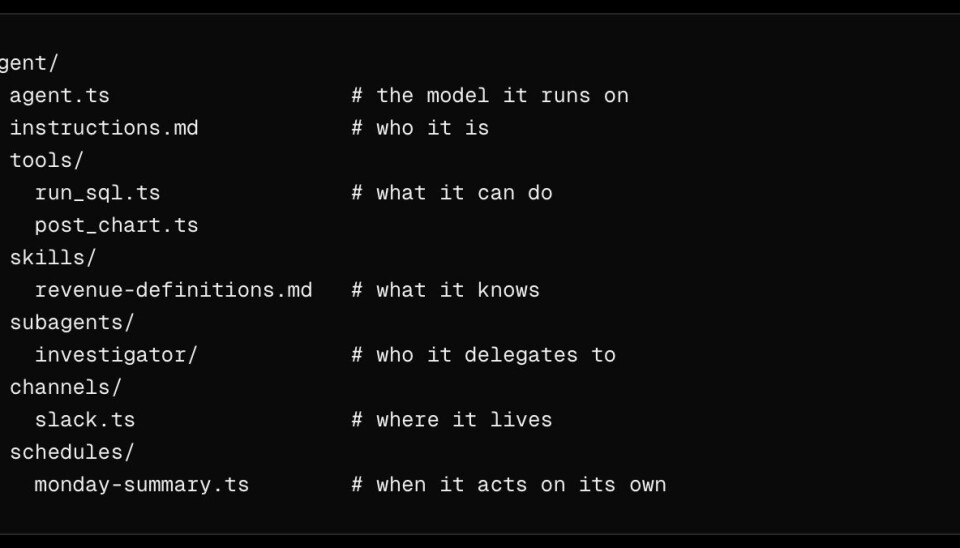
The coding languages are TypeScript and Markdown, and an agent is a directory with files that define the instructions and skills, the model provider, the tools, the authentication, the channels, and the schedule. Agents are sandboxed on isolated VMs by default. The framework also includes a simple testing tool that exercises the agent and evaluates the result. Code is on GitHub under the Apache 2.0 license.
There are plenty of existing agent frameworks, but Vercel CTO Malte Ubl told us that with eve, simplicity is a feature, with users able to take a “fill in the blanks” approach.
“The life cycle of the agent is completely orchestrated by the framework, and as a developer or builder you have to put things in the right places, but then everything magically works,” Ubl said.
“It’s a system where you don’t have to understand every little bit about what sandboxes are and how to compact context windows… All these things are quite complex; you don’t have to understand any of it.”
Advertisement
Agents built with eve deploy to Vercel by default, using the same command that works for web applications: vercel deploy. That said, the company says it is not tied to its platform.
“We are 100 percent committed to making it work everywhere,” Ubl told us, though an early user has already raised an issue about it requiring a Vercel login even when set to use a different model provider; it is early days and this may be a bug. Providers for LLMs and sandboxes are configurable. An eve project also runs locally with: npx eve dev.
Vercel’s eve agent frameworkVercel
What LLM does eve use? “You can connect any model that AI SDK connects to, which is all the models,” Ubl said, where the AI SDK is a Vercel SDK. There is also an option to use Vercel’s AI Gateway, which has a single endpoint for multiple model providers and can improve reliability by switching to another model if one fails.
The company also previewed Enterprise Apps and Agents, which have four components. Vercel Connect replaces static secret credentials with short-lived tokens accessed by OAuth or an API. Vercel Passport uses OpenID Connect to put all the applications and AI agents in a team behind an identity provider such as Okta or Microsoft Entra. Enterprise Managed Users uses directory sync to enable Vercel in a team to be managed by the organization’s identity system. Finally, Bring Your Own Cloud (BYOC) lets organizations use Vercel’s platform running on AWS infrastructure provisioned by the customer.
Advertisement
According to Vercel, Passport was a highly requested feature because of the number of employees who create applications hosted by Vercel but outside the control of the organization. A typical scenario is that an employee builds an application with AI assistance, and the AI agent defaults to using the Next.js React-based framework and Vercel hosting. It is a variety of shadow IT – or shadow AI – where staff create vibe-coded applications using company data but outside the organization’s IT policy or control.
Vercel itself is an AWS customer so its platform should work well using BYOC, but there are some trade-offs, Ubl said. One is that “we don’t allow your compute to assume AWS roles… If you are really deep in the AWS IM [Identity Management] security system, then Vercel doesn’t give this to you,” he told us, “but we do always issue an OIDC token for every invocation of the compute, so you can use that to configure your AWS policies.” Second, with BYOC, “we become a management vendor,” Ubl said, which means giving Vercel access to that part of the customer’s AWS infrastructure.
All Vercel deployments are immutable, which means “every time you push to Git you get a new infrastructure from scratch,” Ubl told us. He considers this ideal for AI agents. Other aspects of the platform have also been optimized for agents. “We try to be close to what the agents do,” he said.
A common critique of Vercel is that since it runs on AWS, using Vercel means paying a premium for hosting that would be cheaper when purchased directly. According to Ubl, that premium is mitigated by Vercel’s efficient use of those resources, “especially at low scale, and especially compared to Lambda,” the AWS serverless platform. Vercel said last year that it cut its Lambda costs by up to 95 percent by reusing idle instances.
Advertisement
Ubl claimed AWS customers need “more than 35 percent utilization to match Vercel’s price.”
Another Vercel competitor is Cloudflare, which, unlike Vercel, hosts on its own datacenters and has an efficient serverless platform using Workers, based on V8 isolates, a feature of the V8 JavaScript engine used by Google Chrome and the open source Chromium project.
Ubl said that whereas Cloudflare Workers are unique to Cloudflare, Vercel “is a more normal platform, we don’t run some bespoke runtime that we create ourselves, we just run Node.js or Python or PHP and it runs on a VM (virtual machine)… We offer standard PostgreSQL, VPC peering, AWS, S3 and not bespoke.”
This is a bit of a war of words. Cloudflare engineering director Steve Faulkner in February described the Next.js tooling, sponsored by Vercel, as “entirely bespoke.” Since then the situation has improved, with an Adapter API that is stable in Next.js 16.2, meaning other providers no longer need to reverse-engineer the build output, but adapters for AWS and Cloudflare are still under development, with completion expected by the end of 2026. ®
Prime Day 2026 kicks off on Tuesday, but there are numerous Apple deals in effect now that deliver the lowest prices of the season.
There are several early Prime Day Apple deals worth checking out this weekend, as the sale festivities kick off. From AirPods 4 for $99 to triple-digit discounts on M5 MacBook Air models, Apple products are a popular pick for Prime Day.
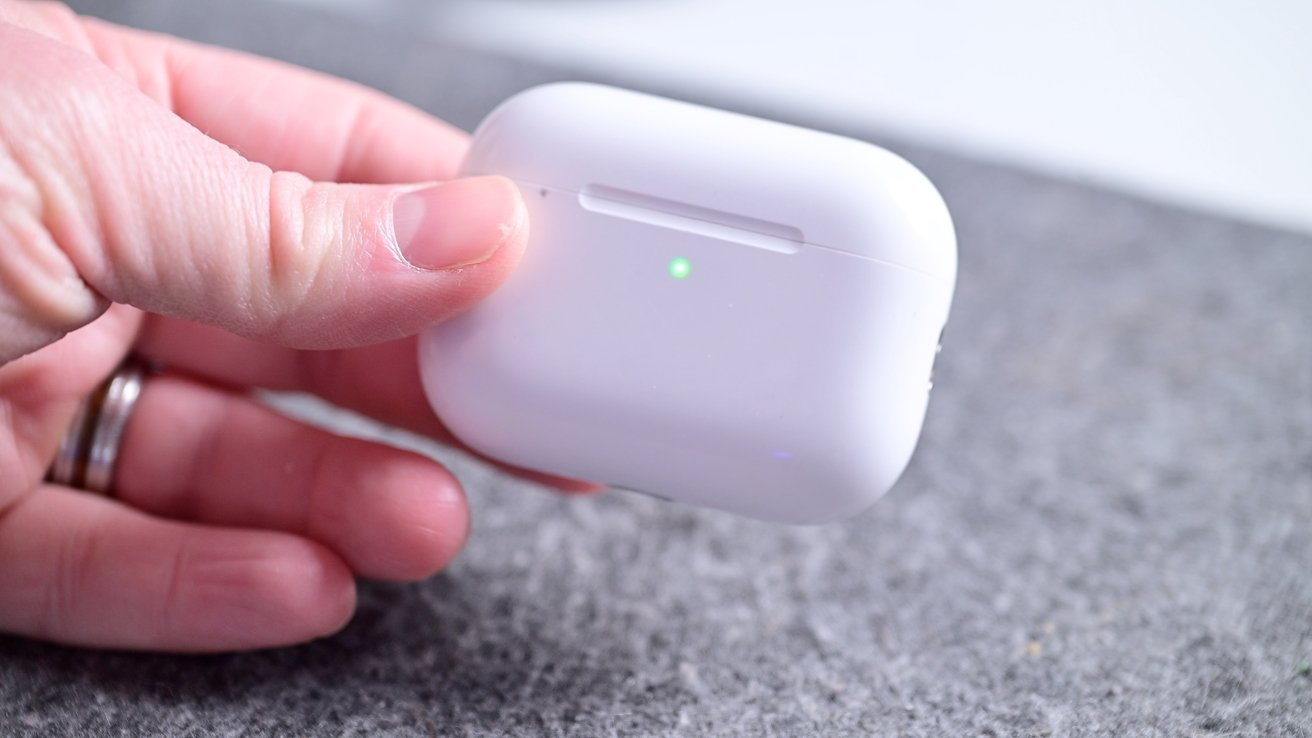
AirPods prices have dipped to as low as $99 heading into Prime Week, with earbud and over-ear models on sale. Walmart has also replenished AirPods Pro 3 inventory at $169.
Today’s top AirPods deals
iPads on sale from $299
Early Prime Day deals on iPads deliver prices from $299.
Those in search of a budget-friendly tablet can grab Apple’s 11-inch iPad with an A16 chip for $299. The current M4 iPad Air and M5 iPad Pro are also on sale, with a detailed rundown of the discounts in our iPad Price Guide.
42mm Apple Watch Series 11 GPS (Aluminum Case, Sport Band): $299 ($100 off)
42mm Apple Watch Series 11 GPS + Cellular (Aluminum Case, Sport Band): $399 ($100 off)
42mm Apple Watch Series 11 GPS + Cellular (Titanium Case, Sport Band): $589 ($110 off)
42mm Apple Watch Series 11 GPS + Cellular (Titanium Case, Milanese Loop Band): $639 ($160 off)
46mm Apple Watch Series 11 discounts
46mm Apple Watch Series 11 GPS (Aluminum Case, Sport Band): $329 ($100 off)
46mm Apple Watch Series 11 GPS + Cellular (Aluminum Case, Sport Band): $399 ($130 off)
46mm Apple Watch Series 11 GPS + Cellular (Titanium Case, Sport Band): $549.97 ($200 off)
Apple Watch SE 3 & Ultra 3 markdowns
MacBooks as low as $589
Apple’s latest MacBooks are marked down to as low as $589.
Advertisement
Early Prime Day deals are plentiful on Mac computers as well, with Apple’s budget-friendly MacBook Neo dipping to $589.99. M5 MacBook Air models are also as low as $949.99, while M5 MacBook Pros with at least 1TB of storage can be picked up for as low as $1,529.99.
Compare prices across dozens of configurations in our Mac Price Guide.
Buried deep insideeverything announced at WWDC this year was something I, an Apple Shortcuts enthusiast, can’t wait to try: the ability to make Apple Shortcuts using generative artificial intelligence. In macOS 27, you’ll be able to just type what you want a shortcut to do, and the app will build it.
Anyone who builds shortcuts regularly knows the process of doing so can be tedious, even if the end results save you a lot of time. So I’m excited about the idea of describing what you want in plain language and ending up with a working shortcut. Even if it doesn’t work perfectly (let’s face it, AI-built things rarely do), it’s a starting point that you can tweak to meet your needs.
The only downside: This feature doesn’t launch until autumn, when version 27 of Apple’s operating systems come out.
To get started you first need to install the Shortcuts Playground agent; there are instructions on GitHub. Basically you will need to copy and paste a command into the Terminal. (I am not going to include the command here in case it changes.)
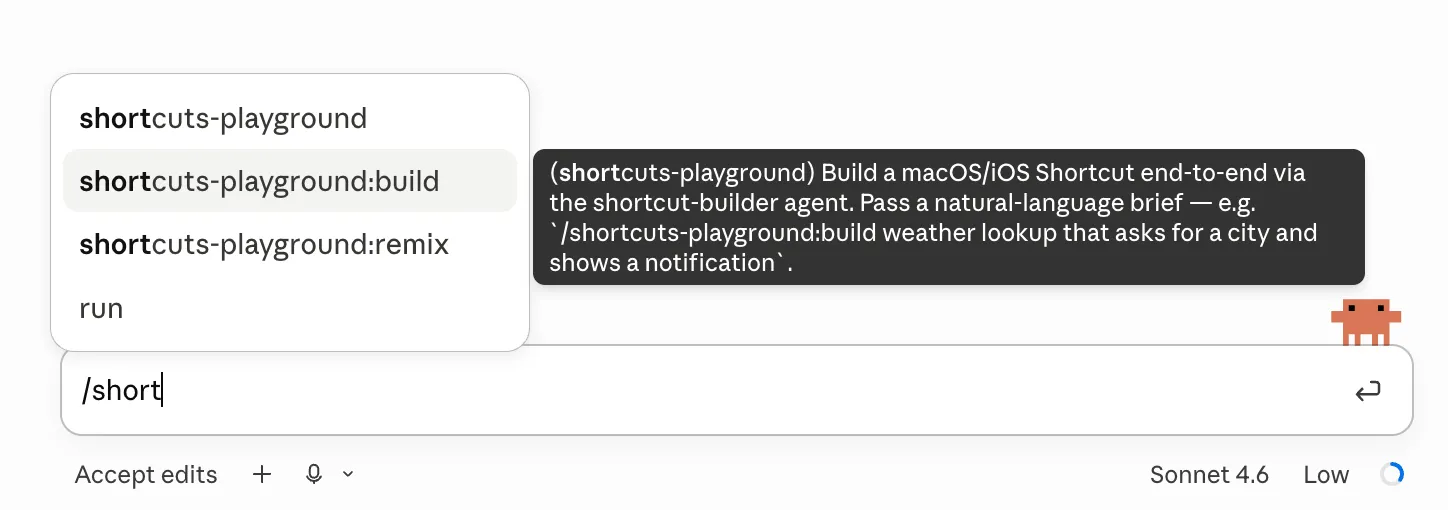
I tested this in Claude Code, but the tool works the same way in Codex. Once you’ve installed Shortcuts Playground you can trigger it by typing / followed by “shortcuts.” You’ll see a list of options pop up:
The different options for using the agent.
Courtesy of Justin Pot
If you’re starting from scratch, I recommend using the shortcuts-playground:build option, followed by a rough description of what you want the shortcut to do. (The other option, shortcuts-playground:remix, is for making changes to existing shortcuts.)
Advertisement
The agent will get to work building a shortcut for you. Sometimes it will stop to ask you for more information, or to explain what is and isn’t possible to build in Apple Shortcuts.
While exploring this tool, I asked for a shortcut that compiled today’s weather, my calendar appointments, and my to-do list for the day, then read the entire thing out loud. The agent happily went to work.
A cheaper, lighter camera for indoors, the Arlo Essential 3 2K Indoor Security Camera might have a lower price than the rest of the range, but it has the same core features. That includes excellent object detection options, a brilliant app and high-quality 2K footage. With its clever privacy shield this is a top indoor camera, provided you don’t mind paying the relatively high subscription costs.
Good value
Clever privacy shield
Excellent footage
Powerful object detection via a subscription
Subscriptions are expensive
Key Features
Introduction
As good as the Arlo system is, fitting one of the weatherproof, battery-powered cameras seems a bit overkill. The Arlo Essential 3 2K Indoor Security Camera redresses the balance: the same core features, but in a cheaper body that needs to be permanently wired, with the addition of a privacy shutter.
Advertisement
It gets all of the basic right, and image quality is very good, but is the camera worth the price of the subscription you’ll need?
Advertisement
Design and Installation
Wall or desk mounted
USB-C power
Privacy shutter
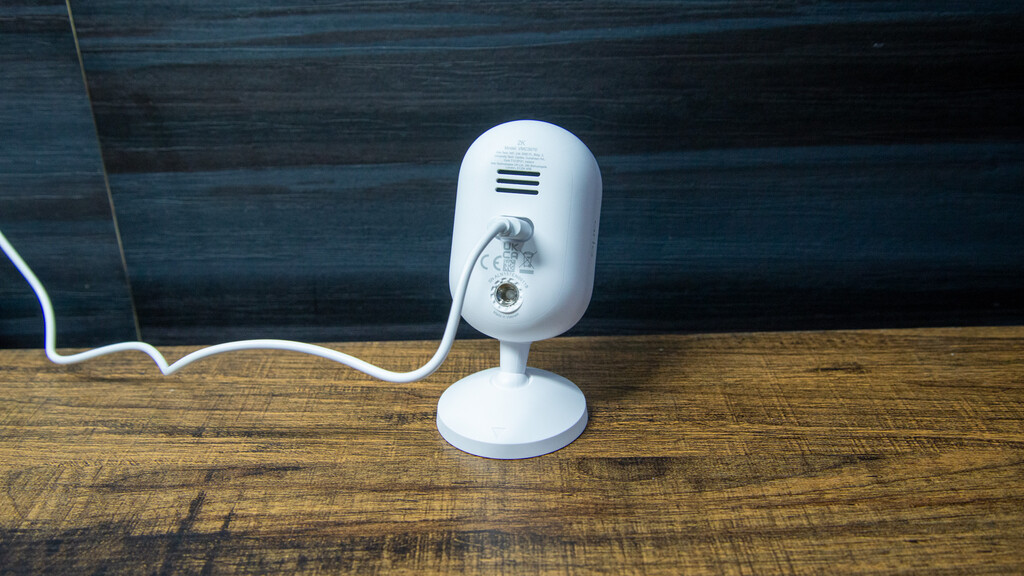
As there’s no battery, the Arlo Essential 3 2K Indoor Security Camera is quite a bit smaller than the other cameras in the range, such as the Arlo Pro 6 2K. All you need to set it up is a power socket within reach of the required USB-C cable.
Image Credit (Trusted Reviews)
This camera can be sat on a desk or bookshelf, which is the easiest way to install it. If you prefer, the stand can be moved to the back and used as a wall mount, giving a more permanent installation.
One key difference that you’ll notice with this camera, compared to the other Arlo models, is the integrated privacy shield: a plastic cover that swings up in front of the camera to prevent it from recording.
Image Credit (Trusted Reviews)
Advertisement
I think that’s quite important for indoor cameras, and it’s nice to have this privacy feature, which also gives you a simple way to check if the camera is on or off.
Advertisement
Image Credit (Trusted Reviews)
Features
Subscription required for main features
Custom AI detection option
Very powerful object detection
This camera is quick and easy to connect to your Wi-Fi (2.4GHz and 5GHz networks supported) and into the Arlo app. This app remains one of my favourite, offering a brilliant range of controls and a simple way to find footage.
Before I get into the features, I have to point out that you need a subscription to make the most of the camera. If you don’t want to pay monthly, then don’t buy this camera.
A basic Arlo Secure subscription costs £7.99 a month for a single camera and includes just seven days of video history, which is stingy compared to the competition. You also get Basic Person, Animal, Package and Vehicle Detection.
Advertisement
There’s also a multi-camera version of this plan for £11.99 a month, covering up to four cameras. It’s not clearly advertised on the website, but you can find it in the app under the subscriptions section.
Advertisement
If you want the more advanced AI features, you’ll need Arlo Secure Plus, which costs £19.99 a month for unlimited cameras, gives you 14 days of video history and supports resolutions up to 4K.
At the higher tiers in particular, Arlo Secure is expensive compared with rivals such as Ring, which starts at just £4.99 for a single camera, with higher tiers adding extra features for cameras and the Ring Alarm.
I’d stick with the standard plan, especially if you’re using a 2K camera, although I’ll also explain the new AI features.
With Arlo Secure, you do get a lot of controls. With the basic plan, the object detection options dramatically cut down the number of motion alerts that I got. It’s unlikely that you’ll need them inside, but activity zones can futher reduce false alerts in some situations.
Advertisement
Image Credit (Trusted Reviews)
Advertisement
On the most expensive package, there’s support for facial recognition, although this only works on a single camera in your system. Realistically, it makes more sense to have this option on an external camera.
Image Credit (Trusted Reviews)
Vehicle recognition (like facial recognition) is also available, although this is a feature that you’re unlikely to need indoors unless something goes horribly wrong.
Custom detection on the higher tier is the only detection type of its kind that I’ve seen. With this, you can train the camera with before and after shots to spot your own custom events, such as the front door being left open. I find that I need a big enough difference between images for the feature to work, but it does open up a lot of possibilities.
There’s also support in the more expensive package for fire detection. If the camera spots a fire starting it can send an alert.
But, as nice as the extras are, they don’t feel essential, and I’d stick with the more basic cloud subscription options to save money.
Advertisement
Advertisement
In the app, there are three modes: Arm, Arm Home and Standby. For each mode, you can set which cameras you want to have on. They’re essential for an indoor camera, where you won’t want to record everything going on in your home.
Modes can be set manually, scheduled or even triggered by your location, so you can largely automate the process.
With the Arlo Essential 3 2K Indoor Security Camera, when it’s set to not record the privacy shield quickly snaps into position.
Advertisement
Recorded footage can be accessed via the app, with loads of filtering options: date, specific camera and even what triggered the motion (person, vehicle, etc). There’s then a thumbnail list of events, which can be watched and saved to your phone for longevity.
Performance
Excellent 2K video
Sharp video at night and during the day
With its 2K (2304 x 1296) resolution, the Arlo Essential 3 2K Indoor Security Camera has the same resolution as the bulk of the rest of the range of cameras. This step up from Full HD is a good one, adding a bit more sharpness and detail, but without the file size and bandwidth requirements of 4K.
Advertisement
There’s a 130° field of view from this model, which is enough to capture most of a room, provided the camera is sensibly placed.
In daylight, the footage is excellent, as good as you can expect. Even in the busy Trusted Reviews Home Technology Lab, there’s detail all the way through the frame, and faces are sharp and clear.
Advertisement
Image Credit (Trusted Reviews)
At night, the Arlo Essential 3 2K Indoor Security Camera switches to black and white footage, using IR to light up the space. These IR lights work well, with the main frame sharp. Moving objects become a bit softer, but even so, it’s easy to find a frame where people are easy to identify. Again, you don’t really get better than this.
Image Credit (Trusted Reviews)
Should you buy it?
You want a smart, quality indoor camera
Excellent 2K footage day and night, plus a wide range of detection options make this camera a winner.
Advertisement
You want a camera with lower monthly costs
Arlo Secure is quite expensive, and there are cameras with cheaper or even no monthly subscription costs.
Advertisement
Advertisement
Final Thoughts
In terms of pure quality and features, the Arlo Essential 3 2K Indoor Security Camera is an excellent bit of kit.
It’s well-priced, shoots excellent video, and the Arlo app is brilliant, with some of the most advanced detection options. The flip side is that subscriptions are expensive, but if you want the best features, this camera is great. For alternatives, including subscription-free options, read my guide to the best indoor security cameras.
Advertisement
How We Test
We test every security camera we review thoroughly over an extended period of time. We use industry standard tests to compare features properly. We’ll always tell you what we find. We never, ever, accept money to review a product.
Find out more about how we test in our ethics policy.
Used as our main security camera for the review period
We test compatibility with the main smart systems (HomeKit, Alexa, Google Assistant, SmartThings, IFTTT and more) to see how easy each camera is to automate
We take samples during the day and night to see how clear each camera’s video is
FAQs
Do you need a subscription to use the Arlo Essential 3 2K Indoor Security Camera?
No, but without a subscription you miss out on the advanced features, such as people detection.
Advertisement
Does the Arlo Essential 3 2K Indoor Security Camera have a battery?
NASA’s Mars rovers have accomplished a whole lot since the first one landed on the red planet in the late ’90s, but even the latest members of the fleet still have plenty of limitations. For one, they’re very slow; Perseverance, which NASA considers a “standout,” achieves a top speed of just under .1 mph on flat ground. On top of that, the rough terrain is hard on the rovers’ wheels, and steep slopes with hazards like rocks and sand pose a real challenge, sometimes requiring long detours to reach certain targets. But this week, NASA showed off its progress on a prototype that boasts more advanced capabilities: the Exploration Rover for Navigating Extreme Sloped Terrain, or Ernest.
The space agency has been testing Ernest in the Colorado Desert, exploring new approaches that could be used for future missions on Mars and the moon. Ernest has four wheels, in contrast to the current Mars’ rovers’ six, and is four feet long, though a version that would be used for an actual mission would be double the size. And, it can individually lift its wheels to step on or over obstacles. In the recent tests in the desert, the prototype drove for a total of over 37 hours across seven days, covering roughly 16 miles, according to NASA. It hit a top speed of about .6 mph.
“You could do a science road trip across the Moon — or Mars — with this vehicle,” said James Keane, a JPL planetary scientist working on lunar missions. Going back to NASA’s Sojourner rover, the Mars rovers have relied on a passive suspension system, the rocker-bogie system, to keep the weight constant across their wheels. Now, though, engineers are trying out active suspension with Ernest to achieve greater mobility. “Two powered joints in front articulate a gimbal that allows the rover to drive using different gaits like squirming, wheel-walking, and obstacle-climbing,” NASA says.
Advertisement
It can switch between active and passive suspension depending on the task and energy needs, and thanks to its four steerable wheels, it can drive in any direction. There have already been multiple iterations of the Ernest prototype since the program began in 2022, and the team has tested nearly a dozen active suspension configurations. The latest version also has “enhanced independent decision-making capabilities.” The goal with Ernest is to develop the technology for rovers that can cover more ground than those that came before them, and faster, with less reliance on human controllers back on Earth.
The managing directors of Seattle’s AI House, from left: Yifan Zhang, Jacob Colker, and Sri Chandrasekar. (AI House Photo)
AI2 Incubator has spent the past 12 years building AI companies in Seattle. Now it’s taking the name of the community it built around that work, rebranding today as AI House and dropping the AI2 name it had kept as a vestige of its former ties to the Allen Institute for AI.
The incubator was founded in 2014 inside Ai2 — the Seattle research institute created by Microsoft co-founder Paul Allen — long before artificial intelligence became a household term. Its mission has been to help founders with the early work of company building: idea formation, customer discovery, recruiting, technical strategy and more.
In 2022, the incubator spun off from Ai2, and last year launched AI House as a physical hub for Seattle’s AI ecosystem — a gathering space for founders, engineers, researchers and investors at Pier 70 on the Seattle waterfront. In its first year, more than 20,000 people came through its events and programming.
“We’ve grown a lot, we’ve become our own organization in so many ways,” said Jacob Colker, the co-founder and managing director of AI2 Incubator and now AI House. “Community has become a deeply intertwined company-building platform for how we do what we do — and that was a big catalyst for the evolution of our brand.”
Along with the rebrand, AI House is bringing on Sri Chandrasekar as a new managing director. Chandrasekar spent nearly a decade at Point72 Ventures, where he helped build the firm’s ventures and private equity businesses, and previously led investments at In-Q-Tel, the strategic investment arm of the U.S. intelligence community.
Advertisement
While considering what to do next and possibly starting his own fund, Chandrasekar said he realized it was already being built.
“I think the core of what I would have wanted to do was build a community of founders all learning from each other and going as fast as they can,” Chandrasekar said. “And it already existed at AI House.”
AI House opened in March 2025 and features 108,000 square feet of space for co-working, events and more at Pier 70 on the Seattle waterfront. (GeekWire File Photo)
Chandrasekar was already deeply connected to AI House before joining full-time — he had invested in several of its portfolio companies and wrote the first check into the organization’s $80 million Fund III last fall. He moved to Seattle from the Bay Area in 2021, betting the city would become a major force in AI.
Five years later, that conviction has only grown.
“As I think about my portfolio from Point72, some of our best performing companies are Seattle-based,” Chandrasekar said. “We had never made a Seattle investment before I moved up here, and something like 25% of our investments, maybe even more, were Seattle-based by the time I left.”
Chandrasekar joins Colker and fellow AI House managing director Yifan Zhang, who have led the organization through its evolution from research institute spinout to independent venture firm and community hub.
Colker credited Zhang with creating the basis for a community and building a public-private partnership with the City of Seattle, the State of Washington and Ada Developers Academy, with early support from Google and JPMorgan.
“It’s through her hard work over the last year that we have so much energy coming through the space,” he said.
Oren Etzioni, the longtime AI researcher and former CEO of the Allen Institute for AI, continues in a part-time role as technical director, and AI House also recently hired former GeekWire editor Taylor Soper as director of community and programming.
Advertisement
Under the AI House name, the organization is formalizing itself around three pillars: Community, which brings together founders, engineers, researchers and investors across the Pacific Northwest; Incubator, where the team works side by side with founders from the earliest stages; and Capital, where it writes pre-seed checks from its Fund III into applied AI companies.
Colker said the company-building playbook that worked in 2018 no longer applies in 2026.
“The new playbook is being written in real time,” he said. “One team’s breakthroughs that week become another team’s unfair advantages next week.”
Yifan Zhang accepts the Geeks Give Back award for AI House at the 2026 GeekWire Awards in Seattle in May. (GeekWire Photo / Kevin Lisota)
Over its 12-year history, AI2 Incubator spun out more than 40 companies — including computer vision startup Xnor.ai, acquired by Apple; legal tech firm Lexion, acquired by Docusign for $165 million; and applied AI startups Yoodli, Ozette, Roboto and Casium — with 90% of graduates going on to raise venture funding.
AI House will continue to recruit founders from across North America — the organization has portfolio companies in Montreal, New York, San Diego and elsewhere — but Seattle remains the home base. Going forward, every founder in the incubator will be required to spend at least one month working from AI House daily.
“Community is not something you can fully access from a distance,” Colker said. “The value comes from being in the room: the conversation after an event, the founder at the next desk, the operator who helps with a pricing question.”
Colker has been vocal on LinkedIn about what he sees as Seattle’s underappreciated stature, and he had no shortage of examples. Forty percent of world air travel flies on planes built in the Pacific Northwest, he noted. The cloud was invented here. When OpenAI needed compute, Sam Altman flew to Seattle to talk to Microsoft CEO Satya Nadella. When Anthropic needed compute, Dario Amodei flew to Seattle to talk to Amazon CEO Andy Jassy.
“How are we not just walking around with our heads held high?” Colker said. “I think we are as a region bad at telling our story — but that doesn’t mean we don’t have ambition and world-changing impact. It just shows up a little differently.”
Advertisement
Chandrasekar, who made his own bet on Seattle, put it simply.
“I can’t imagine a more exciting opportunity than investing in AI companies in an area that has a plethora of AI talent like Seattle,” he said. “If you want to use AI to disrupt an industry, this is the place where we teach you how to do that.”
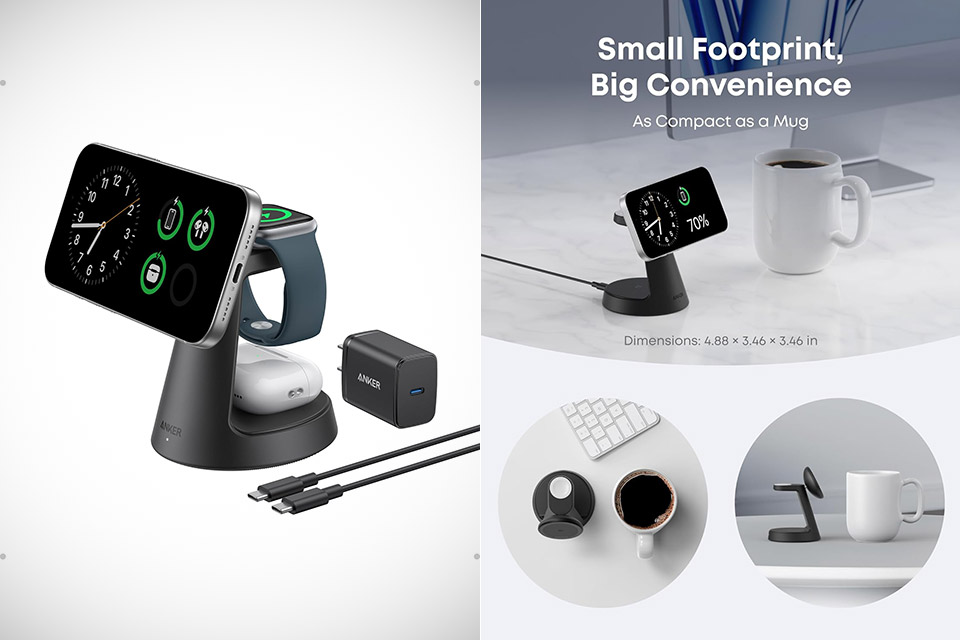
Travel often turns charging into a small production. You reach for the phone cable, then hunt down the watch puck, then dig out the earbud case adapter. Before long the bag holds more power gear than clothes. Anker built the MagGo 3-in-1 Wireless Charging Station, priced at $67.49 (was $90), to cut that routine down to one compact piece that actually fits in the corner of a carry-on.
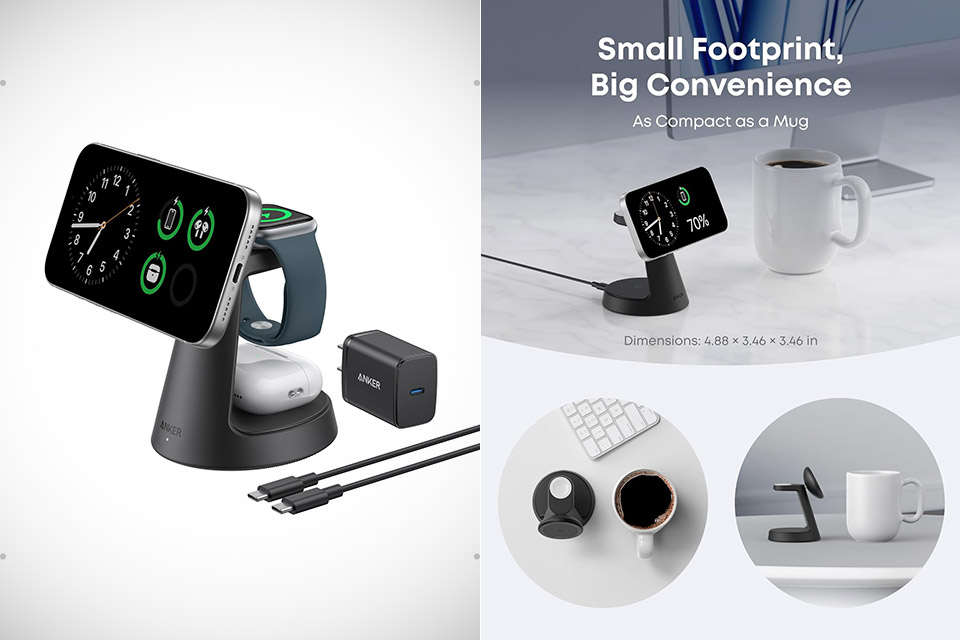
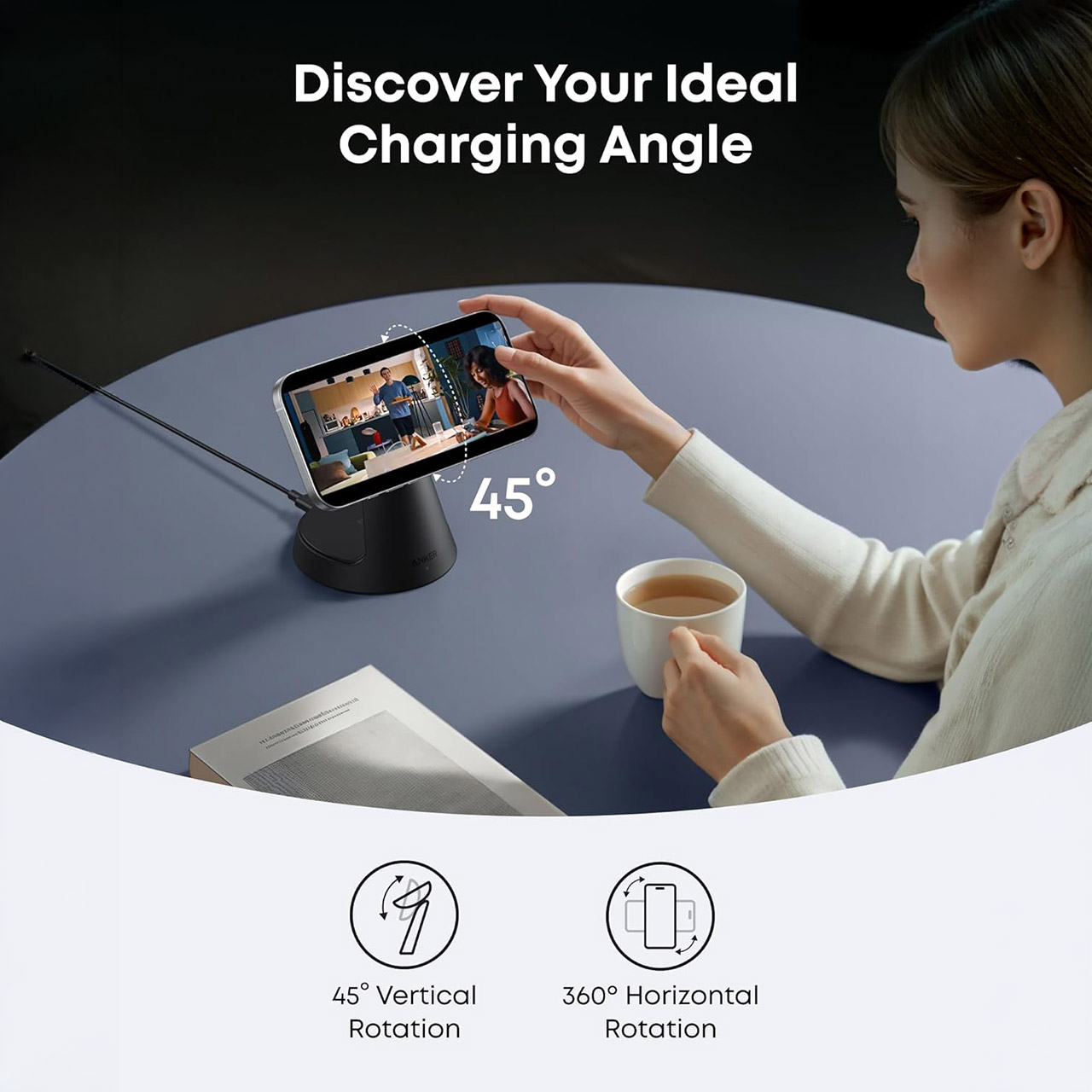
Official measurements show that when upright, it measures 3.46 × 3.46 × 4.92 inches and weighs just over 10 ounces. It’s a brilliant design that employs a short silicone hinge mechanism, allowing the entire device to fold out flat or at any angle you like, with no exposed wiring or loose parts to deal with. When you eventually put it down, four rubber feet will keep it steady on your nightstand or hotel desk.
Ultra-Fast 15W Wireless Charging: Harness full 15W charging power, giving your essential devices the quickest charge, consistent with the original…
Compact Charging for 3 Devices: Ideal for clutter-free workspaces, this compact charger fits ideally on any desk, powering everything from phones to…
Certified Fast Charging for Apple Watch: Boasts official certification, enabling you to power your Apple Watch Series 10 from 0 to 100% in just 1 hour…
When you open it, three special pads come to life, the largest of which uses some clever Qi2 magnetic alignment to send up to 15 watts to your most recent iPhone. Slap your phone on and it clicks into place; tilt the pad and the screen remains visible even while the phone is in Standby mode. Next to that is a 5-watt pad that is specifically designed to fit AirPods cases and includes wireless charging. Then there’s the third pad, which handles Apple Watches with Apple-certified quick charging at 5 watts. All three pads can function simultaneously, so you can charge your phone, watch, and earphones all at once without experiencing any slowdowns or priority issues.
Advertisement
All of the power comes from the 40-watt USB-C wall adapter and 5-foot cord, which are included when you open the package. That adapter provides enough electricity to keep everything charged, and even while charging three devices at once, it remains well within its capabilities. Testers have put this device through its paces, and even after three full charges, it keeps quite cool thanks to some clever ventilation slits integrated into the base. To top it all off, a little LED light will flicker on to indicate that everything is linked, but it will be faint enough not to disturb you at night.
It works with iPhone 12s and up, most Apple Watch models, including the Ultra models, AirPods Pro, and other devices that support wireless case charging. It’s worth noting that non-magnetic cases or metal attachments can interfere with the phone pad, but a regular silicone or slim case will work just well, and while it uses slightly more power in standby than some of those single-device chargers, the difference is negligible in normal use.
This week OpenAI announced a 750-task test to to measure “whether AI systems can support realistic life science research tasks, not just answer biology questions.”
But while OpenAI’s top-performing GPT-Rosalind model led the rankings, Slashdot reader BrianFagioli notes that “it achieved a pass rate of just 36.1 percent, failing nearly two-thirds of benchmark tasks.” Nerds.xyz points out that means “the best-performing model failed nearly two-thirds of the benchmark’s tasks.”
The benchmark also revealed a familiar weakness. AI systems generally perform better when everything is presented as text. Once they are forced to work with supporting documents, figures, or complex datasets, performance drops noticeably. GPT-Rosalind’s pass rate fell from 45.1 percent on text-only tasks to 28.1 percent on tasks involving artifacts or URLs.
Advertisement
To be fair, the benchmark is not intended to suggest AI is useless in research. Quite the opposite. OpenAI found that models are becoming increasingly capable of scientific communication, evidence synthesis, and translating research findings into practical explanations. Those are valuable skills, particularly for researchers drowning in information. But LifeSciBench serves as a useful reminder that today’s AI systems are still far from autonomous scientists. They can help. They can assist. They can sometimes provide surprisingly useful insights. What they cannot reliably do, however, is replace the expertise, judgment, and skepticism that real scientific research requires.
Some municipalities implement bike counters on cycling routes in order to monitor traffic. [nullpxl] recently investigated how these counters work, and explored methods that can be used to trick the counter into thinking a bike passed over it.
A great many of these devices are built using inductive loop sensors. This involves passing a current through a loop of wire embedded in the ground. When a conductive item such as the metal wheel of a bike passes through the electric field, eddy currents are generated in the item, creating their own magnetic field which reacts with the loop’s field itself. This creates a change in inductance which can be measured, and thus used to log the number of times a conductive item has passed over the sensor. By looking at the signature of the inductance change, a system can be tuned to detect specific objects—for example, two bicycle wheels passing over a sensor will create a signal that varies over time in a characteristic way.
[nullpxl] first tried to recreate a “bike” signal for the inductive loop by running over the area holding two metal pans. This wasn’t close enough, so a new idea was needed. Experiments with a scrap bike then indicated that there was a speed gate involved, and that wheeling one wheel over the sensor and back again could trick the sensor into thinking a bike had passed by. Eventually, [nullpxl] distilled all this learning down to create “the BIKE BASKET.” It’s simply a bag with a bike wheel in it, and swinging it over the sensor twice makes the counter tick up.
Advertisement
Is there any money in tricking the average municipal bike counter in your local city? We doubt it, unless Big Bike is getting increasingly filthy in its lobbying efforts. In any case, we love to see weird sensor hacks around these parts.
Microsoft has attributed a recent Mastra AI supply chain attack that compromised more than 140 npm packages to the North Korean hacking group Sapphire Sleet, also known as BlueNoroff.
This attribution comes after Microsoft first disclosed earlier this week that attackers hijacked an npm maintainer account and used it to publish malicious package updates.
“Microsoft assesses with high confidence that this activity is attributable to Sapphire Sleet, a North Korean state actor that primarily targets the financial sector,” the company said in a June 19 update.
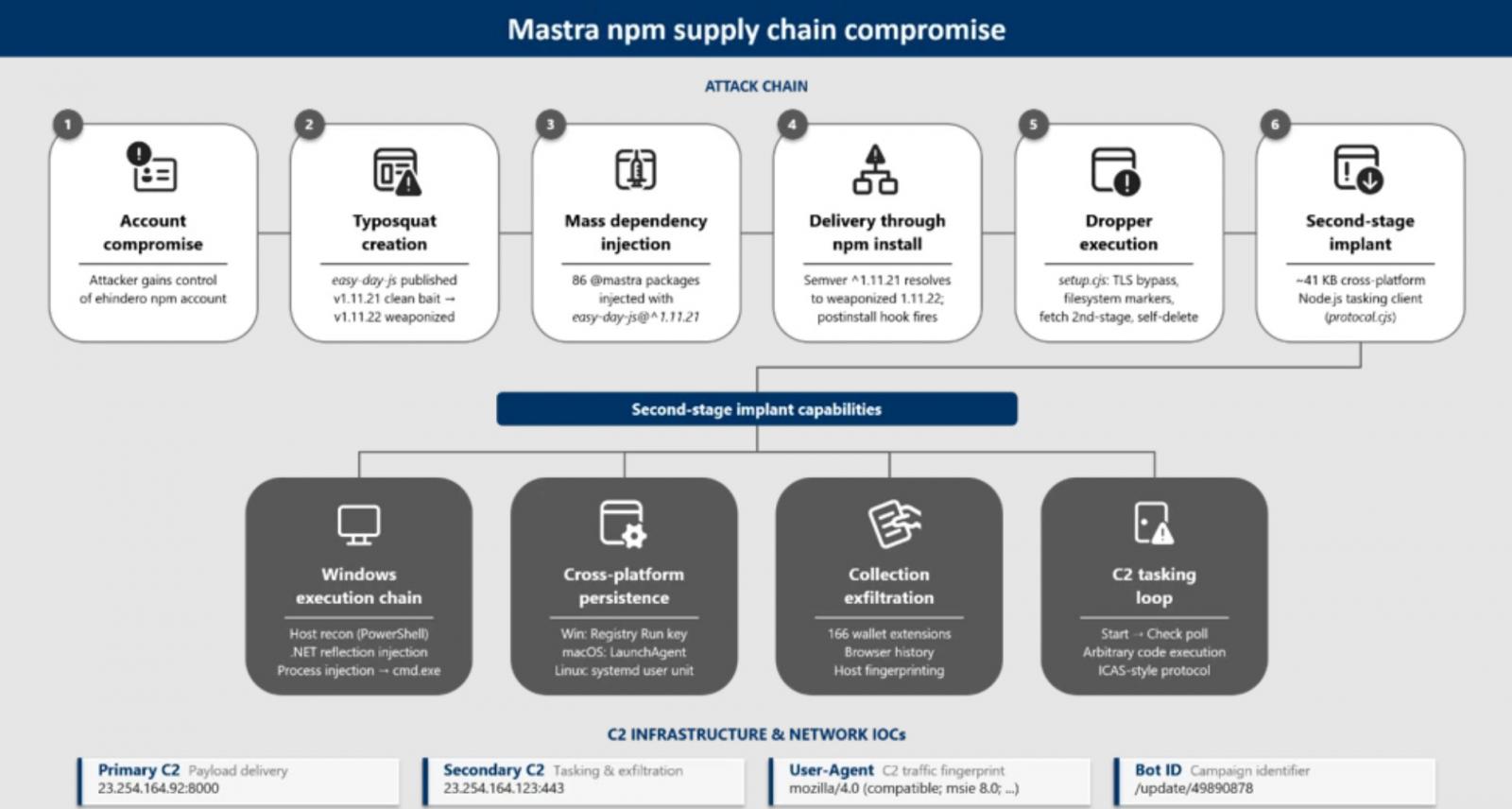
According to Microsoft, the attack began when threat actors compromised the npm maintainer account “ehindero,” which had publishing privileges across the Mastra package environment.
Using the account, the attackers published malicious updates for more than 140 packages in the @mastra scope that injected a malicious dependency named “easy-day-js”. This dependency is a typosquat of the legitimate and widely used dayjs JavaScript library.
Advertisement
When the compromised packages were installed, the malicious dependency executed a post-install hook that deployed a malware dropper on developers’ devices, ultimately aimed at stealing sensitive credentials, API keys, authentication tokens, and cryptocurrency wallets.
“Once installed, easy-day-js triggered a postinstall hook that executed an obfuscated dropper script, disabled Transport Layer Security (TLS) certificate verification, contacted attacker-controlled command-and-control (C2) infrastructure, downloaded a second-stage payload, and executed the payload as a detached hidden process,” explains Microsoft.
Cross-platform malware targets crypto wallets
The downloaded second-stage payload was a cross-platform information stealer designed to target Windows, Linux, and macOS systems
The implant collected information about the host, browser histories, installed applications, and running processes, and checked whether 166 cryptocurrency wallet browser extensions were installed, including MetaMask, Phantom, Coinbase Wallet, Binance Wallet, and TronLink.
Advertisement
The malware also used different persistence methods depending on the operating system, such as Windows Registry Run keys, macOS LaunchAgents, and Linux systemd services.
Mastra npm supply chain compromise Source: Microsoft
Microsoft says systems that communicated with the attackers’ command-and-control servers had follow-on activity that utilized tactics previously associated with Sapphire Sleet.
This includes the deployment of a PowerShell backdoor previously used by the group, additional persistence mechanisms, Microsoft Defender exclusions, and a malicious Windows service that granted SYSTEM privileges.
“The PowerShell backdoor, tradecraft, and C2 infrastructure have been used by Sapphire Sleet in other, prior campaigns,” Microsoft explained.







%2520copy.jpg)













































You must be logged in to post a comment Login