










Connect with us

Tech

Barkbox Promo Codes and Discounts: Up to 50% Off

Published

on

As my fellow pet parents will know, it’s amazing how quickly even the tiniest of dogs can demolish their toys and treat stash. We love and spoil them nonetheless. When you subscribe to BarkBox a fresh batch of cleverly themed treats and toys arrives at your doorstep. The costs of pet ownership can stack up quickly, especially if you’re buying your pooch a random gift box that goes well beyond the essentials. That’s why we have Barkbox promo codes and discount options ready to go for you.

Barkbox Promo: Enjoy a Free Toy for a Year at Barkbox

When your monthly Barkbox arrives, it’s like Christmas morning for your dogs. I watch as my two dogs, Rosi and Randy, shake their little Chihuahua mix bodies with barely restrained excitement. They’re never gentle on their toys but the stimulation that comes from textures and chewing is good for their little brains. With Barkbox you get a steady supply of two unique toys and two bags of all-natural treats every month. If you want to see how your dogs react, this Barkbox coupon is good for new Barkbox subscription customers and adds an additional toy in your box every month for a year.

Save 50% on Your First Barkbox Food Subscription With a Barkbox Coupon Code

Another reason why Barkbox is the best dog subscription box is how easy the company makes it to keep your pantry stocked with your dog’s food. Use this Barkbox coupon to save 50% off your first Barkbox food subscription, so you won’t have to end up running out to the grocery store in the middle of the night when your scooper scrapes across the bottom of an empty kibble bin.

Fly Travel Stress-Free With Your Dog and Get $300 Off BARK Air Flights

If you live in a Barkbox flight hub destination, please know I am insanely jealous of you. It’s no secret that flying is stressful and can be very dangerous for pets, especially if they have to ride in a cargo hold. Barkbox makes them the VIP with BARK Air, letting them ride in the cabin with you and get doted on, so things are a lot less scary. This is another perk of having a BarkBox subscription, with the opportunity to save $300 off BARK Air Flights.

Advertisement

Support Your Dog’s Dental Health and Get $10 Off With a Barkbox Coupon

Dental health is crucial for dogs, as it can prevent disease not just in their mouths, but their vital organs. Don’t forget to schedule your yearly cleaning with your vet, but in the meantime, use this BarkBox discount code to get $10 off a special BarkBox Dental kit.

Get an Extra Premium Toy in Every BarkBox With the Extra Toy Club

For having such tiny mouths, my dogs can gnaw through toys with surprising speed. If you’re also buried in a pile of shredded fluff and squeakers from disemboweled toys, the Extra Toy Club can help. This subscription includes dog toys for aggressive chewers of all ages, breeds, and sizes, offering extra durable toys meant to last longer. So far, so good at my house. To upgrade to this subscription box, it’s an extra $9 per month.

Get Exclusive BarkBox Discounts: Join the Email List

If you assume that the punchy branding and witty lingo extend to Barkbox’s email subscribers and not just the box subscription, you’d be correct. As a bonus, you can get exclusive BarkBox discount codes when you sign up to receive these emails. Who also doesn’t love a furry face and reminder of their pet in between work subject lines and bill payment reminders, too?

Source link

Advertisement
Continue Reading
Click to comment

Leave a Reply

Your email address will not be published. Required fields are marked *

Tech

‘Game of Thrones’ Movie In the Works

Published

on

Warner Bros. is developing a feature film set in the world of Game of Thrones with writer Beau Willimon of Andor and House of Cards. “That’s about all we know right now, and as with everything ‘Thrones’ things could change, but the film is firmly in development,” reports TheWrap. Page Six Hollywood was first to break the news and speculated that the story could revolve around Aegon I, the legendary Targaryen king who spawned a dynasty. From the report: The Targaryens have been at the center of all things “Thrones” on HBO, with “Game of Thrones” following Daenerys Targaryen’s (Emilia Clarke) quest to usurp the throne, spinoff “House of the Dragon” set in the midst of the Targaryens’ reign and recent spinoff “A Knight of the Seven Kingdoms” following the squire-ship of Aegon “Egg” Targaryen towards the end of the family’s run atop the Iron Throne. All, of course, based on George R.R. Martin’s expansive book universe.

Source link

Continue Reading

Tech

Hackers abuse OAuth error flows to spread malware

Published

on

Phishing

Hackers are abusing the legitimate OAuth redirection mechanism to bypass phishing protections in email and browsers to take users to malicious pages.

The attacks target government and public-sector organizations with phishing links that prompt users to authenticate to a malicious application, Microsoft Defender researchers say.

with e-signature requests, Social Security notices, meeting invitations, password resets, or various financial and political topics that contain OAuth redirect URLs. Sometimes, the URLs are embedded in PDF files to evade detection.

Microsoft 365 account warning lure
Source: Microsoft

Forcing risky redirections

OAuth applications are registered with an identity provider, such as Microsoft Entra ID, and leverage the OAuth 2.0 protocol to obtain delegated or application-level access to user data and resources.

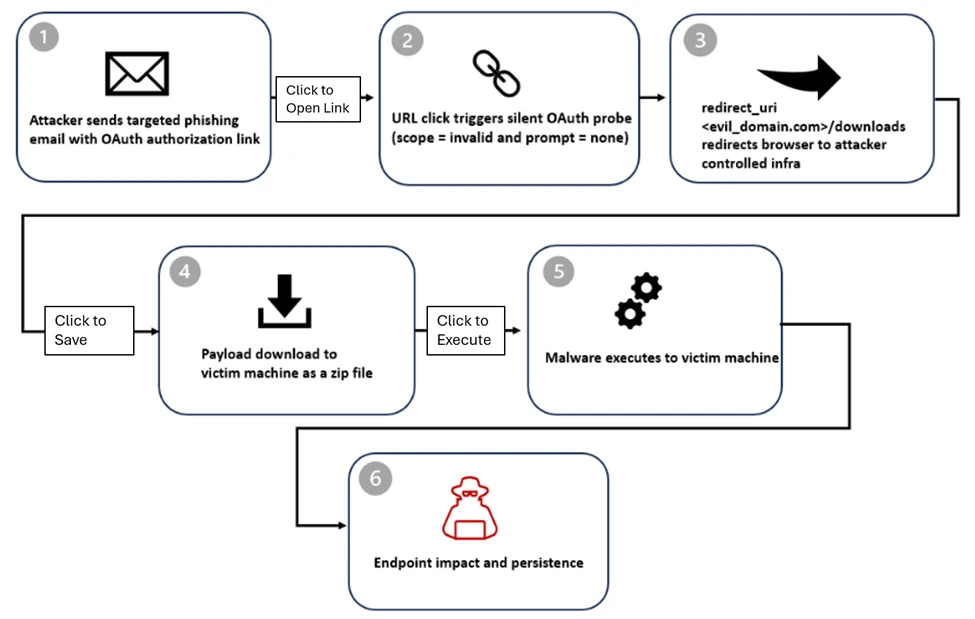
In the campaigns observed by Microsoft, the attackers create malicious OAuth applications in a tenant they control and configure them with a redirect URI pointing to their infrastructure.

Advertisement

The researchers say that even if the URLs for Entra ID look like legitimate authorization requests, the endpoint is invoked with parameters for silent authentication without an interactive login and an invalid scope that triggers authentication errors. This forces the identity provider to redirect users to the redirect URI configured by the attacker.

In some cases, the victims are redirected to phishing pages powered by attacker-in-the-middle frameworks such as EvilProxy, which can intercept valid session cookies to bypass multi-factor authentication (MFA) protections.

Microsoft found that the ‘state’ parameter was misused to auto-fill the victim’s email address in the credentials box on the phishing page, increasing the perceived sense of legitimacy.

OAuth redirect attack overview
Source: Microsoft

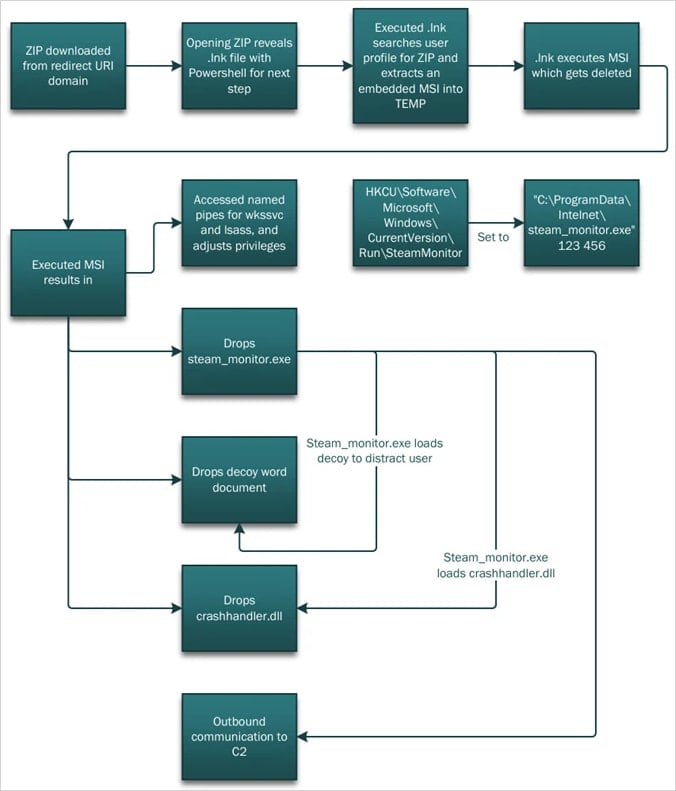
In other instances, the victims are redirected to a ‘/download’ path that automatically delivers a ZIP file with malicious shortcut (.LNK) files and HTML smuggling tools.

Opening the .LNK launches PowerShell, which performs reconnaissance on the compromised host and extracts the components required for the next step, DLL side-loading.

Advertisement

A malicious DLL (crashhandler.dll) decrypts and loads the final payload (crashlog.dat) into memory, while a legitimate executable (stream_monitor.exe) loads a decoy to distract the victim.

The malware attack chain
Source: Microsoft

Microsoft suggests that organizations should tighten permissions for OAuth applications, enforce strong identity protections and Conditional Access policies, and use cross-domain detection across email, identity, and endpoints.

The company highlights that the observed attacks are identity-based threats that abuse an intended behavior in the OAuth framework that behaves as specified by the standard defining how authorization errors are managed through redirects.

The researchers warn that threat actors are now triggering OAuth errors through invalid parameters, such as scope or prompt=none, to force silent error redirects as part of real-world attacks.

Malware is getting smarter. The Red Report 2026 reveals how new threats use math to detect sandboxes and hide in plain sight.

Download our analysis of 1.1 million malicious samples to uncover the top 10 techniques and see if your security stack is blinded.

Advertisement

Source link

Continue Reading

Tech

CPU benchmarks for M4 iPad Air show comparable scores to M4 iPad Pro

Published

on

The iPad Air with M4 isn’t going to have identical performance to the iPad Pro, and Geekbench scores have confirmed how that shows up in the spec sheet.

An iPad Air laying on a surface with the Home Screen shown. It has multiple icons and dock in view.
iPad Air is updated with M4

Once Apple finally announces a product to the public, it tends to start making its way out to testers. Then, the tester performs an inevitable Geekbench benchmark, and the results are public.
The iPad 16,11 in Geekbench is undoubtedly one for the iPad Air with M4. It was first discovered by MacRumors and the results aren’t surprising.
Continue Reading on AppleInsider | Discuss on our Forums

Source link

Continue Reading

Tech

These 6 Harbor Freight Products Will Save Your Back

Published

on


There’s a reason why the most important part of a structure is often described as its “backbone.” Your spine is literally holding you up, and damage to it can affect all kinds of motion elsewhere (not to mention all it does for your central nervous system). Even minor aches and pains should be avoided, because they can lead to greater problems much further down the line — when standing, walking, and even lifting lightweight items become much harder with age.

Spending time in a garage or on a jobsite often requires a lot of lifting, bending, and twisting, which can take its toll on your back. Sure, manual labor is part of the job, or if you’re a DIYer, it may even be part of the fun, but not all physical effort is the same — and not all of it is necessary. Reducing strain on your spine and back muscles is always a good thing, no matter how fit you are. That’s why it’s just as important to include items in your toolset that specifically help your back, even if they’re not totally necessary for the job.

Advertisement

Among its other hardware and home improvement products, Harbor Freight sells several tools, accessories, and other gear that can help reduce or prevent back strain. Many of these come from one or more of Harbor Freight’s house brands and include equipment that can help bear weight, prevent injuries, or keep you from having to bend so low or at awkward angles all the time. Here are six currently available Harbor Freight products that will help save your back.

Advertisement

Pittsburgh Mechanics Roller Seat

There are several Pittsburgh tools worth buying from Harbor Freight, but the house brand makes other gear and accessories as well, including a Mechanics Roller Seat. A roller seat may not be as comfy as a high-end office chair, but the ability to roll around the garage, whether it’s to your workbench or to another tire, greatly minimizes the number of times you need to get up and down from the ground, saving your back a ton of strain.

The Pittsburgh Mechanics Roller Seat costs $31.99 and is 14 ½ inches tall. With a max load capacity of 250 pounds, the seat is 15 x 14 inches and rests on 2 ½-inch swivel casters. The casters are constructed from high-impact polyurethane to better resist oil and other chemicals commonly found in garages. The frame is built with durable steel, and the seat sports foam cushioning, so it isn’t the worst thing in the world to sit on all day as you work on a vehicle.

One very useful feature is an integrated tray to keep the tools you need most — that way, you don’t even need to roll over to your chest to grab them. It’s made from high-impact PVC, so you won’t have to worry about putting tools back as gently as possible. This feature is one of the reasons Pittsburgh’s Mechanics Roller Seat is so highly rated by Harbor Freight customers, with 93% of those surveyed recommending the product.

Advertisement

Western Safety Back Support Belt

In addition to tools and other hardware, there are also several Harbor Freight products that will help keep you safe on the jobsite, such as hard hats and safety goggles. These are obvious accessories that can prevent harm to your body, but an unsung safety product is the Western Safety Back Support Belt. By increasing abdominal pressure and reducing load on your lumbar area, as well as limiting movement so you don’t accidentally pull or twist something, it can help prevent less-conspicuous injuries. Plus, it also encourages you to maintain good posture, which can be especially hard when working.

The Western Safety Back Support Belt comes in several sizes and costs less than a sawbuck. Adjustable suspenders and a hook-and-loop design allow you to quickly make yourself comfortable in the apparatus and size it so that it can properly do its job. It’s built with tapered abdominal support panels and elastic outer panels for better comfort. 

Advertisement

It weighs less than a pound, so you won’t need to worry about it weighing you down, either. Harbor Freight also sells a Western Safety Back Support Belt with Reflector, doubling down on safety. It’s built exactly the same, so it’s providing the same benefit to your back, but with the addition of highly visible reflective strips and neon-orange suspenders. That way, your coworkers and others can easily spot you on a jobsite, even while you’re lifting something heavy.

Advertisement

Pittsburgh Telescoping Magnetic Pickup Tool

If you’re not already, you should be maximizing the efficiency of your workshop or jobsite by taking advantage of magnetic tools and accessories. Magnets may be simple, but they can offer lots of convenience when it comes to mounting, storage, cleaning, and more, which is why there are multiple magnetic tools from Harbor Freight that users love.

One such tool is the Pittsburgh Telescoping Magnetic Pickup Tool, which makes it easy to grab metal items from the ground without having to bend over and strain your back. Whether it’s a small tool or a tiny screw that’s rolled off the workbench, Pittsburgh’s deceptively straightforward pickup tool can take a lot of frustration, time, and effort out of your workday.

The Pittsburgh Telescoping Magnetic Pickup Tool has a 15-pound load capacity, so there are plenty of metal objects in the garage that it can lift on your behalf. It telescopes from 7-½ inches to over 29-½ inches, allowing you to use it in tight spaces or reach something nearly a yard away. The tool won’t add to your burden since it’s lightweight and the grip is layered with foam, so it’s more comfortable to use throughout the day. 

The device has a ¾-inch wide head and is built with steel to keep it strong and durable over time. Users love the product, and it’s one of the higher-rated tools in Harbor Freight’s catalog. In customer reviews, multiple users specifically say it’s great for your back, whether you’ve got a bad back or are trying to prevent one while you can.

Advertisement

Bauer Steel Adjustable Sawhorse

Many carpenters, both professional and casual, know that there are many Harbor Freight woodworking tools that are worth buying. One of these products — Bauer Steel Adjustable Sawhorse — can save your back in addition to helping you accomplish your woodworking tasks. That’s because its nine different height settings allow you to erect the sawhorse at a level that’s optimal for you and your back, enabling you to cut wood without having to hunch in an awkward — and potentially damaging — position.

Advertisement

The Bauer Steel Adjustable Sawhorse is built to be heavy-duty and can hold 1,300 pounds, giving it a 2,600-pound max capacity when paired with a second one. It’s made entirely of durable steel and is powder-coated and zinc-plated to better withstand harsher jobsite conditions. It includes material support pegs and pivoting feet to provide users with better stability during cuts. It can easily be adjusted, and the tallest of its nine height options is 32 inches.

Besides being better for your back, it’s also easy to move around and store. It folds up into a more compact, easier-to-carry shape and includes an integrated carrying handle. With all this in mind, it’s not hard to see why 96% of surveyed Harbor Freight customers recommend the product and why it’s highly rated. While some owners say it can be a bit of a hassle to initially set up, more than one user reports that it makes working without back pain possible.

Advertisement

Cosco 3-in-1 Convertible Hand Truck and Franklin Hardwood Dolly

Lifting a car all on your own is preposterous, which is why Harbor Freight’s metallic red Daytona jack and similar tools are readily available. But there are plenty of reasons why you shouldn’t lift and carry smaller loads, either. You might be physically strong enough to move around heavy tool boxes, lumber, or equipment, but your back would really appreciate it if you lightened the load when you can. 

Over time, you’ll appreciate it yourself, because straining your back as you carry items, as well as bending up and down to lift and drop them, takes its toll on your spine and surrounding muscles. Harbor Freight sells several kinds of hand trucks, wagons, and dollies that will handle most of the weight for you. The Cosco 3-in-1 Convertible Hand Truck can be used as an upright 2-wheel truck, as well as a 4-wheel cart or hand truck, and can be switched between these modes one-handed and without tools. When horizontal, it can hold up to 1,000 pounds; when vertical, it can hold up to 800 pounds.

Franklin also makes a heavy-duty hand truck, but an even simpler option is its 18 x 12-inch Hardwood Dolly, which has a 1,000-lb capacity. Its carpeted surface prevents scratches on whatever you’re carrying, like furniture. Using products like Cosco’s hand truck and Franklin’s dolly will save your back a lot of wear and tear. You might be the type of person whose pride is hurt when others see you not lifting the big stuff all on your own, but wounded pride is a lot, lot better than a wounded back.

Advertisement


Source link

Advertisement
Continue Reading

Tech

Trapeze Rec Club to close, sudden notice leaves members seeking answers

Published

on

The wellness club was founded by GJ Wee, son of UOB CEO Wee Ee Cheong

Homegrown wellness club Trapeze Rec. Club (TRC), opened by GJ Wee, son of billionaire UOB CEO Wee Ee Cheong, is set to close by Mar 22.

In a post on its Instagram page yesterday (Mar 3), the business said “rising costs” made continuing at its current location unsustainable. The decision was reportedly made last week.

TRC said its team is individually reaching out to members, processing refunds, and supporting its coaches, though the post did not clarify what would happen to the coaching staff and encouraged the community to contact them directly.

The club added that it is also “closing the chapter right” with suppliers, vendors, and partners.

Advertisement

Classes and private training will continue until the closure date.

trapeze rec club appointment closuretrapeze rec club appointment closure
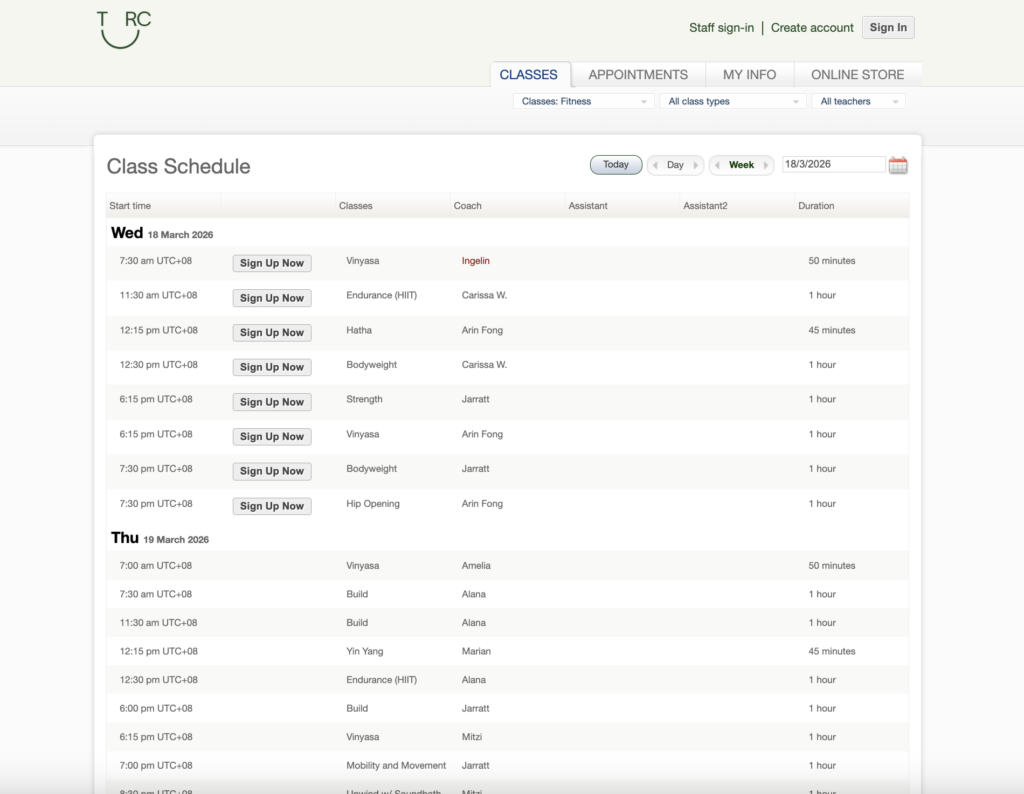
Screenshot of TRC’s website as of Mar 4 shows that the wellness club is still open for bookings./ Screengrab by Vulcan Post

As of Mar 4, TRC’s website is still open for bookings until Mar 18, while there are classes still scheduled until Mar 22.

Launched in 2021, TRC is a four-storey fitness club spanning 8,000 square feet that’s located in a pre-war shophouse at Tanjong Pagar. It offers group classes covering fitness, wellness, and more, alongside personal training.

The club operates under the wellness-focused lifestyle company Trapeze Group, also founded by GJ Wee. Other brands under the group include Hideaway, a massage and bathhouse-style recovery concept in New Bahru, which appears to be operating as usual.

A “surprising closure”

A day prior to TRC’s official Instagram announcement on Mar 2, a netizen going by @swiftologist was already seeking answers about the club’s “imminent (and surprising) closure” from both TRC and its founder.

Advertisement

He called the closure sudden and “disruptive,” while lauding TRC’s trainers “who did everything they could to keep Trapeze going, despite clear indifference to the well-being of members and staff from upper management.”

trapeze rec. club instagram closuretrapeze rec. club instagram closure
Screenshots of comments made by @theswiftologist on TRC’s Instagram page on Mar 2 and Mar 3./ Screengrab by Vulcan Post

In response to the official announcement on Mar 3, the netizen added that members were “given less than a month’s notice,” after seeking clarification on Mar 2 and only “finally” getting an official address on Mar 3.

He further questioned if TRC’s closure was “truly unavoidable due to rising costs,” and that “the community deserves a direct explanation from the founder itself—not just a message via the brand account.”

@swiftologist also went on to question the founder’s priorities “when other projects appear to continue while this space (the one with a real, invested community) is deemed ‘unsustainable’.”

Other members have echoed similar concerns, describing the closure as given on “very short notice.” One netizen noted that members were informed of a possible relocation “just last month,” only to now be told that operations are shutting down entirely, which they said “feels abrupt, poorly handled and communicated.”

Advertisement

That said, some members have also expressed support amid the discussion.

When Vulcan Post approached @swiftologist and TRC for additional comments, both said that they had nothing to add.

  • Read more stories we’ve written on Singaporean businesses here.

Featured Image Credit: Trapeze Rec. Club

Advertisement

Source link

Continue Reading

Tech

What It’s Like to Have a Brain Implant for 5 Years

Published

on

Initially, Gorham used his brain-computer interface for single clicks, Oxley says. Then he moved on to multi-clicks and eventually sliding control, which is akin to turning up a volume knob. Now he can move a computer cursor, an example of 2D control—horizontal and vertical movements within a two-dimensional plane.

Over the years, Gorham has gotten to try out different devices using his implant. Zafar Faraz, a field clinical engineer for Synchron, says Gorham directly contributed to the development of Switch Control, a new accessibility feature Apple announced last year that allows brain-computer interface users the ability to control iPhones, iPads, and the Vision Pro with their thoughts.

In a video demonstration shown at an Nvidia conference last year in San Jose, California, Gorham demonstrates using his implant to play music from a smart speaker, turn on a fan, adjust his lights, activate an automatic pet feeder, and run a robotic vacuum in his home in Melbourne, Australia.

“Rodney has been pushing the boundaries of what is possible,” Faraz says.

Advertisement

As a field clinical engineer, Faraz visits Gorham in his home twice a week to lead sessions on his brain-computer interface. It’s Faraz’s job to monitor the performance of the device, troubleshoot problems, and also learn the range of things that Gorham can and can’t do with it. Synchron relies on this data to improve the reliability and user-friendliness of its system.

In the years he’s been working with Gorham, the two have done a lot of experimenting to see what’s possible with the implant. Once, Faraz says, he had Gorham using two iPads side by side, switching between playing a game on one and listening to music on the other. Another time, Gorham played a computer game in which he had to grab blocks on a shelf. The game was tied to an actual robotic arm at the University of Melbourne, about six miles from Gorham’s home, that remotely moved real blocks in a lab.

Gorham, who was an IBM software salesman before he was diagnosed with ALS in 2016, has relished being such a key part of the development of the technology, his wife Caroline says.

“It fits Rodney’s set of life skills,” she says. “He spent 30 years in IT, talking to customers, finding out what they needed from their software, and then going back to the techos to actually develop what the customer needed. Now it’s sort of flipped around the other way.” After a session with Faraz, Gorham will often be smiling ear to ear.

Advertisement

Through field visits, the Synchron team realized it needed to change the setup of its system. Currently, a wire cable with a paddle on one end needs to sit on top of the user’s chest. The paddle collects the brain signals that are beamed through the chest and transmits them via the wire to an external unit that translates those signals into commands. In its second generation system, Synchron is removing that wire.

“If you have a wearable component where there’s a delicate communication layer, we learned that that’s a problem,” Oxley says. “With a paralyzed population, you have to depend on someone to come and modify the wearable components and make sure the link is working. That was a huge learning piece for us.”

Source link

Advertisement
Continue Reading

Tech

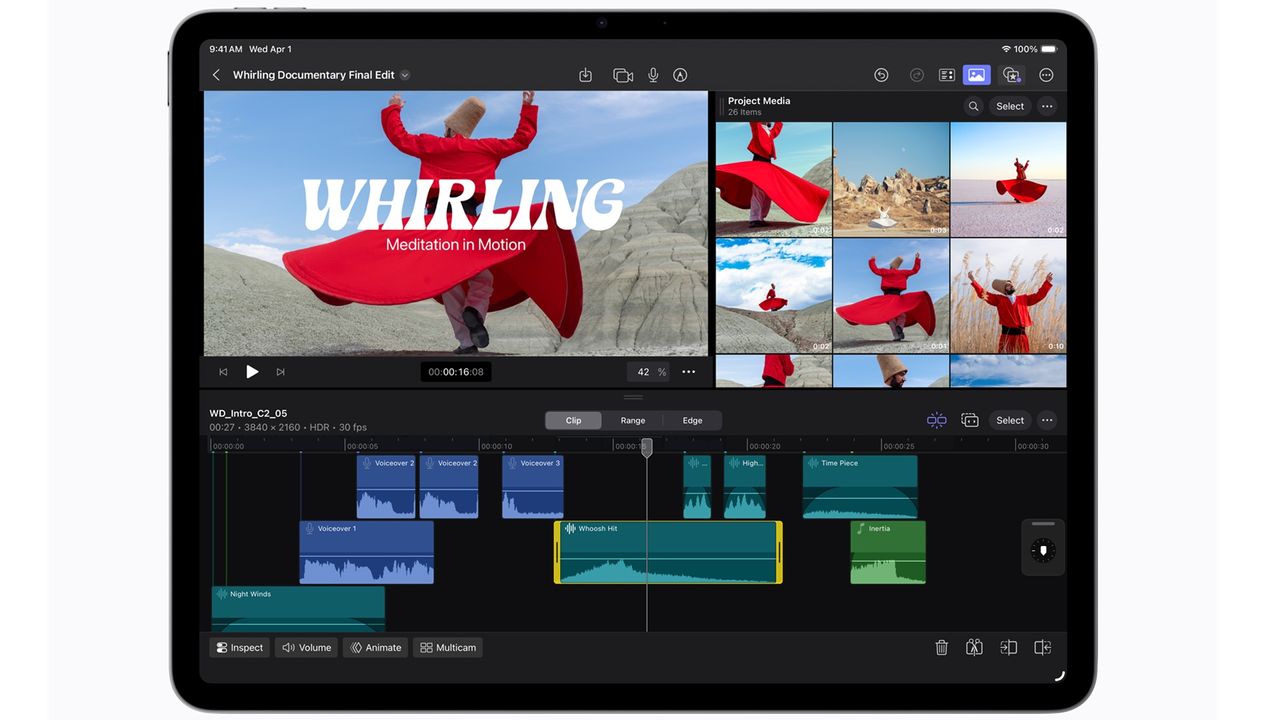
You can preorder the Apple iPad Air (M4) from $249 at Best Buy when you trade in your old tablet

Published

on

Apple recently announced a new iPad Air and there’s already a great way to save on preorders. From 9:15am ET on March 4, you will be able to preorder the Apple iPad Air (M4) at Best Buy from as little as $249 when trading in.

To grab the best discount, you need to trade in a fairly new device. For instance, if you trade in the iPad Air (M3) 11-inch model or an iPad Pro 12.9 (4th Gen), you get $350 trade-in towards the iPad Air (M4). If you trade in the iPad mini (6th Gen), you get $200 off.

It’s worth playing around with the trade-in system to see how you can save while getting rid of unwanted older tech. Bear in mind that how cheap that makes the Apple iPad Air (M4) depends on which model you’re aiming for.

The Apple iPad Air (M4) provides the same design as previous models, but it now uses Apple’s much more powerful M4 chip. There’s also Wi-Fi 7 support, and LTE or 5G for relevant models. Think of this all as a small but important upgrade if you want the fastest iPad Air around. It’s sleek enough to carry around easily, too.

Advertisement

iPad Air (M3) a highly respectable 4.5 stars out of five. We appreciated the power that the M3 chip offers, its “vibrant screen”, and “strong battery life and audio.”

That seems almost certain to carry over to this M4 model, so we’re counting on it riding high in our look at the best iPads soon.

Advertisement

For Apple enthusiasts, it’ll be one of the best tablets to upgrade to, even if it’s a relatively subtle improvement over the previous model. If you need something more powerful than your phone but more portable than your laptop, this is a great way to bridge the gap.

If you can’t wait for the latest model or you want to buy something a little cheaper, take a look at the other iPad deals currently going on. There are some good tablet deals around for every budget and need.
Source link

Advertisement
Continue Reading

Tech

Viral S$45M spa hit by hygiene complaints & staff mistreatment allegations

Published

on

Amid the backlash, the business—touted as S’pore’s largest 24-hour spa—closes its pools

When House+ Bubble announced its arrival in Singapore, it quickly became one of the most talked-about spa openings here.

Touted as Singapore’s largest 24-hour spa—it will span nearly 100,000 sqft once completed—the new S$45 million wellness destination in Jurong East promised an all-in-one experience: soaking pools, therapy rooms, a cinema, an e-sports room, and round-the-clock access.

But that hype appears to have been short-lived.

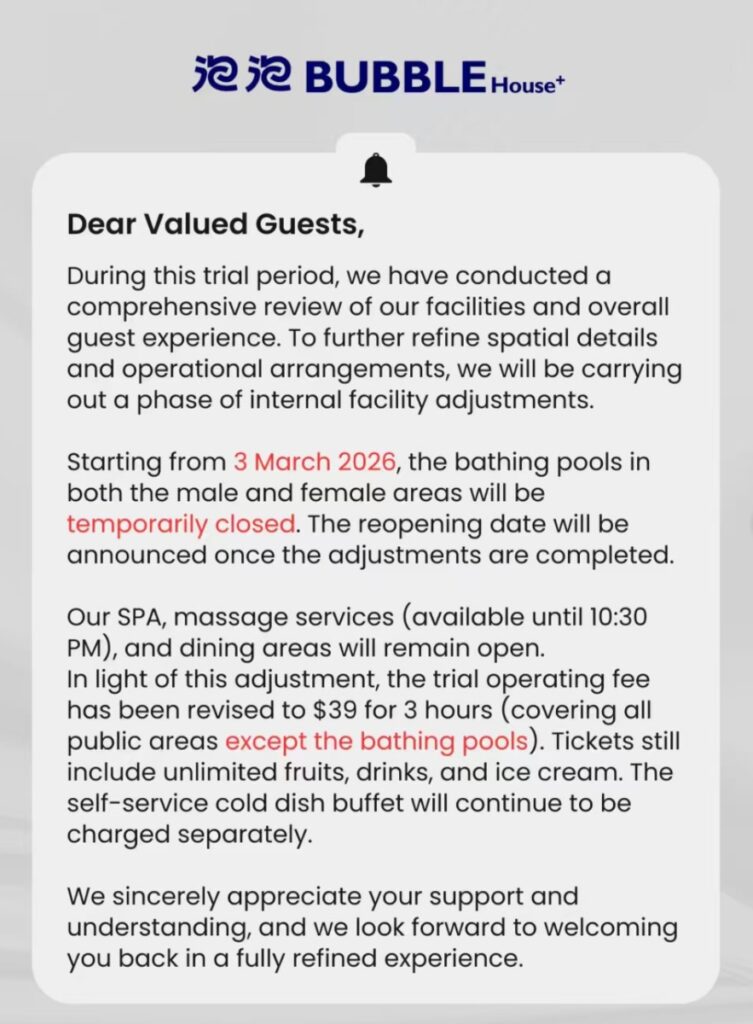
Just a week into its soft-opening, during which guests could access the spa, massage services, pools, and dining areas for S$49, House+ Bubble closed its bathing pools in both the male and female sections indefinitely, citing “internal facility adjustments.”

Advertisement
A statement from House+ Bubble./ Image Credit: House+ Bubble

This move comes amid mounting complaints online. Google Reviews and visitor feedback have flagged hygiene concerns, inconsistent pool temperatures, and other operational issues, raising questions about whether the spa can live up to its lofty promises.

A slew of negative reviews

When Vulcan Post combed through House+ Bubble’s Google Reviews, bathrooms and toilets were described as “dirty,” and shared amenities raised concerns: combs reportedly had visible dandruff, while communal skincare bottles contained stray hairs.

A Google Review accompanying photos shows wet floors and towels left on the ground. The user also claimed that toilet bowls were clogged, and urinals were broken with “water running non-stop,” and a lack of toilet paper or paper towels./ Image Credit: Google Maps

Others pointed out that, despite being marketed as a 24-hour spa, not all facilities actually operate around the clock. The on-site restaurant closes at 12:30 AM, while massage services end at 10:30PM.

In response to one reviewer, the management of House+ Bubble said that it “is taking action to address these issues” and would elevate its cleaning standards.

Some visitors also highlighted hidden costs and misleading advertising. Despite claims of “unlimited massages,” the S$49 soft-opening fee only covered the massage chairs. A proper massage would reportedly cost between S$150 and S$250 per hour.

Alleged staffing issues

Allegedly, staffing issues may be compounding the spa’s operational problems.

Advertisement

A Reddit post claims that several employees left after short stints due to “poor management” and “poor staff treatment.”

Staff reportedly received only a 30-minute unpaid meal break for a nine-hour shift, despite being told they would get an hour. The post adds that the spa is now facing manpower shortages as a result.

Vulcan Post has reached out to House+ Bubble for comment on these claims but has yet to receive a response.

A S$45 million spa ambition

House+ Bubble is a S$45 million project.

Advertisement
House+ BubbleHouse+ Bubble
Some of the facilities shown on the House+ Bubble website include private pools and even an esports room./ Image Credit: House+ Bubble

Its first opening phase, spanning approximately 49,000 sqft, was slated for an official launch on Mar 14, though it remains unclear if this will proceed as planned.

The second phase will look to add about 50,000 sqft, and is targeted for completion at the end of the year, subject to regulatory approvals.

Currently, visitors can still access House+ Bubble, but following the closure of the bathing pools, the trial operating fee has been reduced from S$49 to S$39 for three hours, excluding pool access.

  • Read other articles we’ve written on Singaporean businesses here

Featured Image Credit: House+ Bubble/ Screengrab from Google Reviews

Advertisement

Source link

Continue Reading

Tech

Neither Android Nor IOS: DIY Smartphone Runs On ESP32!

Published

on

You may or may not be reading this on a smartphone, but odds are that even if you aren’t, you own one. Well, possess one, anyway — it’s debatable if the locked-down, one-way relationships we have with our addiction slabs counts as ownership. [LuckyBor], aka [Breezy], on the other hand — fully owns his 4G smartphone, because he made it himself.

OK, sure, it’s only rocking a 4G modem, not 5G. But with an ESP32-S3 for a brain, that’s probably going to provide plenty of bandwidth. It does what you expect from a phone: thanks to its A7682E simcom modem, it can call and text. The OV2640 Arducam module allows it to take pictures, and yes, it surfs the web. It even has features certain flagship phones lack, like a 3.5 mm audio jack, and with its 3.5″ touchscreen, the ability to fit in your pocket. Well, once it gets a case, anyway.

It talks, it texts, it… does not julienne fry, but that’s arguably a good thing.

This is just an alpha version, a brick of layered modules. [LuckyBor] plans on fitting everything into a slimmer form factor with a four-layer PCB that will also include an SD-card adapter, and will open-source the design at that time, both hardware and software. Since [LuckyBor] has also promised the world documentation, we don’t mind waiting a few months.

It’s always good to see another open-source option, and this one has us especially chuffed. Sure, we’ve written about Postmarket OS and other Linux options like Nix, and someone even put the rust-based Redox OS on a phone, but those are still on the same potentially-backdoored commercial hardware. That’s why this project is so great, even if its performance is decidedly weak compared to flagship phones that have as more horsepower as some of our laptops.

We very much hope [LuckyBor] carries through with the aforementioned promise to open source the design.

Advertisement

Source link

Continue Reading

Tech

4 Bluetooth Gadgets You Can Connect To Your Fire TV Stick

Published

on


We may receive a commission on purchases made from links.

With streaming being such an integral part of modern entertainment, it’s no wonder we’re all looking for ways to optimize our experience. Beyond owning smart TVs, this also means investing in additional devices, such as the Amazon Fire TV Stick, to enhance the viewing experience. In fact, it includes numerous useful remote shortcuts that Amazon doesn’t advertise, letting you do everything from switching display resolutions to enabling accessibility features.

Unlike our smart TVs, which usually stay firmly in our homes, you can also easily travel with your Fire TV Stick and enjoy your streaming content as long as you have access to a compatible TV and Wi-Fi. Not to mention, you can play games on television screens without lugging around huge gaming laptops or bringing extra handheld consoles.

Advertisement

Owning an Amazon Fire TV Stick also opens many connectivity options, especially with Bluetooth-enabled devices. But take note: while there are a ton of devices you can connect to your Fire TV Stick to see your exact options, you first need to find your model number by either referencing the receipt, the box it came with, or the device itself when in use. If you’ve forgotten what model of Fire TV stick you own, you can launch it, open the Settings menu, and select “My Fire TV.”

To pair any compatible Bluetooth device, launch your Amazon Fire TV Stick and navigate to Settings. Afterward, select Controllers & Bluetooth Devices, choose the device category you want to pair, and follow the pairing instructions on the screen. 

Here are the gadgets you can connect to the Fire TV Stick via Bluetooth.

Advertisement

1. Speakers

Many modern smart television sets will probably already let you hook up your speakers directly via Bluetooth. However, there are reasons why you might still want to do it through the Fire TV Stick. For example, you can easily adjust the volume with the Fire TV Stick remote, so you have fewer things to fiddle with. If you tend to use your television only with your Fire TV Stick, this can also streamline audio processing and reduce the risk of audio issues when streaming your favorite shows or movies. These days, there’s no shortage of Bluetooth speakers worth buying that can work with your Fire TV Stick, such as the Anker Soundcore 2, Marshall Stanmore III, and Sonos Move 2. With this, you can get better sound than your TV speakers, and you can also move your speakers to your preferred location.

For those who are already invested in the Amazon smart home ecosystem, you can hook up the Fire TV Stick to your Alexa-powered Echo speakers. With this alone, it introduces a ton of additional possibilities for your integrated smart home experience. Apart from voice control options, it can be used as a component in creating automated scenes that work with other Alexa-compatible devices, such as light bulbs, scent machines, and smart switches. For example, some Alexa automations compatible with your Fire TV Stick can optimize your bedtime routine or turn everything off after movie nights.

Advertisement

2. Headphones and earbuds

While some people are lucky enough to live in places where they can turn on the loudspeakers freely while accessing their favorite content, others need to be more mindful of their viewing habits. Thankfully, just because you’re watching from a TV doesn’t mean the whole neighborhood has to watch with you. Whether you want some privacy or just to avoid an angry neighbor knocking on your door, you can pair your Bluetooth headphones with your Amazon Fire TV devices. In recent times, there is no shortage of multi-point Bluetooth Headphones and Earbuds that can work with your Amazon Fire TV Stick. For example, Apple users will be relieved to know that its AirPods, AirPods Pro, and AirPods Max all work with it.

But take note: the same issues other devices have with Bluetooth headphones and earphones apply, such as audio latency, which you’ll need to resolve using AV Sync Tuning. Not to mention, apart from commercial headphones and earbuds, some Amazon Fire TV devices also work with hearing aids, including several of its TV offerings and the Fire TV Cube (2nd- and 3rd-generation models). Among compatible hearing aids, it lists Starkey, Widex, and Cochlear hearing devices. Although you may need to check with your specific model. In 2025, Amazon released a few new features that make its Fire TV devices more accessible, such as the Dual Audio option, which allows hearing aid users and others to listen to audio at adjusted loudness levels simultaneously.

Advertisement

3. Bluetooth game controllers

Even though many smart TVs can perform the same functions, the Amazon Fire TV Stick still does a lot of things better, such as navigation, software experiences, and cloud gaming. In 2020, Amazon launched Luna Cloud Gaming, which lets people run its library of games on Amazon’s remote servers. Depending on your preferences, you can choose a subscription model that suits the kinds of games you play most often.

According to Amazon, certified Luna-compatible controllers include the official Luna Controller, PlayStation 4 DualShock 4 Wireless Controller, Xbox One Controller, and the Google Stadia Controller. Additionally, owners of the PS5’s DualSense Controllers have been able to use them effectively. Although some people may claim that their 3rd-party controllers from other manufacturers work with their Fire TV Stick, it’s important to note that you will not have the same protection, assurance, or expected longevity as with official ones.

Advertisement

Regardless of which model you choose, you’ll still want to make sure you have the right network and device settings to enjoy your Bluetooth controllers. Apart from having a fast enough connection, you’ll also want to turn on Game Mode when possible. Not to mention, compatibility isn’t entirely guaranteed for everything and still depends on the specific game you are playing. In a jiffy, you can opt to use the Luna Controller app on your mobile phone instead.

Advertisement

4. Bluetooth mice and keyboards

Devices like the Fire TV Stick solve many problems, but they also introduce new ones. One of the most annoying, yet somewhat universal, experiences for anyone who has used a streaming device is finding it difficult to navigate with the remote. In fact, while the Amazon Fire TV Stick lets you browse the internet with your TV using Amazon Silk, it can be a nightmare to type all the website names and click all the right buttons.

If you want a sleek-looking wireless keyboard, something like the Logitech K380 Multi-Device Bluetooth Keyboard lets you pair with up to three devices, so you don’t have to unpair it from your computer to use it with your Fire TV Stick. But if you’re looking for something more ergonomic, there are even Bluetooth mice with side-scrolling, like the Logitech MX Master 3S, Keychron M6 Wireless Mouse, and Razer Basilisk V3 Pro.

If you don’t own a Bluetooth keyboard or mouse, all hope is not lost. As we’ve mentioned before, you can use a micro-USB OTG splitter to plug in a wired keyboard or mouse to your Fire TV Stick. So, if you still prefer using a wired peripheral or have already maxed out the number of devices you can connect to your Fire TV stick, this is a possible alternative.

Advertisement


Source link

Advertisement
Continue Reading

Trending

Copyright © 2025