



Connect with us
DAPA Banner
DAPA Coin
DAPA
COIN PAYMENT ASSET
PRIVACY · BLOCKDAG · HOMOMORPHIC ENCRYPTION · RUST
ElGamal Encrypted MINE DAPA
🚫 GENESIS SOLD OUT
DAPAPAY COMING

Tech

Baseus Inspire XH1 review: These Bose-tuned headphones defied my budget expectations

Published

on

Baseus Inspire XH1

MSRP $149.99

Advertisement

“Budget headphones that surpass expectations.”

Pros

  • Really good battery life
  • Lovely build and comfort
  • Pleasing audio output
  • Sufficiently durable
  • Generous accessory kit

Cons

  • ANC incurs an audio tax
  • Transparency needs work
  • Wear detection is missing
  • Earcup hinge is a tad loose

Quick Review 

On an average day, when a company makes “best ever” claims for its new product, I usually take it with the proverbial pinch of salt. Naturally, when Baseus launched the Inspire XH1 and marketed them as the “finest headphones” it has ever made, I was skeptical. I’m glad that I was wrong. These are the best budget headphones in years, and they hit way beyond their weight class on multiple metrics. 

These fall in the rare class of audio wearables that make you double-check the price tag. It takes features that usually live behind a premium paywall and folds them into something almost absurdly affordable. Tuned in collaboration with Bose, these over-ear cans carry a “Sound by Bose” profile that leans into punchy bass and a clarity that outdoes its weight class. The aesthetics borrow plenty from Bose’s premium headphones, serving a comfortable folding frame, plush memory foam earcups, and a proper hard carrying case that you don’t have to fork extra cash for.

The headline numbers are absurd in the best way, especially for the per-charge mileage. They aren’t without their own set of sonic flaws, though. The companion app can be finicky, the Dolby Spatial Audio isn’t a winner, and the active noise cancellation (ANC) mode takes some toll on the audio quality. But the bigger picture is still bright. If you want premium comfort, multi-point connectivity, high-resolution LDAC support, and a warm sound without spending flagship money, the Baseus Inspire XH1 is one of the most compelling options you can get.

Baseus Inspire XH1 specs: What’s inside these cans?

Driver Unit 35 mm dynamic
Frequency Response Range 20 Hz – 40 kHz
Audio Codec SBC, AAC, LDAC
Connection Modes Bluetooth / AUX
Bluetooth Version V6.1
Multipoint Connection Yes
Low Latency 80 ms
Battery Capacity 800 mAh / 2.39 Wh
Playback Time Approx. 100 hours (with ANC off and volume at 50%)
Transparency Mode Yes
Baseus App Support Yes
Product Materials ABS + Metal + PC
Ear Cushion Material Protein Leather
Weight Approx. 275 g
Size 8.07″ (H) × 6.57″ (W) × 3.14″ (D)
What’s in the Box Inspire XH1 Headphones, Aux Cable, USB-C Cable, Carrying Case

Baseus Inspire XH1 design and build quality: Luxury ride on a bargain ticket

Engineering wallet-friendly wireless headphones usually means cutting costs in a few places, and you can normally see them from a mile away. The Inspire XH1 mostly skips that trend, and to a surprising extent. At a relatively light 275 grams, these closed-back over-ear cans feel a class above what Baseus has offered so far, and you’ll feel it the moment you pick them up.

Now, let’s talk about that Bose brand-and-tune job. The design language is unmistakably Bose-inspired, leaning hard on the styling of the flagship QuietComfort Ultra, with a thoughtful mix of metal and high-grade plastic. Even the colorways, which include Cosmic Black, Starlight Off-White, a muted blue, and a punchy red, echo the grown-up elegance of pricier gear you will come across in the Bose portfolio.

Advertisement

Baseus has wrapped the sturdy aluminum headband and roomy ear cups in a soft, velvet-like leather. Beneath it sits memory foam that settles comfortably onto your skull, while the clamping force is just about right. It’s gentle enough for the long haul, but I often found the slipping from my sweaty head in the charring Summer of New Delhi.

Thankfully, even after hours of sustained usage, I didn’t feel any fatigue, save for a bit of warmth around the ears that comes with the closed-back territory. The cups run deep and generous, easily cradling larger ears without complaint. That said, certain ear shapes may find the big internal microphones tucked in the driver cavity brushing against the ear, which takes a small nudge of the cup to get in a comfortable position.

Another aspect of the Baseus Inspire XH1 that I love is portability, thanks to the versatile dual-hinge design. The cups swivel 90 degrees to lie flat across your collarbones when slung around the neck, and the metal hinges let the arms fold up into a tidy package. The hinges feel a touch loose, though, and they’ll spin with barely any resistance. But at the end of the day, these headphones are built to last. To further sweeten the deal, Baseus throws in a color-matched hard travel case, something you’ll hardly find on a product in this price bracket.

Coming to the controls, they are entirely physical, skipping fiddly touch panels for buttons you can actually find by feel. The left cup holds the power button and the ANC toggle, while the right side handles playback and volume. The track-skipping logic is a little awkward. Holding the volume-up button jumps back on the queue, while volume-down moves the dial forward.

Thankfully, you can customize the behavior of these buttons in the companion Baseus app. The quiet showpiece, though, is the official IP66 rating, meaning serious protection against dust and strong jets of water. Most over-ear wireless headphones ship with no ingress protection at all, which leaves the XH1 oddly well-suited to sweaty gym sessions, light rain, or a dusty walk home.

Score: 9/10

Advertisement

Baseus Inspire XH1 audio quality: Pleasing, if you stick to the basics

The real winner of the Basesus Inspire XH1 headphones is the audio driver architecture. They come equipped with 35mm dynamic drivers, but it’s not just the hardware that must make it to the headlines. It’s the tuning. Basesus knocked at Bose’s doorsteps to build the “Sound by Bose” default EQ, and in doing so, the brand has nudged the Inspire XH1 out of the budget hearable conversation.

Straight out of the box, the Inspire XH1 leans towards a warm and lightly V-shaped frequency curve. In simpler terms, it’s engaging but doesn’t get in your face with exaggerated frequencies. There’s real energy injected into the upper-mids and lows, and the music feels alive because of it. The bass is the standout aspect. It’s deep, rich, and full-bodied, dropping low without too much effort or distortion.

Budget-focused headphones tend to smear the low-end into the vocals, but the Inspire XH1 keeps things controlled. The bass is thumping, but never overpowering. Listening to Hatikoli’s Go was a pleasing experience. Likewise, with Bass Boost enabled, Twin’s Uzi got a discernible lift, producing deeper bass without meddling with the synths or the electronic vocals.

One of my friends, after trying Gucci Mane’s I Get The Bag, remarked that the bass is literally vibrating their ears without any jarring effect. The mid-range comes through smooth and textured. Voices sit clearly in the mix, especially with the “Sound by Bose” EQ profile enabled. If there’s a soft spot, it’s right at the top.

The treble misses a little sparkle, so the finest details in cymbals or upper strings can read slightly muted. The upside is that there’s no noticeable sibilance or harshness, even when you crank up the volumes. For fans of classical music, the XH1 offers a surprisingly wide soundstage, making it easy to map instruments across an orchestra.

Advertisement

The breath behind a woodwind or the low hum of a cello lands with startling clarity. If you’re a fan of Hans Zimmer or artists like Olafur Arnalds, these headphones won’t disappoint. Rock and progressive metal tracks run into a bit of trouble as the highs tend to sound a bit muddy, but you can still salvage them with a bit of EQ tuning.

The biggest hiccup is the Dolby Audio. The two built-in presets that ship with it (Music and Cinema) just suck the life out of songs, especially those where you want to enjoy the lively vocals. Listening to Moein and Sivash Ghomayshi’s Parandeh was a test of patience, as the Dolby Audio mode flattened the highs and mids, making the track feel bland.

In general, the Sound by Bose is the one you should stick with for nearly all genres of songs. For Android users chasing the hi-res dream, the XH1 supports the LDAC codec. There’s also a 3.5mm input for passive, wired listening when the battery finally taps out. Without the internal DSP and amplification doing their thing, though, the sound feels thin and tinny.

Score: 8/10

Baseus Inspire XH1 noise cancellation and transparency: A bright picture

Noise cancellation is a well-known litmus test, and it’s usually where budget headphones fall apart. Thankfully, the Inspire XH1 headphones pull off a competent performance and make the daily sonic grind a tad easier to handle. As far as numbers go, Baseus touts up to -48 dB of reduction, which is fairly standard for the price bracket.

Qualitatively, the Inspire XH1 headphones can handle low, sustained drones with ease. Airplane engines, office HVAC units, and the constant roar of a subway car are easily shoved into the background. All you hear is a faint (but not totally faint) remnant of the external noise.

Advertisement

It’s excellent for the money, but it isn’t the vacuum-sealed silence you get from the likes of Bose QuietComfort Ultra or the Sony WH-1000XM6. High-pitched or sudden sounds, such as a siren, a barking dog, or sharp chatter nearby, still pierce through. It can completely silence a room fan, but not the Reels playing on a phone being used on the next table.

Oddly, with the noise cancellation enabled, I could still feel the rumble of your footsteps, irrespective of whether I was wearing rubberized slippers or heavy boots. The ANC also affects the audio output. Once enabled, it discernibly shifts the sound profile, giving it a slightly thicker flavor for the low frequencies, while the mids also get a bit suppressed. If you’re chasing the pristine audio output, disable ANC and crank up the volume to drown out the external noise.

Moving to transparency mode, it pipes the humdrum of the outside world into your ear canals to keep you aware of your surroundings. It’s pretty good on the Inspire XH1 headphones. Low-cost headphones usually produce a loud hiss with a synthetic reproduction of the external noise. On the Baseus headphones, the sounds are natural, but the hissing is still there. What baffles me is Baseus’s decision to switch transparency off the moment you take a call.

Moving to the microphone and call quality, things are fairly smooth here. There are five microphones here, and they get a lift from AI-powered noise reduction. On calls, the voice comes through clean and stable. In the noisy landscape of a city street, the AI algorithms kick into action and scrub the background noise. In my time testing these headphones, callers never complained about any jarring background interference. However, a few of my friends pointed out that the voice sounds a tad different and subdued. But overall, the Inspire XH1 can handle calls fairly well, if that’s a key concern for you.

Score: 7/10

Advertisement

Baseus Inspire XH1 software: Clean and straightforward

In order to get the best out of this package, you must head over to the Baseus companion app. The interface is clean, intuitive, and all the features are conveniently laid out. There’s barely any bloat, and all the core controls are easily accessible. All the core controls, including ANC and transparency, can be handled through the app.

There’s also a “Sound Fit” personalization test that plays a run of tones to gauge your hearing and accordingly creates a customized EQ to compensate for any hearing discrepancies. It works surprisingly well. If you’re an audio purist, there are seven EQ presets, including a “Powerful Bass” mode for bassheads and a “Clear Treble” mode to lift those recessed highs.

For maximum flexibility, there’s a custom 8-band equalizer, as well. As far as wireless connectivity goes, it’s rock solid. Multipoint support ensures that you can simultaneously pair these Baseus headphones with two devices at once. There’s also a Low Latency mode that is tailor-made for gaming.

What’s missing is the quality-of-life stuff. There are no wear sensors, so the music won’t pause when you pull the headphones off, and it won’t pick back up when you put them on. Thankfully, they can automatically power off after a brief spell of inactivity and save on the battery juice.

Score: 8/10

Baseus Inspire XH1 battery life: An absolute warhorse

If there’s one aspect where the Inspire XH1 headphones demolish the budget perception (and even pricier headphones), it’s the battery life. The stamina here borders on the ridiculous, and is well past what you would reasonably expect from a wireless pair. Baseus claims a colossal 100 hours of continuous playback with ANC off, clocking down to roughly 50% volume on the standard AAC codec.

Even with ANC enabled, you’re still looking at 65 hours of per-charge mileage. For comparison, flagships from Apple, Bose, and Sony tend to land somewhere in the 30 to 40-hour range, and that’s mostly restricted to the latest and greatest models. The Baseus Inspire XH1 stands out, and I can vouch for its frugal power uptake.

On average, you can go at least two to three weeks of heavy listening without even worrying about low power warning messages. You can comfortably carry them on a multi-stop international flight, run them through a full office week, and survive weeks of gym duties without plugging in a cable.

The idle power draw is absurdly low and almost negligible. As far as charging goes, the Inspire supports fast charging over USB-C, with a 10-minute plugged-in time delivering enough juice to last 12 hours of music playback. In a nutshell, the proverbial battery anxiety is effectively gone.

Advertisement

Score: 9/10

Should you buy?

The Baseus Inspire XH1 is nothing short of a masterclass in milking the most value out of your spending, discounted or otherwise. What you get is class-leading comfort, an enormous battery, and capable drivers that will please your ears. In doing so, Baseus offers something that trades blows with the heavyweights of the mid-tier.

If you love that warm, dynamic Bose signature but won’t drop a minimum of $350 to enjoy it, the Inspire XH1 offers a strikingly close acoustic experience for a fraction of the cost. In case you spend an hour (or more) commuting each day and absolutely need music to focus on work, you have a solid pick here. Thanks to a combination of solid battery life, a protective hard case, and effective noise isolation, these headphones are hard to beat for the 9-to-5 lifestyle.

The cherry on top is the IP66 rating, which means you can comfortably take them for a sweaty gym session. But it’s not a flowery picture everywhere. If a flawless ANC experience is what you can’t live without, you must pay the flagship fee at Bose or Sony’s counter. The Inspire XH1’s ANC is good, but not perfect. Plus, if you lean too much on transparency for long calls, you’re out of luck.

Finally, if you’re chasing those pristine treble lines, you may not like the bass-forward Bose tuning on these headphones. At the end of the day, wireless over-ear cans tag along with compromises. The Baseus Inspire XH1 serves fewer of them than, and effortlessly proves that you don’t need to spend a fortune to enjoy good audio.

Advertisement

Why not try?

Sennheiser Accentum Plus — If pristine, audiophile-grade sound sits above everything else for you, the Sennheiser Accentum Plus is a solid pick. They skip the big, punchy bass of the Baseus XH1 in favor of a detailed soundstage. The treble clarity is better, which makes them a natural fit for critical listening, jazz, and acoustic material. You get aptX Adaptive support, a finer ANC system, and touch controls on the cups. Battery life lands at a respectable 50 hours, though there’s no ingress protection available.

Sony ULT Wear ($250) — If the bass-forward tuning on the Baseus headphones is not enough, the Sony ULT Wear will satisfy your basshead cravings. A dedicated button slams on huge sub-bass boosts on demand, and these are tuned to rattle your skull. Past the low-end theatrics, you get Sony’s noise-cancelling pedigree, which edges slightly ahead of the Baseus offering. Additionally, wear sensing for auto-pause and resume is seriously convenient.

Beats Studio Pro In case you’re swimming deep in the Apple ecosystem, the Beats Studio Pro is a smart choice. The sound is far more balanced and refined, but the real standout on these cans is the fully supported Dynamic Head Tracking and Spatial Audio, which is leagues beyond the lackluster Dolby Audio experience on the Baseus. You also get lossless USB-C output. On the flip side, the fit is uncomfortably tight, and you will feel the pain after long listening sessions.

How we tested  

For a spell of two months, I used the Baseus Inspire XH1 headphones as my primary noise-cancelling over-the-ear audio gear. I kept them paired with my Samsung Galaxy S26 Ultra, iPhone 17 Pro, and MacBook Pro, while using the official Baseus (v1.1.11) mobile app.

Advertisement

To test the audio quality, I played music across different genres and compared the audio quality while using Sony’s WH-1000XM6 as a reference device. To test the noise cancellation and transparency modes, I wore the headphones in buzzing cafes with music playing in the background, on metro rails, in auto rickshaws on busy roads, and in my own room to gauge noise isolation across different frequencies.

Battery life was tested across three full charging cycles, spanning hours of music playback every day with volume levels usually hovering between the 50% and 60% mark. I used Apple Music and Amazon Music (Unlimited tier, Ultra HD quality preset, Dolby Atmos playlist) to stream audio in wired and wireless modes.

Source link

Advertisement
Continue Reading
Click to comment

You must be logged in to post a comment Login

Leave a Reply

Tech

This printer engineer knows every trick in the book

Published

on

Official BOFH logo (red rotary telephone with devil's tal and devil's horns)

EPISODE 14 The morning coffee in Mission Control is interrupted by a hesitant tapping at the door. Our current office temp has an issue.

“It’s the printer,” she says, apologetically. “It makes a noise.”

“When it’s printing, or all the time?” the PFY asks.

“Sort of both. It starts making the noise before it starts printing, then keeps making the noise for about 20 seconds after.”

Advertisement

The PFY and I pop out and take a look, and the printer is indeed making a tiny squeaking noise, from the time it wakes up until the time it lapses back into low-power mode.

“I know it’s hardly noticeable, but the office is so quiet…” she says.

“Leave it with us,” I say.

“So you can fix it?”

Advertisement

“A machine with an extortionately priced service contract, voided the moment we open a panel that we’re not authorized to open?” I ask. “Not a chance!”

“Oh,” she says, disappointedly.

“But what we can do,” I say, moving a bunch of paper from my rarely used desk phone and pressing a speed dial button, “is log a fault.”

Barely 15 minutes later, I have negotiated the tricky maze of passages, all alike, which comprise the printer company’s ancient IVR system, and am speaking to an actual engineer.

Advertisement

“… and what’s the serial number?” he asks.

I rattle off the sequence of numbers that I took a snapshot of earlier.

“Oh no, that sounds like the controller serial number,” he sighs. “I need the printer serial number. It’s on the back panel of the machine, underneath the sticker with our support number on it. If you want to ring back when you get that I ca-“

“It’s OK, I have that here,” I say, having been to this particular rodeo a time or two before.

Advertisement

Ploy #1 in the Printer Engineer playbook is to ask for the serial number. If the user actually has the serial number, ask for some other number, i.e. the FULL model number, the total page count, a 40-digit service number from the sticker – where the last two digits are mysteriously missing, etc. When they can’t supply it, get them to ring back, endure another 15 minutes of ambiguous and clunky IVR, and then hopefully get fielded to some other engineer.

I rattle off the new number, the model number, the revision number – which is helpfully located on the base of the machine. Like I said, not the first time we’ve ridden this bronco…

“And what seems to be the problem?” the engineer asks, unable to shake us.

“It’s probably the fuser unit,” I say.

Advertisement

“It’s probably the fuser unit, or it is the fuser unit?” he asks.

“I can’t be sure – I’m no printer scientist,” I admit. “Could you make it in this morning?”

Ploy #2. You can never make it when they want you to make it.

“Oh… this morning I’m fully booked up.”

Advertisement

“This afternoon then?” I ask.

“Let me see. Hmmm. No, it looks like I’ve got a couple of calls outside the city.”

“Tomorrow morning?”

“Hmmmmmmmmm, no, but I can possibly make it tomorrow between 1 and 3pm – if that works.”

Advertisement

“OK,” I sigh. “I suppose we can make that work.”

“And I’ll need a park for the van.”

“Right. I’ll get one coned off outside the building.”

Advertisement

“OK,” I say to the temp. “He’ll be here tomorrow at 3:45.”

“He said between 1 and 3,” she points out.

Ploy #3. Turn up late and leave a note asking the user to rebook.

We all know the rules.

Advertisement

… The next day, 3:40pm …

“And here he comes,” the PFY says, as we watch a small white van pull up beside the road cones we installed early this morning. The driver gets out, moves the cones, along with the “DANGER, SINK HOLE” sign that we had made – complete with branding from the local council.

Scant minutes later, he’s in the main office, looking at the printer.

“I thought you said it was a fuser unit?” he states.

Advertisement

“No, no, I said it was probably the fuser unit,” I counter.

“It’s got nothing to do with the fuser unit,” he replies.

“My bad,” I say. “But then would you have turned up if I’d told you it was a squeaky bearing?”

“Yes.”

Advertisement

“Yes, but would you then have said that you’d need to order some replacement bearings?”

“I do need to order some replacement bearings.”

“And in a week’s time, will you ring us back, say the bearings are discontinued, that this particular printer model is end of line, and that for the sake of compatibility we’d need to replace this printer and every other printer in the building for an eye-wateringly large price?”

Ploy #4. The Upsell.

Advertisement

“This printer model is end of line. We don’t have spares either,” he admits.

“So,” I say, “what I need you to do is this: take this printer up to the fourth floor, tell them that you’re upgrading their printer with this one, which has 32-bit color, blacker blacks, a memory expansion, and an advanced feeder mechanism – then bring their one down here.”

“It’s the same printer,” he replies. “They’re all exactly the same.”

“Yes, but only you, me, my assistant – and now our temp – know this.”

Advertisement

“No, I don’t think I could do th-“

“20 quid,” I say, waving a note in his eyeline.

“Be back in five,” he says, pocketing the cash faster than a FIFA official.

True to his word, he’s back in five, pushing a printer in front of him.

Advertisement

“Pleasure doing business with you,” he says, parking the printer in front of me and grabbing his tool kit.

“Are you sure that he actually replaced the printer?” the temp asks, as the PFY wheels the printer out of the main office to Mission Control. “Only, our printer had a red smudge on the front panel… and I think the replacement printer did too.”

Ploy #5. Take the money and run.

Advertisement

“We’ll only know by listening,” I say.

“Listening for what?” she asks.

“Shh!” I whisper.

And the temp’s right, the office is quiet. So quiet you could hear a slight squeaking noise from a worn bearing. Or, off in the distance, the sound of a large multifunction printer hitting a small white van from a great height…

Advertisement

Source link

Continue Reading

Tech

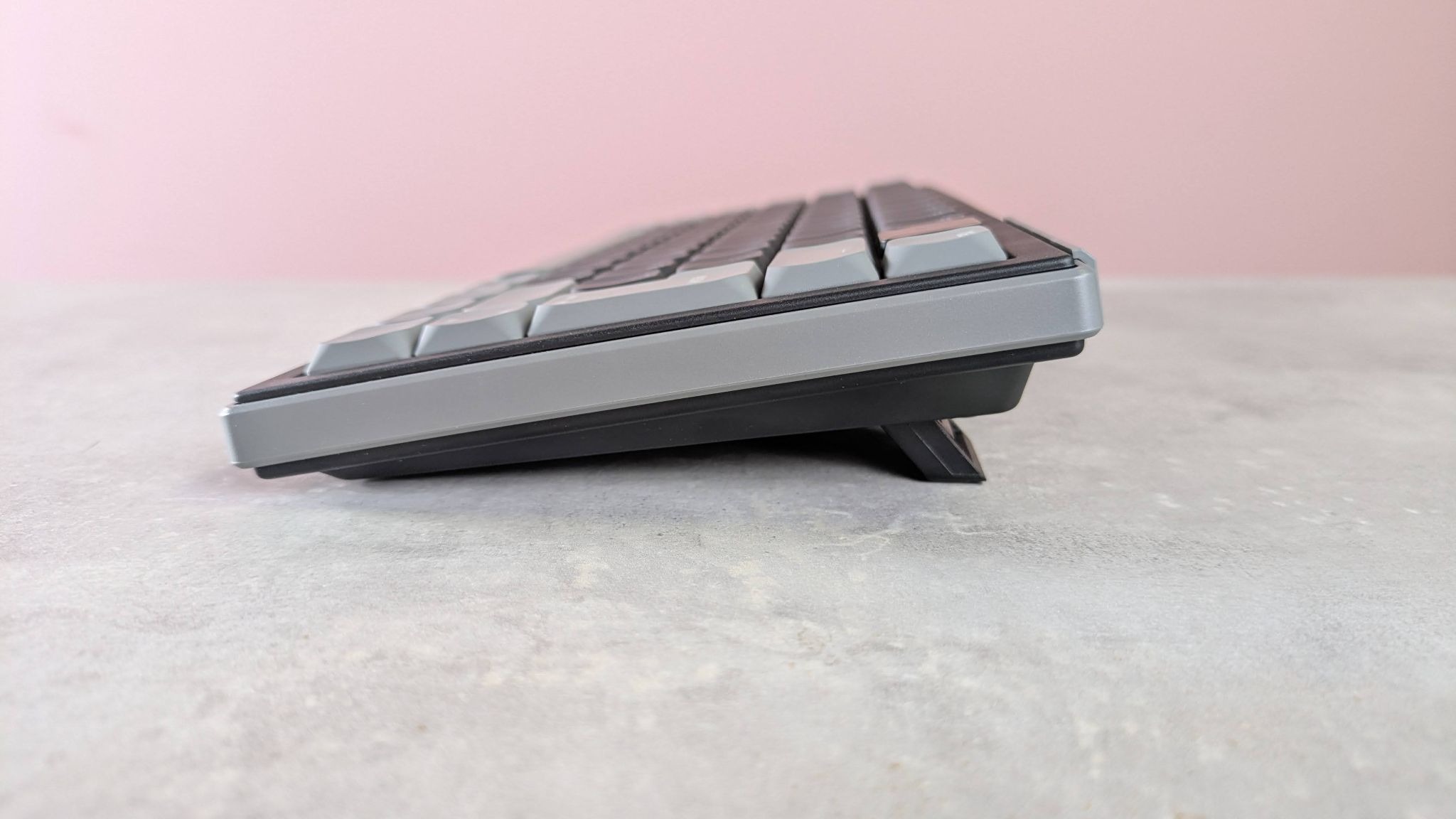
Cherry XTRFY K63W Pro Compact Ultra-Wideband review: a unique keyboard that may prove divisive

Published

on

Why you can trust TechRadar


We spend hours testing every product or service we review, so you can be sure you’re buying the best. Find out more about how we test.

Cherry XTRFY K63W Pro Compact Ultra-Wideband: One-minute review

The Cherry XTRFY K63W Pro Compact Ultra-Wideband is a small gaming keyboard with a few surprises in store.

True to its name, it certainly doesn’t take up much room on your desk. It’s also pleasingly light, which means it’s easy to move around. Despite this and the plastic construction, the build quality seems high.

Advertisement

Source link

Advertisement
Continue Reading

Tech

Ukraine reveals in-house AI system to slash battle planning time to mere minutes

Published

on


  • Ukraine Central Research Institute has unveiled Marichka, a closed neural network intended to cut brigade-level planning decisions from six to 12 hours down to minutes
  • The system calculates force ratios, estimates losses, and models courses of action on an interactive map, but has so far only been trialed on test data, with classified document integration still pending
  • Marichka adds another layer to Ukraine’s tech stack for battlefield planning: the country already fields Delta for situational awareness and works with Palantir at multiple levels

Ukraine’s Central Research Institute of the Armed Forces has presented Marichka, a closed neural network designed to compress the operational planning cycle at brigade level and above from hours to minutes.

The system, still in testing, is built to collect and verify battlefield information, then calculate force ratios and estimate required resources and likely losses, presenting commanders with modeled options on an interactive map. Military standards currently allow a regiment or brigade commander six to 12 hours and roughly 20 documents to reach the same point.

Source link

Continue Reading

Tech

Chuck Berry Is On Top Review: Chess Records’ 75th Anniversary Audiophile Remaster Series Restored Rock ‘n’ Roll Classic

Published

on

Now seems like a good time to revisit the recent Chess Records 75th Anniversary Series audiophile reissue of Chuck Berry’s 1959 one-LP masterpiece, Chuck Berry Is on Top. With one of Mr. Berry’s most famous musical progeny, the Rolling Stones, back on the charts with their very strong Foreign Tongues LP, newer fans discovering the glories of good old rock ’n’ roll would be wise to take a very enjoyable history lesson with Berry’s iconic third studio album.

For those unfamiliar with the Stones’ deep repertoire, they covered numerous Chuck Berry songs over the years, and much of their musical style, especially early on, was influenced by his writing and overall sound. Their versions of “Carol,” “Little Queenie,” “Around and Around,” and “You Can’t Catch Me” made that debt rather difficult to miss.

Effectively a greatest-hits collection in all but name, most of the tracks on Chuck Berry Is on Top were originally issued as 45 rpm singles during the late 1950s. Many became Top 40 hits, including “Almost Grown” (No. 32 on the Billboard Hot 100, No. 3 on the R&B chart), “Carol” (No. 18 Hot 100, No. 12 R&B), “Maybellene” (No. 5 Hot 100, No. 1 R&B), “Sweet Little Rock and Roller,” “Johnny B. Goode” (No. 8 Hot 100, No. 2 R&B), “Little Queenie” (No. 80 Hot 100), “Jo Jo Gunne,” “Roll Over Beethoven” (No. 29 Hot 100, No. 2 R&B), and “Around and Around.”

chess-records-75th-anniversary-sticker

In terms of sound quality, this new reissue of Chuck Berry Is on Top is exemplary. The project was supervised by Chad Kassem of Analogue Productions, a division of Acoustic Sounds. Disc mastering and lacquer cutting were handled by Matthew Lutthans at The Mastering Lab, located within Quality Record Pressings (QRP), where the albums were manufactured.

Much like an Acoustic Sounds or Blue Note Tone Poet Series reissue, Chuck Berry Is on Top is packaged in a deluxe, expanded, laminated gatefold cover, rather than the single-pocket, flat-matte design of the original. Each disc is housed in an audiophile-grade, plastic-lined inner sleeve. The iconic black Chess Records label design has also been reproduced. Some original pressings used a blue label, but it is still a very cool detail.

Advertisement
chuck-berry-on-top-labels

For those dead set on finding an original 1959 copy of Chuck Berry Is on Top, tempered expectations may be in order, as copies in good condition remain quite rare. At the time of writing, only eight are listed on the vinyl marketplace Discogs, none graded higher than VG, with asking prices ranging from $35 to $185. It took me forever to find an original copy in playable condition out in the wild, so unless you are willing to pay collector prices, be prepared for a very long search.

chuck-berry-on-top-back-cover

That said, the prospect of buying a pristine new 180-gram pressing of Chuck Berry Is on Top, made from the original monaural master tapes and supervised by one of the most highly regarded vinyl production teams in the world, for $38.98 at Amazon seems like the logical choice for most fans.

Were the cover on my original copy not quite so nice, I might purge it entirely, knowing that this new Chess Records 75th Anniversary Series audiophile reissue will be my go-to listening copy for the foreseeable future. It sounds excellent and remains very much in keeping with the character of my original, minus the clicks and pops, of course. Perhaps it will become your go-to copy as well.

Our Ratings

★★★★★★★★★★ Music

★★★★★★★★★★ Sound Quality

★★★★★★★★★★ Pressing Quality

Advertisement
Advertisement. Scroll to continue reading.

Where to buy:


Mark Smotroff is a deep music enthusiast / collector who has also worked in entertainment oriented marketing communications for decades supporting the likes of DTS, Sega and many others. He reviews vinyl for Analog Planet and has written for Audiophile Review, Sound+Vision, Mix, EQ, etc.  You can learn more about him at LinkedIn.

Source link

Advertisement
Continue Reading

Tech

IBM buys Howard Hughes-founded HRL to fuel quantum plans

Published

on

IBM expects HRL’s technical breakthroughs will help drive its quantum programme for ‘decades to come’.

IBM is acquiring Boeing and General Motors’ jointly-owned research and development institute HRL Laboratories.

HRL’s expertise in silicon-spin qubit engineering is expected to help IBM in its long-term quantum plans. The lab was established in 1948 as Hughes Research Laboratories by the late prominent aviation expert Howard Hughes. Details of the transaction were not disclosed.

IBM has major ongoing quantum computing projects, including a roadmap to delivering Quantum Starling by 2029, expected to be fault-tolerant and 20,000-times more powerful than today’s quantum computers – capable of running 100m quantum operations.

Advertisement

As per IBM’s plans, Starling will be followed up with an even more powerful quantum computer called Blue Jay, projected to be capable of 1bn quantum operations.

In May, the company pledged more than $10bn to quantum research over the next five years and announced ‘Anderon’, the world’s first pure-play quantum wafer foundry in the making, with support from the US government.

The acquisition gives IBM a boost in quantum research and allows the incoming team from HRL to partner closely with Anderon to scale quantum manufacturing and enable faster learning cycles. Quantum technology has the potential for commercial impact across industries, including in life sciences, defence and navigation, according to IBM.

HRL’s support could also allow IBM to innovate and industrialise new technologies such as quantum sensing, and conduct deeper research into the sensors detecting and capturing subtle measurements.

Advertisement

Combined with additional technical capabilities in cryogenics, control electronics, qubit interconnects and packaging, IBM anticipates the acquisition will fuel its quantum programme for “decades to come” and help develop next-generation computing, communications and mission-critical systems.

HRL has also innovated in quantum materials that have the potential to unlock better semiconductors and more sensitive sensors.

“The HRL team will help IBM push even farther forward toward the frontiers of quantum innovation,” said Jay Gambetta, IBM’s director of research and an IBM fellow.

“This talented group of researchers brings a broad portfolio of technologies that will strengthen IBM’s long-term plans to deliver useful quantum computing to the world, bringing together advances across quantum computing, quantum sensing and quantum networking to enable the applications of the future.”

Advertisement

The announcement comes after a disappointing quarter for IBM, which reported a 1pc revenue growth and a marginally lower net income compared to the same quarter last year. The company lowered its 2026 forecast as a result.

“Joining IBM is the natural next chapter for what we have built at HRL, where our team has dedicated years to exploring paths to how future quantum computers could be built at scales that today seem impossible,” said Rob Vasquez, the president and CEO at HRL.

“We now look forward to leveraging IBM’s industry leadership and working alongside their world-class talent on fundamental infrastructure to take this vision forward.

“Additionally, our cutting-edge physical and information science innovations will combine with their advanced research capabilities to deliver an unmatched suite of technology solutions for our commercial and government customers.”

Advertisement

Don’t miss out on the knowledge you need to succeed. Sign up for the Daily Brief, Silicon Republic’s digest of need-to-know sci-tech news.

Source link

Advertisement
Continue Reading

Tech

Firefox’ New Tab Page Will Get Widgets – Including an AI-Powered Daily Crossword

Published

on

In a sign of the times, Firefox’s New Tab page could soon include a crossword puzzle from AI-powered news platform Particle. The blog OMG Ubuntu reports:

The mini crossword game is updated daily, with puzzles based around recent content Particle’s AI has ingested and summarised that day. [After solving the crossword, links appear to related news articles…] If you just want to try the crossword, you access it in any browser via a direct link.

While it may look like Mozilla is trying to capitalise on the Wordle craze several years too late, it’s part of its strategy to make the Firefox new tab page a discover destination in itself, not just a springboard for new searches. The ‘Daily Grind’ crossword widget (name subject to change) is just one of several widgets Firefox has (or will get). You’ll also find a to-do list, timer, stock checker, world clock, picture of the day, privacy report and new-look weather widget (bigger than the existing one). During the World Cup 2026, Firefox offered real-time match scores and fixture information too…

[T]hey aren’t mandatory. You can disable the ones you don’t want to use, or, if you don’t want any at all, turn them all off to hide the widget area itself. A button to ‘show fewer widgets’ frees up room to allow other distractions (sponsored stories) on the new tab page to show… [Presumably you can also still open new tabs to a blank page…]

Advertisement

They’re rolling out to users in certain region and locales already. Plus, Mozilla routinely tests new features with a small set of users before they hit stable builds (i.e., the “Allow Firefox to run feature studies” setting). If you don’t have widgets in your Firefox build, but you want them, you can manually enable them in Firefox 153 and later from the about:config page. Search for the following master switch and set it to true to enable the widget area:

browser.newtabpage.activity-stream.widgets.system.enabled

Then, enable the widgets you want to use by searching:

activity-stream.widgets.*.enabled

Advertisement

However, the usual caveats about “trying things not enabled by default” still apply. Mozilla hasn’t set a firm rollout date, though the feature is already documented on its support site. With fortnightly Firefox releases about to start, and a big Nova redesign, chances are we’ll all be puzzling over these widgets sooner rather than later.

Source link

Continue Reading

Tech

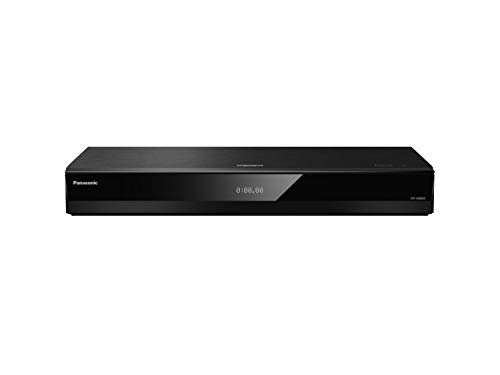
Someone polled 4K Blu-ray player owners about the reliability of different models over time, and there’s a clear winner

Published

on


  • Nearly 400 4K Blu-ray users shared info about player problems
  • There’s a huge gap between the best and worst in the poll
  • Panasonic will be happy; Sony not so much

One of the things I like best about Reddit is the way people share their experiences of particular products: whether it’s a kitchen knife, a portable AC or a Gibson guitar I know I’ll be able to find sage advice on what to buy and what to watch out for. And now the good people of r/hometheater have come together to talk about the best 4K Blu-ray players and their reliability.

The poll was carried out by r/hometheater poster “requieminadream” and generated nearly 400 responses — almost double the number of previous poll respondents — from r/4KBluray, r/Bluray, r/PhysicalMediaMatters, the AVS Forums, and the Blu-ray.com forums. And there are some very clear differences between different firms’ Blu-ray devices.

Source link

Advertisement
Continue Reading

Tech

People are recording every conversation with AI tools, and nobody consented

Published

on

TL;DR

AI tools now record conversations without announcing themselves, and users are bringing them to dates and personal chats

A growing number of professionals have started using AI tools to record every conversation they have, and the people being recorded usually have no idea it is happening. The Wall Street Journal reported this week that apps like Granola, which transcribes meetings without deploying a visible bot or announcing its presence, have made ambient recording so frictionless that users are now bringing the technology out of conference rooms and into personal settings. The shift raises legal and ethical questions that neither the tools nor their users appear ready to answer.

Granola, which raised 125 million dollars earlier this year at a valuation of one and a half billion dollars, works by recording audio directly through the user’s device microphone rather than joining a call as a separate participant. That means no bot icon appears in the meeting and no automated message tells attendees they are being recorded. Michelle Lim, CEO of meeting software company Flint, told the Journal that she wishes Granola were running in every room she enters, a statement that captures both the appeal and the problem.

Some users have taken the concept well beyond the workplace, with Emmie Chang, founder of startup Yuzu Labs, telling the Journal she records first dates and sends the transcripts to Claude for feedback on how the conversation went. Others described recording therapy sessions, doctor visits, and casual dinners with friends, all without telling the other person. In the eleven US states that require all-party consent for recordings, including California, Florida, Illinois, and Pennsylvania, doing so without disclosure is a potential felony under state wiretapping laws.

Advertisement

The 💜 of EU tech

The latest rumblings from the EU tech scene, a story from our wise ol’ founder Boris, and some questionable AI art. It’s free, every week, in your inbox. Sign up now!

The workplace implications are already materialising. Amy Dufrane, CEO of the Human Resource Certification Institute, told the Associated Press that AI note-takers pose enormous organisational risk, arguing that companies should not use them at all. Reports have surfaced of AI notetakers remaining on video calls after employees have left, silently documenting informal conversation and gossip, and privacy law expert Alex Alben warned that automatic recording involving third parties creates liability that most users have not considered.

Researchers have raised a separate concern that goes beyond privacy, with studies on cognitive offloading finding a negative correlation between heavy AI use and critical thinking. The worry is not just that people are recording without consent, but that they are losing the ability to listen, remember, and process conversations on their own. As these tools become cheaper and more invisible, the question is no longer whether they will spread but whether anyone will bother to ask permission first.

Advertisement

Source link

Continue Reading

Tech

Amazon Sale Drops Apple Watch to $299 4 AirTags $89 iPad $399

Published

on

Amazon’s weekend Apple sale is going strong, with price drops of up to $150 off Apple Watch, AirTag, and iPad devices.

Apple Watch Series 11 from $299

Save $100 on several Apple Watch Series 11 styles.

Save $100 on several Apple Watch Series 11 styles.

Apple Watch shoppers have plenty of reasons to take a look at Amazon, where several Series 11 styles are $100 off. The standout offer drops the 42mm GPS model to $299, within $20 of the lowest price on record.

42mm Apple Watch Series 11 deals

  • 42mm Apple Watch Series 11 GPS (Aluminum Case, Sport Band): $299 ($100 off)
  • 42mm Apple Watch Series 11 GPS + Cellular (Aluminum Case, Sport Band): $399 ($100 off)
  • 42mm Apple Watch Series 11 GPS + Cellular (Titanium Case, Milanese Loop): $649 ($100 off)

46mm Apple Watch Series 11 deals

  • 46mm Apple Watch Series 11 GPS (Aluminum Case, Sport Band): $329 ($100 off)
  • 46mm Apple Watch Series 11 GPS + Cellular (Aluminum Case, Sport Band): $429 ($100 off)
  • 46mm Apple Watch Series 11 GPS + Cellular (Titanium Case, Milanese Loop Band): $699 ($100 off)
Stack of Apple AirTag trackers on a smooth surface, one standing upright in front, with a blurred purple and blue background

Get 4 AirTags for just $89 at Amazon.

Advertisement

Amazon’s weekend AirTag sale drops the 4-pack down to $89 after a 10% discount.

The second-generation AirTag tracker builds on the original design while adding hardware improvements aimed at helping users locate lost items from greater distances. And according to Amazon, the deal is selling fast.

Today’s AirTag 2 deals

iPads from $399

Apple iPad tablet with colorful home screen and app icons, standing upright on a wooden surface, with a white brick wall in the background

Get an iPad 11 for $399 with month-end deals.

Amazon is also running discounts across Apple’s iPad line, with month-end deals delivering prices as low as $399.

Advertisement

Weekend iPad sale

Source link

Continue Reading

Tech

My Life With Looki Is a Harbinger of Always-On Recording Glasses to Come

Published

on

A new memory cartoon is waiting for me. When I open the app, I see a multipanel strip called Big Little Moments. It appears as soon as I plug the Looki AI device back in to recharge, after almost a month not wearing it. It shows moments of me at a bar with my friend in LA, watching a stage presentation, eating a meal, seeing a demo, two women sitting across from me and then just me, walking with a phone in my hand.

These moments are from two days in June, when I wore the Looki to the Augmented World Expo in Long Beach, California. I’d been wearing it almost nonstop since April. I wore it to Apple’s WWDC, to Google I/O. I wore it to my Princeton college reunion. I wore it at home and commuting. And then I stopped.

The Looki L1 is a little black pendant, sort of watch-sized, with a camera on the front and microphones hidden somewhere. It has a clip and a lanyard. It can be worn around the neck or left propped on a desk. It’s an AI wearable but, unlike smart glasses, it has a battery that can run a whole day while intermittently recording audio and video clips. My colleague Katie Collins tried it last year, but I never got to test one out until this spring and summer.


The Looki is a round-with-spiky-bits pendant with a magnetic back clasp. Buttons to trigger recordings are studded around the sides. There’s also a touchpad. (Scott Stein/CNET)

AI wearables of all shapes and forms are everywhere now. OpenAI may be next to offer one. Some of these devices come in glasses form. Some are pendants. Some are pins. Some are earbuds. As AI keeps spreading everywhere and trying to absorb more of our personal information that it can craft into patterns and narratives, wearables are the physical form of trying to give AI eyes, ears and, increasingly, memories of your own life.

Everyone feels wary of smart glasses lately, because of the outer-facing cameras, tech’s pushy AI relentlessness and Meta’s poor reputation for privacy. When I tell people I’m wearing Meta Ray-Bans, they tend to ask me, “Is it recording me now?” I say no, then point to the Looki around my neck. “But this probably is.”

Advertisement

The Looki device follows in a long line of lifelogging wearables that go back over a decade. In 2014, I reviewed an occasionally recording lifelogging camera called the Narrative Clip, which promised to capture our memories. I found its memory, in practice, to be full of holes. In 2026, that’s pretty much still the case.

The Looki L1 promises a fun way to remember and record life’s moments, to have a companion to travel with you and save moments without having to record them. To be an all-day wearable camera.

But when I wore one, it made me feel awkward, like I was being a jerk or a spy. At best, it’s odd; at worst, it feels like I’m a guy with, well, an always-on camera. Which, in 2026, isn’t nearly as “fun” as it was in 2014, it turns out. I tested the Looki because I was curious, and because I’m legitimately interested in the future of assisted memory tech. 

What the Looki L1 is, and isn’t

Looki L1 is an odd duck product, as many AI wearables are. The $250 lifelogging camera has no subscription, although the product team I chatted with suggested that some services could be subscription-based down the road. It uses its own proprietary AI service, and can’t hook into any other platforms such as Google Gemini, ChatGPT or Anthropic’s Claude, although it borrows models from several sources.

Advertisement

I do like the snap-on magnetic pendant strap that doubles as a charging dongle and can serve as a desktop stand if you want to perch it somewhere to take photos or video. The magnetic clasp works through clothing, too, so the pendant could look like a clip-on pin. But I don’t like that the Looki’s active recording LEDs are small. They’re less noticeable than those on Meta’s glasses by far.

There’s a phone app that the Looki pairs with, just as a smartwatch or pair of smart glasses would. That’s how the pendant gets its firmware updates and uploads its recorded clips to your phone and the cloud.

Looki’s highlight video compilations feel pretty random at the events I wore them at, and of course, no one really knew I was recording. (Scott Stein/CNET)

Looki has an “AI Mode” that stays on and intermittently records short video clips (no more than about 5 seconds each), apparently picking moments of interest. In my three months of use, it didn’t seem to have any pattern. There are dedicated buttons to trigger manual audio recordings, still photos or video recordings. There’s also a front touchpad, which I could hold down to summon a voice AI to chat with for feedback on what I’d recorded, or anything else. I rarely used it.

The Qualcomm chip on the Looki is an older watch-oriented model, but it still lasts a day on a charge. The future for pendants like these is likely even longer battery life, based on the specs of Qualcomm’s newest AI-optimized chips, released this year. These types of pendants are probably going to do even more on-device without relying on the cloud at all.

But, for the most part, the Looki is a repository. It sucks up images and videos, and then syncs them over to its companion phone app (which takes several minutes) and cloud-analyzes them later (which can take up to several hours). It’s like burying a time capsule and then digging it up later that day to see what you’ve got.

Advertisement

And what did I get? Mostly a hot, sometimes fascinating, often awkward mess. 

As a memory maker, full of holes

The best thing the Looki does is generate comic book-like generative AI images based on things it automatically captures. The results vary in style and structure, with absolutely no discrete controls to make anything turn into a comic if you’d like it to. You just have to get lucky, I guess.

A few images of people I met, comic-transformed, are fun. A few story panel-type comics tried to distill a day, or several days, into a narrative. Sometimes they were clever (one, a map of New York and New Jersey showing me commuting, seeing tech demos and going to a Princeton reunion) felt sharable. One, of my trip to WWDC, was weirdly focused on my pre-event breakfast with my colleague Bridget Carey rather than all the hours I wore it during Apple’s keynote, which was the whole point of the day.

Sometimes the Looki auto-inserted me into images, inventing a narrative. (Since I’m wearing the pendant, I was clearly not in the picture.) My comic portrait ranged from oddly accurate to something more like Marc Maron. One comic picture of me buying a coffee at a Hyatt was inexplicably done in Minecraft-style blocks.

As for the rest of the recorded memories? There are AI-made supercuts of videos, set to odd preselected music. The tone often felt generic, and the captured videos are frequently at bad angles. When I had coffee with friends, several of the clips were accidental crotch shots. Other times, faces were cut out of the picture. (Did I need to wear the pendant higher up?)

The Looki seems to take video clips but not photos automatically, which were harder to download and share with friends. Also, a lot of the captured clips were either too brief or the people in them were discussing things that nobody approved sharing in the first place. If you’re wearing a Looki, prepare to do a lot of warning, explaining and apologizing.

Advertisement

Do I like having them to look over? Sort of, but so few are actually good. You can just take photos and videos when you want, rather than having the intermittently recording AI mode on. But then, if you do that, the device doesn’t feel like a true lifelog.

Sadly, a lot of the captured supercuts just showed me on my phone. Which, of course, just illustrated a sad state of my own life. I am on my phone a hell of a lot. Too much. And the comics, the autocaptures, they all tended to have at least one shot capturing me looking at my phone, since the pendant was around my neck, over and over and over.

Besides keeping these lifelog videos and autocaptures and creating comic strips, it weirdly tries to analyze meals I’ve eaten (not to any true success), and also pops occasional random notifications based on location, I think, and what the camera sees. These notifications are meant to be smart and context-aware. Sometimes they’re oddly on point (telling me I’m at AWE and reminding me of the start of the opening keynote, even though I never told it I was at AWE). Other times it just noted a store or maybe someone standing nearby. Again, like everything else the Looki does, these notifications can’t be customized at all.

As a public device, it’s embarrassing

My son has told me to take off the Looki pendant more times than I can count. My wife shamed me about my decision to wear it in a Japanese supermarket (I didn’t). People who saw it at public events, like WWDC or Google I/O, were either mildly curious or mildly offput. I awkwardly took it off a lot and stuck it in my pocket on trains, in bathrooms and, increasingly, many other places.

At a Whole Foods, someone next to me noticed it as I was shopping for chocolate bars and asked if it was recording. I explained it might be and that I test tech products for my job. They said they weren’t that upset, they knew that people are wearing cameras more and more. I didn’t believe they weren’t upset. And that reaction, too, has stuck with me. I wear smart glasses at least half the time now. Where does that put me on the socially acceptable spectrum? Don’t tell me.

Advertisement

I still find smart glasses less personally embarrassing, because they look and function like actual glasses. And, in reality, Meta’s glasses very infrequently record anything. While Meta has an autocapture mode for the glasses now, running it would wear out the battery fast.

The Looki, meanwhile, does nothing at all except be a AI-enabled camera pendant on your neck. To remember to charge that up and wear it, like an odd necklace that nobody asked for… I just can’t justify it. I made myself wear it for more weeks than I thought I would. Now, it’s out of batteries and sitting in a bag somewhere. I gave up.

The Looki was really just my Memory Cartoon Generator, for the most part, as you can see from all the images I shared. They’re interesting, but I can’t choose when they happen, or how they happen. And they’re not enough to keep me wearing the Looki. As you can see above, sometimes it even captured when I went to my home bathroom. (I never kept it on in an actual public bathroom, but this is exactly the nightmare stuff that the Looki embodies.)

If devices like the Looki could be actual memory assistants, deeply aware and able to help see and guide you — Or, if they were better cameras, taking photos I’d actually use — Or, if it could hook into AI services I actually semi-trusted and recognized — well, maybe. Right now, the Looki is more like a harbinger. Of glasses that really and truly will have longer battery life, someday soon, and be able to record all day long, if intermittently. And more AI pendants.

When that day happens, then yes, maybe my glasses will truly be recording all the time. And yes, that’s concerning. But even more concerning is the lack of any tech company efforts to manage privacy and deeper control over these random AI wearables. Or to elevate them beyond just gimmicks.

Advertisement

What I learned is I hit my limit. The Looki is not on me anymore. But the spirit of the Looki is everywhere else, coming fast.

Source link

Continue Reading

Trending

Copyright © 2025