
Tech
Beats Studio Buds drop under $100 with a strong 41% off

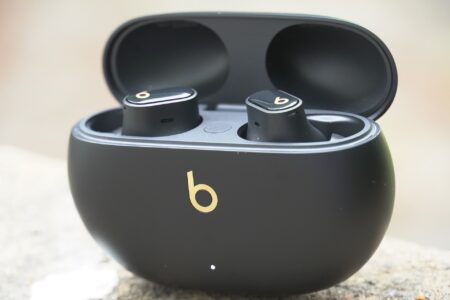
For those who find the act of commuting to work a bit too boring and monotonous, an outstanding pair of earbuds can work wonders. Now you have a chance to pick up a top set on the cheap.
By giving you access to world-class audio quality, noise-cancellation, ambient sound and more, a good pair of earbuds can elevate your day-to-day routine instantly.
To that end, the true wireless noise-cancelling Beats Studio Buds + have just plummeted from their usual price of $169.95 to only $99.95 at Amazon. That’s an instant 41% discount as well as one of the lowest prices that you’ll find these buds in for the foreseeable future.
These Beats Studio Buds drop under $100 with a hefty 41% off, making it one of the strongest deals you’ll find on them right now.
Beats Studio Buds drop under $100 with a strong 41% off
For any Apple/Android users who are looking to make an upgrade, the Beats Studio Buds + are arguably the better buy over the AirPods line simply for the added compatibility across all of the main mobile operating systems.
Just the same as any pair of AirPods, the Beats Studio Buds + use a built-in microphone, which gets rid of any ambient noise around you when you’re on a call, so that the person on the other end of the line can always pick up what you’re saying clearly.
On top of replicating Apple’s noise-cancelling ambient sound set-up, the Studio Buds + also offer spatial audio, which makes each song, podcast, and audiobook sound as if they’re truly enveloping you, creating a more immersive experience that’s hard to go back from once you’ve tried it.
Our four-star review mentioned “Subtly better audio and improved noise-cancellation are all plusses, and the Studio Buds+ offer a great clarity and minimal noise for calls.”
Even though they are marketed primarily as an Apple device, these buds integrate seamlessly with Android as well, so regardless of which operating system you’re using, it’s easy to make the most out of what these earbuds have to offer.
For those who also like to indulge in the occasional bit of gaming, you’ll be glad to know that spatial audio also works with your PS5, letting you hear players sneaking up around you as you try to mind your own business in the latest multiplayer skirmish.
For just $99.95, the Beats Studio Buds + are an instant win for anyone in need of an upgrade from their current audio device.
A satisfying update over the original with improved noise-cancellation, sound, and battery life. There are areas where the Beats Studio Buds+ could be better, but they hold their own among tough competition from the likes of Sony and Jabra.
-
Improved noise-cancellation over original -
Clear, spacious audio -
Excellent call performance -
Improved battery -
Feature parity on Android and iOS
-
Patchy performance in busy signal areas -
Slightly loose fit -
More expensive -
No support for higher-quality Bluetooth codecs
SQUIRREL_PLAYLIST_10148964

In my years of engineering, I have seen technological shifts come and go. But nothing has transformed the software landscape quite like artificial intelligence. Adding artificial intelligence to an existing product used to mean hiring a massive team of data scientists. Today, we have powerful AI APIs that allow us to plug advanced cognitive capabilities directly into our applications. Whether you want to add natural language processing, computer vision, or predictive analytics, leveraging an API is the most efficient path forward. In this comprehensive guide, I will walk you through exactly how to integrate AI APIs into existing software applications. I will share my personal methodologies and best practices along the way so you can build smarter applications faster.
Why You Should Care About AI API Integration
Before we get our hands dirty with the technical steps, I want to explain why this matters. Modern users expect intelligent features. They want smart search, automated summarizations, and conversational interfaces. If your software lacks these capabilities, it risks becoming obsolete. By using an API, you bypass the need to train and host complex models yourself. You simply send a request to a provider, and they return a highly accurate prediction or generation.
This drastically reduces your time to market. I have helped countless teams reduce their development cycles from months to mere days by simply utilizing pre-built AI services. It is a massive advantage for resource management and operational scalability. Furthermore, cloud providers constantly update their models. When you use an API, your application automatically gets smarter every time the provider releases a new version. You do not have to worry about model drift or retraining pipelines. You get to focus entirely on building a great user experience.
Evaluating Your Current Software Architecture
When I begin evaluating an application framework for artificial intelligence integration, I always look at the underlying codebase to ensure it can support advanced machine learning models. A robust, scalable foundation is the absolute bedrock of successful digital transformation. If your legacy system is too rigid or outdated, you might need to collaborate with a skilled software development company to refactor your code and build custom enterprise solutions. These technical experts specialize in bespoke software engineering, agile deployment, system architecture design, and creating tailored backend infrastructures that can seamlessly handle complex API requests and massive data pipelines without latency.
Assessing Data Flow and Bottlenecks
Beyond the foundational architecture, you must understand how data moves through your system. AI APIs require specific payloads, often formatted as JSON. I always map out the data journey from the user interface down to the database. You need to ask yourself if your current servers can handle the additional network requests. If your application is already suffering from high latency, adding an external API call will only make it worse.
I strongly recommend implementing asynchronous processing or message queues to handle these requests in the background. This ensures your user interface remains responsive even if the AI takes a few seconds to generate a response. When users click a button to generate text, they should see a loading spinner while the server does the heavy lifting asynchronously.
The Role of Microservices
In my professional experience, monolithic architectures struggle with AI integrations. If your entire application is bundled into one massive codebase, adding a new API dependency can introduce fragility. I prefer a microservices approach. By isolating your AI logic into its own dedicated service, you protect the rest of your application from potential crashes. If the AI service goes down or experiences a timeout, your core application will continue to function normally. This separation of concerns also makes it much easier to scale the AI components independently when traffic spikes.
Top AI APIs to Consider in 2026
Choosing the right provider is half the battle. Over the years, I have tested dozens of platforms. Some excel at creative writing, while others are better at strict data extraction. Below, I have compiled a comparison of the most reliable options currently available on the market based on my direct testing.
API Provider
Best Use Case
Key Strength
OpenAI
Conversational agents
Superior natural language understanding
Anthropic
Long form content analysis
Massive context windows and strict safety guidelines
Google Gemini
Multimodal applications
Native integration with the Google Cloud ecosystem
AWS Bedrock
Enterprise compliance
Wide choice of foundation models in a secure environment
Each of these providers offers comprehensive documentation. I always advise my teams to read the documentation thoroughly before writing a single line of code.
Step by Step Guide to Integrating an AI API
Now, let us dive into the actual implementation. I have refined this process over countless projects. If you follow these steps, you will avoid the most common pitfalls that plague junior developers.
- Identify the Core Value Proposition: Do not add AI just for the sake of it. Pinpoint exactly what user problem you are solving. For instance, if your users struggle to find information in large documents, integrating a search API is a perfect fit.
- Secure Your API Keys: Never hardcode your credentials into your application. I always use environment variables and robust secrets management tools to keep my keys safe from unauthorized access. A leaked key can cost you thousands of dollars in a matter of hours.
- Set Up the Development Environment: Install the necessary Software Development Kits or HTTP client libraries. Most providers offer native Python or Node packages that simplify the connection process. If a native package is unavailable, a standard HTTP client will work perfectly.
- Construct the Prompt or Payload: Designing the right prompt is crucial. I spend a significant amount of time testing different instructions to ensure the API returns the exact format my software needs. You should constrain the output format by asking the AI to return strictly structured data.
- Implement Error Handling: Network requests fail. The API might experience downtime, or you might hit a rate limit. You must build retry mechanisms to handle these failures gracefully. I typically use an exponential backoff strategy for retries.
Handling Rate Limits and Timeouts
One specific area I want to highlight is rate limiting. When you launch your new AI feature, a sudden spike in traffic can easily exhaust your API quota. I highly recommend implementing a queuing system. If a user requests a heavy text generation task, put that request in a queue. Let a background worker process it and notify the user when it is done. Furthermore, always set strict timeouts on your API calls. If the provider takes longer than ten seconds to respond, your application should abort the call and display a friendly fallback message instead of freezing indefinitely.
Cost Management and Token Optimization
Another crucial aspect of AI integration is cost management. Most AI APIs charge by the token. A token is roughly equivalent to a piece of a word. If you send massive prompts to the API, your bills will skyrocket. I always implement token counting logic before sending a request. If a user tries to analyze a document that is too large, my software automatically truncates the text or rejects the request. You should also cache frequent API responses. If multiple users ask the exact same question, you can serve the cached answer instead of paying for a new API call.
Security and Data Privacy Best Practices

As an expert, I cannot overstate the importance of data privacy. When you send data to an external AI API, you are potentially exposing sensitive information. You must read the terms of service of your chosen provider. I always ensure that the provider explicitly states they do not use my API data to train their public models.
Furthermore, you should scrub all Personally Identifiable Information from the payload before it leaves your servers. If a user submits a document containing social security numbers or private addresses, use a local script to redact those details before forwarding the text to the AI. Trust is the most valuable currency you have with your users. Do not compromise it for the sake of a cool feature.
Testing and Monitoring Your AI Integration
Deploying the feature is only the beginning. AI models are unpredictable. This means they can produce different outputs for the exact same input. This makes traditional unit testing incredibly difficult. I rely heavily on integration tests and continuous monitoring.
You need to log every single request and response. I usually set up a dashboard to track the average response time, token usage, and error rates. If I notice the token usage spiking unexpectedly, it usually means there is a bug in my prompt construction loop. You also need a mechanism for users to report bad AI outputs. This allows you to continually refine your prompts and parameters based on real world usage.
Conclusion
Integrating artificial intelligence into your existing software is a highly rewarding endeavor. I have seen firsthand how it can breathe new life into legacy applications and delight users with magical, automated experiences. By carefully evaluating your architecture, choosing the right provider, and following rigorous security protocols, you can successfully launch intelligent features without compromising system stability. Start small, monitor your usage closely, and iterate based on real user feedback. If you are ready to modernize your platform, take action today and start planning your AI API integration roadmap. Your users are waiting for the next generation of smart software.

Disclaimer: Unless otherwise stated, any opinions expressed below belong solely to the author.
The war in Iran has been raging for a month now, and the resulting energy crisis has hurt the world, as oil and gas prices surged in response to the closure of the Strait of Hormuz, through which about 20% of the world’s energy travels each year.
Much of Asia, as well as countries in the Pacific, have been badly affected, as many of them depend on Gulf shipments of oil and LNG (liquified natural gas) for electricity generation and transportation.
We’ve seen reports of petrol stations closing due to a lack of fuel, airlines cancelling flights, people forced to work from home to conserve energy and a threat of another wave of inflation fuelled by the rise in costs of moving goods.

Singapore was not spared the consequences, but the situation here is far better than in the worst-affected countries. With diversified sources of both oil and natural gas, as well as ample reserves, Singapore has little to fear other than higher-than-usual bills for filling up your car.
There’s no fear of blackouts, pumps running dry or businesses unable to carry out their operations. Electricity prices may not have jumped yet, but the government has the means to put a cap on them.
It’s mostly an inconvenience—and one which may even produce benefits for the country.
Everybody needs Singapore
Singapore is the world’s largest and most developed transhipment port.
Disruptions in other areas of the planet do not affect it directly, because no matter what happens, cargo has to travel through here to its destination.
If Hormuz cannot be used, then the endpoints may change in response to the closure. But Singapore is still the bridge between the West and the Far East. Shipping companies have already begun rerouting traffic to ports in Oman and the UAE, located on the coast of the Arabian Sea, with cargo then trucked overland to their final destination in the Middle East.
No matter where they are heading, though, their pit stop is still in Singapore.
And while higher prices may hurt the pockets of regular Singaporeans (although the government has already announced readiness to help), higher fuel and shipping costs make those companies operating here more profitable, with a share of their income ending up in the national budget through taxes.
In other words, not only is the trading activity unlikely to be meaningfully affected (just like it was not during the COVID-19 pandemic), but Singapore’s large shipping industry is probably going to benefit in many ways from the war-induced disruptions.
Money likes peace
An even more meaningful win for Singapore is the uncertainty that the war has introduced about the future of the developed and thus far very peaceful Gulf Arab countries.
For decades dependent on oil and gas, they have in recent years invested heavily to diversify their economies by appealing to wealthy immigrants.
It’s no secret that cities like Dubai or Abu Dhabi in the UAE (with Qatar and Saudi Arabia following in its footsteps) entered competition with Singapore to attract the richest people in the world, encouraging them to move to the Gulf and park their wealth there.
According to Henley & Partners, the UAE has been the leading destination for millionaires in the past decade. Just last year, nearly 10,000 of them, commanding US$63 billion in assets, moved to the Emirates, compared to only 1,600 and US$8.9 billion headed to Singapore.


Their offer has been quite appealing to many, since Arab nations don’t charge any income taxes, while other levies tend to be lower than in Singapore.
What’s more, they have far more land than the city-state and have been investing heavily in property development, building clean, modern cities offering some of the best living conditions in the world, at very competitive prices.
Their strategy, however, has always been underpinned by the promise of absolute safety, which the war with Iran has left a big crack in.

As missiles and drones target them every day, it has made some question their commitment to the Gulf, even if little damage is done.
Singapore, in comparison, is an oasis of calm, with a very robust military, in a region which doesn’t show any appetite for war—at least not one that would affect the city directly.
All of a sudden, the higher cost of living—the pricier apartments, the more expensive cars—feels worth the extra expense because it’s far less likely that a rogue neighbour is one day going to start bombing Singapore the way Dubai, for example, is.

Within a week, reports of anxious Asian residents trying to leave the Gulf hit the news headlines. They weren’t happy with the paradise bubble being popped so violently by the war they weren’t expecting to erupt.

The war may be bound to end within a few weeks or months at most, and it’s quite likely that a period of calm is going to follow it in the Middle East, but the damage done will take some time to fix.
Dubai, Abu Dhabi or Doha are not going to suddenly implode or become abandoned by panicked expats. Nevertheless, any future calculation made by the wealthy—especially those very rich—will include the potential for another military conflict.
This is where Singapore has gained a strong competitive advantage over its desert rivals.
Singapore thrives in crisis
The city does quite well at all times, of course, but when the international situation is peaceful, both companies and individuals are more open to taking risks.
It’s when a crisis strikes that everybody seeks to escape to a safe haven—such as Singapore.

During the pandemic, it was one of the critical logistical hubs, as cargo had to move even if people could not.
GDP per capita dipped slightly at first, to just over US$60,000, only to be catapulted by around 50% to over US$90,000 two years later, thanks to both how much Singapore’s economy has to offer and how trusted the Singapore dollar is.
It was similar after the 2008 financial crisis. A temporary and mild slowdown was followed by an economic surge.
Or last year, when Trump’s tariffs hit the world, Singapore’s economy recorded one of the highest growth rates in recent history. GDP jumped by 5% on increased trading activity amid global uncertainty as businesses were adapting to American actions.
Singapore is the essential trade node bridging Asia with the rest of the world. Economic crises don’t really freeze trade—they redirect it, and the reliable middleman always earns a premium for his services.
It’s no different this time.
- Read other articles we’ve written on Singapore’s current affairs here.
Featured Image Credit: adwo@hotmail.com/ depositphotos
Tech
Apple Will Push Out Rare ‘Backported’ Patches to Protect iOS 18 Users From DarkSword Hacking Tool
Last week, DarkSword was then posted to open source code repository GitHub, making it all the more accessible. Security firms Malfors and Proofpoint soon after warned that another Russian hacker group linked to the Kremlin’s FSB intelligence agency was sending out phishing emails that used the technique. Independent security researcher Johnny Franks tells WIRED that he found yet another new, active domain—a fake website written in English, capable of infecting US-based users—that was part of a DarkSword hacking campaign as late as Thursday of last week, a finding confirmed by mobile security firm iVerify.
Despite DarkSword’s growing threat to iOS 18 users, many stubbornly refused to update to iOS 26. On Reddit channels related to cybersecurity and iOS, some self-identified iPhone owners discussing DarkSword argued that Apple seemed to be taking advantage of the DarkSword hacking campaigns to push them onto its latest OS version, which some have found to be slow or overly animated.
“Apple is trying to force you onto the dumpster fire that is liquid glass,” one Reddit user wrote.
“If this is so serious, why wouldn’t Apple insert a fix into iOS 18.x,” another Redditor named asked.
“It’s all bullshit propaganda!” another user wrote. “Not updating my phone is perfect on iOS 18.1.1.”
For cybersecurity experts who have been waiting for Apple to act, the company’s move to now cater to those stubborn iOS 18 users received “better-late-than-never” reviews. “Apple is now, finally, doing this for the DarkSword exploits, but only after they were already being abused by other attackers, putting iOS users at risk,” says Patrick Wardle, a former NSA hacker and now the CEO of the Apple-device-focused security firm DoubleYou. “If protecting users actually matters, backporting critical fixes should be standard, not the exception.”
DarkSword is, in fact, the second sophisticated, in-the-wild iPhone hacking technique in just the last month that’s inspired Apple to take the rare step of pushing out fixes for older versions of iOS. Earlier in March, the company also backported patches to protect users from a different, even more sophisticated iOS hacking toolkit known as Coruna. A week after researchers at Google and iVerify revealed that the Coruna iOS exploitation kit—which was likely created for the US government—had spread from Russian espionage hackers to profit-focused cybercriminals, Apple released security fixes for iOS 17, the even older version of Apple’s mobile operating system that was vulnerable to Coruna’s set of hacking techniques.
DarkSword’s ability to compromise iOS 18 devices, however, left a different set of users vulnerable. Rocky Cole, cofounder of iVerify, notes that some of those users may have held out on updating to iOS 26 until now not simply because they don’t like its features but because they use specific or custom-made apps that aren’t compatible with newer operating systems. In the UK, Apple has also added age verification features to iOS 26 that some users have resisted. Others may simply not have had enough storage space on their phone to carry out the update.
Verdict
As long as a refined and slightly self-consciously grown up rendition of your tunes is what you’re after, and provided they actually fit you in the first place, the Meze Audio Strada are a brilliantly open, revealing and sophisticated listen
-
Controlled, informative and engaging sound
-
Open and spacious presentation by closed-back standards
-
Very comfortable (if they fit)
-
Can fractionally overplay the sonic refinement card
-
Cable is slightly noisy
-
Another Meze Audio product that mocks the smaller-headed
Key Features
Introduction
How do you take a proven and successful closed-back over-ear headphone design like the Meze Audio Liric and reduce the asking price more than 50 percent?
With its new Strada closed-back over-ear design, Meze Audio thinks it has the answer…
Design
- Magnesium frame
- Macassar hardwood earcups
- magnetically attached earpads
If you’re familiar with the look of Meze Audio’s Liric II over-ear headphones, there’s really only the colour of the magnesium frame that’s going to set the design of the Strada apart. If you’re not, though, well – it’s like this…
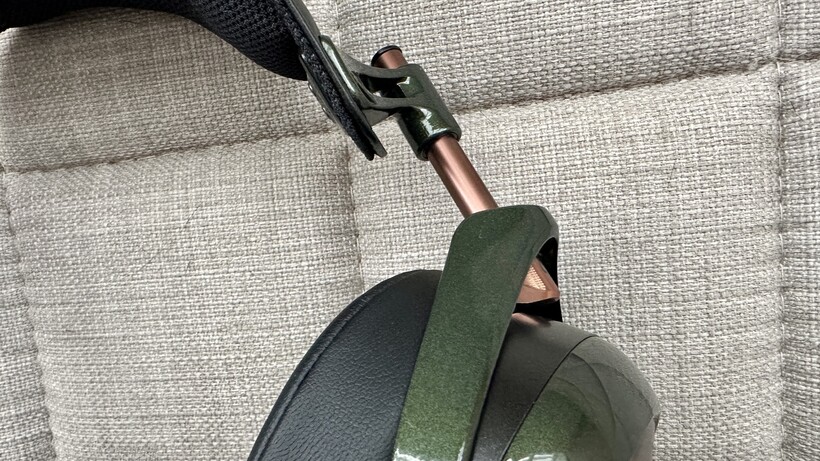
These are relatively wide, fairly light (330g without cable) headphones, and they feature magnetically attached earpads that are a) made from memory foam with a PU leather cover, and b) so generously padded that they contribute to that width more than somewhat.

The frame is made from magnesium, and the elaborately shaped yoke arrangement is quite strongly at odds with not-even-remotely elaborate adjustment rod mechanism that modifies the position of the headband.
The headband itself is fairly wide and thin. It’s covered with more PU leather on the outside, while on the inside it’s covered in fabric and much more judiciously padded than the earpads – the four-stage contact points are designed to help airflow and thus prevent your head heating up too readily.

The outside of each earcup is made from a quantity of good-looking and tactile Macassar ebony hardwood. And the frame surrounding each of these quantities of Macassar features a 3.5mm cable connection – Meze Audio supplies two 1.8m lengths of braided Kevlar OFC cable in the fairly large EVA case the STRADA travel in. One is terminated with an unbalanced 3.5mm jack, the other with a balanced 4.4mm alternative.
The frame of the STRADA is hand-painted, and available in just one finish: a deep, mildly metallic tone that anyone with an interest in motor racing from back in the day is going to recognise immediately as a very close relative of British Racing Green.

Specification
- 50mm dynamic drivers
- 5Hz – 30kHz frequency response
- 111dB sensitivity
Fundamentally, all of the stuff I’ve talked about in the design section constitutes the way Meze Audio has decided to suspend a driver over each of the listener’s ears. And it’s the driver technology deployed in the Strada that explains just how they can be so much more affordable than their very similar-looking Liric II siblings.
Unlike the super-elaborate planar magnetic driver technology fitted to the Liric II, the Strada use the much more common dynamic driver technology. Although this is not the same as saying there’s nothing interesting, or complex, about what’s going on here.

Each STRADA earcup features a 50mm dynamic driver that’s based closely on the driver found in the company’s (very similarly priced) 109 PRO open-back over-ear model. For its use in a closed-back design, though, Meze Audio has naturally given it quite a going-over…
The W-shaped dome is made of cellulose composite reinforced with carbon-fibre – which means it’s both durable and lightweight, and should be able to reduce many of the resonances that can lead to distortion.
The torus that surrounds the dome is of beryllium-coated semicrystalline polymer – the beryllium coating increases both the durability and the stiffness of the driver without weighing it down and compromising transient response. Carefully positioned grooves on the torus also contribute to the intended effect.

Finally, a copper-zinc alloy stabiliser is positioned around the membrane to absorb vibration and further reduce distortion.
This arrangement, says Meze Audio, delivers a frequency response of 5Hz – 30kHz, which is deeply impressive if anything like accurate. Impedance of 4ohms is nothing to worry about, but a sensitivity rating of 111dB (SPL/mW @ 1kHz) means a fairly pokey DAC or digital audio player is probably in order if you’re going to hear the STRADA at their optimum.
Sound Quality
- Presentation is commendably open fopr a closed-back design
- Articulate, detailed and engaging sound
- Prioritise refinement at all costs
The first thing it’s important to note about the Meze Audio Strada, even before you have begun listening to them, is that it’s fairly important to sit still. Bumping or knocking the connecting cable will cause noise to be transmitted – that’s the case, to a lesser or greater extent, with most wired headphones, but it’s more pronounced here than is the norm.
But once you’re sitting comfortably and not fidgeting, there’s an awful lot to enjoy about the way these headphones sound. No matter if you’re listening to a big-standard Spotify stream of Highwayman by The New Eves or a full-fat 24-bit/48kHz FLAC file of Ora Cogan’s Cowgirl, these are eloquent and informative headphones, and are more than capable of revealing and contextualising even the finest details in order to let you know you’re getting the complete sonic picture.

Where soundstaging is concerned, they’re considerably more open, more spacious and more expansive than is the closed-back norm. They can do intimate and direct well, of course – but when it comes to opening up a recording and putting meaningful space between every element of it, the Strada are more reminiscent of open-backed alternatives.
This ability to give elbow-room to each participant doesn’t come at the expense of togetherness or singularity, either – recordings are presented as a unified whole.
When it comes to frequency response and tonality, the Meze Audio are quite carefully neutral; and not about to stick their oar in too obviously. Detail levels are high at every stage, and though they can dig a long way down and hit respectably hard while they’re at it, the Strada give bass sounds plenty of texture and variation – and they control the attack of low-end information so well that rhythmic expression is never less than naturalistic.

The opposite end of the frequency range is similarly detailed, and there’s sufficient substance to balance out the polite amount of bite and shine the headphones summon when describing treble sounds. In between, the midrange communicates in the most positive way, and voices are as expressive of attitude as they are of tone or timbre. The frequency range is described even-handedly, with no suggestion of understatement or over-emphasis at any stage.
There’s a fair amount of dynamic headroom available for when a recording shifts through the gears, and the distance the Strada can put between hushed and heartfelt and furiously angry is quite considerable. In combination with the attention they pay to the dynamic of harmonic variation and to transient response, it makes for a vivid and convincing sound.

It’s really only when they’re asked to deal with content that’s in some way rough around the edges, or that prioritises posture and attack over good taste, that the Meze Audio are found even slightly wanting.
Fundamentally, they’re a grown-up and quite refined listen – and this position works well almost all of the time. But when asked to play music that ignores refinement and instead prefers snottiness, the Meze Audio’s desire to bring order to bear where none is supposed to exist results in something of a stand-off.
Should you buy it?
You want more than a hint of the typically spacious open-backed sound from a closed-back design
Small heads need not apply
You’re blessed with a head that’s smaller than average
Final Thoughts
I’ve been very well-disposed to pretty much every Meze Audio product I’ve come into contact with – and I’ve listened to plenty.
But despite all of the very many things that I find admirable about the Strada, I cannot help but wonder why the company seems to think that people with smaller heads don’t have the money or the inclination to get into ownership of high-achieving headphones.
On a good day I’m six feet tall, and the size of my head is reasonably proportionate – but these headphones must be adjusted to their smallest fitting if they’re going to work for me. It’s a strange state of affairs…
How We Test
I connected the STRADA directly to an iBasso DX340 digital audio player using their 4.4mm-terminated cable. I used the same cable to connect to an iFi iDSD Diablo 2 headphone amp/DAC which was, in turn, connected to an Apple MacBook Pro.
I also connected them to an Eversolo DAC-Z10 pre-amp/DAC using a 6.3mm adapter on the 3.5mm cable – this gave access to a system including a Rega Apollo CD player, an Arcam ST25 network streamer and a Technics SL-1300G turntable.
- Tested for several days
- Tested with real world use
FAQs
No, the wood-and-dark-green you see in the pictures is the only finish available
Yes – it uses a standard 3.5mm connection at each earcup. An upgrade on the cable Meze Audio supplies won’t come cheap, though…
Full Specs
| Meze Audio Strada Review | |
|---|---|
| UK RRP | £799 |
| USA RRP | $799 |
| EU RRP | €799 |
| CA RRP | CA$1199 |
| AUD RRP | AU$1499 |
| Manufacturer | Meze Audio |
| IP rating | No |
| Weight | 330 G |
| Release Date | 2026 |
| Driver (s) | 50mm dynamic |
| Connectivity | 3.5mm single-ended, 4.4mm Pentacon |
| Colours | Green |
| Frequency Range | 5 30000 – Hz |
| Headphone Type | Over-ear |
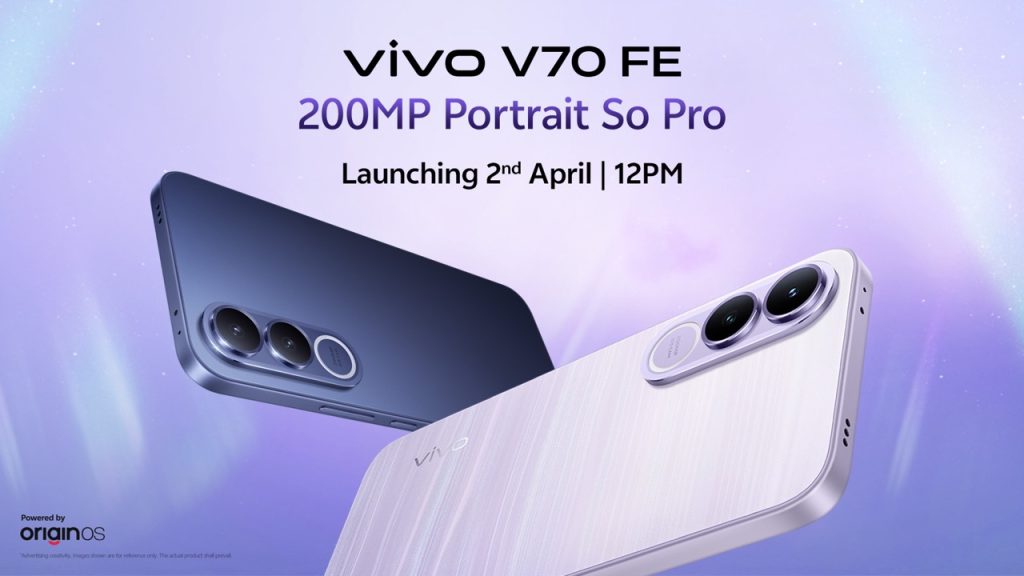
vivo is all set to launch the vivo V70 FE in the Indian market this week. It is believed to be the latest addition to the vivo V70 series. Before the actual launch, the pricing details of the upcoming smartphone have already gone live. Let’s take a quick look at the vivo V70 FE.
vivo V70 FE specifications
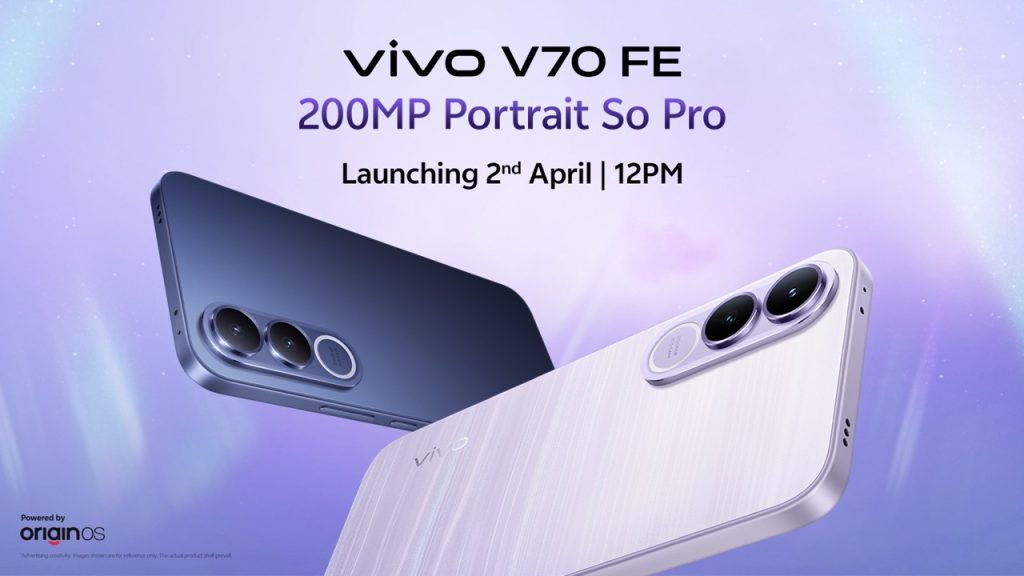
The vivo V70 FE is likely to bring a new design compared to other models in the V70 series. It may feature an oblong camera module with dual rings and a “200MP” label on the back. The phone is expected to have flat edges with side-mounted buttons.
In terms of colors, the device may be available in Northern Lights Purple and Monsoon Blue. The Purple variant is said to offer a unique glow effect, which makes it stand out in low light. As far as the display is concerned, the smartphone is expected to feature a large 6.83-inch 1.5K OLED display along with a 120Hz refresh rate. It may offer a peak brightness of up to 1,900 nits, which is great for media consumption and gaming.
The vivo V70 FE is expected to feature a MediaTek Dimensity 7360-Turbo chipset based on a 4nm process node. This should enable the device to handle daily tasks as well as gaming smoothly. It may support up to 12GB of RAM and 256GB of internal storage.
Battery and Camera
Battery life is one of the major highlights of the vivo V70 FE. The smartphone is expected to come with a massive 7,000mAh battery. It is believed to support 90W fast charging as well. It is expected to support fast charging, which would be helpful for the users.
vivo V70 FE is expected to bring the best camera experience with its 200MP primary camera. It is believed to click high-resolution images. Along with the primary camera, the smartphone is expected to come with an 8MP ultra-wide-angle lens. It is believed to click ultra-wide images. For the front camera, the smartphone is expected to come with either a 32MP or 50MP front camera. The device is likely to focus on portraits and detailed photos, but it may miss out on ZEISS branding.
Expected Price and Launch Date
When it comes to pricing, vivo may launch the phone at Rs 37,999 for the 8GB + 128GB variant. In comparison, the 8GB + 256GB model could be priced at around Rs 40,999, while the 12GB + 256GB version may reach Rs 44,999. Moreover, buyers can also expect some launch offers and exchange deals. However, these prices are based on leaks and could change.
Furthermore, it is likely to launch the vivo V70 FE in India on April 2 at around 12 PM. The event will be streamed live on YouTube and vivo’s social channels. This will also be the first Fan Edition (FE) smartphone in the V-series.
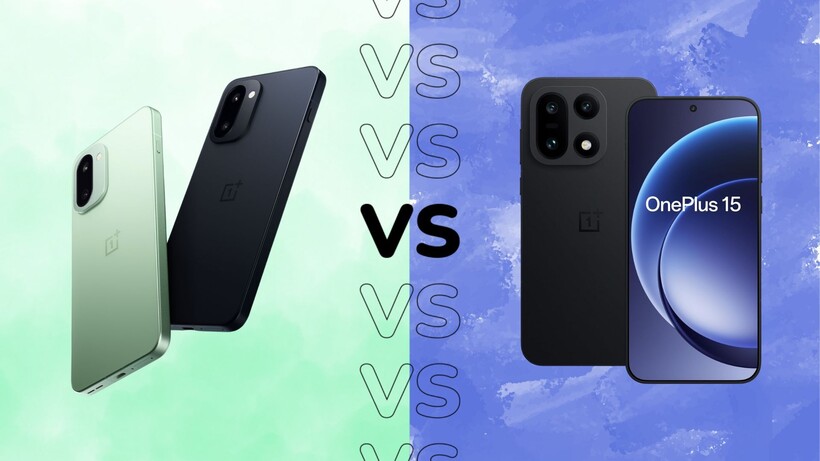

The OnePlus 15 and OnePlus 15R are very similar phones, making the decision of which to buy all the more challenging.
Do you go for the full-fat flagship OnePlus 15 or save a bit of cash with the almost-flagship OnePlus 15R? Is there really a difference in how they perform day-to-day? And what about elements like camera hardware, screen tech and the all-important battery life?
While it’s easy to compare the two on paper, we’ve used both the OnePlus 15 and OnePlus 15R in day-to-day use – and here’s how they compare in the real world.
Pricing and availability
The OnePlus 15 is the more expensive smartphone of the two, though at £849/$899 with 256GB of storage, it’s still more affordable than many competing flagship Android phones.
That said, if budget is a primary concern, the 256GB OnePlus 15R is the one to go for at £649 – as long as you’re in the UK, that is, with no US availability for the more affordable model.
Design
- Near-identical flat-edged, modern designs overall
- OnePlus 15 offers premium, tougher, fibreglass finishes
- OnePlus 15R sticks to simpler matte glass
The OnePlus 15 and OnePlus 15R are certainly cut from the same cloth; put both side-by-side and you might struggle to tell the differences at a glance – but look a little closer, and there are a few telltale signs.
Both phones sport an entirely new flat-edged, rounded-cornered design compared to their curvy predecessors, offering a much cleaner look, though one that looks almost too similar to parent company Oppo’s Find X9 Pro. It’d be nice to see OnePlus-branded smartphones have their own separate identity, but that’s neither here nor there when comparing the two OnePlus phones specifically.

The large, centrally placed circular camera housing on the back has been replaced by a more modern rectangular module in the upper-right corner on both models, but the rear finish differs between the two.
The flagship OnePlus 15 is available in a new Sandstorm finish that uses an MAO-processed mid-frame and camera housing, along with a fibreglass back, delivering something that’s noticeably cool to the touch while being more durable than both aluminium and titanium, complete with a nice textured sandstone finish.
There’s also what OnePlus calls Infinite Black, an ultra-deep matte black that reduces reflectivity for a near-Vantablack experience, along with a more standard Ultra Violet (lavender) finish with flashes of bright blue. These two are available with a matte-finish glass that reduces the look of fingerprints and other smudges.

The OnePlus 15R’s back panels are a little less exciting; it’s available in Mint Breeze, Electric Violet and Charcoal Black, available only with a matte-finished glass panel – none of the fancy fibreglass material or advanced colour shades here. The glass isn’t as durable as the flagship alternative either, using Gorilla Glass 7i in place of Crystal Shield Glass.
The two are more evenly matched when it comes to dust and water resistance however, with both models offering the same IP68/IP69K rating – though the 15 can be dunked down to 2m for up to half an hour, while the 15R can go down to 1.5m for the same amount of time. In reality, that doesn’t really matter – both will survive a stint in the rain, a dunk in the pool and a drop or two.
Screen
- Both deliver big, bright, vibrant AMOLEDs
- Matching 165Hz refresh and strong outdoor brightness
- OnePlus 15 benefits from LTPO tech
The OnePlus 15 and 15R look pretty similar, and that’s also the case when it comes to screen tech – though the flagship takes a win in one key area.
The OnePlus 15R is actually the bigger of the two, though at 6.83 inches compared to 6.78 inches, there really isn’t that much in it in real-world use. These are both big, vibrant AMOLED panels that look great whether you’re scrolling through social media or bingeing on Netflix.

They’re equally matched when it comes to brightness too; both panels clock in at 1800nits in high brightness mode, while HDR-enabled peak brightness caps out at 3600nits. The latter is actually lower than last year’s alternatives, which clocked in at 4500nits, but the HBM is higher – and that’s what you’ll actually see more often.
As a result, they’re perfectly suited for use outdoors, even on bright, sunny days, and they can drop to as low as 0.5 nits for late-night use, too.

They both also share the same 165Hz refresh rate, though this is also where the two diverge. The flagship OnePlus 15 has LTPO tech that lets it drop to as little as 1Hz to offer a more responsive yet still battery-friendly experience – a feature not present on the 15R, despite being present on last year’s OnePlus 13R.
In fact, last year’s OnePlus 13R had more advanced LTPO 4.1 tech than the then-flagship OnePlus 13, making it a notable step back for this year’s ‘R’ variant.
Cameras
- Shared 50MP main camera with a smaller sensor
- OnePlus 15 offers better camera versatility
- OnePlus 15R has had a serious camera downgrade
Camera tech is one area where the two phones diverge greatly, with the cheaper 15R’s focus on performance meaning camera tech has fallen to the wayside, even compared to last year’s 13R.
That said, both phones sport the exact same main sensor – a 50MP affair with OIS and a wide f/1.8 aperture, though the sensor is rather small at 1/1.56 inches, the same size as the telephoto lens in the Oppo Find X9 Pro. That’s actually a downgrade for the flagship OnePlus 15, whose predecessor sported a larger 1/1.43-inch sensor – and it’s noticeable in everyday use.

While the main sensor delivers sharp, detailed images with pleasing colours and good dynamic range in ideal shooting conditions – outdoors, during the day – things start to take a downturn at night. The phone can handle low-light shots with ambient lighting, but things get much softer and muddier in very dark scenes. This is somewhat forgivable on the 15R, but not so much with the flagship alternative.
That said, the OnePlus 15’s secondary cameras are a damn sight more capable than those of the 15R.
The flagship sports a 50MP 3.5x periscope zoom lens that offers very good quality to around the 7x mark, with acceptable results until the 20-30x mark when those telltale signs of digital enhancement appear, and a 50MP ultrawide that matches the other lenses closely in terms of both colour and overall detail – something that isn’t a given, even at the high end of the market.

The 15R, on the other hand, sports an 8MP ultrawide and… not much else. That’s a big change compared to last year’s 13R, which also sported a 50MP telephoto lens for better zoom capabilities – and as such, the 15R has to rely on a digital crop of the main sensor to get closer to the action.
The 8MP ultrawide is, to put it nicely, a disappointment for the price, with many rivals sporting higher-res, more capable ultrawide sensors. The 8MP hardware here can handle daylight well, but as soon as light levels drop, it really struggles.
Simply put, not only is the OnePlus 15 better for photography than the OnePlus 15R, but the OnePlus 13R is too.
Performance
- OnePlus 15 runs Snapdragon 8 Elite Gen 5
- OnePlus 15R uses Snapdragon 8 Gen 5, slightly behind
- Both feel essentially flagship-fast in daily use
In terms of performance, the two smartphones are fairly evenly matched – though the full-fat OnePlus 15 does come out on top by the skin of its teeth.
That’s because, while the OnePlus 15 features the Snapdragon 8 Elite Gen 5 found in most 2026 flagships, the OnePlus 15R features the Snapdragon 8 Gen 5 – just a single step down from the Elite chipset in terms of power output. That’s paired with 12GB of LPDDRX5 RAM on the 15R, and a boosted 16GB on the 15.

With specs like those, you’re not going to run into many issues with either smartphone on a day-to-day basis. The OnePlus 15, with its flagship chipset and rapid screen, is particularly well-suited to gaming, especially with a new Cryo-Velocity cooling system helping keep things stable even during longer sessions.
However, the cheaper 15R also features the same cooling system, so it can match its bigger brother in most regards.
In fact, you’re only really going to notice a difference in performance when benchmarking the two phones, with the 15 scoring slightly higher than the 15R in most GPU and CPU tests – but not by as big a margin as some might assume given the difference in price here.
In reality, both of these phones can handle just about anything you can throw at them, from media-heavy timelines to demanding AAA mobile games – a real achievement for the 15R in particular – with only the most demanding users needing the extra power from the 15.
Software
- Identical OxygenOS 16 on top of Android 16
- Deep customisation, smooth animations and capable AI tools
- Only four OS upgrades and six years of security
Regardless of the phone you opt for, you’ll get the same software experience. Both the OnePlus 15 and 15R run OxygenOS 16 based on Android 16, and while some may prefer the stock experience of Pixels, there’s a lot to appreciate about OnePlus’s custom UI.

OxygenOS 16 has a massive focus on customisation, with pretty much every element of the software able to be tweaked in one way or another. That ranges from features like lock screen customisation, complete with a very Apple-esque UI, to smaller elements like tweaking the size and shape of app icons on the home screen.
It also feels fast in use, thanks to OxygenOS’ Parallel Processing and Flow Motion, technologies that make transitions between apps feel smoother and more responsive – especially if you toggle on the fastest animation speeds in the Settings app.
There’s also a slew of AI features across both models, including pretty standard features like AI writing tools, photo editing tools and voice recording transcription, along with what OnePlus calls Mind Space. It’s essentially a space where you can store screenshots and other information, with AI processing for easier resurfacing later. It’s a handy way to store important screenshots you know you’ll need later, but it’s not a game-changer.

The only downside is the long-term software support; both phones are slated to receive only four OS upgrades and six years of security updates, well behind the likes of Google, Samsung and Honor, which offer seven years of OS upgrades at similar prices.
Battery life
- OnePlus 15’s 7300mAh comfortably delivers all-day stamina
- OnePlus 15R’s 7400mAh matches endurance in real-world use
- OnePlus 15 boasts faster wired and convenient wireless charging
One area where neither the OnePlus 15 nor 15R is left wanting is battery life; these phones have some of the largest cells on the market right now, and the day-to-day use reflects this.
The OnePlus 15 has a massive 7300mAh cell that’s not only a big boost over the OnePlus 13’s 6000mAh alternative, but it makes it one of the biggest around right now, leaving the likes of the 5000mAh Galaxy S26 Ultra in the dust.

That extra slice of battery is noticed in everyday use too; the phone is a comfortable all-day phone regardless of what you’re up to, with less busy times seeing the phone push close to two full days before needing a top-up.
The OnePlus 15R, rather inexplicably, has an even bigger battery – though only 100mAh more at 7400mAh, and that’s not enough of a difference to notice in day-to-day use. That said, just like its more expensive sibling, the 15R has the legs to just keep on going, with easy one-day use and the possibility of two days with lighter use.
Where the two differ is in the charging department: the OnePlus 15 gets the full 120W SuperVOOC charging experience, while the 15R is limited to (still rather rapid) 80W. It might not sound like much of a difference, but it meant the OnePlus 15 reached full charge in 45 minutes, while the 15R took slightly longer at 56 minutes.

The OnePlus 15 also has 50W SuperVOOC wireless charging for speedy wireless top-ups – a convenient feature missing from the 15R.
Verdict
Overall, the OnePlus 15 is the better buy for most people, even though the 15R offers impressive performance and battery life for less cash.
Both phones share a very similar design, bright 165Hz AMOLED displays, near-flagship Snapdragon 8-series performance, and huge batteries that comfortably last a full day or more. However, the OnePlus 15 justifies its higher price with a tougher, more premium build, LTPO display tech for smoother and more efficient refresh rate changes, vastly superior camera hardware, faster 120W wired charging, and the bonus of 50W wireless charging.
The 15R is excellent value if you care primarily about speed and stamina and can live with weaker cameras and slower charging, but if you want a genuinely flagship experience that balances performance, photography and features, the OnePlus 15 is the clear winner.
To see how they compare in the wider market, take a look at our hand-picked selection of the best Android phones.
The post OnePlus 15R vs OnePlus 15: Which is best? appeared first on Trusted Reviews.
I’ve been trying to become fluent in Spanish for the last decade. After spending most of my adult life surrounded by multilinguals, I often feel like I’m playing an impossible game of catch-up. Like everyone else, I’ve tried to become regimented with practicing on an in-phone app like Duolingo, which attempts to ‘game-ify’ language learning, but mostly ends up with a sad and sick-looking green bird icon guilting me to practice every time I open up my phone.
Babbel aims to help people actually learn the language through practical conversation and grammar, using proven pedagogical methods and speech recognition technology. Each lesson is short, with 10 to 15 minute lessons developed by a team of over 150 linguists. Instead of learning the same simple phrases in ad-ridden games on an endless loop, take charge of your language learning this year and make that commitment a reality. No more excuses—we’ve got a Babbel promo code and a Babbel coupon to help you hit your goals. Maybe you’ll be fluent by your next vacation (or at least able to order a chopped cheese with confidence at the bodega).
Unlock Your Babbel Promo Code and Save Big in April 2026
Not only is Babbel a helpful interactive app to simplify language learning, but it also has holistic services to help introduce the language to every part of your life. These are things like Babbel videos, which do a deep dive into what makes a language so fascinating, Babbel podcasts, which are led by Babbel experts who take an inside look at local culture and break down language secrets, and Babbel magazine, which highlights stories from around the world so you can better understand the history, culture, and people from the language you’re learning (and maybe will inspire you to take a trip to practice that language IRL!).
Make sure you check back often to find the latest Babbel promo code for sitewide savings. There are often discounts on the subscription tiers, which range from three month plans to annual memberships. Plus, springtime is usually when there are significant Babbel discounts for new users. And, if you sign up for the Babbel newsletter, you can receive a link for a Babbel coupon in your inbox.
Save 60% on 6-Month Plans With the Healthcare Workers Discount
As stated, knowing another language is an invaluable life skill, and a skill that is immeasurably valuable to healthcare workers, who may be able to more easily give lifesaving care. Healthcare professionals and nurses get a Babbel discount of 60% off a six-month Babbel subscription. To claim the Babbel discount, users just need to verify their medical credentials via ID.me.
Claim Your 60% Military Discount on 6-Month Subscriptions
This Babbel discount also applies to active duty military, veterans, and their families, who are also eligible for 60% off six-month Babbel subscriptions. This Babbel military coupon is valid for National Guard, reserve members, and immediate family members of service personnel, and all you need to do is verify your status at ID.me.
Snag a 60% Teacher Discount on Your Next 6 Months
Babbel is also extending the 60% discount to the real unsung heroes, teachers. Knowing more than one language is an invaluable tool for educators to be able to talk more effectively to parents or guardians, as well as to more deeply understand their students’ cultural identities. Educators and teachers, like K-12 teachers, university professors, and other educational staff members, are eligible for 60% off a six-month Babbel subscription. And like the others, you just need to verify credentials through ID.me.
Grab Top Lifetime Subscription Deals and Save in April 2026
Everyone knows that learning a language is a lifetime process, and Babbel wants to make it even easier for you to commit to it. If you pay once, you’ll get access to all available Babbel languages forever with Lifetime deals. You’ll just need to look for the “Lifetime Subscription” Babbel promos that could potentially save you hundreds of dollars over several years. Be sure to check back often, as these rotating deals often pop up during major holiday sales. While the upfront cost is higher, you’ll get access to all 14 available languages with this Babbel promo code lifetime subscription deal.
Tech
'You’re holding it wrong': 11 iconic phrases that define Apple's last 50 years, from genius highs to embarrassing lows
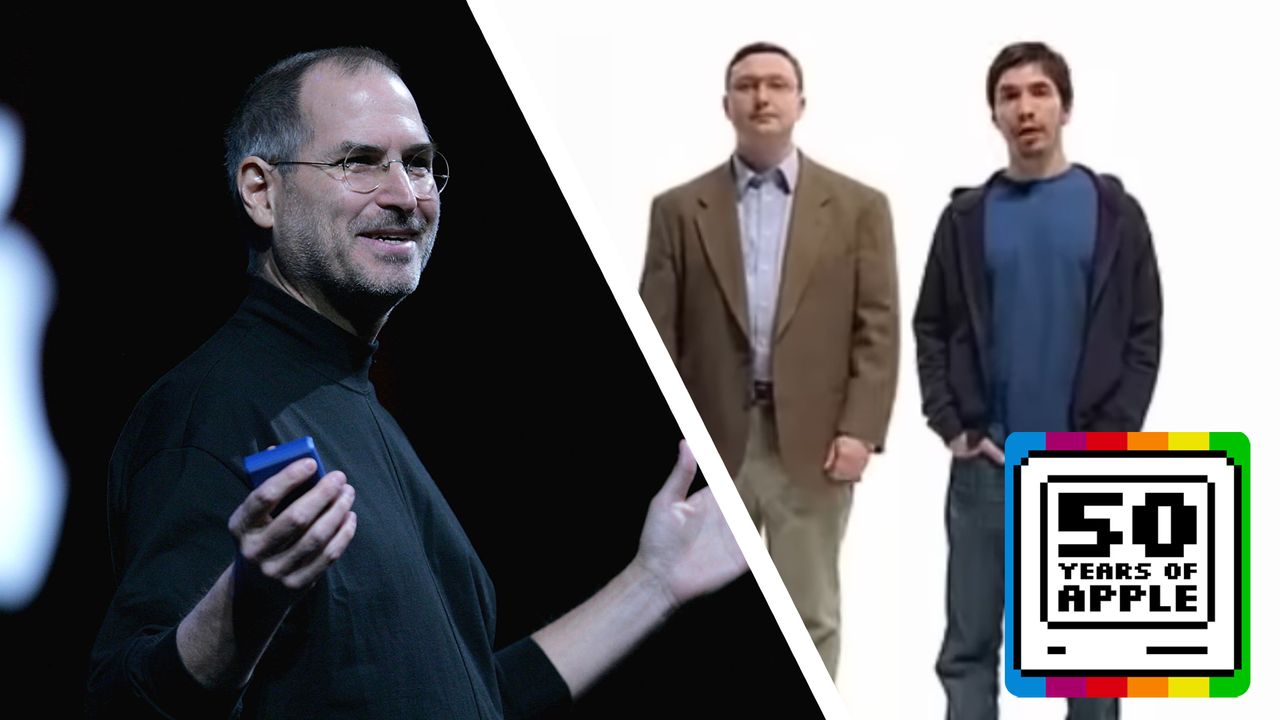
From carefully crafted marketing lines to terms the company would probably rather forget, these phrases capture the impact, influence and missteps of Apple over the last 50 years.

Apple is already moving on to its next update. It is rolling out the first developer beta of iOS 26.5 just a week after the stable iOS 26.4 release.
And while this isn’t a headline-grabbing upgrade, it quietly adds a handful of features. These hint at where Apple is heading next.
The biggest change is tucked inside Maps. A new ‘Suggested Places’ section has appeared within the search interface, surfacing recommendations directly in the app. It lines up with Apple’s broader push to expand discovery, and potentially advertising, within its own services.
Elsewhere, iOS 26.5 beta 1 brings a mix of smaller but meaningful tweaks. There are new purchase options in the App Store, alongside improvements to accessory pairing and broader support for connected devices. Apple is also continuing its slow expansion of RCS messaging. Plus, there are enhanced sharing options for message attachments between iPhone and Android, a move that should make cross-platform chats feel a little less clunky.
Some features are more region-specific. Users in the EU will see Live Activities support extended to third-party accessories. Meanwhile, the update also introduces a new Inuktitut keyboard layout, expanding Apple’s language support.
Digging into the code, there are also references to a ‘Year in Review for 2026’ feature in Apple Books. This suggests Apple is working on more personalised, end-of-year summaries across its ecosystem. It is something we’ve already seen roll out in Apple Music and other services.
As with most early betas, the focus here is stability as much as features. There are a number of bug fixes included under the hood.
There’s no word yet on when iOS 26.5 will roll out publicly. However, if Apple sticks to its usual schedule, a wider release shouldn’t be too far off.
The post Apple reveals first look at iOS 26.5 in its latest beta appeared first on Trusted Reviews.

The Apple of 1976 is unrecognizable compared to today’s gigantic corporation, and yet key early decisions by Steve Jobs, Steve Wozniak, and more, are still having their effect today, half a century later.

Steve Jobs with the original Macintosh, made eight years after Apple’s founding
Apple has long had a reputation for never looking back, and it’s usually justified. “Let’s go invent tomorrow rather than worrying about what happened yesterday,” said Steve Jobs in an interview that has long been lost, but is forever quoted in motivational speeches.
He was consistent about this even when talking about himself and his work, though. “[Technology] is not a field where one paints a painting that will be looked at for centuries,” he said in 1994, “or where one builds a church that will be looked at, admired, and looked at in astonishment for centuries.”
Continue Reading on AppleInsider | Discuss on our Forums

What does the UN Declaration on the slave trade mean for Western legitimacy and the Global South?

Filip Hrgovic ‘guaranteed’ fight with top heavyweight if he beats Dave Allen: “We have a contract”

How to Integrate AI APIs Into Existing Software Applications: A Developer’s Guide


-

 News Videos6 days ago
Parliament publishes latest register of MPs’ financial interests
-
 Tech6 days ago
Intercom’s new post-trained Fin Apex 1.0 beats GPT-5.4 and Claude Sonnet 4.6 at customer service resolutions
-

 NewsBeat4 days ago
The Story hosts event on Durham’s historic registers
-

 Business6 days ago
Instagram, YouTube Found Responsible for Teen’s Mental Health Struggle in Historic Ruling
-

 Sports4 days ago
Sweet Sixteen Game Thread: Tide vs Michigan
-
 NewsBeat7 days ago
Tesco is selling new Cadbury Dairy Milk bar and people can’t wait to try it
-
 Entertainment3 days ago
Lana Del Rey Celebrates Her Husband’s 51st Birthday In New Post
-
Entertainment2 days ago
Fans slam 'heartbreaking' Barbie Dream Fest convention debacle with 'cardboard cutout' experience
-
Crypto World21 hours ago
Dems press CFTC, ethics board on prediction-market insider trades
-

 Sports16 hours ago
Tallest college basketball player ever, standing at 7-foot-9, entering transfer portal
-
 Fashion7 days ago
How to Style Spring Like WeWoreWhat: Easy Outfit Ideas for 2026
-

 Entertainment6 days ago
HBO’s Harry Potter Series Will Definitely Fail For One Big Reason, And It’s Not J.K. Rowling Or Snape
-

 Tech2 days ago
The Pixel 10a doesn’t have a camera bump, and it’s great
-

 Fashion6 days ago
En Vogue in Brown Leather and Tailored Neutrals by Atelier Savoir, Styled by J Bolin
-

 Crypto World1 day ago
U.S. rule change may open trillions in 401(k) funds to crypto
-

 Fashion6 days ago
What Are Your Favorite T-Shirts for the Weekend?
-

 Fashion5 days ago
Weekly News Update, 3.27.26 – Corporette.com
-

 Sports1 day ago
Women’s hockey camp eyes fitness boost, tactics ahead of WC 2026 campaign | Other Sports News
-
 Sports6 days ago
Lewis Hall hopes to miss another summer of village cricket due to World Cup call
-

 Tech3 days ago
Elon Musk’s last co-founder reportedly leaves xAI
You must be logged in to post a comment Login