And when it comes to which is the very best, CNET’s pick for the best fiber internet service provider in the country is AT&T Fiber. That’s thanks to its consistency, high customer satisfaction ratings and fast symmetrical speeds. AT&T Fiber is a crowd-pleaser and consistently gets top marks in customer satisfaction surveys, likely due to its variety of plans, competitive pricing and customer-friendly service terms. There’s a lot to like — but only if you can get it at your address.
It’s important to note that fiber internet isn’t the most broadly available internet connection type. According to the latest Federal Communications Commission data, approximately 52% of the US population has access to a fiber connection. Still, CNET considers fiber the gold standard of home internet connections and a sure way to future-proof your home. Let’s take a closer look at what the top fiber ISPs in the country have to offer.
Best fiber internet providers
Speed range
300 – 5,000 Mbps
Price range
$55 – $250 per month
Advertisement
Our take – AT&T has the greatest availability of any fiber provider, extending service to more than 16 million potential customers across 22 states. Compared to other big-name providers, AT&T is among the cheapest when considering cost per Mbps and there are no hidden fees. However, if all you can get is AT&T’s fixed wireless plans, you’re better off looking into Frontier Fiber and Verizon Fios.
Or call to learn more:
(833) 579-0031
Speed range
300 – 5,000 Mbps
Advertisement
Price range
$55 – $250 per month
Speed range
500 – 5,000 Mbps
Advertisement
Price range
$50 – $155 per month
Our take – Frontier Communications recently expanded its fiber internet coverage to 19 states and then rolled out a new multi-gig service to the entire footprint simultaneously, becoming the first major ISP to do so on such a wide scale.
Or call to learn more:
(877) 870-0633
Advertisement
Speed range
500 – 5,000 Mbps
Price range
$50 – $155 per month
Advertisement
Speed range
300 – 2,000 Mbps
Price range
$50 – $120 per month
Advertisement
Our take – Verizon Fios is up there with AT&T Fiber and Frontier Fiber in terms of speed, pricing and service terms. The cheapest tier, which starts at just $50 a month, comes with download and upload speeds of up to 300Mbps. The next speed level — 500Mbps for $75 monthly — also carries decent value, but the gigabit service at $90 is priced the same or a touch higher than you’ll find with other fiber providers.
Or call to learn more:
(888) 461-3204
Speed range
300 – 2,000 Mbps
Advertisement
Price range
$50 – $120 per month
Speed range
200 – 8,000 Mbps
Advertisement
Price range
$45 – $165 per month
Our take – If you thought Verizon Fios’s price lock guarantee was great, Quantum Fiber offers a price-for-life guarantee for all plans. You can choose from two main plans: 500Mbps for $50 monthly or 940Mbps for $70 monthly. Select locations may have the choice of faster speeds, including the 3,000Mbps and 8,000Mbps tiers.
Or call to learn more:
(866) 671-3650
Advertisement
Speed range
200 – 8,000 Mbps
Price range
$45 – $165 per month
Advertisement
Speed range
1,000 – 8,000 Mbps
Price range
$70 – $150 per month
Advertisement
Our take – If you’re eyeing gig or multi-gig speeds, GFiber is the provider for you. Plans start at gig speed and only go up from there. With these starting speeds, the starting monthly rate of $70 is understandably higher than many internet providers.
Or call to learn more:
(855) 500-4211
Speed range
1,000 – 8,000 Mbps
Advertisement
Price range
$70 – $150 per month
Speed range
500 – 2,000 Mbps
Advertisement
Price range
$65 – $95 per month
Our take – T-Mobile has been dominating the 5G home internet market for the past few years. Now it’s offering fiber internet in more than 175 cities after its April 2025 acquisition of Lumos Fiber. When it comes to pricing, T-Mobile Fiber is almost in line with other fiber providers on our list: $65 a month for 500Mbps, $75 a month for 1-gig and $95 a month for the 2-gig plan.
Or call to learn more:
(877) 519-7610
Advertisement
Speed range
500 – 2,000 Mbps
Price range
$65 – $95 per month
Advertisement
Speed range
100 – 2,000 Mbps
Price range
$25 – $90 per month
Advertisement
Our take – Formely known as Windstream, Kinetic is one of our top rural internet providers, bringing high-speed connections to underserved places. Targeting North Carolina and Texas, Kinetic has announced plans to expand its fiber network from nearly 2 million homes to 3.5 million by 2029.
Or call to learn more:
(866) 671-3650
Speed range
100 – 2,000 Mbps
Advertisement
Price range
$25 – $90 per month
Speed range
100 – 50,000 Mbps
Advertisement
Price range
$20 – $900 per month
Our take – Ziply Fiber rolled out a ridiculously fast 50-gig plan across its entire Northwest footprint in Idaho, Montana, Oregon and Washington, making it the fastest internet provider nationwide.
Or call to learn more:
(866) 671-3650
Advertisement
Speed range
100 – 50,000 Mbps
Price range
$20 – $900 per month
Advertisement
Fiber internet honorable mentions
Brightspeed: A relatively new DSL and fiber internet provider, Brightspeed operates networks in many markets in the eastern half of the US that were previously owned by Lumen Technologies (CenturyLink, Quantum Fiber). Fiber service starts at just $30 per month for speeds up to 200Mbps. Your equipment is also free with the fiber plans.
Metronet: As one of the largest independently owned fiber internet companies, Metronet has a smaller footprint than other fiber providers. But it still offers fast speeds for decent prices. Based in Evansville, Indiana, Metronet is available primarily to cities in the Midwest. Service starts at $30 monthly for 100Mbps. Select areas can see speeds as fast as 2,000 or 5,000Mbps for $80 and $110 per month, respectively. Last year, T-Mobile announced plans to purchase Metronet; the FCC has yet to approve the sale.
Optimum: Optimum is primarily a cable internet provider, but it has a growing fiber network, particularly in the Greater NYC area. Approximately 2.8 million households are available for fiber service there. Optimum offers six plans for houses eligible for fiber, 300-,500-,1-gig, 2-gig, 5-gig, and 8-gig plans, which range in cost from $40 to $280 a month. It’s important to note that only select households may have access to the multi-gig plans.
What is fiber internet?
Fiber-optic internet sends data as light signals via thin glass wires either straight to the home, known as FTTH, or to an access point just outside the home, commonly referred to as fiber to the node or fiber to the curb. The technology allows for higher bandwidth and faster data transmission than any other connection type and has the unique capability of delivering symmetrical or near-symmetrical download and upload speeds.
Andrew Brookes/Getty Images
Fiber internet uses a different type of modem than DSL or the DOCSIS equipment used for cable. In fact, fiber technically doesn’t use a modem at all but an optical network terminal that performs the same function. To learn more, read our fiber internet explainer.
Advertisement
How many members of your household use the internet?
Advertisement
Why choose fiber internet?
Your internet speeds, reliability and overall experience don’t depend solely on your internet provider. The technology your ISP uses to run service to your home makes a big difference in what speeds you get. Here’s why fiber internet stands out as the leading connection type:
Speed, upload and download. Fiber internet is the fastest internet connection type with speeds up to 1,000Mbps and higher available from nearly every fiber ISP. The technology also has the added benefit of delivering symmetrical (or nearly symmetrical) upload speeds. Upload speeds are more important than you think, so fast speeds are nice to have when gaming online, uploading posts to social media, or taking a video call.
Reliability. Many fiber ISPs (AT&T Fiber, Frontier Fiber, Quantum Fiber, Verizon Fios included) claim over 99% reliability. A fiber-to-the-home connection also ensures speed consistency and reliability during peak usage times.
Value. Fiber internet providers have some of the highest-priced plans, but the slower, cheaper plans are often comparable to service from cable or 5G providers. Considering cost per Mbps and the added advantages of a fiber-optic connection, fiber plans often present the best overall value.
How you can shop for fiber internet like a pro
Fiber internet is the best type of service for most homes, but there’s more to choosing a provider and plan than the connection type. Here are some tips to keep in mind when shopping for fiber internet service.
Availability. Fiber internet is not available in nearly as many homes as cable, DSL, satellite or even 5G internet. Only around 48% of US households are wired for fiber-optic internet. In most cities, availability can vary from one neighborhood to the next and is even harder to come by in suburban and rural areas.
Speeds. Fiber internet has the fastest upload and download speed potential of any type of internet. Many of the top providers offer speed tiers up to 2,000Mbps (2Gbps), 5Gbps and higher. While the blazing-fast speeds are tempting, they’re likely to be faster than your home needs. Check out our guide to finding the right internet speed for help selecting a fiber plan that best meets your needs.
Price. If you’re looking for cheap internet, fiber may not be your best option. It’s true that fiber internet plans are often the best value, but you may find cheaper options from cable or 5G providers.
Advertisement
A few fiber providers offer plans with starting prices as low as $30 per month, but you’re more likely to pay at least $50 per month for fiber internet. Cable internet providers including Cox, Mediacom, Xfinity and others have lower-priced plans in many areas. If you are a T-Mobile Magenta Max or Verizon wireless customer, you could get 5G home internet for the discounted price of $25 to $35 per month.
Bundles.Should you bundle your internet service? Few fiber providers offer a TV service, meaning you may not be able to bundle internet and TV together with the same provider if you choose a fiber internet service. In the days of streaming and cord-cutting, that may not be a deal-breaker for you, but it’s something to keep in mind if you’re shopping for both services.
How we evaluate fiber internet providers
Testing an internet provider the same way CNET tests other products and services is, at best, impractical. Instead, we rely on extensive research of each provider to develop our reviews and recommendations.
When comparing fiber internet providers, availability, speeds and overall value are at the center of our evaluations. We also examine added fees, data caps, contract requirements, customer satisfaction reports and other factors that could affect your quality of service or customer experience.
Advertisement
We refer to the Federal Communications Commission at FCC.gov for availability data and the type of network a provider uses. We then research a provider’s speeds, pricing and service terms through various channels, such as the provider’s website and our historical data. When possible, we contact the provider directly to confirm pricing and speed details.
Finally, to develop a more well-rounded perspective of the provider, we consider customer satisfaction reports from the American Customer Satisfaction Index and J.D. Power, as well as customer reviews and complaints from sources such as the Better Business Bureau, Downdetector.com and even Reddit. (Downdetector is owned by the same parent company as CNET, Ziff Davis.)
Before writing our reviews and compiling best lists, we research anything and everything the typical shopper would want to know prior to signing up for home internet service. Read our piece on how we review internet providers to learn more about our review process.
Best fiber internet providers recap
If fiber internet service is available in your area, it’s probably worth getting, especially if any of the providers listed above is an option. AT&T is easiest to recommend thanks to its high availability, low costs and favorable service terms, but Verizon Fios is a close second with low pricing, high customer satisfaction and lots of perks for signing up. GFiber, Frontier Fiber, Kinetic, Quantum Fiber and Ziply Fiber round out the list of ideal options, while providers like Metronet, Optimum and others are worth a look, too, if available in your area.
Advertisement
Ziply Fiber has the fastest speed tier of any major fiber internet provider, with max speeds of 50,000Mbps, or 50Gbps. Many other fiber providers top out at 5Gbps, 2Gbps or 1Gbps.
Fiber internet is not cheap. The faster the speeds, the more costly your monthly bill will likely be. Starting plans with fiber internet typically range from $30 to $50 a month, with gigabit service ranging from $60 to $90 a month. While there are cheaper plans available with cable or 5G internet service in select areas, fiber service is likely to come with better speed and connection quality for the price.
Not likely. While the potential of 5G home internet is promising, it doesn’t currently offer the speed or reliability that comes with a fiber-optic connection. That said, the wireless delivery method is rapidly expanding in availability and becoming a popular option among home internet users. Cellular internet and 5G are a viable alternative in areas where fiber connections are not yet available.
Advertisement
If fiber hasn’t reached your address yet, I’m sorry to say you’ll just have to be patient, as providers are actively expanding their fiber networks across the US. You’re more likely to see fiber come to your neighborhood if you live in a city or densely populated area, but providers like Windstream and Quantum Fiber show that fiber access in suburban and rural areas is also obtainable. Check out if fiber internet is available in your area.
When it comes to internet speeds, fiber internet has every other type of connection beat. However, there is a downside to fiber connections: They pose a logistical challenge to implement. This means availability is a common issue.
Unlike fixed wireless and satellite internet connections, fiber lines run directly to your home, so they aren’t usually susceptible to adverse weather. It means you can expect your network to keep chugging along at its maximum capacity unless there’s severe damage to the network infrastructure or a power outage in your neighborhood.
The free/open source project OrcaSlicer is a popular fork of 3D printer slicing software from Bambu Lab. But Tuesday independent developer Pawel Jarczak shuttered the project “following legal threats from Bambu Lab,” reports Tom’s Hardware:
Jarczak’s fork of OrcaSlicer would have allowed users to bypass Bambu Connect, a middleware application that severely limits OrcaSlicer’s access to remote printer functions in the name of security. Jarczak said in a note on GitHub that Bambu Lab threatened him with a cease and desist letter and accused him of reverse engineering its software in order to impersonate Bambu Studio.
Bambu Studio is an open-source project under the AGPL-3.0 license. Anyone can take its code, modify it, and distribute it… That’s what OrcaSlicer does, and 734 other forks do as well. We have no issue with that and never have. At the same time, a license for code is not a pass to our cloud infrastructure… Our cloud is a private service. Access to it is governed by a user agreement, not the AGPL license… [T]he modification in question worked by injecting falsified identity metadata into network communication. In simple terms: it pretended to be the official Bambu Studio client when communicating with our servers… If this method were widely adopted or incorrectly configured, thousands of clients could simultaneously hit our servers while impersonating the official client.
Advertisement
“User-Agent is not authentication,” counters OrcaSlicer’s developer. “It is only self-declared client metadata. Any program can set any User-Agent.” And “the User-Agent construction comes directly from Bambu Lab’s own public AGPL Bambu Studio code…. So on what basis can anyone claim that I am not allowed to use this specific part of AGPL-licensed code under the AGPL license…? My work was based on publicly available Bambu Studio source code together with my own integration layer.”
But the bottom line is that Bambu Lab “contacted me directly and demanded removal of the solution.”
I asked whether I could publish the private correspondence in full for transparency. That request was refused… They also referred to legal materials and stated that a cease and desist letter had been prepared…
I removed the repository voluntarily. That removal should not be interpreted as an admission that all legal or technical allegations made against the project were correct. I removed it because I have no interest in maintaining a prolonged dispute around this particular implementation, and no interest in continuing to distribute it. YouTuber and right-to-repair advocate Louis Rossmann reviewed the correspondence from Bambu Lab — then pledged $10,000 for legal expenses if the developer returned his code online. (“I think that their legal claim is bullshit,” Rossman said Saturday in a YouTube video for his 2.5 million subscribers. “I’m not a lawyer, but I’m willing to put my money where my mouth is.”)
The video now has over 129,000 views so far. “Rossman has not started a crowdfunding site yet,” Tom’s Hardware notes, “stating in the comments that he wants to prove to Jarczak that he has supporters willing to put their money where their mouth is. The video had over 129,000 views so far, with commenters vowing to back the case as requested.”
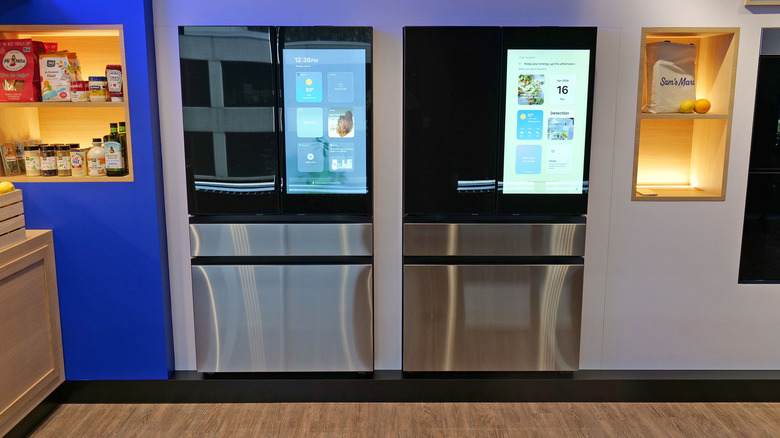
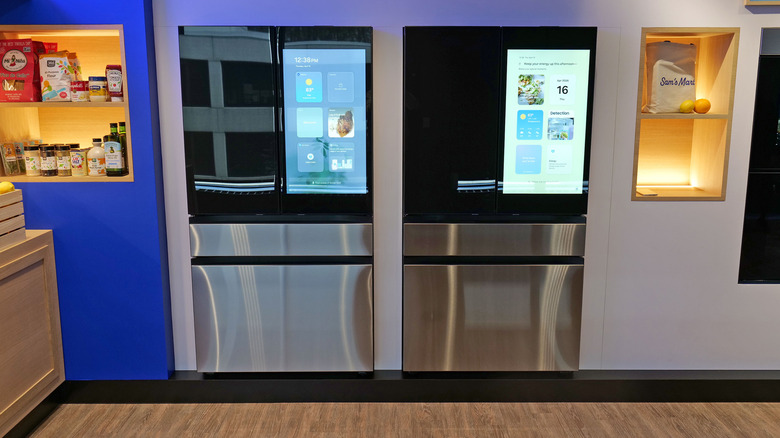
The idea of installing a software update on your fridge already feels kind of weird, let alone one centered around improving its AI capabilities. But that’s exactly what’s happening to Samsung’s line of Bespoke refrigerators this week, and to my surprise this patch is making major strides at providing truly useful machine learning in a modern day icebox.
As a quick recap, Samsung has offered AI-powered features like automatic food recognition and meal planning on its Bespoke refrigerators for a couple years already. However, as I found out after reviewing its flagship model late last year, the company’s AI capabilities are still very much a work in progress. Previously, the fridge could recognize around 60 different kinds of fresh foods (like fruits and veggies) alongside another 50 or so packaged goods like yogurt or popcorn. That felt like a decent start, but considering the sheer number of different items you can find at a typical grocery store, it was far from complete. Furthermore, you often had to input additional data like the number of items or when something was first added, which made the idea of AI-assisted grocery tracking more tedious than I’d like. I don’t know about you, but I generally don’t want to have to type on my fridge and I’m pretty sure the engineers at Samsung agree, which is probably what brought about this major update to its Bespoke refrigerator software.
Advertisement
So what’s new?
Sam Rutherford for Engadget
The big change is that Samsung is adding support for Google Gemini, which has several important implications. By combining Samsung’s existing on-device object recognition with Google’s cloud-based models, the total number of identifiable foods is increasing from just over 100 items to more than 2,000. Now this does mean you will need to connect the fridge to Wi-Fi, but considering the number of other smart features it supports like calendar integration and video playback, that’s not a big ask.
Another update is that Samsung is using Gemini to expand voice controls, allowing users to ask the fridge to change things like device settings, check details like when the water filter was last replaced or to even help troubleshoot issues. And depending on the situation, the fridge can even play back a tutorial about how to solve the issue.
Alternatively, for more complicated or harder-to-solve problems, Samsung is introducing what it calls Reliability AI, which is designed to monitor the fridge’s components or help identify faults before they get too serious. Or in cases where the device needs to be serviced, the AI can provide more detailed info to agents while potentially allowing them to fix certain things remotely.
Advertisement
For example, a Samsung representative told me that if a customer calls and says that cubes from the icemaker are coming out in clumps and stuck together, Reliability AI could allow agents to reduce the amount of water that is being added to the ice tray — all without ever needing to physically come to your home. Critically, Samsung says that while the fridge will monitor and track device health metrics, owners will need to provide express consent in order for repair personnel to access that data. Meanwhile, if an issue does require in-person servicing, Samsung says that by sharing this data with repair technicians, it allows people to identify and solve problems faster instead of having to arrive with no context and diagnose issues from scratch.
Advertisement
How this works in the real world
Sam Rutherford for Engadget
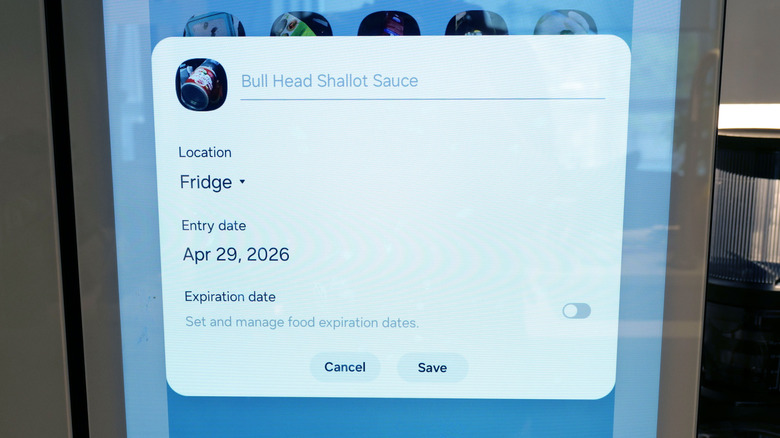
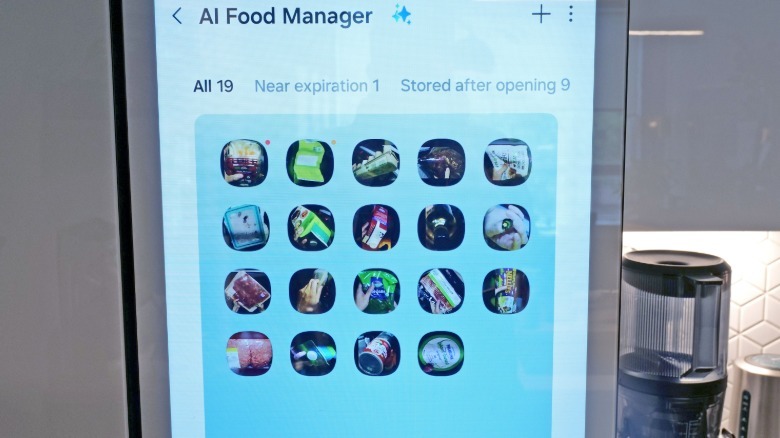
My test unit hasn’t run into any mechanical issues in the eight months I’ve been using it, so I haven’t been able to evaluate Samsung’s Repairability AI. That said, after checking it out first at Samsung’s headquarters, I’ve had the chance to use an early version of the Bespoke line’s new software over the last two weeks — including its upgraded support for cloud-based object recognition — and the improvement is profound. Even after using it for a while, I’m still surprised by how many different foods it recognizes. Deep in the back of my fridge, I have a can of Bull Head Shallot Sauce, which is a rather niche ingredient from Taiwan used almost exclusively in Asian dishes. However, the AI had no trouble recognizing it, automatically tagging it and including when it was first added to the fridge’s AI Food Manager.
On top of that, the system is now much better at recognizing brands and counting the number of specific ingredients in order to create more detailed listings. It can distinguish between a Diet Coke and Coke Zero while also accurately noting that there were multiples of each item. And even though the fridge often has to ping a cloud-based server somewhere to help recognize various items, results appeared rather quickly, often in less than a few seconds. And for certain foods like avocados, I was delighted that the fridge tracks how long you’ve had it and will surface a notification that it might be getting close to expiration. Granted, it’s not always right, but all I really need is a reminder to check on things and it does just that.
Sam Rutherford for Engadget
I also noticed that the fridge now remembers when you frequently take a specific food out and then asks if you want to add that item to your shopping list. It’s a nice reminder to replenish staples you use regularly and happens in a low-friction way, so it doesn’t become annoying. From there, you can simply check your phone when you’re at the store instead of needing to manually curate a list every week. Also, because the fridge does a much better job of recognizing and tracking what’s inside, it can provide better suggestions about recipes you can cook using ingredients you already have.
That said, like a lot of current models, the AI doesn’t always nail every detail. For example, I was initially impressed when it automatically labeled a tub of fake cream cheese as “Philadelphia Plant-based,” until I realized that the label was incomplete and the AI was merely reading what was written on the lid and didn’t have the smarts to accurately finish the description. Don’t get me wrong, it provides more than enough info to help me figure out what’s in the fridge when I’m glancing at the Food Manager. It’s just not quite spot on.
Advertisement
Outlook and things that still need work
Sam Rutherford for Engadget
The one issue with this update is that like a lot of AI services today, Samsung’s new software can be a bit overconfident or prone to hallucinations. One time, as my wife was putting something back in the fridge, the algorithm took a picture of a brightly colored bandage on her finger and labeled that as a veggie, which it very much is not. Other times it seemingly just guesses. But I’d argue going from around 100 identifiable items to over 2,000 is a very welcome improvement even with the limitations.
The other weird thing is that even though Samsung is leveraging Google’s AI models for a lot of the fridge’s new features, you won’t see any obvious callouts to Gemini inside the device itself. That’s kind of a bummer because Bixby is still the only digital assistant you can use and talk to directly.
I’ve said before that Samsung’s AI food recognition is a work in progress and I think that still holds true. With this latest update, the company has gotten a lot closer to delivering on the promise of a fridge with truly useful AI-powered features. What once felt more like a promising tech demo has quickly become a handy tool to keep track of your groceries, even with some hiccups here and there.
The Federal Communications Commission has extended a key waiver allowing certain foreign-made routers, drones, and drone components to continue receiving software and firmware updates in the United States until at least January 1, 2029.
The move comes after growing concerns that millions of already-deployed devices could become cybersecurity risks if manufacturers were suddenly blocked from issuing security patches and compatibility updates. The decision was announced through the FCC’s Office of Engineering and Technology (OET), which also expanded the scope of the waiver to cover additional software-related changes needed to maintain device functionality.
Security concerns forced a regulatory rethink
The extension follows a broader FCC crackdown that added certain foreign-produced routers and unmanned aerial systems to the agency’s “Covered List” in late 2025 and early 2026 over national security concerns. Those restrictions effectively blocked new approvals and limited post-certification modifications for affected devices.
Initially, existing waivers would have allowed updates only until 2027. However, regulators later acknowledged that cutting off software support entirely could create a bigger problem by leaving devices exposed to vulnerabilities, cyberattacks, and compatibility failures.
The updated waiver now permits critical firmware and software updates for previously authorized devices, even though the products themselves remain subject to broader restrictions. The FCC emphasized that the policy does not reverse the bans or remove affected products from the Covered List.
Why consumers should pay attention
For everyday users, the decision matters because routers and drones depend heavily on ongoing software support to remain secure and functional. Routers in particular act as gateways for home networks, connecting phones, laptops, smart TVs, cameras, and other internet-enabled devices. Without security patches, known vulnerabilities can become easier targets for hackers.
DroneUnsplash
The FCC’s extension effectively gives consumers more time before worrying about their devices becoming unsupported or obsolete. It also reduces the risk of millions of products suddenly losing compatibility with future operating systems, networks, or connected services.
What happens next
While the waiver offers temporary relief, it also highlights the growing tension between national security policy and practical cybersecurity needs. Regulators are now expected to spend the next few years developing a more permanent framework governing foreign-made networking equipment and drones.
For manufacturers, the message remains mixed: existing products can continue receiving critical updates, but future approvals for foreign-made devices will likely face tighter scrutiny and more restrictive oversight in the years ahead.
While Artemis II was primarily a demonstration flight of the architecture NASA plans to use for future lunar missions, it was also an excellent excuse for the crew to snap some photos of the Moon and Earth with the benefit of modern camera technology. If you’ve been looking forward to seeing more of the crew’s images, you’re in luck, as thousands of new images have recently been released.
Now we don’t mean to beat up on the folks at NASA, but browsing through these images, we couldn’t help but be reminded of an article we saw on PetaPixel that discussed the space agency’s haphazard approach to sharing images online.
It’s really more like an unsorted file dump than anything, made worse by the fact that you have to access it through a government website that looks and performs like it was designed in the early 2000s. There’s even a prominent button that attempts to load a gallery feature that relies on the long-deprecated Adobe Flash. It would be nice to see the situation improved by the time astronauts actually touch down on the lunar surface, but we wouldn’t count on it.
Speaking of old tech, we’ve been following the resurgence of keyboard-equipped smartphones with great interest, as we imagine many of you have been. A recent CNBC article addresses the trend, although it didn’t quite take the nerd contingent into account. We want physical keys so we can work in the terminal and write code without fighting an on-screen keyboard, but of course, that’s not exactly what your average consumer is looking for.
It’s quite the opposite, in fact. A 20-something user referenced in the article explained how the younger generations see the physical keyboard as a way to be less connected to their phones, describing it as “an extra barrier of inconvenience that adds more steps into the thinking process.” If you need us, we’ll be collecting dust in the corner.
Advertisement
As regular readers may know, we’ve also taken an interest in plug-in solar panels recently. So-called “solar balconies” have become quite popular in Europe, but regulatory friction in the United States has prevented them from achieving similar success here. An article in the MIT Technology Review talks about the process of bringing solar balconies to the US, and we’re not overly thrilled with some of the developments it highlights.
As the key hurdle appears to be safety, UL Solutions recommends that balcony solar panels be plugged into a specialized outlet. If putting a regular AC plug on the end of a solar panel can lead to potentially dangerous situations, they believe the solution is to require a different plug that no one could mistake for anything else, with built-in safety features to reduce the risk of electric shock.
That might not seem unreasonable at first, but it actually represents a pretty serious hurdle for many users. Consider that the whole advantage of these panels is the convenience: you can simply open the box, plug them in, and start collecting energy. But if you need to install a special outlet, potentially requiring an electrician, the whole concept falls apart. Expect to hear more from us on this particular subject as it develops.
Finally, Spirit Airline customers weren’t the only ones running into issues this week — a Southwest flight in California was delayed due to complications with a robotic passenger. The bot actually had a ticket, but the flight crew said it still violated the airline’s rules for large carry-on luggage and had to be moved to a different seat. Then somebody realized the robot’s relatively large lithium-ion battery was also in violation of carry-on limits, and it had to be removed and confiscated by authorities. Important details to keep in mind if you happen to be a robot planning your summer vacation.
See something interesting that you think would be a good fit for our weekly Links column? Drop us a line, we’d love to hear about it.
During an investor call following the release of AMD’s first-quarter 2026 earnings, CEO Lisa Su confirmed that the Epyc Venice processors remain on schedule for launch later this year. The server CPUs will mark the debut of the Zen 6 architecture and AMD’s first move to TSMC’s 2nm process technology. Read Entire Article Source link
A leader in almost everything tech and home-office related for over 40 years, Swiss-founded Logitech offers a vast array of products, including keyboards, consoles, webcams, and tech gear made especially for education, business, and gaming. We at WIRED know the company’s wares well (obviously), so we’ve found the latest Logitech promo codes and deals to save on any type of tech purchase.
Logitech makes seriously great Bluetooth keyboards, keyboard cases, and smart pencils that made our Best iPad Accessories list. We also named the Logitech Pro X 2 the best gaming headset in our wireless headphones guide. If you want to keep the spirit of playfulness alive, fellow F1 enthusiast (and senior editor of product reviews) Parker Hall raved about Logitech’s high-tech wheel, pedals, and seat racing simulation set to help you become the Lewis Hamilton of your gaming fantasies. Check out these Logitech discounts we’ve found to help you ball (technologically) on a budget.
Get a Free Gift With Select Purchases at Logitech
Right now, Logitech wants to reward you for choosing them, with tons of free gifts with select purchases at Logitech. These Logitech deals include major savings, like a free Logitech Desk Mat when you buy any two Ergo Products, ($23 value), or a free Logitech Accessory Case when you purchase a Crayon & Combo Touch Case ($30 value). There are tons of savings on accessories, like a free Wooden Headset Stand when you buy a qualifying Logitech Zone Headset, ($40 value), or a free MX Keyboard Sleeve when you purchase a qualifying MX Mini Keyboard ($30 value). Plus, you can claim a free 6-month Perplexity Pro membership, worth $120, when you buy an eligible MX Series, Ergo Series, or iPad Keyboard case over $119.
Save up to $100 On Refurbished Premium Gear
The Logitech outlet is one of the best ways to save big on your important tech purchases on premium gear with exclusive gear. With the outlet, you’ll find like-new refurbished devices and limited-time favorites to shop before they’re gone forever (so be sure to check often and act soon!). Some of the best deals we’ve seen so far include: $50 off a refurbished X56 HOTAS VR flight simulator controller, $60 off a refurbished G715 wireless gaming keyboard, and $20 off a refurbished Folio Touch for iPad Air and Pro models.
Advertisement
Tips and Tricks for More Logitech Discounts
Even if you don’t have a promo code on hand, Logitech has plenty of ways to save, with free shipping on orders of $29 or more (a super-easy mark to hit). Many products also qualify for a gift with purchase, so take advantage of a free MX travel case, keyboard sleeve, or 1 month of Adobe Creative Cloud. And for a limited time, when you buy one product, you can get a second for 25% off.
With an array of helpful products for students, Logitech is making it easier to get all this game-changing tech. Students can get a 25% discount on products after registering and verifying their student status with UNiDAYS.
{Logitech 20% Off: Students & Heroes
Logitech wants to benefit as many people as it can, with a 20% discount for some of our most valuable community members who can benefit from this important, but sometimes pricey tech. That’s why Logitech is offering a 20% Logitech promo code discount of 20% off for heroes and students—this includes students, teachers, medical professionals, military, and first responders. Just verify your status to get the Logitech discount code.
25% Off Logitech Gaming Gear
Logitech G Play Days sales event is a celebration of all things gaming. During the Logitech G Play Days sales event, you’ll save with exclusive promotions and score 25% off select gear for a limited time. So whether you (or a friend) is in need of a new gaming headset or wants to upgrade your keyboard, there’s gear (and discounts) for every type of gamer.
Advertisement
Shop Trending Logitech Products
As mentioned, Logitech has nearly every type of tech product needed for productivity in your office or school, but also has some really innovative tech products for home and gaming. Looking to get serious about your WFH (or gaming) setup? Logitech’s MX Keys S Advanced Wireless Illuminated Keyboard is a bestseller because of its portability, ergonomic design, and cheap price point. The bestselling MX Vertical Advanced Ergonomic Mouse is occasionally discounted, so save your hand the cramps and carpal tunnel (while saving some coin, too).
In Polymarket’s prediction market, “most people end up losing money,” reports the Washington Post — typically a few bucks.
“Since Polymarket launched in 2022, a few thousand people have lost the bulk of the money… and an even smaller group — .05 percent of users — has gone home with most of the overall profits, according to a new analysis from finance researcher Pat Akey and colleagues.”
A lot of users aren’t that good at predicting the future. They’re losing money at roughly the same rate as online gamblers betting on sports and other real-life events at traditional sportsbooks, according to the U.K. gambling regulator’s analysis of 2024 data. On Polymarket, the odds of making a profit are slightly higher on weather and tech markets — and a little lower on sports…
On Polymarket, just 1,200 people took more than half the profits — $591 million, or more than $100,000 each. [“The top 1% of users capture 76.5% of all trading gains,” the researchers write.] When you dabble in prediction markets, you’re competing against these sophisticated players who consistently win. Most of those 1,200 big winners didn’t place just a few smart bets. They appear to be pros making thousands of trades, mostly in the past year and a half, that were probably automated. One user made $3 million since January on more than a million trades about the Oscars, according to TRM Labs…
Advertisement
The most profitable participants are also just good at picking what to bet on, Akey found, winning so often it was statistically unlikely to be dumb luck. They had some sort of edge — expertise, deep research or, perhaps, inside knowledge. “Our results suggest that the informational benefits of prediction markets come at a cost to unsophisticated participants,” the researchers conclude.
A new NYT Connections puzzle appears at midnight each day for your time zone – which means that some people are always playing ‘today’s game’ while others are playing ‘yesterday’s’. If you’re looking for Sunday’s puzzle instead then click here: NYT Connections hints and answers for Sunday, May 10 (game #1064).
Good morning! Let’s play Connections, the NYT’s clever word game that challenges you to group answers in various categories. It can be tough, so read on if you need Connections hints.
What should you do once you’ve finished? Why, play some more word games of course. I’ve also got daily Strands hints and answers and Quordle hints and answers articles if you need help for those too, while Marc’s Wordle today page covers the original viral word game.
Advertisement
SPOILER WARNING: Information about NYT Connections today is below, so don’t read on if you don’t want to know the answers.
Latest Videos From
NYT Connections today (game #1065) – today’s words
(Image credit: New York Times)
Today’s NYT Connections words are…
Advertisement
COLOR
CREEP
SHANDY
KARMA
KNIVES OUT
SLIP
PYRAMID
RHYME
STEAL
CHINATOWN
KEYED
SNEAK
SEVEN
PONZI
ELEGY
VERTIGO
NYT Connections today (game #1065) – hint #1 – group hints
What are some clues for today’s NYT Connections groups?
BLUE: Crime films
GREEN: Types of plan
YELLOW: Move slowly without being seen
PURPLE: Hidden anatomy
Need more clues?
We’re firmly in spoiler territory now, but read on if you want to know what the four theme answers are for today’s NYT Connections puzzles…
Sign up for breaking news, reviews, opinion, top tech deals, and more.
Advertisement
NYT Connections today (game #1065) – hint #2 – group answers
What are the answers for today’s NYT Connections groups?
BLUE: DETECTIVE MOVIES
GREEN: KINDS OF SCHEMES
YELLOW: MOVE STEALTHILY, WITH “IN”
PURPLE: BODY PARTS SURROUNDED BY TWO LETTERS
Right, the answers are below, so DO NOT SCROLL ANY FURTHER IF YOU DON’T WANT TO SEE THEM.
Advertisement
NYT Connections today (game #1065) – the answers
(Image credit: New York Times)
The answers to today’s Connections, game #1065, are…
YELLOW: MOVE STEALTHILY, WITH “IN” CREEP, SLIP, SNEAK, STEAL
GREEN: KINDS OF SCHEMES COLOR, PONZI, PYRAMID, RHYME
BLUE: DETECTIVE MOVIES CHINATOWN, KNIVES OUT, SEVEN, VERTIGO
PURPLE: BODY PARTS SURROUNDED BY TWO LETTERS ELEGY, KARMA, KEYED, SHANDY
My rating: Easy
My score: Perfect
Today’s purple group looks a lot more gettable than normal and I’m annoyed at myself for not taking more time over today’s game. Congratulations if you saw the four BODY PARTS SURROUNDED BY TWO LETTERS.
Instead, I rushed in spotting the four DETECTIVE MOVIES — not that I saw the link at first, just that they are all great films.
Next, PONZI could only be here for one thing, although I did hesitate over the fourth tile, getting caught up in thinking SLIP scheme could be something as well as SLIP stream.
Advertisement
With just eight tiles left CREEP, SLIP, SNEAK, and STEAL were impossible to resist.
Yesterday’s NYT Connections answers (Sunday, May 10, game #1064)
YELLOW: MUSIC PLAYER BUTTONS PLAY, REPEAT, SHUFFLE, SKIP
GREEN: DESTINED BOUND, CERTAIN, FATED, SURE
BLUE: VERBS IN MAKING A MOJITO GARNISH, MUDDLE, POUR, STIR
PURPLE: WHAT “SPRING” MIGHT REFER TO COIL, FOUNTAIN, LEAP, SEASON
What is NYT Connections?
NYT Connections is one of several increasingly popular word games made by the New York Times. It challenges you to find groups of four items that share something in common, and each group has a different difficulty level: green is easy, yellow a little harder, blue often quite tough and purple usually very difficult.
On the plus side, you don’t technically need to solve the final one, as you’ll be able to answer that one by a process of elimination. What’s more, you can make up to four mistakes, which gives you a little bit of breathing room.
Advertisement
It’s a little more involved than something like Wordle, however, and there are plenty of opportunities for the game to trip you up with tricks. For instance, watch out for homophones and other word games that could disguise the answers.
It’s playable for free via the NYT Games site on desktop or mobile.
A new NYT Strands puzzle appears at midnight each day for your time zone – which means that some people are always playing ‘today’s game’ while others are playing ‘yesterday’s’. If you’re looking for Sunday’s puzzle instead then click here: NYT Strands hints and answers for Sunday, May 10 (game #798).
Strands is the NYT’s latest word game after the likes of Wordle, Spelling Bee and Connections – and it’s great fun. It can be difficult, though, so read on for my Strands hints.
Want more word-based fun? Then check out my NYT Connections today and Quordle today pages for hints and answers for those games, and Marc’s Wordle today page for the original viral word game.
Advertisement
SPOILER WARNING: Information about NYT Strands today is below, so don’t read on if you don’t want to know the answers.
Latest Videos From
NYT Strands today (game #799) – hint #1 – today’s theme
What is the theme of today’s NYT Strands?
• Today’s NYT Strands theme is… A nice medley
Advertisement
NYT Strands today (game #799) – hint #2 – clue words
Play any of these words to unlock the in-game hints system.
DRIES
GAPE
MULES
BEND
STIR
SOAR
NYT Strands today (game #799) – hint #3 – spangram letters
How many letters are in today’s spangram?
• Spangram has 11 letters
Advertisement
NYT Strands today (game #799) – hint #4 – spangram position
What are two sides of the board that today’s spangram touches?
First side: left, 5th row
Last side: bottom, 3rd column
Right, the answers are below, so DO NOT SCROLL ANY FURTHER IF YOU DON’T WANT TO SEE THEM.
Advertisement
NYT Strands today (game #799) – the answers
(Image credit: New York Times)
The answers to today’s Strands, game #799, are…
JUMBLE
HODGEPODGE
VARIETY
MISHMASH
RAGBAG
SPANGRAM: ODDSANDENDS
My rating: Easy
My score: Perfect
After struggling to see yesterday’s blatantly obvious words I roared through today’s messy selection — all of which probably says a lot about my brain and/or my organizational skills.
Sign up for breaking news, reviews, opinion, top tech deals, and more.
Advertisement
I really love all of these words and personally I think they sum up the glorious VARIETY and reality of life, where nothing is in straight lines or ordered and everything comes at you in a MISHMASH.
I also really enjoyed how today’s words revealed themselves to me, with the spangram slowly becoming obvious after I solved the words surrounding it.
Advertisement
Yesterday’s NYT Strands answers (Sunday, May 10, game #798)
OVERT
BRAZEN
GLARING
BLATANT
OBVIOUS
FLAGRANT
SPANGRAM: CLEARCUT
What is NYT Strands?
Strands is the NYT’s not-so-new-any-more word game, following Wordle and Connections. It’s now a fully fledged member of the NYT’s games stable that has been running for a year and which can be played on the NYT Games site on desktop or mobile.
I’ve got a full guide to how to play NYT Strands, complete with tips for solving it, so check that out if you’re struggling to beat it each day.
For as many speakers as someone can cram into a surround sound system, humans still (generally) only have two ears to listen to those sounds with. This means that, for recording purposes, it’s possible to create incredibly vivid three-dimensional sounds with just two microphones, provided that there’s an actual physical replica of a human ear attached to each microphone. This helps ensure that all the qualities of the sounds are preserved in a way a real human would experience them, and as [David Green] demonstrates, these systems don’t need to be very expensive.
This build doesn’t just use models of human ears for recording sounds through. The silicone ears are mounted on a styrofoam mannequin head as well, which provides some sound isolation between the two microphones, much like a real human head. The ears are mounted in appropriate locations with the microphones installed inside, and the entire microphone apparatus is positioned on a PVC rig with a camera so that binaural audio will be recorded for anything [David] points it at.
Although he had some issues interfacing two microphones using 19th-century technology instead of soldering everything together, the build still eventually came together, and only for around $70 USD. However, this build is a bit dated now, so prices may have changed by now. It’s still a great way to produce realistic stereo sound without breaking the bank, but it’s not the only way of getting this job done.


















 Now we don’t mean to beat up on the folks at NASA, but browsing through these images, we couldn’t help but be reminded of an article we saw on PetaPixel that discussed the space agency’s haphazard approach to sharing images online.
 That might not seem unreasonable at first, but it actually represents a pretty serious hurdle for many users. Consider that the whole advantage of these panels is the convenience: you can simply open the box, plug them in, and start collecting energy. But if you need to install a special outlet, potentially requiring an electrician, the whole concept falls apart. Expect to hear more from us on this particular subject as it develops.















































You must be logged in to post a comment Login