With a quote in minutes, Boxt Solar makes it easy to start your solar journey. I found that high-quality solar panels and professional installation let me make the most of my roof space and generate a decent amount of power from my south-facing roof.
Boxt Solar might not be right for those with special requirements (flat roofs aren’t supported, for example, and there’s only a basic choice of inverter and solar battery), but if your home is ripe for a straightforward installation, the service is professional and smooth.
Very competitive price
Simple quotation and installation process
Excellent and neat installation
High quality solar panels and other components
Initial communication could be better
No support for flat roofs
Introduction
Solar power is a brilliant, simple way to generate electricity from the sun. With technology improving, installation costs dropping, and high electricity prices, there’s never been a better time to kit your house out. While there are many companies offering installation, I’ve tried out Boxt Solar.
As with its boiler installation service, the idea behind Boxt Solar is to offer a simple quoting and installation process at very competitive prices. The flip side is that some types of roofs can’t be used for solar panels, and there’s a more limited choice of hardware than you might get with some alternatives. But, if you’ve got a house that can take a straightforward installation, the quality and simplicity of Boxt could make it a good choice.
Advertisement
Advertisement
Quote and buying
Get a quote fast
Competitive pricing
Project finalisation could do with extra detail
The Boxt Solar installation process starts with the website and a super-quick quotation process. Just tap in your postcode, select your home using the satellite image, and answer a few basic questions about the house and roof type, and you get a basic quote through.
This basic quotation makes an initial assumption about the number of solar panels you can have, and gives you a choice over the number and type of batteries you might want.
It’s remarkably quick. Having been thinking about getting solar installed for some time, I’ve been through the quotation process with several other providers in the past, and in many cases have had to wait for a final quote.
Even where I have had a quote instantly elsewhere, the price was higher and Boxt, as it is for its boiler service, is hugely competitive.
This initial quote process does highlight some of the restrictions of Boxt’s service. For starters, the company doesn’t support flat roofs. Depending on which way your house is orientated, that could be an issue.
Advertisement
Advertisement
For example, I live in a Victorian terraced house, and have had a loft conversion, so the back part of the roof is all flat. Fortunately, the front of my house is pretty much due south, which is ideal for solar; however, my neighbours over the road with loft conversions would find that their south-facing roofs are all flat, so not suitable for solar with Boxt.
There’s an argument for my house to use the flat roof for increased solar capacity, although that wouldn’t be possible with Boxt. I do get why this decision has been made. Installing solar on a flat roof is more complicated, so it’s harder to give an instant quote for and would make the system more complicated.
If you do have a lot of flat roof that you want to use, then Boxt isn’t for you, and you’ll want to talk to a more specialist company that can offer this kind of installation.
Advertisement
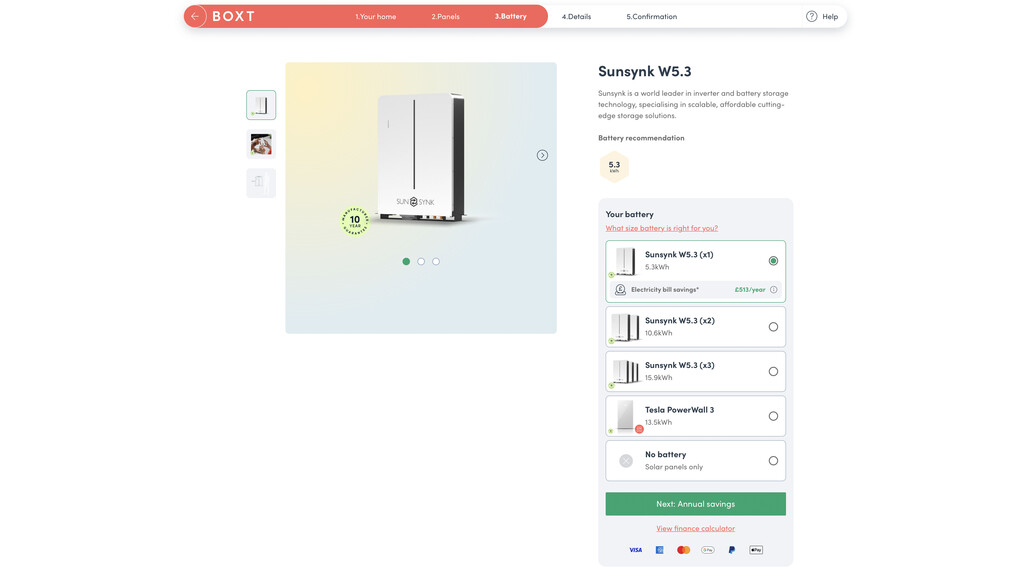
Next, from the installation process, you’ll see that the choice of components is relatively small. You can have a Sunsynk hybrid inverter only, rated to match the size of your array.
Then there’s a choice of just Sunsynk batteries (up to three 5.3kWh), or a Tesla PowerWall 3 13.5kWh.
Image Credit (Trusted Reviews)
Advertisement
While the choice is limited, Boxt has at least taken highly-rated products, well-suited to the jobs. The Sunsynk 3.6kW Ecco Hybrid Inverter that was quoted for my system is compact and rated for up to 7000W of DC input, with a constant 3.6kWh output and support for batteries. Likewise, the companies batteries are highly specced.
While the choice may be low, focusing on a few key components makes the process simple and helps keep the price down.
Advertisement
It’s the same with the solar panels, which are all AIKO NEOSTART S3 Mono-Glass panels. These are highly rated panels, and Boxt will update to the best available. When I got my first quote, it was for 460W panels, but before installation, they were upgraded to 475W panels at no extra cost.
Image Credit (Trusted Reviews)
I decided not to opt for a battery: working at home all day, I tend to use a lot of electricity throughout the day; I don’t have a huge amount of space to put a battery; and the relatively small footprint of my roof limits the size of array I can have and, therefore, how much spare power there is to charge a battery. Whether or not a battery is right for you will depend on your installation and how much power you generate.
Overall, the system came in at £4699 for five panels and no battery (with buy one get one free on the solar panels, and bird protection), which is great value. Pricing and offers do change quite regularly, but this gives you an idea of the cost.
Advertisement
A quote includes the full installation cost, with scaffolding, and there’s a two-year workmanship guarantee covered. All installations come with an HIES deposit guarantee, which protects your deposit should the installer cease trading before work is completed.
Advertisement
Before installation can go ahead, you need to provide images of your home, including the roof, and inside and outside areas. You then have a call to confirm your selection and what can be done on your house.
It’s at this point that you need to think about where to put everything. If you’ve got a garage or side wall with plenty of space on a path, using that space probably makes sense; if not, then you’ll need space for the inverter and battery. Both can go outside, but it’s important to clarify where you’d like them to go.
As mentioned, I didn’t go for a battery, so I needed space for the inverter only, which I wanted on my external wall, to the left of the bay window. I did feel as though this process could do with a bit more information and, perhaps, some photos of what an installed inverter looks like in a typical house (inside and out) for size reasons.
I was told that I needed space for the inverter, but regulations mean that you need isolation switches, and you may need an additional consumer input for the incoming feed. Where you want all of this stuff should be considered before installation.
Advertisement
During the call, there’s a confirmation of how many solar panels you can have. There’s no site visit, so satellite photos and images of neighbouring properties are used as a guide. In my case, my next-door neighbour already has solar, with six panels, so that was used as a guide.
Advertisement
I was told that potentially it would be five panels rather than six, due to the size of the panel that Boxt uses. That’s fine, as there’s only so much physical space, but at this point it would have been useful if I had been sent a quote for both a five- and six-panel system.
That’s particularly important, as the quote gives you a breakdown of how much electricity you will likely generate over the year, as well as how long it will take the system to pay itself off.
Advertisement
Image Credit (Trusted Reviews)
It’s a detailed report, but there is a difference between having five and six panels, and it’s good to have all of the information to hand. I say this more as a piece of information: if you start going through a quote with Boxt, just make sure you ask for additional quotes if there’s a chance you’ll end up with fewer solar panels than you first thought.
What I can say is that the report generated is thorough. It uses average data based from across the UK, based on the orientation of your roof, and makes it easier to make an informed decision based on your home.
I’m lucky in that my roof is almost directly south-facing, so about as good as you’ll get. If your house has an east- or west-facing roof, then you’ll get less direct sun, so you’ll generate less power and it will take longer to pay back.
Advertisement
In all cases, solar is a long-term investment. For my house, the system is estimated to take 11 years to pay back, paying up front. If you want to take finance, then the report lets you select three, five or 10 year finance options to see the difference in payback time and savings.
Advertisement
Image Credit (Trusted Reviews)
Having all of this to hand makes it much easier to make an informed decision. With any solar installation, it’s well worth analysing the data to make sure the system is worth it.
Assuming everything aligns and you’re happy with the quote, then the installation can be booked in. Boxt, like other solar installers are busy, but it shouldn’t take more than a few weeks until a slot is available.
Installation
Professional, clean installation
Make sure you’re very clear where everything will go
Installation is via one of Boxt’s teams. There’s good communication, with clear information on when the scaffolding will go up and come back down, and when the installation team will be on site, turning up with the solar panels, inverter and, if you ordered, a battery.
Advertisement
My scaffolding went up a few days before the planned installation. It was done neatly and professionally, and it was securely fastened to a stable work platform for the solar team to work on. As an aside, it was also useful to get up to the roof and sort out the very dirty gutters!
Image Credit (Trusted Reviews)
On installation day, the team arrived on time and were great: friendly, polite and easy to deal with. The first thing mentioned was that the six panels I’d ordered wouldn’t fit, so it would have to be five panels.
This is something that a site visit would have confirmed immediately. And, if I’d have had the five-panel quote, I would have had more information on whether to progress or not. I still would have gone ahead, but finding out on the day that I was effectively one panel down wasn’t ideal, and a bit more communication from Boxt pre-installation would have been good.
Advertisement
As the team had a spare solar panel, this was left at the end of installation, and needed to be collected separately. I left the panel outside (it’s too big to fit in my home) and found out a few days later that the collection hadn’t been arranged; a quick online chat with the help team fixed it.
Back to the installation, the job on the roof was immaculate. Many solar installations use mounting bars for the panels. Depending on the number and orientation of the panels, this can mean the ends of the bars stick out. Boxt uses individual mounts for each panel, that clamp under the tiles.
Advertisement
Image Credit (Trusted Reviews)
This gives a much neater finish winothing sticking out from the sides of the panels.
Image Credit (Trusted Reviews)
Likewise, the bird proofing is very neat. Rather than using a mesh, which a bird could get its foot caught in, Boxt uses vertical bits of metal, which feels safer, while stopping pigeons from getting under the panels.
Image Credit (Trusted Reviews)
I can’t say how important it is to opt for the bird proofing. My neighbours originally had their system installed without, and pigeons got under it, with red mites making their way into their home, so they retrospectively added it. Avoid this and make sure you have bird proofing from the start.
Advertisement
Advertisement
The rest of the installation was done with precision and neatness, and I like the way that the cables on the roof where tucked under the tiles to keep them out of site. Sure, I was always going to end up with some cables running down the front of the house, but where cables could be hidden, they were.
Image Credit (Trusted Reviews)
There are a few more components to think about. An extra consumer unit was required, which can go inside or out.
I went for an outside installation, with a neat weatherproof box on the wall. Regulations require that an isolator switch is installed below this, which is fine: this switch is a bit ugly, but a pot-plant in front of it hides the switch, while still giving easy access to it.
Image Credit (Trusted Reviews)
My inverter was installed at head height, even though I had asked the pre-installation team to keep it as low as possible. Where the scaffolding was prevented a lower fitting at the time of installation.
Advertisement
Beneath the inverter, there was another strip of cabling with another isolator. Again, this is because of regulations. With the scaffolding up, the inverter wasn’t too visible; with the scaffolding down, the first thing you could see when walking past my house was an inverter, its red and green lights on the Wi-Fi module (please, smart home manufacturers, stop putting lights on everything), and the switches below. While the finish was very professional, the overall look wasn’t great.
Advertisement
Image Credit (Trusted Reviews)
I spoke to Boxt, and had the inverter lowered by just over 50cm, which largely hides it from view as you walk past.
Image Credit (Trusted Reviews)
The isolator switches were relocated to under the left-hand-side of the bay window, where they’re easy to access but, crucially, remain hidden.
Image Credit (Trusted Reviews)
Advertisement
I mention this as more of a guide for anyone using Boxt (or, indeed, another installer): make sure you know exactly where the inverter and any switches will go, and confirm exactly where you want them prior to installation.
Overall, the final installation was expertly done, and looked neater than other installations I’ve spotted walking around my neighbourhood, particularly with the panels themselves. I also prefer the inverter to be outside, as it would take up too much room inside a small, terraced house (it’s almost like those pesky Victorians didn’t think about solar panels when building millions of these houses).
At the end of the installation, Boxt commissions the inverter and gets it connected to your Wi-Fi. Boxt maintains the inverter’s master account and invites you as a full admin guest.
This makes a lot of sense, as if there are any issues, the support team can look at the app and see what’s going on.
Advertisement
From the Sunsynk app, you can see how much solar is being generated, what a battery (if connected) is doing and, via a clamp, how much power you’re drawing or sending to the grid. This information can have a slight delay, but it should give a close approximation of what’s going on.
Image Credit (Trusted Reviews)
Advertisement
For overall power consumption, I find that the Octopus app is best, but the Sunsynk app gives me a breakdown between solar and grid that’s very useful, so I know what I’m generating.
After the installation I was emailed the installation certificates and all the data that’s required for getting on a feed-in tariff. I signed up for the Octopus feed-in tariff as soon as I could, which means I get paid 15p per kWh exported to the grid. This took a few weeks to complete, after which I got a new dashboard in the Octopus app to track my earnings.
Performance
Lots of power on a clear day
Helpful support team
The first thing that I noticed was that the Synsynk app was often quite wrong. It would register the amount of solar power I was generating properly, but the house load and information from the grid was often completely wrong, even accounting for a delay. For example, on a cloudy day with 60W of solar, the Synsynk app would report that I was exporting 14W to the grid, suggesting a house load of just 46W; the Octopus app had it right at around 473W consumed.
Talking to the support team, they could view my inverter and see that the data wasn’t quite right. After sending a firmware update to the inverter and monitoring the system, sent someone round who moved the internal clamp, fixing the issue.
Advertisement
Image Credit (Trusted Reviews)
Advertisement
I find the Sunsynk app useful for seeing how much power I’m generating at any one time, but the Octopus app is better for seeing actual live household use.
Image Credit (Trusted Reviews)
Aside from monitoring solar and, if you have one, battery performance, the Sunsynk app isn’t much use. It has a section called Intelligent, where I could connect my Philips Hue lights to the system, using colour-changing to show the state of battery charge. That’s pretty useless, and it’s a shame that there aren’t more features.
Image Credit (Trusted Reviews)
For example, I’d like the app to have the ability to send a notification when solar generation exceeds a certain level, as a prompt to use up some power by turning on the washing machine or dishwasher.
Solar is very much an individual thing, but I can say that I’m impressed with my system. Having had it installed late in December, I was just in time for the shortest days, mixed with dull, cloudy days.
Advertisement
On a clean, bright, sunny day, the system can (so far) deliver up to 1.4kW from a notional capacity of 2.37kW. Once the solar array is fully cranked up, it’s free power in the house, and it’s always nice to check the real-time information from Octopus and see a deficit – sometimes over 1kW.
Advertisement
What difference solar makes can only really be seen over a year, and maximising it does involve rethinking how appliances are used. I can see where solar is working.
Going away at the end of November, with nobody in the house, the 30 November was a nice, bright sunny day. Overall, that day, my usage in the house was just 4.14kWh, which is tiny. Without solar, and just background device usage (fridge, router, etc), I’d expect at least 7kWh. Compared to the previous day (29 November), when we were away but it was cloudy, the hourly breakdown shows what solar does – there are hours where no external power is used.
Image Credit (Trusted Reviews)
Pre-installation in November, my average usage was 12.89kWh of power per day; in December that came down to 11.79kWh per day with similar conditions throughout the month.
Where possible, I do try to maximise solar usage. So, on a bright sunny day when running a deficit, I try to run the washing machine, dishwasher and/or tumble dryer. Effectively, these appliances become free to run if there’s solar power.
Advertisement
Advertisement
Via my export tariff, I managed to export 13.75kWh in December, with the tariff only kicking in half-way through the month. That’s £2.06 of earnings. In January, I exported 31.59kWh of power (earning £4.74).
The best export day I had was 4.2kWh, but on dull, cloudy days, there’s nothing going out. What this shows me is that in the colder, darker months, when I use more power, there’s rarely enough spare power to charge a battery for later, so I think I made the right decision not to have one.
While the export figures I have are hardly life-changing, they do make an impact: I basically export enough power that I claw back enough to pay for one and two days’ worth of electricity for nothing.
Once we hit the summer months, with a higher sun and longer daylight hours, my electricity production should massively jump, and sunny days should be almost free for me. I’ll update this review over the year to give a better idea.
Advertisement
Exact savings depend on the amount of sunlight and overall electricity demand, but I can say with confidence that on bright days, the solar panels can generate more power than I use and cope with spikes from higher-demand appliances, such as a washing machine. There’s a clear impact.
Advertisement
Should you buy it?
You want a simple process and a good price
Advertisement
If you can go for a simple straightforward installation, Boxt’s combination of simple sign-up, fast installation and quality components are a winner.
Advertisement
You have more complex needs
If you need to specify which components you want, or have need of a more complicated installation, such as on a flat roof, an alternative supplier might be best.
Advertisement
Final Thoughts
Are solar panels worth it? Without a doubt, if you’ve got the right type of roof that gets adequate sunshine, then a solar system will save you money and generate power that you can use, export and/or top up a battery. It’s worth doing your sums to make sure that any system will pay for itself in an acceptable time frame and if a battery will be of benefit to you.
Would I buy from Boxt Solar? Yes, I would, but with some caveats. For those who need a more complicated installation, such as on a flat roof, or who want specific components (battery, inverter, etc.), then Boxt isn’t for you.
If you want a straightforward installation, then the combination of low price, high-quality components and quality installation is a winner. Just make sure that you get all of your questions answered up front, including where the kit will go exactly, and get quotes for all variations of the number of panels you might have installed, just in case things change on the day. With that information, you can’t go wrong.
FAQs
Do solar panels work on cloudy days?
Advertisement
Yes, but not as efficiently. On an overcast day, my five-panel array can hit up to 267W; on a bright, sunny day, I’ve seen up to 1.4kW of power.
Do solar panels have be cleaned?
Rain will mostly clean off the panels, but having them cleaned yearly can help maintain maximum performance.
Photo credit: Wall Street Journal The Wall Street Journal recently got a rare look inside Apple Park as part of the company’s 50th anniversary celebrations, with reporters joining Tim Cook for a walk through an archive that Cook himself admitted he had barely visited until preparations for the milestone began pulling decades of stored material back into the light.
The first thing that caught his eye was Apple’s original patent filing for the Apple II, a single document that Cook said effectively opened the floodgates for what eventually became more than 140,000 patent applications. A small drawing on a piece of paper that quietly set the direction for everything that followed.
MIGHT TAKES FLIGHT — MacBook Air with the M5 chip packs blazing speed and powerful AI capabilities into an incredibly portable design. With Apple…
SUPERCHARGED BY M5 — With its faster CPU and unified memory, the M5 chip delivers even more performance and fluidity across apps, making…
APPLE INTELLIGENCE — Apple Intelligence is the personal intelligence system that helps you write, express yourself, and get things done…
An early 2001 iPod prototype came next, and Cook recalled the feeling of holding it for the first time a few years after joining the company. The idea of carrying a thousand songs in your pocket felt genuinely unbelievable at a moment when most people were still rotating five CD changers on road trips. He remembered loading a Beatles song the moment he got his hands on one and how that little white device changed his daily commute.
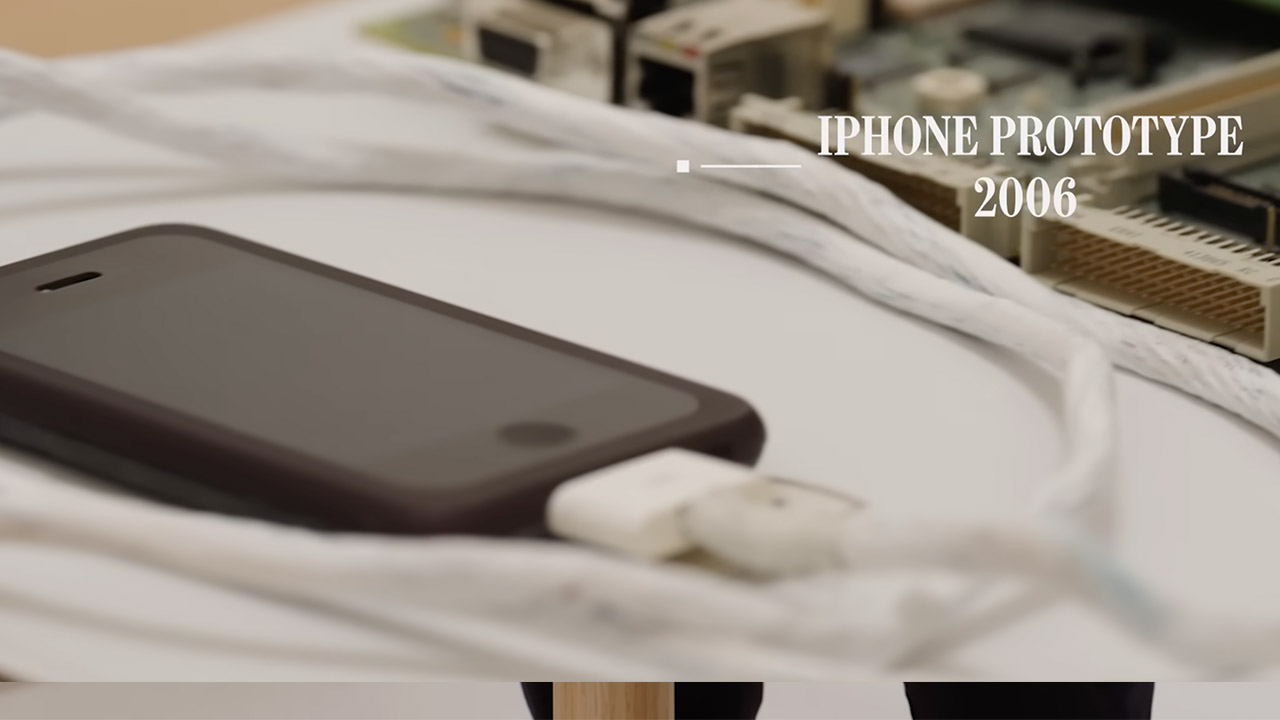
The 2007 iPhone launch remains Cook’s favorite moment in the company’s history, and a circuit board from one of the first working prototypes sitting on the table illustrated just how far the engineering team had to travel to get there. It looked more like a cutting board than something destined for a pocket, an early proof of concept that needed everything working together before the whole thing could be miniaturized. Cook noted that even inside Apple, employees were walking around with early models watching keys and coins scratch the plastic casing. Steve Jobs made the call to switch to glass within a matter of months, a timeline Cook described as close to impossible, comparing it to trying to land on the moon between January and June.
Cook touched on projects that never made it, framing each one as something the team learned from before showing up the next morning and getting back to work. That steadiness, he suggested, is what carried the company through five decades of setbacks and breakthroughs alike. An early Apple Watch prototype rounded out the tour, and Cook’s attention shifted forward, pointing to the combination of hardware, software, and services as the space where the next significant leap is most likely to come from.
NASA is going back to the Moon! We’ll follow the crew of Artemis II every step of the way.
Day 1 – Liftoff!
After resolving a last-minute communications issue with the Flight Termination System (FTS), the Artemis II Space Launch System (SLS) rocket lifted off from Launch Complex 39B at NASA’s Kennedy Space Center in Florida at 6:35 PM EDT.
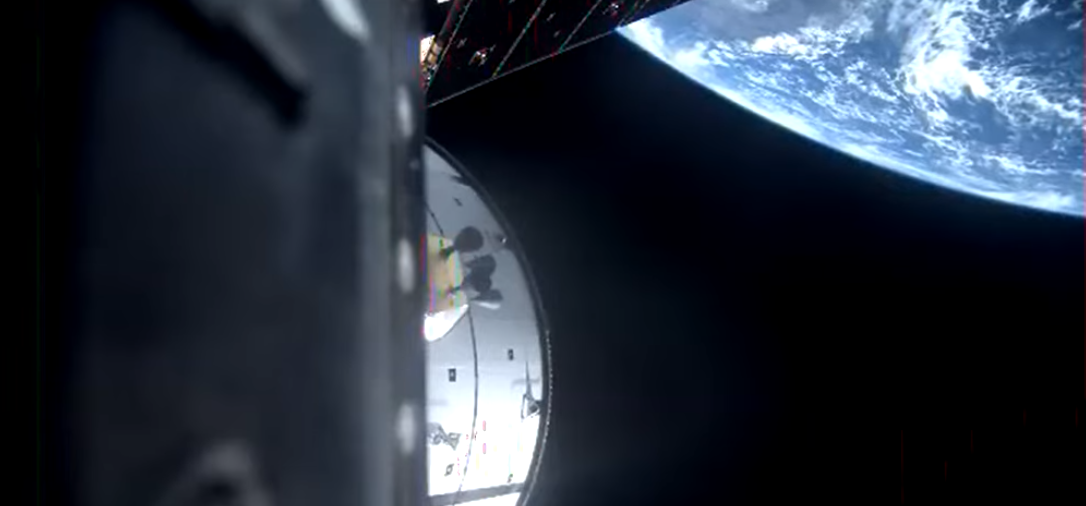
Main engine cutoff (MECO) for the SLS rocket occurred at 6:43 PM, placing the Orion spacecraft and crew members Reid Wiseman, Victor Glover, Christina Koch, and Jeremy Hansen safely into orbit around the Earth. Just before 7:00 PM, all four solar array “wings” were successfully deployed from the European Service Module.
Advertisement
The next major milestones are the perigee and apogee raise maneuvers — two engine burns which will put the Orion spacecraft into a higher orbit, necessary for the eventual trans-lunar injection (TLI) burn which will put the vehicle on course for the Moon.
April is a strong month for horror with some of the biggest franchises and originals available to watch from the comfort of your living room. The month is typically associated with pranks and comedies, but if you want something more macabre, I’ve got you covered.
Here are my 7 top horror picks arriving across streaming services this April.
Advertisement
Article continues below
Alien
Alien Trailer HD (Original 1979 Ridley Scott Film) Sigourney Weaver – YouTube
When: April 1 Where: HBO Max (US); Disney+ (UK, AU)
Ridley Scott’s iconic sci-fi horror Alien is streaming throughout April, if you want to revisit one of the greats. And if you haven’t seen this masterpiece of a movie, now is the perfect time.
Advertisement
Alien is well-loved for its groundbreaking effects in the 70s, its iconic Xenomorph creature design, and the atmospheric tension that builds throughout. Other Alien movies can also be found on HBO Max and Disney+, but you really can’t beat the first one, even if some people do think Aliens was better!
Sign up for breaking news, reviews, opinion, top tech deals, and more.
2025’s Deathstalker is a remake of the 1983 movie of the same name. Those looking for dark fantasy won’t want to miss this addition to Shudder’s library, as an alternative to some of the more modern horror movies it offers.
Advertisement
Daniel Bernhardt and Patton Oswalt lead the cast of the remake, which follows a powerful swordsman known as Deathstalker after he recovers a cursed amulet from a corpse-strewn battlefield. When he’s marked by dark magic and hunted by monstrous assassins, he must face the rising evil and break the curse before it’s too late.
Five Nights at Freddy’s 2
Five Nights at Freddy’s 2 | Official Trailer – YouTube
When: April 3 Where: Peacock (US); rent or buy (AU)
Are you ready for Freddy? The sequel arrives on Peacock in April, following a successful box office run. Despite being panned critically, Freddy Fazbear and friends continue to have a dedicated fanbase, so if you’re part of that, you’ll be happy to know it’s coming to streaming.
Advertisement
The adaptation of the successful horror game is set a year and a half after the previous movie, where we follow young Abby Schmidt as she gets manipulated by the Marionette, an animatronic from the original Freddy Fazbear’s Pizza restaurant, who wants revenge against her parents. The Marionette is one of the creepiest figures in the games, and now you get to see it come to life on film.
Earwig
EARWIG | Official Trailer | Now showing on MUBI – YouTube
Earwig is a strange movie, but when you’re a horror fan, that’s often a compliment. Set in a bleak post-war Europe, we follow a middle-aged man, Albert, as he cares for a young girl named Mia, who has no teeth.
Every day, he makes her new dentures out of ice, and one day, he’s told by a mysterious voice to prepare Mia for the outside world, where she has never been. Described as both a melodrama and a body horror, it’s a disturbing movie that may divide fans, but I can certainly say it’s stuck with me for a while.
When: April 10 Where: Netflix (US); Paramount+ (UK); rent or buy (AU)
2022’s Scream is the fifth entry into the slasher franchise, and why it wasn’t just called Scream 5 continues to baffle me. Anyway, don’t let that deter you; it is a very strong movie and one of my favorites in the series.
Despite the name, it’s not a remake; instead, it focuses on a new core cast of characters, though original stars like Courteney Cox, David Arquette, and Neve Campbell reprise their roles.
Advertisement
A Quiet Place Part II
A Quiet Place Part II (2021) – Final Trailer – Paramount Pictures – YouTube
When: April 11 Where: Netflix (US); Paramount+ (UK); rent or buy (AU)
Ahead of A Quiet Place Part III, which is due next year, why not catch up with the second in the successful horror series? It’s arriving on Netflix for US audiences, while UK audiences can watch on Paramount+.
A Quiet Place Part II continues to focus on the Abbott family (except for John Kransinski’s Lee) as they try to survive in a post-apocalyptic world inhabited by blind aliens with an acute sense of hearing, so it’s critical that they monitor how much noise they make. Horror doesn’t get much more tense than this.
Dolly
Dolly – Official Trailer (2026) Fabianne Therese, Seann William Scott, and Max the Impaler. – YouTube
Finally, at the end of April, we have Dolly. Creepy dolls are a staple in the horror genre, just look at Annabelle and Chucky, but this movie has got me creeped out by the synopsis alone.
Advertisement
Terror strikes when Macy and her boyfriend Chase are attacked while camping, and Macy is abducted by a tall, menacing figure who treats her as if she were a living doll. NWA wrestler Max the Impaler plays said figure, making it their movie debut.
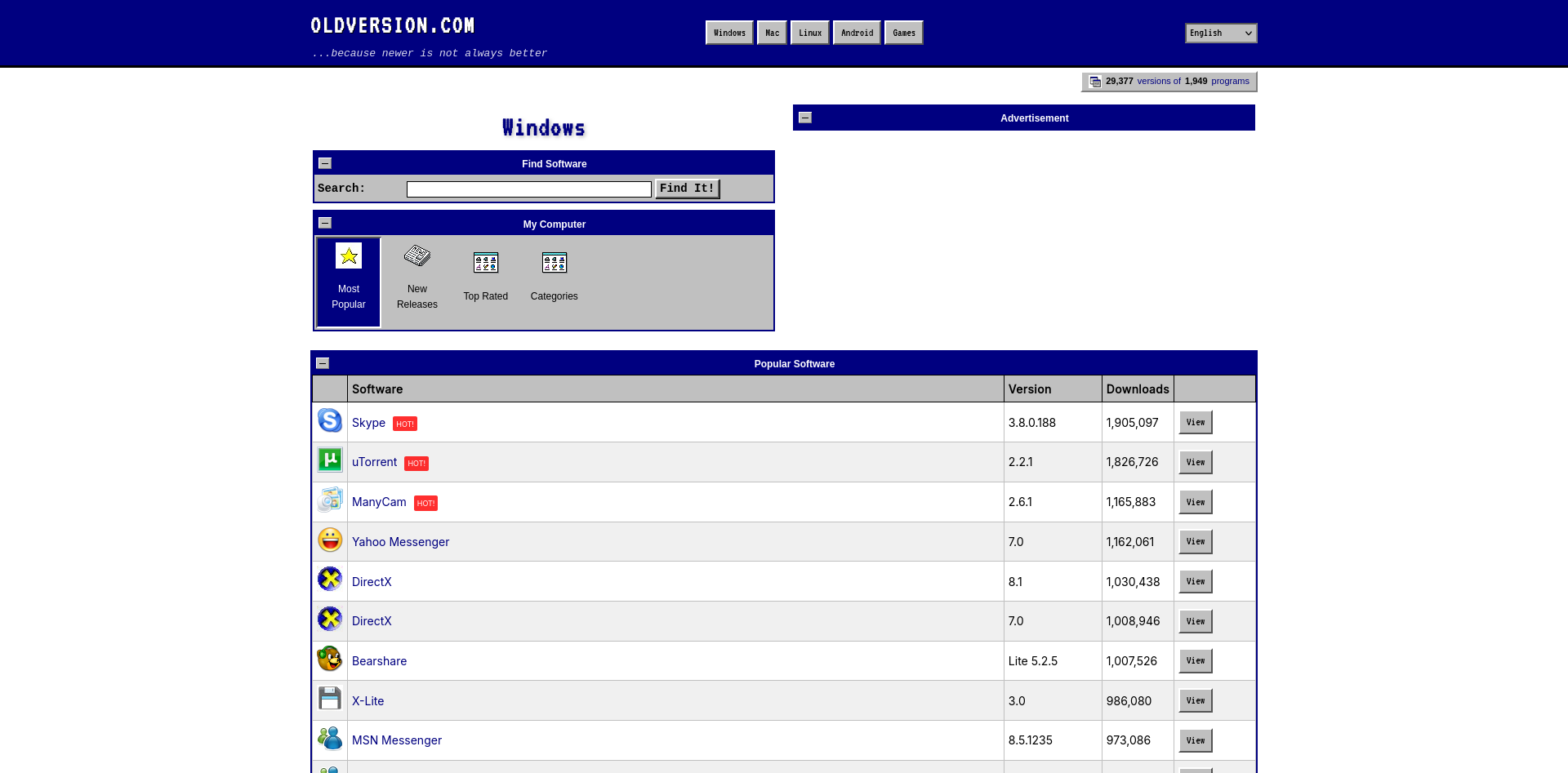
You know what they say — you can’t keep a good website down. OldVersion.com, the repository of outdated software that has been serving up old versions of tools you need for the last twenty-five years, is not going away as we reported last year. Not only is it sticking around, it’s gotten a retro facelift inspired by Windows 3.1 or OS/2. Mostly Windows, given the screensaver, but we’ll let you find that for yourself.
We’re thrilled to see that OldVersion has gotten the support they need to keep going after running into financial troubles. According to founder Alex Levine, some of that support came as a result of the Hackaday article reporting on the then-upcoming closure, so kudos to you guys for stepping up.
While we absolutely love the retro redesign of the new website, that’s one thing notably lacking — an obvious donation button. Well, that and old-school HTTP support so you can get on with your retromachines, but that, at least, is in the works according to the site roadmap. It’s a little weird that in this year of the common era 2026 you have to do extra work to give up on HTTPS functionality, but it is the way it is.
In the meantime, the site is fully usable as long as you have HTTPS capability, or go through a proxy. Perhaps you could use this ESP8266 code to get started making one, if you don’t want to embarrass your old computer by using something more powerful than it as a pass-through.
Advertisement
Speaking of proxies, if old versions of software aren’t enough for you, how about an old version of the internet? We heard you like old versions, so you can visit an old version of OldVersion!
Note that if you’re reading this after 01/04/2026, the look-and-feel of OldVersion.com may not match what’s depicted here.
SpaceX is looking to the heavens for its upcoming initial public offering based on a $1.75 trillion valuation, according to confidential paperwork filed with the US Securities and Exchange Commission.
As reported by Bloomberg, the draft IPO registration is the first step toward a possible June offering that could raise approximately $75 billion. The filing allows the company to get feedback from the SEC before the information is released publicly.
The IPO may be open to more people than just the wealthiest investors. According to a report by The Motley Fool, SpaceX plans to allocate around 30% of the initial shares to “retail investors,” meaning individual investors. Normal retail allocation tends to be around 10% of shares.
Advertisement
A SpaceX representative didn’t immediately respond to a request for comment.
Why a SpaceX IPO is a big deal
Spaceflight is an incredibly expensive endeavor; SpaceX gets billions of dollars from the US government to launch satellites and help keep NASA’s programs running. Almost a year ago, the company set a target of launching every other day through the end of 2025 and ended up launching a record 165 orbital flights.
But SpaceX is no longer just a high-flying rocket company. Its Starlink division provides data access to homes, remote locations, airlines and direct to many mobile phones in areas where there’s no cellular coverage. It also recently acquired xAI, another of Elon Musk’s companies, and owns the social media site X (formerly Twitter).
It’s the AI angle that seems to be driving up the company’s valuation ahead of the IPO. The xAI all-stock acquisition valued the company and SpaceX at $1.25 trillion. This year, OpenAI and Anthropic PBC are also expected to go public.
Advertisement
Although those numbers are eye-popping, the company has plenty of challenges before it can get off the launchpad.
Starlink has announced a plan to send up new V3 third-generation satellites that should bring gigabit internet speeds to its network, but those won’t be ready until 2027. Getting them up requires SpaceX’s heavy-duty Spacecraft vehicle, which has had limited success in testing so far. In the meantime, its current Starlink satellites have been exploding in orbit as recently as this week.
And for xAI, the skies aren’t exactly clear despite the current fervor for all things AI. Musk announced in mid-March that “xAI was not built right first time around, so is being rebuilt from the foundations up.” And the company is being sued by three teen girls and their guardians for “devastating” harm caused by its Grok AI generating child sexual abuse images.
WhatsApp has notified approximately 200 users, primarily in Italy, that they were tricked into installing a counterfeit version of the messaging app that was actually government spyware. The fake application was built by SIO, an Italian surveillance technology company that develops spyware for law enforcement and intelligence agencies through its subsidiary ASIGINT. WhatsApp said it had proactively identified the affected users, logged them out of their accounts, warned them about the privacy risks, and urged them to delete the fake client and install the official app from a trusted source. The company told TechCrunch it also plans to send a formal legal demand to SIO to halt any malicious activity linked to the campaign.
The disclosure, first reported by Italian newspaper La Repubblica and news agency ANSA, marks the second time in little more than a year that WhatsApp has publicly named a spyware vendor operating against its users in Italy. In early 2025, WhatsApp alerted around 90 users, including journalists and pro-immigration activists, that they had been targeted by Paragon Solutions, a U.S.-Israeli surveillance firm whose flagship product, Graphite, was deployed by Italy’s domestic and foreign intelligence services. That revelation triggered a political crisis in Rome. Italy’s parliamentary intelligence oversight committee, COPASIR, confirmed the use of Graphite and found that seven Italians had been targeted. Paragon subsequently cut ties with Italy’s spy agencies after the government declined to verify whether the spyware had been used against a specific journalist, Francesco Cancellato of the news site Fanpage.
SIO’s spyware operates through a different model. The malware, identified in its own code as Spyrtacus, is embedded in fake applications designed to look like legitimate software. Researchers have found 13 different samples of Spyrtacus dating back to 2019, with the most recent from late 2024. Previous versions impersonated Android apps from Italian mobile providers TIM, Vodafone, and WINDTRE, as well as earlier fake versions of WhatsApp itself. TechCrunch first exposed SIO’s Android distribution campaign in February 2025. The latest operation, targeting iPhones, represents an expansion of the tactic to Apple’s ecosystem. Once installed, Spyrtacus can steal text messages, chat histories, and call logs, as well as record audio and video directly from the device’s microphone and camera.
The delivery mechanism is as revealing as the malware itself. In Italy, authorities routinely obtain cooperation from mobile carriers, who send phishing links to their own customers on behalf of law enforcement. The target receives what appears to be a routine update notification from their provider, directing them to install what looks like a standard WhatsApp update. The Italian justice ministry has maintained a price list and catalogue showing how authorities can compel telecom companies to send such messages, a system that effectively turns the mobile network itself into a distribution channel for state surveillance tools. The cost of renting spyware in Italy is remarkably low: as of late 2022, law enforcement could access these tools for as little as €150 per day, without the large upfront acquisition costs that typically limit deployment in other countries.
Italy’s position as a spyware hub is unusual among Western democracies. Companies including Hacking Team, Cy4Gate, RCS Lab, and Raxir have all been based in the country, drawn by a legal framework that provides a formal statutory basis for the “captatore informatico,” or computer interceptor, effectively state-sanctioned trojan software. Fabio Pietrosanti, president of the Hermes Center for Transparency and Digital Human Rights, has said thatspyware is deployed more frequently in Italy than anywhere else in Europebecause the low cost and permissive regulation make it accessible to a far wider range of law enforcement agencies than in neighbouring countries. The result is an ecosystem in which municipal police forces, not just national intelligence agencies, can commission surveillance operations against individuals.
Advertisement
WhatsApp spokesperson Margarita Franklin told TechCrunch the company could not yet confirm whether the 200 affected users included journalists or members of civil society. “Our priority has been protecting the users who may have been tricked into downloading this fake iOS app,” she said. The company did not specify whether it had referred the matter to Italian prosecutors or to any regulatory authority. Apple and SIO did not respond to requests for comment.
The legal landscape around commercial spyware has shifted substantially in the past year. In May 2025, a California jury ordered NSO Group, the Israeli maker of Pegasus, to pay WhatsApp $167 million in punitive damages after finding it had enabled hacks of approximately 1,400 users through zero-click attacks. A federal judge later reduced the award to $4 million but imposed a permanent injunction barring NSO from targeting WhatsApp’s infrastructure. NSO has appealed. WhatsApp’s parent company Meta described the verdict as a landmark, and it has since expanded its legal strategy against the broader surveillance industry. The formal legal demand WhatsApp intends to send SIO follows the same pattern: use litigation and public disclosure as deterrents against companies that profit from compromising encrypted messaging platforms.
The proliferation of spyware vendors presents a challenge that extends well beyond any single platform. Apple has sent mercenary-spyware threat notifications to users in more than 150 countries since 2021, alerting individuals it believes have been individually targeted by state-sponsored attacks. In April 2025, Apple notified the Italian journalist Ciro Pellegrino, one of the Paragon victims, that he had been targeted. The notification systems run by Apple and WhatsApp now represent the primary mechanism by which victims of government surveillance learn they have been compromised, a function that was once the exclusive domain ofthe cybersecurity industry’s specialist researchers.
The global lawful-interception market was valued at $4 billion in 2023 and is projected to reach $15 billion by 2032, growing at roughly 16 per cent annually. That growth is being driven not by the Pegasus-style zero-click exploits that attract headlines, but by the kind of low-cost, phishing-based tools that SIO sells. The barrier to entry for government surveillance has dropped to the point where a local police department in a midsize Italian city can commission the same class of spyware deployment that was once the preserve of national intelligence agencies. Thegap between regulatory ambition and enforcement capacityin Europe means that the legal frameworks governing these tools have not kept pace with the speed at which they are being adopted.
Advertisement
What makes the SIO case distinct from the Paragon scandal is the method. Paragon’s Graphite used zero-click exploits that required no action from the target. SIO’s Spyrtacus requires the target to install a fake application, a social-engineering approach that relies on trust in the carrier and familiarity with routine app updates. The fact that Italian telecoms participate in the delivery chain, sending phishing messages to their own subscribers at the state’s request, turns the mobile infrastructure itself into an instrument of surveillance. It is one thing for a government to hack a phone. It is another for the phone company to help.
WhatsApp’s decision to publicly name SIO and notify the affected users followsthe broader pattern of tech platforms asserting themselves as counterweights to state surveillancein ways that would have been unthinkable a decade ago. The company is not merely patching a vulnerability. It is identifying the vendor, alerting the victims, and threatening legal action, a posture that positions a messaging app owned by Meta as a more effective check on government spyware abuse than any European regulatory body has managed to date. Whether that dynamic is reassuring or alarming depends on your view of where the responsibility for protecting citizens from their own governments should ultimately rest.
For the 200 users in Italy who received WhatsApp’s notification, the immediate question is narrower: who authorised the surveillance, and on what legal basis? The answer may never become public. Italy’s lawful-intercept framework permits the use of these tools under judicial oversight, but the oversight mechanisms haverepeatedly proven inadequate to prevent abuse. The Paragon scandal demonstrated that intelligence agencies could target journalists and activists under the cover of lawful authority. The SIO case suggests the problem runs deeper, extending to less prominent vendors, cheaper tools, and a distribution model that exploits the trust citizens place in their mobile carriers. The spyware industry does not need zero-click exploits to be dangerous. It just needs a convincing notification from your phone company.
Under a new state regulation, venture capital firms operating in California were supposed to submit demographic data about their portfolio companies, including the gender and race of startup founders they backed. But amid public criticism from some tech leaders, the California agency administering the new requirement suspended it just before the Wednesday deadline for firms to make their first disclosures.
“The California Department of Financial Protection and Innovation (DFPI) has announced that it plans to initiate rulemaking in response to comments by various stakeholders relating to the Fair Investment Practices by Venture Capital Companies Law,” the state agency posted on its website in mid-March. “Implementation and enforcement of the [law] will be suspended pending completion of the rulemaking and until final regulations are in place.”
California lawmakers first passed the measure in 2023, and it was signed into law shortly thereafter by Governor Gavin Newsom. For decades, women and people of color have received only a small share of overall startup funding relative to their representation in the US population. Lawmakers hoped putting more public scrutiny on investment decisions would help foster greater equity in the market, including for people who are disabled, retired military, or LGBTQ+.
The law called for venture capital and some other investment firms to file annual reports starting March 1 of last year about the overall makeup of the founding teams they had invested in and the amount of money they provided to diverse founders. Firms were meant to collect the demographic data through a voluntary survey that was then anonymized. California authorities planned to publish the filings online. Lawmakers amended the law in 2024 to delay reporting until April 1, 2026 and enable the state to levy daily fines for noncompliance.
Advertisement
The California Department of Financial Protection and Innovation did not immediately respond to a request for comment on the authority it used to sidestep the deadline set by lawmakers. Newsom’s office also didn’t immediately respond to a request for comment.
Financiers focused on funding entrepreneurs from underrepresented backgrounds had supported the law. But the National Venture Capital Association, the tech investment industry’s leading trade group, opposed it. The group argued that voluntary data collection would inflate diversity statistics and that publishing inaccurate data could lead to unfair attacks on investors genuinely trying to tackle diversity issues. Over the past year, the Trump administration has defunded and attacked diversity, equity, and inclusion, or DEI, initiatives in both the public and private sectors, leading many businesses and organizations to pull back from them.
In February, the venture capital association wrote to Newsom asking for the reporting deadline to be pushed back again because, in its view, the state had bungled the process. California authorities didn’t publish the standardized survey founders were supposed to fill out until early this year and, at the time, they still hadn’t introduced a way for firms to register with regulators as required by the law, according to the association. “This administrative timeline creates an environment ripe for error and threatens to produce the misleading and counterproductive data we previously warned against,” association president and CEO Bobby Franklin wrote.
Last month, as the deadline for the first reports loomed, some entrepreneurs and investors began complaining on social media about the survey effort. “The latest California malarky is a requirement for venture investors to collect/report racial and gender statistics,” wrote Blake Scholl, the founder and CEO of venture-backed aviation startup Boom Supersonic. “I want to live in a world where merit matters—not skin color or what you have between your legs.”
A new malware-as-a-service called CrystalRAT is being promoted on Telegram, offering remote access, data theft, keylogging, and clipboard hijacking capabilities.
The malware emerged in January with a tiered subscription model. Apart from the Telegram channel, the MaaS was also promoted on YouTube, via a dedicated marketing channel that showcased its capabilities.
Kaspersky researchers say in a report today that the malware features strong similarities to WebRAT (Salat Stealer), including the same panel design, Go-based code, and a similar bot-based sales system.
CrystalX also includes an extensive list of prankware features designed to annoy the user or disrupt their work. Despite its “fun” side, CrystalX offers a large set of data theft capabilities.
Advertisement
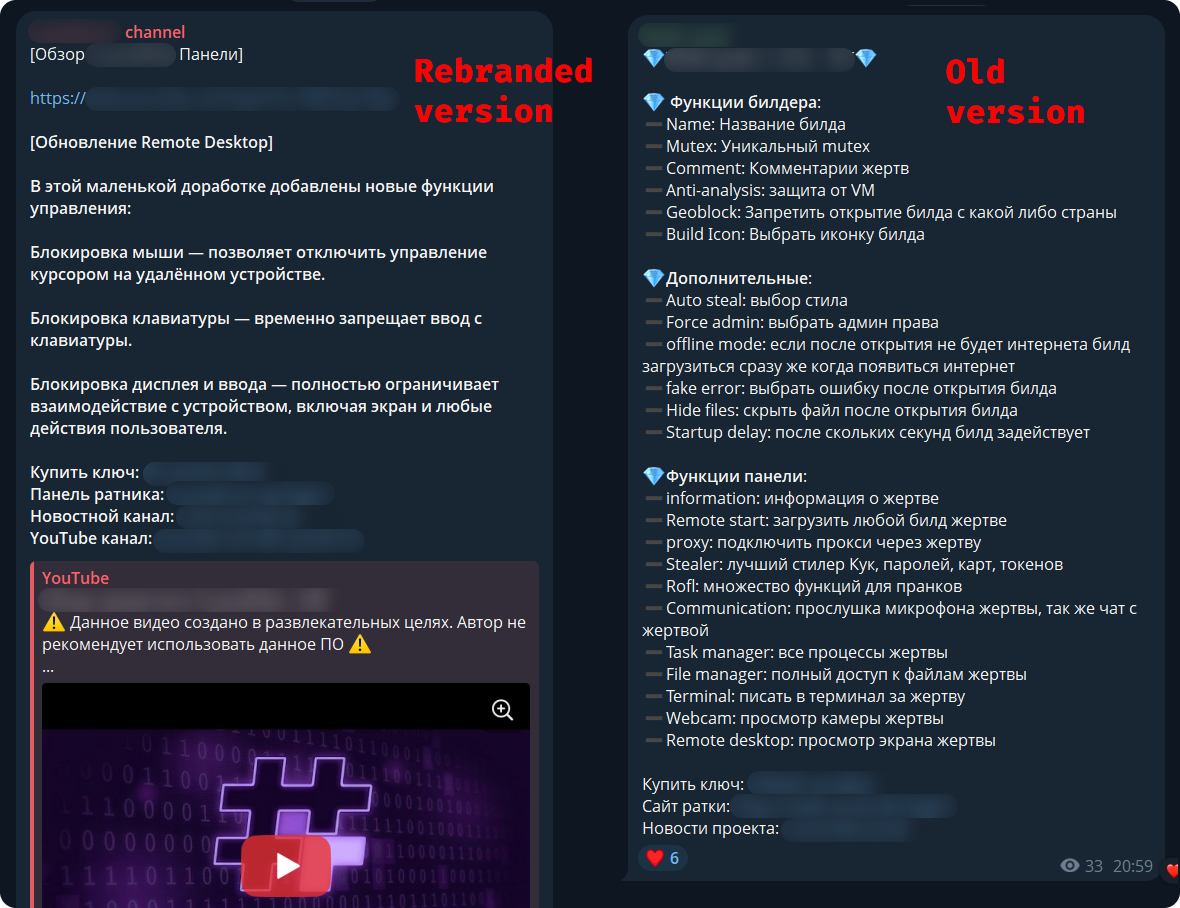
Telegram channel promoting CrystaX RAT Source: Kaspersky
CrystalX RAT details
Kaspersky says that the malware provides a user-friendly control panel and an automated builder tool that supports customization options, including geoblocking, executable customization, and anti-analysis features (anti-debugging, VM detection, proxy detection, etc.).
The generated payloads are zlib-compressed and encrypted with the ChaCha20 symmetric stream cipher for protection.
The malware connects to the command-and-control (C2) via WebSocket and sends info about the host for profiling and infection tracking.
CrystalX’s infostealer component, which Kaspersky found to be temporarily disabled as it is being prepared for an upgrade, targets Chromium-based browsers via the ChromeElevator tool, Yandex, and Opera. Additionally, the tool collects data from desktop apps such as Steam, Discord, and Telegram.
The remote access module can be used to execute commands via CMD, upload/download files, browse the file system, and control the machine in real time via built-in VNC.
Advertisement
The malware also exhibits spyware-like behavior, as it can capture video and audio from the microphone.
Finally, CrystalX features a keylogger that streams keystrokes in real time to the C2, and a clipper tool that uses regular expressions to detect wallet addresses in the clipboard and replace them with ones the attacker provides.
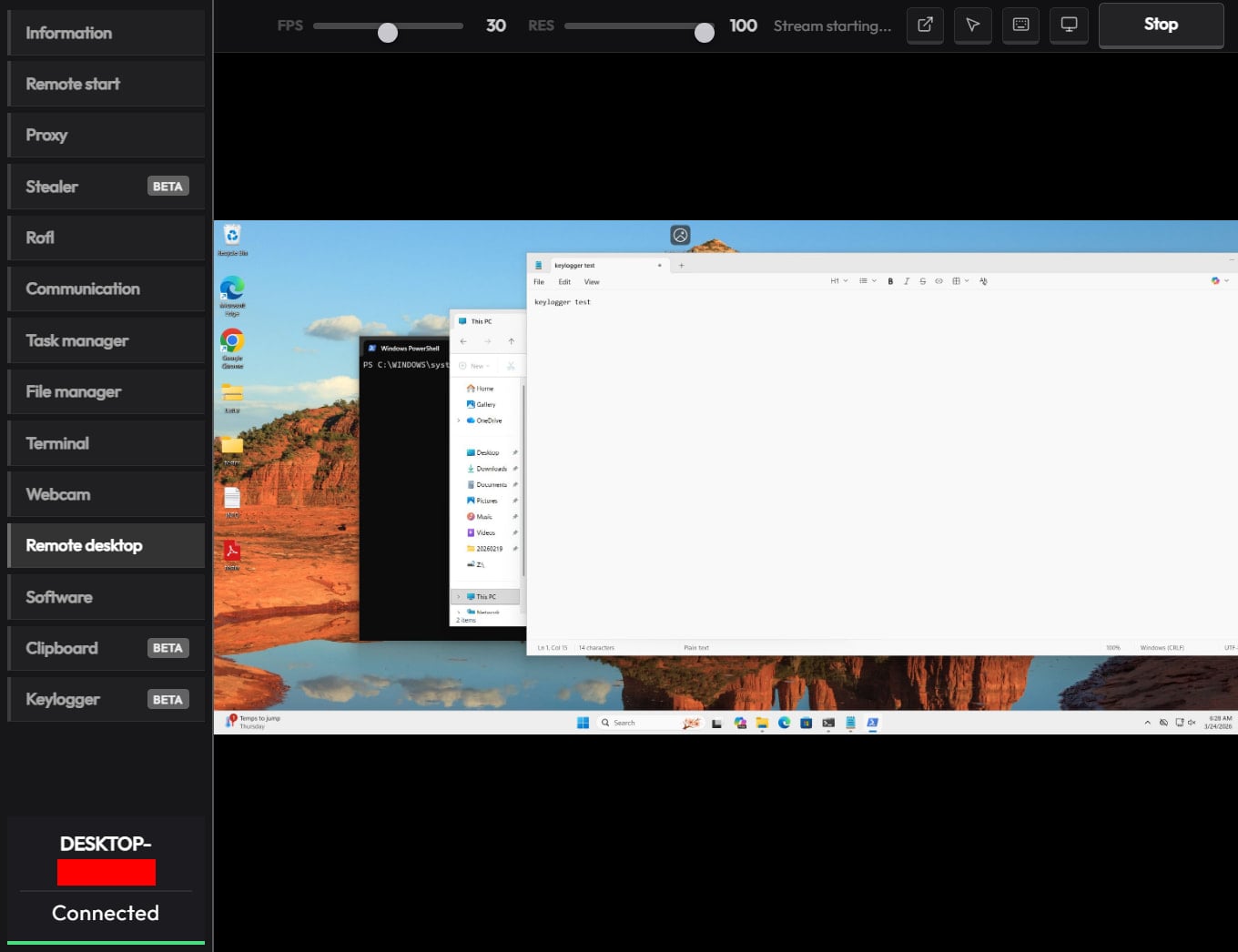
Remote desktop function in CrystalX RAT panel Source: Kaspersky
Putting some “fun” in the package
What sets CrystalX apart in the crowded MaaS space is its rich set of prankware features.
According to Kaspersky, the malware can do the following on infected devices:
change desktop wallpaper
alter display orientation to various angles
force system shutdown
remap mouse buttons
disable input devices (keyboard/mouse/monitor)
show fake notifications
change cursor position on the screen
hide various components (desktop icons, taskbar, the Task Manager, and the Command Prompt executable)
Provide attacker-victim chat window
While the above features do not improve the attack’s monetization potential for cybercriminals, they certainly make the product distinctive, and could bait script kiddies and low-skilled/entry-level threat actors into getting a subscription.
Another reason for the prank features could be potential for victim manipulation, or even distraction, while the data theft modules run in the background.
Advertisement
To reduce the risk of malware infections, users are advised to exercise caution when interacting with online content and avoid downloading software or media from untrusted or unofficial sources.
Automated pentesting proves the path exists. BAS proves whether your controls stop it. Most teams run one without the other.
This whitepaper maps six validation surfaces, shows where coverage ends, and provides practitioners with three diagnostic questions for any tool evaluation.
Because South Dakota governor Larry Rhoden is forever obligated to serve Kristi Noem and Kristi Noem is forever obligated to serve Donald Trump, he and his GOP buddies are making America MAGA again, starting with his home turf.
Non-citizens have never really disrupted voting. But they’re the convenient scapegoat for a party that’s justifiably worried it’s going to lose its majority during the mid-terms. Multiple efforts are being made all over the nation to disenfranchise anyone that’s not part of Trump’s most rabid voting base. Pretending people not allowed to legally vote are somehow flipping elections for the Democratic Party is more than merely obnoxious. It’s actually harming the democratic process.
Here in South Dakota, two laws have been passed in recent weeks with the express purpose of keeping non-white people from showing up to vote. The first, passed at the beginning of this month, allows any rando to claim a person they saw voting shouldn’t be allowed to vote.
Voters in South Dakota will soon be able to challenge other voters’ citizenship.
Republican Gov. Larry Rhoden signed legislation into law last week that authorizes challenges by individuals and election officials.
Advertisement
[…]
State law already allows challenges to a voter’s registration up to the 90th day before an election, if a person is suspected of lacking South Dakota residency, voting in another state or being registered to vote in another state. The new law adds citizenship as a justification for a challenge.
Challenges may be filed by the South Dakota Secretary of State’s Office, the auditor in the county where the voter is registered, or a voter in the same county. The challenge must be in the form of a signed, sworn statement and must include what the law describes as “documented evidence.”
Now, we can all see what the law is. But we all know how it will be applied. State employees with access to voter rolls will raise challenges against anyone with a foreign-sounding last name. While it’s unlikely few citizens will actually file challenges, they’ll certainly feel comfortable accosting anyone standing in line to vote whose skin is darker than their own. Given the inevitability of these responses, it’s easy to see the law accomplishing exactly what it’s supposed to: limit the number of non-white voters at the polls during the mid-terms and beyond.
Advertisement
But that’s not the only suppression effort signed into law this month. There’s also this one, which raises the bar for participating in the democratic process with the obvious intention of limiting participation to the sort of voters the GOP thinks with vote for it:
New voters in South Dakota will have to prove that they are United States citizens in order to cast a ballot in state and local races under a bill signed on Thursday by Gov. Larry Rhoden.
The new law, which does not apply to South Dakotans already on the voter rolls, comes amid a national push by Republicans to tighten voting rules and root out voting by noncitizens, which is already illegal and believed to be rare.
“This bill ensures only citizens vote in state elections, keeping our elections safe and secure,” said Mr. Rhoden, who is seeking election to a full term this year and is facing a crowded Republican primary field.
It’s already illegal in South Dakota to vote if you’re not a citizen. This bill addresses a completely imaginary “problem.” And it forces voters to provide a passport, birth certificate, and other documents proving citizenship before they’re allowed to vote. While it may be easy for many people to present these documents, the simple fact is that they’ve never been asked to do this before, and anyone who’s not aware this law has been passed will be denied the opportunity to vote because the GOP decided to move the goalposts during an election year.
Advertisement
Non-citizens voting in South Dakota has never been an issue. The fact that 273 non-citizens were recently removed from the state’s voting rolls may seem a bit sketchy but there’s a good reason there might be a few hundred non-citizens with voter registrations:
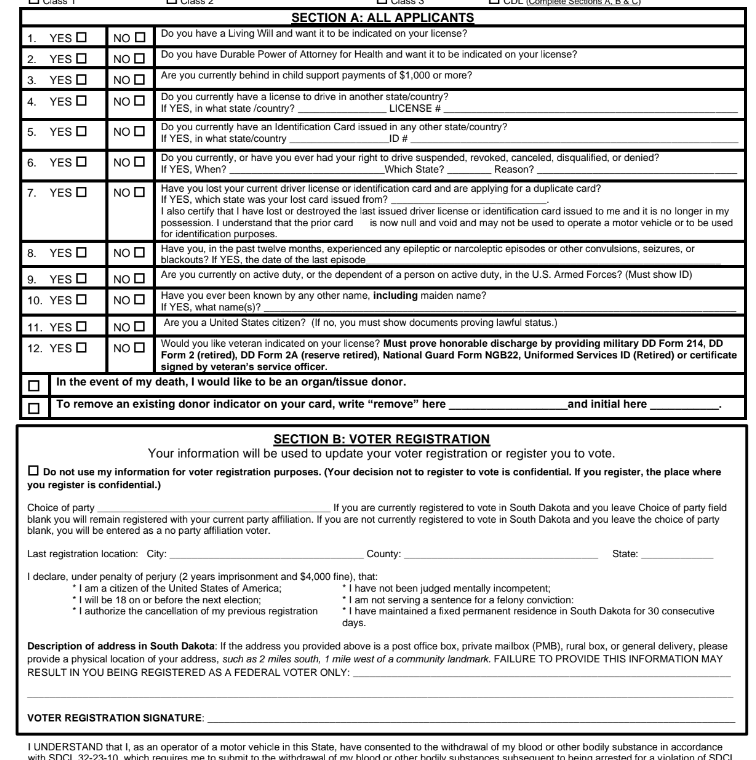
Noncitizens can obtain a driver’s license or state ID if they are lawful permanent residents or have temporary legal status. There’s a part of the driver’s license form that allows an applicant to register to vote. That part says voters must be citizens.
The problem is that this is all on the same form. The voter registration part of the form has a signature line, which many applicants will fill out and sign even if their intention is only to get a drivers license or ID card, especially since it appears before the final signature block for the entire application.
If applicants are not asked to affirmatively state their intention to register to vote (as the Department of Public Safety employees ask now, along with asking applicants to write “vote” on the form to signal their affirmation), their applications might be processed, along with the voter registration applicants didn’t realize they enabling.
The Secretary of State’s office (the office that’s supposed to be reviewing voter registrations for eligibility) threw the Department of Public Safety under the bus:
Rachel Soulek, director of the Division of Elections in the Secretary of State’s Office, placed blame on the department in her response to South Dakota Searchlight questions about the situation.
“These non U.S. citizens had marked ‘no’ to the citizenship question on their driver’s license application but were incorrectly processed as U.S. citizens due to human error by the Department of Public Safety,” Soulek wrote.
Advertisement
That’s not what happened. Their ID applications were processed and the Soulek’s department failed to catch the inadvertent errors. And it doesn’t really even matter who’s at fault because despite the errors, this is still a non-issue.
Soulek said only one of the 273 noncitizens had ever cast a ballot. That was during the 2016 general election.
A handful of clerical errors that resulted in a single illegal vote in the past decade cannot be a rational basis for a new law. And there’s a good chance the sole vote was made in error, rather than maliciously. After all, if the state told this person they could vote, who were they to question that determination?
This is nothing more than state governments stepping up to do what Trump can’t. His SAVE Act is stalled and lots of last-minute gerrymandering at the behest of the president is tied up in court. His loyalists are doing what they can to make his perverted dreams a reality in states that are most likely to lean Republican in the first place, which makes all of this as pointless as it is stupid. But the underlying threat to democracy remains, ever propelled forward by the people who claim to love America the most.
This week, juries in California and New Mexico dealt a pair of landmark verdicts against America’s social media giants.
In Los Angeles, jurors awarded $6 million to a young woman who alleged that Instagram and YouTube had damaged her mental health. A day earlier, a jury in Santa Fe ruled that Meta had designed its social media platforms in a manner that harmed minors — and ordered the company to pay $375 million in recompense.
These decisions constituted a breakthrough for a legal movement that sees social media companies as the new “Big Tobacco” — an industry that knowingly peddles harmful and addictive products. And it was a triumph for advocates of “child online safety,” who believe that social media is corrosive to minors’ psychological well-being. With thousands of similar lawsuits pending, the California and New Mexico verdicts could prove to be transformative precedents.
Yet the decisions have also raised alarm bells for many free speech advocates. To organizations like FIRE — and civil libertarian writers like Reason’sElizabeth Nolan Brown — these decisions will do more to undermine free expression online than to safeguard young people’s mental well-being.
Advertisement
To better understand — and interrogate — this perspective, I spoke with Nolan Brown. We discussed how the recent verdicts could open the door to broader censorship, the evidence for social media’s psychological harms, and whether parents can sufficiently protect their kids from problematic internet use without the government’s help. Our conversation has been edited for clarity and concision.
You’ve written that these verdicts are “a very bad omen for the open internet and free speech.” How so?
What we’re seeing in these cases is an attempt to get around Section 230 by recharacterizing speech issues as “product liability” issues. Instead of saying, “We’re going after platforms for hosting harmful speech,” the plaintiffs are saying, “We’re going after them for negligent product design.”
Advertisement
In other words, the choices that social media companies make about how to curate their feeds or encourage engagement.
Right. Some of the things they complained about were “endless scroll” (where you keep going down and the feed doesn’t stop at the end of a page), recommendation algorithms that promote content that a user is more likely to engage with, and beauty filters.
But ultimately, if you look at what they’re actually going after, it comes down to speech. When you talk about TikTok or YouTube being so engaging that it’s “addictive,” you’re talking about content: No matter how TikTok’s algorithm is designed, it wouldn’t be compelling to people if the content wasn’t compelling.
Similarly, in the California case, the plaintiff argued that Meta allowing beauty filters on images was a negligent product design, since they promote unrealistic beauty standards, which caused her to develop body image issues.
Advertisement
But that really just comes back to speech: The choice to use a filter is something that individual users do to express themselves. Providing those tools for users is a form of speech.
But aren’t many of these product design choices content-neutral? A defender of these verdicts might argue: Social media companies are manipulating minors into compulsively using their platforms, in a manner that’s bad for their mental health. And they’re doing this, in part, through push notifications, autoplaying videos, and endlessly scrolling feeds. So, why can’t we legally restrict their use of those features — without constraining the kinds of speech they’re allowed to platform?
Some people will say, “Why don’t we limit notifications — or kick people off after an hour — if they’re minors?” But in order to implement any set of rules or product design choices just for young people, these platforms would need to have a foolproof way of knowing who is a minor and who is an adult.
And that means age verification procedures, where they’re either checking everyone’s government-issued ID, or they’re using biometric data — or something else that requires everyone to submit identification before they can speak anywhere on the internet.
Advertisement
And that creates a lot of problems. It makes people’s data more vulnerable to identity theft, hackers, and scammers. It also means that your identity is tied to everything you do online. And that can be dangerous, especially for people who are talking about sensitive issues or protesting the government. The ability to speak and organize online anonymously is very important.
What if the product design restrictions applied to adults and minors alike? If we barred social media companies from issuing push notifications for everyone, that would avoid the age verification issue, right?
Many platforms give people the tools to do these things already. You can turn autoplay off. You can have a chronological feed. You can tailor your settings so that you don’t have these features.
If we’re saying, “Why can’t the government mandate these options?” I think that’s a very slippery slope. You might think, “Okay, who cares about push notifications? Why can’t the government just mandate that they not do push notifications?” But the rationale for that gets us into much broader territory.
Advertisement
It’s effectively saying: Since some people will have a problem with this, the government must micromanage the way that the product is made. Yet people can use all sorts of products in a problematic way: Fitness regimes, streaming services, food. And we’re not saying like, okay, the government gets to step in and tell these companies exactly how to do business in the way that would be least harmful to people. And that attitude is particularly dangerous when we’re talking about products involving speech.
A skeptic might argue that the slope here isn’t actually that slippery. After all, the government has already shown that it can enact targeted, content-neutral restrictions on speech without triggering a cascade of censorship.
For example, since 1990, there have been limits on the amount of advertising that can air during children’s programming in a given hour — and also a requirement that ads and content be clearly separated. Those measures are arguably more intrusive on speech than, say, banning autoplay of videos on a social media platform. And yet, the Children’s Television Act of 1990 didn’t lead to any really sweeping constraints on First Amendment rights.
I just think it makes a big difference if you’re talking about restricting speech for minors and restricting it for adults. And what you were just mentioning were restrictions that would apply to everybody.
Advertisement
Beyond the First Amendment issues, you’ve expressed some skepticism about the specific causal claims made by plaintiffs in these cases: Specifically, that social media caused their mental health difficulties. Yet many social psychologists — most prominently Jonathan Haidt — have argued that these platforms are corrosive to children’s psychological being. So, why do you think the allegations here are overstated?
In the California case specifically, this young woman is alleging that, because she was on social media since she was very young, she developed mental health issues. But there was a lot of testimony showing that there were many other things going wrong in her life. She was exposed to domestic violence. She had troubles with her parents, troubles at school.
So the idea that social media directly caused her difficulties — rather than these life stressors that are well-known to cause harm — I think that’s kind of suspect.
And I think you see this problem in the broader research on social media’s mental health impacts. There’s often a correlation between depressive symptoms and heavy social media use because people who are having a difficult time at home and at school — people who are socially isolated — tend to use social media more than people in better circumstances.
Advertisement
How much do your views on the regulation of social media hinge on skepticism about the actual harms of these platforms? If we acquired evidence that there really were major impacts here — that autoplay and beauty filters were dramatically worsening kids’ mental health — would you support legal restrictions on these features? Or would First Amendment considerations override public health concerns, irrespective of the evidence?
The strength of the evidence is important for guiding the decision-making of individuals, parents, families, communities, and school districts. But even if we knew that beauty filters caused a lot of harm, the government still would not be justified in banning them, since they are avenues for speech. Plenty of people are not harmed by them.
There are so many things that harm some people, but that are useful to others. And I don’t think the existence of problematic use justifies banning those things for everyone.
I think talk of social media “addiction” can be unhelpful on this front. That language suggests that this is something that’s automatically harmful for everyone. And that just isn’t the case. Plenty of people use social media in a healthy way, in the same way that countless people can drink alcohol without it harming them, or eat a bag of chips without bingeing on them.
Advertisement
I think it’s the same way with social media. This is a technology that can harm some people, particularly those who already have psychological issues.
But it isn’t this addictive substance or a poison where you can’t even be exposed to it, or else. I think that view imbues smartphones with an almost mystical quality.
There are many cases, though, where we choose to heavily regulate a substance or practice — not because it harms everyone who engages with it — but rather, because it imposes massive harms on a minority of problem users. Gambling and alcohol are two examples. But even with opioids, many people can pop some pills and never develop a dependency. Yet some end up addicted and dying of overdoses. And for that reason, we heavily restrict access to opioids.
So, I feel like the question here might be less about whether social media is bad for everyone than whether it has truly large harms for problem users.
Advertisement
I think there are people who talk about it the way you do. But others describe social media as if it’s something that people are powerless against. But yes, I don’t think we have strong evidence that this is harmful in the way that addictive substances are. In fact, I think the evidence is really mixed. Some studies suggest that moderate smartphone use is actually correlated with better mental health outcomes.
You argue that, instead of seeking government restrictions on social media, parents should exercise more responsibility over their kids’ use of smartphones and apps.
Many parents argue that their capacity to monitor their children’s social media use is really limited and that they lack the tools to protect their kids from the harmful effects of these platforms. What would you say to them?
I think this is straightforward with very young children. Like, why is a 6-year-old having unfettered alone time on a digital device? In the California case, the plaintiff was using social media as a very young child. And at that age, parents definitely have control over what their kids do and see online; you can control whether your kid has access to a smartphone. With adolescents, there are areas where tech companies are working with parents. We’ve seen more parental controls being introduced in recent years. We’ve seen Meta roll out specific accounts for minors that have some restrictions on them. We’ve seen things like the introduction of phones that allow basic texting but not certain apps. So, I think private solutions are possible here. I think we can address people’s legitimate concerns without having the government infringe on free expression.

























































You must be logged in to post a comment Login