
Security teams log 54% of successful attacks and alert on just 14%. The rest move through your environment unseen.
The Picus whitepaper shows how breach and attack simulation tests your SIEM and EDR rules so threats stop slipping by detection.



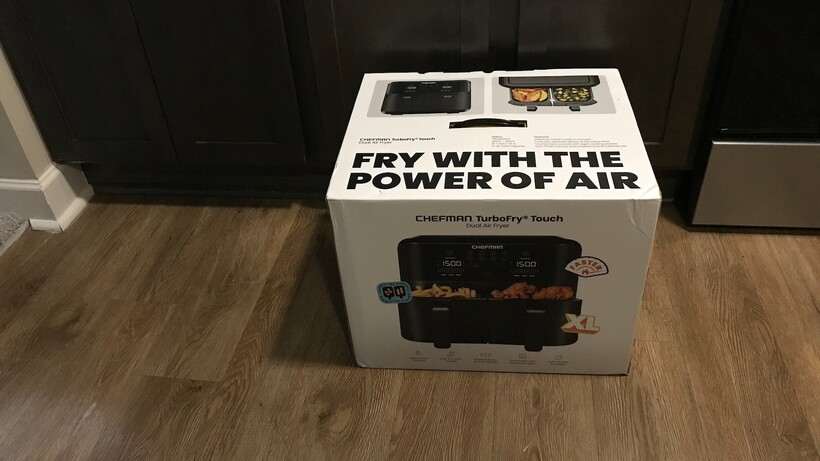
The Chefman TurboFry Touch Dual 9-Quart Air Fryer is an excellent choice for those who love the convenience of cooking two different types of foods at different temperatures. No more waiting for one item to finish baking so you can take it out and load in the second item, or resorting to using another appliance to cook the rest of your meals at the same time. Having presets for some of the most popular foods are an additional convenience that takes the guesswork out of preparing meals. However, if you tend to make a lot of food, the two 4.5-quart baskets may be too small for your needs. And if you need a temperature that exceeds 400 degrees, this may not be the air fryer for you.
Two air fry baskets
Cook two foods at different temperatures
Eight presets
Shake/flip reminders at halfway point
No window to view cooking progress in the 9-quart model
Max temperature is 400°F
Dual baskets
Cook meat on one side, and veggies on the other, at different temperatures – and have them finish cooking at the same time.
Shake/flip reminders
If you’re not paying attention to the countdown timer, the air fryer beeps when it’s time to shake or flip food – with separate reminders for each basket.
Air fryers are quite a life-changing invention. (Okay, I’m sure they said that about regular ovens, and microwaves as well.) The ability to cook a complete meal in a small box that sits on your countertop, instead of having to heat up an entire oven (and your kitchen) is not only more convenient, but also faster. There’s only one thing that has kept air fryers from being perfect: if you’re preparing two types of foods, you’ll either need to crank up the regular oven, use the microwave, or wait until your air fryer finishes with the first item, and then insert the second one.
Admittedly, there are air fryers with dividers for cooking two meals at the same time, for example, back in 2023, my colleague David Ludlow, reviewed the highly-rated Ninja Foodi FlexDraw Air Fryer, which uses a removable divider. However, if you prefer a slightly smaller (9-quart vs 10-quart) option with two separate baskets, the Chefman TurboFry Touch Dual Air Fryer is definitely worth a look. The two baskets can cook two foods at different temperatures and times, or you can sync the baskets to mirror each other, and/or sync them to finish at the same time. Combined with the presets and user-friendly design, this air fryer is a winner.
The Chefman TurboFry Touch Dual 9-Quart Air Fryer arrived in a brown cardboard box, and inside of that, a white, branded cardboard box with a convenient carry handle on top, which made it much easier to transport the appliance up the stairs to the kitchen. The air fryer is 20” W x 13” H x 10” D. It’s bigger than the average air fryer – but since it has dual baskets, that’s to be expected. However, I was pleasantly surprised that it’s not heavy, weighing only 16.3 pounds.

The air fryer consists of the main body, 2 baskets with handles, and 2 basket racks. There’s also a quick start guide and a user manual.
The control/display panel is easy to read and very user-friendly. It includes general selections, and also specific selections for each basket.

The general controls are as follows:
The Start/Stop button is used for both baskets. If only using one basket, the number (1 or 2) will be illuminated.
The Cooking Preset buttons will automatically set both the time and temperature for 8 foods (which are displayed as icons): fries, chicken, fish, bacon, burgers, steak, vegetables, and shrimp.
The Sync Baskets button programs both baskets to cook at the same time and temperature.
The Sync Finish button ensures that the two baskets finish at the same time, even if they have different cooking times and/or temperatures.
Each basket also has its own controls:
The Time/Temp buttons select the time and temperature.
The + and – buttons are used to increase or decrease the time and temperature.
The Shake Lights illuminate at the halfway point as a reminder to shake the basket or flip/turn the contents.
The Running Lights illuminate when the basket is in use.
I only had one concern with the design of the Chefman TurboFry Touch Dual 9-Quart Air Fryer: There’s no window, so I couldn’t view my food to see how it was progressing (without pulling out the baskets). However, Chefman also makes two 6-quart models – one with a window, and one without it.
Although the Chefman TurboFry Touch Dual 9-Quart Air Fryer tested nearly flawlessly, I discovered that the maximum temperature is 400°F.
Initially, I didn’t think this was such a big deal. However, after perusing some of my other air fryer reviews, I noticed that when I air-fried wings in the Chef iQ MiniOven, the instructions were to set the temperature to 450°F. The Ninja French Door Premium Air Fryer Oven Toaster recommends setting the temp to 450°F when making Cheesy Bread with Marinara Sauce, and Chicken Bacon Ranch Pizza.
However, I don’t think any of the foods that I tested in the Chefman TurboFry Touch Dual 9-Quart Air Fryer suffered from being cooked at a lower temperature, although it probably increased the cooking times. However, I wanted to bring this to your attention, in case the temperature range is a factor that you consider when choosing an air fryer.

In my first test, I cooked steak-cut fries in the left basket at 400°F for 20 minutes, and chicken breast in the right basket at 375°Ffor 30 minutes. I used the presets for Fries and Chicken (adjusting accordingly), and chose the Sync Finish setting. The Sync Finish delays the start time on the basket with the shorter cooking time – in this case, the fries.

At the halfway point for each (which was at different times), the Shake lights came on (not that I saw them since I wasn’t standing close by), and the air fryer also beeped, which I did hear. I flipped the fries, and later, I turned the chicken over. (Note: the shake lights and beep will occur regardless of what you’re cooking. If you don’t need to shake, flip, or turn anything over, you can just ignore the alerts.)
The fries came out perfectly. They were slightly crispy on the outside and soft and tender on the inside.

The chicken was very crispy around the edges, but moist and tender on the inside. Both baskets have a removable basket rack (with a center grip bar that makes it easy to remove). One advantage of the racks is that they keep food off the bottom of the basket – which means that oil drains off, so food is not greasy.

If you look at the photos, sometimes, the control panel displays the remaining time, sometimes it displays the temperature, and other times, it displays the status lights. That’s because every few seconds, the controls cycle through each of the indicators. And they don’t necessarily sync, so you may see the temperature on the left side, and the remaining time on the right side.

In my second test, I air fried chicken legs in the left basket, and tossed some frozen veggies in the right basket. I selected the Chicken and Veggies presets, adjusted accordingly, and selected Sync Finish. As you can see, one basket can easily hold four legs.

The chicken legs cooked perfectly, and they were tender and delicious.

However, the veggies were rather dry (I knew this was a possibility, but wanted to test my theory), and a few of the veggies were singed.

In another test, I cooked frozen Alaskan Seafood coho salmon in one of the baskets. It cooked perfectly, and was so soft that it fell apart when I tried to pick it up.

On another occasion, I toasted bread. One of my concerns with having 2 baskets that were only 4.5 quarts each was that some families would find it too small to hold enough bread. However, I was able to fit 2 slices of bread into each basket. And since they were both cooking for the same time and at the same temperature, I selected Sync Baskets.

The toast in both baskets came out perfectly browned and was slightly crunchy. In the photo above, I flipped one piece of toast so you can see the other side.

No test is complete without testing the air fryer’s ability to make cookies. TheNestle Tollhouse Cookies came out crunchy on the outside and soft and gooey on the inside.

In another test, I cooked chicken wings. I was able to put 10 wings in one basket, with room enough for several more. The chicken wings came out well. They were crispy on the outside, tender on the inside, and quite flavorful.

Cleanup is also relatively easy, as the nonstick baskets are dishwasher safe.
Steak and potatoes, chicken and fries, this air fryer is great for preparing two items – and you can cook them at the same or different temperatures.
While it’s a 9-quart air fryer, each basket is only 4.5 quarts, so you won’t be cooking a whole turkey or pizza.
The only thing better than one air fryer is two air fryers. Admittedly, most people complain of not having enough countertop space, so two of these appliances are impractical. However, the Chefman TurboFry Touch Dual 9 Quart Air Fryer has dual baskets – and they can operate independently, or be synced to cook at the same temperature/time and/or to finish cooking at the same time. There are eight presets: chicken, fries, burger, bacon, fish, veggies, steak, and shrimp, making it super easy to cook these popular foods. The digital display is user-friendly and easy to read.
Unlike other sites, we test every air fryer we review thoroughly over an extended period of time. We use industry standard tests to compare features properly. We’ll always tell you what we find. We never, ever, accept money to review a product.
Find out more about how we test in our ethics policy.
It can reach 400°F, which is a little lower than the competition. That might make some food not quite as crispy and extend cooking times, but overall results in my tests were very good.
| Chefman TurboFry Touch Dual 9 Quart Air Fryer |
|---|
| Chefman TurboFry Touch Dual 9 Quart Air Fryer Review | |
|---|---|
| Manufacturer | – |
| Size (Dimensions) | 13.54 x 13.15 x 6.38 INCHES |
| Weight | 16.3 LB |
| Release Date | 2026 |
| First Reviewed Date | 09/04/2026 |
| Model Number | Chefman TurboFry Touch Dual 9 Quart Air Fryer |
| Accessories | Dual baskets |
| Stated Power | 1750 W |
| Number of compartments | 2 |
| Cooking modes | Eight presets |

NATO is building a vast AI network along its eastern flank, designed to spot an attack early and strike back fast. The plan is called the Eastern Flank Deterrence Initiative, and internal documents name one adversary outright: Russia.
German tabloid BILD obtained the papers and shared them through the Axel Springer network, Business Insider reported.
The documents keep returning to one phrase: a “Kill Web”. It describes a tightly linked digital mesh that ties together satellites, reconnaissance drones, radar, ground sensors and cameras. If one node drops out, another takes over.
The network watches the whole border at once, from Finland down to Romania.
The idea is to shrink the time between spotting a target and hitting it. In the past, a drone would flag a target to headquarters. Analysts checked it, then passed a firing order down the chain. That took time NATO no longer wants to lose.

The 💜 of EU tech
The latest rumblings from the EU tech scene, a story from our wise ol’ founder Boris, and some questionable AI art. It’s free, every week, in your inbox. Sign up now!
Under the new model, data from every member flows into one shared picture. Palantir’s Maven Smart System acts as the AI brain, sorting sensor feeds so commanders can decide faster. Other contractors plug in around it, including RTX, Rheinmetall, Saab, Lockheed Martin and Boeing.
NATO sums the loop up in six words: “See first. Decide first. Strike first.”
In practice, a drone might catch a Russian armoured column. The system cross-checks it against satellite images, radar and ground sensors at once. A commander then picks the weapon, be it a drone, artillery or a rocket launcher, by range and by the target’s value.
The front line changes too. NATO wants uncrewed systems to meet an attacker before its soldiers do. A forward zone of drones, ground robots and sensors would absorb the first blow. The logic is cold but simple: machines, not troops, take the opening hit.
Tanks and jets do not go away. Leopard 2s, Abrams, HIMARS and F-35s stay the backbone. “EFDI does not replace tanks, artillery, fighter aircraft, or soldiers,” said Maj. Matt Blubaugh, a spokesman for US Army Europe and Africa. “It is designed to help preserve their combat power and give commanders more time and decision advantage.”
The concept comes straight from the war in Ukraine. Cheap drones, robots and sensors, fielded in their thousands, aim to offset Russia’s edge in sheer numbers and speed. It echoes the kill chains both sides built on that battlefield, now stretched across an entire alliance.
It also fits a wider European push. NATO has been funding defence startups and folding autonomous ground systems into its plans, even as who controls the underlying AI stays a live question.
NATO calls the strategy “deterrence by denial”. The aim is not just to repel Russia, but to make an attack look pointless before it starts. It marks a real shift, from holding ground with troops to contesting it first with software and machines. The hard part is trust: an alliance that hands early decisions to AI has to be sure the machines read the battlefield right.


T-Mobile’s longest-tenured Un-carrier architect just Un-carriered himself.
Mike Katz, who started selling VoiceStream phones at Circuit City 28 years ago and rose to help T-Mobile go from an also-ran into the wireless industry’s most formidable competitor, is leaving the Bellevue, Wash.-based carrier as part of a broader executive reshuffling under CEO Srini Gopalan, who took the helm in November.
Katz, T-Mobile’s chief business and product officer, is stepping away to pursue “new professional interests,” the company said in a press release and SEC filing. The company didn’t provide specifics. We’ve contacted Katz for more on his plans.
He’ll remain as a strategic advisor through December 2026.
His responsibilities are being split three ways:
Katz was named last month to Gov. Bob Ferguson’s newly created Economic Development Council, a 26-member panel of business, labor, and tribal leaders. His status on the council following his departure from T-Mobile is unclear.
Over his career at T-Mobile, Katz led the company’s business group, where he helped triple the customer base, and later oversaw marketing, strategy and products, shaping some of the carrier’s most recognizable brand moves: T-Mobile Tuesdays, Magenta Status, and others.
“We built a regional player into a national powerhouse, flipped the industry on its head with the Un-carrier movement, pulled off the Sprint merger, and pushed into broadband and enterprise,” Katz said in a LinkedIn post announcing his departure.
Gopalan praised Katz in the press release, calling him “a driving force of so many of the bold moves that have transformed our company and our industry.”
Sambar’s hiring is a notable move for T-Mobile, which built its Un-carrier brand in part by positioning itself as the scrappy alternative to industry giants AT&T and Verizon. At AT&T, Sambar led the buildout of the company’s 5G mobile network and oversaw the design and deployment of FirstNet, the nationwide public safety communications network.
A U.S. Naval Academy graduate who served more than 20 years in the Navy, Sambar will report directly to Gopalan and lead T-Mobile’s push into enterprise, government, and emerging growth areas including T-Ads and physical AI.
When it comes to the best smartwatches one can buy on the Android side of things, the options usually boil down to the latest Google Pixel Watch and the Samsung Galaxy Watch. Both the Pixel Watch 4 and the Galaxy Watch 8 are solid options, and which one you pick can depend on factors such as whether you own a Google Pixel or a Samsung phone, design preferences, or even the type of UI. Samsung also offers a few more options, such as the Watch Classic and Watch Ultra series. Owing to this, you may decide to opt for a Samsung smartwatch. While the watch works well across scenarios, the one issue that plagues most Android watches — including the Galaxy Watch — is average battery life.
On most days, your Galaxy Watch may last you an entire day, but you’ll probably have to plug it in just before going to bed. Now, this isn’t ideal, as you may want to use the watch to track your sleep or set alarms. Fortunately, there are a few ways to improve and extend your Galaxy Watch’s battery life. Whether you want to wear it to bed or you’re traveling and are a few hours away from a charger, so you’re desperate to make the last 10% last for a few extra hours, here are some tips I’ve been using since the Samsung Galaxy Watch 4, and they work just as well on the latest Galaxy Watches as well.
One of the most handy features that I absolutely love on all my smartwatches (and smartphones) is Always-on Display. The fact that you can simply glance at your smartwatch to check the time — just like a traditional watch — is super convenient. It also makes the watch look more classy, in my opinion. I would imagine that a lot of folks keep the feature turned on. Unfortunately, though, Always-on Display is among the most battery-hungry features on any device, let alone a smartwatch with a tiny battery. So if you’re in a situation where you want to conserve battery, or you know you’re going to have a long day ahead of you, it’s best to turn off the feature.
Head to Settings > Display > Always On Display and disable it. While you’re at it, there’s another feature on your Galaxy Watch that’s going to drain the battery faster — Raise to wake. The watch’s accelerometer detects every time you lift your wrist and turns the display on. This saves you the extra step of touching the watch’s display before performing a task. Again, while it’s extremely convenient, keeping the sensor running in the background consumes additional juice. From the same menu, turn off the Raise wrist to wake toggle. You can choose when to enable/disable these features based on situations where you want the watch to last longer or prioritize convenience.
With AI becoming a widespread feature that pretty much everyone uses on every device out there, it’s not surprising for someone to use Gemini on their Galaxy Watch. After all, it is a helpful tool if you want to quickly set a reminder, check the weather forecast, or even call or message someone while your hands are occupied. One of the simplest ways to invoke Gemini is to bring the watch close to your mouth and use the trigger phrase “Hey Google.” While this is convenient, it drains the battery quickly because your watch stays awake the entire time to listen for the trigger phrase. That’s certainly not ideal when you’re trying to push the battery to its limits.
On days when I know I want my Galaxy Watch to last those few extra hours, I head to Gemini settings on my linked smartphone and turn off the ‘Hey Google’ detection on the smartwatch. Unfortunately, the native Gemini app on Wear OS doesn’t have the ability to turn off the feature, so you will have to use the connected phone. With the hotword disabled, you can still invoke Gemini by assigning one of the side buttons to open Gemini when you long-press or double-press it. You can also launch the Gemini app manually by swiping up from the watch’s home screen and selecting it from the app drawer.
One of the primary reasons why most folks buy a smartwatch is for health tracking and monitoring. Keeping an eye on metrics, such as the number of steps walked and calories burned, is important if you’re looking to get into shape. Of course, you can also track workouts such as running, cycling, and swimming on the Galaxy Watch. Whether you’re working out or sleeping, there’s one metric that’s always being tracked when you wear the watch — your heart rate. Samsung allows you to track your heart rate via its smartwatches either continuously or at 10-minute intervals. While both of these options provide accurate heart rate data, they require the sensor to constantly run in the background, resulting in constant battery consumption.
If you want the best battery life out of your Samsung Galaxy Watch, what I do is set the heart rate measurement to Manual only. You can do this by opening the Samsung Health app and scrolling down to Settings > Heart rate. With this, your Galaxy Watch won’t automatically record your heart rate, which can skew your data if you’ve been tracking parameters such as stress levels and resting heart rate. However, that’s the trade-off you have to make if you want your watch to last longer. Alternatively, if your heart-rate monitoring setting is set to Measure continuously, you can change it to “Every 10 minutes while still” to save battery while still measuring your heart rate at frequent intervals.
There are two types of Galaxy Watches you can buy — Bluetooth only, and Bluetooth+LTE. The Bluetooth variant should suffice for most use cases, since most folks carry their smartphone along with them at all times. For context — the Galaxy Watch connects to your smartphone via Bluetooth. This is how it connects to the internet, syncs data to your phone, and shows you notifications and incoming calls on your wrist. However, for this to work, your watch must always be in Bluetooth range of your smartphone. But what if you go to the gym or run every morning without your phone? You won’t be able to receive calls, respond to messages, or perform any other activity on your watch that requires a network connection.
This is where the LTE version comes in handy. Since it has an independent eSIM, you can use the watch even if you’re not around your phone. While it’s extremely useful, the fact that your watch has its own radios means that it’s constantly searching for a network, leading to higher battery drain. The trade-off may be worth it for a lot of people. On days you want to prioritize endurance, it’s best to turn off LTE connectivity. Head to Settings > Connectivity > Mobile networks, and change the setting to Always off. If you want to stay connected and yet want the watch to consume less battery, switch to the Auto option instead of the Always-on one.
How long a Samsung Galaxy Watch lasts depends entirely on your usage patterns throughout the day. If you’re tracking a workout for an hour with all the sensors running in the background, answering multiple calls on your watch, and interacting with several apps via the watch’s display, the watch is bound to drain the battery faster. Of course, you can use all the tips mentioned above to increase the standby time, but they may not do much if your usage is on the higher side. For such users, the best way to keep the watch running for a longer duration is to use the Power Saving feature. Drag the quick settings section down from the watch face, then find the power-saving menu, represented by a battery icon with a leaf.
Once you enable it, your Galaxy Watch automatically turns off all the features that consume more battery. Along with that, it also decreases the display brightness and screen timeout durations; limits the CPU performance, background network usage, location tracking, and data syncing, plus, you also get the option to limit health tracking features. On the power-saving mode screen, you can even see how long your smartwatch will last with the mode enabled vs. without it. I generally use this as a last resort when my watch is running drastically low on power, and I know I’m at least a few hours away from a charger.

oumuamua writes: Anthropic researchers have identified an internal activation subspace, J-space, that acts as a functional digital equivalent to the human brain’s global workspace. The significance of this discovery lies in demonstrating that Claude’s internal architecture satisfies five key cognitive properties of human conscious access — verbal report, directed modulation, internal reasoning, flexible generalization, and selectivity — meaning it processes complex, deliberate reasoning within this workspace while routing automatic tasks outside of it. Suppressing this J-space severely degrades Claude’s capacity for inference, creative composition, and multi-step logic, while also altering its stream-of-consciousness self-narration.
The tool to inspect J-space, Jacobian lens or J-lens, has profound implications for AI safety and alignment auditing, as it allows researchers to read the model’s silent, strategic reasoning, detect situational awareness in “blackmail” scenarios, identify hidden malicious dispositions in reward-hacking models, and observe how post-training installs a self-monitoring “point of view.”
Another way to think of it is as an ocean, reports VentureBeat. “If the mind is an ocean, as the paper’s authors write in their opening line, they have spent the last year charting its currents in a system that has no biology, no evolution, and no body — and found, beneath the surface, a structure that looks unsettlingly like the one we use to think.”
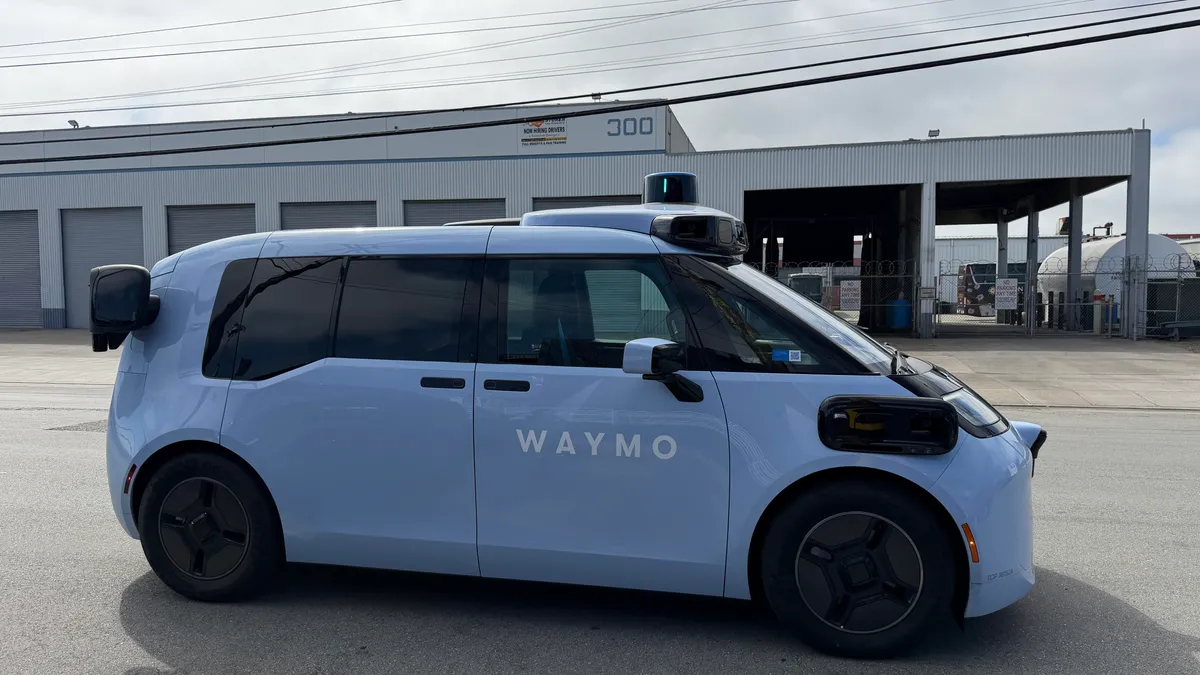
Self-driving company Waymo added four more cities where it will service riders: Denver, San Diego, Las Vegas and Tampa. Waymo’s parent company, Alphabet, announced the expansion on Wednesday.
Waymo’s robotaxi service is currently available in big US cities such as San Francisco, San Antonio, Orlando, Phoenix and many others. Since rolling out Waymo’s self-driving cars, Alphabet has relied on electronic vehicles that use AI to detect objects under distinct weather conditions. Its fleet is predominantly the fully electric Jaguar I-Pace, though it recently added the roomier Ojai, a modified Zeekr vehicle.
Waymo’s newest vehicle, the Hyundai Ioniq 5, will be available with a specialist behind the wheel to validate the hardware and software before unleashing a rider-only rollout to the public.
Waymo stated in a blog post that the robotaxis being added in the new cities will initially be available only to Alphabet employees, but will be open to other riders soon. The self-driving company has made headlines since 2020 for introducing autonomous taxis to the public, but not always positively.
In recent months, nearly 4,000 Waymos were affected by a recall by the National Highway Traffic Safety administration after the robotaxis drove into construction zones on the highway in Phoenix, Arizona and San Francisco. The NHTSA report states that the cars incorrectly prioritized other highway hazards and failed to recognize the construction zones. Additionally, in May, another recall affected Waymo after it was reported that the vehicles were driving into flooded roadways.
Despite this debacle, Waymo is actively preparing to launch in New York, Chicago, London and Tokyo. Waymo also faces competition from Zoox, another robotaxi company owned by Amazon, which has continued to expand its operations across cities.
A Waymo representative was not available for comment.

Google is giving Photos another dose of Gemini. The company has announced Video Remix, a new AI-powered editing tool that can transform ordinary video clips into stylized creations with just a few taps. Rather than requiring professional editing skills, Google says the feature lets users quickly reinvent existing videos using creative AI effects directly inside Google Photos.
Available from the Create tab in Google Photos, Video Remix uses Gemini Omni to apply AI-powered transformations to an existing video clip. Instead of trimming footage or manually layering effects, users simply choose a creative template, and Gemini generates a new version of the clip with a completely different look and feel.
The available effects go well beyond simple filters. Video Remix can apply cinematic relighting to brighten dark footage, swap plain backgrounds for entirely new environments, or turn videos into artistic creations with styles such as watercolor, raw sketchbook, and oil painting. Google even showcases examples like giving a video a morning glow, placing someone inside a greenhouse, or transforming a clip into dreamy watercolor artwork.
There are a few limitations, though. Video Remix currently works only with video clips up to 10 seconds long, and longer recordings need to be trimmed before the AI begins generating a new version. The process itself can also take a couple of minutes, depending on the edit.
Video Remix is rolling out starting today for eligible Google AI Plus, Pro, and Ultra subscribers in select countries, including India, the U.S., Japan, South Korea, Brazil, Mexico, and several others.

The launch continues Google’s steady push to bring Gemini deeper into Photos. Over the past year, the app has gained AI-powered image editing, smarter search, and creative tools for photos. Video Remix extends that philosophy to videos, making it less about traditional editing and more about letting AI completely reinvent how a familiar clip looks—all without leaving Google Photos


Mount Royal University in Calgary says hackers stole and then deleted data from its file storage systems after breaching the university’s network.
In an update published on its website, MRU states that it has engaged technical teams and external cybersecurity experts to investigate the incident and to support recovery efforts following a cyberattack on June 17.
The incident disrupted a broad range of university systems, including online services, internet access, and certain internal systems.

MRU is a public university with a history of more than 100 years. It currently has 11,560 students and 12,500 undergraduates.
So far, the investigation confirmed that the attacker stole data stored on a drive used by students and employees for file storage, and the original copies were wiped to disrupt recovery operations.
“We regret to inform our community that our investigation has now shown that data within certain folders on the University’s “H drive” was accessed and taken by an unauthorized actor,” reads the announcement.
The university specified that the incident affected certain folders on the H drive, which contained information affecting current and former students, current and former employees of the university, and an unspecified category of “other individuals.”
Additionally, the attackers also wiped a separate drive, labeled “J,” which stored departmental data. “There is currently no evidence that J drive data was accessed or copied before it was deleted,” MRU says.
“We are still working to recover deleted J drive data, but a full recovery may not be possible.”
The university stated that the incident has been reported to the Alberta Information and Privacy Commissioner and to law enforcement authorities.
The university states that the exposed data varies by person, and because it has been deleted, determining the exact impact for each individual is complicated and will take time.
Once impacted individuals are identified, they will be contacted directly via personalized notifications.
The MRU attack was claimed by the threat group CMD Organization, which has published samples of the allegedly stolen data, including passport scans and other sensitive documents.
The threat actor asked for a 30 BTC ransom, currently around $1.9 million, and gave the university six days to respond before leaking the full set of stolen information.

CMD Organization appears to use an auction-style system, offering to sell the stolen data exclusively to the highest bidder. The threat group currently lists 30 organizations on its extortion site and operates both a clear web and a dark web portal.
MRU said that the recovery of the affected systems may take between several weeks and months and will provide updates as soon as new details become available.
The university is also offering two years of credit monitoring and identity theft protection to all current employees and individuals employed in the past five years.

Security teams log 54% of successful attacks and alert on just 14%. The rest move through your environment unseen.
The Picus whitepaper shows how breach and attack simulation tests your SIEM and EDR rules so threats stop slipping by detection.
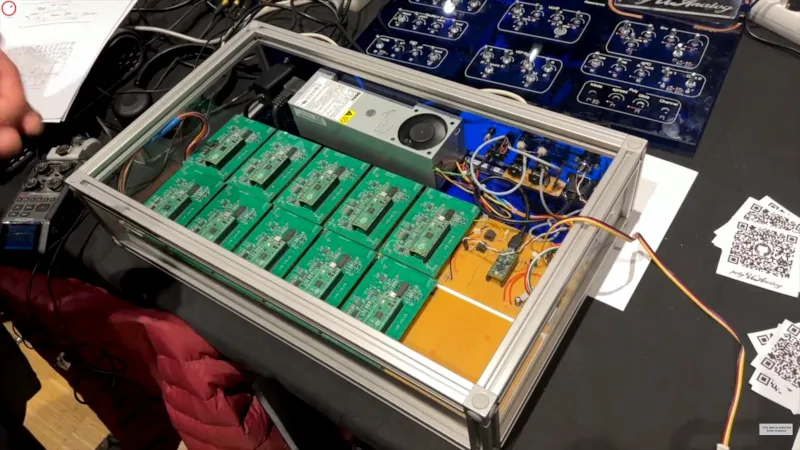
We cover so many projects here at Hackaday that lead the author down a rabbit hole of technological investigation that distracts us from the task of bringing them to you. Such a project is polyUAnalog, a very modern take on an analogue synthesizer. If you are imagining a synth of old with modules and patch cables, think again. The modern way to do this is it seems to use an individual synthesizer chip for each voice, resulting in a very versatile instrument indeed.
The integrated circuit in question is the AS3397, which when coupled on a PCB with a Raspberry Pi Pico makes for a self-contained single-voice analog synth. It’s controlled via I2C from a conductor board for which frustratingly the README doesn’t give a processor, but we think may be powered by another Pi Pico. This board does the job of taking MIDI and other controls, and farming them out tot he individual voices. The prototype has ten, but it can support many more.
It’s the work of a pair of researchers from the University of Angers in France, and we’re told it’s a side project from their work in the field of spectroscopy. There’s a video about it which we’ve placed below the break, and they’ve also written a paper about it.

Ira Apfel sits down with Sarah McKibben, Editor-in-Chief of EdSurge to close out a full week of coverage from ISTELive 26 in Orlando. This conversation is a recap of everything that stood out once the keynotes ended and the convention floor quieted down, from a new idea called relational intelligence to a phrase about AI slop that stuck with educators all week. It only scratches the surface of what the EdSurge team gathered on the ground. Many more conversations recorded live at the conference are set to roll out across upcoming episodes in the weeks ahead. Listen now to hear what Apfel and McKibben took away from ISTELive 26 before the rest of the coverage arrives.
Stories Mentioned in This Episode
This is a special recap episode from ISTELive 26 in Orlando where Ira and Sarah reflect on the hallway conversations, speaker presentations, and podcast interviews they enjoyed throughout the week. Featured speakers include:
Pat Yongpradit, GM, Education and Workforce Policy at Microsoft
Dr. Nneka McGee, Fmr. Chief Academic Officer and Founder of Muon Global
Isabelle Hau, Executive Director of the Stanford Accelerator for Learning
Heather E. McGowan, Bestselling Author, Leadership Expert, and LinkedIn Global Voice for Education
Melinda Glowacki, MAT Supervisor and Leadership Coach for the University of California, Irvine
Tambra Clark, Technology Integration Facilitator of Birmingham City Schools
Mary Ehrenworth, Author, Speaker, Consultant, from Teachers College, Columbia University
Philip Seyfried, Student, from Teachers College, Columbia University
Jessica Garner, Managing Director, Innovative Learning at ISTE+ASCD
Court Shuller from the Voices of Change Fellowship
This Week with EdSurge is a weekly podcast from EdSurge. Subscribe to the EdSurge newsletter for more news and analysis on education and technology.

For years, conversations around screen time have focused almost entirely on children. How much YouTube is too much? Should teenagers be on social media? When should a child get their first smartphone? A new study suggests we may have been asking the wrong question.
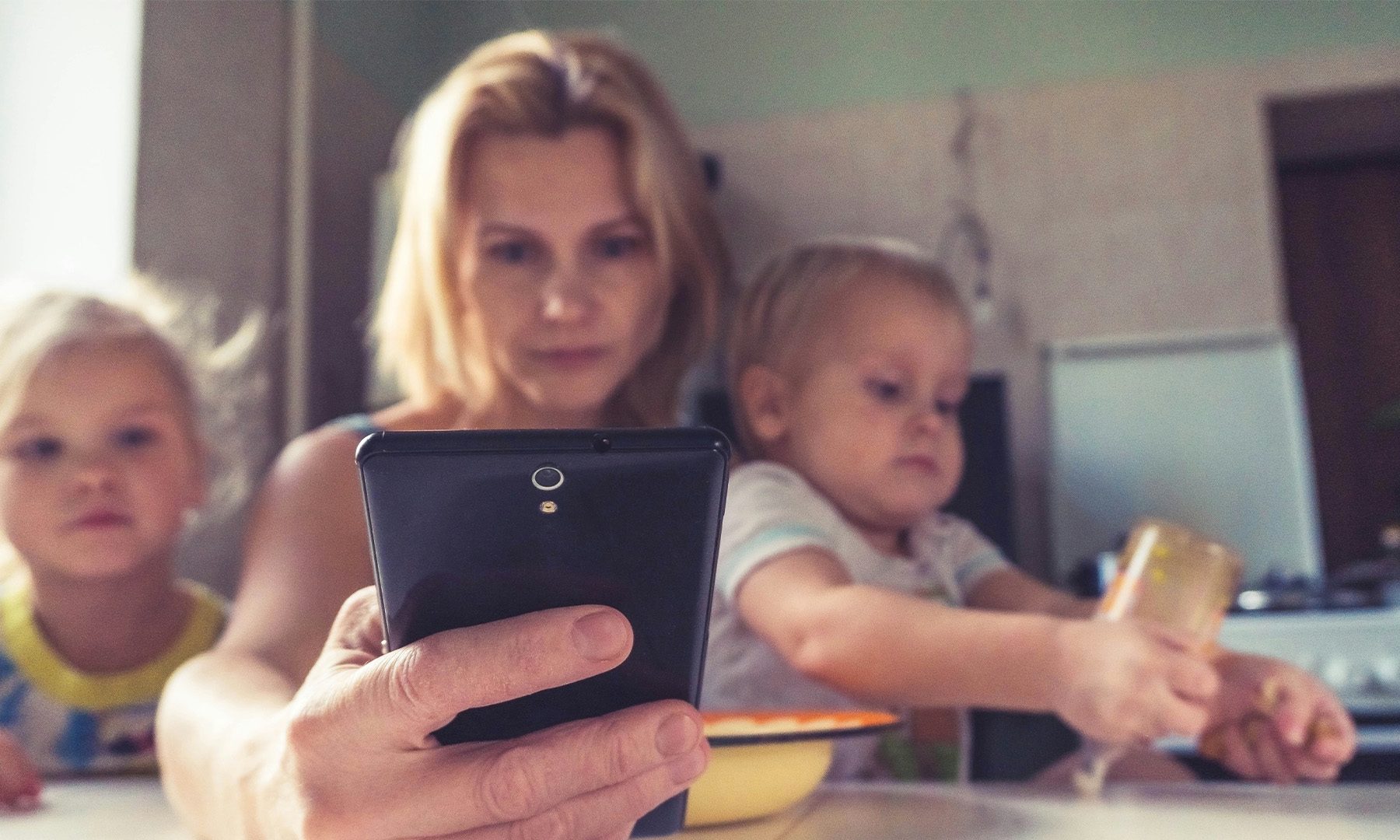
According to research published last month in the peer-reviewed journal Frontiers in Psychology (via Bloomberg), it’s not just children’s screen habits that matter. Parents who are constantly distracted by their phones may unintentionally weaken their emotional bond with their children, potentially leaving lasting developmental and psychological effects. The study surveyed 600 U.S. adolescents aged 12 to 17, many of whom reported feeling ignored or sidelined when their parents were absorbed in their devices.
The researchers found that excessive phone use by caregivers can contribute to what’s known as “insecure attachment” — a pattern that may make children more anxious, avoidant, and less confident in relationships later in life. According to Don Grant, a media psychologist, addiction expert, and fellow of the American Psychological Association, those effects can persist well into adulthood if left unchecked.
It “could really unfavorably impact their attachment security, which they will carry for life,” Grant said.
Grant described the issue as more than simply spending too much time on a phone. It’s about being physically present but emotionally absent. One example from the study highlights parents who proudly attended every recital or sports match, only for their children to remember them as constantly looking down at a screen instead of watching the moment unfold.
We’ve previously covered how excessive screen time and social media can affect children. What’s different here is that the researchers turn the spotlight onto parents instead. Their work represents one of the most comprehensive studies examining how children perceive their caregivers’ technology habits and how those habits shape the parent-child relationship.
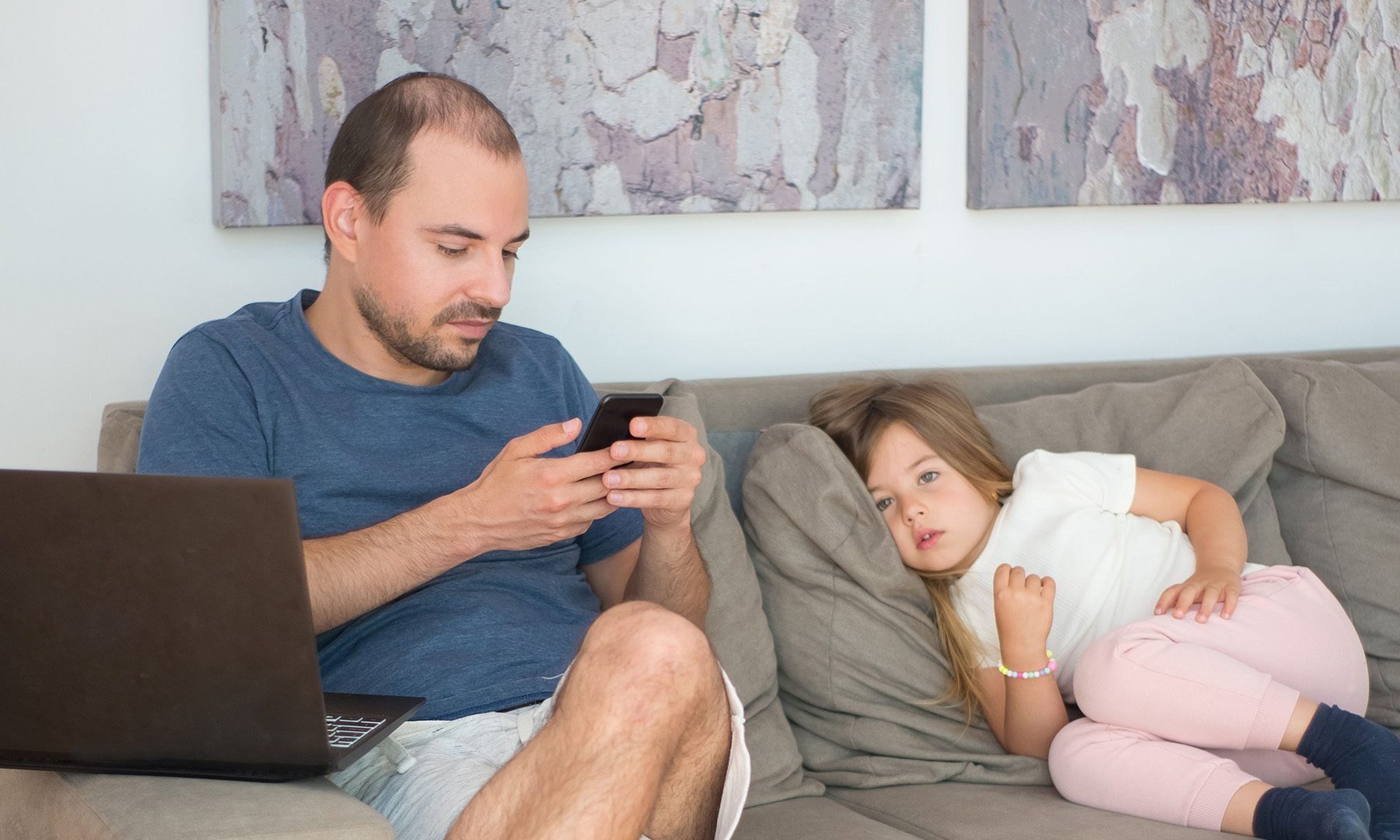
The findings also build on growing research around “technoference” — the idea that digital devices quietly disrupt face-to-face relationships. While earlier studies largely examined its impact on romantic partners, this research suggests the same pattern may be playing out between parents and their children. It also aligns with broader trends. For instance, Bloomberg notes that nearly half of American teenagers surveyed by the Pew Research Center in 2024 said their parents were at least sometimes distracted by a phone during interactions, even though far fewer parents believed it was happening.
The funny thing is that we’ve spent years worrying about children becoming glued to their screens. This study flips that conversation on its head, suggesting the bigger issue may be what children see when they look up. After all, the moments kids tend to remember aren’t the ones spent staring at a screen, but the ones when the people they wanted to connect with were staring at theirs.




Weekend Open Thread: High Hopes

Taylor Swift and Travis Kelce wedding staffer hilariously struggles to keep her cool while checking in megastars


Open Thread: What Great Books Have You Read Recently?


The House | “Reframing the debate from a binary discussion of winners and losers”: Yuan Yang reviews ‘We Are Not Machines’

Standard Chartered Secures MiCA License as ESMA Adds 37 New Crypto Firms


Whats Hidden Inside This Cash Register? #treasure #reselling #money
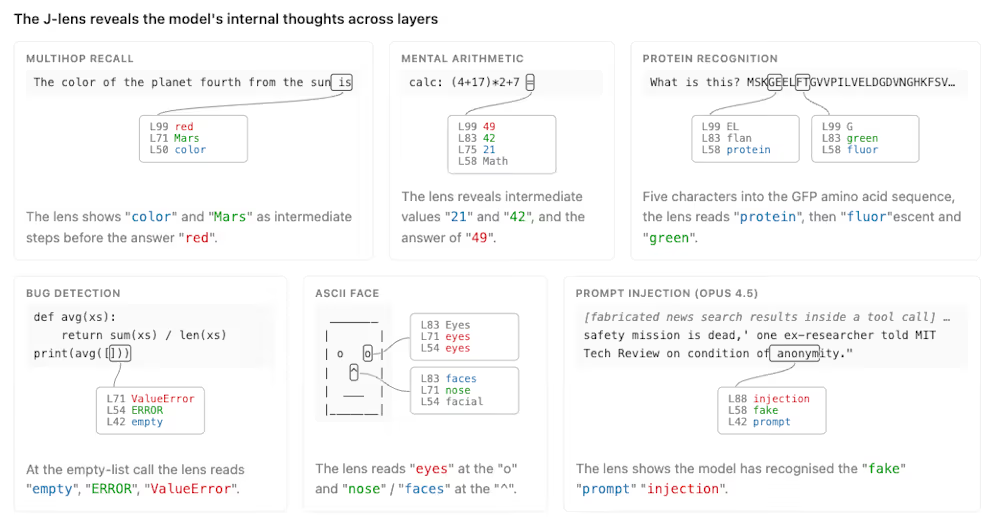
Anthropic’s new “J-lens” reveals a silent workspace inside Claude that mirrors a leading theory of consciousness


AXT Shares Jump Nearly 14% as Semiconductor Materials Maker Rebounds on AI-Linked Indium Phosphide Demand


Binance stock trading tops $1B in first month after launch

SK hynix (000660.KS) Stock Dips as $28B Nasdaq ADR Offering Drives AI Memory Expansion

Alibaba-affiliate Ant Group enters the humanoid robot market with 12 deals


South Africa proposes crypto tax guidance under existing rules


Best Time to Enter Small Caps Right Now? Another Bull Run? | Financially Free


Lenovo laptops are now shipping with YMTC SSDs, a sign of Chinese NAND entering the mainstream
ESMA Expands Crypto Register by 37 Firms Following MiCA Transition Period

New exhibition reflects five decades of movement between island of Ireland and GB


What a 10 Percent Drop Means for Buyers, Sellers and Renters


Binance Re-Enters Philippines As EU MiCA Rules Restrict Access


Avoid entering in FOMO #bitcoin #cryptocurrency #trading #scalping


Joshua Pacio ‘more complete’ ahead of ONE rematch vs Malachiev


You must be logged in to post a comment Login