Drupal is warning that hackers are attempting to exploit a “highly critical” SQL injection vulnerability announced earlier this week.
The content management system (CMS) project published a PSA on May 18, urging administrators to reserve time for core updates that addressed an issue that threat actors might start exploiting “within hours or days.”
The flaw is now tracked as CVE-2026-9082 and was discovered by Google/Mandiant researcher Michael Maturi. It affects Drupal’s database abstraction API. It allows specially crafted requests to trigger arbitrary SQL injection on sites using PostgreSQL.
SQL injection is a flaw in which attackers inject malicious SQL commands into database queries via user input fields or dialogs on websites, resulting in unauthorized access, modification, or deletion of database data.
Advertisement
The flaw is exploitable without authentication and could result in remote code execution, privilege escalation, and information disclosure.
In an update to the advisory on May 22, Drupal confirmed that exploitation attempts have been detected.
“The risk score has been updated to reflect that exploit attempts are now being detected in the wild,” reads the updated advisory.
Drupal rated the vulnerability as “highly critical,” assigning it an internal score of 23 out of 25. However, NIST has rated it as “medium severity” based on a CVSS v3 score of 6.5.
Advertisement
Impact and recommendations
CVE-2026-9082 impacts a broad range of Drupal versions, including:
Drupal 8.9.x
Drupal 10.4.x before 10.4.10
Drupal 10.5.x before 10.5.10
Drupal 10.6.x before 10.6.9
Drupal 11.0.x / 11.1.x before 11.1.10
Drupal 11.2.x before 11.2.12
Drupal 11.3.x before 11.3.10
Website owners and administrators are recommended to upgrade immediately to the latest version available for their branch.
Those not using PostgreSQL are still advised to update, as the latest security updates also include fixes for upstream dependencies, including Symfony and Twig.
The advisory underlines that Drupal 8 and 9 are end-of-life (EoL), and that patches are provided on a “best-effort” basis; however, those branches still contain other known vulnerabilities, so continuing their use is inherently risky.
Automated pentesting tools deliver real value, but they were built to answer one question: can an attacker move through the network? They were not built to test whether your controls block threats, your detection rules fire, or your cloud configs hold.
This guide covers the 6 surfaces you actually need to validate.
Apple may already be testing one of the biggest iPhone redesigns in years, with a new leak suggesting the company has started evaluating a futuristic “all-screen” style display for its 2027 handset.
If accurate, this could become the most dramatic iPhone design shift since the introduction of the iPhone 12 range.
The rumoured device is currently being referred to online as the “iPhone 19 Pro,” though Apple’s actual branding remains unclear. Given that 2027 marks the iPhone’s 20th anniversary, there’s also a decent chance Apple skips ahead and calls it the iPhone 20 Pro instead.
Advertisement
Either way, the display sounds like the real focus here. Previous leaks have described it as a “Liquid Glass Display,” with ultra-thin bezels and subtle curves wrapping around the edges of the phone. Thankfully, reports suggest Apple is avoiding the aggressive waterfall-style screens seen on some older Android devices that often looked impressive but could be awkward to use in practice.
Advertisement
Instead, the curvature is said to be much more restrained and seamless.
Interestingly, this isn’t the first time these rumours have surfaced. Reports from late 2025 claimed Samsung Display was already developing advanced OLED panels for Apple using something called COE, or Colour Filter on Encapsulation technology. More recent leaks also suggested that Samsung would become the primary supplier of curved display panels.
Advertisement
What makes this leak more believable is the source itself. Digital Chat Station has a fairly solid track record when it comes to Apple hardware leaks. The leaker previously revealed accurate details about the iPhone Air and the iPhone 17 Pro camera upgrades ahead of launch.
Of course, there’s still a long way to go before any of this becomes official. Apple is reportedly still focusing on the iPhone 18 lineup for this year, and if rumours are true, the first part of 2027. The company could also launch its foldable “iPhone Ultra” sometime in late 2026 if it resolves its production issues.
Still, it’s becoming increasingly clear that Apple sees 2027 as more than just another yearly iPhone refresh.
Nvidia smashed revenue records in its first quarter of fiscal 2027, with sales up 85pc year-on-year to $81.6bn.
The Santa Clara-based company saw its data centre division lead the charge, with revenue reaching $75.2bn, up 92pc from a year ago. Demand for Nvidia’s AI chips from hyperscale cloud providers and enterprise AI factories showed no signs of slowing, with quarterly revenue also up 20pc.
Gross margins held firm at around 75pc, and net income more than tripled to $58.3bn compared to the same period last year, reflecting Nvidia’s central role in the current AI infrastructure boom.
CEO Jensen Huang was typically ebullient, describing the moment as a major inflection point for the industry. “The buildout of AI factories – the largest infrastructure expansion in human history – is accelerating at extraordinary speed,” he said.
Advertisement
“Agentic AI has arrived, doing productive work, generating real value and scaling rapidly across companies and industries.”
Huang described “an extraordinary quarter” in closing out yesterday’s (21 May) earnings call, according to CNBC. “Demand has gone parabolic. The reason is simple: agentic AI has arrived,” he said.
“AI can now do productive and valuable work. Tokens are now profitable, so model makers are in a race to produce more. In the AI era, compute capacity is revenue and profits.”
Looking ahead, the company guided for Q2 revenues of $91bn, pointing to continued explosive growth, although it did note that it is not counting on any data centre revenue from China in that forecast.
Advertisement
Not everyone is without reservation. Alvin Nguyen, senior analyst at Forrester, struck a note of caution: “At a roughly $5trn valuation, the question is no longer whether growth is strong, it’s whether growth can be sustained at this level.
“Nvidia’s continued success creates an extraordinary level of pressure that’s difficult to maintain, though the company has consistently risen to the challenge so far.”
Don’t miss out on the knowledge you need to succeed. Sign up for the Daily Brief, Silicon Republic’s digest of need-to-know sci-tech news.
Most Mac users see Apple Preview as only an app to view images, PDFs, and other documents. That’s it. If that sounds like you, you are leaving a lot on the table, because Preview has quietly grown into one of the most capable apps on macOS, and it’s available for free.
I use the app daily to edit images, markup and sign PDFs, redact information, and so much more. So let me walk you through seven things you probably didn’t know Apple Preview could handle.
You can rearrange, combine, and pull out PDF pages
If you regularly work with PDFs, this one will save you a ton of time. Preview lets you easily rearrange pages in PDFs, combine multiple PDFs into one, and even extract specific pages from a PDF.
Rachit Agarwal / Digital Trends
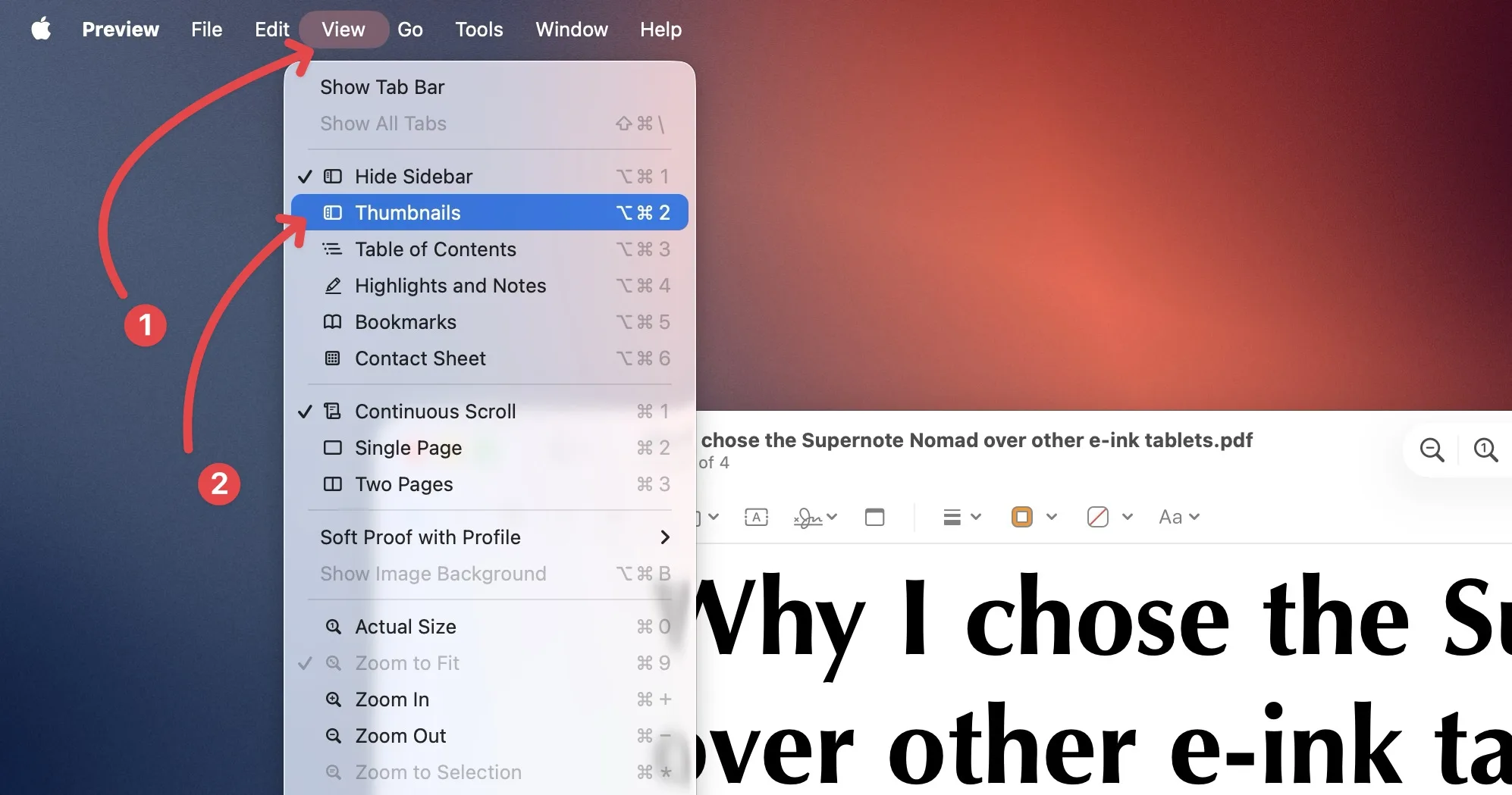
To perform any of these actions, first you have to enable the thumbnail view. To do this, open a PDF file in Preview and go to View → Thumbnails or hit the keyboard shortcut ⌥⌘2 to reveal the sidebar. From here, you can click and drag pages to rearrange them in any order you like.
Rachit Agarwal / Digital Trends
You can also drag a selected page out of the sidebar directly onto your desktop, and it will save those pages as a new PDF. No need for any extra software.
Rachit Agarwal / Digital Trends
You can also drag a PDF document or pages from other PDFs inside another PDF to merge them.
Rachit Agarwal / Digital Trends
Stop people from snooping on your PDFs
If you are sharing a sensitive PDF with someone and you don’t want anyone else to read it, you can lock it using Preview so only people with the correct password can open it.
To do this, open your PDF, click the info button in the toolbar, find the security lock icon under Permissions, and click the Edit button.
Advertisement
Rachit Agarwal / Digital Trends
Now, check the box to require a password to open the document, set your password, and save the changes. You can even control what others can do without the password, like allowing them to print the file, but nothing else.
Rachit Agarwal / Digital Trends
Another way to hide information is by redacting it. It permanently obscures the information so no one can read it. Note that once you save a redacted document, even you won’t be able to get the information back so ensure to create a copy of the original document before redacting it.
Rachit Agarwal / Digital Trends
To redact a document, open the Markup toolbar and click on the Redact tool. Now, you can highlight any text or just select an area to redact it.
Rachit Agarwal / Digital Trends
Read PDFs at night without burning your eyes
This one is a recent addition and an incredibly useful one. If you use your Mac in dark mode, Preview now has an option to match that for your PDFs. Go to View → Use Dark Appearance for PDF, and the blinding white background flips to a dark background that’s much easier on the eyes. Just keep in mind that this option only shows up when your Mac is already set to dark mode.
Rachit Agarwal / Digital Trends
Remove image backgrounds without a third-party app
Preview can do it. Open an image, go to Tools → Remove Background, or hit the keyboard shortcut ⌘⇧K. As you can see in the image below, Preview has done a great job of removing the background and cutting out the subject.
Rachit Agarwal / Digital Trends
Open any image you just copied
Here is a little trick I use all the time. If you copy an image to your clipboard, you don’t need to paste it into a photo editing app to save it. Just open Preview and go to File → New from Clipboard or hit the keyboard shortcut ⌘N. Your copied image opens instantly, ready for you to edit, resize, or export.
Rachit Agarwal / Digital Trends
Mark up screenshots and PDFs like a pro
The markup toolbar in Preview is genuinely great for quick edits. You can draw circles or rectangles to highlight something, add text, draw arrows, and even drop in your signature.
Rachit Agarwal / Digital Trends
While CleanShot X handles all my screenshot annotation needs, Preview is the app I use to markup my PDFs. And if you don’t deal with dozens of screenshots every day, Preview’s built-in functionality will be more than enough for you.
Bonus tip: extract high-quality app icons
I don’t know who will need this feature, but I use it regularly, so I am sharing this as a bonus. Sometimes I need to use app icons to create images (like the one you see at the top of this article).
If you have the app already installed on your Mac, you don’t need to hunt for the icon image on the web. Just go to the Application folder in Finder, select the app, and copy it.
Rachit Agarwal / Digital Trends
Now, launch Preview and use the “New from Clipboard” option, or use the ⌘N keyboard shortcut to open the app icon as an image in Preview. Now, use the ⌘S shortcut to save it to your desktop.
Rachit Agarwal / Digital Trends
Apple Preview is more than just a viewer
The point is that Apple Preview is genuinely powerful, and it’s sitting right there on your Mac, completely free. Whether you are managing PDFs, editing images, or trying to keep a late-night reading session from blinding you, Preview has you covered. Give it a proper chance, and I think it will earn a permanent spot in your workflow.
What if the humidity in the air around you could charge your fitness tracker or power your smart home sensors? That is exactly what an international research team led by scientists at Queen Mary University of London has achieved.
Their new device, called a Moisture-Electric Generator or MEG, turns ambient moisture into usable electricity using just three ingredients you could find in any kitchen: gelatin, table salt, and activated charcoal.
The MEG works by absorbing water molecules from the surrounding air or directly from human skin. When the gelatin and salt mixture dries, it naturally separates into three distinct layers without any complex manufacturing steps.
This structure creates a moisture gradient that drives ion movement through the material, generating a stable electrical output of around 1 volt per unit for over 30 days.
Science Direct
When you connect 100 units together in a series, the output scales up to 90 volts and 5.08 milliamps, enough to power a string of 40 decorative lights. That 100-unit stack also weighs just 6.7 grams and takes up less space than a standard AA battery, which only delivers 1.5 volts by comparison.
It can sense your breathing and dissolve in soil when you are done with it
Beyond generating power, the MEG doubles as a self-powered sensor. It can detect breathing patterns in real time by picking up changes in exhaled moisture. It can also read the number of syllables in spoken words and track skin hydration levels.
Even touchless proximity sensing is possible, since natural moisture from a hovering fingertip is enough to trigger a voltage response. The best part is that the device biodegrades in soil within three weeks and can be recycled by dissolving it in water and recasting it, with no loss in performance.
With all of the TVs available today, and all of the technical terms and jargon associated with television technology, it can be tough to figure out what’s important. Here’s a quick guide to help cut through the confusion.
Picture quality: Broadly speaking, the type of display technology helps dictate how good a TV’s picture quality is, but OLED is typically the best display technology, and this is followed by LCD (including QLED, and Mini LED). OLED tends to have the best picture quality because it doesn’t need a backlight and every pixel can be either on or off, leading to great black levels. In comparison, each LED in a backlight looks after multiple pixels at a time so it isn’t as precise — it’s not yet 1:1. Among midrange models, look for a feature including full-array local dimming, mini-LED and 120Hz refresh rate, which (unlike some other extras) do help improve the picture in my experience. Additionally, If a TV uses Quantum Dots it often leads to better color performance, whether it’s an OLED or an LCD.
Advertisement
Screen size: Bigger is better in my book. I recommend a size of at least 43 inches for a bedroom TV and at least 55 inches for a living room or main TV — and 65 inches or larger is best. More so than any “feature,” stepping up in TV screen size is the best use of your money. One of the most common post-TV-purchase complaints I’ve heard is from people who didn’t go big enough. And I rarely hear people complain that their TV is too large. It’s worth adding that while TVs can get really big indeed, 4K resolution is sufficient for even the biggest models, and CNET doesn’t recommend any 8K TVs as they represent a poor comparative value.
Price: TVs range in price from $100 to more than $2,000. Smaller screens are cheaper, well-known brands are more expensive and spending more money can also get you better image quality. Most entry-level TVs have a good enough picture for most people, but TVs last a long time, so it might be worth spending more to get a better picture. It’s also best to shop for a TV in the fall when prices are lower.
Sound quality: Every TV has some sort of built-in speaker, but in my twenty years of reviewing AV equipment the sound of modern TVs has been routinely terrible. While I do test the audio on each model, if you are serious about sound quality then buying a separate soundbar (from $100) or home theater system will instantly improve vital aspects such as speech and bass reproduction.
Smart TV: Among entry-level TVs the most important feature is what kind of smart TV system the TV uses, and while some are proprietary to each brand (Samsung and LG) some models do offer Roku and Google TV.
The Free Software Foundation announced this week that “its global call for free software supporters to organize LibreLocals this May resulted in free software supporters organizing forty-six LibreLocal events on six continents thus far.” (And new dates and locations are being added daily.)
The FSF invited free software supporters to organize in-person community meetups in their area during May 2026, or LibreLocal month, to bring people together to swap ideas, learn from each other, and celebrate free software. People were encouraged to organize events grounded in freedom to help spread the free software philosophy…. “The success of these LibreLocals speaks to how many people globally are interested in free software and ready to build community, and it demonstrates the strength of our movement” [said FSF executive director Zoë Kooyman]. “People getting together like this also proves how computer freedom and digital rights are on people’s minds. When we reject freedom-restricting software and promote software that respects user rights, it helps further so many other basic rights….”
The FSF has financially supported some of the events, but notes organizers are going above and beyond to create noteworthy events by any measure, and is impressed with the global network taking shape. “The energy we feel from all organizers is extremely motivating and we look forward to seeing LibreLocal events spread even wider over the next years! We want to support these initiatives even more, so we’ll be looking to build a network of sponsors for future iterations as we work towards May 2027,” says Heshan de Silva-Weeramuni, FSF program manager… William Goodspeed, the organizer behind the Beijing LibreLocal, reported that their meetup was double the size of last year’s, and a number of very rich collaborative projects have emerged among the attendees.
Discussing the value of connecting people, de Silva-Weeramuni notes: “Free software supporters know that connecting with each other leads them to learn, experiment, and create great things that protect our individual and shared rights. The extraordinary contributions that free software has made to the world were born through such collaborations between like-minded people towards a freer society. This same global spirit of collectively building a better future is one of the inspiring things that we have once again seen unfold through this year’s many LibreLocals.”
For the last two years, tech companies have aggressively pushed the idea that AI is ready to replace huge chunks of repetitive human work. Meanwhile, Starbucks just discovered that accurately identifying milk cartons inside a coffee shop is apparently still harder than Silicon Valley promised.
Starbucks
The company is officially scrapping its AI-powered inventory counting system across North America just nine months after deployment, according to a Reuters report. The tool, designed to automate stock counting and reduce in-store shortages, reportedly struggled with frequent miscounts and labeling errors, including confusing similar milk types or missing products entirely.
Starbucks’ AI inventory system: More headaches than solutions?
The automated counting system used cameras and LIDAR-equipped tablets to scan beverage inventory and ingredient stock across stores. It was part of CEO Brian Niccol’s larger “Back to Starbucks” turnaround strategy aimed at improving product availability and operational efficiency.
Athar Khan / Unsplash
But despite Starbucks previously claiming that the system improved inventory visibility, employees reportedly continued to struggle with inaccurate counts and unreliable product recognition. Internal messages reviewed by Reuters even showed workers openly celebrating the tool’s removal. Starbucks says it will now return to manual inventory counting while focusing on more standardized replenishment systems and daily restocking improvements instead.
AI keeps failing at the boring stuff companies said it would solve first
The funny thing is that inventory counting is exactly the kind of structured, repetitive task AI companies constantly claim should be easy to automate. And yet, once these systems leave polished demos and enter messy real-world environments with lighting changes, similar packaging, and busy workers, things start falling apart surprisingly fast.
What makes this especially awkward is how aggressively corporations are currently chasing AI adoption. Companies everywhere are laying off workers, restructuring teams, and pouring billions into automation strategies while many AI systems still struggle with basic reliability in practical workflows. Starbucks accidentally becoming the latest example of “humans still needed” feels both hilarious and deeply predictable. Maybe the bigger lesson here is that replacing people turns out to be much harder than replacing PowerPoint presentations with AI-generated buzzwords.
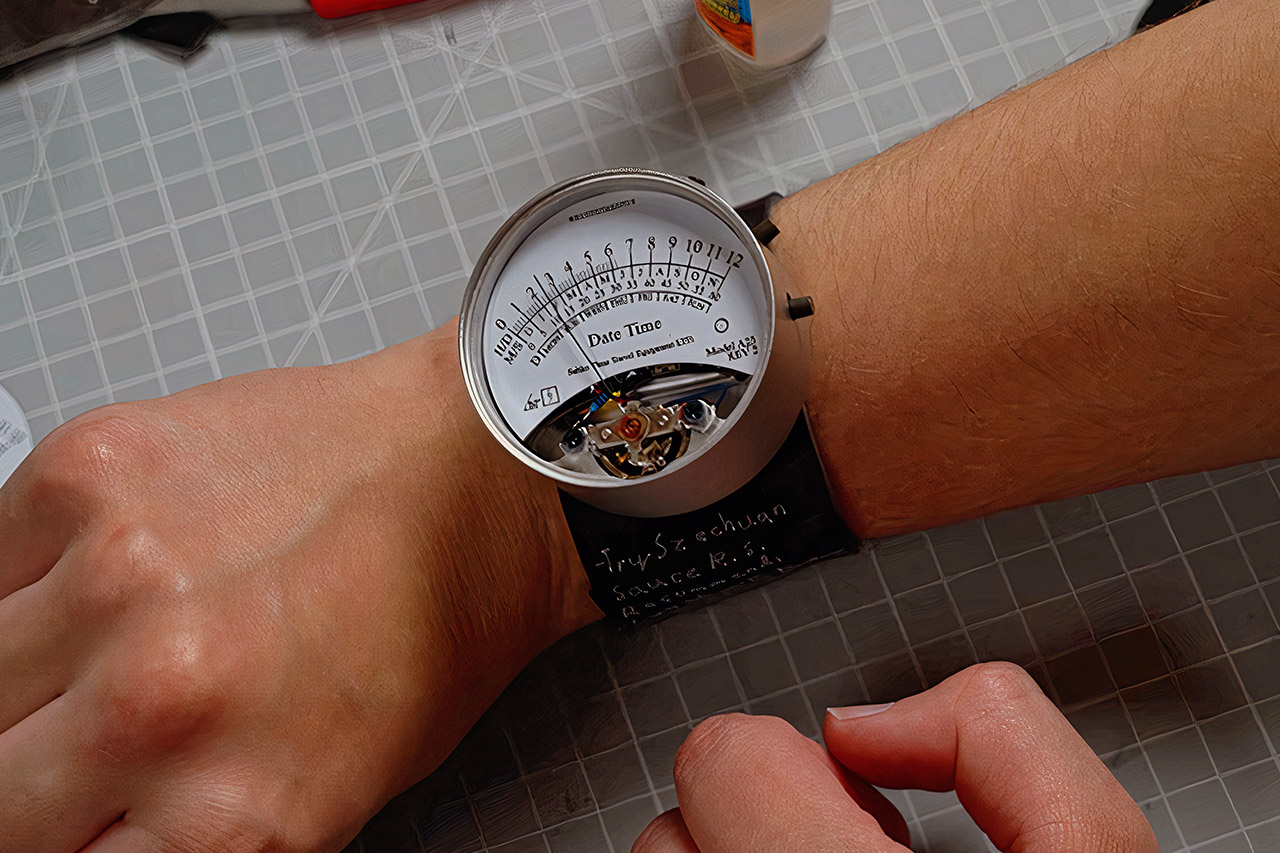
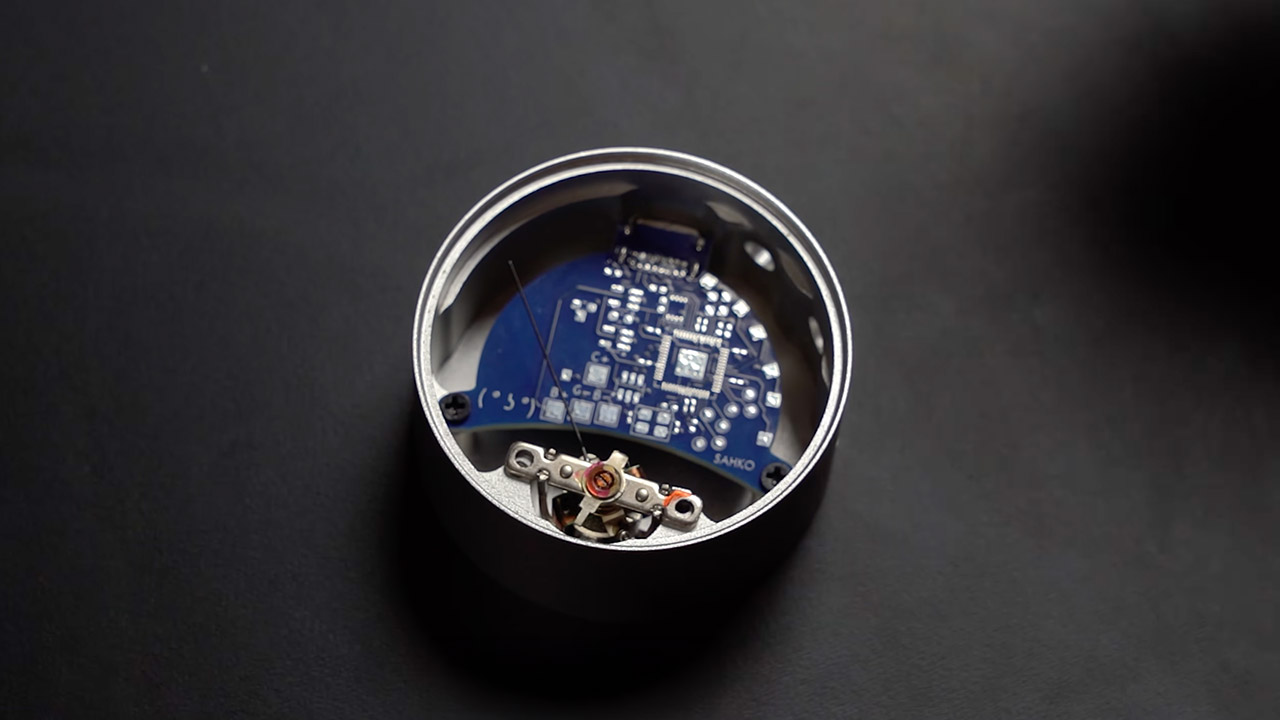
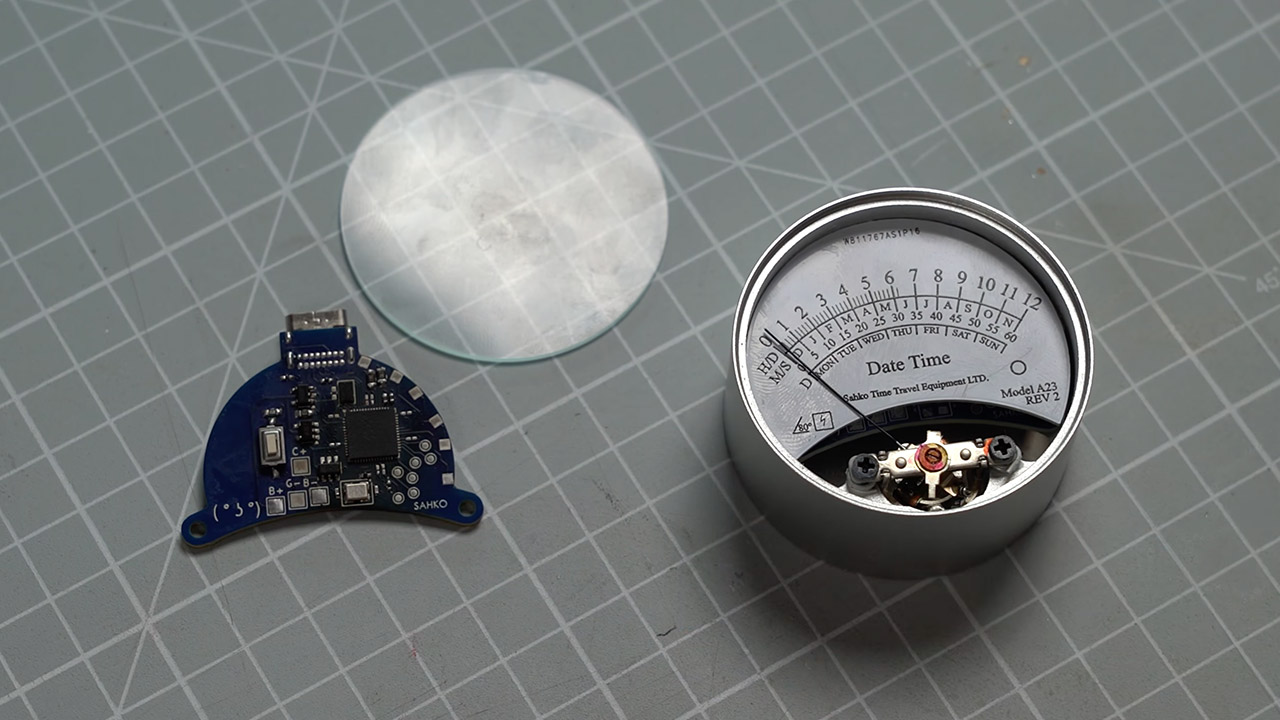
Wearing this watch provides an initial feeling of surprise, as a single needle glides across a printed scale to reveal the exact time or date without a flashing screen or ticking hands. Sahko transformed an idea drawn years ago into a polished item that fits easily around the wrist and seems both old and new at the same time. He desired a digital watch that depended solely on analog mechanics for display.
Early drawings depicted many scales crammed onto a single dial, each controlled by a button on the housing. He then built numerous prototypes to test different housings and circuits. The first version included a compass, which was a complete failure because the meter’s own magnetic field continuously threw off the readings. The functionality was then entirely dropped in favor of simplifying the design and ensuring that everything actually worked correctly.
Google Fitbit Air is the unbelievably comfortable, exceptionally smart way to transform your health[1]; and Google Health brings together effortless…
Unlock more with Google Health Premium: With a premium membership, get personalized coaching that’s built with Gemini and adapts to your life…
Comfortable fit – One Size Tracker (130-210 mm): The lightweight, micro-adjustable fit sits comfortably and quietly, so you can wear Google Fitbit Air…
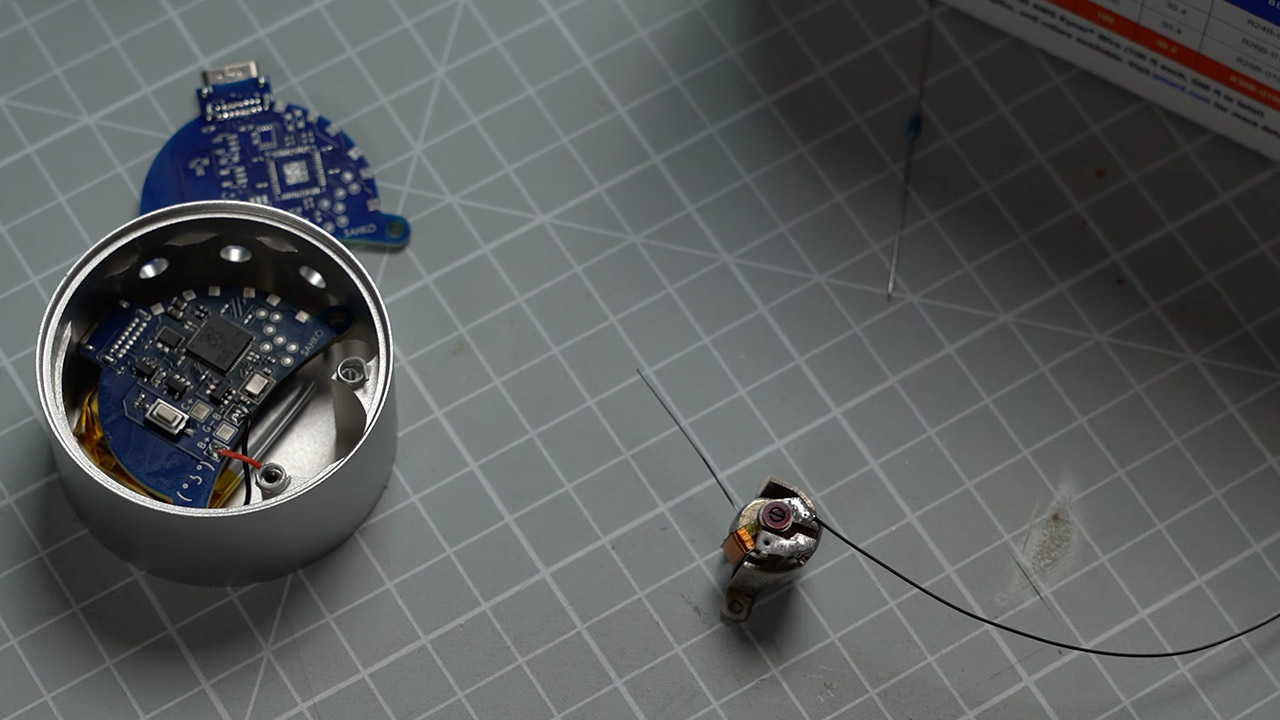
The meter movement is simply a salvaged 1970s amplifier component that lies in the middle of the entire setup. A current flows through the coil and interacts with a magnet, swinging the needle left and right in a smooth motion. The Raspberry Pi Pico microprocessor turns time into voltage, which is then passed to the digital-to-analog converter and, last, to the meter coil, ensuring that the needle always lands exactly on the mark. They use the same needle and arc in all modes, but the information shown differs depending on which button you press.
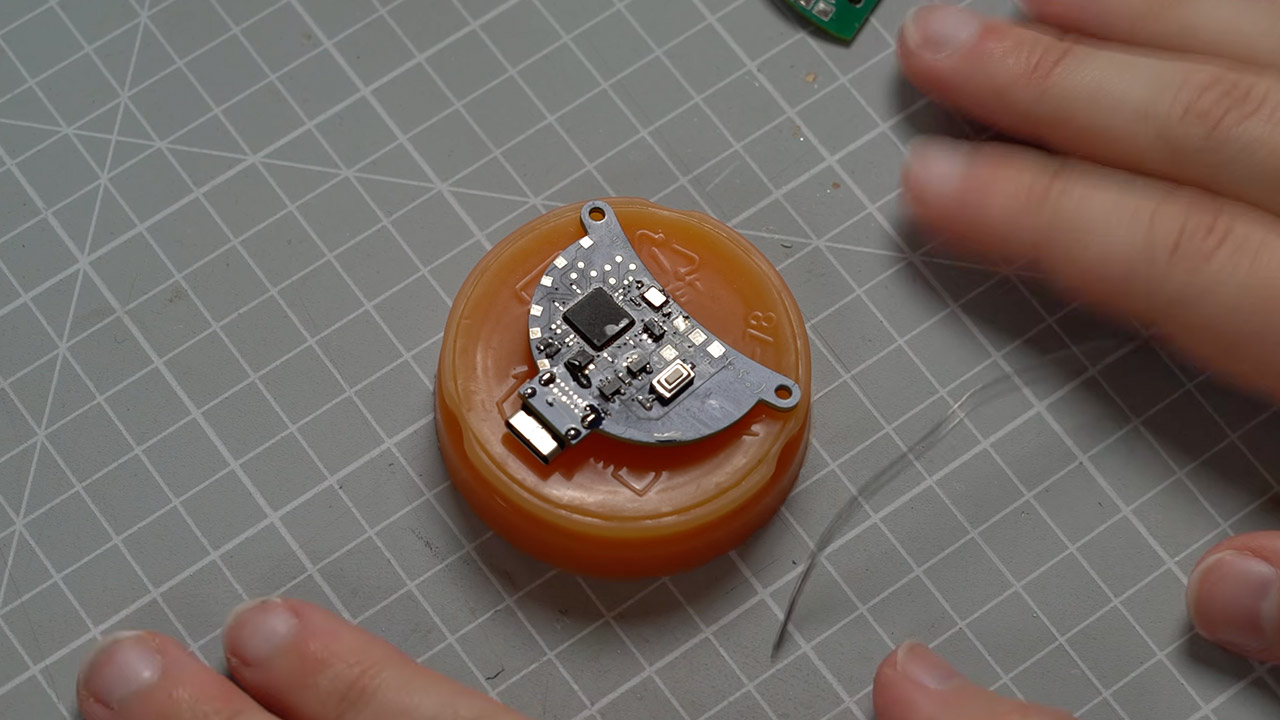
The Pico, converter, battery, and charging circuit are all housed on a customized board that takes up little space. Sahko had the idea of printing the dial scales directly onto the board, making it incredibly durable and visually beautiful. On one side of the case, there are three buttons: one to cycle through the hours, one for the day of the month, and one to show the month or day of the week. Holding the proper combination causes the needle to sweep over the scale, marking off each second in real time.
The case is machined from aluminum and has a smooth matte texture from bead blasting, making it fingerprint-resistant and comfortable against the skin. You can even put a pocket watch-style cover on the dial to protect the needle and keep it looking good. The wire spacers keep the needle perfectly level, so it never scrapes the underlying surface. The strap is made of leather and features an elastic bit in the center for easy adjusting. The leather ends simply attach to the case via magnets, making them exceedingly easy to put on and take off without the use of traditional pins or buckles.
Power comes from a little rechargeable battery that can easily last the entire day. The casing includes a USB-C socket for charging, and the Pico’s programming does an excellent job of keeping the time accurate and determining which voltage range to map each reading to, ensuring that the needle always reacts swiftly. If you want to see the schematics of the whole thing, Sahko has even uploaded a set of files to GitHub that contain schematics, board designs, and the actual firmware. [Source]
A lot of people on MacBooks do not really think of themselves as gamers. Aside from a few casual titles on phones or trying out GTA or COD on their friend’s console, many don’t really get into that hobby. Macs have never had the same gaming reputation as Windows PCs, and if your idea of gaming is competitive shooters or open-world RPGs from AAA studios, it’s easy to miss out on the gems that are available on the Mac ecosystem.
But some of the best games for non-gamers are not about fast reflexes at all. They are about choices, curiosity, grief, adventure, and so much more. This is exactly why I’ve chosen these three games, which aren’t your typical hardware showcase. These go much deeper than that. Video games as an art form have been a long-standing debate, and I can’t recommend Disco Elysium, What Remains of Edith Finch, and Firewatch enough.
What stands out here is the confidence in writing and atmosphere.
Disco Elysium
ZA/UM
Disco Elysium is one of the best arguments that games can be literature without becoming homework. Enter the underwhelming role of a broken detective investigating a murder, but that description barely covers what the game actually does. This is a game about a lot of things. From politics and addiction to identity and the horror of waking up as yourself after everything has gone wrong. There’s a combat loop here, and it’s your conversational skills.
The real battles are fought inside your head, as different parts of the protagonist’s personality play a big role in the outcome of the story. This makes it perfect for MacBook users who do not want a mechanically demanding game. You simply talk, choose, and live with the consequences. Steam describes it as having a “revolutionary dialogue system,” and seeing how you can write sweet talk, romance, and even write poetry in-game, I’d say that’s pretty apt.
Advertisement
What Remains of Edith Finch
What Remains of Edith Finch is the game I would hand to someone who says they do not have time for games. In essence, it’s a series of connected short stories and experiences that are condensed into one single game that is incredibly easy to understand. You explore the Finch family home as the titular Editch, uncovering the stories of relatives who died in strange, tragic, sometimes surreal ways.
Annapurna Interactive
Each interactive short story changes how you play for a little while, but none of them asks you to master complicated systems. It is experienced from a first-person perspective and ends with that family member’s death, with the larger game exploring what it feels like to be humbled by the world.
If the concept sounds heavy, that’s exactly what the devs were going for. This is from the same people who brought you other critically acclaimed titles like Outer Wilds and Stray. So it’s no surprise that there’s a strong focus on narrative. You are not just watching a family history unfold; you are experiencing it yourself and piecing it together room by room.
Firewatch
Firewatch is probably the easiest of the three to recommend to someone who wants a “normal” game but does not want stress. You play as Henry, a man working as a fire lookout in the Wyoming wilderness. Your main connection is Delilah, another lookout who speaks to you through a walkie-talkie.
While the setup is simple, the game has a very distinct feel to it. Firewatch is about isolation, emotional escape, and the danger of treating distance like a solution. This is a proper single-player experience where choices shape the narrative.
Advertisement
Campo Santo
You can expect to explore, talk, and investigate as you slowly get pulled into something stranger. It is not difficult in the traditional sense, but you will be facing emotional challenges between two characters who aren’t honest enough to face their own lives.
For non-gamers on MacBooks, these three games are a perfect starting point. They are not about proving you are good at games. These are experiences that will make you stop and think for a while.
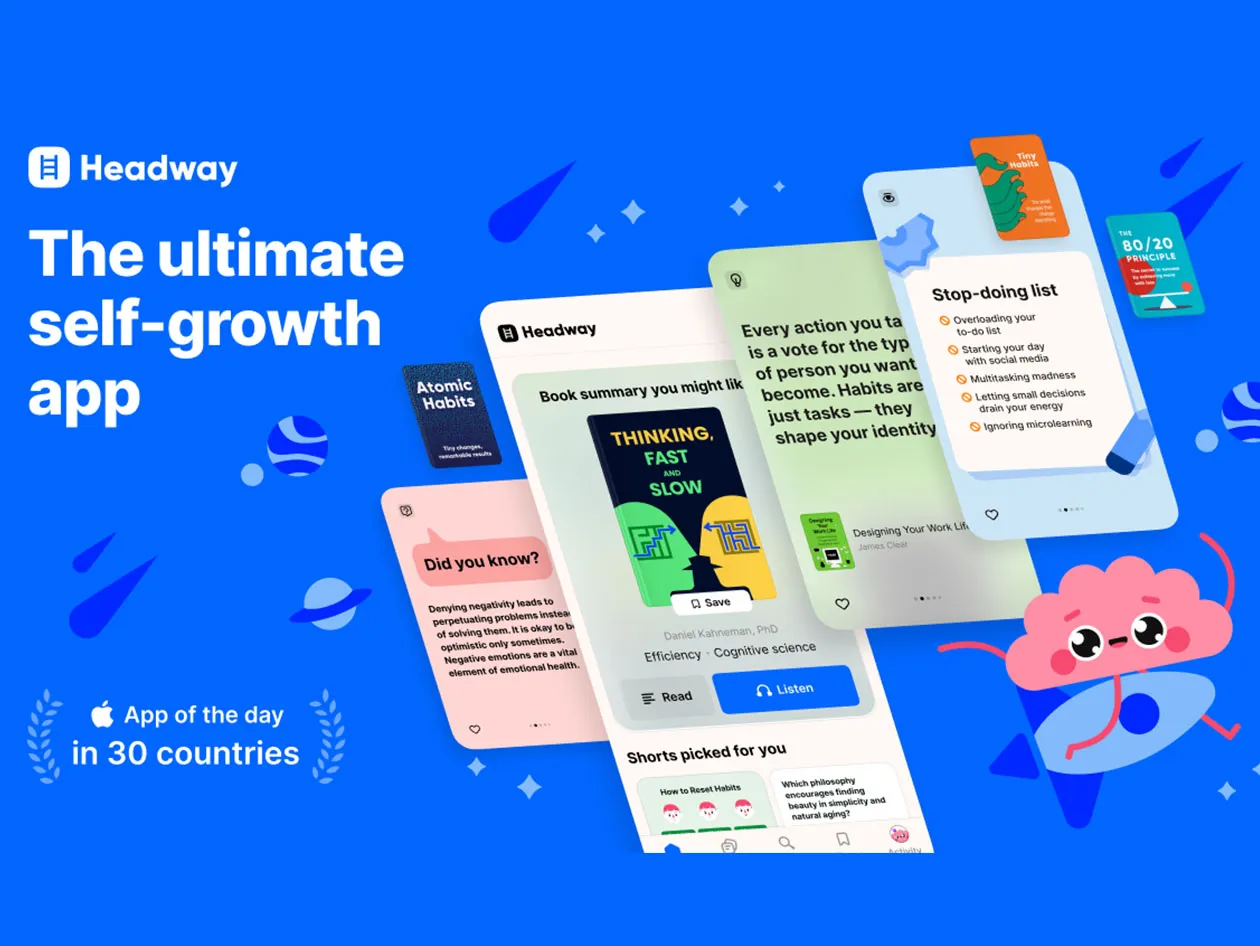
Unlock a world of knowledge with a Headway Premium subscription. This exclusive deal gives you unlimited access to Headway’s massive library of 1500+ book summaries, with 30-50 new ones added monthly. Cover any topic you can imagine, from personal development and business strategies to health and wellness. It’s usually on sale for $60 for new users only, but for a very limited time you can get it for $47.97.
Note: The Techdirt Deals Store is powered and curated by StackCommerce. A portion of all sales from Techdirt Deals helps support Techdirt. The products featured do not reflect endorsements by our editorial team.





























































You must be logged in to post a comment Login