The Cronos blockchain network has resumed trading activity after a price-manipulation attack on the Tectonic cryptocurrency lending platform allowed an attacker to borrow $74 million.
According to current information, the threat actor artificially inflated the price of Tectonic’s TONIC token by 100 times, then used it as collateral to borrow real assets. The price manipulation happened in 20 minutes.
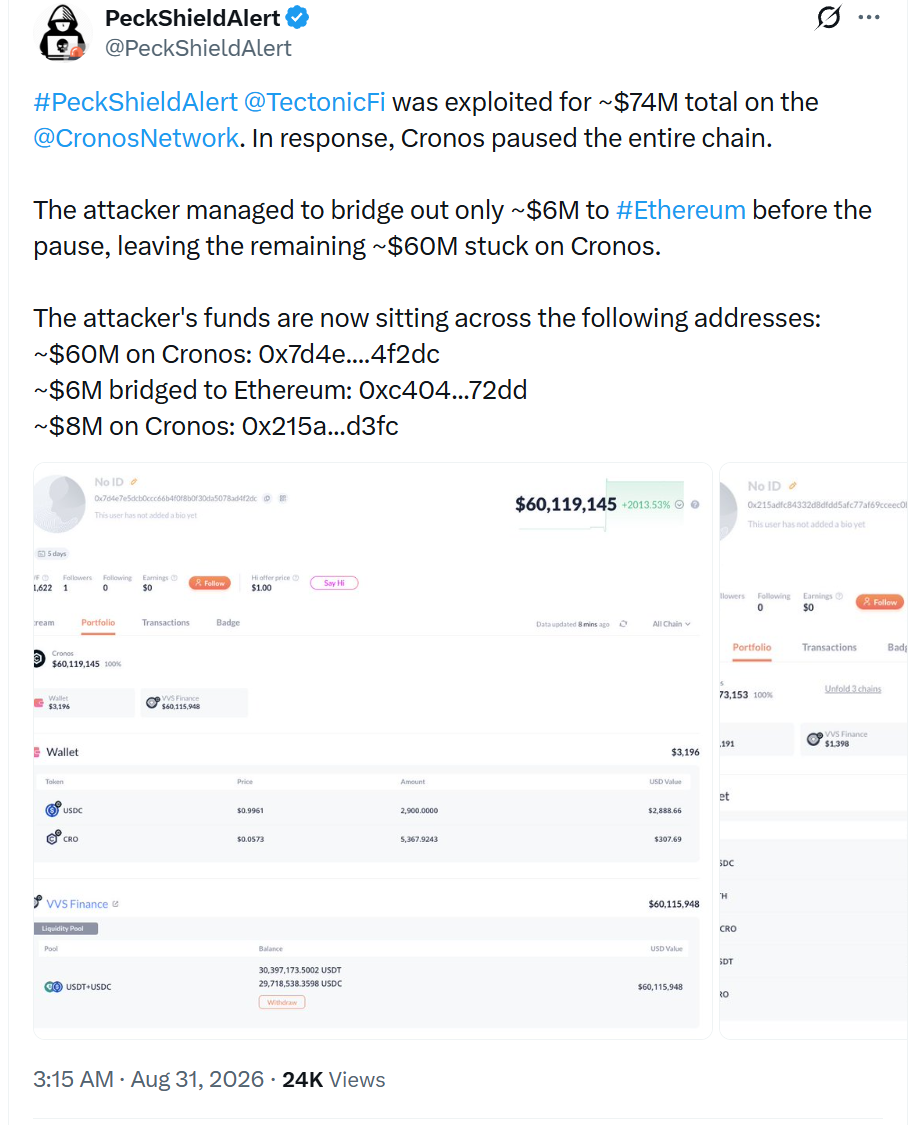
Despite the massive amount the exploit generated, the attacker only managed to steal roughly $6 million worth of Ethereum, the rest of the funds being “stuck” on Cronos, says blockchain security and data analytics company PeckShield.
Cronos is an Ethereum-like blockchain network associated with Crypto.com, while Tectonic is a decentralized finance (DeFi) lending app running on Cronos.
Advertisement
Tectonic, which was Cronos’ largest lending protocol before the incident, holding $122 million, allows users to deposit cryptocurrency and borrow against assets they provide as collateral.
After the incident, the total value locked according to DeFiLlama is just under $3 million.
Yesterday, Tectonic announced that it was investigating an incident and advised users not to interact with the protocol until the platform publicly confirmed that it was safe to do so.
Cronos responded quickly to the detected exploit and halted the blockchain’s operation, freezing all transactions in progress at the time.
Advertisement
Earlier today, Cronos restarted the network again and notified users that it “is producing blocks again and is fully back online.”
“This was a validator-consensus emergency action to protect users from an exploit on the Tectonic protocol,” Cronos states.
“The chain state was restored to before the Tectonic exploit from this morning. Cronos is producing blocks again as of 2026-08-30 23:49:01 UTC, starting from block 90,896,189.”
The blockchain is currently being closely monitored for stability, protocol compatibility, and other issues.
Advertisement
The platform also said it would provide further details about the exploit in a post-mortem report to be published soon.
Overall prevention scores can hide what happens after initial access. Once attackers are using valid credentials, prevention drops sharply.
The Blue Report 2026 measures defenses technique by technique across 338 million simulations run in customer production environments.
The Love Island USA season 8 reunion premieres exclusively on Peacock on Monday, August 31 at 9pm ET and if it’s anything like the spicy trailer, reality TV fans are in for a treat. All eyes on Melanie… that’s all we’re saying.
You can watch the Love Island USA season 8 reuniononlinefrom anywhere with a VPN and potentially for free.
The fiery sneak peek, co-hosted by Bravo’s Andy Cohen and Ariana Madix, sees the islanders going in hard: “If you don’t like me, go f–k yourself” rages paralympian Beatriz Hatz. Fans can also expect season 8 winner Trinity Tatum – still going strong with Bryce btw – to address the wild rumors on social media.
Advertisement
Peacock has officially confirmed season 8 racked up over 19 billion minutes streamed, so let’s find out all the ways to watch the Love Island USA season 8 reunion from anywhere.
Can I watch the Love Island USA S8 reunion for free?
All 35 episodes of Love Island USA S8 are free to watch on ITVX but Brits will have to wait a while for the reunion show.
You’ll need a subscription to either Peacock in the US, Crave in Canada, or Stan in Australia to watch reunion on August 31.
Outside the US? Use a strong VPN to watch – see our exclusive deal below.
Advertisement
Watch the Love Island USA S8 reunion from anywhere
If you’re keen to watch the Love Island USA reunionbut you’re away from home and access to the show is geo-blocked, you can always use a VPN to access it (assuming you’re not breaching any broadcaster T&Cs, of course). You may be surprised by how simple it is to do.
Use one of the best VPNs to watch Love Island reunion from anywhere:
Advertisement
Watch the Love Island USA S8 reunion in USA
The Love Island USA S8 reunion premieres at 9pm ET / 6pm PT on Mon, Aug 31 in the US, streaming exclusively on Peacock.
You’ll need the $11.99/month plan to tune in.
Alternatively, you can access Peacock for just $1 with the Walmart Plus trial. Peacock Premium is thrown in for free.
Traveling outside the US?Try using a VPN – check the details above for more.
Advertisement
How to watch the Love Island USA S8 reunion in Canada
The Love Island USA season 8 reunion show premieres an hour after the US show airs – 10pm ET/PT on Mon, Aug 31 on Crave in Canada.
Outside Canada right now?Use a VPN to gain access to all the content you’d normally stream at home.
Advertisement
Can I watch the Love Island USA S8 reunion in the UK?
(Image credit: Other)
Free-to-air ITVX is home to Love Island USA in the UK, but the season 8 reunion show isn’t likely to drop for a while. For now, you can watch all 35 episodes of season 8 for free…
Remember a VPN will help you tune in if you’re an American or a Canadian traveling across the pond. NordVPN is our recommended provider, and you can find out why with our in-depth NordVPN review (basically, it unblocks Peacock and many other VPNs don’t).
How to watch the Love Island USA S8 reunion in Australia
(Image credit: free)
The Love Island USA season 8 reunion show with Bravo’s Andy Cohen premieres on Stan in Australia on Tuesday, September 1.
Advertisement
A subscription starts at AU$12 a month.
Traveling outside Australia? As detailed above, if you’re overseas you’ll struggle to connect to any of the streaming services you usually use. The solution? Try using a VPN.
What to expect: Love Island USA S8 reunion
Andy Cohen is co-hosting – For the first time in Love Island history, host Ariana Madix is joined by Bravo big cheese Andy Cohen to co-host Monday’s reunion special, meaning the Islanders can expect a proper Real Housewives-style grilling.
Advertisement
Live studio audience – The 2026 reunion show was filmed on location at Universal Studios Hollywood in front of a live studio audience, departing from standard closed-set reunion formats. How will the crowd react?
More blockbuster ratings – According to Peacock, Love Island USA season 8 racked up over 19 billion minutes streamed, ranking as the No. 1 reality streaming title of the 2026 summer season for six consecutive weeks (per MediaPlayNews).
Breakups on stage – Season 8 winners Trinity and Bryce are still together, but let’s be honest, many couples who look solid after leaving Fiji hit the buffers when the cameras stop rolling. The reunion will catch viewers up on the breakups – and we might even see some on-stage breakups.
Season 9 preview – Alongside the reunion announcement, Peacock has officially renewed Love Island USA for season 9 with host Ariana Madix returning in 2027. The streamer also greenlit third seasons of both spinoffs – Love Island Games and Love Island: Beyond the Villa. Monday’s reunion show could contain some kind of teaser…
Advertisement
Love Island USA S8 reunion date and & time
Peacock officially confirmed that the Love Island USA Season 8 Reunion drops on Monday, August 31, 2026, at 9pm ET / 6pm PT.
Love Island USA S8 reunion cast?
The Finalists:
Advertisement
Trinity Tatum & Bryce Dettloff (Winners)
Aniya Harvey & Carl Schmidt (Runners-Up)
Melanie Moreno & Sincere Rhea (3rd Place)
Kayda Bosse & Zach Georgiou (4th Place)
Advertisement
Notable Returnees & Bombshells:
KC Chandler & Tierra “Titi” Davis
Kenzie Annis
Jen Terry
Advertisement
Beatriz Hatz
Caleb & Jaiden (returning to discuss their post-villa split)
No Shows / Minimal screentime
Unlike previous seasons there no major boycotts (so far) but don’t expect to see much of early dropouts, early bombshells or Casa Amor cuts such as Tino Ellis or Trae Taylor (looks like they were either not invited to stage seats or only featured in the audience).
Advertisement
We test and review VPN services in the context of legal recreational uses. For example: 1. Accessing a service from another country (subject to the terms and conditions of that service). 2. Protecting your online security and strengthening your online privacy when abroad. We do not support or condone the illegal or malicious use of VPN services. Consuming pirated content that is paid-for is neither endorsed nor approved by Future Publishing.
Every F-35 pilot in the US Air Force gets their own custom-fitted $400,000 helmet, which lets them peer through the cockpit mid-flight to see what’s going on in the surrounding airspace and the ground below.
This is possible through six infrared cameras embedded on to the flight’s exterior, broadcasting a 360-degree video stream straight into the pilot’s visor. Pilots say it’s like being able to see through the hull of the aircraft, as if it were made of glass.
No expense spared
Advertisement
Lockheed Martin’s F-35 Lightning II is one of the world’s most expensive fighter jets, priced anywhere between $80-110 million USD. These are single-seat, supersonic, stealth fighter jets designed for air strikes and electronic warfare.
Latest Videos FromTechRadar
Each fighter jet also comes equipped with a Gen III Helmet Mounted Display System (HMDS). A single F-35 Gen III helmet costs four times more than what the older F-16 jets came equipped with. To be more specific, an investigation by Air Force Times in 2015 put their per-unit pricing at roughly $400,000.
Given that the United States Air Force has a contract with the helmet manufacturer, Collins Elbit Vision Systems, to build thousands of these helmets — that makes the combined project cost for the headgear alone in the billions of dollars.
Advertisement
What do Air Force pilots get for the exorbitant price tag? When looking down through the visor, they get a real-time view of the airspace and ground below, the closest that the US military has come to X-ray vision.
Mark Welsh III, a retired four-star general who served as the Air Force’s 25th Chief of Staff, remarked that “the helmet is a workspace,” adding “It’s an interpretation of the battle space. It’s situational awareness. Calling this thing a helmet … we’ve got to come up with a new word.”
Sign up to the TechRadar Pro newsletter to get all the top news, opinion, features and guidance your business needs to succeed!
Advertisement
(Image credit: United States Air Force)
What makes the helmet special
The new F-35 Gen III helmets were designed by Collins Elbit Vision Systems, a joint venture between Collins Aerospace and Elbit Systems of America. Through their contract with the F-35 Joint Program, Collins Elbit has so far shipped more than 3,000 units of these helmets to the United States Air Force.
Each helmet is custom-built to match an individual pilot’s skull and facial structure, assigned right away during training, and retained by the pilot for all future flight runs.
The flagship feature of the Gen III helmets is that they let Air Force pilots see through the floor of their aircraft, using a Distributed Aperture System (DAS) designed by Northrop Grumman. This system consists of a set of cameras and built-in sensors, all connected using a software module that lets pilots track nearby aircrafts or missiles. Pilots can even lock on to targets as far as 800 miles away simply by looking at them.
Advertisement
Apart from the mounted display system and cameras, F-35 helmets are also equipped with digital night vision and thermal imaging. The visor uses high-resolution LCD lenses for improved picture clarity, plus the helmet itself is equipped with head and eye tracking systems to adjust to the pilot’s motions.
A vast improvement over previous models
Earlier versions of the F-35 helmet suffered from jittery visuals and ejection issues, so much so that the Pentagon funded a backup program with BAE Systems in case Lockheed Martin wasn’t able to deliver.
Advertisement
It took years for the joint venture to get the helmet designs right. There were multiple design iterations and several rounds of reviews before the Pentagon finally cleared the helmets for Air Force use, with the current version improved in mobility and vision.
Bob Hess, a senior director at Elbit America, went on record claiming that the Gen III HMDS was “the most advanced helmet-mounted display system in the world” in a 2024 press release. “The system’s next-generation user interface serves as a pilot’s primary display system, providing them with vital flight, tactical and sensor information day or night,” he said.
We spend hours testing every product or service we review, so you can be sure you’re buying the best. Find out more about how we test.
The MSI PRO MP243 is a slim-bezel monitor that delivers nearly everything you would want from a low-cost display. At the same time, it’s exactly what you would expect when you hear the words “budget monitor.”
It’s not going to impress you with flashy features, and it’s not going to win any performance awards. It’s not the very best business monitor we’ve ever tested. But what it does offer, however, is a sleek design, an easy setup, and enough of what most people need to make it a practical choice for everyday work in the office or home.
Advertisement
Maybe you need a larger screen for your home office, or perhaps you just bought a mini PC or Mac mini and need an affordable display to go along with it. It could also work well as a second monitor in a dual-screen setup. In those cases, the MP243 does the job.
MSI PRO MP243: Price and availability
(Image credit: Collin Probst // Future)
The price is where the MP243 really starts to make sense.
At around $120, you are getting a 23.8-inch IPS panel, a 144Hz refresh rate, Adaptive-Sync, HDMI, DisplayPort, built-in speakers, VESA support, and a clean white design.
Advertisement
That is a good group of features for a monitor in this price range.
One of the closest alternatives is the Dell SE2426HS. It has a similar 23.8-inch Full HD IPS panel, 144Hz refresh rate, Adaptive-Sync, and VESA support. The Dell also has a height-adjustable stand, which is a real advantage over the tilt-only stand on the MSI.
Sign up to the TechRadar Pro newsletter to get all the top news, opinion, features and guidance your business needs to succeed!
The MSI does have a few advantages of its own. It includes built-in speakers and DisplayPort, and the white finish gives it a cleaner look than most budget monitors.
Advertisement
At a lower sale price, the MSI is an easy monitor to recommend. At around $120, it is still a good option, but there are more competitors worth considering.
It really comes down to what matters more to you. If you want the white design, built-in speakers, and DisplayPort, the MSI is a good pick. If you care more about stand adjustment (and a higher resolution), there are better options.
(Image credit: Collin Probst // Future)
MSI PRO MP243: Unboxing and First Impressions
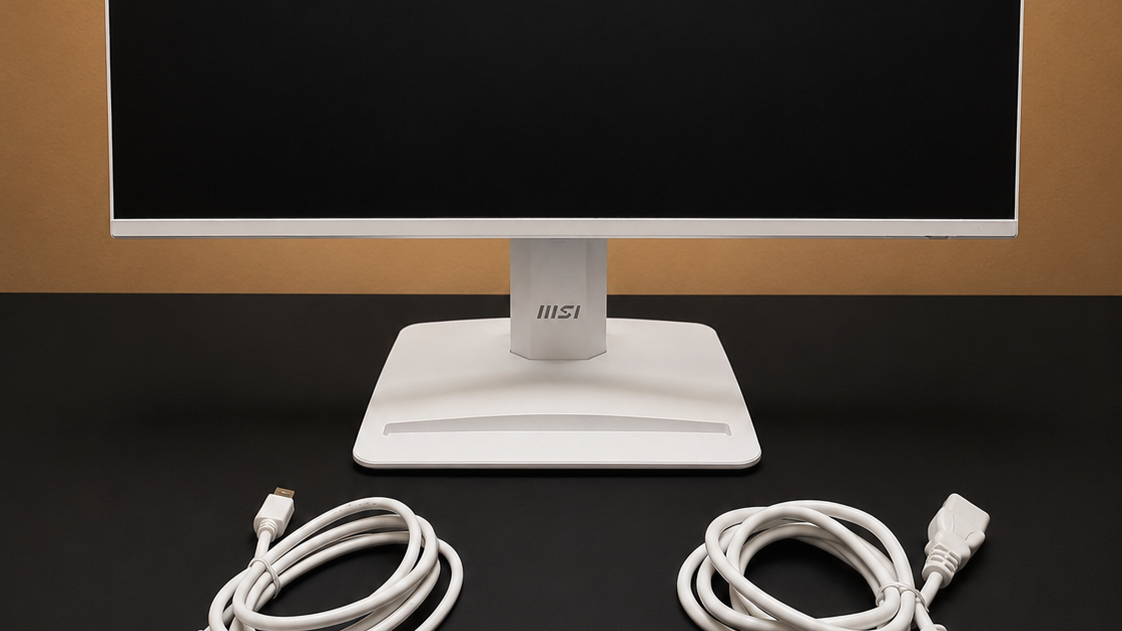
Most of the monitor and stand are plastic, but they don’t really feel cheap. It’s lightweight enough that I’d still be careful when putting it together and taking it apart.
Advertisement
Everything included in the box is white, even down to the cables, which gives the setup a uniform look. If you’re someone who likes a certain aesthetic, I think you’ll appreciate that everything matches.
The monitor is really simple to put together. Everything just clicks in, and then you’re good to go. The back of the stem includes a cable-management clip for routing your power and display cables. It is a small feature, but it helps keep the back of your desk a little cleaner.
The top of the base includes a simple organizer slot. It’s big enough that you can put a USB adapter, thumb drive, or anything else in there that would otherwise just be sitting on top of your desk. It’s an unexpected little feature that actually turned out to be useful.
MSI advertises it as a spot to hold your phone. You can place your phone in landscape and, depending on your workflow, use it as a secondary screen or simply keep it visible for notifications, your calendar, or something similar. It’s not a huge feature by any means, but it’s another small touch I appreciated that adds to the overall practicality of the monitor.
Advertisement
MSI PRO MP243: Design & Build Quality
The monitor’s control button is on the back right side. It doubles as both the power button and the joystick for navigating the menu.
The monitor keeps things simple when it comes to connectivity. It has one HDMI port, one DisplayPort, and one 3.5mm headphone jack. Both display inputs support 1080p at refresh rates up to 144Hz.
Honestly, support for up to 144Hz is a nice bonus for this price range, even if it’s clearly built for office work first. It’s not necessary, but it’s handy and opens up the customers for this monitor a little bit as well.
Advertisement
The MP243 has the standard settings you would expect, including brightness, contrast, sharpness, volume, and color controls. It also includes a few MSI-specific features that are worth mentioning.
MSI’s EyesErgo features include Less Blue Light, Anti-Flicker, and an anti-glare coating. These are all meant to make the monitor easier on your eyes during longer work sessions. If you spend most of your day reading emails, writing, or working through spreadsheets, they are nice features to have.
There is also an Eye-Q Check feature that gives you basic reminders for posture, eye fatigue, and taking breaks. It is not a feature I would buy the monitor for, but it makes sense on something that is primarily designed for office use.
The monitor supports Adaptive-Sync, HDR Ready, and refresh rates up to 144Hz. Adaptive-Sync can help reduce screen tearing, while 144Hz makes scrolling through webpages and moving things around the screen feel smoother than it would on a basic 60Hz monitor.
Advertisement
One of the more useful features of this monitor is its support for VESA mounting. The obvious benefit is that the monitor can be attached to a compatible wall mount or monitor arm. However, I think the more interesting use case is mounting a compatible mini PC directly to the back of the monitor.
Pairing this monitor with any of the best mini PCs is a more affordable alternative to a prebuilt all-in-one desktop. The computer stays out of sight, you can use shorter cables, and the whole setup takes up less space and looks cleaner.
I’m a stickler for cable management and keeping electronics as organized as possible. Being able to mount a mini PC behind the monitor, hide most of the hardware, and cut down on visible cables really adds to the value of this monitor.
The MP243 uses a 24-inch IPS panel with a claimed viewing angle of 178 degrees.
Advertisement
The bezels are thin along the left, right, and top edges, while the bottom bezel is slightly thicker. Combined with the white finish, the slim borders give the monitor a more high-end appearance than its price might suggest.
That is where this monitor arguably shines the most. It looks sleek, occupies relatively little space, and can blend naturally into a clean home-office environment.
The actual display is more conventional. Its 1080p resolution and standard image-quality features are appropriate for email, web browsing, documents, spreadsheets, and other everyday office tasks.
You can do just about anything with it, of course, but if you’re trying to edit photos or creative content on this, you may miss some things you would catch on a higher end monitor, it also just won’t look as clear.
Advertisement
MSI PRO MP243: In use
(Image credit: Collin Probst // Future)
One thing I actually didn’t mind was virtual meetings on this monitor. While I didn’t have the clearest images of everyone, I didn’t feel the virtual meeting was degraded or compromised in any way when using this screen.
The monitor includes two built-in 2W stereo speakers. The best comparison I can make is that they sound like basic laptop speakers without Dolby features or any other processing trying to make them sound better than they are.
It was good enough to hear clear audio, but I won’t be listening to music through this anytime soon. If you do not already own desktop speakers, they are enough to get started. You can always add better speakers or headphones later.
Advertisement
I also connected an Xbox Series X and tested the monitor with Overwatch. It worked and the game was “playable.” However, the deficiencies were pretty noticeable when compared to my dedicated gaming monitor, which was already around five years old.
The 144Hz refresh rate may make it seem gaming-friendly on paper, but refresh rate alone doesn’t define the overall experience. For casual gaming, especially with a system limited to Full HD, it gets the job done.
I would not buy it specifically for gaming, though. Anyone shopping primarily for gaming should look elsewhere, which makes sense as this is more of a budget business monitor, despite the 144Hz tag that will get gamers excited.
Advertisement
MSI PRO MP243: Final verdict
(Image credit: Collin Probst // Future)
The MSI PRO MP243 is best suited to someone who wants to upgrade or expand a home-office setup without spending much money.
Its strongest qualities are its clean design, compact footprint, useful stand, cable-management features, built-in speakers, and support for VESA mounting systems. It provides the basic features most people need for regular office work while looking better than many inexpensive monitors.
Its limitations are just as clear, though. It’s only 1080p, the build is lightweight, and while it supports 144Hz, I wouldn’t recommend buying it specifically for gaming. That doesn’t make it a bad product. It just means it should be purchased for the right reasons.
This is a practical choice for emails, documents, web browsing, secondary-screen use, casual media consumption, and compact desktop setups. If you’re not concerned about having 4K, it offers a straightforward and affordable way to add more screen space to your desk.
When it comes to building real-world flying vehicles, testing can be arduous and expensive. You have to find somewhere to fly, then you have to contend with environmental conditions and the possibility of damaging your craft if things go wrong. Simulation is a great solution to this, allowing testing without so much risk. To that end, [AlexanderRex] whipped up a platform for testing UAVs from the comfort of your computer desk.
PteroSim is intended as a comprehensive test bench for simulating autonomous aerial vehicles. It can run PX4, ArduPilot, and Betaflight binaries right in the simulator. The autopilot code is given simulated sensor data, and in turn responds with actuator commands, just as it would in a real craft. The simulator runs the flight dynamics using JSBSim, and the resulting scene is rendered in Unreal Engine 5.
If you’ve ever wanted to quickly road test different autopilot settings without heading out to the field or risking hardware, this is a great way to do so. It’s hard to beat the speed of iteration that is possible when testing on the computer on your desk. We’ve featured similar work before, too.
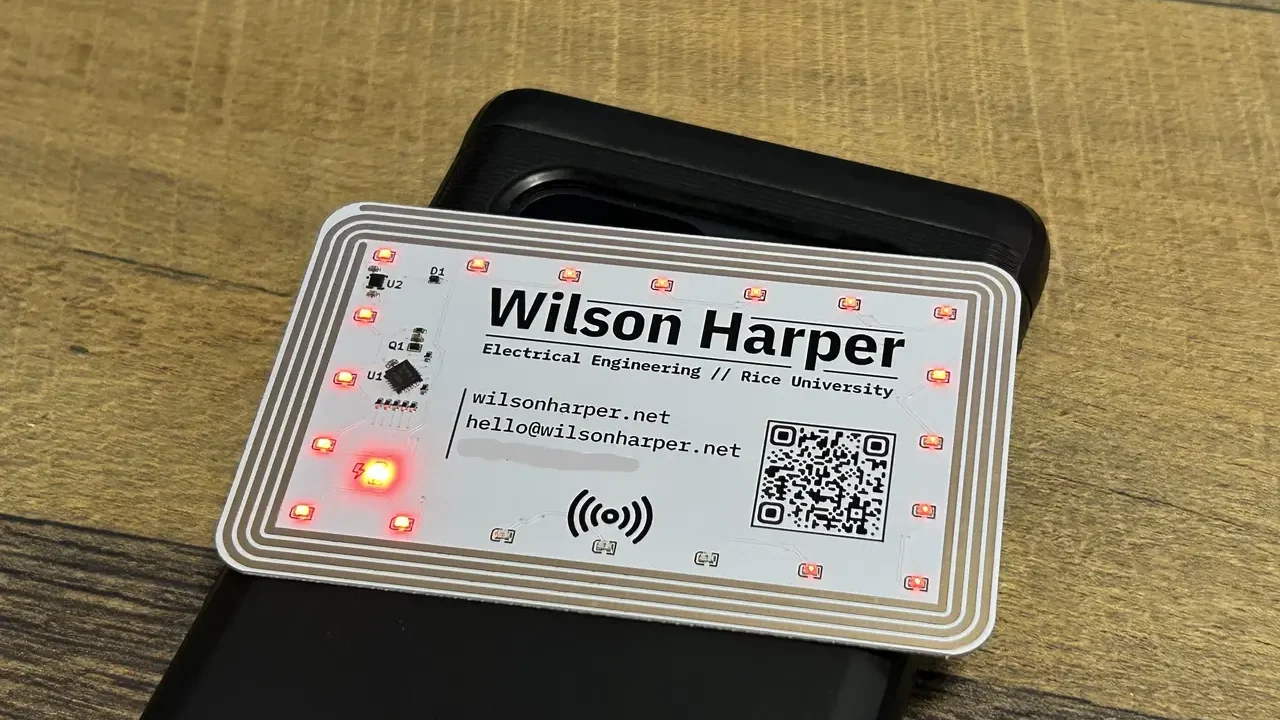
The hope is always that a good business card will leave a good impression. For those in the electronics field, they also serve as an opportunity to showcase creative design skills. [Wilson Harper] demonstrates that ably with a rather nifty energy-harvesting build.
The card is based around a thin PCB in the typical business card size. It’s populated by 21 Charlieplexed LEDs, a small microcontroller, and some supporting components. Now, this is normally where you might expect the device to be powered by a small coin cell, maybe deftly integrated into the PCB thickness itself to make the card less cumbersome. But no—[Wilson] went a different route. The thing is that in 2026, most of us are carrying phones with NFC readers built in. Thus, the card was built to harvest this source of energy with a PCB trace antenna, designed with the aid of STM’s antenna inductance tools and an LLM script lobbed into KiCad. All one needs to do is to pop the card on the back of a phone and the LEDs animate joyfully.
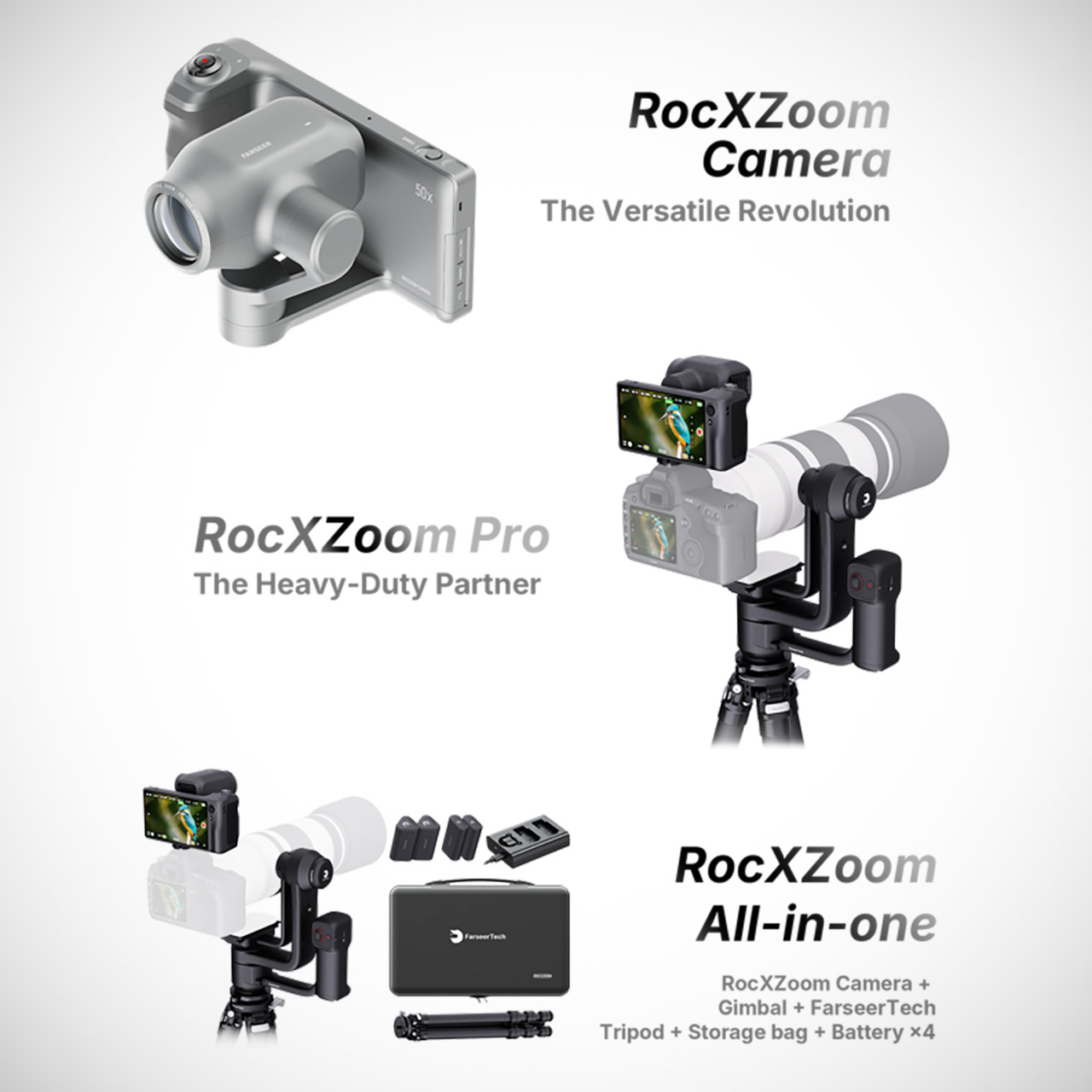
Four days into a Kickstarter run that ends September 26, FarseerTech’s RocXZoom has already pulled in about $249,628 from 344 backers against a $9,999 goal. Company copy calls it the world’s first robotic extreme zoom camera, and the hardware matches the slogan more closely than most crowdfunding pitches do.
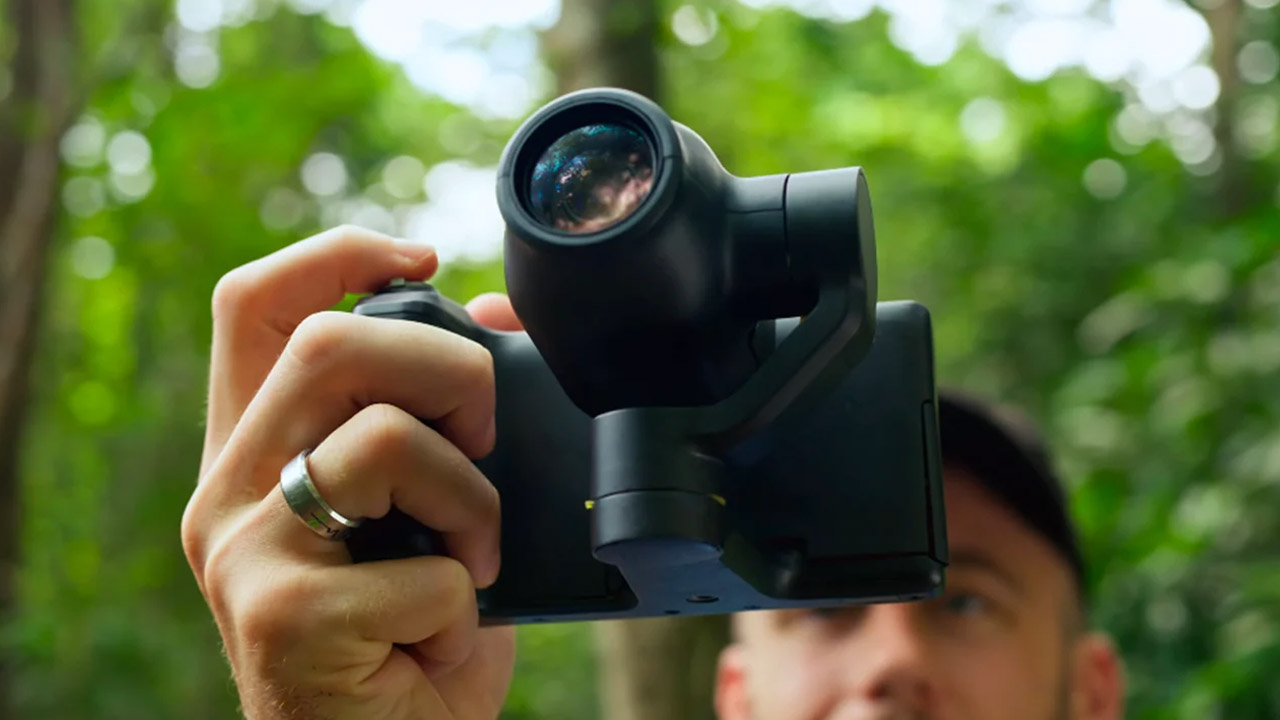
FarseerTech’s senior team formerly worked on the R&D and mass production of DJI products such as the Inspire, Osmo Pocket, and the high-end Ronin 4D. As you’d expect, this experience is reflected in the camera’s design: a beautifully machined aluminum body, a motorized pan-and-tilt head, a built-in vision chip, and a long zoom, all packed into a 400-gram handheld unit rated for IP54 dust and splash resistance, which means it can withstand being dropped in the mud. A 5 inch OLED screen on the back provides a clear view of what you’re capturing. The battery life is advertized as up to four hours.
8K30fps 360° Video with Dual 1/1.28″ Sensors: Capture stunning detail with dual 1/1.28″ sensors shooting up to 8K30fps. Film epic adventures…
Triple AI Chip Design, Better Low Light: Shoot confidently even in challenging lighting. X5’s triple AI chip design powers advanced noise reduction…
Invisible Selfie Stick: Create impossible third-person views with no selfie stick in sight! Capture everything in 360°, then choose your angles later…
On paper, the camera has some impressive specs, including a 20x optical zoom and 50x hybrid zoom, which is equivalent to a 40mm to 2,000mm full frame lens range, albeit the latter is a bit misleading; more on that below. The aperture increases from f1.8 to f3.9 as the lens extends. Video resolution is up to 4K at 30fps, with 1080p accessible at both 30 and 60fps. Photos can be in either 4K or 1080p resolution. Stabilization is achieved by a mixture of electrical image stabilization within the camera and, on higher-end kits, a gimbal. The 2,000mm figure attracts a lot of attention, but it’s worth taking a closer look: the camera has a far more realistic reach of roughly 40mm to 1kmm, with the rest being digital zoom and processing. The software they’ve developed will determine how well that works in the long run.
Advertisement
Then there’s subject tracking, which employs a computer vision system to detect subjects and automatically pan and zoom the camera to keep them in view. It is based on a model that has been trained on a large number of bird photos, with additional assistance from a Siamese network to identify individuals. FarseerTech claims it can identify over 300 distinct animal species, track people or custom targets, react in 0.01 seconds, and keep up with subjects moving at up to 45 mph. So far, we’ve seen some demo film featuring a fake bird on a remote control car, which is a good real-world test but far from the subjects they claim it can handle.
The camera has a small but powerful 1/2.5 inch sensor hidden behind that impressive-sounding lens. That allows them to pack a lot of zoom into a small body, but it also means sacrificing some image quality, especially in low light, dynamic range, and fine texture. Anyone who has used a competent compact or mirrorless camera with a good telephoto lens understands what I’m talking about.
FarseerTech is marketing this camera based on ease and automation rather than pure image quality. That’s supported by the pricing: their Kickstarter campaign is substantially more competitive than the retail price, with the Super Early Bird for the standalone camera costing only $449, followed by $499 and $549 on later tiers, for an MSRP of $799. The Pro Kit costs somewhat more: Super Early Bird is $849, followed by $949 and $1,049, with a retail price of $2,099. They hope to begin shipping this device by November 2026, but they showed out the hardware during CES 2026, so we at least have an idea of how it functions. [Source]
AI data center construction is now a hot-button topic in the US
President Trump wants constituents to embrace data centers or risk falling behind
Trump does not address energy, resource, or other growing concerns
The growth and expansion of generative AI is unprecedented, surpassed only, perhaps, by the rapid expansion and impact of the data centers that support it. While anti-data center sentiment is on the rise, US President Donald Trump took to his Truth Social social media platform on Monday to urge people to support rapid data center growth, warning those who oppose that “the only reason that communities throughout the U.S.A. should not want Data Centers is that they want to end up being backwards and poor.”
Before we dive into the rest of Trump’s post, it’s worth stepping back to look at data center construction growth and the more recent and somewhat remarkable backlash.
Data centers are not just an artificial intelligence phenomenon. These large buildings packed with servers and connected to the Internet have been around for decades and initially marked their greatest expansion during the rise of the World Wide Web. As the Internet grew in the 1990s and the number of websites skyrocketed, data centers that could keep copies of these sites and their data and then serve them to whoever wanted to access them around the world popped up around the world. Modern-day cloud systems like Amazon Web Services (AWS) serve millions of websites with a reported 900 data centers.
Latest Videos FromTechRadar
Advertisement
The recent rapid rise of AI usage around the globe in the form of ChatGPT, Claude, and Gemini has supercharged a new kind of data center growth. While traditional cloud servers relied on relatively efficient CPUs, generative AI demands more powerful and power-hungry GPUs, primarily from Nvidia.
Power-hungry AI
According to the World Resources Institute, a single AI data center can eat as much energy as 100,000 homes. When you consume that kind of energy, you also generate a lot of heat, and one of the other earmarks of modern AI data centers is their use of water for cooling. The WRI reports that a large AI data center can consume up to 5 million gallons of water a day.
Finally, these large data centers can be loud, producing a constant hum that can be heard in nearby communities.
Sign up for breaking news, reviews, opinion, top tech deals, and more.
Perhaps more concerning are the AI data centers planned for Colorado, Nevada, Utah, Arizona, and New Mexico, where a lengthy drought and the shrinking Colorado River are leading to water shortages that may result in far more stringent water conservation measures. It’s unclear how AI data center plans sync with that.
Advertisement
In the meantime, public opinion on data centers has shifted. A May 2026 Gallup poll found that 7 in 10 Americans oppose local construction of AI data centers, basically a “not in my town” sentiment. As expected, chief concerns revolve around the environment and quality of life. Many are also worried about resources.
In the midst of all this, we have the US leadership trying to encourage people to just let AI data center companies build. Here’s Trump’s full post:
“The only reason that communities throughout the U.S.A. should not want Data Centers is that they want to end up being backwards and poor. If they want to be successful and rich, with far lower taxes and jobs all over the place, let Data Reign. The good news is that there are plenty of other places that want them. If we kill the Golden Goose, you will only have yourselves to blame. China could not be happier with this anti Data Center movement. Actually, they can’t believe it is happening!”
Advertisement
Yes and no
Trump is right that data centers can result in an economic boom, including investment and new jobs, but it can also be short-lived after construction is done. Basically, the workforce is needed for the build and setup, and then automation tends to take on the majority of the day-to-day workload.
The concern about falling behind China in the AI race is more supportable in that there is undoubtedly an AI global supremacy race. With its lack of regulation and fewer open-source models, the US has not necessarily done itself any favors. And it’s safe to assume that Chinese citizens have little say in the power, resources, and quality-of-life impacts of AI data center development and construction.
Still, the idea that consumers, as opposed to AI companies, and the companies that build, support, and invest in these companies, will get rich is — well — rich. Communities can potentially benefit economically if the tax base is spread over these massive structures (utilities in your town can have a similar effect), therefore taking some of the burden off residents, but that doesn’t address water, electricity, sound, and aesthetic concerns.
Advertisement
(Image credit: Jim West/UCG/Universal Images Group via Getty Images)
Some data center developers are working with communities and local utilities to ensure that they pay their fair share of electricity (and maybe manage electricity use) and reuse water, but there’s no regulation to ensure these data centers are built responsibly.
Naturally, Trump does not address any of those worries in his post, and his administration has in recent days worked with the EPA to try and remove opportunities for communities to comment on the construction of these AI data centers before they’re built in their communities.
“Let data reign” sounds like a campaign slogan that might work for more simplistic issues, but Trump’s promises of jobs and wealth for all are likely to fall flat with communities who see the cranes dotting the landscape, walls rising from the dust and, eventually, resources being sucked dry.
I had been leery of prepared meal delivery services. They gave me flashbacks to those delivery diet plans sold on late night television in the 1990s. And so Tempo Meals, a spin-off prepared meal brand from meal kit service Home Chef, came as a pleasant surprise even after testing dozens of meal kits.
Tempo meals look like TV dinners, but they’ve never been frozen, thanks to advances in packaging technology. The beef barbacoa and sous-vide chicken I tried actually retained moisture and tenderness. Green beans were still vibrantly green, with a little bit of snap. They’re cooked in a commissary kitchen, and shipped to your doorstep in special packaging that prevents spoilage without using a bunch of preservatives. Heat-and-eat meals won’t ever be quite as good as freshly cooked meals, but especially when I reheated them in an air fryer they got closer than expected.
Tempo is especially known for high-protein and GLP-1 plans created in consultation with dietitians, helping prevent people from losing muscle mass when on calorie-restricted diets or just in midlife. Meals are $11 to $13 a serving at regular price, but Tempo Meals discount codes are available. For now, with a Tempo Meals promo code, you can get up to 60% off your first box of Tempo, with discounts throughout the first month.
Score 30% Off Your First Month of Four Boxes
Like a lot of meal delivery services, Tempo Meals wants you to try them out in hopes you enjoy the service and decide you can’t live without it. And so Home Chef offers a Tempo Meals coupon code for new customers. Depending on the Tempo promo code, this may be a straight discount of 30% off for the first four weeks. Or it may be 50% or 60% off the first box, and then discounts off the next month of boxes. Right now, you can also sign up for a lifetime free breakfast item. For previous customers who for whatever reason paused their Tempo subscription, there are Tempo Meals promo codes for existing customers that show up in your inbox. These may automatically be applied when you visit the Tempo website.
Advertisement
Activate the Heroes Discount to Get 50% Off Now and 10% Off for a Lifetime
Most Tempo Meals promo codes are good for deals during the introductory week only. But the Tempo Meals heroes discount applies for life for military personnel, first responders, teachers, doctors, nurses, and other hospital employees. To get the heroes discount from Tempo, you’ll need to verify your identity with the ID.Me system. After this, you get a permanent discount—pretty much the best discounts available if you plan on using Tempo long-term for a high-protein meal program.
Secure Instant Savings by Applying Your Tempo Meals Coupon
Often, Home Chef offers multiple Tempo Meals coupons at the same time. These can usually be activated on the site by clicking on the right pop-up. After you enter your area code and email address to verify that Tempo serves your area, you’ll be asked a couple questions about your meal preferences, before selecting how many meals you want each week—anywhere from six to 20 meals. At checkout, make sure the right Tempo Meals discount code has been applied to your order. This may include free shipping for the first week, and an extra item such as free breakfast.
I’ve written quite a lot about 8K TV over the years, which seems so strange for a format that’s never really taken off.
Maybe it really is the hope that kills you. The amount of effort TV brands put into showcasing an 8K future, only to slowly retreat from it and pursue other lines of picture quality. And while no one seems to have officially put the stake into 8K TV’s chest, the silence around the technology has approached deafening levels.
8K popped into my mind recently as I was going through our best buys and updating the best 8K TV page. The past few years have seen the options dwindle, and each time I look at it, it’s not to add something but likely to remove a no longer available TV and to spruce up the copy so that it reflects 8K’s current status of a technology that was a thing rather than is a thing.
With RGB tellies occupying the mind space of TV brands, I can’t help but wonder where TVs go next.
Advertisement
The search for the next shiny thing
Advertisement
I’ve written much about how 8K arrived too soon trying to do too much without the content in place. Some out there on the Internet forums would still believe that 8K is just over the horizon, but if studios and the such wanted to make content available, they’d have done so years ago. There is an apathy rather than excitement around 8K that’s consumed it whole. Samsung was the format’s biggest cheerleader but even it has gone quiet recently.
TV brands have been searching for an answer to the next frontier in TV technology, but so far it’s been a busted flush. It started with 3D in the 2010s, a technology that no one quite seemed to figure out how to make it work for the home. This kicked off a series of ‘shiny’ new things that the industry would investigate, toil and make hard work of, and then leave it to list while pursuing other ‘shiny’ things.
Image Credit (Trusted Reviews)
QLED started of as a premium technology for TVs priced at £2000+ and now you can get it in a TV that costs £350. You’ll see in marketing for QLED TVs that they’re brighter and more colourful than standard TVs (or something to that effect), but the problem with this is that QLED is now the standard, and there’s been no progress in the technology for years at budget price brackets.
We then had a dabble with MicroLED, but quite correctly that proved prohibitive in terms of cost and who the intended market was for. MicroLED is more B2B – at best it’s custom install for the millionaires and billionaires out there. The dream of MicroLED being able to make it into 55-inch sizes was just that – a dream.
Advertisement
Advertisement
Image Credit (Trusted Reviews)
We’ve had fancy looking OLED TVs – LG bringing out its rollable OLED-R, but designs like this came and went leaving less a crater and more a scoop of unturned soil. Then we Mini-LED (Quantum Dot Mini LED) but that’s experience a similar trajectory as QLED. A panel technology that started life as the reserve of those who could afford riches has now reached affordable status. Samsung’s M80H is an entry-level Mini LED for £699. A few years ago and that would have cost £2000.
RGB Mini LED seemed like it could be the cure-all, but now that we’re past the launches, RGB doesn’t feel like it’s an earth-shattering development. That’s not to say that RGB TVs aren’t good – some are better than others, of course – but it’s already suffering from a lack of excitement and enthusiasm. At the end of the day, it is an LCD TV, and has the same strengths and drawbacks.
Let’s not forget OLED, which seems to be the one TV technology that’s resisting taking a dive and becoming affordable. But it suffers from a lack of competition – Sony dabble in it, Hisense and TCL disavow it, Panasonic has struggled to assert itself, and no other TV brand will touch it because of the dominance of both LG and Samsung in the sector.
Image Credit (Trusted Reviews)
Where next?
It feels as if the TV industry has slowly exhausted its options, and at the same time, customers do not seem much enthused.
Advertisement
We remain in a cost of living crisis but something has changed in the conversation around TVs. Teens and young adults care more about their phones, younger kids grow up holding tablets, and these are the coming and upcoming generations that TV brands want to ensnare.
Advertisement
But TVs don’t form the epicentre of home life any more – the move to streaming has released any bonds and attachment to the big screen in the living room. For the first time in its history, the IPA TouchPoints data survey revealed that for adults in the UK (aged 15+) mobile phone time overtook TV watching for the first time. When I was growing up, the TV was the window to the outside world, the only way to see massive events if you weren’t there. That’s not the case any more.
It’s not so much that the TV itself has changed – it still does the same it did sixty years ago – but everything around it has. What does the future look like for TVs? I’m not too sure but it can’t be more of the same. That’s partly the reason it is where it is now.
As far as the Asus’ appearance goes, the side bezels are a bit large, and the top and bottom bezels aren’t the same size, which I find visually off-putting. Nicely, though, the amount of adjustability is impressive. This stand can swivel, tilt, rotate into portrait mode, and the height can shift 5 inches. The stand has some very basic built-in cable management, with down-firing ports that help keep cords organized. Also, the flat base doesn’t require much space on my desk.
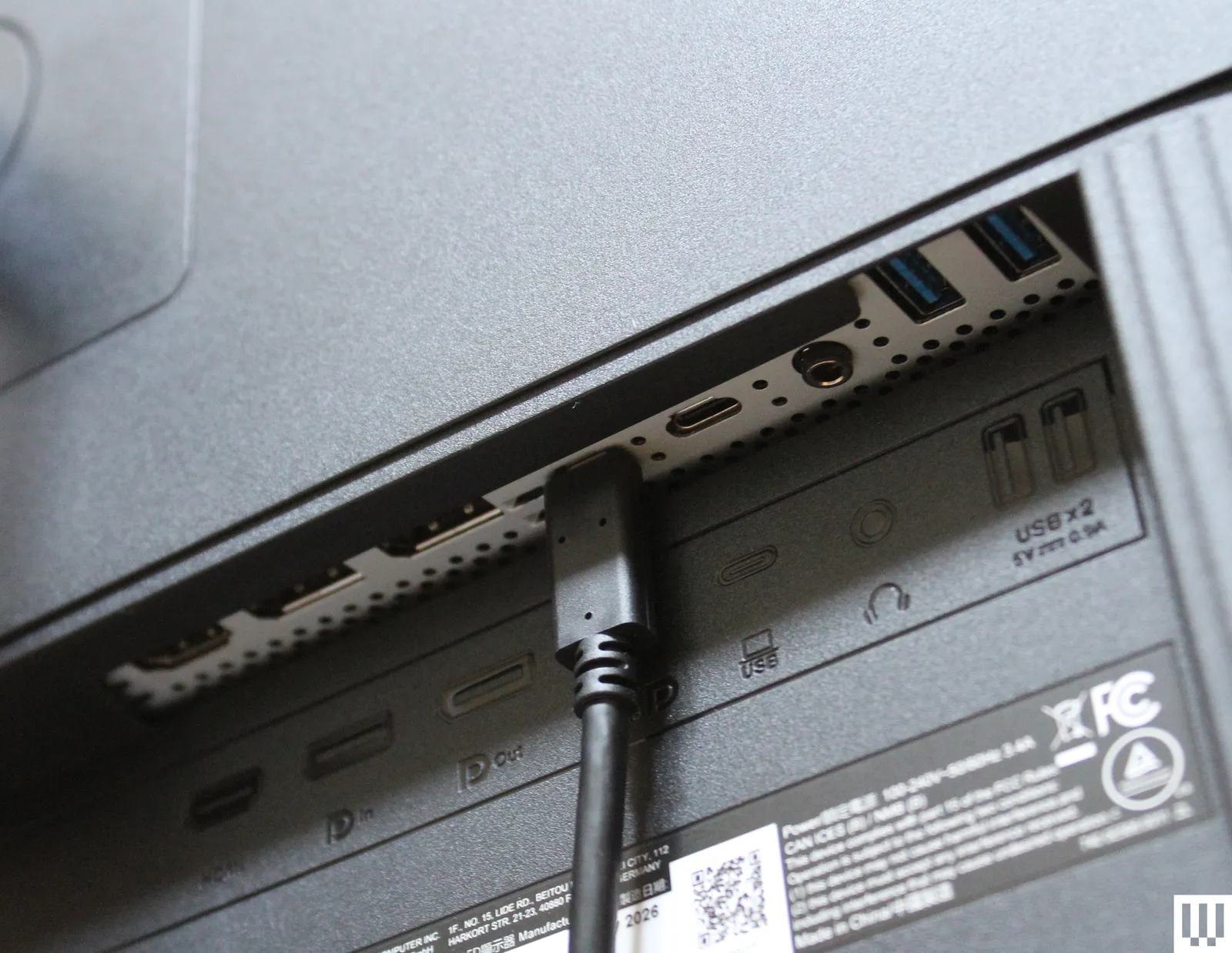
Each of the two back USB-C ports has a specific purpose. One is USB-C 3.2 with DP Alt Mode, which provides 96 watts of power delivery for your laptop. The other is a USB-C 3.2 port for the KVM switch, enabling you to connect two PCs to the monitor and switch between them seamlessly. Fortunately, Asus clearly labels each port, so you know which to use for your intended purpose. The monitor also comes with two USB-A ports for accessories, a headphone jack, HDMI 2.1, DisplayPort 1.4, and a DisplayPort Out for daisy-chaining monitors together. This is a solid array of port selection that gives you just about everything you need to use the ProArt PA279cdv as a workstation.
Advertisement
Photograph: Luke Larsen
Photograph: Luke Larsen
Meanwhile, the controls for the onscreen display and menu are on the right side of the front panel. I tend to prefer just a single joystick for simplicity’s sake, but like the other Asus ProArt monitors, this one gives you five control buttons, plus a power button, in addition to a joystick. Once you know how to use it, though, the buttons give you quick access to switching inputs or changing brightness.
There are quite a lot of features to dig through in the menu, including a number of color modes and detailed picture-quality tweaks. There’s also a Display Widget app to handle all these settings, available in Windows 11 or macOS.
The monitor includes speakers, but they sound pretty bad, which is unfortunate for a monitor designed at least partially for entertainment purposes. Keep this in mind if you plan to watch a movie on the monitor, since you’ll only want to use the speakers for basic notifications. By contrast, the Dell 32 Plus QD-OLED has a really nice set of speakers.
OLED, Oh My!
Brightness—both measured in standard dynamic range (SDR) and HDR content—is the key feature of an OLED monitor, as it determines how good at HDR the device in question truly is. OLED displays can switch off individual pixels, a capability that provides the absolute blacks this class of display is known for. But if the pixels aren’t bright enough, the display still won’t produce a strong HDR performance.
Advertisement
Using an HDR test pattern, I was able to record 1,038 nits in a 1 percent window and 917 nits in a 4 percent window. These strong results deliver a greater sense of visual fidelity when watching movies or playing games than what you’d get with dimmer displays. Compared to the current ultimate HDR monitor, the Apple Studio Display XDR (7/10, WIRED Recommends), though, these results aren’t stunning. On the Apple monitor, I got to 1,905 nits of brightness in a 25 percent window. Even so, comparing these two monitors is hardly fair, given that the Apple costs more than $3,000 and should provide a premium quality to match. I’m providing these results to demonstrate the broad HDR landscape in monitors.



































































You must be logged in to post a comment Login