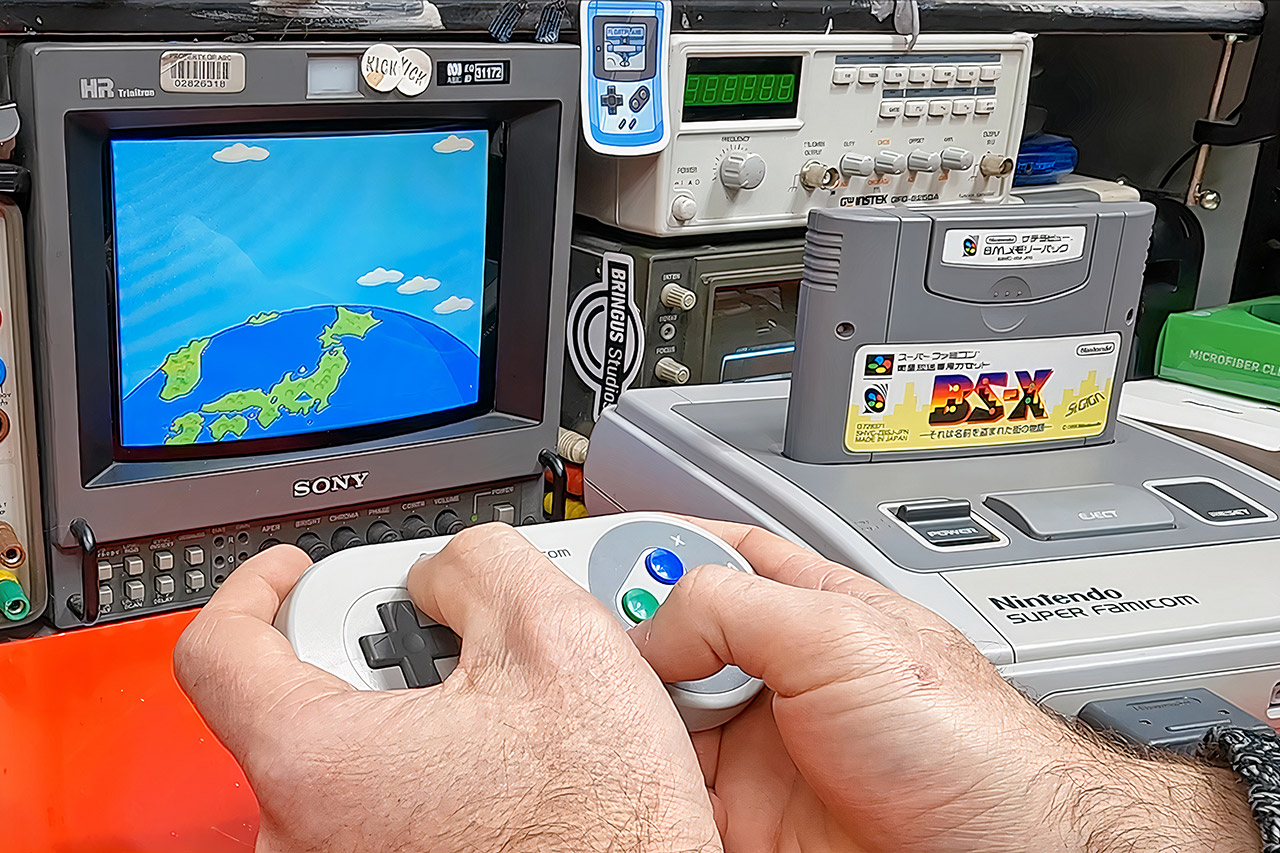
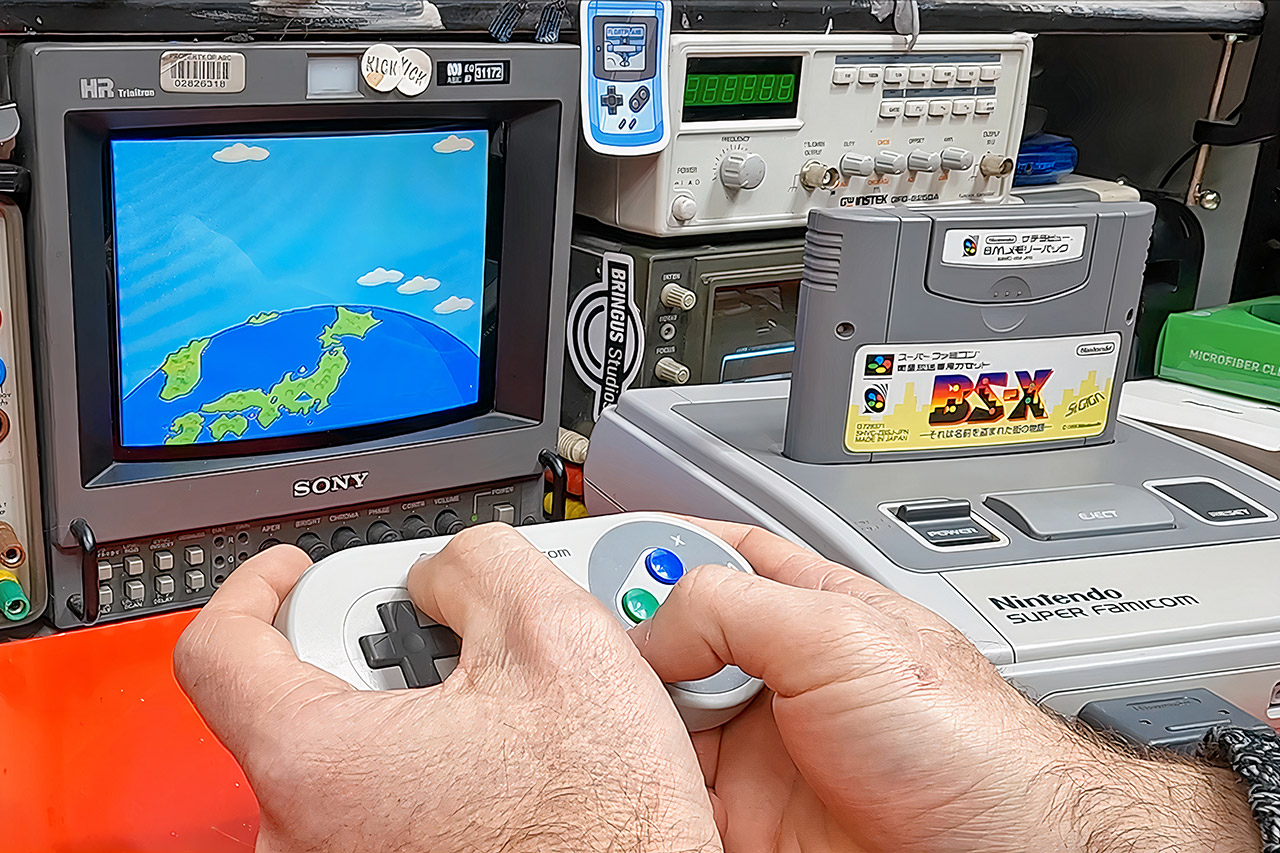
James Channel spent a recent video staring down a piece of Nintendo hardware that was never meant to last. His question is simple and a little unsettling: does the object in his hands still hold a game the rest of the world no longer has? That question only makes sense if you rewind past Satellaview itself and look at how Nintendo spent the late 1980s turning a living-room toy into a communications box.
Nintendo’s Family Computer had already established itself in millions of Japanese homes when the corporation chose to add a disk drive to it in 1986. Disk cards were dirt cheap, easy to rewrite, and extremely small. Stores began installing Disk Writer kiosks, allowing customers to walk in with a used disk and walk out with an entirely different game for a few hundred yen. Another innovation, the Disk Fax machine, allowing players from all around the country to upload their high scores from national competitions. The disk drive was the catalyst for the release of games like Zelda and Metroid, as it provided space for save data and extra soundtracks. That short trial showed Nintendo two things: first, that cheap distribution was the way to go, and second, that weak media and a divided user base would be a significant pain.
Two years later, they tried it again, this time with a phone line. The Family Computer Network System consisted of a modem and a few credit-card-sized ROM cards that let a Famicom to dial up for a variety of information such as stock prices, the current horse racing odds, the weather, some jokes, and a dealer tool known as Super Mario Club. Approximately 130,000 machines were sold, however only a small percentage of owners used them for anything other than a curiosity “ooh see what this thing can do.” Even yet, Nintendo president Hiroshi Yamauchi believed that this was simply a test run, and that if the next one failed, he would try something new.
The next attempt, Satellaview, landed in Japan on April 23, 1995. It was a two-piece kit for the Super Famicom, consisting of a receiver that you plugged into the console and a cartridge named BS-X: Sore wa Namae o Nusumareta Machi no Monogatari, “The Town Whose Name Was Stolen,” which combined a little role-playing game and a menu. Then there was the memory pack, an 8-meg flash drive that held all of the downloads from space. St.GIGA, a satellite radio operation that Nintendo eventually acquired when the company was in financial trouble, was in charge of the broadcasting side of things. Players were expected to purchase the hardware and a dish, and then download whatever they wanted at no further cost. Nintendo expected to sell two million devices in the first year, but only sold roughly 100,000.
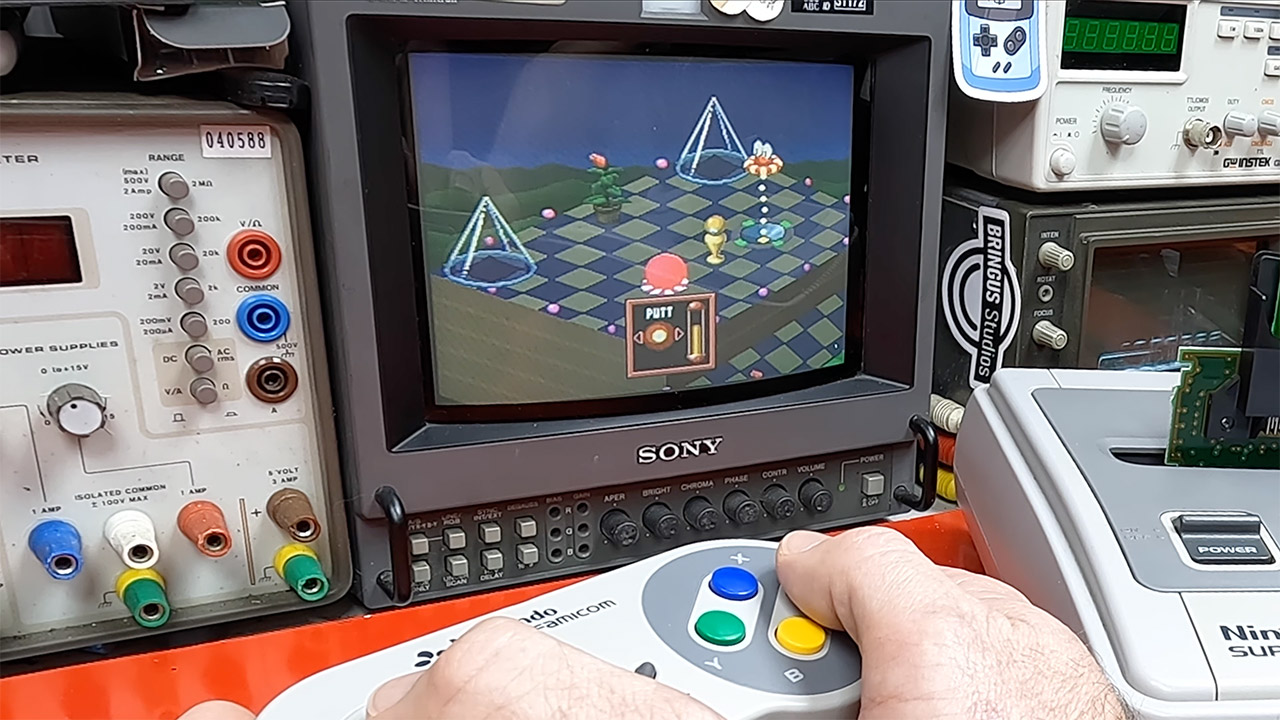
Every evening a window would open up to the world. During “Super Famicom Happy Hour” (a name that was more of a catch-all than anything officially assigned), a bunch of items would simply pour down. This might include a game, a digital magazine, or even a radio show all at the same time. SoundLink titles would then be overlaid on top of the existing data, such as a narrator talking over the original BS Zelda while also altering up the map or music on the fly, if someone on the other end of the satellite opted to modify something. The Ancient Stone Tablets then took players on a wild roller coaster ride six years after the original, with a Link characterization that was missing from the story and the Satellaview avatar taking center stage from the start, thanks to a separate four-part episode series broadcast on the Satellaview system. BS Super Mario USA, on the other hand, piggybacked off of the Western Super Mario Bros. 2. F-Zero received the typical new tracks and races. Fire Emblem, Kirby minigames, Square’s Radical Dreamers, Treasure Conflix, and a slew of other bizarre stuff all arrived in the same way: they simply appeared in the system with little explanation. Many were held up for approximately a week before the most recent pack was overwritten with a fresh one, and the entire affair was canceled.
Eventually, St.GIGA and Nintendo fell out after debt collection talks failed and a license agreement to broadcast anything was missed. Nintendo discontinued sending their products about 1999 for this reason. St.GIGA went through the motions and repeated parts of the old items for a little longer, until June 30, 2000. Then, with a skeleton crew, all radio transmissions came to a standstill. The entire thing suddenly went apart. People either left the packs in their drawers or threw them away after they were overwritten. Today, all that exists is a collection of (mainly useless) dumps collected from these ancient broadcasts. Some people, like James, have even begun purchasing outdated hardware in the hopes that the occasional broadcast has been left in the system and can still be played out, waiting for someone to come along and push the proper button.
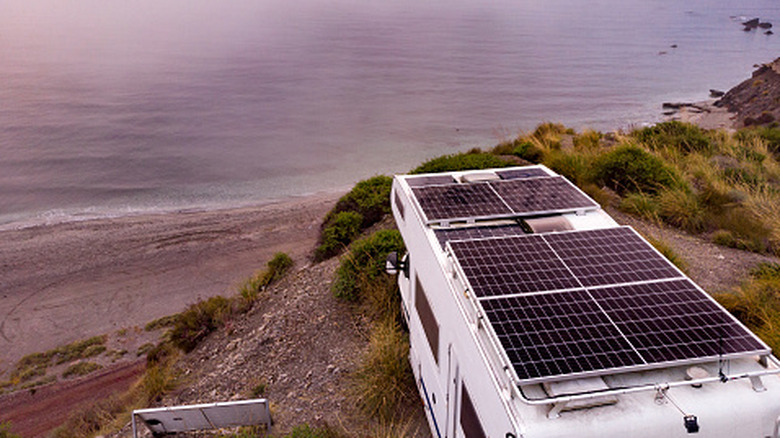
If you’re considering installing solar panels to help protect the environment and serve your home’s energy needs, you might also wonder whether they should be installed flat on a roof or at an angle. The short answer: It depends. Per the U.S. Department of Energy (DoE), consumer solar panels in the U.S. typically deliver the strongest results when installed on south-facing roofs with slopes that are between 15 and 40 degrees. Thus, the orientation of your solar panels will depend, in part, on the slope of your roof.
Be aware that the above angle recommendations apply specifically to homes in the U.S. The ideal tilt for a consumer solar panel is as close as possible to whatever the local latitude is. In the U.S., that means a slope or angle between 15 and 40 degrees is usually best, but the superior angle will likely be different in other parts of the world.
Naturally, you should always familiarize yourself with the different types of consumer solar panels beforehand to get a sense of your options. It’s also important to understand some basics regarding how proper installation can optimize the power production of your solar panels. Although a professional installer should know how to effectively position them, it’s beneficial if you also have a rudimentary understanding of the process.
Advertisement
Important information about installing solar panels flat or at an angle
Siri Stafford/Getty Images
The angle at which solar panels are installed is critical because it determines how much sun exposure they get over the course of a typical day. Again, the current slope of your roof may provide the ideal angle already. In this case, unless a professional convincingly explains otherwise, it probably makes sense to install solar panels flat on your roof. If your roof’s slope isn’t reasonably close to the local latitude, installing solar panels so they tilt at the ideal angle is probably necessary.
Just be aware that other factors can influence how you should position solar panels on a residential roof. For example, if you live in an area that’s prone to snow, hail, or other winter weather, an angle of 60 degrees can help solar panels shed precipitation that might otherwise damage them or impact performance. That said, a larger angle can also increase wind load. Similarly, trees and other such obstructions can determine whether a given spot and angle on a roof is the best choice for your panels.
Advertisement
Again, you can discuss all the relevant factors with a qualified professional to better decide how to install solar panels. While doing your research, you may also want to learn about some common solar panel myths, as debunking misconceptions about this eco-friendly energy option may convince you to finally add an array to your home.
LG is pushing back against reports that its smart TVs are “spying” on users, saying wake-word detection happens locally and that features such as Automatic Content Recognition, voice recognition, and interest-based ads are optional. But critics note that researchers found TVs keeping logs of ambient conversations, and LG’s response “did not address broader concerns about how much data it collects, who it shares it with, the potential for bad actors to exploit its features, or the misleading way in which its privacy options are presented,” reports The Verge. Here’s an excerpt from LG’s statement: Some recent media coverage may have contributed to misconceptions about how LG smart TVs work. As an industry leader, LG believes we have a responsibility to provide customers with clear and accurate information about how our smart TVs operate and the privacy controls available to them. We would like to clarify how our smart TVs operate and explain our approach to user privacy.
LG smart TVs do not continuously record or transmit users’ conversations. Speech-to-text processing begins only if a user activates a voice interaction through a supported wake-word feature or by pressing the voice (or AI) button on the remote control. Audio used for wake-word detection is processed locally on the TV and, if no wake word is detected, audio is not converted to text, stored, or transmitted. Voice-recognition results and related technical logs may be generated as part of processing a voice command. These records are associated with specific voice interactions and do not indicate continuous recording of conversations occurring outside an active voice recognition session.
Speech-recognition results may be used to support voice-related features but are not uploaded later when the TV is offline or when connectivity is restored. Features such as Automatic Content Recognition (ACR), voice recognition, and interest-based advertising are optional. These features are not enabled by default. Users can choose to enable these features and can manage or withdraw consent through TV settings.
ACR uses audio fingerprinting technology using the TV’s internal audio processor (not a speaker) to identify content and does not collect screenshots, screen recordings, video recordings, voice recordings, or other audio recordings from the TV. Where ACR is available and enabled, ACR-related information may be used for audience segmentation and viewing or audience trend analysis. Interest-based advertising and cross-device advertising require separate user consent through the applicable advertising-related agreements. Protecting user privacy is a fundamental principle in the design and operation of LG products and services. The statement goes on to “provide additional details on how LG smart TV features work, how information may be processed, what choices users have, and how LG continues to strengthen privacy, transparency, and security.”
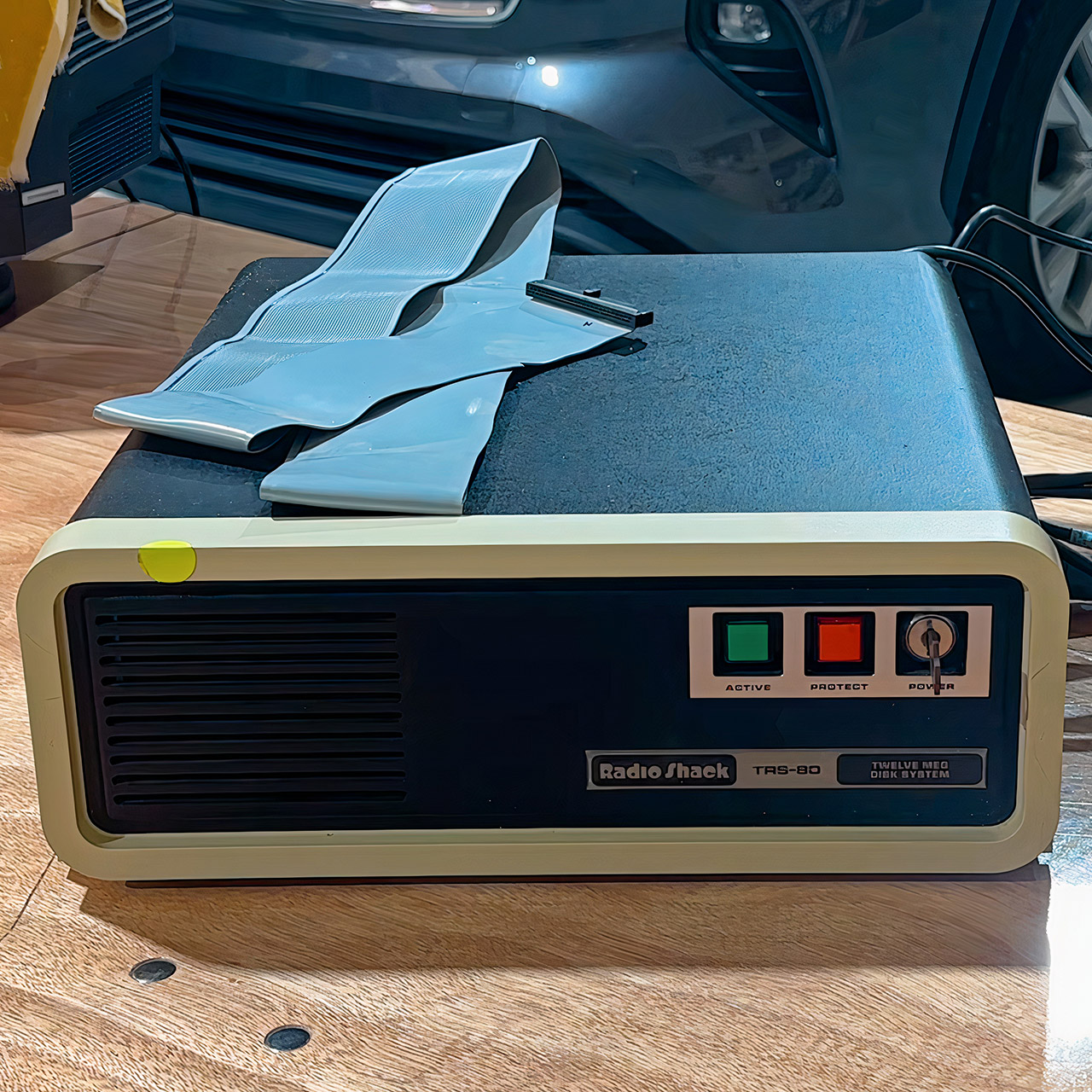
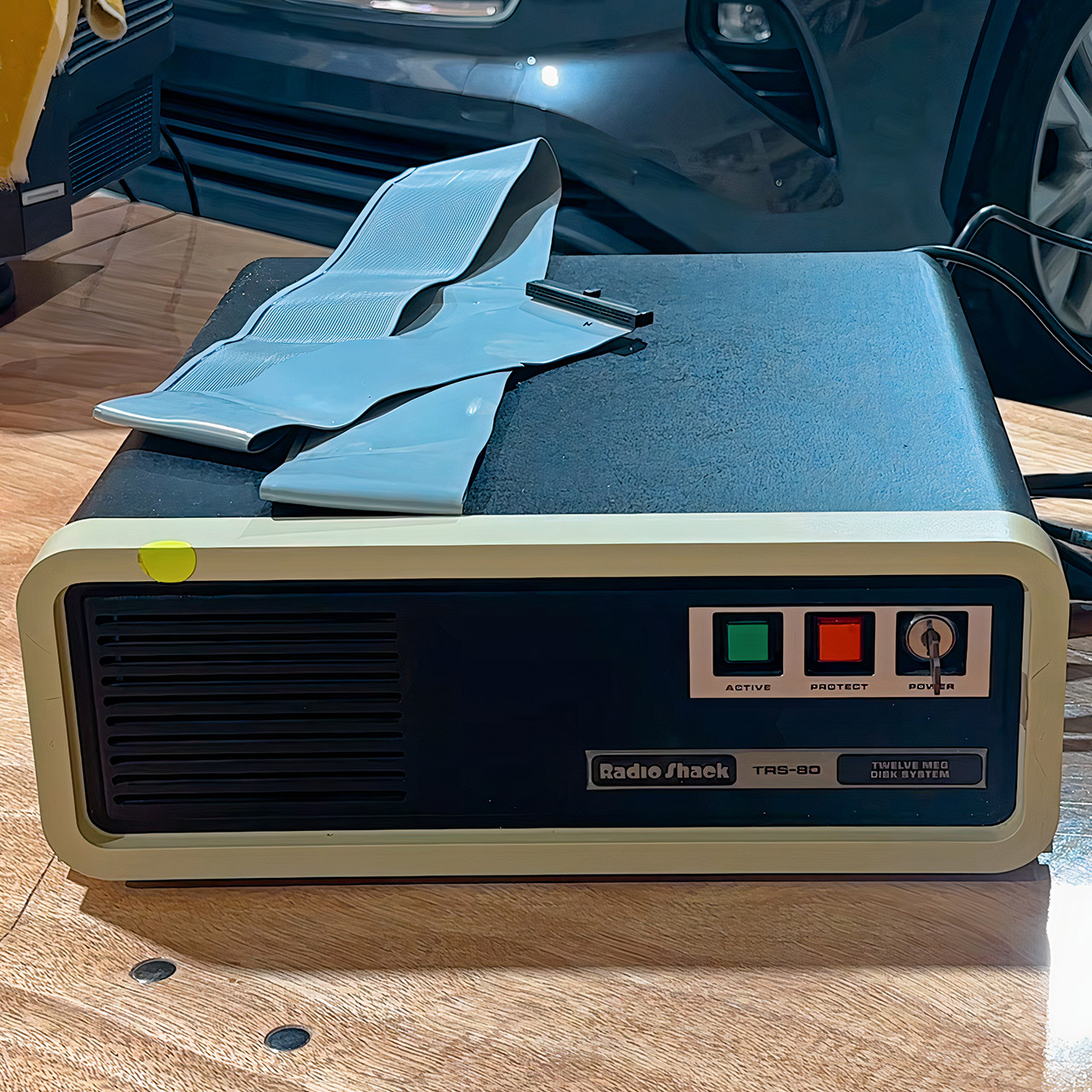
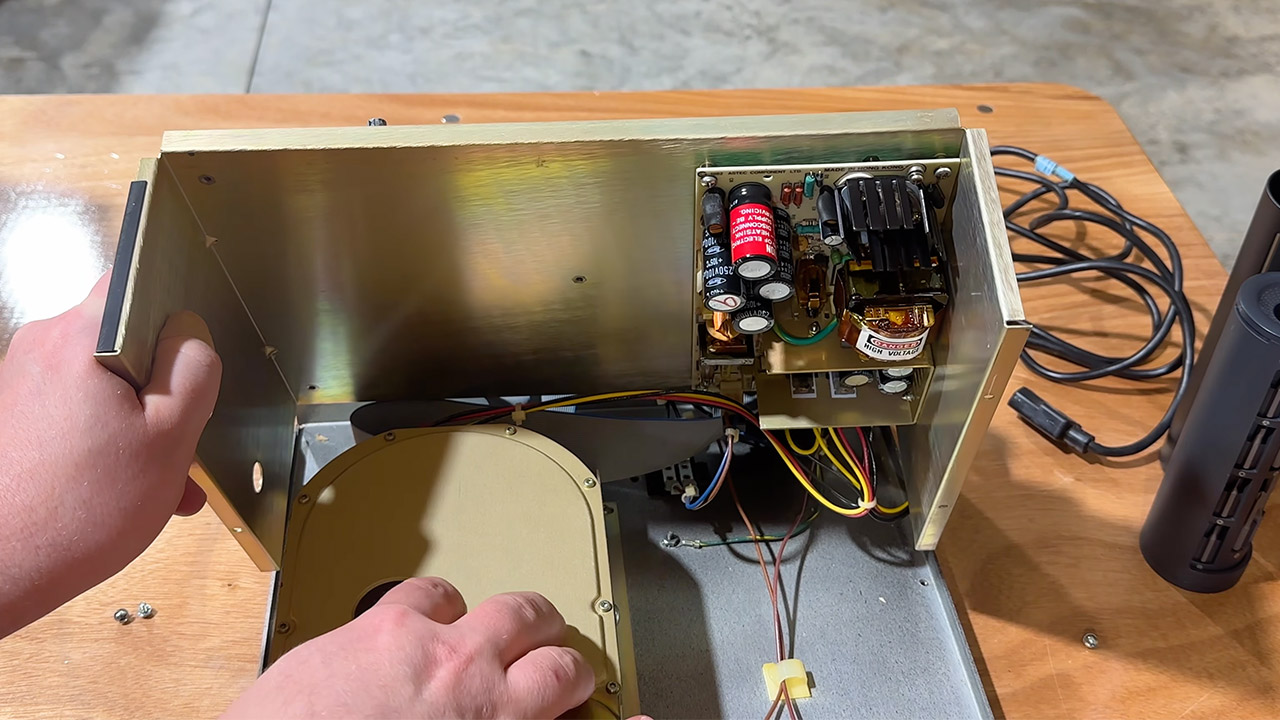
Radio Shack asked $3,495 in 1983 for a 12-megabyte external Winchester meant to sit beside a TRS-80 Model II, Model 12, or Model 16. That price lands near $11,754 in 2026 money. Clint Basinger of LGR pulled one of those units from long-term storage, cracked the case, and gave it a brief power-on test before packing the vintage hard drive off to a museum.
Catalog No. 26-4152 Having identified the primary drive, a matching secondary unit with Catalog number 26-4153 was available for a stunning $2,495 back then. However, if you wanted the installation done, you would have to pay extra. Back then, the only way to load software into your home computer was to utilize 8-inch or 5.25-inch floppies, or a cassette tape. A sealed 12-million-character disk, on the other hand, was a genuine beast in an office that ran payroll, inventories, and customer records around the clock.
MADE FOR THE MAKERS: Create; Explore; Store; The T7 Portable SSD delivers fast speeds and durable features to back up any endeavor; Build your video…
SHARE IDEAS IN A FLASH: Don’t waste a second waiting and spend more time doing; The T7 is embedded with PCIe NVMe technology that brings fast read…
ALWAYS MAKE THE SAVE: Compact design with massive capacity; With capacities up to 4TB, save exactly what you need to your drive – from large working…
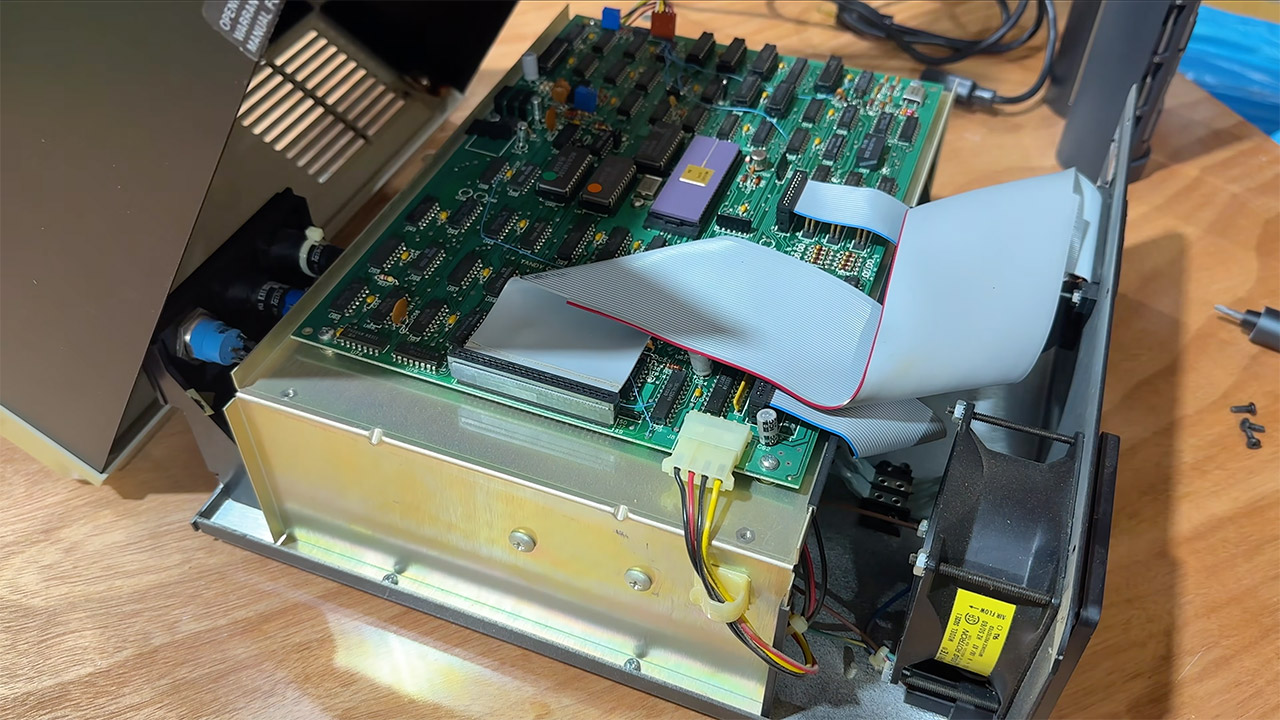
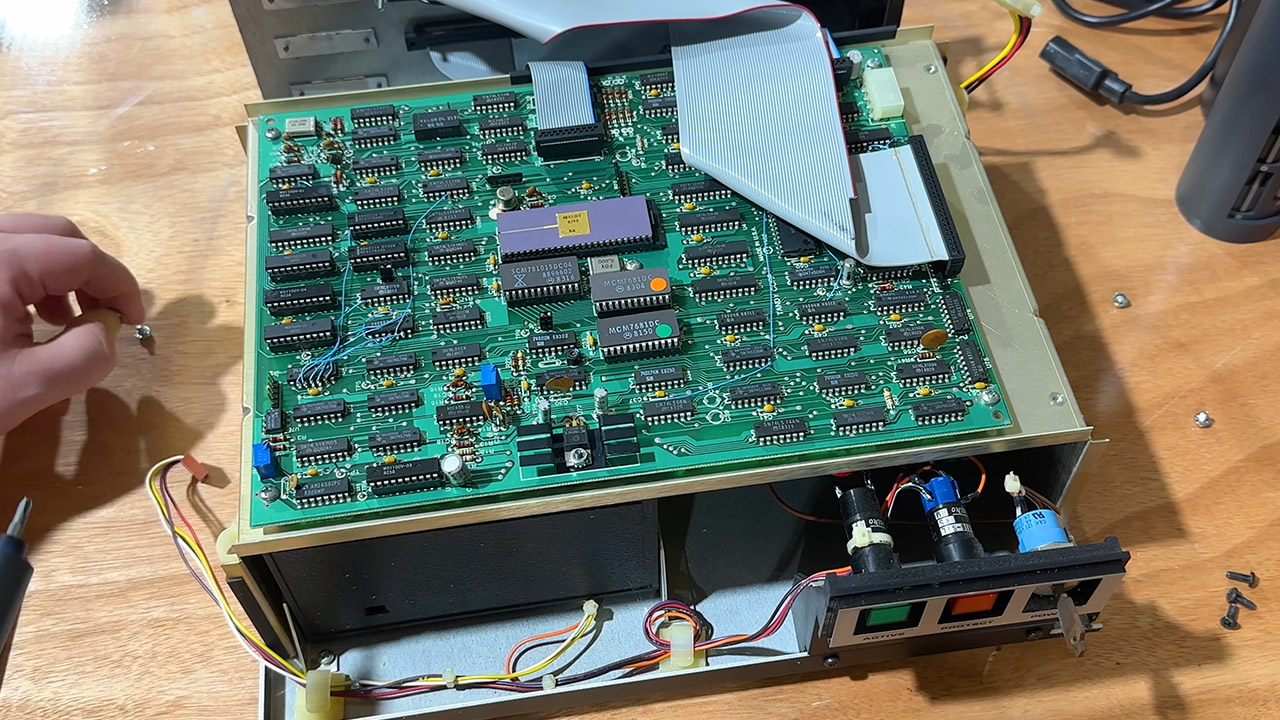
Inside the metal cabinet, there is a Tandon TM-603, a full-height 5.25-inch drive with three platters and six recording surfaces. Six heads share one actuator, allowing a single seek to easily strike a six-track cylinder. The platter is spinning at 3,600 rpm. You’re talking about 8.3 milliseconds of rotational delay time. Data leaves the heads at a scorching five megabits per second. Radio Shack advertised formatted capacity as 11.6 megabytes on the first device and 12 megabytes on each add-on drive they sold. They claimed that track-to-track seek times were as short as 3 milliseconds. It measures 5.5 by 14 by 15 inches and comes equipped with its own power supply.
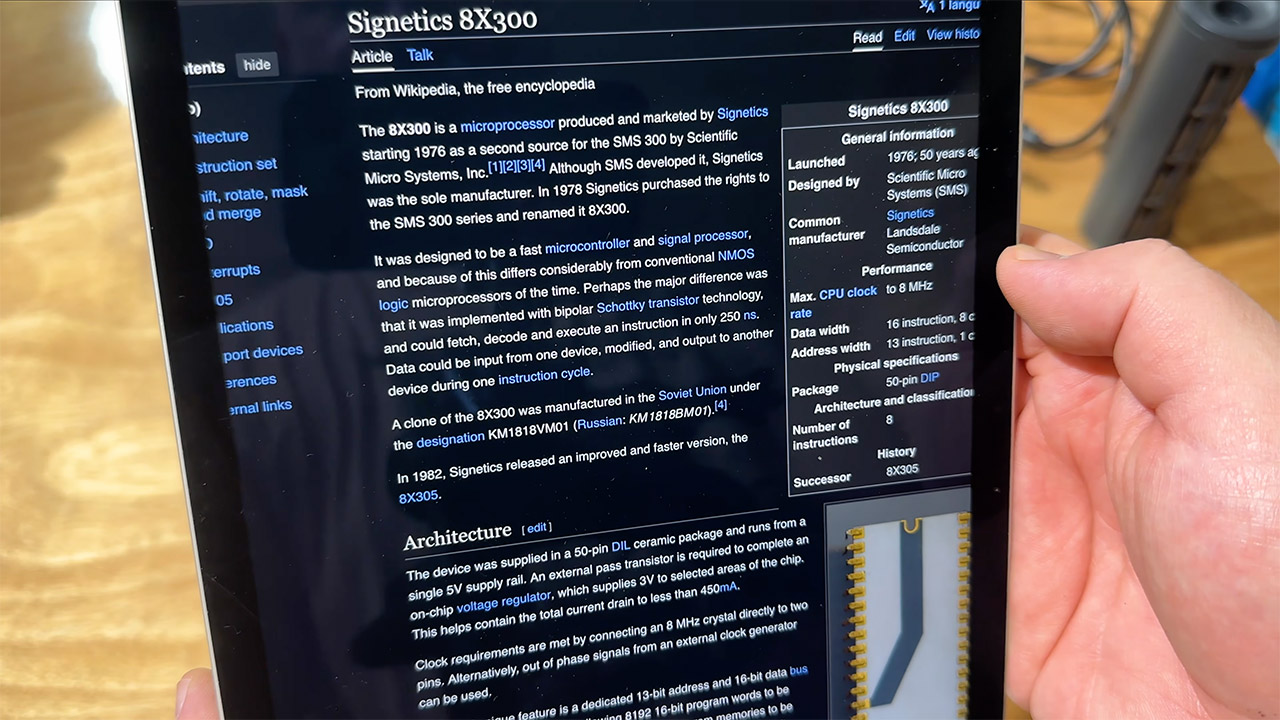
A different controller card exists within the same box. At the heart of it is a 1976 Signetics 8X300 chip, which functions as a microcontroller and allows the Tandon drive to fool the TRS-80 into believing it is a Western Digital. A large ribbon cable extends from the back of the enclosure and connects to a corresponding host card within the computer. Clint discovered that the interior still looked factory-new after more than 40 years. There was an error map label, a serial number, and a few factory bodges left, but the rifa filter capacitors in the power supply forced him to shorten the test.
He flipped the front panel switch, and the motor produced a lengthy grinding whine that sounded like to a rusty jet engine or a table saw resuming operation after years of inactivity. The bearings were slightly noisy, but the platters were not locked down. He shut off the power after only a few seconds. It’s made entirely of metal, with a keyless power switch, and two status lights that give it a vintage industrial aspect; Clint described it as “Star Wars-esque.” A label indicating that opening the case would void the warranty.
Clint is donating the drive to the Midwest Computer Museum, and he intends to drop it off at VCF Midwest in 2026, along with a plethora of other vintage computer detritus. The museum staff has the TRS-80 machines functioning wonderfully, so there’s a decent possibility this ancient Winchester will spin up for the guests. Business software in 1983 thought 12 megabytes was plenty for databases and even multi-user Xenix sessions on the Model 16. Only a few individuals outside of professional shops had ever seen a disk this large on a microcomputer that year, unless you count the luxury IBM PC/XTs with a 10-megabyte drive. 43 years later, the Radio Shack box still appears to be waiting for someone to come along and repair it with a new host and filter caps. [Source]
Yes, you’ll need to do math, but it’s worth it to avoid being left powerless.
Voyagerix/Getty Images
As climate change continues to worsen, renewable energy is becoming more and more important in daily life, particularly with new consumer markets opening up (such as plug-in solar in the UK). One of the more well-trodden areas of consumer renewables comes from solar power in RVs, where rigs can bring off-grid power without the noise of a typical generator. However, there are more than a few steps and stipulations to keep in mind when going all-in with solar panels — chief among them being the amount of solar power needed to get an RV’s systems working.
It is possible to fully power your RV using solar energy, though you’ll need a few odds and ends to store that energy when the sun’s gone. It’s more common among RV users to combine solar energy with non-solar generator power, but fully solar is possible with a battery bank, inverter, and charge controller. These pieces of tech allow you to store solar power, convert that power from DC to AC to charge your RV system, and to channel that power from panels to the battery bank, respectively.
Advertisement
What to look out for when using solar panels
alexgo.photography/Shutterstock
The specs for those devices will largely depend on how many solar panels you need for your rig (for example, an ideal inverter size is equal to about 1.25x the amount of watts you’ll need at any given time). A 100W solar panel, when accounting for changes in weather and sun exposure, will receive about 350W of power per day. You’ll want to check how much power your devices are using throughout the day, and add that all together. The easiest way to do this is to check the label for each device. If it lists volts and amps only, multiply those together to get the watts.
Not only do you need to look at what gadgets you keep in your RV (such as a charging unit, portable heater, any cooking tech, GPS, etc.) but you also need to consider the panels themselves. No panel will generate the maximum amount of power advertised, especially during periods of low sun exposure or when travelling through forested areas. Ideal solar panel temperature is also something that needs attention, as cooler temperatures will deliver more efficient results — so bright, cold days are ideal for efficiency.
Advertisement
The 20 percent rule
Wmaster890/Getty Images
A 400W panel will suit many of these purposes well, and will also suit the 20 percent rule most solar panel users abide by. This rule is simply the idea that a solar setup should produce 20 percent more energy than your setup needs, to tide you over for the times when sunlight is scarce. You need to make sure you’re prepared for when your solar panel is operating below maximum output, as this will be the case the majority of the time.
Ultimately, you’ll need to make sure you have the right numbers down before committing. Tally up how many watts each of your devices uses per hour, and then figure out how much you’re using those devices per day (so if you use something that uses 1500 watts per hour, but only use it for ten minutes in a day, that’s only about 250 watts). Once you have your total, you’ll want a solar setup that can output that amount per day, plus 20 percent more.
This week on the GeekWire Podcast: A study commissioned by the City of Seattle says the city is not in decline but is in danger — finding that 10 companies, nine of them in tech, pay three-quarters of the payroll tax on large employers, and that the tax structure uniquely penalizes the hiring of senior, high-compensation workers.
The report says Seattle should be most concerned about AI but most active in cleantech, the one industry the city can actually shape, since it owns the electric utility and controls permitting, building codes and land use.
Meanwhile, the Seattle Times and Newsday sue Microsoft and OpenAI, accusing them of copying hundreds of thousands of articles to train their AI models, putting Microsoft’s hometown paper against a company that helps fund some of its journalism.
Which leads us to a new GeekWire Trivia Challenge about the Microsoft products that Apple later turned into categories. Stick around to the final segment to see if you can figure it out.
Advertisement
Upcoming Event
AI meets real estate
GeekWire, in partnership with Real Estate at Work, is recording the GeekWire Podcast live at 4 p.m. Wednesday, Sept. 16, with Toby Roberts, SVP of Engineering at Zillow. John Cook and Todd Bishop host with Real Residential broker Leka Devatha at Atmosphere Seattle. Grab a ticket.
New research shows that while standing desks can potentially mitigate some health risks by limiting your sitting time, standing too long isn’t all that great and can increase the risk of cardiovascular disease. I reached out to Anne-Kristina Arnold, a kinesiology expert and senior lecturer in the Department of Biomedical Physiology and Kinesiology at Simon Fraser University. She says the results from this recent study “illustrate how challenging some of this epidemiological research is.”
“To say standing workstations are good for everybody in every situation all the time is never going to flow,” Arnold tells WIRED. “There are so many variables, so many varied kinds of work we do—we’re varied in our body sizes, in our fitness, in the shoes we wear. It’s really hard to be able to say definitively that standing workstations are good. The research is mixed.”
Switching from sitting to standing doesn’t solve all problems, and standing too long can cause its own problems. If you want to work with a standing workstation, Arnold recommends to use it in the standing position for 20 minutes per hour. If you have a normal desk, get up and move every 15 to 20 minutes. However, there’s no definitive guideline. “The standing workstation isn’t necessarily the answer—getting up and walking is better,” Arnold concludes. —Julian Chokkattu
Advertisement
Electric vs. Manual Standing Desks
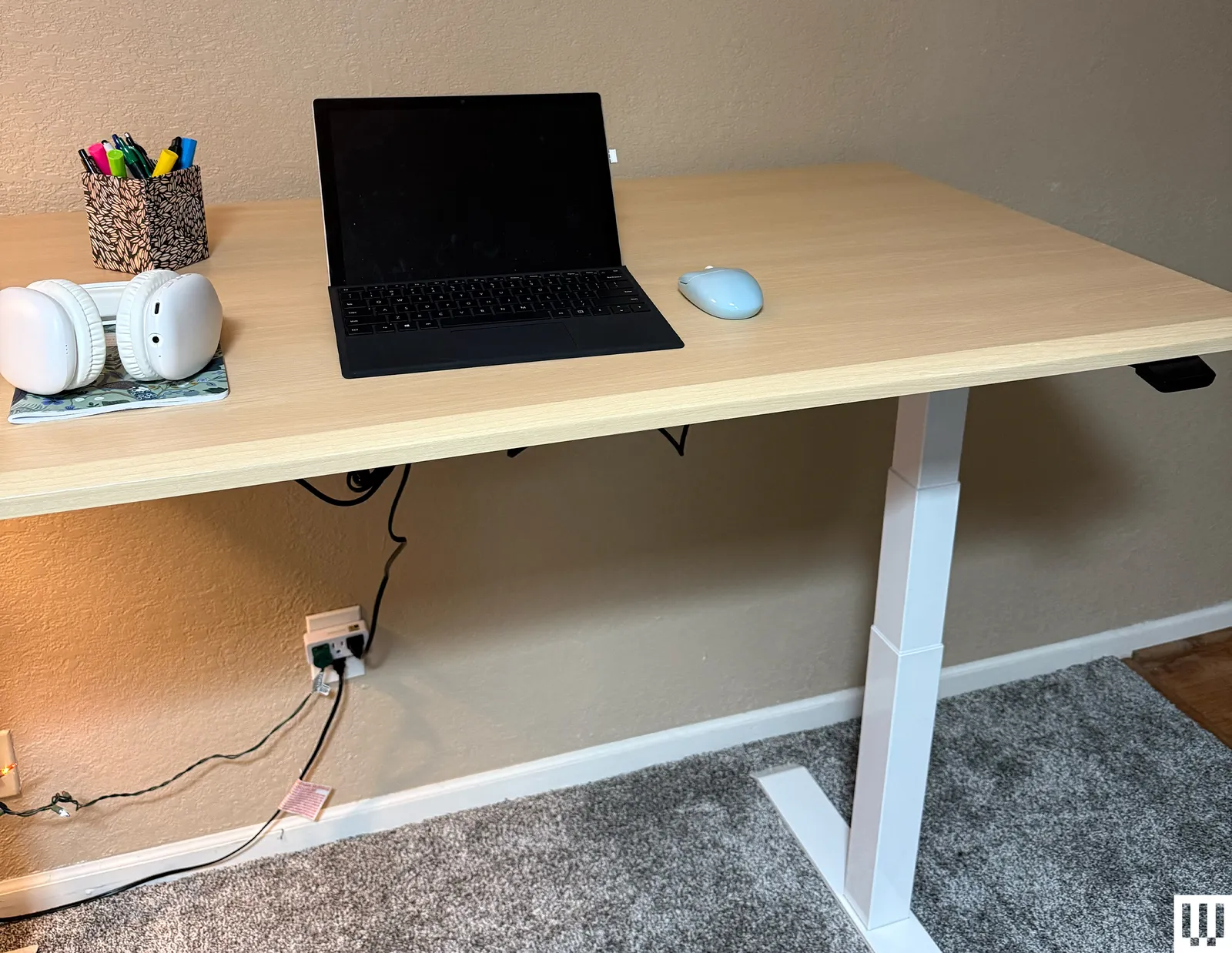
Our guide here focuses largely on electric standing desks, which have motors in the legs to smoothly move the table up and down. However, we have a few manual standing desk recommendations, too. If you’re planning on switching up how you work a few times every day, an electric desk will simply be more convenient. However, if you just want to be able to adjust the height of your desk and won’t be changing it all that often, then maybe look at manual standing desks. They’re often cheaper.
How to Properly Stand and Sit With a Standing Desk
The same ergonomic rules you follow when sitting at a workstation apply when you’re standing. When your elbows are at a 90-degree position, you want the desk keyboard to be elbow height. Your monitor should be at eye level (a good rule of thumb is the top of your monitor should meet your eye), and if you’re using a laptop, you should keep it angled with a laptop stand for a more ergonomic typing position. Be sure to adjust your office chair appropriately to the floor before adjusting the height of your desk.
Advertisement
Cable management is exceptionally important when it comes to standing desks. After setting up your standing desk, make sure you keep an eye on every single wire that’s connected to something on the desk when you start raising the desktop. Otherwise, funny things start to happen: wires come undone, or scoot light objects off the desk.
WIRED reviewer Julian Chokkattu has unboxed and set up many desks over the years, and yet he still made a rookie move. As he was raising a desk, he didn’t realize his Ethernet cable was taut, and it broke cleanly off the back of his PC when the desk reached a certain height. Welp. As for me, I’m a naturally distracted person, and so I need to tack my cables down or suffer grievous consequences on the regular.
Keep an eye on the wires. Keep an eye on stuff near the wires. If you’re not careful, you can even accidentally knock art off your wall. —Matthew Korfhage
I and other members of WIRED’s Reviews team test standing desks in our own homes and in our own home offices. We use desks for months at a time (even years, in some cases), jotting down every flaw we see over the course of that time and noting any highlights. We look at building materials, motor noise, motor speed, preset options, cable management, and ease of use—and of course, the simple intangibles like aesthetics.
Advertisement
We gauge the difficulty of the assembly and setup, as well as the difficulty of disassembling or moving each desk. Desks are a solid investment, and so we expect a desk to be with us for years, perhaps longer than we live in a city. And so we also look at both the length of the warranty and the service reputation of each company.
Sometimes a small detail can take on outsized importance when using a desk over long periods, whether the existence or nonexistence of a grommet, a rounded edge, or a bolt that gets a little wobbly over time. That’s why WIRED’s Reviews team believes in the value of long-term testing, and why we do so in our own home offices.
This long-term testing also means it’s not easy for our small team to test every single desk out there, as these are bulky, big pieces of furniture and the setup is fairly involved. This means you may see a few missing brands in this guide, but we’re always testing and adding more desks. —Matthew Korfhage
Other Standing Desks to Consider
Advertisement
Photograph: Nicole Kinning
Ergodriven Tempo Automatic Standing Desk for $629: It was only a matter of time before desks got “smart,” right? This Tempo from new-ish company Ergodriven is designed to automate the process of standing or sitting, with a Cruise Control function that will encourage you to change position during the day by, well, automatically doing so. A “wiggle” will alert you when the desk wants to change position, which you can override manually if you’re eating lunch or in a meeting. A sensor will register your presence, so the desk won’t move when you’re away. WIRED contributor Nicole Kinning found that this all works as promised—as does a little app that registers “achievements” like standing time. But note the desk, while sturdy, is also a bit heavy, and a slight cosmetic crack formed early on the rounded edge. The 16-year warranty provides a bit of assurance.
Photograph: Nicole Kinning
Luxor Compact Electric Standing Desk for $200: The Luxor is a no-nonsense standing desk that does exactly what you expect and takes up minimal space. It’s perfect for students, small apartments, and anyone who needs a compact, budget-friendly setup. At 23.5 inches deep, the tabletop is shallow enough to fit into tight corners or shared spaces. The electric lift moves steadily at an inch per second, whisper-quiet, and the 154-pound weight capacity can handle a laptop, monitor, and a few textbooks with no sweat. The lift mechanism is exposed underneath, so you’ll want to leave some legroom when at sitting height. —Nicole Kinning
Simple Height Adjustable Desk for $850: The Simple Height Adjustable Desk lives up to its name. Assembly is straightforward and cable routing is tidy thanks to an integrated channel that keeps everything corralled. The T-shaped legs slide into a bracket instead of screwing or locking into place, which feels a little ambiguous, but once it’s upright, the desk is solid and sturdy. In practice, the desk became everything I needed. It’s smooth, quiet, and spacious, with four height presets. The laminate top is durable and forgiving—ideal if you’re like me and regularly forget that coasters exist. There are no fancy gimmicks, which is exactly the point. It’s a dependable, fuss-free desk that prioritizes function over flashy. —Nicole Kinning
Advertisement
Photograph: Nicole Kinning
Eureka Ergonomic Opal Standing Desk for $2,250: WIRED contributor Nicole Kinning was a big fan of the, well, opaline looks of the Eureka Ergonomic Opal standing desk. It’s a sturdy, milky-toned, downright fancy-looking pillar of vaguely art-deco luxe: beaded cabinets on each leg, gold hardware, marbled top, integrated drawer, hooooooey! It all makes for a quite distinctive aesthetic, and setup is a bit tricky given the heft of the desk. But unlike most standing desks, this one is outfitted quite beautifully as a full workstation, with roomy cabinets in each leg and a drawer offering ample storage. Just be sure to put grips on the bottom; it slid around on Kinning’s hard floors like a curling stone, she noted. Once it’s in place, bask in the stateliness. It’s the rare standing desk where she could see herself writing a Great American Novel.
Autonomous Desk Pro for $600: The standout feature here is the new Desk AI, a separate control attachment that tracks your standing habits along with environmental factors like air pressure and quality, temperature, humidity, and noise. In theory, it’s meant to help you work smarter, but in practice, it mostly flags things you can’t control from the desk itself. If it came with an air purifier or fan to manage these conditions, then we’d be talkin’. Still, it’s a fun and techy bonus on an otherwise reliable desk.
Advertisement
Photograph: Nicole Kinning
Vari Solid Wood Electric Standing Desk for $829: Even though it’s solid wood, this desk never felt too precious for everyday use. Made from FSC-certified lumber, the desk is heavy and stable, even at standing height on carpet, and the motor is impressively quiet and subtle when adjusting. The ComfortEdge feature turned out to be more helpful than reviewer Nicole Kinning expected; over long typing sessions, it noticeably softened where my wrists meet the desk, a nice upgrade to a standard desk’s hard, squared-off edges. Yes, the solid wood Vari is on the pricier side, but it feels justified if solid wood and long-term durability matter to you. If they don’t, consider the traditional version.
Boulies Magvida for $760: The Boulies Magvida advertises its best feature in the name itself. This midsize desk (55 x 28 inches) is known for its EMO system, a magnetic organization setup built beneath the desktop. Instead of drilling holes or fiddling with brackets, you just snap accessories, like a cable tray, hooks, and silicone straps, into place. The add-ons feel premium and the magnets don’t budge, and there’s an optional magnetic drawer that’s also handy. Add in memory presets, a child lock, anti-collision detection, and simple color options and you’ve got a clean, clever setup.
Herman Miller Jarvis Bamboo Standing Desk for $1,325: As someone who spent years hunching over keyboards, obsessive research led WIRED reviewer Simon Hill to the Jarvis Standing Desk (now owned by Herman Miller), which has served him well for six years. With a contoured bamboo top, handy optional extras to tuck wires out of sight, and a responsive control panel for easy height adjustment (including presets), this is an excellent standing desk. The only weakness is that it wobbles slightly at higher levels. The newer touchscreen OLED control unit is not as reliable as the original, so opt for the programmable controls.
Advertisement
Room & Board Lincoln Desk for $5,399: Few standing desks can lay claim to true elegance. But Room & Board’s Lincoln desk—designed in collaboration with design firm Gensler—is an exception. This is a dignified, sturdy, wobble-free electric standing desk that’d fit in with an executive office or a well-appointed home, made with solid wood and available in walnut, maple, cherry, ash, or oak (with a rye, salt, or charcoal stain). You can configure the desk to have integrated drawers on the left, right, or on both sides if you choose the larger 72-inch size. There’s even a drawer in the center! This is what privilege looks like, where standing desks are concerned. The price is commensurately high, though take note this included white glove delivery and assembly. Also take note that the thickness of the desktop means only some clamps will mount onto its girth. This monitor arm mount will work, but for some mounts, you might have to directly screw it to the desktop. All in all, this is a gorgeous standing desk that doesn’t look anything like a standing desk, but with a few quirks and a high price.
Staples Union & Scale Electric Standing Desk With Micro Movements (UN62092) for $513: Staples’ house brand, Union & Scale, makes some of WIRED reviewer Julian Chokkattu’s favorite affordable office furniture, and its standing desk is no exception—though at this middle price range, it didn’t keep pace with Branch’s reasonably priced desks. Still, this was easy to put together, and while the white desktop is not much to look at, the dual motors do the job. He liked the control panel, which has dedicated buttons for moving the desk up and down, as well as two height presets. He also didn’t see any wobble, though the collision sensor could stand to be more sensitive. There’s a cable tray at the bottom back of the desk to route cables, but there’s sadly no grommet to pull them through. The Micro Movement mode moves the desk up and down over time to reduce fatigue and encourage movement, but it might be more distracting than useful.
Beflo Tenon Premium for $3,998: While incredibly expensive (and heavy!), WIRED contributor Henri Robbins found the hardwood smart desk both sturdy and well-designed. Assembly was straightforward, and once the desk was up and running, Robbins found all of the features (touchscreen controls, a built-in power strip, audio passthrough, and LED lighting) to work well, and in convenient locations. The touchscreen controls are intuitive (iOS-like), and features like a sit/stand timer and phone connectivity provide additional functionality. The desk supports over 200 pounds of stuff even when moving, and the height-adjustment motors will temporarily disable if they overheat, instead of risking damage to the desk. The table also looks fantastic, and a multitude of first-party accessories let you customize the desk to your specific needs. The largest issue with this table is the noise. While in no way loud, it was certainly more audible than the “whisper-quiet” descriptor Beflo uses in its marketing. Besides that, the lighting color adjustment had some difficulties creating specific colors using the built-in touchscreen, and the audio cable was too short to reach a desktop computer on the floor, even at the lowest height. However, the Tenon is still a great, if pricey, option to consider.
Advertisement
Herman Miller Spout Sit-to-Stand Table for $3,275: Herman Miller’s Spout Sit-To-Stand Table is lovely to look at. Like the Branch Four-Legged Desk, it looks like a normal desk with four legs, giving it a luxe look. Those motors in the legs rise smoothly, and it’s easy to raise and lower the desktop to my preferences with the button on the right. The motor does have a high hum to it, and WIRED reviewer Nena Farrell found it loud enough that she’d hesitate to use it when her husband is on a call in the same room, but not so loud it would disturb her son if he were sleeping a room away. Bizarrely, it doesn’t have memory presets, but it’s pretty easy to just adjust the desk each time to sitting and standing heights. You can add a cable tray underneath the desk each time to organize cords, but it costs extra. The only other item built into the desk is a single slim center drawer perfect for pens and notebooks. It comes in three desktop sizes and three finishes: laminate white, veneer walnut, and veneer ash. You can also customize the base color, with seven different colors ranging from your classic black and white to a gentle blue and olive green. While it’s gorgeous to look at and works well, Farrell found it disappointing that such a high-priced desk doesn’t have presets and uses veneers rather than real wood.
FlexiSpot E7 Pro for $400+: Standing desks can get pricey, but FlexiSpot routinely offers similar functionality at a lower price. At first glance, the E7 Pro looks much like the Herman Miller Jarvis, but look closer, and you discover the entry-level option has a shallow 23-inch desktop, the control unit feels a bit cheap, and it emits a high-pitched whine in operation. WIRED reviewer Simon Hill had some issues fitting larger power adapters in the cable tidily, and the desk can get wobbly when fully extended. But, even when fully configured, the E7 Pro is cheaper than many rivals. Minor flaws aside, it is a perfectly decent standing desk.
Inbox Zero 47-inch Adjustable Electric Standing Desk for $196: This desk has every feature you’d expect to need at the price range less than $200, wrote former WIRED reviewer Martin Cizmar. There are rolling casters so you can not only move the desk up and down, but also shake it all around. The desk’s electric controls have presets but also allow you to fine-tune the height for typing or Zooming. The split top that makes it easier and cheaper to ship doesn’t hurt the performance, but is less pleasant visually, and the little motor works audibly hard (tshunk, tschunk, tshunk) while raising the desktop. Based on three months of testing, it’s a decent budget standing desk with casters, but if you can spend a little more, you’ll probably be happier with something else.
Advertisement
Standing Desk Accessories
Branch Clamp-on Power
Photograph: Julian Chokkattu
Branch Clamp-on Power for $89: This simple and elegant clamp attaches to your desktop and adds three AC outlets, a USB-C, and a USB-A, so you don’t have so many wires running down to the ground.
Advertisement
LumeCube EdgeLight 2.0 for $150: Why have a lamp take up valuable desk space when you can clamp the lamp to your desk? These task lights from LumeCube are great for illuminating the desktop and even your face during late-night Zoom calls. You can adjust the color temperature and the brightness.
BenQ ScreenBar Lamp
Photograph: Julian Chokkattu
BenQ ScreenBar Lamp for $139: Alternatively, you can place these ScreenBar lamps over your computer monitor, and it will light up your desktop, no clamping required. The ScreenBar Pro also has a motion sensor, so when you leave your desk, the lamp will turn off, and it will light up when you’re back. You can adjust the brightness and color temperature, and an automatic setting makes it adjust these controls based on the room’s ambient lighting.
Secretlab Premium Footrest for $89: WIRED reviewer Julian Chokkattu been using this footrest for several years, and it’s excellent. The plush memory foam is cushy and a nice respite for Chokkattu’s feet, and it’s easy to clean with a vacuum and a damp cloth. It hasn’t shown much wear despite years of use.
Advertisement
Monoprice Single Monitor Adjustable Gas Spring Desk Mount for $84: WIRED reviewer Julian Chokkattu has tested a few of these WorkStream arm mounts for years, and they’ve reliably done the job. You can adjust the tension with a hex key and move the monitor around to your desired position. Just make sure you don’t go over the recommended weight load with a big and heavy screen.
Mount-It! Dual Monitor Arm for $280: This heavy-duty monitor arm holds up my ultrawide monitor and my vertical monitor, both of which have BenQ Screenbar lamps on top, along with my webcam. It handles the weight with no effort, and the clamp is accommodating enough to even work with the 5-inch Room & Board standing desk. There’s RGB lighting throughout, but it’s not bright enough to splash onto the wall, so it’s a little pointless, noted WIRED Reviewer Julian Chokkattu.
Harber London Professional Desk Mat for $239: Keep your desktop protected with a large desk mat like this one. I’ve used several mats from Harber London over the years, and this latest model is the favorite of WIRED reviewer Julian Chokkattu. The pebbled leather is supple and soft, and the mat stays put. It’s easy to clean as well.
Avoid These Standing Desks
Advertisement
Corsair Platform:6 Desk
Photograph: Julian Chokkattu
Corsair Platform:6 Desk for $1,400: Where do I start? I liked Corsair’s standing desk because it’s spacious, has a fun pegboard design to mount your tchotchkes, and even has an interesting rail system that lets you mount and slide things across the desktop, like your monitors. Unfortunately, several months after mounting two monitors on the included dual-monitor arms, this rail system has tilted forward due to the weight. (I’m also not the only one to experience this.) It doesn’t help that I never really found this rail to be all that useful. The standing function works well, and you get two presets, but sometimes the little screen would throw me an error message “rE5.” Pressing and holding the down button resolved it, but none of these are issues anyone should deal with considering the crazy-high price. That’s the real problem. It’s just so expensive, and the five-year warranty feels like a slap in the face. This model is still listed for sale, but as out of stock last time we checked. —Julian Chokkattu
Marinamantra ‘Flow’ Sit-to-Stand Desk for $1,149: I had high hopes for this one. A desk that lets me sit crisscross applesauce while I work?! Sold. But the reality didn’t live up to the pitch. When I unboxed the desk, several screws were scattered loose in the box. That set the tone for a desk that eventually worked, but often misbehaved, sometimes refusing to move up and down. That said, I do like the cord management lip and the clever Velcro covers that keep cables and hardware neatly tucked out of sight. Unfortunately, none of that matters much if I’m spending more time flipping it over and poking around underneath the hood than actually using it. —Nicole Kinning
Alyssa Goeckner has given nearly two decades to the music industry, working with artists like Steve Aoki and Afrojack, and releasing music under Sony and Universal, among other labels. As a singer, songwriter, producer, director, and original-IP creator, her work has appeared on Billboard charts under the names Miss Palmer and Bishøp over the years. Her next endeavor is her most exciting yet, and it fundamentally shifts how music can transcend the medium and evolve into a cinematic experience with deep visual storytelling.
The Song Of The Universe is the latest project from Bishøp, which keeps music as the central theme of a multi-episode cinematic story that revolves around her as the eponymous character, fighting to restore the balance of light against the forces of darkness.
Alyssa Goeckner
Featuring 15 songs on the soundtrack, The Song Of The Universe will be told across 20 episodes as part of the first season, and will expand the cinematic universe across five additional seasons planned. The series will land on YouTube in October as an original franchise that combines a story-driven experience built atop Bishøp’s own childhood experiences with original music feeding into the wonder, emotions, and mystery of an original universe.
The premise is enthralling, but what’s even more impressive is the fact that Goeckner developed a custom multi-stage workflow that involved AI-driven tools like Adobe Creative Suite, Midjourney, Ideogram, Nano Banana, Seedream, GPT Image, Higgsfield, Kling, Seedance, and ElevenLabs to get full creative control over visual design, conceptualization, music production, character animation, and sound editing. Human input and direction were always at the lead, but this project is also a showcase of how a single artist can expand their creative work into an immersive audio-visual experience that unfolds as its own original story.
Alyssa Goeckner
Here’s the plot for The Song Of The Universe:
“Bishøp has no memory of who she was before Lumen. But something in the darkness remembers her.
Advertisement
As a war between light and nothingness begins to tear through reality, a mysterious entity known as the Null starts reaching Bishøp through her dreams—calling her by a name she doesn’t recognize and awakening fragments of a past someone went to extraordinary lengths to erase. The deeper she searches for the truth, the more impossible it becomes to tell who is protecting her, who is using her, and why the most dangerous being in existence seems to know her better than she knows herself.
At the center of it all is an ancient prophecy, seven Guardians, and a power hidden inside Bishøp that could determine the fate of existence itself. To save their universe, she will have to remember who she was, discover what she is—and decide whether the darkness calling to her is the enemy… or something far more complicated.“
You can follow The Song Of The Universe by signing up on Laylo and get notified about its release. Also head to the official handle on X, Instagram, Facebook, and TikTok to catch up on the episodic content drop.
Dario Amodei said that “we owe it to humanity to try.”
Anna Moneymaker/Getty Images
At least one CEO of an AI company is calling for a slower pace when it comes to developing artificial intelligence. Anthropic’s CEO Dario Amodei wrote a lengthy post detailing a goal of pacing the speed at which AI is built, instead of forging ahead at the rapid rate that AI is currently on. Amodei proposed a three-tiered approach to achieve this, with Anthropic already committing to the first step.
The first measure calls for “frontier AI” companies to commit to “ongoing, employee-like access” for third-party evaluators who would focus on verifying compliance with certain safety standards, evaluating if AI model training is aligned with the goal of slowing down and reporting incidents. The second step requires these AI companies to establish “common safety standards” with the help of governments in order to limit the rate of unchecked AI progress. The final measure would have the US and other democratic governments coordinate with authoritarian governments to ensure everyone is on the same page about compliance.
“The measures I propose to advance the frontier at a safe pace will not be easy,” Amodei wrote in his post. “But I believe we owe it to humanity to try.”
Advertisement
According to Amodei, the risks include “losing control of AI systems, misuse of AI for cyberattacks and bioterrorism, and serious economic disruption.” Amodei acknowledged the major incident where OpenAI agents broke out of a testing environment and hacked into Hugging Face. Anthropic itself recently discovered that multiple scientists were using Claude for “biological misuse.” Following these incidents, OpenAI called for California to establish “stronger safeguards” for the laws surrounding frontier AI models.
Earlier this year, Anthropic already called for a slowdown in AI development, with much of the previous plea echoing the sentiments expressed in Amodei’s recent post. However, Amodei attributed the Hugging Face incident and the onset of “recursive self-improvement,” where AI models are capable enough to develop their future iterations, as the two things that have convinced him of the need to slow down.
The 2026 Hackaday Superconference is just around the corner in November. It’s hard to believe that we’ve been having an annual gathering for so long, but this is number ten. Every year, it’s a great time to refresh your pool of new ideas, hang out with fellow hackers, put your soldering skills to the test, eat some phenomenal tacos, and catch some of the two tracks of talks.
What’s got me stoked right now is that we just finished up talk selection, and this year is going to be a banger! We had more talks submitted than ever, and all of high quality. Frankly, if this keeps up for next year, we might have to figure out a third stage.
This year also marks the move to a bigger venue, with more space for hacking in the courtyard, more space for talks in two halls, and more room for you to all settle down and share your work, or create something new. Even the badge is going to be bigger this year – but that’s all we can say at this time.
Advertisement
If you don’t have your tickets yet, go ahead and get them. Flights are still relatively cheap, and hotels not booked up yet. See you all soon!
The company won out over some of Ireland’s most admired start-ups, including DevAlly, Spryt, MenoPal, Jentic and ArrayPatch.
Disseqt beat some impressive competition to win this year’s KPMG Global Tech Innovator (GTI) Ireland, earning a spot in the global competition final.
Disseqt’s AI assurance layer for enterprise AI operations offers IT teams a single platform to test and detect issues, protect and enforce guardrails, and prove and comply across the full AI agent lifecycle, according to KPMG, and aims to support organisations in aligning with frameworks like the EU AI Act and ISO/IEC 42001.
The judging panel found that Disseqt’s “pioneering solutions” meant it deserved its spot on the global stage in Lisbon this November, where it will represent Ireland and compete alongside innovating companies from 20 other countries in the overall final for 2026.
Advertisement
“Winning the GTI Ireland competition is a tremendous honour for myself, Apoorva Kumar and Manish Atri – my co-founders – and a testament to our team’s dedication to innovation and excellence,” said Cyril Treacy, co-founder and COO of Disseqt, which is based in NovaUCD in Dublin.
“As enterprises accelerate their AI adoption, assurance, reliability and compliance have never been more critical. This recognition validates our mission to help organisations operate AI safely and responsibly, and inspires us to keep pushing the boundaries of what’s possible in enterprise AI operations.”
“The level of innovation across this year’s competitors was outstanding and reflects the depth of talent in Ireland’s tech community,” said Anna Scally, global head of technology, media and telecommunications at KPMG.
Advertisement
“Disseqt’s commitment to ensuring trustworthy, compliant AI at scale is both timely and essential.”
Don’t miss out on the knowledge you need to succeed. Sign up for the Daily Brief, Silicon Republic’s digest of need-to-know sci-tech news.
















-front-Reviewer-Photo-SOURCE-Julian-Chokkattu-(no-border).jpg)
-(no-border)-SOURCE-Julian-Chokkattu.jpg)
.jpg)










































You must be logged in to post a comment Login